A new article has been published at prMac.
TS Calc 1.5 for Mac to Solve Mathematical Models - Published on 05/17/16
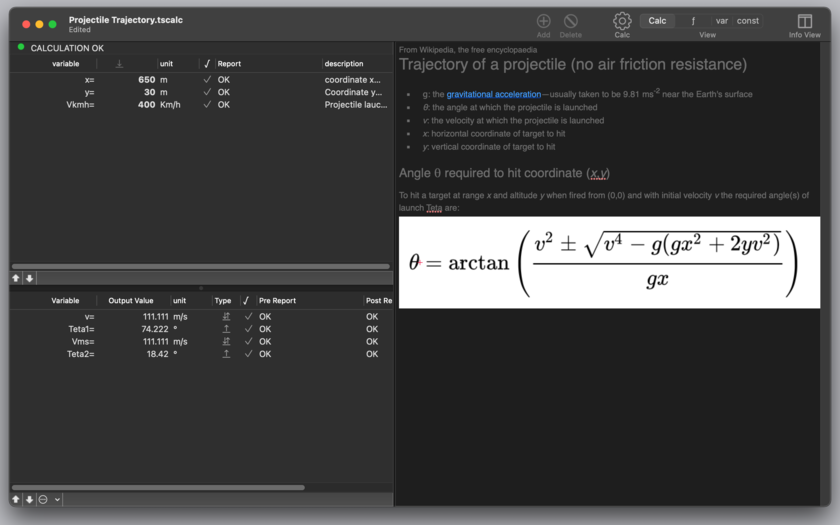
Tension Software announces TS Calc 1.5, their app for Mac OS X, developed to solve mathematical models. TS Calc is a document based application and its documents can be realized and used as calculation models for a specific mathematical technical problems. It is a complete different approach to solve problems than spreadsheets. A TS Calc document contains a series of equations and a list of variables and constants used by the equations.
Milano, Italy - Tension Software is proud to announce the release of TS Calc 1.5, their app for Mac OS X, developed to solve mathematical models. TS Calc is a document based application and its documents can be realized and used as calculation models for a specific mathematical technical problems. It is a complete different approach to solve problems than spreadsheets.
A TS Calc document contains a series of equations and a list of variables and constants used by the equations.
When the document is set-up, the user can insert the input value and see the output generated by the TS Calc document using the equations to solve the problem.
TS Calc uses a math calculation engine entirely developed and coded internally by Tension Software in C and Objective-C, able to solve equations with any nested level of parenthesis, variables and a large type of mathematical functions at an impressive speed, almost Instantaneously on modern Mac.
All the variables and constants used by the functions are automatically recognized and inserted inside dedicated tables. Selecting any function shows all the variables and constant used in the info panel. Selecting any variables or constant show to functions using it. TS calc solves the equations from a numerical point of view as-you-type, the user has just to enter inside the table the input values and the output is instantly calculated
Features:
* Uses standard math syntax with parenthesis and standard operators
* Provides and extended diagnostic tool to catch errors
* Automatic insertion of variable parsing equations
* Variables and constants have a table listing them
* Variables and constants can also be manually added and edited
* Import/Export of functions and constants from TSV, CSV or CSV-S (using semicolon for separator) files
* Allows to see where variables and constant are used and how
* Any variable can be moved to the constant table and vice versa
* Any view offers an info panel with additional info
* Can specify acceptable range value for input and output
* Values can be imported/exported using a powerful import/export functionalities
* Up to 16 decimal digit precision
* RTF note to provide additional info regarding the document
* Document based, you can create an unlimited number of pre-made documents with pre-inserted equations. You can use one document for any math problem
* Native math engine is C based, in house developed and highly optimized for the Mac
* PDF tutorial is included inside the application under the Help menu
* Easy to use. You can start to work and be productive from the first minutes
New in this release:
* Better Import of variables with 'Cascade Assignment' feature and other features
* Improved undo support in variables, constants and functions management
* Better error report
* Improved calc engine
* Various bug fixes
System Requirements:
* OS X 10.10 or higher
* 64-bit processor
* 5.5 MB
Pricing and Availability:
TS Calc 1.5 is $15.00, and is available through the Mac App Store in the Productivity category.The app is also available from the Tension Software website.
Tension Software: http://www.tensionsoftware.com
TS Calc 1.5: http://www.tensionsoftware.com/osx/tscalc/
Direct Download Link: http://sec.tensionsoftware.com/osx/tscalc/tscalc.dmg
Purchase Link: http://www.tensionsoftware.com/buy/
Screenshot: http://www.tensionsoftware.com/static/tensionsoftware/images/app/tscalc/screenshots/mac/1.png
Application Icon: http://www.tensionsoftware.com/static/tensionsoftware/images/app/tscalc/icons/128.png
Tension Software develops software for Mac OS X and iOS using the latest Apple technology, Cocoa and Objective-C. All Material and Software (C) Copyright 2016 Tension Software. All Rights Reserved. Apple, the Apple logo, Macintosh and Mac OS X are registered trademarks of Apple Inc. in the U.S. and/or other countries. Other trademarks and registered trademarks may be the property of their respective owners.
*******
Link To Article: http://prmac.com/release-id-79495.htm
*******
---------------------------------------------------------------------------------
Note that you can alter delivered distributions at any time.
Login to your account on prMac to alter your channel selection, or to opt-out at any time.


CS Odessa Releases a New Scrum Workflow Solution for ConceptDraw PRO v10
A new article has been published at prMac.
CS Odessa Releases a New Scrum Workflow Solution for ConceptDraw PRO v10 - Published on 05/17/16
CS Odessa today announces a new Scrum Workflow solution in ConceptDraw Solution Park. The Scrum Workflow Solution for ConceptDraw PRO makes it easy for anyone to build any professional Scrum diagram such as a Release burn-down chart, Release velocity chart, Sprint burn-down chart, or a Team velocity chart. The Scrum methodology breaks down the steps needed to reach the final goal by using short Sprints of 1 to 4 weeks. A skilled collaborative workforce can achieve high levels of productivity.
San Jose, California - CS Odessa is pleased to announce a new paid addition, the Scrum Workflow, to ConceptDraw Solution Park. Scrum is a highly interactive method for teams to collaborate on a large project. The Scrum methodology breaks down the steps needed to reach the final goal by using short Sprints of 1 to 4 weeks. The Sprints combined with a skilled collaborative workforce can achieve high levels of productivity by better understanding the entire scope of a project; however the project execution takes place in small chunks. The Scrum methodology gives teams the ability to modify the direction of a project in-flight, and to quickly adapt to changes as they occur.
The Scrum Methodology because of its collaborative nature is very visual. The combination of ConceptDraw PRO and the Scrum Workflow Solution make it easy for team members to quickly assemble expert visual diagrams that are associated with the Scrum process.
ConceptDraw PRO is recognized for its ability to exchange documents with Microsoft Visio - the de facto standard in business graphics documents. ConceptDraw PRO can open and save documents that can be used by Visio users. It is supported by the powerful business solutions located in ConceptDraw Solution Park, and retails for only $199 per end user license.
ConceptDraw Office v3 is the third generation suite of ConceptDraw products that uses ConceptDraw InGyre3 integration technology to share data between its applications, allowing user to switch gears for different tasks more quickly. ConceptDraw Office v3 includes ConceptDraw MINDMAP v8, ConceptDraw PROJECT v7, ConceptDraw PRO v10, and the ConceptDraw Solution Park with more than 150 Solutions to power user through difficult and time consuming asks.
Pricing and Availability:
The Scrum Workflow solution is priced at $25 (USD). ConceptDraw Office retails for $499 and can be purchased directly from CS Odessa or their resellers. The ConceptDraw Office suite is designed for knowledge workers, project managers, managers, and academics. ConceptDraw Office works with the latest versions of both Apple OS X and Microsoft Windows.
ConceptDraw Office v3: http://www.conceptdraw.com/products/office
ConceptDraw Scrum Workflow Solution: http://www.conceptdraw.com/solution-park/project-management-scrum-workflow
ConceptDraw PRO v10: http://www.conceptdraw.com/products/drawing-tool
ConceptDraw MINDMAP v8: http://www.conceptdraw.com/products/mind-map
ConceptDraw PROJECT v7: http://www.conceptdraw.com/products/project-management-software
ConceptDraw Diagram Viewer: https://itunes.apple.com/app/diagram-viewer/id981531525
Founded in 1993, Computer Systems Odessa supplies cross-platform productivity tools and graphic technologies to professional and corporate users around the world. With headquarters in Odessa, Ukraine, and an U.S. office in San Jose, California, CS Odessa sells products internationally through resellers in over 30 countries. The ConceptDraw line of products has won numerous awards and is used by hundreds of thousands of people all over the world. ConceptDraw is a registered trademark, and ConceptDraw Office, ConceptDraw Solution Park, ConceptDraw PRO, ConceptDraw MINDMAP, ConceptDraw PROJECT, and ConceptDraw Solution Browser are trademarks of CS Odessa. All other trademarks and registered trademarks are the properties of their respective owners.
*******
Link To Article: http://prmac.com/release-id-79494.htm
*******
---------------------------------------------------------------------------------
Note that you can alter delivered distributions at any time.
Login to your account on prMac to alter your channel selection, or to opt-out at any time.
CS Odessa Releases a New Scrum Workflow Solution for ConceptDraw PRO v10 - Published on 05/17/16
CS Odessa today announces a new Scrum Workflow solution in ConceptDraw Solution Park. The Scrum Workflow Solution for ConceptDraw PRO makes it easy for anyone to build any professional Scrum diagram such as a Release burn-down chart, Release velocity chart, Sprint burn-down chart, or a Team velocity chart. The Scrum methodology breaks down the steps needed to reach the final goal by using short Sprints of 1 to 4 weeks. A skilled collaborative workforce can achieve high levels of productivity.
San Jose, California - CS Odessa is pleased to announce a new paid addition, the Scrum Workflow, to ConceptDraw Solution Park. Scrum is a highly interactive method for teams to collaborate on a large project. The Scrum methodology breaks down the steps needed to reach the final goal by using short Sprints of 1 to 4 weeks. The Sprints combined with a skilled collaborative workforce can achieve high levels of productivity by better understanding the entire scope of a project; however the project execution takes place in small chunks. The Scrum methodology gives teams the ability to modify the direction of a project in-flight, and to quickly adapt to changes as they occur.
The Scrum Methodology because of its collaborative nature is very visual. The combination of ConceptDraw PRO and the Scrum Workflow Solution make it easy for team members to quickly assemble expert visual diagrams that are associated with the Scrum process.
ConceptDraw PRO is recognized for its ability to exchange documents with Microsoft Visio - the de facto standard in business graphics documents. ConceptDraw PRO can open and save documents that can be used by Visio users. It is supported by the powerful business solutions located in ConceptDraw Solution Park, and retails for only $199 per end user license.
ConceptDraw Office v3 is the third generation suite of ConceptDraw products that uses ConceptDraw InGyre3 integration technology to share data between its applications, allowing user to switch gears for different tasks more quickly. ConceptDraw Office v3 includes ConceptDraw MINDMAP v8, ConceptDraw PROJECT v7, ConceptDraw PRO v10, and the ConceptDraw Solution Park with more than 150 Solutions to power user through difficult and time consuming asks.
Pricing and Availability:
The Scrum Workflow solution is priced at $25 (USD). ConceptDraw Office retails for $499 and can be purchased directly from CS Odessa or their resellers. The ConceptDraw Office suite is designed for knowledge workers, project managers, managers, and academics. ConceptDraw Office works with the latest versions of both Apple OS X and Microsoft Windows.
ConceptDraw Office v3: http://www.conceptdraw.com/products/office
ConceptDraw Scrum Workflow Solution: http://www.conceptdraw.com/solution-park/project-management-scrum-workflow
ConceptDraw PRO v10: http://www.conceptdraw.com/products/drawing-tool
ConceptDraw MINDMAP v8: http://www.conceptdraw.com/products/mind-map
ConceptDraw PROJECT v7: http://www.conceptdraw.com/products/project-management-software
ConceptDraw Diagram Viewer: https://itunes.apple.com/app/diagram-viewer/id981531525
Founded in 1993, Computer Systems Odessa supplies cross-platform productivity tools and graphic technologies to professional and corporate users around the world. With headquarters in Odessa, Ukraine, and an U.S. office in San Jose, California, CS Odessa sells products internationally through resellers in over 30 countries. The ConceptDraw line of products has won numerous awards and is used by hundreds of thousands of people all over the world. ConceptDraw is a registered trademark, and ConceptDraw Office, ConceptDraw Solution Park, ConceptDraw PRO, ConceptDraw MINDMAP, ConceptDraw PROJECT, and ConceptDraw Solution Browser are trademarks of CS Odessa. All other trademarks and registered trademarks are the properties of their respective owners.
*******
Link To Article: http://prmac.com/release-id-79494.htm
*******
---------------------------------------------------------------------------------
Note that you can alter delivered distributions at any time.
Login to your account on prMac to alter your channel selection, or to opt-out at any time.
Remotix VNC & RDP 6.0 for iOS is out with more than a dozen new features
A new article has been published at prMac.
Remotix VNC & RDP 6.0 for iOS is out with more than a dozen new features - Published on 05/17/16
Nulana LTD today announces Remotix VNC & RDP 6.0, a huge update to their very popular remote desktop tool developed for iPhone, iPad and iPod touch devices. Remotix VNC & RDP 6.0 is a very fast, secure and feature-packed remote control application. This new release includes, among other things, support for RD Gateway and Swiftpoint GT Bluetooth Mouse, automatic reconnect feature, true multitasking implementation, RDP live resolution & scale change and much more.
Perm, Russian Federation - Nulana LTD today is proud to announce the release of Remotix VNC & RDP 6.0, a huge update to their very popular remote desktop tool developed for iPhone, iPad and iPod touch devices. Remotix VNC & RDP 6.0 is a very fast, secure and feature-packed remote control application. Just look at all these new features that make it even better:
RD Gateway:
This is the most long-awaited RDP feature for business users, finally coming to Remotix.
Swiftpoint GT Bluetooth Mouse:
Nulana and Swiftpoint would like to introduce you to the best travel mouse in the world, The SwiftpointGT. This is a quality and award winning Bluetooth mouse that is comfortable, compact and clever and will now allow you to use your iPad like a computer.
Automatic Reconnect:
If network connect is lost, Wi-Fi goes away, Remotix transparently reconnects to the machine. This is especially useful on iPhones, where top button cuts of all network connections. Auto-reconnect works for both RDP and VNC connections.
RDP Live Resolution & Scale Change:
Single most cool RDP feature since Windows 8.1. RDP automatically fits your iDevice resolution on rotations and toolbar/show hide. Also, you can change the scale of the elements on the fly, without leaving the viewer. Note, resolution and scale change only works on non-server Windows editions, starting from 8.1.
True Multitasking and Full Resolution:
On iPad Pro and iPad Air 2 you can now use Remotix simultaneously with the other apps, thanks to the Slide Over feature. Remotix is now using native resolution for all modern iPhone models, like 6 and 6 Plus.
3D Touch:
On 3D touch enabled devices perform right click using the touch with a little force. This is really, really convenient!
Better Keyboard:
We've improved the on screen keyboard - added more shortcut actions like spotlight, mission control and CAD as well as giving better use for more estate available on the devices like iPad Pro and iPhone 6 Plus.
Spotlight Search and App Shortcuts:
Remotix servers are now searchable by Spotlight. Really fast way to connect to particular computer without finding Remotix app first. Also, recently used servers are added as shortcuts to Remotix app (use force touch on the app icon).
Load-Balancing Configurations:
One more feature for business users - Remotix now supports RDP redirection, used in RD farm configurations.
Better RDP network speed adaptivity:
RDP engine now performs periodic network speed checks while you're connected to automatically tune RDP features for the best performance.
Connection Information Panel:
We've added HUD display of current connection parameters, including current rate, total bytes used and total time connected.
VeNCrypt Authentication:
Remotix is currently the only client (as far as we know) supporting TLS VeNCrypt authentication used by ProxMox and others.
Bugfixes:
* Addressed the long-standing issue with RealVNC "Invalid protocol message"
* You can rename "Unsorted" category
* There are a lot of small fixes here and there, and of course, new bugs
Device Requirements:
* iPhone, iPad, and iPod touch
* Requires iOS 8.0 or later
* 10.0 MB
Pricing and Availability:
Remotix VNC & RDP 6.0 is $19.99 (USD) and available worldwide through the App Store in the Business category. The update will be free for current users.
Nulana: http://nulana.com/
Remotix VNC & RDP 6.0: http://nulana.com/remotix-ios/
Purchase and Download: https://itunes.apple.com/app/remotix/id407498378
Screenshot 1: http://nulana.com/storage/multitasking.png
Screenshot 2: http://nulana.com/storage/remotemac.png
App Icon: http://a4.mzstatic.com/us/r30/Purple20/v4/5c/86/c0/5c86c039-1efe-3416-c250-e570971e3c8a/icon175x175.jpeg
Nulana LTD is a privately held software company, founded in 2007. Since then we have focused on creating great apps for Mac OS X, iOS, Windows and Android. We are a small team of creative thinkers, highly experienced in software craftsmanship. All Material and Software (C) Copyright 2015 Nulana LTD. All Rights Reserved. Apple, the Apple logo, iPhone, iPad, iPod, Macintosh and Mac OS X are registered trademarks of Apple Inc. in the U.S. and/or other countries. Other trademarks and registered trademarks may be the property of their respective owners.
*******
Link To Article: http://prmac.com/release-id-79492.htm
*******
---------------------------------------------------------------------------------
Note that you can alter delivered distributions at any time.
Login to your account on prMac to alter your channel selection, or to opt-out at any time.
Remotix VNC & RDP 6.0 for iOS is out with more than a dozen new features - Published on 05/17/16
Nulana LTD today announces Remotix VNC & RDP 6.0, a huge update to their very popular remote desktop tool developed for iPhone, iPad and iPod touch devices. Remotix VNC & RDP 6.0 is a very fast, secure and feature-packed remote control application. This new release includes, among other things, support for RD Gateway and Swiftpoint GT Bluetooth Mouse, automatic reconnect feature, true multitasking implementation, RDP live resolution & scale change and much more.
Perm, Russian Federation - Nulana LTD today is proud to announce the release of Remotix VNC & RDP 6.0, a huge update to their very popular remote desktop tool developed for iPhone, iPad and iPod touch devices. Remotix VNC & RDP 6.0 is a very fast, secure and feature-packed remote control application. Just look at all these new features that make it even better:
RD Gateway:
This is the most long-awaited RDP feature for business users, finally coming to Remotix.
Swiftpoint GT Bluetooth Mouse:
Nulana and Swiftpoint would like to introduce you to the best travel mouse in the world, The SwiftpointGT. This is a quality and award winning Bluetooth mouse that is comfortable, compact and clever and will now allow you to use your iPad like a computer.
Automatic Reconnect:
If network connect is lost, Wi-Fi goes away, Remotix transparently reconnects to the machine. This is especially useful on iPhones, where top button cuts of all network connections. Auto-reconnect works for both RDP and VNC connections.
RDP Live Resolution & Scale Change:
Single most cool RDP feature since Windows 8.1. RDP automatically fits your iDevice resolution on rotations and toolbar/show hide. Also, you can change the scale of the elements on the fly, without leaving the viewer. Note, resolution and scale change only works on non-server Windows editions, starting from 8.1.
True Multitasking and Full Resolution:
On iPad Pro and iPad Air 2 you can now use Remotix simultaneously with the other apps, thanks to the Slide Over feature. Remotix is now using native resolution for all modern iPhone models, like 6 and 6 Plus.
3D Touch:
On 3D touch enabled devices perform right click using the touch with a little force. This is really, really convenient!
Better Keyboard:
We've improved the on screen keyboard - added more shortcut actions like spotlight, mission control and CAD as well as giving better use for more estate available on the devices like iPad Pro and iPhone 6 Plus.
Spotlight Search and App Shortcuts:
Remotix servers are now searchable by Spotlight. Really fast way to connect to particular computer without finding Remotix app first. Also, recently used servers are added as shortcuts to Remotix app (use force touch on the app icon).
Load-Balancing Configurations:
One more feature for business users - Remotix now supports RDP redirection, used in RD farm configurations.
Better RDP network speed adaptivity:
RDP engine now performs periodic network speed checks while you're connected to automatically tune RDP features for the best performance.
Connection Information Panel:
We've added HUD display of current connection parameters, including current rate, total bytes used and total time connected.
VeNCrypt Authentication:
Remotix is currently the only client (as far as we know) supporting TLS VeNCrypt authentication used by ProxMox and others.
Bugfixes:
* Addressed the long-standing issue with RealVNC "Invalid protocol message"
* You can rename "Unsorted" category
* There are a lot of small fixes here and there, and of course, new bugs
Device Requirements:
* iPhone, iPad, and iPod touch
* Requires iOS 8.0 or later
* 10.0 MB
Pricing and Availability:
Remotix VNC & RDP 6.0 is $19.99 (USD) and available worldwide through the App Store in the Business category. The update will be free for current users.
Nulana: http://nulana.com/
Remotix VNC & RDP 6.0: http://nulana.com/remotix-ios/
Purchase and Download: https://itunes.apple.com/app/remotix/id407498378
Screenshot 1: http://nulana.com/storage/multitasking.png

Screenshot 2: http://nulana.com/storage/remotemac.png

App Icon: http://a4.mzstatic.com/us/r30/Purple20/v4/5c/86/c0/5c86c039-1efe-3416-c250-e570971e3c8a/icon175x175.jpeg

Nulana LTD is a privately held software company, founded in 2007. Since then we have focused on creating great apps for Mac OS X, iOS, Windows and Android. We are a small team of creative thinkers, highly experienced in software craftsmanship. All Material and Software (C) Copyright 2015 Nulana LTD. All Rights Reserved. Apple, the Apple logo, iPhone, iPad, iPod, Macintosh and Mac OS X are registered trademarks of Apple Inc. in the U.S. and/or other countries. Other trademarks and registered trademarks may be the property of their respective owners.
*******
Link To Article: http://prmac.com/release-id-79492.htm
*******
---------------------------------------------------------------------------------
Note that you can alter delivered distributions at any time.
Login to your account on prMac to alter your channel selection, or to opt-out at any time.
Maintain Releases Cocktail 9.3 (El Capitan Edition)
A new article has been published at prMac.
Maintain Releases Cocktail 9.3 (El Capitan Edition) - Published on 05/17/16
Maintain today announces Cocktail 9.3 (El Capitan Edition), the latest maintenance update for users running OS X El Capitan 10.11. Cocktail is a general purpose utility for OS X that lets users clean, repair and optimize their Macs. This version adds OS X 10.11.5 compatibility and ability to clear iCloud caches. It also adds ability to disable animation when showing and hiding Launchpad or Mission Control and resolves a number of minor issues discovered in the previous release.
Ekero, Sweden - Maintain today is pleased to announce the release of Cocktail 9.3 (El Capitan Edition), the latest maintenance update for users running OS X El Capitan 10.11. The update is highly recommended for all users of Cocktail (El Capitan Edition).
What's New:
* Added ability to clear iCloud caches
* Added ability to disable animation when showing and hiding Launchpad (Interface - Misc)
* Added ability to disable animation when changing pages in Launchpad (Interface - Misc)
* Added ability to disable animation when showing and hiding Mission Control (Interface - Misc)
* Added OS X 10.11.5 compatibility
* Updated Automator actions
* Updated Help files
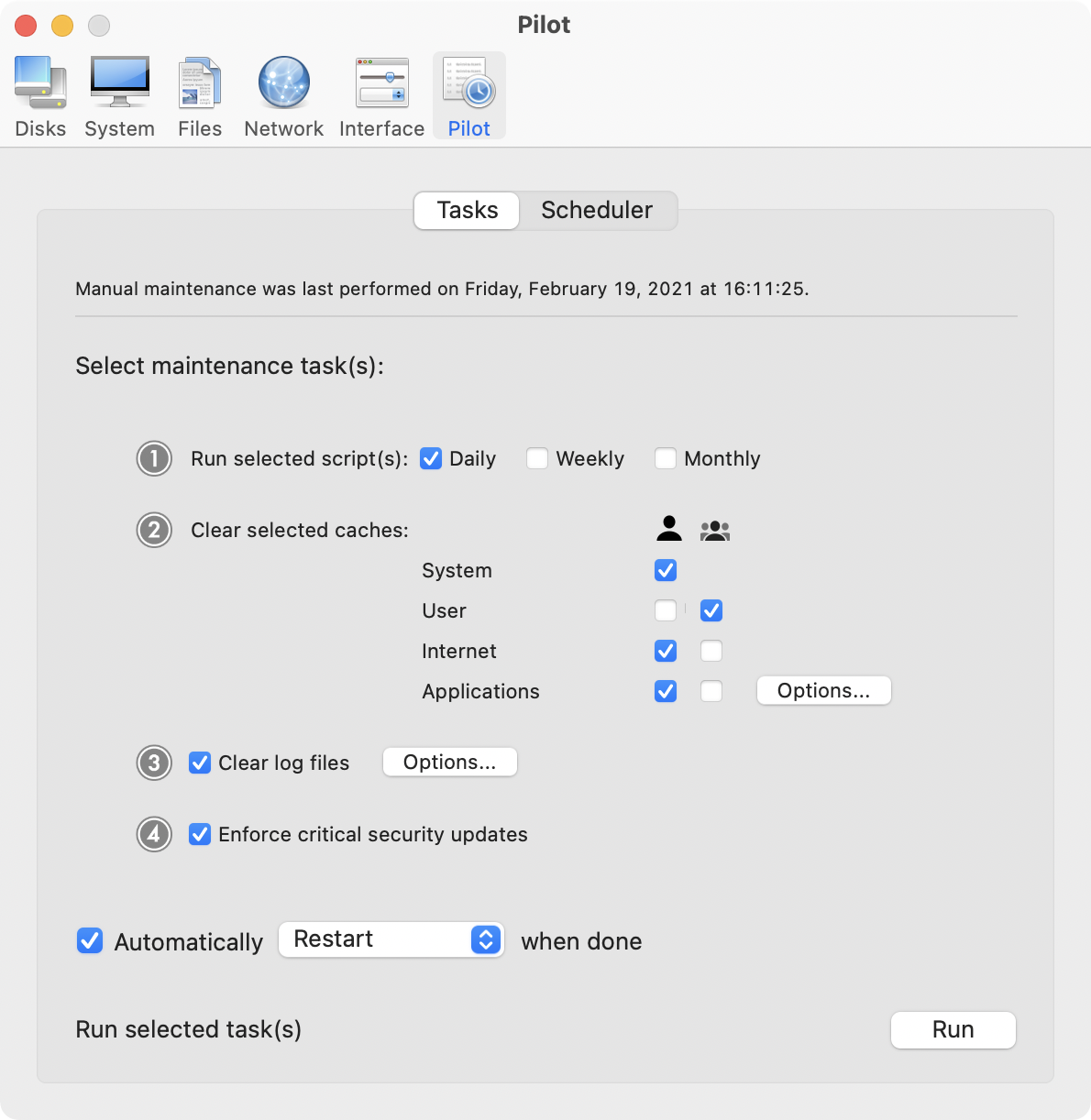
Cocktail is a general purpose utility for OS X that lets you clean, repair and optimize your Mac. The application serves up a perfect mix of maintenance tools and tweaks, all accessible through a clean and easy to use interface. Cocktail's features are arranged into five categories that helps you manage various aspects of your computer. It also comes with an automatic Pilot mode that allows you to simply press a button and relax, knowing that Cocktail will take care of the rest.
Disk:
* Automatically check S.M.A.R.T. status of disks
* Enable or disable journaling
* Repair disk permissions
* Reset home directory permissions and ACLs
* Set disk sleep (spindown) time
* Modify standby delay
* Change other disk sleep settings
* Force eject CD/DVD
System:
* Run periodic maintenance scripts
* Purge inactive memory and optimize virtual memory usage
* Manage Spotlight indexing
* Erase Spotlight indexes
* Modify Time Machine settings
* Rebuild Launch Services and Help databases
* Rebuild Mail's Envelope Index
* Update locate and whatis databases
* Force empty the Trash
* Change startup mode or set startup delay
* Disable startup sound
* Disable Notification Center and App Nap
Files:
* Clear system caches
* Clear user caches
* Clear font caches
* Clear virtual memory swap files
* Clear temporary files
* Clear Internet caches
* Clear cookies, download lists, form values and history files
* Clear Adobe Flash Player caches and cookies
* Clear applications caches
* Search for corrupted preference files
* Delete unnecessary localization (language resources) files
* Clear and manage (view, print and save) log files
* Delete invisible DS Store files
* Delete locked or inaccessible items
Network:
* Change speed, duplex and MTU of network cards
* Easily optimize network settings for common connection types
* Modify IP configuration parameters
* Configure File Sharing settings
Interface:
* Customize look and features of Finder, Dock, login window and other system services
* Modify hidden settings of Safari, QuickTime X and iTunes
Pilot:
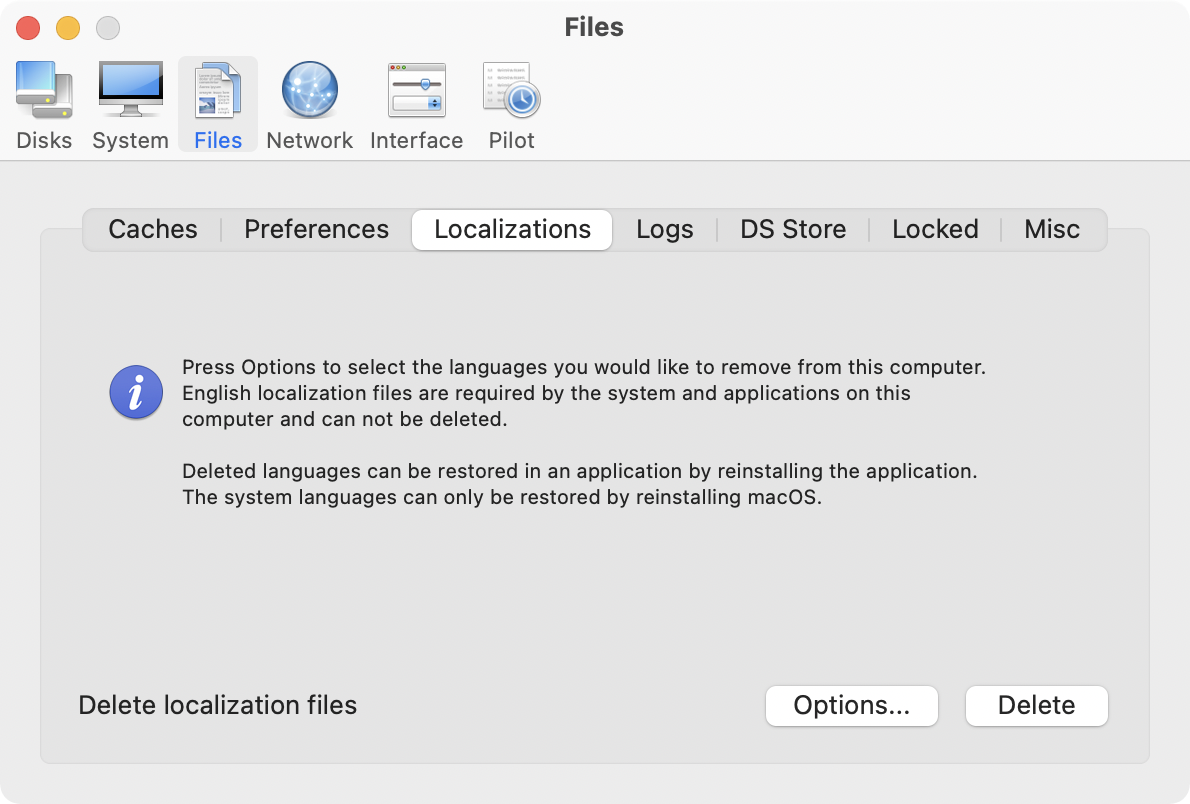
* Clean, repair and optimize your system with one click of the button
* Schedule clearing of caches and log files as well as permissions repair and run of periodic maintenance scripts
System Requirements:
Cocktail 9.3 (El Capitan Edition) requires OS X El Capitan 10.11 to run. Cocktail (Yosemite Edition) for OS X 10.10, Cocktail (Mavericks Edition) for OS X 10.9, Cocktail (Mountain Lion Edition) for OS X 10.8 and Cocktail (Lion Edition) for OS X 10.7 are available for download from Maintain website.
Pricing and Availability:
Cocktail is $19.00 (USD) for a single user license and available for purchase from the Maintain website. When unregistered, Cocktail runs in demo mode and will expire after the tenth launch.
Cocktail: http://www.maintain.se/cocktail
Download Cocktail 9.3 (El Capitan Edition): http://usa.maintain.se/Cocktail9ECE.dmg
Vimeo Video: https://vimeo.com/109816714
Screenshot 1: http://www.maintain.se/downloads/screenshots/screenshot1.png
Screenshot 2: http://www.maintain.se/downloads/screenshots/screenshot2.png
Application Icon: http://www.maintain.se/downloads/screenshots/icon.png
Maintain develops tailored applications for Mac users. We work towards creating technical solutions which maintain your computer and make it as efficient and easy to use as possible. In addition, we offer comprehensive consultancy and support services which cover everything from operation of existing systems to purchase and implementation of new technical solutions. Among our clients are: Major League Baseball, Puma, The New York Times, Sony Pictures, Ericsson, Fortum, The City Of Calgary, Peak Performance, Loreal, Harvard University, Los Angeles Times, Swedish Film Institute, Weber, ESPN, Business Week, Swedish National Police Board, Norwegian Broadcasting Corporation, Getty Images, University of Texas, South Park Studios, CompUSA, bwin, Lockheed Martin, Defense Intelligence Agency, University of Michigan and hundred of thousands of Mac users around the world. Copyright (C) 2016 Maintain. All Rights Reserved. Apple, the Apple logo and Mac are registered trademarks of Apple Inc. in
the U.S. and/or other countries.
*******
Link To Article: http://prmac.com/release-id-79493.htm
*******
---------------------------------------------------------------------------------
Note that you can alter delivered distributions at any time.
Login to your account on prMac to alter your channel selection, or to opt-out at any time.
Maintain Releases Cocktail 9.3 (El Capitan Edition) - Published on 05/17/16
Maintain today announces Cocktail 9.3 (El Capitan Edition), the latest maintenance update for users running OS X El Capitan 10.11. Cocktail is a general purpose utility for OS X that lets users clean, repair and optimize their Macs. This version adds OS X 10.11.5 compatibility and ability to clear iCloud caches. It also adds ability to disable animation when showing and hiding Launchpad or Mission Control and resolves a number of minor issues discovered in the previous release.
Ekero, Sweden - Maintain today is pleased to announce the release of Cocktail 9.3 (El Capitan Edition), the latest maintenance update for users running OS X El Capitan 10.11. The update is highly recommended for all users of Cocktail (El Capitan Edition).
What's New:
* Added ability to clear iCloud caches
* Added ability to disable animation when showing and hiding Launchpad (Interface - Misc)
* Added ability to disable animation when changing pages in Launchpad (Interface - Misc)
* Added ability to disable animation when showing and hiding Mission Control (Interface - Misc)
* Added OS X 10.11.5 compatibility
* Updated Automator actions
* Updated Help files
Cocktail is a general purpose utility for OS X that lets you clean, repair and optimize your Mac. The application serves up a perfect mix of maintenance tools and tweaks, all accessible through a clean and easy to use interface. Cocktail's features are arranged into five categories that helps you manage various aspects of your computer. It also comes with an automatic Pilot mode that allows you to simply press a button and relax, knowing that Cocktail will take care of the rest.
Disk:
* Automatically check S.M.A.R.T. status of disks
* Enable or disable journaling
* Repair disk permissions
* Reset home directory permissions and ACLs
* Set disk sleep (spindown) time
* Modify standby delay
* Change other disk sleep settings
* Force eject CD/DVD
System:
* Run periodic maintenance scripts
* Purge inactive memory and optimize virtual memory usage
* Manage Spotlight indexing
* Erase Spotlight indexes
* Modify Time Machine settings
* Rebuild Launch Services and Help databases
* Rebuild Mail's Envelope Index
* Update locate and whatis databases
* Force empty the Trash
* Change startup mode or set startup delay
* Disable startup sound
* Disable Notification Center and App Nap
Files:
* Clear system caches
* Clear user caches
* Clear font caches
* Clear virtual memory swap files
* Clear temporary files
* Clear Internet caches
* Clear cookies, download lists, form values and history files
* Clear Adobe Flash Player caches and cookies
* Clear applications caches
* Search for corrupted preference files
* Delete unnecessary localization (language resources) files
* Clear and manage (view, print and save) log files
* Delete invisible DS Store files
* Delete locked or inaccessible items
Network:
* Change speed, duplex and MTU of network cards
* Easily optimize network settings for common connection types
* Modify IP configuration parameters
* Configure File Sharing settings
Interface:
* Customize look and features of Finder, Dock, login window and other system services
* Modify hidden settings of Safari, QuickTime X and iTunes
Pilot:
* Clean, repair and optimize your system with one click of the button
* Schedule clearing of caches and log files as well as permissions repair and run of periodic maintenance scripts
System Requirements:
Cocktail 9.3 (El Capitan Edition) requires OS X El Capitan 10.11 to run. Cocktail (Yosemite Edition) for OS X 10.10, Cocktail (Mavericks Edition) for OS X 10.9, Cocktail (Mountain Lion Edition) for OS X 10.8 and Cocktail (Lion Edition) for OS X 10.7 are available for download from Maintain website.
Pricing and Availability:
Cocktail is $19.00 (USD) for a single user license and available for purchase from the Maintain website. When unregistered, Cocktail runs in demo mode and will expire after the tenth launch.
Cocktail: http://www.maintain.se/cocktail
Download Cocktail 9.3 (El Capitan Edition): http://usa.maintain.se/Cocktail9ECE.dmg
Vimeo Video: https://vimeo.com/109816714
Screenshot 1: http://www.maintain.se/downloads/screenshots/screenshot1.png
Screenshot 2: http://www.maintain.se/downloads/screenshots/screenshot2.png
Application Icon: http://www.maintain.se/downloads/screenshots/icon.png

Maintain develops tailored applications for Mac users. We work towards creating technical solutions which maintain your computer and make it as efficient and easy to use as possible. In addition, we offer comprehensive consultancy and support services which cover everything from operation of existing systems to purchase and implementation of new technical solutions. Among our clients are: Major League Baseball, Puma, The New York Times, Sony Pictures, Ericsson, Fortum, The City Of Calgary, Peak Performance, Loreal, Harvard University, Los Angeles Times, Swedish Film Institute, Weber, ESPN, Business Week, Swedish National Police Board, Norwegian Broadcasting Corporation, Getty Images, University of Texas, South Park Studios, CompUSA, bwin, Lockheed Martin, Defense Intelligence Agency, University of Michigan and hundred of thousands of Mac users around the world. Copyright (C) 2016 Maintain. All Rights Reserved. Apple, the Apple logo and Mac are registered trademarks of Apple Inc. in
the U.S. and/or other countries.
*******
Link To Article: http://prmac.com/release-id-79493.htm
*******
---------------------------------------------------------------------------------
Note that you can alter delivered distributions at any time.
Login to your account on prMac to alter your channel selection, or to opt-out at any time.
Doodletime Gets Your Creative Juices Flowing Each Morning
A new article has been published at prMac.
Doodletime Gets Your Creative Juices Flowing Each Morning - Published on 05/17/16
Qrayon announces Doodletime 1.0, their creative app for iOS devices. Doodletime is a fun way to get your creative juices flowing. Each time players start the App, they get a random word (like "banana") and 60 seconds to doodle it. But instead of just another static picture, the result is a neat 6-second timelapse video that can be shared on Vine, YouTube, or anywhere the player would like. Doodletime provides a simple and non-intimidating sandbox to create fun little pieces 60 seconds at a time.
Seattle, Washington - Qrayon is proud to announce the release of Doodletime 1.0, their creative app for iPhone, iPad, and iPod touch devices. Doodletime is a fun way to get a payer's creative juices flowing. Each time a player starts the App, they get a random word (like "banana") and 60 seconds to doodle it. But instead of just another static picture, the result is a neat 6-second timelapse video that can be shared on Vine, YouTube, or anywhere the player likes.
Features:
* Vector ink canvas built on the Inkflow Engine
* Random words prompts each morning
* 60 seconds to sketch a video
* Converted to a 6 second time-lapse
* Videos can be shared on Facebook, YouTube, Vine, Vimeo and other social media
Creativity Loves Constraint
Doodletime provides a simple and non-intimidating sandbox to create fun little pieces 60 seconds at a time. But you can explore a whole range of different expressions within those constraints. Try different styles, or give yourself extra challenges (draw with your non-dominant hand, or upside down, or with just your pinkie). Use Doodletime as part of your own workflow. Do a couple doodles each morning to warm up your brain. Doodle after boring meetings. Keep them as a private art journal, or build a YouTube following around them.
Device Requirements:
* iPhone, iPad, and iPod touch
* Requires iOS 7.0 or later
* 2.7 MB
Pricing and Availability:
Doodletime 1.0 is free, and is available worldwide exclusively through the App Store in the Photo and Video category.
Doodletime 1.0: http://www.qrayon.com/home/Doodletime/
Download from iTunes: https://geo.itunes.apple.com/us/app/doodletime-create-timelapse/id968475529?ls=1&mt=8&at=11l4CP&ct=prmac
Screenshot: http://a5.mzstatic.com/us/r30/Purple7/v4/db/ab/6c/dbab6c49-a045-5e9c-a8c7-f5e9bc5deb8a/screen322x572.jpeg
App Icon: http://a2.mzstatic.com/us/r30/Purple3/v4/4a/12/35/4a1235b7-f236-d149-c582-e640bb18383b/icon175x175.png
Based in Seattle, Washington, Qrayon is a pioneering developer of productivity and education Apps for the iPad and iPhone. Their Apps have been featured by Apple numerous times, and are currently being used in classrooms and offices all over the world. All Material and Software Copyright (C) 2016 Qrayon, LLC. All Rights Reserved. Apple, the Apple logo, iPhone, iPod and iPad are registered trademarks of Apple Inc. in the U.S. and/or other countries. Other trademarks and registered trademarks may be the property of their respective owners.
*******
Link To Article: http://prmac.com/release-id-79491.htm
*******
---------------------------------------------------------------------------------
Note that you can alter delivered distributions at any time.
Login to your account on prMac to alter your channel selection, or to opt-out at any time.
Doodletime Gets Your Creative Juices Flowing Each Morning - Published on 05/17/16
Qrayon announces Doodletime 1.0, their creative app for iOS devices. Doodletime is a fun way to get your creative juices flowing. Each time players start the App, they get a random word (like "banana") and 60 seconds to doodle it. But instead of just another static picture, the result is a neat 6-second timelapse video that can be shared on Vine, YouTube, or anywhere the player would like. Doodletime provides a simple and non-intimidating sandbox to create fun little pieces 60 seconds at a time.
Seattle, Washington - Qrayon is proud to announce the release of Doodletime 1.0, their creative app for iPhone, iPad, and iPod touch devices. Doodletime is a fun way to get a payer's creative juices flowing. Each time a player starts the App, they get a random word (like "banana") and 60 seconds to doodle it. But instead of just another static picture, the result is a neat 6-second timelapse video that can be shared on Vine, YouTube, or anywhere the player likes.
Features:
* Vector ink canvas built on the Inkflow Engine
* Random words prompts each morning
* 60 seconds to sketch a video
* Converted to a 6 second time-lapse
* Videos can be shared on Facebook, YouTube, Vine, Vimeo and other social media
Creativity Loves Constraint
Doodletime provides a simple and non-intimidating sandbox to create fun little pieces 60 seconds at a time. But you can explore a whole range of different expressions within those constraints. Try different styles, or give yourself extra challenges (draw with your non-dominant hand, or upside down, or with just your pinkie). Use Doodletime as part of your own workflow. Do a couple doodles each morning to warm up your brain. Doodle after boring meetings. Keep them as a private art journal, or build a YouTube following around them.
Device Requirements:
* iPhone, iPad, and iPod touch
* Requires iOS 7.0 or later
* 2.7 MB
Pricing and Availability:
Doodletime 1.0 is free, and is available worldwide exclusively through the App Store in the Photo and Video category.
Doodletime 1.0: http://www.qrayon.com/home/Doodletime/
Download from iTunes: https://geo.itunes.apple.com/us/app/doodletime-create-timelapse/id968475529?ls=1&mt=8&at=11l4CP&ct=prmac
Screenshot: http://a5.mzstatic.com/us/r30/Purple7/v4/db/ab/6c/dbab6c49-a045-5e9c-a8c7-f5e9bc5deb8a/screen322x572.jpeg

App Icon: http://a2.mzstatic.com/us/r30/Purple3/v4/4a/12/35/4a1235b7-f236-d149-c582-e640bb18383b/icon175x175.png

Based in Seattle, Washington, Qrayon is a pioneering developer of productivity and education Apps for the iPad and iPhone. Their Apps have been featured by Apple numerous times, and are currently being used in classrooms and offices all over the world. All Material and Software Copyright (C) 2016 Qrayon, LLC. All Rights Reserved. Apple, the Apple logo, iPhone, iPod and iPad are registered trademarks of Apple Inc. in the U.S. and/or other countries. Other trademarks and registered trademarks may be the property of their respective owners.
*******
Link To Article: http://prmac.com/release-id-79491.htm
*******
---------------------------------------------------------------------------------
Note that you can alter delivered distributions at any time.
Login to your account on prMac to alter your channel selection, or to opt-out at any time.
Kurdish Keyboard for Kurds 2.0 for iOS Offers Customizable Kurdish Entry
A new article has been published at prMac.
Kurdish Keyboard for Kurds 2.0 for iOS Offers Customizable Kurdish Entry - Published on 05/17/16
LastThink today announces Kurdish Keyboard for Kurds 2.0, an important update to their highly customizable keyboard application for iOS devices. Kurdish Keyboard offers users a third-party keyboard for use with iOS apps that allows anyone to modify it to their individual taste. Users can modify the order of the keyboard for more convenient usage. The update includes the ability to save specific words for later use, emoticons, paragraph formatting, word prediction, and more.
Yerevan, Armenia - LastThink is proud to announce the release of Kurdish Keyboard for Kurds 2.0, an important update to their highly customizable keyboard application for iPhone, iPad, and iPod touch devices. The Kurdish Keyboard's customization features allow anyone to create the keyboard layout that is perfect for their needs. Features include the ability to change the size, shape, and order of characters; the ability to save specific words for later use; emoticons, word prediction, and more.
Users can change the order of the keyboard's letter layout, and even create handy shortcuts to allow entering words or even entire sentences with just a few keystrokes. The keyboard's Swipe feature allows users to swipe their finger around the keyboard to select letters and form words. The app intelligently predicts what the user intends to enter, greatly enhancing typing speed.
What's New in Version 2.0:
* Change the size, and place, as well as the shape of characters and keyboard separately
* Save any words that are used frequently in the active vocabulary for later use
* Express emotions with emoji characters (emoticons) which will correspond to entered words
* Paragraph formatting: Adjust alignment, line spacing, margins, bullets and numbering
* Optional smart auto correction: Intelligent spell checking for even the sloppiest typing
* Style: Customize the look of the keyboard. Change the color of the keys and background
* Word prediction: The keyboard guesses and displays the appropriate word as the user types
* Share text via Facebook, Twitter, email, Dropbox, and more
"When we set out to create the Kurdish Keyboard, we knew we wanted to create a customizable keyboard that would offer users the ability to modify it to their individual tastes," says LastThink founder Grigori Jlavyan. Our keyboard allows Kurdish speaking users to easily enter their text messages, emails, and other types of texts via a comprehensive interface, making their day-to-day communications more convenient than ever."
The Kurdish Keyboard also offers handy paragraph formatting options, allowing users to adjust the alignment of their text, while also offering the ability to set line spacing, adjust margins, even add bulleted or numbered lists. Optional smart correction makes even the sloppiest speller's text entry become correct. The keyboard also offers a downloadable Kurdish font for use with iOS devices, making text entry, editing, and display even more convenient.
Kurdish Keyboard emphasizes the user's security above all, and while many third-party iOS keyboard apps require "Full Access" - with the ability to send back keystrokes and other information back to their developer - the Kurdish Keyboard does not, protecting the text entry and sensitive user information, keeping their personal information safe from prying eyes.
Device Requirements:
* iPhone, iPad, and iPod touch
* Optimized for iPhone 5, iPhone 6/6 Plus
* Universal Application
* Requires iOS 8.0 or later
* 11.2 MB
Pricing and Availability:
Kurdish Keyboard for Kurds 2.0 is $1.99 USD (or an equivalent amount in other currencies), and is available worldwide exclusively through the App Store in the Utilities category. Review codes are available upon request.
LastThink: http://lastthink.com/
Kurdish Keyboard for Kurds 2.0: https://www.facebook.com/pages/Kurdish-Keyboard/1411135482473265
Purchase and Download from iTunes: https://itunes.apple.com/app/kurdish-keyboard-for-ipad/id942966092
Screenshot: http://a2.mzstatic.com/us/r30/Purple5/v4/8c/73/53/8c7353b6-2123-f785-3b30-6ff07aa933fb/screen322x572.jpeg
App Icon: http://a3.mzstatic.com/us/r30/Purple7/v4/9f/99/49/9f994950-d5fa-36f3-e23b-0954b928d70b/icon175x175.png
LastThink is an IT company with a focus on mobile development. It has extended its list of services since 2012 to offer high-end business process management, system integration, as well as up-to-date communication solutions. LastThink's mission is to deliver maximum business value to its customers by designing, developing, implementing and maintaining efficient and high quality software solutions aligned with their most essential business needs. Their team will always do its best to meet client expectations. All Material and Software (C) Copyright 2016 LastThink. All Rights Reserved. Apple, the Apple logo, iPhone, iPod and iPad are registered trademarks of Apple Inc. in the U.S. and/or other countries. Other trademarks and registered trademarks may be the property of their respective owners.
*******
Link To Article: http://prmac.com/release-id-79490.htm
*******
---------------------------------------------------------------------------------
Note that you can alter delivered distributions at any time.
Login to your account on prMac to alter your channel selection, or to opt-out at any time.
Kurdish Keyboard for Kurds 2.0 for iOS Offers Customizable Kurdish Entry - Published on 05/17/16
LastThink today announces Kurdish Keyboard for Kurds 2.0, an important update to their highly customizable keyboard application for iOS devices. Kurdish Keyboard offers users a third-party keyboard for use with iOS apps that allows anyone to modify it to their individual taste. Users can modify the order of the keyboard for more convenient usage. The update includes the ability to save specific words for later use, emoticons, paragraph formatting, word prediction, and more.
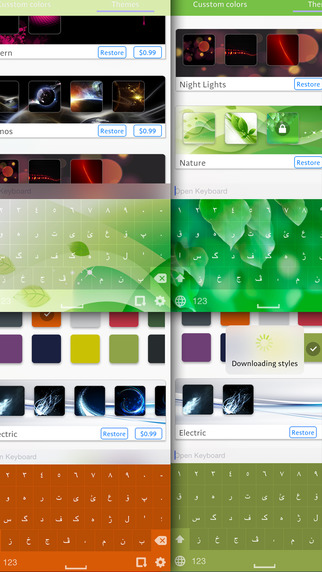
Yerevan, Armenia - LastThink is proud to announce the release of Kurdish Keyboard for Kurds 2.0, an important update to their highly customizable keyboard application for iPhone, iPad, and iPod touch devices. The Kurdish Keyboard's customization features allow anyone to create the keyboard layout that is perfect for their needs. Features include the ability to change the size, shape, and order of characters; the ability to save specific words for later use; emoticons, word prediction, and more.
Users can change the order of the keyboard's letter layout, and even create handy shortcuts to allow entering words or even entire sentences with just a few keystrokes. The keyboard's Swipe feature allows users to swipe their finger around the keyboard to select letters and form words. The app intelligently predicts what the user intends to enter, greatly enhancing typing speed.
What's New in Version 2.0:
* Change the size, and place, as well as the shape of characters and keyboard separately
* Save any words that are used frequently in the active vocabulary for later use
* Express emotions with emoji characters (emoticons) which will correspond to entered words
* Paragraph formatting: Adjust alignment, line spacing, margins, bullets and numbering
* Optional smart auto correction: Intelligent spell checking for even the sloppiest typing
* Style: Customize the look of the keyboard. Change the color of the keys and background
* Word prediction: The keyboard guesses and displays the appropriate word as the user types
* Share text via Facebook, Twitter, email, Dropbox, and more
"When we set out to create the Kurdish Keyboard, we knew we wanted to create a customizable keyboard that would offer users the ability to modify it to their individual tastes," says LastThink founder Grigori Jlavyan. Our keyboard allows Kurdish speaking users to easily enter their text messages, emails, and other types of texts via a comprehensive interface, making their day-to-day communications more convenient than ever."
The Kurdish Keyboard also offers handy paragraph formatting options, allowing users to adjust the alignment of their text, while also offering the ability to set line spacing, adjust margins, even add bulleted or numbered lists. Optional smart correction makes even the sloppiest speller's text entry become correct. The keyboard also offers a downloadable Kurdish font for use with iOS devices, making text entry, editing, and display even more convenient.
Kurdish Keyboard emphasizes the user's security above all, and while many third-party iOS keyboard apps require "Full Access" - with the ability to send back keystrokes and other information back to their developer - the Kurdish Keyboard does not, protecting the text entry and sensitive user information, keeping their personal information safe from prying eyes.
Device Requirements:
* iPhone, iPad, and iPod touch
* Optimized for iPhone 5, iPhone 6/6 Plus
* Universal Application
* Requires iOS 8.0 or later
* 11.2 MB
Pricing and Availability:
Kurdish Keyboard for Kurds 2.0 is $1.99 USD (or an equivalent amount in other currencies), and is available worldwide exclusively through the App Store in the Utilities category. Review codes are available upon request.
LastThink: http://lastthink.com/
Kurdish Keyboard for Kurds 2.0: https://www.facebook.com/pages/Kurdish-Keyboard/1411135482473265
Purchase and Download from iTunes: https://itunes.apple.com/app/kurdish-keyboard-for-ipad/id942966092
Screenshot: http://a2.mzstatic.com/us/r30/Purple5/v4/8c/73/53/8c7353b6-2123-f785-3b30-6ff07aa933fb/screen322x572.jpeg
App Icon: http://a3.mzstatic.com/us/r30/Purple7/v4/9f/99/49/9f994950-d5fa-36f3-e23b-0954b928d70b/icon175x175.png

LastThink is an IT company with a focus on mobile development. It has extended its list of services since 2012 to offer high-end business process management, system integration, as well as up-to-date communication solutions. LastThink's mission is to deliver maximum business value to its customers by designing, developing, implementing and maintaining efficient and high quality software solutions aligned with their most essential business needs. Their team will always do its best to meet client expectations. All Material and Software (C) Copyright 2016 LastThink. All Rights Reserved. Apple, the Apple logo, iPhone, iPod and iPad are registered trademarks of Apple Inc. in the U.S. and/or other countries. Other trademarks and registered trademarks may be the property of their respective owners.
*******
Link To Article: http://prmac.com/release-id-79490.htm
*******
---------------------------------------------------------------------------------
Note that you can alter delivered distributions at any time.
Login to your account on prMac to alter your channel selection, or to opt-out at any time.
Textkraft becomes a mobile production studio for self-publisher
A new article has been published at prMac.
Textkraft becomes a mobile production studio for self-publisher - Published on 05/17/16
infovole GmbH today announces Textkraft Professional 4.1 for iPad, a major update to their popular text editor. Textkraft is a professional writing app, specifically developed for authors, editors, translators and other prolific writers. Delivering the first comprehensive mobile production studio, version 4.1 comes with many new and updated features, that are of great interest for self-publishers. Writers can be even more productive on their iPad.
Neuss, Germany - infovole GmbH today is proud to announce the release of Textkraft Professional 4.1 for iPad. Textkraft is a series of professional writing apps for iOS devices, specially developed for authors, editors, translators and other prolific writers. The apps for iPad, iPhone and Apple Watch were downloaded more than 5 million times since 2011. The new update 4.1 of Textkraft Professional for the iPad comes with many new and updated features, that are primarily for self-publishers of great interest.
Texts can now directly be saved as an EPUB formatted e-book. The exporter gathers all required and usefull meta data for the publication. In addition to standard data such as the name of the author and the publisher, the cover image can be set and a table of contents can be generated from the structure of heading styles used in the document. Completed e-books can be shared as an attachment, saved locally or in a cloud, or can be directly stored in Apple's iBook app.
Beside the comprehensive export function, Textkraft can also open EPUB e-books for reading or import the text of an e-book including the supported text styles for editing. For the finalization of the text prior to publication, the integrated and extended dictionary with synonyms has been greatly improved. Unknown words can now be learned temporarily, so that they are only valid for the current project. A prediction and correction menu can be shown directly in the text. It only replaces words when the user taps on a suggestion.
The system uses a newly developed text corpus, which learns the favourite words and subjects of the writer to make better suggestions over time. The corpus is secured by Apple Data Protection and can not be made visible.
Furthermore, non-breaking spaces and hyphens can now be written and a new option allows it, to make non-breaking spaces visible in the text. Important functions are available as key shortcuts on external keyboards. The command key can be hold down to display the options. Regular expressions can be used for searching. For instance "grep:t" searches tabs and "grep:[0-9] " finds numbers of any size.
"With the new Textkraft Professional we deliver the first comprehensive, mobile production studio for self-publishers," says Marcel Uetzels, founder of infovole. "Starting with the primary text capture, through the correction process, up to the publication as full-featured e-book: Textkraft has all the features to write and publish on an iPad as productive as it was only possible with a laptop before."
Pricing and Availability:
Textkraft Professional 4.1 is available today at the App Store in the Productivity category. The app is optimized for all iPad devices, including the iPad Pro. A discount of $4.00 (USD) is offered for the next 10 days, which reduces the price to $14.99.
Textkraft Professional 4.1: https://www.infovole.de/en/textkraft-pro/
Purchase and Download: https://itunes.apple.com/app/textkraft-professional/id482550275
Media Assets: https://www.infovole.de/en/updates-en/textkraft-for-self-publisher/
infovole GmbH, based in Germany, focuses on the development and marketing of mobile applications. Consulting, conception, design, development, App Store distribution, ASO and marketing; the service line portfolio of infovole covers the entire production and conversion chain of a mobile app. All Material and Software (C) Copyright 2016 infovole GmbH. All Rights Reserved. Apple, the Apple logo, iPhone, iPod and iPad are registered trademarks of Apple Inc. in the U.S. and/or other countries. Other trademarks and registered trademarks may be the property of their respective owners.
*******
Link To Article: http://prmac.com/release-id-79488.htm
*******
---------------------------------------------------------------------------------
Note that you can alter delivered distributions at any time.
Login to your account on prMac to alter your channel selection, or to opt-out at any time.
Textkraft becomes a mobile production studio for self-publisher - Published on 05/17/16
infovole GmbH today announces Textkraft Professional 4.1 for iPad, a major update to their popular text editor. Textkraft is a professional writing app, specifically developed for authors, editors, translators and other prolific writers. Delivering the first comprehensive mobile production studio, version 4.1 comes with many new and updated features, that are of great interest for self-publishers. Writers can be even more productive on their iPad.
Neuss, Germany - infovole GmbH today is proud to announce the release of Textkraft Professional 4.1 for iPad. Textkraft is a series of professional writing apps for iOS devices, specially developed for authors, editors, translators and other prolific writers. The apps for iPad, iPhone and Apple Watch were downloaded more than 5 million times since 2011. The new update 4.1 of Textkraft Professional for the iPad comes with many new and updated features, that are primarily for self-publishers of great interest.
Texts can now directly be saved as an EPUB formatted e-book. The exporter gathers all required and usefull meta data for the publication. In addition to standard data such as the name of the author and the publisher, the cover image can be set and a table of contents can be generated from the structure of heading styles used in the document. Completed e-books can be shared as an attachment, saved locally or in a cloud, or can be directly stored in Apple's iBook app.
Beside the comprehensive export function, Textkraft can also open EPUB e-books for reading or import the text of an e-book including the supported text styles for editing. For the finalization of the text prior to publication, the integrated and extended dictionary with synonyms has been greatly improved. Unknown words can now be learned temporarily, so that they are only valid for the current project. A prediction and correction menu can be shown directly in the text. It only replaces words when the user taps on a suggestion.
The system uses a newly developed text corpus, which learns the favourite words and subjects of the writer to make better suggestions over time. The corpus is secured by Apple Data Protection and can not be made visible.
Furthermore, non-breaking spaces and hyphens can now be written and a new option allows it, to make non-breaking spaces visible in the text. Important functions are available as key shortcuts on external keyboards. The command key can be hold down to display the options. Regular expressions can be used for searching. For instance "grep:t" searches tabs and "grep:[0-9] " finds numbers of any size.
"With the new Textkraft Professional we deliver the first comprehensive, mobile production studio for self-publishers," says Marcel Uetzels, founder of infovole. "Starting with the primary text capture, through the correction process, up to the publication as full-featured e-book: Textkraft has all the features to write and publish on an iPad as productive as it was only possible with a laptop before."
Pricing and Availability:
Textkraft Professional 4.1 is available today at the App Store in the Productivity category. The app is optimized for all iPad devices, including the iPad Pro. A discount of $4.00 (USD) is offered for the next 10 days, which reduces the price to $14.99.
Textkraft Professional 4.1: https://www.infovole.de/en/textkraft-pro/
Purchase and Download: https://itunes.apple.com/app/textkraft-professional/id482550275
Media Assets: https://www.infovole.de/en/updates-en/textkraft-for-self-publisher/
infovole GmbH, based in Germany, focuses on the development and marketing of mobile applications. Consulting, conception, design, development, App Store distribution, ASO and marketing; the service line portfolio of infovole covers the entire production and conversion chain of a mobile app. All Material and Software (C) Copyright 2016 infovole GmbH. All Rights Reserved. Apple, the Apple logo, iPhone, iPod and iPad are registered trademarks of Apple Inc. in the U.S. and/or other countries. Other trademarks and registered trademarks may be the property of their respective owners.
*******
Link To Article: http://prmac.com/release-id-79488.htm
*******
---------------------------------------------------------------------------------
Note that you can alter delivered distributions at any time.
Login to your account on prMac to alter your channel selection, or to opt-out at any time.
Subscribe to:
Posts (Atom)