A new article has been published at prMac.
XVIDA Will Keep Your Smartphone Charged Anywhere - Now on Indiegogo - Published on 06/16/16
XVIDA announces their move to Indiegogo's InDemand, shortly after wrapping up a successful Kickstarter campaign for the Smartphone Mounting System with Qi Charging, their smartphone mounting system with wireless charging. Compared to other similar accessories available on the market, XVIDA Wireless System offers up to 50% faster wireless charging and enables effortless and secure magnetic mounting at home, in the office, or in the car.
Los Angeles, California - Response to the XVIDA Smartphone Mounting System with Qi Charging during its debut on Kickstarter saw the campaign exceed the $35,000 goal by over 200% with more than 650 backers from over 25 countries. Due to continuous demand by those who missed the Kickstarter campaign, XVIDA System is now available on Indiegogo�s InDemand, a platform where successful crowdfunding campaigns can continue to fulfill demand and take pre-orders from new backers.
XVIDA has been developing innovative accessories for tablets and smartphones since they ran their first Kickstarter campaign in 2012. The company�s newest product line offers consumers the most efficient wireless charging solution, designed for iPhone and Qi-enabled smartphones. Compared to other similar accessories available on the market, XVIDA Wireless System offers up to 50% faster wireless charging and enables effortless and secure magnetic mounting at home, in the office or in the car.
The campaign has structured a variety of pledge levels aimed at both iPhone and Qi-enabled smartphone users. For example, a pledge of $60 will get you a wireless charging case for iPhone 6/6S along with XVIDA�s Wall Charger, a small, versatile wireless charging mount that can easily be attached to walls or other smooth surfaces. The accessories can be purchased individually or in kits.
XVIDA System�s key features:
* Precision Magnetic Mounting
* Incredibly Fast Wireless Charging for iPhone & Android
* Universal Mounting and Charging
* Designed for any environment
XVIDA Smartphone System with Qi Charging can be pre-ordered on Indiegogo. To learn more, visit the XVIDA website.
XVIDA: http://www.xvida.com
Pre-order XVIDA on Indiegogo InDemand: https://www.indiegogo.com/projects/iphone-android-mounting-system-with-qi-charging#/
YouTube Demo Video: http://www.youtube.com/watch?v=gPcsRNV7igI
Press/Media: http://www.xvida.com/blog/press
XVIDA is a European product development company, composed of young, driven individuals who believe in constant innovation, European design and craftsmanship, high quality manufacturing, and providing a superb customer experience. XVIDA is based in Ljubljana, Slovenia with sales offices in Los Angeles, California and Toronto, Canada. All Material and Software (C) 2016 XVIDA. All Rights Reserved. Apple, the Apple logo, iPod, the iPod logo, are registered trademarks of Apple Computer in the U.S. and/or other countries.
*******
Link To Article: http://prmac.com/release-id-79711.htm
*******
---------------------------------------------------------------------------------
Note that you can alter delivered distributions at any time.
Login to your account on prMac to alter your channel selection, or to opt-out at any time.

Real World Gaming comes to the iPhone
A new article has been published at prMac.
Real World Gaming comes to the iPhone - Published on 06/16/16
Sensori Games today introduces City Salvation: Drone Wars 1.0, its latest game title for iOS devices. Your mission is to remotely control a military attack drone to protect downtown Dallas, Chicago and San Francisco from massive attacking robot mechs, which drop from the sky. Zoom over and between city skyscrapers at breakneck speed controlling your drone by tilting your iPhone or iPad. As you fight through each mission, your dispatcher relays the danger and details of the war's story.
Southlake, Texas - Sensori Games today is pleased to announce the release and immediate availability of City Salvation: Drone Wars 1.0, its latest game title developed for iPhone and iPad devices. City Salvation is possibly the world's first mobile game to allow game play in virtual copies of real cities. In the game your mission is to remotely control a military attack drone to protect downtown Dallas, Chicago and San Francisco from massive attacking robot mechs, which drop from the sky. Zoom over and between city skyscrapers at breakneck speed controlling your drone by tilting your iPhone or iPad.
Cities such as Las Vegas, Boston and Tokyo, are planned to be added to the game and will be available to download for an in-game payment. After each level, fighting off waves of attacking robot mechs, the story behind the attacks is delivered by the drone dispatcher who tells you about the mysterious Noise which has almost paralyzed the entire population of earth leaving only a few people left who can function, like you the player! By the end of the 3rd city you defend you will learn the incredible secrets of who is attacking the Earth.
Sensori Games believes this is the beginning of an emerging trend towards 3D digitization of the physical world. Books like Ernest Cline's Ready Player One, which will be coming to the big screen in late 2017, describe an inevitable future where we can play and explore in a virtual copy of the real world. Google and Apple have been a major force behind this trend with the introduction of 3D cities in their mapping products.
In addition, both companies are planning phones, which automatically create 3D models of the things we take photos of right now, including our homes and possessions. When we all have phones which provide the means to create instant 3D models of the world around us then we can interact in a virtual space or even apply augmented reality information to it like the size of rooms or object or even who makes and sells the object you are looking at. Imagine the impact to retailers if everything you look at has a holographic 'Buy Now' button.
From HR to VR:
Sensori Games founder and CEO, Ross Melbourne is a serial entrepreneur who's career has stretched from micros, mainframes, PC and now mobile. Ross co-founded and ran an enterprise Human Resources software company for 18 years with his wife and co-founder Lois Melbourne. Having sold that business he decided it was time for a change and saw virtual reality as a potential market explosion waiting to happen. Melbourne says "A complete digital model of the world outside is inevitable. You just have to look at Google Maps with Street view to see it has already begun. What's coming are higher fidelity models that can be used in business, city planning and communication which includes social apps like Facebook, tourism and initially games. We are proud to release the first mobile games to use 3D models of real cities like San Francisco and Chicago."
Device Requirements:
* iPhone, iPad, and iPod touch
* Requires iOS 8.0 or later
* 65.5 MB
Pricing and Availability:
City Salvation: Drone Wars 1.0 is Free and available worldwide exclusively through the App Store in the Games category. For more information, please contact Ross Melbourne or visit Sensori Games online.
City Salvation: Drone Wars 1.0: http://sensorigames.com
Download from iTunes: https://itunes.apple.com/app/city-salvation-drone-wars/id1073360095
YouTube Video (Preview): https://www.youtube.com/watch?v=0SiKw-aEXJo
Screenshots: http://sensorigames.com/screenshots
App Icon: http://sensorigames.com/wp-content/uploads/2016/06/iTunesArtwork@2x.png
Sensori Games developed the worlds first mobile games set in real cities. 3D maps of cities have been widely used by Google and Apple but only for mapping purposes. Sensori Games makes it possible for you to immerse yourself inside a 3D model of a world renowned city like San Francisco, Chicago or Dallas. Playing a Sensori Game is like being the leading actor at the climatic end of a blockbuster sci-fi movie and just like the hero in a movie, you are guaranteed to survive! All Material and Software (C) Copyright 2016 Sensori Games. All Rights Reserved. Apple, the Apple logo, iPhone, iPod and iPad are registered trademarks of Apple Inc. in the U.S. and/or other countries. Other trademarks and registered trademarks may be the property of their respective owners.
*******
Link To Article: http://prmac.com/release-id-79709.htm
*******
---------------------------------------------------------------------------------
Note that you can alter delivered distributions at any time.
Login to your account on prMac to alter your channel selection, or to opt-out at any time.
Real World Gaming comes to the iPhone - Published on 06/16/16
Sensori Games today introduces City Salvation: Drone Wars 1.0, its latest game title for iOS devices. Your mission is to remotely control a military attack drone to protect downtown Dallas, Chicago and San Francisco from massive attacking robot mechs, which drop from the sky. Zoom over and between city skyscrapers at breakneck speed controlling your drone by tilting your iPhone or iPad. As you fight through each mission, your dispatcher relays the danger and details of the war's story.
Southlake, Texas - Sensori Games today is pleased to announce the release and immediate availability of City Salvation: Drone Wars 1.0, its latest game title developed for iPhone and iPad devices. City Salvation is possibly the world's first mobile game to allow game play in virtual copies of real cities. In the game your mission is to remotely control a military attack drone to protect downtown Dallas, Chicago and San Francisco from massive attacking robot mechs, which drop from the sky. Zoom over and between city skyscrapers at breakneck speed controlling your drone by tilting your iPhone or iPad.
Cities such as Las Vegas, Boston and Tokyo, are planned to be added to the game and will be available to download for an in-game payment. After each level, fighting off waves of attacking robot mechs, the story behind the attacks is delivered by the drone dispatcher who tells you about the mysterious Noise which has almost paralyzed the entire population of earth leaving only a few people left who can function, like you the player! By the end of the 3rd city you defend you will learn the incredible secrets of who is attacking the Earth.
Sensori Games believes this is the beginning of an emerging trend towards 3D digitization of the physical world. Books like Ernest Cline's Ready Player One, which will be coming to the big screen in late 2017, describe an inevitable future where we can play and explore in a virtual copy of the real world. Google and Apple have been a major force behind this trend with the introduction of 3D cities in their mapping products.
In addition, both companies are planning phones, which automatically create 3D models of the things we take photos of right now, including our homes and possessions. When we all have phones which provide the means to create instant 3D models of the world around us then we can interact in a virtual space or even apply augmented reality information to it like the size of rooms or object or even who makes and sells the object you are looking at. Imagine the impact to retailers if everything you look at has a holographic 'Buy Now' button.
From HR to VR:
Sensori Games founder and CEO, Ross Melbourne is a serial entrepreneur who's career has stretched from micros, mainframes, PC and now mobile. Ross co-founded and ran an enterprise Human Resources software company for 18 years with his wife and co-founder Lois Melbourne. Having sold that business he decided it was time for a change and saw virtual reality as a potential market explosion waiting to happen. Melbourne says "A complete digital model of the world outside is inevitable. You just have to look at Google Maps with Street view to see it has already begun. What's coming are higher fidelity models that can be used in business, city planning and communication which includes social apps like Facebook, tourism and initially games. We are proud to release the first mobile games to use 3D models of real cities like San Francisco and Chicago."
Device Requirements:
* iPhone, iPad, and iPod touch
* Requires iOS 8.0 or later
* 65.5 MB
Pricing and Availability:
City Salvation: Drone Wars 1.0 is Free and available worldwide exclusively through the App Store in the Games category. For more information, please contact Ross Melbourne or visit Sensori Games online.
City Salvation: Drone Wars 1.0: http://sensorigames.com
Download from iTunes: https://itunes.apple.com/app/city-salvation-drone-wars/id1073360095
YouTube Video (Preview): https://www.youtube.com/watch?v=0SiKw-aEXJo
Screenshots: http://sensorigames.com/screenshots
App Icon: http://sensorigames.com/wp-content/uploads/2016/06/iTunesArtwork@2x.png

Sensori Games developed the worlds first mobile games set in real cities. 3D maps of cities have been widely used by Google and Apple but only for mapping purposes. Sensori Games makes it possible for you to immerse yourself inside a 3D model of a world renowned city like San Francisco, Chicago or Dallas. Playing a Sensori Game is like being the leading actor at the climatic end of a blockbuster sci-fi movie and just like the hero in a movie, you are guaranteed to survive! All Material and Software (C) Copyright 2016 Sensori Games. All Rights Reserved. Apple, the Apple logo, iPhone, iPod and iPad are registered trademarks of Apple Inc. in the U.S. and/or other countries. Other trademarks and registered trademarks may be the property of their respective owners.
*******
Link To Article: http://prmac.com/release-id-79709.htm
*******
---------------------------------------------------------------------------------
Note that you can alter delivered distributions at any time.
Login to your account on prMac to alter your channel selection, or to opt-out at any time.
Norcron releases Space Barriers for iOS/Android - Addictive Puzzle Game
A new article has been published at prMac.
Norcron releases Space Barriers for iOS/Android - Addictive Puzzle Game - Published on 06/16/16
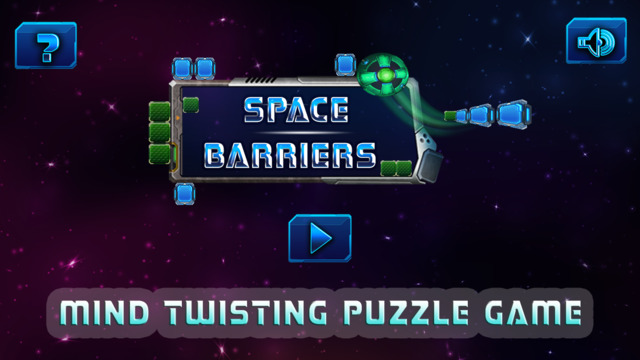
Georgia based Norcron today introduces Space Barriers 1.0, their new game title for iOS and Android devices. In this puzzle game, players must swipe their finger anywhere on the screen to navigate the ball through the puzzle and into the goal. Ideal for kids and adults of all ages, Space Barriers features 100 levels ranging from easy to difficult. Space Barriers promises hours of challenging fun trying to solve each puzzle. The game can help anyone train their brain and keep it mentally fit.
Alpharetta, Georgia - Norcron today is proud to announce the release of Space Barriers 1.0, their new game title developed for iOS and Android devices. Available as a free download, Space Barriers is a puzzle game that has been highly praised by both novice and advanced players. Its 100 levels provide a great challenge to all types of players. The object of the game is to try and get the ball into the goal. Swipe your finger anywhere on the screen to navigate the ball through the puzzle and into the goal. The puzzle is ideal for kids and adults of all ages. Space Barriers can help train the brain and increase mental acuity.
User reviews are phenomenal. Take a look at what Devon L. has to say about this blockbuster new app: "Addicting ... One of those games you have to play until you finally pass that level you've been stuck on for ages! Really fun and challenging!"
Device Requirements:
* iPhone, iPad, and iPod touch
* Requires iOS 7.0 or later
* 77.3 MB
Pricing and Availability:
Space Barriers 1.0 is Free and available worldwide through the App Store in the Games category. There is also an Android version available on Google Play. The Android Version is 24Mb and requires Android 2.3 and up. For more information, please contact David Katz or visit Norcron online.
Norcron: http://norcron.com/
Space Barriers 1.0: http://www.norcronapps.com/
Download from iTunes: https://itunes.apple.com/app/space-barriers/id1106835786
Screenshot 1: http://a5.mzstatic.com/us/r30/Purple60/v4/a1/57/09/a157094f-acd6-07b4-fcd8-e432be228644/screen640x640.jpeg
Screenshot 2: http://a5.mzstatic.com/us/r30/Purple60/v4/9a/0d/af/9a0dafb1-c01b-6a60-2910-ba67270728c9/screen640x640.jpeg
Screenshot 3: http://a1.mzstatic.com/us/r30/Purple18/v4/cf/0b/8a/cf0b8a09-4bb0-46f5-34c5-4523f1ed612e/screen640x640.jpeg
Norcron is a software and application development company based in Alpharetta. They are focused on building challenging and fun games that give your brain a workout. All Material and Software (C) Copyright 2016 Norcron. All Rights Reserved. Apple, the Apple logo, iPhone, iPod and iPad are registered trademarks of Apple Inc. in the U.S. and/or other countries. Other trademarks and registered trademarks may be the property of their respective owners.
*******
Link To Article: http://prmac.com/release-id-79710.htm
*******
---------------------------------------------------------------------------------
Note that you can alter delivered distributions at any time.
Login to your account on prMac to alter your channel selection, or to opt-out at any time.
Norcron releases Space Barriers for iOS/Android - Addictive Puzzle Game - Published on 06/16/16
Georgia based Norcron today introduces Space Barriers 1.0, their new game title for iOS and Android devices. In this puzzle game, players must swipe their finger anywhere on the screen to navigate the ball through the puzzle and into the goal. Ideal for kids and adults of all ages, Space Barriers features 100 levels ranging from easy to difficult. Space Barriers promises hours of challenging fun trying to solve each puzzle. The game can help anyone train their brain and keep it mentally fit.
Alpharetta, Georgia - Norcron today is proud to announce the release of Space Barriers 1.0, their new game title developed for iOS and Android devices. Available as a free download, Space Barriers is a puzzle game that has been highly praised by both novice and advanced players. Its 100 levels provide a great challenge to all types of players. The object of the game is to try and get the ball into the goal. Swipe your finger anywhere on the screen to navigate the ball through the puzzle and into the goal. The puzzle is ideal for kids and adults of all ages. Space Barriers can help train the brain and increase mental acuity.
User reviews are phenomenal. Take a look at what Devon L. has to say about this blockbuster new app: "Addicting ... One of those games you have to play until you finally pass that level you've been stuck on for ages! Really fun and challenging!"
Device Requirements:
* iPhone, iPad, and iPod touch
* Requires iOS 7.0 or later
* 77.3 MB
Pricing and Availability:
Space Barriers 1.0 is Free and available worldwide through the App Store in the Games category. There is also an Android version available on Google Play. The Android Version is 24Mb and requires Android 2.3 and up. For more information, please contact David Katz or visit Norcron online.
Norcron: http://norcron.com/
Space Barriers 1.0: http://www.norcronapps.com/
Download from iTunes: https://itunes.apple.com/app/space-barriers/id1106835786
Screenshot 1: http://a5.mzstatic.com/us/r30/Purple60/v4/a1/57/09/a157094f-acd6-07b4-fcd8-e432be228644/screen640x640.jpeg

Screenshot 2: http://a5.mzstatic.com/us/r30/Purple60/v4/9a/0d/af/9a0dafb1-c01b-6a60-2910-ba67270728c9/screen640x640.jpeg

Screenshot 3: http://a1.mzstatic.com/us/r30/Purple18/v4/cf/0b/8a/cf0b8a09-4bb0-46f5-34c5-4523f1ed612e/screen640x640.jpeg
Norcron is a software and application development company based in Alpharetta. They are focused on building challenging and fun games that give your brain a workout. All Material and Software (C) Copyright 2016 Norcron. All Rights Reserved. Apple, the Apple logo, iPhone, iPod and iPad are registered trademarks of Apple Inc. in the U.S. and/or other countries. Other trademarks and registered trademarks may be the property of their respective owners.
*******
Link To Article: http://prmac.com/release-id-79710.htm
*******
---------------------------------------------------------------------------------
Note that you can alter delivered distributions at any time.
Login to your account on prMac to alter your channel selection, or to opt-out at any time.
Hue Lights v2.3 Launches Stunning Water Effects for Philips Hue
A new article has been published at prMac.
Hue Lights v2.3 Launches Stunning Water Effects for Philips Hue - Published on 06/16/16
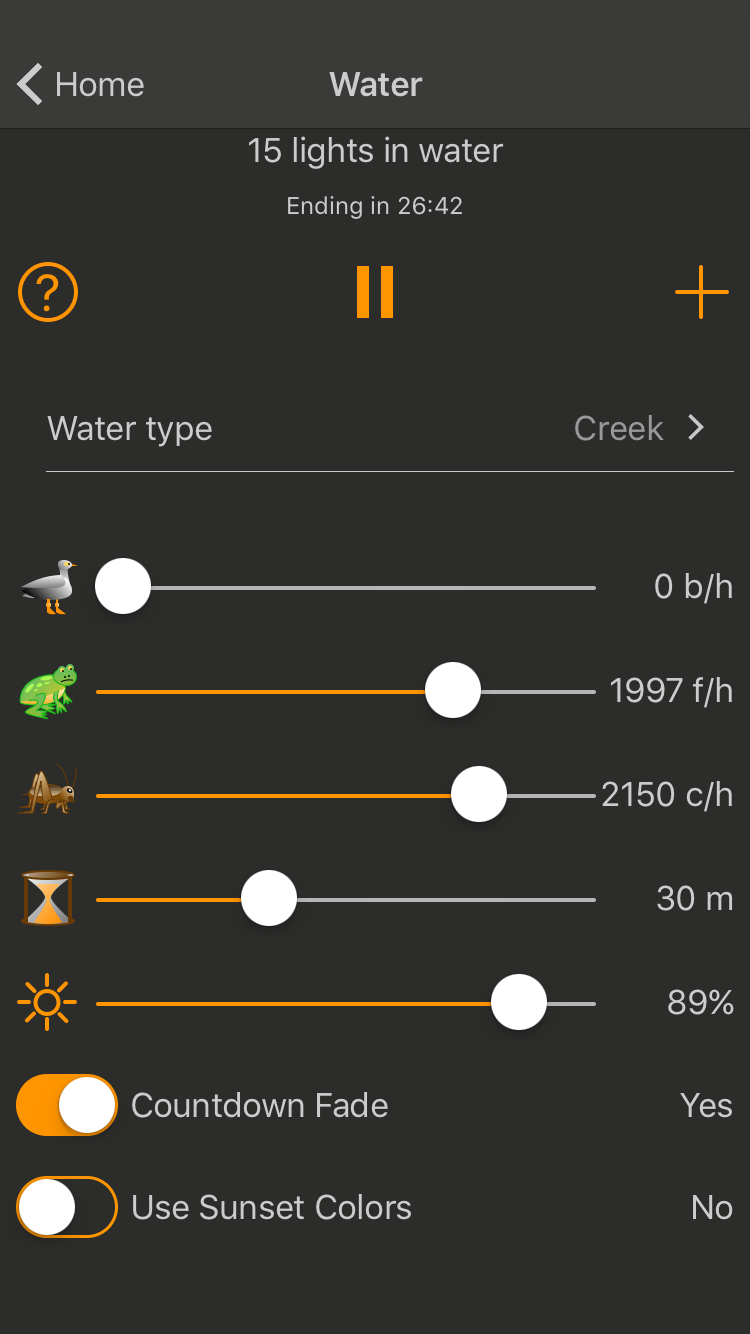
LapApps, LLC today announces Hue Lights 2.3, an update to its popular lifestyle app for iOS devices. Version 2.3 now offers ocean, lake, and creek effects. Experience soothing water sounds while your smart LED lights gently change and dim. Each water type has a distinct visual and audio theme. Dedicated controls are provided for seagull, frog, and cricket sounds. Lights slowly change colors in interesting and dynamic ways. Sunset colors create relaxing, slowly dimming nighttime routines.
San Jose, California - LapApps, LLC is proud to announce the release of Hue Lights 2.3, an update to their popular lifestyle app developed for iOS devices. Version 2.3 now offers ocean, lake, and creek effects. Experience soothing water sounds while your lights gently change and dim. Each water type has a distinct visual and audio theme. Dedicated controls are provided for seagull, frog, and cricket sounds. The water effects work great for nighttime routines. A timer can automatically dim and turn off lights.
Any of the water theme colors can be configured to use sunset colors. This combination of yellow, orange, and intermediate colors is conducive to a relaxed and peaceful ambience. Nature sounds appear in millions of different locations, near and far, as the app moves them through space and time using advanced soundscape algorithms.
The water effects are available as the "Water" In-App purchase. No other In-App purchase is needed to use the water effects. Once purchased all lights recognized by the Philips Hue bridge can be included in any water effect. To get the best effects ZigBee-compatible LED bulbs that support color should be used.
Other recent additions to the Hue Lights app include 3D Touch for pressure sensitive light control, Touchlink for finding lost bulbs, sequences, direct editing of scenes on the bridge, and customization of Hue dimmer switch and Hue Tap buttons. Each button on the Hue dimmer switch can be configured to control scenes, groups, and brightness. Select different scenes with a long-press or short-press of the button. Map up to 8 scenes on a single Hue dimmer switch. A comprehensive list of features and support material is available on the official Hue Lights website.
Hue Lights was first launched in December 2013 and has seen steady growth from a worldwide user base. The app includes Apple Watch support, scene and group activation from a fast widget, native Philips hub scheduling, dynamic lighting and a large selection of custom scenes.
Device Requirements:
* iPhone, iPad, and iPod touch
* Supports Apple Watch
* Requires iOS 7.0 or later
* 34.4 MB
Pricing and Availability:
Hue Lights 2.3 is Free and available worldwide exclusively through the App Store in the Lifestyle category. Every screen supports portrait and landscape mode on iPhone, iPad and iPod touch devices. The app is optimized for all iPhone and iPad devices running iOS 7.0 or later. The Hue Lights app requires a "Hue Personal Wireless Lighting Starter Set" to operate. Follow @HueLights on Twitter for the latest news and updates. Visit Hue Lights official website for more documentation and supported hardware.
Hue Lights 2.3: http://huelights.com
Frequently Asked Questions: http://huelights.com/faq.html
Download from iTunes: https://itunes.apple.com/app/hue-lights/id762009425
Screenshot: http://huelights.com/img/v2.3/iPhone-4.7-S17.png
App Icon: http://huelights.com/img/AppIcon.png
LapApps, LLC, is a California Limited Liability Company based in San Jose, CA. It was founded by Mark Snycerski in September 2013 and specializes in app development. (C) 2016 LapApps, LLC. All rights reserved. Apple Watch, iPad, iPhone and iPod touch are trademarks of Apple Inc., registered in the U.S. and other countries. IOS is a trademark or registered trademark of Cisco in the U.S. and other countries and is used under license. "Hue Personal Wireless Lighting" is a trademark owned by Koninklijke Philips Electronics N.V. LapApps, LLC is in no way affiliated with the Philips organization. Other product and company names mentioned herein may be trademarks of their respective companies.
*******
Link To Article: http://prmac.com/release-id-79708.htm
*******
---------------------------------------------------------------------------------
Note that you can alter delivered distributions at any time.
Login to your account on prMac to alter your channel selection, or to opt-out at any time.
Hue Lights v2.3 Launches Stunning Water Effects for Philips Hue - Published on 06/16/16
LapApps, LLC today announces Hue Lights 2.3, an update to its popular lifestyle app for iOS devices. Version 2.3 now offers ocean, lake, and creek effects. Experience soothing water sounds while your smart LED lights gently change and dim. Each water type has a distinct visual and audio theme. Dedicated controls are provided for seagull, frog, and cricket sounds. Lights slowly change colors in interesting and dynamic ways. Sunset colors create relaxing, slowly dimming nighttime routines.
San Jose, California - LapApps, LLC is proud to announce the release of Hue Lights 2.3, an update to their popular lifestyle app developed for iOS devices. Version 2.3 now offers ocean, lake, and creek effects. Experience soothing water sounds while your lights gently change and dim. Each water type has a distinct visual and audio theme. Dedicated controls are provided for seagull, frog, and cricket sounds. The water effects work great for nighttime routines. A timer can automatically dim and turn off lights.
Any of the water theme colors can be configured to use sunset colors. This combination of yellow, orange, and intermediate colors is conducive to a relaxed and peaceful ambience. Nature sounds appear in millions of different locations, near and far, as the app moves them through space and time using advanced soundscape algorithms.
The water effects are available as the "Water" In-App purchase. No other In-App purchase is needed to use the water effects. Once purchased all lights recognized by the Philips Hue bridge can be included in any water effect. To get the best effects ZigBee-compatible LED bulbs that support color should be used.
Other recent additions to the Hue Lights app include 3D Touch for pressure sensitive light control, Touchlink for finding lost bulbs, sequences, direct editing of scenes on the bridge, and customization of Hue dimmer switch and Hue Tap buttons. Each button on the Hue dimmer switch can be configured to control scenes, groups, and brightness. Select different scenes with a long-press or short-press of the button. Map up to 8 scenes on a single Hue dimmer switch. A comprehensive list of features and support material is available on the official Hue Lights website.
Hue Lights was first launched in December 2013 and has seen steady growth from a worldwide user base. The app includes Apple Watch support, scene and group activation from a fast widget, native Philips hub scheduling, dynamic lighting and a large selection of custom scenes.
Device Requirements:
* iPhone, iPad, and iPod touch
* Supports Apple Watch
* Requires iOS 7.0 or later
* 34.4 MB
Pricing and Availability:
Hue Lights 2.3 is Free and available worldwide exclusively through the App Store in the Lifestyle category. Every screen supports portrait and landscape mode on iPhone, iPad and iPod touch devices. The app is optimized for all iPhone and iPad devices running iOS 7.0 or later. The Hue Lights app requires a "Hue Personal Wireless Lighting Starter Set" to operate. Follow @HueLights on Twitter for the latest news and updates. Visit Hue Lights official website for more documentation and supported hardware.
Hue Lights 2.3: http://huelights.com
Frequently Asked Questions: http://huelights.com/faq.html
Download from iTunes: https://itunes.apple.com/app/hue-lights/id762009425
Screenshot: http://huelights.com/img/v2.3/iPhone-4.7-S17.png
App Icon: http://huelights.com/img/AppIcon.png

LapApps, LLC, is a California Limited Liability Company based in San Jose, CA. It was founded by Mark Snycerski in September 2013 and specializes in app development. (C) 2016 LapApps, LLC. All rights reserved. Apple Watch, iPad, iPhone and iPod touch are trademarks of Apple Inc., registered in the U.S. and other countries. IOS is a trademark or registered trademark of Cisco in the U.S. and other countries and is used under license. "Hue Personal Wireless Lighting" is a trademark owned by Koninklijke Philips Electronics N.V. LapApps, LLC is in no way affiliated with the Philips organization. Other product and company names mentioned herein may be trademarks of their respective companies.
*******
Link To Article: http://prmac.com/release-id-79708.htm
*******
---------------------------------------------------------------------------------
Note that you can alter delivered distributions at any time.
Login to your account on prMac to alter your channel selection, or to opt-out at any time.
Grantwood Technology Releases the TuneBand Go - a Universal Armband
A new article has been published at prMac.
Grantwood Technology Releases the TuneBand Go - a Universal Armband - Published on 06/15/16
Grantwood Technology has added the TuneBand Go to its best-selling armband series. The TuneBand Go provides a lightweight and comfortable way to wear almost any device with a thin protective case while running, bicycling, working out, doing yardwork, walking around the block, or just passing time at the airport. The TuneBand Go comes with two elastic straps for use on either the bicep or forearm, with adjustable Velcro ends that hold the accessory snugly against the user's arm.
Middleburg Heights, Ohio - Grantwood Technology, the market leader in premium technology products, has added the TuneBand Go to its best-selling armband series. Like its previous TuneBands, the TuneBand Go provides a lightweight and comfortable way to wear almost any device with its thin protective case while running, bicycling, working out, doing yardwork, walking around the block, or just passing time at the airport.
The simple design of the TuneBand Go allows for easy installation by first inserting the phone or device, complete with a thin, protective case or shell attached, onto a padded back-piece, and then securing it with four elastic metal clips. The TuneBand Go comes with two elastic straps (a 12" and a 19") for use on either the bicep or forearm, with adjustable Velcro ends that hold the accessory snugly against the user's arm.
Grantwood Technology will send a complimentary elastic strap of a different size in the event the ones provided do not fit the user's arm. Like all TuneBands, its open-faced design allows for easy access to the touchscreen, so that the user can change songs or make calls without having to remove the device.
"With the TuneBand Go, we wanted to create a premium TuneBand that works extremely well with a near-universal set of devices. Simply attach the device and go", stated Michael Banks, co-founder of Grantwood Technology. "It is perfect for folks that use multiple devices, or for households that have a variety of makes and models of phones, or an Apple iPod touch. As you change devices, the TuneBand Go has you covered. In its design, we maintained our high standard of simplicity, product quality, user comfort, and easy access to the device's functionality."
The TuneBand Go is designed to fit a large number of devices with thin, protective cases or shells attached, including the following:
* Apple iPhone 6 / 6S / 6 Plus / 6S Plus
* Samsung Galaxy S7 / S6 / S5 / S4 / S3
* Apple iPhone 4 / 4S / 5 / 5S / 5C / SE, and other similar phones
* Google Nexus 5X / 6P, and other Nexus models
* Moto X, HTC One, and other similar phones
* Apple iPod touch 5th/6th Generation
For a limited time, Grantwood Technology is offering the TuneBand Go at an introductory price of $19.99 (USD), and it is available from both Amazon and the Grantwood Store.
Grantwood Technology: http://www.grantwoodtechnology.com/
TuneBand Go on the Grantwood Store: http://www.grantwoodtechnology.com/products/tuneband-go
TuneBand Go on Amazon: http://www.amazon.com/dp/B01GQUMB9U
Product Image 1: http://www.grantwoodmail.com/share/tuneband_go/tuneband_go_samsung_galaxy_s6_black_front_1024.jpg
Product Image 2: http://www.grantwoodmail.com/share/tuneband_go/tuneband_go_front_1024.jpg
Product Image 3: http://www.grantwoodmail.com/share/tuneband_go/tuneband_go_side_right_1024.jpg
Grantwood Technology, LLC specializes in unique and functional iPod/iPhone/iPad/Kindle/Nexus One accessories and Mac accessories. We also are a database development and consulting service company, specializing in Filemaker Pro. Copyright 2016 Grantwood Technology, LLC. All Rights Reserved. QuickFlipCase, and tuneband are trademarks of Grantwood Technology, LLC. Apple, the Apple logo, iPhone and iPod are registered trademarks of Apple Computer in the U.S. and/or other countries. All other trademarks are the property of their respective owners.
*******
Link To Article: http://prmac.com/release-id-79707.htm
*******
---------------------------------------------------------------------------------
Note that you can alter delivered distributions at any time.
Login to your account on prMac to alter your channel selection, or to opt-out at any time.
Grantwood Technology Releases the TuneBand Go - a Universal Armband - Published on 06/15/16
Grantwood Technology has added the TuneBand Go to its best-selling armband series. The TuneBand Go provides a lightweight and comfortable way to wear almost any device with a thin protective case while running, bicycling, working out, doing yardwork, walking around the block, or just passing time at the airport. The TuneBand Go comes with two elastic straps for use on either the bicep or forearm, with adjustable Velcro ends that hold the accessory snugly against the user's arm.
Middleburg Heights, Ohio - Grantwood Technology, the market leader in premium technology products, has added the TuneBand Go to its best-selling armband series. Like its previous TuneBands, the TuneBand Go provides a lightweight and comfortable way to wear almost any device with its thin protective case while running, bicycling, working out, doing yardwork, walking around the block, or just passing time at the airport.
The simple design of the TuneBand Go allows for easy installation by first inserting the phone or device, complete with a thin, protective case or shell attached, onto a padded back-piece, and then securing it with four elastic metal clips. The TuneBand Go comes with two elastic straps (a 12" and a 19") for use on either the bicep or forearm, with adjustable Velcro ends that hold the accessory snugly against the user's arm.
Grantwood Technology will send a complimentary elastic strap of a different size in the event the ones provided do not fit the user's arm. Like all TuneBands, its open-faced design allows for easy access to the touchscreen, so that the user can change songs or make calls without having to remove the device.
"With the TuneBand Go, we wanted to create a premium TuneBand that works extremely well with a near-universal set of devices. Simply attach the device and go", stated Michael Banks, co-founder of Grantwood Technology. "It is perfect for folks that use multiple devices, or for households that have a variety of makes and models of phones, or an Apple iPod touch. As you change devices, the TuneBand Go has you covered. In its design, we maintained our high standard of simplicity, product quality, user comfort, and easy access to the device's functionality."
The TuneBand Go is designed to fit a large number of devices with thin, protective cases or shells attached, including the following:
* Apple iPhone 6 / 6S / 6 Plus / 6S Plus
* Samsung Galaxy S7 / S6 / S5 / S4 / S3
* Apple iPhone 4 / 4S / 5 / 5S / 5C / SE, and other similar phones
* Google Nexus 5X / 6P, and other Nexus models
* Moto X, HTC One, and other similar phones
* Apple iPod touch 5th/6th Generation
For a limited time, Grantwood Technology is offering the TuneBand Go at an introductory price of $19.99 (USD), and it is available from both Amazon and the Grantwood Store.
Grantwood Technology: http://www.grantwoodtechnology.com/
TuneBand Go on the Grantwood Store: http://www.grantwoodtechnology.com/products/tuneband-go
TuneBand Go on Amazon: http://www.amazon.com/dp/B01GQUMB9U
Product Image 1: http://www.grantwoodmail.com/share/tuneband_go/tuneband_go_samsung_galaxy_s6_black_front_1024.jpg

Product Image 2: http://www.grantwoodmail.com/share/tuneband_go/tuneband_go_front_1024.jpg

Product Image 3: http://www.grantwoodmail.com/share/tuneband_go/tuneband_go_side_right_1024.jpg

Grantwood Technology, LLC specializes in unique and functional iPod/iPhone/iPad/Kindle/Nexus One accessories and Mac accessories. We also are a database development and consulting service company, specializing in Filemaker Pro. Copyright 2016 Grantwood Technology, LLC. All Rights Reserved. QuickFlipCase, and tuneband are trademarks of Grantwood Technology, LLC. Apple, the Apple logo, iPhone and iPod are registered trademarks of Apple Computer in the U.S. and/or other countries. All other trademarks are the property of their respective owners.
*******
Link To Article: http://prmac.com/release-id-79707.htm
*******
---------------------------------------------------------------------------------
Note that you can alter delivered distributions at any time.
Login to your account on prMac to alter your channel selection, or to opt-out at any time.
Tasty Candy Jelly That Will Leave You Hungry for More and Hours of Fun
A new article has been published at prMac.
Tasty Candy Jelly That Will Leave You Hungry for More and Hours of Fun - Published on 06/15/16
Tasty candy jelly that will leave you hungry for more and hours of fun! Sugar Jelly Crush app, free goes viral on the popular social networks sites like Twitter, Facebook and Instagram. Take on these deliciously sweet levels of Sugar Jelly Crush now with cookies gems. Connect matching delicious candy with jelly slime to create a flow. These tasty delicious candy and beautiful graphics make this app game brilliant, fun, challenging and unique. Sugar Jelly Crush is an addictive candy match game.
San Francisco, California - The Sugar Jelly Crush now app, now with cookies gems, goes viral on the popular social networks sites like YouTube, Twitter, Facebook and Instagram. California based independent developer, Super Addicting Games introduces Sugar Jelly Crush exclusively on the App Store, a fun, challenging, and entertaining game of matching candy, cookies and jelly. The juicy jelly game make this app very addictive and colorful. This game brings out our favorite sweets to life with physics and visuals that are fun and dynamic. Users can enjoy yummy designs and challenging stages. To play, simply switch and match the way through various levels in this delicious puzzle strategy adventure.
The goal is to tap and drag finger to connect three or more jelly dots horizontally, vertically or diagonally to clear them. The objective is to rack up as many points as possible in 60 seconds. This app game allows users to challenge themselves and battle their friends in this fun and addicting match three puzzle game.
Users have said, "Inspire yourself with Sugar Jelly Crush and discover the dreamworld of candy."
Users tweet and say that Sugar Jelly Crush is super addictive and fun. The juicy jelly candy and colors make this app awesome. The goal is to discover the dream world of sweet levels and join the candy kingdom with sweet delicious flavors like chocolate, caramel, cotton candy and much more. Tasty sugar candy game that everyone enjoys and love is fun to play.
These tasty delicious candy and beautiful graphics make this app game brilliant, fun, challenging and unique. The goal is to take on these deliciously sweet levels of Sugar Jelly Crush. The juicy jelly candy and colors make this app very attractive. Users can discover the dream world of sweet levels and join the candy kingdom. Sugar candy that everyone enjoys and loves makes this app awesome.
Sugar Jelly Crush invites users to join this sweet adventure through this deliciously sweet game. The main role is to connect matching delicious candy with jelly slime to create a flow.
The highlights and features are:
* Sweet fun levels available
* Match three style puzzle game
* Easy and fun to play, challenging to master
* Play in multiplayer tournaments
* Beautiful, stunning and colorful graphics
* Fun sound effects
Match 3 cute and adorable creatures to complete level targets
Compete high scores against your friends through GameCenter
Timed well designed levels and worldly themes perfectly mix the simplicity and challenges for endless fun
The addicitve match-3 game for all ages and genders
Tasty candy jelly that will leave users hungry for more and hours of fun. Now with cookies.
Device Requirements:
* iPhone, iPad and iPod touch
* Requires iOS 6.0 or later
* Optimized for iPhone 5, iPhone 6, and iPhone 6 Plus
* 44.2 MB
Pricing and Availability:
Sugar Jelly Crush 1.7 is Free to download and available worldwide exclusively through the App Store in the Games category.
Sugar Jelly Crush 1.7: http://sugarjellycrushapp.tumblr.com
Download from iTunes: https://itunes.apple.com/app/sugar-jelly-crush/id944430975
YouTube Video: https://www.youtube.com/watch?v=tvNi-1oO3gY
Screenshot: http://a2.mzstatic.com/us/r30/Purple60/v4/e6/71/a0/e671a034-92f5-34ca-11e5-4a5600625970/screen480x480.jpeg
App Icon: http://a1.mzstatic.com/us/r30/Purple3/v4/9d/50/6b/9d506b47-7c32-2b0c-3289-f456eb23f8f7/icon175x175.png
Located in San Francisco, California, Indie developer Super Addicting Games creates apps for the iOS platform. Copyright (C) 2016 Super Addicting Games. All Rights Reserved. Apple, the Apple logo, iPhone, iPad, iPad mini, iPod touch, and Mac are registered trademarks of Apple Inc. in the U.S. and/or other countries. Other trademarks and registered trademarks may be the property of their respective owners.
*******
Link To Article: http://prmac.com/release-id-79706.htm
*******
---------------------------------------------------------------------------------
Note that you can alter delivered distributions at any time.
Login to your account on prMac to alter your channel selection, or to opt-out at any time.
Tasty Candy Jelly That Will Leave You Hungry for More and Hours of Fun - Published on 06/15/16
Tasty candy jelly that will leave you hungry for more and hours of fun! Sugar Jelly Crush app, free goes viral on the popular social networks sites like Twitter, Facebook and Instagram. Take on these deliciously sweet levels of Sugar Jelly Crush now with cookies gems. Connect matching delicious candy with jelly slime to create a flow. These tasty delicious candy and beautiful graphics make this app game brilliant, fun, challenging and unique. Sugar Jelly Crush is an addictive candy match game.
San Francisco, California - The Sugar Jelly Crush now app, now with cookies gems, goes viral on the popular social networks sites like YouTube, Twitter, Facebook and Instagram. California based independent developer, Super Addicting Games introduces Sugar Jelly Crush exclusively on the App Store, a fun, challenging, and entertaining game of matching candy, cookies and jelly. The juicy jelly game make this app very addictive and colorful. This game brings out our favorite sweets to life with physics and visuals that are fun and dynamic. Users can enjoy yummy designs and challenging stages. To play, simply switch and match the way through various levels in this delicious puzzle strategy adventure.
The goal is to tap and drag finger to connect three or more jelly dots horizontally, vertically or diagonally to clear them. The objective is to rack up as many points as possible in 60 seconds. This app game allows users to challenge themselves and battle their friends in this fun and addicting match three puzzle game.
Users have said, "Inspire yourself with Sugar Jelly Crush and discover the dreamworld of candy."
Users tweet and say that Sugar Jelly Crush is super addictive and fun. The juicy jelly candy and colors make this app awesome. The goal is to discover the dream world of sweet levels and join the candy kingdom with sweet delicious flavors like chocolate, caramel, cotton candy and much more. Tasty sugar candy game that everyone enjoys and love is fun to play.
These tasty delicious candy and beautiful graphics make this app game brilliant, fun, challenging and unique. The goal is to take on these deliciously sweet levels of Sugar Jelly Crush. The juicy jelly candy and colors make this app very attractive. Users can discover the dream world of sweet levels and join the candy kingdom. Sugar candy that everyone enjoys and loves makes this app awesome.
Sugar Jelly Crush invites users to join this sweet adventure through this deliciously sweet game. The main role is to connect matching delicious candy with jelly slime to create a flow.
The highlights and features are:
* Sweet fun levels available
* Match three style puzzle game
* Easy and fun to play, challenging to master
* Play in multiplayer tournaments
* Beautiful, stunning and colorful graphics
* Fun sound effects
Match 3 cute and adorable creatures to complete level targets
Compete high scores against your friends through GameCenter
Timed well designed levels and worldly themes perfectly mix the simplicity and challenges for endless fun
The addicitve match-3 game for all ages and genders
Tasty candy jelly that will leave users hungry for more and hours of fun. Now with cookies.
Device Requirements:
* iPhone, iPad and iPod touch
* Requires iOS 6.0 or later
* Optimized for iPhone 5, iPhone 6, and iPhone 6 Plus
* 44.2 MB
Pricing and Availability:
Sugar Jelly Crush 1.7 is Free to download and available worldwide exclusively through the App Store in the Games category.
Sugar Jelly Crush 1.7: http://sugarjellycrushapp.tumblr.com
Download from iTunes: https://itunes.apple.com/app/sugar-jelly-crush/id944430975
YouTube Video: https://www.youtube.com/watch?v=tvNi-1oO3gY
Screenshot: http://a2.mzstatic.com/us/r30/Purple60/v4/e6/71/a0/e671a034-92f5-34ca-11e5-4a5600625970/screen480x480.jpeg

App Icon: http://a1.mzstatic.com/us/r30/Purple3/v4/9d/50/6b/9d506b47-7c32-2b0c-3289-f456eb23f8f7/icon175x175.png

Located in San Francisco, California, Indie developer Super Addicting Games creates apps for the iOS platform. Copyright (C) 2016 Super Addicting Games. All Rights Reserved. Apple, the Apple logo, iPhone, iPad, iPad mini, iPod touch, and Mac are registered trademarks of Apple Inc. in the U.S. and/or other countries. Other trademarks and registered trademarks may be the property of their respective owners.
*******
Link To Article: http://prmac.com/release-id-79706.htm
*******
---------------------------------------------------------------------------------
Note that you can alter delivered distributions at any time.
Login to your account on prMac to alter your channel selection, or to opt-out at any time.
Qoppa releases PDF Studio 11 - Advanced PDF Editor for Mac
A new article has been published at prMac.
Qoppa releases PDF Studio 11 - Advanced PDF Editor for Mac - Published on 06/15/16
Atlanta based Qoppa Software today announces PDF Studio 11, an important update to their powerful, easy-to-use PDF editing application for Mac OS X. PDF Studio 11 creates PDF documents that are fully compliant with the Adobe PDF specifications and runs well on Mac OS X El Capitan. Version 11 introduces a brand new OCR engine, and adds a number of new features including Spell Check, Non-Latin OCR Languages, Output Preview, and Enhanced Print Dialog.
Atlanta, Georgia - Qoppa Software, a leading producer of PDF software, announces version 11 of PDF Studio, their powerful, easy to use PDF editor for Mac OS X. PDF Studio 11 adds a number of new features including Spell Check, Non-Latin OCR Languages, Output Preview, and Enhanced Print Dialog.
By popular request, PDF Studio now comes with a Spell Checker. Spell check highlights misspelled words when creating text annotations, typing annotation comments, and filling interactive form fields. Users are able to set various options including highlight color, ignore all caps or numbers, and add/edit custom words to the dictionary. PDF Studio 11 offers 9 different languages options and even support spell checking more than one language at the same time! Languages supported are Arabic, Dutch, English, French, German, Italian, Polish, Russian, Spanish.
PDF Studio 11 also introduces a brand new OCR engine that now supports non-Latin and CJK languages. A total of 46 new OCR languages are now available such as Chinese (simplified & traditional), Japanese, Hindi, Arabic, and many more. In addition to the new languages, PDF Studio also has the ability to select 2 languages at once to use when OCRing documents containing multiple languages on each page.
Professionals in the printing industry will enjoy the new Output Preview including overprint simulation. Output preview is used to simulate how the document will look once printed using different color profiles such as CMYK, RGB, and grey. Overprint simulates how overlapping colors will look when mixed on the page. The new dialog can easily switch between print simulation and display and the background color of the document can also be changed to simulate printing on different colored paper.
PDF Studio 11 comes with a New Enhanced Print Dialog with new features including Print Preview, Print to file, and booklet printing. Print Preview allows users to see what the document look like prior to being printed and adjustments can be made in real time if necessary. Print to file creates a .prn file instead of printing directly to the printer. Useful if you need to send the document to a printing press that only prints on a specific printer. Booklet printing turns a multi-page document into a folded booklet.
PDF Studio 11 also adds additional improvements including a Welcome Screen, new rubber stamps (dynamic, preview, predefined and PDF stamps), quick text search (in addition to advanced search), major memory & performance enhancements, font improvements, and many more.
Qoppa Software: http://www.qoppa.com
PDF Studio 11: http://www.qoppa.com/pdfstudio/
Automated PDF Handling - Server Side: http://www.qoppa.com/pas/
Qoppa Software PDF Solutions: http://www.qoppa.com/solutions/
Qoppa Software's Java PDF Libraries and Components: https://www.qoppa.com/javapdf/
Download PDF Studio: http://www.qoppa.com/pdfstudio/demo/download/
Qoppa Software specializes in the development of high-end applications and developer libraries to work with PDF documents. Qoppa Software offers a suite of highly portable products that cover every aspect of PDF processes and integrate seamlessly into document work flows, including end-user, server and PDF library products. Qoppa's products are carefully designed to provide the highest level of performance and reliability. Copyright (C) 2016 Qoppa Software. All Rights Reserved. Apple, the Apple logo, and OS X are registered trademarks of Apple Inc. in the U.S. and/or other countries.
*******
Link To Article: http://prmac.com/release-id-79705.htm
*******
---------------------------------------------------------------------------------
Note that you can alter delivered distributions at any time.
Login to your account on prMac to alter your channel selection, or to opt-out at any time.
Qoppa releases PDF Studio 11 - Advanced PDF Editor for Mac - Published on 06/15/16
Atlanta based Qoppa Software today announces PDF Studio 11, an important update to their powerful, easy-to-use PDF editing application for Mac OS X. PDF Studio 11 creates PDF documents that are fully compliant with the Adobe PDF specifications and runs well on Mac OS X El Capitan. Version 11 introduces a brand new OCR engine, and adds a number of new features including Spell Check, Non-Latin OCR Languages, Output Preview, and Enhanced Print Dialog.
Atlanta, Georgia - Qoppa Software, a leading producer of PDF software, announces version 11 of PDF Studio, their powerful, easy to use PDF editor for Mac OS X. PDF Studio 11 adds a number of new features including Spell Check, Non-Latin OCR Languages, Output Preview, and Enhanced Print Dialog.
By popular request, PDF Studio now comes with a Spell Checker. Spell check highlights misspelled words when creating text annotations, typing annotation comments, and filling interactive form fields. Users are able to set various options including highlight color, ignore all caps or numbers, and add/edit custom words to the dictionary. PDF Studio 11 offers 9 different languages options and even support spell checking more than one language at the same time! Languages supported are Arabic, Dutch, English, French, German, Italian, Polish, Russian, Spanish.
PDF Studio 11 also introduces a brand new OCR engine that now supports non-Latin and CJK languages. A total of 46 new OCR languages are now available such as Chinese (simplified & traditional), Japanese, Hindi, Arabic, and many more. In addition to the new languages, PDF Studio also has the ability to select 2 languages at once to use when OCRing documents containing multiple languages on each page.
Professionals in the printing industry will enjoy the new Output Preview including overprint simulation. Output preview is used to simulate how the document will look once printed using different color profiles such as CMYK, RGB, and grey. Overprint simulates how overlapping colors will look when mixed on the page. The new dialog can easily switch between print simulation and display and the background color of the document can also be changed to simulate printing on different colored paper.
PDF Studio 11 comes with a New Enhanced Print Dialog with new features including Print Preview, Print to file, and booklet printing. Print Preview allows users to see what the document look like prior to being printed and adjustments can be made in real time if necessary. Print to file creates a .prn file instead of printing directly to the printer. Useful if you need to send the document to a printing press that only prints on a specific printer. Booklet printing turns a multi-page document into a folded booklet.
PDF Studio 11 also adds additional improvements including a Welcome Screen, new rubber stamps (dynamic, preview, predefined and PDF stamps), quick text search (in addition to advanced search), major memory & performance enhancements, font improvements, and many more.
Qoppa Software: http://www.qoppa.com
PDF Studio 11: http://www.qoppa.com/pdfstudio/
Automated PDF Handling - Server Side: http://www.qoppa.com/pas/
Qoppa Software PDF Solutions: http://www.qoppa.com/solutions/
Qoppa Software's Java PDF Libraries and Components: https://www.qoppa.com/javapdf/
Download PDF Studio: http://www.qoppa.com/pdfstudio/demo/download/
Qoppa Software specializes in the development of high-end applications and developer libraries to work with PDF documents. Qoppa Software offers a suite of highly portable products that cover every aspect of PDF processes and integrate seamlessly into document work flows, including end-user, server and PDF library products. Qoppa's products are carefully designed to provide the highest level of performance and reliability. Copyright (C) 2016 Qoppa Software. All Rights Reserved. Apple, the Apple logo, and OS X are registered trademarks of Apple Inc. in the U.S. and/or other countries.
*******
Link To Article: http://prmac.com/release-id-79705.htm
*******
---------------------------------------------------------------------------------
Note that you can alter delivered distributions at any time.
Login to your account on prMac to alter your channel selection, or to opt-out at any time.
Subscribe to:
Posts (Atom)