A new article has been published at prMac.
FotoJet Adds Invitation Templates to Create Various Invitations - Published on 06/29/16
PearlMountain released a new version of FotoJet recently, adding lots of newly-designed invitation templates to DESIGN mode, with which users can make professional invitation cards easily. 80 shapes & lines are provided for users to beautify their cards, which can be freely edited to meet individual needs. It is also possible for users to search 93,000 clipart images from the Internet to get some special embellishments.
Chengdu, China - Whenever people want to invite relatives and friends to take participate in a party or other activities, sending an invitation would be a great way to get the words out. Fortunately, there is no need to buy some cards now. With the newly added invitation card templates of FotoJet, even a computer novice can design a delicate card with ease.
FotoJet, an easy-to-use art designer, has provided a growing number of templates that can enable users to make amazing photo designs in minutes. The latest FotoJet version is updated with lots of creative invitation templates for many occasions, birthday, anniversary and more. No matter users want to make an invitation to ask someone to join in a holiday activity or a daily gathering, they can find a perfectly suitable template to customize with personal touch.
In DESIGN mode, all these invitation templates are embedded with beautiful pictures. Users can get a card in seconds by inputting the information about the activity. It is also available to add photos from Computer, Facebook, or search 580,000 images from Stock Photo to replace the existing picture.
What's more, there are 80 shapes & lines provided for users to beautify their cards, which can be freely edited to meet individual needs. It is also possible for users to search 93,000 clipart images from the Internet to get some special embellishments. Besides, users are able to choose the well-designed backgrounds or upload a personal photo as the background of their cards.
When all adjustments are done, users will save, print or share their invitation card to popular social media platforms. There is no doubt that all these new invitation templates can inspire the creativity of users and help them to design fabulous invitation cards in an amazingly easy way.
System Requirements:
FotoJet works flawlessly in any web browser and is fully compatible with Mac, Windows and Linux. Everyone can visit the FotoJet website to create an invitation now.
About the Company:
PearlMountain Technology Co., Ltd is a dedicated graphics and software development company founded in 2006. Over the past 9 years, it has released products with great popularity among worldwide users like Picture Collage Maker, CollageIt and Publisher Plus. Its products have already been well received all through North America, Europe and Asia software markets for their ease of use, reliability and superior performance.
FotoJet: https://www.fotojet.com/features/photo-card/invitation.html
PearlMountain Technology Co., Ltd is a dedicated graphics and software development company founded in 2006. Over the past 8 years, it has released products with great popularity among worldwide users like Picture Collage Maker, Publisher Plus and Watermark Plus. Its products have already been well received all through North America, Europe and Asia software markets for their ease of use, reliability and superior performance. All Material and Software (C) Copyright 2016 PearlMountain Technology Co., Ltd. All Rights Reserved. Apple, the Apple logo, Macintosh and Mac OS X are registered trademarks of Apple Inc. in the U.S. and/or other countries. Other trademarks and registered trademarks may be the property of their respective owners.
*******
Link To Article: http://prmac.com/release-id-79784.htm
*******
---------------------------------------------------------------------------------
Note that you can alter delivered distributions at any time.
Login to your account on prMac to alter your channel selection, or to opt-out at any time.

Heavy Metal Tennis Training - An 8-Bit Game for iOS and Android
A new article has been published at prMac.
Heavy Metal Tennis Training - An 8-Bit Game for iOS and Android - Published on 06/29/16
Berlin based Shape Minds UG today is proud to announce the release of Heavy Metal Tennis Training 1.0, a simple but challenging 8-Bit game for iOS and Android. The player has to take down an evil tennis machine outside a mansion while listening to 8-Bit inspired Heavy Metal music. The game concept sounds simple, and in fact it was the goal of the publishers to bring back nostalghia in graphics and gameplay, reminding older players of their happy youth in the 80ies.
Berlin, Germany - Shape Minds UG today is proud to announce the release of Heavy Metal Tennis Training 1.0, a simple but challenging 8-Bit game for iOS and Android. Heavy Metal Tennis Training is a fun mixture of sports and arcade game. The player acts as an aging rockstar which has to return flaming tennis balls at evil tennis machines, that explode into flames of hellfire from below.
After the player has beaten all machines, hellfire is there awaiting him to challenge his then proven skills. Heavy Metal Tennis Training is a casual game, it can be played with just one touch. The game concept sounds simple, and in fact it was the goal of the publishers to bring back nostalghia in graphics and gameplay, reminding older players of their happy youth in the 80ies. The main character is a Hair Metal guy whose design is inspired by the looks of lead singers of bands like whitesnake or white lion.
Toucharcade writes about Heavy Metal Tennis Trainer: "For far too long, tennis and heavy metal have been separated."
HMTT was created by Shape Minds UG: Uwe Flade and Helen Choy. Uwe directed music videos for bands like Depeche Mode, Rammstein, Nickelback, Franz Ferdinand and many more. He produced million selling apps like Nighty Night! and Little Fox Musicbox. Helen Choy worked for first class motion design companies like psyop.tv, motion theory and buck NY. The programming team Sven Schmitt and Johan Dettmar created the mobile game ducklings, which made 700k downloads to date. 8Bit metal music was created by Darrin Wiener aka World Gang, a contributing member to Modest Mouse's "Stranger to Ourselves."
Device Requirements:
* iPhone, iPad, and iPod touch
* Requires iOS 6.0 or later
* 34.7 MB
Pricing and Availability:
Heavy Metal Tennis Training 1.0 is Free (with two extra characters available for in-purchases) and available worldwide through the App Store in the Games category. There is also an Android version available on Google Play.
Shape Minds: http://shape-minds.co
Heavy Metal Tennis Training 1.0: http://heavymetaltennis.com/
Download from iTunes: https://itunes.apple.com/app/heavy-metal-tennis-training/id1080345135
YouTube Video (Trailer): https://www.youtube.com/watch?v=PHwS0_KOutc
Screenshot: http://images.pocketgamer.co.uk/FCKEditorFiles//Heavy%20Metal%20Tennis%20Training.jpg
App Icon: http://a1.mzstatic.com/us/r30/Purple49/v4/99/f7/7f/99f77f27-198f-508a-8f9e-721a6d5abcd9/icon175x175.jpeg
Shape Minds was founded in 2015 by Uwe Flade and Hyung Helen Choi. Uwe directed music videos for bands like Depeche Mode, Rammstein, Nickelback, Franz Ferdinand and many more. He produced million selling apps like Nighty Night! and Little Fox Musicbox. Helen Choi worked for first class motion design companies like psyop.tv, motion theory and buck NY. All Material and Software (C) Copyright 2016 Shape Minds UG. All Rights Reserved. Apple, the Apple logo, iPhone, iPod and iPad are registered trademarks of Apple Inc. in the U.S. and/or other countries. Other trademarks and registered trademarks may be the property of their respective owners.
*******
Link To Article: http://prmac.com/release-id-79781.htm
*******
---------------------------------------------------------------------------------
Note that you can alter delivered distributions at any time.
Login to your account on prMac to alter your channel selection, or to opt-out at any time.
Heavy Metal Tennis Training - An 8-Bit Game for iOS and Android - Published on 06/29/16
Berlin based Shape Minds UG today is proud to announce the release of Heavy Metal Tennis Training 1.0, a simple but challenging 8-Bit game for iOS and Android. The player has to take down an evil tennis machine outside a mansion while listening to 8-Bit inspired Heavy Metal music. The game concept sounds simple, and in fact it was the goal of the publishers to bring back nostalghia in graphics and gameplay, reminding older players of their happy youth in the 80ies.
Berlin, Germany - Shape Minds UG today is proud to announce the release of Heavy Metal Tennis Training 1.0, a simple but challenging 8-Bit game for iOS and Android. Heavy Metal Tennis Training is a fun mixture of sports and arcade game. The player acts as an aging rockstar which has to return flaming tennis balls at evil tennis machines, that explode into flames of hellfire from below.
After the player has beaten all machines, hellfire is there awaiting him to challenge his then proven skills. Heavy Metal Tennis Training is a casual game, it can be played with just one touch. The game concept sounds simple, and in fact it was the goal of the publishers to bring back nostalghia in graphics and gameplay, reminding older players of their happy youth in the 80ies. The main character is a Hair Metal guy whose design is inspired by the looks of lead singers of bands like whitesnake or white lion.
Toucharcade writes about Heavy Metal Tennis Trainer: "For far too long, tennis and heavy metal have been separated."
HMTT was created by Shape Minds UG: Uwe Flade and Helen Choy. Uwe directed music videos for bands like Depeche Mode, Rammstein, Nickelback, Franz Ferdinand and many more. He produced million selling apps like Nighty Night! and Little Fox Musicbox. Helen Choy worked for first class motion design companies like psyop.tv, motion theory and buck NY. The programming team Sven Schmitt and Johan Dettmar created the mobile game ducklings, which made 700k downloads to date. 8Bit metal music was created by Darrin Wiener aka World Gang, a contributing member to Modest Mouse's "Stranger to Ourselves."
Device Requirements:
* iPhone, iPad, and iPod touch
* Requires iOS 6.0 or later
* 34.7 MB
Pricing and Availability:
Heavy Metal Tennis Training 1.0 is Free (with two extra characters available for in-purchases) and available worldwide through the App Store in the Games category. There is also an Android version available on Google Play.
Shape Minds: http://shape-minds.co
Heavy Metal Tennis Training 1.0: http://heavymetaltennis.com/
Download from iTunes: https://itunes.apple.com/app/heavy-metal-tennis-training/id1080345135
YouTube Video (Trailer): https://www.youtube.com/watch?v=PHwS0_KOutc
Screenshot: http://images.pocketgamer.co.uk/FCKEditorFiles//Heavy%20Metal%20Tennis%20Training.jpg

App Icon: http://a1.mzstatic.com/us/r30/Purple49/v4/99/f7/7f/99f77f27-198f-508a-8f9e-721a6d5abcd9/icon175x175.jpeg

Shape Minds was founded in 2015 by Uwe Flade and Hyung Helen Choi. Uwe directed music videos for bands like Depeche Mode, Rammstein, Nickelback, Franz Ferdinand and many more. He produced million selling apps like Nighty Night! and Little Fox Musicbox. Helen Choi worked for first class motion design companies like psyop.tv, motion theory and buck NY. All Material and Software (C) Copyright 2016 Shape Minds UG. All Rights Reserved. Apple, the Apple logo, iPhone, iPod and iPad are registered trademarks of Apple Inc. in the U.S. and/or other countries. Other trademarks and registered trademarks may be the property of their respective owners.
*******
Link To Article: http://prmac.com/release-id-79781.htm
*******
---------------------------------------------------------------------------------
Note that you can alter delivered distributions at any time.
Login to your account on prMac to alter your channel selection, or to opt-out at any time.
Maintain Releases Cocktail 9.3.2 (El Capitan Edition)
A new article has been published at prMac.
Maintain Releases Cocktail 9.3.2 (El Capitan Edition) - Published on 06/29/16
Maintain today announces Cocktail 9.3.2 (El Capitan Edition), the latest maintenance update for users running OS X El Capitan 10.11. Cocktail is a general purpose utility for OS X that lets users clean, repair and optimize their Macs. This version adds ability to disable volume and brightness control screen overlays and addresses some issues with System Integrity Protection. It also adds support for upcoming OS X 10.11.6 and adds compatibility with the latest versions of supported web browsers.
Ekero, Sweden - Maintain today is pleased to announce the release of Cocktail 9.3.2 (El Capitan Edition), the latest maintenance update for users running OS X El Capitan 10.11. The update is highly recommended for all users of Cocktail (El Capitan Edition).
What's New:
* Added ability to disable volume and brightness control screen overlays (System - Misc)
* Added compatibility with the latest versions of supported web browsers
* Addresses some issues with System Integrity Protection
* Resolves an issue in which the uninstaller may fail to reset Dock settings to their default values
* Improvements on the "Clear CrashReporter logs" procedure
* Added OS X 10.11.6 compatibility
* Overall performance improvements
* Updated Help files
Cocktail is a general purpose utility for OS X that lets you clean, repair and optimize your Mac. The application serves up a perfect mix of maintenance tools and tweaks, all accessible through a clean and easy to use interface. Cocktail's features are arranged into five categories that helps you manage various aspects of your computer. It also comes with an automatic Pilot mode that allows you to simply press a button and relax, knowing that Cocktail will take care of the rest.
Disk:
* Automatically check S.M.A.R.T. status of disks
* Enable or disable journaling
* Repair disk permissions
* Reset home directory permissions and ACLs
* Set disk sleep (spindown) time
* Modify standby delay
* Change other disk sleep settings
* Force eject CD/DVD
System:
* Run periodic maintenance scripts
* Purge inactive memory and optimize virtual memory usage
* Manage Spotlight indexing
* Erase Spotlight indexes
* Modify Time Machine settings
* Rebuild Launch Services and Help databases
* Rebuild Mail's Envelope Index
* Update locate and whatis databases
* Force empty the Trash
* Change startup mode or set startup delay
* Disable startup sound
* Disable Notification Center and App Nap
Files:
* Clear system caches
* Clear user caches
* Clear font caches
* Clear virtual memory swap files
* Clear temporary files
* Clear Internet caches
* Clear cookies, download lists, form values and history files
* Clear Adobe Flash Player caches and cookies
* Clear applications caches
* Search for corrupted preference files
* Delete unnecessary localization (language resources) files
* Clear and manage (view, print and save) log files
* Delete invisible DS Store files
* Delete locked or inaccessible items
Network:
* Change speed, duplex and MTU of network cards
* Easily optimize network settings for common connection types
* Modify IP configuration parameters
* Configure File Sharing settings
Interface:
* Customize look and features of Finder, Dock, login window and other system services
* Modify hidden settings of Safari, QuickTime X and iTunes
Pilot:
* Clean, repair and optimize your system with one click of the button
* Schedule clearing of caches and log files as well as permissions repair and run of periodic maintenance scripts
System Requirements:
Cocktail 9.3.2 (El Capitan Edition) requires OS X El Capitan 10.11 to run. Cocktail (Yosemite Edition) for OS X 10.10, Cocktail (Mavericks Edition) for OS X 10.9, Cocktail (Mountain Lion Edition) for OS X 10.8 and Cocktail (Lion Edition) for OS X 10.7 are available for download from Maintain website.
Pricing and Availability:
Cocktail is $19.00 (USD) for a single user license and available for purchase from the Maintain website. When unregistered, Cocktail runs in demo mode and will expire after the tenth launch.
Cocktail 9.3.2 (El Capitan Edition): http://www.maintain.se/cocktail
Download Cocktail 9.3.2 (El Capitan Edition): http://usa.maintain.se/Cocktail9ECE.dmg
Vimeo Video: https://vimeo.com/109816714
Screenshot 1: http://www.maintain.se/downloads/screenshots/screenshot1.png
Screenshot 2: http://www.maintain.se/downloads/screenshots/screenshot2.png
Application Icon: http://www.maintain.se/downloads/screenshots/icon.png
Maintain develops tailored applications for Mac users. We work towards creating technical solutions which maintain your computer and make it as efficient and easy to use as possible. In addition, we offer comprehensive consultancy and support services which cover everything from operation of existing systems to purchase and implementation of new technical solutions. Among our clients are: Major League Baseball, Puma, The New York Times, Sony Pictures, Ericsson, Fortum, The City Of Calgary, Peak Performance, Loreal, Harvard University, Los Angeles Times, Swedish Film Institute, Weber, ESPN, Business Week, Swedish National Police Board, Norwegian Broadcasting Corporation, Getty Images, University of Texas, South Park Studios, CompUSA, bwin, Lockheed Martin, Defense Intelligence Agency, University of Michigan and hundred of thousands of Mac users around the world. Copyright (C) 2016 Maintain. All Rights Reserved. Apple, the Apple logo and Mac are registered trademarks of Apple Inc. in
the U.S. and/or other countries.
*******
Link To Article: http://prmac.com/release-id-79782.htm
*******
---------------------------------------------------------------------------------
Note that you can alter delivered distributions at any time.
Login to your account on prMac to alter your channel selection, or to opt-out at any time.
Maintain Releases Cocktail 9.3.2 (El Capitan Edition) - Published on 06/29/16
Maintain today announces Cocktail 9.3.2 (El Capitan Edition), the latest maintenance update for users running OS X El Capitan 10.11. Cocktail is a general purpose utility for OS X that lets users clean, repair and optimize their Macs. This version adds ability to disable volume and brightness control screen overlays and addresses some issues with System Integrity Protection. It also adds support for upcoming OS X 10.11.6 and adds compatibility with the latest versions of supported web browsers.
Ekero, Sweden - Maintain today is pleased to announce the release of Cocktail 9.3.2 (El Capitan Edition), the latest maintenance update for users running OS X El Capitan 10.11. The update is highly recommended for all users of Cocktail (El Capitan Edition).
What's New:
* Added ability to disable volume and brightness control screen overlays (System - Misc)
* Added compatibility with the latest versions of supported web browsers
* Addresses some issues with System Integrity Protection
* Resolves an issue in which the uninstaller may fail to reset Dock settings to their default values
* Improvements on the "Clear CrashReporter logs" procedure
* Added OS X 10.11.6 compatibility
* Overall performance improvements
* Updated Help files
Cocktail is a general purpose utility for OS X that lets you clean, repair and optimize your Mac. The application serves up a perfect mix of maintenance tools and tweaks, all accessible through a clean and easy to use interface. Cocktail's features are arranged into five categories that helps you manage various aspects of your computer. It also comes with an automatic Pilot mode that allows you to simply press a button and relax, knowing that Cocktail will take care of the rest.
Disk:
* Automatically check S.M.A.R.T. status of disks
* Enable or disable journaling
* Repair disk permissions
* Reset home directory permissions and ACLs
* Set disk sleep (spindown) time
* Modify standby delay
* Change other disk sleep settings
* Force eject CD/DVD
System:
* Run periodic maintenance scripts
* Purge inactive memory and optimize virtual memory usage
* Manage Spotlight indexing
* Erase Spotlight indexes
* Modify Time Machine settings
* Rebuild Launch Services and Help databases
* Rebuild Mail's Envelope Index
* Update locate and whatis databases
* Force empty the Trash
* Change startup mode or set startup delay
* Disable startup sound
* Disable Notification Center and App Nap
Files:
* Clear system caches
* Clear user caches
* Clear font caches
* Clear virtual memory swap files
* Clear temporary files
* Clear Internet caches
* Clear cookies, download lists, form values and history files
* Clear Adobe Flash Player caches and cookies
* Clear applications caches
* Search for corrupted preference files
* Delete unnecessary localization (language resources) files
* Clear and manage (view, print and save) log files
* Delete invisible DS Store files
* Delete locked or inaccessible items
Network:
* Change speed, duplex and MTU of network cards
* Easily optimize network settings for common connection types
* Modify IP configuration parameters
* Configure File Sharing settings
Interface:
* Customize look and features of Finder, Dock, login window and other system services
* Modify hidden settings of Safari, QuickTime X and iTunes
Pilot:
* Clean, repair and optimize your system with one click of the button
* Schedule clearing of caches and log files as well as permissions repair and run of periodic maintenance scripts
System Requirements:
Cocktail 9.3.2 (El Capitan Edition) requires OS X El Capitan 10.11 to run. Cocktail (Yosemite Edition) for OS X 10.10, Cocktail (Mavericks Edition) for OS X 10.9, Cocktail (Mountain Lion Edition) for OS X 10.8 and Cocktail (Lion Edition) for OS X 10.7 are available for download from Maintain website.
Pricing and Availability:
Cocktail is $19.00 (USD) for a single user license and available for purchase from the Maintain website. When unregistered, Cocktail runs in demo mode and will expire after the tenth launch.
Cocktail 9.3.2 (El Capitan Edition): http://www.maintain.se/cocktail
Download Cocktail 9.3.2 (El Capitan Edition): http://usa.maintain.se/Cocktail9ECE.dmg
Vimeo Video: https://vimeo.com/109816714
Screenshot 1: http://www.maintain.se/downloads/screenshots/screenshot1.png
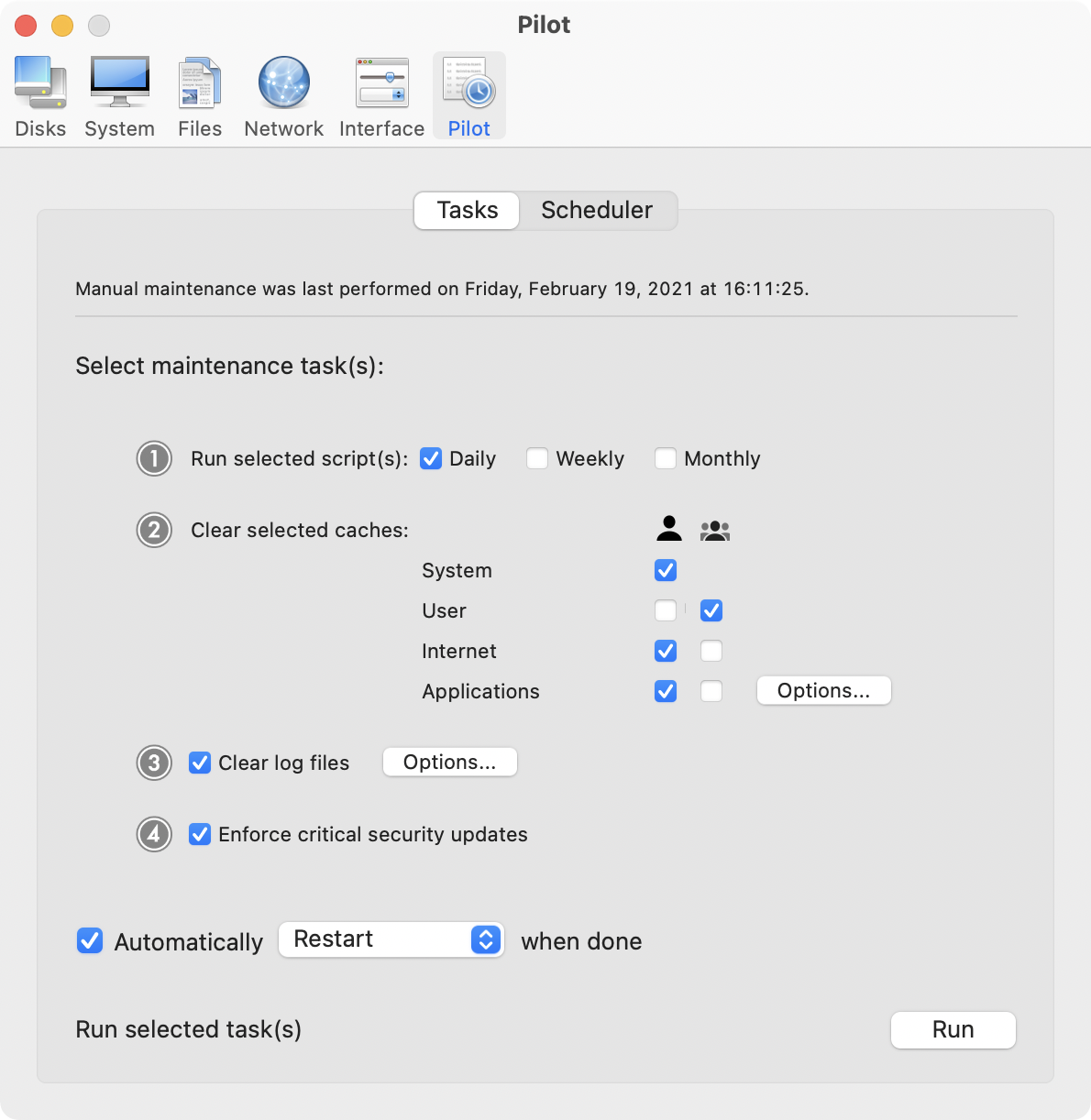
Screenshot 2: http://www.maintain.se/downloads/screenshots/screenshot2.png
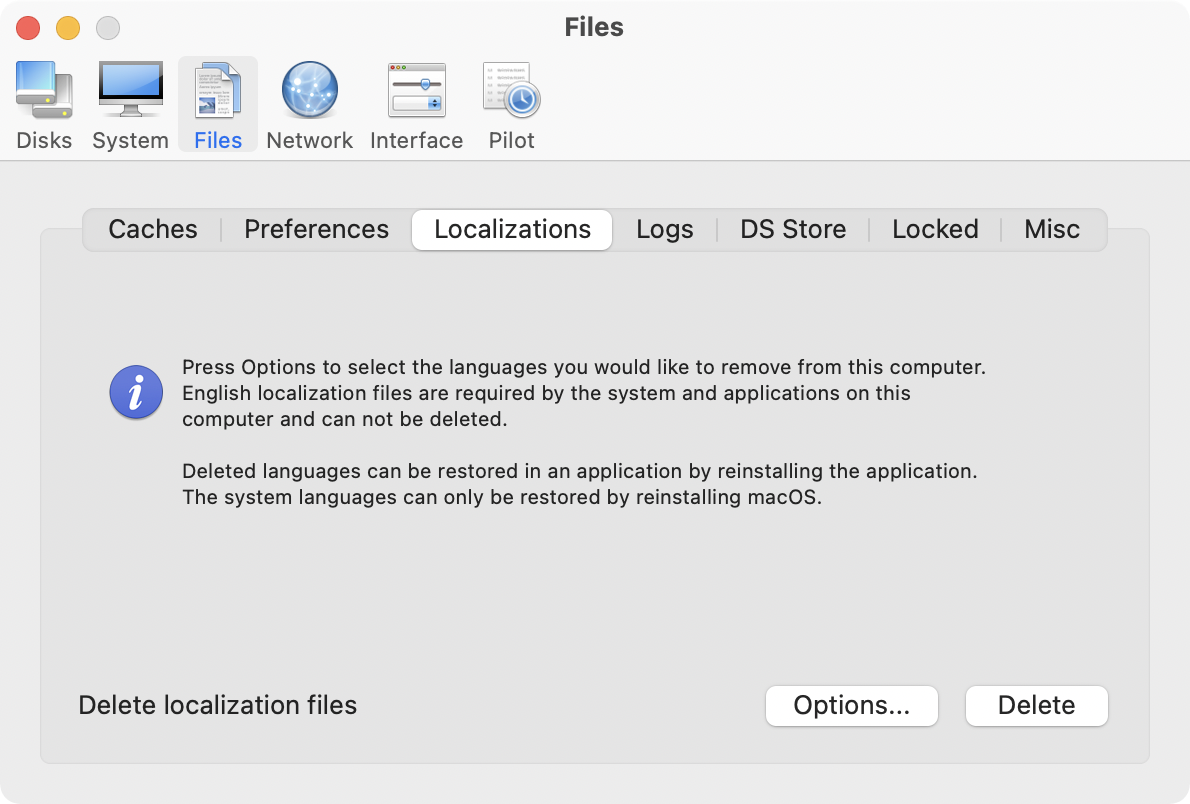
Application Icon: http://www.maintain.se/downloads/screenshots/icon.png

Maintain develops tailored applications for Mac users. We work towards creating technical solutions which maintain your computer and make it as efficient and easy to use as possible. In addition, we offer comprehensive consultancy and support services which cover everything from operation of existing systems to purchase and implementation of new technical solutions. Among our clients are: Major League Baseball, Puma, The New York Times, Sony Pictures, Ericsson, Fortum, The City Of Calgary, Peak Performance, Loreal, Harvard University, Los Angeles Times, Swedish Film Institute, Weber, ESPN, Business Week, Swedish National Police Board, Norwegian Broadcasting Corporation, Getty Images, University of Texas, South Park Studios, CompUSA, bwin, Lockheed Martin, Defense Intelligence Agency, University of Michigan and hundred of thousands of Mac users around the world. Copyright (C) 2016 Maintain. All Rights Reserved. Apple, the Apple logo and Mac are registered trademarks of Apple Inc. in
the U.S. and/or other countries.
*******
Link To Article: http://prmac.com/release-id-79782.htm
*******
---------------------------------------------------------------------------------
Note that you can alter delivered distributions at any time.
Login to your account on prMac to alter your channel selection, or to opt-out at any time.
Musicality - Now with Amazon Music and YouTube
A new article has been published at prMac.
Musicality - Now with Amazon Music and YouTube - Published on 06/29/16
Philadelphia based Industrious One today announces Musicality for Mac. Musicality breaks your music out of the browser, bringing desktop conveniences like keyboard shortcuts, powerful AirPlay streaming, and more to over a dozen of the world's most popular music services. Easily Play, pause, skip and rate songs on any supported music service. Today's release brings the total number of supported music services to 15, adding Amazon Music and YouTube to its growing list of supported music services.
Philadelphia, Pennsylvania - Industrious One today is pleased to announce the latest version of Musicality for Mac, adding Amazon Music and YouTube to its growing list of supported music services. Musicality breaks your music out of the browser, bringing desktop conveniences like keyboard shortcuts, powerful AirPlay streaming, and more to over a dozen of the world's most popular music services.
Key Features:
* Built-in Controls: Play, pause, skip and rate songs on any supported music service using the Apple keyboard media keys, custom keyboard shortcuts, or Musicality's convenient menu bar icon.
* AirPlay Streaming: Musicality can stream the audio from *any* website to AirPlay-compatible devices including AirPort Express, Apple TV, and third-party speakers and receivers. Unlike other players, Musicality can stream to multiple AirPlay devices, and play from the computer speakers, at the same time and perfectly in sync, allowing for complex multi-room setups.
* Remote Control: Musicality Remote, available for free from the iTunes App Store, connects to Musicality for Mac to control your music from an iPhone or iPad. Musicality Remote displays the currently playing song and provides controls to play, pause, skip, and rate your music, turn AirPlay speakers on and off, and adjust volumes.
* Background playback: Unlike a regular web browser, Musicality will keep playing in the background when its window is closed. Use a keyboard shortcut or click of the menu bar icon to bring it back.
* Notifications: Musicality works with Notification Center or Growl to show the currently playing song.
Supported Services
This version adds Amazon Music and YouTube to the growing list of services to take full advantage of all of Musicality's features, including:
* Pandora
* Spotify
* Amazon Music
* Google Play Music
* YouTube
* 8tracks
* Deezer
* Last.fm
* SoundCloud
* Slacker Radio
* TuneIn Radio
* Jango
* MixCloud
* Rhapsody
* Seeburg 1000
More services are added regularly through free updates.
Pricing and Availability:
Musicality is available now for $11 (USD). It requires Mac OS X 10.10 or newer and an internet connection, and may be downloaded as a free 10-day trial from the Musicality website. The trial is full-featured and unlocks in-place when purchased. Musicality Remote is available for free from the iTunes App Store. It requires iOS 9 or newer and a Wi-Fi connection to Musicality for Mac. Musicality for Mac is not currently available in the Mac App Store.
Industrious One: http://industriousone.com/
Musicality: http://getmusicality.com/
Download Musicality Remote on iTunes: https://itunes.apple.com/app/musicality-remote/id840103636
Press Kit (.zip): https://www.dropbox.com/sh/9pn6n5ddp65djx0/AAC5_PlLhfmh7ZwzVwc09fjja?dl=1
Industrious One creates software that helps people do what they love. It was founded by Jason Perkins in 2012 when, unable to stop creating stuff, he figured he better make a home for it. Now he's on a mission to help creators create. You can find him as @starkos on Twitter. All Material and Software (C) Copyright 2015 Industrious One. All Rights Reserved. Musicality is not associated with Apple or any of the music services listed. Apple, the Apple logo, Mac OS X, iPhone, iPod and iPad are registered trademarks of Apple Inc. in the U.S. and/or other countries. Other trademarks and registered trademarks may be the property of their respective owners.
*******
Link To Article: http://prmac.com/release-id-79783.htm
*******
---------------------------------------------------------------------------------
Note that you can alter delivered distributions at any time.
Login to your account on prMac to alter your channel selection, or to opt-out at any time.
Musicality - Now with Amazon Music and YouTube - Published on 06/29/16
Philadelphia based Industrious One today announces Musicality for Mac. Musicality breaks your music out of the browser, bringing desktop conveniences like keyboard shortcuts, powerful AirPlay streaming, and more to over a dozen of the world's most popular music services. Easily Play, pause, skip and rate songs on any supported music service. Today's release brings the total number of supported music services to 15, adding Amazon Music and YouTube to its growing list of supported music services.
Philadelphia, Pennsylvania - Industrious One today is pleased to announce the latest version of Musicality for Mac, adding Amazon Music and YouTube to its growing list of supported music services. Musicality breaks your music out of the browser, bringing desktop conveniences like keyboard shortcuts, powerful AirPlay streaming, and more to over a dozen of the world's most popular music services.
Key Features:
* Built-in Controls: Play, pause, skip and rate songs on any supported music service using the Apple keyboard media keys, custom keyboard shortcuts, or Musicality's convenient menu bar icon.
* AirPlay Streaming: Musicality can stream the audio from *any* website to AirPlay-compatible devices including AirPort Express, Apple TV, and third-party speakers and receivers. Unlike other players, Musicality can stream to multiple AirPlay devices, and play from the computer speakers, at the same time and perfectly in sync, allowing for complex multi-room setups.
* Remote Control: Musicality Remote, available for free from the iTunes App Store, connects to Musicality for Mac to control your music from an iPhone or iPad. Musicality Remote displays the currently playing song and provides controls to play, pause, skip, and rate your music, turn AirPlay speakers on and off, and adjust volumes.
* Background playback: Unlike a regular web browser, Musicality will keep playing in the background when its window is closed. Use a keyboard shortcut or click of the menu bar icon to bring it back.
* Notifications: Musicality works with Notification Center or Growl to show the currently playing song.
Supported Services
This version adds Amazon Music and YouTube to the growing list of services to take full advantage of all of Musicality's features, including:
* Pandora
* Spotify
* Amazon Music
* Google Play Music
* YouTube
* 8tracks
* Deezer
* Last.fm
* SoundCloud
* Slacker Radio
* TuneIn Radio
* Jango
* MixCloud
* Rhapsody
* Seeburg 1000
More services are added regularly through free updates.
Pricing and Availability:
Musicality is available now for $11 (USD). It requires Mac OS X 10.10 or newer and an internet connection, and may be downloaded as a free 10-day trial from the Musicality website. The trial is full-featured and unlocks in-place when purchased. Musicality Remote is available for free from the iTunes App Store. It requires iOS 9 or newer and a Wi-Fi connection to Musicality for Mac. Musicality for Mac is not currently available in the Mac App Store.
Industrious One: http://industriousone.com/
Musicality: http://getmusicality.com/
Download Musicality Remote on iTunes: https://itunes.apple.com/app/musicality-remote/id840103636
Press Kit (.zip): https://www.dropbox.com/sh/9pn6n5ddp65djx0/AAC5_PlLhfmh7ZwzVwc09fjja?dl=1
Industrious One creates software that helps people do what they love. It was founded by Jason Perkins in 2012 when, unable to stop creating stuff, he figured he better make a home for it. Now he's on a mission to help creators create. You can find him as @starkos on Twitter. All Material and Software (C) Copyright 2015 Industrious One. All Rights Reserved. Musicality is not associated with Apple or any of the music services listed. Apple, the Apple logo, Mac OS X, iPhone, iPod and iPad are registered trademarks of Apple Inc. in the U.S. and/or other countries. Other trademarks and registered trademarks may be the property of their respective owners.
*******
Link To Article: http://prmac.com/release-id-79783.htm
*******
---------------------------------------------------------------------------------
Note that you can alter delivered distributions at any time.
Login to your account on prMac to alter your channel selection, or to opt-out at any time.
ZuumSpeed - The most personalized speedometer + HUD
A new article has been published at prMac.
ZuumSpeed - The most personalized speedometer + HUD - Published on 06/29/16
RMKapps today introduces ZuumSpeed 1.0 for iOS. ZuumSpeed isn't just another speedometer, it redefines what's expected down to the foundation of the app. With customization that gives you the ability to personalize the easy-to-use interface and allows access to over 18 custom fonts with unlimited color options. Couple that with the built in HUD (Heads up Display) mode that projects your custom speed onto the front windshield, keeping your eyes safely on the road, or just to impress your friends.
Miami, Florida - RMKapps today is proud to announce the release and immediate availability of ZuumSpeed 1.0, the most personalized speedometer plus heads up display for iOS devices on the market. ZuumSpeed gives users over 18 custom fonts available in unlimited color options to personalize the main speedometer screen. Those choices are then reflected to the heads up display allowing a transparent image to display their custom speed directly on the front windshield. This promotes safe driving by allowing the drivers eyes to refocus much faster when switching from the road to the heads up display usually directly in front of them. It also allows for improved reaction time to changing road conditions. Head up displays are currently found only in high end vehicles and are a very expensive option. RMKapps believes heads up display technology is the future of driving.
In addition users can choose from two built in wallpapers or download additional free wallpapers from the bonus content tab, which will be downloaded directly to their phone. They can then select the image or any image from their photo library to use as a custom background on the main speedometer screen. ZuumSpeed uses your phone's integrated GPS to calculate your speed and works on everything from boats, airplanes, buses, motorcycles, or cars as long as a GPS signal is available. There is even a GPS accuracy indicator to inform users of the GPS strength. With our tested and proven GPS algorithm users can rest assured that no matter mph, km/h or knots their speed will be accurate.
Features:
* Supports MPH, KM/H, and Knots
* Easy-to-use user interface
* GPS precise current speed
* Landscape and portrait mode support
* HUD (Heads up Display) to safely display accurate speed directly in front of you
* Only uses your location while in the app
* Easy to read display
* Lock on HUD display to keep the screen from rotating
* Over 18 custom fonts to choose
* Unlimited color choices
* Free of ads and in app purchases
* Customizable Interface, download new skins for free or use your own photos
Device Requirements:
* iPhone, iPad, and iPod touch
* Requires iOS 8.0 or later
* 15.0 MB
Pricing and Availability:
ZuumSpeed 1.0 is $0.99 and available worldwide exclusively through the App Store in the Navigation category. A limited number of Promotional Codes are available to members of the media. Journalists interested in receiving one should contact Ryan Klimoski.
ZuumSpeed 1.0: http://www.rmkapps.com
Purchase and Download: https://itunes.apple.com/app/zuumspeed-customizable-speedometer/id1113205946
YouTube Video (Demo): https://www.youtube.com/watch?v=6Ca2n1JdoWo
Screenshot: https://www.dropbox.com/s/nc1opputt3qzv7h/iTunes%20Connect%20Main.jpg?dl=0
App Icon: https://www.dropbox.com/s/5dhgcuh6lqfyjbb/iconColorWheellightRound.png?dl=0
Media Assets: http://rmkapps.com/index.php/press-kit/
RMKapps is owned by Ryan Klimoski, an app developer based out of South Florida. Founded in 2014, RMKapps is committed to making quality apps that are entertaining and effective in daily use. All Material and Software (C) Copyright 2016 RMKapps. All Rights Reserved. Apple, the Apple logo, iPhone, iPod and iPad are registered trademarks of Apple Inc. in the U.S. and/or other countries. Other trademarks and registered trademarks may be the property of their respective owners.
*******
Link To Article: http://prmac.com/release-id-79780.htm
*******
---------------------------------------------------------------------------------
Note that you can alter delivered distributions at any time.
Login to your account on prMac to alter your channel selection, or to opt-out at any time.
ZuumSpeed - The most personalized speedometer + HUD - Published on 06/29/16
RMKapps today introduces ZuumSpeed 1.0 for iOS. ZuumSpeed isn't just another speedometer, it redefines what's expected down to the foundation of the app. With customization that gives you the ability to personalize the easy-to-use interface and allows access to over 18 custom fonts with unlimited color options. Couple that with the built in HUD (Heads up Display) mode that projects your custom speed onto the front windshield, keeping your eyes safely on the road, or just to impress your friends.
Miami, Florida - RMKapps today is proud to announce the release and immediate availability of ZuumSpeed 1.0, the most personalized speedometer plus heads up display for iOS devices on the market. ZuumSpeed gives users over 18 custom fonts available in unlimited color options to personalize the main speedometer screen. Those choices are then reflected to the heads up display allowing a transparent image to display their custom speed directly on the front windshield. This promotes safe driving by allowing the drivers eyes to refocus much faster when switching from the road to the heads up display usually directly in front of them. It also allows for improved reaction time to changing road conditions. Head up displays are currently found only in high end vehicles and are a very expensive option. RMKapps believes heads up display technology is the future of driving.
In addition users can choose from two built in wallpapers or download additional free wallpapers from the bonus content tab, which will be downloaded directly to their phone. They can then select the image or any image from their photo library to use as a custom background on the main speedometer screen. ZuumSpeed uses your phone's integrated GPS to calculate your speed and works on everything from boats, airplanes, buses, motorcycles, or cars as long as a GPS signal is available. There is even a GPS accuracy indicator to inform users of the GPS strength. With our tested and proven GPS algorithm users can rest assured that no matter mph, km/h or knots their speed will be accurate.
Features:
* Supports MPH, KM/H, and Knots
* Easy-to-use user interface
* GPS precise current speed
* Landscape and portrait mode support
* HUD (Heads up Display) to safely display accurate speed directly in front of you
* Only uses your location while in the app
* Easy to read display
* Lock on HUD display to keep the screen from rotating
* Over 18 custom fonts to choose
* Unlimited color choices
* Free of ads and in app purchases
* Customizable Interface, download new skins for free or use your own photos
Device Requirements:
* iPhone, iPad, and iPod touch
* Requires iOS 8.0 or later
* 15.0 MB
Pricing and Availability:
ZuumSpeed 1.0 is $0.99 and available worldwide exclusively through the App Store in the Navigation category. A limited number of Promotional Codes are available to members of the media. Journalists interested in receiving one should contact Ryan Klimoski.
ZuumSpeed 1.0: http://www.rmkapps.com
Purchase and Download: https://itunes.apple.com/app/zuumspeed-customizable-speedometer/id1113205946
YouTube Video (Demo): https://www.youtube.com/watch?v=6Ca2n1JdoWo
Screenshot: https://www.dropbox.com/s/nc1opputt3qzv7h/iTunes%20Connect%20Main.jpg?dl=0

App Icon: https://www.dropbox.com/s/5dhgcuh6lqfyjbb/iconColorWheellightRound.png?dl=0

Media Assets: http://rmkapps.com/index.php/press-kit/
RMKapps is owned by Ryan Klimoski, an app developer based out of South Florida. Founded in 2014, RMKapps is committed to making quality apps that are entertaining and effective in daily use. All Material and Software (C) Copyright 2016 RMKapps. All Rights Reserved. Apple, the Apple logo, iPhone, iPod and iPad are registered trademarks of Apple Inc. in the U.S. and/or other countries. Other trademarks and registered trademarks may be the property of their respective owners.
*******
Link To Article: http://prmac.com/release-id-79780.htm
*******
---------------------------------------------------------------------------------
Note that you can alter delivered distributions at any time.
Login to your account on prMac to alter your channel selection, or to opt-out at any time.
QuickShift - The Fastest Way to Clean Up Clutter and Organise your Mac
A new article has been published at prMac.
QuickShift - The Fastest Way to Clean Up Clutter and Organise your Mac - Published on 06/29/16
GrowthBeats Technologies Pvt. Ltd. today announces QuickShift 1.0.2, an update to their popular utility for macOS. Sitting in the menu bar for quick and easy access, QuickShift offers a fast way to clean up file clutter and organise your Mac by providing a series of power features. Add your most used folders to QuickShift and access them anytime from anywhere on your Mac with just a hotkey. In version 1.0.2 users can easily rearrange the grid and more.
Udupi, India - GrowthBeats Technologies Pvt. Ltd. today is proud to announce the release of QuickShift 1.0.2 for macOS. QuickShift is the fastest way to clean up file clutter and organise your Mac. While we work, desktop is the only space we see. The files and folders that we create, the content we download from web or email, all of it ends up on our desktop. This clutter keeps building up and it is too much of an effort to cleanup and organise, because we cannot exist being so organised every single day. QuickShift solves this problem and provides a better way to clean up and organise your Mac in a jiffy!
Add your most used folders to QuickShift and access them anytime from anywhere on your Mac with just a hotkey. QuickShift sits in the menu bar for quick and easy access. It provides a series of power features which helps in staying clutter free during daily work on your Mac.
Here are some feature highlights of QuickShift:
1. Finder drag and drop with QuickShift creates an awesome workflow.
2. Lazy mode - With the QuickShift script you don't even need to drag and drop. You can just select files in Finder, launch QuickShift using the hotkey, and choose a folder to move the files. QuickShift automatically gets the files you have selected in Finder to move/copy.
3. Instant access - Access to your most used folders from anywhere.
4. Power move - Create entire hierarchies of folders with one line of text.
5. Deep Access - This provides the fastest way to access locations which are deep in the folder hierarchy.
6. Auto - Detect external drives to quickly copy files to them.
7. Right-click services: Add folders to QuickShift or move/copy files with QuickShift by just the right-click service menu options.
8. Desktop notifications to inform you of the clutter build up
QuickShift developer Rahul Shetty says, " In a way, Finder is one of the most used application in the world. And QuickShift alleviates the problem of clutter for the Finder"
" Being a designer, I know how clutter can suddenly build up and kill your productivity. And we designers can be unorganised at times :). A tool like QuickShift definitely helps" says Kanishka Gajjar, designer of QuickShift.
Clutter is a problem that will not go away because of the amount of information we create and consume. But now, when a Mac user sees his desktop or computer cluttered he can handle it much better with QuickShift. By improving the experience of de-cluttering the Mac, QuickShift will end up becoming one of the essential utility and productivity tool for Mac users.
System Requirements:
* OS X 10.10 or later
* 64-bit processor
* 11.8 MB
Pricing and Availability:
QuickShift 1.0.2 is priced at $2.99 (or equivalent amount in other currencies) during this introductory offer. It is available worldwide and you can download it from Mac App Store in the Utilities category.
GrowthBeats: http://www.growthbeats.com
QuickShift 1.0.2: http://www.growthbeats.com/quickshift
Purchase and Download (MAS): https://itunes.apple.com/app/quickshift-because-we-cant/id1087314669
Screenshot: http://a1.mzstatic.com/us/r30/Purple30/v4/fa/41/58/fa4158bf-a921-29f7-f336-d75785b8bb59/screen800x500.jpeg
Press Kit (zip): http://quickshiftapp.com/screenshots
App Icon (zip): http://quickshiftapp.com/icon
Based out of a quaint little town called Udupi in India, that is usually popular for its restaurants, GrowthBeats was founded in June 2015. We have a very focussed purpose when it comes to our apps. Our work and lives are made of small things - activities, habits and tools that we use again and again. We want to solve problems in some of those 'small things' that you do everyday. All Material and Software (C) GrowthBeats Technologies Pvt. Ltd. All Rights Reserved. Apple, the Apple logo, Macintosh, Mac OS X and macOS are registered trademarks of Apple Inc. in the U.S. and/or other countries
*******
Link To Article: http://prmac.com/release-id-79779.htm
*******
---------------------------------------------------------------------------------
Note that you can alter delivered distributions at any time.
Login to your account on prMac to alter your channel selection, or to opt-out at any time.
QuickShift - The Fastest Way to Clean Up Clutter and Organise your Mac - Published on 06/29/16
GrowthBeats Technologies Pvt. Ltd. today announces QuickShift 1.0.2, an update to their popular utility for macOS. Sitting in the menu bar for quick and easy access, QuickShift offers a fast way to clean up file clutter and organise your Mac by providing a series of power features. Add your most used folders to QuickShift and access them anytime from anywhere on your Mac with just a hotkey. In version 1.0.2 users can easily rearrange the grid and more.
Udupi, India - GrowthBeats Technologies Pvt. Ltd. today is proud to announce the release of QuickShift 1.0.2 for macOS. QuickShift is the fastest way to clean up file clutter and organise your Mac. While we work, desktop is the only space we see. The files and folders that we create, the content we download from web or email, all of it ends up on our desktop. This clutter keeps building up and it is too much of an effort to cleanup and organise, because we cannot exist being so organised every single day. QuickShift solves this problem and provides a better way to clean up and organise your Mac in a jiffy!
Add your most used folders to QuickShift and access them anytime from anywhere on your Mac with just a hotkey. QuickShift sits in the menu bar for quick and easy access. It provides a series of power features which helps in staying clutter free during daily work on your Mac.
Here are some feature highlights of QuickShift:
1. Finder drag and drop with QuickShift creates an awesome workflow.
2. Lazy mode - With the QuickShift script you don't even need to drag and drop. You can just select files in Finder, launch QuickShift using the hotkey, and choose a folder to move the files. QuickShift automatically gets the files you have selected in Finder to move/copy.
3. Instant access - Access to your most used folders from anywhere.
4. Power move - Create entire hierarchies of folders with one line of text.
5. Deep Access - This provides the fastest way to access locations which are deep in the folder hierarchy.
6. Auto - Detect external drives to quickly copy files to them.
7. Right-click services: Add folders to QuickShift or move/copy files with QuickShift by just the right-click service menu options.
8. Desktop notifications to inform you of the clutter build up
QuickShift developer Rahul Shetty says, " In a way, Finder is one of the most used application in the world. And QuickShift alleviates the problem of clutter for the Finder"
" Being a designer, I know how clutter can suddenly build up and kill your productivity. And we designers can be unorganised at times :). A tool like QuickShift definitely helps" says Kanishka Gajjar, designer of QuickShift.
Clutter is a problem that will not go away because of the amount of information we create and consume. But now, when a Mac user sees his desktop or computer cluttered he can handle it much better with QuickShift. By improving the experience of de-cluttering the Mac, QuickShift will end up becoming one of the essential utility and productivity tool for Mac users.
System Requirements:
* OS X 10.10 or later
* 64-bit processor
* 11.8 MB
Pricing and Availability:
QuickShift 1.0.2 is priced at $2.99 (or equivalent amount in other currencies) during this introductory offer. It is available worldwide and you can download it from Mac App Store in the Utilities category.
GrowthBeats: http://www.growthbeats.com
QuickShift 1.0.2: http://www.growthbeats.com/quickshift
Purchase and Download (MAS): https://itunes.apple.com/app/quickshift-because-we-cant/id1087314669
Screenshot: http://a1.mzstatic.com/us/r30/Purple30/v4/fa/41/58/fa4158bf-a921-29f7-f336-d75785b8bb59/screen800x500.jpeg

Press Kit (zip): http://quickshiftapp.com/screenshots
App Icon (zip): http://quickshiftapp.com/icon
Based out of a quaint little town called Udupi in India, that is usually popular for its restaurants, GrowthBeats was founded in June 2015. We have a very focussed purpose when it comes to our apps. Our work and lives are made of small things - activities, habits and tools that we use again and again. We want to solve problems in some of those 'small things' that you do everyday. All Material and Software (C) GrowthBeats Technologies Pvt. Ltd. All Rights Reserved. Apple, the Apple logo, Macintosh, Mac OS X and macOS are registered trademarks of Apple Inc. in the U.S. and/or other countries
*******
Link To Article: http://prmac.com/release-id-79779.htm
*******
---------------------------------------------------------------------------------
Note that you can alter delivered distributions at any time.
Login to your account on prMac to alter your channel selection, or to opt-out at any time.
Mobilizing the EV Revolution
A new article has been published at prMac.
Mobilizing the EV Revolution - Published on 06/29/16
Electric Car Insider magazine announced today the development of an interactive mobile EV Buyers Guide app for IOS tablets and mobile devices. The app helps people interested in electric cars learn about electric vehicle technology and find a car that fits their budget and lifestyle. The new multimedia app version of the EV Buyers Guide has instructional video, audio podcasts, interviews and image gallery slide shows providing views and details not possible to include in print.
San Diego, California - Electric Car Insider magazine announced today the development of an interactive mobile EV Buyers Guide app for IOS tablets and mobile devices. The app helps people interested in electric cars learn about electric vehicle technology and find a car that fits their budget and lifestyle. The new multimedia app version of the EV Buyers Guide has instructional video, audio podcasts, interviews and image gallery slide shows providing views and details not possible to include in print.
Publisher Christopher Alan explained that the motivation for creating the app was to increase awareness and education of electric cars and other electric vehicles. "A majority of drivers in North America are not aware of the benefits of driving electric cars despite the fact that electric cars are substantially less expensive to operate than cars that use gas. EVs cost less for fuel and maintenance, and with tax and other incentives, actually cost less to purchase or lease than gas cars."
Alan estimated that the digital app will help tens of thousands of people interested in driving zero emission vehicles to make the switch from gasoline to electric transportation. "More electric cars on the road will improve air quality and reduce the nation's dependence on foreign oil" he said.
The company is taking advance orders on the Kickstarter website. Backers of the Kickstarter campaign gain early and discounted access to the product and other rewards which are listed on the project's Kickstarter web page.
The 2016 Kickstarter campaign is the second for Electric Car Insider magazine. In the 4th quarter of 2014, the company held a successful campaign to fund the development of the print edition of the 2015 EV Buyers Guide, raising nearly $12,000 to distribute the magazine through Barnes & Noble in the US and Chapters/Indigo in Canada.
Device Requirements:
* iPhone, iPad, and iPod touch
* Requires iOS 7.0 or later
* 10.1 MB
Pricing and Availability:
Electric Car Insider 2.0 is free (with in-app purchases) with a $19.99 subscription, and available worldwide through the App Store in the Magazines & Newspapers category. There are also digital tablet and mobile editions available on Google Play. The price includes four quarterly issues covering electric cars, motorcycles, bicycles, EV chargers and solar charging systems.
Electric Car Insider 2.0: http://www.electric-car-insider.com/eci-mobile-app-project-on-kickstarter-at-25-percent-of-goal.php
Download from iTunes: https://itunes.apple.com/app/electric-car-insider/id1061399060
Kickstarter Campaign: https://www.kickstarter.com/projects/electric-car-insider/electric-car-insider-interactive-app-for-mobile-an?utm_source=prmac&utm_medium=pr&utm_content=press-release&utm_campaign=2016_Kickstarter
Image (Tame Editorial Product): https://www.dropbox.com/s/w10u0mrh2sc04ls/Mobilize%20the%20EV%20Revolution%20600x600.jpg?dl=0
Image (Vibrant Product): https://www.dropbox.com/s/evwfgqkr43spzae/Rising%20Sun%20EV%20Guide%20Poster.jpg?dl=0
App Icon: https://www.dropbox.com/s/wcst0pw0hk2xpsq/RisingSunAdFinal.jpg?dl=0
Electric Car Insider publishes a quarterly review and Buyers Guide of electric vehicles and related technology. The print magazine is distributed through Ingram Periodicals to over a thousand retailers throughout North America including Barnes and Noble in the US and Chapters/Indigo in Canada. All Material and Software (C) Copyright 2016 Electric Car Insider. All Rights Reserved. Apple, the Apple logo, iPhone, iPod and iPad are registered trademarks of Apple Inc. in the U.S. and/or other countries. Other trademarks and registered trademarks may be the property of their respective owners.
*******
Link To Article: http://prmac.com/release-id-79775.htm
*******
---------------------------------------------------------------------------------
Note that you can alter delivered distributions at any time.
Login to your account on prMac to alter your channel selection, or to opt-out at any time.
Mobilizing the EV Revolution - Published on 06/29/16
Electric Car Insider magazine announced today the development of an interactive mobile EV Buyers Guide app for IOS tablets and mobile devices. The app helps people interested in electric cars learn about electric vehicle technology and find a car that fits their budget and lifestyle. The new multimedia app version of the EV Buyers Guide has instructional video, audio podcasts, interviews and image gallery slide shows providing views and details not possible to include in print.
San Diego, California - Electric Car Insider magazine announced today the development of an interactive mobile EV Buyers Guide app for IOS tablets and mobile devices. The app helps people interested in electric cars learn about electric vehicle technology and find a car that fits their budget and lifestyle. The new multimedia app version of the EV Buyers Guide has instructional video, audio podcasts, interviews and image gallery slide shows providing views and details not possible to include in print.
Publisher Christopher Alan explained that the motivation for creating the app was to increase awareness and education of electric cars and other electric vehicles. "A majority of drivers in North America are not aware of the benefits of driving electric cars despite the fact that electric cars are substantially less expensive to operate than cars that use gas. EVs cost less for fuel and maintenance, and with tax and other incentives, actually cost less to purchase or lease than gas cars."
Alan estimated that the digital app will help tens of thousands of people interested in driving zero emission vehicles to make the switch from gasoline to electric transportation. "More electric cars on the road will improve air quality and reduce the nation's dependence on foreign oil" he said.
The company is taking advance orders on the Kickstarter website. Backers of the Kickstarter campaign gain early and discounted access to the product and other rewards which are listed on the project's Kickstarter web page.
The 2016 Kickstarter campaign is the second for Electric Car Insider magazine. In the 4th quarter of 2014, the company held a successful campaign to fund the development of the print edition of the 2015 EV Buyers Guide, raising nearly $12,000 to distribute the magazine through Barnes & Noble in the US and Chapters/Indigo in Canada.
Device Requirements:
* iPhone, iPad, and iPod touch
* Requires iOS 7.0 or later
* 10.1 MB
Pricing and Availability:
Electric Car Insider 2.0 is free (with in-app purchases) with a $19.99 subscription, and available worldwide through the App Store in the Magazines & Newspapers category. There are also digital tablet and mobile editions available on Google Play. The price includes four quarterly issues covering electric cars, motorcycles, bicycles, EV chargers and solar charging systems.
Electric Car Insider 2.0: http://www.electric-car-insider.com/eci-mobile-app-project-on-kickstarter-at-25-percent-of-goal.php
Download from iTunes: https://itunes.apple.com/app/electric-car-insider/id1061399060
Kickstarter Campaign: https://www.kickstarter.com/projects/electric-car-insider/electric-car-insider-interactive-app-for-mobile-an?utm_source=prmac&utm_medium=pr&utm_content=press-release&utm_campaign=2016_Kickstarter
Image (Tame Editorial Product): https://www.dropbox.com/s/w10u0mrh2sc04ls/Mobilize%20the%20EV%20Revolution%20600x600.jpg?dl=0

Image (Vibrant Product): https://www.dropbox.com/s/evwfgqkr43spzae/Rising%20Sun%20EV%20Guide%20Poster.jpg?dl=0

App Icon: https://www.dropbox.com/s/wcst0pw0hk2xpsq/RisingSunAdFinal.jpg?dl=0

Electric Car Insider publishes a quarterly review and Buyers Guide of electric vehicles and related technology. The print magazine is distributed through Ingram Periodicals to over a thousand retailers throughout North America including Barnes and Noble in the US and Chapters/Indigo in Canada. All Material and Software (C) Copyright 2016 Electric Car Insider. All Rights Reserved. Apple, the Apple logo, iPhone, iPod and iPad are registered trademarks of Apple Inc. in the U.S. and/or other countries. Other trademarks and registered trademarks may be the property of their respective owners.
*******
Link To Article: http://prmac.com/release-id-79775.htm
*******
---------------------------------------------------------------------------------
Note that you can alter delivered distributions at any time.
Login to your account on prMac to alter your channel selection, or to opt-out at any time.
Subscribe to:
Posts (Atom)