A new article has been published at prMac.
prMac Announces Update - Press Release Distribution for the Mac Faithful - Published on 12/11/16
Dallas based prMac today announces new updates to their press release distribution service. Offering both free and paid distribution, prMac is squarely aimed at enhancing the visibility of press releases in the Mac and mobile world. In addition to the migration to an even faster server environment, the new update sports an all-new responsive design, enhances the overall experience, as well as adds many new media partners who have opted-in to the service.
Lake Dallas, Texas - prMac today announces new updates to their press release distribution service. Offering both free and paid distribution, prMac is squarely aimed at enhancing the visibility of press releases in the Mac and mobile world. Their sole mission is to help Developers and PR specialists alike announce newsworthy events, specifically targeted to Mac and iOS centric journalists, and blog enthusiasts.
Every Mac business should have access to state-of-the-art public relations tools at a price that fits their budget. Members will connect to new consumers, journalists and bloggers who would not otherwise find out about them. Regardless the business focus, prMac is fanatical about customer service and dedicated to meeting their every expectation.
"At Apple Daily Report, we're inundated with emails each day." cites Dennis Sellers, CEO. "But we always take action when we get emails from Ray and the folks at prMac. Almost everything we receive from prMac gets posted in our news section or in our daily Software Updates article."
prMac provides the necessary tools to create, manage and distribute press releases, making it easy to manage every aspect of an organization's public relations activities. The new update sports an all-new responsive design, enhances the overall experience, as well as adds many new media partners who have opted-in to the service. prMac features split posting forms (with Extra links w/labels), the ability to save posts as drafts, personalized press sheets, prScore and much more.
"I am very happy with the coverage!" said David Sinclair, owner of Dejal Systems. "Much more than with my self-posted press releases, including some big-name sites like Macworld. I will definitely use prMac for releases in the future."
A well written release can expose companies to the Mac/iOS community, enhance the image of their business, as well as help gain authority and credibility within their niche. Every press release prMac distributes is reviewed by a human editor to insure it meets the highest standards of quality. Distribution services may be upgraded from Free Distribution to an Extended Distribution to ensure maximum exposure.
* Ridiculously Priced: Extended Distribution is only $19.95 per post
* Bulk Distribution Packages Available: discounted off their already low fee
* Excellent Coverage: prMac is proud to represent the Mac faithful
* Dramatically Reduced Spam
* Guaranteed Distribution to Media Partners
* Easy to Use: Members can create, manage and distribute their press communications in a flash
* Drafts: Members can save releases as a Draft to use in future distribution, or simply to stash snippets
* Check Channel Position, Number of Views, as well as Search Engine Indexing
* prScore: Compiles the most significant factors in a communications piece to see how well it performed
* Press Release Challenged? Let prMac help - Writing Services for only $88.00 (USD)
"prMac made the task of sending out a press release for our application significantly easier than our previous process. In addition, the press releases we have sent out through prMac have reached a broader audience than we were obtaining on our own. They are now considered part of our normal workflow for announcements." Marcus S. Zarra - Zarra Studios LLC.
"prMac has done an amazing job writing and distributing our press releases, allowing us to focus on making a better product. They are always quick to respond to emails no matter the time of day (or night). My only regret is that we didn't find prMac sooner."
Sean Reilly - The Infinite Kind
Mac and iOS Developers alike no longer need to spend the time writing every journalist or news website about their products/services. prMac allows them to focus on what they do best: developing cool apps and taking care of their customers. So far, 834 Media Sources have partnered with prMac, representing the bulk of the Mac Press and more. prMac is delighted to have them, and members absolutely love them. Thank You Mac Press!
prMac: http://prmac.com
Welcome: http://services.prmac.com/welcome/
Register: http://prmac.com/register
Media Partners (Short List): http://services.prmac.com/agencylist/
What Members are saying about prMac: http://services.prmac.com/testimonials/
Headquartered in Lake Dallas, Texas, prMac is a property of Geeksuit LLC, a leading evangelist for the Mac platform since 1999. GeekSuit was originally founded by Ray Barber. prMac launched in February, 2007. Copyright 1999-2016 Geeksuit LLC. All Rights Reserved. Apple, the Apple logo, OS X, iPhone, iPad, iPod and Macintosh are registered trademarks of Apple Computer in the U.S. and/or other countries. Other trademarks and registered trademarks may be the property of their respective owners.
*******
Link To Article: http://prmac.com/release-id-80767.htm
*******
---------------------------------------------------------------------------------
Note that you can alter delivered distributions at any time.
Login to your account on prMac to alter your channel selection, or to opt-out at any time.

The Easiest Way to Teach Essential Words to Kids is Kidsyam's Linkpairs
A new article has been published at prMac.
The Easiest Way to Teach Essential Words to Kids is Kidsyam's Linkpairs - Published on 12/11/16
Netdiver announces their third kids game, KidsYam's LinkPairs: Word Education 1.0.2 for iOS and Android devices. KidsYam's LinkPairs is the app which makes kids to learn basic words through adorable illustrations, exact pronunciations, funny sounds and animations of it. The strong point of KidsYam's LinkPairs is that kids can learn essential words naturally during playing KidsYam's LinkPairs. KidsYam's LinkPairs is a good example of gamification which combines game and education.
Seoul, Korea - Netdiver is proud to announce the release of their third kids game, KidsYam's LinkPairs: Word Education 1.0.2 for iPhone, iPad, iPod touch and Android devices. KidsYam's LinkPairs is a matching puzzle game that children can enjoy puzzles and learn basic words at the same time.
The strong point of KidsYam's LinkPairs is that kids can learn essential words naturally during playing KidsYam's LinkPairs. KidsYam's LinkPairs is a good example of gamification which combines game and education. Matching images and words, listening pronunciation, and scanning spellings will be fun and easy to kids when they play KidsYam's LinkPairs.
Of course, children can also enjoy full of adorable illustrations, funny animations, and amusing sounds of KidsYam's LinkPairs. Those make kids to memorize 180 words of 15 categories, 30 stages, 4 languages easily.
If your kids want to learn Asian languages, like Chinese, Japanese, and Korean, KidsYam's LinkPairs is the app which can help your kids. Just download it and let your kids play with it! KidsYam' LinkPairs is available on the Google Play and Apple App Store now.
Netdiver announced they would release other educational kids game apps in succession.
Special Features
1. Various categories and essential words! Birds, animals, bugs, fruits, vegetables, people, body, numbers, nature, jobs, and more! Essential and basic words of 15 categories!
2. Fun to learn and play at the same time! Through the gamification of education program, kids can expand their vocabulary with interest!
3. 3 step matching and repetitive learning method! Adorable characters designed for kids will help kids to increase vocabulary and concentration skills amusingly.
4. Exact pronunciation of professional voice actors from 4 countries! Let kids follow and practice pronunciation of professional voice actors from 4 countries.
Now download and start 'KidsYam's Basic Word Education' to teach your kids basic and essential words!
Device Requirements:
* iPhone, iPad, and iPod touch
* Requires iOS 6.1 or later
* Universal Application
* 56.1 MB
Pricing and Availability:
KidsYam's LinkPairs: Word Education 1.0.2 is free, and is available worldwide through the App Store in the Education category. An Android version is available through Google Play.
Netdiver: http://www.netdiver.co.kr
KidsYam's LinkPairs : Word Education 1.0.2: https://store.kidsyam.com/
Download from iTunes: https://itunes.apple.com/app/kidsyams-linkpairs-word-education/id1174750896
Screenshot: http://a3.mzstatic.com/us/r30/Purple71/v4/d0/a3/f8/d0a3f8ea-beeb-0bc7-6067-d9c50d7517db/screen520x924.jpeg
App Icon: http://is4.mzstatic.com/image/thumb/Purple71/v4/49/d9/11/49d911f9-7335-464f-daa1-3749940267f7/source/175x175bb.jpg
Netdiver's goal is to constantly make kids apps which help kids to be educated or grow properly.
This is because we want to contribute to the education of children as IT Parents! We are now trying to make kids apps that kids can enjoy and learn at the same time. All Material and Software Copyright (C) 2016 Netdiver. All Rights Reserved. Apple, the Apple logo, iPhone, iPod, and iPad are registered trademarks of Apple Inc. in the U.S. and/or other countries.
*******
Link To Article: http://prmac.com/release-id-80766.htm
*******
---------------------------------------------------------------------------------
Note that you can alter delivered distributions at any time.
Login to your account on prMac to alter your channel selection, or to opt-out at any time.
The Easiest Way to Teach Essential Words to Kids is Kidsyam's Linkpairs - Published on 12/11/16
Netdiver announces their third kids game, KidsYam's LinkPairs: Word Education 1.0.2 for iOS and Android devices. KidsYam's LinkPairs is the app which makes kids to learn basic words through adorable illustrations, exact pronunciations, funny sounds and animations of it. The strong point of KidsYam's LinkPairs is that kids can learn essential words naturally during playing KidsYam's LinkPairs. KidsYam's LinkPairs is a good example of gamification which combines game and education.
Seoul, Korea - Netdiver is proud to announce the release of their third kids game, KidsYam's LinkPairs: Word Education 1.0.2 for iPhone, iPad, iPod touch and Android devices. KidsYam's LinkPairs is a matching puzzle game that children can enjoy puzzles and learn basic words at the same time.
The strong point of KidsYam's LinkPairs is that kids can learn essential words naturally during playing KidsYam's LinkPairs. KidsYam's LinkPairs is a good example of gamification which combines game and education. Matching images and words, listening pronunciation, and scanning spellings will be fun and easy to kids when they play KidsYam's LinkPairs.
Of course, children can also enjoy full of adorable illustrations, funny animations, and amusing sounds of KidsYam's LinkPairs. Those make kids to memorize 180 words of 15 categories, 30 stages, 4 languages easily.
If your kids want to learn Asian languages, like Chinese, Japanese, and Korean, KidsYam's LinkPairs is the app which can help your kids. Just download it and let your kids play with it! KidsYam' LinkPairs is available on the Google Play and Apple App Store now.
Netdiver announced they would release other educational kids game apps in succession.
Special Features
1. Various categories and essential words! Birds, animals, bugs, fruits, vegetables, people, body, numbers, nature, jobs, and more! Essential and basic words of 15 categories!
2. Fun to learn and play at the same time! Through the gamification of education program, kids can expand their vocabulary with interest!
3. 3 step matching and repetitive learning method! Adorable characters designed for kids will help kids to increase vocabulary and concentration skills amusingly.
4. Exact pronunciation of professional voice actors from 4 countries! Let kids follow and practice pronunciation of professional voice actors from 4 countries.
Now download and start 'KidsYam's Basic Word Education' to teach your kids basic and essential words!
Device Requirements:
* iPhone, iPad, and iPod touch
* Requires iOS 6.1 or later
* Universal Application
* 56.1 MB
Pricing and Availability:
KidsYam's LinkPairs: Word Education 1.0.2 is free, and is available worldwide through the App Store in the Education category. An Android version is available through Google Play.
Netdiver: http://www.netdiver.co.kr
KidsYam's LinkPairs : Word Education 1.0.2: https://store.kidsyam.com/
Download from iTunes: https://itunes.apple.com/app/kidsyams-linkpairs-word-education/id1174750896
Screenshot: http://a3.mzstatic.com/us/r30/Purple71/v4/d0/a3/f8/d0a3f8ea-beeb-0bc7-6067-d9c50d7517db/screen520x924.jpeg

App Icon: http://is4.mzstatic.com/image/thumb/Purple71/v4/49/d9/11/49d911f9-7335-464f-daa1-3749940267f7/source/175x175bb.jpg

Netdiver's goal is to constantly make kids apps which help kids to be educated or grow properly.
This is because we want to contribute to the education of children as IT Parents! We are now trying to make kids apps that kids can enjoy and learn at the same time. All Material and Software Copyright (C) 2016 Netdiver. All Rights Reserved. Apple, the Apple logo, iPhone, iPod, and iPad are registered trademarks of Apple Inc. in the U.S. and/or other countries.
*******
Link To Article: http://prmac.com/release-id-80766.htm
*******
---------------------------------------------------------------------------------
Note that you can alter delivered distributions at any time.
Login to your account on prMac to alter your channel selection, or to opt-out at any time.
Dejal introduces Date Stamp - Customizable Stickers for iMessage
A new article has been published at prMac.
Dejal introduces Date Stamp - Customizable Stickers for iMessage - Published on 12/09/16
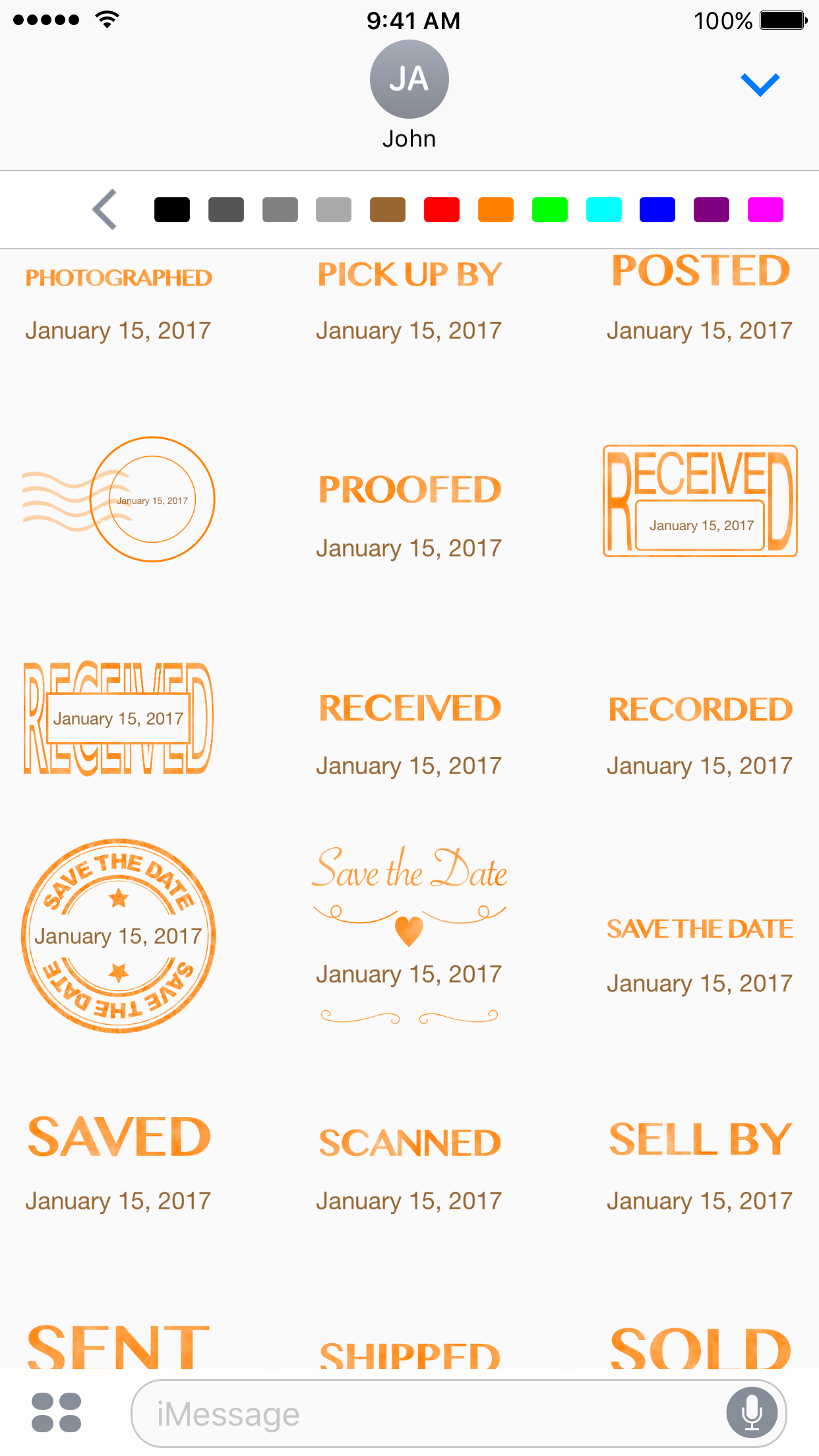
Dejal Systems, LLC today introduces Date Stamp 1.0, a iMessage app for iPhone and iPad. With Date Stamp, anyone can create customizable stickers, featuring a date and message like APPROVED, DUE, PAID, RECEIVED, SAVE THE DATE, SENT, and more. Users can can choose a different date, select short, medium, or long date format, and change the colors of the date and design text to personalize the date stamp stickers. It also includes a toolbar above the stickers to change the appearance.
Portland, Oregon - Dejal Systems, LLC today is proud to announce the release and immediate availability of Date Stamp version 1.0, an iMessage app for iPhone and iPad. Use it to create customizable stickers, featuring a date and message like APPROVED, DUE, PAID, RECEIVED, SAVE THE DATE, SENT, and more.
Date Stamp is a standalone iMessage app; it won't clutter up your home screen, but will only appear in Apple's Messages app on iOS. Tap the stickers/apps button to the left of the text field to display the stickers and iMessage apps. Unlike a static sticker pack, you can choose a different date, select short, medium, or long date format, and change the colors of the date and design text to personalize the date stamp stickers.
Date Stamp includes a toolbar above the stickers to change the appearance. The date can be changed via a mini date picker; tap Today, or spin each of the date components to choose another date. Choose short, medium, or long date format (via buttons that show how the chosen date will be displayed). Pick a color to use for the date in the stamp. Pick another color for the rest of the stamp (the text and any frame). Then tap a sticker to insert it in a message, or tap and hold to peel it, and drag it to stick on any message bubble, optionally using two fingers to rotate or resize it as desired.
Device Requirements:
* iPhone, iPad, and iPod touch
* Requires iOS�10.1 or later
* 20.5 MB
Pricing and Availability:
Date Stamp 1.0 is $1.99 USD (or equivalent amount in other currencies) and available worldwide exclusively through the App Store in the Stickers category (iMessage Store). For-review promo codes are available to the media; contact Dejal to receive one.
Dejal: http://www.dejal.com/
Date Stamp 1.0: http://www.dejal.com/datestamp/
Purchase and Download: https://itunes.apple.com/us/app/datestamp/id1180861479?mt=8&uo=4&at=10l5Kg&ct=datestamp
Screenshot 1: http://www.dejal.com/datestamp/images/iphone/1.png
Screenshot 2: http://www.dejal.com/datestamp/images/iphone/4.png
App Icon: http://www.dejal.com/datestamp/images/icons/icon-1024x768.png
Founded by David Sinclair in 1991, Dejal Systems, LLC was originally established in New Zealand, and later moved to Portland, Oregon in 2001. With a focus on the Mac, iPad and iPhone platforms, Dejal specializes in user-friendly and flexible utility software. Copyright 2016 Dejal Systems, LLC. All Rights Reserved. Dejal, the Dejal logo, and Date Stamp are trademarks of Dejal Systems, LLC. Apple, the Apple logo, iPhone, iPod and iPad are registered trademarks of Apple Inc. in the U.S. and/or other countries. Other trademarks and registered trademarks may be the property of their respective owners.
*******
Link To Article: http://prmac.com/release-id-80765.htm
*******
---------------------------------------------------------------------------------
Note that you can alter delivered distributions at any time.
Login to your account on prMac to alter your channel selection, or to opt-out at any time.
Dejal introduces Date Stamp - Customizable Stickers for iMessage - Published on 12/09/16
Dejal Systems, LLC today introduces Date Stamp 1.0, a iMessage app for iPhone and iPad. With Date Stamp, anyone can create customizable stickers, featuring a date and message like APPROVED, DUE, PAID, RECEIVED, SAVE THE DATE, SENT, and more. Users can can choose a different date, select short, medium, or long date format, and change the colors of the date and design text to personalize the date stamp stickers. It also includes a toolbar above the stickers to change the appearance.
Portland, Oregon - Dejal Systems, LLC today is proud to announce the release and immediate availability of Date Stamp version 1.0, an iMessage app for iPhone and iPad. Use it to create customizable stickers, featuring a date and message like APPROVED, DUE, PAID, RECEIVED, SAVE THE DATE, SENT, and more.
Date Stamp is a standalone iMessage app; it won't clutter up your home screen, but will only appear in Apple's Messages app on iOS. Tap the stickers/apps button to the left of the text field to display the stickers and iMessage apps. Unlike a static sticker pack, you can choose a different date, select short, medium, or long date format, and change the colors of the date and design text to personalize the date stamp stickers.
Date Stamp includes a toolbar above the stickers to change the appearance. The date can be changed via a mini date picker; tap Today, or spin each of the date components to choose another date. Choose short, medium, or long date format (via buttons that show how the chosen date will be displayed). Pick a color to use for the date in the stamp. Pick another color for the rest of the stamp (the text and any frame). Then tap a sticker to insert it in a message, or tap and hold to peel it, and drag it to stick on any message bubble, optionally using two fingers to rotate or resize it as desired.
Device Requirements:
* iPhone, iPad, and iPod touch
* Requires iOS�10.1 or later
* 20.5 MB
Pricing and Availability:
Date Stamp 1.0 is $1.99 USD (or equivalent amount in other currencies) and available worldwide exclusively through the App Store in the Stickers category (iMessage Store). For-review promo codes are available to the media; contact Dejal to receive one.
Dejal: http://www.dejal.com/
Date Stamp 1.0: http://www.dejal.com/datestamp/
Purchase and Download: https://itunes.apple.com/us/app/datestamp/id1180861479?mt=8&uo=4&at=10l5Kg&ct=datestamp
Screenshot 1: http://www.dejal.com/datestamp/images/iphone/1.png

Screenshot 2: http://www.dejal.com/datestamp/images/iphone/4.png
App Icon: http://www.dejal.com/datestamp/images/icons/icon-1024x768.png

Founded by David Sinclair in 1991, Dejal Systems, LLC was originally established in New Zealand, and later moved to Portland, Oregon in 2001. With a focus on the Mac, iPad and iPhone platforms, Dejal specializes in user-friendly and flexible utility software. Copyright 2016 Dejal Systems, LLC. All Rights Reserved. Dejal, the Dejal logo, and Date Stamp are trademarks of Dejal Systems, LLC. Apple, the Apple logo, iPhone, iPod and iPad are registered trademarks of Apple Inc. in the U.S. and/or other countries. Other trademarks and registered trademarks may be the property of their respective owners.
*******
Link To Article: http://prmac.com/release-id-80765.htm
*******
---------------------------------------------------------------------------------
Note that you can alter delivered distributions at any time.
Login to your account on prMac to alter your channel selection, or to opt-out at any time.
Christmas Coloring Book Contest on PaigeeWorld iOS
A new article has been published at prMac.
Christmas Coloring Book Contest on PaigeeWorld iOS - Published on 12/09/16
To celebrate the seasons, PaigeeWorld is hosting a Christmas Coloring Book Contest. Everyone can enter. Simply color the contest line art and submit to PaigeeWorld via their award winning iOS, Android apps or Web Client. PaigeeWorld is North America's largest Manga/Anime community. A world where you can explore fun characters, meet new friends, share your drawings and maybe even discover your own inner artist. The Christmas Contest starts on December 9th and runs until January 2nd, 2017.
Vancouver, Canada - Christmas has arrived on PaigeeWorld! To celebrate the seasons, PaigeeWorld is hosting a Christmas Coloring Book Contest. This contest is made so everyone can enter. Simply color the contest line art and submit to PaigeeWorld via the iOS, Android or Web Client. PaigeeWorld is North America's largest Manga / Anime community. PaigeeWorld iOS is an award winning app, while PaigeeWorld Web is now the 544th largest web site in the USA.
Amazing artists from around the world have provided Christmas coloring page line art for the contest. Community members are encouraged to experiment with a number of different styles by trying as many of the coloring pages they would like. Grand Prizes are awarded for Best Digital and Best Traditional entries. There are also 11 additional prizes including Consolation, Participation and Bonus.
"A huge thank you to the following PaigeeWorld artists for providing line art for this contest: tsiih, axsen, rhinokin, danipandi, emscribbles, gabrielleragusi, hellomango, jellyemily, mrsrabbit, poisonouspeach, xxanjuxx and queenwicky009,"said Preston Rohrick, CEO of Vancouver based PaigeeDraw Inc. "Seasons greetings from PaigeeWorld! If your not already a member, come check us out for Christmas. Join over 600,000 registered artists on PaigeeWorld."
PaigeeWorld 3.3 is the latest version of its very popular social network app for mobile devices. Welcome to the world of manga! A world where you can explore fun characters, meet new friends, share your drawings and maybe even discover your own inner artist. You can even request help or advice on your own work. With over a half of a million downloads and over 7000 five star ratings, this newest version is about to impress its users with a whole series of new features.
Device Requirements:
* iPhone, iPad, and iPod touch
* Requires iOS 7.1 or later
* 65.0 MB
Pricing and Availability:
PaigeeWorld 3.3 is Free and available worldwide through the App Store in the Social Networking category. There is also an Android version available on Google Play as well as on the web. The Christmas Contest starts on December 9th on PaigeeWorld and runs until January 2nd, 2017. The PaigeeWorld Christmas Coloring Book Contest line art can be downloaded at PaigeeWorld online. Full contest details are also available on PaigeeWorld.
PaigeeWorld 3.3: https://www.paigeeworld.com
Christmas Coloring Contest: http://paigeedraw.com/2016/12/christmas-coloring-book/
Download from iTunes: https://itunes.apple.com/app/paigeeworld-how-to-draw-manga/id571154498
Screenshot: http://a2.mzstatic.com/us/r30/Purple69/v4/77/25/a7/7725a7f2-5e4b-3c8d-1a75-a9f2d49720e7/sc552x414.jpeg
App Icon: http://is3.mzstatic.com/image/thumb/Purple69/v4/6d/97/1b/6d971b8b-674b-f7a8-913f-ec084618238f/source/175x175bb.jpg
PaigeeDraw Inc. is an independent software development company formed by Paige Rohrick. Paige started PaigeeWorld in 2012 and since then has helped over half a million artists find a home for their art, improve their skills through tutorials and make friends from around the world. Copyright (C) 2016 PaigeeDraw Inc. All Rights Reserved. Apple, the Apple logo, iPhone, iPod and iPad are registered trademarks of Apple Inc. in the U.S. and/or other countries.
*******
Link To Article: http://prmac.com/release-id-80763.htm
*******
---------------------------------------------------------------------------------
Note that you can alter delivered distributions at any time.
Login to your account on prMac to alter your channel selection, or to opt-out at any time.
Christmas Coloring Book Contest on PaigeeWorld iOS - Published on 12/09/16
To celebrate the seasons, PaigeeWorld is hosting a Christmas Coloring Book Contest. Everyone can enter. Simply color the contest line art and submit to PaigeeWorld via their award winning iOS, Android apps or Web Client. PaigeeWorld is North America's largest Manga/Anime community. A world where you can explore fun characters, meet new friends, share your drawings and maybe even discover your own inner artist. The Christmas Contest starts on December 9th and runs until January 2nd, 2017.
Vancouver, Canada - Christmas has arrived on PaigeeWorld! To celebrate the seasons, PaigeeWorld is hosting a Christmas Coloring Book Contest. This contest is made so everyone can enter. Simply color the contest line art and submit to PaigeeWorld via the iOS, Android or Web Client. PaigeeWorld is North America's largest Manga / Anime community. PaigeeWorld iOS is an award winning app, while PaigeeWorld Web is now the 544th largest web site in the USA.
Amazing artists from around the world have provided Christmas coloring page line art for the contest. Community members are encouraged to experiment with a number of different styles by trying as many of the coloring pages they would like. Grand Prizes are awarded for Best Digital and Best Traditional entries. There are also 11 additional prizes including Consolation, Participation and Bonus.
"A huge thank you to the following PaigeeWorld artists for providing line art for this contest: tsiih, axsen, rhinokin, danipandi, emscribbles, gabrielleragusi, hellomango, jellyemily, mrsrabbit, poisonouspeach, xxanjuxx and queenwicky009,"said Preston Rohrick, CEO of Vancouver based PaigeeDraw Inc. "Seasons greetings from PaigeeWorld! If your not already a member, come check us out for Christmas. Join over 600,000 registered artists on PaigeeWorld."
PaigeeWorld 3.3 is the latest version of its very popular social network app for mobile devices. Welcome to the world of manga! A world where you can explore fun characters, meet new friends, share your drawings and maybe even discover your own inner artist. You can even request help or advice on your own work. With over a half of a million downloads and over 7000 five star ratings, this newest version is about to impress its users with a whole series of new features.
Device Requirements:
* iPhone, iPad, and iPod touch
* Requires iOS 7.1 or later
* 65.0 MB
Pricing and Availability:
PaigeeWorld 3.3 is Free and available worldwide through the App Store in the Social Networking category. There is also an Android version available on Google Play as well as on the web. The Christmas Contest starts on December 9th on PaigeeWorld and runs until January 2nd, 2017. The PaigeeWorld Christmas Coloring Book Contest line art can be downloaded at PaigeeWorld online. Full contest details are also available on PaigeeWorld.
PaigeeWorld 3.3: https://www.paigeeworld.com
Christmas Coloring Contest: http://paigeedraw.com/2016/12/christmas-coloring-book/
Download from iTunes: https://itunes.apple.com/app/paigeeworld-how-to-draw-manga/id571154498
Screenshot: http://a2.mzstatic.com/us/r30/Purple69/v4/77/25/a7/7725a7f2-5e4b-3c8d-1a75-a9f2d49720e7/sc552x414.jpeg

App Icon: http://is3.mzstatic.com/image/thumb/Purple69/v4/6d/97/1b/6d971b8b-674b-f7a8-913f-ec084618238f/source/175x175bb.jpg

PaigeeDraw Inc. is an independent software development company formed by Paige Rohrick. Paige started PaigeeWorld in 2012 and since then has helped over half a million artists find a home for their art, improve their skills through tutorials and make friends from around the world. Copyright (C) 2016 PaigeeDraw Inc. All Rights Reserved. Apple, the Apple logo, iPhone, iPod and iPad are registered trademarks of Apple Inc. in the U.S. and/or other countries.
*******
Link To Article: http://prmac.com/release-id-80763.htm
*******
---------------------------------------------------------------------------------
Note that you can alter delivered distributions at any time.
Login to your account on prMac to alter your channel selection, or to opt-out at any time.
CarQuiz Math Game going to Space - Parents and Teachers Needed
A new article has been published at prMac.
CarQuiz Math Game going to Space - Parents and Teachers Needed - Published on 12/09/16
Smile More Studios, makers of the mental math app, CarQuiz Math Game, are applying for a grant to take the game in to space! The company is conducting a study over the next few weeks to find more kids whose math scores improve after playing the game. They are looking for parents and teachers interested in helping them test the game as an effective way of improving math scores for kids ages 5 to 12. After taking the survey, players can enter to win cool prizes.
Seattle, Washington - Parents and Teachers needed! Smile More Studios, makers of the mental math app, CarQuiz(TM) Math Game, is conducting a study over the next few weeks to find more kids whose math scores improve after playing the game. The company is applying for a grant to take the game in to space! They are conducting a study to find more kids whose math scores improve after playing CarQuiz(TM) Math Game. The company is looking for parents and teachers interested in helping them test the game as an effective way of improving math scores for kids ages 5 to 12. After taking the survey, players can enter to win cool prizes!
Smile More Studios is asking parents and teachers for their help in determining how effective CarQuiz(TM) Math Game can be, as a learning tool to improve basic math skills. We are gathering additional evidence that CarQuiz is an effective learning tool to improve math scores. With this data, we will pursue an educational grant to develop CarQuiz Math Game's sequel - StarQuiz! Players who complete the survey can enter to win 3d prints of the characters and cars from the game.
Follow these steps to help us with the study:
Step 1:
Before using CarQuiz, make notes on the player's math skills for each of the 4 operators of addition, subtraction, multiplication and division. For each operator, choose New, Poor, Fair, Good, or Excellent.
Step 2:
Download and play CarQuiz Math Game, then play several times a day and note the progress. Track player's score, as well as which operator and difficulty level. Maximum score is 30 out of 30. For example, on normal difficulty level, play 10 games each of addition, subtraction, multiplication and division. Make notes on player's progress and keep track of player scores.
Step 3:
Share any stories you have about improved math scores at school. Share any feedback you have about the game. Re-assess player's skill for each operator, after playing many games of CarQuiz.
CarQuiz Math Game is a 5 minute mental math app that helps kids practice addition, subtraction, multiplication, and division skills. In this math game for kids, the player races around a track answering math equations. The objective of the game is to get as many correct answers as possible. Kids can play with a parent, play with a friend, or play on their own. A father/daughter team published the game last year on the App Store. Ideal for ages 5 to 12.
Feedback on the game includes:
* "A must have for all kids out there."
* "The gameplay is so engaging that the kids forget they are actually learning!"
* "A great kids game, and excellent for helping to build up their math skills."
* "This game is awesome!"
Device Requirements:
* iPhone, iPad, and iPod touch
* Requires iOS�6.1 or later
* 292 MB
Pricing and Availability:
CarQuiz Math Game 1.2 is only $0.99 USD (or equivalent amount in other currencies) and available worldwide exclusively through the App Store in the Education category. Players who complete the survey can enter to win 3d prints of the characters and cars from the game. For more information and screenshots about the game and the studio, visit the Smile More Studios and CarQuiz Math Game webpages or contact Scott Martin.
Smile More Studios: http://smilemorestudios.com/
CarQuiz Math Game 1.2: http://www.carquizgame.com/
Purchase and Download: https://itunes.apple.com/app/carquiz-math-game/id979637176
SurveyHero Skills Survey: https://surveyhero.com/c/178ec2c
App Icon: http://www.smilemorestudios.com/CarQuiz_App_Icon_1024.png
Smile More Studios Logo: http://www.smilemorestudios.com/sms_logo_512.png
Smile More Studios is committed to finding effective ways to blend education with gaming. The company is led by industry veteran, Scott Martin, game designer and 3d artist on CarQuiz. Scott has been a teacher and academic director. He has a Masters in Educational Administration and has worked on 10 published game titles. Smile More Studios is a division of Martin Arts Incorporated. All Material and Software (C) Copyright 2016 Smile More Studios. All Rights Reserved. Apple, the Apple logo, iPhone, iPod and iPad are registered trademarks of Apple Inc. in the U.S. and/or other countries. Other trademarks and registered trademarks may be the property of their respective owners.
*******
Link To Article: http://prmac.com/release-id-80764.htm
*******
---------------------------------------------------------------------------------
Note that you can alter delivered distributions at any time.
Login to your account on prMac to alter your channel selection, or to opt-out at any time.
CarQuiz Math Game going to Space - Parents and Teachers Needed - Published on 12/09/16
Smile More Studios, makers of the mental math app, CarQuiz Math Game, are applying for a grant to take the game in to space! The company is conducting a study over the next few weeks to find more kids whose math scores improve after playing the game. They are looking for parents and teachers interested in helping them test the game as an effective way of improving math scores for kids ages 5 to 12. After taking the survey, players can enter to win cool prizes.
Seattle, Washington - Parents and Teachers needed! Smile More Studios, makers of the mental math app, CarQuiz(TM) Math Game, is conducting a study over the next few weeks to find more kids whose math scores improve after playing the game. The company is applying for a grant to take the game in to space! They are conducting a study to find more kids whose math scores improve after playing CarQuiz(TM) Math Game. The company is looking for parents and teachers interested in helping them test the game as an effective way of improving math scores for kids ages 5 to 12. After taking the survey, players can enter to win cool prizes!
Smile More Studios is asking parents and teachers for their help in determining how effective CarQuiz(TM) Math Game can be, as a learning tool to improve basic math skills. We are gathering additional evidence that CarQuiz is an effective learning tool to improve math scores. With this data, we will pursue an educational grant to develop CarQuiz Math Game's sequel - StarQuiz! Players who complete the survey can enter to win 3d prints of the characters and cars from the game.
Follow these steps to help us with the study:
Step 1:
Before using CarQuiz, make notes on the player's math skills for each of the 4 operators of addition, subtraction, multiplication and division. For each operator, choose New, Poor, Fair, Good, or Excellent.
Step 2:
Download and play CarQuiz Math Game, then play several times a day and note the progress. Track player's score, as well as which operator and difficulty level. Maximum score is 30 out of 30. For example, on normal difficulty level, play 10 games each of addition, subtraction, multiplication and division. Make notes on player's progress and keep track of player scores.
Step 3:
Share any stories you have about improved math scores at school. Share any feedback you have about the game. Re-assess player's skill for each operator, after playing many games of CarQuiz.
CarQuiz Math Game is a 5 minute mental math app that helps kids practice addition, subtraction, multiplication, and division skills. In this math game for kids, the player races around a track answering math equations. The objective of the game is to get as many correct answers as possible. Kids can play with a parent, play with a friend, or play on their own. A father/daughter team published the game last year on the App Store. Ideal for ages 5 to 12.
Feedback on the game includes:
* "A must have for all kids out there."
* "The gameplay is so engaging that the kids forget they are actually learning!"
* "A great kids game, and excellent for helping to build up their math skills."
* "This game is awesome!"
Device Requirements:
* iPhone, iPad, and iPod touch
* Requires iOS�6.1 or later
* 292 MB
Pricing and Availability:
CarQuiz Math Game 1.2 is only $0.99 USD (or equivalent amount in other currencies) and available worldwide exclusively through the App Store in the Education category. Players who complete the survey can enter to win 3d prints of the characters and cars from the game. For more information and screenshots about the game and the studio, visit the Smile More Studios and CarQuiz Math Game webpages or contact Scott Martin.
Smile More Studios: http://smilemorestudios.com/
CarQuiz Math Game 1.2: http://www.carquizgame.com/
Purchase and Download: https://itunes.apple.com/app/carquiz-math-game/id979637176
SurveyHero Skills Survey: https://surveyhero.com/c/178ec2c
App Icon: http://www.smilemorestudios.com/CarQuiz_App_Icon_1024.png

Smile More Studios Logo: http://www.smilemorestudios.com/sms_logo_512.png

Smile More Studios is committed to finding effective ways to blend education with gaming. The company is led by industry veteran, Scott Martin, game designer and 3d artist on CarQuiz. Scott has been a teacher and academic director. He has a Masters in Educational Administration and has worked on 10 published game titles. Smile More Studios is a division of Martin Arts Incorporated. All Material and Software (C) Copyright 2016 Smile More Studios. All Rights Reserved. Apple, the Apple logo, iPhone, iPod and iPad are registered trademarks of Apple Inc. in the U.S. and/or other countries. Other trademarks and registered trademarks may be the property of their respective owners.
*******
Link To Article: http://prmac.com/release-id-80764.htm
*******
---------------------------------------------------------------------------------
Note that you can alter delivered distributions at any time.
Login to your account on prMac to alter your channel selection, or to opt-out at any time.
Never Settle for Low Performing Wireless Signals with Wifi Status App
A new article has been published at prMac.
Never Settle for Low Performing Wireless Signals with Wifi Status App - Published on 12/08/16
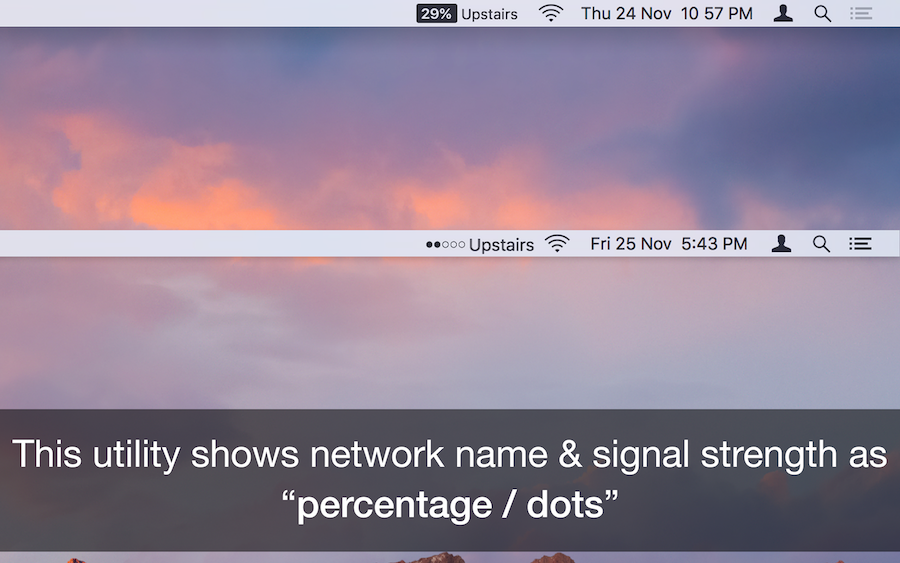
AppYogi Software today introduces Wifi Signal Strength Status App 1.0, its new utility developed exclusively for macOS. This useful app prominently displays the wireless signal strength with network name, "neat icon" or "percentage" on menu bar. It lets users know and monitor wireless signal strength at all times with RSSI, Noise, Transmit Rate, Channel details and much more. The app also allows the user to see their public IP with Mac address on the Menu Bar.
Bangalore, India - AppYogi Software today is pleased to announce the release of WiFi Signal Strength Status App 1.0, the company's new utility developed exclusively for macOS. WiFi Signal Strength Status App features a unique, single threaded algorithm to accurately monitor the wireless signal strength of the personal computer network. This convenient Menu Bar application that allows easily identify all wifi related connectivity and poor performance issues. It also allows the user to see their public IP with Mac address on the Menu Bar.
It also which lets you know the strength of the signal and other stats like your IP address, Mac Address, Open or secured, Channel Details, BSSID, RSSI, Noise, Transmit Rate, PHY, Interface mode, Security type, etc.
Features:
* See the Strength, IP address and speed of the connected network via wireless signal
* Get the public and local IP address of your computer
* Connected wireless network name(optional)
* Retina Display enabled values
* Copy IP / Mac address from the menu
* Set refresh rate of signal strength value
* Transmit rate of connected Wifi network
* Retina Display enabled icons
* Easy to use interface
* Best in the market
"Never settle for low performing wireless signals," explained Bharath Patel, co-founder of Bangalore based AppYogi Software. "WiFi Signal Strength Status App has stunning and easy to use user interface, accurate and precise data calculation. It works best on systems that have a 64-bit processor and the download size is 1.4 MB. The app provides accurate signal strength with retina icons, connected network name and also works with MacBook Air, iMac and MacBook Pro, MacBook, Mac Pro, Mac Mini."
System Requirements:
* OS X 10.10 or later
* 64-bit processor
* 1.4 MB
Pricing and Availability:
Wifi Signal Strength Status App - Get fast and precise info about your system Wi-Fi connections on menu bar 1.0 is only $4.99 USD (or equivalent amount in other currencies) and available worldwide exclusively through the Mac App Store in the Utilities category.
Wifi Signal Strength Status 1.0: http://appyogi.com/apps/wifi-signal-strength-status/
Purchase and Download (Mac App Store): https://itunes.apple.com/app/wifi-signal-strength-status/id1177934624
Featured on ProductHunt: https://www.producthunt.com/posts/wifi-signal-strength-status
Screenshot 1: http://appyogi.com/wordpress/wp-content/uploads/2016/11/Wifi_signal_strength_status_mac_menu_bar_app_1.png
Screenshot 2: http://appyogi.com/wordpress/wp-content/uploads/2016/11/Wifi_signal_strength_status_mac_menu_bar_app_3.png
Application Icon: http://appyogi.com/wordpress/wp-content/uploads/2016/11/Wifi_signal_strength_status_app_for_mac_Icon_256x256.png
AppYogi, derived from upyogi, meaning 'useful' in Hindi. We handcraft apps that are useful and help you do small things more efficiently, making you more productive. We have just started, and bigger, brighter things are yet to come; stay tuned. If you like our apps feel free to drop a word of praise, who doesn't like a bit of flattery. All Material and Software (C) Copyright 2016 AppYogi Software. All Rights Reserved. Apple, the Apple logo, Macintosh, macOS and Mac OS X are registered trademarks of Apple Inc. in the U.S. and/or other countries. Other trademarks and registered trademarks may be the property of their respective owners.
*******
Link To Article: http://prmac.com/release-id-80762.htm
*******
---------------------------------------------------------------------------------
Note that you can alter delivered distributions at any time.
Login to your account on prMac to alter your channel selection, or to opt-out at any time.
Never Settle for Low Performing Wireless Signals with Wifi Status App - Published on 12/08/16
AppYogi Software today introduces Wifi Signal Strength Status App 1.0, its new utility developed exclusively for macOS. This useful app prominently displays the wireless signal strength with network name, "neat icon" or "percentage" on menu bar. It lets users know and monitor wireless signal strength at all times with RSSI, Noise, Transmit Rate, Channel details and much more. The app also allows the user to see their public IP with Mac address on the Menu Bar.
Bangalore, India - AppYogi Software today is pleased to announce the release of WiFi Signal Strength Status App 1.0, the company's new utility developed exclusively for macOS. WiFi Signal Strength Status App features a unique, single threaded algorithm to accurately monitor the wireless signal strength of the personal computer network. This convenient Menu Bar application that allows easily identify all wifi related connectivity and poor performance issues. It also allows the user to see their public IP with Mac address on the Menu Bar.
It also which lets you know the strength of the signal and other stats like your IP address, Mac Address, Open or secured, Channel Details, BSSID, RSSI, Noise, Transmit Rate, PHY, Interface mode, Security type, etc.
Features:
* See the Strength, IP address and speed of the connected network via wireless signal
* Get the public and local IP address of your computer
* Connected wireless network name(optional)
* Retina Display enabled values
* Copy IP / Mac address from the menu
* Set refresh rate of signal strength value
* Transmit rate of connected Wifi network
* Retina Display enabled icons
* Easy to use interface
* Best in the market
"Never settle for low performing wireless signals," explained Bharath Patel, co-founder of Bangalore based AppYogi Software. "WiFi Signal Strength Status App has stunning and easy to use user interface, accurate and precise data calculation. It works best on systems that have a 64-bit processor and the download size is 1.4 MB. The app provides accurate signal strength with retina icons, connected network name and also works with MacBook Air, iMac and MacBook Pro, MacBook, Mac Pro, Mac Mini."
System Requirements:
* OS X 10.10 or later
* 64-bit processor
* 1.4 MB
Pricing and Availability:
Wifi Signal Strength Status App - Get fast and precise info about your system Wi-Fi connections on menu bar 1.0 is only $4.99 USD (or equivalent amount in other currencies) and available worldwide exclusively through the Mac App Store in the Utilities category.
Wifi Signal Strength Status 1.0: http://appyogi.com/apps/wifi-signal-strength-status/
Purchase and Download (Mac App Store): https://itunes.apple.com/app/wifi-signal-strength-status/id1177934624
Featured on ProductHunt: https://www.producthunt.com/posts/wifi-signal-strength-status
Screenshot 1: http://appyogi.com/wordpress/wp-content/uploads/2016/11/Wifi_signal_strength_status_mac_menu_bar_app_1.png

Screenshot 2: http://appyogi.com/wordpress/wp-content/uploads/2016/11/Wifi_signal_strength_status_mac_menu_bar_app_3.png
Application Icon: http://appyogi.com/wordpress/wp-content/uploads/2016/11/Wifi_signal_strength_status_app_for_mac_Icon_256x256.png

AppYogi, derived from upyogi, meaning 'useful' in Hindi. We handcraft apps that are useful and help you do small things more efficiently, making you more productive. We have just started, and bigger, brighter things are yet to come; stay tuned. If you like our apps feel free to drop a word of praise, who doesn't like a bit of flattery. All Material and Software (C) Copyright 2016 AppYogi Software. All Rights Reserved. Apple, the Apple logo, Macintosh, macOS and Mac OS X are registered trademarks of Apple Inc. in the U.S. and/or other countries. Other trademarks and registered trademarks may be the property of their respective owners.
*******
Link To Article: http://prmac.com/release-id-80762.htm
*******
---------------------------------------------------------------------------------
Note that you can alter delivered distributions at any time.
Login to your account on prMac to alter your channel selection, or to opt-out at any time.
Reggie Ashworth releases AppDelete 4.3.1 - Uninstall Anything
A new article has been published at prMac.
Reggie Ashworth releases AppDelete 4.3.1 - Uninstall Anything - Published on 12/08/16
Independent software developer Reggie Ashworth today releases AppDelete 4.3.1, an update to his popular application deletion utility for Mac OS X. With a simple Drag & Drop, AppDelete will uninstall anything along with all of the associated items. Mac users will no longer have to hunt through their system to find and delete these items manually. AppDelete is a must-have utility for beta testers and casual users alike, and the perfect companion to any Mac fanatic's toolbox.
Anaheim, California - Independent software developer Reggie Ashworth today is proud to announce the release of AppDelete 4.3.1, an update to his very popular application deletion utility for Mac OS X. With a simple Drag & Drop, AppDelete will uninstall anything along with all of the associated items. Mac users will no longer have to hunt through their system to find and delete these items manually.
You can drag any item that can be uninstalled onto AppDelete: Applications, Widgets, Preference Panes, Plugins, Screensavers, etc. You can also activate AppDelete in many ways: dragging items onto main window, onto dock icon, selecting in menu, right-clicking using AppDelete workflow, dragging from Launchpad, and throwing items in the trash. When the preview screen appears you can uncheck any items you would like to exclude.
You also have several choices: delete the items, log only the items, or archive (copy) the items to a .zip file for safekeeping or reinstall at a later date. The items you delete will be moved to the trash and arranged in a folder so that you can see exactly what was deleted and you know exactly where it came from. The items will not be removed from your computer until you empty them from your trash. You can also undo the last delete if you choose.
Version 4 has been 100% redesigned and updated and just one look will show you that this is an entirely new AppDelete. AppDelete Version 4.3.1 will run on Lion, Mountain Lion, Mavericks, Yosemite, El Capitan, and macOS Sierra, and here are a few of the new features included:
New in Version 4.3:
* Now optimized for macOS Sierra
* Runs on Lion up to Sierra
* New icon and graphics
* New App Reset tool
* New Clear Logs tool
* Improved search algorithm
* Improved window design
* Numerous visual tweaks
* Localization updates
* Optimizations, bug-fixes, and improvements throughout
Feature Highlights:
* Search filters to find items for deletion fast (including old PPC apps)
* Finds associated items that are invisible or hidden
* Trash monitoring so that simply throwing an app in the trash triggers AppDelete
* Archive/Install from Archive feature for safekeeping and transferring items to another Mac
* Password requested only once if needed instead of multiple requests
* Keeps a Log of all activities and has the ability to Undo a deletion
* Moves items into an organized deleted package in your trash
* Force Empty Trash for stubborn to remove items
There are various options to make your AppDelete experience complete: Quick search filters to help choose items for deletion, Force Empty Trash, an Orphans feature to search and delete orphaned files, Install from Archive even for another Mac, various options in Preferences, and more. AppDelete is a must-have utility for software tinkerers, beta testers, casual users, and the perfect companion to any Mac fanatic's toolbox.
AppDelete supports language in U.S. English, Chinese, Czech, Danish, Dutch, Finnish, French, German, Italian, Japanese, Korean, Portuguese (Brazilian), Russian, Spanish, and Swedish.
AppDelete Version 4.3.1 cleans up and fixes a few minor issues from the big Version 4.3 release. For full Release Notes see Changelog below.
System Requirements:
* Mac OS X Version 10.7 Lion or later (macOS Sierra compatible)
* Intel only
* 13.8 MB Hard Drive space
Pricing and Availability:
AppDelete 4.3.1 is only $7.99 (USD) for a single user license. Upgrades from AppDelete Lite are only $3.99 (USD). A full-featured demo is available.
AppDelete 4.3.1: http://www.reggieashworth.com/appdelete
Changelog: http://www.reggieashworth.com/appdeletenotes
Download AppDelete: http://www.reggieashworth.com/downloads/AppDelete.dmg
YouTube Channel (Tutorials): http://www.youtube.com/user/ReggieAshworth
Screenshot One: http://www.reggieashworth.com/img/picOneCropped2.png
Screenshot Two: http://www.reggieashworth.com/img/picTwoCropped2.png
Based in sunny Anaheim, California, Reggie Ashworth is an independent software developer whose passion for the Mac platform is only exceeded by his aim to craft simple, yet useful utilities. He is fanatical about total customer satisfaction. Copyright 2006-2016 Reggie Ashworth. All Rights Reserved. Apple, the Apple logo, and Macintosh are registered trademarks of Apple Computer in the U.S. and/or other countries.
*******
Link To Article: http://prmac.com/release-id-80760.htm
*******
---------------------------------------------------------------------------------
Note that you can alter delivered distributions at any time.
Login to your account on prMac to alter your channel selection, or to opt-out at any time.
Reggie Ashworth releases AppDelete 4.3.1 - Uninstall Anything - Published on 12/08/16
Independent software developer Reggie Ashworth today releases AppDelete 4.3.1, an update to his popular application deletion utility for Mac OS X. With a simple Drag & Drop, AppDelete will uninstall anything along with all of the associated items. Mac users will no longer have to hunt through their system to find and delete these items manually. AppDelete is a must-have utility for beta testers and casual users alike, and the perfect companion to any Mac fanatic's toolbox.
Anaheim, California - Independent software developer Reggie Ashworth today is proud to announce the release of AppDelete 4.3.1, an update to his very popular application deletion utility for Mac OS X. With a simple Drag & Drop, AppDelete will uninstall anything along with all of the associated items. Mac users will no longer have to hunt through their system to find and delete these items manually.
You can drag any item that can be uninstalled onto AppDelete: Applications, Widgets, Preference Panes, Plugins, Screensavers, etc. You can also activate AppDelete in many ways: dragging items onto main window, onto dock icon, selecting in menu, right-clicking using AppDelete workflow, dragging from Launchpad, and throwing items in the trash. When the preview screen appears you can uncheck any items you would like to exclude.
You also have several choices: delete the items, log only the items, or archive (copy) the items to a .zip file for safekeeping or reinstall at a later date. The items you delete will be moved to the trash and arranged in a folder so that you can see exactly what was deleted and you know exactly where it came from. The items will not be removed from your computer until you empty them from your trash. You can also undo the last delete if you choose.
Version 4 has been 100% redesigned and updated and just one look will show you that this is an entirely new AppDelete. AppDelete Version 4.3.1 will run on Lion, Mountain Lion, Mavericks, Yosemite, El Capitan, and macOS Sierra, and here are a few of the new features included:
New in Version 4.3:
* Now optimized for macOS Sierra
* Runs on Lion up to Sierra
* New icon and graphics
* New App Reset tool
* New Clear Logs tool
* Improved search algorithm
* Improved window design
* Numerous visual tweaks
* Localization updates
* Optimizations, bug-fixes, and improvements throughout
Feature Highlights:
* Search filters to find items for deletion fast (including old PPC apps)
* Finds associated items that are invisible or hidden
* Trash monitoring so that simply throwing an app in the trash triggers AppDelete
* Archive/Install from Archive feature for safekeeping and transferring items to another Mac
* Password requested only once if needed instead of multiple requests
* Keeps a Log of all activities and has the ability to Undo a deletion
* Moves items into an organized deleted package in your trash
* Force Empty Trash for stubborn to remove items
There are various options to make your AppDelete experience complete: Quick search filters to help choose items for deletion, Force Empty Trash, an Orphans feature to search and delete orphaned files, Install from Archive even for another Mac, various options in Preferences, and more. AppDelete is a must-have utility for software tinkerers, beta testers, casual users, and the perfect companion to any Mac fanatic's toolbox.
AppDelete supports language in U.S. English, Chinese, Czech, Danish, Dutch, Finnish, French, German, Italian, Japanese, Korean, Portuguese (Brazilian), Russian, Spanish, and Swedish.
AppDelete Version 4.3.1 cleans up and fixes a few minor issues from the big Version 4.3 release. For full Release Notes see Changelog below.
System Requirements:
* Mac OS X Version 10.7 Lion or later (macOS Sierra compatible)
* Intel only
* 13.8 MB Hard Drive space
Pricing and Availability:
AppDelete 4.3.1 is only $7.99 (USD) for a single user license. Upgrades from AppDelete Lite are only $3.99 (USD). A full-featured demo is available.
AppDelete 4.3.1: http://www.reggieashworth.com/appdelete
Changelog: http://www.reggieashworth.com/appdeletenotes
Download AppDelete: http://www.reggieashworth.com/downloads/AppDelete.dmg
YouTube Channel (Tutorials): http://www.youtube.com/user/ReggieAshworth
Screenshot One: http://www.reggieashworth.com/img/picOneCropped2.png

Screenshot Two: http://www.reggieashworth.com/img/picTwoCropped2.png

Based in sunny Anaheim, California, Reggie Ashworth is an independent software developer whose passion for the Mac platform is only exceeded by his aim to craft simple, yet useful utilities. He is fanatical about total customer satisfaction. Copyright 2006-2016 Reggie Ashworth. All Rights Reserved. Apple, the Apple logo, and Macintosh are registered trademarks of Apple Computer in the U.S. and/or other countries.
*******
Link To Article: http://prmac.com/release-id-80760.htm
*******
---------------------------------------------------------------------------------
Note that you can alter delivered distributions at any time.
Login to your account on prMac to alter your channel selection, or to opt-out at any time.
Subscribe to:
Posts (Atom)