A new article has been published at prMac.
Vita Journal for iOS with Location and Weather - Published on 12/16/16
Georgia based developer, Pixolini, Inc. introduces Vita Journal 1.0, a one-of-a-kind journal for iOS devices. Vita Journal features the ability to organize entries in multiple books and add multiple photos to each entry. Vita Journal was thoughtfully designed to record your daily moments of life and special occasions including location, weather, temperature, photos and tags. The Vita Journal app was designed with these features in mind to help you record your Life.
Conyers, Georgia - Pixolini, Inc. today is proud to announce the release of Vita Journal 1.0 for iPhone, iPad, and iPod touch devices. Vita Journal was thoughtfully designed to record your daily moments of life and special occasions including location, weather, temperature*, photos* and tags. The Vita Journal app was designed with these features in mind to help you record your Life.
Vita Journal: Record your daily moments of life and special occasions. Include Location, Weather and Temperature(*), Photos(*) and Tags.
Vita Journal is a one-of-a-kind journal that features the ability to organize entries in multiple books and add multiple photos to each entry. It is said that a picture is worth a thousand words; organize your life and memorable moments with unlimited photos, audio recordings, and tags. Vita Journal also supports multiple entries per day including past or future dates.
* Multiple Journal Books(*) Personal, Vacations, Ideas, Business...
* Multiple Photos(*) per Diary Entry
* GPS Location with Map
* Weather and Temperature(*)
* Photos can be viewed in full screen mode and zoomed in
* Tag entries by keywords
* Date and time stamp
* Secure Password Protection including Touch ID(*)
* Quickly Search by keywords
* Cloud Sync with multiple devices(*)
(*) Premium Features (available via in-app purchase) include Cloud Sync with Multiple Devices, Multiple Journal Books, Multiple Photos per Entry, Weather and Temperature, support future development
Device Requirements:
* iPhone, iPad, and iPod touch
* Requires iOS 10.1 or later
* Universal Application
* 25.7 MB
Pricing and Availability:
Vita Journal 1.0 is free, and is available worldwide exclusively through the App Store in the Lifestyle category. A convenient in-app purchase is available to activate Premium Features.
Pixolini: http://www.pixolini.com
Vita Journal 1.0: http://pixolini.com/ios/
Download from iTunes: https://itunes.apple.com/app/vita-journal/id1151692934
Screenshot: http://pixolini.com/wp-content/uploads/2016/11/Vita-iPhone-FanOut.png
App Icon: http://pixolini.com/wp-content/uploads/2016/10/Vita_Icon_128x128.png
Based in Georgia, Pixolini was founded to develop with several important values; simple and easy to use, visually striking and quality with affordability. Copyright (C) 2016 Pixolini, Inc. All Rights Reserved. Apple, the Apple logo, iPhone, and iPod are registered trademarks of Apple Inc. in the U.S. and/or other countries. Other trademarks and registered trademarks may be the property of their respective owners.
*******
Link To Article: https://prmac.com/release-id-80801.htm
*******
---------------------------------------------------------------------------------
Note that you can alter delivered distributions at any time.
Login to your account on prMac to alter your channel selection, or to opt-out at any time.



Publisher LITE Games releases fully refurbished version of Mills
A new article has been published at prMac.
Publisher LITE Games releases fully refurbished version of Mills - Published on 12/16/16
Hamburg based LITE Games GmbH today announces Mills 2.5.1, an update to their popular game title for iOS devices. The aim of the game is to hit as many enemy stones as possible by forming so-called Mills. However, you can also block your opponent by cleverly moving your own stones around, rendering them unable to make a move. Version 2.5.1 receives a complete overhaul including online multiplayer mode, international leaderboards, and stylish HD graphics.
Hamburg, Germany - Casual games publisher LITE Games, headquartered in Hamburg/Germany, has released a big update for the iOS version of the successful app "iMills" today. About five years after the initial launch the update delivers the long anticipated online multiplayer mode as well as numerous other improvements (and a new name: "Mills").
Mills is a hugely popular game throughout the world, characterized by the fact it is so easy to learn - and it's even older than chess. Nowadays the game that's also well known as Nine Men's Morris, The Mill Game, or Cowboy Checkers is a national pastime in many countries.
With the Apple iOS version of the free mobile game having already recorded over a million downloads, the game takes the next step to improve the game experience even further. The update was already released for Android about a month ago and was very well received with over 100,000 new downloads and an overall rating of 4.3 stars.
Mills features 3 game modes: 2-player online, 1-player offline, 2-player offline. The heart of the new version is certainly the online multiplayer mode, in which players can put their skills to the test in matches against opponents from all over the world. Also new are the international online ranking and comprehensive statistics which enable players to track their own progress.
"We are extremely excited about the new online multiplayer feature", says Chris Twellmann, Managing Director at LITE Games GmbH. "The ability to play Mills against friends online and to then be able to compete in ranking lists is a feature that a large number of players have been requesting for some time."
But the game continues to be just as fun offline as well. Apart from the powerful AI with various difficulty levels, there are now also customizable rules for a personalized game experience, as well as numerous achievements to unlock. Naturally, the new version also offers the option of replacing an offline computer opponent with a human player, allowing users to play a round of Mills with friends in real life without needing a game board.
In addition to a graphical overhaul of the game, localization into many new languages has been added. The Mills board game is now available in English, German, French, Italian, Spanish, Portuguese, Dutch, Swedish, Turkish, Russian, Polish, Hungarian, Chinese, and Japanese.
Device Requirements:
* iPhone, iPad, and iPod touch
* Requires iOS 7.0 or later
* 208 MB
Pricing and Availability:
Mills 2.5.1 is only Free and available worldwide through the App Store in the Games category. There is also an Android version available on Google Play. For more information regarding the game, please visit LITE Games games online.
LITE Games: http://www.lite-games.com
Mills 2.5.1: http://www.lite-games.com/games/mills
Download from iTunes: https://itunes.apple.com/app/id485690959
Promotional Image: http://www.lite-games.com/Press/LG_Mills_HeaderImage_800x300.png
App Icon: http://www.lite-games.com/Press/LG_Mills_Icon_rounded.png
Press Kit (zip): http://www.lite-games.com/Press/LG_Mills_PressPack_DE.zip
LITE Games GmbH was founded in 2014 in Hamburg, Germany and focusses on developing and publishing casual classics for the mobile operating systems Apple iOS and Android. The constantly expanding portfolio of LITE Games currently comprises more than 30 games, the emphasis lies on the adaption of classical game concepts, and contains card games like Rummy, Canasta or Crazy Eights as well as board-, brain- or dice- games. With more than 25 million downloads and many internationally top ranking apps in the most important app stores (Apple, Google, Amazon) LITE Games is one of the leading providers of mobile casual games. All Material and Software (C) Copyright 2016 LITE Games GmbH. All Rights Reserved. Apple, the Apple logo, iPhone, iPod and iPad are registered trademarks of Apple Inc. in the U.S. and/or other countries. Other trademarks and registered trademarks may be the property of their respective owners.
*******
Link To Article: https://prmac.com/release-id-80800.htm
*******
---------------------------------------------------------------------------------
Note that you can alter delivered distributions at any time.
Login to your account on prMac to alter your channel selection, or to opt-out at any time.
Publisher LITE Games releases fully refurbished version of Mills - Published on 12/16/16
Hamburg based LITE Games GmbH today announces Mills 2.5.1, an update to their popular game title for iOS devices. The aim of the game is to hit as many enemy stones as possible by forming so-called Mills. However, you can also block your opponent by cleverly moving your own stones around, rendering them unable to make a move. Version 2.5.1 receives a complete overhaul including online multiplayer mode, international leaderboards, and stylish HD graphics.
Hamburg, Germany - Casual games publisher LITE Games, headquartered in Hamburg/Germany, has released a big update for the iOS version of the successful app "iMills" today. About five years after the initial launch the update delivers the long anticipated online multiplayer mode as well as numerous other improvements (and a new name: "Mills").
Mills is a hugely popular game throughout the world, characterized by the fact it is so easy to learn - and it's even older than chess. Nowadays the game that's also well known as Nine Men's Morris, The Mill Game, or Cowboy Checkers is a national pastime in many countries.
With the Apple iOS version of the free mobile game having already recorded over a million downloads, the game takes the next step to improve the game experience even further. The update was already released for Android about a month ago and was very well received with over 100,000 new downloads and an overall rating of 4.3 stars.
Mills features 3 game modes: 2-player online, 1-player offline, 2-player offline. The heart of the new version is certainly the online multiplayer mode, in which players can put their skills to the test in matches against opponents from all over the world. Also new are the international online ranking and comprehensive statistics which enable players to track their own progress.
"We are extremely excited about the new online multiplayer feature", says Chris Twellmann, Managing Director at LITE Games GmbH. "The ability to play Mills against friends online and to then be able to compete in ranking lists is a feature that a large number of players have been requesting for some time."
But the game continues to be just as fun offline as well. Apart from the powerful AI with various difficulty levels, there are now also customizable rules for a personalized game experience, as well as numerous achievements to unlock. Naturally, the new version also offers the option of replacing an offline computer opponent with a human player, allowing users to play a round of Mills with friends in real life without needing a game board.
In addition to a graphical overhaul of the game, localization into many new languages has been added. The Mills board game is now available in English, German, French, Italian, Spanish, Portuguese, Dutch, Swedish, Turkish, Russian, Polish, Hungarian, Chinese, and Japanese.
Device Requirements:
* iPhone, iPad, and iPod touch
* Requires iOS 7.0 or later
* 208 MB
Pricing and Availability:
Mills 2.5.1 is only Free and available worldwide through the App Store in the Games category. There is also an Android version available on Google Play. For more information regarding the game, please visit LITE Games games online.
LITE Games: http://www.lite-games.com
Mills 2.5.1: http://www.lite-games.com/games/mills
Download from iTunes: https://itunes.apple.com/app/id485690959
Promotional Image: http://www.lite-games.com/Press/LG_Mills_HeaderImage_800x300.png

App Icon: http://www.lite-games.com/Press/LG_Mills_Icon_rounded.png

Press Kit (zip): http://www.lite-games.com/Press/LG_Mills_PressPack_DE.zip
LITE Games GmbH was founded in 2014 in Hamburg, Germany and focusses on developing and publishing casual classics for the mobile operating systems Apple iOS and Android. The constantly expanding portfolio of LITE Games currently comprises more than 30 games, the emphasis lies on the adaption of classical game concepts, and contains card games like Rummy, Canasta or Crazy Eights as well as board-, brain- or dice- games. With more than 25 million downloads and many internationally top ranking apps in the most important app stores (Apple, Google, Amazon) LITE Games is one of the leading providers of mobile casual games. All Material and Software (C) Copyright 2016 LITE Games GmbH. All Rights Reserved. Apple, the Apple logo, iPhone, iPod and iPad are registered trademarks of Apple Inc. in the U.S. and/or other countries. Other trademarks and registered trademarks may be the property of their respective owners.
*******
Link To Article: https://prmac.com/release-id-80800.htm
*******
---------------------------------------------------------------------------------
Note that you can alter delivered distributions at any time.
Login to your account on prMac to alter your channel selection, or to opt-out at any time.
Vita Journal for iOS with Location and Weather
A new article has been published at prMac.
Vita Journal for iOS with Location and Weather - Published on 12/15/16
Pixolini, Inc. announces Vita Journal 1.0 for iOS devices. Vita Journal is a one-of-a-kind journal that features the ability to organize entries in multiple books and add multiple photos to each entry. Vita Journal was thoughtfully designed to record your daily moments of life and special occasions including location, weather, temperature, photos and tags. The Vita Journal app was designed with these features in mind to help you record your Life.
Conyers, Georgia - Pixolini, Inc. today announces the release of Vita Journal 1.0 for iPhone, iPad, and iPod touch devices. Vita Journal was thoughtfully designed to record your daily moments of life and special occasions including location, weather, temperature*, photos* and tags. The Vita Journal app was designed with these features in mind to help you record your Life.
Vita Journal: Record your daily moments of life and special occasions. Include Location, Weather and Temperature*, Photos* and Tags.
Vita Journal is a one-of-a-kind journal that features the ability to organize entries in multiple books and add multiple photos to each entry. It is said that a picture is worth a thousand words; organize your life and memorable moments with unlimited photos, audio recordings, and tags. Vita Journal also supports multiple entries per day including past or future dates.
* Multiple Journal Books* Personal, Vacations, Ideas, Business...
* Multiple Photos* per Diary Entry
* GPS Location with Map
* Weather and Temperature*
* Photos can be viewed in full screen mode and zoomed in
* Tag entries by keywords
* Date and time stamp
* Secure Password Protection including Touch ID*
* Quickly Search by keywords
* Cloud Sync with multiple devices*
* Premium Features (available via in-app purchase) include Cloud Sync with Multiple Devices, Multiple Journal Books, Multiple Photos per Entry, Weather and Temperature, support future development
Device Requirements:
* iPhone, iPad, and iPod touch
* Requires iOS 10.1 or later
* Universal Application
* 25.7 MB
Pricing and Availability:
Vita Journal 1.0 is free, and is available worldwide exclusively through the App Store in the Lifestyle category. A convenient in-app purchase is available to activate Premium Features.
Pixolini, Inc.: http://www.pixolini.com
Vita Journal 1.0: http://pixolini.com/ios/
Download from iTunes: https://itunes.apple.com/app/vita-journal/id1151692934
Screenshot: http://pixolini.com/wp-content/uploads/2016/11/Vita-iPhone-FanOut.png
App Icon: http://pixolini.com/wp-content/uploads/2016/10/Vita_Icon_128x128.png
Based in Georgia, Pixolini was founded to develop with several important values; simple and easy to use, visually striking and quality with affordability. Copyright (C) 2016 Pixolini, Inc. All Rights Reserved. Apple, the Apple logo, iPhone, and iPod are registered trademarks of Apple Inc. in the U.S. and/or other countries. Other trademarks and registered trademarks may be the property of their respective owners.
*******
Link To Article: http://prmac.com/release-id-80799.htm
*******
---------------------------------------------------------------------------------
Note that you can alter delivered distributions at any time.
Login to your account on prMac to alter your channel selection, or to opt-out at any time.
Vita Journal for iOS with Location and Weather - Published on 12/15/16
Pixolini, Inc. announces Vita Journal 1.0 for iOS devices. Vita Journal is a one-of-a-kind journal that features the ability to organize entries in multiple books and add multiple photos to each entry. Vita Journal was thoughtfully designed to record your daily moments of life and special occasions including location, weather, temperature, photos and tags. The Vita Journal app was designed with these features in mind to help you record your Life.
Conyers, Georgia - Pixolini, Inc. today announces the release of Vita Journal 1.0 for iPhone, iPad, and iPod touch devices. Vita Journal was thoughtfully designed to record your daily moments of life and special occasions including location, weather, temperature*, photos* and tags. The Vita Journal app was designed with these features in mind to help you record your Life.
Vita Journal: Record your daily moments of life and special occasions. Include Location, Weather and Temperature*, Photos* and Tags.
Vita Journal is a one-of-a-kind journal that features the ability to organize entries in multiple books and add multiple photos to each entry. It is said that a picture is worth a thousand words; organize your life and memorable moments with unlimited photos, audio recordings, and tags. Vita Journal also supports multiple entries per day including past or future dates.
* Multiple Journal Books* Personal, Vacations, Ideas, Business...
* Multiple Photos* per Diary Entry
* GPS Location with Map
* Weather and Temperature*
* Photos can be viewed in full screen mode and zoomed in
* Tag entries by keywords
* Date and time stamp
* Secure Password Protection including Touch ID*
* Quickly Search by keywords
* Cloud Sync with multiple devices*
* Premium Features (available via in-app purchase) include Cloud Sync with Multiple Devices, Multiple Journal Books, Multiple Photos per Entry, Weather and Temperature, support future development
Device Requirements:
* iPhone, iPad, and iPod touch
* Requires iOS 10.1 or later
* Universal Application
* 25.7 MB
Pricing and Availability:
Vita Journal 1.0 is free, and is available worldwide exclusively through the App Store in the Lifestyle category. A convenient in-app purchase is available to activate Premium Features.
Pixolini, Inc.: http://www.pixolini.com
Vita Journal 1.0: http://pixolini.com/ios/
Download from iTunes: https://itunes.apple.com/app/vita-journal/id1151692934
Screenshot: http://pixolini.com/wp-content/uploads/2016/11/Vita-iPhone-FanOut.png
App Icon: http://pixolini.com/wp-content/uploads/2016/10/Vita_Icon_128x128.png
Based in Georgia, Pixolini was founded to develop with several important values; simple and easy to use, visually striking and quality with affordability. Copyright (C) 2016 Pixolini, Inc. All Rights Reserved. Apple, the Apple logo, iPhone, and iPod are registered trademarks of Apple Inc. in the U.S. and/or other countries. Other trademarks and registered trademarks may be the property of their respective owners.
*******
Link To Article: http://prmac.com/release-id-80799.htm
*******
---------------------------------------------------------------------------------
Note that you can alter delivered distributions at any time.
Login to your account on prMac to alter your channel selection, or to opt-out at any time.
Exercise Your Brain with Innecto on iPhone, iPod touch and iPad
A new article has been published at prMac.
Exercise Your Brain with Innecto on iPhone, iPod touch and iPad - Published on 12/15/16
45RPM Software announces Innecto 1.0 for iOS devices. Research shows that too much sugar not only rots your teeth but rots your mind as well, making it hard to concentrate. Put the Candy to one side and give your brain a workout with Innecto. Let Innecto lull you into a false sense of security and confidence. It's so easy - it's so relaxing. Those little tiles twist so satisfyingly into place as you race against the clock to complete each board in the least time with the least number of moves.
London, United Kingdom - 45RPM Software is proud to announce the release of Innecto 1.0, their new game for iPhone, iPad, and iPod touch devices. Let Innecto lull you into a false sense of security and confidence. It's so easy - it's so relaxing. Those little tiles twist so satisfyingly into place as you race against the clock to complete each board in the least time with the least number of moves. By the time you get to level 56 you'll be whizzing through (although those little tiles can be a little fiddly on the iPhone) and then - Oh No! Level 57 has a nasty surprise in store - can you get all the way to the end?
No two games are ever the same either, at least on the higher levels - each level is calculated by the computer so each play through is never the same twice.
The game design, code, tile graphics, and segment typeface are all the work of Pascal Harris (45RPM Software) and the music and sound design is the work of Richard Hanson (Highfish Recordings) with additional music production by David Jamieson. Many people have tested Innecto - and we really hope that you enjoy the final result.
Innecto Features:
* Gorgeous Retina graphics
* Addictive gameplay
* Randomly generated levels
* An amazing soundtrack that you'll be humming for weeks
Device Requirements:
* iPhone, iPad, and iPod touch
* Requires iOS 8.0 or later
* Universal Application
* 25.5 MB
Pricing and Availability:
Innecto 1.0 is just $2.99 USD (or an equivalent amount on other currencies) and is available worldwide exclusively through the App Store in the Games category.
45RPM Software: https://www.45rpmsoftware.com
Innecto 1.0: https://www.45rpmsoftware.com/innecto.php
Purchase and Download from iTunes: https://itunes.apple.com/app/innecto/id1081381133
Screenshot 1: https://www.45rpmsoftware.com/Innecto/iOSScreenShot1.png
Screenshot 2: https://www.45rpmsoftware.com/Innecto/iOSScreenShot2.png
App Icon: https://www.45rpmsoftware.com/Innecto/InnectoIcon.png
Based in the United Kingdom, 45RPM Software is an European husband and wife team (and we will remain European, whatever anyone else may say about it). We've been developing useful tools for the Mac since 2007. Our most popular applications are Locamatic (since 2007) and MailRaider (since 2009) - but USBleat (2013) has proven surprisingly popular in Holland and Japan. All Material and Software (C) 2016 45RPM Software. All Rights Reserved. Apple, the Apple logo, iPod, the iPod logo, are registered trademarks of Apple Computer in the U.S. and/or other countries.
*******
Link To Article: http://prmac.com/release-id-80798.htm
*******
---------------------------------------------------------------------------------
Note that you can alter delivered distributions at any time.
Login to your account on prMac to alter your channel selection, or to opt-out at any time.
Exercise Your Brain with Innecto on iPhone, iPod touch and iPad - Published on 12/15/16
45RPM Software announces Innecto 1.0 for iOS devices. Research shows that too much sugar not only rots your teeth but rots your mind as well, making it hard to concentrate. Put the Candy to one side and give your brain a workout with Innecto. Let Innecto lull you into a false sense of security and confidence. It's so easy - it's so relaxing. Those little tiles twist so satisfyingly into place as you race against the clock to complete each board in the least time with the least number of moves.
London, United Kingdom - 45RPM Software is proud to announce the release of Innecto 1.0, their new game for iPhone, iPad, and iPod touch devices. Let Innecto lull you into a false sense of security and confidence. It's so easy - it's so relaxing. Those little tiles twist so satisfyingly into place as you race against the clock to complete each board in the least time with the least number of moves. By the time you get to level 56 you'll be whizzing through (although those little tiles can be a little fiddly on the iPhone) and then - Oh No! Level 57 has a nasty surprise in store - can you get all the way to the end?
No two games are ever the same either, at least on the higher levels - each level is calculated by the computer so each play through is never the same twice.
The game design, code, tile graphics, and segment typeface are all the work of Pascal Harris (45RPM Software) and the music and sound design is the work of Richard Hanson (Highfish Recordings) with additional music production by David Jamieson. Many people have tested Innecto - and we really hope that you enjoy the final result.
Innecto Features:
* Gorgeous Retina graphics
* Addictive gameplay
* Randomly generated levels
* An amazing soundtrack that you'll be humming for weeks
Device Requirements:
* iPhone, iPad, and iPod touch
* Requires iOS 8.0 or later
* Universal Application
* 25.5 MB
Pricing and Availability:
Innecto 1.0 is just $2.99 USD (or an equivalent amount on other currencies) and is available worldwide exclusively through the App Store in the Games category.
45RPM Software: https://www.45rpmsoftware.com
Innecto 1.0: https://www.45rpmsoftware.com/innecto.php
Purchase and Download from iTunes: https://itunes.apple.com/app/innecto/id1081381133
Screenshot 1: https://www.45rpmsoftware.com/Innecto/iOSScreenShot1.png

Screenshot 2: https://www.45rpmsoftware.com/Innecto/iOSScreenShot2.png

App Icon: https://www.45rpmsoftware.com/Innecto/InnectoIcon.png

Based in the United Kingdom, 45RPM Software is an European husband and wife team (and we will remain European, whatever anyone else may say about it). We've been developing useful tools for the Mac since 2007. Our most popular applications are Locamatic (since 2007) and MailRaider (since 2009) - but USBleat (2013) has proven surprisingly popular in Holland and Japan. All Material and Software (C) 2016 45RPM Software. All Rights Reserved. Apple, the Apple logo, iPod, the iPod logo, are registered trademarks of Apple Computer in the U.S. and/or other countries.
*******
Link To Article: http://prmac.com/release-id-80798.htm
*******
---------------------------------------------------------------------------------
Note that you can alter delivered distributions at any time.
Login to your account on prMac to alter your channel selection, or to opt-out at any time.
Maintain Releases Cocktail 10.1.3 (Sierra Edition)
A new article has been published at prMac.
Maintain Releases Cocktail 10.1.3 (Sierra Edition) - Published on 12/15/16
Maintain today announces Cocktail 10.1.3 (Sierra Edition), the latest maintenance update for users running macOS Sierra 10.12. Cocktail is a general purpose utility for macOS that lets users clean, repair and optimize their Macs. This version adds ability to clear Siri caches and ability to prevent Photos from launching automatically when a device is connected. It also adds macOS Sierra 10.12.2 compatibility and contains improvements to the uninstaller as well as updated Automator actions.
Ekero, Sweden - Maintain today is proud to announce the release of Cocktail 10.1.3 (Sierra Edition), the latest maintenance update for users running macOS Sierra 10.12. The update is highly recommended for all users of Cocktail (Sierra Edition).
What's New:
* Added ability to clear Siri caches
* Added ability to prevent Photos from launching automatically when a device is connected (Interface - Misc)
* Added macOS Sierra 10.12.2 compatibility
* Improvements to the uninstaller
* Updated Automator actions
* Updated Help files
Cocktail is a general purpose utility for macOS that lets you clean, repair and optimize your Mac. The application serves up a perfect mix of maintenance tools and tweaks, all accessible through a clean and easy to use interface. Cocktail's features are arranged into five categories that helps you manage various aspects of your computer. It also comes with an automatic Pilot mode that allows you to simply press a button and relax, knowing that Cocktail will take care of the rest.
Disk:
* Automatically check S.M.A.R.T. status of disks
* Enable or disable journaling
* Set disk sleep (spindown) time
* Modify standby delay
* Change other disk sleep settings
* Force eject CD/DVD
System:
* Run periodic maintenance scripts
* Purge inactive memory and optimize virtual memory usage
* Manage Spotlight indexing
* Erase Spotlight indexes
* Modify Time Machine settings
* Rebuild Launch Services and Help databases
* Rebuild Mail's Envelope Index
* Update locate and whatis databases
* Force empty the Trash
* Change startup mode or set startup delay
* Disable startup sound
* Disable Gatekeeper
* Disable Notification Center and App Nap
Files:
* Clear system caches
* Clear user caches
* Clear font caches
* Clear virtual memory swap files
* Clear temporary files
* Clear Internet caches
* Clear cookies, download lists, form values and history files
* Clear Adobe Flash Player caches and cookies
* Clear applications caches
* Search for corrupted preference files
* Delete unnecessary localization (language resources) files
* Clear and manage (view, print and save) log files
* Delete invisible DS Store files
* Delete locked or inaccessible items
Network:
* Change speed, duplex and MTU of network cards
* Easily optimize network settings for common connection types
* Modify IP configuration parameters
* Configure File Sharing settings
Interface:
* Customize look and features of Finder, Dock, login window and other system services
* Modify hidden settings of Safari, iTunes and Launchpad
System Requirements:
Cocktail (Sierra Edition) requires macOS Sierra 10.12 to run. Cocktail (El Capitan Edition) for OS X 10.11, Cocktail (Yosemite Edition) for OS X 10.10, Cocktail (Mavericks Edition) for OS X 10.9 are Cocktail (Mountain Lion Edition) for OS X 10.8 are available for download from Maintain website.
Pricing and Availability:
Cocktail is $19.00 (USD) for a single user license and available for purchase from the Maintain website. When unregistered, Cocktail runs in demo mode and will expire after the tenth launch.
Cocktail 10.1.3 (Sierra Edition): http://www.maintain.se/cocktail
Download Cocktail 10.1.3 (Sierra Edition): http://usa.maintain.se/Cocktail10SE.dmg
Vimeo Video: https://vimeo.com/109816714
Screenshot 1: http://www.maintain.se/downloads/screenshots/screenshot1.png
Screenshot 2: http://www.maintain.se/downloads/screenshots/screenshot3.png
App Icon: http://www.maintain.se/downloads/screenshots/icon.png
Maintain develops tailored applications for Mac users. We work towards creating technical solutions which maintain your computer and make it as efficient and easy to use as possible. In addition, we offer comprehensive consultancy and support services which cover everything from operation of existing systems to purchase and implementation of new technical solutions. Among our clients are: Major League Baseball, Puma, The New York Times, Sony Pictures, Ericsson, Fortum, The City Of Calgary, Peak Performance, Loreal, Harvard University, Los Angeles Times, Swedish Film Institute, Weber, ESPN, Business Week, Swedish National Police Board, Norwegian Broadcasting Corporation, Getty Images, University of Texas, South Park Studios, CompUSA, bwin, Lockheed Martin, Defense Intelligence Agency, University of Michigan and hundred of thousands of Mac users around the world. Copyright (C) 2016 Maintain. All Rights Reserved. Apple, the Apple logo and Mac are registered trademarks of Apple Inc. in
the U.S. and/or other countries.
*******
Link To Article: http://prmac.com/release-id-80797.htm
*******
---------------------------------------------------------------------------------
Note that you can alter delivered distributions at any time.
Login to your account on prMac to alter your channel selection, or to opt-out at any time.
Maintain Releases Cocktail 10.1.3 (Sierra Edition) - Published on 12/15/16
Maintain today announces Cocktail 10.1.3 (Sierra Edition), the latest maintenance update for users running macOS Sierra 10.12. Cocktail is a general purpose utility for macOS that lets users clean, repair and optimize their Macs. This version adds ability to clear Siri caches and ability to prevent Photos from launching automatically when a device is connected. It also adds macOS Sierra 10.12.2 compatibility and contains improvements to the uninstaller as well as updated Automator actions.
Ekero, Sweden - Maintain today is proud to announce the release of Cocktail 10.1.3 (Sierra Edition), the latest maintenance update for users running macOS Sierra 10.12. The update is highly recommended for all users of Cocktail (Sierra Edition).
What's New:
* Added ability to clear Siri caches
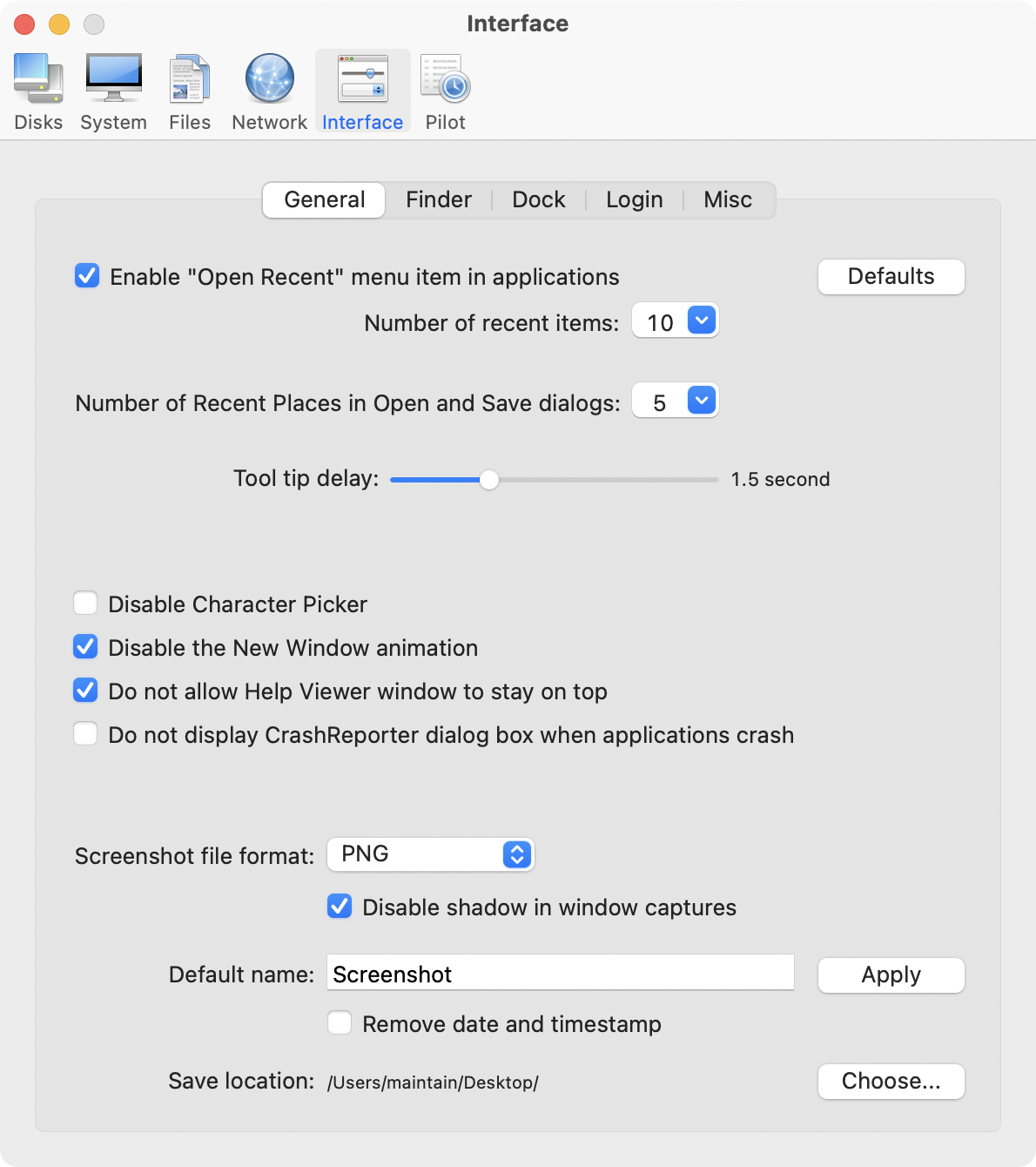
* Added ability to prevent Photos from launching automatically when a device is connected (Interface - Misc)
* Added macOS Sierra 10.12.2 compatibility
* Improvements to the uninstaller
* Updated Automator actions
* Updated Help files
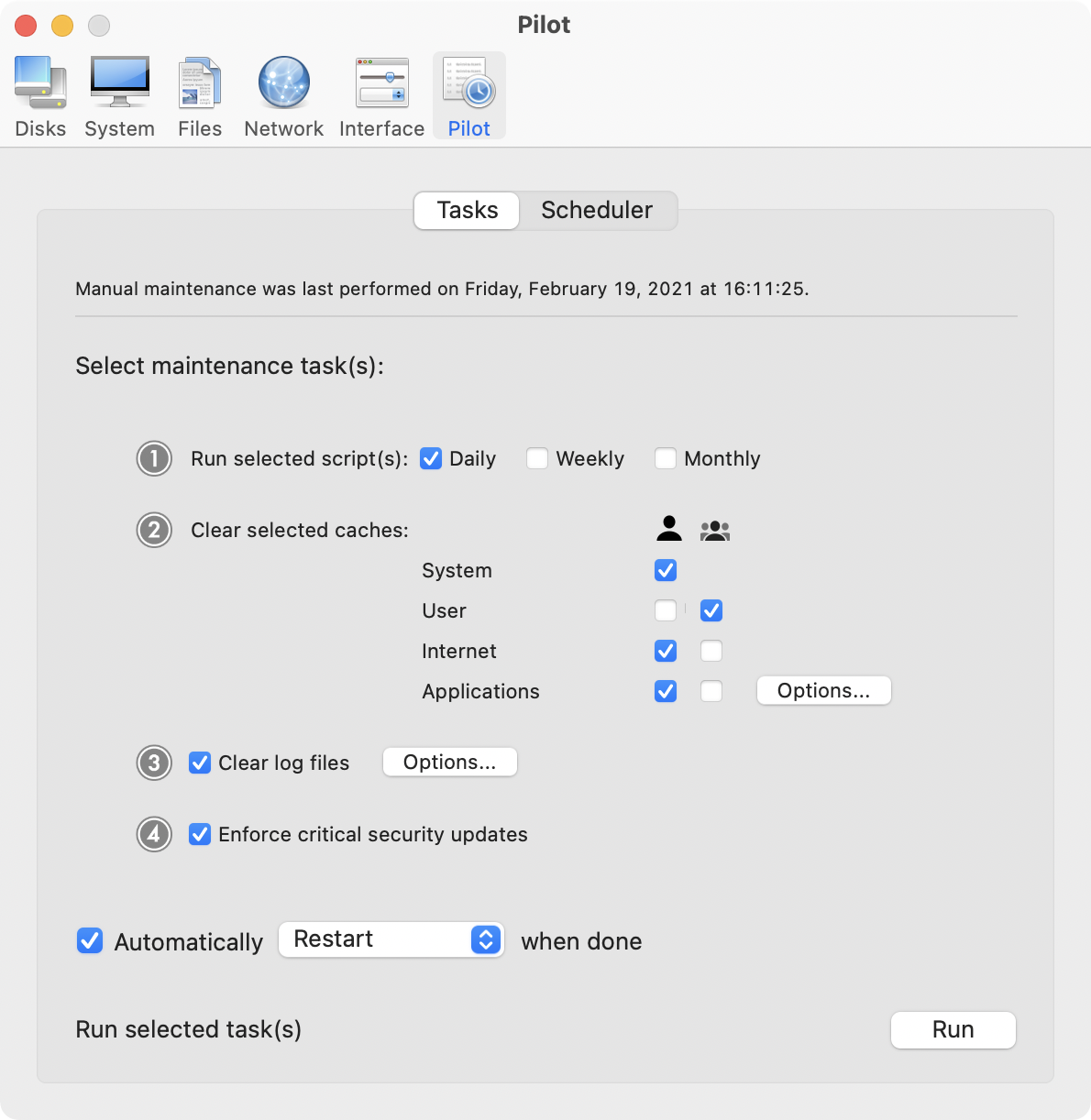
Cocktail is a general purpose utility for macOS that lets you clean, repair and optimize your Mac. The application serves up a perfect mix of maintenance tools and tweaks, all accessible through a clean and easy to use interface. Cocktail's features are arranged into five categories that helps you manage various aspects of your computer. It also comes with an automatic Pilot mode that allows you to simply press a button and relax, knowing that Cocktail will take care of the rest.
Disk:
* Automatically check S.M.A.R.T. status of disks
* Enable or disable journaling
* Set disk sleep (spindown) time
* Modify standby delay
* Change other disk sleep settings
* Force eject CD/DVD
System:
* Run periodic maintenance scripts
* Purge inactive memory and optimize virtual memory usage
* Manage Spotlight indexing
* Erase Spotlight indexes
* Modify Time Machine settings
* Rebuild Launch Services and Help databases
* Rebuild Mail's Envelope Index
* Update locate and whatis databases
* Force empty the Trash
* Change startup mode or set startup delay
* Disable startup sound
* Disable Gatekeeper
* Disable Notification Center and App Nap
Files:
* Clear system caches
* Clear user caches
* Clear font caches
* Clear virtual memory swap files
* Clear temporary files
* Clear Internet caches
* Clear cookies, download lists, form values and history files
* Clear Adobe Flash Player caches and cookies
* Clear applications caches
* Search for corrupted preference files
* Delete unnecessary localization (language resources) files
* Clear and manage (view, print and save) log files
* Delete invisible DS Store files
* Delete locked or inaccessible items
Network:
* Change speed, duplex and MTU of network cards
* Easily optimize network settings for common connection types
* Modify IP configuration parameters
* Configure File Sharing settings
Interface:
* Customize look and features of Finder, Dock, login window and other system services
* Modify hidden settings of Safari, iTunes and Launchpad
System Requirements:
Cocktail (Sierra Edition) requires macOS Sierra 10.12 to run. Cocktail (El Capitan Edition) for OS X 10.11, Cocktail (Yosemite Edition) for OS X 10.10, Cocktail (Mavericks Edition) for OS X 10.9 are Cocktail (Mountain Lion Edition) for OS X 10.8 are available for download from Maintain website.
Pricing and Availability:
Cocktail is $19.00 (USD) for a single user license and available for purchase from the Maintain website. When unregistered, Cocktail runs in demo mode and will expire after the tenth launch.
Cocktail 10.1.3 (Sierra Edition): http://www.maintain.se/cocktail
Download Cocktail 10.1.3 (Sierra Edition): http://usa.maintain.se/Cocktail10SE.dmg
Vimeo Video: https://vimeo.com/109816714
Screenshot 1: http://www.maintain.se/downloads/screenshots/screenshot1.png
Screenshot 2: http://www.maintain.se/downloads/screenshots/screenshot3.png
App Icon: http://www.maintain.se/downloads/screenshots/icon.png

Maintain develops tailored applications for Mac users. We work towards creating technical solutions which maintain your computer and make it as efficient and easy to use as possible. In addition, we offer comprehensive consultancy and support services which cover everything from operation of existing systems to purchase and implementation of new technical solutions. Among our clients are: Major League Baseball, Puma, The New York Times, Sony Pictures, Ericsson, Fortum, The City Of Calgary, Peak Performance, Loreal, Harvard University, Los Angeles Times, Swedish Film Institute, Weber, ESPN, Business Week, Swedish National Police Board, Norwegian Broadcasting Corporation, Getty Images, University of Texas, South Park Studios, CompUSA, bwin, Lockheed Martin, Defense Intelligence Agency, University of Michigan and hundred of thousands of Mac users around the world. Copyright (C) 2016 Maintain. All Rights Reserved. Apple, the Apple logo and Mac are registered trademarks of Apple Inc. in
the U.S. and/or other countries.
*******
Link To Article: http://prmac.com/release-id-80797.htm
*******
---------------------------------------------------------------------------------
Note that you can alter delivered distributions at any time.
Login to your account on prMac to alter your channel selection, or to opt-out at any time.
DockShelf 1.5 Released - The Dock alternative for macOS
A new article has been published at prMac.
DockShelf 1.5 Released - The Dock alternative for macOS - Published on 12/15/16
The Alchemist Guild LLC today announces DockShelf 1.5, an update to their popular Dock management utility for macOS. Version 1.5 now allows unlimited mini-desktops. DockShelf lets you place unlimited docks around your desktop so you never run out of space again for your commonly used files, folders and applications. Launching your favorite documents and apps is faster because you control where your docks are positioned, how many are on screen, how they're labeled and when they're visible.
Boulder, Colorado - The Alchemist Guild LLC today is proud to announce the release of DockShelf 1.5, an update to their popular Dock management utility developed exclusively for macOS. Did you ever wish your Dock could do more or handle more of your apps and files? DockShelf lets you place unlimited docks around your desktop so you never run out of space again for your commonly used files, folders and applications! With DockShelf launching your favorite documents and apps is faster and more powerful because you control where your docks are positioned, how many are on screen, how they're labeled and when they're visible.
What are DockShelf's primary features?
* Tabs - Display docks as tabs which can easily be expanded by hovering the mouse over them
* Browse Folders - Navigate the contents of folders from popup windows using a variety of different viewing options
* Desktops - Extend your Macs desktop with docks
* Smart Folders - Add smart folders to docks which use Spotlight to quickly find files on your Mac then browse the results from the dock
* Stacks - Group any number of files together into a stack which can be browsed via a popup window
* Process and devices docks - Add special docks that show all the processes currently open or external devices connected
* Workspaces - Switch between multiple workspaces depending on the app set currently being used
* Never in the way - Hide docks entirely or depending on which app is currently active
* Notes - Add and edit notes directly from docks using the text editor
* More than just files - Add and launch: Links , Mail messages, Calendar events, text clippings and more
* Themes and Customization - The app comes pre-packaged with a variety of themes for different tastes and customization options
What's new in 1.5:
Most notably the "Desktops" app has been integrated into DockShelf allowing for unlimited mini-desktops to be launched directly from your docks. Now there are more ways than ever to organize your commonly used documents and quickly launch apps on your Mac.
Other important features and improvements include:
* Animations have been optimized so DockShelf feels smoother and snappier now
* URL items can show an optional favorite icon
* Paste files, links, text and images into stacks or folders
* Text, images and links can be dropped and saved into folder items and folder docks
* Variety of different themes to choose from
* Many more improvements, features and bug fixes
System Requirements:
* OS X 10.9 or later
* 64-bit processor
* 9.7 MB
Pricing and Availability:
DockShelf 1.5 is currently only $4.99 USD (or equivalent amount in other currencies) and available worldwide through the Mac App Store in the Utilities category. DockShelf can also be purchased from Alchemist Guild online. There is a free demo available for download.
DockShelf 1.5: http://www.thealchemistguild.com/dockshelf
Purchase and Download (MAS): https://itunes.apple.com/app/dockshelf/id483044083
Purchase from Alchemist Guild: https://www.e-junkie.com/ecom/gb.php?i=1017991&c=single&cl=1268
Download Demo: http://www.thealchemistguild.com/dockshelf/download/DockShelf.zip
Media Assets: http://www.thealchemistguild.com/dockshelf/press.html
With a history spanning back to the late 90's and RPG gaming on the classic Mac OS, The Alchemist Guild in its current form didn't become active until the early 2000's when sole proprietor and lead developer Ryan Joseph began work porting a PERL IDE from the classic Mac OS to OS X. Since then The Alchemist Guild has been working on various utilities and productivity apps on the Mac with TaskCard and DockShelf (an innovation Dock alternative) being their most prominent projects. All Material and Software (C) Copyright 2016 Alchemist Guild LLC. All Rights Reserved. Apple, the Apple logo, Mac OS X and Macintosh are registered trademarks of Apple Inc. in the U.S. and/or other countries. Other trademarks and registered trademarks may be the property of their respective owners.
*******
Link To Article: http://prmac.com/release-id-80796.htm
*******
---------------------------------------------------------------------------------
Note that you can alter delivered distributions at any time.
Login to your account on prMac to alter your channel selection, or to opt-out at any time.
DockShelf 1.5 Released - The Dock alternative for macOS - Published on 12/15/16
The Alchemist Guild LLC today announces DockShelf 1.5, an update to their popular Dock management utility for macOS. Version 1.5 now allows unlimited mini-desktops. DockShelf lets you place unlimited docks around your desktop so you never run out of space again for your commonly used files, folders and applications. Launching your favorite documents and apps is faster because you control where your docks are positioned, how many are on screen, how they're labeled and when they're visible.
Boulder, Colorado - The Alchemist Guild LLC today is proud to announce the release of DockShelf 1.5, an update to their popular Dock management utility developed exclusively for macOS. Did you ever wish your Dock could do more or handle more of your apps and files? DockShelf lets you place unlimited docks around your desktop so you never run out of space again for your commonly used files, folders and applications! With DockShelf launching your favorite documents and apps is faster and more powerful because you control where your docks are positioned, how many are on screen, how they're labeled and when they're visible.
What are DockShelf's primary features?
* Tabs - Display docks as tabs which can easily be expanded by hovering the mouse over them
* Browse Folders - Navigate the contents of folders from popup windows using a variety of different viewing options
* Desktops - Extend your Macs desktop with docks
* Smart Folders - Add smart folders to docks which use Spotlight to quickly find files on your Mac then browse the results from the dock
* Stacks - Group any number of files together into a stack which can be browsed via a popup window
* Process and devices docks - Add special docks that show all the processes currently open or external devices connected
* Workspaces - Switch between multiple workspaces depending on the app set currently being used
* Never in the way - Hide docks entirely or depending on which app is currently active
* Notes - Add and edit notes directly from docks using the text editor
* More than just files - Add and launch: Links , Mail messages, Calendar events, text clippings and more
* Themes and Customization - The app comes pre-packaged with a variety of themes for different tastes and customization options
What's new in 1.5:
Most notably the "Desktops" app has been integrated into DockShelf allowing for unlimited mini-desktops to be launched directly from your docks. Now there are more ways than ever to organize your commonly used documents and quickly launch apps on your Mac.
Other important features and improvements include:
* Animations have been optimized so DockShelf feels smoother and snappier now
* URL items can show an optional favorite icon
* Paste files, links, text and images into stacks or folders
* Text, images and links can be dropped and saved into folder items and folder docks
* Variety of different themes to choose from
* Many more improvements, features and bug fixes
System Requirements:
* OS X 10.9 or later
* 64-bit processor
* 9.7 MB
Pricing and Availability:
DockShelf 1.5 is currently only $4.99 USD (or equivalent amount in other currencies) and available worldwide through the Mac App Store in the Utilities category. DockShelf can also be purchased from Alchemist Guild online. There is a free demo available for download.
DockShelf 1.5: http://www.thealchemistguild.com/dockshelf
Purchase and Download (MAS): https://itunes.apple.com/app/dockshelf/id483044083
Purchase from Alchemist Guild: https://www.e-junkie.com/ecom/gb.php?i=1017991&c=single&cl=1268
Download Demo: http://www.thealchemistguild.com/dockshelf/download/DockShelf.zip
Media Assets: http://www.thealchemistguild.com/dockshelf/press.html
With a history spanning back to the late 90's and RPG gaming on the classic Mac OS, The Alchemist Guild in its current form didn't become active until the early 2000's when sole proprietor and lead developer Ryan Joseph began work porting a PERL IDE from the classic Mac OS to OS X. Since then The Alchemist Guild has been working on various utilities and productivity apps on the Mac with TaskCard and DockShelf (an innovation Dock alternative) being their most prominent projects. All Material and Software (C) Copyright 2016 Alchemist Guild LLC. All Rights Reserved. Apple, the Apple logo, Mac OS X and Macintosh are registered trademarks of Apple Inc. in the U.S. and/or other countries. Other trademarks and registered trademarks may be the property of their respective owners.
*******
Link To Article: http://prmac.com/release-id-80796.htm
*******
---------------------------------------------------------------------------------
Note that you can alter delivered distributions at any time.
Login to your account on prMac to alter your channel selection, or to opt-out at any time.
Waver Cloud Music Player released for iOS - Personal Streaming Service
A new article has been published at prMac.
Waver Cloud Music Player released for iOS - Personal Streaming Service - Published on 12/15/16
Chicago based Imagam, Inc. today introduces Waver Cloud Music Player 1.0, their brand new music app developed exclusively for iPhone and iPad devices. Waver allows you to create a personal streaming service with Dropbox. Google Drive, Box, OneDrive, SMB Server, WebDav Server, SoundCloud, FTP and more. Featuring an advanced and powerful media player, Waver offers Light and dark theme modes, with FLAC format support so you can enjoy your favorite tracks in the best quality.
Chicago, Illinois - Imagam, Inc. today is proud to announce new iOS(iPhone/iPad) application Waver Cloud Music Player. Waver allows you to create a personal streaming service with Dropbox. Google Drive, Box, OneDrive, SMB Server, WebDav Server, SoundCloud, FTP and more.
Listen to your music with an advanced and powerful media player.
* FLAC format supported - Enjoy your favorite tracks in the best quality
* Light and dark theme modes
Supported Clouds and Protocols:
Dropbox, Google Drive, Box, OneDrive, SMB/CIFS, SugarSync, AFP (Mac), FTP/FTPS, SFTP, WebDav, Amazon S3, SoundCloud, FTP, more coming soon.
Features:
* Formats: MP3, WAV, FLAC, M4A
* Audio Bar (Adjustable with 3 modes)
* Repeat and shuffle
* Airplay (iOS Airplay mode is supported)
* Favorites (favorites list is supported)
* Playlists (create and manage playlists)
* Dark Theme (In addition to default light theme)
* Fine scrubbing
* Lock screen playback controls
* Background music playback
* Background controls
* Cache Streamed Files - (Files can be saved after caching to prevent re-downloading)
* Passcode Lock - (Application can be passcode protected)
Pricing and Availability:
Waver Cloud Music Player 1.0 is $2.99 USD (or equivalent amount in other currencies) and available worldwide exclusively through the App Store in the Music category. For more information please contact Tom Biel.
Waver Cloud Music Player 1.0: http://wavercloudplayer.com/
Purchase and Download: https://itunes.apple.com/app/waver-cloud-music-player-streamer/id1164196870
Screenshot: http://a4.mzstatic.com/us/r30/Purple122/v4/00/f2/42/00f24271-fd62-0c8e-3c05-56f4a1069dc2/screen696x696.jpeg
App Icon: http://is1.mzstatic.com/image/thumb/Purple71/v4/0e/d7/db/0ed7db83-a25c-a858-6255-8c0e87404e27/source/175x175bb.jpg
Located in located in Chicago., Illinois, Imagam is a small software development studio established by founder and CEO Tom Biel in 2009. Imagam specializes in creating fun, useful, and beautiful apps for the iPhone, including the incredible iFiles app. Please visit the Imagam website for more information. Copyright (C) 2009-2016 Imagam, Inc. All Rights Reserved. Apple, the Apple logo, iPhone, iPod and iPad are registered trademarks of Apple Inc. in the U.S. and/or other countries.
*******
Link To Article: http://prmac.com/release-id-80795.htm
*******
---------------------------------------------------------------------------------
Note that you can alter delivered distributions at any time.
Login to your account on prMac to alter your channel selection, or to opt-out at any time.
Waver Cloud Music Player released for iOS - Personal Streaming Service - Published on 12/15/16
Chicago based Imagam, Inc. today introduces Waver Cloud Music Player 1.0, their brand new music app developed exclusively for iPhone and iPad devices. Waver allows you to create a personal streaming service with Dropbox. Google Drive, Box, OneDrive, SMB Server, WebDav Server, SoundCloud, FTP and more. Featuring an advanced and powerful media player, Waver offers Light and dark theme modes, with FLAC format support so you can enjoy your favorite tracks in the best quality.
Chicago, Illinois - Imagam, Inc. today is proud to announce new iOS(iPhone/iPad) application Waver Cloud Music Player. Waver allows you to create a personal streaming service with Dropbox. Google Drive, Box, OneDrive, SMB Server, WebDav Server, SoundCloud, FTP and more.
Listen to your music with an advanced and powerful media player.
* FLAC format supported - Enjoy your favorite tracks in the best quality
* Light and dark theme modes
Supported Clouds and Protocols:
Dropbox, Google Drive, Box, OneDrive, SMB/CIFS, SugarSync, AFP (Mac), FTP/FTPS, SFTP, WebDav, Amazon S3, SoundCloud, FTP, more coming soon.
Features:
* Formats: MP3, WAV, FLAC, M4A
* Audio Bar (Adjustable with 3 modes)
* Repeat and shuffle
* Airplay (iOS Airplay mode is supported)
* Favorites (favorites list is supported)
* Playlists (create and manage playlists)
* Dark Theme (In addition to default light theme)
* Fine scrubbing
* Lock screen playback controls
* Background music playback
* Background controls
* Cache Streamed Files - (Files can be saved after caching to prevent re-downloading)
* Passcode Lock - (Application can be passcode protected)
Pricing and Availability:
Waver Cloud Music Player 1.0 is $2.99 USD (or equivalent amount in other currencies) and available worldwide exclusively through the App Store in the Music category. For more information please contact Tom Biel.
Waver Cloud Music Player 1.0: http://wavercloudplayer.com/
Purchase and Download: https://itunes.apple.com/app/waver-cloud-music-player-streamer/id1164196870
Screenshot: http://a4.mzstatic.com/us/r30/Purple122/v4/00/f2/42/00f24271-fd62-0c8e-3c05-56f4a1069dc2/screen696x696.jpeg

App Icon: http://is1.mzstatic.com/image/thumb/Purple71/v4/0e/d7/db/0ed7db83-a25c-a858-6255-8c0e87404e27/source/175x175bb.jpg

Located in located in Chicago., Illinois, Imagam is a small software development studio established by founder and CEO Tom Biel in 2009. Imagam specializes in creating fun, useful, and beautiful apps for the iPhone, including the incredible iFiles app. Please visit the Imagam website for more information. Copyright (C) 2009-2016 Imagam, Inc. All Rights Reserved. Apple, the Apple logo, iPhone, iPod and iPad are registered trademarks of Apple Inc. in the U.S. and/or other countries.
*******
Link To Article: http://prmac.com/release-id-80795.htm
*******
---------------------------------------------------------------------------------
Note that you can alter delivered distributions at any time.
Login to your account on prMac to alter your channel selection, or to opt-out at any time.
Subscribe to:
Posts (Atom)