A new article has been published at prMac.
Boris FX Previews New 2018 Product Lineup at NAB 2018 - Published on 03/08/18
Boris FX, the leading developer of professional post-production tools, will be showcasing major new versions of the industry's premier plug-ins: Continuum, Sapphire, and Mocha in connection with the brand new 2018 Boris FX App Manager at the National Association of Broadcasters (NAB), April 9-12, 2018 in Las Vegas, Nevada (Booth SL7620).
Boston, Massachusetts - Boris FX(TM), the leading developer of professional post-production tools, will be showcasing major new versions of the industry's premier plug-ins: Continuum, Sapphire, and Mocha in connection with the brand new 2018 Boris FX App Manager at the National Association of Broadcasters (NAB), April 9-12, 2018 in Las Vegas, Nevada (Booth SL7620).
Technology demos of upcoming products are now united with a new Boris FX App Manager - a user-friendly, centralized utility to manage and license all Boris FX products and plug-ins. Additionally, Particle Illusion, the popular motion graphics and particle animation system Boris FX acquired from GenArts, is being relaunched with an updated user interface, additional new emitter libraries, and blazing fast GPU speeds. Original founder of Particle Illusion, Alan Lorence has joined the Boris FX team as the Product Manager.
"We're excited to preview new versions of Sapphire, Continuum, and Mocha, plus announce the reboot of Particle Illusion," says Boris Yamnitsky, Boris FX Founder & President. "We have listened to our customer base and have taken on multiple initiatives that will greatly enhance the workflow for editors, motion graphics, and effects artists. Mocha will have a streamlined user interface to improve the tracking and masking found in all our products, and the new Boris App Manager provides our customers with a welcome centralized utility for quick and easy installation and licensing management." Yamnitsky continues, "Another highly-requested feature was to bring back Particle Illusion. We have responded by reengineering and designing this application from the ground up. The NAB show is a great opportunity for customers to meet the team and learn more about our core commitment to developing the most robust professional tools for the broadcast and post-production industry."
Boris FX NAB 2018 Announcements
Boris FX Suite 2018 and App Manager
The Boris FX Suite is a bundle product making the industry's three most popular plug-in packages (Sapphire, Continuum, and Mocha Pro) available together on one license with cost effective pricing, purchase, and subscription options. The Boris FX App Manager is a new utility that unifies licensing and application management for all Boris products.
Particle Illusion
Particle Illusion creates brilliant motion graphics elements, such as sparkles, smoke, and fireworks with a lightning fast GPU-accelerated engine in a simple, easy-to-learn interface. NAB attendees can preview a technology demo of the new Particle Illusion plug-in which will be released later in 2018 as part of Continuum 12 and the Continuum Particle Unit.
Mocha 2018
The Academy Award-winning tools found in Mocha Pro, Mocha VR (recently awarded a prestigious Advanced Imaging Society Tech Award, January 2018), Sapphire, and Continuum will feature a new Essential Interface Mode to help editors and VFX artists solve tracking and masking challenges in less time. Mocha Pro and Mocha VR will be updated in 2018 with an improved interface, new tools for rotoscoping and mask creation, and speed improvements in object removal and clean plating.
Sapphire and Continuum
The broadcast industry's most widely used plug-in packages for editorial and finishing will be previewing new technology and enhancements:
GPU improvements on Avid and Resolve for faster effects rendering and playback.
Output to broadcast monitor. Preview images and video from Boris FX UI applications to broadcast monitors via BlackMagic and AJA video hardware.
Title Studio with new tools and performance improvements: faster rendering time, new text tool, and user interface update.
New Upgrade & Support Plan, Subscription Options
Boris FX customers can now stay on the most current versions of the Sapphire, Continuum, and Mocha for a low-cost fixed annual price ($195-$495, varies by product). The Upgrade & Support plan provides customers with automatic upgrades, better licensing and management, full phone and email support, unlimited burn and render licenses, and more. Learn more.
New annual subscriptions by product are now available with multi-host ($495-$895, varies by product) or individual host options ($195-$495, varies by product). See individual product pages for pricing.
Host support includes pro video applications from: Adobe, Avid, Apple, Blackmagic Design, Autodesk, Foundry, Magix, FXHome, Grass Valley, Corel, and more.
NAB Guest Presenters
A special guest demo artist line-up for NAB (April 9-12, Las Vegas Convention Center, Las Vegas, Nevada, booth SL7620) includes: Nick Harauz, Apple, Adobe and Avid certified instructor; Ben Brownlee, VFX artist and Curious Turtle trainer; Kelsey Brannan, YouTube influencer Premiere Gal; Alejandro Brubaker, motion graphics artist and adjunct professor; Ben Eshagpoor, VFX and Cinema 4D artist, BeMotion Design; and product managers and specialists from Boris FX.
To schedule a press appointment at NAB, please contact Jessie Electa Petrov, Director of Marketing.
Boris FX: http://www.borisfx.com
Press Release: http://borisfx.com/press-releases/boris-fx-announces-new-particle-illusion-and-app-manager-previews-new-2018-product-lineup-at-nab-2018/
Download the Press Image : http://cdn.borisfx.com/borisfx/download_files/BorisFX-NAB2018-Tech-Demo-Particle-Illusion.png
Founded in 1995, Boris FX is a leading developer of VFX, compositing, titling, video editing, and workflow tools for broadcast, post-production, and film professionals. Boris FX products have grown to serve over a million artists worldwide. The company's success lies in its ability to tightly integrate and leverage technologies through strong partnerships with Adobe, Apple, Avid, Black Magic Design, Autodesk, Grass Valley, Sony, Quantel, and other leading developers of video editing software. In 2014, Boris FX acquired Imagineer Systems, the Academy Award-winning developer of Mocha planar tracking software. In 2016, Boris FX acquired GenArts, the developer of Sapphire, the gold standard plug-in package for high-end visual effects. All Material and Software (C) Copyright 2018 Boris FX. All Rights Reserved. Apple, the Apple logo, Macintosh Mac OS X and macOS are registered trademarks of Apple Inc. in the U.S. and/or other countries. Other trademarks and registered trademarks may be
the property of their respective owners.
*******
Link To Article: https://prmac.com/release-id-82539.htm
*******
---------------------------------------------------------------------------------
Note that you can alter delivered distributions at any time.
Login to your account on prMac to alter your channel selection, or to opt-out at any time.


XVIDA Debuts Magnetic Wireless Car Charger for iPhone on Indiegogo
A new article has been published at prMac.
XVIDA Debuts Magnetic Wireless Car Charger for iPhone on Indiegogo - Published on 03/08/18
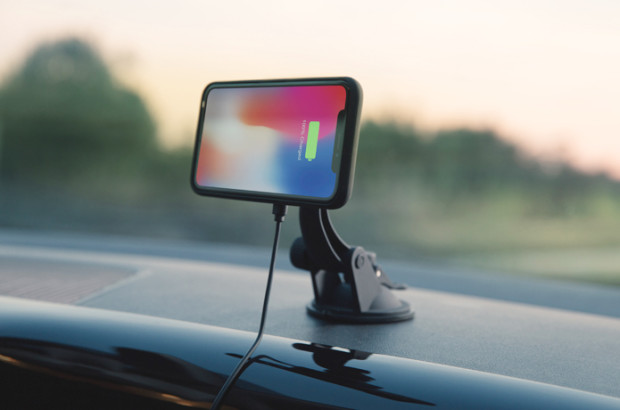
XVIDA has just released an entire collection of sophisticated and functional accessories that enable hassle-free and reliable in-car charging. Its latest crowdfunding campaign for their new POWER 2 Collection of Wireless Charging Car Docks and Magnetic Cases, has reached its fundraising goal of $15,000 USD in less than 24 hours on Indiegogo. The Car Kits include an ultra-slim, magnetic case, made from durable TPU/ABS, which offers protection against impact and provides a comfortable grip.
Los Angeles, California - XVIDA has just released an entire collection of sophisticated and functional accessories that enable hassle-free and reliable in-car charging. The charging cases and car charging docks feature built-in precision magnets so your phone will stay securely attached and positioned in the optimal charging spot, ensuring maximum charging speed with zero risk of charging being interrupted due to device moving.
Highlights of the new XVIDA Power 2 Car Kits include:
Dual Mode (7.5W/15W) charges up to 40% faster
Magnetic Locking: no risk of accidentally misaligning your phone so it doesn't charge
Advanced Cooling Technology ensures there's no overheating
Multiple Mounting Options: windshield, dashboard, car vent, CD-slot
The Car Kits include an ultra-slim, magnetic case, made from durable TPU/ABS, which offers protection against impact and provides a comfortable grip. The case is available for all the latest iPhone lineup as well as for Samsung Galaxy S8 & S8+. Those looking for all-round protection will be happy to know, XVIDA offers case-friendly tempered glass screen protectors, which fit perfectly with XVIDA Cases for the latest Apple & Samsung phones.
Price and Availability:
The XVIDA wireless charging car kits are available for pre-order exclusively at Indiegogo (https://igg.me/at/xvidacardock/x/16925667) at a starting price of $59 (45% off the expected retail value). Backers will start receiving the perks as early as by the end of March/beginning of April 2018.
XVIDA: https://www.xvida.com
Wireless Magnetic Car Phone Dock on Indiegogo: https://www.indiegogo.com/projects/xvida-fastest-wireless-magnetic-car-phone-dock#/
Screenshot: https://c1.iggcdn.com/indiegogo-media-prod-cld/image/upload/c_limit,f_auto,w_620/v1520245384/tfpnbmdjkqe7ptvwgxsg.jpg
XVIDA is a California- based, award-winning European product development company, composed of young, driven individuals who believe in constant innovation, European design & craftsmanship, high-quality manufacturing and providing a superb customer experience. All Material and Software (C) 2018 XVIDA. All Rights Reserved. Apple, the Apple logo, iPhone, iPod and iPad are registered trademarks of Apple Inc. in the U.S. and/or other countries. Other trademarks and registered trademarks may be the property of their respective owners.
*******
Link To Article: https://prmac.com/release-id-82538.htm
*******
---------------------------------------------------------------------------------
Note that you can alter delivered distributions at any time.
Login to your account on prMac to alter your channel selection, or to opt-out at any time.
XVIDA Debuts Magnetic Wireless Car Charger for iPhone on Indiegogo - Published on 03/08/18
XVIDA has just released an entire collection of sophisticated and functional accessories that enable hassle-free and reliable in-car charging. Its latest crowdfunding campaign for their new POWER 2 Collection of Wireless Charging Car Docks and Magnetic Cases, has reached its fundraising goal of $15,000 USD in less than 24 hours on Indiegogo. The Car Kits include an ultra-slim, magnetic case, made from durable TPU/ABS, which offers protection against impact and provides a comfortable grip.
Los Angeles, California - XVIDA has just released an entire collection of sophisticated and functional accessories that enable hassle-free and reliable in-car charging. The charging cases and car charging docks feature built-in precision magnets so your phone will stay securely attached and positioned in the optimal charging spot, ensuring maximum charging speed with zero risk of charging being interrupted due to device moving.
Highlights of the new XVIDA Power 2 Car Kits include:
Dual Mode (7.5W/15W) charges up to 40% faster
Magnetic Locking: no risk of accidentally misaligning your phone so it doesn't charge
Advanced Cooling Technology ensures there's no overheating
Multiple Mounting Options: windshield, dashboard, car vent, CD-slot
The Car Kits include an ultra-slim, magnetic case, made from durable TPU/ABS, which offers protection against impact and provides a comfortable grip. The case is available for all the latest iPhone lineup as well as for Samsung Galaxy S8 & S8+. Those looking for all-round protection will be happy to know, XVIDA offers case-friendly tempered glass screen protectors, which fit perfectly with XVIDA Cases for the latest Apple & Samsung phones.
Price and Availability:
The XVIDA wireless charging car kits are available for pre-order exclusively at Indiegogo (https://igg.me/at/xvidacardock/x/16925667) at a starting price of $59 (45% off the expected retail value). Backers will start receiving the perks as early as by the end of March/beginning of April 2018.
XVIDA: https://www.xvida.com
Wireless Magnetic Car Phone Dock on Indiegogo: https://www.indiegogo.com/projects/xvida-fastest-wireless-magnetic-car-phone-dock#/
Screenshot: https://c1.iggcdn.com/indiegogo-media-prod-cld/image/upload/c_limit,f_auto,w_620/v1520245384/tfpnbmdjkqe7ptvwgxsg.jpg
XVIDA is a California- based, award-winning European product development company, composed of young, driven individuals who believe in constant innovation, European design & craftsmanship, high-quality manufacturing and providing a superb customer experience. All Material and Software (C) 2018 XVIDA. All Rights Reserved. Apple, the Apple logo, iPhone, iPod and iPad are registered trademarks of Apple Inc. in the U.S. and/or other countries. Other trademarks and registered trademarks may be the property of their respective owners.
*******
Link To Article: https://prmac.com/release-id-82538.htm
*******
---------------------------------------------------------------------------------
Note that you can alter delivered distributions at any time.
Login to your account on prMac to alter your channel selection, or to opt-out at any time.
Fashion Invite - Wardrobe List - Free Women's Fashion App for iPhone
A new article has been published at prMac.
Fashion Invite - Wardrobe List - Free Women's Fashion App for iPhone - Published on 03/07/18
Knag Enterprises today introduces Fashion Invite - Wardrobe List 1.0, the company's new women's fashion swipe-driven shopping app developed exclusively for iPhone, iPad and iPod touch devices. Featuring thousands of women's fashion items and displaying fashion in conjunction with fashionandinvites.com, the free Fashion Invite - Wardrobe List App invites you to swipe right to like or swipe left to skip items while easily creating a Shopping Want List.
Hoboken, New Jersey - Knag Enterprises today is proud to announce the release of Fashion Invite - Wardrobe List 1.0, the company's new women's fashion swipe-driven shopping app developed exclusively for iPhone, iPad and iPod touch devices. Featuring thousands of women's fashion items and displaying fashion in conjunction with Fashion And Invites, the free Fashion Invite - Wardrobe List App invites you to swipe right for an item you like (ACCEPT) or swipe left for an item that you don't want (DECLINE).
Swipe your way to style and create your ultimate fashion Want List with brands such as BCBGeneration, bebe, Burberry, Calvin Klein, Christian Dior, free people, French Connection and more! Thousands of dresses, boots, bags, shoes, skirts, jeans, workout clothes, shirts, jewelry, and more! The app offers a high quality and novel shopping experience. This objective is achieved through the quality and diversity of the items along with the manner in which they are displayed. The app allows you to swipe your way to style by presenting items you might not typically have access to in a traditional shopping experience.
Features:
* View thousands of women's fashion items - swipe right or click Accept to add an item to your shopping Want List. Swipe left or click Decline for items that don't match your style.
* Click on pictures of displayed fashion items for additional details and to purchase OR view and purchase items directly from your Want List (top right menu).
* View shoes, boots, dresses, pants, tops, skirts, shirts, jackets, coats, bathing suits, sunglasses, bags, jewelry, and more.
* Share your Want List through the following buttons available at the top left menu: Email List, SMS Message List, Post to Facebook, Tweet List, View Want List, and View List Website.
* Add and / or Delete Items from your Want List, evolving your Want List with your evolving needs;
* New Items added daily.
Brands featured: 1921 Jeans, 2b by bebe, 7 For All Mankind, AG Adriano Goldschmied, Armani Exchange, BCBGeneration, BCBG MAXAZRIA, bebe, Bottega Veneta, Budd Leather, Bueno, Burberry, C & C California, Calvin Klein, Calvin Klein Jeans, Chinese Laundry, Christian Dior, Citizens of Humanity, CJ by Cookie Johnson, Cosabella, D&G Dolce & Gabbana, Danskin, David King, David Lerner, Democracy, Descente, Diane Von Furstenberg, Dolce Vita, Dooney & Bourke, ECI, Elita, Eva Franco, Fendi, Floto, Francesco Biasia, Frankie B., Free People, French Connection, Frock! by Tracy Reese, G by GUESS, Genetic Denim, Gentle Fawn, Giani Bernini, Giorgio Armani, Givenchy, Gucci, GUESS by Marciano, HKNB Heidi Klum for New Balance, INC International Concepts, J. Furmani, JAG Jeans, James Jeans, James Perse, Jessica McClintock, Jessica Simpson, Jezebel, JLO, Johnston & Murphy, Joie, Jolt, Kay Unger, Kenneth Cole, Kensie, Kipling, La Blanca, La Perla, Lamade, Larry Levine, Laundry by Shelli Segal, Lauren Ralph
Lauren, Level 99, Linea Pelle, LNA, Lodis, London Fog, Lucky Brand, LUCY LOVE, Luli Fama, Madison, Marc Jacobs, MaxStudio, Michael Kors, MICHAEL Michael Kors, Miss Sixty, My Michelle, Myne, Nine West, Obey, Orage, Oscar de la Renta, Paige Premium Denim, Rosetti, Salvatore Ferragamo, Sanctuary, Shiraleah, Splendid, Steve Madden, Style & Co., Sun N' Sand, Susana Monaco, Tahari, Twelfth St. by Cynthia Vincent, Versace, Via Spiga, Volcom, Yves Saint Laurent and more.
User Comments:
" I love swiping through the fashion - I'm presented with items I might not see otherwise. it's so much fun, and I love keeping track of items to purchase in my Want List."
"Cool app allows you to flip through 1000s of products rapidly while skipping or adding things to a want list. Stream line shopping works well and is applied in this app!"
"I love this app. The dresses are very beautiful, and stylish. It is so easy to buy dresses from this app because you can buy them from your mobile phone. This app saves me so much time and money. I do not have to spend hours in a mall looking for a dress. Using this app makes me feel like I have a personal fashion advisor who helps me put together a beautiful wardrobe."
Device Requirements:
* iPhone 5s or later and iPod touch
* iPad 5th generation or later
* Requires iOS 11.2 or later
* 5-star rating
* 18.2 MB
Pricing and Availability:
Fashion Invite - Wardrobe List 1.0 is Free and available worldwide exclusively through the App Store in the Shopping category. For more information, please contact Justin Knag.
Knag Enterprises: http://www.knagent.com/
Fashion Invite - Wardrobe List 1.0: http://www.fashionandinvites.com
Download from iTunes: https://itunes.apple.com/app/fashion-invite-wardrobe-list/id1344296156
Promotional Image 1: http://www.jettemediainc.com/screenshot1
Promotional Image 2: http://www.jettemediainc.com/screenshot2
In March of 2009, Justin Knag made the decision to enter the software world. He registered Knag Enterprises LLC and launched a desktop application for Windows called YouGank. Yougank downloaded Youtube videos and converted the videos into mp3 files. Since that date, Knag Enterprises has proceeded to leave its mark in Mobile Software and Philanthropy. Knag Enterprises' headquarters is located in Hoboken, NJ. Knag Enterprises has collaborated with Fashion and Invites to bring about its most recent app - Fashion Invite - Wardrobe List. All Material and Software (C) Copyright 2018 Knag Enterprises LLC. All Rights Reserved. Apple, the Apple logo, iPhone, iPod and iPad are registered trademarks of Apple Inc. in the U.S. and/or other countries. Other trademarks and registered trademarks may be the property of their respective owners.
*******
Link To Article: https://prmac.com/release-id-82535.htm
*******
---------------------------------------------------------------------------------
Note that you can alter delivered distributions at any time.
Login to your account on prMac to alter your channel selection, or to opt-out at any time.
Fashion Invite - Wardrobe List - Free Women's Fashion App for iPhone - Published on 03/07/18
Knag Enterprises today introduces Fashion Invite - Wardrobe List 1.0, the company's new women's fashion swipe-driven shopping app developed exclusively for iPhone, iPad and iPod touch devices. Featuring thousands of women's fashion items and displaying fashion in conjunction with fashionandinvites.com, the free Fashion Invite - Wardrobe List App invites you to swipe right to like or swipe left to skip items while easily creating a Shopping Want List.
Hoboken, New Jersey - Knag Enterprises today is proud to announce the release of Fashion Invite - Wardrobe List 1.0, the company's new women's fashion swipe-driven shopping app developed exclusively for iPhone, iPad and iPod touch devices. Featuring thousands of women's fashion items and displaying fashion in conjunction with Fashion And Invites, the free Fashion Invite - Wardrobe List App invites you to swipe right for an item you like (ACCEPT) or swipe left for an item that you don't want (DECLINE).
Swipe your way to style and create your ultimate fashion Want List with brands such as BCBGeneration, bebe, Burberry, Calvin Klein, Christian Dior, free people, French Connection and more! Thousands of dresses, boots, bags, shoes, skirts, jeans, workout clothes, shirts, jewelry, and more! The app offers a high quality and novel shopping experience. This objective is achieved through the quality and diversity of the items along with the manner in which they are displayed. The app allows you to swipe your way to style by presenting items you might not typically have access to in a traditional shopping experience.
Features:
* View thousands of women's fashion items - swipe right or click Accept to add an item to your shopping Want List. Swipe left or click Decline for items that don't match your style.
* Click on pictures of displayed fashion items for additional details and to purchase OR view and purchase items directly from your Want List (top right menu).
* View shoes, boots, dresses, pants, tops, skirts, shirts, jackets, coats, bathing suits, sunglasses, bags, jewelry, and more.
* Share your Want List through the following buttons available at the top left menu: Email List, SMS Message List, Post to Facebook, Tweet List, View Want List, and View List Website.
* Add and / or Delete Items from your Want List, evolving your Want List with your evolving needs;
* New Items added daily.
Brands featured: 1921 Jeans, 2b by bebe, 7 For All Mankind, AG Adriano Goldschmied, Armani Exchange, BCBGeneration, BCBG MAXAZRIA, bebe, Bottega Veneta, Budd Leather, Bueno, Burberry, C & C California, Calvin Klein, Calvin Klein Jeans, Chinese Laundry, Christian Dior, Citizens of Humanity, CJ by Cookie Johnson, Cosabella, D&G Dolce & Gabbana, Danskin, David King, David Lerner, Democracy, Descente, Diane Von Furstenberg, Dolce Vita, Dooney & Bourke, ECI, Elita, Eva Franco, Fendi, Floto, Francesco Biasia, Frankie B., Free People, French Connection, Frock! by Tracy Reese, G by GUESS, Genetic Denim, Gentle Fawn, Giani Bernini, Giorgio Armani, Givenchy, Gucci, GUESS by Marciano, HKNB Heidi Klum for New Balance, INC International Concepts, J. Furmani, JAG Jeans, James Jeans, James Perse, Jessica McClintock, Jessica Simpson, Jezebel, JLO, Johnston & Murphy, Joie, Jolt, Kay Unger, Kenneth Cole, Kensie, Kipling, La Blanca, La Perla, Lamade, Larry Levine, Laundry by Shelli Segal, Lauren Ralph
Lauren, Level 99, Linea Pelle, LNA, Lodis, London Fog, Lucky Brand, LUCY LOVE, Luli Fama, Madison, Marc Jacobs, MaxStudio, Michael Kors, MICHAEL Michael Kors, Miss Sixty, My Michelle, Myne, Nine West, Obey, Orage, Oscar de la Renta, Paige Premium Denim, Rosetti, Salvatore Ferragamo, Sanctuary, Shiraleah, Splendid, Steve Madden, Style & Co., Sun N' Sand, Susana Monaco, Tahari, Twelfth St. by Cynthia Vincent, Versace, Via Spiga, Volcom, Yves Saint Laurent and more.
User Comments:
" I love swiping through the fashion - I'm presented with items I might not see otherwise. it's so much fun, and I love keeping track of items to purchase in my Want List."
"Cool app allows you to flip through 1000s of products rapidly while skipping or adding things to a want list. Stream line shopping works well and is applied in this app!"
"I love this app. The dresses are very beautiful, and stylish. It is so easy to buy dresses from this app because you can buy them from your mobile phone. This app saves me so much time and money. I do not have to spend hours in a mall looking for a dress. Using this app makes me feel like I have a personal fashion advisor who helps me put together a beautiful wardrobe."
Device Requirements:
* iPhone 5s or later and iPod touch
* iPad 5th generation or later
* Requires iOS 11.2 or later
* 5-star rating
* 18.2 MB
Pricing and Availability:
Fashion Invite - Wardrobe List 1.0 is Free and available worldwide exclusively through the App Store in the Shopping category. For more information, please contact Justin Knag.
Knag Enterprises: http://www.knagent.com/
Fashion Invite - Wardrobe List 1.0: http://www.fashionandinvites.com
Download from iTunes: https://itunes.apple.com/app/fashion-invite-wardrobe-list/id1344296156
Promotional Image 1: http://www.jettemediainc.com/screenshot1
Promotional Image 2: http://www.jettemediainc.com/screenshot2
In March of 2009, Justin Knag made the decision to enter the software world. He registered Knag Enterprises LLC and launched a desktop application for Windows called YouGank. Yougank downloaded Youtube videos and converted the videos into mp3 files. Since that date, Knag Enterprises has proceeded to leave its mark in Mobile Software and Philanthropy. Knag Enterprises' headquarters is located in Hoboken, NJ. Knag Enterprises has collaborated with Fashion and Invites to bring about its most recent app - Fashion Invite - Wardrobe List. All Material and Software (C) Copyright 2018 Knag Enterprises LLC. All Rights Reserved. Apple, the Apple logo, iPhone, iPod and iPad are registered trademarks of Apple Inc. in the U.S. and/or other countries. Other trademarks and registered trademarks may be the property of their respective owners.
*******
Link To Article: https://prmac.com/release-id-82535.htm
*******
---------------------------------------------------------------------------------
Note that you can alter delivered distributions at any time.
Login to your account on prMac to alter your channel selection, or to opt-out at any time.
HoudahGeo 5.2: Photo geocoding solution adds Lightroom Classic support
A new article has been published at prMac.
HoudahGeo 5.2: Photo geocoding solution adds Lightroom Classic support - Published on 03/07/18
Houdah Software announces HoudahGeo 5.2, a major upgrade to the photo geotagging tool for Mac. HoudahGeo tags photos with location coordinates and names. Standard EXIF, XMP, and IPTC geotags allow photo cataloging tools to organize and find photos by location. HoudahGeo works with Apple Photos, iPhoto, Aperture, and Adobe Lightroom. Version 5.2 adds support for Lightroom Classic, brings many enhancements to the geocoding workflow and adds support for newer EXIF tags.
Luxembourg City, Luxembourg - Houdah Software announces HoudahGeo 5.2, a major upgrade to the photo geotagging tool for Mac. HoudahGeo tags photos with GPS coordinates and location names. Geotags allow photo cataloging tools to organize and find photos by location.
Location information adds to the "story" of a photo. A photo pinned to a map has context. A series of tagged photos documents the path taken.
That's why we took a GPS track logger on our trek to the top of Mount Kilimanjaro, the highest peak in Africa. Later on, this allowed us to geotag our photos using HoudahGeo.
Browsing the photos we took during this once-in-a-lifetime vacation, we can retrace our steps through the rainforest, into the heather zone, the mountain desert and finally to the summit. Seeing the photos and track log on a map helps recalling details, understanding the route we took and makes telling our story so much more visual and interactive.
For details on the equipment we used on the Kilimanjaro trek, check out the Houdah Software blog. There you will also find examples of what our photos look like in Google Earth and Google Photos.
HoudahGeo makes it easy to geotag digital photos with GPS location information. It writes future-proof EXIF, XMP, and IPTC tags to JPEG and RAW image files. HoudahGeo also supports XMP sidecar files.
HoudahGeo can load photos from Apple Photos, iPhoto, Aperture, and Adobe Lightroom catalogs. HoudahGeo can then tag original image files and add location information to photos in Apple Photos, iPhoto, and Aperture libraries. This gives the users of Apple's photo cataloging tools access to the many photo geocoding options HoudahGeo has to offer:
* Automatic geocoding using GPS track logs
* Geocoding using reference photos taken using iPhone, a smartphone, or a GPS-enabled camera
* Geocoding without a GPS. Use the built-in map to double-check, adjust, or assign locations to your photos
How is geotagging different from assigning locations in Apple Photos?
Geotagging writes location information to metadata tags within the original image files. This creates a permanent bond between a photo and the location where it was taken. HoudahGeo writes the same industry-standard EXIF and XMP as used by GPS-enabled cameras. Such geotags can be used by Apple Photos as well as other photo cataloging or publishing tools.
Location information added in Apple Photos exists only within the library database. The original images remain unaltered. Only exported versions of the photo can be set to include geotags.
HoudahGeo feature highlights:
* Supports many methods of geocoding: GPS track logs, built-in maps, Google Earth, etc.
* Writes GPS data, location names, title, description and keywords to EXIF, XMP and IPTC tags
* Works with JPEG as well as a large number of RAW file formats. It also supports XMP sidecar files
* Notifies Apple Photos, iPhoto, and Aperture of changes made to photo location information
* Exports photos and track logs for viewing in Google Earth
New in HoudahGeo 5.2:
* Support for Lightroom Classic CC. Import photos and metadata from Lightroom catalogs
* HoudahGeo now offers autocompletion when editing location, city, province/state, country names
* HoudahGeo now reads and writes the EXIF v2.31 OffsetTimeOriginal tag. This specifies the camera clock time zone
* HoudahGeo now updates the XMP MetadataDate tag when writing EXIF/XMP tags
* Greatly improved performance of bulk changes. E.g. setting the location name on all selected images
Notable additions in previous releases:
* Apple Photos: HoudahGeo can now add locations to photos in the Apple Photos library. Requires Photos 2.0 on macOS Sierra
* Places: Quickly assign photos to favorite places and apply coordinates and location names
* Drag-and-drop geocoding: Drag images to the built-in map and drop them at the location where they were taken
* Reverse geocoding: Look up location names in English, German, Spanish and French
* Camera import: Download photos from your camera. Geotag photos before importing them into your photo library
* Lightroom integration: HoudahGeo reads location metadata directly from the Lightroom catalog
* Keywords editor: The new keywords editor makes it easy to assign keywords in bulk
* Map search: No GPS? No problem! Search for landmarks, cities, as well as your favorite places
* Publish KML to Dropbox: Upload photos and track logs to Dropbox. View in Google Earth and Google My Maps
System Requirements:
* OS X Version 10.10 or later. Fully tested with macOS 10.13 High Sierra
* Some features require macOS 10.12 Sierra
* It is recommended that iCloud Photos users geotag their photos before uploading these to the cloud
* Digital camera
* Optional GPS track logger
* Optional iPhone, smartphone, or GPS-enabled camera
* 55 MB of disk space
Pricing and Availability:
HoudahGeo 5.2 is priced at $39 USD (+ tax) for a single-user license. A full-featured demo version is available. Licenses are available from the Houdah Software in-app and web stores.
HoudahGeo 5.2: https://www.houdah.com/houdahGeo/
Documenting an 8-day Kilimanjaro Trek: https://blog.houdah.com/2018/03/photos-track-log-documenting-an-8-day-kilimanjaro-trek/
Geotagging Tips & Tricks: https://blog.houdah.com/category/houdahgeo/
Screenshot: https://www.houdah.com/houdahGeo/assets/HoudahGeo-800x600@2x.jpg
Application Icon: https://www.houdah.com/houdahGeo/assets/HoudahGeo-Icon.png
Press Kit (zip): https://www.houdah.com/houdahGeo/assets/HoudahGeo-Press-Kit.zip
Founded in 2005 by Pierre Bernard, Houdah Software s.a r.l is a small company based in Luxembourg, Europe. Houdah Software specializes in quality software for Mac, iPhone, and iPad. Our mission is to pair quality products with excellent customer support. All material and software copyright (C) 2005-2018 Houdah Software s.a r.l. All rights reserved. Apple, macOS, Mac, OS X, iPhone, iPod, and iPad are registered trademarks of Apple Inc. in the U.S. and/or other countries. Other trademarks and registered trademarks may be the property of their respective owners.
*******
Link To Article: https://prmac.com/release-id-82536.htm
*******
---------------------------------------------------------------------------------
Note that you can alter delivered distributions at any time.
Login to your account on prMac to alter your channel selection, or to opt-out at any time.
HoudahGeo 5.2: Photo geocoding solution adds Lightroom Classic support - Published on 03/07/18
Houdah Software announces HoudahGeo 5.2, a major upgrade to the photo geotagging tool for Mac. HoudahGeo tags photos with location coordinates and names. Standard EXIF, XMP, and IPTC geotags allow photo cataloging tools to organize and find photos by location. HoudahGeo works with Apple Photos, iPhoto, Aperture, and Adobe Lightroom. Version 5.2 adds support for Lightroom Classic, brings many enhancements to the geocoding workflow and adds support for newer EXIF tags.
Luxembourg City, Luxembourg - Houdah Software announces HoudahGeo 5.2, a major upgrade to the photo geotagging tool for Mac. HoudahGeo tags photos with GPS coordinates and location names. Geotags allow photo cataloging tools to organize and find photos by location.
Location information adds to the "story" of a photo. A photo pinned to a map has context. A series of tagged photos documents the path taken.
That's why we took a GPS track logger on our trek to the top of Mount Kilimanjaro, the highest peak in Africa. Later on, this allowed us to geotag our photos using HoudahGeo.
Browsing the photos we took during this once-in-a-lifetime vacation, we can retrace our steps through the rainforest, into the heather zone, the mountain desert and finally to the summit. Seeing the photos and track log on a map helps recalling details, understanding the route we took and makes telling our story so much more visual and interactive.
For details on the equipment we used on the Kilimanjaro trek, check out the Houdah Software blog. There you will also find examples of what our photos look like in Google Earth and Google Photos.
HoudahGeo makes it easy to geotag digital photos with GPS location information. It writes future-proof EXIF, XMP, and IPTC tags to JPEG and RAW image files. HoudahGeo also supports XMP sidecar files.
HoudahGeo can load photos from Apple Photos, iPhoto, Aperture, and Adobe Lightroom catalogs. HoudahGeo can then tag original image files and add location information to photos in Apple Photos, iPhoto, and Aperture libraries. This gives the users of Apple's photo cataloging tools access to the many photo geocoding options HoudahGeo has to offer:
* Automatic geocoding using GPS track logs
* Geocoding using reference photos taken using iPhone, a smartphone, or a GPS-enabled camera
* Geocoding without a GPS. Use the built-in map to double-check, adjust, or assign locations to your photos
How is geotagging different from assigning locations in Apple Photos?
Geotagging writes location information to metadata tags within the original image files. This creates a permanent bond between a photo and the location where it was taken. HoudahGeo writes the same industry-standard EXIF and XMP as used by GPS-enabled cameras. Such geotags can be used by Apple Photos as well as other photo cataloging or publishing tools.
Location information added in Apple Photos exists only within the library database. The original images remain unaltered. Only exported versions of the photo can be set to include geotags.
HoudahGeo feature highlights:
* Supports many methods of geocoding: GPS track logs, built-in maps, Google Earth, etc.
* Writes GPS data, location names, title, description and keywords to EXIF, XMP and IPTC tags
* Works with JPEG as well as a large number of RAW file formats. It also supports XMP sidecar files
* Notifies Apple Photos, iPhoto, and Aperture of changes made to photo location information
* Exports photos and track logs for viewing in Google Earth
New in HoudahGeo 5.2:
* Support for Lightroom Classic CC. Import photos and metadata from Lightroom catalogs
* HoudahGeo now offers autocompletion when editing location, city, province/state, country names
* HoudahGeo now reads and writes the EXIF v2.31 OffsetTimeOriginal tag. This specifies the camera clock time zone
* HoudahGeo now updates the XMP MetadataDate tag when writing EXIF/XMP tags
* Greatly improved performance of bulk changes. E.g. setting the location name on all selected images
Notable additions in previous releases:
* Apple Photos: HoudahGeo can now add locations to photos in the Apple Photos library. Requires Photos 2.0 on macOS Sierra
* Places: Quickly assign photos to favorite places and apply coordinates and location names
* Drag-and-drop geocoding: Drag images to the built-in map and drop them at the location where they were taken
* Reverse geocoding: Look up location names in English, German, Spanish and French
* Camera import: Download photos from your camera. Geotag photos before importing them into your photo library
* Lightroom integration: HoudahGeo reads location metadata directly from the Lightroom catalog
* Keywords editor: The new keywords editor makes it easy to assign keywords in bulk
* Map search: No GPS? No problem! Search for landmarks, cities, as well as your favorite places
* Publish KML to Dropbox: Upload photos and track logs to Dropbox. View in Google Earth and Google My Maps
System Requirements:
* OS X Version 10.10 or later. Fully tested with macOS 10.13 High Sierra
* Some features require macOS 10.12 Sierra
* It is recommended that iCloud Photos users geotag their photos before uploading these to the cloud
* Digital camera
* Optional GPS track logger
* Optional iPhone, smartphone, or GPS-enabled camera
* 55 MB of disk space
Pricing and Availability:
HoudahGeo 5.2 is priced at $39 USD (+ tax) for a single-user license. A full-featured demo version is available. Licenses are available from the Houdah Software in-app and web stores.
HoudahGeo 5.2: https://www.houdah.com/houdahGeo/
Documenting an 8-day Kilimanjaro Trek: https://blog.houdah.com/2018/03/photos-track-log-documenting-an-8-day-kilimanjaro-trek/
Geotagging Tips & Tricks: https://blog.houdah.com/category/houdahgeo/
Screenshot: https://www.houdah.com/houdahGeo/assets/HoudahGeo-800x600@2x.jpg

Application Icon: https://www.houdah.com/houdahGeo/assets/HoudahGeo-Icon.png

Press Kit (zip): https://www.houdah.com/houdahGeo/assets/HoudahGeo-Press-Kit.zip
Founded in 2005 by Pierre Bernard, Houdah Software s.a r.l is a small company based in Luxembourg, Europe. Houdah Software specializes in quality software for Mac, iPhone, and iPad. Our mission is to pair quality products with excellent customer support. All material and software copyright (C) 2005-2018 Houdah Software s.a r.l. All rights reserved. Apple, macOS, Mac, OS X, iPhone, iPod, and iPad are registered trademarks of Apple Inc. in the U.S. and/or other countries. Other trademarks and registered trademarks may be the property of their respective owners.
*******
Link To Article: https://prmac.com/release-id-82536.htm
*******
---------------------------------------------------------------------------------
Note that you can alter delivered distributions at any time.
Login to your account on prMac to alter your channel selection, or to opt-out at any time.
BatchOutput for Microsoft Excel Now Can Save Single Sheet PDFs
A new article has been published at prMac.
BatchOutput for Microsoft Excel Now Can Save Single Sheet PDFs - Published on 03/07/18
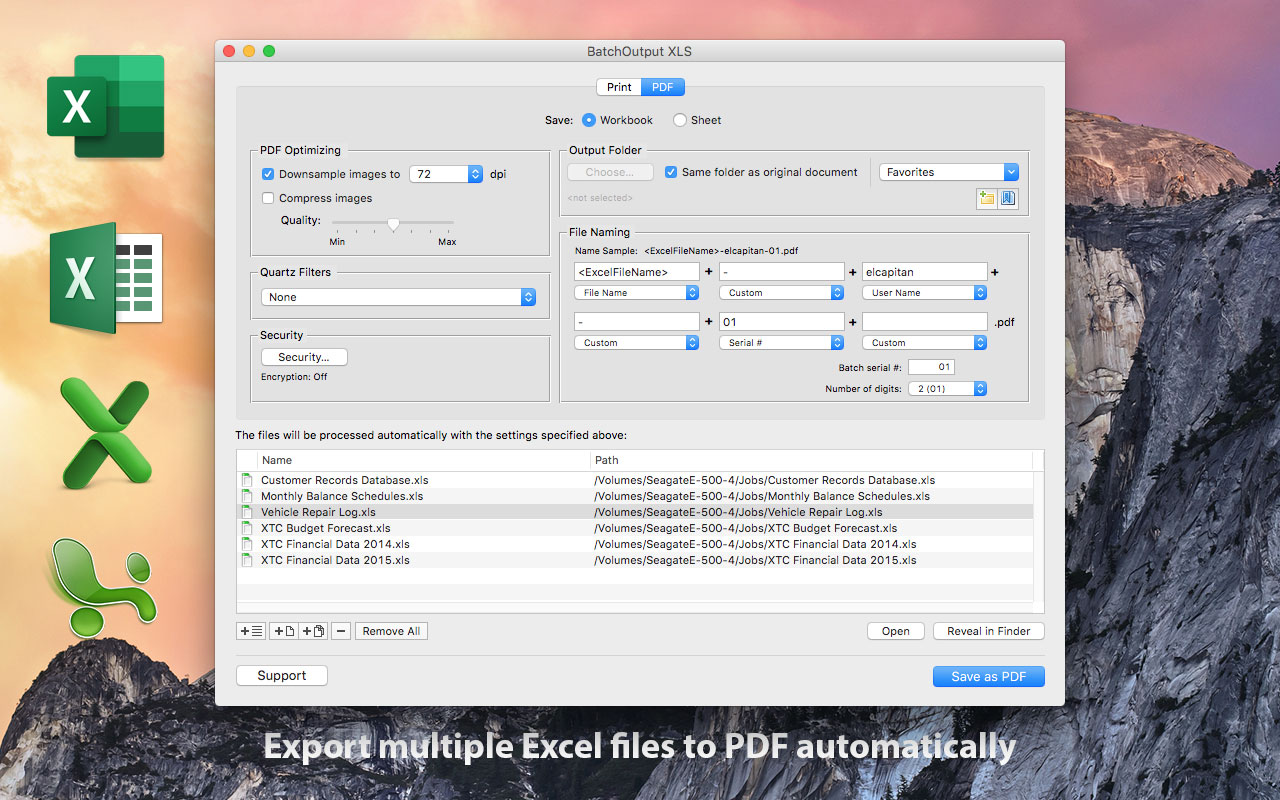
Toronto based Zevrix Solutions today announces BatchOutput XLS 2.5.3, a feature update to its output automation solution for Microsoft Excel. In addition to batch printing and PDF conversion, the software lets users carry out professional PDF production directly from Excel and effortlessly repurpose Office spreadsheets for web and mobile devices. The new version lets users split Excel workbooks into single sheet PDF files while preserving the multi-page sheet structure in exported documents.
Toronto (ON), Canada - Zevrix Solutions today announces BatchOutput XLS 2.5.3, a feature update to its output automation solution for Microsoft Excel on macOS. The only batch processing tool for Excel on the Mac market, the software helps users eliminate repetitive tasks through automation of printing and professional PDF output.
The new version adds the ability to automatically split Excel workbooks into single sheet PDF files while preserving the multi-page sheet structure in exported documents. Previous versions of the software always created single page PDF files only, which resulted in undesirable splitting of multi page sheets into single documents. The update also fixes some rare crashes and removes a redundant option to close Excel files after processing.
In addition to batch printing, BatchOutput XLS allows to carry out powerful professional PDF production directly from Excel, helping users simplify and streamline the conversion process. BatchOutput XLS is the only app on the market that brings advanced PDF creation options right to Excel users' fingertips:
* Print and export multiple Excel documents to PDF with a click of a button
* Variable PDF file names based on user name, date, batch number and other values
* Reduce PDF file size and optimize documents for web, print or mobile devices
* Encrypt and password-protect PDF from unauthorized copying, printing and viewing
* Apply Quartz filters to change PDF color tone, brightness and other qualities
BatchOutput XLS is a part of the Zevrix BatchOutput product family which also includes output automation solutions for Microsoft Word, PowerPoint, Adobe InDesign and PDF workflows.
Pricing and Availability
BatchOutput XLS can be purchased for $19.95 (USD) from Zevrix website, as well as from authorized resellers and Mac App Store. Trial is also available for download. BatchOutput XLS requires macOS 10.7 - 10.13 and Microsoft Excel 2008, 2011 or 2016.
Zevrix Solutions: http://zevrix.com
BatchOutput XLS 2.5.3: http://zevrix.com/BatchOutputOffice.php
Download BatchOutput XLS: http://zevrix.com/BatchOutputOffice.dmg
Purchase: http://zevrix.com/store.php
Screenshot: http://zevrix.com/screenshots/bo-office/MAS/box2-pdf-mas.jpg
Located in Toronto, Canada, Zevrix Solutions provides automation and productivity solutions for Adobe Creative Cloud and Creative Suite software, PDF workflows, graphic file diagnostics and Microsoft Office output on Mac OS. Zevrix is dedicated to help professionals increase their profits through automating everyday tasks, producing error-free documents, saving disk space and cutting production costs. For more information, visit their website. Copyright (C) 2018 Zevrix Solutions. All Rights Reserved. Other trademarks and registered trademarks may be the property of their respective owners.
*******
Link To Article: https://prmac.com/release-id-82533.htm
*******
---------------------------------------------------------------------------------
Note that you can alter delivered distributions at any time.
Login to your account on prMac to alter your channel selection, or to opt-out at any time.
BatchOutput for Microsoft Excel Now Can Save Single Sheet PDFs - Published on 03/07/18
Toronto based Zevrix Solutions today announces BatchOutput XLS 2.5.3, a feature update to its output automation solution for Microsoft Excel. In addition to batch printing and PDF conversion, the software lets users carry out professional PDF production directly from Excel and effortlessly repurpose Office spreadsheets for web and mobile devices. The new version lets users split Excel workbooks into single sheet PDF files while preserving the multi-page sheet structure in exported documents.
Toronto (ON), Canada - Zevrix Solutions today announces BatchOutput XLS 2.5.3, a feature update to its output automation solution for Microsoft Excel on macOS. The only batch processing tool for Excel on the Mac market, the software helps users eliminate repetitive tasks through automation of printing and professional PDF output.
The new version adds the ability to automatically split Excel workbooks into single sheet PDF files while preserving the multi-page sheet structure in exported documents. Previous versions of the software always created single page PDF files only, which resulted in undesirable splitting of multi page sheets into single documents. The update also fixes some rare crashes and removes a redundant option to close Excel files after processing.
In addition to batch printing, BatchOutput XLS allows to carry out powerful professional PDF production directly from Excel, helping users simplify and streamline the conversion process. BatchOutput XLS is the only app on the market that brings advanced PDF creation options right to Excel users' fingertips:
* Print and export multiple Excel documents to PDF with a click of a button
* Variable PDF file names based on user name, date, batch number and other values
* Reduce PDF file size and optimize documents for web, print or mobile devices
* Encrypt and password-protect PDF from unauthorized copying, printing and viewing
* Apply Quartz filters to change PDF color tone, brightness and other qualities
BatchOutput XLS is a part of the Zevrix BatchOutput product family which also includes output automation solutions for Microsoft Word, PowerPoint, Adobe InDesign and PDF workflows.
Pricing and Availability
BatchOutput XLS can be purchased for $19.95 (USD) from Zevrix website, as well as from authorized resellers and Mac App Store. Trial is also available for download. BatchOutput XLS requires macOS 10.7 - 10.13 and Microsoft Excel 2008, 2011 or 2016.
Zevrix Solutions: http://zevrix.com
BatchOutput XLS 2.5.3: http://zevrix.com/BatchOutputOffice.php
Download BatchOutput XLS: http://zevrix.com/BatchOutputOffice.dmg
Purchase: http://zevrix.com/store.php
Screenshot: http://zevrix.com/screenshots/bo-office/MAS/box2-pdf-mas.jpg
Located in Toronto, Canada, Zevrix Solutions provides automation and productivity solutions for Adobe Creative Cloud and Creative Suite software, PDF workflows, graphic file diagnostics and Microsoft Office output on Mac OS. Zevrix is dedicated to help professionals increase their profits through automating everyday tasks, producing error-free documents, saving disk space and cutting production costs. For more information, visit their website. Copyright (C) 2018 Zevrix Solutions. All Rights Reserved. Other trademarks and registered trademarks may be the property of their respective owners.
*******
Link To Article: https://prmac.com/release-id-82533.htm
*******
---------------------------------------------------------------------------------
Note that you can alter delivered distributions at any time.
Login to your account on prMac to alter your channel selection, or to opt-out at any time.
Jumsoft update Toolbox apps with more languages
A new article has been published at prMac.
Jumsoft update Toolbox apps with more languages - Published on 03/07/18
Today's Jumsoft update brings 5 new localizations to their popular productivity companion apps Toolbox for Pages, Toolbox for Keynote, Toolbox for iWork, and Toolbox for Office for Mac and Toolbox for Pages and Toolbox for Keynote for iOS. Jumsoft Toolbox applications provide productivity templates and designs and include everything from individual decorative items such as doodles, badges, and clipart, to completely formatted document and presentation themes and layouts.
Vilnius, Lithuania - Jumsoft's Toolbox applications have been steadily gaining traction in worldwide markets. Toolbox for Pages, Toolbox for Keynote, Toolbox for iWork, and Toolbox for Office have been updated with 5 new languages: Danish, Dutch, Portuguese, Swedish, and Thai. The new additions bring the total number of languages supported in Jumsoft's Toolbox apps to 14.
"Our Toolbox apps are some of the highest-rated products on the App Store. Users worldwide love them for the quality, variety, and amount of content they offer for productivity. In 2017, we brought more than 12,000 new designs into our Toolbox apps, added new languages, and we are continuing this trend in 2018," said Algirdas Unguvaitis, CEO of Jumsoft. "People are discovering our apps all across the world. Some of these markets have genuinely surprised us with user growth rates. We want to make sure that users in these markets can enjoy all the possibilities offered by our Toolbox apps and have them presented in their native languages."
Jumsoft have added a total of 12,714 new original productivity items and designs across the 4 Toolbox applications in 2017, which translates into an average of 1060 items per month or 35 items a day. This makes Jumsoft's Toolbox apps by far the largest collections of specialized productivity templates and items for any productivity suite, including Apple's Pages and Keynote, or Microsoft Office.
Toolbox for Keynote, Toolbox for Pages, Toolbox for iWork, and Toolbox for Office are currently available in 14 languages total: English, Danish, Dutch, French, German, Italian, Japanese, Korean, Portuguese, Russian, Simplified Chinese, Spanish, Swedish, and Thai, with more planned in the future.
Jumsoft Toolbox applications provide productivity templates and designs for the specific productivity suites as indicated in their names (e.g. Toolbox for Keynote). They include everything from individual decorative items such as doodles, badges, and clipart, to completely formatted document and presentation themes and layouts. They are popular among home and business users because the designs are highly adaptable, and can be used with other software as well. The latest versions of Toolbox applications are already available on Mac and iOS App Stores.
Jumsoft: http://www.jumsoft.com
Jumsoft apps on the App Store: https://itunes.apple.com/us/developer/jumsoft/id325934228
Press Kit (zip): http://jumsoft.com/press-kit
Based in Vilnius, Lithuania, Jumsoft is a privately funded company, founded in 2002. Committed to developing highest-quality applications, Jumsoft consists of a team of macOS and iOS experts and enthusiasts who dedicate their time to develop amazing tools for personal and professional use. Copyright 2002-2018 Jumsoft. All Rights Reserved. Apple, the Apple logo, iWork and macOS are registered trademarks of Apple Inc. in the U.S. and/or other countries.
*******
Link To Article: https://prmac.com/release-id-82534.htm
*******
---------------------------------------------------------------------------------
Note that you can alter delivered distributions at any time.
Login to your account on prMac to alter your channel selection, or to opt-out at any time.
Jumsoft update Toolbox apps with more languages - Published on 03/07/18
Today's Jumsoft update brings 5 new localizations to their popular productivity companion apps Toolbox for Pages, Toolbox for Keynote, Toolbox for iWork, and Toolbox for Office for Mac and Toolbox for Pages and Toolbox for Keynote for iOS. Jumsoft Toolbox applications provide productivity templates and designs and include everything from individual decorative items such as doodles, badges, and clipart, to completely formatted document and presentation themes and layouts.
Vilnius, Lithuania - Jumsoft's Toolbox applications have been steadily gaining traction in worldwide markets. Toolbox for Pages, Toolbox for Keynote, Toolbox for iWork, and Toolbox for Office have been updated with 5 new languages: Danish, Dutch, Portuguese, Swedish, and Thai. The new additions bring the total number of languages supported in Jumsoft's Toolbox apps to 14.
"Our Toolbox apps are some of the highest-rated products on the App Store. Users worldwide love them for the quality, variety, and amount of content they offer for productivity. In 2017, we brought more than 12,000 new designs into our Toolbox apps, added new languages, and we are continuing this trend in 2018," said Algirdas Unguvaitis, CEO of Jumsoft. "People are discovering our apps all across the world. Some of these markets have genuinely surprised us with user growth rates. We want to make sure that users in these markets can enjoy all the possibilities offered by our Toolbox apps and have them presented in their native languages."
Jumsoft have added a total of 12,714 new original productivity items and designs across the 4 Toolbox applications in 2017, which translates into an average of 1060 items per month or 35 items a day. This makes Jumsoft's Toolbox apps by far the largest collections of specialized productivity templates and items for any productivity suite, including Apple's Pages and Keynote, or Microsoft Office.
Toolbox for Keynote, Toolbox for Pages, Toolbox for iWork, and Toolbox for Office are currently available in 14 languages total: English, Danish, Dutch, French, German, Italian, Japanese, Korean, Portuguese, Russian, Simplified Chinese, Spanish, Swedish, and Thai, with more planned in the future.
Jumsoft Toolbox applications provide productivity templates and designs for the specific productivity suites as indicated in their names (e.g. Toolbox for Keynote). They include everything from individual decorative items such as doodles, badges, and clipart, to completely formatted document and presentation themes and layouts. They are popular among home and business users because the designs are highly adaptable, and can be used with other software as well. The latest versions of Toolbox applications are already available on Mac and iOS App Stores.
Jumsoft: http://www.jumsoft.com
Jumsoft apps on the App Store: https://itunes.apple.com/us/developer/jumsoft/id325934228
Press Kit (zip): http://jumsoft.com/press-kit
Based in Vilnius, Lithuania, Jumsoft is a privately funded company, founded in 2002. Committed to developing highest-quality applications, Jumsoft consists of a team of macOS and iOS experts and enthusiasts who dedicate their time to develop amazing tools for personal and professional use. Copyright 2002-2018 Jumsoft. All Rights Reserved. Apple, the Apple logo, iWork and macOS are registered trademarks of Apple Inc. in the U.S. and/or other countries.
*******
Link To Article: https://prmac.com/release-id-82534.htm
*******
---------------------------------------------------------------------------------
Note that you can alter delivered distributions at any time.
Login to your account on prMac to alter your channel selection, or to opt-out at any time.
Glyphin Unveils New Visual Text Recognition Software for Mobile
A new article has been published at prMac.
Glyphin Unveils New Visual Text Recognition Software for Mobile - Published on 03/06/18
Glyphin SPRL has launched Text Sniper, a new iPhone application that aims to provide the quickest and easiest way from printed text to digital text. Text Sniper starts recognizing text with the camera when the app is opened, and displays results in real-time. This mode of operation, similar to how barcode scanners function, allows very short interactions. Digitizing an email address, a long number or a complicated code only takes a few seconds, from app launch to app exit.
Wavre, Belgium - Glyphin SPRL has launched Text Sniper, a new iPhone application that aims to provide the quickest and easiest way from printed text to digital text. Unlike most document scanning and Optical Character Recognition (OCR) apps, Text Sniper starts recognizing text immediately when the app is opened, and displays results in real-time.
This mode of operation, similar to how barcode scanners function, allows very short interactions. The user can easily adjust their aim, the scanning distance, or the camera focus when necessary, and leave the app as soon as the text they need has been digitized. Digitizing an email address, a long number or a complicated code only takes a few seconds, from app launch to app exit.
Text Sniper consists of a single screen. All the interface elements are readily available: the live camera feed, the real-time recognition results, and the clipboard with the snippets that the user has selected.
The text recognition technology behind Text Sniper is the result of several years of research and development by Glyphin. The user experience and the machine learning algorithms have jointly been optimized for smartphones. While the user experience stresses speed and flexibility, the algorithms minimize memory usage and leverage the full power of the GPU.
Another feature that sets Glyphin's software apart is that all the image processing occurs locally on the device itself, with several benefits. First, Text Sniper does not require nor uses the Internet connection. Second, the user's privacy is guaranteed because the images and the text never leave their phone. Third, there are no recurring charges for cloud-based text recognition. Finally, on-board processing is the key ingredient that makes the "live" scanning mode so responsive. In addition to text printed on paper or on screen, Text Sniper also recognizes a wide variety of barcode formats.
"I wanted to build the Shazam of text recognition", explains Benoit Maison, Glyphin's founder. "For me the ideal is: one tap and you are all set. That's what this first release is aiming at. I don't believe many people need to scan entire documents with their phones, flatbed scanner style. Instead I am betting that short bits of text are much more useful."
Device Requirements:
* iPhone 5s or later and iPod touch 6th generation
* iPad 5th generation or later
* Requires iOS 9.0 or later
* 6.7 MB
Pricing and Availability:
Text Sniper is available now as a free download, with a one-time in-app purchase of $1.99 (USD) to unlock the copy-to-clipboard feature. It is available worldwide exclusively through the App Store in the Utilities category. For more information, please contact Benoit Maison.
Glyphin: http://www.glyphin.com
Text Sniper: http://www.glyphin.com/text-sniper/
Download from iTunes: https://itunes.apple.com/app/text-sniper-instant-ocr/id1352716745
YouTube Video: https://www.youtube.com/watch?v=qFOaR-nPp8U
Screenshot: http://www.glyphin.com/text-sniper/images/phone.jpg
App Icon: http://www.glyphin.com/text-sniper/images/app-icon-512.png
Located in Wavre, Belgium, Glyphin is a young independent company that develops its own image analysis and text recognition software, with focus on mobile applications. All Material and Software (C) Copyright 2018 Glyphin SPRL. All Rights Reserved. Apple, the Apple logo, iPhone, iPod and iPad are registered trademarks of Apple Inc. in the U.S. and/or other countries. Other trademarks and registered trademarks may be the property of their respective owners.
*******
Link To Article: https://prmac.com/release-id-82532.htm
*******
---------------------------------------------------------------------------------
Note that you can alter delivered distributions at any time.
Login to your account on prMac to alter your channel selection, or to opt-out at any time.
Glyphin Unveils New Visual Text Recognition Software for Mobile - Published on 03/06/18
Glyphin SPRL has launched Text Sniper, a new iPhone application that aims to provide the quickest and easiest way from printed text to digital text. Text Sniper starts recognizing text with the camera when the app is opened, and displays results in real-time. This mode of operation, similar to how barcode scanners function, allows very short interactions. Digitizing an email address, a long number or a complicated code only takes a few seconds, from app launch to app exit.
Wavre, Belgium - Glyphin SPRL has launched Text Sniper, a new iPhone application that aims to provide the quickest and easiest way from printed text to digital text. Unlike most document scanning and Optical Character Recognition (OCR) apps, Text Sniper starts recognizing text immediately when the app is opened, and displays results in real-time.
This mode of operation, similar to how barcode scanners function, allows very short interactions. The user can easily adjust their aim, the scanning distance, or the camera focus when necessary, and leave the app as soon as the text they need has been digitized. Digitizing an email address, a long number or a complicated code only takes a few seconds, from app launch to app exit.
Text Sniper consists of a single screen. All the interface elements are readily available: the live camera feed, the real-time recognition results, and the clipboard with the snippets that the user has selected.
The text recognition technology behind Text Sniper is the result of several years of research and development by Glyphin. The user experience and the machine learning algorithms have jointly been optimized for smartphones. While the user experience stresses speed and flexibility, the algorithms minimize memory usage and leverage the full power of the GPU.
Another feature that sets Glyphin's software apart is that all the image processing occurs locally on the device itself, with several benefits. First, Text Sniper does not require nor uses the Internet connection. Second, the user's privacy is guaranteed because the images and the text never leave their phone. Third, there are no recurring charges for cloud-based text recognition. Finally, on-board processing is the key ingredient that makes the "live" scanning mode so responsive. In addition to text printed on paper or on screen, Text Sniper also recognizes a wide variety of barcode formats.
"I wanted to build the Shazam of text recognition", explains Benoit Maison, Glyphin's founder. "For me the ideal is: one tap and you are all set. That's what this first release is aiming at. I don't believe many people need to scan entire documents with their phones, flatbed scanner style. Instead I am betting that short bits of text are much more useful."
Device Requirements:
* iPhone 5s or later and iPod touch 6th generation
* iPad 5th generation or later
* Requires iOS 9.0 or later
* 6.7 MB
Pricing and Availability:
Text Sniper is available now as a free download, with a one-time in-app purchase of $1.99 (USD) to unlock the copy-to-clipboard feature. It is available worldwide exclusively through the App Store in the Utilities category. For more information, please contact Benoit Maison.
Glyphin: http://www.glyphin.com
Text Sniper: http://www.glyphin.com/text-sniper/
Download from iTunes: https://itunes.apple.com/app/text-sniper-instant-ocr/id1352716745
YouTube Video: https://www.youtube.com/watch?v=qFOaR-nPp8U
Screenshot: http://www.glyphin.com/text-sniper/images/phone.jpg

App Icon: http://www.glyphin.com/text-sniper/images/app-icon-512.png

Located in Wavre, Belgium, Glyphin is a young independent company that develops its own image analysis and text recognition software, with focus on mobile applications. All Material and Software (C) Copyright 2018 Glyphin SPRL. All Rights Reserved. Apple, the Apple logo, iPhone, iPod and iPad are registered trademarks of Apple Inc. in the U.S. and/or other countries. Other trademarks and registered trademarks may be the property of their respective owners.
*******
Link To Article: https://prmac.com/release-id-82532.htm
*******
---------------------------------------------------------------------------------
Note that you can alter delivered distributions at any time.
Login to your account on prMac to alter your channel selection, or to opt-out at any time.
Subscribe to:
Posts (Atom)