A new article has been published at prMac.
Teleprompter 2.0 for iOS - Teleprompter + Record + Auto Subtitles - Published on 03/15/18
UK based VideoGo Ltd today announces Teleprompter Auto Subtitler 2.0, an update to the company's professional level standalone teleprompter and video recording app developed exclusively for iOS devices. VideoGo Teleprompter Auto Subtitles is a great solution for the perfect video recording. Not only can you use the teleprompter to help read your script, the app also features a recording option and a final option to automatically burn you script into subtitles for you final video output.
Letchworth Garden City, Hertfordshire, United Kingdom - VideoGo Ltd today is proud to announce the release of Teleprompter Auto Subtitles 2.0, an update to the company's professional level standalone teleprompter & video recording app developed exclusively for iPhone, iPad and iPod touch devices. VideoGo Teleprompter is the ultimate series of video apps to create and share your own branded broadcast quality videos quickly and easily from your mobile device.
Perfect for vloggers, small business and the corporate sector, VideoGo Teleprompter Auto Subtitles offers a nicely designed interface that is simple to operate. It ships with a variety of features which are easy to understand and fits well within multiple environments. VideoGo Teleprompter is essentially three products in one. Flip between the standalone teleprompter for those with a separate camera, or use the built-in recording app with a teleprompter by its side. Lastly you have the option to burn your script into your final video render, a massive time saver from the usual captioning software and .SRT files processes.
Features include:
* Text only or Record Mode
* Text Size and Text Speed
* Pause snippet
* Rotate and Reflect Mode
* Scale Video up or down for more real estate
* Save your presets, no need to start from scratch if you would like to create several tests
* Share via email or your favourite social media platforms
* Countdown Timer
* Clock
* Option to Burn Script in Final Video Render Automatically
"Our team have over 40 years experience in the broadcast, television and video industries. And with the expanding mobile market, decided to create a suite of video apps for use with your mobile device," explained Joph Hord, co-founder of UK VideoGo Ltd. "With a template structure in mind, we create apps which enable our customers to speed up their workflow and produce consistency in their brand."
In version 2.0, Now with Auto Subtitling - Add Subtitles to your video recordings direct from your script. Automatically burn subtitles to your final videos as an option.
Device Requirements:
* iPhone 5s or later, iPad, and iPod touch
* Requires iOS 11.1 or later
* 22.5 MB
Pricing and Availability:
Teleprompter Auto Subtitles is GBP9.99 GBP (or equivalent amount in other currencies) and available worldwide exclusively through the App Store in the Business category. Promo codes are available to members of the press. For more information, please contact Joph Hord or Russell Leak.
VideoGo Technology: http://www.videogo.technology
Teleprompter Auto Subtitles 2.0: https://itunes.apple.com/app/videogo-teleprompter-best-script-prompter/id1184814134
YouTube Video: https://www.youtube.com/channel/UCu3kkOGz9S9TN2bFzCMkziw
Screenshot: http://www.videogo.technology/wp-content/uploads/2018/03/2.png
App Icon: http://is3.mzstatic.com/image/thumb/Purple122/v4/cb/16/00/cb1600f5-7fc3-aee8-7f67-5db15a3485f9/source/175x175bb.jpg
Located in the United Kingdom, VideoGo Ltd was founded in 2016 by Joph Hord and Russell Leak. Collectively the VideoGo team have over 40 years experience in the broadcast, television and video industries, working in graphics, production, directing and presentation. All Material and Software (C) 2016-2018 VideoGo / All Rights Reserved. Apple, the Apple logo, iPhone, iPod and iPad are registered trademarks of Apple Inc. in the U.S. and/or other countries. Other trademarks and registered trademarks may be the property of their respective owners.
*******
Link To Article: https://prmac.com/release-id-82561.htm
*******
---------------------------------------------------------------------------------
Note that you can alter delivered distributions at any time.
Login to your account on prMac to alter your channel selection, or to opt-out at any time.



Best Free Workout Timer App for Home, HIIT, Yoga, or 7 Minute Workouts
A new article has been published at prMac.
Best Free Workout Timer App for Home, HIIT, Yoga, or 7 Minute Workouts - Published on 03/15/18
Seattle based Prajnu, Inc. today introduces FlexTimer+, a free workout timer app for iOS devices. Perfect for HIIT, Interval Training, Tabata, Cross-fit, Yoga, or Meditation, FlexTimer+ is a fully customizable workout timer for any type of workout or activity for everyone. The user simply creates a workout and the app will guide them through the workout they created with sound cues, exercise names, and images. FlexTimer+ works with most music apps, including Pandora, Spotify and more.
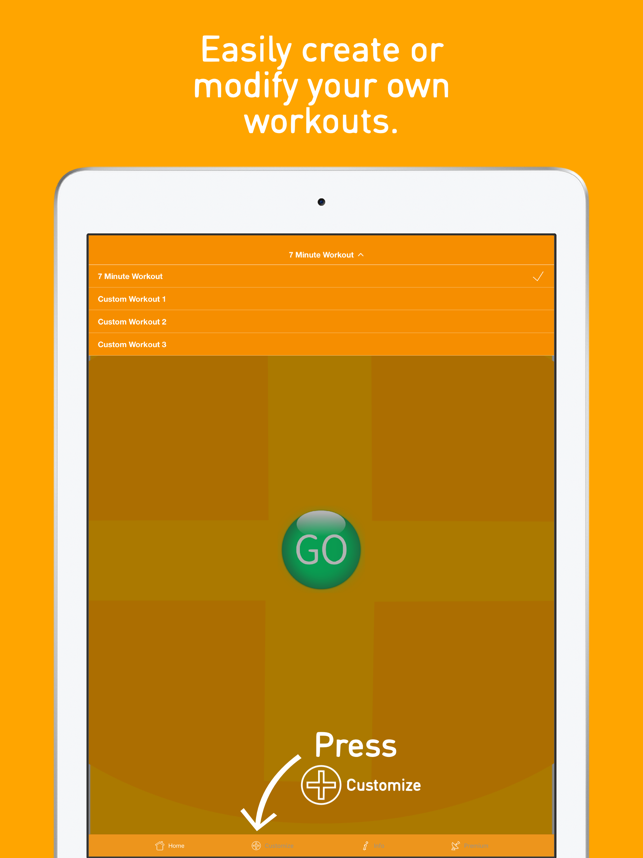
Seattle, Washington - Prajnu, Inc. is pleased to announce FlexTimer+, a free workout timer app now available on the Apple App Store. FlexTimer+ is a fully customizable workout timer for any type of workout or activity (HIIT, Interval, Tabata, Cross-fit, Yoga, Meditation) the user would like to create. It also comes preloaded with a 7 minute workout template that can be easily modified to the user's preferences.
Once the user creates a workout or modifies the 7 minute workout template to fit their personal goals, the app will guide them through the workout with sound cues, exercise names, and any static images loaded in. After the workout is complete (with the user's permission) the workout and/or mindful minutes (meditation, breathing, etc.) are recorded to the Apple Health app. The user can also use FlexTimer+ with their favorite music app (Apple Music, Pandora, Amazon Music, Spotify, Etc.)
The app is the creation of Rick Nanda, Co-Founder of Prajnu, who was diagnosed as prediabetic a few years ago. A healthier diet combined with a variety of high intensity and kettlebell workouts have led to 30 pounds of weight loss and better health. When he looked for an app to help him manage these workouts he only found apps with preloaded exercises that were primarily subscription based. So he and Prajnu Co-Founder, Spencer Leu, decided to create a fully customizable free workout timer app. The result is FlexTimer+.
Device Requirements:
* iPhone, iPad, iPod touch
*Requires iOS 10.0 or later
* 33.7 MB
Pricing and Availability:
FlexTimer+ 1.0 is free and available worldwide exclusively through the Apple App Store in the Health & Fitness category. For more information, please contact Spencer Leu.
Prajnu: http://prajnu.wixsite.com/visulax
FlexTimer+ 1.0: http://prajnu.wixsite.com/visulax/flextimer
Download from iTunes: https://itunes.apple.com/app/flextimer-workout-timer/id1248889561
Screenshot: https://is1-ssl.mzstatic.com/image/thumb/Purple128/v4/36/00/4f/36004f27-058d-65cb-45a5-6d96edf424aa/pr_source.png/643x0w.png
App Icon: https://is2-ssl.mzstatic.com/image/thumb/Purple62/v4/9b/d5/a9/9bd5a9e9-509b-4998-06a8-c15cc281f7e8/AppIcon-1x_U007emarketing-0-0-GLES2_U002c0-512MB-sRGB-0-0-0-85-220-0-0-0-6.png/246x0w.jpg
Prajnu, Inc. is a privately held Washington-based company focused on creating innovative self improvement apps for mobile devices. Prajnu's mission is to improve life. All Material and Software Copyright (C) 2018 Prajnu, Inc. All Rights Reserved. Apple, the Apple logo, iPhone, iPod and iPad are registered trademarks of Apple Computer in the U.S. and/or other countries. Other trademarks and registered trademarks may be the property of their respective owners.
*******
Link To Article: https://prmac.com/release-id-82559.htm
*******
---------------------------------------------------------------------------------
Note that you can alter delivered distributions at any time.
Login to your account on prMac to alter your channel selection, or to opt-out at any time.
Best Free Workout Timer App for Home, HIIT, Yoga, or 7 Minute Workouts - Published on 03/15/18
Seattle based Prajnu, Inc. today introduces FlexTimer+, a free workout timer app for iOS devices. Perfect for HIIT, Interval Training, Tabata, Cross-fit, Yoga, or Meditation, FlexTimer+ is a fully customizable workout timer for any type of workout or activity for everyone. The user simply creates a workout and the app will guide them through the workout they created with sound cues, exercise names, and images. FlexTimer+ works with most music apps, including Pandora, Spotify and more.
Seattle, Washington - Prajnu, Inc. is pleased to announce FlexTimer+, a free workout timer app now available on the Apple App Store. FlexTimer+ is a fully customizable workout timer for any type of workout or activity (HIIT, Interval, Tabata, Cross-fit, Yoga, Meditation) the user would like to create. It also comes preloaded with a 7 minute workout template that can be easily modified to the user's preferences.
Once the user creates a workout or modifies the 7 minute workout template to fit their personal goals, the app will guide them through the workout with sound cues, exercise names, and any static images loaded in. After the workout is complete (with the user's permission) the workout and/or mindful minutes (meditation, breathing, etc.) are recorded to the Apple Health app. The user can also use FlexTimer+ with their favorite music app (Apple Music, Pandora, Amazon Music, Spotify, Etc.)
The app is the creation of Rick Nanda, Co-Founder of Prajnu, who was diagnosed as prediabetic a few years ago. A healthier diet combined with a variety of high intensity and kettlebell workouts have led to 30 pounds of weight loss and better health. When he looked for an app to help him manage these workouts he only found apps with preloaded exercises that were primarily subscription based. So he and Prajnu Co-Founder, Spencer Leu, decided to create a fully customizable free workout timer app. The result is FlexTimer+.
Device Requirements:
* iPhone, iPad, iPod touch
*Requires iOS 10.0 or later
* 33.7 MB
Pricing and Availability:
FlexTimer+ 1.0 is free and available worldwide exclusively through the Apple App Store in the Health & Fitness category. For more information, please contact Spencer Leu.
Prajnu: http://prajnu.wixsite.com/visulax
FlexTimer+ 1.0: http://prajnu.wixsite.com/visulax/flextimer
Download from iTunes: https://itunes.apple.com/app/flextimer-workout-timer/id1248889561
Screenshot: https://is1-ssl.mzstatic.com/image/thumb/Purple128/v4/36/00/4f/36004f27-058d-65cb-45a5-6d96edf424aa/pr_source.png/643x0w.png
App Icon: https://is2-ssl.mzstatic.com/image/thumb/Purple62/v4/9b/d5/a9/9bd5a9e9-509b-4998-06a8-c15cc281f7e8/AppIcon-1x_U007emarketing-0-0-GLES2_U002c0-512MB-sRGB-0-0-0-85-220-0-0-0-6.png/246x0w.jpg

Prajnu, Inc. is a privately held Washington-based company focused on creating innovative self improvement apps for mobile devices. Prajnu's mission is to improve life. All Material and Software Copyright (C) 2018 Prajnu, Inc. All Rights Reserved. Apple, the Apple logo, iPhone, iPod and iPad are registered trademarks of Apple Computer in the U.S. and/or other countries. Other trademarks and registered trademarks may be the property of their respective owners.
*******
Link To Article: https://prmac.com/release-id-82559.htm
*******
---------------------------------------------------------------------------------
Note that you can alter delivered distributions at any time.
Login to your account on prMac to alter your channel selection, or to opt-out at any time.
Natural Designs Software brings modern on-screen keyboard to iPhone
A new article has been published at prMac.
Natural Designs Software brings modern on-screen keyboard to iPhone - Published on 03/15/18
Natural Designs Software today announces a port of their well-regarded iPad custom keyboard app "PadKeys" to the iPhone. Numbers, punctuation, and cursor keys are now available without layout flipping. Smart phones have much larger screens than they did a decade ago when Apple brought out the first iPhone, but the keyboard design hasn't changed - until now. PadKeys provides additional keys for numbers and more in a carefully designed ergonomic layout to make typing easier and more efficient.
Valley Cottage, New York - For all fans of PadKeys and non-fans of switching between ABC and 123 layouts, Natural Designs Software has announced a port of their well-regarded iPad custom keyboard app to the iPhone. Numbers, punctuation, and cursor keys are now available without layout flipping. The existing PadKeys Keyboard app previously only available for iPad is now a universal app.
Smart phones are different, much larger devices than they were a decade ago, but the on-screen keyboard hasn't evolved. To satisfy requests from users frustrated with traditional ABC-123 layout swapping, PadKeys improves the iPhone typing experience in several ways:
* A number row: no more need to switch screens to enter part of an address, tracking number, or other alphanumeric text.
* Punctuation and symbols on the same screen: no more layout flipping just to type something in "quotes" or use a simple character like +, -, or *.
* Cursor keys: Easier to use than any of the alternatives smartphone makers have introduced.
* Word swipe input: One of the most efficient ways to enter text on a small screen.
* Enhanced autocorrect: As on the iPad, PadKeys iPhone displays as many suggestions as your screen has room for - no artificial limitation to three.
* Multilingual: PadKeys iPhone supports the same dozen-plus common languages and keyboard layouts as the iPad version, and lets you swap quickly between your two most-frequently used.
Success of the original PadKeys was driven by a simple idea. The stock iOS keyboard design was optimized for the original 3.5" iPhone and doesn't make good use of space on larger tablet displays. PadKeys took the opposite approach, shrinking a full laptop layout to ergonomically provide numbers, punctuation, and also cursor keys on one screen in familiar places. This was well received by iPad users, making PadKeys one of the highest-rated keyboards in the App Store. However, modern iPhones are also much larger than the original that inspired the screen-switching design, and users asked for PadKeys to be brought to their phones as well.
Making this happen was not as simple as shrinking down the same layout to phone size. Simplifications had to be made to avoid making the keys too small to hit, and also existing functionality like word swipe had to be enhanced to deal with the "sloppier" input that comes from a smaller screen. A long beta testing phase has honed the initial prototype to a practical tool.
"As you can guess from the name, we initially developed PadKeys to be a kind of 'anti-' phone keyboard, inspired by conventional laptop/netbook layouts," says Adrian Robert, founder and lead developer at Natural Designs. "So I was surprised when users started asking us to bring it to their phones. But actually the trend has been towards ever-bigger screens. The display size on the Plus series is over double that of the original iPhone, and the standard model isn't far behind. Yet keyboard designs haven't evolved. It's high time they do."
Supported Languages:
PadKeys Keyboard supports English (US, CA, UK, AU, and NZ), Danish, Dutch, Finnish, French (France and Canada), German, Italian, Norwegian (Bokml), Portuguese (Brazil and Portugal), Spanish, and Swedish.
Device Requirements:
* Any device supporting iOS 10 or above
Pricing and Availability:
PadKeys Keyboard universal for iPad and iPhone is available at phone launch promotional pricing in the iOS App Store for $1.99 USD (or equivalent in other currencies). Regular price is $4.99. Review codes available upon request.
PadKeys Keyboard 4.0: http://padkeyskeyboard.com
Purchase and Download: https://itunes.apple.com/app/padkeys-keyboard/id975022995
YouTube Video (PadKeys Keyboard with iPhone): https://www.youtube.com/watch?v=hjI8-hKmlpQ
Media Assets: https://docs.google.com/document/d/1qp0nCl9g1WYyql18wf7Pz6cZIPZTKj5Q__LuBicraOc
Natural Designs Software, Inc. was founded in 2007 to bring innovative user interfaces to education, entertainment, and utility applications. Software should work the way the user sees, thinks and acts, not the other way around. The current products are a Chinese language learning program for desktop and iPad, and an iOS custom keyboard extension designed for tablets. Musical and visual art creativity software is in the works. All Material and Software (C) Copyright 2007-2018 Natural Designs Software, Inc. All Rights Reserved. Apple, the Apple logo, iPhone, iPod and iPad are registered trademarks of Apple Inc. in the U.S. and/or other countries. Other trademarks and registered trademarks may be the property of their respective owners.
*******
Link To Article: https://prmac.com/release-id-82558.htm
*******
---------------------------------------------------------------------------------
Note that you can alter delivered distributions at any time.
Login to your account on prMac to alter your channel selection, or to opt-out at any time.
Natural Designs Software brings modern on-screen keyboard to iPhone - Published on 03/15/18
Natural Designs Software today announces a port of their well-regarded iPad custom keyboard app "PadKeys" to the iPhone. Numbers, punctuation, and cursor keys are now available without layout flipping. Smart phones have much larger screens than they did a decade ago when Apple brought out the first iPhone, but the keyboard design hasn't changed - until now. PadKeys provides additional keys for numbers and more in a carefully designed ergonomic layout to make typing easier and more efficient.
Valley Cottage, New York - For all fans of PadKeys and non-fans of switching between ABC and 123 layouts, Natural Designs Software has announced a port of their well-regarded iPad custom keyboard app to the iPhone. Numbers, punctuation, and cursor keys are now available without layout flipping. The existing PadKeys Keyboard app previously only available for iPad is now a universal app.
Smart phones are different, much larger devices than they were a decade ago, but the on-screen keyboard hasn't evolved. To satisfy requests from users frustrated with traditional ABC-123 layout swapping, PadKeys improves the iPhone typing experience in several ways:
* A number row: no more need to switch screens to enter part of an address, tracking number, or other alphanumeric text.
* Punctuation and symbols on the same screen: no more layout flipping just to type something in "quotes" or use a simple character like +, -, or *.
* Cursor keys: Easier to use than any of the alternatives smartphone makers have introduced.
* Word swipe input: One of the most efficient ways to enter text on a small screen.
* Enhanced autocorrect: As on the iPad, PadKeys iPhone displays as many suggestions as your screen has room for - no artificial limitation to three.
* Multilingual: PadKeys iPhone supports the same dozen-plus common languages and keyboard layouts as the iPad version, and lets you swap quickly between your two most-frequently used.
Success of the original PadKeys was driven by a simple idea. The stock iOS keyboard design was optimized for the original 3.5" iPhone and doesn't make good use of space on larger tablet displays. PadKeys took the opposite approach, shrinking a full laptop layout to ergonomically provide numbers, punctuation, and also cursor keys on one screen in familiar places. This was well received by iPad users, making PadKeys one of the highest-rated keyboards in the App Store. However, modern iPhones are also much larger than the original that inspired the screen-switching design, and users asked for PadKeys to be brought to their phones as well.
Making this happen was not as simple as shrinking down the same layout to phone size. Simplifications had to be made to avoid making the keys too small to hit, and also existing functionality like word swipe had to be enhanced to deal with the "sloppier" input that comes from a smaller screen. A long beta testing phase has honed the initial prototype to a practical tool.
"As you can guess from the name, we initially developed PadKeys to be a kind of 'anti-' phone keyboard, inspired by conventional laptop/netbook layouts," says Adrian Robert, founder and lead developer at Natural Designs. "So I was surprised when users started asking us to bring it to their phones. But actually the trend has been towards ever-bigger screens. The display size on the Plus series is over double that of the original iPhone, and the standard model isn't far behind. Yet keyboard designs haven't evolved. It's high time they do."
Supported Languages:
PadKeys Keyboard supports English (US, CA, UK, AU, and NZ), Danish, Dutch, Finnish, French (France and Canada), German, Italian, Norwegian (Bokml), Portuguese (Brazil and Portugal), Spanish, and Swedish.
Device Requirements:
* Any device supporting iOS 10 or above
Pricing and Availability:
PadKeys Keyboard universal for iPad and iPhone is available at phone launch promotional pricing in the iOS App Store for $1.99 USD (or equivalent in other currencies). Regular price is $4.99. Review codes available upon request.
PadKeys Keyboard 4.0: http://padkeyskeyboard.com
Purchase and Download: https://itunes.apple.com/app/padkeys-keyboard/id975022995
YouTube Video (PadKeys Keyboard with iPhone): https://www.youtube.com/watch?v=hjI8-hKmlpQ
Media Assets: https://docs.google.com/document/d/1qp0nCl9g1WYyql18wf7Pz6cZIPZTKj5Q__LuBicraOc
Natural Designs Software, Inc. was founded in 2007 to bring innovative user interfaces to education, entertainment, and utility applications. Software should work the way the user sees, thinks and acts, not the other way around. The current products are a Chinese language learning program for desktop and iPad, and an iOS custom keyboard extension designed for tablets. Musical and visual art creativity software is in the works. All Material and Software (C) Copyright 2007-2018 Natural Designs Software, Inc. All Rights Reserved. Apple, the Apple logo, iPhone, iPod and iPad are registered trademarks of Apple Inc. in the U.S. and/or other countries. Other trademarks and registered trademarks may be the property of their respective owners.
*******
Link To Article: https://prmac.com/release-id-82558.htm
*******
---------------------------------------------------------------------------------
Note that you can alter delivered distributions at any time.
Login to your account on prMac to alter your channel selection, or to opt-out at any time.
Blox Shock released for iOS - Fun and Addictive Puzzle Game
A new article has been published at prMac.
Blox Shock released for iOS - Fun and Addictive Puzzle Game - Published on 03/15/18
UK based Notus Games Ltd announces Blox Shock 1.0.6, an important update to their fun-to-play block elimination game developed exclusively for iPhone, iPad and iPod touch devices. Blox Shock is a simple and addicting puzzle game for everyone. Players drag colorful blocks of different shapes to create lines. Completed lines are immediately blasted away to free space for more blocks. Version 1.0.6 sports an improved user interface, improved performance and minor bug fixes.
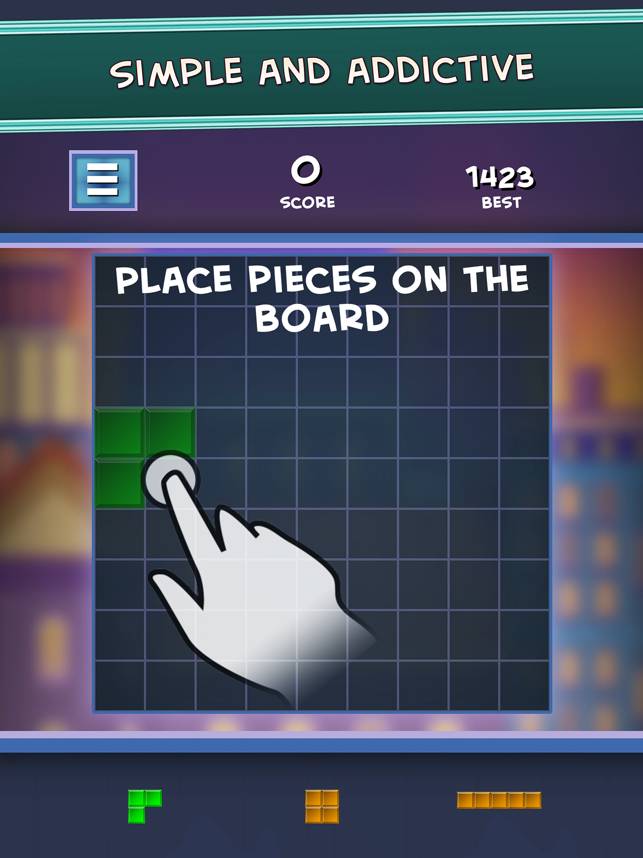
Sheffield, United Kingdom - Notus Games Ltd is proud to announce the release of Blox Shock 1.0.6, an important update to their fun-to-play block elimination game developed exclusively for iPhone, iPad and iPod touch devices. Blox Shock is a simple and addicting puzzle game for everyone. It is easy and relaxing to play, but try to use the full power of your strategic thinking and logic to get the best results.
Players drag colorful blocks of different shapes to create lines. Completed lines are immediately blasted away to free space for more blocks. Shapes become trickier as the game progresses, but the more lines cleared the more points they gain. Removing several lines with one move gives extra points. The round ends when there is no more place for blocks.
Players can compare their results with other players worldwide. There are no time limits or other restrictions. It's a fun and effective way to train your brain!
Features:
* Colorful and simple puzzle game
* Worldwide leaderboard
* Neat design
* Upbeat music track
* Free game with no limits
* Global leaderboard
* You can play anytime and anywhere
Device Requirements:
* Optimized both for iPads and for iPhones (Supports iPhone X)
* iPhone 5s or later and iPod touch
* iPad 5th Generation or later
* High definition Retina graphics
* Requires iOS 11.0 or later
* 17.9 MB
Pricing and Availability:
Blox Shock 1.0.6 is Free (With In-App Purchases) and available worldwide exclusively through the App Store in the Games category. Currently available in English, but Spanish, French, Italian, Ukrainian, Chinese, Russian and other localizations are already being developed. We really hope you enjoy it! Don't hesitate to try! For more information, please contact Oleksandr Movchan.
Notus Games: http://notusgames.com/
Blox Shock 1.0.6: https://itunes.apple.com/app/blox-shock-block-elimination/id1338714008
Screenshot: https://is2-ssl.mzstatic.com/image/thumb/Purple128/v4/55/e0/ac/55e0ac6d-44f8-76b3-a3f4-940def14062b/pr_source.png/643x0w.png
App Icon: https://is2-ssl.mzstatic.com/image/thumb/Purple62/v4/b4/ae/40/b4ae40d2-85ca-7e48-6961-332d7049fb08/AppIcon-1x_U007emarketing-0-0-GLES2_U002c0-512MB-sRGB-0-0-0-85-220-0-0-0-6.png/246x0w.jpg
Notus Games Ltd is a rapidly developing company founded in 2010. Copyright (C) 2010-2018 Notus Games Ltd. All Rights Reserved. Apple, the Apple logo, iPhone, iPod and iPad are registered trademarks of Apple Inc. in the U.S. and/or other countries.
*******
Link To Article: https://prmac.com/release-id-82557.htm
*******
---------------------------------------------------------------------------------
Note that you can alter delivered distributions at any time.
Login to your account on prMac to alter your channel selection, or to opt-out at any time.
Blox Shock released for iOS - Fun and Addictive Puzzle Game - Published on 03/15/18
UK based Notus Games Ltd announces Blox Shock 1.0.6, an important update to their fun-to-play block elimination game developed exclusively for iPhone, iPad and iPod touch devices. Blox Shock is a simple and addicting puzzle game for everyone. Players drag colorful blocks of different shapes to create lines. Completed lines are immediately blasted away to free space for more blocks. Version 1.0.6 sports an improved user interface, improved performance and minor bug fixes.
Sheffield, United Kingdom - Notus Games Ltd is proud to announce the release of Blox Shock 1.0.6, an important update to their fun-to-play block elimination game developed exclusively for iPhone, iPad and iPod touch devices. Blox Shock is a simple and addicting puzzle game for everyone. It is easy and relaxing to play, but try to use the full power of your strategic thinking and logic to get the best results.
Players drag colorful blocks of different shapes to create lines. Completed lines are immediately blasted away to free space for more blocks. Shapes become trickier as the game progresses, but the more lines cleared the more points they gain. Removing several lines with one move gives extra points. The round ends when there is no more place for blocks.
Players can compare their results with other players worldwide. There are no time limits or other restrictions. It's a fun and effective way to train your brain!
Features:
* Colorful and simple puzzle game
* Worldwide leaderboard
* Neat design
* Upbeat music track
* Free game with no limits
* Global leaderboard
* You can play anytime and anywhere
Device Requirements:
* Optimized both for iPads and for iPhones (Supports iPhone X)
* iPhone 5s or later and iPod touch
* iPad 5th Generation or later
* High definition Retina graphics
* Requires iOS 11.0 or later
* 17.9 MB
Pricing and Availability:
Blox Shock 1.0.6 is Free (With In-App Purchases) and available worldwide exclusively through the App Store in the Games category. Currently available in English, but Spanish, French, Italian, Ukrainian, Chinese, Russian and other localizations are already being developed. We really hope you enjoy it! Don't hesitate to try! For more information, please contact Oleksandr Movchan.
Notus Games: http://notusgames.com/
Blox Shock 1.0.6: https://itunes.apple.com/app/blox-shock-block-elimination/id1338714008
Screenshot: https://is2-ssl.mzstatic.com/image/thumb/Purple128/v4/55/e0/ac/55e0ac6d-44f8-76b3-a3f4-940def14062b/pr_source.png/643x0w.png
App Icon: https://is2-ssl.mzstatic.com/image/thumb/Purple62/v4/b4/ae/40/b4ae40d2-85ca-7e48-6961-332d7049fb08/AppIcon-1x_U007emarketing-0-0-GLES2_U002c0-512MB-sRGB-0-0-0-85-220-0-0-0-6.png/246x0w.jpg

Notus Games Ltd is a rapidly developing company founded in 2010. Copyright (C) 2010-2018 Notus Games Ltd. All Rights Reserved. Apple, the Apple logo, iPhone, iPod and iPad are registered trademarks of Apple Inc. in the U.S. and/or other countries.
*******
Link To Article: https://prmac.com/release-id-82557.htm
*******
---------------------------------------------------------------------------------
Note that you can alter delivered distributions at any time.
Login to your account on prMac to alter your channel selection, or to opt-out at any time.
Turn your Mac into a Spotify Alarm Clock - Introducing Wakefy
A new article has been published at prMac.
Turn your Mac into a Spotify Alarm Clock - Introducing Wakefy - Published on 03/14/18
Madrid based indie developer, Javier Ramirez today introduces Wakefy 0.2.0 for macOS. Wakefy is a simple, beautiful free app that turns your Mac into a Spotify alarm clock. It forces you to actually get up and walk to turn off the alarm, and allows you to wake up to your favorite Spotify tunes. It works even if your Mac is not awake. It's a tiny, unobtrusive tool that lives in your menu bar and only pops up when you need it. Set it once, forget about it.
Madrid, Spain - Independent developer, Javier Ramirez today is proud to announce the release of Wakefy 0.2.0 for macOS. Wakefy is a simple, beautiful free app that turns your Mac into a Spotify alarm clock. It forces you to actually get up and walk to turn off the alarm, and allows you to wake up to your favorite Spotify tunes. It works even if your Mac is not awake.
"I have a sleep disorder called DSPS that makes me a really heavy sleeper in the morning," explained Javi Ramirez, indie developer. "And you know, sleeping next to my phone, as we all do, did not help at all. I subconsciously mastered the ability to turn off that awful alarm without even opening an eye. I became desperate to wake up on time most days. That's why I decided to put an end to my problem and created Wakefy. I just want people to solve their waking up problems or just enjoy better mornings."
Some other benefits of using Wakefy are:
* Useful for those nights when you fall asleep watching Netflix and forget to set the alarm on your phone
* It's a tiny, unobtrusive tool that lives in your menu bar and only pops up when you need it - Set it once, forget about it
* Nice for travelling: it can save you from situations where you ran out of battery on your phone or even left it at home
The fact that you can set a Spotify playlist as the alarm sound implies you can wake up each day with a different song, preventing you from getting used (and ignoring) a single alarm ringtone. It prevents you from hating a single alarm sound, too!
Pricing and Availability:
Wakefy 0.2.0 is freely available, and can be downloaded directly from its official website. macOS 10.12 or later required. For more information about Wakefy, please contact Javier Ramirez.
Wakefy 0.2.0: https://wakefy.com
Download Wakefy: https://s3-eu-west-1.amazonaws.com/wakefy/Wakefy-0.2.0.dmg
Media Assets: https://wakefy.com/press.html
Javi Ramirez (@rameerez) is a 24 year old indie serial maker from Madrid, Spain. Computer Science + Business Administration graduate. Javi believes in shaping the world through creating meaningful products and companies that support them. That's why he designs and codes products such as chatbots, apps (mobile/web/desktop) and Artificial Intelligence and Big Data apps that make people's lives easier. He has been also a TEDx speaker and has founded international award-winning startups and products. All Material and Software (C) Copyright 2018 Javier Ramirez. All Rights Reserved. Apple, the Apple logo, macOS, iPhone, iPod, iPad and OS X are registered trademarks of Apple Inc. in the U.S. and/or other countries. Other trademarks and registered trademarks may be the property of their respective owners.
*******
Link To Article: https://prmac.com/release-id-82556.htm
*******
---------------------------------------------------------------------------------
Note that you can alter delivered distributions at any time.
Login to your account on prMac to alter your channel selection, or to opt-out at any time.
Turn your Mac into a Spotify Alarm Clock - Introducing Wakefy - Published on 03/14/18
Madrid based indie developer, Javier Ramirez today introduces Wakefy 0.2.0 for macOS. Wakefy is a simple, beautiful free app that turns your Mac into a Spotify alarm clock. It forces you to actually get up and walk to turn off the alarm, and allows you to wake up to your favorite Spotify tunes. It works even if your Mac is not awake. It's a tiny, unobtrusive tool that lives in your menu bar and only pops up when you need it. Set it once, forget about it.
Madrid, Spain - Independent developer, Javier Ramirez today is proud to announce the release of Wakefy 0.2.0 for macOS. Wakefy is a simple, beautiful free app that turns your Mac into a Spotify alarm clock. It forces you to actually get up and walk to turn off the alarm, and allows you to wake up to your favorite Spotify tunes. It works even if your Mac is not awake.
"I have a sleep disorder called DSPS that makes me a really heavy sleeper in the morning," explained Javi Ramirez, indie developer. "And you know, sleeping next to my phone, as we all do, did not help at all. I subconsciously mastered the ability to turn off that awful alarm without even opening an eye. I became desperate to wake up on time most days. That's why I decided to put an end to my problem and created Wakefy. I just want people to solve their waking up problems or just enjoy better mornings."
Some other benefits of using Wakefy are:
* Useful for those nights when you fall asleep watching Netflix and forget to set the alarm on your phone
* It's a tiny, unobtrusive tool that lives in your menu bar and only pops up when you need it - Set it once, forget about it
* Nice for travelling: it can save you from situations where you ran out of battery on your phone or even left it at home
The fact that you can set a Spotify playlist as the alarm sound implies you can wake up each day with a different song, preventing you from getting used (and ignoring) a single alarm ringtone. It prevents you from hating a single alarm sound, too!
Pricing and Availability:
Wakefy 0.2.0 is freely available, and can be downloaded directly from its official website. macOS 10.12 or later required. For more information about Wakefy, please contact Javier Ramirez.
Wakefy 0.2.0: https://wakefy.com
Download Wakefy: https://s3-eu-west-1.amazonaws.com/wakefy/Wakefy-0.2.0.dmg
Media Assets: https://wakefy.com/press.html
Javi Ramirez (@rameerez) is a 24 year old indie serial maker from Madrid, Spain. Computer Science + Business Administration graduate. Javi believes in shaping the world through creating meaningful products and companies that support them. That's why he designs and codes products such as chatbots, apps (mobile/web/desktop) and Artificial Intelligence and Big Data apps that make people's lives easier. He has been also a TEDx speaker and has founded international award-winning startups and products. All Material and Software (C) Copyright 2018 Javier Ramirez. All Rights Reserved. Apple, the Apple logo, macOS, iPhone, iPod, iPad and OS X are registered trademarks of Apple Inc. in the U.S. and/or other countries. Other trademarks and registered trademarks may be the property of their respective owners.
*******
Link To Article: https://prmac.com/release-id-82556.htm
*******
---------------------------------------------------------------------------------
Note that you can alter delivered distributions at any time.
Login to your account on prMac to alter your channel selection, or to opt-out at any time.
Graphic Node's Flash Sale on Creativity Apps
A new article has been published at prMac.
Graphic Node's Flash Sale on Creativity Apps - Published on 03/13/18
The developers behind some of the App Store's popular creativity assistant apps, Graphic Node has launched a flash sale on 42 of their applications. These applications offer creative items for many of the popular productivity and image-editing suites, so it is a great time to jump in as a new user, or for existing users to expand their collections. All of these products are available for a limited time for just $1.99 for everyone.
Sakiai, Lithuania - Graphic Node, the developers behind some of the App Store's popular creativity assistant apps have launched a flash sale on 42 of their applications. All of these products are available for a limited time for just $1.99 for everyone! These applications offer creative items for many of the popular productivity and image-editing suites, so it is a great time to jump in as a new user, or for existing users to expand their collections!
The complete list of apps discounted to $1.99 for the flash sale:
* Bundle for Pages by GN
* Bundle for Wedding
* Business Bundle for Word by GN
* DesiGN Brochures Templates
* DesiGN Certificates Templates
* Design Elements - GN Templates
* DesiGN Flyers Templates
* Design for Keynote
* Design for Numbers
* DesiGN Greeting Cards Templates
* DesiGN Invitation Templates
* DesiGN Invoices Templates
* DesiGN Labels Templates
* DesiGN Letters Templates
* DesiGN Menus Templates
* DesiGN Newsletters Templates
* DesiGN Posters Templates
* GN Business Books for iBooks Author
* GN Business Cards Templates
* GN Catalogs for Pages - Templates Bundle
* GN Fax for Pages -Templates Bundle
* GN Food Books for iBooks Author - Templates Bundle
* GN Infographics for Adobe Illustrator
* GN Infographics for Adobe Photoshop
* GN Letters Templates for Pages
* GN Memos for Pages - Templates Bundle
* GN Templates Bundle for iWork
* Graphics
* iArt for MS Excel
* iArt for MS Word
* iArt for Numbers
* iArt Layout Design
* iArt Theme Design
* Inspiration Templates
* Print Templates for Word by GN
* Resume Templates
* Stock Icons - Cliparts by GN
* Templates for MS Excel by GN
* Templates for MS Powerpoint by GN
* Templates for MS Word by GN
* Templates for Photoshop by GN
* Templates for Pixelmator by GN
* Vector Icons - Cliparts by GN
"Users love our creativity products and we are proud to be able to offer one of the most extensive creative items collections on the market. We are launching a one-day flash sale so new users could get their hands on productivity templates and graphics, and discover the amazing opportunities they open up for creativity at home or work" - said Zivile Unguvaityte, CEO of Graphic Node. "Our products are designed to be flexible and adaptable, so users of any skill-level can work with them and achieve amazing results in no time! With 42 diverse products on sale for just $1.99, we're sure that everyone can find something useful for personal and business needs!"
All Graphic Node applications can be found on the Mac App Store.
Graphic Node: http://graphicnode.com
Graphic Node Products: https://search.itunes.apple.com/WebObjects/MZContentLink.woa/wa/link?mt=11&path=mac%2fgraphicnode
Press Kit (zip): https://download.graphicnode.com/Temporary/riuzavas_flashas.zip
Graphic Node is a graphic design company based in Lithuania and committed to creating exceptional templates and themes for the Mac OS X community. Theme Inn is a team of professional Mac designers who specialize in developing high-quality templates for Microsoft Office for Mac. The company defines its work through careful attention to rich visuals, ease of use and wide adaptability. Theme Inn's products are designed to save users time and help them achieve the best results. Copyright (C) 2018 Graphic Node. All Rights Reserved. Apple, the Apple logo, Mac OS X and Macintosh are registered trademarks of Apple Inc. in the U.S. and/or other countries.
*******
Link To Article: https://prmac.com/release-id-82551.htm
*******
---------------------------------------------------------------------------------
Note that you can alter delivered distributions at any time.
Login to your account on prMac to alter your channel selection, or to opt-out at any time.
Graphic Node's Flash Sale on Creativity Apps - Published on 03/13/18
The developers behind some of the App Store's popular creativity assistant apps, Graphic Node has launched a flash sale on 42 of their applications. These applications offer creative items for many of the popular productivity and image-editing suites, so it is a great time to jump in as a new user, or for existing users to expand their collections. All of these products are available for a limited time for just $1.99 for everyone.
Sakiai, Lithuania - Graphic Node, the developers behind some of the App Store's popular creativity assistant apps have launched a flash sale on 42 of their applications. All of these products are available for a limited time for just $1.99 for everyone! These applications offer creative items for many of the popular productivity and image-editing suites, so it is a great time to jump in as a new user, or for existing users to expand their collections!
The complete list of apps discounted to $1.99 for the flash sale:
* Bundle for Pages by GN
* Bundle for Wedding
* Business Bundle for Word by GN
* DesiGN Brochures Templates
* DesiGN Certificates Templates
* Design Elements - GN Templates
* DesiGN Flyers Templates
* Design for Keynote
* Design for Numbers
* DesiGN Greeting Cards Templates
* DesiGN Invitation Templates
* DesiGN Invoices Templates
* DesiGN Labels Templates
* DesiGN Letters Templates
* DesiGN Menus Templates
* DesiGN Newsletters Templates
* DesiGN Posters Templates
* GN Business Books for iBooks Author
* GN Business Cards Templates
* GN Catalogs for Pages - Templates Bundle
* GN Fax for Pages -Templates Bundle
* GN Food Books for iBooks Author - Templates Bundle
* GN Infographics for Adobe Illustrator
* GN Infographics for Adobe Photoshop
* GN Letters Templates for Pages
* GN Memos for Pages - Templates Bundle
* GN Templates Bundle for iWork
* Graphics
* iArt for MS Excel
* iArt for MS Word
* iArt for Numbers
* iArt Layout Design
* iArt Theme Design
* Inspiration Templates
* Print Templates for Word by GN
* Resume Templates
* Stock Icons - Cliparts by GN
* Templates for MS Excel by GN
* Templates for MS Powerpoint by GN
* Templates for MS Word by GN
* Templates for Photoshop by GN
* Templates for Pixelmator by GN
* Vector Icons - Cliparts by GN
"Users love our creativity products and we are proud to be able to offer one of the most extensive creative items collections on the market. We are launching a one-day flash sale so new users could get their hands on productivity templates and graphics, and discover the amazing opportunities they open up for creativity at home or work" - said Zivile Unguvaityte, CEO of Graphic Node. "Our products are designed to be flexible and adaptable, so users of any skill-level can work with them and achieve amazing results in no time! With 42 diverse products on sale for just $1.99, we're sure that everyone can find something useful for personal and business needs!"
All Graphic Node applications can be found on the Mac App Store.
Graphic Node: http://graphicnode.com
Graphic Node Products: https://search.itunes.apple.com/WebObjects/MZContentLink.woa/wa/link?mt=11&path=mac%2fgraphicnode
Press Kit (zip): https://download.graphicnode.com/Temporary/riuzavas_flashas.zip
Graphic Node is a graphic design company based in Lithuania and committed to creating exceptional templates and themes for the Mac OS X community. Theme Inn is a team of professional Mac designers who specialize in developing high-quality templates for Microsoft Office for Mac. The company defines its work through careful attention to rich visuals, ease of use and wide adaptability. Theme Inn's products are designed to save users time and help them achieve the best results. Copyright (C) 2018 Graphic Node. All Rights Reserved. Apple, the Apple logo, Mac OS X and Macintosh are registered trademarks of Apple Inc. in the U.S. and/or other countries.
*******
Link To Article: https://prmac.com/release-id-82551.htm
*******
---------------------------------------------------------------------------------
Note that you can alter delivered distributions at any time.
Login to your account on prMac to alter your channel selection, or to opt-out at any time.
Pro Golf Challenge new game for iOS, Android, and Windows 10
A new article has been published at prMac.
Pro Golf Challenge new game for iOS, Android, and Windows 10 - Published on 03/13/18
Texas based developer, Magnin & Associates today introduces Pro Golf Challenge 1.0, their new game for iOS, Android & Windows 10. Pro Golf Challenge simulates 9 or 18 holes of golf, selecting club from golf bag, challenging holes with trees, sand traps, and water obstacles. The game offers multiple game play modes, including local single player, or multiplayer multi-platform online play. Players can optionally share accomplishments via email, instant messaging, or social media.
Farmers Branch, Texas - Magnin & Associates today introduces Pro Golf Challenge 1.0, their new game for iOS, Android, and Windows 10. Pro Golf Challenge simulates 9 or 18 holes of golf, selecting club from golf bag, challenging holes with trees, sand traps, and water obstacles. The game offers multiple game play modes, including local single player, or multiplayer multi-platform online play. Players can optionally share accomplishments via email, instant messaging, or social media.
Enjoy the convenience of being able to play a round of golf, any time you want, right on your iPhone, iPad, Android, or Windows 10 PC or Surface.
Touch the club head to select and drag it up out of your golf bag. Pivot left or right to adjust your stance and aim. Use your finger as the golf club, touching the club head and dragging it to the right to wind up, and back to the left to hit the ball. You control the distance by adjusting how far and strongly you swing.
The View Button zooms out to let you see a bird's eye view of the current hole. The Path Button lets you see the predicted path of the ball using the selected club. Your bag includes 3 woods, 7 irons, a wedge, and a putter. Automatically keeps score. Optionally shares your accomplishments via email, instant messaging, or social media.
Multiple gameplay modes:
* 1 Player, Front 9 (holes 1-9)
* 1 Player, Back 9 (holes 10-18)
* 1 Player, Full Course (holes 1-18)
* Free Play, practice whatever hole you wish
* 2 - 4 Players online
Challenging for all ages. Enjoy by yourself or go head-to-head online against invited opponent(s). Pro Golf Challenge is multiplayer and multi-platform, supporting most popular smartphones, tablets, and computers.
The game was produced by Ed Magnin, programmed and technical art by Willie Johnson, Jr, and level design by Austin Farrar. Matt Campana created the music and realistic audio effects. According to Ed Magnin, "We wanted to create a game where you could play a round golf anytime anywhere using your finger as your club."
Device Requirements (iOS):
* Compatible with iPhone, iPad, and iPod touch
* Requires iOS 7.0 or later
* Universal App - supports iPhone, iPod touch, and iPad, including standard, Retina, and iPhone X displays
* 143.6 MB
* Rated 4+
Pricing and Availability:
Pro Golf Challenge 1.0 is $2.99 USD (or equivalent amount in other currencies) and available worldwide through the App Store in the Games category. An Android version is available worldwide from both Google Play and Amazon AppStore. A Windows 10 version is available from the Windows Store. For more information, please contact Ed Magnin.
Magnin & Associates: http://MagninGames.com
Mini Golf Challenge 1.0: http://MagninGames.com/progolf
YouTube Video: https://www.youtube.com/watch?v=3pdlZnUipMY
Image (Title Screen): http://magningames.com/iphone/progolf/images/ProGolfTitle.png
App Icon: http://MagninGames.com/iphone/progolf/images/Icon_144.png
Ed Magnin has been actively involved in the game industry since 1979. Earlier in his career he worked for some of the top game developers of their day - MicroProse, Cinemaware, Virgin Games, and Park Place Productions. In 1993, he founded Magnin & Associates and has focused on handheld games ever since. They have created over 26 games for iOS (with over a million App Store downloads). Most are also available for Android and Windows 10. All Material and Software (C) Copyright 2018 Magnin & Associates. All Rights Reserved. Apple, the Apple logo, iPhone, iPod and iPad are registered trademarks of Apple Inc. in the U.S. and/or other countries. Other trademarks and registered trademarks may be the property of their respective owners.
*******
Link To Article: https://prmac.com/release-id-82552.htm
*******
---------------------------------------------------------------------------------
Note that you can alter delivered distributions at any time.
Login to your account on prMac to alter your channel selection, or to opt-out at any time.
Pro Golf Challenge new game for iOS, Android, and Windows 10 - Published on 03/13/18
Texas based developer, Magnin & Associates today introduces Pro Golf Challenge 1.0, their new game for iOS, Android & Windows 10. Pro Golf Challenge simulates 9 or 18 holes of golf, selecting club from golf bag, challenging holes with trees, sand traps, and water obstacles. The game offers multiple game play modes, including local single player, or multiplayer multi-platform online play. Players can optionally share accomplishments via email, instant messaging, or social media.
Farmers Branch, Texas - Magnin & Associates today introduces Pro Golf Challenge 1.0, their new game for iOS, Android, and Windows 10. Pro Golf Challenge simulates 9 or 18 holes of golf, selecting club from golf bag, challenging holes with trees, sand traps, and water obstacles. The game offers multiple game play modes, including local single player, or multiplayer multi-platform online play. Players can optionally share accomplishments via email, instant messaging, or social media.
Enjoy the convenience of being able to play a round of golf, any time you want, right on your iPhone, iPad, Android, or Windows 10 PC or Surface.
Touch the club head to select and drag it up out of your golf bag. Pivot left or right to adjust your stance and aim. Use your finger as the golf club, touching the club head and dragging it to the right to wind up, and back to the left to hit the ball. You control the distance by adjusting how far and strongly you swing.
The View Button zooms out to let you see a bird's eye view of the current hole. The Path Button lets you see the predicted path of the ball using the selected club. Your bag includes 3 woods, 7 irons, a wedge, and a putter. Automatically keeps score. Optionally shares your accomplishments via email, instant messaging, or social media.
Multiple gameplay modes:
* 1 Player, Front 9 (holes 1-9)
* 1 Player, Back 9 (holes 10-18)
* 1 Player, Full Course (holes 1-18)
* Free Play, practice whatever hole you wish
* 2 - 4 Players online
Challenging for all ages. Enjoy by yourself or go head-to-head online against invited opponent(s). Pro Golf Challenge is multiplayer and multi-platform, supporting most popular smartphones, tablets, and computers.
The game was produced by Ed Magnin, programmed and technical art by Willie Johnson, Jr, and level design by Austin Farrar. Matt Campana created the music and realistic audio effects. According to Ed Magnin, "We wanted to create a game where you could play a round golf anytime anywhere using your finger as your club."
Device Requirements (iOS):
* Compatible with iPhone, iPad, and iPod touch
* Requires iOS 7.0 or later
* Universal App - supports iPhone, iPod touch, and iPad, including standard, Retina, and iPhone X displays
* 143.6 MB
* Rated 4+
Pricing and Availability:
Pro Golf Challenge 1.0 is $2.99 USD (or equivalent amount in other currencies) and available worldwide through the App Store in the Games category. An Android version is available worldwide from both Google Play and Amazon AppStore. A Windows 10 version is available from the Windows Store. For more information, please contact Ed Magnin.
Magnin & Associates: http://MagninGames.com
Mini Golf Challenge 1.0: http://MagninGames.com/progolf
YouTube Video: https://www.youtube.com/watch?v=3pdlZnUipMY
Image (Title Screen): http://magningames.com/iphone/progolf/images/ProGolfTitle.png

App Icon: http://MagninGames.com/iphone/progolf/images/Icon_144.png

Ed Magnin has been actively involved in the game industry since 1979. Earlier in his career he worked for some of the top game developers of their day - MicroProse, Cinemaware, Virgin Games, and Park Place Productions. In 1993, he founded Magnin & Associates and has focused on handheld games ever since. They have created over 26 games for iOS (with over a million App Store downloads). Most are also available for Android and Windows 10. All Material and Software (C) Copyright 2018 Magnin & Associates. All Rights Reserved. Apple, the Apple logo, iPhone, iPod and iPad are registered trademarks of Apple Inc. in the U.S. and/or other countries. Other trademarks and registered trademarks may be the property of their respective owners.
*******
Link To Article: https://prmac.com/release-id-82552.htm
*******
---------------------------------------------------------------------------------
Note that you can alter delivered distributions at any time.
Login to your account on prMac to alter your channel selection, or to opt-out at any time.
Subscribe to:
Posts (Atom)