A new article has been published at prMac.
Portland Cardiologist Launches New Heart Attack Prevention App - Published on 03/22/18
Portland based Semler HealthPerks (SHP) has launched Dr. Semler's HeartPerks 2.2.2 for iOS and Android, the first interactive app that deals directly with preventing heart attacks and heart disease: the #1 cause of death in this country. Semler HealthPerks founder and CEO, Dr. Herb Semler, M.D., M.S., F.A.C.C, F.A.H.A., developed this easy to use application to educate and motivate people to understand the dangers of heart disease.
Portland, Oregon - Semler HealthPerks (SHP) has launched its latest Version 2.3 of Dr. Semler's HeartPerks App, the first interactive App that deals directly with preventing cardio vascular disease and heart attacks - the #1 cause of death in this country. The updated version of DR. Semler's Heartperks App is now on the App Store and Google Play.
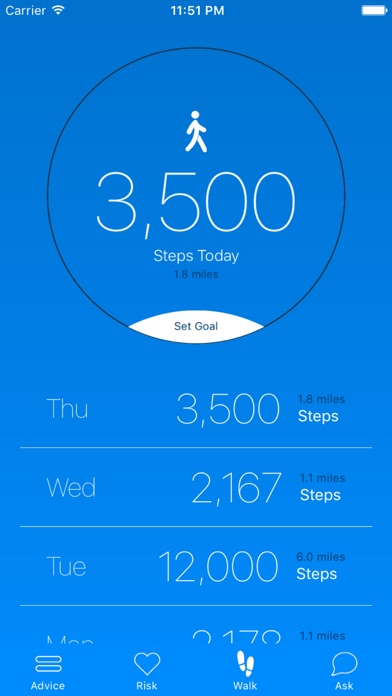
The App is available for a one-time download charge of $.99. This version gives users access to three elements: "Risk Assessment Meter", "Step Counter" and "Meet Dr. Semler" features.
The updated Premium Version is offered at a monthly rate of $1.99 or annual rate of $11.99. and offers additional elements:
* Current articles and updates on cardio vascular disease, stroke, diabetes and obesity.
* Direct access to Dr. Semler on our "Ask Dr. Semler" Tab
* Interaction with followers on our "Groups" tab enabling users to ask questions and tell their story
* Direct links to Amazon.com where users can earn discounts and rewards
"Heart attacks can effect anyone. Our mission is saving lives." Says Dr. Semler. "And this app will do just that."
Semler HealthPerks Founder and CEO, Dr. Herb Semler, M.D., M.S., F.A.C.C, F.A.H.A., developed this easy to use application to educate and motivate users to increase their physical activity. This is the first interactive mobile App developed by a Mayo Clinic trained cardiologist, providing information on the causes and prevention of cardiac disease and heart attacks, the #1 cause of death in America. The "Ask Dr. Semler" section answers frequently asked questions about various heart conditions and medical terms and provides electronic access to Dr. Semler. The weekly updated "Advice" section offers numerous tips on living well, eating well and staying healthy.
Our Risk Assessment tool will give you guidance as to your risk for heart disease. Your daily steps will be tracked through integration with the Apple HealthKit for iPhone and through Google Fit for Android users.
According to the American Heart Association, over 800,000 heart attacks occur in the U.S. every year. However, 80% of heart attacks can be prevented by healthy lifestyle choices. The Semler's HeartPerks App is based on the "Seven Pillars" of heart healthy living:
1. Stop smoking
2. Control high blood pressure
3. Control diabetes
4. Control cholesterol
5. Increase physical activity
6. Follow a heart healthy diet
7. Avoid obesity
Dr. Herb Semler is a respected and internationally known cardiologist and inventor and holds multiple patents for cardiology products. He has spent his entire medical career counseling thousands of patients on the importance of preventing heart disease.
Pricing and Availability:
Dr. Semler's HeartPerks 2.2.2 is only $0.99 USD (or equivalent amount in other currencies) and available worldwide through the App Store in the Health & Fitness category. There is also an Android version available on Google Play. Premium Versions are available to $1.99/month or $11.99 annually. For more information, please contact Jim Whittemore.
Dr. Semler's HeartPerks 2.2.2: https://www.semlerheartperks.com/
Purchase and Download (iOS): https://itunes.apple.com/app/dr-semlers-heartperks/id1158602884
Purchase and Download (Android): https://play.google.com/store/apps/details?id=com.semlerheartperks
Screenshot: http://is5.mzstatic.com/image/thumb/Purple128/v4/e6/6e/81/e66e81c2-11d2-a2d7-c6ea-730e31d7e219/source/392x696bb.jpg
App Icon: http://is4.mzstatic.com/image/thumb/Purple118/v4/c0/17/a8/c017a85a-6fcf-d54a-cc28-a20dde59e1fa/source/175x175bb.jpg
Based in Portland, Oregon, Semler HealthPerks was founded in 2014 upon decades of experience providing the highest level of cardiovascular care to patients. SHP is a preventative health care company committed to making a difference in the lives of people by providing opportunities to improve their health through day to day lifestyle choices. All Material and Software (C) Copyright 2018 Semler HealthPerks, Inc. All Rights Reserved. Apple, the Apple logo, iPhone, iPod and iPad are registered trademarks of Apple Inc. in the U.S. and/or other countries. Other trademarks and registered trademarks may be the property of their respective owners.
*******
Link To Article: https://prmac.com/release-id-82573.htm
*******
---------------------------------------------------------------------------------
Note that you can alter delivered distributions at any time.
Login to your account on prMac to alter your channel selection, or to opt-out at any time.


SoundMeter X Succeeds the Original iPhone Sound Level Meter
A new article has been published at prMac.
SoundMeter X Succeeds the Original iPhone Sound Level Meter - Published on 03/22/18
Utah based Faber Acoustical, LLC introduces SoundMeter X as the successor to SoundMeter, the first-ever sound level meter app for iPhone. SoundMeter X offers basic sound level measurements for free and more powerful measurements via in-app subscriptions. SoundMeter X also supports Pro Tool Set synchronization with SignalScope X--a single subscription unlocks Pro tools in both apps. SoundMeter X is now available on the App Store as a free download.
Lehi, Utah - Faber Acoustical today is pleased to announce the release of SoundMeter X as the successor to SoundMeter, the first-ever sound level meter app for iPhone. In 2008, SoundMeter became the first sound level meter app in the iPhone App Store. Since then, SoundMeter has been validated by professional researchers as "the app best suited for occupational and general purpose noise measurements." With a continued pursuit of accuracy, precision, and reliability, Faber Acoustical announces SoundMeter X as the newest version of SoundMeter for iOS.
SoundMeter may be downloaded for free from the App Store. The free download includes a sound level meter tool, which supports time-weighted sound levels, Lp, with flat frequency weighting and fast time weighting (LpAF). Additional tools and features are offered via auto-renewable subscriptions. SoundMeter Standard, SoundMeter Pro, and Pro Tool Set subscriptions may be purchased in increments of 1 month or 1 year.
Major additions to the new SoundMeter X include a multi-channel data recorder tool, for streaming sound information to audio files, and the ability to share a Pro Tool Set subscription with the new SignalScope X--a single subscription unlocks Pro tools in both apps. SoundMeter's Pro Tool Set subscription unlocks all tools and features of the SoundMeter Pro subscription in SoundMeter X and all tools and features of the Pro Tool Set subscription in SignalScope X. Users who have already purchased the Pro Tool Set subscription within SignalScope X will be able to access the Pro features in SoundMeter X while that subscription is active. An iCloud account login is required for syncing subscriptions between the two apps.
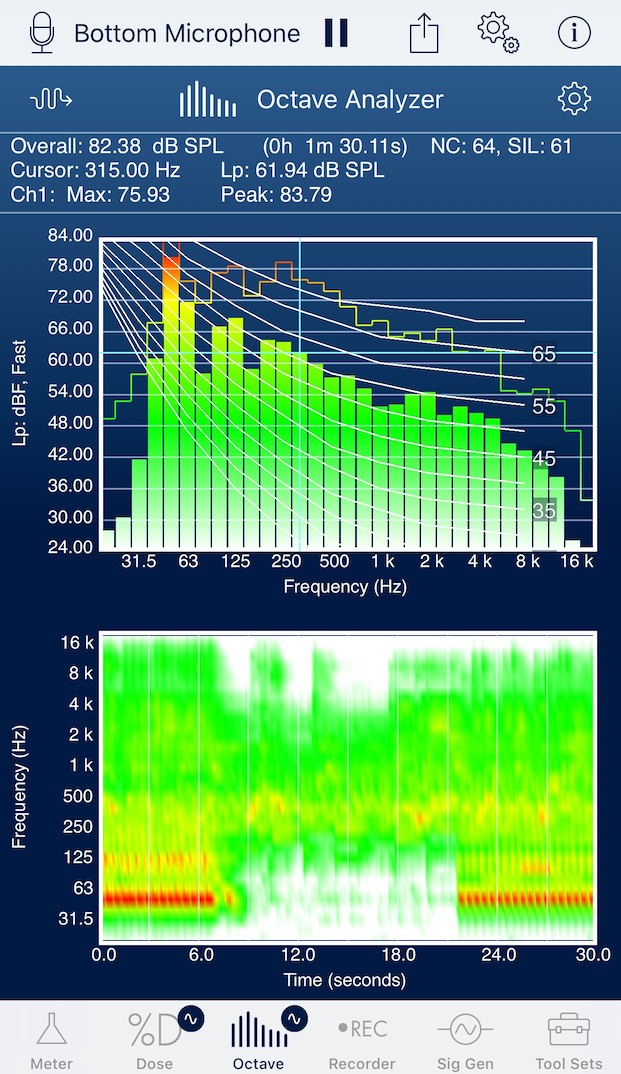
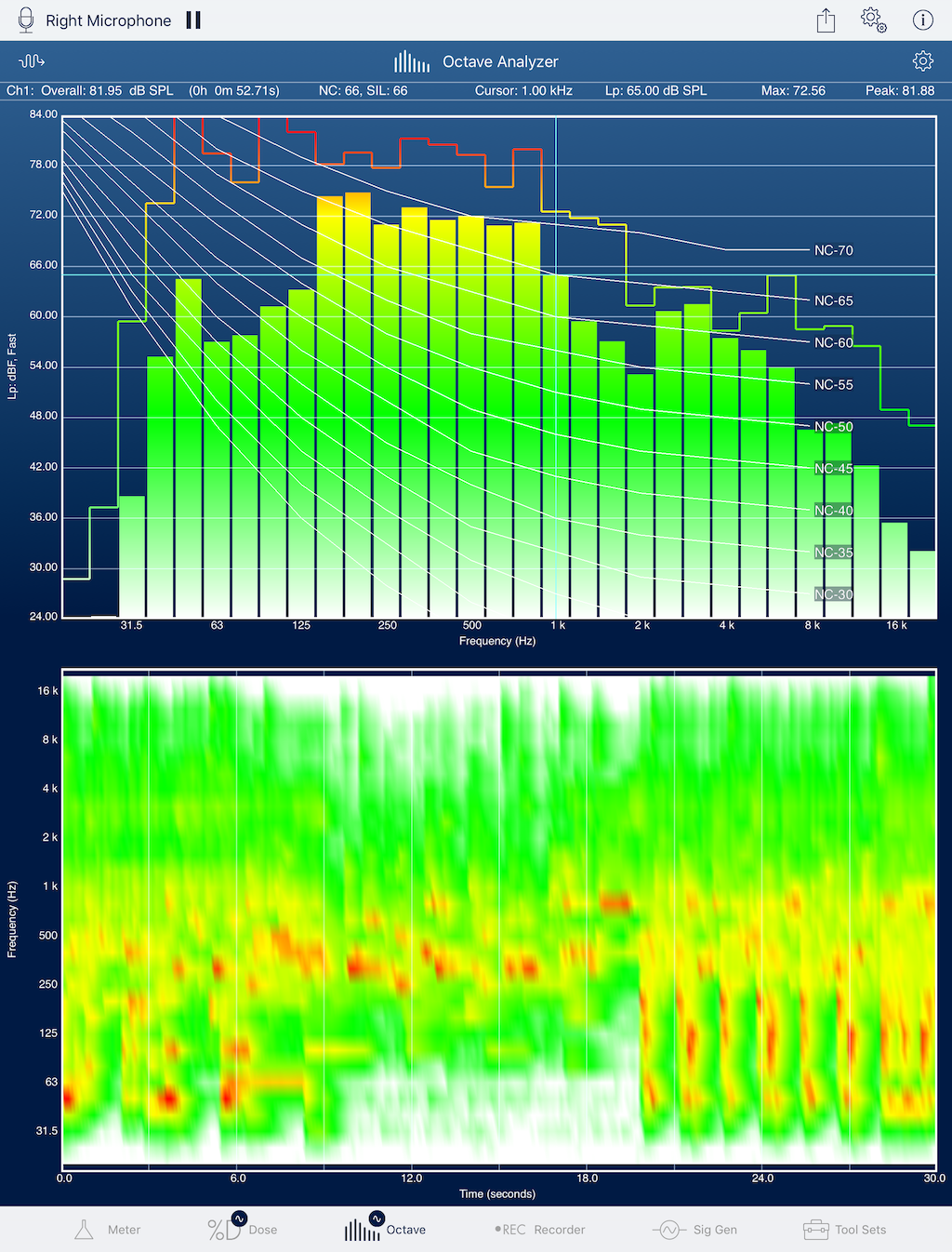
The SoundMeter Standard subscription includes access to more capable sound level meter and noise dosimeter tools, plus ongoing hardware support, such as periodically updated nominal microphone sensitivities for built-in microphones on Apple devices, updated nominal voltage sensitivities for select audio input devices, and automatic calibration for audio input devices that include built-in sensitivity information. The SoundMeter Pro subscription adds a whole or 1/3-octave real-time spectrum analyzer, a multi-channel data recorder, and a stereo signal generator. Additionally, data logging is added to the meter, dosimeter, and octave analyzer tools, and percentile-exceeded sound levels are added to the meter and octave analyzer tools.
Device Requirements:
* Designed to take full advantage of the iPhone X's 5.8" screen
* iPhone, iPad, and iPod touch
* Requires iOS 10.0 or later
* 42 MB
Pricing and Availability:
SoundMeter X is Free (With App Purchases) and available worldwide exclusively through the App Store in the Utilities category. The existing SoundMeter and SoundMeter Pro apps will remain available for sale on the App Store for a limited time for the benefit of those who need access to them on iOS 8 and 9. For more information, please contact Benjamin Faber.
Faber Acoustical: https://www.faberacoustical.com
SoundMeter X (1.0): https://www.faberacoustical.com/apps/ios/soundmeter_x
Download from iTunes: https://itunes.apple.com/us/app/soundmeter-x/id1348050232?mt=8&uo=4&at=11lppv
iPhone Screenshot: http://www.faberacoustical.com/screenshots/ios/soundmeter_x/IMG_4428crop.JPG
iPad Screenshot: http://www.faberacoustical.com/screenshots/ios/soundmeter_x/IMG_0037crop.png
App Icon: http://www.faberacoustical.com/screenshots/ios/soundmeter_x/SMXiPhone3x.png
Faber Acoustical provides cost effective tools for acoustical instrumentation, analysis, and education. Faber Acoustical's expertise include acoustical measurements, active noise control (sometimes referred to as active noise cancellation or ANC), mixed-signal circuit design, digital signal processing (DSP), adaptive filtering, and embedded DSP and desktop software design. Copyright (C) 2018 Faber Acoustical, LLC. All Rights Reserved. Apple, the Apple logo, iPhone, iPod, iPad and macOS are registered trademarks of Apple Inc. in the U.S. and/or other countries.
*******
Link To Article: https://prmac.com/release-id-82572.htm
*******
---------------------------------------------------------------------------------
Note that you can alter delivered distributions at any time.
Login to your account on prMac to alter your channel selection, or to opt-out at any time.
SoundMeter X Succeeds the Original iPhone Sound Level Meter - Published on 03/22/18
Utah based Faber Acoustical, LLC introduces SoundMeter X as the successor to SoundMeter, the first-ever sound level meter app for iPhone. SoundMeter X offers basic sound level measurements for free and more powerful measurements via in-app subscriptions. SoundMeter X also supports Pro Tool Set synchronization with SignalScope X--a single subscription unlocks Pro tools in both apps. SoundMeter X is now available on the App Store as a free download.
Lehi, Utah - Faber Acoustical today is pleased to announce the release of SoundMeter X as the successor to SoundMeter, the first-ever sound level meter app for iPhone. In 2008, SoundMeter became the first sound level meter app in the iPhone App Store. Since then, SoundMeter has been validated by professional researchers as "the app best suited for occupational and general purpose noise measurements." With a continued pursuit of accuracy, precision, and reliability, Faber Acoustical announces SoundMeter X as the newest version of SoundMeter for iOS.
SoundMeter may be downloaded for free from the App Store. The free download includes a sound level meter tool, which supports time-weighted sound levels, Lp, with flat frequency weighting and fast time weighting (LpAF). Additional tools and features are offered via auto-renewable subscriptions. SoundMeter Standard, SoundMeter Pro, and Pro Tool Set subscriptions may be purchased in increments of 1 month or 1 year.
Major additions to the new SoundMeter X include a multi-channel data recorder tool, for streaming sound information to audio files, and the ability to share a Pro Tool Set subscription with the new SignalScope X--a single subscription unlocks Pro tools in both apps. SoundMeter's Pro Tool Set subscription unlocks all tools and features of the SoundMeter Pro subscription in SoundMeter X and all tools and features of the Pro Tool Set subscription in SignalScope X. Users who have already purchased the Pro Tool Set subscription within SignalScope X will be able to access the Pro features in SoundMeter X while that subscription is active. An iCloud account login is required for syncing subscriptions between the two apps.
The SoundMeter Standard subscription includes access to more capable sound level meter and noise dosimeter tools, plus ongoing hardware support, such as periodically updated nominal microphone sensitivities for built-in microphones on Apple devices, updated nominal voltage sensitivities for select audio input devices, and automatic calibration for audio input devices that include built-in sensitivity information. The SoundMeter Pro subscription adds a whole or 1/3-octave real-time spectrum analyzer, a multi-channel data recorder, and a stereo signal generator. Additionally, data logging is added to the meter, dosimeter, and octave analyzer tools, and percentile-exceeded sound levels are added to the meter and octave analyzer tools.
Device Requirements:
* Designed to take full advantage of the iPhone X's 5.8" screen
* iPhone, iPad, and iPod touch
* Requires iOS 10.0 or later
* 42 MB
Pricing and Availability:
SoundMeter X is Free (With App Purchases) and available worldwide exclusively through the App Store in the Utilities category. The existing SoundMeter and SoundMeter Pro apps will remain available for sale on the App Store for a limited time for the benefit of those who need access to them on iOS 8 and 9. For more information, please contact Benjamin Faber.
Faber Acoustical: https://www.faberacoustical.com
SoundMeter X (1.0): https://www.faberacoustical.com/apps/ios/soundmeter_x
Download from iTunes: https://itunes.apple.com/us/app/soundmeter-x/id1348050232?mt=8&uo=4&at=11lppv
iPhone Screenshot: http://www.faberacoustical.com/screenshots/ios/soundmeter_x/IMG_4428crop.JPG
iPad Screenshot: http://www.faberacoustical.com/screenshots/ios/soundmeter_x/IMG_0037crop.png
App Icon: http://www.faberacoustical.com/screenshots/ios/soundmeter_x/SMXiPhone3x.png

Faber Acoustical provides cost effective tools for acoustical instrumentation, analysis, and education. Faber Acoustical's expertise include acoustical measurements, active noise control (sometimes referred to as active noise cancellation or ANC), mixed-signal circuit design, digital signal processing (DSP), adaptive filtering, and embedded DSP and desktop software design. Copyright (C) 2018 Faber Acoustical, LLC. All Rights Reserved. Apple, the Apple logo, iPhone, iPod, iPad and macOS are registered trademarks of Apple Inc. in the U.S. and/or other countries.
*******
Link To Article: https://prmac.com/release-id-82572.htm
*******
---------------------------------------------------------------------------------
Note that you can alter delivered distributions at any time.
Login to your account on prMac to alter your channel selection, or to opt-out at any time.
Output Factory for InDesign Is Now Available on the New Adobe Exchange
A new article has been published at prMac.
Output Factory for InDesign Is Now Available on the New Adobe Exchange - Published on 03/21/18
Zevrix Solutions announced that Output Factory for Adobe InDesign is now available on Adobe Exchange, a new and improved Creative Cloud marketplace. Output Factory automates printing, exporting and preflighting from InDesign and offers batch processing, export as single pages, layer versioning, custom scripts integration and more. Users can now purchase the software directly on Adobe Exchange which makes it easier for customers to discover and install third party plug-ins for Creative Cloud.
Toronto (ON), Canada - Zevrix Solutions today announces that Output Factory for Adobe InDesign is now available on the new and improved Adobe Exchange. Awarded 5 of 5 stars by InDesign Magazine, Output Factory automates and simplifies workflows of printers, ad agencies and publishing houses worldwide. The software helps users eliminate repetitive tasks through batch processing with time-saving output options.
Adobe Exchange provides a new way to search, discover, and install plug-ins, extensions, and other content for Creative Cloud products.. As a unified destination that brings third-party integrations with Creative Cloud, Document Cloud & Experience Cloud under a single umbrella, Adobe Exchange will make it easier for customers to discover and install integrations that expand and enhance what they can achieve on Adobe's Clouds.
"With Output Factory, I've got our magazine production down to six minutes from three hours," says Jeff Middleton, a Toronto, Canada based graphic designer. "Once I set up all my presets, it was insane how fast it was. I load all my InDesign docs into Output Factory, press play, go grab a coffee and come back to my entire magazine."
Output Factory supports printing as well as exporting to PDF, PostScript, EPS, Flash, IDML, EPUB and several image formats. It offers the following key features:
* Batch processing of InDesign files
* Export as single pages or spreads
* Output files to multiple formats with one click
* Variable output file names
* Layer versioning: output layer combinations as single files
* Preflight InDesign documents on the fly
* Run custom scripts
* Preflight final PDF files
Pricing and Availability:
Output Factory can be purchased from Adobe Exchange for $169.95 USD (Lite version: $119.95) as well as from Zevrix website and authorized resellers. Trial is also available for download. Output Factory requires macOS 10.7-10.13 and Adobe InDesign CS3-CC 2018.
Zevrix Solutions: http://zevrix.com
Output Factory: https://www.adobeexchange.com/creativecloud.details.308.html
Download Output Factory: http://zevrix.com/OutputFactory.dmg
Screenshot: http://zevrix.com/screenshots/of2/of2-pdf.jpg
Located in Toronto, Canada, Zevrix Solutions provides automation and productivity solutions for Adobe Creative Cloud and Creative Suite software, PDF workflows, graphic file diagnostics and Microsoft Office output on Mac OS. Zevrix is dedicated to help professionals increase their profits through automating everyday tasks, producing error-free documents, saving disk space and cutting production costs. For more information, visit their website. Copyright (C) 2018 Zevrix Solutions. All Rights Reserved. Other trademarks and registered trademarks may be the property of their respective owners.
*******
Link To Article: https://prmac.com/release-id-82571.htm
*******
---------------------------------------------------------------------------------
Note that you can alter delivered distributions at any time.
Login to your account on prMac to alter your channel selection, or to opt-out at any time.
Output Factory for InDesign Is Now Available on the New Adobe Exchange - Published on 03/21/18
Zevrix Solutions announced that Output Factory for Adobe InDesign is now available on Adobe Exchange, a new and improved Creative Cloud marketplace. Output Factory automates printing, exporting and preflighting from InDesign and offers batch processing, export as single pages, layer versioning, custom scripts integration and more. Users can now purchase the software directly on Adobe Exchange which makes it easier for customers to discover and install third party plug-ins for Creative Cloud.
Toronto (ON), Canada - Zevrix Solutions today announces that Output Factory for Adobe InDesign is now available on the new and improved Adobe Exchange. Awarded 5 of 5 stars by InDesign Magazine, Output Factory automates and simplifies workflows of printers, ad agencies and publishing houses worldwide. The software helps users eliminate repetitive tasks through batch processing with time-saving output options.
Adobe Exchange provides a new way to search, discover, and install plug-ins, extensions, and other content for Creative Cloud products.. As a unified destination that brings third-party integrations with Creative Cloud, Document Cloud & Experience Cloud under a single umbrella, Adobe Exchange will make it easier for customers to discover and install integrations that expand and enhance what they can achieve on Adobe's Clouds.
"With Output Factory, I've got our magazine production down to six minutes from three hours," says Jeff Middleton, a Toronto, Canada based graphic designer. "Once I set up all my presets, it was insane how fast it was. I load all my InDesign docs into Output Factory, press play, go grab a coffee and come back to my entire magazine."
Output Factory supports printing as well as exporting to PDF, PostScript, EPS, Flash, IDML, EPUB and several image formats. It offers the following key features:
* Batch processing of InDesign files
* Export as single pages or spreads
* Output files to multiple formats with one click
* Variable output file names
* Layer versioning: output layer combinations as single files
* Preflight InDesign documents on the fly
* Run custom scripts
* Preflight final PDF files
Pricing and Availability:
Output Factory can be purchased from Adobe Exchange for $169.95 USD (Lite version: $119.95) as well as from Zevrix website and authorized resellers. Trial is also available for download. Output Factory requires macOS 10.7-10.13 and Adobe InDesign CS3-CC 2018.
Zevrix Solutions: http://zevrix.com
Output Factory: https://www.adobeexchange.com/creativecloud.details.308.html
Download Output Factory: http://zevrix.com/OutputFactory.dmg
Screenshot: http://zevrix.com/screenshots/of2/of2-pdf.jpg

Located in Toronto, Canada, Zevrix Solutions provides automation and productivity solutions for Adobe Creative Cloud and Creative Suite software, PDF workflows, graphic file diagnostics and Microsoft Office output on Mac OS. Zevrix is dedicated to help professionals increase their profits through automating everyday tasks, producing error-free documents, saving disk space and cutting production costs. For more information, visit their website. Copyright (C) 2018 Zevrix Solutions. All Rights Reserved. Other trademarks and registered trademarks may be the property of their respective owners.
*******
Link To Article: https://prmac.com/release-id-82571.htm
*******
---------------------------------------------------------------------------------
Note that you can alter delivered distributions at any time.
Login to your account on prMac to alter your channel selection, or to opt-out at any time.
Keep It 1.3 adds iCloud folder sharing, PDF annotation and more
A new article has been published at prMac.
Keep It 1.3 adds iCloud folder sharing, PDF annotation and more - Published on 03/20/18
UK based Reinvented Software announces Keep It 1.3, an important update to their popular notebook, scrapbook and organizer for macOS. Keep It is ideal for writing notes, saving web links, organizing documents, and finding them again. Available on Mac, iPad and iPhone, Keep It is the successor to Together, a brand new app that preserves the very best of its predecessor, but recast for today and the future. Version 1.3 adds iCloud folder sharing, PDF annotation and more.
Swansea, United Kingdom - Reinvented Software is pleased to announce the release of Keep It 1.3, which adds iCloud folder sharing, PDF annotation, focus on folders, and the ability to edit saved searches, plus improvements to notes, the info view, and more. Keep It is the successor to Together, a brand new app that preserves the very best of its predecessor, but recast for today and the future.
Keep It is a notebook, scrapbook and organizer, ideal for writing notes, saving web links, organizing documents, and finding them again. Available on Mac, iPad and iPhone, Keep It is the destination for all those things you want to put somewhere, confident you will find them again later.
Keep It 1.3 adds iCloud folder sharing, where any top-level folder can now be shared with other Keep It users via iCloud. This version can also focus the sidebar on any folder that contains other folders, bundles or saved searches, hiding all other folders not in the hierarchy, making it ideal for focusing on particular projects.
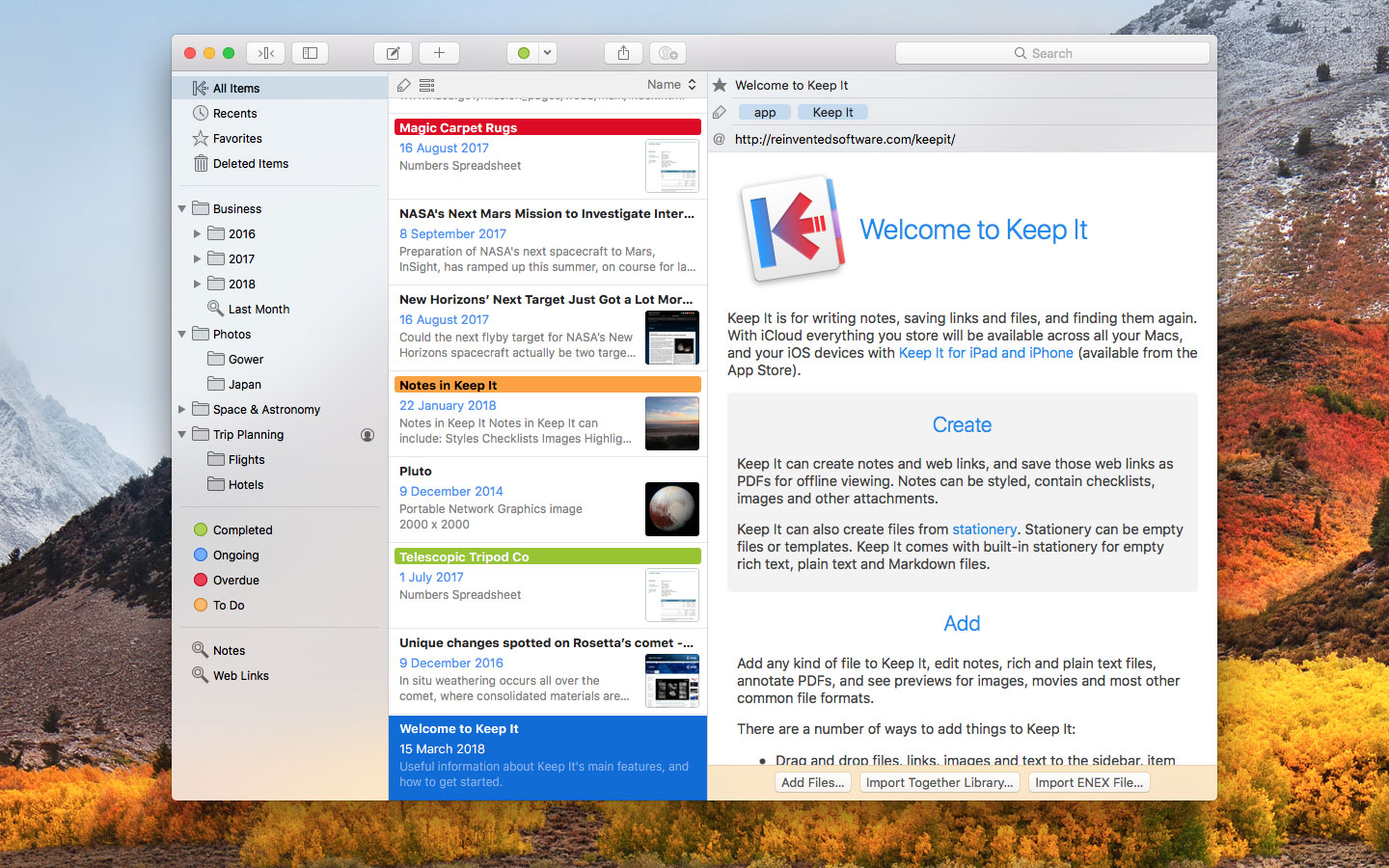
Keep It 1.3 now allows saved searches to be edited. Complex searches can either be created by combining suggestions in the search field, or both created and edited using a rule-based editor that allows for more options, such as finding all items with dates in a particular period (e.g. the last 7 days), untagged or unlabelled items. In addition, saved searches can now be nested in the folders they target. Saved searches can be created and edited on both Mac and iOS.
It's now possible to add highlights in a variety of colors to PDF documents, and notes to those highlights. There is a new "Where" line that can be shown in the Info view to see the path of the folder in which an item is stored, along with any bundles that contain the item. When highlighting text in notes, there is now the same choice of highlight colors as in PDFs, and it's now possible to drag other items to a note to insert a clickable link to the item.
About Keep It:
Pretty much anything can be added to Keep It, including notes, web links, rich and plain text documents, PDFs, images, or any other kind of file, using drag and drop, its share extension, the Services menu, or a browser bookmarklet. Keep It can also create new files of any type from stationery, and uses iCloud to make everything available across your devices and to share folders and items with others.
Keep It has all the organization tools you could need, including folders, tags, colored labels, and bundles. Keep It stores everything you add as files in folders that you can access in the Finder on Mac or the Files app on iOS 11, and open in other apps for editing. Saving files to these folders will automatically add them.
Building on Together, just about everything in Keep It has been improved or streamlined to work consistently across Mac and iOS, while taking advantage of each platform's unique strengths. Keep It's innovative tag filter that can drill down through combinations of related tags, and works in conjunction with search, which offers suggestions and makes it easy to combine terms. Keep It for Mac's Compact Mode reduces the app to a single column, ideal for using as a floating window, or alongside another full screen app in split view, as you would on iPad.
Pricing and Availability:
Keep It for Mac 1.3 requires macOS 10.12 Sierra or later, and is available as a 15-day trial. A license for Keep It for Mac costs $49.99 (USD), and will include all Keep It Version 1.x updates. Together 3 users can purchase a $24.99 upgrade, or get a free copy if Together 3 was purchased during its final 6 months on sale. Keep It is also available on the Mac App Store, also with a free trial, and a choice of one-time purchases to buy Keep It, upgrade from Together, along with monthly or yearly subscriptions. Keep It for iPad and iPhone is available separately with either monthly ($1.49) or yearly ($9.99) subscriptions.
Keep It for Mac 1.3: http://reinventedsoftware.com/keepit/
Keep It for iPad and iPhone: http://reinventedsoftware.com/keepit/ios/
Download (Free Trial): http://reinventedsoftware.com/keepit/downloads/KeepIt.dmg
Screenshot: http://reinventedsoftware.com/keepit/screenshots/KeepIt_1.3.jpg
Reinvented Software was founded in August 2004 by long-time Mac developer Steve Harris who, having wasted 10 years working for other people, decided to dedicate his life to making the best software in the world - software for the Mac. Copyright (C) 2004-2018 Reinvented Software. All Rights Reserved. Apple, the Apple logo, Mac OS X, iPhone, iPad, iPod, and Macintosh are registered trademarks of Apple Inc. in the U.S. and/or other countries.
*******
Link To Article: https://prmac.com/release-id-82570.htm
*******
---------------------------------------------------------------------------------
Note that you can alter delivered distributions at any time.
Login to your account on prMac to alter your channel selection, or to opt-out at any time.
Keep It 1.3 adds iCloud folder sharing, PDF annotation and more - Published on 03/20/18
UK based Reinvented Software announces Keep It 1.3, an important update to their popular notebook, scrapbook and organizer for macOS. Keep It is ideal for writing notes, saving web links, organizing documents, and finding them again. Available on Mac, iPad and iPhone, Keep It is the successor to Together, a brand new app that preserves the very best of its predecessor, but recast for today and the future. Version 1.3 adds iCloud folder sharing, PDF annotation and more.
Swansea, United Kingdom - Reinvented Software is pleased to announce the release of Keep It 1.3, which adds iCloud folder sharing, PDF annotation, focus on folders, and the ability to edit saved searches, plus improvements to notes, the info view, and more. Keep It is the successor to Together, a brand new app that preserves the very best of its predecessor, but recast for today and the future.
Keep It is a notebook, scrapbook and organizer, ideal for writing notes, saving web links, organizing documents, and finding them again. Available on Mac, iPad and iPhone, Keep It is the destination for all those things you want to put somewhere, confident you will find them again later.
Keep It 1.3 adds iCloud folder sharing, where any top-level folder can now be shared with other Keep It users via iCloud. This version can also focus the sidebar on any folder that contains other folders, bundles or saved searches, hiding all other folders not in the hierarchy, making it ideal for focusing on particular projects.
Keep It 1.3 now allows saved searches to be edited. Complex searches can either be created by combining suggestions in the search field, or both created and edited using a rule-based editor that allows for more options, such as finding all items with dates in a particular period (e.g. the last 7 days), untagged or unlabelled items. In addition, saved searches can now be nested in the folders they target. Saved searches can be created and edited on both Mac and iOS.
It's now possible to add highlights in a variety of colors to PDF documents, and notes to those highlights. There is a new "Where" line that can be shown in the Info view to see the path of the folder in which an item is stored, along with any bundles that contain the item. When highlighting text in notes, there is now the same choice of highlight colors as in PDFs, and it's now possible to drag other items to a note to insert a clickable link to the item.
About Keep It:
Pretty much anything can be added to Keep It, including notes, web links, rich and plain text documents, PDFs, images, or any other kind of file, using drag and drop, its share extension, the Services menu, or a browser bookmarklet. Keep It can also create new files of any type from stationery, and uses iCloud to make everything available across your devices and to share folders and items with others.
Keep It has all the organization tools you could need, including folders, tags, colored labels, and bundles. Keep It stores everything you add as files in folders that you can access in the Finder on Mac or the Files app on iOS 11, and open in other apps for editing. Saving files to these folders will automatically add them.
Building on Together, just about everything in Keep It has been improved or streamlined to work consistently across Mac and iOS, while taking advantage of each platform's unique strengths. Keep It's innovative tag filter that can drill down through combinations of related tags, and works in conjunction with search, which offers suggestions and makes it easy to combine terms. Keep It for Mac's Compact Mode reduces the app to a single column, ideal for using as a floating window, or alongside another full screen app in split view, as you would on iPad.
Pricing and Availability:
Keep It for Mac 1.3 requires macOS 10.12 Sierra or later, and is available as a 15-day trial. A license for Keep It for Mac costs $49.99 (USD), and will include all Keep It Version 1.x updates. Together 3 users can purchase a $24.99 upgrade, or get a free copy if Together 3 was purchased during its final 6 months on sale. Keep It is also available on the Mac App Store, also with a free trial, and a choice of one-time purchases to buy Keep It, upgrade from Together, along with monthly or yearly subscriptions. Keep It for iPad and iPhone is available separately with either monthly ($1.49) or yearly ($9.99) subscriptions.
Keep It for Mac 1.3: http://reinventedsoftware.com/keepit/
Keep It for iPad and iPhone: http://reinventedsoftware.com/keepit/ios/
Download (Free Trial): http://reinventedsoftware.com/keepit/downloads/KeepIt.dmg
Screenshot: http://reinventedsoftware.com/keepit/screenshots/KeepIt_1.3.jpg
Reinvented Software was founded in August 2004 by long-time Mac developer Steve Harris who, having wasted 10 years working for other people, decided to dedicate his life to making the best software in the world - software for the Mac. Copyright (C) 2004-2018 Reinvented Software. All Rights Reserved. Apple, the Apple logo, Mac OS X, iPhone, iPad, iPod, and Macintosh are registered trademarks of Apple Inc. in the U.S. and/or other countries.
*******
Link To Article: https://prmac.com/release-id-82570.htm
*******
---------------------------------------------------------------------------------
Note that you can alter delivered distributions at any time.
Login to your account on prMac to alter your channel selection, or to opt-out at any time.
Twocanoes Software releases Certificate Request for macOS
A new article has been published at prMac.
Twocanoes Software releases Certificate Request for macOS - Published on 03/20/18
Twocanoes Software today introduces Certificate Request, an innovative and powerful utility for the Mac that is used to request and install digital X.509 certificates directly from Active Directory. Certificate Request automatically discovers all the required information from Active Directory. Once authenticated, requesting a digital certificate is a simple as clicking a single button. The digital certificate can be used for configuring wireless, Mail, VPN, or many other services on macOS.
Naperville, Illinois - Twocanoes Software is pleased to announce the release of Certificate Request, an innovative and powerful utility for the Mac that is used to request and install digital X.509 certificates directly from Active Directory. This utility automatically discovers all the required information from Active Directory. Once authenticated, requesting a digital certificate is a simple as clicking a single button. The digital certificate can be used for configuring wireless, Mail, VPN, or many other services on macOS that require certificates issued by Active Directory:
* Native Requests: Certificate Request doesn't require any changes to Active Directory. Certificate requests are sent over standard Windows protocols (DCE/RPC).
* Active Directory binding not required: Certificate Request uses Kerberos to authenticate with Active Directory and doesn't require the Mac to be bound to Active Directory. If the Mac is bound, Certificate Request can use the existing kerberos credentials from login to request a certificate.
* Smart: Certificate Request automatically discovers all of the Active Directory information that is required, including the name of the Active Directory Certificate Authority server, the Certificate Authority name, and all available certificate templates. Certificate Request even downloads the Active Directory Root Certificate automatically and makes it easy to configure the Mac to trust it.
* Keychain or YubiKey: Certificate Request installs digital certificates directly to the standard macOS keychain or YubiKey hardware encryption device. The private key never leaves the keychain or the yubikey, so it is secure.
* Advanced Authentication: Certificate Request automatically detects if a login has already occurred and if credentials available. If there are multiple credentials available, Certificate Request gives the option to select the appropriate one. Certificate Request can also purge all credentials, and certificates use SHA512 hashing and 2048 bit RSA keys.
* Multiple Template Support: Since digital certificates can be used in many different services, Active Directory bundles the settings into Templates. Certificate Request shows all available templates on the Active Directory server and makes it easy to select the appropriate one for the service you require (i.e. VPN, Mail, Wi-Fi, etc).
* Simple, Yet Powerful: When Certificate Request is first launched, all the necessary Active Directory information needed to request a user certificate is automatically populated. Certificate Request is simple and easy to use with your existing Active Directory infrastructure without making any changes.
* Intensely Integrated: Certificate Request doesn't require a proxy or web services to work with your existing Active Directory network. DCE/RPC, a protocol that Windows Servers understand natively, is used to send all certificate requests.
* At Your Service: Configure any services that require digital certificates easily. Certificate Request stores the digital certificate in the secure keychain on macOS, or in a YubiKey hardware device, so services such as VPN, Mail, 802.1X (wireless) and more can easily access them.
* Automate: The Certificate Request command line tool allows administrators to automate certificate requests to Active Directory and installation into the keychain on macOS. The command line tool uses the user's kerberos credentials so that certificate generation can happen seamlessly.
Technical Specs:
* Generates X.509 Digital Certificates
* SHA512 Hash
* RSA 2048 bit keys
* Kerberos Authentication
System Requirements:
* macOS 10.12 or Later
* Active Directory user credentials for a kerberos ticket, or a Mac bound to Active Directory
Windows Server:
* Active Directory (Windows Server 2003 or later)
* Standard Network Ports for LDAP, RPC and Kerberos
YubiKey:
* YubiKey 4 Series Security Keys in PIV mode
* Management Key
* Available Slot for digital identity
Pricing and Availability:
Certificate Request can be purchased online today for $29.99 for a single user, and $299.99 (USD) for 30 users. A free 14 day trial is available on the product webpage. Premium Support and upgrade maintenance for 1 year is included with multi-licensed versions of Certificate Request. For organizations that require additional licenses, educational pricing, or payment by purchase order, please visit Twocanoes Software online.
Twocanoes Software: https://twocanoes.com
Certificate Request: https://twocanoes.com/products/mac/certificate-request/
Purchase: https://twocanoes.com/products/mac/certificate-request/
YouTube Video: https://www.youtube.com/watch?v=izOX9sWoRKU
Screenshot: https://xdl4wtzciw-flywheel.netdna-ssl.com/wp-content/uploads/2018/03/main-window-1.png
Based in Naperville, Illinois, Twocanoes Software was founded by Timothy Perfitt in 2012. Focusing on iOS and OS X exclusively, Twocanoes provides customers with software to perform complex IT tasks with minimum effort. All Material and Software (C) Copyright 2018 Twocanoes Software, Inc. All Rights Reserved. Apple, the Apple logo, macOS, iPhone, iPod, iPad and Macintosh are registered trademarks of Apple Inc. in the U.S. and/or other countries. Other trademarks and registered trademarks may be the property of their respective owners.
*******
Link To Article: https://prmac.com/release-id-82568.htm
*******
---------------------------------------------------------------------------------
Note that you can alter delivered distributions at any time.
Login to your account on prMac to alter your channel selection, or to opt-out at any time.
Twocanoes Software releases Certificate Request for macOS - Published on 03/20/18
Twocanoes Software today introduces Certificate Request, an innovative and powerful utility for the Mac that is used to request and install digital X.509 certificates directly from Active Directory. Certificate Request automatically discovers all the required information from Active Directory. Once authenticated, requesting a digital certificate is a simple as clicking a single button. The digital certificate can be used for configuring wireless, Mail, VPN, or many other services on macOS.
Naperville, Illinois - Twocanoes Software is pleased to announce the release of Certificate Request, an innovative and powerful utility for the Mac that is used to request and install digital X.509 certificates directly from Active Directory. This utility automatically discovers all the required information from Active Directory. Once authenticated, requesting a digital certificate is a simple as clicking a single button. The digital certificate can be used for configuring wireless, Mail, VPN, or many other services on macOS that require certificates issued by Active Directory:
* Native Requests: Certificate Request doesn't require any changes to Active Directory. Certificate requests are sent over standard Windows protocols (DCE/RPC).
* Active Directory binding not required: Certificate Request uses Kerberos to authenticate with Active Directory and doesn't require the Mac to be bound to Active Directory. If the Mac is bound, Certificate Request can use the existing kerberos credentials from login to request a certificate.
* Smart: Certificate Request automatically discovers all of the Active Directory information that is required, including the name of the Active Directory Certificate Authority server, the Certificate Authority name, and all available certificate templates. Certificate Request even downloads the Active Directory Root Certificate automatically and makes it easy to configure the Mac to trust it.
* Keychain or YubiKey: Certificate Request installs digital certificates directly to the standard macOS keychain or YubiKey hardware encryption device. The private key never leaves the keychain or the yubikey, so it is secure.
* Advanced Authentication: Certificate Request automatically detects if a login has already occurred and if credentials available. If there are multiple credentials available, Certificate Request gives the option to select the appropriate one. Certificate Request can also purge all credentials, and certificates use SHA512 hashing and 2048 bit RSA keys.
* Multiple Template Support: Since digital certificates can be used in many different services, Active Directory bundles the settings into Templates. Certificate Request shows all available templates on the Active Directory server and makes it easy to select the appropriate one for the service you require (i.e. VPN, Mail, Wi-Fi, etc).
* Simple, Yet Powerful: When Certificate Request is first launched, all the necessary Active Directory information needed to request a user certificate is automatically populated. Certificate Request is simple and easy to use with your existing Active Directory infrastructure without making any changes.
* Intensely Integrated: Certificate Request doesn't require a proxy or web services to work with your existing Active Directory network. DCE/RPC, a protocol that Windows Servers understand natively, is used to send all certificate requests.
* At Your Service: Configure any services that require digital certificates easily. Certificate Request stores the digital certificate in the secure keychain on macOS, or in a YubiKey hardware device, so services such as VPN, Mail, 802.1X (wireless) and more can easily access them.
* Automate: The Certificate Request command line tool allows administrators to automate certificate requests to Active Directory and installation into the keychain on macOS. The command line tool uses the user's kerberos credentials so that certificate generation can happen seamlessly.
Technical Specs:
* Generates X.509 Digital Certificates
* SHA512 Hash
* RSA 2048 bit keys
* Kerberos Authentication
System Requirements:
* macOS 10.12 or Later
* Active Directory user credentials for a kerberos ticket, or a Mac bound to Active Directory
Windows Server:
* Active Directory (Windows Server 2003 or later)
* Standard Network Ports for LDAP, RPC and Kerberos
YubiKey:
* YubiKey 4 Series Security Keys in PIV mode
* Management Key
* Available Slot for digital identity
Pricing and Availability:
Certificate Request can be purchased online today for $29.99 for a single user, and $299.99 (USD) for 30 users. A free 14 day trial is available on the product webpage. Premium Support and upgrade maintenance for 1 year is included with multi-licensed versions of Certificate Request. For organizations that require additional licenses, educational pricing, or payment by purchase order, please visit Twocanoes Software online.
Twocanoes Software: https://twocanoes.com
Certificate Request: https://twocanoes.com/products/mac/certificate-request/
Purchase: https://twocanoes.com/products/mac/certificate-request/
YouTube Video: https://www.youtube.com/watch?v=izOX9sWoRKU
Screenshot: https://xdl4wtzciw-flywheel.netdna-ssl.com/wp-content/uploads/2018/03/main-window-1.png

Based in Naperville, Illinois, Twocanoes Software was founded by Timothy Perfitt in 2012. Focusing on iOS and OS X exclusively, Twocanoes provides customers with software to perform complex IT tasks with minimum effort. All Material and Software (C) Copyright 2018 Twocanoes Software, Inc. All Rights Reserved. Apple, the Apple logo, macOS, iPhone, iPod, iPad and Macintosh are registered trademarks of Apple Inc. in the U.S. and/or other countries. Other trademarks and registered trademarks may be the property of their respective owners.
*******
Link To Article: https://prmac.com/release-id-82568.htm
*******
---------------------------------------------------------------------------------
Note that you can alter delivered distributions at any time.
Login to your account on prMac to alter your channel selection, or to opt-out at any time.
Students write better, well-structured essays with Think2Write
A new article has been published at prMac.
Students write better, well-structured essays with Think2Write - Published on 03/20/18
Niles Technology Group has released Think2Write, the new and improved version of essay writing apps. Think2Write is an easy-to-follow, step-by-step method to teach students the logical and critical steps necessary to consistently write well-reasoned, informative essays. The app delivers increased accessibility across mobile devices and Macs and even more writing assistance at an affordable price. It is also an engaging platform where students learn analytical and critical thinking skills.
Charlottesville, Virginia - Niles Technology Group has released Think2Write, the new and improved version of the essay writing apps Essay Czar, Essay Writing Workstation and Essay Writing Wizard that sold successfully in the Apple App Store for 8 years, from 2009-16. Used in over 400 schools by teachers and personally bought by high school and college students, the apps were listed multiple times as top language arts apps and featured several times in the App Store and other education publications.
Think2Write is bigger and better and delivers a lot more:
* Think2Write is an iBook with the same excellent content from the essay writing apps that has been updated and re-formatted. The new iBook format provides much more versatility where it can be used. Switching from preparing an essay on your mobile device to writing an essay on your Mac with the same instructional content is now a breeze.
* Think2Write is your source for one-on-one writing assistance for students, who want help fully understanding writing assignments and in developing logical, well-structured outlines.
* Think2Write is a platform on which, with one click of a button, a civic-minded citizen or company can sponsor a middle school class, high school class, or sports team where each student receives our one-on-one writing assistance and essay writing guide.
* Think2Write is an engagement platform that delivers a monthly essay writing instructional digest to keep students learning critical thinking skills, as these skills pertain directly to essay writing.
"With the switch to Think2Write in the iBook format, students now have the identical instructional content with the same look and feel on mobile devices, desktop computers and laptops. Students can also seamlessly write essays with the iBook open side-by-side on the same Mac as their main word processor, which is something they could not do with the mobile-only app," explained Michael Niles, President of Niles Technology Group. "Our mobile apps put us on the essay writing map for iPad and iPhone, but we realized the apps simply were not enough; we needed to work and look the same on Macs as well. Therefore, we solved the issue with a new approach and business model that deserved a new name, Think2Write."
The iBook is also the gateway to a community dedicated to the teaching of essay writing from a critical thinking perspective. It became clear, based on interaction with users, that the aforementioned essay writing apps were developing a fledging community of teachers and parents who desired a critical thinking approach to writing for their students and children. It was amazing how many asked for more writing assistance on an ongoing basis.
"This community aspect led us to create and develop a Think2Write Patreon portal," continues Mr. Niles. "Combined with the iBook, this community builder allows us to offer more. Users can now easily decide which other essay writing services best fit them for what length of time; a very student-friendly, family-friendly, budget-friendly approach."
To herald the start of this new community, Think2Write's first 200 patrons on Patreon will receive one of the following upgrades: you will either be automatically upgraded and receive the benefits of the next level up in rewards or, if you are a sponsor of students, the number of sponsorships will be automatically doubled. These upgrades will remain in place for as long as you are a patron.
Think2Write is an easy-to-follow, step-by-step method to teach students the logical and critical steps necessary to consistently write well-reasoned, informative essays.
Device Requirements:
* iPad with iBooks 2 or later iOS 5 or later
* iPhone with iOS 8.4 or later
* Mac with OS X 10.9 or later
Pricing and Availability:
Think2Write (v1.4) is $4.99 USD (or equivalent amount in other currencies) and available worldwide exclusively through the App Store in the Writing category. We invite you to learn more about us at Think2Write online. For more information, please contact Michael Niles.
Think2Write: Essay Writing Guide for Students (v1.4): http://www.think2write.com
Patreon Listing : https://www.patreon.com/think2write
Purchase and Download (iBook)): https://itunes.apple.com/us/book/think2write/id1358496324
Book Cover: http://is2.mzstatic.com/image/thumb/Publication118/v4/05/ef/a6/05efa67f-b4a2-3e94-badc-53b252494ab0/source/225x225bb.jpg
Niles Technology Group was founded in 2007 to develop applications dedicated to teaching superior writing and logical thinking skills. Our first three products Essay Czar, Essay Writing Workstation and Essay Writing Wizard sold successfully in the App Store from 2009-16. Michael A. Niles, the founder, was formerly, for eight years, the President and CEO of The Right Education, Inc. (TRE), a web-based educational technology company that developed The Learning Accelerator. Copyright (C) 2007-18 Niles Technology Group. All Rights Reserved. Apple, the Apple logo, iPhone, iPod and iPad are registered trademarks of Apple Inc. in the U.S. and/or other countries.
*******
Link To Article: https://prmac.com/release-id-82569.htm
*******
---------------------------------------------------------------------------------
Note that you can alter delivered distributions at any time.
Login to your account on prMac to alter your channel selection, or to opt-out at any time.
Students write better, well-structured essays with Think2Write - Published on 03/20/18
Niles Technology Group has released Think2Write, the new and improved version of essay writing apps. Think2Write is an easy-to-follow, step-by-step method to teach students the logical and critical steps necessary to consistently write well-reasoned, informative essays. The app delivers increased accessibility across mobile devices and Macs and even more writing assistance at an affordable price. It is also an engaging platform where students learn analytical and critical thinking skills.
Charlottesville, Virginia - Niles Technology Group has released Think2Write, the new and improved version of the essay writing apps Essay Czar, Essay Writing Workstation and Essay Writing Wizard that sold successfully in the Apple App Store for 8 years, from 2009-16. Used in over 400 schools by teachers and personally bought by high school and college students, the apps were listed multiple times as top language arts apps and featured several times in the App Store and other education publications.
Think2Write is bigger and better and delivers a lot more:
* Think2Write is an iBook with the same excellent content from the essay writing apps that has been updated and re-formatted. The new iBook format provides much more versatility where it can be used. Switching from preparing an essay on your mobile device to writing an essay on your Mac with the same instructional content is now a breeze.
* Think2Write is your source for one-on-one writing assistance for students, who want help fully understanding writing assignments and in developing logical, well-structured outlines.
* Think2Write is a platform on which, with one click of a button, a civic-minded citizen or company can sponsor a middle school class, high school class, or sports team where each student receives our one-on-one writing assistance and essay writing guide.
* Think2Write is an engagement platform that delivers a monthly essay writing instructional digest to keep students learning critical thinking skills, as these skills pertain directly to essay writing.
"With the switch to Think2Write in the iBook format, students now have the identical instructional content with the same look and feel on mobile devices, desktop computers and laptops. Students can also seamlessly write essays with the iBook open side-by-side on the same Mac as their main word processor, which is something they could not do with the mobile-only app," explained Michael Niles, President of Niles Technology Group. "Our mobile apps put us on the essay writing map for iPad and iPhone, but we realized the apps simply were not enough; we needed to work and look the same on Macs as well. Therefore, we solved the issue with a new approach and business model that deserved a new name, Think2Write."
The iBook is also the gateway to a community dedicated to the teaching of essay writing from a critical thinking perspective. It became clear, based on interaction with users, that the aforementioned essay writing apps were developing a fledging community of teachers and parents who desired a critical thinking approach to writing for their students and children. It was amazing how many asked for more writing assistance on an ongoing basis.
"This community aspect led us to create and develop a Think2Write Patreon portal," continues Mr. Niles. "Combined with the iBook, this community builder allows us to offer more. Users can now easily decide which other essay writing services best fit them for what length of time; a very student-friendly, family-friendly, budget-friendly approach."
To herald the start of this new community, Think2Write's first 200 patrons on Patreon will receive one of the following upgrades: you will either be automatically upgraded and receive the benefits of the next level up in rewards or, if you are a sponsor of students, the number of sponsorships will be automatically doubled. These upgrades will remain in place for as long as you are a patron.
Think2Write is an easy-to-follow, step-by-step method to teach students the logical and critical steps necessary to consistently write well-reasoned, informative essays.
Device Requirements:
* iPad with iBooks 2 or later iOS 5 or later
* iPhone with iOS 8.4 or later
* Mac with OS X 10.9 or later
Pricing and Availability:
Think2Write (v1.4) is $4.99 USD (or equivalent amount in other currencies) and available worldwide exclusively through the App Store in the Writing category. We invite you to learn more about us at Think2Write online. For more information, please contact Michael Niles.
Think2Write: Essay Writing Guide for Students (v1.4): http://www.think2write.com
Patreon Listing : https://www.patreon.com/think2write
Purchase and Download (iBook)): https://itunes.apple.com/us/book/think2write/id1358496324
Book Cover: http://is2.mzstatic.com/image/thumb/Publication118/v4/05/ef/a6/05efa67f-b4a2-3e94-badc-53b252494ab0/source/225x225bb.jpg

Niles Technology Group was founded in 2007 to develop applications dedicated to teaching superior writing and logical thinking skills. Our first three products Essay Czar, Essay Writing Workstation and Essay Writing Wizard sold successfully in the App Store from 2009-16. Michael A. Niles, the founder, was formerly, for eight years, the President and CEO of The Right Education, Inc. (TRE), a web-based educational technology company that developed The Learning Accelerator. Copyright (C) 2007-18 Niles Technology Group. All Rights Reserved. Apple, the Apple logo, iPhone, iPod and iPad are registered trademarks of Apple Inc. in the U.S. and/or other countries.
*******
Link To Article: https://prmac.com/release-id-82569.htm
*******
---------------------------------------------------------------------------------
Note that you can alter delivered distributions at any time.
Login to your account on prMac to alter your channel selection, or to opt-out at any time.
Mellel 4.1 introduces DOCX support, Tracking, Word Spacing, and more
A new article has been published at prMac.
Mellel 4.1 introduces DOCX support, Tracking, Word Spacing, and more - Published on 03/19/18
Word processing pioneer, Mellel today releases Mellel 4.1, a major update to its latest word processor. Mellel was built by a writer for serious writers, and is a global favorite among thousands of Mac professionals. Version 4.1 offers a host of new export capabilities and features for both its Mac and iPad versions. The list of enhancements give writers, editors, academics, and authors a better avenue to write and manage long and oftentimes complex content such as books and academic research.
Tel Aviv, Israel - Mellel, a developer of word processing technology for professional and long-form writers, is announcing the release of Mellel 4.1. Now available to Mac and iPad users, Mellel 4.1 is on the heals of the very successful release of 4.0, and offers several new features and a long list of enhancements that give writers, editors, academics, and authors a better avenue to write and manage long and oftentimes complex content such as books and academic research.
Mellel 4.1 is now able to smoothly import native MS Word DOCX, addressing one of the main requests of the company's more than 100,000 customers who rely on Mellel with a cultish fervor.
"We've been getting this request for quite some time, especially after the release of 4.0 last August," says Ori Redler, one of the two-person creators of the software in 2002. He is also an editor and published author. "What makes Mellel better than others is that so much of it's features are developed by people who work with words for a living. Of course, I have a solid idea of what professionals in the word industry need, but honestly, so much of our innovation is guided by the needs and requests of our customers."
The newest version of Mellel has features that give writers and editors enhanced control and flexibility of their document:
* DOCX Import: Mellel can now smoothly import MS Word DOCX documents.
* Character tracking: Users can now set letter-spacing easily.
* Minimum Word Spacing: This new feature gives an easy way to squeeze and maximize spacing, thus improving significantly text layout.
* Outline: Users can now change the color of items in the outline, can truncate outline items so they do not wrap, and a host of other improvements.
* Auto-indent: You can now set the indent for continuing paragraphs within the Auto-title setup, allowing you to set auto-indent much faster and with much less clutter.
* Story Feature: Writers can now create or draw story points on a line of their own. This makes the points more apparent when displayed, and unobtrusive when hidden.
* Auto-title palette: The palette now shows the flow level of selected auto-titles in the text or in the outline with a checkmark. This helps writers keep a birds-eye view of their structure as they create.
With its latest release, Mellel continues to give writers a full-suite of options unseen in other word processors.
It is the first and only word processor to support headings as an object, allowing limitation-free design of titles and headings. Mellel is also the only word processor to offer multiple streams of footnotes and endnotes, professional level index support, the best and most advanced outline, live bibliography, live-upda cross references, an innovative Story pane, and much more.
You can learn more about Mellel through its new demo and tutorial center, Mellel U. It features over 70 videos on an array of topics that allow users to master the software. You can also check out Mellel's videos on their YouTube channel. Mellel is currently available to Mac and iPad, and its latest version can be found on their website.
Mellel 4.1: http://www.mellel.com
More Information: https://www.mellel.com/mellel/
Download Mellel: http://mellel.download.s3.amazonaws.com/mellel_41019.dmg
Purchase Mellel: http://sites.fastspring.com/mellel/product/mellelwordprocessor?_ga=2.37257760.1067594887.1521464870-1785587432.1368197485
Screenshot (Updated Story Feature): http://mellel.other.s3.amazonaws.com/updated_story.png
Application Icon: http://mellel.other.s3.amazonaws.com/Mellel_icon_new.png
Mellel is the first and only word processing software to support headings as objects, allowing for limitation-free design of titles and headings. Founded in 2002, by brothers Ori and Eyal Redler, Mellel is today lead by writer and editor, Amber Massey. She was first introduced to the software while working as an editor inside Washington's Beltway, and later joined forces with the Redlers in order to bring innovation in word processing technology to wider audiences. Copyright (C) 2002-2018 Mellel. All Rights Reserved. Apple, the Apple logo, macOS, iPhone, iPad, iPod and Macintosh are registered trademarks of Apple Inc. in the U.S. and/or other countries.
*******
Link To Article: https://prmac.com/release-id-82567.htm
*******
---------------------------------------------------------------------------------
Note that you can alter delivered distributions at any time.
Login to your account on prMac to alter your channel selection, or to opt-out at any time.
Mellel 4.1 introduces DOCX support, Tracking, Word Spacing, and more - Published on 03/19/18
Word processing pioneer, Mellel today releases Mellel 4.1, a major update to its latest word processor. Mellel was built by a writer for serious writers, and is a global favorite among thousands of Mac professionals. Version 4.1 offers a host of new export capabilities and features for both its Mac and iPad versions. The list of enhancements give writers, editors, academics, and authors a better avenue to write and manage long and oftentimes complex content such as books and academic research.
Tel Aviv, Israel - Mellel, a developer of word processing technology for professional and long-form writers, is announcing the release of Mellel 4.1. Now available to Mac and iPad users, Mellel 4.1 is on the heals of the very successful release of 4.0, and offers several new features and a long list of enhancements that give writers, editors, academics, and authors a better avenue to write and manage long and oftentimes complex content such as books and academic research.
Mellel 4.1 is now able to smoothly import native MS Word DOCX, addressing one of the main requests of the company's more than 100,000 customers who rely on Mellel with a cultish fervor.
"We've been getting this request for quite some time, especially after the release of 4.0 last August," says Ori Redler, one of the two-person creators of the software in 2002. He is also an editor and published author. "What makes Mellel better than others is that so much of it's features are developed by people who work with words for a living. Of course, I have a solid idea of what professionals in the word industry need, but honestly, so much of our innovation is guided by the needs and requests of our customers."
The newest version of Mellel has features that give writers and editors enhanced control and flexibility of their document:
* DOCX Import: Mellel can now smoothly import MS Word DOCX documents.
* Character tracking: Users can now set letter-spacing easily.
* Minimum Word Spacing: This new feature gives an easy way to squeeze and maximize spacing, thus improving significantly text layout.
* Outline: Users can now change the color of items in the outline, can truncate outline items so they do not wrap, and a host of other improvements.
* Auto-indent: You can now set the indent for continuing paragraphs within the Auto-title setup, allowing you to set auto-indent much faster and with much less clutter.
* Story Feature: Writers can now create or draw story points on a line of their own. This makes the points more apparent when displayed, and unobtrusive when hidden.
* Auto-title palette: The palette now shows the flow level of selected auto-titles in the text or in the outline with a checkmark. This helps writers keep a birds-eye view of their structure as they create.
With its latest release, Mellel continues to give writers a full-suite of options unseen in other word processors.
It is the first and only word processor to support headings as an object, allowing limitation-free design of titles and headings. Mellel is also the only word processor to offer multiple streams of footnotes and endnotes, professional level index support, the best and most advanced outline, live bibliography, live-upda cross references, an innovative Story pane, and much more.
You can learn more about Mellel through its new demo and tutorial center, Mellel U. It features over 70 videos on an array of topics that allow users to master the software. You can also check out Mellel's videos on their YouTube channel. Mellel is currently available to Mac and iPad, and its latest version can be found on their website.
Mellel 4.1: http://www.mellel.com
More Information: https://www.mellel.com/mellel/
Download Mellel: http://mellel.download.s3.amazonaws.com/mellel_41019.dmg
Purchase Mellel: http://sites.fastspring.com/mellel/product/mellelwordprocessor?_ga=2.37257760.1067594887.1521464870-1785587432.1368197485
Screenshot (Updated Story Feature): http://mellel.other.s3.amazonaws.com/updated_story.png
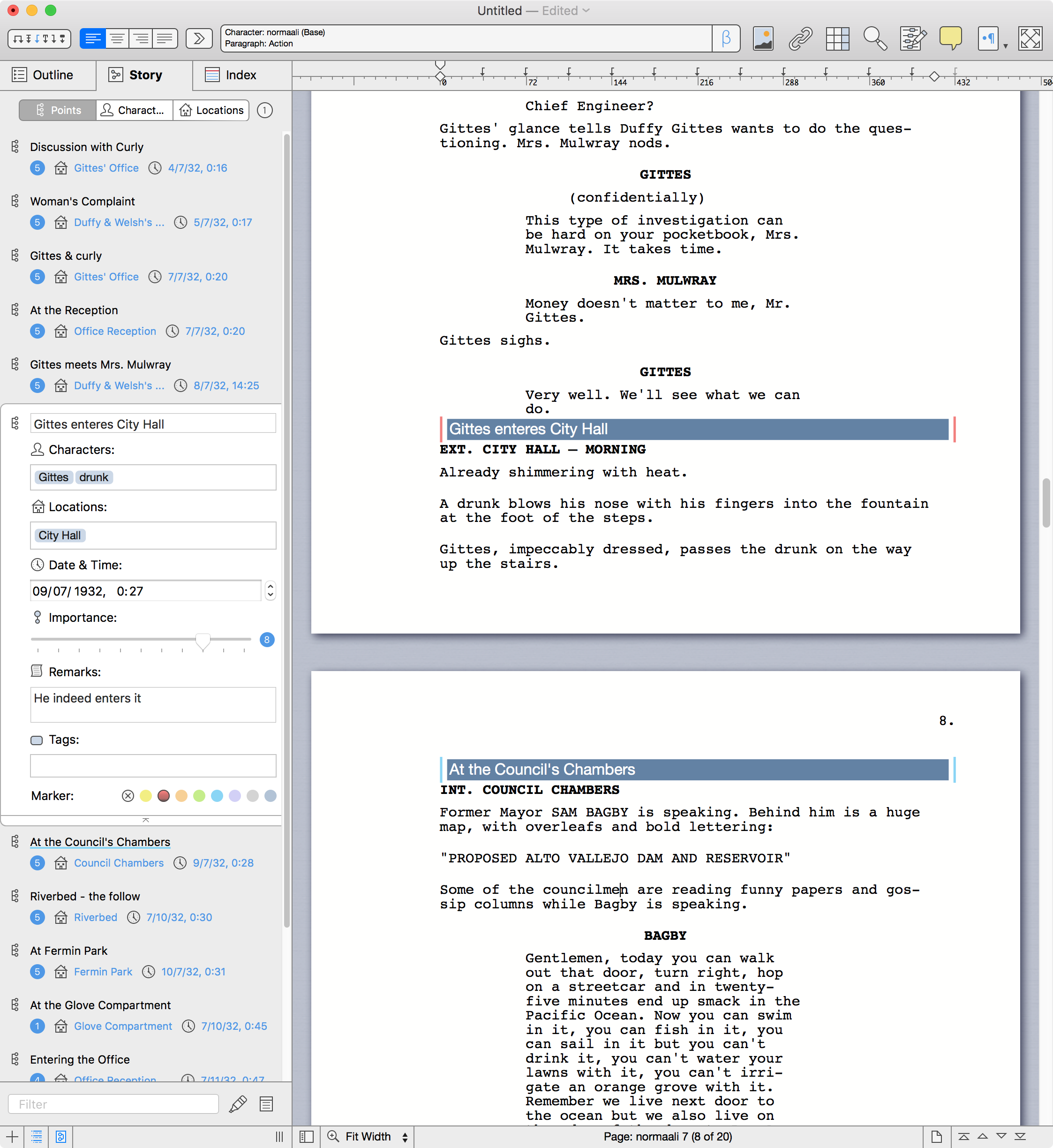
Application Icon: http://mellel.other.s3.amazonaws.com/Mellel_icon_new.png

Mellel is the first and only word processing software to support headings as objects, allowing for limitation-free design of titles and headings. Founded in 2002, by brothers Ori and Eyal Redler, Mellel is today lead by writer and editor, Amber Massey. She was first introduced to the software while working as an editor inside Washington's Beltway, and later joined forces with the Redlers in order to bring innovation in word processing technology to wider audiences. Copyright (C) 2002-2018 Mellel. All Rights Reserved. Apple, the Apple logo, macOS, iPhone, iPad, iPod and Macintosh are registered trademarks of Apple Inc. in the U.S. and/or other countries.
*******
Link To Article: https://prmac.com/release-id-82567.htm
*******
---------------------------------------------------------------------------------
Note that you can alter delivered distributions at any time.
Login to your account on prMac to alter your channel selection, or to opt-out at any time.
Subscribe to:
Posts (Atom)