A new article has been published at prMac.
Swipe Your Finger to Defend Your Throne in a Clash of Orbs - Published on 04/01/18
Rogue Monkey Studio announces Clash of Orbs 1.0.7, their entertaining game for iOS devices. Clash of orbs is fantastic fighting game. It is easy to understand with more fun. Play and become worrier to protect your kingdom. The story is all about the Great Shadow, who cause trouble to our kingdom and destroy all our holy elements.
United States - Playing the game is always on the top priority. Earlier people use to have different set up of a video game to play. Other than playing at home, people also go game parlour where they pay and play the sports. With the time, mobile phone took place for this. Now everyone is seen as playing the game on their device. This makes them independent from the playing place. There are so many game apps belonging to different categories.
The likeness of the game varies from person to person. Many of people like an adventure game and that's what Clash of Orbs is providing. It's an interesting platform where you need to swipe your finger and play. Easy to understand and play, this is a complete package of adventure.
It is well said that "Adventure is worthwhile in itself"
The story is all about the Great Shadow, who cause trouble to our kingdom and destroy all our holy elements. Only last remaining light orb is left. Now you need to save the kingdom from the evil with swiping your finger. Slice through hordes of elemental orbs.
How to play: To play this game all you need to click on the level and press start level option. In that, you need to swipe your finger and protect the throne from the evil swarm. When you will swipe your finger, all the evil swarm will get destroyed.
Special Tips: Keep a good pace while playing the game as you need to be active.
Features:
* Hundred of battle levels in easy, medium & difficult mode
* Collect the ancient powers
* Easy to play
* User-friendly feature
* Upgrade your powers
* Lots of different in app purchasing in the shop
* Good music and sound
* Different survival mode
* Colorful graphics with cool looks & features
* Reward points
* Leaderboard to claim your spot
Conclusion:
Clash of orbs is all meant for providing the best entertainment. It is having all the required features that make the game a perfect one. Save the kingdom & remaining orbs from the ancient evil as now it is in your hand. Prevent the ancient evil from capturing the entire cosmos. All the best!
Device Requirements:
* iPhone, iPad, and iPod touch
* Requires iOS 8.0 or later
* Universal Application
* 166.5 MB
Pricing and Availability:
Clash of Orbs 1.0.7 is free and is available worldwide through the App Store in the Games category.
Rogue Monkey Studio: https://www.roguemonkeystudios.com/
Clash of Orbs 1.0.7: https://www.clashoforbs.com/
Download from iTunes: https://itunes.apple.com/app/clash-of-orbs/id1205598475
Screenshot: https://is2-ssl.mzstatic.com/image/thumb/Purple118/v4/26/82/67/268267bf-bbf1-0be6-fb9a-07508c504fd2/pr_source.png/643x0w.png
App Icon: https://is2-ssl.mzstatic.com/image/thumb/Purple128/v4/dd/25/e5/dd25e500-4c94-cff4-9017-525ba37fc1f0/AppIcon-1x_U007emarketing-85-220-6.png/246x0w.jpg
Rogue Monkey Studio is a mobile game development company of United State founded in the year 2016. We work together to bring out the polished result. Our team is always engaged in developing the best of games with a unique and fresh idea. To convey the best entertainment to the entire world is our main aim. Clash of orbs is one such our game which is full of entertainment and fun. We put our best efforts to make this game most unique one. Play this game and have a path of fun. All Material and Software (C) Copyright 2018 Rogue Monkey Studio. All Rights Reserved. Apple, the Apple logo, iPhone, iPod and iPad are registered trademarks of Apple Inc. in the U.S. and/or other countries. Other trademarks and registered trademarks may be the property of their respective owners.
*******
Link To Article: https://prmac.com/release-id-82598.htm
*******
---------------------------------------------------------------------------------
Note that you can alter delivered distributions at any time.
Login to your account on prMac to alter your channel selection, or to opt-out at any time.



AlphaDigits Top Rated Apps March 2018
A new article has been published at prMac.
AlphaDigits Top Rated Apps March 2018 - Published on 04/01/18
Mobile app review publisher AlphaDigits has named top rated applications for March 2018. Save the Emoji is a semi virtual reality game. AllTracker can check out the GPS location of the mobile devices. MacX Video Converter Pro converts video formats. Bingo Tale is not like other bingo gaming apps. Cheepcheep Chivalry provides more than a handful of fun entertainment.
Long Island, New York - Mobile app review publisher AlphaDigits has named top rated applications for March 2018. AlphaDigits names five top class mobile apps every month based on the reviews published in the website during the particular month. This website has now released the names of top rated mobile apps for the month of March.
Save the Emoji (10/10): Save the Emoji is a semi virtual reality game that sets you on a course for adventure to seek out and save emojis. The download is for a small price, and provides long term entertainment, because everyday is different and the emojis you will encounter will vary, from day to day and from location to location. This makes the game something new every time you are in a different place: at home, at work, out shopping, on vacation - you get the picture.
AllTracker (9.5/10): AllTracker can check out the GPS location and coordinates of the mobile device. The great thing about this app is that there are no hidden costs. You pay a subscription fee for which you choose the frequency of payments, for example. It is all prepaid and you can cancel it at any time. I chose the annual subscription fee but there are other options such as monthly to choose from too.
MacX Video Converter Pro (9/10): To convert any 4K ultra HD video, just import it to the program, choose the output profile from the dozens of readymade profiles from the pop-up window and start converting. And also it's the only app out there that will take your 4K and HD videos and make it easy for video format conversion, video file size compression, videos edit as well as video parameters adjustment.
Bingo Tale (8.5/10): It's not like other bingo gaming apps. It casts the game of bingo in a whole new light by placing it in a variety of venues based on a movie picture set and loaded with all sorts of playing options. What's neat is that it's also geared for players of all ages, which means kids and well as adults can play and enjoy. Free to download, the app is an easy install and use.
Cheepcheep Chivalry (8/10): While it's a mouthful to say, it provides more than a handful of fun entertainment for players of all ages, making this gaming app a download you simply cannot pass up. Set in medieval times, the birds are cute colorful creatures who desperately want to fly from one place to another, whether it be from a cliff to a nearby castle or between two castles. The issue is that they are just to cuddly cute and chubby to keep themselves up in flight.
Joe Ellen, an Editor at AlphaDigits said, "Our ASO team specializes in ranking iOS apps and they can help in ranking apps for any keyword." Developers can also contact AlphaDigits through the onsite form, mail or the contact form to get their apps reviewed.
AlphaDigits: http://alphadigits.com
Submit App for Review: http://alphadigits.com/submit-app-for-review/
AlphaDigits is a review site run by a few app marketers. Enjoying the support from a handy amount of regular visitors, AlphaDigits provides reviews for iPhone, iPad and Android apps. Copyright (C) 2018 AlphaDigits. All Rights Reserved. Apple, the Apple logo, iPhone, iPod and iPad are registered trademarks of Apple Inc. in the U.S. and/or other countries.
*******
Link To Article: https://prmac.com/release-id-82599.htm
*******
---------------------------------------------------------------------------------
Note that you can alter delivered distributions at any time.
Login to your account on prMac to alter your channel selection, or to opt-out at any time.
AlphaDigits Top Rated Apps March 2018 - Published on 04/01/18
Mobile app review publisher AlphaDigits has named top rated applications for March 2018. Save the Emoji is a semi virtual reality game. AllTracker can check out the GPS location of the mobile devices. MacX Video Converter Pro converts video formats. Bingo Tale is not like other bingo gaming apps. Cheepcheep Chivalry provides more than a handful of fun entertainment.
Long Island, New York - Mobile app review publisher AlphaDigits has named top rated applications for March 2018. AlphaDigits names five top class mobile apps every month based on the reviews published in the website during the particular month. This website has now released the names of top rated mobile apps for the month of March.
Save the Emoji (10/10): Save the Emoji is a semi virtual reality game that sets you on a course for adventure to seek out and save emojis. The download is for a small price, and provides long term entertainment, because everyday is different and the emojis you will encounter will vary, from day to day and from location to location. This makes the game something new every time you are in a different place: at home, at work, out shopping, on vacation - you get the picture.
AllTracker (9.5/10): AllTracker can check out the GPS location and coordinates of the mobile device. The great thing about this app is that there are no hidden costs. You pay a subscription fee for which you choose the frequency of payments, for example. It is all prepaid and you can cancel it at any time. I chose the annual subscription fee but there are other options such as monthly to choose from too.
MacX Video Converter Pro (9/10): To convert any 4K ultra HD video, just import it to the program, choose the output profile from the dozens of readymade profiles from the pop-up window and start converting. And also it's the only app out there that will take your 4K and HD videos and make it easy for video format conversion, video file size compression, videos edit as well as video parameters adjustment.
Bingo Tale (8.5/10): It's not like other bingo gaming apps. It casts the game of bingo in a whole new light by placing it in a variety of venues based on a movie picture set and loaded with all sorts of playing options. What's neat is that it's also geared for players of all ages, which means kids and well as adults can play and enjoy. Free to download, the app is an easy install and use.
Cheepcheep Chivalry (8/10): While it's a mouthful to say, it provides more than a handful of fun entertainment for players of all ages, making this gaming app a download you simply cannot pass up. Set in medieval times, the birds are cute colorful creatures who desperately want to fly from one place to another, whether it be from a cliff to a nearby castle or between two castles. The issue is that they are just to cuddly cute and chubby to keep themselves up in flight.
Joe Ellen, an Editor at AlphaDigits said, "Our ASO team specializes in ranking iOS apps and they can help in ranking apps for any keyword." Developers can also contact AlphaDigits through the onsite form, mail or the contact form to get their apps reviewed.
AlphaDigits: http://alphadigits.com
Submit App for Review: http://alphadigits.com/submit-app-for-review/
AlphaDigits is a review site run by a few app marketers. Enjoying the support from a handy amount of regular visitors, AlphaDigits provides reviews for iPhone, iPad and Android apps. Copyright (C) 2018 AlphaDigits. All Rights Reserved. Apple, the Apple logo, iPhone, iPod and iPad are registered trademarks of Apple Inc. in the U.S. and/or other countries.
*******
Link To Article: https://prmac.com/release-id-82599.htm
*******
---------------------------------------------------------------------------------
Note that you can alter delivered distributions at any time.
Login to your account on prMac to alter your channel selection, or to opt-out at any time.
Output Factory for Adobe InDesign Improves Variable Subfolder Naming
A new article has been published at prMac.
Output Factory for Adobe InDesign Improves Variable Subfolder Naming - Published on 04/02/18
Zevrix Solutions announces Output Factory 2.2.9, a maintenance update to company's output automation solution for Adobe InDesign. Output Factory automates printing, exporting and preflighting from InDesign and offers batch processing, export as single pages, layer versioning, custom scripts integration and more. The new version fixes an issue which prevented users from including text from InDesign document in the variable subfolder name for output files of each InDesign document in the batch.
Toronto (ON), Canada - Zevrix Solutions today announces the release of Output Factory 2.2.3, a maintenance update to company's output automation plug-in for Adobe InDesign. Awarded 5 of 5 stars by InDesign Magazine, Output Factory automates and simplifies workflows of printers, ad agencies, and publishing houses worldwide by helping eliminate repetitive tasks through batch processing with time-saving output options.
The new version fixes a bug in an advanced feature that allows users to insert text from specific InDesign frames into the names of output subfolders. Output Factory can automatically create subfolder structure for exported files making it easier for the users to locate and manage their output assets. Among other options, the app can create a separate subfolder for output files of each InDesign document. With the new update, customers can leverage the InDesign script label feature to name the subfolders with text snippets from the source InDesign document.
"Using Output Factory is straightforward. You determine your settings and sit back while Output Factory does all the heavy lifting," writes Jamie McKee in a 5-star review in InDesign Magazine. "The time savings are huge."
Output Factory supports printing as well as exporting to PDF, PostScript, EPS, Flash, IDML, EPUB and several image formats. It offers the following key features:
* Batch processing of InDesign files
* Output files to multiple formats with one click
* Output each page as a single document
* Variable output file names
* Layer versioning: output layer combinations as single files
* Preflight InDesign documents and skip errors
* Split InDesign files into single pages
* Preflight final PDF files
Pricing and Availability:
Output Factory can be purchased from Zevrix website for $169.95 USD (Lite version $119.95), as well as from authorized resellers and Adobe Exchange. Trial is also available for download. The update is free for the users of Output Factory 2.x, and $84.97 to upgrade from Output Factory 1.x and BatchOutput. Output Factory requires macOS 10.7-10.13 and Adobe InDesign CS3-CC 2018.
Zevrix Solutions: http://zevrix.com
Output Factory 2.2.9: http://zevrix.com/OutputFactory.php
Download Output Factory: http://zevrix.com/OutputFactory.dmg
Purchase Output Factory: http://zevrix.com/store.php
Screenshot: http://zevrix.com/screenshots/of2/output-location.png
Located in Toronto, Canada, Zevrix Solutions provides automation and productivity solutions for Adobe Creative Cloud and Creative Suite software, PDF workflows, graphic file diagnostics and Microsoft Office output on Mac OS. Zevrix is dedicated to help professionals increase their profits through automating everyday tasks, producing error-free documents, saving disk space and cutting production costs. For more information, visit their website. Copyright (C) 2018 Zevrix Solutions. All Rights Reserved. Other trademarks and registered trademarks may be the property of their respective owners.
*******
Link To Article: https://prmac.com/release-id-82596.htm
*******
---------------------------------------------------------------------------------
Note that you can alter delivered distributions at any time.
Login to your account on prMac to alter your channel selection, or to opt-out at any time.
Output Factory for Adobe InDesign Improves Variable Subfolder Naming - Published on 04/02/18
Zevrix Solutions announces Output Factory 2.2.9, a maintenance update to company's output automation solution for Adobe InDesign. Output Factory automates printing, exporting and preflighting from InDesign and offers batch processing, export as single pages, layer versioning, custom scripts integration and more. The new version fixes an issue which prevented users from including text from InDesign document in the variable subfolder name for output files of each InDesign document in the batch.
Toronto (ON), Canada - Zevrix Solutions today announces the release of Output Factory 2.2.3, a maintenance update to company's output automation plug-in for Adobe InDesign. Awarded 5 of 5 stars by InDesign Magazine, Output Factory automates and simplifies workflows of printers, ad agencies, and publishing houses worldwide by helping eliminate repetitive tasks through batch processing with time-saving output options.
The new version fixes a bug in an advanced feature that allows users to insert text from specific InDesign frames into the names of output subfolders. Output Factory can automatically create subfolder structure for exported files making it easier for the users to locate and manage their output assets. Among other options, the app can create a separate subfolder for output files of each InDesign document. With the new update, customers can leverage the InDesign script label feature to name the subfolders with text snippets from the source InDesign document.
"Using Output Factory is straightforward. You determine your settings and sit back while Output Factory does all the heavy lifting," writes Jamie McKee in a 5-star review in InDesign Magazine. "The time savings are huge."
Output Factory supports printing as well as exporting to PDF, PostScript, EPS, Flash, IDML, EPUB and several image formats. It offers the following key features:
* Batch processing of InDesign files
* Output files to multiple formats with one click
* Output each page as a single document
* Variable output file names
* Layer versioning: output layer combinations as single files
* Preflight InDesign documents and skip errors
* Split InDesign files into single pages
* Preflight final PDF files
Pricing and Availability:
Output Factory can be purchased from Zevrix website for $169.95 USD (Lite version $119.95), as well as from authorized resellers and Adobe Exchange. Trial is also available for download. The update is free for the users of Output Factory 2.x, and $84.97 to upgrade from Output Factory 1.x and BatchOutput. Output Factory requires macOS 10.7-10.13 and Adobe InDesign CS3-CC 2018.
Zevrix Solutions: http://zevrix.com
Output Factory 2.2.9: http://zevrix.com/OutputFactory.php
Download Output Factory: http://zevrix.com/OutputFactory.dmg
Purchase Output Factory: http://zevrix.com/store.php
Screenshot: http://zevrix.com/screenshots/of2/output-location.png

Located in Toronto, Canada, Zevrix Solutions provides automation and productivity solutions for Adobe Creative Cloud and Creative Suite software, PDF workflows, graphic file diagnostics and Microsoft Office output on Mac OS. Zevrix is dedicated to help professionals increase their profits through automating everyday tasks, producing error-free documents, saving disk space and cutting production costs. For more information, visit their website. Copyright (C) 2018 Zevrix Solutions. All Rights Reserved. Other trademarks and registered trademarks may be the property of their respective owners.
*******
Link To Article: https://prmac.com/release-id-82596.htm
*******
---------------------------------------------------------------------------------
Note that you can alter delivered distributions at any time.
Login to your account on prMac to alter your channel selection, or to opt-out at any time.
Tembo 2.2 - Easy and Effective Search for Files, Messages, Images & More
A new article has been published at prMac.
Tembo 2.2 - Easy and Effective Search for Files, Messages, Images & More - Published on 03/30/18
Houdah Software today releases Tembo 2.2, an update to the file search utility for Mac. Tembo is an efficient search tool that is based upon the Spotlight engine. It makes finding documents, mail messages, bookmarks, images and more as easy as possible. Tembo's strengths are its easy-to-use interface as well as the context sensitive filters to narrow down search results. Version 2.2 brings refinements and under-the-hood improvements.
Luxembourg - Houdah Software today is proud to announce the release of Tembo 2.2, an update to the file search utility for Mac. Tembo is a super-efficient, organized file search tool. It makes finding documents, mail messages, bookmarks, images and more as easy as possible.
Tembo is a desktop search tool that uses the existing Spotlight index. Tembo's strength is its easy-to-use interface. It's signature features are the grouped search results and context-sensitive filters. In a first pass, Tembo groups search results by file type categories. For each group, the top 10 matches are displayed. Preferences allow for groups to be enabled, disabled and reordered.
The real power and convenience of Tembo is revealed on drill-down into a group. Here Tembo lists up to 10'000 search results. Next the results are context-relevant filters. These make it easy to break down longs search results lists. E.g. a sidebar in the Documents group lists file types of found files. A single click reduces Documents search results to only Word files.
Each result category has its own dedicated filters:
* Bookmarks & History: Type, URL Domain
* Documents: File Type
* Fonts: File Type
* Images: Resolution, File Type
* Messages: Subject, From, To
* Movies: File Type, Codec
* Music: Artist, File Type
* PDF Documents: Author
* Source Code: File Type
Enhancements in Tembo 2.2:
* Search multiple folders at once
* Set up a selection of folders to search as default for new windows
* Drag files from search results to the Trash to delete
* Corrections to the German and French language versions
Enhancements in Tembo 2.1:
* Tembo now shows Finder tag colors in search results
* Long file names now wrap over two lines in grid view
* Improved performance and responsiveness in the grouped display of search results
Enhancements in Tembo 2.0:
* Actions: rename, tag, or trash files from search results
* Sharing: send files by Mail, Messages, Facebook, etc.
* File Info window: easy-to-read overview of important file properties
* View options: font size, date format, grid of icons or previews
* Menu bar button and global keyboard shortcuts
* Collapsible groups: hide rarely visited groups
* Improved performance
* Option to hand a search over to HoudahSpot
System Requirements:
* Mac OS X Version 10.10 Yosemite through macOS 10.13 High Sierra
* Spotlight indexing enabled
* 10 MB of disk space
Pricing and Availability:
Tembo 2.2 is available for download from the Houdah Software web site. The demo version is fully functional. It however shows a message and adds a delay when opening files from search results.
A single-user license is priced at USD $15. A family license is available for $22. Upgrades from previous versions are priced $6.95 and $9.95 respectively. Upgrades are available through the store built into the demo version. Tembo licenses purchased on or after March 1, 2015 remain valid for Tembo 2. Prices are in USD and exclusive of tax.
Tembo 2.2 is also available through the Mac App Store. The version of Tembo available on the App Store is confined to the to the OS X application sandbox. The sandbox requires Tembo to ask for explicit permission before it can access files or folders. It also restricts interactions between applications. Thus some features are available only in the direct download version of Tembo.
Houdah Software: https://www.houdah.com/
Tembo 2.2: https://www.houdah.com/tembo
Download Tembo: https://www.houdah.com/tembo/download.html
Tembo Store: https://www.houdah.com/tembo/buy.html
Screenshot: https://www.houdah.com/tembo/assets/Tembo-Screenshot.jpg
Founded in 2005 by Pierre Bernard, Houdah Software s.a r.l is a small company based in Luxembourg, Europe. Houdah Software specializes in quality software for Mac, iPhone and Apple iPad. Our mission is to pair quality products with excellent customer support. All Material and Software Copyright (C) 2005-2018 Houdah Software s.a r.l. All Rights Reserved. Apple, the Apple logo, Macintosh, Mac OS X, macOS, iPhone, iPod and iPad are registered trademarks of Apple Inc. in the U.S. and/or other countries. Other trademarks and registered trademarks may be the property of their respective owners.
*******
Link To Article: https://prmac.com/release-id-82594.htm
*******
---------------------------------------------------------------------------------
Note that you can alter delivered distributions at any time.
Login to your account on prMac to alter your channel selection, or to opt-out at any time.
Tembo 2.2 - Easy and Effective Search for Files, Messages, Images & More - Published on 03/30/18
Houdah Software today releases Tembo 2.2, an update to the file search utility for Mac. Tembo is an efficient search tool that is based upon the Spotlight engine. It makes finding documents, mail messages, bookmarks, images and more as easy as possible. Tembo's strengths are its easy-to-use interface as well as the context sensitive filters to narrow down search results. Version 2.2 brings refinements and under-the-hood improvements.
Luxembourg - Houdah Software today is proud to announce the release of Tembo 2.2, an update to the file search utility for Mac. Tembo is a super-efficient, organized file search tool. It makes finding documents, mail messages, bookmarks, images and more as easy as possible.
Tembo is a desktop search tool that uses the existing Spotlight index. Tembo's strength is its easy-to-use interface. It's signature features are the grouped search results and context-sensitive filters. In a first pass, Tembo groups search results by file type categories. For each group, the top 10 matches are displayed. Preferences allow for groups to be enabled, disabled and reordered.
The real power and convenience of Tembo is revealed on drill-down into a group. Here Tembo lists up to 10'000 search results. Next the results are context-relevant filters. These make it easy to break down longs search results lists. E.g. a sidebar in the Documents group lists file types of found files. A single click reduces Documents search results to only Word files.
Each result category has its own dedicated filters:
* Bookmarks & History: Type, URL Domain
* Documents: File Type
* Fonts: File Type
* Images: Resolution, File Type
* Messages: Subject, From, To
* Movies: File Type, Codec
* Music: Artist, File Type
* PDF Documents: Author
* Source Code: File Type
Enhancements in Tembo 2.2:
* Search multiple folders at once
* Set up a selection of folders to search as default for new windows
* Drag files from search results to the Trash to delete
* Corrections to the German and French language versions
Enhancements in Tembo 2.1:
* Tembo now shows Finder tag colors in search results
* Long file names now wrap over two lines in grid view
* Improved performance and responsiveness in the grouped display of search results
Enhancements in Tembo 2.0:
* Actions: rename, tag, or trash files from search results
* Sharing: send files by Mail, Messages, Facebook, etc.
* File Info window: easy-to-read overview of important file properties
* View options: font size, date format, grid of icons or previews
* Menu bar button and global keyboard shortcuts
* Collapsible groups: hide rarely visited groups
* Improved performance
* Option to hand a search over to HoudahSpot
System Requirements:
* Mac OS X Version 10.10 Yosemite through macOS 10.13 High Sierra
* Spotlight indexing enabled
* 10 MB of disk space
Pricing and Availability:
Tembo 2.2 is available for download from the Houdah Software web site. The demo version is fully functional. It however shows a message and adds a delay when opening files from search results.
A single-user license is priced at USD $15. A family license is available for $22. Upgrades from previous versions are priced $6.95 and $9.95 respectively. Upgrades are available through the store built into the demo version. Tembo licenses purchased on or after March 1, 2015 remain valid for Tembo 2. Prices are in USD and exclusive of tax.
Tembo 2.2 is also available through the Mac App Store. The version of Tembo available on the App Store is confined to the to the OS X application sandbox. The sandbox requires Tembo to ask for explicit permission before it can access files or folders. It also restricts interactions between applications. Thus some features are available only in the direct download version of Tembo.
Houdah Software: https://www.houdah.com/
Tembo 2.2: https://www.houdah.com/tembo
Download Tembo: https://www.houdah.com/tembo/download.html
Tembo Store: https://www.houdah.com/tembo/buy.html
Screenshot: https://www.houdah.com/tembo/assets/Tembo-Screenshot.jpg

Founded in 2005 by Pierre Bernard, Houdah Software s.a r.l is a small company based in Luxembourg, Europe. Houdah Software specializes in quality software for Mac, iPhone and Apple iPad. Our mission is to pair quality products with excellent customer support. All Material and Software Copyright (C) 2005-2018 Houdah Software s.a r.l. All Rights Reserved. Apple, the Apple logo, Macintosh, Mac OS X, macOS, iPhone, iPod and iPad are registered trademarks of Apple Inc. in the U.S. and/or other countries. Other trademarks and registered trademarks may be the property of their respective owners.
*******
Link To Article: https://prmac.com/release-id-82594.htm
*******
---------------------------------------------------------------------------------
Note that you can alter delivered distributions at any time.
Login to your account on prMac to alter your channel selection, or to opt-out at any time.
Buy, Sell & Connect Online with the First Social Networking Shopping App
A new article has been published at prMac.
Buy, Sell & Connect Online with the First Social Networking Shopping App - Published on 03/29/18
The Maximillion Group LLC releases ShopSnapIt - Online Shopping 1.7, an update to their popular shopping app for iOS and Android devices. ShopSnapIt brings buyers and sellers from across the world together in a single platform, offering buyers the benefit of choice at competitive prices and affording sellers an opportunity to reach out to a global market. The recently released updated version of the app offers reward points for active users apart from a more intuitive user interface.
Atlanta, United States - ShopSnapIt, a social networking shopping app released in December 2017 by The Maximillion Group LLC, has taken the world by storm. The revolutionary app has grown its user base to 10k within 3 months of its launch, growing from 7k to 10k in just one month. People across the world are selling their personal items on ShopSnapIt to support their favourite charities as well as make some money for themselves without any risk or investment.
ShopSnapIt app is a unique combination of the social aspect of Instagram and Facebook and the buying and selling power of eBay. Anybody can turn into an entrepreneur by simply downloading the app and listing their wares or services on it. Apart from being able to sell their products to anyone in the world, the app also allows users to follow and purchase from their favourite celebrities, top designers, artists and friends located anywhere on the globe.
"ShopSnapIt is a platform that benefits both buyers and sellers. Users can not only find exclusive products and bargain deals from all over the world but also use their personal page as a digital storefront to showcase their products and services through photos and videos and interact with other users," says app founder Leslie Neland. "Users could choose to dedicate a portion of their sales to a charity of their choice," she adds.
What makes the ShopSnapIt experience even more powerful is the interactive feature that makes it possible to connect with celebrities more closely than ever before. Besides, buyers and sellers can also network and negotiate through private messaging.
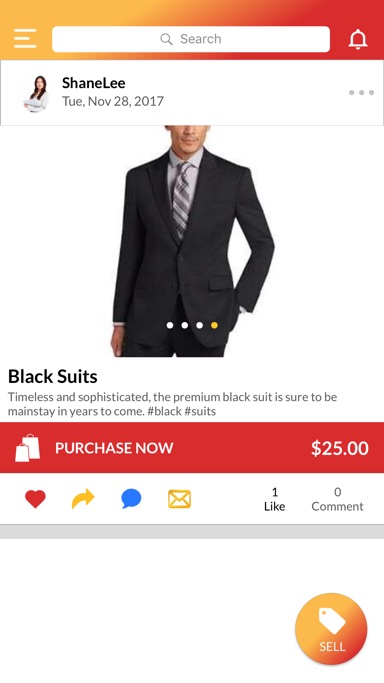
"With ShopSnapIt, we have created a social e-commerce app that makes it possible for anyone to start a business with no risk at all. Users can conveniently upload photos and videos of their items, hold auctions and set prices for their listings with a single 'Purchase Now' button. The platform sends traffic through predictive data analysis, making the service very attractive for small entrepreneurs," explains Leslie. "For shoppers, the app is a paradise offering fashionable clothes, products and services from global service providers at attractive rates. Besides, one can also buy fashion items from their favourite celebrities who can use the platform to raise money for charities through auctions," she adds.
The new version of the app released in March 2018 makes it even more rewarding for users to connect, buy and sell on ShopSnapIt. Apart from fixing some minor bugs and improving the user interface further, the app now rewards its active users with additional points that can be redeemed on future purchases:
For Sellers:
* Upload and advertise items in a snap
* Broadcast items to a large user base for new audience
* Like, follow, comment and message celebrities, businesses, services and friends
* Get more relevant traffic to your page through predictive data analysis
* Set up auctions; sellers can accept, counteroffer and reject bids from their screen
* Create personalized shopping experience by adding photos, videos and music
* Use "Add a commercial" option to upload engaging content for attracting buyers
* Safe and secure payments in seller's pre-arranged bank account
For Buyers:
* One stop shop for popular clothing, fashion and retail
* Buy at great rates from local and international sellers
* Like, follow, comment and message celebrities, friends, sellers and businesses
* Get updates about latest items from preferred as well as new sellers
* Bid on items to get your dream products at dream prices
* Negotiate directly with sellers through private messaging
* Make secure online payments
* Customer purchases are protected through Stripe security system
Device Requirements for iPhone:
* iPhone, iPad, and iPod touch
* Requires iOS 9.0 or later
* 92.8 MB
Device Requirements for Android:
* System: 4.4 and up
Pricing and Availability:
ShopSnapIt - Online Shopping 1.7 is currently available for Free with in-app purchases on the App Store in the Shopping category and also available for Free with in-app purchases on the Google Play Store in the Productivity category.
ShopSnapIt - Online Shopping 1.7: https://www.shopsnapit.com/
Download from iTunes: https://itunes.apple.com/app/shopsnapit/id1240073634
Download from Google Play: https://play.google.com/store/apps/details?id=com.shopsnapit
Screenshot 1: https://is3-ssl.mzstatic.com/image/thumb/Purple118/v4/fe/7c/0d/fe7c0dc2-fbc5-cdc4-a46e-df2d7b3bf0f9/source/384x0w.jpg
Screenshot 2: https://is3-ssl.mzstatic.com/image/thumb/Purple128/v4/a4/de/87/a4de8757-74c5-69e8-5a3e-db5d79678d27/source/384x0w.jpg
App Icon: https://is1-ssl.mzstatic.com/image/thumb/Purple128/v4/ab/2b/8f/ab2b8f08-ecd1-a4c4-e055-ea126267e3f5/AppIcon-1x_U007emarketing-85-220-0-4.png/738x0w.jpg
The Maximillion Group is an Atlanta based productions and multimedia company operating since 2001. C.E.O, author, multimedia writer and developer, Leslie Neland is on a mission to use her new e-commerce shopping app, ShopSnapIt, to help entrepreneurs, and aspiring business owners further their success by utilizing this cost effective platform. The app also caters to philanthropy and charity work through celebrities having the proceeds from their page benefit a foundation of choice. Shopsnapit launched December 5th, 2017 to over 2 billion users on google play and the App Store. For more information please visit www.Shopsnapit.com or contact us at info@shopsnapit.com. All Material and Software (C) Copyright 2018 Maximillion Group Productions LLC. All Rights Reserved. Apple, the Apple logo, iPhone, iPod and iPad are registered trademarks of Apple Inc. in the U.S. and/or other countries. Other trademarks and registered trademarks may be the property of their respective owners.
*******
Link To Article: https://prmac.com/release-id-82593.htm
*******
---------------------------------------------------------------------------------
Note that you can alter delivered distributions at any time.
Login to your account on prMac to alter your channel selection, or to opt-out at any time.
Buy, Sell & Connect Online with the First Social Networking Shopping App - Published on 03/29/18
The Maximillion Group LLC releases ShopSnapIt - Online Shopping 1.7, an update to their popular shopping app for iOS and Android devices. ShopSnapIt brings buyers and sellers from across the world together in a single platform, offering buyers the benefit of choice at competitive prices and affording sellers an opportunity to reach out to a global market. The recently released updated version of the app offers reward points for active users apart from a more intuitive user interface.
Atlanta, United States - ShopSnapIt, a social networking shopping app released in December 2017 by The Maximillion Group LLC, has taken the world by storm. The revolutionary app has grown its user base to 10k within 3 months of its launch, growing from 7k to 10k in just one month. People across the world are selling their personal items on ShopSnapIt to support their favourite charities as well as make some money for themselves without any risk or investment.
ShopSnapIt app is a unique combination of the social aspect of Instagram and Facebook and the buying and selling power of eBay. Anybody can turn into an entrepreneur by simply downloading the app and listing their wares or services on it. Apart from being able to sell their products to anyone in the world, the app also allows users to follow and purchase from their favourite celebrities, top designers, artists and friends located anywhere on the globe.
"ShopSnapIt is a platform that benefits both buyers and sellers. Users can not only find exclusive products and bargain deals from all over the world but also use their personal page as a digital storefront to showcase their products and services through photos and videos and interact with other users," says app founder Leslie Neland. "Users could choose to dedicate a portion of their sales to a charity of their choice," she adds.
What makes the ShopSnapIt experience even more powerful is the interactive feature that makes it possible to connect with celebrities more closely than ever before. Besides, buyers and sellers can also network and negotiate through private messaging.
"With ShopSnapIt, we have created a social e-commerce app that makes it possible for anyone to start a business with no risk at all. Users can conveniently upload photos and videos of their items, hold auctions and set prices for their listings with a single 'Purchase Now' button. The platform sends traffic through predictive data analysis, making the service very attractive for small entrepreneurs," explains Leslie. "For shoppers, the app is a paradise offering fashionable clothes, products and services from global service providers at attractive rates. Besides, one can also buy fashion items from their favourite celebrities who can use the platform to raise money for charities through auctions," she adds.
The new version of the app released in March 2018 makes it even more rewarding for users to connect, buy and sell on ShopSnapIt. Apart from fixing some minor bugs and improving the user interface further, the app now rewards its active users with additional points that can be redeemed on future purchases:
For Sellers:
* Upload and advertise items in a snap
* Broadcast items to a large user base for new audience
* Like, follow, comment and message celebrities, businesses, services and friends
* Get more relevant traffic to your page through predictive data analysis
* Set up auctions; sellers can accept, counteroffer and reject bids from their screen
* Create personalized shopping experience by adding photos, videos and music
* Use "Add a commercial" option to upload engaging content for attracting buyers
* Safe and secure payments in seller's pre-arranged bank account
For Buyers:
* One stop shop for popular clothing, fashion and retail
* Buy at great rates from local and international sellers
* Like, follow, comment and message celebrities, friends, sellers and businesses
* Get updates about latest items from preferred as well as new sellers
* Bid on items to get your dream products at dream prices
* Negotiate directly with sellers through private messaging
* Make secure online payments
* Customer purchases are protected through Stripe security system
Device Requirements for iPhone:
* iPhone, iPad, and iPod touch
* Requires iOS 9.0 or later
* 92.8 MB
Device Requirements for Android:
* System: 4.4 and up
Pricing and Availability:
ShopSnapIt - Online Shopping 1.7 is currently available for Free with in-app purchases on the App Store in the Shopping category and also available for Free with in-app purchases on the Google Play Store in the Productivity category.
ShopSnapIt - Online Shopping 1.7: https://www.shopsnapit.com/
Download from iTunes: https://itunes.apple.com/app/shopsnapit/id1240073634
Download from Google Play: https://play.google.com/store/apps/details?id=com.shopsnapit
Screenshot 1: https://is3-ssl.mzstatic.com/image/thumb/Purple118/v4/fe/7c/0d/fe7c0dc2-fbc5-cdc4-a46e-df2d7b3bf0f9/source/384x0w.jpg

Screenshot 2: https://is3-ssl.mzstatic.com/image/thumb/Purple128/v4/a4/de/87/a4de8757-74c5-69e8-5a3e-db5d79678d27/source/384x0w.jpg
App Icon: https://is1-ssl.mzstatic.com/image/thumb/Purple128/v4/ab/2b/8f/ab2b8f08-ecd1-a4c4-e055-ea126267e3f5/AppIcon-1x_U007emarketing-85-220-0-4.png/738x0w.jpg

The Maximillion Group is an Atlanta based productions and multimedia company operating since 2001. C.E.O, author, multimedia writer and developer, Leslie Neland is on a mission to use her new e-commerce shopping app, ShopSnapIt, to help entrepreneurs, and aspiring business owners further their success by utilizing this cost effective platform. The app also caters to philanthropy and charity work through celebrities having the proceeds from their page benefit a foundation of choice. Shopsnapit launched December 5th, 2017 to over 2 billion users on google play and the App Store. For more information please visit www.Shopsnapit.com or contact us at info@shopsnapit.com. All Material and Software (C) Copyright 2018 Maximillion Group Productions LLC. All Rights Reserved. Apple, the Apple logo, iPhone, iPod and iPad are registered trademarks of Apple Inc. in the U.S. and/or other countries. Other trademarks and registered trademarks may be the property of their respective owners.
*******
Link To Article: https://prmac.com/release-id-82593.htm
*******
---------------------------------------------------------------------------------
Note that you can alter delivered distributions at any time.
Login to your account on prMac to alter your channel selection, or to opt-out at any time.
Numerics 5.2 - ChartMogul, Delighted & CSV Dashboards for iOS & tvOS
A new article has been published at prMac.
Numerics 5.2 - ChartMogul, Delighted & CSV Dashboards for iOS & tvOS - Published on 03/29/18
Numerics, the KPI dashboard app for iOS & tvOS, adds integration with ChartMogul enabling subscription businesses to track performance of their subscriptions & subscriber base. v5.2 adds an integration with Delighted to help businesses improve customer service by monitoring customer feedback. Numerics also adds support for the most widely used custom data source - CSV files. Users can now design their dashboards with KPIs from any in-house software that can output CSV data.
Mumbai, India - Cynapse is updating Numerics: the KPI dashboard app exclusively designed for the iPhone, iPad, Apple TV and Apple Watch - with 2 new cloud service integrations, ChartMogul & Delighted and the most asked for custom data source - CSV files.
ChartMogul is a subscription analytics platform that brings in key subscription metrics from Stripe, iTunes Connect, Recurly, Braintree and more. With the new integration, Numerics customers can now create ChartMogul dashboards to monitor changes in their subscription business KPIs. The ChartMogul integration bundles 24 pre-designed KPI templates like ARR, MRR, Customer LTV, Customer Churn, metrics that are key to the success of a subscription business. Combining metrics from other integrations in Numerics like Appfigures and Chargify, mobile app developers and SaaS business owners can get a comprehensive view of their subscription business in a single dashboard.
Numerics v5.2 adds an integration for Delighted, a tool that makes it easy for businesses to run NPS surveys and gather feedback from customers in groups based on the sentiment of their response. It's integration in Numerics helps customers monitor NPS feedback by tracking the NPS value or the number of people in the NPS groups based on sentiment, including Promoters, Passives & Detractors. With Delighted NPS dashboards in Numerics, business stakeholders always have access to numbers that help them measure customer satisfaction and predict business growth.
Numerics dashboards are designed to pull in metrics from different systems, in the cloud or from custom business software behind a firewall. Numerics 5.2 adds support for CSV files - the most widely adopted way by businesses to share and communicate custom data. Data exports from various third-party software support CSV files and since they can be updated programmatically, and consumed by users using Spreadsheet tools, the CSV format remains quite popular among business software users. The 9 unique CSV widget types let customers visualize business data in dashboards from CSV files; hosted internally on a LAN / VPN or on the Internet protected behind a login. The CSV widgets are all free to use with the app.
With these new sources, Numerics now integrates with 45 cloud services and custom data sources. Customers can choose to add any of the KPIs to their Apple Watch and keep track of their most wanted number using a watch face complication. Numerics dashboards can also be displayed on large screens on the Apple TV, enabling teams to stay focussed on the numbers that matter the most.
Device Requirements:
* iPhone 5s or later, iPod touch and Apple TV
* iPad 5th generation or later
* Requires iOS 11.0 or later
* 44.3 MB
Pricing and Availability:
Numerics 5.2 is Free (With In-App Purchases) and available worldwide exclusively through the App Store in the Business category. The new version includes many performance improvements and fixes some bugs. A full list of What's New in Numerics v5.2 is available on the App Store.
Numerics 5.2: http://cynapse.com/numerics
More Information: https://cynapse.com/blog/chartmogul-delighted-csv-dashboards/
Dashboards Integration for ChartMogul: https://cynapse.com/numerics/integrations/chartmogul-dashboards/
Download from iTunes: https://itunes.apple.com/app/numerics/id875319874?mt=8
Promo Image (ChartMogul, Delighted & CSV Dashboards with Numerics): https://cynapse.com/img/blog/numerics-chartmogul-csv-delighted-dashboards.jpg
Media Assets: https://www.dropbox.com/sh/tu2p5cm9eqv6msq/AAAkRvASYs36Wd3mxgPepft4a
Headquartered in Mumbai, India, Cynapse invents technology that applies to and benefits everyday life. Cynapse creates products that solve specific fundamental problems in the most beautiful and amazing way. Cynapse has successfully produced 10 products in its lifespan, focused in the areas of productivity and collaboration. Cynapse is the creator of open source Enterprise 2.0 software Cyn.in, provider of the realtime collaboration software Sync.in and inventor of Numerics, Localscope and Phlo for the iOS and Mac platforms. Over 100,000 businesses and institutions and millions of users across the world benefit using Cynapse technology. Copyright (C) 2018 Cynapse. All Rights Reserved. Apple, the Apple logo, iPhone, iPod and iPad are registered trademarks of Apple Inc. in the U.S. and/or other countries.
*******
Link To Article: https://prmac.com/release-id-82591.htm
*******
---------------------------------------------------------------------------------
Note that you can alter delivered distributions at any time.
Login to your account on prMac to alter your channel selection, or to opt-out at any time.
Numerics 5.2 - ChartMogul, Delighted & CSV Dashboards for iOS & tvOS - Published on 03/29/18
Numerics, the KPI dashboard app for iOS & tvOS, adds integration with ChartMogul enabling subscription businesses to track performance of their subscriptions & subscriber base. v5.2 adds an integration with Delighted to help businesses improve customer service by monitoring customer feedback. Numerics also adds support for the most widely used custom data source - CSV files. Users can now design their dashboards with KPIs from any in-house software that can output CSV data.
Mumbai, India - Cynapse is updating Numerics: the KPI dashboard app exclusively designed for the iPhone, iPad, Apple TV and Apple Watch - with 2 new cloud service integrations, ChartMogul & Delighted and the most asked for custom data source - CSV files.
ChartMogul is a subscription analytics platform that brings in key subscription metrics from Stripe, iTunes Connect, Recurly, Braintree and more. With the new integration, Numerics customers can now create ChartMogul dashboards to monitor changes in their subscription business KPIs. The ChartMogul integration bundles 24 pre-designed KPI templates like ARR, MRR, Customer LTV, Customer Churn, metrics that are key to the success of a subscription business. Combining metrics from other integrations in Numerics like Appfigures and Chargify, mobile app developers and SaaS business owners can get a comprehensive view of their subscription business in a single dashboard.
Numerics v5.2 adds an integration for Delighted, a tool that makes it easy for businesses to run NPS surveys and gather feedback from customers in groups based on the sentiment of their response. It's integration in Numerics helps customers monitor NPS feedback by tracking the NPS value or the number of people in the NPS groups based on sentiment, including Promoters, Passives & Detractors. With Delighted NPS dashboards in Numerics, business stakeholders always have access to numbers that help them measure customer satisfaction and predict business growth.
Numerics dashboards are designed to pull in metrics from different systems, in the cloud or from custom business software behind a firewall. Numerics 5.2 adds support for CSV files - the most widely adopted way by businesses to share and communicate custom data. Data exports from various third-party software support CSV files and since they can be updated programmatically, and consumed by users using Spreadsheet tools, the CSV format remains quite popular among business software users. The 9 unique CSV widget types let customers visualize business data in dashboards from CSV files; hosted internally on a LAN / VPN or on the Internet protected behind a login. The CSV widgets are all free to use with the app.
With these new sources, Numerics now integrates with 45 cloud services and custom data sources. Customers can choose to add any of the KPIs to their Apple Watch and keep track of their most wanted number using a watch face complication. Numerics dashboards can also be displayed on large screens on the Apple TV, enabling teams to stay focussed on the numbers that matter the most.
Device Requirements:
* iPhone 5s or later, iPod touch and Apple TV
* iPad 5th generation or later
* Requires iOS 11.0 or later
* 44.3 MB
Pricing and Availability:
Numerics 5.2 is Free (With In-App Purchases) and available worldwide exclusively through the App Store in the Business category. The new version includes many performance improvements and fixes some bugs. A full list of What's New in Numerics v5.2 is available on the App Store.
Numerics 5.2: http://cynapse.com/numerics
More Information: https://cynapse.com/blog/chartmogul-delighted-csv-dashboards/
Dashboards Integration for ChartMogul: https://cynapse.com/numerics/integrations/chartmogul-dashboards/
Download from iTunes: https://itunes.apple.com/app/numerics/id875319874?mt=8
Promo Image (ChartMogul, Delighted & CSV Dashboards with Numerics): https://cynapse.com/img/blog/numerics-chartmogul-csv-delighted-dashboards.jpg

Media Assets: https://www.dropbox.com/sh/tu2p5cm9eqv6msq/AAAkRvASYs36Wd3mxgPepft4a
Headquartered in Mumbai, India, Cynapse invents technology that applies to and benefits everyday life. Cynapse creates products that solve specific fundamental problems in the most beautiful and amazing way. Cynapse has successfully produced 10 products in its lifespan, focused in the areas of productivity and collaboration. Cynapse is the creator of open source Enterprise 2.0 software Cyn.in, provider of the realtime collaboration software Sync.in and inventor of Numerics, Localscope and Phlo for the iOS and Mac platforms. Over 100,000 businesses and institutions and millions of users across the world benefit using Cynapse technology. Copyright (C) 2018 Cynapse. All Rights Reserved. Apple, the Apple logo, iPhone, iPod and iPad are registered trademarks of Apple Inc. in the U.S. and/or other countries.
*******
Link To Article: https://prmac.com/release-id-82591.htm
*******
---------------------------------------------------------------------------------
Note that you can alter delivered distributions at any time.
Login to your account on prMac to alter your channel selection, or to opt-out at any time.
myTuner Radio 6.0.2 Now Supports Alexa and Sonos
A new article has been published at prMac.
myTuner Radio 6.0.2 Now Supports Alexa and Sonos - Published on 03/29/18
The myTuner radio team brings big news about the latest version for iOS and Android. Now you can enjoy myTuner Radio, not only on your mobile devices, desktop devices, wearables, TV sets, set-top boxes and connected cars, but now also on Alexa and Sonos. On Alexa you only need to ask it to open myTuner radio and then request it to play a station of your choice. myTuner Radio is a multi-platform solution that allows you to listen to 50,000 radio stations from more than 200 countries.
Porto, Portugal - The myTuner radio team is very excited about the latest version for iOS and Android, because it brings big news! Now you can enjoy myTuner Radio, not only on your mobile devices (iOS, Android and Windows Phone), desktop devices (Web, Windows and Mac), wearables (Apple Watch and Google Wearables), TV sets, set-top boxes and connected cars, but now also on Alexa and Sonos (beta version).
myTuner Radio team is always making an effort to be available on more and more platforms. That being said, we couldn't ignore the fact that Alexa and Sonos were the next big step we had to take to be available to even more people. So, myTuner Radio team made this possible! The latest version of myTuner Radio supports Alexa and Sonos and it is uber-simple to use.
On Alexa you only need to ask it to open myTuner radio and then request it to play a station of your choice (e.g. Step 1 - "Alexa open myTuner Radio" Step 2 - "Play BBC radio one"). Looking for a recommendation? With myTuner Radio opened already on Alexa you can play the most popular stations from 200 countries or territories (e.g. "What are the most popular stations in the United States?".) You can also tell myTuner Radio to play your preferred genre (e.g. "Play the best jazz radio stations").
myTuner Radio's latest version is also pretty simple to play on Sonos. You only have to run the Sonos app, add the music service myTuner Radio and start enjoying your favorite stations and podcasts directly from myTuner Radio into your Sonos wireless speakers, wherever you are.
myTuner Radio features the best radio listening experience and the best way to discover new hits or remember old ones you didn't listen to in a while, on your favorite radio stations.
Remember that, above all, myTuner Radio is a multi-platform solution that allows you to listen to 50,000 radio stations from more than 200 countries / territories. The iOS and Android versions of myTuner Radio are available for Free and you can download them at any time.
Language Support:
myTuner Radio for mobile devices supports English, Spanish, Portuguese (European and Brazilian), German, Italian, Turkish, Japanese, Korean, Chinese (Simplified and Traditional), Russian, Danish, Dutch, Indonesian, Norwegian, Polish, Swedish, Thai and Arabic languages.
Device Requirements (iOS):
* iPhone, iPod touch and iPad
* Offers app for Apple TV and Apple Watch and offers support for Apple CarPlay
* Requires iOS 9.0 or later
Device Requirements (Android):
* Offers app for Android TV and Android Wear and offers support for Android Auto
* Requires Android 4.1 or later
Pricing and Availability:
myTuner Radio 6.0.2 is currently available for Free for iOS in the App Store and in the Google Play Store in the Music category.
myTuner Radio 6.0.2: https://mytuner-radio.com/homepage/
More Information: https://mytuner-radio.com/news/2018/03/29/alexa-and-sonos-play-mytuner-radio/
myTuner Radio on Alexa: https://www.amazon.com/Appgeneration-Software-technologies-Lda-myTuner/dp/B079WY54NQ/ref=sr_1_1?s=digital-skills&ie=UTF8&qid=1522256137&sr=1-1&keywords=mytuner+radio
Download from iTunes: https://itunes.apple.com/app/id520502858?at=11l64h&pt=420029&ct=mytuner_SonosAlexa_PR&mt=8
Download from Google Play : https://play.google.com/store/apps/details?id=com.appgeneration.itunerfree&referrer=utm_source%3DPR%26utm_medium%3Demail%26utm_campaign%3DSonosAlexa
Screenshot : https://mytuner-radio.com/media/news/2018/03/29/amazon_sonos.png
Based in Porto, Portugal, AppGeneration Software specializes in software development and editorial content to provide a unique experience centered on smartphones and tablets. Copyright (C) 2018 AppGeneration and myTuner Radio. All Rights Reserved. Apple, the Apple logo, iPhone, iPod, and iPad are registered trademarks of Apple Inc. in the U.S. and/or other countries.
*******
Link To Article: https://prmac.com/release-id-82592.htm
*******
---------------------------------------------------------------------------------
Note that you can alter delivered distributions at any time.
Login to your account on prMac to alter your channel selection, or to opt-out at any time.
myTuner Radio 6.0.2 Now Supports Alexa and Sonos - Published on 03/29/18
The myTuner radio team brings big news about the latest version for iOS and Android. Now you can enjoy myTuner Radio, not only on your mobile devices, desktop devices, wearables, TV sets, set-top boxes and connected cars, but now also on Alexa and Sonos. On Alexa you only need to ask it to open myTuner radio and then request it to play a station of your choice. myTuner Radio is a multi-platform solution that allows you to listen to 50,000 radio stations from more than 200 countries.
Porto, Portugal - The myTuner radio team is very excited about the latest version for iOS and Android, because it brings big news! Now you can enjoy myTuner Radio, not only on your mobile devices (iOS, Android and Windows Phone), desktop devices (Web, Windows and Mac), wearables (Apple Watch and Google Wearables), TV sets, set-top boxes and connected cars, but now also on Alexa and Sonos (beta version).
myTuner Radio team is always making an effort to be available on more and more platforms. That being said, we couldn't ignore the fact that Alexa and Sonos were the next big step we had to take to be available to even more people. So, myTuner Radio team made this possible! The latest version of myTuner Radio supports Alexa and Sonos and it is uber-simple to use.
On Alexa you only need to ask it to open myTuner radio and then request it to play a station of your choice (e.g. Step 1 - "Alexa open myTuner Radio" Step 2 - "Play BBC radio one"). Looking for a recommendation? With myTuner Radio opened already on Alexa you can play the most popular stations from 200 countries or territories (e.g. "What are the most popular stations in the United States?".) You can also tell myTuner Radio to play your preferred genre (e.g. "Play the best jazz radio stations").
myTuner Radio's latest version is also pretty simple to play on Sonos. You only have to run the Sonos app, add the music service myTuner Radio and start enjoying your favorite stations and podcasts directly from myTuner Radio into your Sonos wireless speakers, wherever you are.
myTuner Radio features the best radio listening experience and the best way to discover new hits or remember old ones you didn't listen to in a while, on your favorite radio stations.
Remember that, above all, myTuner Radio is a multi-platform solution that allows you to listen to 50,000 radio stations from more than 200 countries / territories. The iOS and Android versions of myTuner Radio are available for Free and you can download them at any time.
Language Support:
myTuner Radio for mobile devices supports English, Spanish, Portuguese (European and Brazilian), German, Italian, Turkish, Japanese, Korean, Chinese (Simplified and Traditional), Russian, Danish, Dutch, Indonesian, Norwegian, Polish, Swedish, Thai and Arabic languages.
Device Requirements (iOS):
* iPhone, iPod touch and iPad
* Offers app for Apple TV and Apple Watch and offers support for Apple CarPlay
* Requires iOS 9.0 or later
Device Requirements (Android):
* Offers app for Android TV and Android Wear and offers support for Android Auto
* Requires Android 4.1 or later
Pricing and Availability:
myTuner Radio 6.0.2 is currently available for Free for iOS in the App Store and in the Google Play Store in the Music category.
myTuner Radio 6.0.2: https://mytuner-radio.com/homepage/
More Information: https://mytuner-radio.com/news/2018/03/29/alexa-and-sonos-play-mytuner-radio/
myTuner Radio on Alexa: https://www.amazon.com/Appgeneration-Software-technologies-Lda-myTuner/dp/B079WY54NQ/ref=sr_1_1?s=digital-skills&ie=UTF8&qid=1522256137&sr=1-1&keywords=mytuner+radio
Download from iTunes: https://itunes.apple.com/app/id520502858?at=11l64h&pt=420029&ct=mytuner_SonosAlexa_PR&mt=8
Download from Google Play : https://play.google.com/store/apps/details?id=com.appgeneration.itunerfree&referrer=utm_source%3DPR%26utm_medium%3Demail%26utm_campaign%3DSonosAlexa
Screenshot : https://mytuner-radio.com/media/news/2018/03/29/amazon_sonos.png

Based in Porto, Portugal, AppGeneration Software specializes in software development and editorial content to provide a unique experience centered on smartphones and tablets. Copyright (C) 2018 AppGeneration and myTuner Radio. All Rights Reserved. Apple, the Apple logo, iPhone, iPod, and iPad are registered trademarks of Apple Inc. in the U.S. and/or other countries.
*******
Link To Article: https://prmac.com/release-id-82592.htm
*******
---------------------------------------------------------------------------------
Note that you can alter delivered distributions at any time.
Login to your account on prMac to alter your channel selection, or to opt-out at any time.
Subscribe to:
Posts (Atom)