A new article has been published at prMac.
Output Factory for Adobe InDesign at 50% off until May 5 - Published on 05/02/18
Zevrix Solutions announces that Output Factory for Adobe InDesign is available on sale at 50% off until May 5 only. Awarded 5 out of 5 stars by InDesign Magazine, Output Factory automates printing and exporting from InDesign. The app offers batch output, export as single pages, variable file names, layer versioning, custom scripts integration and more. The software is designed to automate and simplify workflows of printers, prepress bureaus, ad agencies and publishing houses.
Toronto (ON), Canada - Zevrix Solutions is pleased to announce that Output Factory for Adobe InDesign is available on sale at 50% off until May 5 only. Output Factory lets printers, ad agencies and publishing houses worldwide eliminate repetitive tasks, streamline their output workflows, and easily repurpose InDesign files for the web and mobile devices. The offer lets users save $85 on each copy of the software.
"Using Output Factory is straightforward. You determine your settings and sit back while Output Factory does all the heavy lifting. The time savings are huge," writes Jamie McKee in a 5-star review in InDesign Magazine. "If you find yourself repeatedly exporting InDesign files in various formats, you owe it to yourself to install the free trial and see just how much time you'll save using Output Factory."
With Output Factory, users only need to queue the desired InDesign files and select pre-defined output options. The software will then print the files or save them to PDF or other formats with just a click of a button. Output Factory can automate processing of hundreds of documents in the background while freeing users time for other important activities and eliminating repetitive tasks. Output Factory supports printing as well as exporting to PDF, PostScript, EPS, Flash, IDML, EPUB and several image formats. It offers the following key features:
* Batch printing and exporting of InDesign files
* Export as single pages or spreads
* Output to several formats with one click
* Layer versioning: output layer combinations as single files
* Variable output file names
* Run custom scripts
* Preflight InDesign and PDF documents
Pricing and Availability:
Output Factory can be purchased form Zevrix online at 50% off for $85 until May 5 only. Trial is also available for download. Output Factory requires macOS 10.7-10.13 and InDesign CS3-CC 2018.
Zevrix Solutions: http://zevrix.com
Output Factory: http://zevrix.com/OutputFactory.php
Download Output Factory: http://zevrix.com/OutputFactory.dmg
Purchase Output Factory: http://zevrix.com/store.php
Screenshot: http://zevrix.com/screenshots/of2/of2-pdf.jpg
Located in Toronto, Canada, Zevrix Solutions provides automation and productivity solutions for Adobe Creative Cloud and Creative Suite software, PDF workflows, graphic file diagnostics and Microsoft Office output on Mac OS. Zevrix is dedicated to help professionals increase their profits through automating everyday tasks, producing error-free documents, saving disk space and cutting production costs. For more information, visit their website. Copyright (C) 2018 Zevrix Solutions. All Rights Reserved. Other trademarks and registered trademarks may be the property of their respective owners.
*******
Link To Article: https://prmac.com/release-id-82659.htm
*******
---------------------------------------------------------------------------------
Note that you can alter delivered distributions at any time.
Login to your account on prMac to alter your channel selection, or to opt-out at any time.


See What Your Apps Can Do With Sandkorn
A new article has been published at prMac.
See What Your Apps Can Do With Sandkorn - Published on 05/01/18
Peter Borg Apps announces Sandkorn for macOS, a new and easy to use utility that shows you which macOS apps that are sandboxed. It also shows you what entitlements those apps have. Many apps are restricted in a sandbox - all new Mac App Store apps are - but it is hard to know what those restrictions are for each app. Sandkorn helps you with that.
Stockholm, Sweden - Sandkorn from Peter Borg Apps is a new and easy to use utility that shows you which of your macOS apps that are sandboxed. It also shows you what entitlements those apps have.
A sandbox is an access control technology for macOS. Many apps are restricted in a sandbox - all new Mac App Store apps are - but it is hard to know what those restrictions are for each app. And it is even harder to get an overview of all your apps. But Sandkorn helps you with that.
By using Sandkorn you can now in a simple way see what apps have no restrictions at all or, for instance, are limited to accessing your contacts or some particular folder.
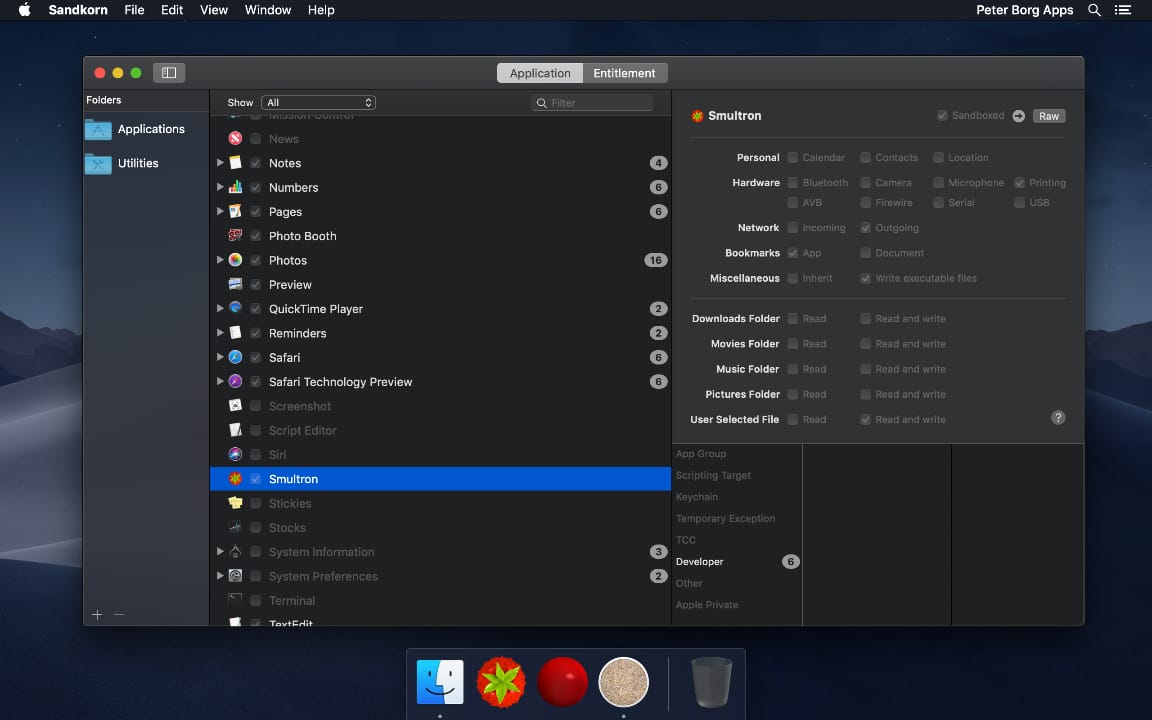
Sandkorn checks for apps and executables within each folder in the Folders sidebar, by default it includes the Applications and Utilities folders. It doesn't check subfolders, so you have to add each subfolder that you want to be included by using the plus sign at the bottom or Add Folder in the File menu.
For each app that it finds, Sandkorn tries to find any other executables within that app bundle, for instance plugins and XPC services. And then it looks for all entitlements that those use.
In Sandkorn you can see the information either by listing the apps or by a list of each entitlement used by your apps. In that way you can both check a specific app if you are curious about that and also check a specific entitlement if, for instance, you want to see what apps can use the camera.
Requirements:
* macOS High Sierra 10.13 or later
* 12.3 MB
Pricing and Availability:
Sandkorn is free and is available worldwide exclusively through the Mac App Store in the Utilities category.
Peter Borg Apps: https://www.peterborgapps.com/
Sandkorn: https://www.peterborgapps.com/sandkorn
Download from Mac App Store: https://itunes.apple.com/us/app/sandkorn/id1377973524?ls=1&mt=12&at=1001l3eG
Screenshot: https://www.peterborgapps.com/images/sandkorn-screenshot-1.jpg
App Icon: https://www.peterborgapps.com/images/sandkorn-logo.png
Peter Borg Apps is a small, but great, company that creates apps for macOS, iOS, watchOS and tvOS. We believe in creating easy to use, powerful and elegant apps. All Material and Software (C) Copyright 2018 Peter Borg Apps. All Rights Reserved. Apple, the Apple logo, Macintosh Mac OS X and macOS are registered trademarks of Apple Inc. in the U.S. and/or other countries. Other trademarks and registered trademarks may be the property of their respective owners.
*******
Link To Article: https://prmac.com/release-id-82658.htm
*******
---------------------------------------------------------------------------------
Note that you can alter delivered distributions at any time.
Login to your account on prMac to alter your channel selection, or to opt-out at any time.
See What Your Apps Can Do With Sandkorn - Published on 05/01/18
Peter Borg Apps announces Sandkorn for macOS, a new and easy to use utility that shows you which macOS apps that are sandboxed. It also shows you what entitlements those apps have. Many apps are restricted in a sandbox - all new Mac App Store apps are - but it is hard to know what those restrictions are for each app. Sandkorn helps you with that.
Stockholm, Sweden - Sandkorn from Peter Borg Apps is a new and easy to use utility that shows you which of your macOS apps that are sandboxed. It also shows you what entitlements those apps have.
A sandbox is an access control technology for macOS. Many apps are restricted in a sandbox - all new Mac App Store apps are - but it is hard to know what those restrictions are for each app. And it is even harder to get an overview of all your apps. But Sandkorn helps you with that.
By using Sandkorn you can now in a simple way see what apps have no restrictions at all or, for instance, are limited to accessing your contacts or some particular folder.
Sandkorn checks for apps and executables within each folder in the Folders sidebar, by default it includes the Applications and Utilities folders. It doesn't check subfolders, so you have to add each subfolder that you want to be included by using the plus sign at the bottom or Add Folder in the File menu.
For each app that it finds, Sandkorn tries to find any other executables within that app bundle, for instance plugins and XPC services. And then it looks for all entitlements that those use.
In Sandkorn you can see the information either by listing the apps or by a list of each entitlement used by your apps. In that way you can both check a specific app if you are curious about that and also check a specific entitlement if, for instance, you want to see what apps can use the camera.
Requirements:
* macOS High Sierra 10.13 or later
* 12.3 MB
Pricing and Availability:
Sandkorn is free and is available worldwide exclusively through the Mac App Store in the Utilities category.
Peter Borg Apps: https://www.peterborgapps.com/
Sandkorn: https://www.peterborgapps.com/sandkorn
Download from Mac App Store: https://itunes.apple.com/us/app/sandkorn/id1377973524?ls=1&mt=12&at=1001l3eG
Screenshot: https://www.peterborgapps.com/images/sandkorn-screenshot-1.jpg
App Icon: https://www.peterborgapps.com/images/sandkorn-logo.png
Peter Borg Apps is a small, but great, company that creates apps for macOS, iOS, watchOS and tvOS. We believe in creating easy to use, powerful and elegant apps. All Material and Software (C) Copyright 2018 Peter Borg Apps. All Rights Reserved. Apple, the Apple logo, Macintosh Mac OS X and macOS are registered trademarks of Apple Inc. in the U.S. and/or other countries. Other trademarks and registered trademarks may be the property of their respective owners.
*******
Link To Article: https://prmac.com/release-id-82658.htm
*******
---------------------------------------------------------------------------------
Note that you can alter delivered distributions at any time.
Login to your account on prMac to alter your channel selection, or to opt-out at any time.
SecuritySpy 4.2.4 - Update to macOS CCTV Software
A new article has been published at prMac.
SecuritySpy 4.2.4 - Update to macOS CCTV Software - Published on 05/01/18
Ben Software today announced the release of SecuritySpy 4.2.4, an update to the premier multi-camera video surveillance software for the Mac. With powerful and flexible recording features, motion-activated events, and remote monitoring and configuration, SecuritySpy is designed for demanding video surveillance applications. This version adds many new features and improvements, including improved playback of captured footage, web interface improvements, and bug fixes.
London, United Kingdom - Ben Software today announced the release of SecuritySpy 4.2.4, an update to the premier multi-camera video surveillance software for the Mac. With powerful and flexible recording features, motion-activated events, and remote monitoring and configuration, SecuritySpy is designed for demanding video surveillance applications. This version adds many new features and improvements, including improved playback of captured footage, web interface improvements, and bug fixes.
"This update represents our ongoing commitment to maintain top-quality NVR software and respond to our customers' feedback" said Ben Bird, the developer of SecuritySpy. "We are proud to deliver a host of improvements that make SecuritySpy even more powerful."
The main features of SecuritySpy are as follows:
* Displays and records multiple cameras simultaneously
* Powerful capture features, with motion-detection and notifications
* Built-in secure web server for remote monitoring and administration
* Pan/Tilt/Zoom (PTZ) support
* Secure off-site backup of captured footage
* Browser feature for synchronised multi-camera playback of captured footage
* Supports all major brands of IP camera as well as ONVIF-compatible cameras
* Supports all industry-standard media formats (JPEG, MPEG-4, MxPEG, H.264, AAC)
* Extensively threaded and optimised to take full advantage of multi-core Macs
* Hardware-accelerated video compression and decompression
* Purpose-built iOS and tvOS apps for full access on iPhone, iPad and Apple TV
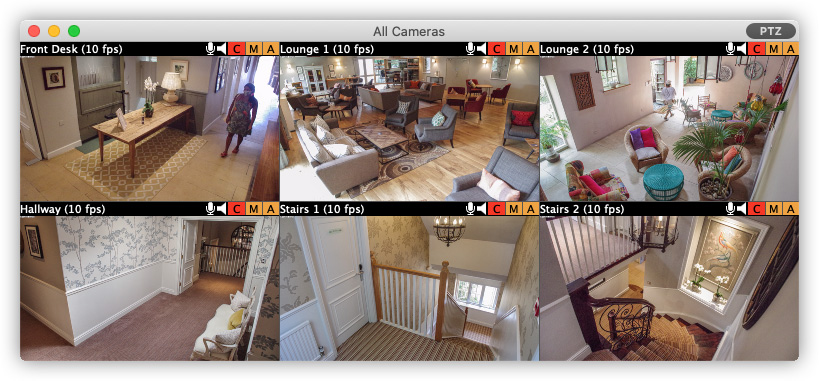
SecuritySpy supports virtually all network cameras on the market, including the popular Axis, Dahua, Canon, Amcrest, Hikvision, Samsung, Vivotek and Zavio ranges. SecuritySpy features advanced motion detection, which can be used to trigger recordings as well as email alerts, audio alarms, iOS push notifications and external devices. The built-in secure web server allows remote monitoring of live streams and captured footage from over the Internet, using a web browser or an iPhone, iPad or Apple TV.
The full list of improvements in this version is as follows:
* Zoom/Pan captured footage during playback in the Browser
* Improved viewing of captured footage via the web interface
* Improved reliability of HTTP Live Streaming via the web interface
* Improved web server performance
* Improved recovery of corrupt recordings due to power outages
* Added local copy as alternative to FTP upload after capture
* Fixed PTZ control issues with Hikvision IP cameras
* Fixed connection issues with FTPS uploads
* Numerous other minor bug fixes and improvements
Pricing is in British Pounds, Euros or US Dollars and depends on the number of cameras used, ranging from GBP 29.90 (approx. USD $40) for a single-camera license, to GBP 649.00 (approx. USD $930) for an unlimited-camera license. SecuritySpy supports any Mac running macOS (Mac OS X) 10.7 "Lion" through 10.13 "High Sierra". SecuritySpy can be tested for 30 days before purchase, with no demo limitations whatsoever.
Ben Software: http://www.bensoftware.com/
SecuritySpy 4.2.4: http://www.bensoftware.com/securityspy/
Download SecuritySpy: http://www.bensoftware.com/securityspy/SecuritySpy.dmg
Purchase SecuritySpy: http://www.bensoftware.com/purchase/
Screenshot: http://www.bensoftware.com/img/allcameras.jpg
Application Icon: https://www.bensoftware.com/securityspy/manual/ss-icon-256.png
Ben Software Ltd is an independent software development house focused on providing high-quality video-related software for the Mac platform. Copyright (C) 2018 Ben Software. All Rights Reserved. Apple, the Apple logo, Mac OS X, and Macintosh are registered trademarks of Apple Inc. in the U.S. and/or other countries.
*******
Link To Article: https://prmac.com/release-id-82657.htm
*******
---------------------------------------------------------------------------------
Note that you can alter delivered distributions at any time.
Login to your account on prMac to alter your channel selection, or to opt-out at any time.
SecuritySpy 4.2.4 - Update to macOS CCTV Software - Published on 05/01/18
Ben Software today announced the release of SecuritySpy 4.2.4, an update to the premier multi-camera video surveillance software for the Mac. With powerful and flexible recording features, motion-activated events, and remote monitoring and configuration, SecuritySpy is designed for demanding video surveillance applications. This version adds many new features and improvements, including improved playback of captured footage, web interface improvements, and bug fixes.
London, United Kingdom - Ben Software today announced the release of SecuritySpy 4.2.4, an update to the premier multi-camera video surveillance software for the Mac. With powerful and flexible recording features, motion-activated events, and remote monitoring and configuration, SecuritySpy is designed for demanding video surveillance applications. This version adds many new features and improvements, including improved playback of captured footage, web interface improvements, and bug fixes.
"This update represents our ongoing commitment to maintain top-quality NVR software and respond to our customers' feedback" said Ben Bird, the developer of SecuritySpy. "We are proud to deliver a host of improvements that make SecuritySpy even more powerful."
The main features of SecuritySpy are as follows:
* Displays and records multiple cameras simultaneously
* Powerful capture features, with motion-detection and notifications
* Built-in secure web server for remote monitoring and administration
* Pan/Tilt/Zoom (PTZ) support
* Secure off-site backup of captured footage
* Browser feature for synchronised multi-camera playback of captured footage
* Supports all major brands of IP camera as well as ONVIF-compatible cameras
* Supports all industry-standard media formats (JPEG, MPEG-4, MxPEG, H.264, AAC)
* Extensively threaded and optimised to take full advantage of multi-core Macs
* Hardware-accelerated video compression and decompression
* Purpose-built iOS and tvOS apps for full access on iPhone, iPad and Apple TV
SecuritySpy supports virtually all network cameras on the market, including the popular Axis, Dahua, Canon, Amcrest, Hikvision, Samsung, Vivotek and Zavio ranges. SecuritySpy features advanced motion detection, which can be used to trigger recordings as well as email alerts, audio alarms, iOS push notifications and external devices. The built-in secure web server allows remote monitoring of live streams and captured footage from over the Internet, using a web browser or an iPhone, iPad or Apple TV.
The full list of improvements in this version is as follows:
* Zoom/Pan captured footage during playback in the Browser
* Improved viewing of captured footage via the web interface
* Improved reliability of HTTP Live Streaming via the web interface
* Improved web server performance
* Improved recovery of corrupt recordings due to power outages
* Added local copy as alternative to FTP upload after capture
* Fixed PTZ control issues with Hikvision IP cameras
* Fixed connection issues with FTPS uploads
* Numerous other minor bug fixes and improvements
Pricing is in British Pounds, Euros or US Dollars and depends on the number of cameras used, ranging from GBP 29.90 (approx. USD $40) for a single-camera license, to GBP 649.00 (approx. USD $930) for an unlimited-camera license. SecuritySpy supports any Mac running macOS (Mac OS X) 10.7 "Lion" through 10.13 "High Sierra". SecuritySpy can be tested for 30 days before purchase, with no demo limitations whatsoever.
Ben Software: http://www.bensoftware.com/
SecuritySpy 4.2.4: http://www.bensoftware.com/securityspy/
Download SecuritySpy: http://www.bensoftware.com/securityspy/SecuritySpy.dmg
Purchase SecuritySpy: http://www.bensoftware.com/purchase/
Screenshot: http://www.bensoftware.com/img/allcameras.jpg
Application Icon: https://www.bensoftware.com/securityspy/manual/ss-icon-256.png

Ben Software Ltd is an independent software development house focused on providing high-quality video-related software for the Mac platform. Copyright (C) 2018 Ben Software. All Rights Reserved. Apple, the Apple logo, Mac OS X, and Macintosh are registered trademarks of Apple Inc. in the U.S. and/or other countries.
*******
Link To Article: https://prmac.com/release-id-82657.htm
*******
---------------------------------------------------------------------------------
Note that you can alter delivered distributions at any time.
Login to your account on prMac to alter your channel selection, or to opt-out at any time.
iPhone Security Tips: How to Protect Your iPhone from Prying Eyes
A new article has been published at prMac.
iPhone Security Tips: How to Protect Your iPhone from Prying Eyes - Published on 04/30/18
CoverMe, Inc. accounces CoverMe Private Text & Call 2.8.9, an important update to their iPhone
Privacy protecting app for iOS devices. For this new version, they added more burner phone numbers, making it better for personal or business; users are now able to transfer documents from Vault to PC and download files from Dropbox to Vault.
San Jose, California - CoverMe, Inc. accounces CoverMe Private Text & Call 2.8.9, an important update to their iPhone privacy protecting app for iOS devices. For this new version, they added more burner phone numbers, making it better for personal or business; users are now able to transfer documents from Vault to PC and download files from Dropbox to Vault.
Have you ever lent your iPhone to someone and hoped that they don't look through your image gallery? Maybe they will find pictures sent from your significant other. Or how about those pictures of you flexing or posing in front of the mirror? What's worse, keeping your nude selfies in your phone's camera album is an awkward moment waiting to happen. The last thing you want is to be showing friends and family your vacation photos and then accidentally give them an embarrassing glimpse of your naked mirror selfie.
To make sure these pics don't haunt you, the rule of thumb is to delete them in time. But if you want to hold onto the photos which have great significance to you, the best way is to lock those pictures with password.
CoverMe integrate a password-protected picture vault to hide photos on iPhone. It allows you to hide pictures safely in the picture vault behind a pattern-lock. In the private vault of CoverMe, you can not only hide pictures and videos, but also any kind of files, such as notes, audio, word, excel, pdf documents and so on. It is one of the best place to store essential business or personal files and keep them from being deleted by accident. Your important files will be secured with strong passwords. Even if others get your phone, they will not be able to enter the vault and spy your privacy.
Device Requirements:
* iPhone, iPad, and iPod touch
* Requires iOS 7.0 or later
* 138.8 MB
Pricing and Availability:
CoverMe Private Text & Call 2.8.9 is free and is available worldwide exclusively through the App Store in the Social Networking category.
CoverMe Private Text & Call 2.8.9: http://www.coverme.ws/
Download from App Store: https://itunes.apple.com/app/coverme-secure-texting-phone/id593652484
Located in San Jose, California, CoverMe is a privately held technology company specializing in private communication. CoverMe allows private texting, private calling, private vault and private sharing. All Material and Software (C) Copyright 2018 CoverMe. All Rights Reserved. Apple, the Apple logo, iPhone, iPod and iPad are registered trademarks of Apple Inc. in the U.S. and/or other countries. Other trademarks and registered trademarks may be the property of their respective owners.
*******
Link To Article: https://prmac.com/release-id-82656.htm
*******
---------------------------------------------------------------------------------
Note that you can alter delivered distributions at any time.
Login to your account on prMac to alter your channel selection, or to opt-out at any time.
iPhone Security Tips: How to Protect Your iPhone from Prying Eyes - Published on 04/30/18
CoverMe, Inc. accounces CoverMe Private Text & Call 2.8.9, an important update to their iPhone
Privacy protecting app for iOS devices. For this new version, they added more burner phone numbers, making it better for personal or business; users are now able to transfer documents from Vault to PC and download files from Dropbox to Vault.
San Jose, California - CoverMe, Inc. accounces CoverMe Private Text & Call 2.8.9, an important update to their iPhone privacy protecting app for iOS devices. For this new version, they added more burner phone numbers, making it better for personal or business; users are now able to transfer documents from Vault to PC and download files from Dropbox to Vault.
Have you ever lent your iPhone to someone and hoped that they don't look through your image gallery? Maybe they will find pictures sent from your significant other. Or how about those pictures of you flexing or posing in front of the mirror? What's worse, keeping your nude selfies in your phone's camera album is an awkward moment waiting to happen. The last thing you want is to be showing friends and family your vacation photos and then accidentally give them an embarrassing glimpse of your naked mirror selfie.
To make sure these pics don't haunt you, the rule of thumb is to delete them in time. But if you want to hold onto the photos which have great significance to you, the best way is to lock those pictures with password.
CoverMe integrate a password-protected picture vault to hide photos on iPhone. It allows you to hide pictures safely in the picture vault behind a pattern-lock. In the private vault of CoverMe, you can not only hide pictures and videos, but also any kind of files, such as notes, audio, word, excel, pdf documents and so on. It is one of the best place to store essential business or personal files and keep them from being deleted by accident. Your important files will be secured with strong passwords. Even if others get your phone, they will not be able to enter the vault and spy your privacy.
Device Requirements:
* iPhone, iPad, and iPod touch
* Requires iOS 7.0 or later
* 138.8 MB
Pricing and Availability:
CoverMe Private Text & Call 2.8.9 is free and is available worldwide exclusively through the App Store in the Social Networking category.
CoverMe Private Text & Call 2.8.9: http://www.coverme.ws/
Download from App Store: https://itunes.apple.com/app/coverme-secure-texting-phone/id593652484
Located in San Jose, California, CoverMe is a privately held technology company specializing in private communication. CoverMe allows private texting, private calling, private vault and private sharing. All Material and Software (C) Copyright 2018 CoverMe. All Rights Reserved. Apple, the Apple logo, iPhone, iPod and iPad are registered trademarks of Apple Inc. in the U.S. and/or other countries. Other trademarks and registered trademarks may be the property of their respective owners.
*******
Link To Article: https://prmac.com/release-id-82656.htm
*******
---------------------------------------------------------------------------------
Note that you can alter delivered distributions at any time.
Login to your account on prMac to alter your channel selection, or to opt-out at any time.
CS Odessa Releases New Funnel Diagrams Solution for ConceptDraw PRO
A new article has been published at prMac.
CS Odessa Releases New Funnel Diagrams Solution for ConceptDraw PRO - Published on 04/28/18
CS Odessa has introduced a new addition to ConceptDraw Solutions to support documentation and graphics that deal with marketing information and data. The new Funnel Diagrams solution for ConceptDraw PRO gives organizations a new marketing tool that facilitates market trends discovery and sales process representation. ConceptDraw products support the latest versions of both macOS and Windows.
San Jose, California - CS Odessa has introduced a new addition to ConceptDraw Solutions to support documentation and graphics that deal with marketing information and data.
Funnel Diagrams solution extends the Marketing Area of ConceptDraw Solutions with wide range of funnel diagram samples, sales funnel examples, and vector design elements that make it ideal for creation marketing and sales funnels of different types and designs, including the classic models and their multifarious variations, AIDA Model, AIDAS, ACCA Dagmar, Rossiter-Percy Model, Sales funnel, Marketing funnel, Search funnel, Brand funnel, Purchase funnel, Lead funnel, Conversion funnel, Business funnel, etc.
ConceptDraw PRO is well-known for its ability to exchange documents with Microsoft Visio - the de facto standard in business graphics documents. It can open and save documents that can be used by Visio (VSD, VDX and VSDX documents) users. It is supported by the powerful business solutions and retails for only US$199 per end user license.
Office v4 is the fourth generation suite of ConceptDraw products that uses InGyre4 integration technology to share data between its applications, allowing you to switch gears for different tasks more quickly. It retails for US$499 and can be purchased directly from CS Odessa or their resellers.
Funnel Diagrams solution is a US$25 paid solution for ConceptDraw PRO v11 and Office v4. ConceptDraw products support the latest versions of both macOS and Windows. ConceptDraw Office is a perpetual license with no annual fees associated with it. It is an economical and long-term solution for users.
Funnel Diagrams: samples, templates, libraries: http://www.conceptdraw.com/solution-park/marketing-funnel-diagrams
ConceptDraw PRO v11 - business graphics and diagramming product (compatible with MS Visio): http://www.conceptdraw.com/products/drawing-tool
ConceptDraw MINDMAP v9 - brainstorming, planning, and mind mapping software: http://www.conceptdraw.com/products/mind-map
ConceptDraw PROJECT v8 - project and resource management tool (compatible with MS Project): http://www.conceptdraw.com/products/project-management-software
ConceptDraw Office v4 - business suite that contains the entire ConceptDraw Desktop Product line: http://www.conceptdraw.com/products/office
Solution Park - an online collection of visual solutions: http://www.conceptdraw.com/solution-park
Founded in 1993, Computer Systems Odessa supplies cross-platform productivity tools and graphic technologies to professional and corporate users around the world. With headquarters in Odessa, Ukraine, and a U.S. office in San Jose, California, CS Odessa sells products internationally through resellers in over 150 countries, both directly and through resellers. The ConceptDraw line of products has won numerous awards and is used by hundreds of thousands, including Fortune 500 companies, U.S. Federal Government agencies, small and medium businesses, and students and educators around the globe. ConceptDraw is a registered trademark, and ConceptDraw Office, ConceptDraw Solution Park, ConceptDraw PRO, ConceptDraw MINDMAP, ConceptDraw PROJECT, and ConceptDraw STORE are trademarks of CS Odessa. All other trademarks and registered trademarks are the properties of their respective owners.
*******
Link To Article: https://prmac.com/release-id-82654.htm
*******
---------------------------------------------------------------------------------
Note that you can alter delivered distributions at any time.
Login to your account on prMac to alter your channel selection, or to opt-out at any time.
CS Odessa Releases New Funnel Diagrams Solution for ConceptDraw PRO - Published on 04/28/18
CS Odessa has introduced a new addition to ConceptDraw Solutions to support documentation and graphics that deal with marketing information and data. The new Funnel Diagrams solution for ConceptDraw PRO gives organizations a new marketing tool that facilitates market trends discovery and sales process representation. ConceptDraw products support the latest versions of both macOS and Windows.
San Jose, California - CS Odessa has introduced a new addition to ConceptDraw Solutions to support documentation and graphics that deal with marketing information and data.
Funnel Diagrams solution extends the Marketing Area of ConceptDraw Solutions with wide range of funnel diagram samples, sales funnel examples, and vector design elements that make it ideal for creation marketing and sales funnels of different types and designs, including the classic models and their multifarious variations, AIDA Model, AIDAS, ACCA Dagmar, Rossiter-Percy Model, Sales funnel, Marketing funnel, Search funnel, Brand funnel, Purchase funnel, Lead funnel, Conversion funnel, Business funnel, etc.
ConceptDraw PRO is well-known for its ability to exchange documents with Microsoft Visio - the de facto standard in business graphics documents. It can open and save documents that can be used by Visio (VSD, VDX and VSDX documents) users. It is supported by the powerful business solutions and retails for only US$199 per end user license.
Office v4 is the fourth generation suite of ConceptDraw products that uses InGyre4 integration technology to share data between its applications, allowing you to switch gears for different tasks more quickly. It retails for US$499 and can be purchased directly from CS Odessa or their resellers.
Funnel Diagrams solution is a US$25 paid solution for ConceptDraw PRO v11 and Office v4. ConceptDraw products support the latest versions of both macOS and Windows. ConceptDraw Office is a perpetual license with no annual fees associated with it. It is an economical and long-term solution for users.
Funnel Diagrams: samples, templates, libraries: http://www.conceptdraw.com/solution-park/marketing-funnel-diagrams
ConceptDraw PRO v11 - business graphics and diagramming product (compatible with MS Visio): http://www.conceptdraw.com/products/drawing-tool
ConceptDraw MINDMAP v9 - brainstorming, planning, and mind mapping software: http://www.conceptdraw.com/products/mind-map
ConceptDraw PROJECT v8 - project and resource management tool (compatible with MS Project): http://www.conceptdraw.com/products/project-management-software
ConceptDraw Office v4 - business suite that contains the entire ConceptDraw Desktop Product line: http://www.conceptdraw.com/products/office
Solution Park - an online collection of visual solutions: http://www.conceptdraw.com/solution-park
Founded in 1993, Computer Systems Odessa supplies cross-platform productivity tools and graphic technologies to professional and corporate users around the world. With headquarters in Odessa, Ukraine, and a U.S. office in San Jose, California, CS Odessa sells products internationally through resellers in over 150 countries, both directly and through resellers. The ConceptDraw line of products has won numerous awards and is used by hundreds of thousands, including Fortune 500 companies, U.S. Federal Government agencies, small and medium businesses, and students and educators around the globe. ConceptDraw is a registered trademark, and ConceptDraw Office, ConceptDraw Solution Park, ConceptDraw PRO, ConceptDraw MINDMAP, ConceptDraw PROJECT, and ConceptDraw STORE are trademarks of CS Odessa. All other trademarks and registered trademarks are the properties of their respective owners.
*******
Link To Article: https://prmac.com/release-id-82654.htm
*******
---------------------------------------------------------------------------------
Note that you can alter delivered distributions at any time.
Login to your account on prMac to alter your channel selection, or to opt-out at any time.
Get 'She Power' With the Perfect Fertility Tracker
A new article has been published at prMac.
Get 'She Power' With the Perfect Fertility Tracker - Published on 04/29/18
Fertility Tracker 2.61 is a free app for iOS devices, which is designed for women to help keep track of their periods. This smart and simple app acts as a tracker and calendar to help women with their menstrual cycle. It also works as a helpful fertility calendar, pregnancy monitor and provides accurate ovulation details. This app helps in tracking the PMS symptoms for women.
Hangzhou, China - Femometer - Fertility Tracker 2.61 is a free app for iPhone, iPad, and iPod touch devices, which is designed for women to help keep track of their periods. This smart and simple app acts as a tracker and calendar to help women with their menstrual cycle. It also works as a helpful fertility calendar, pregnancy monitor and provides accurate ovulation details. This app helps in tracking the PMS symptoms for women.
Are you someone who keeps forgetting the period dates? Do you want reminders on your menstrual cycle? Do you think you have symptoms of PMS? Do you want to enjoy sex without the fear of getting pregnant? Do you want to understand your ovulation calendar better? Are you trying to conceive? Well, all these are possible by using this free fertility tracker app.
Femometer can be your true friend and help identify ovulation and fertile days and make accurate prediction of menstruation. This is the first of its kind app which helps women all over the world to keep track of their cycle. It acts as a pregnancy calculator by giving accurate details of the ovulation. This app, in fact, acts as a fertility calendar for women all over the world.
Women with irregular periods can completely rely on this app and keep track of their cycle. You will need to log in your menstruation days in the period calendar and fertility tracker. It is also possible to schedule the menstrual date reminders, record your moods and symptoms related to PMS. There is a pregnancy calendar and due date calculator, which allows you to control your complete reproductive health.
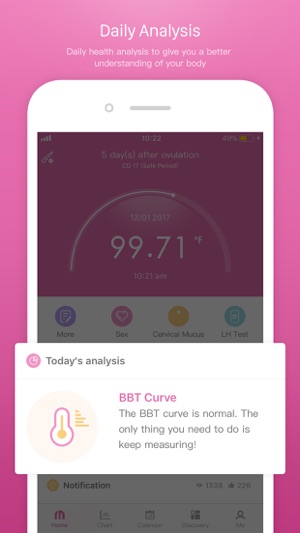
To give you a quick snapshot, the app has features such as, period tracker, pregnancy calculator, lifestyle tracker, ovulation cycle monitor which helps to analyze the reproductive cycle. It also allows setting reminders for medication, prenatal checkup, conception, upcoming periods, etc. The best part is it draws the BBT chart automatically and allows you to take notes with pictures. It also tracks weight increase, stress, injury, disease, etc. It keeps history of the ovulation and fertility cycle and also tracks your sexual life and moods.
You can use your Period/Ovulation/Fertility Calendar to log your period, cervical mucus and cervix details to understand your body better. It keeps track of your cycle, PMS and periods. You will have to log the first and last days of the menstruation/fertile days to track your fertility window. The ovulation predictor allows you to check your chances of conception. Make sure to log positive and negative ovulation. Analyze your past and current cycles using the menstrual tracker. This will help get your predictions for forthcoming periods, ovulation and fertility. It is also possible to recognize LH test with intelligent AI algorithms and track BBT (basal body temperature). Log all the symptoms if you have irregular periods for improved predictions
Similarly, there is a pregnancy calculator, lifestyle and fitness tracker, which will help keep track of all the necessary details. This informative app not only allows you to draw graphs, keep reminders, etc. but also provides medical knowledge with scientific explanations.
Download Femometer and join the millions of women who trust their cycles to this intelligent free app.
Device Requirements:
* iPhone, iPad, and iPod touch
* Requires iOS 8.0 or later
* Universal Application
* 159.3 MB
Pricing and Availability:
Fertility Tracker 2.61 is free and is available worldwide exclusively through the App Store in the Health and Fitness category.
Bangtang: https://www.bongmi.com/en/
Femometer - Fertility Tracker 2.6.1: https://www.bongmi.com/en/femometer/index.html
Download from App Store: https://itunes.apple.com/us/app/femometer/id1269972832
Screenshot: https://is2-ssl.mzstatic.com/image/thumb/Purple118/v4/d5/34/52/d53452c3-3bdb-9810-ee56-89047695d0bb/mzl.mtimvalp.jpg/300x0w.jpg
App Icon: https://is3-ssl.mzstatic.com/image/thumb/Purple128/v4/83/a1/9f/83a19fe3-159d-ac2a-683f-e8a265832323/AppIcon-1x_U007emarketing-85-220-5.png/246x0w.jpg
Bangtang is a startup company with the mission of providing intelligent health solutions for family through data collection. We envision a world where mobile internet as its convenience and interaction, plays an important role in improving people's health status. Currently, we mainly focus on women's reproductive and children's general health. Located in China, we are a group of people equipped with enthusiasm and profession, as well as the willing to do a big thing. All Material and Software (C) Copyright 2018 Bangtang. All Rights Reserved. Apple, the Apple logo, iPhone, iPod and iPad are registered trademarks of Apple Inc. in the U.S. and/or other countries. Other trademarks and registered trademarks may be the property of their respective owners.
*******
Link To Article: https://prmac.com/release-id-82655.htm
*******
---------------------------------------------------------------------------------
Note that you can alter delivered distributions at any time.
Login to your account on prMac to alter your channel selection, or to opt-out at any time.
Get 'She Power' With the Perfect Fertility Tracker - Published on 04/29/18
Fertility Tracker 2.61 is a free app for iOS devices, which is designed for women to help keep track of their periods. This smart and simple app acts as a tracker and calendar to help women with their menstrual cycle. It also works as a helpful fertility calendar, pregnancy monitor and provides accurate ovulation details. This app helps in tracking the PMS symptoms for women.
Hangzhou, China - Femometer - Fertility Tracker 2.61 is a free app for iPhone, iPad, and iPod touch devices, which is designed for women to help keep track of their periods. This smart and simple app acts as a tracker and calendar to help women with their menstrual cycle. It also works as a helpful fertility calendar, pregnancy monitor and provides accurate ovulation details. This app helps in tracking the PMS symptoms for women.
Are you someone who keeps forgetting the period dates? Do you want reminders on your menstrual cycle? Do you think you have symptoms of PMS? Do you want to enjoy sex without the fear of getting pregnant? Do you want to understand your ovulation calendar better? Are you trying to conceive? Well, all these are possible by using this free fertility tracker app.
Femometer can be your true friend and help identify ovulation and fertile days and make accurate prediction of menstruation. This is the first of its kind app which helps women all over the world to keep track of their cycle. It acts as a pregnancy calculator by giving accurate details of the ovulation. This app, in fact, acts as a fertility calendar for women all over the world.
Women with irregular periods can completely rely on this app and keep track of their cycle. You will need to log in your menstruation days in the period calendar and fertility tracker. It is also possible to schedule the menstrual date reminders, record your moods and symptoms related to PMS. There is a pregnancy calendar and due date calculator, which allows you to control your complete reproductive health.
To give you a quick snapshot, the app has features such as, period tracker, pregnancy calculator, lifestyle tracker, ovulation cycle monitor which helps to analyze the reproductive cycle. It also allows setting reminders for medication, prenatal checkup, conception, upcoming periods, etc. The best part is it draws the BBT chart automatically and allows you to take notes with pictures. It also tracks weight increase, stress, injury, disease, etc. It keeps history of the ovulation and fertility cycle and also tracks your sexual life and moods.
You can use your Period/Ovulation/Fertility Calendar to log your period, cervical mucus and cervix details to understand your body better. It keeps track of your cycle, PMS and periods. You will have to log the first and last days of the menstruation/fertile days to track your fertility window. The ovulation predictor allows you to check your chances of conception. Make sure to log positive and negative ovulation. Analyze your past and current cycles using the menstrual tracker. This will help get your predictions for forthcoming periods, ovulation and fertility. It is also possible to recognize LH test with intelligent AI algorithms and track BBT (basal body temperature). Log all the symptoms if you have irregular periods for improved predictions
Similarly, there is a pregnancy calculator, lifestyle and fitness tracker, which will help keep track of all the necessary details. This informative app not only allows you to draw graphs, keep reminders, etc. but also provides medical knowledge with scientific explanations.
Download Femometer and join the millions of women who trust their cycles to this intelligent free app.
Device Requirements:
* iPhone, iPad, and iPod touch
* Requires iOS 8.0 or later
* Universal Application
* 159.3 MB
Pricing and Availability:
Fertility Tracker 2.61 is free and is available worldwide exclusively through the App Store in the Health and Fitness category.
Bangtang: https://www.bongmi.com/en/
Femometer - Fertility Tracker 2.6.1: https://www.bongmi.com/en/femometer/index.html
Download from App Store: https://itunes.apple.com/us/app/femometer/id1269972832
Screenshot: https://is2-ssl.mzstatic.com/image/thumb/Purple118/v4/d5/34/52/d53452c3-3bdb-9810-ee56-89047695d0bb/mzl.mtimvalp.jpg/300x0w.jpg
App Icon: https://is3-ssl.mzstatic.com/image/thumb/Purple128/v4/83/a1/9f/83a19fe3-159d-ac2a-683f-e8a265832323/AppIcon-1x_U007emarketing-85-220-5.png/246x0w.jpg

Bangtang is a startup company with the mission of providing intelligent health solutions for family through data collection. We envision a world where mobile internet as its convenience and interaction, plays an important role in improving people's health status. Currently, we mainly focus on women's reproductive and children's general health. Located in China, we are a group of people equipped with enthusiasm and profession, as well as the willing to do a big thing. All Material and Software (C) Copyright 2018 Bangtang. All Rights Reserved. Apple, the Apple logo, iPhone, iPod and iPad are registered trademarks of Apple Inc. in the U.S. and/or other countries. Other trademarks and registered trademarks may be the property of their respective owners.
*******
Link To Article: https://prmac.com/release-id-82655.htm
*******
---------------------------------------------------------------------------------
Note that you can alter delivered distributions at any time.
Login to your account on prMac to alter your channel selection, or to opt-out at any time.
Users Can Remotely Control Their Mac from Any iOS Device
A new article has been published at prMac.
Users Can Remotely Control Their Mac from Any iOS Device - Published on 04/30/18
Indie developer, Evgeny Cherpak today announces Remote Control for Mac 8.6.1, an important update to his popular remote control app for iOS and watchOS devices. The app allows iOS device users to remotely control their Mac, using their iPhone or iPad as a keyboard and trackpad. Anyone can also launch any app on the Mac from anywhere in their home. The app can also put the Mac to sleep, wake it up, and even control volume, playback, and AirPlay mirroring on the computer.
Netanya, Israel - Independent developer, Evgeny Cherpak today is proud to announce the release and immediate availability of Remote Control for Mac 8.6.1, an important update to his remote control app for iPhone, iPad, iPod touch, and Apple Watch devices. Users can easily control their Mac from anywhere in their home, directly from their iOS device. Using Remote Control for Mac, iOS users can use their device as a trackpad or keyboard for their Mac, launch any app, control their Mac's volume, media playback, and much more.
By installing the Remote Control helper app on their Mac and pairing their iOS device with the Mac, users can begin remotely controlling their Mac from their mobile device in less than a minute. Apple Watch owners can control playback of iTunes media directly from their wrist. All devices just need to be connected to the same Wi-Fi network to enable remote control.
"Until Remote Control for Mac, there were few Mac remote control options for users. Plus, the options that were available were severely limited by distance and performance," says Remote Control for Mac developer Evgeny Cherpak. "But now, iOS users can control their Mac, using their mobile device as a trackpad and keyboard. Plus, they can conveniently launch any app, control their Mac's volume and display brightness, and much more from any room in their house!"
Features:
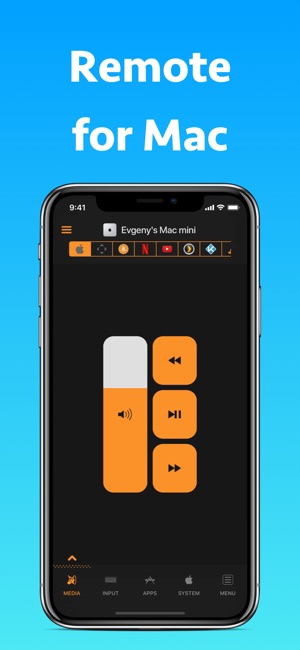
* Control any Mac's volume and media playback
* Control AirPlay mirroring of the Mac
* Use an iOS device as a remote Mac trackpad and keyboard
* Remotely launch and quit any app on your Mac
* Control any app on the Mac using its menu
* Restart or shut down the Mac
* Change the Mac's display brightness and much more
* Enjoy an easy-to-use interface
* No Wi-Fi network available? Use the iOS Personal Hotspot feature to control the Mac
* Easy setup: Just 3 steps, takes less than 30 seconds to begin
* Use the Apple Watch to control media playback on the Mac
Remote Control for Mac isn't limited to controlling iTunes media playback, it can also remotely control playback from numerous other Mac media apps. This gives users full media playback control right in the palm of their hand.
Remote Control for Mac can control playback from:
* iTunes
* Amazon Prime Video
* Netflix
* YouTube
* Plex
* Kodi
* VLC
* SoundCloud
* Spotify
* Deezer
* IINA
In addition to media playback, complete Mac app control is available from the user's iOS device. Using their iPhone or iPad, anyone can launch or shutdown an app, bring the app to the front, set an app to quit after a specified length of time, and much more.
While remotely controlling their Mac, iOS users can also view their Mac's screen on their mobile device, allowing them to work directly from the palm of their hand if needed. Remote Control for Mac can also remotely wake, put to sleep, or shutdown their connected Mac, lock it, restart it, start or stop the screen saver, and more.
Reviewers love Remote Control for Mac:
"This iOS app lets me control nearly every aspect of my Mac from my iPhone or iPad." - Lifehacker
"Remote for Mac is perfect for controlling a Mac that serves as a media center." - MacStories
"This setup gives me full control of my Mac in the palm of my hand from anywhere in my house." - MacObserver
What's New in Version 8.6.1:
* Refreshed watchOS app UI
* Optimized the app to launch faster, take less memory, and almost never crash
* Added missing translations
* Fixed "Open URL..." to automatically add "https" prefix
"I'll admit that the idea for this app was planted when I didn't want to get out of bed one cold morning just to play music on my Mac," shares Evgeny. "But, the app has turned into so much more than even I expected. Remote for Mac has become a full remote control solution for the Mac, allowing anyone to make full use of their Mac from anywhere in their home or office."
Device Requirements:
* iPhone, iPad, iPod touch, and Apple Watch
* Requires iOS 9.0 or later
* Universal Application
* 33.8 MB
Pricing and Availability:
Remote Control for Mac 8.6.1 is only $4.99 USD (or an equivalent amount in other currencies) and is available worldwide exclusively through the App Store in the Utilities category. Review copies are available upon request. A free, ad-supported "lite "version is also available through the App Store.
Remote Control for Mac 8.6.1: https://www.cherpake.com/remote-control-faq/
Purchase and Download from App Store: https://itunes.apple.com/us/app/remote-control-for-mac-pro/id884153085?mt=8&at=1000loWa&ct=prmac1
Download from App Store (Free "Lite" Version): https://itunes.apple.com/us/app/remote-control-for-mac-lite/id629019487?mt=8&at=1000loWa&ct=prmac2
Screenshot 1: https://is5-ssl.mzstatic.com/image/thumb/Purple128/v4/bc/cc/1a/bccc1a49-f2dc-5999-e92d-b776d8321c50/mzl.ybljtvim.png/300x0w.jpg
Screenshot 2: https://is1-ssl.mzstatic.com/image/thumb/Purple118/v4/cf/6d/be/cf6dbec8-392c-258f-fd47-1fc436aadd59/mzl.owhogtkl.png/300x0w.jpg
App Icon: https://is5-ssl.mzstatic.com/image/thumb/Purple118/v4/96/08/36/960836d4-130c-dab5-cac3-565e5480f7d2/AppIcon-1x_U007emarketing-85-220-0-9.png/246x0w.jpg
Located in Netanya, Israel, Evgeny Cherpak is an independent developer. His mission is to fill the gaps in the Apple eco-system integration. Evgeny's apps are designed to offer iOS and macOS users the ability to use the devices to improve their productivity, streamline tasks, and offer more time to enjoy life. All Material and Software (C) Copyright 2018 Evgeny Cherpak. All Rights Reserved. Apple, the Apple logo, iPhone, iPod and iPad are registered trademarks of Apple Inc. in the U.S. and/or other countries. Other trademarks and registered trademarks may be the property of their respective owners.
*******
Link To Article: https://prmac.com/release-id-82653.htm
*******
---------------------------------------------------------------------------------
Note that you can alter delivered distributions at any time.
Login to your account on prMac to alter your channel selection, or to opt-out at any time.
Users Can Remotely Control Their Mac from Any iOS Device - Published on 04/30/18
Indie developer, Evgeny Cherpak today announces Remote Control for Mac 8.6.1, an important update to his popular remote control app for iOS and watchOS devices. The app allows iOS device users to remotely control their Mac, using their iPhone or iPad as a keyboard and trackpad. Anyone can also launch any app on the Mac from anywhere in their home. The app can also put the Mac to sleep, wake it up, and even control volume, playback, and AirPlay mirroring on the computer.
Netanya, Israel - Independent developer, Evgeny Cherpak today is proud to announce the release and immediate availability of Remote Control for Mac 8.6.1, an important update to his remote control app for iPhone, iPad, iPod touch, and Apple Watch devices. Users can easily control their Mac from anywhere in their home, directly from their iOS device. Using Remote Control for Mac, iOS users can use their device as a trackpad or keyboard for their Mac, launch any app, control their Mac's volume, media playback, and much more.
By installing the Remote Control helper app on their Mac and pairing their iOS device with the Mac, users can begin remotely controlling their Mac from their mobile device in less than a minute. Apple Watch owners can control playback of iTunes media directly from their wrist. All devices just need to be connected to the same Wi-Fi network to enable remote control.
"Until Remote Control for Mac, there were few Mac remote control options for users. Plus, the options that were available were severely limited by distance and performance," says Remote Control for Mac developer Evgeny Cherpak. "But now, iOS users can control their Mac, using their mobile device as a trackpad and keyboard. Plus, they can conveniently launch any app, control their Mac's volume and display brightness, and much more from any room in their house!"
Features:
* Control any Mac's volume and media playback
* Control AirPlay mirroring of the Mac
* Use an iOS device as a remote Mac trackpad and keyboard
* Remotely launch and quit any app on your Mac
* Control any app on the Mac using its menu
* Restart or shut down the Mac
* Change the Mac's display brightness and much more
* Enjoy an easy-to-use interface
* No Wi-Fi network available? Use the iOS Personal Hotspot feature to control the Mac
* Easy setup: Just 3 steps, takes less than 30 seconds to begin
* Use the Apple Watch to control media playback on the Mac
Remote Control for Mac isn't limited to controlling iTunes media playback, it can also remotely control playback from numerous other Mac media apps. This gives users full media playback control right in the palm of their hand.
Remote Control for Mac can control playback from:
* iTunes
* Amazon Prime Video
* Netflix
* YouTube
* Plex
* Kodi
* VLC
* SoundCloud
* Spotify
* Deezer
* IINA
In addition to media playback, complete Mac app control is available from the user's iOS device. Using their iPhone or iPad, anyone can launch or shutdown an app, bring the app to the front, set an app to quit after a specified length of time, and much more.
While remotely controlling their Mac, iOS users can also view their Mac's screen on their mobile device, allowing them to work directly from the palm of their hand if needed. Remote Control for Mac can also remotely wake, put to sleep, or shutdown their connected Mac, lock it, restart it, start or stop the screen saver, and more.
Reviewers love Remote Control for Mac:
"This iOS app lets me control nearly every aspect of my Mac from my iPhone or iPad." - Lifehacker
"Remote for Mac is perfect for controlling a Mac that serves as a media center." - MacStories
"This setup gives me full control of my Mac in the palm of my hand from anywhere in my house." - MacObserver
What's New in Version 8.6.1:
* Refreshed watchOS app UI
* Optimized the app to launch faster, take less memory, and almost never crash
* Added missing translations
* Fixed "Open URL..." to automatically add "https" prefix
"I'll admit that the idea for this app was planted when I didn't want to get out of bed one cold morning just to play music on my Mac," shares Evgeny. "But, the app has turned into so much more than even I expected. Remote for Mac has become a full remote control solution for the Mac, allowing anyone to make full use of their Mac from anywhere in their home or office."
Device Requirements:
* iPhone, iPad, iPod touch, and Apple Watch
* Requires iOS 9.0 or later
* Universal Application
* 33.8 MB
Pricing and Availability:
Remote Control for Mac 8.6.1 is only $4.99 USD (or an equivalent amount in other currencies) and is available worldwide exclusively through the App Store in the Utilities category. Review copies are available upon request. A free, ad-supported "lite "version is also available through the App Store.
Remote Control for Mac 8.6.1: https://www.cherpake.com/remote-control-faq/
Purchase and Download from App Store: https://itunes.apple.com/us/app/remote-control-for-mac-pro/id884153085?mt=8&at=1000loWa&ct=prmac1
Download from App Store (Free "Lite" Version): https://itunes.apple.com/us/app/remote-control-for-mac-lite/id629019487?mt=8&at=1000loWa&ct=prmac2
Screenshot 1: https://is5-ssl.mzstatic.com/image/thumb/Purple128/v4/bc/cc/1a/bccc1a49-f2dc-5999-e92d-b776d8321c50/mzl.ybljtvim.png/300x0w.jpg
Screenshot 2: https://is1-ssl.mzstatic.com/image/thumb/Purple118/v4/cf/6d/be/cf6dbec8-392c-258f-fd47-1fc436aadd59/mzl.owhogtkl.png/300x0w.jpg

App Icon: https://is5-ssl.mzstatic.com/image/thumb/Purple118/v4/96/08/36/960836d4-130c-dab5-cac3-565e5480f7d2/AppIcon-1x_U007emarketing-85-220-0-9.png/246x0w.jpg

Located in Netanya, Israel, Evgeny Cherpak is an independent developer. His mission is to fill the gaps in the Apple eco-system integration. Evgeny's apps are designed to offer iOS and macOS users the ability to use the devices to improve their productivity, streamline tasks, and offer more time to enjoy life. All Material and Software (C) Copyright 2018 Evgeny Cherpak. All Rights Reserved. Apple, the Apple logo, iPhone, iPod and iPad are registered trademarks of Apple Inc. in the U.S. and/or other countries. Other trademarks and registered trademarks may be the property of their respective owners.
*******
Link To Article: https://prmac.com/release-id-82653.htm
*******
---------------------------------------------------------------------------------
Note that you can alter delivered distributions at any time.
Login to your account on prMac to alter your channel selection, or to opt-out at any time.
Subscribe to:
Posts (Atom)