A new article has been published at prMac.
File Cabinet Pro 6.3 Major Update Out - 85% Off for the Month of May - Published on 05/10/18
Florida based Writes for All Inc. today announces File Cabinet Pro 6.3, an important feature update to their powerful file manager for macOS. File Cabinet Pro allows anyone to open, move, rename, tag, trash, copy and paste files, all from a popover window that appears from the menu bar. This useful utility serves as a convenient place for users to store files they access often, as it completely eliminates desktop clutter. Version 6.3 is a significant update, offering several new features.
Coral Springs, Florida - Writes for All Inc. is proud to announce the release of File Cabinet Pro version 6.3. File Cabinet Pro is a powerful file manager for the macOS menu bar. File Cabinet Pro allows users to open, move, rename, tag, trash, copy and paste files, all from a popover window that appears from the menu bar. File Cabinet Pro is a convenient place for users to store files they access often, as it completely eliminates desktop clutter.
File Cabinet Pro version 6.3 is a significant update, offering several new features including:
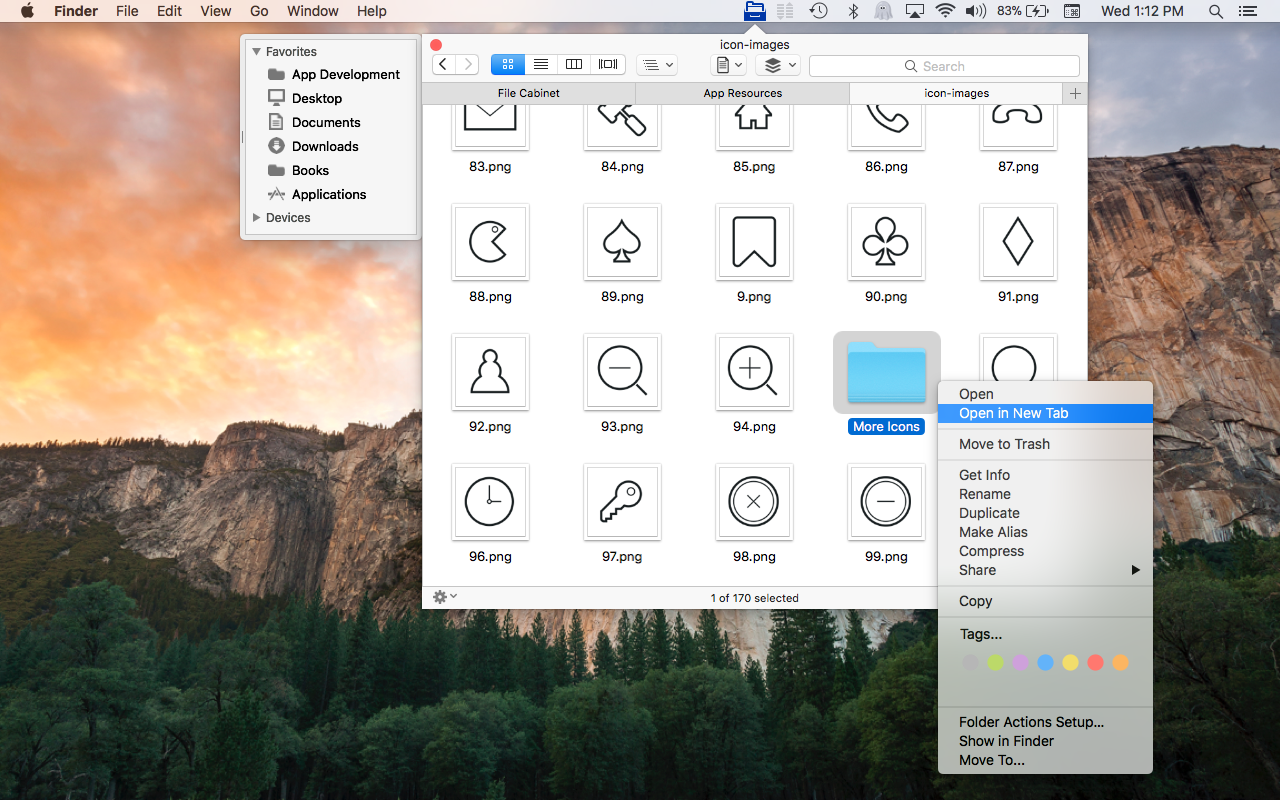
* You can now open directories in new tabs.
* Tabs in File Cabinet Pro's new Tab Bar support spring-loading; you can drag files over a tab to select one.
* File Cabinet Pro now displays the number of selected items and the file count for the current directory at the bottom of the window.
* The size of the Quicklook preview for a selected file in Column view will now resize with the window instead of remaining at a small fixed size.
* File Cabinet Pro started displaying a Services submenu in its context menu in version 4.5. As a result if the "Show In Finder" service on your Mac was enabled you would see two "Show In Finder" menu items in File Cabinet Pro's context menu. File Cabinet Pro no longer displays its own "Show in Finder" menu item in its context menu to fix this problem. You can enable the "Show In Finder" Service in System Preferences on your Mac to continue using this feature.
*A new "Go to Folder..." menu item has been added to File Cabinet Pro's context menu.
File Cabinet Pro offers powerful features. With File Cabinet Pro you can:
* Create subdirectories
* Click into subdirectories and open documents
* Open directories in new tabs
* Tag files easily. Select files in File Cabinet Pro, right click, and then simply add or remove file tags from the control in the context menu
* Show selected files in Finder
* Rename files
* Copy and paste files
* Show hidden files
* Show package contents
* Compress files
* Trash files
* View items as icons, in a list, in columns, or in cover flow view
* Launch the application at login. You can have File Cabinet Pro automatically launch when you login to your Mac (optional feature, disabled by default)
* Create a list of all your favorite directories in the sidebar
* Create and edit txt, rtf, rtfd, and .md files using the built in lightweight text editor
* Create txt, rtf, rtfd, and .md files from text data currently on the clipboard
* Create text documents from Finder using File Cabinet Pro's Document Creator Finder extension (Note: To use this feature, you have to enable the Finder extension in System Preferences under the "Extensions" tab)
* Rotate images, crop images, and apply filters to images using the built in lightweight image editor
* Watch video and play audio files using the built in media player
* View pdf files using the built in pdf viewer
* Revert document versions for supported editable document types
* Set a Global Hotkey for showing and closing the File Cabinet Pro window (optional feature, disabled by default)
* Preview selected files in Quicklook by pressing the spacebar
* Share files in apps that support Sharing extensions like Mail and Messages
* Verify the SHA256, SHA1, or MD5 checksum of files using the "View Checksum in File Cabinet Pro" Service
System Requirements:
* macOS
* 15.4 MB
Pricing and Availability:
To celebrate the release of version 6.3, File Cabinet Pro is on sale for just $4.99 (85% off) for the month of May at the developer's website. It is available worldwide through the Mac App Store in the Utilities category and on App Tyrant online. For more information, please contact Anthony Cruz.
App Tyrant: http://apptyrant.com
File Cabinet Pro 6.3.1: https://apptyrant.com/file-cabinet-pro-help/
Purchase and Download (MAS): https://itunes.apple.com/app/file-cabinet-pro/id1150565778
Purchase from App Tyrant: https://sites.fastspring.com/apptyrant/product/filecabinetpro
Screenshot: https://apptyrant.com/wordpress/wp-content/uploads/2018/03/FCPScreenshotRightClickMenuShowingOpenInNewTab.png
Application Icon: https://i2.wp.com/apptyrant.com/wordpress/wp-content/uploads/2017/05/FileCabinetProMacAppIcon1024x1024.png
Writes for All Inc. owns and operates App Tyrant, a website dedicated to iOS and Mac application development. Links to iOS and Mac applications distributed by Writes for All Inc. can be found on the website. All Material and Software (C) Copyright 2018 Writes for All Inc. All Rights Reserved. Apple, the Apple logo, Mac OS X, iPhone, iPod, iPad and Macintosh are registered trademarks of Apple Inc. in the U.S. and/or other countries. Other trademarks and registered trademarks may be the property of their respective owners.
*******
Link To Article: https://prmac.com/release-id-82677.htm
*******
---------------------------------------------------------------------------------
Note that you can alter delivered distributions at any time.
Login to your account on prMac to alter your channel selection, or to opt-out at any time.


Screen Saver Collection Brings Screen Saver Fun Back to the Mac
A new article has been published at prMac.
Screen Saver Collection Brings Screen Saver Fun Back to the Mac - Published on 05/09/18
New York based independent development firm, Johansson Design today announces their collection of Screen Savers for Apple's Mac. The collection offers 15 assorted screen saving animations that are designed to be both practical and also serve as a form of self-expression. Designs include eye-catching clocks, color bars, stickers, sport logos, emoji, and many more. This collection brings back a long-neglected piece of the Mac experience to modern users.
New York, New York - Johansson Design today is proud to announce the release and immediate availability of their collection of Screen Savers for macOS. The collection offers a wide variety of animated modern, pop-culture inspired screen savers that are both practical and a fun form of self-expression.
Screen Savers by Johansson Design offer a collection of 15 screen savers, each of which are uniquely designed to provide entertainment, the time of day, or just a pleasing screen-saving design. Designs include eye-catching clocks, color bars, stickers, sport logos, emoji, and many more.
"While screen savers have been a part of macOS since day one, they've been ignored by Apple and I think that's a mistake," says designer Bjorn Johansson. "I believe screen savers have a lot of untapped potential, and I like creating them because they serve as a unique outlet for both my design and coding skills. My screen savers can be used as a form of self-expression which communicates something about the users. Or they can simply be a fun way to set your Mac apart from all of the others, like stickers on a laptop."
Currently, there are 15 different screen savers available:
* MacClock - Features four "squared" recreations of Apple Watch faces
* Grid Systems - A clock inspired by the book, "Grid Systems in Graphic Design"
* Color Circle Clock - A rudimentary color circle turned into a stylish clock
* Points in Time - A digital clock featuring animated halftone digits
* SMPTE Color Bars - Simulates SMPTE color bars television test pattern
* EXIT - Turn your screen into a New York City Building Authority Exit Sign
* Mon Monogram - Features the iconic LV pattern.
* Supreme Monogram - Features the most hyped update to the LV pattern since Murakami.
* Red White Stickers - Barbara Kruger inspired stickers with custom text
* Long Ago Time - Star Wars inspired clock screen saver
* Emoji Matrix - Choose from 8 Emoji categories
* Teams of New York - Logos of all of the famous New York sports teams
* The SF Trilogy - A trilogy of screen savers based on Apple's San Francisco typeface
Bjorn Johansson thinks that if Apple ever does release their much-rumored TV, the screen saver will become a viable medium for artists to offer their works. While there are a few digital art screens currently available on the market, none of them are likely to ever reach mass market adoption, which is why screen savers are much better suited for bringing digital art into potentially millions of people's homes. To stay ahead of the curve in this hopefully burgeoning field, future screen savers by Bjorn will focus on artistic expressions.
"Johansson Design is probably the only company around actively designing and releasing screen savers for the Mac these days. I really hope my work will inspire both developers and artists to start creating more beautiful and interesting screen savers," shares Bjorn.
The Screen Savers collection is just the latest project for Johansson Design. Previous projects include the BIG-ASS MESSAGE website, which has been used to create over 25 million messages so far. The "Him" website is based on the movie "Her," and is possibly the first website users can talk to. More information about those projects, and others, are available at the Johansson Design website.
Device Requirements:
* 10.9 Mavericks or higher (Some require 10.11 El Capitan or higher)
Pricing and Availability:
All of the Screen Savers by Johansson Design are free and are available worldwide exclusively through the Johansson Design website. While all of the screen savers are free to download, users can pay any amount they like if they're feeling generous.
Johansson Design: https://johansson.design
Screen Savers by Johansson Design: https://johansson.design/screensavers
BIG-ASS MESSAGE: https://bigassmessage.com
Media Assets: https://johansson.design/screensavers/press
New York-based Johansson Design is a one man operation founded in 2009 and ran by Bjorn Johansson. Graphic design and product design is always at the heart of the company's products. Bjorn does all of the design and coding for his projects. All Material and Software (C) Copyright 2018 Johansson Design. All Rights Reserved. Apple, the Apple logo, Macintosh Mac OS X and macOS are registered trademarks of Apple Inc. in the U.S. and/or other countries. Other trademarks and registered trademarks may be the property of their respective owners.
*******
Link To Article: https://prmac.com/release-id-82676.htm
*******
---------------------------------------------------------------------------------
Note that you can alter delivered distributions at any time.
Login to your account on prMac to alter your channel selection, or to opt-out at any time.
Screen Saver Collection Brings Screen Saver Fun Back to the Mac - Published on 05/09/18
New York based independent development firm, Johansson Design today announces their collection of Screen Savers for Apple's Mac. The collection offers 15 assorted screen saving animations that are designed to be both practical and also serve as a form of self-expression. Designs include eye-catching clocks, color bars, stickers, sport logos, emoji, and many more. This collection brings back a long-neglected piece of the Mac experience to modern users.
New York, New York - Johansson Design today is proud to announce the release and immediate availability of their collection of Screen Savers for macOS. The collection offers a wide variety of animated modern, pop-culture inspired screen savers that are both practical and a fun form of self-expression.
Screen Savers by Johansson Design offer a collection of 15 screen savers, each of which are uniquely designed to provide entertainment, the time of day, or just a pleasing screen-saving design. Designs include eye-catching clocks, color bars, stickers, sport logos, emoji, and many more.
"While screen savers have been a part of macOS since day one, they've been ignored by Apple and I think that's a mistake," says designer Bjorn Johansson. "I believe screen savers have a lot of untapped potential, and I like creating them because they serve as a unique outlet for both my design and coding skills. My screen savers can be used as a form of self-expression which communicates something about the users. Or they can simply be a fun way to set your Mac apart from all of the others, like stickers on a laptop."
Currently, there are 15 different screen savers available:
* MacClock - Features four "squared" recreations of Apple Watch faces
* Grid Systems - A clock inspired by the book, "Grid Systems in Graphic Design"
* Color Circle Clock - A rudimentary color circle turned into a stylish clock
* Points in Time - A digital clock featuring animated halftone digits
* SMPTE Color Bars - Simulates SMPTE color bars television test pattern
* EXIT - Turn your screen into a New York City Building Authority Exit Sign
* Mon Monogram - Features the iconic LV pattern.
* Supreme Monogram - Features the most hyped update to the LV pattern since Murakami.
* Red White Stickers - Barbara Kruger inspired stickers with custom text
* Long Ago Time - Star Wars inspired clock screen saver
* Emoji Matrix - Choose from 8 Emoji categories
* Teams of New York - Logos of all of the famous New York sports teams
* The SF Trilogy - A trilogy of screen savers based on Apple's San Francisco typeface
Bjorn Johansson thinks that if Apple ever does release their much-rumored TV, the screen saver will become a viable medium for artists to offer their works. While there are a few digital art screens currently available on the market, none of them are likely to ever reach mass market adoption, which is why screen savers are much better suited for bringing digital art into potentially millions of people's homes. To stay ahead of the curve in this hopefully burgeoning field, future screen savers by Bjorn will focus on artistic expressions.
"Johansson Design is probably the only company around actively designing and releasing screen savers for the Mac these days. I really hope my work will inspire both developers and artists to start creating more beautiful and interesting screen savers," shares Bjorn.
The Screen Savers collection is just the latest project for Johansson Design. Previous projects include the BIG-ASS MESSAGE website, which has been used to create over 25 million messages so far. The "Him" website is based on the movie "Her," and is possibly the first website users can talk to. More information about those projects, and others, are available at the Johansson Design website.
Device Requirements:
* 10.9 Mavericks or higher (Some require 10.11 El Capitan or higher)
Pricing and Availability:
All of the Screen Savers by Johansson Design are free and are available worldwide exclusively through the Johansson Design website. While all of the screen savers are free to download, users can pay any amount they like if they're feeling generous.
Johansson Design: https://johansson.design
Screen Savers by Johansson Design: https://johansson.design/screensavers
BIG-ASS MESSAGE: https://bigassmessage.com
Media Assets: https://johansson.design/screensavers/press
New York-based Johansson Design is a one man operation founded in 2009 and ran by Bjorn Johansson. Graphic design and product design is always at the heart of the company's products. Bjorn does all of the design and coding for his projects. All Material and Software (C) Copyright 2018 Johansson Design. All Rights Reserved. Apple, the Apple logo, Macintosh Mac OS X and macOS are registered trademarks of Apple Inc. in the U.S. and/or other countries. Other trademarks and registered trademarks may be the property of their respective owners.
*******
Link To Article: https://prmac.com/release-id-82676.htm
*******
---------------------------------------------------------------------------------
Note that you can alter delivered distributions at any time.
Login to your account on prMac to alter your channel selection, or to opt-out at any time.
WaterField's New Professional Backpack is Ready to Hit the Boardroom
A new article has been published at prMac.
WaterField's New Professional Backpack is Ready to Hit the Boardroom - Published on 05/09/18
As professionals increasingly trade stuffy briefcases for comfortable backpacks, WaterField announces the business-ready Pro Backpack made from rugged ballistic nylon and sumptuous leather for a sophisticated look. Designed collaboratively with customers, the feature-rich Pro Backpack sports a plush MacBook Pro compartment, thoughtfully-placed pockets to maximize convenience, and an optional, removable Executive Folio to carry a laptop and other essentials when dashing off to meetings.
San Francisco, California - WaterField Designs, an innovative leader in Apple laptop sleeves, bags, and cases for tech gear, announces the Pro Backpack, designed in collaboration with customers to address the style and functionality needs of modern executives. A sumptuous, full-grain leather panel adorns the streamlined, black ballistic luxury backpack, lending it a refined look suitable in even the most professional environments. Ergonomic straps ensure comfort and abundant pockets keep work items easily accessible and organized. An optional, removable Executive Folio for a MacBook Pro, pen, files and other small accessories combines convenience and elegance for carrying these essentials to meetings.
"When we set out to design the Pro Backpack with customers, they told us they wanted something highly functional to support them throughout their day, while looking sharp enough for the C-suite," explained company owner Gary Waterfield. "They wanted a lightweight bag that stands upright for easy access to their entire mobile office during meetings and provides carrying options for the train, the office, and airports. The Pro Backpack does all this and more."
Pro Backpack Business- and Commute-friendly Features:
* Suit-worthy design: premium, full-grain leather accent panel in four color choices, a robust ballistic nylon base, and waterproof YKK zippers; streamlined shape and clean lines mask the bag's large capacity; sweat-mesh lining on the padded straps and backside keeps work clothes fresh, even after a long day.
* Multiple carry options: ergonomic straps for carrying backpack-style on the commute, a leather top handle to carry briefcase-style at the office, and a wheeled suitcase pass-through for easing through airports. For a streamlined look, backpack straps can be stashed in the suitcase-handle pass-through.
* Dual main compartments: one area boasts a suspended, protective laptop compartment to fit up to a 15-inch MacBook Pro and a pocket for files or a tablet, and another capacious chamber holds anything from technical gear to an after-work change of clothes.
* Strategically-placed, multi-functional pockets: a top pocket for iPhone and other sensitive items " quickly accessible to the wearer, but out of reach from fellow commuters; a discreet pocket beneath the leather panel designed for convenient access by swinging the bag off one shoulder; two side compartments " with internal pockets and a key fob " to hold tech, personal necessities, and a water bottle or umbrella.
* Optional Executive Folio: black ballistic nylon and premium leather to match the Pro Backpack; lightly-padded internal laptop compartment with pen slots and a softly-lined iPhone pocket on one side; a document pocket on the facing side; exterior zippered pocket for small or flat items; in two sizes for 13- and 15-inch Macbook Pros; TSA friendly.
The Pro Backpack is designed to anticipate professionals' needs throughout the workday while promoting comfort and projecting elegance. The bag joins WaterField's Staad Laptop Backpack and Bolt Backpack to form the WaterField professional backpack collection. The Pro Backpack's first production run sold out within an hour of an early offering to customer design participants, affirming that the product reflected their preferences. WaterField Designs' practice of working with interested customers to crowd-source product designs has resulted in gear that addresses genuine needs. Past collaborations include a collection of cases for the Nintendo Switch and the popular Air Porter Carry-on for travelers.
Availability and Pricing
Pro Backpack: $349. Executive Folio: $89. Backpack and Folio purchased together: $399 (USD).
Colors: Black ballistic nylon with a choice of black, chocolate, crimson or gray premium, full-grain leather.
Dimensions and weight: 16.5 x 13.5 x 7 inches. 2.9 lbs.
Pre-order now. Shipping begins June 8, 2018.
WaterField Designs: http://www.sfbags.com/
The Pro Backpack: https://www.sfbags.com/blogs/news/want-to-help-design-the-next-professional-backpack/
YouTube Video (Pro Backpack Features): https://www.youtube.com/watch?v=nT55HKC1DIc
WaterField Designs is an innovative San Francisco designer and manufacturer of bags and cases for tech-savvy consumers who want to stylishly and responsibly transport their technology. WaterField manufactures custom-fitted, high-quality cases and bags for a full-range of laptop computers, smartphones, tablets, gaming devices and other digital gear. All products are manufactured to exacting standards entirely in San Francisco. More information at "Our Story". Copyright (C) 2018 WaterField Designs. All Rights Reserved. Apple, the Apple logo, MacBook Pro, and iPhone, are registered trademarks of Apple Inc. in the U.S. and/or other countries. Other trademarks and registered trademarks may be the property of their respective owners.
*******
Link To Article: https://prmac.com/release-id-82675.htm
*******
---------------------------------------------------------------------------------
Note that you can alter delivered distributions at any time.
Login to your account on prMac to alter your channel selection, or to opt-out at any time.
WaterField's New Professional Backpack is Ready to Hit the Boardroom - Published on 05/09/18
As professionals increasingly trade stuffy briefcases for comfortable backpacks, WaterField announces the business-ready Pro Backpack made from rugged ballistic nylon and sumptuous leather for a sophisticated look. Designed collaboratively with customers, the feature-rich Pro Backpack sports a plush MacBook Pro compartment, thoughtfully-placed pockets to maximize convenience, and an optional, removable Executive Folio to carry a laptop and other essentials when dashing off to meetings.
San Francisco, California - WaterField Designs, an innovative leader in Apple laptop sleeves, bags, and cases for tech gear, announces the Pro Backpack, designed in collaboration with customers to address the style and functionality needs of modern executives. A sumptuous, full-grain leather panel adorns the streamlined, black ballistic luxury backpack, lending it a refined look suitable in even the most professional environments. Ergonomic straps ensure comfort and abundant pockets keep work items easily accessible and organized. An optional, removable Executive Folio for a MacBook Pro, pen, files and other small accessories combines convenience and elegance for carrying these essentials to meetings.
"When we set out to design the Pro Backpack with customers, they told us they wanted something highly functional to support them throughout their day, while looking sharp enough for the C-suite," explained company owner Gary Waterfield. "They wanted a lightweight bag that stands upright for easy access to their entire mobile office during meetings and provides carrying options for the train, the office, and airports. The Pro Backpack does all this and more."
Pro Backpack Business- and Commute-friendly Features:
* Suit-worthy design: premium, full-grain leather accent panel in four color choices, a robust ballistic nylon base, and waterproof YKK zippers; streamlined shape and clean lines mask the bag's large capacity; sweat-mesh lining on the padded straps and backside keeps work clothes fresh, even after a long day.
* Multiple carry options: ergonomic straps for carrying backpack-style on the commute, a leather top handle to carry briefcase-style at the office, and a wheeled suitcase pass-through for easing through airports. For a streamlined look, backpack straps can be stashed in the suitcase-handle pass-through.
* Dual main compartments: one area boasts a suspended, protective laptop compartment to fit up to a 15-inch MacBook Pro and a pocket for files or a tablet, and another capacious chamber holds anything from technical gear to an after-work change of clothes.
* Strategically-placed, multi-functional pockets: a top pocket for iPhone and other sensitive items " quickly accessible to the wearer, but out of reach from fellow commuters; a discreet pocket beneath the leather panel designed for convenient access by swinging the bag off one shoulder; two side compartments " with internal pockets and a key fob " to hold tech, personal necessities, and a water bottle or umbrella.
* Optional Executive Folio: black ballistic nylon and premium leather to match the Pro Backpack; lightly-padded internal laptop compartment with pen slots and a softly-lined iPhone pocket on one side; a document pocket on the facing side; exterior zippered pocket for small or flat items; in two sizes for 13- and 15-inch Macbook Pros; TSA friendly.
The Pro Backpack is designed to anticipate professionals' needs throughout the workday while promoting comfort and projecting elegance. The bag joins WaterField's Staad Laptop Backpack and Bolt Backpack to form the WaterField professional backpack collection. The Pro Backpack's first production run sold out within an hour of an early offering to customer design participants, affirming that the product reflected their preferences. WaterField Designs' practice of working with interested customers to crowd-source product designs has resulted in gear that addresses genuine needs. Past collaborations include a collection of cases for the Nintendo Switch and the popular Air Porter Carry-on for travelers.
Availability and Pricing
Pro Backpack: $349. Executive Folio: $89. Backpack and Folio purchased together: $399 (USD).
Colors: Black ballistic nylon with a choice of black, chocolate, crimson or gray premium, full-grain leather.
Dimensions and weight: 16.5 x 13.5 x 7 inches. 2.9 lbs.
Pre-order now. Shipping begins June 8, 2018.
WaterField Designs: http://www.sfbags.com/
The Pro Backpack: https://www.sfbags.com/blogs/news/want-to-help-design-the-next-professional-backpack/
YouTube Video (Pro Backpack Features): https://www.youtube.com/watch?v=nT55HKC1DIc
WaterField Designs is an innovative San Francisco designer and manufacturer of bags and cases for tech-savvy consumers who want to stylishly and responsibly transport their technology. WaterField manufactures custom-fitted, high-quality cases and bags for a full-range of laptop computers, smartphones, tablets, gaming devices and other digital gear. All products are manufactured to exacting standards entirely in San Francisco. More information at "Our Story". Copyright (C) 2018 WaterField Designs. All Rights Reserved. Apple, the Apple logo, MacBook Pro, and iPhone, are registered trademarks of Apple Inc. in the U.S. and/or other countries. Other trademarks and registered trademarks may be the property of their respective owners.
*******
Link To Article: https://prmac.com/release-id-82675.htm
*******
---------------------------------------------------------------------------------
Note that you can alter delivered distributions at any time.
Login to your account on prMac to alter your channel selection, or to opt-out at any time.
DJkit Announces Exclusive QSC K2 Tote Bag Promotion
A new article has been published at prMac.
DJkit Announces Exclusive QSC K2 Tote Bag Promotion - Published on 05/06/18
Buy Any Loudspeaker from the Superb K2 Series and Get a Free Tote Bag! For a limited time only, DJkit is adding a branded tote bag to every purchase of one or more QSC K2 Series loudspeakers. The deal is active as of right now and applies to the incredible QSC K8.2 Active Speaker, QSC K10.2 Active Speaker, QSC K12.2 Active Speaker and the simply superb QSC K.2 Series K12.2 & KW181 Active Sound package.
Newbury, Berkshire - Britain's leading name in high-end DJ hardware has announced an exclusive deal on the latest and greatest loudspeakers from QSC. For a limited time only, DJkit is adding a branded tote bag to every purchase of one or more QSC K2 Series loudspeakers.
The deal is active as of right now and applies to the incredible QSC K8.2 Active Speaker, QSC K10.2 Active Speaker, QSC K12.2 Active Speaker and the simply superb QSC K.2 Series K12.2 & KW181 Active Sound package. Check out the full specs of the superb QSC K2 Series and place your order with DJkit today.
Setting a New Standard
"The QSC K.2 Series is quite simply, the next standard in powered loudspeakers. Each model is equipped with a 2000-watt amplifier module that combines with elegant design and advanced DSP to deliver pristine sound quality and smooth pattern control across the listening area. Preset contours for common applications including Stage Monitor, Dance Music, Musical Instrument Amplification and Hand-held Microphone, along with user-configurable and storable Scenes, provide maximum flexibility in real-world situations. Each model can be operated as either main PA (mounted or flown) or as floor monitor. Rugged, light-weight and incredibly stylish, the K.2 Series also features a global 6-Year Warranty with product registration" - QSC
The exceptional QSC K2 Loudspeaker Series has been designed to meet the expectations and requirements of the most discerning professionals at every level. Unashamedly exclusive and packed with the most cutting-edge technology the industry has access to, QSC K2 Loudspeakers deliver the total package of superior performance, rugged durability and long-term value for money.
Available individually or as a pair with free bags and cables thrown in, DJkit guarantees the UK's lowest prices on the QSC K8.2 Active Speaker, QSC K10.2 Active Speaker and QSC K12.2 Active Speaker alike. All of which now include a branded tote bag for a limited time only, along with free shipping to any UK address.
Independent Advice, Exclusive Deals
"Here at DJkit, we provide the best DJ gear at the cheapest prices. Whether you are a professional master mixer, playing for thousands, or an unseasoned scratcher mixing and mashing alone in your bedroom, we will have the product for you, in conjunction with a suitable DJ finance option. As the DJkit site and showroom are heaving with the Holy Grails of DJ Equipment manufacturers, with the likes of QSC, Stanton, Allen and Heath, Numark and Pioneer DJ gracing our books, you will not find better than us." - DJkit
Right now, DJkit has an extensive range of incredible items up for sale with exclusive discounts from their regular prices. From the latest QSC K2 Loudspeakers to flight cases to headphones and so much more besides, now really is the perfect time to invest in the world's very best DJ and performance hardware.
QSC K2 Series Loudspeakers: https://www.djkit.com/search.php?manufacturer=&needle=k2promo
Active Speaker: https://www.djkit.com/speakers
Branded Tote Bag: https://www.djkit.com/flight-cases-and-bags
Powered Loudspeakers: https://www.djkit.com/speakers
DJkit is the UK's leading DJ retailer, offering an unrivalled range of over 25,000 products and packages for professional musicians and amateurs alike. The team prides itself at being right at the forefront of the industry, stocking only the most cutting-edge technology, offering the highest-level of service and hosting regular events in conjunction with industry elite. All Material and Software (C) Copyright 2018 DJkit. All Rights Reserved. Apple, the Apple logo, iPhone, iPod and iPad are registered trademarks of Apple Inc. in the U.S. and/or other countries. Other trademarks and registered trademarks may be the property of their respective owners.
*******
Link To Article: https://prmac.com/release-id-82674.htm
*******
---------------------------------------------------------------------------------
Note that you can alter delivered distributions at any time.
Login to your account on prMac to alter your channel selection, or to opt-out at any time.
DJkit Announces Exclusive QSC K2 Tote Bag Promotion - Published on 05/06/18
Buy Any Loudspeaker from the Superb K2 Series and Get a Free Tote Bag! For a limited time only, DJkit is adding a branded tote bag to every purchase of one or more QSC K2 Series loudspeakers. The deal is active as of right now and applies to the incredible QSC K8.2 Active Speaker, QSC K10.2 Active Speaker, QSC K12.2 Active Speaker and the simply superb QSC K.2 Series K12.2 & KW181 Active Sound package.
Newbury, Berkshire - Britain's leading name in high-end DJ hardware has announced an exclusive deal on the latest and greatest loudspeakers from QSC. For a limited time only, DJkit is adding a branded tote bag to every purchase of one or more QSC K2 Series loudspeakers.
The deal is active as of right now and applies to the incredible QSC K8.2 Active Speaker, QSC K10.2 Active Speaker, QSC K12.2 Active Speaker and the simply superb QSC K.2 Series K12.2 & KW181 Active Sound package. Check out the full specs of the superb QSC K2 Series and place your order with DJkit today.
Setting a New Standard
"The QSC K.2 Series is quite simply, the next standard in powered loudspeakers. Each model is equipped with a 2000-watt amplifier module that combines with elegant design and advanced DSP to deliver pristine sound quality and smooth pattern control across the listening area. Preset contours for common applications including Stage Monitor, Dance Music, Musical Instrument Amplification and Hand-held Microphone, along with user-configurable and storable Scenes, provide maximum flexibility in real-world situations. Each model can be operated as either main PA (mounted or flown) or as floor monitor. Rugged, light-weight and incredibly stylish, the K.2 Series also features a global 6-Year Warranty with product registration" - QSC
The exceptional QSC K2 Loudspeaker Series has been designed to meet the expectations and requirements of the most discerning professionals at every level. Unashamedly exclusive and packed with the most cutting-edge technology the industry has access to, QSC K2 Loudspeakers deliver the total package of superior performance, rugged durability and long-term value for money.
Available individually or as a pair with free bags and cables thrown in, DJkit guarantees the UK's lowest prices on the QSC K8.2 Active Speaker, QSC K10.2 Active Speaker and QSC K12.2 Active Speaker alike. All of which now include a branded tote bag for a limited time only, along with free shipping to any UK address.
Independent Advice, Exclusive Deals
"Here at DJkit, we provide the best DJ gear at the cheapest prices. Whether you are a professional master mixer, playing for thousands, or an unseasoned scratcher mixing and mashing alone in your bedroom, we will have the product for you, in conjunction with a suitable DJ finance option. As the DJkit site and showroom are heaving with the Holy Grails of DJ Equipment manufacturers, with the likes of QSC, Stanton, Allen and Heath, Numark and Pioneer DJ gracing our books, you will not find better than us." - DJkit
Right now, DJkit has an extensive range of incredible items up for sale with exclusive discounts from their regular prices. From the latest QSC K2 Loudspeakers to flight cases to headphones and so much more besides, now really is the perfect time to invest in the world's very best DJ and performance hardware.
QSC K2 Series Loudspeakers: https://www.djkit.com/search.php?manufacturer=&needle=k2promo
Active Speaker: https://www.djkit.com/speakers
Branded Tote Bag: https://www.djkit.com/flight-cases-and-bags
Powered Loudspeakers: https://www.djkit.com/speakers
DJkit is the UK's leading DJ retailer, offering an unrivalled range of over 25,000 products and packages for professional musicians and amateurs alike. The team prides itself at being right at the forefront of the industry, stocking only the most cutting-edge technology, offering the highest-level of service and hosting regular events in conjunction with industry elite. All Material and Software (C) Copyright 2018 DJkit. All Rights Reserved. Apple, the Apple logo, iPhone, iPod and iPad are registered trademarks of Apple Inc. in the U.S. and/or other countries. Other trademarks and registered trademarks may be the property of their respective owners.
*******
Link To Article: https://prmac.com/release-id-82674.htm
*******
---------------------------------------------------------------------------------
Note that you can alter delivered distributions at any time.
Login to your account on prMac to alter your channel selection, or to opt-out at any time.
Putty for Mac 9.0.0 has been released
A new article has been published at prMac.
Putty for Mac 9.0.0 has been released - Published on 05/08/18
California based WinOnMacs today announces Putty for Mac 9.0.0 for MacOS. Version 9.0.0 is another major release, fixing minor bugs and font rendering. Putty is one of the Best Terminal Emulators available today. It Supports different types of Network Protocols such as SSH, FTP, SCP, Telnet and more. Official versions of Putty are available on Unix-like platforms, and now it's widely available for Mac systems running OSX 10.9.5 or higher.
San Jose, California - WinOnMacs released Putty for Mac 9.0.0 for MacOS today. Putty 9.0.0 is yet another major release, we now have full support for macOS High Sierra. Please see the full change-log below for all the exciting changes in this release.
Putty is one of the Best Terminal Emulators available today. It Supports different types of Network Protocols such as SSH, FTP, SCP, Telnet etc. In Windows it is used as SSH Client to connect to Your Linux server or for some other purpose But what will you do if you are on Mac? You might be thinking , Is there any Software like Putty for Mac Available? The answer is Yes! With the help of some other Software's we can Use putty on MacOS although Putty is used widely on Windows Platform. Official Versions of Putty are available on Unix like Platforms, and now it's widely available for Mac systems running OSX 10.9.5 or higher.
SSH is available by default in Mac and Linux or Unix. Although you can use terminal for SSH connections still there are some benefits in using Putty such as Other clients don't keep connections alive whereas Putty does. Also it is cool to use Putty as your SSH client if you are doing some Amazon AWS, VMware ESXi or CISCO Stuffs, transferring files, managing files on a server or whatever.
Supported Protocols:
* Telnet
* FTP
* SFTP
* SSH
* SCP
Version 9.0.0 New Features:
* Font rendering and kerning has been improved
* Compiled PuTTY on macOS 10.13.4 High Sierra
* Improved Menu support, Edit Menu now works
* Updated the Documentation
* Minor bug fixes
Pricing and Availability:
The cost of Putty 9.0.0 is only $15.00 (USD). Anyone who purchased Putty in the past three months is entitled to a free upgrade. Putty comes with three months of free upgrades and of course a 14-day money back guarantee. We now use FastSpring as our preferred storefront, you can pay with Credit / Debit Cards, PayPal, Amazon payments, Wire Transfer and more. This store is very secure, simple and fast.
WinOnMacs: https://winonmacs.com/
Putty for Mac 9.0.0: https://winonmacs.com/2018/05/05/putty-for-mac-9-0-0-has-been-released-with-improved-font-rendering/
Download Putty for Mac: https://winereviews.onfastspring.com/
Purchase: https://winereviews.onfastspring.com/putty-for-mac
Screenshot 1: https://twickline.files.wordpress.com/2018/05/pscp_client.png
Screenshot 2: https://twickline.files.wordpress.com/2018/05/fonts.png
There is a multitude of software developed only for the Windows operating system and even when software vendors port their applications to another platform, generally it lacks features that the Windows version contains. The only solution these developers face is to have access to both systems for testing which leads to increased infrastructure demands, and wasted project resources. Our goal is to have native ports of essential Windows tools and applications made available for MacOS users. All Material and Software (C) Copyright 2018 WinOnMacs. All Rights Reserved. Apple, the Apple logo, Macintosh and Mac OS X are registered trademarks of Apple Inc. in the U.S. and/or other countries. Other trademarks and registered trademarks may be the property of their respective owners.
*******
Link To Article: https://prmac.com/release-id-82673.htm
*******
---------------------------------------------------------------------------------
Note that you can alter delivered distributions at any time.
Login to your account on prMac to alter your channel selection, or to opt-out at any time.
Putty for Mac 9.0.0 has been released - Published on 05/08/18
California based WinOnMacs today announces Putty for Mac 9.0.0 for MacOS. Version 9.0.0 is another major release, fixing minor bugs and font rendering. Putty is one of the Best Terminal Emulators available today. It Supports different types of Network Protocols such as SSH, FTP, SCP, Telnet and more. Official versions of Putty are available on Unix-like platforms, and now it's widely available for Mac systems running OSX 10.9.5 or higher.
San Jose, California - WinOnMacs released Putty for Mac 9.0.0 for MacOS today. Putty 9.0.0 is yet another major release, we now have full support for macOS High Sierra. Please see the full change-log below for all the exciting changes in this release.
Putty is one of the Best Terminal Emulators available today. It Supports different types of Network Protocols such as SSH, FTP, SCP, Telnet etc. In Windows it is used as SSH Client to connect to Your Linux server or for some other purpose But what will you do if you are on Mac? You might be thinking , Is there any Software like Putty for Mac Available? The answer is Yes! With the help of some other Software's we can Use putty on MacOS although Putty is used widely on Windows Platform. Official Versions of Putty are available on Unix like Platforms, and now it's widely available for Mac systems running OSX 10.9.5 or higher.
SSH is available by default in Mac and Linux or Unix. Although you can use terminal for SSH connections still there are some benefits in using Putty such as Other clients don't keep connections alive whereas Putty does. Also it is cool to use Putty as your SSH client if you are doing some Amazon AWS, VMware ESXi or CISCO Stuffs, transferring files, managing files on a server or whatever.
Supported Protocols:
* Telnet
* FTP
* SFTP
* SSH
* SCP
Version 9.0.0 New Features:
* Font rendering and kerning has been improved
* Compiled PuTTY on macOS 10.13.4 High Sierra
* Improved Menu support, Edit Menu now works
* Updated the Documentation
* Minor bug fixes
Pricing and Availability:
The cost of Putty 9.0.0 is only $15.00 (USD). Anyone who purchased Putty in the past three months is entitled to a free upgrade. Putty comes with three months of free upgrades and of course a 14-day money back guarantee. We now use FastSpring as our preferred storefront, you can pay with Credit / Debit Cards, PayPal, Amazon payments, Wire Transfer and more. This store is very secure, simple and fast.
WinOnMacs: https://winonmacs.com/
Putty for Mac 9.0.0: https://winonmacs.com/2018/05/05/putty-for-mac-9-0-0-has-been-released-with-improved-font-rendering/
Download Putty for Mac: https://winereviews.onfastspring.com/
Purchase: https://winereviews.onfastspring.com/putty-for-mac
Screenshot 1: https://twickline.files.wordpress.com/2018/05/pscp_client.png

Screenshot 2: https://twickline.files.wordpress.com/2018/05/fonts.png

There is a multitude of software developed only for the Windows operating system and even when software vendors port their applications to another platform, generally it lacks features that the Windows version contains. The only solution these developers face is to have access to both systems for testing which leads to increased infrastructure demands, and wasted project resources. Our goal is to have native ports of essential Windows tools and applications made available for MacOS users. All Material and Software (C) Copyright 2018 WinOnMacs. All Rights Reserved. Apple, the Apple logo, Macintosh and Mac OS X are registered trademarks of Apple Inc. in the U.S. and/or other countries. Other trademarks and registered trademarks may be the property of their respective owners.
*******
Link To Article: https://prmac.com/release-id-82673.htm
*******
---------------------------------------------------------------------------------
Note that you can alter delivered distributions at any time.
Login to your account on prMac to alter your channel selection, or to opt-out at any time.
SyncSpace 6: Collaborative Canvas for Concept Creation
A new article has been published at prMac.
SyncSpace 6: Collaborative Canvas for Concept Creation - Published on 05/08/18
The Infinite Kind todays announce a major update to SyncSpace, its drawing and collaboration app for iOS. SyncSpace 6 provides a basket full of enhancements, making it the most powerful tool for sharing visual ideas across teams of any size. SyncSpace takes collaborative drawing an even larger step forward. Think of it as an infinite shared whiteboard where everyone can express their ideas through sketches, photos, text, web pages, and maps on the same canvas.
Edinburgh, United Kingdom - The Infinite Kind are excited to announce a major update to SyncSpace, their drawing and collaboration app for iOS. SyncSpace 6 provides a basket full of enhancements, making it the most powerful tool for sharing visual ideas across teams of any size. Think of it as an infinite shared whiteboard where everyone can express their ideas through sketches, photos, text, web pages, and maps on the same canvas. SyncSpace 6 contains a number of enhancements, including the following highlights:
* Split screen multitasking on iPad
* The canvas can now rotate with the device automatically - You can also use two-fingers to rotate it any other direction, with snapping to 90 degree angles
* Blazing fast drawing, zooming, and panning
* Stylus support including Adonit Jot, Pogo Connect, Scriba, and a special focus on Apple Pencil
* Apple TVs and other external displays now use the full screen and highest available resolution
* Improved palm rest detection
* Performance and reliability improvements to the collaboration service
Using SyncSpace, you'll never again be limited by the size of the canvas or the amount of space remaining in an existing sketch. You can always zoom in to add detail or zoom out to add context to a drawing. Use the nearly limitless canvas to create drawings from scratch, or draw on maps, web pages and photos. You can also include editable text labels and descriptions to add context to your drawings.
Collaborators need not be on the same local network, and there is no limit to the number of participants. All you need to do is share a drawing's link (and optional password) and anyone can follow the link to work on the drawing with you. There is no fussing with routers or firewalls - it just works. Your friends and colleagues can even view shared drawings - including live updates - with nothing but a web browser.
SyncSpace drawings can be easily shared to social media or exported as high resolution PNG or PDF files. Sketches can be shown on a nearby Apple TV or any external display, which is perfect for use in meetings and classrooms.
Pricing and Availability:
In addition to the major tech improvements, SyncSpace is now free on the App Store. Non-collaborative use and viewing drawings shared by others is completely free. A modestly priced subscription is required only if you wish to create or modify shared drawings. A subscription to the collaboration service is $2.99 USD per month or $24.99 USD per year (price may vary by country), and includes a 14 day free trial. Anyone who purchased an earlier version of SyncSpace is grandfathered in to a free unlimited subscription. For school, business, or other organisational use, please see the link to set up a private server and bulk license that is customised for your requirements.
The Infinite Kind: https://infinitekind.com/
SyncSpace 6.0.4: https://infinitekind.com/syncspace
Download from iTunes: https://itunes.apple.com/app/id408672838
SyncSpace Server Setup: https://infinitekind.com/syncspace-server
Headquartered in in Edinburgh, Scotland, The Infinite Kind has been producing powerful and human-friendly software since 1997. The Infinite Kind's current products include Moneydance, a cross platform compatible desktop personal finance program, and SyncSpace, an infinite shared whiteboard app for iPad, Android and the web. Copyright (C) 1997-2018 The Infinite Kind. All Rights Reserved. Apple, the Apple logo, macOS, and Macintosh are registered trademarks of Apple Inc. in the U.S. and/or other countries.
*******
Link To Article: https://prmac.com/release-id-82672.htm
*******
---------------------------------------------------------------------------------
Note that you can alter delivered distributions at any time.
Login to your account on prMac to alter your channel selection, or to opt-out at any time.
SyncSpace 6: Collaborative Canvas for Concept Creation - Published on 05/08/18
The Infinite Kind todays announce a major update to SyncSpace, its drawing and collaboration app for iOS. SyncSpace 6 provides a basket full of enhancements, making it the most powerful tool for sharing visual ideas across teams of any size. SyncSpace takes collaborative drawing an even larger step forward. Think of it as an infinite shared whiteboard where everyone can express their ideas through sketches, photos, text, web pages, and maps on the same canvas.
Edinburgh, United Kingdom - The Infinite Kind are excited to announce a major update to SyncSpace, their drawing and collaboration app for iOS. SyncSpace 6 provides a basket full of enhancements, making it the most powerful tool for sharing visual ideas across teams of any size. Think of it as an infinite shared whiteboard where everyone can express their ideas through sketches, photos, text, web pages, and maps on the same canvas. SyncSpace 6 contains a number of enhancements, including the following highlights:
* Split screen multitasking on iPad
* The canvas can now rotate with the device automatically - You can also use two-fingers to rotate it any other direction, with snapping to 90 degree angles
* Blazing fast drawing, zooming, and panning
* Stylus support including Adonit Jot, Pogo Connect, Scriba, and a special focus on Apple Pencil
* Apple TVs and other external displays now use the full screen and highest available resolution
* Improved palm rest detection
* Performance and reliability improvements to the collaboration service
Using SyncSpace, you'll never again be limited by the size of the canvas or the amount of space remaining in an existing sketch. You can always zoom in to add detail or zoom out to add context to a drawing. Use the nearly limitless canvas to create drawings from scratch, or draw on maps, web pages and photos. You can also include editable text labels and descriptions to add context to your drawings.
Collaborators need not be on the same local network, and there is no limit to the number of participants. All you need to do is share a drawing's link (and optional password) and anyone can follow the link to work on the drawing with you. There is no fussing with routers or firewalls - it just works. Your friends and colleagues can even view shared drawings - including live updates - with nothing but a web browser.
SyncSpace drawings can be easily shared to social media or exported as high resolution PNG or PDF files. Sketches can be shown on a nearby Apple TV or any external display, which is perfect for use in meetings and classrooms.
Pricing and Availability:
In addition to the major tech improvements, SyncSpace is now free on the App Store. Non-collaborative use and viewing drawings shared by others is completely free. A modestly priced subscription is required only if you wish to create or modify shared drawings. A subscription to the collaboration service is $2.99 USD per month or $24.99 USD per year (price may vary by country), and includes a 14 day free trial. Anyone who purchased an earlier version of SyncSpace is grandfathered in to a free unlimited subscription. For school, business, or other organisational use, please see the link to set up a private server and bulk license that is customised for your requirements.
The Infinite Kind: https://infinitekind.com/
SyncSpace 6.0.4: https://infinitekind.com/syncspace
Download from iTunes: https://itunes.apple.com/app/id408672838
SyncSpace Server Setup: https://infinitekind.com/syncspace-server
Headquartered in in Edinburgh, Scotland, The Infinite Kind has been producing powerful and human-friendly software since 1997. The Infinite Kind's current products include Moneydance, a cross platform compatible desktop personal finance program, and SyncSpace, an infinite shared whiteboard app for iPad, Android and the web. Copyright (C) 1997-2018 The Infinite Kind. All Rights Reserved. Apple, the Apple logo, macOS, and Macintosh are registered trademarks of Apple Inc. in the U.S. and/or other countries.
*******
Link To Article: https://prmac.com/release-id-82672.htm
*******
---------------------------------------------------------------------------------
Note that you can alter delivered distributions at any time.
Login to your account on prMac to alter your channel selection, or to opt-out at any time.
AQ Releases TurnTable 3.0 - The Next iTunes, for Dreamers
A new article has been published at prMac.
AQ Releases TurnTable 3.0 - The Next iTunes, for Dreamers - Published on 05/06/18
Aquarius Computer today announces TurnTable 3.0 on the Mac App Store. TurnTable is a new Music Player (in the vein of iTunes) that revolutionizes the software. It's as if it were made by Artists. It's designed around the Art. A music player for people with artist minds, a music player for getting somewhere, in your mind. Like a new iTunes, an iTunes with Soul.
New Jersey - Aquarius Computer announces the release of TurnTable 3.0 for macOS. People who listen to music with poets' minds, abstract minds, minds who care... And thusly far better for normal people too. Humanized and far more human than iTunes is, the current state of it. To smoke in joy and inspiration, or to cry... That's what albums and music are dignified for on TurnTable. And to hear it all brightly in the complete App Package re-tuned brightly with built-in Lightspeed.
To dignify art! The New Music Player for dreamers.
[TurnTable is] To dignify art even. The holy grail of human existence. Find an album (find the right album), find something true... and hear it, dignified, like a shrine. (And thus albums are displayed realistically, like records on your Macintosh.)
To smoke in joy and inspiration, or to cry to... That's what albums are for. TurnTable dignifies that, and makes something that both an artist and an art would want. Something personal...
Version 3.0, What's New
TurnTable version 3.0 is all-new once again.
It features:
* A new, lighter, Macintosh- like Interface.
* Fixes & refinements all throughout. (More of a) Solid program now.
* TurnTable Package now featuring Lightspeed program built-in
* Changing standard musical tuning to 432Hz. (! Biggest new feature of the release, arguably - like half of the program/package)
System Requirements:
* macOS
* 1.3 MB
Pricing and Availability:
TurnTable 3.0 is just $3.99 USD (or an equivalent amount in other currencies) and is available worldwide exclusively through the Mac App Store in the Music category.
TurnTable 3.0: http://aquariuscomputer.org/turntable
Purchase and Download (MAS): https://itunes.apple.com/app/turntable/id835925938
Screenshot 1: http://aquariuscomputer.org/turntable/MAS-screenshots/MAS_fullscreen/0-AT_MAS-screenshots-1440x900.png
Screenshot 2: http://aquariuscomputer.org/turntable/MAS-screenshots/MAS_fullscreen/1-AT_MAS-screenshots-1440x900.png
Screenshot 3: http://aquariuscomputer.org/turntable/MAS-screenshots/MAS_fullscreen/2-AT_MAS-screenshots-1440x900.png
Screenshot 4: http://aquariuscomputer.org/turntable/MAS-screenshots/MAS_fullscreen/3-AT_MAS-screenshots-1440x900.png
Aquarius Computer specializes in new software. Like a "new computer", kind of. The new GUI, new inventions. Human. The best products, programs - on planet earth. TurnTable is one of the first. In the past the developer created Classics which later led to iBooks... and made iPhone history there. (Was featured on TV, charted, the works...) All Material and Software (C) Copyright 2018 Aquarius Computer. All Rights Reserved. Apple, the Apple logo, iPhone, iPod and iPad are registered trademarks of Apple Inc. in the U.S. and/or other countries. Other trademarks and registered trademarks may be the property of their respective owners.
*******
Link To Article: https://prmac.com/release-id-82671.htm
*******
---------------------------------------------------------------------------------
Note that you can alter delivered distributions at any time.
Login to your account on prMac to alter your channel selection, or to opt-out at any time.
AQ Releases TurnTable 3.0 - The Next iTunes, for Dreamers - Published on 05/06/18
Aquarius Computer today announces TurnTable 3.0 on the Mac App Store. TurnTable is a new Music Player (in the vein of iTunes) that revolutionizes the software. It's as if it were made by Artists. It's designed around the Art. A music player for people with artist minds, a music player for getting somewhere, in your mind. Like a new iTunes, an iTunes with Soul.
New Jersey - Aquarius Computer announces the release of TurnTable 3.0 for macOS. People who listen to music with poets' minds, abstract minds, minds who care... And thusly far better for normal people too. Humanized and far more human than iTunes is, the current state of it. To smoke in joy and inspiration, or to cry... That's what albums and music are dignified for on TurnTable. And to hear it all brightly in the complete App Package re-tuned brightly with built-in Lightspeed.
To dignify art! The New Music Player for dreamers.
[TurnTable is] To dignify art even. The holy grail of human existence. Find an album (find the right album), find something true... and hear it, dignified, like a shrine. (And thus albums are displayed realistically, like records on your Macintosh.)
To smoke in joy and inspiration, or to cry to... That's what albums are for. TurnTable dignifies that, and makes something that both an artist and an art would want. Something personal...
Version 3.0, What's New
TurnTable version 3.0 is all-new once again.
It features:
* A new, lighter, Macintosh- like Interface.
* Fixes & refinements all throughout. (More of a) Solid program now.
* TurnTable Package now featuring Lightspeed program built-in
* Changing standard musical tuning to 432Hz. (! Biggest new feature of the release, arguably - like half of the program/package)
System Requirements:
* macOS
* 1.3 MB
Pricing and Availability:
TurnTable 3.0 is just $3.99 USD (or an equivalent amount in other currencies) and is available worldwide exclusively through the Mac App Store in the Music category.
TurnTable 3.0: http://aquariuscomputer.org/turntable
Purchase and Download (MAS): https://itunes.apple.com/app/turntable/id835925938
Screenshot 1: http://aquariuscomputer.org/turntable/MAS-screenshots/MAS_fullscreen/0-AT_MAS-screenshots-1440x900.png

Screenshot 2: http://aquariuscomputer.org/turntable/MAS-screenshots/MAS_fullscreen/1-AT_MAS-screenshots-1440x900.png

Screenshot 3: http://aquariuscomputer.org/turntable/MAS-screenshots/MAS_fullscreen/2-AT_MAS-screenshots-1440x900.png

Screenshot 4: http://aquariuscomputer.org/turntable/MAS-screenshots/MAS_fullscreen/3-AT_MAS-screenshots-1440x900.png

Aquarius Computer specializes in new software. Like a "new computer", kind of. The new GUI, new inventions. Human. The best products, programs - on planet earth. TurnTable is one of the first. In the past the developer created Classics which later led to iBooks... and made iPhone history there. (Was featured on TV, charted, the works...) All Material and Software (C) Copyright 2018 Aquarius Computer. All Rights Reserved. Apple, the Apple logo, iPhone, iPod and iPad are registered trademarks of Apple Inc. in the U.S. and/or other countries. Other trademarks and registered trademarks may be the property of their respective owners.
*******
Link To Article: https://prmac.com/release-id-82671.htm
*******
---------------------------------------------------------------------------------
Note that you can alter delivered distributions at any time.
Login to your account on prMac to alter your channel selection, or to opt-out at any time.
Subscribe to:
Posts (Atom)