A new article has been published at prMac.
File Cabinet Pro Improves Drag and Drop With Spring-Loading Support - Published on 05/28/18
Writes for All Inc. adds spring-loading support to its file manager application for macOS, File Cabinet Pro, in newly released version 6.4. The new version of File Cabinet Pro also improves undo and redo support; each opened tab in File Cabinet Pro now remembers actions for undo and redo independently. File Cabinet Pro version 6.4 is a free upgrade and is recommended for all current users.
Coral Springs, Florida - Writes for All Inc. adds spring-loading support to its file manager application for macOS, File Cabinet Pro, in newly released version 6.4. Spring-loading support makes dragging and dropping files to nested folders even easier with File Cabinet Pro. The new version of File Cabinet Pro also improves undo and redo support; each opened tab in File Cabinet Pro now remembers actions for undo and redo independently from each other. File Cabinet Pro version 6.4 is a free upgrade and is recommended for all current users.
In addition to adding spring-loading support, File Cabinet Pro version 6.4 also includes minor bug fixes including:
* Fixes a bug that sometimes caused the zoom slider to remain hidden after switching to a tab in Icon view.
* Fixes issue that could sometimes cause drag and drop to silently fail when you drag a file from a readonly volume to File Cabinet Pro.
More about File Cabinet Pro:
File Cabinet Pro is the file manager for the macOS menu bar. Quickly navigate to files without cluttering your desktop. Open, move, rename, compress, tag, trash, copy and paste files, all from the menu bar. You can open many file types natively in File Cabinet Pro or open files by launching other applications. It's easy to click into directories in icon view, drill through directories in list view, or navigate the file tree in column view.
More information about File Cabinet Pro for macOS can be found at the developer's website, App Tyrant.
App Tyrant: https://apptyrant.com/
File Cabinet Pro 6.4: https://apptyrant.com/file-cabinet-pro-help/
Free Trial Link: https://geo.itunes.apple.com/us/app/file-cabinet-lite/id1160292682?mt=12&app=apps&at=11lNk7
Purchase Link: http://sites.fastspring.com/apptyrant/product/filecabinetpro
Screenshot: https://twitter.com/AppTyrant/status/999738257029124096
App Icon: https://i2.wp.com/apptyrant.com/wordpress/wp-content/uploads/2017/05/FileCabinetProMacAppIcon1024x1024.png
Writes for All Inc. owns and operates App Tyrant, a website dedicated to iOS and Mac application development. Links to iOS and Mac applications distributed by Writes for All Inc. can be found on the website. All Material and Software (C) Copyright 2018 Writes for All Inc. All Rights Reserved. Apple, the Apple logo, Mac OS X, iPhone, iPod, iPad and Macintosh are registered trademarks of Apple Inc. in the U.S. and/or other countries. Other trademarks and registered trademarks may be the property of their respective owners.
*******
Link To Article: https://prmac.com/release-id-82726.htm
*******
---------------------------------------------------------------------------------
Note that you can alter delivered distributions at any time.
Login to your account on prMac to alter your channel selection, or to opt-out at any time.


The new iShredder Mac 2 Offers Military Grade Data Deletion
A new article has been published at prMac.
The new iShredder Mac 2 Offers Military Grade Data Deletion - Published on 05/28/18
Miami based developer, ProtectStar today announces iShredder Mac 2, their new military grade data deletion tool for macOS computers. iShredder securely deletes data using methods that meet and exceed government, military, and industry standards. Users simply drag-and-drop files, folders, or drives to the app and press the "Shred" button. iShredder then completely eliminates any chance for data reconstruction, even by government agencies.
Miami, Florida - ProtectStar today is proud to announce the release and immediate availability of iShredder Mac 2, their new military grade data deletion tool for macOS. The app allows users to drag-and-drop files, folders, hard drives, an external drives to the app's shredding area and securely erase the data with just a click of the "Shred" button.
Using the same data shredding techniques as their popular iShredder iOS app, ProtectStar's iShredder Mac securely and efficiently erases data using secure erasure algorithms that meet and exceed government, military, and industry standards. The app eliminates any chance for data reconstruction, even by government agencies.
"Many users believe that when they delete files from their Mac's hard drive, that they're gone for good. The truth is, the files can be recovered using any one of a number of macOS disk utilities. That's due to the way computers "delete" files. They don't really remove the data, they simply mark the files as deleted," says Chris Bohn, CEO of ProtectStar. "Files aren't really gone forever until that storage space is overwritten using secure deletion algorithms. iShredder Mac securely overwrites the 'deleted' files using patented security standards, making it impossible to recover any deleted data."
The latest version of iShredder Mac 2 includes a new innovative search and collection algorithm to detect and effectively clean up useless temporary junk data, caches, and log files on the Mac as well as macOS snapshots. With just a push of a button, iShredder Mac not only brings back valuable storage space to your Macbook or iMac, it also ensures a performance tuning. This ensures that the files that contain fragments of your personal data are erased.
The new release of iShredder Mac 2 is also fully compliant with the European privacy legislation (GDPR).
iShredder Mac 2 is available in two versions. The Professional Edition offers 11 different data shredding methods, completely wiping all free space and overwriting the storage area, to completely shred all of the stored data. The iShredder Mac Military Edition offers 18 erasing methods in total, while also offering advanced deletion reports.
iShredder Mac Professional uses certified deletion algorithms, including: DoD 5220.22-M ECE, Peter Gutmann, DoD 5220.22-M, HMG Infosec No.5, German BSI-2011-VS, US Army AR380-19 and more. iShredder Mac Mac Military Edition uses those same algorithms. Plus, it makes use of enhanced military deletion methods like NATO standard, US Navy NAVSO P-5239-26 (MFM & RLL), USAF AFSSI-5020, BSI TL-03423 and CSEC ITSG-06. Each algorithm has been analyzed by independent authorities and organizations to ensure it really does what it promises, which is destroy data beyond any hope of restoration.
iShredder Mac Professional Edition Features Include:
* Compatible with all Mac models
* Deletes files, folders, hard drives, external drives, USB Sticks, SD cards, and more
* Secure data deletion up to the top-secret security standard level
* A detailed deletion report provides evidence of deletion
* Compatible with Solid State Drives (SSD) and Flash memory
* Wiping of Temporary Data and macOS Snapshots
* Full Drag & Drop support
* Includes 1 year of technical support and free upgrades
* 24/7 support via e-Mail
iShredder Mac Military Edition Includes the above features, plus:
* Advanced erasure reports
* Enhanced military deletion methods
Both editions have integrated the high-secure Advanced Secure Deletion Algorithm developed by ProtectStar Inc. in 2017. The new deletion method also encrypts the blocks completely using the 256-bit AES (Advanced Encryption Algorithm) and uses high-quality random numbers generated based on Feder Information Processing Standards (FIPS).
System Requirements:
* Mac OS 10.11 or higher
* Supports OS X El Capitan, macOS Sierra, and High Sierra
* Internet connection for activation and updates
* 64-bit processor
* 50 MB
Pricing and Availability:
iShredder Mac 2 Professional Edition is just $19.90 and is available worldwide exclusively through the ProtectStar website.
iShredder Mac 2 Military Edition is just $29.90 (USD) and is also available worldwide exclusively through the ProtectStar website.
Review copies are available upon request.
ProtectStar: https://www.protectstar.com
iShredder Mac 2: https://www.protectstar.com/en/products/ishredder-mac
Shop Professional Edition: https://www.protectstar.com/en/shop-ishredder-mac-professional
Shop Military Edition: https://www.protectstar.com/en/shop-ishredder-mac-military
Screenshot: https://www.protectstar.com/images/ishredder-mac/s8-img-2x.jpg
Application Icon: https://www.protectstar.com/images/ishredder-mac/s3-img-2x.jpg
Founded in 2004 by Chris Bohn, Miami, Florida-based ProtectStar Inc. was established with the single intent of offering innovative security solutions for individuals and corporations alike. The company offers a number of security-enhancing solutions for Mac, iOS, Android, and Windows users. The company currently serves over 1,000,000 satisfied customers worldwide. All Material and Software (C) Copyright 2018 ProtectStar Inc. All Rights Reserved. Apple, the Apple logo, Macintosh, Mac OS X, and macOS are registered trademarks of Apple Inc. in the U.S. and/or other countries. Other trademarks and registered trademarks may be the property of their respective owners.
*******
Link To Article: https://prmac.com/release-id-82725.htm
*******
---------------------------------------------------------------------------------
Note that you can alter delivered distributions at any time.
Login to your account on prMac to alter your channel selection, or to opt-out at any time.
The new iShredder Mac 2 Offers Military Grade Data Deletion - Published on 05/28/18
Miami based developer, ProtectStar today announces iShredder Mac 2, their new military grade data deletion tool for macOS computers. iShredder securely deletes data using methods that meet and exceed government, military, and industry standards. Users simply drag-and-drop files, folders, or drives to the app and press the "Shred" button. iShredder then completely eliminates any chance for data reconstruction, even by government agencies.
Miami, Florida - ProtectStar today is proud to announce the release and immediate availability of iShredder Mac 2, their new military grade data deletion tool for macOS. The app allows users to drag-and-drop files, folders, hard drives, an external drives to the app's shredding area and securely erase the data with just a click of the "Shred" button.
Using the same data shredding techniques as their popular iShredder iOS app, ProtectStar's iShredder Mac securely and efficiently erases data using secure erasure algorithms that meet and exceed government, military, and industry standards. The app eliminates any chance for data reconstruction, even by government agencies.
"Many users believe that when they delete files from their Mac's hard drive, that they're gone for good. The truth is, the files can be recovered using any one of a number of macOS disk utilities. That's due to the way computers "delete" files. They don't really remove the data, they simply mark the files as deleted," says Chris Bohn, CEO of ProtectStar. "Files aren't really gone forever until that storage space is overwritten using secure deletion algorithms. iShredder Mac securely overwrites the 'deleted' files using patented security standards, making it impossible to recover any deleted data."
The latest version of iShredder Mac 2 includes a new innovative search and collection algorithm to detect and effectively clean up useless temporary junk data, caches, and log files on the Mac as well as macOS snapshots. With just a push of a button, iShredder Mac not only brings back valuable storage space to your Macbook or iMac, it also ensures a performance tuning. This ensures that the files that contain fragments of your personal data are erased.
The new release of iShredder Mac 2 is also fully compliant with the European privacy legislation (GDPR).
iShredder Mac 2 is available in two versions. The Professional Edition offers 11 different data shredding methods, completely wiping all free space and overwriting the storage area, to completely shred all of the stored data. The iShredder Mac Military Edition offers 18 erasing methods in total, while also offering advanced deletion reports.
iShredder Mac Professional uses certified deletion algorithms, including: DoD 5220.22-M ECE, Peter Gutmann, DoD 5220.22-M, HMG Infosec No.5, German BSI-2011-VS, US Army AR380-19 and more. iShredder Mac Mac Military Edition uses those same algorithms. Plus, it makes use of enhanced military deletion methods like NATO standard, US Navy NAVSO P-5239-26 (MFM & RLL), USAF AFSSI-5020, BSI TL-03423 and CSEC ITSG-06. Each algorithm has been analyzed by independent authorities and organizations to ensure it really does what it promises, which is destroy data beyond any hope of restoration.
iShredder Mac Professional Edition Features Include:
* Compatible with all Mac models
* Deletes files, folders, hard drives, external drives, USB Sticks, SD cards, and more
* Secure data deletion up to the top-secret security standard level
* A detailed deletion report provides evidence of deletion
* Compatible with Solid State Drives (SSD) and Flash memory
* Wiping of Temporary Data and macOS Snapshots
* Full Drag & Drop support
* Includes 1 year of technical support and free upgrades
* 24/7 support via e-Mail
iShredder Mac Military Edition Includes the above features, plus:
* Advanced erasure reports
* Enhanced military deletion methods
Both editions have integrated the high-secure Advanced Secure Deletion Algorithm developed by ProtectStar Inc. in 2017. The new deletion method also encrypts the blocks completely using the 256-bit AES (Advanced Encryption Algorithm) and uses high-quality random numbers generated based on Feder Information Processing Standards (FIPS).
System Requirements:
* Mac OS 10.11 or higher
* Supports OS X El Capitan, macOS Sierra, and High Sierra
* Internet connection for activation and updates
* 64-bit processor
* 50 MB
Pricing and Availability:
iShredder Mac 2 Professional Edition is just $19.90 and is available worldwide exclusively through the ProtectStar website.
iShredder Mac 2 Military Edition is just $29.90 (USD) and is also available worldwide exclusively through the ProtectStar website.
Review copies are available upon request.
ProtectStar: https://www.protectstar.com
iShredder Mac 2: https://www.protectstar.com/en/products/ishredder-mac
Shop Professional Edition: https://www.protectstar.com/en/shop-ishredder-mac-professional
Shop Military Edition: https://www.protectstar.com/en/shop-ishredder-mac-military
Screenshot: https://www.protectstar.com/images/ishredder-mac/s8-img-2x.jpg

Application Icon: https://www.protectstar.com/images/ishredder-mac/s3-img-2x.jpg

Founded in 2004 by Chris Bohn, Miami, Florida-based ProtectStar Inc. was established with the single intent of offering innovative security solutions for individuals and corporations alike. The company offers a number of security-enhancing solutions for Mac, iOS, Android, and Windows users. The company currently serves over 1,000,000 satisfied customers worldwide. All Material and Software (C) Copyright 2018 ProtectStar Inc. All Rights Reserved. Apple, the Apple logo, Macintosh, Mac OS X, and macOS are registered trademarks of Apple Inc. in the U.S. and/or other countries. Other trademarks and registered trademarks may be the property of their respective owners.
*******
Link To Article: https://prmac.com/release-id-82725.htm
*******
---------------------------------------------------------------------------------
Note that you can alter delivered distributions at any time.
Login to your account on prMac to alter your channel selection, or to opt-out at any time.
Pause Guided Meditation and Sleep Story released for iOS/Android
A new article has been published at prMac.
Pause Guided Meditation and Sleep Story released for iOS/Android - Published on 05/28/18
GreenTomatoMedia today releases Pause 1.6, a new update to their Guided Meditation and Sleep Story app for iOS & Android devices. Pause is a meditation app in French and English with more than 20 hours of meditations sessions. Manage your stress, improve the quality of your sleep, sweep away negative thoughts and anxiety, deal with panic attacks and more. Version 1.6 adds 10 sleep stories, as well as 30 relaxation sounds you can mix to help you fall asleep sooner.
Chiang Mai, Thailand - GreenTomatoMedia is proud to announce the new update 1.6 of Pause - Guided meditation and sleep story for iOS and Android devices. Pause is a meditation app in French and English with more than 20 hours of meditations sessions. In the last update, we added 10 sleep stories (both in French and English), and 30 relaxation sounds you can mix to help you fall asleep sooner. Pause, the 1st mobile app to help you stay zen throughout the day and sleep deeply at night:
* Manage your stress, improve the quality of your sleep, sweep away negative thoughts and anxiety, deal with panic attacks and more. Find out all Pause has to offer.
* Becoming more in sync with your body and mind, calming your emotions, these are some of the objectives of meditation. Just 10 minutes a day is enough to start to reap benefits.
* Compatible with iPhone and Android and available in both French and English, PAUSE caters to both beginners, with its guided meditation sessions, as well as those with more experience, who will enjoy the non-guided sessions.
* In 2018 we decided to tackle sleep and insomnia issues, adding our sleep stories and relaxation sounds.
The app opens with an introductory video laying out the benefits of meditation. Our 6 meditations program, each with its own introductory video, is composed of seven sessions:
* "Discovery" can be broken down into three programs designed as an introduction to meditation and the benefits it holds for mind and body
* "Stress and Calm" teaches us to manage our emotions
* "Transform your relationships" focuses on our relationships with others
* "Meditation and yoga
* "Taoist healing sounds
* "The languages of love"
Added to these is a section dedicated to sleep. Ten stories in French and English guide you gently towards a night of reparative sleep. Thirty relaxation melodies are also available and can even be combined with the stories for the perfect atmosphere to help you drift off.
The element that sets PAUSE firmly apart from the rest is that it can be of help to users at any point in their lives and at any time of day or night. All content on the app is provided in both English and French (with one click in the navigation menu) and will soon also be available 100% in German. The app's content was contributed by Eleonore Chaban-Delmas, a seasoned expert and practitioner of meditation, Qi Gong and Tantra.
Pricing and Availability:
Pause - Guided Meditation (v1.6) is free (with in-app purchases) and available worldwide through the App Store in the Health and Fitness category. There is also an Android version available on Google Play. For more information, please contact Thomas Jegu.
Pause 1.6: http://pause-app.org/en/
Download from iTunes: https://itunes.apple.com/app/pause-guided-meditation/id1233607337
Download from Google Play: https://play.google.com/store/apps/details?id=com.gtm.pause
YouTube Video (Presentation): https://www.youtube.com/watch?v=zrtYMaWceU8
YouTube Video (Sleep Stories): https://www.youtube.com/watch?v=hZPLPjAe5TA
GreenTomatoMedia is a company made with Thai and French people based in Thailand. The company started making apps 2 years ago, focusing on Health and Fitness apps (Meditation, Fitness, Stop Smoking). All Material and Software (C) Copyright 2018 GreenTomatoMedia. All Rights Reserved. Apple, the Apple logo, iPhone, iPod and iPad are registered trademarks of Apple Inc. in the U.S. and/or other countries. Other trademarks and registered trademarks may be the property of their respective owners.
*******
Link To Article: https://prmac.com/release-id-82724.htm
*******
---------------------------------------------------------------------------------
Note that you can alter delivered distributions at any time.
Login to your account on prMac to alter your channel selection, or to opt-out at any time.
Pause Guided Meditation and Sleep Story released for iOS/Android - Published on 05/28/18
GreenTomatoMedia today releases Pause 1.6, a new update to their Guided Meditation and Sleep Story app for iOS & Android devices. Pause is a meditation app in French and English with more than 20 hours of meditations sessions. Manage your stress, improve the quality of your sleep, sweep away negative thoughts and anxiety, deal with panic attacks and more. Version 1.6 adds 10 sleep stories, as well as 30 relaxation sounds you can mix to help you fall asleep sooner.
Chiang Mai, Thailand - GreenTomatoMedia is proud to announce the new update 1.6 of Pause - Guided meditation and sleep story for iOS and Android devices. Pause is a meditation app in French and English with more than 20 hours of meditations sessions. In the last update, we added 10 sleep stories (both in French and English), and 30 relaxation sounds you can mix to help you fall asleep sooner. Pause, the 1st mobile app to help you stay zen throughout the day and sleep deeply at night:
* Manage your stress, improve the quality of your sleep, sweep away negative thoughts and anxiety, deal with panic attacks and more. Find out all Pause has to offer.
* Becoming more in sync with your body and mind, calming your emotions, these are some of the objectives of meditation. Just 10 minutes a day is enough to start to reap benefits.
* Compatible with iPhone and Android and available in both French and English, PAUSE caters to both beginners, with its guided meditation sessions, as well as those with more experience, who will enjoy the non-guided sessions.
* In 2018 we decided to tackle sleep and insomnia issues, adding our sleep stories and relaxation sounds.
The app opens with an introductory video laying out the benefits of meditation. Our 6 meditations program, each with its own introductory video, is composed of seven sessions:
* "Discovery" can be broken down into three programs designed as an introduction to meditation and the benefits it holds for mind and body
* "Stress and Calm" teaches us to manage our emotions
* "Transform your relationships" focuses on our relationships with others
* "Meditation and yoga
* "Taoist healing sounds
* "The languages of love"
Added to these is a section dedicated to sleep. Ten stories in French and English guide you gently towards a night of reparative sleep. Thirty relaxation melodies are also available and can even be combined with the stories for the perfect atmosphere to help you drift off.
The element that sets PAUSE firmly apart from the rest is that it can be of help to users at any point in their lives and at any time of day or night. All content on the app is provided in both English and French (with one click in the navigation menu) and will soon also be available 100% in German. The app's content was contributed by Eleonore Chaban-Delmas, a seasoned expert and practitioner of meditation, Qi Gong and Tantra.
Pricing and Availability:
Pause - Guided Meditation (v1.6) is free (with in-app purchases) and available worldwide through the App Store in the Health and Fitness category. There is also an Android version available on Google Play. For more information, please contact Thomas Jegu.
Pause 1.6: http://pause-app.org/en/
Download from iTunes: https://itunes.apple.com/app/pause-guided-meditation/id1233607337
Download from Google Play: https://play.google.com/store/apps/details?id=com.gtm.pause
YouTube Video (Presentation): https://www.youtube.com/watch?v=zrtYMaWceU8
YouTube Video (Sleep Stories): https://www.youtube.com/watch?v=hZPLPjAe5TA
GreenTomatoMedia is a company made with Thai and French people based in Thailand. The company started making apps 2 years ago, focusing on Health and Fitness apps (Meditation, Fitness, Stop Smoking). All Material and Software (C) Copyright 2018 GreenTomatoMedia. All Rights Reserved. Apple, the Apple logo, iPhone, iPod and iPad are registered trademarks of Apple Inc. in the U.S. and/or other countries. Other trademarks and registered trademarks may be the property of their respective owners.
*******
Link To Article: https://prmac.com/release-id-82724.htm
*******
---------------------------------------------------------------------------------
Note that you can alter delivered distributions at any time.
Login to your account on prMac to alter your channel selection, or to opt-out at any time.
Cafe and Restaurant Floor Plans, Found in the Solutions for ConceptDraw
A new article has been published at prMac.
Cafe and Restaurant Floor Plans, Found in the Solutions for ConceptDraw - Published on 05/25/18
Cafe and Restaurant Floor Plans, found in the Solutions for ConceptDraw PRO has been updated with new content. The Cafe and Restaurant Floor Plans solution includes libraries that are tailored to floor plans and interior layouts of any size or type of food service establishment. The renewed Cafe and Restaurant Floor Plans solution has undergone an extensive facelift with this newest update.
Odessa, Odessa oblast - CS Odessa is pleased to announce the new edition of Cafe and Restaurant Floor Plans solution for ConceptDraw PRO. Meet a renewed set of graphics tools for designing complete visual solutions for floor planning and the interior laying out of catering establishments.
The Cafe and Restaurant Floor Plans solution includes libraries that are tailored to floor plans and interior layouts of any size or type of food service establishment. The renewed Cafe and Restaurant Floor Plans solution has undergone an extensive facelift with this newest update. Added 20 new sample documents, redesigned the previous samples, and improved the associated vector object libraries.
Cafe and Restaurant Floor Plans is a US$25 paid solution for ConceptDraw PRO and is available in ConceptDraw STORE.
ConceptDraw PRO is a powerful business graphics and diagramming tool that is recognized for its ability to exchange documents with Microsoft Visio - the de facto standard in business graphics documents. It is supported by the powerful ever-growing collection of business Solutions. ConceptDraw PRO is compatible with macOS and Windows and retails for only US$199 per end user license. It is included in ConceptDraw Office v4 which retails for US$499.
ConceptDraw Office v4 is the fourth generation suite of ConceptDraw products that uses InGyre4 integration technology to share data between its applications, allowing you to switch gears for different tasks more quickly. It can be purchased directly from CS Odessa or their resellers. The ConceptDraw Office suite is designed for knowledge workers, project managers, managers, and academics.
Cafe and Restaurant Floor Plans Solution - Floor and Interior Plans of Catering Establishments: http://www.conceptdraw.com/solution-park/building-cafe-restaurant-plans
ConceptDraw PRO v11 - Business Graphics and Diagramming Product (Compatible With Ms Visio): http://www.conceptdraw.com/products/drawing-tool
ConceptDraw MINDMAP v9 - Brainstorming, Planning, and Mind Mapping Software: http://www.conceptdraw.com/products/mind-map
ConceptDraw PROJECT v8 - Project and Resource Management Tool (Compatible With Ms Project): http://www.conceptdraw.com/products/project-management-software
ConceptDraw Office v4 - Business Suite That Contains the Entire Conceptdraw Desktop Product Line: http://www.conceptdraw.com/products/office
Solution Park - An Online Collection of Visual Solutions: http://www.conceptdraw.com/solution-park
Founded in 1993, Computer Systems Odessa supplies cross-platform productivity tools and graphic technologies to professional and corporate users around the world. With headquarters in Odessa, Ukraine, and a U.S. office in San Jose, California, CS Odessa sells products internationally through resellers in over 150 countries, both directly and through resellers. The ConceptDraw line of products has won numerous awards and is used by hundreds of thousands, including Fortune 500 companies, U.S. Federal Government agencies, small and medium businesses, and students and educators around the globe. ConceptDraw is a registered trademark, and ConceptDraw Office, ConceptDraw Solution Park, ConceptDraw PRO, ConceptDraw MINDMAP, ConceptDraw PROJECT, and ConceptDraw STORE are trademarks of CS Odessa. All other trademarks and registered trademarks are the properties of their respective owners.
*******
Link To Article: https://prmac.com/release-id-82720.htm
*******
---------------------------------------------------------------------------------
Note that you can alter delivered distributions at any time.
Login to your account on prMac to alter your channel selection, or to opt-out at any time.
Cafe and Restaurant Floor Plans, Found in the Solutions for ConceptDraw - Published on 05/25/18
Cafe and Restaurant Floor Plans, found in the Solutions for ConceptDraw PRO has been updated with new content. The Cafe and Restaurant Floor Plans solution includes libraries that are tailored to floor plans and interior layouts of any size or type of food service establishment. The renewed Cafe and Restaurant Floor Plans solution has undergone an extensive facelift with this newest update.
Odessa, Odessa oblast - CS Odessa is pleased to announce the new edition of Cafe and Restaurant Floor Plans solution for ConceptDraw PRO. Meet a renewed set of graphics tools for designing complete visual solutions for floor planning and the interior laying out of catering establishments.
The Cafe and Restaurant Floor Plans solution includes libraries that are tailored to floor plans and interior layouts of any size or type of food service establishment. The renewed Cafe and Restaurant Floor Plans solution has undergone an extensive facelift with this newest update. Added 20 new sample documents, redesigned the previous samples, and improved the associated vector object libraries.
Cafe and Restaurant Floor Plans is a US$25 paid solution for ConceptDraw PRO and is available in ConceptDraw STORE.
ConceptDraw PRO is a powerful business graphics and diagramming tool that is recognized for its ability to exchange documents with Microsoft Visio - the de facto standard in business graphics documents. It is supported by the powerful ever-growing collection of business Solutions. ConceptDraw PRO is compatible with macOS and Windows and retails for only US$199 per end user license. It is included in ConceptDraw Office v4 which retails for US$499.
ConceptDraw Office v4 is the fourth generation suite of ConceptDraw products that uses InGyre4 integration technology to share data between its applications, allowing you to switch gears for different tasks more quickly. It can be purchased directly from CS Odessa or their resellers. The ConceptDraw Office suite is designed for knowledge workers, project managers, managers, and academics.
Cafe and Restaurant Floor Plans Solution - Floor and Interior Plans of Catering Establishments: http://www.conceptdraw.com/solution-park/building-cafe-restaurant-plans
ConceptDraw PRO v11 - Business Graphics and Diagramming Product (Compatible With Ms Visio): http://www.conceptdraw.com/products/drawing-tool
ConceptDraw MINDMAP v9 - Brainstorming, Planning, and Mind Mapping Software: http://www.conceptdraw.com/products/mind-map
ConceptDraw PROJECT v8 - Project and Resource Management Tool (Compatible With Ms Project): http://www.conceptdraw.com/products/project-management-software
ConceptDraw Office v4 - Business Suite That Contains the Entire Conceptdraw Desktop Product Line: http://www.conceptdraw.com/products/office
Solution Park - An Online Collection of Visual Solutions: http://www.conceptdraw.com/solution-park
Founded in 1993, Computer Systems Odessa supplies cross-platform productivity tools and graphic technologies to professional and corporate users around the world. With headquarters in Odessa, Ukraine, and a U.S. office in San Jose, California, CS Odessa sells products internationally through resellers in over 150 countries, both directly and through resellers. The ConceptDraw line of products has won numerous awards and is used by hundreds of thousands, including Fortune 500 companies, U.S. Federal Government agencies, small and medium businesses, and students and educators around the globe. ConceptDraw is a registered trademark, and ConceptDraw Office, ConceptDraw Solution Park, ConceptDraw PRO, ConceptDraw MINDMAP, ConceptDraw PROJECT, and ConceptDraw STORE are trademarks of CS Odessa. All other trademarks and registered trademarks are the properties of their respective owners.
*******
Link To Article: https://prmac.com/release-id-82720.htm
*******
---------------------------------------------------------------------------------
Note that you can alter delivered distributions at any time.
Login to your account on prMac to alter your channel selection, or to opt-out at any time.
The First Mobile AR Escape Room Experience is Happening at E3
A new article has been published at prMac.
The First Mobile AR Escape Room Experience is Happening at E3 - Published on 05/25/18
The Pixel Crushers will be showcasing an exclusive demo of ARia's Legacy, the first augmented reality escape room game at E3 on June 12-14, 2018 at the Los Angeles Convention Center. ARia's Legacy is a true implementation of augmented reality. Instead of displaying objects on a table in front of you, it creates a virtual environment around your physical space that has you walking around your room discovering parts that were never there before.
Toronto, Ontario - THe Pixel Crushers are proud to announce an exclusive demo of ARia's Legacy, the first mobile AR escape room video game, will be shown by developers The Pixel Crushers at E3 from June 12-14, 2018 at the Los Angeles Convention Center.
ARia's Legacy is a true implementation of augmented reality. Instead of displaying objects on a table in front of you, it creates a virtual environment around your physical space that has you walking around your room discovering parts that were never there before. Through the power of AR, players can immerse themselves in 50 different levels of mystery anywhere using a mobile phone or tablet as they uncover the story behind ARia's sudden disappearance and discover her legacy.
In ARia's Legacy, you are a part of a team of archaeologists excitedly looking for artifacts at your newest archaeological site. Suddenly, your shovel strikes a chest that you quickly unearth with the help of various tools around you. When you try to open it, you are seemingly thrown into a locked room that is at once familiar and eerily foreign to you.
Your only clue seems to be the chest that you found and the name "ARia" ringing in your head.
With ARia's Legacy, we created an immersive escape room experience that you can enjoy anywhere at any time," says Galal Hassan, professor of George Brown College and The Pixel Crusher's project manager. "Augmented reality is meant to have the player move around. Using your environment to solve puzzles is why AR was born. The most successful AR games are the ones that make you move. This is the future of gaming in AR."
Attendees will be able to register in advance to skip the lines at E3 in order to try this convention exclusive hands-on demo of ARia's Legacy on their website.
ARia's Legacy is currently in development for both iOS and Android platforms. Follow the development of ARia's Legacy on Twitter, Facebook, and Instagram.
ARia's Legacy: http://www.ariaslegacy.com
Press Kit: https://www.ariaslegacy.com/presskit
Instagram: https://www.instagram.com/thepixelcrushers/
The Pixel Crushers is a small independent creative software agency that offers superior app and game development services that shifts your projects into overdrive. Our team consists of senior level developers Galal Hassan and Abdul Algharbi, as well as several graduate designers that have worked on countless projects such as our first release, RoBox and its sequel, Robo X - The Lost Energy. Together, we craft games that make you think! For more information, go to The Pixel Crushers website. All Material and Software (C) Copyright 2018 The Pixel Crushers. All Rights Reserved. Apple, the Apple logo, iPhone, iPod and iPad are registered trademarks of Apple Inc. in the U.S. and/or other countries. Other trademarks and registered trademarks may be the property of their respective owners.
*******
Link To Article: https://prmac.com/release-id-82721.htm
*******
---------------------------------------------------------------------------------
Note that you can alter delivered distributions at any time.
Login to your account on prMac to alter your channel selection, or to opt-out at any time.
The First Mobile AR Escape Room Experience is Happening at E3 - Published on 05/25/18
The Pixel Crushers will be showcasing an exclusive demo of ARia's Legacy, the first augmented reality escape room game at E3 on June 12-14, 2018 at the Los Angeles Convention Center. ARia's Legacy is a true implementation of augmented reality. Instead of displaying objects on a table in front of you, it creates a virtual environment around your physical space that has you walking around your room discovering parts that were never there before.
Toronto, Ontario - THe Pixel Crushers are proud to announce an exclusive demo of ARia's Legacy, the first mobile AR escape room video game, will be shown by developers The Pixel Crushers at E3 from June 12-14, 2018 at the Los Angeles Convention Center.
ARia's Legacy is a true implementation of augmented reality. Instead of displaying objects on a table in front of you, it creates a virtual environment around your physical space that has you walking around your room discovering parts that were never there before. Through the power of AR, players can immerse themselves in 50 different levels of mystery anywhere using a mobile phone or tablet as they uncover the story behind ARia's sudden disappearance and discover her legacy.
In ARia's Legacy, you are a part of a team of archaeologists excitedly looking for artifacts at your newest archaeological site. Suddenly, your shovel strikes a chest that you quickly unearth with the help of various tools around you. When you try to open it, you are seemingly thrown into a locked room that is at once familiar and eerily foreign to you.
Your only clue seems to be the chest that you found and the name "ARia" ringing in your head.
With ARia's Legacy, we created an immersive escape room experience that you can enjoy anywhere at any time," says Galal Hassan, professor of George Brown College and The Pixel Crusher's project manager. "Augmented reality is meant to have the player move around. Using your environment to solve puzzles is why AR was born. The most successful AR games are the ones that make you move. This is the future of gaming in AR."
Attendees will be able to register in advance to skip the lines at E3 in order to try this convention exclusive hands-on demo of ARia's Legacy on their website.
ARia's Legacy is currently in development for both iOS and Android platforms. Follow the development of ARia's Legacy on Twitter, Facebook, and Instagram.
ARia's Legacy: http://www.ariaslegacy.com
Press Kit: https://www.ariaslegacy.com/presskit
Instagram: https://www.instagram.com/thepixelcrushers/
The Pixel Crushers is a small independent creative software agency that offers superior app and game development services that shifts your projects into overdrive. Our team consists of senior level developers Galal Hassan and Abdul Algharbi, as well as several graduate designers that have worked on countless projects such as our first release, RoBox and its sequel, Robo X - The Lost Energy. Together, we craft games that make you think! For more information, go to The Pixel Crushers website. All Material and Software (C) Copyright 2018 The Pixel Crushers. All Rights Reserved. Apple, the Apple logo, iPhone, iPod and iPad are registered trademarks of Apple Inc. in the U.S. and/or other countries. Other trademarks and registered trademarks may be the property of their respective owners.
*******
Link To Article: https://prmac.com/release-id-82721.htm
*******
---------------------------------------------------------------------------------
Note that you can alter delivered distributions at any time.
Login to your account on prMac to alter your channel selection, or to opt-out at any time.
ClickInstall 5.0 Builds 64-Bit macOS Installer with Code Signing
A new article has been published at prMac.
ClickInstall 5.0 Builds 64-Bit macOS Installer with Code Signing - Published on 05/26/18
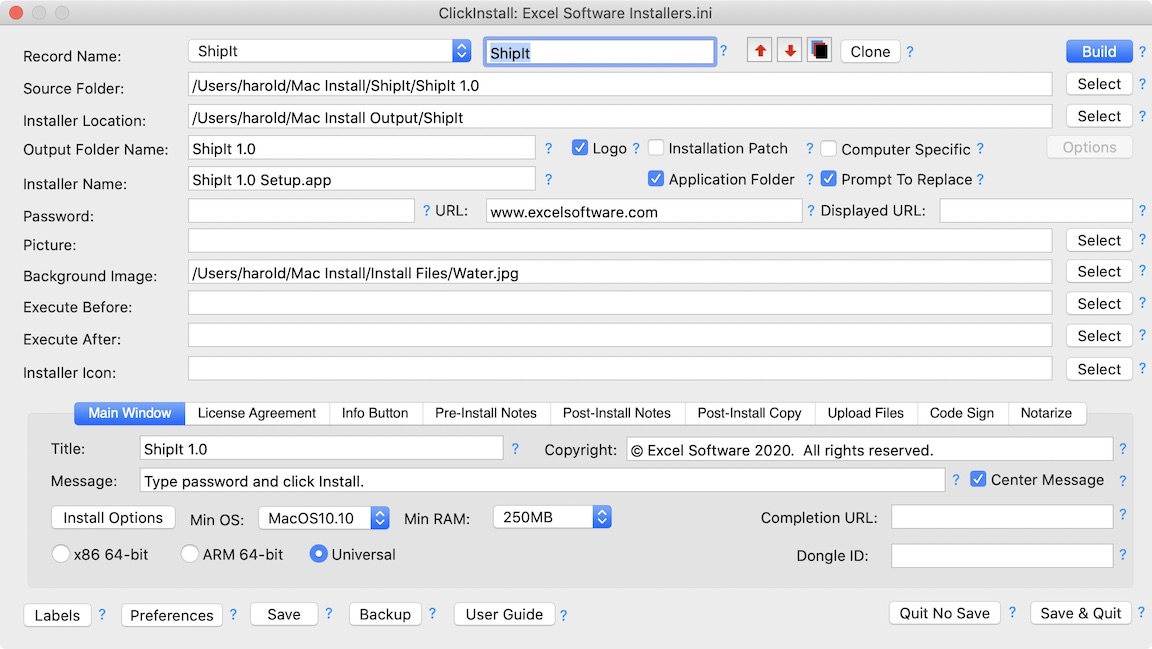
ClickInstall 5 creates a new 64-bit software installer for macOS computers with 10.9 or later. Code sign applications, libraries and the installer itself during the build process. Create a simple installer in 5 minutes. Set a few options, point to the Source folder holding the files you want to install to the Applications folder and click the Build button. ClickInstall makes it easy to create compressed, password-protected, self-extracting installers with basic computer skills.
Henderson, Nevada - ClickInstall makes it easy to create highly customized, professional installers for macOS computers. A good installer can reduce support cost and download time, simplify and customize the user experience, add security and make a great first impression.
ClickInstall 5.0 builds a 64-bit software installer that runs on any macOS 10.9 or later computer. Applications, libraries and the installer itself can be code signed during the build process using a certificate downloaded from an Apple Developer account.
Create a simple installer in 5 minutes. Set a few options, point to the Source folder holding the files you want to install to the Applications folder and click the Build button. ClickInstall makes it easy to create compressed, password-protected, self-extracting installers with basic computer skills. A user can double-click an installer on a CD, USB flash drive or from a download to start the install process.
ClickInstall supports user choice and option selections during the install process. Users can install the files and features they want or patch an existing installation with new or modified files. To reduce file size and download time, the install process can download optional features on demand. To customize the user experience, check minimum OS and RAM requirements before installing, present Pre and Post install notes or take the user to your online registration, tutorial or introduction video when the install process is finished.
A simple installer window is presented with custom logo, icon and background image. Include an optional web link, copyright notice, license agreement with required confirmation, help or release notes. An executable can run before installation to confirm system requirements or after installation to complete custom actions. The installer window title, buttons and other text seen by the user can be customized for any human language with Unicode text encoding.
An installer can create a desktop alias or shortcut to the installed application. Apply a custom icon to the installer or require a computer unique password. The vendor can generate a password for each user computer using ClickInstall or fully automate a Serial Number activation process with an online activation server. The Safe Activation service or the self-hosted WebActivation or Desktop License Server products support Serial Number activation.
ClickInstall has the ability to split a large setup file into multiple files or CDs. During the installation process the user is prompted to insert the next CD. Users with slow Internet access can download multiple smaller files, then double-click the Setup file for a seamless install.
Each record in ClickInstall holds the information needed to build a full or patch installer. Select a record and click to generate one installer or a batch of installers. ClickInstall can integrate many steps during the build process. Code sign files and the installer itself. Compress the Setup file and upload it directly to your website with builtin FTP features.
ClickInstall generates royalty-free installers for any number of products with a one-time licensing fee of $395. The product includes a PDF User Guide, short tutorial, downloadable trial edition and an online video demonstration.
Excel Software: http://www.excelsoftware.com
ClickInstall for Mac: http://www.excelsoftware.com/clickinstallmac
Direct Download Link: http://www.excelsoftware.com/download/clickinstall_trial_500.zip
Purchase Link: http://www.excelsoftware.com/priceandordering
Screenshot: http://www.excelsoftware.com/image/clickinstallmac.jpg
App Icon: http://www.excelsoftware.com/image/clickinstallicon.gif
Established in 1985, Excel Software provides Windows and Mac OS X software products to thousands of users worldwide. Capabilities include system modeling & simulation, requirements management, software design, code generation, reengineering, bug tracking, help authoring, software license management, document protection and internet marketing automation. All Material and Software (C) Copyright 2018 Excel Software. All Rights Reserved. Apple, the Apple logo, Macintosh Mac OS X and macOS are registered trademarks of Apple Inc. in the U.S. and/or other countries. Other trademarks and registered trademarks may be the property of their respective owners.
*******
Link To Article: https://prmac.com/release-id-82722.htm
*******
---------------------------------------------------------------------------------
Note that you can alter delivered distributions at any time.
Login to your account on prMac to alter your channel selection, or to opt-out at any time.
ClickInstall 5.0 Builds 64-Bit macOS Installer with Code Signing - Published on 05/26/18
ClickInstall 5 creates a new 64-bit software installer for macOS computers with 10.9 or later. Code sign applications, libraries and the installer itself during the build process. Create a simple installer in 5 minutes. Set a few options, point to the Source folder holding the files you want to install to the Applications folder and click the Build button. ClickInstall makes it easy to create compressed, password-protected, self-extracting installers with basic computer skills.
Henderson, Nevada - ClickInstall makes it easy to create highly customized, professional installers for macOS computers. A good installer can reduce support cost and download time, simplify and customize the user experience, add security and make a great first impression.
ClickInstall 5.0 builds a 64-bit software installer that runs on any macOS 10.9 or later computer. Applications, libraries and the installer itself can be code signed during the build process using a certificate downloaded from an Apple Developer account.
Create a simple installer in 5 minutes. Set a few options, point to the Source folder holding the files you want to install to the Applications folder and click the Build button. ClickInstall makes it easy to create compressed, password-protected, self-extracting installers with basic computer skills. A user can double-click an installer on a CD, USB flash drive or from a download to start the install process.
ClickInstall supports user choice and option selections during the install process. Users can install the files and features they want or patch an existing installation with new or modified files. To reduce file size and download time, the install process can download optional features on demand. To customize the user experience, check minimum OS and RAM requirements before installing, present Pre and Post install notes or take the user to your online registration, tutorial or introduction video when the install process is finished.
A simple installer window is presented with custom logo, icon and background image. Include an optional web link, copyright notice, license agreement with required confirmation, help or release notes. An executable can run before installation to confirm system requirements or after installation to complete custom actions. The installer window title, buttons and other text seen by the user can be customized for any human language with Unicode text encoding.
An installer can create a desktop alias or shortcut to the installed application. Apply a custom icon to the installer or require a computer unique password. The vendor can generate a password for each user computer using ClickInstall or fully automate a Serial Number activation process with an online activation server. The Safe Activation service or the self-hosted WebActivation or Desktop License Server products support Serial Number activation.
ClickInstall has the ability to split a large setup file into multiple files or CDs. During the installation process the user is prompted to insert the next CD. Users with slow Internet access can download multiple smaller files, then double-click the Setup file for a seamless install.
Each record in ClickInstall holds the information needed to build a full or patch installer. Select a record and click to generate one installer or a batch of installers. ClickInstall can integrate many steps during the build process. Code sign files and the installer itself. Compress the Setup file and upload it directly to your website with builtin FTP features.
ClickInstall generates royalty-free installers for any number of products with a one-time licensing fee of $395. The product includes a PDF User Guide, short tutorial, downloadable trial edition and an online video demonstration.
Excel Software: http://www.excelsoftware.com
ClickInstall for Mac: http://www.excelsoftware.com/clickinstallmac
Direct Download Link: http://www.excelsoftware.com/download/clickinstall_trial_500.zip
Purchase Link: http://www.excelsoftware.com/priceandordering
Screenshot: http://www.excelsoftware.com/image/clickinstallmac.jpg
App Icon: http://www.excelsoftware.com/image/clickinstallicon.gif

Established in 1985, Excel Software provides Windows and Mac OS X software products to thousands of users worldwide. Capabilities include system modeling & simulation, requirements management, software design, code generation, reengineering, bug tracking, help authoring, software license management, document protection and internet marketing automation. All Material and Software (C) Copyright 2018 Excel Software. All Rights Reserved. Apple, the Apple logo, Macintosh Mac OS X and macOS are registered trademarks of Apple Inc. in the U.S. and/or other countries. Other trademarks and registered trademarks may be the property of their respective owners.
*******
Link To Article: https://prmac.com/release-id-82722.htm
*******
---------------------------------------------------------------------------------
Note that you can alter delivered distributions at any time.
Login to your account on prMac to alter your channel selection, or to opt-out at any time.
How to Call Someone Private? Make a Private Call
A new article has been published at prMac.
How to Call Someone Private? Make a Private Call - Published on 05/25/18
CoverMe, Inc. accounces CoverMe Private Calls & Texts 2.9.1, an important update to their private texting & calling app for iOS devices. How to call someone private, or hide your phone number when making a phone call? The best way would be getting a private calling app. CoverMe gives users a private phone number for calling so you can call someone private and hide your existing number when making a phone call.
San Jose, California - As a phone number stands for identity, there are times when is it necessary to call private without exposing your phone number sometimes, whether you're getting quotes from car dealers, setting up an online dating account or returning a work call from your personal phone. How to call someone private, or hide your phone number when making a phone call? The best way would be getting a private calling app.
How to Choose a Private Calling App
The VoIP calling service has exploded in the past few years, and a small competition has turned into an all-out melee. It's important to keep a few things in mind when evaluating which VoIP service is right for you: you don't need to use your existing number for calling; your personal information won't be exposed; calls must be secure from interception; good call quality to ensure you can hear others clearly.
CoverMe Private Calling App
CoverMe gives users a private phone number for calling so you can call someone private and hide your existing number when making a phone call. It has no connection with your personal information so your identity will be kept private.
No matter which number you dial, calls are encrypted and safe from inception. Call logs won't show up on your phone bill, totally private. Most importantly, you are allowed to set custom notification for incoming calls, which makes the app unique. Besides, calls are crystal clear. The quality is much better than which of any other VoIP calling apps.
Device Requirements:
* iPhone, iPad, and iPod touch
* Requires iOS 7.0 or later
* 143.1 MB
Pricing and Availability:
CoverMe Private Calls & Texts 2.9.1 is free and is available worldwide exclusively through the App Store in the Social Networking category.
CoverMe Private Text & Call 2.9.1: http://www.coverme.ws/
Download from App Store: https://itunes.apple.com/app/coverme-secure-texting-phone/id593652484
Screenshot 1: http://blog.coverme.ws/en/wp-content/uploads/2018/05/private-text.png
Screenshot 2: http://blog.coverme.ws/en/wp-content/uploads/2018/05/private-messaging.png
Screenshot 3: http://blog.coverme.ws/en/wp-content/uploads/2018/05/private-phone-number.png
App Icon: https://lh4.ggpht.com/VKnd32MspxOQ2y7s4KQziskYCnol5l-ZPAe_X0j2Uri9-ezaBmhYrm_RZZ2EgbXlYxk=w300-rw
Located in San Jose, California, CoverMe is a privately held technology company specializing in private communication. CoverMe allows private texting, private calling, private vault and private sharing. All Material and Software (C) Copyright 2018 CoverMe. All Rights Reserved. Apple, the Apple logo, iPhone, iPod and iPad are registered trademarks of Apple Inc. in the U.S. and/or other countries. Other trademarks and registered trademarks may be the property of their respective owners.
*******
Link To Article: https://prmac.com/release-id-82719.htm
*******
---------------------------------------------------------------------------------
Note that you can alter delivered distributions at any time.
Login to your account on prMac to alter your channel selection, or to opt-out at any time.
How to Call Someone Private? Make a Private Call - Published on 05/25/18
CoverMe, Inc. accounces CoverMe Private Calls & Texts 2.9.1, an important update to their private texting & calling app for iOS devices. How to call someone private, or hide your phone number when making a phone call? The best way would be getting a private calling app. CoverMe gives users a private phone number for calling so you can call someone private and hide your existing number when making a phone call.
San Jose, California - As a phone number stands for identity, there are times when is it necessary to call private without exposing your phone number sometimes, whether you're getting quotes from car dealers, setting up an online dating account or returning a work call from your personal phone. How to call someone private, or hide your phone number when making a phone call? The best way would be getting a private calling app.
How to Choose a Private Calling App
The VoIP calling service has exploded in the past few years, and a small competition has turned into an all-out melee. It's important to keep a few things in mind when evaluating which VoIP service is right for you: you don't need to use your existing number for calling; your personal information won't be exposed; calls must be secure from interception; good call quality to ensure you can hear others clearly.
CoverMe Private Calling App
CoverMe gives users a private phone number for calling so you can call someone private and hide your existing number when making a phone call. It has no connection with your personal information so your identity will be kept private.
No matter which number you dial, calls are encrypted and safe from inception. Call logs won't show up on your phone bill, totally private. Most importantly, you are allowed to set custom notification for incoming calls, which makes the app unique. Besides, calls are crystal clear. The quality is much better than which of any other VoIP calling apps.
Device Requirements:
* iPhone, iPad, and iPod touch
* Requires iOS 7.0 or later
* 143.1 MB
Pricing and Availability:
CoverMe Private Calls & Texts 2.9.1 is free and is available worldwide exclusively through the App Store in the Social Networking category.
CoverMe Private Text & Call 2.9.1: http://www.coverme.ws/
Download from App Store: https://itunes.apple.com/app/coverme-secure-texting-phone/id593652484
Screenshot 1: http://blog.coverme.ws/en/wp-content/uploads/2018/05/private-text.png

Screenshot 2: http://blog.coverme.ws/en/wp-content/uploads/2018/05/private-messaging.png

Screenshot 3: http://blog.coverme.ws/en/wp-content/uploads/2018/05/private-phone-number.png

App Icon: https://lh4.ggpht.com/VKnd32MspxOQ2y7s4KQziskYCnol5l-ZPAe_X0j2Uri9-ezaBmhYrm_RZZ2EgbXlYxk=w300-rw
Located in San Jose, California, CoverMe is a privately held technology company specializing in private communication. CoverMe allows private texting, private calling, private vault and private sharing. All Material and Software (C) Copyright 2018 CoverMe. All Rights Reserved. Apple, the Apple logo, iPhone, iPod and iPad are registered trademarks of Apple Inc. in the U.S. and/or other countries. Other trademarks and registered trademarks may be the property of their respective owners.
*******
Link To Article: https://prmac.com/release-id-82719.htm
*******
---------------------------------------------------------------------------------
Note that you can alter delivered distributions at any time.
Login to your account on prMac to alter your channel selection, or to opt-out at any time.
Subscribe to:
Posts (Atom)