A new article has been published at prMac.
Data Creator 1.6.1 for macOS to Create Demo Data Content - Published on 06/10/18
Tension Software announces Data Creator 1.6.1 for macOS to create demo data content exportable to use for presentaions and test. Data Creator can be used to create small or very large data sets (thousands and thousands of records) for fast prototyping or stress test of structures and scripts. Data Creator can create custom tables (rows and columns) and fill them with pseudo-random proper content with a single click.
Milano, Italy - Tension Software is proud to announce the release of Data Creator 1.6.1 for macOS to create demo data content exportable to use for presentaions and test. Data Creator can create custom tables (rows and columns) and fill them with pseudo-random proper content with a single click.
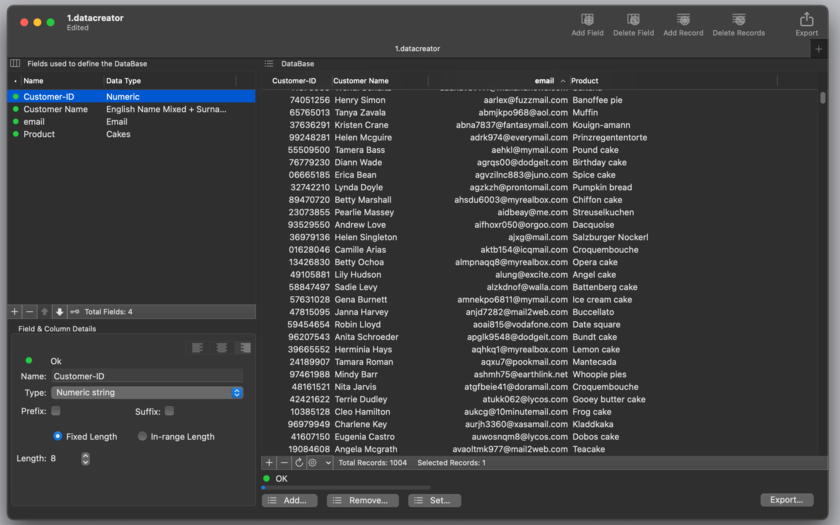
The user can select which kind of fields (columns) he likes (name of animals, colors, fruits, emails, addresses, English surname, German names and so on with over 50 different kind of data) and have all the contents filled for an unlimited number of rows in a single click. It can export to Comma separated value, Tab separated values, HTML tables, even web pages ready to deploy on the web or in any custom format (selecting custom separators).
Data creator is a must have for any power user or developer working with database or web pages when in need of neutral realistic data for prototyping or test purpose. Data Creator can be used to create small or very large data sets (thousands and thousands of records) for fast prototyping or stress test of structures and scripts.
Using Data Creator the user can perform serious demo and software test using realistic data and not just repetitive unrealistic text fields created with copy and paste. Data Creator can be used any time you need to produce massive, heterogeneous, realistic data for any development, or test or demo purpose.
Data Creator is simple to use and powerful, with over 50 different types of data to insert in custom created data tables. Created data is heterogeneous and absolutely realistic, thanks to a large internal database of data to create dataset that looks true during demonstration and usage test.
It uses an intuitive macOS interface any Mac user is able to use from the first launch. It's fast to create data, in a click it can create thousands and thousand rows of data. It's fast to let see and change data thanks to a latest generation interface. It's fast to let use data, it uses a state of the art export interface with great features. It allows to select in which format to export. It can even export in ready to use web pages in html format.
One of the greatest feature of Data Creator is the Custom export that let the user specify in great details the format to use to export. The user can specify code to embed at the start and at the end of the file, at the start and end of any record, before and after any field and the tag to use as field separator. It is also possible specify if to use or not the name of the field as first row (for export purpose) and other details
New in this release:
* Various optimizations
* Bug fix
System Requirements:
* Requires Mac OS X 10.10 or higher
* macOS 10.13 High Sierra Optimized
* 3.4 MB
Pricing and Availability:
Data Creator 1.6.1 is just $9.99 USD (or an equivalent amount in other currencies) and is available worldwide exclusively through the Mac App Store in the Developer Tools category.
Tension Software: http://www.tensionsoftware.com
Data Creator 1.6.1: http://www.tensionsoftware.com/osx/datacreator/
Purchase and Download from Mac App Store: http://itunes.apple.com/app/data-creator/id491686136
Direct Download Link: http://dwn.tensionsoftware.com/osx/datacreator/datacreator.dmg
Screenshot: http://www.tensionsoftware.com/static/tensionsoftware/images/app/datacreator/screenshots/mac/1.png
Application Icon: http://www.tensionsoftware.com/static/tensionsoftware/images/app/datacreator/icons/512.png
Tension Software develops software for macOS and iOS using the latest Apple technologies.
Other brands and products referenced herein are the trademarks or registered trademarks of their respective holders. All Material and Software (C) Copyright 2018 Tension Software. All Rights Reserved. Apple, the Apple logo, Macintosh Mac OS X and macOS are registered trademarks of Apple Inc. in the U.S. and/or other countries. Other trademarks and registered trademarks may be the property of their respective owners.
*******
Link To Article: https://prmac.com/release-id-82763.htm
*******
---------------------------------------------------------------------------------
Note that you can alter delivered distributions at any time.
Login to your account on prMac to alter your channel selection, or to opt-out at any time.

Development Company Jatapp Now Can Be Found in One More City - Chicago
A new article has been published at prMac.
Development Company Jatapp Now Can Be Found in One More City - Chicago - Published on 06/10/18
JatApp already have offices in Florida, Los Angeles, New York, London, Kiev and we are glad to extend this list with one of the biggest financial centers - Chicago. We would be happy to see anyone in our comfortable office in the heart of the city. The new big team of real professionals is ready to develop!
Chicago, Illinois - JatApp already has offices in Florida, Los Angeles, New York, London, Kiev and we are glad to extend this list with one of the biggest financial centers - Chicago. Decision was taken in the purpose of satisfying more clients and to make our developers more available for live communication.
Everyone know how important good application can be for business and how hard to choose the right company for help in this issue. JatApp is really responsible company. Our team of professionals always aware of the latest updates as well as trends in the industry.
Any idea of our client (even the most crazy) can be brought into incredible and really successful Android or iOS app. Besides, problems we can satisfy your web and blockchain development demands.
Team of JatApp consist from experienced experts in development. We have already managed more than 200 successful projects!
We would be happy to see anyone in our comfortable office in the heart of the city. The new big team of real professionals is ready to develop something that worth delight of everyone!
For more information you can contact our manager via the contact form on the company's site. He will provide you with answer to any of your questions.
Chicago Mobile App Development: https://jatapp.com/mobile-application-development-in-chicago/
JatApp company is one of the leaders in mobile application development. Our team of professionals always aware of the latest updates as well as trends in the industry. Any idea of our client (even the most crazy) can be brought into incredible and really successful Android or iOS app. Besides, problems we can satisfy your web and blockchain development demands. The team of JatApp consists of experienced experts in development. We have already managed more than 200 successful projects! All Material and Software (C) Copyright 2018 JatApp. All Rights Reserved. Apple, the Apple logo, iPhone, iPod and iPad are registered trademarks of Apple Inc. in the U.S. and/or other countries. Other trademarks and registered trademarks may be the property of their respective owners.
*******
Link To Article: https://prmac.com/release-id-82762.htm
*******
---------------------------------------------------------------------------------
Note that you can alter delivered distributions at any time.
Login to your account on prMac to alter your channel selection, or to opt-out at any time.
Development Company Jatapp Now Can Be Found in One More City - Chicago - Published on 06/10/18
JatApp already have offices in Florida, Los Angeles, New York, London, Kiev and we are glad to extend this list with one of the biggest financial centers - Chicago. We would be happy to see anyone in our comfortable office in the heart of the city. The new big team of real professionals is ready to develop!
Chicago, Illinois - JatApp already has offices in Florida, Los Angeles, New York, London, Kiev and we are glad to extend this list with one of the biggest financial centers - Chicago. Decision was taken in the purpose of satisfying more clients and to make our developers more available for live communication.
Everyone know how important good application can be for business and how hard to choose the right company for help in this issue. JatApp is really responsible company. Our team of professionals always aware of the latest updates as well as trends in the industry.
Any idea of our client (even the most crazy) can be brought into incredible and really successful Android or iOS app. Besides, problems we can satisfy your web and blockchain development demands.
Team of JatApp consist from experienced experts in development. We have already managed more than 200 successful projects!
We would be happy to see anyone in our comfortable office in the heart of the city. The new big team of real professionals is ready to develop something that worth delight of everyone!
For more information you can contact our manager via the contact form on the company's site. He will provide you with answer to any of your questions.
Chicago Mobile App Development: https://jatapp.com/mobile-application-development-in-chicago/
JatApp company is one of the leaders in mobile application development. Our team of professionals always aware of the latest updates as well as trends in the industry. Any idea of our client (even the most crazy) can be brought into incredible and really successful Android or iOS app. Besides, problems we can satisfy your web and blockchain development demands. The team of JatApp consists of experienced experts in development. We have already managed more than 200 successful projects! All Material and Software (C) Copyright 2018 JatApp. All Rights Reserved. Apple, the Apple logo, iPhone, iPod and iPad are registered trademarks of Apple Inc. in the U.S. and/or other countries. Other trademarks and registered trademarks may be the property of their respective owners.
*******
Link To Article: https://prmac.com/release-id-82762.htm
*******
---------------------------------------------------------------------------------
Note that you can alter delivered distributions at any time.
Login to your account on prMac to alter your channel selection, or to opt-out at any time.
Calcline 4.3: The Mac Math Calculator in a Small Stripe
A new article has been published at prMac.
Calcline 4.3: The Mac Math Calculator in a Small Stripe - Published on 06/09/18
Tension Software announces Calcline 4.3, their powerful Mac math calculator in a small stripe. Calcline allows to have a powerful algebra solver in small stripe window taking just a small portion of the Mac screen. It opens in a flash ready to be used. Calcline offers an array of functionalities to help users work in a fast and effective way. It works also as a service to all the other app they have installed on their Mac!
Milano, Italy - Tension Software announces the release and immediate availability of Calcline 4.3, the Mac math calculator in a small stripe. Calcline allows to have a powerful algebra solver in small stripe window taking just a small portion of your Mac screen. It opens in a flash ready to be used.
You can use it for simple additions or for complex formula using and assigning variables and constants
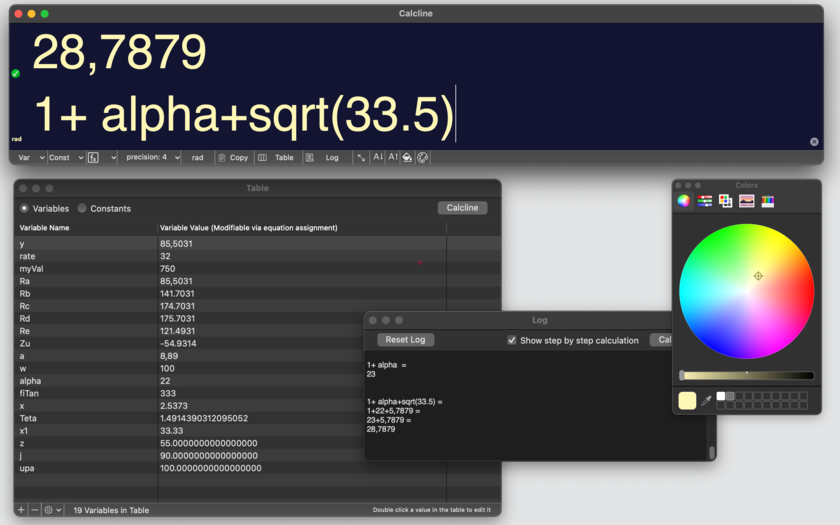
Variables and constant can be managed and assigned in a intuitive to use table (in a separate window) with simple clicks. Performed calculations can be displayed in a separate log window (content retained over re-launches).
Calcline offers an array of functionalities to help you work in a fast and effective way. You can work with all the variables and constants in a separate window, creating, deleting assigning them with click and edit. You can also create and assign variables via calcline assignment x=...
You can specify precision display up to 16 decimal positions, work in radians or degree, and have always available a popup to paste (without errors) all the available formulas, and defined variables and constants. You can have the variable and constant values displayed inside the main stripe windows
If you need detailed instructions Calcline has a PDF User Guide included (as any application created by Tension Software)
Any performed calculations can be saved inside a log. You can select to show step-by-step calculation or just the result. Log content is retained over re-launch of the application. At any time you can reset it. Variables and constants can be displayed also in a compact form inside the main calc window.
Calcline works with your international preferences settings (as example it uses ',' for decimals or '.' depending of your country. You can force at any time the value you like via the preferences.
It works also as a service to _all_ the other app you have installed on your Mac! You just select a math expression in any other app you have and from the service menu (available in any application on OS X) you paste the result!
Using it in an advanced way, Calcline offers mathematical expressions with infinite level of parenthesis to nest expressions and a large selections of math functions as:
square root, cube root, trigonometric sine, trigonometric cosine, trigonometric tangent, trigonometric arcsine, trigonometric arccosine, trigonometric arctangent, hyperbolic sine, hyperbolic cosine, hyperbolic tangent, hyperbolic arcsine, hyperbolic arccosine, hyperbolic arctangent, natural logarithm, base 10 logarithm, exponent base e, exponent base 2, exponent base 10, absolute, ceil, floor, factorial computation.
Features:
* Opens in a flash, it's Mac native code only for Mac only (no cross-platform crap inside).
* Uses a small stripe windows that let you still focus on the other task you are working on.
* Evaluates mathematical expressions with parentheses, nested functions, variables and constants
* Easy to use and effective
* Variable creation and reference inside expressions are very easy using an interactive table.
* Constant table with editable values
* Variables and constants values are retained over different runs
* Expressions solved optionally step by step showing all the mathematical passages.
* Uses a very small window, expandable if necessary to show vars/consts .
* Offers calculation service to other Apps, just selecting an expression and choosing 'Calc With Calcline' from the services menu.
* Based on a custom fast calculation engine developed by Tension Software on macOS.
* Uses long double calculation (High precision with up to 16 decimal digit precision)
* Popup for fast introduction of variables and constants in formula
* DEG and RAD calculation for trigonometric functions
* Numeric format customizable depending the user needs and country
* Values and position retained over relaunches
* Embedded PDF user guide
New in this release:
* Random function
* Bug fixes
* Various optimizations
* macOS 10.13 Sierra optimized
Minimum Requirements:
* Requires macOS 10.10 or higher
* Optimized for macOS 10.13 High Sierra
* 7.6 MB
Pricing and Availability:
Calcline 4.3 is just $4.99 USD (or an equivalent amount in other currencies. The app is available worldwide through the Mac App Store in the Productivity category.
Tension Software: http://www.tensionsoftware.com
Calcline 4.3: http://www.tensionsoftware.com/osx/calcline
Purchase and Download from Mac App Store: https://itunes.apple.com/app/calcline-4/id808680950
Screenshot: http://www.tensionsoftware.com/static/tensionsoftware/images/app/calcline/screenshots/mac/1.png
Application Icon: http://www.tensionsoftware.com/static/tensionsoftware/images/app/calcline/icons/512.png
Tension Software develops software for macOS and iOS using the latest Apple technologies.
Other brands and products referenced herein are the trademarks or registered trademarks of their respective holders. All Material and Software (C) Copyright 2018 Tension Software. All Rights Reserved. Apple, the Apple logo, Macintosh Mac OS X and macOS are registered trademarks of Apple Inc. in the U.S. and/or other countries. Other trademarks and registered trademarks may be the property of their respective owners.
*******
Link To Article: https://prmac.com/release-id-82761.htm
*******
---------------------------------------------------------------------------------
Note that you can alter delivered distributions at any time.
Login to your account on prMac to alter your channel selection, or to opt-out at any time.
Calcline 4.3: The Mac Math Calculator in a Small Stripe - Published on 06/09/18
Tension Software announces Calcline 4.3, their powerful Mac math calculator in a small stripe. Calcline allows to have a powerful algebra solver in small stripe window taking just a small portion of the Mac screen. It opens in a flash ready to be used. Calcline offers an array of functionalities to help users work in a fast and effective way. It works also as a service to all the other app they have installed on their Mac!
Milano, Italy - Tension Software announces the release and immediate availability of Calcline 4.3, the Mac math calculator in a small stripe. Calcline allows to have a powerful algebra solver in small stripe window taking just a small portion of your Mac screen. It opens in a flash ready to be used.
You can use it for simple additions or for complex formula using and assigning variables and constants
Variables and constant can be managed and assigned in a intuitive to use table (in a separate window) with simple clicks. Performed calculations can be displayed in a separate log window (content retained over re-launches).
Calcline offers an array of functionalities to help you work in a fast and effective way. You can work with all the variables and constants in a separate window, creating, deleting assigning them with click and edit. You can also create and assign variables via calcline assignment x=...
You can specify precision display up to 16 decimal positions, work in radians or degree, and have always available a popup to paste (without errors) all the available formulas, and defined variables and constants. You can have the variable and constant values displayed inside the main stripe windows
If you need detailed instructions Calcline has a PDF User Guide included (as any application created by Tension Software)
Any performed calculations can be saved inside a log. You can select to show step-by-step calculation or just the result. Log content is retained over re-launch of the application. At any time you can reset it. Variables and constants can be displayed also in a compact form inside the main calc window.
Calcline works with your international preferences settings (as example it uses ',' for decimals or '.' depending of your country. You can force at any time the value you like via the preferences.
It works also as a service to _all_ the other app you have installed on your Mac! You just select a math expression in any other app you have and from the service menu (available in any application on OS X) you paste the result!
Using it in an advanced way, Calcline offers mathematical expressions with infinite level of parenthesis to nest expressions and a large selections of math functions as:
square root, cube root, trigonometric sine, trigonometric cosine, trigonometric tangent, trigonometric arcsine, trigonometric arccosine, trigonometric arctangent, hyperbolic sine, hyperbolic cosine, hyperbolic tangent, hyperbolic arcsine, hyperbolic arccosine, hyperbolic arctangent, natural logarithm, base 10 logarithm, exponent base e, exponent base 2, exponent base 10, absolute, ceil, floor, factorial computation.
Features:
* Opens in a flash, it's Mac native code only for Mac only (no cross-platform crap inside).
* Uses a small stripe windows that let you still focus on the other task you are working on.
* Evaluates mathematical expressions with parentheses, nested functions, variables and constants
* Easy to use and effective
* Variable creation and reference inside expressions are very easy using an interactive table.
* Constant table with editable values
* Variables and constants values are retained over different runs
* Expressions solved optionally step by step showing all the mathematical passages.
* Uses a very small window, expandable if necessary to show vars/consts .
* Offers calculation service to other Apps, just selecting an expression and choosing 'Calc With Calcline' from the services menu.
* Based on a custom fast calculation engine developed by Tension Software on macOS.
* Uses long double calculation (High precision with up to 16 decimal digit precision)
* Popup for fast introduction of variables and constants in formula
* DEG and RAD calculation for trigonometric functions
* Numeric format customizable depending the user needs and country
* Values and position retained over relaunches
* Embedded PDF user guide
New in this release:
* Random function
* Bug fixes
* Various optimizations
* macOS 10.13 Sierra optimized
Minimum Requirements:
* Requires macOS 10.10 or higher
* Optimized for macOS 10.13 High Sierra
* 7.6 MB
Pricing and Availability:
Calcline 4.3 is just $4.99 USD (or an equivalent amount in other currencies. The app is available worldwide through the Mac App Store in the Productivity category.
Tension Software: http://www.tensionsoftware.com
Calcline 4.3: http://www.tensionsoftware.com/osx/calcline
Purchase and Download from Mac App Store: https://itunes.apple.com/app/calcline-4/id808680950
Screenshot: http://www.tensionsoftware.com/static/tensionsoftware/images/app/calcline/screenshots/mac/1.png
Application Icon: http://www.tensionsoftware.com/static/tensionsoftware/images/app/calcline/icons/512.png
Tension Software develops software for macOS and iOS using the latest Apple technologies.
Other brands and products referenced herein are the trademarks or registered trademarks of their respective holders. All Material and Software (C) Copyright 2018 Tension Software. All Rights Reserved. Apple, the Apple logo, Macintosh Mac OS X and macOS are registered trademarks of Apple Inc. in the U.S. and/or other countries. Other trademarks and registered trademarks may be the property of their respective owners.
*******
Link To Article: https://prmac.com/release-id-82761.htm
*******
---------------------------------------------------------------------------------
Note that you can alter delivered distributions at any time.
Login to your account on prMac to alter your channel selection, or to opt-out at any time.
Unisecure Data Centers Announces Advanced Cloud Management Solutions
A new article has been published at prMac.
Unisecure Data Centers Announces Advanced Cloud Management Solutions - Published on 06/08/18
Unisecure announces Cloud Management Solutions to deliver a secure digital work space from any Cloud with automatic OS and application patching. The company has now upgraded to Advanced Cloud Management Solutions that include Cloud Security, Cloud Visibility, Cloud Cost control, Cloud Automation and Cloud migrations.
New York, United States - Philadelphia, US, 5th June 2018 | Unisecure, leading data centers in US, being specialized in web hosting services, have now upgraded to Advanced Cloud Management Solutions, that include Cloud Security, Cloud Visibility, Cloud Cost control, Cloud Automation and Cloud migrations.
Why Unisecure's Cloud Management Solutions?
Cloud Security: Unisecure's Cloud Security includes security framework with multi- layered on real-time understanding of risk and validation of users. Using this, one can protect an organization from Network Attacks and Application Layer. And fully manages security services are working pro-active range of solutions which increase visibility of risk and save from breaches and attacks within your business.
Cloud Visibility : Unisecure's Cloud Visibility provides visibility and control over multi-cloud costs with Google Cloud, AWS, Azura and many others.
Cloud Cost Control : Unisecure's main goal is to control the cost and long term cloud cost management in the cloud computing Market.
Cloud Automation : Unisecure's Cloud Automation Tool which helps reduce the manual efforts with managing cloud computing workloads and can be applicable to Public, Private or Hybrid Cloud environments.
Cloud Migration : Unisecure's Cloud Migration automatically creates repository of application, device relationships, service and dependencies for optimized Cloud Migration.
Unisecure: https://www.unisecure.com/
Unisecure is one of the leading data centers and best cloud hosting provider in the US. Unisecure data centers guarantee 99.995% up-time, high-density redundant power, flexible configurations, carrier-neutral facilities, and 24x7x365 customer support. The company has 5 data centers among which 2 are located in Philadelphia and Conshohocken, U.S embed with Information Security Management System (ISMS) to examine risks and develop better processes for security our data centers are most secure and reliable. Their data centers offer services for VPS hosting services, co-location services, and dedicated hosting providers to the firewall and advanced backup solutions. They have 50,000 customers in over 17 countries, including brands such as Canon, DHL, HP, Microsoft, Pepsi, Mc Donalds and much more. All Material and Software (C) Copyright 2018 Unisecure. All Rights Reserved. Apple, the Apple logo, Macintosh Mac OS X and macOS are registered trademarks of Apple Inc. in the U.S. and/or
other countries. Other trademarks and registered trademarks may be the property of their respective owners.
*******
Link To Article: https://prmac.com/release-id-82760.htm
*******
---------------------------------------------------------------------------------
Note that you can alter delivered distributions at any time.
Login to your account on prMac to alter your channel selection, or to opt-out at any time.
Unisecure Data Centers Announces Advanced Cloud Management Solutions - Published on 06/08/18
Unisecure announces Cloud Management Solutions to deliver a secure digital work space from any Cloud with automatic OS and application patching. The company has now upgraded to Advanced Cloud Management Solutions that include Cloud Security, Cloud Visibility, Cloud Cost control, Cloud Automation and Cloud migrations.
New York, United States - Philadelphia, US, 5th June 2018 | Unisecure, leading data centers in US, being specialized in web hosting services, have now upgraded to Advanced Cloud Management Solutions, that include Cloud Security, Cloud Visibility, Cloud Cost control, Cloud Automation and Cloud migrations.
Why Unisecure's Cloud Management Solutions?
Cloud Security: Unisecure's Cloud Security includes security framework with multi- layered on real-time understanding of risk and validation of users. Using this, one can protect an organization from Network Attacks and Application Layer. And fully manages security services are working pro-active range of solutions which increase visibility of risk and save from breaches and attacks within your business.
Cloud Visibility : Unisecure's Cloud Visibility provides visibility and control over multi-cloud costs with Google Cloud, AWS, Azura and many others.
Cloud Cost Control : Unisecure's main goal is to control the cost and long term cloud cost management in the cloud computing Market.
Cloud Automation : Unisecure's Cloud Automation Tool which helps reduce the manual efforts with managing cloud computing workloads and can be applicable to Public, Private or Hybrid Cloud environments.
Cloud Migration : Unisecure's Cloud Migration automatically creates repository of application, device relationships, service and dependencies for optimized Cloud Migration.
Unisecure: https://www.unisecure.com/
Unisecure is one of the leading data centers and best cloud hosting provider in the US. Unisecure data centers guarantee 99.995% up-time, high-density redundant power, flexible configurations, carrier-neutral facilities, and 24x7x365 customer support. The company has 5 data centers among which 2 are located in Philadelphia and Conshohocken, U.S embed with Information Security Management System (ISMS) to examine risks and develop better processes for security our data centers are most secure and reliable. Their data centers offer services for VPS hosting services, co-location services, and dedicated hosting providers to the firewall and advanced backup solutions. They have 50,000 customers in over 17 countries, including brands such as Canon, DHL, HP, Microsoft, Pepsi, Mc Donalds and much more. All Material and Software (C) Copyright 2018 Unisecure. All Rights Reserved. Apple, the Apple logo, Macintosh Mac OS X and macOS are registered trademarks of Apple Inc. in the U.S. and/or
other countries. Other trademarks and registered trademarks may be the property of their respective owners.
*******
Link To Article: https://prmac.com/release-id-82760.htm
*******
---------------------------------------------------------------------------------
Note that you can alter delivered distributions at any time.
Login to your account on prMac to alter your channel selection, or to opt-out at any time.
Cronette 1.8 for macOS to Launch Tasks on Unattended Macs
A new article has been published at prMac.
Cronette 1.8 for macOS to Launch Tasks on Unattended Macs - Published on 06/07/18
Tension Software announces Cronette 1.8 for macOS, their app designed to launch tasks on an unattended Mac. Cronette is software designed to specify tasks to be launched unattended by the Mac. It can be used on unattended Mac Servers or also on regular Mac workstations for tasks to execute during the night or for recurring tasks to be performed on a regular basis.
Milano, Italy - Tension Software is proud to announce the release and availability of Cronette 1.8 for macOS, their app designed to launch tasks on an unattended Mac. Cronette is a software designed to specify tasks to be launched unattended by the Mac. It can be used on unattended Mac Servers or also on regular Mac workstations for tasks to execute during the night or for recurring tasks to be performed on a regular basis. Cronette provides different type of launch tasks and any task can be specified to launch different type of execution.
How it works in details:
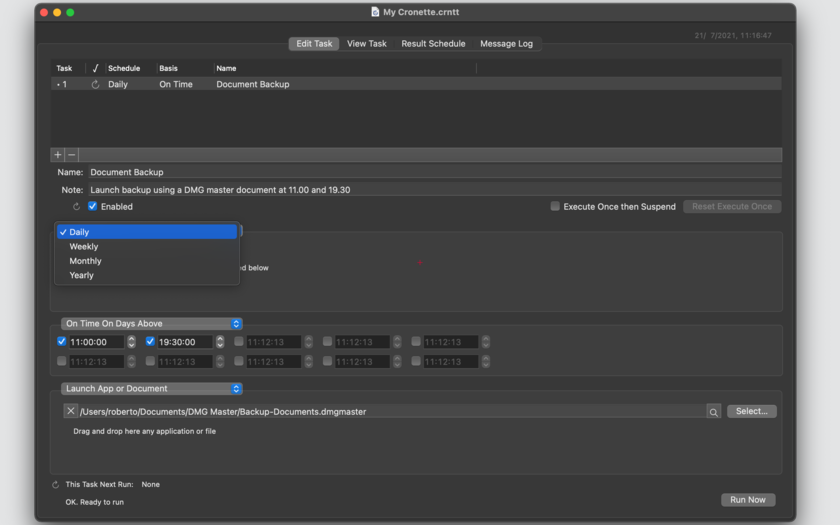
* All the tasks inside Cronette are represented in a document table. The task is visualised in a master and details interface (the well know layout used in a multitude of Mac software, the user selects the task in the master table and he can see and edit details visualized under the table)
* User can insert in a document how many tasks he likes
* User can assign to a task a name and a note to recognise it
The user can select for a task to run, different time plan type:
* Daily: running at any day
* Weekly: specifying which day of any week to run
* Monthly: specifying which day of any month to run
* Yearly: specifying month and day to run
And specifying:
* Up to ten different time to run in the days of the daily/weekly/monthly/yearly plan
* To run at the document opening, if the daily/weekly/monthly/yearly plan matches with the current day and if the max run per day specified was not reached.
The last feature is useful to perform recurring activities as backups, report creations, emails sending and any other tasks you want to perform not based on time but as example when you shutdown your Mac and only in the days you specify
The user can select which action to perform when the task is launched
* Launch an application or a document
* Opening different type of URLs
* Insert a message into the log
* Executing unix commands directly from Cronette
* Copy a file or a folder
* Move a file or a folder
Cronette will launch the tasks in background when scheduled. No further actions required.
Cronette add to basic functionalities additional peculiarities:
* Allows to specify a task using Mac standard Cocoa controls (no coding required)
* Instant diagnostic of task as they are inserted, showing errors presence (wrong path, incomplete time execution input and so on..)
* Display of 'runnable' task and 'non runnable' task to better understand what you have inside documents
* Shows the chronological schedule for any separate task
* Shows the chronological schedule for all the tasks combined, inside a user selected time interval. The user can watch the future...
* Display executed process in a separate log Window for any documents
Cronette is document based, allowing to have different tasks grouped in separate documents sets. It can operate Cronette as a Utility tool simply using just one document and having it opened at startup without further actions (preference option). Processes are launched using separate thread and the application never hangs even for very time consuming tasks. Includes a PDF user guide.
Test it downloading an unlicensed version from the TensionSoftware website. Money back if you buy it and you are not satisfied!
New in this release 1.8:
* Improved log output
* Improved result schedule with automatic update results at any applied changes to any settings
* Various bug fixes
* Optimized for macOS 10.13 (High Sierra)
System Requirements:
* Requires macOS 10.10 or higher
* Optimized for macOS 10.13 High Sierra
* 3.8 MB
Pricing and Availability:
Cronette 1.8 is just $9.99 USD (or an equivalent amount in other currencies) and is available worldwide through the Mac App Store in the Productivity category.
Tension Software: http://www.tensionsoftware.com
Cronette 1.8: http://www.tensionsoftware.com/osx/cronette/
Download Link: http://dwn.tensionsoftware.com/osx/cronette/cronette.dmg
Purchase and Download from Mac App Store: http://itunes.apple.com/us/app/cronette/id415169603?mt=12&ls=1
Screenshot: http://www.tensionsoftware.com/static/tensionsoftware/images/app/cronette/screenshots/mac/1.png
Application Icon: http://www.tensionsoftware.com/static/tensionsoftware/images/app/cronette/icons/512.png
Tension Software develops software for macOS and iOS using the latest Apple technologies.
Other brands and products referenced herein are the trademarks or registered trademarks of their respective holders. All Material and Software (C) Copyright 2018 MaBaSoft. All Rights Reserved. Apple, the Apple logo, Macintosh Mac OS X and macOS are registered trademarks of Apple Inc. in the U.S. and/or other countries. Other trademarks and registered trademarks may be the property of their respective owners.
*******
Link To Article: https://prmac.com/release-id-82759.htm
*******
---------------------------------------------------------------------------------
Note that you can alter delivered distributions at any time.
Login to your account on prMac to alter your channel selection, or to opt-out at any time.
Cronette 1.8 for macOS to Launch Tasks on Unattended Macs - Published on 06/07/18
Tension Software announces Cronette 1.8 for macOS, their app designed to launch tasks on an unattended Mac. Cronette is software designed to specify tasks to be launched unattended by the Mac. It can be used on unattended Mac Servers or also on regular Mac workstations for tasks to execute during the night or for recurring tasks to be performed on a regular basis.
Milano, Italy - Tension Software is proud to announce the release and availability of Cronette 1.8 for macOS, their app designed to launch tasks on an unattended Mac. Cronette is a software designed to specify tasks to be launched unattended by the Mac. It can be used on unattended Mac Servers or also on regular Mac workstations for tasks to execute during the night or for recurring tasks to be performed on a regular basis. Cronette provides different type of launch tasks and any task can be specified to launch different type of execution.
How it works in details:
* All the tasks inside Cronette are represented in a document table. The task is visualised in a master and details interface (the well know layout used in a multitude of Mac software, the user selects the task in the master table and he can see and edit details visualized under the table)
* User can insert in a document how many tasks he likes
* User can assign to a task a name and a note to recognise it
The user can select for a task to run, different time plan type:
* Daily: running at any day
* Weekly: specifying which day of any week to run
* Monthly: specifying which day of any month to run
* Yearly: specifying month and day to run
And specifying:
* Up to ten different time to run in the days of the daily/weekly/monthly/yearly plan
* To run at the document opening, if the daily/weekly/monthly/yearly plan matches with the current day and if the max run per day specified was not reached.
The last feature is useful to perform recurring activities as backups, report creations, emails sending and any other tasks you want to perform not based on time but as example when you shutdown your Mac and only in the days you specify
The user can select which action to perform when the task is launched
* Launch an application or a document
* Opening different type of URLs
* Insert a message into the log
* Executing unix commands directly from Cronette
* Copy a file or a folder
* Move a file or a folder
Cronette will launch the tasks in background when scheduled. No further actions required.
Cronette add to basic functionalities additional peculiarities:
* Allows to specify a task using Mac standard Cocoa controls (no coding required)
* Instant diagnostic of task as they are inserted, showing errors presence (wrong path, incomplete time execution input and so on..)
* Display of 'runnable' task and 'non runnable' task to better understand what you have inside documents
* Shows the chronological schedule for any separate task
* Shows the chronological schedule for all the tasks combined, inside a user selected time interval. The user can watch the future...
* Display executed process in a separate log Window for any documents
Cronette is document based, allowing to have different tasks grouped in separate documents sets. It can operate Cronette as a Utility tool simply using just one document and having it opened at startup without further actions (preference option). Processes are launched using separate thread and the application never hangs even for very time consuming tasks. Includes a PDF user guide.
Test it downloading an unlicensed version from the TensionSoftware website. Money back if you buy it and you are not satisfied!
New in this release 1.8:
* Improved log output
* Improved result schedule with automatic update results at any applied changes to any settings
* Various bug fixes
* Optimized for macOS 10.13 (High Sierra)
System Requirements:
* Requires macOS 10.10 or higher
* Optimized for macOS 10.13 High Sierra
* 3.8 MB
Pricing and Availability:
Cronette 1.8 is just $9.99 USD (or an equivalent amount in other currencies) and is available worldwide through the Mac App Store in the Productivity category.
Tension Software: http://www.tensionsoftware.com
Cronette 1.8: http://www.tensionsoftware.com/osx/cronette/
Download Link: http://dwn.tensionsoftware.com/osx/cronette/cronette.dmg
Purchase and Download from Mac App Store: http://itunes.apple.com/us/app/cronette/id415169603?mt=12&ls=1
Screenshot: http://www.tensionsoftware.com/static/tensionsoftware/images/app/cronette/screenshots/mac/1.png
Application Icon: http://www.tensionsoftware.com/static/tensionsoftware/images/app/cronette/icons/512.png

Tension Software develops software for macOS and iOS using the latest Apple technologies.
Other brands and products referenced herein are the trademarks or registered trademarks of their respective holders. All Material and Software (C) Copyright 2018 MaBaSoft. All Rights Reserved. Apple, the Apple logo, Macintosh Mac OS X and macOS are registered trademarks of Apple Inc. in the U.S. and/or other countries. Other trademarks and registered trademarks may be the property of their respective owners.
*******
Link To Article: https://prmac.com/release-id-82759.htm
*******
---------------------------------------------------------------------------------
Note that you can alter delivered distributions at any time.
Login to your account on prMac to alter your channel selection, or to opt-out at any time.
Email Obfuscator 1.3.2 Lets Mac Web Developers Obfuscate Email Addresses
A new article has been published at prMac.
Email Obfuscator 1.3.2 Lets Mac Web Developers Obfuscate Email Addresses - Published on 06/07/18
Tension Software announces Email Obfuscator 1.3.2 for macOS web developers to obfuscate email addresses inside web pages. Email Obfuscator is a tool useful for anyone creating and editing web pages, it creates email links using 'obfuscated' code. The obfuscated link can be put inside any web page and it is not recognised by Bot surfing the net collecting emails.
Milano, Italy - Tension Software is proud to announce the release of Email Obfuscator 1.3.2 for macOS web developers to obfuscate email addresses inside web pages. Email Obfuscator is a tool useful for anyone creating and editing web pages. It creates email links using 'obfuscated' code. The obfuscated link can be put inside any web page and it is not recognised by Bot surfing the net collecting emails
Obfuscated means that:
* From the user point of view, nothing changes and the user still is presented with an email link
* The link is perfectly working and a web user clicking on the link has the email client presenting the email, ready to be sent with the email address and (optionally the subject) filled with the correct values.
* AND MORE IMPORTANTLY: A link created in that way can't be easily recognised by bot and software that surf the internet collecting emails from email links.
The obtained obfuscated code can be copied and pasted in any web page using any html editor.
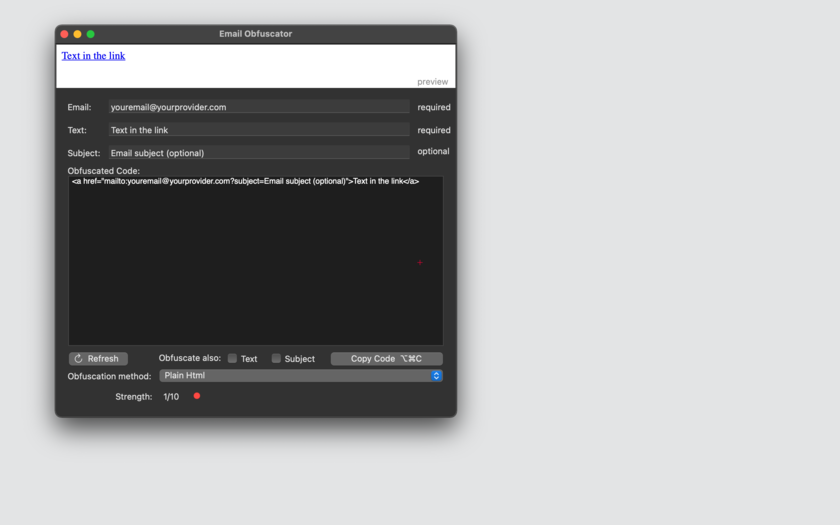
Email Obfuscator, uses a single window where you can insert:
* the email
* the text link
* the email subject [optionally]
The obfuscated code is created inside Email Obfuscator as-you-type. Selecting one of the different method of obfuscation the code is re-created instantly. Email Obfuscator offers instant preview and test of the generated code inside the window using an internal web view (webkit based).
Obfuscation is provided by various available methods:
* ASCII
* HEX
* Percentage Encoding
* Random ASCII-Hex
* Random ASCII-Hex-Percent encoding
* Javascript
* Javascript and ASCII
* Javascript and HEX
* Javascript and Percentage Encoding
* Javascript and Random ASCII-Hex
* Javascript and Random ASCII-Hex-Percent encoding
Features:
* Creates obfuscated code ready to embed in web pages
* Accepts email, text and subject for the email
* Created as you type
* Offers selection from various methods
* Internal preview area
* Shows obfuscation strength
* PDF Manual embedded in the app included
New in this release:
* Bug fix
* Various optimizations
System Requirements:
* OS X Version 10.10 or higher
* Optimized for OS X 10.13
* 1.3 MB
Pricing and Availability:
Email Obfuscator 1.3.2 is just $2.99 USD (or an equivalent amount in other currencies) and is available worldwide exclusively in the Mac App Store in the Productivity category.
Tension Software: http://www.tensionsoftware.com
Email Obfuscator 1.3.2: http://www.tensionsoftware.com/osx/emailobfuscator/
Purchase and Download from Mac App Store: https://itunes.apple.com/us/app/email-obfuscator/id418620481?ls=1&mt=12
Screenshot: http://www.tensionsoftware.com/static/tensionsoftware/images/app/emailobfuscator/screenshots/mac/1.png
Application Icon: http://www.tensionsoftware.com/static/tensionsoftware/images/app/emailobfuscator/icons/512.png
Tension Software develops software for macOS and iOS using the latest Apple technologies.
Other brands and products referenced herein are the trademarks or registered trademarks of their respective holders. All Material and Software (C) Copyright 2018 MaBaSoft. All Rights Reserved. Apple, the Apple logo, Macintosh Mac OS X and macOS are registered trademarks of Apple Inc. in the U.S. and/or other countries. Other trademarks and registered trademarks may be the property of their respective owners.
*******
Link To Article: https://prmac.com/release-id-82758.htm
*******
---------------------------------------------------------------------------------
Note that you can alter delivered distributions at any time.
Login to your account on prMac to alter your channel selection, or to opt-out at any time.
Email Obfuscator 1.3.2 Lets Mac Web Developers Obfuscate Email Addresses - Published on 06/07/18
Tension Software announces Email Obfuscator 1.3.2 for macOS web developers to obfuscate email addresses inside web pages. Email Obfuscator is a tool useful for anyone creating and editing web pages, it creates email links using 'obfuscated' code. The obfuscated link can be put inside any web page and it is not recognised by Bot surfing the net collecting emails.
Milano, Italy - Tension Software is proud to announce the release of Email Obfuscator 1.3.2 for macOS web developers to obfuscate email addresses inside web pages. Email Obfuscator is a tool useful for anyone creating and editing web pages. It creates email links using 'obfuscated' code. The obfuscated link can be put inside any web page and it is not recognised by Bot surfing the net collecting emails
Obfuscated means that:
* From the user point of view, nothing changes and the user still is presented with an email link
* The link is perfectly working and a web user clicking on the link has the email client presenting the email, ready to be sent with the email address and (optionally the subject) filled with the correct values.
* AND MORE IMPORTANTLY: A link created in that way can't be easily recognised by bot and software that surf the internet collecting emails from email links.
The obtained obfuscated code can be copied and pasted in any web page using any html editor.
Email Obfuscator, uses a single window where you can insert:
* the email
* the text link
* the email subject [optionally]
The obfuscated code is created inside Email Obfuscator as-you-type. Selecting one of the different method of obfuscation the code is re-created instantly. Email Obfuscator offers instant preview and test of the generated code inside the window using an internal web view (webkit based).
Obfuscation is provided by various available methods:
* ASCII
* HEX
* Percentage Encoding
* Random ASCII-Hex
* Random ASCII-Hex-Percent encoding
* Javascript
* Javascript and ASCII
* Javascript and HEX
* Javascript and Percentage Encoding
* Javascript and Random ASCII-Hex
* Javascript and Random ASCII-Hex-Percent encoding
Features:
* Creates obfuscated code ready to embed in web pages
* Accepts email, text and subject for the email
* Created as you type
* Offers selection from various methods
* Internal preview area
* Shows obfuscation strength
* PDF Manual embedded in the app included
New in this release:
* Bug fix
* Various optimizations
System Requirements:
* OS X Version 10.10 or higher
* Optimized for OS X 10.13
* 1.3 MB
Pricing and Availability:
Email Obfuscator 1.3.2 is just $2.99 USD (or an equivalent amount in other currencies) and is available worldwide exclusively in the Mac App Store in the Productivity category.
Tension Software: http://www.tensionsoftware.com
Email Obfuscator 1.3.2: http://www.tensionsoftware.com/osx/emailobfuscator/
Purchase and Download from Mac App Store: https://itunes.apple.com/us/app/email-obfuscator/id418620481?ls=1&mt=12
Screenshot: http://www.tensionsoftware.com/static/tensionsoftware/images/app/emailobfuscator/screenshots/mac/1.png
Application Icon: http://www.tensionsoftware.com/static/tensionsoftware/images/app/emailobfuscator/icons/512.png

Tension Software develops software for macOS and iOS using the latest Apple technologies.
Other brands and products referenced herein are the trademarks or registered trademarks of their respective holders. All Material and Software (C) Copyright 2018 MaBaSoft. All Rights Reserved. Apple, the Apple logo, Macintosh Mac OS X and macOS are registered trademarks of Apple Inc. in the U.S. and/or other countries. Other trademarks and registered trademarks may be the property of their respective owners.
*******
Link To Article: https://prmac.com/release-id-82758.htm
*******
---------------------------------------------------------------------------------
Note that you can alter delivered distributions at any time.
Login to your account on prMac to alter your channel selection, or to opt-out at any time.
Now Free to Download, TextGrabber for iOS Adds Real-Time Translation
A new article has been published at prMac.
Now Free to Download, TextGrabber for iOS Adds Real-Time Translation - Published on 06/07/18
ABBYY today announces TextGrabber 6.8, a major update to their popular real-time OCR app for iOS devices. TextGrabber instantly captures text in 61 languages and translates it in real time to 104 languages online and 10 languages offline. The app allows users to translate text of any color on any background directly on the camera preview screen, eliminating the need to take a photo or crop it. The application now translates text in real time online and offline.
Milpitas, California - ABBYY(R), a global provider of content intelligence solutions and services, today announced a major update to TextGrabber for iOS. The application now translates text in real time online and offline and is free to download with a premium subscription for a number of features.
The revamped TextGrabber instantly captures text in 61 languages and translates it in real time to 104 languages online and 10 languages offline. The app allows users to translate text of any color on any background directly on the camera preview screen eliminating the need to take a photo or crop it. In contrast to other translation apps, it does not require users to download languages in order to translate offline.
TextGrabber automatically identifies if the device has access to a stable Internet connection, and if so, uses it to deliver full-text translation into 104 languages in real time. If the device does not have Internet access, the app switches to offline translation, which is essential for travel and everyday situations like understanding menus, street signs, labels, and more. Offline translation works for 10 common languages including English, Spanish, French, German, Chinese, and Japanese. The user also has the option to switch to the offline mode manually in the settings.
From now on, TextGrabber for iOS is free to download. Upon installation, each user can leverage the full functionality of the app to capture, translate, and share three texts. After the three complimentary full-feature uses are over, they can still digitize texts and save them as notes in the app's internal storage " this functionality is free. If the user would like to access the full functionality again, they are offered to purchase a subscription for $0.5 a month for the first two months and $2 a month after that.
"We have added the new functionality to TextGrabber to help people travel with confidence, learn foreign languages, and communicate with ease. Now users will be able to download the app free of charge and use it to translate text in real time without effort or delay, online and offline. A Swiss army knife for any everyday situation involving text, the app empowers users to turn their mobile devices into digital transformation assets," comments Bruce Orcutt, Vice-President, Head of Product Marketing at ABBYY.
As always, TextGrabber for iOS captures text on photo or in real time and connects it to action. The app helps to digitize books, magazines, manuals, screens, menus, posters, and street signs. The captured text can be copied, edited, shared, translated or read aloud via VoiceOver. All links, phone numbers, email addresses, street addresses and event details become clickable for the user to easily perform the corresponding task: follow, call, email, find on maps or add to the calendar. Text recognition is performed on the device. The technology works with 61 languages, the biggest number on the market in its category. As an additional feature, TextGrabber also works as a QR code reader. All the digitized texts and QR codes are saved in the app, easily accessible for further use.
TextGrabber also serves the needs of people with disabilities who can use it to capture and voice virtually any text from print, computer or TV screen. It improves accessibility of information, which is one of ABBYY's core values and priorities.
The app complements ABBYY's comprehensive portfolio of tools that simplify capture, digitization, and extraction of data. The company's offering ranges from top-of-the-line mobile-based optical character recognition (OCR) to enterprise-level automated document processing enabled by machine learning and semantics.
Technical Requirements:
* Text recognition is performed on the device
* For online translation and sharing, an Internet connection is required
* iPhone, iPad, and iPod touch
* Requires iOS 9.0 or later
* 123.6 MB
Pricing and Availability:
TextGrabber 6.8 is Free (With In-App Purchases) and available worldwide exclusively through the App Store in the Productivity category. TextGrabber for Android will become free to download and receive the Real-Time Translation functionality in June 2018. For more information, please contact Catherine Matantseva.
ABBYY: https://www.abbyy.com/
TextGrabber 6.8: http://www.textgrabber.pro
Download from iTunes: https://itunes.apple.com/app/id438475005
YouTube Video (Demo): https://www.youtube.com/watch?v=RMwIcxhVS6s
Media Assets: https://drive.google.com/drive/folders/0B7ldAh9VMcZSR0RJODFfdFk4Z2c
ABBYY is a global provider of content intelligence solutions and services, leader in intelligent capture driving innovation in the areas of meaningful insights, data, and relationships to improve business outcomes. ABBYY offers a complete range of AI-based technologies and solutions transforming business documents and content into business value. By providing digital transformation solutions to financial services, insurance, transportation, healthcare and other industries, the company helps organizations achieve the next wave of growth by understanding customers and delivering responsive real-time intelligent systems. ABBYY technologies are used and licensed by some of the largest international enterprises and government organizations, as well as SMBs and individuals. The company maintains offices in Australia, Canada, Cyprus, France, Germany, Japan, Russia, Spain, Taiwan, UAE, the UK, Ukraine, and the United States. (C) Copyright 2018 ABBYY Software Ltd.. All Rights Reserved.
Apple, the Apple logo, iPhone, iPod and iPad are registered trademarks of Apple Inc. in the U.S. and/or other countries.
*******
Link To Article: https://prmac.com/release-id-82757.htm
*******
---------------------------------------------------------------------------------
Note that you can alter delivered distributions at any time.
Login to your account on prMac to alter your channel selection, or to opt-out at any time.
Now Free to Download, TextGrabber for iOS Adds Real-Time Translation - Published on 06/07/18
ABBYY today announces TextGrabber 6.8, a major update to their popular real-time OCR app for iOS devices. TextGrabber instantly captures text in 61 languages and translates it in real time to 104 languages online and 10 languages offline. The app allows users to translate text of any color on any background directly on the camera preview screen, eliminating the need to take a photo or crop it. The application now translates text in real time online and offline.
Milpitas, California - ABBYY(R), a global provider of content intelligence solutions and services, today announced a major update to TextGrabber for iOS. The application now translates text in real time online and offline and is free to download with a premium subscription for a number of features.
The revamped TextGrabber instantly captures text in 61 languages and translates it in real time to 104 languages online and 10 languages offline. The app allows users to translate text of any color on any background directly on the camera preview screen eliminating the need to take a photo or crop it. In contrast to other translation apps, it does not require users to download languages in order to translate offline.
TextGrabber automatically identifies if the device has access to a stable Internet connection, and if so, uses it to deliver full-text translation into 104 languages in real time. If the device does not have Internet access, the app switches to offline translation, which is essential for travel and everyday situations like understanding menus, street signs, labels, and more. Offline translation works for 10 common languages including English, Spanish, French, German, Chinese, and Japanese. The user also has the option to switch to the offline mode manually in the settings.
From now on, TextGrabber for iOS is free to download. Upon installation, each user can leverage the full functionality of the app to capture, translate, and share three texts. After the three complimentary full-feature uses are over, they can still digitize texts and save them as notes in the app's internal storage " this functionality is free. If the user would like to access the full functionality again, they are offered to purchase a subscription for $0.5 a month for the first two months and $2 a month after that.
"We have added the new functionality to TextGrabber to help people travel with confidence, learn foreign languages, and communicate with ease. Now users will be able to download the app free of charge and use it to translate text in real time without effort or delay, online and offline. A Swiss army knife for any everyday situation involving text, the app empowers users to turn their mobile devices into digital transformation assets," comments Bruce Orcutt, Vice-President, Head of Product Marketing at ABBYY.
As always, TextGrabber for iOS captures text on photo or in real time and connects it to action. The app helps to digitize books, magazines, manuals, screens, menus, posters, and street signs. The captured text can be copied, edited, shared, translated or read aloud via VoiceOver. All links, phone numbers, email addresses, street addresses and event details become clickable for the user to easily perform the corresponding task: follow, call, email, find on maps or add to the calendar. Text recognition is performed on the device. The technology works with 61 languages, the biggest number on the market in its category. As an additional feature, TextGrabber also works as a QR code reader. All the digitized texts and QR codes are saved in the app, easily accessible for further use.
TextGrabber also serves the needs of people with disabilities who can use it to capture and voice virtually any text from print, computer or TV screen. It improves accessibility of information, which is one of ABBYY's core values and priorities.
The app complements ABBYY's comprehensive portfolio of tools that simplify capture, digitization, and extraction of data. The company's offering ranges from top-of-the-line mobile-based optical character recognition (OCR) to enterprise-level automated document processing enabled by machine learning and semantics.
Technical Requirements:
* Text recognition is performed on the device
* For online translation and sharing, an Internet connection is required
* iPhone, iPad, and iPod touch
* Requires iOS 9.0 or later
* 123.6 MB
Pricing and Availability:
TextGrabber 6.8 is Free (With In-App Purchases) and available worldwide exclusively through the App Store in the Productivity category. TextGrabber for Android will become free to download and receive the Real-Time Translation functionality in June 2018. For more information, please contact Catherine Matantseva.
ABBYY: https://www.abbyy.com/
TextGrabber 6.8: http://www.textgrabber.pro
Download from iTunes: https://itunes.apple.com/app/id438475005
YouTube Video (Demo): https://www.youtube.com/watch?v=RMwIcxhVS6s
Media Assets: https://drive.google.com/drive/folders/0B7ldAh9VMcZSR0RJODFfdFk4Z2c
ABBYY is a global provider of content intelligence solutions and services, leader in intelligent capture driving innovation in the areas of meaningful insights, data, and relationships to improve business outcomes. ABBYY offers a complete range of AI-based technologies and solutions transforming business documents and content into business value. By providing digital transformation solutions to financial services, insurance, transportation, healthcare and other industries, the company helps organizations achieve the next wave of growth by understanding customers and delivering responsive real-time intelligent systems. ABBYY technologies are used and licensed by some of the largest international enterprises and government organizations, as well as SMBs and individuals. The company maintains offices in Australia, Canada, Cyprus, France, Germany, Japan, Russia, Spain, Taiwan, UAE, the UK, Ukraine, and the United States. (C) Copyright 2018 ABBYY Software Ltd.. All Rights Reserved.
Apple, the Apple logo, iPhone, iPod and iPad are registered trademarks of Apple Inc. in the U.S. and/or other countries.
*******
Link To Article: https://prmac.com/release-id-82757.htm
*******
---------------------------------------------------------------------------------
Note that you can alter delivered distributions at any time.
Login to your account on prMac to alter your channel selection, or to opt-out at any time.
Subscribe to:
Posts (Atom)