A new article has been published at prMac.
Watch Kast Audio Player for Apple Watch Syncs from Non-Paired Devices - Published on 07/12/18
Ron Boyd Design announces version 1.3 of Watch Kast Audio Player for the Apple Watch. Watch Kast is an iOS application that allows users to load their own audio files directly on the Apple Watch for playback independent of the iPhone. Watch Kast was first introduced in 2015 with the introduction of Watch OS 2 and has been growing since. Watch Kast version 1.3 has a new method of transferring audio files using the cloud to sync files.
Seattle, Washington USA - Ron Boyd Design is proud to announce Watch Kast 1.3, an iOS application that allows users to load their own audio files directly on the Apple Watch for playback independent of the iPhone.
Watch Kast was first introduced in 2015 with the introduction of Watch OS 2 and has been growing since. Earlier versions of Watch Kast the app allowed users to transfer the audio files via the background transfer method afforded to all Apple Watches and can take some time depending on the file size.
As the newer Watch OS3 and 4 were rolled out transfer times have been reduced dramatically and even though best transfer times are achieved with both the watch and phone connected to power, the background transfer method is great for large audio files.
Version 1.3 now has a new method of transferring those files using the cloud to sync files. This cloud syncing is offered as an optional subscription service. As with earlier versions Watch Kast users can:
* Load and organize audio files on the phone and transfer them to the Apple Watch at load time or a later date.
* Record audio on the Apple Watch and playback from the watch. Recorded audio is also transferred to the iPhone application and a copy is automatically stored in iCloud Drive when enabled.
* Copy audio files from other applications like iCloud Drive on the iPhone and transfer them to the Apple Watch for independent playback.
* AirDrop audio files from other devices to iPhone and transfer them to the Apple Watch for independent playback.
The new Cloud syncing feature allows audio files to be synced from devices other than the paired iPhone and because of that Watch Kast has become a universal application with an interface for the iPad. This is particularly useful because most iPads allow drag and drop from other applications. Rather than importing and storing the file on the phone, subscribed iPad users can simply drop the desired files to the application and send it to the private cloud container where it is exposed to the Apple Watch for load- ing as desired completely independent of the paired iPhone.
For more information about Watch Kast, read the official blog and support page.
Device Requirements:
* iPhone and Apple Watch
* iOS 11.4 or later
* 28 MB
Pricing and Availability:
Watch Kast Audio Player 1.3 is just $0.99 USD for a limited time and is available worldwide exclusively through the App Store in the Health & Fitness category.
Watch Kast Audio Player 1.3: https://podwatchapp.wordpress.com
Purchase and Download from App Store: https://itunes.apple.com/app/watch-kast/id1071703776
Subscriptions: https://podwatchapp.wordpress.com/2018/06/19/version-1-3-subscriptions
Freedom to Explore: https://podwatchapp.wordpress.com/2018/06/18/watch-kast-1-3-freedom-to-explore
Support: https://podwatchapp.wordpress.com/the-app
Ron Boyd Design is a small business that specializes in iOS development and currently has eight apps available in the App Store. All Material and Software (C) Copyright 2018 Ron Boyd Design. All Rights Reserved. Apple, the Apple logo, iPhone, iPod and iPad are registered trademarks of Apple Inc. in the U.S. and/or other countries. Other trademarks and registered trademarks may be the property of their respective owners.
*******
Link To Article: https://prmac.com/release-id-82860.htm
*******
---------------------------------------------------------------------------------
Note that you can alter delivered distributions at any time.
Login to your account on prMac to alter your channel selection, or to opt-out at any time.

International Space Station to Track the ISS Position Live
A new article has been published at prMac.
International Space Station to Track the ISS Position Live - Published on 07/12/18
Tension Software announces International Space Station 2 for macOS, which allows users to see the position of the the International Space Station over an interactive map of the world or an interactive tridimensional representation of the globe. With a simple view, users will be able to see if the International Space station will be visible (naked eye) from their local position in the next hours.
Milano, Italy - Tension Software is proud to announce the release of International Space Station 2 for macOS, which allows users to see the position of the the International Space Station over an interactive map of the world or an interactive tridimensional representation of the globe.
With a simple view users will be able to see if the International Space station will be visible (naked eye) from their local position in the next hours. Using the application (release 1) I did it many time and success is granted and also the 'Wow effect' from the one you show it in the sky. Many people has no idea the space station can be seen naked eye (if you know when to look and where)
With a simple click anyone can also see the live webcam stream coming from the International Space Station. Users will watch the astronauts activities with video and audio, all live.
Calculation of the position of the station is very accurate, the app uses the latest NASA code optimized for Mac to calculate it. Users don't get an approximated position, they get the exact position, speed and altitude of the Station updated every second.
The route path is visualized over the map to evaluate if the station is coming near your position in the next hours (when meteorological and light condition are adequate you can see it without any instruments, just observing the sky naked-eye).
Time of day matters, you can't see it during the day but only when you have dark sky and the station still get the sun light, so usually after sunset for around 3 hours and before dawn (for a period of 3 hours)
E
very year during the summer I had the possibility to see it many times in a month and many nights you have 2 valid passages (distanced by the time it spend for a world circle with is around 90 minutes at 27 000 Km/h - 17 000 MPH)
You can zoom, move and resize the map as you like at any time and on the map you see exactly from where it's coming and where to look to catch it After some time you will become expert to spot it in the sky as soon as it is on the horizon.
The application downloads at regular time, once per day when you startup it, from our server, the latest orbital parameters to calculate the orbit, so the calculation obtained for the position is always accurate and perfect because the app uses the most updated orbital parameters.
No user action required, the app does it all alone. Our own server provides always updated NASA data to your app when it requires it.
International Space Station is easy and fun to use, anyone can use it even if it uses sophisticated satellite orbit calculation with the same alghoritm used by pro orbital calculation software.
* Perfect results as using pro orbital software but in an easy to use app
* Offers 6 different types of map/3D globe on macOS 10.13 (5 on previous release, plain map not available till 10.12, and only 3 types on macOS 10.10)
* Customizable latitude/longitude format
* Measure units in Km and Km/h or NM and MPH
* Zoomable interactive Map and 3DGlobe showing also night/day areas
* 'Keep Centered' function
* Circle area of visibility moving with the station* Autodetect of your position and circle area of visibility around your position
* Includes a PDF User Guide
Plus it offers fast access via your web browser to various dedicated area:
* Page Station at NASA
* Nasa station blog
* Web Cam stream on board of the station
* Audio stream from the station
* Facebook page of the station
* Twitter NASA astronauts
* Twitter ESA astronauts
* YouTube presence
* Flickr presence
Requires an internet connection for Apple Map visualization, data update once a day, web cam stream and web pages access. Position is calculated locally using the latest algorithm for orbit computation coded for macOS. We have also a version for the iPhone and the iPad with similar features. Search on the iOS App Store for 'ISS Track 2'
What's new in release 2.0:
* Now uses native Apple MapKit
* 6 different type of maps
* Till 12 hours of station trajectory
* User position visualization
* Visibility circle also around the user
* Improved algorithm
* Various optimizations
* Various Bug fixes
Device Requirements:
* macOS
* 13.4 MB
Pricing and Availability:
International Space Station 2 is just $6.99 USD (or an equivalent amount in other currencies) and is available worldwide through the Mac App Store in the Education category.
Tension Software: http://www.tensionsoftware.com
International Space Station 2: http://www.tensionsoftware.com/osx/internationalspacestation/
Purchase and Download from Mac App Store: https://itunes.apple.com/app/international-space-station-2/id1405686068
Tension Software develops software for macOS and iOS using the latest Apple technologies. Other brands and products referenced herein are the trademarks or registered trademarks of their respective holders. All Material and Software (C) Copyright 2018 Tension Software. All Rights Reserved. Apple, the Apple logo, Macintosh Mac OS X and macOS are registered trademarks of Apple Inc. in the U.S. and/or other countries. Other trademarks and registered trademarks may be the property of their respective owners.
*******
Link To Article: https://prmac.com/release-id-82859.htm
*******
---------------------------------------------------------------------------------
Note that you can alter delivered distributions at any time.
Login to your account on prMac to alter your channel selection, or to opt-out at any time.
International Space Station to Track the ISS Position Live - Published on 07/12/18
Tension Software announces International Space Station 2 for macOS, which allows users to see the position of the the International Space Station over an interactive map of the world or an interactive tridimensional representation of the globe. With a simple view, users will be able to see if the International Space station will be visible (naked eye) from their local position in the next hours.
Milano, Italy - Tension Software is proud to announce the release of International Space Station 2 for macOS, which allows users to see the position of the the International Space Station over an interactive map of the world or an interactive tridimensional representation of the globe.
With a simple view users will be able to see if the International Space station will be visible (naked eye) from their local position in the next hours. Using the application (release 1) I did it many time and success is granted and also the 'Wow effect' from the one you show it in the sky. Many people has no idea the space station can be seen naked eye (if you know when to look and where)
With a simple click anyone can also see the live webcam stream coming from the International Space Station. Users will watch the astronauts activities with video and audio, all live.
Calculation of the position of the station is very accurate, the app uses the latest NASA code optimized for Mac to calculate it. Users don't get an approximated position, they get the exact position, speed and altitude of the Station updated every second.
The route path is visualized over the map to evaluate if the station is coming near your position in the next hours (when meteorological and light condition are adequate you can see it without any instruments, just observing the sky naked-eye).
Time of day matters, you can't see it during the day but only when you have dark sky and the station still get the sun light, so usually after sunset for around 3 hours and before dawn (for a period of 3 hours)
E
very year during the summer I had the possibility to see it many times in a month and many nights you have 2 valid passages (distanced by the time it spend for a world circle with is around 90 minutes at 27 000 Km/h - 17 000 MPH)
You can zoom, move and resize the map as you like at any time and on the map you see exactly from where it's coming and where to look to catch it After some time you will become expert to spot it in the sky as soon as it is on the horizon.
The application downloads at regular time, once per day when you startup it, from our server, the latest orbital parameters to calculate the orbit, so the calculation obtained for the position is always accurate and perfect because the app uses the most updated orbital parameters.
No user action required, the app does it all alone. Our own server provides always updated NASA data to your app when it requires it.
International Space Station is easy and fun to use, anyone can use it even if it uses sophisticated satellite orbit calculation with the same alghoritm used by pro orbital calculation software.
* Perfect results as using pro orbital software but in an easy to use app
* Offers 6 different types of map/3D globe on macOS 10.13 (5 on previous release, plain map not available till 10.12, and only 3 types on macOS 10.10)
* Customizable latitude/longitude format
* Measure units in Km and Km/h or NM and MPH
* Zoomable interactive Map and 3DGlobe showing also night/day areas
* 'Keep Centered' function
* Circle area of visibility moving with the station* Autodetect of your position and circle area of visibility around your position
* Includes a PDF User Guide
Plus it offers fast access via your web browser to various dedicated area:
* Page Station at NASA
* Nasa station blog
* Web Cam stream on board of the station
* Audio stream from the station
* Facebook page of the station
* Twitter NASA astronauts
* Twitter ESA astronauts
* YouTube presence
* Flickr presence
Requires an internet connection for Apple Map visualization, data update once a day, web cam stream and web pages access. Position is calculated locally using the latest algorithm for orbit computation coded for macOS. We have also a version for the iPhone and the iPad with similar features. Search on the iOS App Store for 'ISS Track 2'
What's new in release 2.0:
* Now uses native Apple MapKit
* 6 different type of maps
* Till 12 hours of station trajectory
* User position visualization
* Visibility circle also around the user
* Improved algorithm
* Various optimizations
* Various Bug fixes
Device Requirements:
* macOS
* 13.4 MB
Pricing and Availability:
International Space Station 2 is just $6.99 USD (or an equivalent amount in other currencies) and is available worldwide through the Mac App Store in the Education category.
Tension Software: http://www.tensionsoftware.com
International Space Station 2: http://www.tensionsoftware.com/osx/internationalspacestation/
Purchase and Download from Mac App Store: https://itunes.apple.com/app/international-space-station-2/id1405686068
Tension Software develops software for macOS and iOS using the latest Apple technologies. Other brands and products referenced herein are the trademarks or registered trademarks of their respective holders. All Material and Software (C) Copyright 2018 Tension Software. All Rights Reserved. Apple, the Apple logo, Macintosh Mac OS X and macOS are registered trademarks of Apple Inc. in the U.S. and/or other countries. Other trademarks and registered trademarks may be the property of their respective owners.
*******
Link To Article: https://prmac.com/release-id-82859.htm
*******
---------------------------------------------------------------------------------
Note that you can alter delivered distributions at any time.
Login to your account on prMac to alter your channel selection, or to opt-out at any time.
Evervue Launches QAIO, The First Ever Smart Vanity Mirror
A new article has been published at prMac.
Evervue Launches QAIO, The First Ever Smart Vanity Mirror - Published on 07/12/18
Evervue USA Inc. announces the launch of QAIO, a smart vanity mirror which lets users connect their smart devices, watch the latest news, get the updates on the stocks, see who is at their front door or get the ideal light for their make-up. QAIO is so much more than a mirror. With QAIO, merchants are not just adding another mirror to their stores; they are showcasing the future of the bathroom vanity mirror.
Newport Beach, California - Evervue USA Inc., a leading mirror technology company since 2001 with subsidiaries around the world, is proud to announce the launch of QAIO, a smart vanity mirror which lets users connect their smart devices, watch the latest news, get the updates on the stocks, see who is at their front door or get the ideal light for their make-up.
Evervue has continued to transform the way consumers use their bathroom vanity mirror. No doubt, they are the architect of QAIO which is a very smart mirror.
* Built in Full HD Camera and Microphone (if desired, both can be unplugged for privacy).
* Stunning product visibility (4K Ultra HD resolution on select models) with TV sizes ranging from 12.1" to 98".
* QAIO comes standard with an additional 12.1" panel. This display can show local weather, stocks, transit-time to work, reminders and news.
* Designed for easy installation in only 30 minutes.
* Wireless Keyboard for navigating online, along with Alexa Voice Control and Touch Screen.
* QAIO True light, which allows for custom lighting.
* Built in Night Light with motion sensor... and so much more.
Evervue's QAIO offers attractive point of sales displays for Do-It-Yourself stores, Electronic Stores, Bathroom stores, Home Furnishing stores, and Department stores. QAIO is easy to install, convenient, and leave a lasting impression.
With QAIO, vendors are not just adding another mirror to their stores; they are showcasing the future of the bathroom vanity mirror. They are simply adding a completely new product category to their stores that will excite customers.
For more information about the QAIO Smart Vanity Mirror, please visit the my QAIO website.
Evervue USA Inc.: http://www.evervuetv.com/
QAIO: https://www.myqaio.com/
Evervue USA Inc. is transforming the way consumers use their bathroom vanity mirror for a smarter bathroom experience. The company is redefining the worlds of Bathroom TVs, Mirror TVs, Kitchen TVs and Outdoor TVs. With subsidiaries around the world, Evervue products are installed in many hotels and continues to delight guests with our unique hospitality solutions. All Material and Software (C) Copyright 2018 Evervue USA Inc. All Rights Reserved. Apple, the Apple logo, iPhone, iPod and iPad are registered trademarks of Apple Inc. in the U.S. and/or other countries. Other trademarks and registered trademarks may be the property of their respective owners.
*******
Link To Article: https://prmac.com/release-id-82858.htm
*******
---------------------------------------------------------------------------------
Note that you can alter delivered distributions at any time.
Login to your account on prMac to alter your channel selection, or to opt-out at any time.
Evervue Launches QAIO, The First Ever Smart Vanity Mirror - Published on 07/12/18
Evervue USA Inc. announces the launch of QAIO, a smart vanity mirror which lets users connect their smart devices, watch the latest news, get the updates on the stocks, see who is at their front door or get the ideal light for their make-up. QAIO is so much more than a mirror. With QAIO, merchants are not just adding another mirror to their stores; they are showcasing the future of the bathroom vanity mirror.
Newport Beach, California - Evervue USA Inc., a leading mirror technology company since 2001 with subsidiaries around the world, is proud to announce the launch of QAIO, a smart vanity mirror which lets users connect their smart devices, watch the latest news, get the updates on the stocks, see who is at their front door or get the ideal light for their make-up.
Evervue has continued to transform the way consumers use their bathroom vanity mirror. No doubt, they are the architect of QAIO which is a very smart mirror.
* Built in Full HD Camera and Microphone (if desired, both can be unplugged for privacy).
* Stunning product visibility (4K Ultra HD resolution on select models) with TV sizes ranging from 12.1" to 98".
* QAIO comes standard with an additional 12.1" panel. This display can show local weather, stocks, transit-time to work, reminders and news.
* Designed for easy installation in only 30 minutes.
* Wireless Keyboard for navigating online, along with Alexa Voice Control and Touch Screen.
* QAIO True light, which allows for custom lighting.
* Built in Night Light with motion sensor... and so much more.
Evervue's QAIO offers attractive point of sales displays for Do-It-Yourself stores, Electronic Stores, Bathroom stores, Home Furnishing stores, and Department stores. QAIO is easy to install, convenient, and leave a lasting impression.
With QAIO, vendors are not just adding another mirror to their stores; they are showcasing the future of the bathroom vanity mirror. They are simply adding a completely new product category to their stores that will excite customers.
For more information about the QAIO Smart Vanity Mirror, please visit the my QAIO website.
Evervue USA Inc.: http://www.evervuetv.com/
QAIO: https://www.myqaio.com/
Evervue USA Inc. is transforming the way consumers use their bathroom vanity mirror for a smarter bathroom experience. The company is redefining the worlds of Bathroom TVs, Mirror TVs, Kitchen TVs and Outdoor TVs. With subsidiaries around the world, Evervue products are installed in many hotels and continues to delight guests with our unique hospitality solutions. All Material and Software (C) Copyright 2018 Evervue USA Inc. All Rights Reserved. Apple, the Apple logo, iPhone, iPod and iPad are registered trademarks of Apple Inc. in the U.S. and/or other countries. Other trademarks and registered trademarks may be the property of their respective owners.
*******
Link To Article: https://prmac.com/release-id-82858.htm
*******
---------------------------------------------------------------------------------
Note that you can alter delivered distributions at any time.
Login to your account on prMac to alter your channel selection, or to opt-out at any time.
3DTOPO releases Oilist 2.0 for iOS - Acclaimed Painting App
A new article has been published at prMac.
3DTOPO releases Oilist 2.0 for iOS - Acclaimed Painting App - Published on 07/12/18
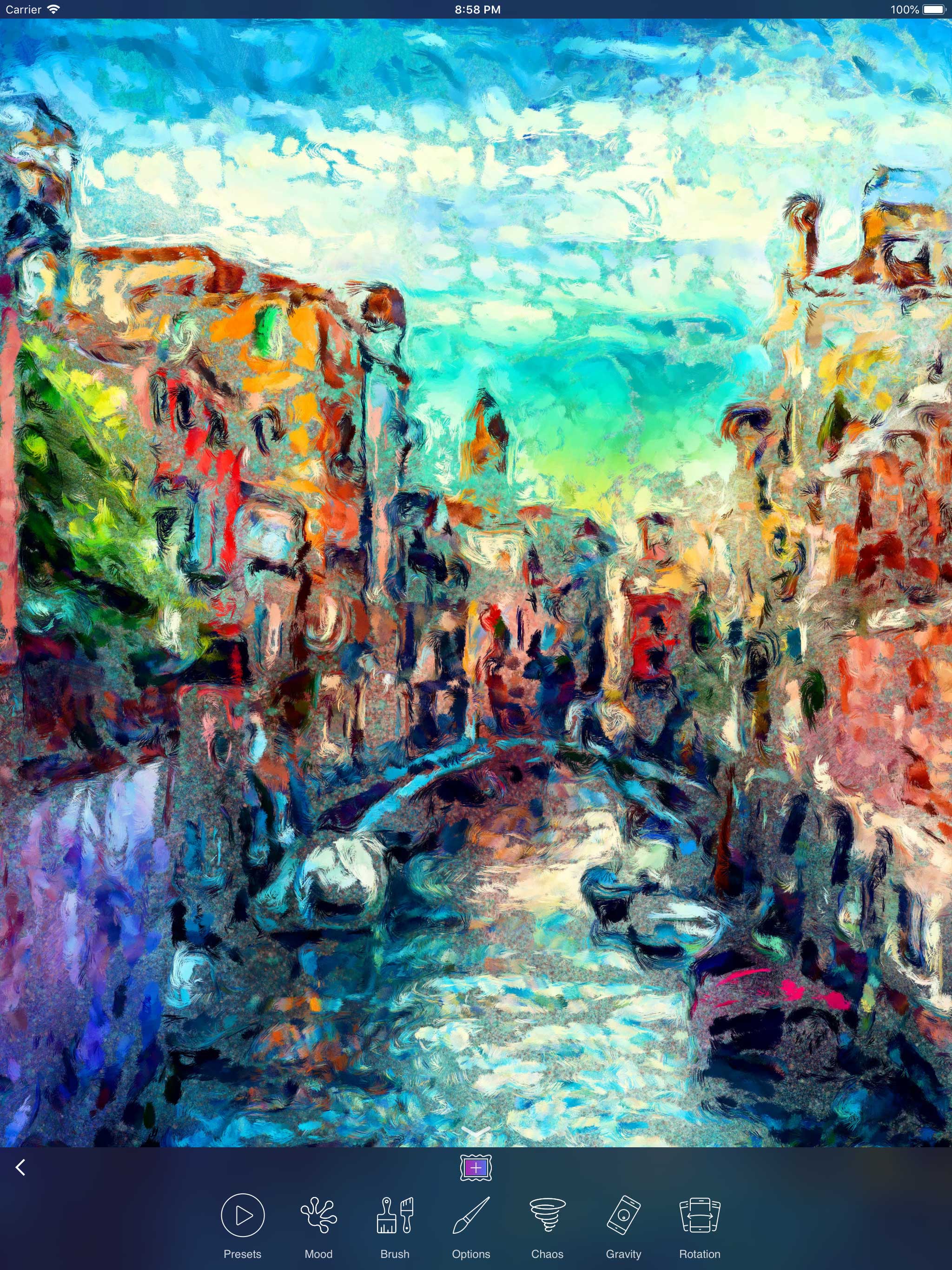
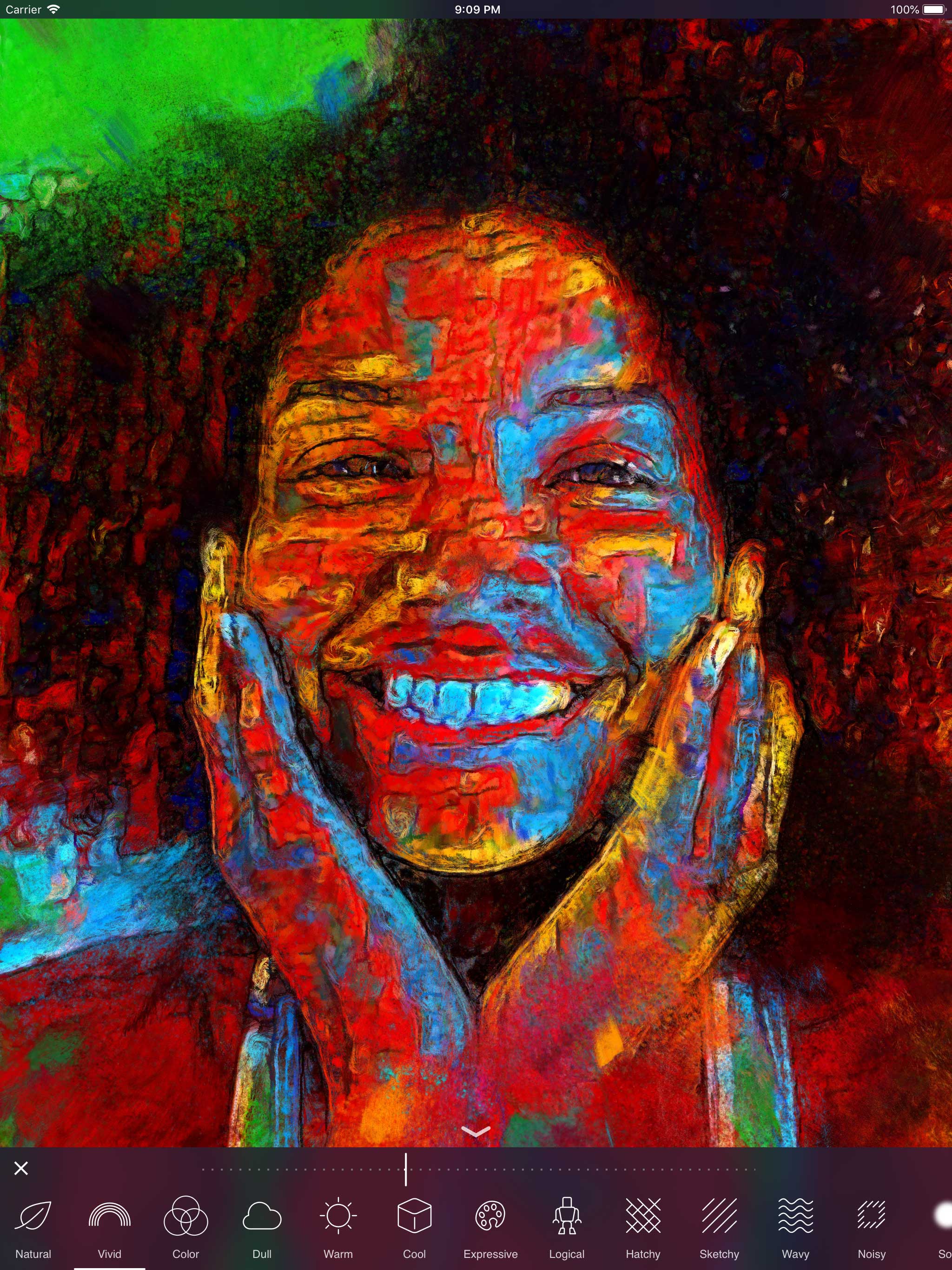
3DTOPO Inc. announces Oilist 2.0, a major update to their acclaimed painting app for iOS devices. Oilist was designed to automatically generate unique and original works of art based on photos supplied by a user. It analyzes the image using computer vision technology, then paints simulated paint particles that are applied with various brush strokes and techniques. Version 2.0 adds 47 styles based on neural networks, each with three user selectable levels of abstraction, and much much more.
Garden Valley, Idaho - After nearly a year of development, 3DTOPO Inc. today announced that the 2.0 version of their acclaimed Oilist is now available on the App Store. Previous versions of Oilist were named as the App Store's App of the Day in over 70 countries; twice.
3DTOPO's Oilist app was designed to automatically generate unique and original works of art based on photos supplied by its user. For the 2.0 version, 3DTOPO reimagined Oilist's generative process; to bring a more faithful simulation of natural painting techniques. Compared to the previous versions, Oilist now has higher resolution brush stroke work, improved brush stroke techniques, a detail brush pass, numerous other paint-specific enhancements and improvements across the app.
Oilist 2.0 adds 47 styles based on neural networks, each with three user selectable levels of abstraction. Each of the neural networks has been trained from different artwork to offer a range of possibilities. 3DTOPO claims that the neural networks add a sense of creativity to the Oilist 2.0's improved painting techniques. In addition to the new neural network-based styles, Oilist includes a photo-realist style, which works similar to previous versions of Oilist.
What were the styles in previous versions of Oilist are now called "Presets" and may be dynamically changed anytime the painting process is unfolding. 3DTOPO claims that the new version adds: live style previews, faster and smoother gameplay while being more energy efficient, overall improved user experience, higher resolution brush strokes, a new detail brush pass, 47 new neural network-based styles, and various other improvements throughout the app.
3DTOPO claims that Oilist is not a photo filter. Since unlike most filter apps, Oilist will never generate the same results twice and is capable of creating from photo-realistic, to impressionistic, to abstract artwork based on the user's photos. Instead of applying a fixed formula to an image as photo filters typically do, Oilist will first analyze the user's image using computer vision technology then it will paint simulated paint particles with various brush strokes and techniques.
Oilist's creator likens it to a video game for generating art, as Jeshua Lacock put it: "Oilist is a ground-breaking app, which allows the user to interact with the creative process as if Oilist is a fast-paced video game. While instead of scoring points, beautiful and original works of art are the reward. I think it is as exciting to watch the new painting evolve in front of you as it is to share the work that it creates."
Device Requirements:
* iPhone, iPad, and iPod touch
* Requires iOS 11.0 or later
* 158.3 MB
Pricing and Availability:
Oilist 2.0 is $2.99 USD (or equivalent amount in other currencies) and available worldwide exclusively through the App Store in the Photo & Video category. Promo codes and example output available upon request. For more information, please contact Jeshua Lacock.
Oilist 2.0: http://3dtopo.com/
Purchase and Download: https://itunes.apple.com/app/oilist/id985497767
Vimeo Video (Preview): https://vimeo.com/279597724
Screenshot 1: http://3DTOPO.com/Oilist2-screenshot1.jpg
Screenshot 2: http://3DTOPO.com/Oilist2-screenshot2.jpg
Screenshot 3: http://3DTOPO.com/Oilist2-screenshot3.jpg
3DTOPO Inc. is a premier iOS developer of world-class apps since 2011. Their ComicBook! app was named Best iPad Photography App of the Year (2011) by Apple. Their Oilist app has been named App of the Day in over 70 countries; twice. All Material and Software (C) Copyright 2018 3DTOPO Inc. All Rights Reserved. Apple, the Apple logo, iPhone, iPod and iPad are registered trademarks of Apple Inc. in the U.S. and/or other countries. Other trademarks and registered trademarks may be the property of their respective owners.
*******
Link To Article: https://prmac.com/release-id-82857.htm
*******
---------------------------------------------------------------------------------
Note that you can alter delivered distributions at any time.
Login to your account on prMac to alter your channel selection, or to opt-out at any time.
3DTOPO releases Oilist 2.0 for iOS - Acclaimed Painting App - Published on 07/12/18
3DTOPO Inc. announces Oilist 2.0, a major update to their acclaimed painting app for iOS devices. Oilist was designed to automatically generate unique and original works of art based on photos supplied by a user. It analyzes the image using computer vision technology, then paints simulated paint particles that are applied with various brush strokes and techniques. Version 2.0 adds 47 styles based on neural networks, each with three user selectable levels of abstraction, and much much more.
Garden Valley, Idaho - After nearly a year of development, 3DTOPO Inc. today announced that the 2.0 version of their acclaimed Oilist is now available on the App Store. Previous versions of Oilist were named as the App Store's App of the Day in over 70 countries; twice.
3DTOPO's Oilist app was designed to automatically generate unique and original works of art based on photos supplied by its user. For the 2.0 version, 3DTOPO reimagined Oilist's generative process; to bring a more faithful simulation of natural painting techniques. Compared to the previous versions, Oilist now has higher resolution brush stroke work, improved brush stroke techniques, a detail brush pass, numerous other paint-specific enhancements and improvements across the app.
Oilist 2.0 adds 47 styles based on neural networks, each with three user selectable levels of abstraction. Each of the neural networks has been trained from different artwork to offer a range of possibilities. 3DTOPO claims that the neural networks add a sense of creativity to the Oilist 2.0's improved painting techniques. In addition to the new neural network-based styles, Oilist includes a photo-realist style, which works similar to previous versions of Oilist.
What were the styles in previous versions of Oilist are now called "Presets" and may be dynamically changed anytime the painting process is unfolding. 3DTOPO claims that the new version adds: live style previews, faster and smoother gameplay while being more energy efficient, overall improved user experience, higher resolution brush strokes, a new detail brush pass, 47 new neural network-based styles, and various other improvements throughout the app.
3DTOPO claims that Oilist is not a photo filter. Since unlike most filter apps, Oilist will never generate the same results twice and is capable of creating from photo-realistic, to impressionistic, to abstract artwork based on the user's photos. Instead of applying a fixed formula to an image as photo filters typically do, Oilist will first analyze the user's image using computer vision technology then it will paint simulated paint particles with various brush strokes and techniques.
Oilist's creator likens it to a video game for generating art, as Jeshua Lacock put it: "Oilist is a ground-breaking app, which allows the user to interact with the creative process as if Oilist is a fast-paced video game. While instead of scoring points, beautiful and original works of art are the reward. I think it is as exciting to watch the new painting evolve in front of you as it is to share the work that it creates."
Device Requirements:
* iPhone, iPad, and iPod touch
* Requires iOS 11.0 or later
* 158.3 MB
Pricing and Availability:
Oilist 2.0 is $2.99 USD (or equivalent amount in other currencies) and available worldwide exclusively through the App Store in the Photo & Video category. Promo codes and example output available upon request. For more information, please contact Jeshua Lacock.
Oilist 2.0: http://3dtopo.com/
Purchase and Download: https://itunes.apple.com/app/oilist/id985497767
Vimeo Video (Preview): https://vimeo.com/279597724
Screenshot 1: http://3DTOPO.com/Oilist2-screenshot1.jpg
Screenshot 2: http://3DTOPO.com/Oilist2-screenshot2.jpg
Screenshot 3: http://3DTOPO.com/Oilist2-screenshot3.jpg

3DTOPO Inc. is a premier iOS developer of world-class apps since 2011. Their ComicBook! app was named Best iPad Photography App of the Year (2011) by Apple. Their Oilist app has been named App of the Day in over 70 countries; twice. All Material and Software (C) Copyright 2018 3DTOPO Inc. All Rights Reserved. Apple, the Apple logo, iPhone, iPod and iPad are registered trademarks of Apple Inc. in the U.S. and/or other countries. Other trademarks and registered trademarks may be the property of their respective owners.
*******
Link To Article: https://prmac.com/release-id-82857.htm
*******
---------------------------------------------------------------------------------
Note that you can alter delivered distributions at any time.
Login to your account on prMac to alter your channel selection, or to opt-out at any time.
Snake Bricks - A Cool Block Breaker, Out on iOS and Android
A new article has been published at prMac.
Snake Bricks - A Cool Block Breaker, Out on iOS and Android - Published on 07/11/18
Global mobile game publisher ZPLAY announces their cool block breaker game - Snake Bricks-Bounce Balls 1.0.1, is available on iOS and Android devices all over the world. Swipe left and right, manipulate the baffle, bounce a snake consisting of small balls, and constantly bounce and hit the bricks. As the bricks fall, try to adjust the angle, collect more balls, let the snake grow longer and break all the bricks.
Beijing, China - Global mobile game publisher ZPLAY is glad to announce that a cool block breaker - Snake Bricks-Bounce Balls 1.0.1, is available on iOS and Android devices all over the world today.
Swipe left and right, manipulate the baffle, bounce a snake consisting of small balls, and constantly bounce and hit the bricks! As the bricks fall, try to adjust the angle, collect more balls, let the snake grow longer and break all the bricks!
How to play:
* Swipe left and right
* Manipulate the baffle
* Bounce and hit the bricks
Game features:
* Swipe to move the bar and bounce the snake.
* Make a longer snake to strengthen attack power.
* Collect various snakes.
* Destroy as many blocks as you can.
Founded in 2010, ZPLAY is a fast growing, global, mobile games publisher, having the solid strength of both experience and industry success. To date, ZPLAY has attracted close to half a billion users, and its products cover more than 100 countries and regions. ZPLAY, along with its developer partners, has enjoyed top 10 rankings in all major markets, including Europe, America, Asia, and the Middle East.
Outstanding games: PopStar, Will Hero, The Little Fox, Beat Racer, BB-TAN, Original Journey, etc.
Device Requirements:
* iPhone, iPad, and iPod touch
* Requires iOS 7.0 or later
* Universal Application
* 159.1 MB
Pricing and Availability:
Snake Bricks-Bounce Balls 1.0.1 is free and is available worldwide through the App Store in the Games category.
Snake Bricks-Bounce Balls 1.0.1: http://zplay.com/
Download from App Store: https://itunes.apple.com/us/app/snake-bricks/id1387863490?l=zh&ls=1&mt=8
Download from Google Play: https://play.google.com/store/apps/details?id=com.zplay.beatracer
Press Kit: https://drive.google.com/drive/folders/1DwlIjfUxIGFERs_xiwMrbb-LNvHb51I8?usp=sharing
YouTube Trailer: https://www.youtube.com/watch?v=0EA8AaboGcc
Founded in 2010, ZPLAY is a fast growing, global, mobile games publisher, having the solid strength of both experience and industry success. To date, ZPLAY has attracted close to half a billion users, and its products cover more than 100 countries and regions. ZPLAY, along with its developer partners, has enjoyed top 10 rankings in all major markets, including Europe, America, Asia, and the Middle East. All Material and Software (C) Copyright 2018 ZPLAY. All Rights Reserved. Apple, the Apple logo, iPhone, iPod and iPad are registered trademarks of Apple Inc. in the U.S. and/or other countries. Other trademarks and registered trademarks may be the property of their respective owners.
*******
Link To Article: https://prmac.com/release-id-82856.htm
*******
---------------------------------------------------------------------------------
Note that you can alter delivered distributions at any time.
Login to your account on prMac to alter your channel selection, or to opt-out at any time.
Snake Bricks - A Cool Block Breaker, Out on iOS and Android - Published on 07/11/18
Global mobile game publisher ZPLAY announces their cool block breaker game - Snake Bricks-Bounce Balls 1.0.1, is available on iOS and Android devices all over the world. Swipe left and right, manipulate the baffle, bounce a snake consisting of small balls, and constantly bounce and hit the bricks. As the bricks fall, try to adjust the angle, collect more balls, let the snake grow longer and break all the bricks.
Beijing, China - Global mobile game publisher ZPLAY is glad to announce that a cool block breaker - Snake Bricks-Bounce Balls 1.0.1, is available on iOS and Android devices all over the world today.
Swipe left and right, manipulate the baffle, bounce a snake consisting of small balls, and constantly bounce and hit the bricks! As the bricks fall, try to adjust the angle, collect more balls, let the snake grow longer and break all the bricks!
How to play:
* Swipe left and right
* Manipulate the baffle
* Bounce and hit the bricks
Game features:
* Swipe to move the bar and bounce the snake.
* Make a longer snake to strengthen attack power.
* Collect various snakes.
* Destroy as many blocks as you can.
Founded in 2010, ZPLAY is a fast growing, global, mobile games publisher, having the solid strength of both experience and industry success. To date, ZPLAY has attracted close to half a billion users, and its products cover more than 100 countries and regions. ZPLAY, along with its developer partners, has enjoyed top 10 rankings in all major markets, including Europe, America, Asia, and the Middle East.
Outstanding games: PopStar, Will Hero, The Little Fox, Beat Racer, BB-TAN, Original Journey, etc.
Device Requirements:
* iPhone, iPad, and iPod touch
* Requires iOS 7.0 or later
* Universal Application
* 159.1 MB
Pricing and Availability:
Snake Bricks-Bounce Balls 1.0.1 is free and is available worldwide through the App Store in the Games category.
Snake Bricks-Bounce Balls 1.0.1: http://zplay.com/
Download from App Store: https://itunes.apple.com/us/app/snake-bricks/id1387863490?l=zh&ls=1&mt=8
Download from Google Play: https://play.google.com/store/apps/details?id=com.zplay.beatracer
Press Kit: https://drive.google.com/drive/folders/1DwlIjfUxIGFERs_xiwMrbb-LNvHb51I8?usp=sharing
YouTube Trailer: https://www.youtube.com/watch?v=0EA8AaboGcc
Founded in 2010, ZPLAY is a fast growing, global, mobile games publisher, having the solid strength of both experience and industry success. To date, ZPLAY has attracted close to half a billion users, and its products cover more than 100 countries and regions. ZPLAY, along with its developer partners, has enjoyed top 10 rankings in all major markets, including Europe, America, Asia, and the Middle East. All Material and Software (C) Copyright 2018 ZPLAY. All Rights Reserved. Apple, the Apple logo, iPhone, iPod and iPad are registered trademarks of Apple Inc. in the U.S. and/or other countries. Other trademarks and registered trademarks may be the property of their respective owners.
*******
Link To Article: https://prmac.com/release-id-82856.htm
*******
---------------------------------------------------------------------------------
Note that you can alter delivered distributions at any time.
Login to your account on prMac to alter your channel selection, or to opt-out at any time.
DriveDx 1.8.1 for Mac will Protect You from Data Loss and Downtime
A new article has been published at prMac.
DriveDx 1.8.1 for Mac will Protect You from Data Loss and Downtime - Published on 07/11/18
BinaryFruit today announces the immediate availability of DriveDx 1.8.1, its latest solution for SSD and HDD health diagnostics and monitoring. As macOS does not have a comprehensive drive health indicator, DriveDx fills a critical role in measuring the overall health of both SSD and HDD drives. Because DriveDx tracks more indicators of impending failure than any other product on the market, users will get an advanced warning before their drives fail.
San Francisco, California - BinaryFruit today is pleased to announce the release and immediate availability of DriveDx 1.8.1, its latest solution for SSD and HDD health diagnostics and monitoring. As macOS does not have a comprehensive drive health indicator, DriveDx fills a critical role in measuring the overall health of both SSD and HDD drives. Because DriveDx tracks more indicators of impending failure than any other product on the market, users will get an advanced warning before their drives fail. This will allow them to take action to avert the failure and save themselves from resulting data loss and downtime.
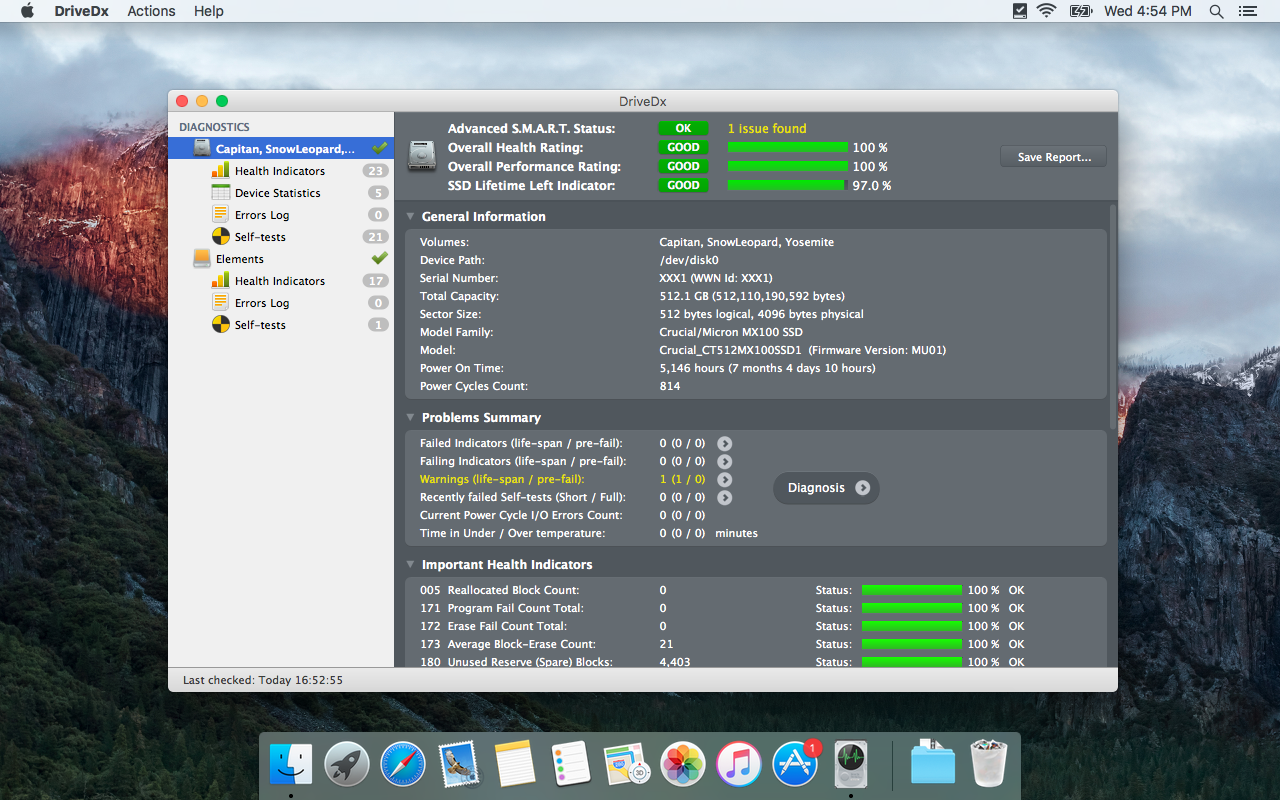
Unlike many other drive health diagnostics utilities that simply check built-in S.M.A.R.T. status, DriveDx performs overall drive health diagnostics using drive health indicators (like SSD wear out / endurance, reallocated bad sectors, offline bad sectors, pending sectors, I/O errors, and more) that most closely correlate with drive failures according to the statistics reported in the latest researches focused on identifying drive failure trends. This gives a user a comprehensive picture of a current drive health status and enables foreseeing potential problems with drive failure and loss of sensitive data. Moreover, DriveDx shows this information on a user-friendly Mac-style interface in an easy-to-understand format.
"Here's a DriveDx triumph. DriveDx showed my just out of AppleCare iMac with two pre-fail conditions for the hard drive. Made appointment and took it to Genius Bar yesterday. Tech looked at DriveDx and was very impressed. Even though out of warranty - they replaced the drive without question," said Michael Sidoric, CapMac User Group Treasurer, ex-Vice President of CapMac.org. "God knows how many dollars and troubles DriveDx saved me since I had several vital FinalCut projects on it."
DriveDx is a combined drive health analysis and forecasting tool. It monitors and analyzes changes to S.M.A.R.T. attributes in order to continuously evaluate drive health status and predict drive failures. In addition to "Failed" and "OK" drive statutes DriveDx supports "Warning" and "Failing" statuses indicating that a drive is in a pre-failure status and backup of sensitive data is highly recommended.
DriveDx performs both SSD and HDD health diagnostics. Moreover, it uses a separate set of indicators for SSD and HDD to monitor drive health status. This is particularly important as SSD works different from HDD, and requires a different algorithm to check its health status. Also, SSDs typically are more dependent on firmware than HDDs, and DriveDx has been programmed to support many versions of firmware (please see our website for a complete list of supported firmware).
DriveDx allows configuring the delivery of customized drive status and free space reports by email and therefore does not require user presence to inform about drive status changes. In addition, DriveDx can launch built-in drive diagnostics self-tests. Drive self-tests will help to quickly identify if the drive is faulty.
DriveDx is the first utility of its kind to have a real user-friendly Mac-style interface. It is organized in a way that allows a user to view and understand drive status and its performance at a glance. User can switch between different view modes to drill up or down data related to drive health, including S.M.A.R.T. indicators and attributes, drive statistics and errors.
What's New in DriveDx 1.8.1:
* Improved SSD and HDD health diagnostic algorithms and heuristics
* Fixed crash when sending email via some SMTP servers (like "smtp.outlook.com") and port 587 when "Use encryption (SSL/TLS)" option is off,
* Improved support of "macOS Purgeable Space" for Disk Free Space Monitoring on macOS High Sierra (10.13).
* Many stability improvements
* Many cosmetics tweaks and fixes
DriveDx feature highlights:
* Support of modern SSDs and HDDs
* SSD lifetime left indicator
* Different routines for SSD and HDD health evaluation and diagnostics
* Real-time SSD & HDD health status monitoring
* User-friendly and intuitive UI
* Multi-tier warning system that will inform the user about deviations from the normal state of drive attributes
* Diagnostic Knowledge Base online auto-updating
* Drive overall health rating
* Drive overall performance rating (if drive supports this subset of indicators)
* Device statistics
* I/O errors monitoring
* Drive free space monitoring
* Support of drive short and full (extended) self-tests
* Sending a warning whenever a problem with a drive firmware exists
* Saving detailed drive status reports to a file
* Warning a user with pop-up notifications about errors and failures
* Displaying drive status on a macOS status bar
* Runs natively on macOS
System Requirements:
* macOS 10.6.8 or newer
Pricing and Availability - DriveDx has 4 types of licenses that are currently being offered on promotion:
* Personal License - $19.99 (USD)
* Family License - $39.99
* Business License - starting from $99.99
* IT-Consultant License - starting from $49.99
DriveDx can be purchased from the BinaryFruit website. A fully functional 15-day trial version is available for download at our website. Review copies are available upon request.
DriveDx 1.8.1: https://binaryfruit.com/drivedx
Download DriveDx: https://binaryfruit.com/download/drivedx/mac/1?ref=pr
Purchase: https://binaryfruit.com/store
Screenshot 1: https://binaryfruit.com/permalink/press-release/drivedx/mac/1_8_1/DriveDx_screenshot_1.png
Screenshot 2: https://binaryfruit.com/permalink/press-release/drivedx/mac/1_8_1/DriveDx_screenshot_2.png
Application Icon: https://binaryfruit.com/permalink/press-release/drivedx/mac/1_8_1/DriveDxIcon512x512.png
BinaryFruit is a team of creative IT professionals developing the most comprehensive and user-friendly macOS tools and solutions. We make fruitful software! Copyright (C) 2012-2018 BinaryFruit. All Rights Reserved. Apple, the Apple logo, macOS are registered trademarks of Apple Inc. in the U.S. and/or other countries.
*******
Link To Article: https://prmac.com/release-id-82855.htm
*******
---------------------------------------------------------------------------------
Note that you can alter delivered distributions at any time.
Login to your account on prMac to alter your channel selection, or to opt-out at any time.
DriveDx 1.8.1 for Mac will Protect You from Data Loss and Downtime - Published on 07/11/18
BinaryFruit today announces the immediate availability of DriveDx 1.8.1, its latest solution for SSD and HDD health diagnostics and monitoring. As macOS does not have a comprehensive drive health indicator, DriveDx fills a critical role in measuring the overall health of both SSD and HDD drives. Because DriveDx tracks more indicators of impending failure than any other product on the market, users will get an advanced warning before their drives fail.
San Francisco, California - BinaryFruit today is pleased to announce the release and immediate availability of DriveDx 1.8.1, its latest solution for SSD and HDD health diagnostics and monitoring. As macOS does not have a comprehensive drive health indicator, DriveDx fills a critical role in measuring the overall health of both SSD and HDD drives. Because DriveDx tracks more indicators of impending failure than any other product on the market, users will get an advanced warning before their drives fail. This will allow them to take action to avert the failure and save themselves from resulting data loss and downtime.
Unlike many other drive health diagnostics utilities that simply check built-in S.M.A.R.T. status, DriveDx performs overall drive health diagnostics using drive health indicators (like SSD wear out / endurance, reallocated bad sectors, offline bad sectors, pending sectors, I/O errors, and more) that most closely correlate with drive failures according to the statistics reported in the latest researches focused on identifying drive failure trends. This gives a user a comprehensive picture of a current drive health status and enables foreseeing potential problems with drive failure and loss of sensitive data. Moreover, DriveDx shows this information on a user-friendly Mac-style interface in an easy-to-understand format.
"Here's a DriveDx triumph. DriveDx showed my just out of AppleCare iMac with two pre-fail conditions for the hard drive. Made appointment and took it to Genius Bar yesterday. Tech looked at DriveDx and was very impressed. Even though out of warranty - they replaced the drive without question," said Michael Sidoric, CapMac User Group Treasurer, ex-Vice President of CapMac.org. "God knows how many dollars and troubles DriveDx saved me since I had several vital FinalCut projects on it."
DriveDx is a combined drive health analysis and forecasting tool. It monitors and analyzes changes to S.M.A.R.T. attributes in order to continuously evaluate drive health status and predict drive failures. In addition to "Failed" and "OK" drive statutes DriveDx supports "Warning" and "Failing" statuses indicating that a drive is in a pre-failure status and backup of sensitive data is highly recommended.
DriveDx performs both SSD and HDD health diagnostics. Moreover, it uses a separate set of indicators for SSD and HDD to monitor drive health status. This is particularly important as SSD works different from HDD, and requires a different algorithm to check its health status. Also, SSDs typically are more dependent on firmware than HDDs, and DriveDx has been programmed to support many versions of firmware (please see our website for a complete list of supported firmware).
DriveDx allows configuring the delivery of customized drive status and free space reports by email and therefore does not require user presence to inform about drive status changes. In addition, DriveDx can launch built-in drive diagnostics self-tests. Drive self-tests will help to quickly identify if the drive is faulty.
DriveDx is the first utility of its kind to have a real user-friendly Mac-style interface. It is organized in a way that allows a user to view and understand drive status and its performance at a glance. User can switch between different view modes to drill up or down data related to drive health, including S.M.A.R.T. indicators and attributes, drive statistics and errors.
What's New in DriveDx 1.8.1:
* Improved SSD and HDD health diagnostic algorithms and heuristics
* Fixed crash when sending email via some SMTP servers (like "smtp.outlook.com") and port 587 when "Use encryption (SSL/TLS)" option is off,
* Improved support of "macOS Purgeable Space" for Disk Free Space Monitoring on macOS High Sierra (10.13).
* Many stability improvements
* Many cosmetics tweaks and fixes
DriveDx feature highlights:
* Support of modern SSDs and HDDs
* SSD lifetime left indicator
* Different routines for SSD and HDD health evaluation and diagnostics
* Real-time SSD & HDD health status monitoring
* User-friendly and intuitive UI
* Multi-tier warning system that will inform the user about deviations from the normal state of drive attributes
* Diagnostic Knowledge Base online auto-updating
* Drive overall health rating
* Drive overall performance rating (if drive supports this subset of indicators)
* Device statistics
* I/O errors monitoring
* Drive free space monitoring
* Support of drive short and full (extended) self-tests
* Sending a warning whenever a problem with a drive firmware exists
* Saving detailed drive status reports to a file
* Warning a user with pop-up notifications about errors and failures
* Displaying drive status on a macOS status bar
* Runs natively on macOS
System Requirements:
* macOS 10.6.8 or newer
Pricing and Availability - DriveDx has 4 types of licenses that are currently being offered on promotion:
* Personal License - $19.99 (USD)
* Family License - $39.99
* Business License - starting from $99.99
* IT-Consultant License - starting from $49.99
DriveDx can be purchased from the BinaryFruit website. A fully functional 15-day trial version is available for download at our website. Review copies are available upon request.
DriveDx 1.8.1: https://binaryfruit.com/drivedx
Download DriveDx: https://binaryfruit.com/download/drivedx/mac/1?ref=pr
Purchase: https://binaryfruit.com/store
Screenshot 1: https://binaryfruit.com/permalink/press-release/drivedx/mac/1_8_1/DriveDx_screenshot_1.png
Screenshot 2: https://binaryfruit.com/permalink/press-release/drivedx/mac/1_8_1/DriveDx_screenshot_2.png

Application Icon: https://binaryfruit.com/permalink/press-release/drivedx/mac/1_8_1/DriveDxIcon512x512.png

BinaryFruit is a team of creative IT professionals developing the most comprehensive and user-friendly macOS tools and solutions. We make fruitful software! Copyright (C) 2012-2018 BinaryFruit. All Rights Reserved. Apple, the Apple logo, macOS are registered trademarks of Apple Inc. in the U.S. and/or other countries.
*******
Link To Article: https://prmac.com/release-id-82855.htm
*******
---------------------------------------------------------------------------------
Note that you can alter delivered distributions at any time.
Login to your account on prMac to alter your channel selection, or to opt-out at any time.
Output Factory Server for InDesign Now Can Save Page Groups as PDF Files
A new article has been published at prMac.
Output Factory Server for InDesign Now Can Save Page Groups as PDF Files - Published on 07/11/18
Zevrix Solutions announces Output Factory Server 2.18, a feature update to company's output automation solution for Adobe InDesign. Output Factory Server automates printing and exporting from InDesign by processing files from hot folders. The software offers layer versioning, preflighting, PDF security presets and much more. The new version lets users export specific InDesign page sequences as single PDF files (for example, every 2 pages, 3 pages etc.), and improves processing IDML files.
Toronto (ON), Canada - Zevrix Solutions today announces the release of Output Factory Server 2.18, a feature update to company's output automation tool for Adobe InDesign. Output Factory Server automates InDesign production workflow by processing files from watched hot folders. The software offloads printing and exporting from InDesign to a central system leaving operator workstations free from the output process.
The new version adds the ability to export every n pages of InDesign document as single PDF files (for example, every 2 pages, 3 pages etc.) The specified groups of pages can also be exported as spreads if the Spreads option is checked in the selected PDF export preset. This time saving feature was in high demand by InDesign users. Output Factory is now the only tool on the market that provides customers with multi-page sequential export to single PDF files. The update also addresses an issue in which the IDML file extension was not removed from the resulting output files
Output Factory Server is intended to run on a dedicated machine and support unlimited users on a network via watched hot folders. Users can create hot folders for different output targets such as hi-res PDF, large format printing, Flash files and so on. The app offers the following key features:
* Output InDesign files automatically from hot folders
* Supports print, PDF, PostScript, TIFF, EPUB and other formats
* Output to multiple formats from a single hot folder
* Automatic email notifications on errors and other events
* Layer versioning
* Variable output file names
* Automatic preflighting
* PDF security presets for different workflows
Pricing and Availability:
Output Factory Server can be purchased from Zevrix web site for $699.95 (USD), as well as from authorized resellers. Trial is also available for download. The upgrade to version 2 is $350 for the licensed users of Output Factory Server 1.x and BatchOutput Server. Output Factory Server requires macOS 10.7-10.13 and Adobe InDesign CS5-CC 2018.
Zevrix Solutions: http://zevrix.com
Output Factory Server 2.18: http://zevrix.com/OutputFactoryServer.php
Download Output Factory Server: http://zevrix.com/OutputFactoryServer.dmg
Purchase: http://zevrix.com/store.php
Screenshot: http://zevrix.com/screenshots/ofs2/ofs-main-pdf.jpg
Located in Toronto, Canada, Zevrix Solutions provides automation and productivity solutions for Adobe Creative Cloud and Creative Suite software, PDF workflows, graphic file diagnostics and Microsoft Office output on Mac OS. Zevrix is dedicated to help professionals increase their profits through automating everyday tasks, producing error-free documents, saving disk space and cutting production costs. For more information, visit their website. Copyright (C) 2018 Zevrix Solutions. All Rights Reserved. Other trademarks and registered trademarks may be the property of their respective owners.
*******
Link To Article: https://prmac.com/release-id-82854.htm
*******
---------------------------------------------------------------------------------
Note that you can alter delivered distributions at any time.
Login to your account on prMac to alter your channel selection, or to opt-out at any time.
Output Factory Server for InDesign Now Can Save Page Groups as PDF Files - Published on 07/11/18
Zevrix Solutions announces Output Factory Server 2.18, a feature update to company's output automation solution for Adobe InDesign. Output Factory Server automates printing and exporting from InDesign by processing files from hot folders. The software offers layer versioning, preflighting, PDF security presets and much more. The new version lets users export specific InDesign page sequences as single PDF files (for example, every 2 pages, 3 pages etc.), and improves processing IDML files.
Toronto (ON), Canada - Zevrix Solutions today announces the release of Output Factory Server 2.18, a feature update to company's output automation tool for Adobe InDesign. Output Factory Server automates InDesign production workflow by processing files from watched hot folders. The software offloads printing and exporting from InDesign to a central system leaving operator workstations free from the output process.
The new version adds the ability to export every n pages of InDesign document as single PDF files (for example, every 2 pages, 3 pages etc.) The specified groups of pages can also be exported as spreads if the Spreads option is checked in the selected PDF export preset. This time saving feature was in high demand by InDesign users. Output Factory is now the only tool on the market that provides customers with multi-page sequential export to single PDF files. The update also addresses an issue in which the IDML file extension was not removed from the resulting output files
Output Factory Server is intended to run on a dedicated machine and support unlimited users on a network via watched hot folders. Users can create hot folders for different output targets such as hi-res PDF, large format printing, Flash files and so on. The app offers the following key features:
* Output InDesign files automatically from hot folders
* Supports print, PDF, PostScript, TIFF, EPUB and other formats
* Output to multiple formats from a single hot folder
* Automatic email notifications on errors and other events
* Layer versioning
* Variable output file names
* Automatic preflighting
* PDF security presets for different workflows
Pricing and Availability:
Output Factory Server can be purchased from Zevrix web site for $699.95 (USD), as well as from authorized resellers. Trial is also available for download. The upgrade to version 2 is $350 for the licensed users of Output Factory Server 1.x and BatchOutput Server. Output Factory Server requires macOS 10.7-10.13 and Adobe InDesign CS5-CC 2018.
Zevrix Solutions: http://zevrix.com
Output Factory Server 2.18: http://zevrix.com/OutputFactoryServer.php
Download Output Factory Server: http://zevrix.com/OutputFactoryServer.dmg
Purchase: http://zevrix.com/store.php
Screenshot: http://zevrix.com/screenshots/ofs2/ofs-main-pdf.jpg

Located in Toronto, Canada, Zevrix Solutions provides automation and productivity solutions for Adobe Creative Cloud and Creative Suite software, PDF workflows, graphic file diagnostics and Microsoft Office output on Mac OS. Zevrix is dedicated to help professionals increase their profits through automating everyday tasks, producing error-free documents, saving disk space and cutting production costs. For more information, visit their website. Copyright (C) 2018 Zevrix Solutions. All Rights Reserved. Other trademarks and registered trademarks may be the property of their respective owners.
*******
Link To Article: https://prmac.com/release-id-82854.htm
*******
---------------------------------------------------------------------------------
Note that you can alter delivered distributions at any time.
Login to your account on prMac to alter your channel selection, or to opt-out at any time.
Subscribe to:
Posts (Atom)