A new article has been published at prMac.
Mac Shutdown is the Modern macOS Application to Shutdown Your Mac - Published on 07/21/18
Tension Software announces Mac Shutdown for macOS, which is able to use 'Soft Shutdown' and 'Hard Shutdown' to shutdown your Mac. The 'Soft Shutdown' is issued at finder level and ask to all the running app to quit before shut down the Mac. The 'Hard shutdown' is issued at system level and offer a very low level of probability of having the shut down interrupted by an app refusing to quit.
Milano, Italy - Tension Software is proud to announce the release and immediate availability of Mac Shutdown 4.1, the modern macOS application to shutdown the Mac when unattended under different conditions.
Mac Shutdown is able to use 'Soft Shutdown' and 'Hard Shutdown' to shutdown your Mac. The 'Soft Shutdown' is issued at finder level and ask to all the running app to quit before shut down the Mac. The 'Hard shutdown' is issued at system level and offer a very low level of probability of having the shut down interrupted by an app refusing to quit.
The 'Hard Shutdown' feature from release 4 of Mac Shutdown, uses the latest Apple XPC technology (the recommended way now by Apple, secure and digitally signed, to escalate admin privileges) to provide admin right actions. It allows to shutdown your Mac in a secure way, just providing admin right one time only at installation.
From version 4 Mac Shutdown can now work also as a status menu only application, always available from the menu also when in background and without showing any window to just silently waiting in the background.
Mac Shutdown can provide what others tools can't. Just an example: it can help a user start a download of big files over the net in the night and have the Mac automatically turned off when the download is finished.
Mac Shutdown is customizable using an easy to use setting setup panel (no coding or editing of script required). It's small, fast, simple and reliable and now more stable then ever and fully complaint with the latest OS X 10.10 Yosemite and is fully optimized for use with OS X 10.13 High Sierra.
Mac Shutdown is fully customizable. The user can choose to shutdown the Mac:
* On a scheduled plan
* On a specific date and time
* When a generic file is removed or moved on your Hard Disk
* When a download is finished: using Safari using Firefox or Camino or Netscape using Speed Download
* At launch time to use it via Apple iCal
* When a keyword is found inside a continuously checked web wage
* Using the scheduled plan the user can set any repetitive interval, selecting a time and a day of the week or any day or any weekday and so on. With the 'On date' option the user can specify the preferred date and time.
The user can select to have the settings always enabled or to disable them after a shutdown ... and more.
New in this release:
* Improved management of the Status Menu only functionality
* More commands in the status menu
* Improved layout
* Various optimization
* Various bug fix
System Requirements:
* macOS Version 10.10 (Yosemite) or higher
* Optimized for macOS 10.13 High Sierra
Pricing and Availability:
Mac Shutdown 4.1 is just $12.00 USD (or an equivalent amount in other currencies) and is available worldwide exclusively from the Tension Software website.
Tension Software: http://www.tensionsoftware.com
Mac Shutdown 4.1: http://www.tensionsoftware.com/osx/macshutdown/
Direct Download Link: http://dwn.tensionsoftware.com/osx/macshutdown/macshutdown.dmg
Tension Software develops software for macOS and iOS using the latest Apple technologies. Other brands and products referenced herein are the trademarks or registered trademarks of their respective holders. All Material and Software (C) Copyright 2018 Tension Software. All Rights Reserved. Apple, the Apple logo, Macintosh Mac OS X and macOS are registered trademarks of Apple Inc. in the U.S. and/or other countries. Other trademarks and registered trademarks may be the property of their respective owners.
*******
Link To Article: https://prmac.com/release-id-82880.htm
*******
---------------------------------------------------------------------------------
Note that you can alter delivered distributions at any time.
Login to your account on prMac to alter your channel selection, or to opt-out at any time.

AutoMailer to Send Serialised Emails on macOS
A new article has been published at prMac.
AutoMailer to Send Serialised Emails on macOS - Published on 07/20/18
Tension Software announces AutoMailer 2.6 for macOS, which allows users to prepare and send personalized emails to multiple unlimited addresses, in text or web format, each merged with data from an internal database. All in a single click, each with custom contents depending of each recipient. AutoMailer is document based and allows to use as many documents you need to manage all the different list and required emails.
Milano, Italy - AutoMailer 2.6 for macOS allows to prepare and send personalised emails to multiple unlimited addresses, in text or web format, each merged with data from an internal database. All in a single click, each with custom contents depending of each recipient.
Emails sent by AutoMailer are standard emails. People receiving the emails will not notice any difference compared to standard emails and they will be able to reply to them as usually.
AutoMailer is document based and allows to use as many documents you need to manage all the different list and required emails. AutoMailer is a flexible tools to manage your mailing list directly from your Mac.
AutoMailer is able to import from external sources in a smart and simply way. The user can import addresses and any kind of data from any database able to export in text format, both CSV (comma separated value),TSV (Tab separated value), CSV-S (Char separated Value using semicolon). The application is able to automatically detect during imports, the data type and the file encode method to provide imports of data without any problems
Data imported into any AutoMailer document are managed in an easy to use, table. Data can be modified, updated and enlarged with new additional data at any time. Various commands provide manipulation of internal records in a fast and intuitive way.
You can also maintain for each document an 'Except' list of address, that will never be used to send, to be sure to never send to those 'black listed people' also if they are addend in the recipient list.
The template email used to merge the email with data, can be written both in text or in html to send emails in text or web format (also including pictures linked from a support server hosting them, to create truly professional results).
AutoMailer provides for html emails, at any time, a live preview or the email the user is composing. Emails can be previewed also for any address the user want to send to, with all the data merged for any of those users, simply selecting it from a list.
All the emails can be prepared or sent with a single command, with the capability to send them via an email server, one by one, specifying an interval time between each sending. The application can prepare all the emails using the Mail.app installed on any Mac and then manually send them or sending directly all them with a single command (as a standard email client) via an email server you have access to.
* AutoMailer can auto-prepare via Mail.app and you have to manually press the send button inside Mail.app.
* The app can auto-send accessing directly your Mail server, without the use of Apple Mail.app
* It can send via standard BSDM/Linux mail server (example: sendmail or postfix)
* It can send via your gMail account
AutoMailer has a renewed improved mail server connect function (PLAIN, STARTTLS, TLS) and can test your connection (without sending) to better set it up. You can save an unlimited number of connection settings and use more then one pre-defined server.
Settings, data and email templates are saved inside documents, ready to be reused at later time reopening the documents. The user can prepare email templates inserting content of the database table using a simple syntax (a popup offers all the available field tags to access tabled data, without having to type them).
Any table is searchable using a search field at the top of them.
AutoMailer provides a lot of additional functionalities to help the user do his job in the best way, they are too much to list all. Further, one of the goal of AutoMailer is to be easy of use. Anyone with a minimum of familiarity with the Mac will be able to use AutoMailer at best efficiency using all the potentiality of the app in a very intuitive way.
* You can use the download version at our site to check if it can work with your smtp mail server
Features:
* Document based, allows to save data and setting and have them ready for successive uses
* Can create and send both text or web (html) emails
* Possibility to manage an infinite number of data and letter template thanks to the document based approach with maximum flexibility of use.
* Big emphases on simplicity and easy of use.
* Elimination of duplicated and invalid emails.
* Extreme easy to import, create and manipulate data to use for merge with letter template
* Imports form various encoding format from Unix, mac, Windows
* Import from Tab separated values, Comma separated values, semicolon separated values
* Table view with possibility to add, delete rows (records) and columns (fields) at any time and to edit in place inside the table
* Easy import with automatic detection of format and with selection of data source elements and destination (data fields) and browsing of source data in advance (before importing)
* Very simple creation of email templates with keywords insertion to put database data inside the emails for any email recipient
* Automatically updated popup to insert data tags inside the email template
* Emails with attachments
* Live preview for any email to send with updated data (you see the email as the recipient will see it) both for text and html emails
* Can send a single email, a subset or all the emails
* Can just prepare the email, to send them at later time manually from inside Mail.app
* Can use and send directly via an external mail server
* Can manage an unlimited number of server
* Store your server passwords encrypted
* Log monitoring of email preparation and sending
* Any area benefits of search features on the contained data
* PDF user guide inside the app.
What's new:
* Improved information about emails sending, sent and remaining to send emails, estimation time to finish.
* Live update of data also during sending, modifying the interval to send.
* Various bug fixes
* Minor improvements
System Requirements:
* macOS
* 8.9 MB
Pricing and Availability:
AutoMailer 2.6 is only $49.99 and is available worldwide through the Mac App Store in the Productivity category.
Tension Software: http://www.tensionsoftware.com
AutoMailer 2 Version 2.6: http://www.tensionsoftware.com/osx/automailer/
Download Link: http://sec.tensionsoftware.com/osx/automailer/automailer.dmg
Purchase and Download from Mac App Store: https://itunes.apple.com/app/automailer-2/id731968271
Tension Software develops software for macOS and iOS using the latest Apple technologies. Other brands and products referenced herein are the trademarks or registered trademarks of their respective holders. All Material and Software (C) Copyright 2018 Tension Software. All Rights Reserved. Apple, the Apple logo, Macintosh Mac OS X and macOS are registered trademarks of Apple Inc. in the U.S. and/or other countries. Other trademarks and registered trademarks may be the property of their respective owners.
*******
Link To Article: https://prmac.com/release-id-82879.htm
*******
---------------------------------------------------------------------------------
Note that you can alter delivered distributions at any time.
Login to your account on prMac to alter your channel selection, or to opt-out at any time.
AutoMailer to Send Serialised Emails on macOS - Published on 07/20/18
Tension Software announces AutoMailer 2.6 for macOS, which allows users to prepare and send personalized emails to multiple unlimited addresses, in text or web format, each merged with data from an internal database. All in a single click, each with custom contents depending of each recipient. AutoMailer is document based and allows to use as many documents you need to manage all the different list and required emails.
Milano, Italy - AutoMailer 2.6 for macOS allows to prepare and send personalised emails to multiple unlimited addresses, in text or web format, each merged with data from an internal database. All in a single click, each with custom contents depending of each recipient.
Emails sent by AutoMailer are standard emails. People receiving the emails will not notice any difference compared to standard emails and they will be able to reply to them as usually.
AutoMailer is document based and allows to use as many documents you need to manage all the different list and required emails. AutoMailer is a flexible tools to manage your mailing list directly from your Mac.
AutoMailer is able to import from external sources in a smart and simply way. The user can import addresses and any kind of data from any database able to export in text format, both CSV (comma separated value),TSV (Tab separated value), CSV-S (Char separated Value using semicolon). The application is able to automatically detect during imports, the data type and the file encode method to provide imports of data without any problems
Data imported into any AutoMailer document are managed in an easy to use, table. Data can be modified, updated and enlarged with new additional data at any time. Various commands provide manipulation of internal records in a fast and intuitive way.
You can also maintain for each document an 'Except' list of address, that will never be used to send, to be sure to never send to those 'black listed people' also if they are addend in the recipient list.
The template email used to merge the email with data, can be written both in text or in html to send emails in text or web format (also including pictures linked from a support server hosting them, to create truly professional results).
AutoMailer provides for html emails, at any time, a live preview or the email the user is composing. Emails can be previewed also for any address the user want to send to, with all the data merged for any of those users, simply selecting it from a list.
All the emails can be prepared or sent with a single command, with the capability to send them via an email server, one by one, specifying an interval time between each sending. The application can prepare all the emails using the Mail.app installed on any Mac and then manually send them or sending directly all them with a single command (as a standard email client) via an email server you have access to.
* AutoMailer can auto-prepare via Mail.app and you have to manually press the send button inside Mail.app.
* The app can auto-send accessing directly your Mail server, without the use of Apple Mail.app
* It can send via standard BSDM/Linux mail server (example: sendmail or postfix)
* It can send via your gMail account
AutoMailer has a renewed improved mail server connect function (PLAIN, STARTTLS, TLS) and can test your connection (without sending) to better set it up. You can save an unlimited number of connection settings and use more then one pre-defined server.
Settings, data and email templates are saved inside documents, ready to be reused at later time reopening the documents. The user can prepare email templates inserting content of the database table using a simple syntax (a popup offers all the available field tags to access tabled data, without having to type them).
Any table is searchable using a search field at the top of them.
AutoMailer provides a lot of additional functionalities to help the user do his job in the best way, they are too much to list all. Further, one of the goal of AutoMailer is to be easy of use. Anyone with a minimum of familiarity with the Mac will be able to use AutoMailer at best efficiency using all the potentiality of the app in a very intuitive way.
* You can use the download version at our site to check if it can work with your smtp mail server
Features:
* Document based, allows to save data and setting and have them ready for successive uses
* Can create and send both text or web (html) emails
* Possibility to manage an infinite number of data and letter template thanks to the document based approach with maximum flexibility of use.
* Big emphases on simplicity and easy of use.
* Elimination of duplicated and invalid emails.
* Extreme easy to import, create and manipulate data to use for merge with letter template
* Imports form various encoding format from Unix, mac, Windows
* Import from Tab separated values, Comma separated values, semicolon separated values
* Table view with possibility to add, delete rows (records) and columns (fields) at any time and to edit in place inside the table
* Easy import with automatic detection of format and with selection of data source elements and destination (data fields) and browsing of source data in advance (before importing)
* Very simple creation of email templates with keywords insertion to put database data inside the emails for any email recipient
* Automatically updated popup to insert data tags inside the email template
* Emails with attachments
* Live preview for any email to send with updated data (you see the email as the recipient will see it) both for text and html emails
* Can send a single email, a subset or all the emails
* Can just prepare the email, to send them at later time manually from inside Mail.app
* Can use and send directly via an external mail server
* Can manage an unlimited number of server
* Store your server passwords encrypted
* Log monitoring of email preparation and sending
* Any area benefits of search features on the contained data
* PDF user guide inside the app.
What's new:
* Improved information about emails sending, sent and remaining to send emails, estimation time to finish.
* Live update of data also during sending, modifying the interval to send.
* Various bug fixes
* Minor improvements
System Requirements:
* macOS
* 8.9 MB
Pricing and Availability:
AutoMailer 2.6 is only $49.99 and is available worldwide through the Mac App Store in the Productivity category.
Tension Software: http://www.tensionsoftware.com
AutoMailer 2 Version 2.6: http://www.tensionsoftware.com/osx/automailer/
Download Link: http://sec.tensionsoftware.com/osx/automailer/automailer.dmg
Purchase and Download from Mac App Store: https://itunes.apple.com/app/automailer-2/id731968271
Tension Software develops software for macOS and iOS using the latest Apple technologies. Other brands and products referenced herein are the trademarks or registered trademarks of their respective holders. All Material and Software (C) Copyright 2018 Tension Software. All Rights Reserved. Apple, the Apple logo, Macintosh Mac OS X and macOS are registered trademarks of Apple Inc. in the U.S. and/or other countries. Other trademarks and registered trademarks may be the property of their respective owners.
*******
Link To Article: https://prmac.com/release-id-82879.htm
*******
---------------------------------------------------------------------------------
Note that you can alter delivered distributions at any time.
Login to your account on prMac to alter your channel selection, or to opt-out at any time.
Tropical Software contributes copies of TopXNotes to Macstock attendees
A new article has been published at prMac.
Tropical Software contributes copies of TopXNotes to Macstock attendees - Published on 07/20/18
Florida based Tropical Software today announces copies of TopXnotes, their award-winning, full-featured personal information manager for macOS to attendees of the midwest Macworld replacement meeting Macstock.. Use TopXNotes to import all your notes and organize them in one place with the option to password protect and encrypt sensitive information. We encourage you to attend the Macstock meeting this weekend.
Atlantic Beach, Florida - Florida based Tropical Software today announces copies of TopXnotes, their award-winning, full-featured personal information manager for macOS to attendees of the midwest Macworld replacement meeting Macstock.
We miss Macworld and wanted to help the new midwest Macworld replacement meeting Macstock succeed. So we are offering free copies of our award-winning, full-featured personal information manager for macOS to attendees of the midwest Macworld replacement meeting Macstock. We encourage you to attend the Macstock meeting this weekend and support the the midwest Macworld replacement meeting.
Get Organized with TopXNotes:
Tired of all those loose bits of information spread all over your hard drive in multiple documents requiring opening multiple apps to see them? Opening many apps sucks up your valuable Mac memory and slows it down. Are you tired of trying to remember which note was written in which application and where you put it? Use TopXNotes to import all your notes and organize them in one place with the option to password protect and encrypt sensitive information.
TopXNotes - Reviews:
TopXNotes was awarded 4 out of 5 mice by Macworld magazine in their "Summer of Mac Gems" series of reviews, by Macworld Australia, and later by Macworld UK. TopXNotes was rated "9 of 10" by Macsimum News (now part of MacTech), and highly rated by the Macintosh Guild, Macworld, Macworld UK and Mac360. Dennis Sellers rated it 10 of 10 for Apple Daily Report. TopXNotes has been critically reviewed with high marks on many occasions and you can find links to all the reviews on our website.
TopXNotes - Macworld Review:
Macworld praised the TopXNotes "clean, single window interface that puts controls for highlighting and marking up your text right at your fingertips," as well as for its "killer" QuickNotes feature.
TopXNotes - Mac User Group Review:
Sue Beal, president of the Upper Keys (Florida) Macintosh Users Group called TopXNotes "Inexpensive, unobtrusive, and just plain handy."
TopXNotes - Mac360:
Ron Mc Elfresh, of Mac360 stated: "I'm a notes freak. I have notes on everything. From to-do items to code snippets to tasks and projects to article ideas. Here's an understated, unloved, deceptively powerful notes app worthy of some Mac love...it's loaded with user features that set it apart from other note taking apps. TopXNotes is deceptively powerful and flexible, probably because the interface is immediately familiar."
Pricing and Availability:
Try Tropical's reliable TopXNotes 1.8.5 to "get organized" today! TopXNotes 1.8.5 is available for $39.95 (USD) from the Tropical Software web site, the Apple Mac App store, Amazon, and other select Macintosh software resellers. TopXNotes 1.8.5 is a free update to customers who have already purchased version 1.5 or later. Existing customers with an older version (previous to 1.5) can upgrade to version 1.8.5 for only $19.95 from the company's web site.
TopXNotes: http://www.tropic4.com/topxnotes.html
Macstock: https://macstockconferenceandexpo.com
Download Free Trial (zip): http://www.tropic4.com/download/TopXNotes.zip
Purchase: http://sites.fastspring.com/tropic4/product/TopXNotes
TopXNotes Reviews: http://www.tropic4.com/products/topxnotes/reviews.html
Application Icon: http://www.tropic4.com/images/GetOrganizedNoReflect.png
Tropical Software makes the award-winning TopXNotes, a modern personal note manager with state of the art proprietary encryption technology for the ultimate in securing personal information. Located in Atlantic Beach, Florida, Tropical Software is owned and operated by former Apple employee James Lee, and is dedicated to improving the lives of its customers by offering easy to use productivity software for Macs and Apple touch devices including iPhone, iPod touch and iPad. Copyright (C) 2018 Tropical Software. All Rights Reserved. Apple, the Apple logo, iPhone, iPod, iPad and Macintosh are registered trademarks of Apple Inc. in the U.S. and/or other countries.
*******
Link To Article: https://prmac.com/release-id-82878.htm
*******
---------------------------------------------------------------------------------
Note that you can alter delivered distributions at any time.
Login to your account on prMac to alter your channel selection, or to opt-out at any time.
Tropical Software contributes copies of TopXNotes to Macstock attendees - Published on 07/20/18
Florida based Tropical Software today announces copies of TopXnotes, their award-winning, full-featured personal information manager for macOS to attendees of the midwest Macworld replacement meeting Macstock.. Use TopXNotes to import all your notes and organize them in one place with the option to password protect and encrypt sensitive information. We encourage you to attend the Macstock meeting this weekend.
Atlantic Beach, Florida - Florida based Tropical Software today announces copies of TopXnotes, their award-winning, full-featured personal information manager for macOS to attendees of the midwest Macworld replacement meeting Macstock.
We miss Macworld and wanted to help the new midwest Macworld replacement meeting Macstock succeed. So we are offering free copies of our award-winning, full-featured personal information manager for macOS to attendees of the midwest Macworld replacement meeting Macstock. We encourage you to attend the Macstock meeting this weekend and support the the midwest Macworld replacement meeting.
Get Organized with TopXNotes:
Tired of all those loose bits of information spread all over your hard drive in multiple documents requiring opening multiple apps to see them? Opening many apps sucks up your valuable Mac memory and slows it down. Are you tired of trying to remember which note was written in which application and where you put it? Use TopXNotes to import all your notes and organize them in one place with the option to password protect and encrypt sensitive information.
TopXNotes - Reviews:
TopXNotes was awarded 4 out of 5 mice by Macworld magazine in their "Summer of Mac Gems" series of reviews, by Macworld Australia, and later by Macworld UK. TopXNotes was rated "9 of 10" by Macsimum News (now part of MacTech), and highly rated by the Macintosh Guild, Macworld, Macworld UK and Mac360. Dennis Sellers rated it 10 of 10 for Apple Daily Report. TopXNotes has been critically reviewed with high marks on many occasions and you can find links to all the reviews on our website.
TopXNotes - Macworld Review:
Macworld praised the TopXNotes "clean, single window interface that puts controls for highlighting and marking up your text right at your fingertips," as well as for its "killer" QuickNotes feature.
TopXNotes - Mac User Group Review:
Sue Beal, president of the Upper Keys (Florida) Macintosh Users Group called TopXNotes "Inexpensive, unobtrusive, and just plain handy."
TopXNotes - Mac360:
Ron Mc Elfresh, of Mac360 stated: "I'm a notes freak. I have notes on everything. From to-do items to code snippets to tasks and projects to article ideas. Here's an understated, unloved, deceptively powerful notes app worthy of some Mac love...it's loaded with user features that set it apart from other note taking apps. TopXNotes is deceptively powerful and flexible, probably because the interface is immediately familiar."
Pricing and Availability:
Try Tropical's reliable TopXNotes 1.8.5 to "get organized" today! TopXNotes 1.8.5 is available for $39.95 (USD) from the Tropical Software web site, the Apple Mac App store, Amazon, and other select Macintosh software resellers. TopXNotes 1.8.5 is a free update to customers who have already purchased version 1.5 or later. Existing customers with an older version (previous to 1.5) can upgrade to version 1.8.5 for only $19.95 from the company's web site.
TopXNotes: http://www.tropic4.com/topxnotes.html
Macstock: https://macstockconferenceandexpo.com
Download Free Trial (zip): http://www.tropic4.com/download/TopXNotes.zip
Purchase: http://sites.fastspring.com/tropic4/product/TopXNotes
TopXNotes Reviews: http://www.tropic4.com/products/topxnotes/reviews.html
Application Icon: http://www.tropic4.com/images/GetOrganizedNoReflect.png
Tropical Software makes the award-winning TopXNotes, a modern personal note manager with state of the art proprietary encryption technology for the ultimate in securing personal information. Located in Atlantic Beach, Florida, Tropical Software is owned and operated by former Apple employee James Lee, and is dedicated to improving the lives of its customers by offering easy to use productivity software for Macs and Apple touch devices including iPhone, iPod touch and iPad. Copyright (C) 2018 Tropical Software. All Rights Reserved. Apple, the Apple logo, iPhone, iPod, iPad and Macintosh are registered trademarks of Apple Inc. in the U.S. and/or other countries.
*******
Link To Article: https://prmac.com/release-id-82878.htm
*******
---------------------------------------------------------------------------------
Note that you can alter delivered distributions at any time.
Login to your account on prMac to alter your channel selection, or to opt-out at any time.
Qoppa's PDF Editor for High Sierra with Fast Sign, Cursor Text Editing
A new article has been published at prMac.
Qoppa's PDF Editor for High Sierra with Fast Sign, Cursor Text Editing - Published on 07/18/18
Atlanta based Qoppa Software today announces version 2018 of PDF Studio, their powerful, intuitive PDF Editor for Mac, Windows and Linux. PDF Studio 2018 adds many new exciting features including a redesigned user interface with ribbon, cursor text content editing with reflow, rich text and Unicode support in form fields, new Linux scanning interface, with scanning profiles, new "Fast Sign" feature and the ability to create dynamic forms using page template.
Atlanta, Georgia - Qoppa Software, a leading producer of PDF software, announces version 2018 of PDF Studio, their powerful, intuitive PDF editing application for Mac, Windows and Linux. PDF Studio 2018 adds many new exciting features including:
* Redesigned user interface with ribbon
* Inline text content editing with reflow
* Rich text and Unicode support in form fields
* New Linux scanning interface, with scanning profiles
* New "Fast Sign" feature
* Create page templates for dynamic forms
The PDF Studio 2018 interface has been redesigned with a Ribbon Toolbar to provide easy and efficient access to the many functions the application has to offer. Compared with the old classic menu, ribbons are enhancing the discoverability of new & existing features, providing users with a simple to use, visual interface to browse through all the tools and find the functions they need. The responsive auto-sizing design also creates better support for different display and windows sizes. For users who prefer the previous layout, an option is available under Preferences to revert to the classic menu.
The new Inline Text Content Editing with reflow provides user friendly text editing directly on the page. PDF Studio's advanced text recognition logic can detect contiguous text blocks within a document, and organize them into paragraphs and columns. Users can edit text within a PDF as they would in a word processor, including across paragraphs, without worrying about text reflow; they can modify layout by resizing or moving columns and easily change font, style and alignment on text.
The new Fast Sign Tool allows users to create signature stamps that can be quickly applied to documents. Signature stamps can be created in 3 ways: by using a handwritten font, by drawing a signature with a mouse or tablet pen or by importing a scanned signature image. Signed PDFs are automatically flattened upon save to prevent further editing of the signatures or any interactive form fields present in the documents.
Rich Text and Unicode are now fully supported when filling interactive forms, allowing to format and style all or part of the field contents, but also type in strings from multiple fonts, including non-Latin fonts such as Arabic, Chinese, and Russian. This feature is certain to please Qoppa's growing international customer base.
On Linux, direct Sane access was implemented to connect to scanners, resolving many issues caused by the old Sane Daemon interface, and allowing Linux users to set and save many scanning options. Scanning profiles can be started with a single click from the scanning menu and will keep information about the scanner to use, the color options, the DPI resolution, or even whether OCR should be performed on the scanned document.
Creating and editing Page Templates is a way to make smarter, more dynamic PDFs. The templates are hidden pages stored within the PDF (usually an interactive PDF form), that can be appended or shown based on a JavaScript trigger saved within the document. Typical use cases would be a patient form where a second insurance information needs to be filled, a contract where an addendum needs to be shown, or a tax document where an extra page is needed for entering additional deductions.
Version 2018 is a major release that delivers a new intuitive user interface, many advanced features and greater stability to make your PDFs smarter and do more with your documents. PDF Studio 2018 includes many other improvements, such as incremental dynamic stamps (with counter), ZUGFeRD verification, PAdES signatures. See the full list of new features.
As part of this latest version, new features and enhancements were also added to Qoppa's free PDF reader for macOS, Windows and Linux. The new PDF Studio Viewer 2018 includes annotating functions including typewriter, callout, text box, sticky note, text markups & shape annotations and comes with the ability to fill and save forms. This is certainly one the best cross-platform PDF readers available on the market.
Language Support:
PDF Studio Viewer supports 5 languages: English, French, German, Italian and Spanish.
Pricing and Availability:
The Free PDF reader edition is offered at no cost for both personal and commercial use. The Standard edition is offered at $89 one-time fee and the Pro edition at $129 (USD).
Qoppa Software: https://www.qoppa.com
PDF Studio 2018: https://www.qoppa.com/pdfstudio/
Feature Comparison: https://www.qoppa.com/files/pdfstudio/buy/compare_acrobat.html
Server Side Document Automation: https://www.qoppa.com/pdfautomation/
Download PDF Studio: https://www.qoppa.com/pdfstudio/download/
Splash Image: https://www.qoppa.com/files/pdfstudio/images/pdfstudio2018_splash.png
Qoppa Software specializes in the development of developer libraries and applications to work with PDF documents. Qoppa Software offers a suite of highly portable products that cover every aspect of PDF processes and integrate seamlessly into document work flows, including end-user, server and PDF library products. Qoppa's products are carefully designed to provide the highest level of performance and reliability. Copyright (C) 2018 Qoppa Software. All Rights Reserved. Apple, the Apple logo, and OS X are registered trademarks of Apple Inc. in the U.S. and/or other countries.
*******
Link To Article: https://prmac.com/release-id-82873.htm
*******
---------------------------------------------------------------------------------
Note that you can alter delivered distributions at any time.
Login to your account on prMac to alter your channel selection, or to opt-out at any time.
Qoppa's PDF Editor for High Sierra with Fast Sign, Cursor Text Editing - Published on 07/18/18
Atlanta based Qoppa Software today announces version 2018 of PDF Studio, their powerful, intuitive PDF Editor for Mac, Windows and Linux. PDF Studio 2018 adds many new exciting features including a redesigned user interface with ribbon, cursor text content editing with reflow, rich text and Unicode support in form fields, new Linux scanning interface, with scanning profiles, new "Fast Sign" feature and the ability to create dynamic forms using page template.
Atlanta, Georgia - Qoppa Software, a leading producer of PDF software, announces version 2018 of PDF Studio, their powerful, intuitive PDF editing application for Mac, Windows and Linux. PDF Studio 2018 adds many new exciting features including:
* Redesigned user interface with ribbon
* Inline text content editing with reflow
* Rich text and Unicode support in form fields
* New Linux scanning interface, with scanning profiles
* New "Fast Sign" feature
* Create page templates for dynamic forms
The PDF Studio 2018 interface has been redesigned with a Ribbon Toolbar to provide easy and efficient access to the many functions the application has to offer. Compared with the old classic menu, ribbons are enhancing the discoverability of new & existing features, providing users with a simple to use, visual interface to browse through all the tools and find the functions they need. The responsive auto-sizing design also creates better support for different display and windows sizes. For users who prefer the previous layout, an option is available under Preferences to revert to the classic menu.
The new Inline Text Content Editing with reflow provides user friendly text editing directly on the page. PDF Studio's advanced text recognition logic can detect contiguous text blocks within a document, and organize them into paragraphs and columns. Users can edit text within a PDF as they would in a word processor, including across paragraphs, without worrying about text reflow; they can modify layout by resizing or moving columns and easily change font, style and alignment on text.
The new Fast Sign Tool allows users to create signature stamps that can be quickly applied to documents. Signature stamps can be created in 3 ways: by using a handwritten font, by drawing a signature with a mouse or tablet pen or by importing a scanned signature image. Signed PDFs are automatically flattened upon save to prevent further editing of the signatures or any interactive form fields present in the documents.
Rich Text and Unicode are now fully supported when filling interactive forms, allowing to format and style all or part of the field contents, but also type in strings from multiple fonts, including non-Latin fonts such as Arabic, Chinese, and Russian. This feature is certain to please Qoppa's growing international customer base.
On Linux, direct Sane access was implemented to connect to scanners, resolving many issues caused by the old Sane Daemon interface, and allowing Linux users to set and save many scanning options. Scanning profiles can be started with a single click from the scanning menu and will keep information about the scanner to use, the color options, the DPI resolution, or even whether OCR should be performed on the scanned document.
Creating and editing Page Templates is a way to make smarter, more dynamic PDFs. The templates are hidden pages stored within the PDF (usually an interactive PDF form), that can be appended or shown based on a JavaScript trigger saved within the document. Typical use cases would be a patient form where a second insurance information needs to be filled, a contract where an addendum needs to be shown, or a tax document where an extra page is needed for entering additional deductions.
Version 2018 is a major release that delivers a new intuitive user interface, many advanced features and greater stability to make your PDFs smarter and do more with your documents. PDF Studio 2018 includes many other improvements, such as incremental dynamic stamps (with counter), ZUGFeRD verification, PAdES signatures. See the full list of new features.
As part of this latest version, new features and enhancements were also added to Qoppa's free PDF reader for macOS, Windows and Linux. The new PDF Studio Viewer 2018 includes annotating functions including typewriter, callout, text box, sticky note, text markups & shape annotations and comes with the ability to fill and save forms. This is certainly one the best cross-platform PDF readers available on the market.
Language Support:
PDF Studio Viewer supports 5 languages: English, French, German, Italian and Spanish.
Pricing and Availability:
The Free PDF reader edition is offered at no cost for both personal and commercial use. The Standard edition is offered at $89 one-time fee and the Pro edition at $129 (USD).
Qoppa Software: https://www.qoppa.com
PDF Studio 2018: https://www.qoppa.com/pdfstudio/
Feature Comparison: https://www.qoppa.com/files/pdfstudio/buy/compare_acrobat.html
Server Side Document Automation: https://www.qoppa.com/pdfautomation/
Download PDF Studio: https://www.qoppa.com/pdfstudio/download/
Splash Image: https://www.qoppa.com/files/pdfstudio/images/pdfstudio2018_splash.png

Qoppa Software specializes in the development of developer libraries and applications to work with PDF documents. Qoppa Software offers a suite of highly portable products that cover every aspect of PDF processes and integrate seamlessly into document work flows, including end-user, server and PDF library products. Qoppa's products are carefully designed to provide the highest level of performance and reliability. Copyright (C) 2018 Qoppa Software. All Rights Reserved. Apple, the Apple logo, and OS X are registered trademarks of Apple Inc. in the U.S. and/or other countries.
*******
Link To Article: https://prmac.com/release-id-82873.htm
*******
---------------------------------------------------------------------------------
Note that you can alter delivered distributions at any time.
Login to your account on prMac to alter your channel selection, or to opt-out at any time.
App Tamer 2.4 can hide idle apps and its own CPU graph
A new article has been published at prMac.
App Tamer 2.4 can hide idle apps and its own CPU graph - Published on 07/18/18
St. Clair Software delivers an update today for App Tamer, its Macintosh utility that manages applications to yield more efficient CPU usage, increased battery life and quieter operation. App Tamer's unique AutoStop capability automatically slows down or pauses applications when you switch away from them, and then restarts them when you click back to them. Version 2.4 offers a new option to hide idle applications, offers more customization of its interface, and addresses bugs and issues.
Denver, Colorado - St. Clair Software is happy to announce the availability of a free update to its App Tamer utility for macOS. App Tamer 2.4 features a new option to quit idle applications, allows its CPU usage graph to be hidden, and offers several bug fixes and other improvements.
The changes in version 2.4 include:
* The CPU usage graph in App Tamer's window can now be turned off
* App Tamer can be set to hide an application after a certain amount of idle time
* Scroll wheel use is recognized as activity in an application even if the app is in the background
* A bug has been fixed that caused incorrect process throttling if the "Do not slow or stop apps if power is plugged in" option was turned on
* User interface issues have been corrected
More about App Tamer:
Some Mac applications, especially web browsers, continue running tasks or animations even when they're supposed to be idle in the background. This can consume valuable processing power, reducing battery life and producing heat that increases fan noise. App Tamer's unique AutoStop capability automatically slows down or pauses these applications when you switch away from them, and then restarts them when you click back to them. This frees your CPU and reduces power consumption.
App Tamer comes pre-configured to automatically manage Safari, Firefox, Chrome, Spotlight, Time Machine, Word and many other apps when they're in the background. And customizing it for other applications is just a mouse click away.
Pricing and Availability:
App Tamer will operate on any Macintosh running macOS 10.8 or higher, and is free to try for 15 days. A license to continue using it after the trial period is $14.95 (USD). This update is free for users who purchased App Tamer 2.x or bought App Tamer 1.x after July 1, 2013. For those that purchased a license before that date, the upgrade is $7.95 (USD).
St. Clair Software: http://www.stclairsoft.com/
App Tamer 2.4: http://www.stclairsoft.com/AppTamer/
Download App Tamer: http://www.stclairsoft.com/cgi-bin/dl.cgi?AT
Purchase: http://stclairsoft.com/store
Screenshot: http://www.stclairsoft.com/AppTamer/images/MainPanelWithSettingsTall.png
Application Icon: http://www.stclairsoft.com/AppTamer/images/AppTamerIcon.png
Based in Denver, Colorado, St. Clair Software is a privately held company that has been specializing in utilities and custom software solutions for the Macintosh since 1988. St. Clair Software can be contacted at: St. Clair Software, 271 S. Emerson Street, Denver, CO, USA 80209. Copyright (C) 1988-2018 St. Clair Software. All Rights Reserved. Apple, the Apple logo, and Macintosh are registered trademarks of Apple Inc. in the U.S. and/or other countries.
*******
Link To Article: https://prmac.com/release-id-82874.htm
*******
---------------------------------------------------------------------------------
Note that you can alter delivered distributions at any time.
Login to your account on prMac to alter your channel selection, or to opt-out at any time.
App Tamer 2.4 can hide idle apps and its own CPU graph - Published on 07/18/18
St. Clair Software delivers an update today for App Tamer, its Macintosh utility that manages applications to yield more efficient CPU usage, increased battery life and quieter operation. App Tamer's unique AutoStop capability automatically slows down or pauses applications when you switch away from them, and then restarts them when you click back to them. Version 2.4 offers a new option to hide idle applications, offers more customization of its interface, and addresses bugs and issues.
Denver, Colorado - St. Clair Software is happy to announce the availability of a free update to its App Tamer utility for macOS. App Tamer 2.4 features a new option to quit idle applications, allows its CPU usage graph to be hidden, and offers several bug fixes and other improvements.
The changes in version 2.4 include:
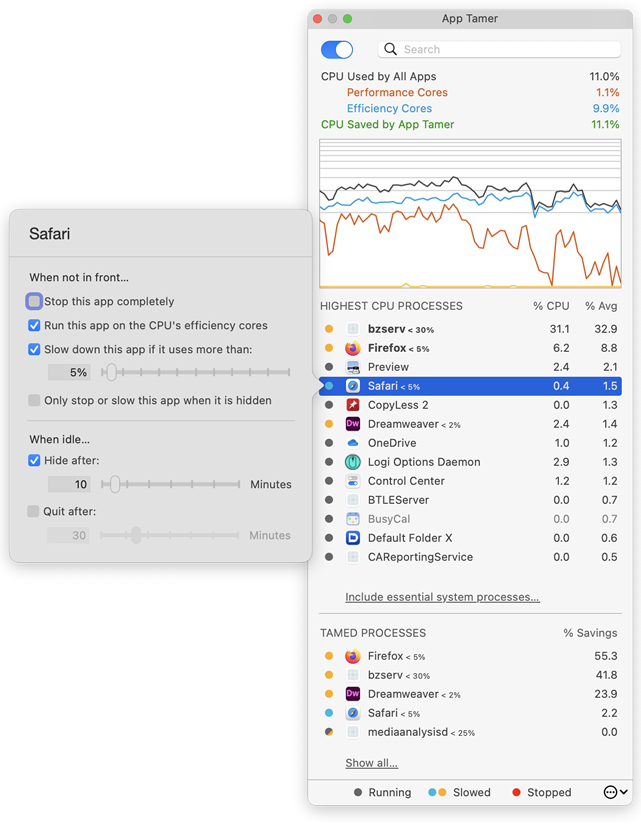
* The CPU usage graph in App Tamer's window can now be turned off
* App Tamer can be set to hide an application after a certain amount of idle time
* Scroll wheel use is recognized as activity in an application even if the app is in the background
* A bug has been fixed that caused incorrect process throttling if the "Do not slow or stop apps if power is plugged in" option was turned on
* User interface issues have been corrected
More about App Tamer:
Some Mac applications, especially web browsers, continue running tasks or animations even when they're supposed to be idle in the background. This can consume valuable processing power, reducing battery life and producing heat that increases fan noise. App Tamer's unique AutoStop capability automatically slows down or pauses these applications when you switch away from them, and then restarts them when you click back to them. This frees your CPU and reduces power consumption.
App Tamer comes pre-configured to automatically manage Safari, Firefox, Chrome, Spotlight, Time Machine, Word and many other apps when they're in the background. And customizing it for other applications is just a mouse click away.
Pricing and Availability:
App Tamer will operate on any Macintosh running macOS 10.8 or higher, and is free to try for 15 days. A license to continue using it after the trial period is $14.95 (USD). This update is free for users who purchased App Tamer 2.x or bought App Tamer 1.x after July 1, 2013. For those that purchased a license before that date, the upgrade is $7.95 (USD).
St. Clair Software: http://www.stclairsoft.com/
App Tamer 2.4: http://www.stclairsoft.com/AppTamer/
Download App Tamer: http://www.stclairsoft.com/cgi-bin/dl.cgi?AT
Purchase: http://stclairsoft.com/store
Screenshot: http://www.stclairsoft.com/AppTamer/images/MainPanelWithSettingsTall.png
Application Icon: http://www.stclairsoft.com/AppTamer/images/AppTamerIcon.png

Based in Denver, Colorado, St. Clair Software is a privately held company that has been specializing in utilities and custom software solutions for the Macintosh since 1988. St. Clair Software can be contacted at: St. Clair Software, 271 S. Emerson Street, Denver, CO, USA 80209. Copyright (C) 1988-2018 St. Clair Software. All Rights Reserved. Apple, the Apple logo, and Macintosh are registered trademarks of Apple Inc. in the U.S. and/or other countries.
*******
Link To Article: https://prmac.com/release-id-82874.htm
*******
---------------------------------------------------------------------------------
Note that you can alter delivered distributions at any time.
Login to your account on prMac to alter your channel selection, or to opt-out at any time.
Kids make awesome burgers with the top children's app Bamba Burger 2
A new article has been published at prMac.
Kids make awesome burgers with the top children's app Bamba Burger 2 - Published on 07/18/18
The long awaited follow-up to the super popular Bamba Burger is here. This sequel to the best children's burger making app has gotten bigger and better! Like the first app, Bamba Burger 2 is an interactive toy for children to imagine they are running a burger restaurant. In Bamba Burger 2, kids can slice burger buns, cook all sorts of fun ingredients, stack the tallest, craziest burgers, make crispy french fries, pour soda, build a 5-tier ice-cream soft serve and finally, eat it all.
Singapore - Mezmedia is proud to announce the long-awaited sequel to their most popular app - Bamba Burger 2. With over 4 million downloads for Bamba Burger, the success of this burger restaurant game for kids has led to calls for a sequel. The Singapore-based game studio has obliged with the release of Bamba Burger 2 on the App Store and on Google Play.
In Bamba Burger 2, kids pretend to play cook and customer in a burger restaurant. There are a lot of cooking activities for the kids to do. First, the player chooses the type of bun, which range from the standard fare (burger bun) to the weird (brick burger anyone?). Next up, the player cooks the ingredients on a frying pan, tossing them about. Then comes the fun part where they start building the burger with over 20 wacky ingredients to choose from, such as Radioactive Goo, or a Pirate Hat! And that is not all, the player can make side dishes like mashed potatoes, crinkle cut fries, soda and ice-cream.
The player 'pays' for the meal by dropping coins into a cash register. Then comes the best part - eating what they've made! With every meal completed, there's a mystery gift with a surprise toy inside. The screenshot button allows players to save pictures of the fantastic burger they've made.
Learning through play is what Bamba Burger 2 is about. Here, kids learn about different ingredients, objects, how things are made and how to count. There are plenty of educational opportunities with Bamba Burger 2.
The development studio encourages parents to play with their children to promote family bonding and improve learning. Parents can play the customer and order a cheeseburger, for example, while the child plays the restaurant chef and tries to assemble it in Bamba Burger 2. Real world props like a chef's hat and apron are recommended to make the experience more enriching and fun.
Bamba Burger 2 is language free. There is no text within the game so players are not restricted to learning a particular language. It is up to the parent to teach in his or her language of choice. It is an excellent tool for learning new words.
Bamba apps are all about being wacky and gross. So kids can find special ingredients like the Dirty Shoe, the Slimy Tentacle or the Mouldy Bun, along with 'standard' fare like a Burger Patty, Cheese and Ketchup.
"Which kid doesn't love fast food? Fries and burgers are a favorite with my 3-year old, but they can't always have it, so that's where the idea for Bamba Burger came about. With this sequel, we've taken feedback from our users and made it much better, with longer engagement periods, more activity points and more learning opportunities", said John Ng, co-founder of Mezmedia, the studio behind the Bamba series of education apps for kids.
Supported Languages
* Bamba Burger 2 is designed to be language free
Device Requirements:
* iPhone and iPad
* Android devices
* Requires iOS 10.0 or later, Android 6.0 or later
Pricing and Availability:
Bamba Burger 2 is Free (With In-App Purchases) and available worldwide through the App Store and Google Play in the Education category. For more information, please contact John Ng.
Bamba Burger 2: http://bambatown.com
Download from iTunes: https://itunes.apple.com/app/bamba-burger-2/id1387372144
Download from Google Play: https://play.google.com/store/apps/details?id=com.mezmedia.bambaburgerkitchen
YouTube Video (Gameplay Trailer): https://www.youtube.com/watch?v=TIfov0Yka-Q
App Icon: http://www.bambatown.com/wp-content/uploads/2018/07/bamba_burger_2_icon_iOS.png
Press Kit (zip): http://www.bambatown.com/wp-content/uploads/2018/07/screenshots_burgertwo_5.5_eng.zip
Mezmedia is an interactive studio based in Singapore. Under the Bamba brand, we create fun interactive toys for kids. It is our belief that interactive toys offer a new and exciting way to educate young children, learning through play. Our apps are designed to stimulate a child's imagination and creativity. Copyright (C) 2018 Mezmedia Pte Ltd. All Rights Reserved. Apple, the Apple logo, iPhone, iPod and iPad are registered trademarks of Apple Inc. in the U.S. and/or other countries.
*******
Link To Article: https://prmac.com/release-id-82875.htm
*******
---------------------------------------------------------------------------------
Note that you can alter delivered distributions at any time.
Login to your account on prMac to alter your channel selection, or to opt-out at any time.
Kids make awesome burgers with the top children's app Bamba Burger 2 - Published on 07/18/18
The long awaited follow-up to the super popular Bamba Burger is here. This sequel to the best children's burger making app has gotten bigger and better! Like the first app, Bamba Burger 2 is an interactive toy for children to imagine they are running a burger restaurant. In Bamba Burger 2, kids can slice burger buns, cook all sorts of fun ingredients, stack the tallest, craziest burgers, make crispy french fries, pour soda, build a 5-tier ice-cream soft serve and finally, eat it all.
Singapore - Mezmedia is proud to announce the long-awaited sequel to their most popular app - Bamba Burger 2. With over 4 million downloads for Bamba Burger, the success of this burger restaurant game for kids has led to calls for a sequel. The Singapore-based game studio has obliged with the release of Bamba Burger 2 on the App Store and on Google Play.
In Bamba Burger 2, kids pretend to play cook and customer in a burger restaurant. There are a lot of cooking activities for the kids to do. First, the player chooses the type of bun, which range from the standard fare (burger bun) to the weird (brick burger anyone?). Next up, the player cooks the ingredients on a frying pan, tossing them about. Then comes the fun part where they start building the burger with over 20 wacky ingredients to choose from, such as Radioactive Goo, or a Pirate Hat! And that is not all, the player can make side dishes like mashed potatoes, crinkle cut fries, soda and ice-cream.
The player 'pays' for the meal by dropping coins into a cash register. Then comes the best part - eating what they've made! With every meal completed, there's a mystery gift with a surprise toy inside. The screenshot button allows players to save pictures of the fantastic burger they've made.
Learning through play is what Bamba Burger 2 is about. Here, kids learn about different ingredients, objects, how things are made and how to count. There are plenty of educational opportunities with Bamba Burger 2.
The development studio encourages parents to play with their children to promote family bonding and improve learning. Parents can play the customer and order a cheeseburger, for example, while the child plays the restaurant chef and tries to assemble it in Bamba Burger 2. Real world props like a chef's hat and apron are recommended to make the experience more enriching and fun.
Bamba Burger 2 is language free. There is no text within the game so players are not restricted to learning a particular language. It is up to the parent to teach in his or her language of choice. It is an excellent tool for learning new words.
Bamba apps are all about being wacky and gross. So kids can find special ingredients like the Dirty Shoe, the Slimy Tentacle or the Mouldy Bun, along with 'standard' fare like a Burger Patty, Cheese and Ketchup.
"Which kid doesn't love fast food? Fries and burgers are a favorite with my 3-year old, but they can't always have it, so that's where the idea for Bamba Burger came about. With this sequel, we've taken feedback from our users and made it much better, with longer engagement periods, more activity points and more learning opportunities", said John Ng, co-founder of Mezmedia, the studio behind the Bamba series of education apps for kids.
Supported Languages
* Bamba Burger 2 is designed to be language free
Device Requirements:
* iPhone and iPad
* Android devices
* Requires iOS 10.0 or later, Android 6.0 or later
Pricing and Availability:
Bamba Burger 2 is Free (With In-App Purchases) and available worldwide through the App Store and Google Play in the Education category. For more information, please contact John Ng.
Bamba Burger 2: http://bambatown.com
Download from iTunes: https://itunes.apple.com/app/bamba-burger-2/id1387372144
Download from Google Play: https://play.google.com/store/apps/details?id=com.mezmedia.bambaburgerkitchen
YouTube Video (Gameplay Trailer): https://www.youtube.com/watch?v=TIfov0Yka-Q
App Icon: http://www.bambatown.com/wp-content/uploads/2018/07/bamba_burger_2_icon_iOS.png

Press Kit (zip): http://www.bambatown.com/wp-content/uploads/2018/07/screenshots_burgertwo_5.5_eng.zip
Mezmedia is an interactive studio based in Singapore. Under the Bamba brand, we create fun interactive toys for kids. It is our belief that interactive toys offer a new and exciting way to educate young children, learning through play. Our apps are designed to stimulate a child's imagination and creativity. Copyright (C) 2018 Mezmedia Pte Ltd. All Rights Reserved. Apple, the Apple logo, iPhone, iPod and iPad are registered trademarks of Apple Inc. in the U.S. and/or other countries.
*******
Link To Article: https://prmac.com/release-id-82875.htm
*******
---------------------------------------------------------------------------------
Note that you can alter delivered distributions at any time.
Login to your account on prMac to alter your channel selection, or to opt-out at any time.
Logo Pop Adds 250 New Editable Graphics To Make Logo Design Even Easier
A new article has been published at prMac.
Logo Pop Adds 250 New Editable Graphics To Make Logo Design Even Easier - Published on 07/17/18
MacAppware, a division of 128bit Technologies, announced today it has added 250 new editable graphics to its popular Logo Pop, the powerful logo design app for Mac. Easily create a professional looking vector based logo, and then use it online or in print with support for all popular image formats including transparent PNGs, and vector PDF and SVG formats. Logo Pop also includes a library of pre-designed logo templates and editable graphics to get you started.
San Francisco, California - 128bit Technologies announced Logo Pop version 1.1 today, a vector based logo design app available on the MacAppware website and the Mac App Store. To celebrate the new version, you can grab this easy logo creator for a limited time price of $19.99 (50% off). The powerful logo design app adds 250 new editable logo graphics to give users a quick start to creating the right look for their business or organization.
Logo Pop comes packed with a large library of pre-designed logo templates and logo graphics in SVG format (scalable vector graphic) you can use royalty free. From concept to design to using your logo in print or online, Logo Pop is a quick way to create a professional looking logo!
Not sure where to start? No problem! Quickly open and edit any of the 150 pre-designed logo templates with your own text, change colors, add shapes or drawings, and even browse through more than 750 included logo graphics to create the look that's right for you.
Save time and money by becoming your own logo creator. Stay away from overpriced design firms and cookie cutter online logo services that don't always understand what you want and charge extra for more concepts. Use Logo Pop to quickly add shapes and text, draw unique illustrations, adjust colors, add strokes, and more in order to make your identity stand out. Then save and export your logo to use on websites, business cards, letterhead, merchandise, social media, product packaging, banners, advertisements, profile pictures, and any other branding or marketing piece.
Logo Pop highlights:
* Includes 750 editable vector logo graphics to use royalty free
* Includes 150 pre-designed logo templates to quickly edit and make your own
* Create unlimited concepts and designs
* Perfect for any industry or interest
* Vector-based drawing tools and graphics keep your design sharp at any size
* You can even sell your logo designs to others because everything in Logo Pop is royalty free
* Draw your own illustrations and graphics
* Draw tools include Rectangle, Oval, Round Rectangle, Round End Rectangle, Line, Polygon, Path, Freehand, Ring, Speech Balloon, and Arc
* Use what you design royalty free
* Convert text to a shape, path, or even a shape group to easily rearrange the characters
* Adjust freehand drawing to create smooth looking paths
* Add strokes (regular, arrowed, rough, zig-zag)
* Add fills (solid, gradient, pattern, zig-zag, hatch)
* Add text on a path
* Create curved and wavy text
* Create Outline text
* Add an image to text
* Boolean operation support to combine shapes
* Blend and mask effects
* Over 130 filters and effects
* Enhance pictures
* Full layer support
* Easily align multiple items on your canvas
* Rulers and guides make it easy to place items in the right location
* Snap to grid, snap to guides, or snap to other objects
* Zoom in or out to get every detail pixel perfect
* Export in fully editable SVG and vector PDF
* Export as an image (JPEG, TIFF, PNG, BMP, GIF)
* Supports transparent backgrounds
* Extensive help file explains Logo Pop's tools in detail
* Video tutorials available on the MacAppware website
* And more
No one knows your business better than you! From concept, to design, to using your logo in print or online, you will not find a better logo design app!
System Requirements:
* macOS 10.7 or newer (including Mojave)
* 64-bit processor
* 20 MB
Pricing and Availability:
Logo Pop 1.1 is available on the MacAppware website, and through the Mac App Store in the Graphics & Design category for the limited time price of $19.99 (USD), a savings of 50% off the normal price of $39.99.
MacAppware: https://macappware.com
Logo Pop 1.1: https://macappware.com/software/logo-pop
Purchase and Download (MAS): https://itunes.apple.com/app/logo-pop-logo-design-made-easy/id1167995641
Free Logo Fonts: https://macappware.com/software/free-fonts/
Screenshot: https://macappware.com/images/logo/Logo-Pop-mac-logo-design-1.png
Application Icon: https://macappware.com/images/logo/Logo-Pop-app-icon-256.png
MacAppware is a division of 128bit Technologies and a dedicated Mac software developer currently offering graphic design, image editing and disk utility applications; unique commercial use font collections; and a carefully curated rotation of bundles and deals. Copyright (C) 2018 128bit Technologies. All Rights Reserved. Apple, the Apple logo, Mac OS X, and Macintosh are registered trademarks of Apple Inc. in the U.S. and/or other countries. All other trademarks are the property of their respective owners.
*******
Link To Article: https://prmac.com/release-id-82872.htm
*******
---------------------------------------------------------------------------------
Note that you can alter delivered distributions at any time.
Login to your account on prMac to alter your channel selection, or to opt-out at any time.
Logo Pop Adds 250 New Editable Graphics To Make Logo Design Even Easier - Published on 07/17/18
MacAppware, a division of 128bit Technologies, announced today it has added 250 new editable graphics to its popular Logo Pop, the powerful logo design app for Mac. Easily create a professional looking vector based logo, and then use it online or in print with support for all popular image formats including transparent PNGs, and vector PDF and SVG formats. Logo Pop also includes a library of pre-designed logo templates and editable graphics to get you started.
San Francisco, California - 128bit Technologies announced Logo Pop version 1.1 today, a vector based logo design app available on the MacAppware website and the Mac App Store. To celebrate the new version, you can grab this easy logo creator for a limited time price of $19.99 (50% off). The powerful logo design app adds 250 new editable logo graphics to give users a quick start to creating the right look for their business or organization.
Logo Pop comes packed with a large library of pre-designed logo templates and logo graphics in SVG format (scalable vector graphic) you can use royalty free. From concept to design to using your logo in print or online, Logo Pop is a quick way to create a professional looking logo!
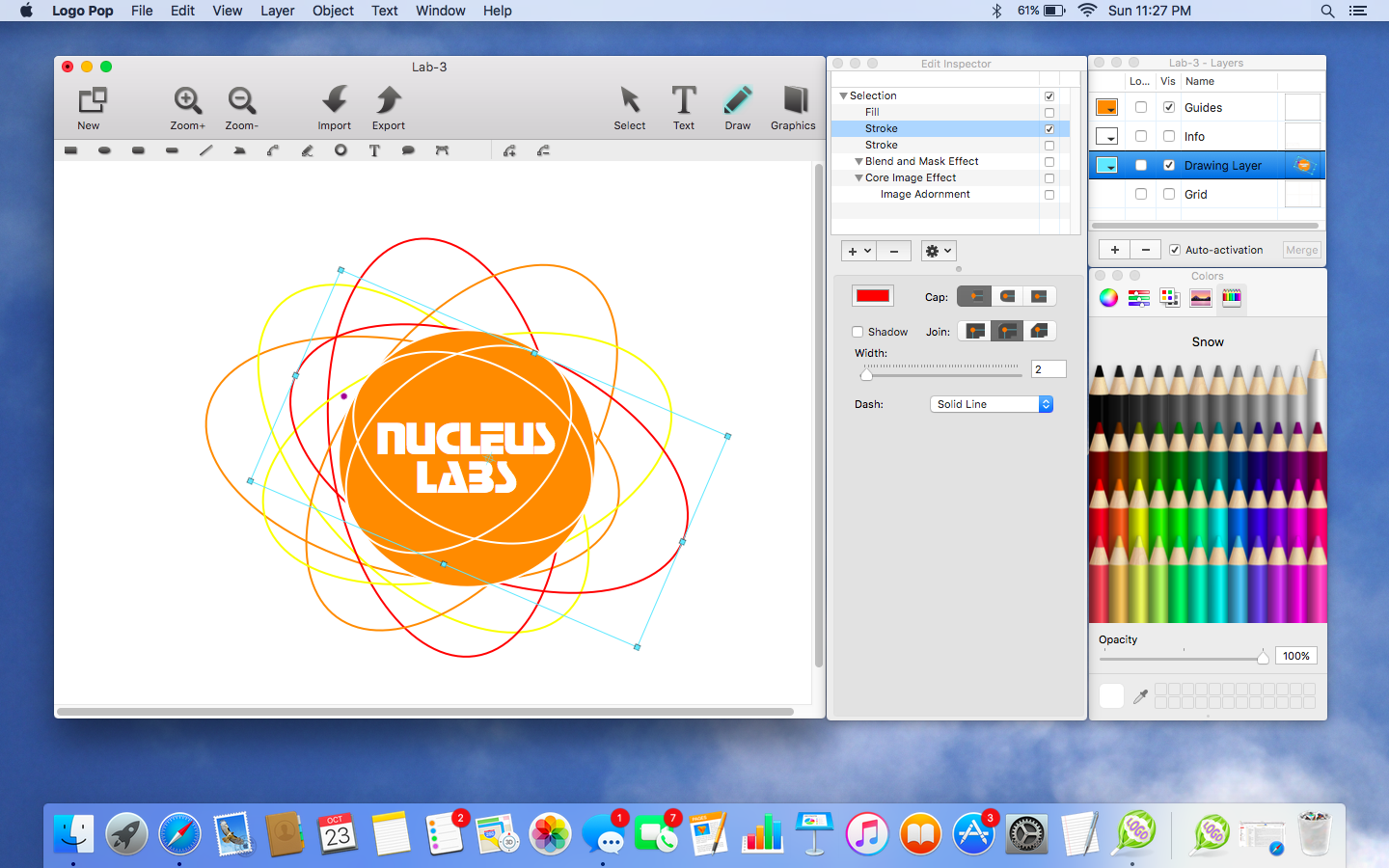
Not sure where to start? No problem! Quickly open and edit any of the 150 pre-designed logo templates with your own text, change colors, add shapes or drawings, and even browse through more than 750 included logo graphics to create the look that's right for you.
Save time and money by becoming your own logo creator. Stay away from overpriced design firms and cookie cutter online logo services that don't always understand what you want and charge extra for more concepts. Use Logo Pop to quickly add shapes and text, draw unique illustrations, adjust colors, add strokes, and more in order to make your identity stand out. Then save and export your logo to use on websites, business cards, letterhead, merchandise, social media, product packaging, banners, advertisements, profile pictures, and any other branding or marketing piece.
Logo Pop highlights:
* Includes 750 editable vector logo graphics to use royalty free
* Includes 150 pre-designed logo templates to quickly edit and make your own
* Create unlimited concepts and designs
* Perfect for any industry or interest
* Vector-based drawing tools and graphics keep your design sharp at any size
* You can even sell your logo designs to others because everything in Logo Pop is royalty free
* Draw your own illustrations and graphics
* Draw tools include Rectangle, Oval, Round Rectangle, Round End Rectangle, Line, Polygon, Path, Freehand, Ring, Speech Balloon, and Arc
* Use what you design royalty free
* Convert text to a shape, path, or even a shape group to easily rearrange the characters
* Adjust freehand drawing to create smooth looking paths
* Add strokes (regular, arrowed, rough, zig-zag)
* Add fills (solid, gradient, pattern, zig-zag, hatch)
* Add text on a path
* Create curved and wavy text
* Create Outline text
* Add an image to text
* Boolean operation support to combine shapes
* Blend and mask effects
* Over 130 filters and effects
* Enhance pictures
* Full layer support
* Easily align multiple items on your canvas
* Rulers and guides make it easy to place items in the right location
* Snap to grid, snap to guides, or snap to other objects
* Zoom in or out to get every detail pixel perfect
* Export in fully editable SVG and vector PDF
* Export as an image (JPEG, TIFF, PNG, BMP, GIF)
* Supports transparent backgrounds
* Extensive help file explains Logo Pop's tools in detail
* Video tutorials available on the MacAppware website
* And more
No one knows your business better than you! From concept, to design, to using your logo in print or online, you will not find a better logo design app!
System Requirements:
* macOS 10.7 or newer (including Mojave)
* 64-bit processor
* 20 MB
Pricing and Availability:
Logo Pop 1.1 is available on the MacAppware website, and through the Mac App Store in the Graphics & Design category for the limited time price of $19.99 (USD), a savings of 50% off the normal price of $39.99.
MacAppware: https://macappware.com
Logo Pop 1.1: https://macappware.com/software/logo-pop
Purchase and Download (MAS): https://itunes.apple.com/app/logo-pop-logo-design-made-easy/id1167995641
Free Logo Fonts: https://macappware.com/software/free-fonts/
Screenshot: https://macappware.com/images/logo/Logo-Pop-mac-logo-design-1.png
Application Icon: https://macappware.com/images/logo/Logo-Pop-app-icon-256.png

MacAppware is a division of 128bit Technologies and a dedicated Mac software developer currently offering graphic design, image editing and disk utility applications; unique commercial use font collections; and a carefully curated rotation of bundles and deals. Copyright (C) 2018 128bit Technologies. All Rights Reserved. Apple, the Apple logo, Mac OS X, and Macintosh are registered trademarks of Apple Inc. in the U.S. and/or other countries. All other trademarks are the property of their respective owners.
*******
Link To Article: https://prmac.com/release-id-82872.htm
*******
---------------------------------------------------------------------------------
Note that you can alter delivered distributions at any time.
Login to your account on prMac to alter your channel selection, or to opt-out at any time.
Subscribe to:
Posts (Atom)