A new article has been published at prMac.
Zevrix Solutions announces Package Central 1.11.1, a maintenance update - Published on 08/20/18
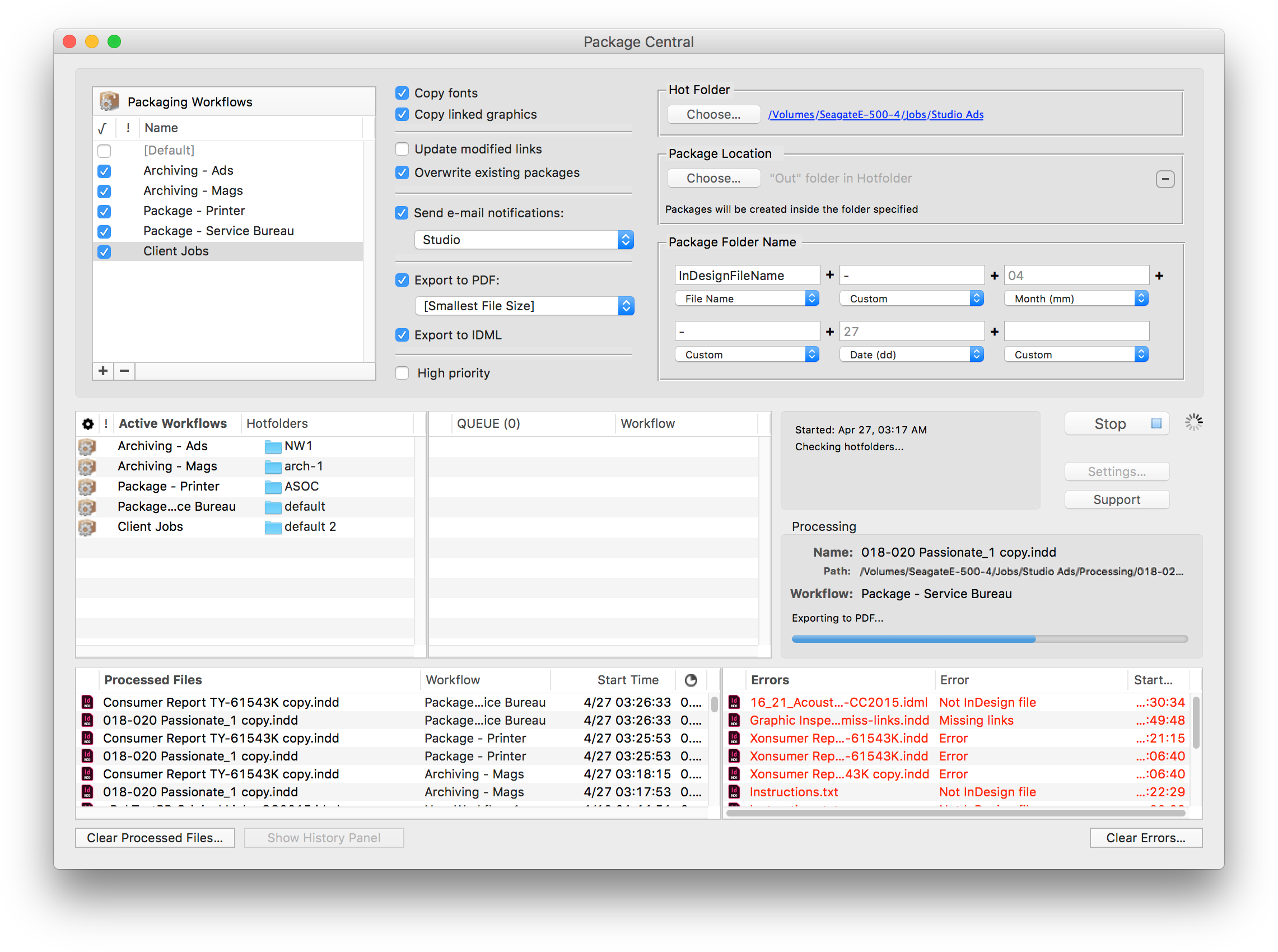
Zevrix Solutions announces Package Central 1.11.1, a maintenance update to company's file packaging automation solution for Adobe InDesign. The software automatically collects InDesign documents with their fonts and links from watched hot folders. Package Central can serve unlimited users on a network and offers email alerts, variable job names, PDF export, and more. The new version addresses an issue in which the app could stall when enqueuing a large number of InDesign jobs in its hot folders.
Toronto (ON), Canada - Zevrix Solutions today announces Package Central 1.11, a maintenance update to its document packaging automation solution for Adobe InDesign. Originally developed for a major publisher in the United States, the software automates InDesign packaging by processing files from watched hot folders. Package Central offloads file packaging to a central system leaving operator workstations free from the document collection process.
The new version addresses an issue in which Package Central could stall when enqueuing a large number of InDesign jobs in the app's hot folders. The issue was caused by a macOS limitation on the total number of files than can be aggregated for certain operations during threaded processing. Package Central now breaks such long queues into smaller segments, giving users the complete freedom to accumulate unlimited number of jobs in the hot folders.
Under Package Central workflow, production artists, prepress operators and designers simply submit files to watched hot folders that reside on a network. The software automatically collects InDesign files along with their fonts and links freeing user's time for important tasks such as design and layout. Operator workstations will never again be tied up by the packaging process.
Package Central runs on a dedicated Mac station and watches hot folders for incoming InDesign files. The software performs all its tasks automatically and can run absolutely unattended. It offers the following key features and benefits:
* Automatically collect InDesign files from hot folders
* Automatic email notifications of process stages and errors
* Update modified links automatically
* Create PDF and IDML files on the fly
* Compose variable folder names
* Serves unlimited users on a network
* Detailed processing history
Pricing and Availability:
Package Central can be purchased for $149.95 (USD) from Zevrix website as well as from authorized resellers. Trial is also available for download. The update is free for registered users. Package Central requires macOS 10.7-10.13 and Adobe InDesign CS5-CC 2018.
Zevrix Solutions: http://zevrix.com
Package Central 1.11: http://zevrix.com/PackageCentral.php
Download Package Central: http://zevrix.com/PackageCentral.dmg
Purchase: http://zevrix.com/store.php
Screenshot: http://zevrix.com/screenshots/pac/pac-main.png
Located in Toronto, Canada, Zevrix Solutions provides automation and productivity solutions for Adobe Creative Cloud and Creative Suite software, PDF workflows, graphic file diagnostics and Microsoft Office output on Mac OS. Zevrix is dedicated to help professionals increase their profits through automating everyday tasks, producing error-free documents, saving disk space and cutting production costs. For more information, visit their website. Copyright (C) 2018 Zevrix Solutions. All Rights Reserved. Other trademarks and registered trademarks may be the property of their respective owners.
*******
Link To Article: https://prmac.com/release-id-82924.htm
*******
---------------------------------------------------------------------------------
Note that you can alter delivered distributions at any time.
Login to your account on prMac to alter your channel selection, or to opt-out at any time.

Tropical Software Releases Discounted TopXNotes 1.8.6
A new article has been published at prMac.
Tropical Software Releases Discounted TopXNotes 1.8.6 - Published on 08/18/18
Florida based Tropical Software today announces TopXNotes 1.8.6, an update to their award-winning, full-featured personal information manager for macOS. Create, view, organize, and instantly access your Mac notes with TopXNotes. Version 1.8.6, our most stable, easiest-to-use version of TopXNotes, with a few new features, performance enhancements and bug fixes is being offered at a huge discount as a Back-to-School special.
Atlantic Beach, Florida - Tropical Software today is happy to announce that TopXNotes for Mac, an app that helps you to create a note by typing, dragging, or importing, has been updated to version 1.8.6 and is being offered at a huge discount as a "Back to School" special. The upgrade provides performance enhancements, a few new features, and bug fixes. TopXNotes 1.8.6 keeps your notes synchronized between TopXNotes for Mac and TopXNotes for iOS.
Get Organized with TopXNotes:
Tired of all those loose bits of information spread all over your hard drive in multiple documents requiring opening multiple apps to see them? Opening many apps sucks up your valuable Mac memory and slows it down. Are you tired of trying to remember which note was written in which application and where you put it? Use TopXNotes to import all your notes and organize them in one place with the option to password protect and encrypt sensitive information.
TopXNotes - Your Personal Information Organizer:
Use TopXNotes advanced drag and drop to create notes from any other text application, or to drag to import text and/or RTF documents. Or copy/cut and paste from other applications. Once the information is created, use TopXNotes' category system to create categories that meet your needs, or file in folder-like groups. Have one for home, one for office, and one for school, or a car project, or recipes, or anything at all.
TopXNotes - Your Personal Information Organizer:
As a Mac user, the Mac's desktop Finder is familiar to you, so you will find our NoteOrganizer highly intuitive. To improve that experience, we have moved beyond the Finder to allow you to build your own Categories (with names, icons and colors) to customize the experience for your needs. You will use the TopXNotes NoteOrganizer to organize your notes and quickly find things. TopXNotes NoteOrganizer lets you filter your notes by name, note page number, date created, date modified or category. You can also rapidly reverse sort or instantly switch between multiple NoteOrganizer display layouts.
TopXNotes - MultiView Convenience:
Use TopXNotes' unique MultiView feature to view more than one note at once in adjacent views. Think of it like opening a book to multiple pages at a time.
TopXNotes - MultiView Editing:
Using MultiView speeds up note editing by simplifying comparing notes, rearranging information from one note to another, combining notes, separating a long note into 2 or more notes, and other tasks. While you work, TopXNotes sliding Text toolbar automatically hovers right above where you are typing.
TopXNotes - MultiViewing:
In addition to helping edit your notes, TopXNotes MultiView allows you to show multiple notes on a theme at once. For instance, you might have a shopping list, budget and websites in adjacent notes for shopping. Alternatively, you might organize your day by having a list of calls, a list of errands, a project outline, and today's To-Do list side by side by side by side. There is no end to the combinations you will find useful.
TopXNotes - QuickNotes at your fingertips:
Once you have your notes organized, prioritize them with TopXNotes QuickNotes feature. Just click to check the QuickNotes category for your most critical information. Now you will be able to instantly access that note from the QuickNotes menu. Whether you have many windows open or the TopXNotes main window minimized, your QuickNotes are always instantly accessible from the desktop or from the TopXNotes Dock menu for your convenience.
TopXNotes - Security & Dual-Encryption:
Once you have your notes organized be sure to use our password protection to encrypt those notes with sensitive information, or you can set a password to shield all your notes from prying eyes, or you can do both (our unique "Dual-Encryption"). In this fashion, you have easy access to all your information, including the sensitive items.
TopXNotes Sync - Notes "On the Go":
Use TopXNotes Mac and its mobile partner, TopXNotes for iOS (for iPhone, iPad and iPod touch) to take those notes with you that you want while you are away including shopping lists, to-do lists, directions, or anything you want.
TopXNotes - Reviews:
TopXNotes was awarded 4 out of 5 mice by Macworld magazine in their "Summer of Mac Gems" series of reviews, by Macworld Australia, and later by Macworld UK. TopXNotes was rated "9 of 10" by Macsimum News (now part of MacTech), and highly rated by the Macintosh Guild, Macworld, Macworld UK and Mac360. Dennis Sellers rated it 10 of 10 for Apple Daily Report. TopXNotes has been critically reviewed with high marks on many occasions and you can find links to all the reviews on our website.
TopXNotes - Macworld Review:
Macworld praised the TopXNotes "clean, single window interface that puts controls for highlighting and marking up your text right at your fingertips," as well as for its "killer" QuickNotes feature.
TopXNotes - Mac User Group Review:
Sue Beal, president of the Upper Keys (Florida) Macintosh Users Group called TopXNotes "Inexpensive, unobtrusive, and just plain handy."
TopXNotes - Mac360:
Ron Mc Elfresh, of Mac360 stated: "I'm a notes freak. I have notes on everything. From to-do items to code snippets to tasks and projects to article ideas. Here's an understated, unloved, deceptively powerful notes app worthy of some Mac love...it's loaded with user features that set it apart from other note taking apps. TopXNotes is deceptively powerful and flexible, probably because the interface is immediately familiar."
Release Specific Information
TopXNotes 1.8.6 has the following changes:
New Features:
* Mac OS X 10.14 (Mohave) Ready
* The Tropical Store version of the app now requires a minimum MacOS version of 10.6.
* Added a new menu option that gives the user the ability to delete a note by page number.
Changed Features:
* Automatically Sync note deletions across devices.
Fixed:
* Insure TopXNotes is registered before enabling Sync command.
* Style slippage occurring at end of style change for some entirely selected lines that were followed by a blank line.
Pricing and Availability:
Try Tropical's reliable TopXNotes 1.8.6 to "get organized" today! TopXNotes 1.8.6 is available for $9.95 (USD) from the Tropical Software web site, Amazon, and other select Macintosh software resellers. TopXNotes 1.8.6 is a free update to customers who have already purchased version 1.5 or later. Existing customers with an older version (previous to 1.5) can upgrade to version 1.8.6 for only $9.95 from the company's web site.
TopXNotes 1.8.6: http://www.tropic4.com/topxnotes.html
TopXNotes Anatomy: http://www.tropic4.com/anatomy.html
Download Free Trial (zip): http://www.tropic4.com/download/TopXNotes.zip
Purchase at Steep Discount: http://sites.fastspring.com/tropic4/product/TopXNotes
Macworld and Other Reviews: http://www.tropic4.com/products/topxnotes/reviews.html
App Icon: http://www.tropic4.com/images/GetOrganizedNoReflect.png
Tropical Software makes the award-winning TopXNotes, a modern personal note manager with state of the art proprietary encryption technology for the ultimate in securing personal information. Located in Atlantic Beach, Florida, Tropical Software is owned and operated by former Apple employee James Lee, and is dedicated to improving the lives of its customers by offering easy to use productivity software for Macs and Apple touch devices including iPhone, iPod touch and iPad. Copyright (C) 2018 Tropical Software. All Rights Reserved. Apple, the Apple logo, iPhone, iPod, iPad and Macintosh are registered trademarks of Apple Inc. in the U.S. and/or other countries.
*******
Link To Article: https://prmac.com/release-id-82923.htm
*******
---------------------------------------------------------------------------------
Note that you can alter delivered distributions at any time.
Login to your account on prMac to alter your channel selection, or to opt-out at any time.
Tropical Software Releases Discounted TopXNotes 1.8.6 - Published on 08/18/18
Florida based Tropical Software today announces TopXNotes 1.8.6, an update to their award-winning, full-featured personal information manager for macOS. Create, view, organize, and instantly access your Mac notes with TopXNotes. Version 1.8.6, our most stable, easiest-to-use version of TopXNotes, with a few new features, performance enhancements and bug fixes is being offered at a huge discount as a Back-to-School special.
Atlantic Beach, Florida - Tropical Software today is happy to announce that TopXNotes for Mac, an app that helps you to create a note by typing, dragging, or importing, has been updated to version 1.8.6 and is being offered at a huge discount as a "Back to School" special. The upgrade provides performance enhancements, a few new features, and bug fixes. TopXNotes 1.8.6 keeps your notes synchronized between TopXNotes for Mac and TopXNotes for iOS.
Get Organized with TopXNotes:
Tired of all those loose bits of information spread all over your hard drive in multiple documents requiring opening multiple apps to see them? Opening many apps sucks up your valuable Mac memory and slows it down. Are you tired of trying to remember which note was written in which application and where you put it? Use TopXNotes to import all your notes and organize them in one place with the option to password protect and encrypt sensitive information.
TopXNotes - Your Personal Information Organizer:
Use TopXNotes advanced drag and drop to create notes from any other text application, or to drag to import text and/or RTF documents. Or copy/cut and paste from other applications. Once the information is created, use TopXNotes' category system to create categories that meet your needs, or file in folder-like groups. Have one for home, one for office, and one for school, or a car project, or recipes, or anything at all.
TopXNotes - Your Personal Information Organizer:
As a Mac user, the Mac's desktop Finder is familiar to you, so you will find our NoteOrganizer highly intuitive. To improve that experience, we have moved beyond the Finder to allow you to build your own Categories (with names, icons and colors) to customize the experience for your needs. You will use the TopXNotes NoteOrganizer to organize your notes and quickly find things. TopXNotes NoteOrganizer lets you filter your notes by name, note page number, date created, date modified or category. You can also rapidly reverse sort or instantly switch between multiple NoteOrganizer display layouts.
TopXNotes - MultiView Convenience:
Use TopXNotes' unique MultiView feature to view more than one note at once in adjacent views. Think of it like opening a book to multiple pages at a time.
TopXNotes - MultiView Editing:
Using MultiView speeds up note editing by simplifying comparing notes, rearranging information from one note to another, combining notes, separating a long note into 2 or more notes, and other tasks. While you work, TopXNotes sliding Text toolbar automatically hovers right above where you are typing.
TopXNotes - MultiViewing:
In addition to helping edit your notes, TopXNotes MultiView allows you to show multiple notes on a theme at once. For instance, you might have a shopping list, budget and websites in adjacent notes for shopping. Alternatively, you might organize your day by having a list of calls, a list of errands, a project outline, and today's To-Do list side by side by side by side. There is no end to the combinations you will find useful.
TopXNotes - QuickNotes at your fingertips:
Once you have your notes organized, prioritize them with TopXNotes QuickNotes feature. Just click to check the QuickNotes category for your most critical information. Now you will be able to instantly access that note from the QuickNotes menu. Whether you have many windows open or the TopXNotes main window minimized, your QuickNotes are always instantly accessible from the desktop or from the TopXNotes Dock menu for your convenience.
TopXNotes - Security & Dual-Encryption:
Once you have your notes organized be sure to use our password protection to encrypt those notes with sensitive information, or you can set a password to shield all your notes from prying eyes, or you can do both (our unique "Dual-Encryption"). In this fashion, you have easy access to all your information, including the sensitive items.
TopXNotes Sync - Notes "On the Go":
Use TopXNotes Mac and its mobile partner, TopXNotes for iOS (for iPhone, iPad and iPod touch) to take those notes with you that you want while you are away including shopping lists, to-do lists, directions, or anything you want.
TopXNotes - Reviews:
TopXNotes was awarded 4 out of 5 mice by Macworld magazine in their "Summer of Mac Gems" series of reviews, by Macworld Australia, and later by Macworld UK. TopXNotes was rated "9 of 10" by Macsimum News (now part of MacTech), and highly rated by the Macintosh Guild, Macworld, Macworld UK and Mac360. Dennis Sellers rated it 10 of 10 for Apple Daily Report. TopXNotes has been critically reviewed with high marks on many occasions and you can find links to all the reviews on our website.
TopXNotes - Macworld Review:
Macworld praised the TopXNotes "clean, single window interface that puts controls for highlighting and marking up your text right at your fingertips," as well as for its "killer" QuickNotes feature.
TopXNotes - Mac User Group Review:
Sue Beal, president of the Upper Keys (Florida) Macintosh Users Group called TopXNotes "Inexpensive, unobtrusive, and just plain handy."
TopXNotes - Mac360:
Ron Mc Elfresh, of Mac360 stated: "I'm a notes freak. I have notes on everything. From to-do items to code snippets to tasks and projects to article ideas. Here's an understated, unloved, deceptively powerful notes app worthy of some Mac love...it's loaded with user features that set it apart from other note taking apps. TopXNotes is deceptively powerful and flexible, probably because the interface is immediately familiar."
Release Specific Information
TopXNotes 1.8.6 has the following changes:
New Features:
* Mac OS X 10.14 (Mohave) Ready
* The Tropical Store version of the app now requires a minimum MacOS version of 10.6.
* Added a new menu option that gives the user the ability to delete a note by page number.
Changed Features:
* Automatically Sync note deletions across devices.
Fixed:
* Insure TopXNotes is registered before enabling Sync command.
* Style slippage occurring at end of style change for some entirely selected lines that were followed by a blank line.
Pricing and Availability:
Try Tropical's reliable TopXNotes 1.8.6 to "get organized" today! TopXNotes 1.8.6 is available for $9.95 (USD) from the Tropical Software web site, Amazon, and other select Macintosh software resellers. TopXNotes 1.8.6 is a free update to customers who have already purchased version 1.5 or later. Existing customers with an older version (previous to 1.5) can upgrade to version 1.8.6 for only $9.95 from the company's web site.
TopXNotes 1.8.6: http://www.tropic4.com/topxnotes.html
TopXNotes Anatomy: http://www.tropic4.com/anatomy.html
Download Free Trial (zip): http://www.tropic4.com/download/TopXNotes.zip
Purchase at Steep Discount: http://sites.fastspring.com/tropic4/product/TopXNotes
Macworld and Other Reviews: http://www.tropic4.com/products/topxnotes/reviews.html
App Icon: http://www.tropic4.com/images/GetOrganizedNoReflect.png

Tropical Software makes the award-winning TopXNotes, a modern personal note manager with state of the art proprietary encryption technology for the ultimate in securing personal information. Located in Atlantic Beach, Florida, Tropical Software is owned and operated by former Apple employee James Lee, and is dedicated to improving the lives of its customers by offering easy to use productivity software for Macs and Apple touch devices including iPhone, iPod touch and iPad. Copyright (C) 2018 Tropical Software. All Rights Reserved. Apple, the Apple logo, iPhone, iPod, iPad and Macintosh are registered trademarks of Apple Inc. in the U.S. and/or other countries.
*******
Link To Article: https://prmac.com/release-id-82923.htm
*******
---------------------------------------------------------------------------------
Note that you can alter delivered distributions at any time.
Login to your account on prMac to alter your channel selection, or to opt-out at any time.
LinkOptimizer for InDesign Improves Access to Variable Name Tokens
A new article has been published at prMac.
LinkOptimizer for InDesign Improves Access to Variable Name Tokens - Published on 08/16/18
Zevrix Solutions announces LinkOptimizer 5.2.8, a feature update to company's workflow automation solution for Adobe InDesign. LinkOptimizer can automatically resize InDesign links to their final dimensions at specific target resolution, convert image formats, adjust colors, reduce linked image size and more. The new version introduces new user interface for the variable name tokens feature. Users utilize the tokens to interactively compose variable names of optimized images and backup folders.
Toronto (ON), Canada - Zevrix Solutions today announces LinkOptimizer 5.2.8, a feature update to its image processing automation plug-in for Adobe InDesign. LinkOptimizer automates complex image manipulation tasks and helps users reduce the size of InDesign links, save prepress costs, and easily repurpose InDesign documents for web and mobile devices.
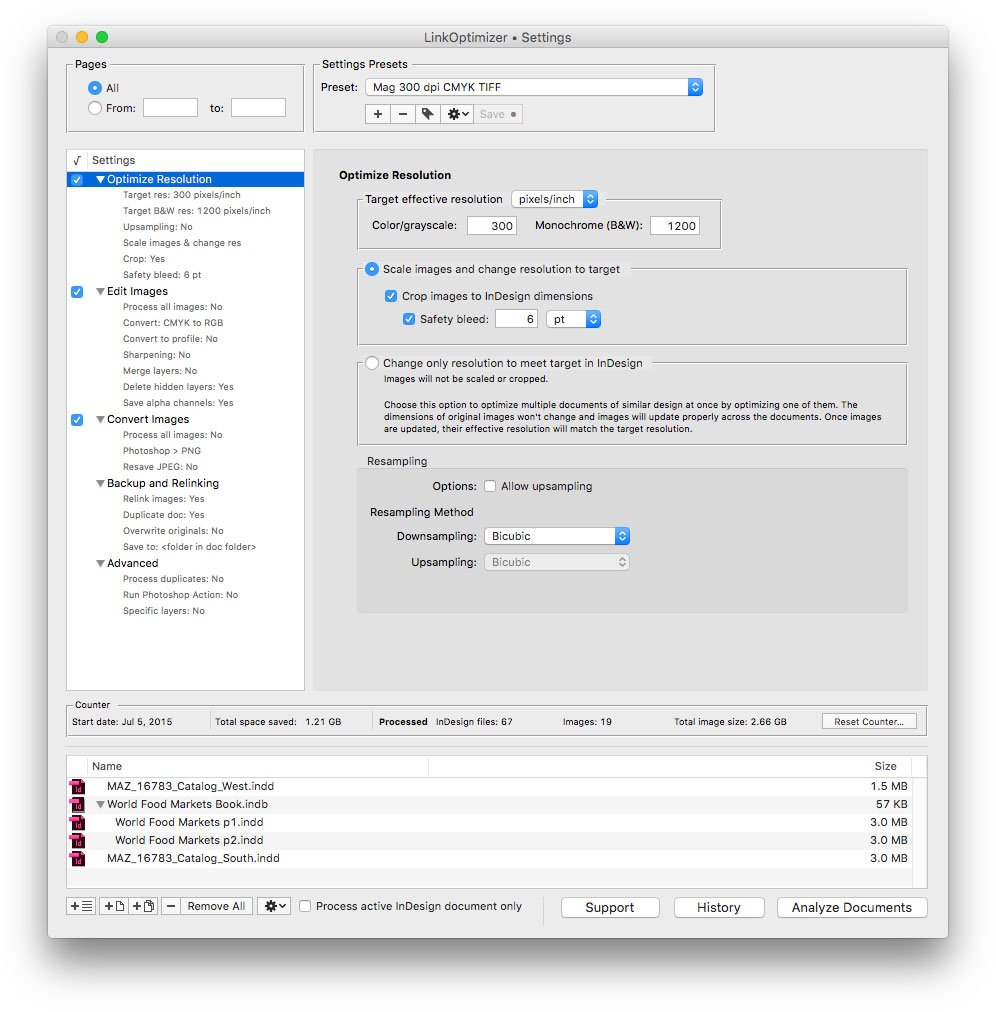
The new version introduces new user interface for the variable name tokens feature. Users utilize the tokens to interactively compose variable names of optimized images, backup folders and InDesign files. The tokens are now located in the popover windows attached to variable name fields rather than in popup menus. This new UI makes it much easier for the users to access the tokens and insert them directly into the desired location of the target variable name field. LinkOptimizer offers variable tokens for day, time, image color, page number and more.
"LinkOptimizer is the one product no creative studio can live without," says Wayne Guy from Edge Graphics studio in Lake Balboa, California. "It saves hours of time, tediously replacing linked images, resizing, batch processing... If you're a designer or production artist, you need this."
LinkOptimizer works automatically with Photoshop to eliminate the excess image data of InDesign links, perform essential image adjustments and convert image formats. For example, with just a click of a button users can:
* Optimize multiple InDesign files
* Scale and crop images to their InDesign dimensions
* Change image resolution to 300 dpi
* Convert RGB images to CMYK profile
* Resave PNGs as TIFF
* Run a Photoshop action on each image
As a result users can save gigabytes of disk space and countless hours of optimizing images manually, accelerate document output, reduce job turnaround and cut costs through faster processing.
Pricing and Availability:
LinkOptimizer can be purchased from Zevrix website for $259.95 USD (Lite version: $179.95) as well as from Adobe Exchange and authorized resellers. Trial is also available for download. The update is free for LinkOptimizer 5.x users and $130 to upgrade from previous versions. LinkOptimizer requires macOS 10.7-10.13 and Adobe InDesign / Photoshop CS5-CC 2018.
Zevrix Solutions: http://zevrix.com
LinkOptimizer 5.2.8: http://zevrix.com/LinkOptimizer.php
Download LinkOptimizer: http://zevrix.com/LinkOptimizer.dmg
Purchase: http://zevrix.com/store.php
Screenshot: http://zevrix.com/screenshots/lo5/res-win.jpg
Located in Toronto, Canada, Zevrix Solutions provides automation and productivity solutions for Adobe Creative Cloud and Creative Suite software, PDF workflows, graphic file diagnostics and Microsoft Office output on Mac OS. Zevrix is dedicated to help professionals increase their profits through automating everyday tasks, producing error-free documents, saving disk space and cutting production costs. For more information, visit their website. Copyright (C) 2018 Zevrix Solutions. All Rights Reserved. Other trademarks and registered trademarks may be the property of their respective owners.
*******
Link To Article: https://prmac.com/release-id-82922.htm
*******
---------------------------------------------------------------------------------
Note that you can alter delivered distributions at any time.
Login to your account on prMac to alter your channel selection, or to opt-out at any time.
LinkOptimizer for InDesign Improves Access to Variable Name Tokens - Published on 08/16/18
Zevrix Solutions announces LinkOptimizer 5.2.8, a feature update to company's workflow automation solution for Adobe InDesign. LinkOptimizer can automatically resize InDesign links to their final dimensions at specific target resolution, convert image formats, adjust colors, reduce linked image size and more. The new version introduces new user interface for the variable name tokens feature. Users utilize the tokens to interactively compose variable names of optimized images and backup folders.
Toronto (ON), Canada - Zevrix Solutions today announces LinkOptimizer 5.2.8, a feature update to its image processing automation plug-in for Adobe InDesign. LinkOptimizer automates complex image manipulation tasks and helps users reduce the size of InDesign links, save prepress costs, and easily repurpose InDesign documents for web and mobile devices.
The new version introduces new user interface for the variable name tokens feature. Users utilize the tokens to interactively compose variable names of optimized images, backup folders and InDesign files. The tokens are now located in the popover windows attached to variable name fields rather than in popup menus. This new UI makes it much easier for the users to access the tokens and insert them directly into the desired location of the target variable name field. LinkOptimizer offers variable tokens for day, time, image color, page number and more.
"LinkOptimizer is the one product no creative studio can live without," says Wayne Guy from Edge Graphics studio in Lake Balboa, California. "It saves hours of time, tediously replacing linked images, resizing, batch processing... If you're a designer or production artist, you need this."
LinkOptimizer works automatically with Photoshop to eliminate the excess image data of InDesign links, perform essential image adjustments and convert image formats. For example, with just a click of a button users can:
* Optimize multiple InDesign files
* Scale and crop images to their InDesign dimensions
* Change image resolution to 300 dpi
* Convert RGB images to CMYK profile
* Resave PNGs as TIFF
* Run a Photoshop action on each image
As a result users can save gigabytes of disk space and countless hours of optimizing images manually, accelerate document output, reduce job turnaround and cut costs through faster processing.
Pricing and Availability:
LinkOptimizer can be purchased from Zevrix website for $259.95 USD (Lite version: $179.95) as well as from Adobe Exchange and authorized resellers. Trial is also available for download. The update is free for LinkOptimizer 5.x users and $130 to upgrade from previous versions. LinkOptimizer requires macOS 10.7-10.13 and Adobe InDesign / Photoshop CS5-CC 2018.
Zevrix Solutions: http://zevrix.com
LinkOptimizer 5.2.8: http://zevrix.com/LinkOptimizer.php
Download LinkOptimizer: http://zevrix.com/LinkOptimizer.dmg
Purchase: http://zevrix.com/store.php
Screenshot: http://zevrix.com/screenshots/lo5/res-win.jpg
Located in Toronto, Canada, Zevrix Solutions provides automation and productivity solutions for Adobe Creative Cloud and Creative Suite software, PDF workflows, graphic file diagnostics and Microsoft Office output on Mac OS. Zevrix is dedicated to help professionals increase their profits through automating everyday tasks, producing error-free documents, saving disk space and cutting production costs. For more information, visit their website. Copyright (C) 2018 Zevrix Solutions. All Rights Reserved. Other trademarks and registered trademarks may be the property of their respective owners.
*******
Link To Article: https://prmac.com/release-id-82922.htm
*******
---------------------------------------------------------------------------------
Note that you can alter delivered distributions at any time.
Login to your account on prMac to alter your channel selection, or to opt-out at any time.
WaterField unveils the Tech Pocket - A Minimalist Tech Accessory Pouch
A new article has been published at prMac.
WaterField unveils the Tech Pocket - A Minimalist Tech Accessory Pouch - Published on 08/16/18
San Francisco manufacturer, WaterField Designs unveils the Tech Pocket, a plushly-padded, high-end pouch designed to address a minimalist's need to safely store small electronic gear. Featured as part of the company's Gear Case Month, the Tech Pocket is the second of three designs born out of WaterField's pioneering crowdsourced design process. The Tech Pocket is perfect for essential small tech items and everyday necessities like a wallet, keys, or glasses.
San Francisco, California - WaterField Designs, an innovative leader in custom laptop sleeves, bags, and Apple-specific cases, introduces the Tech Pocket, a plush minimalist pouch that functions as an extra pocket for stowing the frequently-used, small tech gear ubiquitous in today's digital society. The new tech accessory pouch can conveniently attach to the inside or outside of a bag and fits into the palm of a hand. Developed as part of WaterField's fifth crowdsourced, community-design project, the new case fills the need of an overwhelming number of participants who carry small electronics at all times and requested a minimalist pouch.
"The Tech Pocket is perfect for my essential small tech items and everyday necessities like my wallet, keys, and glasses," said company owner Gary Waterfield. "It's the larger pocket my pants don't have, and it goes everywhere with me. It's easy to carry in my hand, fits quickly into my bag, and is my constant companion on my desk at work."
The Tech Pocket helps users keep their daily essential tech items easily accessible and organized. Available in rugged tan waxed canvas or black ballistic nylon, the minimalist Tech Pocket holds and protects gear that otherwise might get scratched or dinged if loose in a pant or bag pocket. Lined with super-soft, almost cashmere-like padding, the pouch conveniently closes with a silent, snap-shut magnet. Inside, the main compartment and two internal pockets organize dongles, an Apple Pencil, an extra Mouse, adapters, a key fob, an iPhone or whatever other personal necessities need to be stored and organized. A front pocket for additional accessories closes with a self-locking YKK zipper. Loops at either end of the case can attach to a strap. A metal carabiner is included so users can easily hook the pouch to a backpack or briefcase.
WaterField designed this new gear organizer using its unique customer-collaboration process that results in highly-functional products specifically tailored to address customer needs. After analyzing survey data gathered from hundreds of customers, the company identified the need for three unique cases, including a minimalist pouch like the Tech Pocket. It then began to design prototypes, while continuing to gather feedback and to provide project participants with design updates. WaterField will announce a third new gear case next week as part of its August Gear Case Month.
* Dimensions: 7.5 x 4.75 inches
* Weight: 4.3 oz.
Pricing and Availability:
The Tech Pocket is priced at only $49 (USD). Colors and materials: Tan waxed canvas or black ballistic nylon. Shipping now.
WaterField Designs: http://www.sfbags.com/
The Tech Pocket: https://www.sfbags.com/products/tech-pocket-gear-case
YouTube video (demonstration): https://youtu.be/qfCF1GSH_MA
WaterField Designs is an innovative San Francisco designer and manufacturer of bags and cases for tech-savvy consumers who want to stylishly and responsibly transport their technology. WaterField manufactures custom-fitted, high-quality cases and bags for a full range of laptop computers, smartphones, tablets, gaming devices, and other digital gear. All products are manufactured to exacting standards entirely in San Francisco. More information at "Our Story". WaterField Designs, SFBags, and Tech Pocket are trademarks of WaterField Designs. Other company and product names may be trademarks of their respective owners. Copyright (C)2018. All Rights Reserved.
*******
Link To Article: https://prmac.com/release-id-82921.htm
*******
---------------------------------------------------------------------------------
Note that you can alter delivered distributions at any time.
Login to your account on prMac to alter your channel selection, or to opt-out at any time.
WaterField unveils the Tech Pocket - A Minimalist Tech Accessory Pouch - Published on 08/16/18
San Francisco manufacturer, WaterField Designs unveils the Tech Pocket, a plushly-padded, high-end pouch designed to address a minimalist's need to safely store small electronic gear. Featured as part of the company's Gear Case Month, the Tech Pocket is the second of three designs born out of WaterField's pioneering crowdsourced design process. The Tech Pocket is perfect for essential small tech items and everyday necessities like a wallet, keys, or glasses.
San Francisco, California - WaterField Designs, an innovative leader in custom laptop sleeves, bags, and Apple-specific cases, introduces the Tech Pocket, a plush minimalist pouch that functions as an extra pocket for stowing the frequently-used, small tech gear ubiquitous in today's digital society. The new tech accessory pouch can conveniently attach to the inside or outside of a bag and fits into the palm of a hand. Developed as part of WaterField's fifth crowdsourced, community-design project, the new case fills the need of an overwhelming number of participants who carry small electronics at all times and requested a minimalist pouch.
"The Tech Pocket is perfect for my essential small tech items and everyday necessities like my wallet, keys, and glasses," said company owner Gary Waterfield. "It's the larger pocket my pants don't have, and it goes everywhere with me. It's easy to carry in my hand, fits quickly into my bag, and is my constant companion on my desk at work."
The Tech Pocket helps users keep their daily essential tech items easily accessible and organized. Available in rugged tan waxed canvas or black ballistic nylon, the minimalist Tech Pocket holds and protects gear that otherwise might get scratched or dinged if loose in a pant or bag pocket. Lined with super-soft, almost cashmere-like padding, the pouch conveniently closes with a silent, snap-shut magnet. Inside, the main compartment and two internal pockets organize dongles, an Apple Pencil, an extra Mouse, adapters, a key fob, an iPhone or whatever other personal necessities need to be stored and organized. A front pocket for additional accessories closes with a self-locking YKK zipper. Loops at either end of the case can attach to a strap. A metal carabiner is included so users can easily hook the pouch to a backpack or briefcase.
WaterField designed this new gear organizer using its unique customer-collaboration process that results in highly-functional products specifically tailored to address customer needs. After analyzing survey data gathered from hundreds of customers, the company identified the need for three unique cases, including a minimalist pouch like the Tech Pocket. It then began to design prototypes, while continuing to gather feedback and to provide project participants with design updates. WaterField will announce a third new gear case next week as part of its August Gear Case Month.
* Dimensions: 7.5 x 4.75 inches
* Weight: 4.3 oz.
Pricing and Availability:
The Tech Pocket is priced at only $49 (USD). Colors and materials: Tan waxed canvas or black ballistic nylon. Shipping now.
WaterField Designs: http://www.sfbags.com/
The Tech Pocket: https://www.sfbags.com/products/tech-pocket-gear-case
YouTube video (demonstration): https://youtu.be/qfCF1GSH_MA
WaterField Designs is an innovative San Francisco designer and manufacturer of bags and cases for tech-savvy consumers who want to stylishly and responsibly transport their technology. WaterField manufactures custom-fitted, high-quality cases and bags for a full range of laptop computers, smartphones, tablets, gaming devices, and other digital gear. All products are manufactured to exacting standards entirely in San Francisco. More information at "Our Story". WaterField Designs, SFBags, and Tech Pocket are trademarks of WaterField Designs. Other company and product names may be trademarks of their respective owners. Copyright (C)2018. All Rights Reserved.
*******
Link To Article: https://prmac.com/release-id-82921.htm
*******
---------------------------------------------------------------------------------
Note that you can alter delivered distributions at any time.
Login to your account on prMac to alter your channel selection, or to opt-out at any time.
AudFree Launches DRM Audio Converter to Remove DRM from Apple Music
A new article has been published at prMac.
AudFree Launches DRM Audio Converter to Remove DRM from Apple Music - Published on 08/14/18
AudFree announces DRM Audio Converter for macOS and Windows, its Apple Music converting tool called based on costumers' request to remove DRM protection from Apple Music tracks. Thanks to this smart app, people who subscribed Apple Music service can easily decrypt DRM encryption and enjoy those DRM-restricted music streams on any media player according to their demands.
Shenzhen, Guangdong - AudFree is proud to announce the release and immediate availability of AudFree DRM Audio Converter for macOS and Windows. As one of the most popular music streaming services, Apple Music has already surpassed 40 million subscribers so far and this data is fast increasing every minute.
With an Apple Music subscription, users can download any song from Apple Music to devices with an Apple ID. However, many users found that Apple Music songs can play on authorized devices by Apple only. In other words, even if they have subscribed to Apple Music, they can't enjoy our Apple Music playlists on other media players or burn them to CDs.
"Although DRM is a useful method to protect the artists' rights, it's an unfair trade for users who are restricted to play purchased songs on Apple supported devices only. Therefore, we developed a practical Apple Music DRM removal tool to enable customers to bypass DRM restrictions and play them everywhere freely," said Charles, the sale manager of AudFree.
AudFree DRM Audio Converter's Features and Benefits
Unlike other common Apple Music converters on the market, AudFree DRM Audio Converter is a one-stop streaming music solution, which can convert Apple Music M4P files to MP3 and other plain formats while unlocking DRM protection. So, users can access to Apple Music songs on any device and media player.
Detailed features are listed below:
1. Lossless remove DRM protection from Apple Music
2. Batch convert Apple Music M4P to MP3, FLAC, WAV, AAC, etc.
3. Play Apple Music streams on multiple popular devices offline
4. With User-friendly interface, convert Apple Music at 30X faster speed
5. Preserve original ID 3 tags and other metadata information
6. Lifetime free upgrade and 100% secure
With these powerful features, Apple Music subscribers can transfer DRM-free Apple Music tracks, playlists and albums to any device for enjoying, such as iPod, Zune, Sony, and other portable players. In addition, users can keep all Apple Music files on devices permanently even without an Apple Music subscription. Apart from Apple Music, this smart software works well with iTunes audiobooks, songs, and Audible books.
Pricing and Availability:
AudFree DRM Audio Converter is priced at just $39.95 USD (or an equivalent amount in other currencies) for Windows & Mac. It also supports a totally free trial version for customers. Interested users can visit the AudFree official website and download AudFree DRM Audio Converter.
AudFree: https://www.audfree.com
AudFree DRM Audio Converter for Mac 1.0: https://www.audfree.com/drm-audio-converter-mac/
Direct Download Link: https://www.audfree.com/download/AudioConverter.dmg
AudFree DRM Audio Converter for Windows: https://www.audfree.com/drm-audio-converter-win/
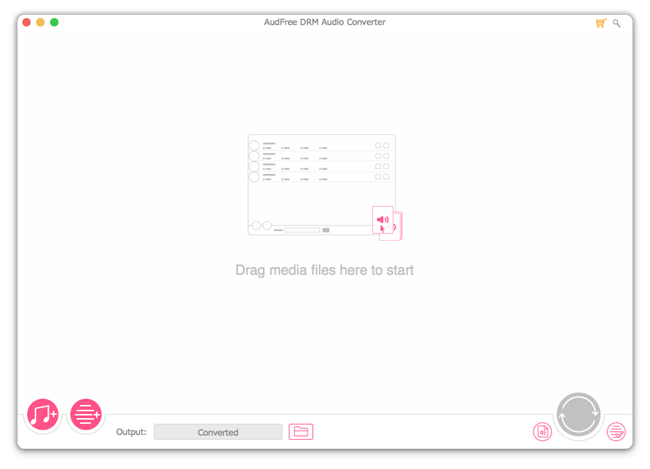
Screenshot: https://www.audfree.com/images/drm-audio-converter/main-mac.png
As an innovation-driven multimedia studio, AudFree is focused on developing and providing industry-leading DRM removal solutions for streaming music addicts, such as users of Apple Music, Spotify songs, Audible audioboks, iTunes music and more. With a passionate team full of dedicated individuals, AudFree is aiming to make your digital life much easier and bring more fun to you when enjoying music. All Material and Software (C) Copyright 2018 AudFree. All Rights Reserved. Apple, the Apple logo, macOS, iTunes, iPhone, iPod and iPad are registered trademarks of Apple Inc. in the U.S. and/or other countries. Other trademarks and registered trademarks may be the property of their respective owners.
*******
Link To Article: https://prmac.com/release-id-82920.htm
*******
---------------------------------------------------------------------------------
Note that you can alter delivered distributions at any time.
Login to your account on prMac to alter your channel selection, or to opt-out at any time.
AudFree Launches DRM Audio Converter to Remove DRM from Apple Music - Published on 08/14/18
AudFree announces DRM Audio Converter for macOS and Windows, its Apple Music converting tool called based on costumers' request to remove DRM protection from Apple Music tracks. Thanks to this smart app, people who subscribed Apple Music service can easily decrypt DRM encryption and enjoy those DRM-restricted music streams on any media player according to their demands.
Shenzhen, Guangdong - AudFree is proud to announce the release and immediate availability of AudFree DRM Audio Converter for macOS and Windows. As one of the most popular music streaming services, Apple Music has already surpassed 40 million subscribers so far and this data is fast increasing every minute.
With an Apple Music subscription, users can download any song from Apple Music to devices with an Apple ID. However, many users found that Apple Music songs can play on authorized devices by Apple only. In other words, even if they have subscribed to Apple Music, they can't enjoy our Apple Music playlists on other media players or burn them to CDs.
"Although DRM is a useful method to protect the artists' rights, it's an unfair trade for users who are restricted to play purchased songs on Apple supported devices only. Therefore, we developed a practical Apple Music DRM removal tool to enable customers to bypass DRM restrictions and play them everywhere freely," said Charles, the sale manager of AudFree.
AudFree DRM Audio Converter's Features and Benefits
Unlike other common Apple Music converters on the market, AudFree DRM Audio Converter is a one-stop streaming music solution, which can convert Apple Music M4P files to MP3 and other plain formats while unlocking DRM protection. So, users can access to Apple Music songs on any device and media player.
Detailed features are listed below:
1. Lossless remove DRM protection from Apple Music
2. Batch convert Apple Music M4P to MP3, FLAC, WAV, AAC, etc.
3. Play Apple Music streams on multiple popular devices offline
4. With User-friendly interface, convert Apple Music at 30X faster speed
5. Preserve original ID 3 tags and other metadata information
6. Lifetime free upgrade and 100% secure
With these powerful features, Apple Music subscribers can transfer DRM-free Apple Music tracks, playlists and albums to any device for enjoying, such as iPod, Zune, Sony, and other portable players. In addition, users can keep all Apple Music files on devices permanently even without an Apple Music subscription. Apart from Apple Music, this smart software works well with iTunes audiobooks, songs, and Audible books.
Pricing and Availability:
AudFree DRM Audio Converter is priced at just $39.95 USD (or an equivalent amount in other currencies) for Windows & Mac. It also supports a totally free trial version for customers. Interested users can visit the AudFree official website and download AudFree DRM Audio Converter.
AudFree: https://www.audfree.com
AudFree DRM Audio Converter for Mac 1.0: https://www.audfree.com/drm-audio-converter-mac/
Direct Download Link: https://www.audfree.com/download/AudioConverter.dmg
AudFree DRM Audio Converter for Windows: https://www.audfree.com/drm-audio-converter-win/
Screenshot: https://www.audfree.com/images/drm-audio-converter/main-mac.png
As an innovation-driven multimedia studio, AudFree is focused on developing and providing industry-leading DRM removal solutions for streaming music addicts, such as users of Apple Music, Spotify songs, Audible audioboks, iTunes music and more. With a passionate team full of dedicated individuals, AudFree is aiming to make your digital life much easier and bring more fun to you when enjoying music. All Material and Software (C) Copyright 2018 AudFree. All Rights Reserved. Apple, the Apple logo, macOS, iTunes, iPhone, iPod and iPad are registered trademarks of Apple Inc. in the U.S. and/or other countries. Other trademarks and registered trademarks may be the property of their respective owners.
*******
Link To Article: https://prmac.com/release-id-82920.htm
*******
---------------------------------------------------------------------------------
Note that you can alter delivered distributions at any time.
Login to your account on prMac to alter your channel selection, or to opt-out at any time.
Send Mini Video-Clips from Movies & Shows to Express Yourself Better
A new article has been published at prMac.
Send Mini Video-Clips from Movies & Shows to Express Yourself Better - Published on 08/14/18
Vidicons LLC announced an upgrade to the much popular Vidii - iMessage Video Sharing app that has crossed 11k downloads within a few months of its launch. The app, which has thousands hooked around the world, allows users to share memes, and video clips from an expanding database of fun and interesting video content in the iMessage app. The enhanced features of the app include a quick reference guide, better control functionality, and other features to improve user experience.
Houston, Texas - Vidicons LLC, the US-based video equipment company, has recently launched an updated version of the Vidii - iMessage Video Sharing app. The app enables users to share video clips, and memes to enhance their conversations in the iMessage app, making conversations much more fun and interactive.
"Emojis could get boring," says Co-founder Mr. E.L. Mont, "but Vidii video clips give you the perfect way to express your feelings by sharing video clips that truly match your mood."
Indeed, with the Vidii app, users can do much more than sharing the same old emojis to express their feelings or react to a post. The app offers thousands of short video clips in HD format, enabling users to have spontaneous conversations that are lively and fun. Each video clip is the size of 1 or 2 tweets, which saves users time as well as data.
"All you need to do is start typing a thought, dialogue or even an actor's name to find hundreds of clips that exactly sum up your mood. You can also explore various titles and stream them on multiple devices whenever you find time," explains Mr. Mont. He adds that "The app has crossed 11k downloads within 3 months of its launch. It shows how much users appreciate the ingenuity we have put into their conversations with an easy to use app that utilizes an emotion-based AI engine."
Here are some of the features that users love in the Vidii app:
* Search videos by simply typing an emotion, quote, movie/TV series or an actor's name
* Search and share your favorite movie clips and dialogues to express yourself better
* Discover new movies and shows by clicking on the title. Instantly stream on your phone or view on another device later in your free time
* Create your own reaction video "folder" by saving your favorites to access them quickly when texting
New features after the upgrade include:
* Send requests to have your favorite shows and characters added to Vidii
* Enjoy a more intuitive interface to share the app with friends
* Find a handy 'how to use' guide to fully enjoy the app
* Enhanced control functionality for improved user experience
Device Requirements:
* iPhone, iPad, and iPod touch
* Requires iOS 10.0 or later
* 6.4 MB
Pricing and Availability:
Vidii - iMessage Video Sharing 1.2 is currently available for Free on the App Store in the Entertainment category.
Vidii - iMessage Video Sharing 1.2: http://vidii.co/
Download from iTunes: https://itunes.apple.com/app/vidii-imessage-video-sharing/id1153346418
Screenshot 1: https://is1-ssl.mzstatic.com/image/thumb/Purple118/v4/b6/79/28/b67928bb-182f-669a-15d7-58db519cb29d/pr_source.png/900x0w.jpg
Screenshot 2: https://is1-ssl.mzstatic.com/image/thumb/Purple118/v4/e1/31/dc/e131dc85-6209-71ca-1f57-9ad03ec9b5e2/pr_source.png/900x0w.jpg
App Icon: https://is1-ssl.mzstatic.com/image/thumb/Purple125/v4/00/69/9e/00699e96-91aa-66d1-7e2c-6e7013398341/AppIcon-1x_U007emarketing-0-0-GLES2_U002c0-512MB-sRGB-0-0-0-85-220-0-0-0-8.png/738x0w.jpg
The founders - E. L. Mont, Rama Lahori, and Paul Martin made Vidii app although it could be looked at as just another chat app that lets you send messages or videos, share pictures and post to your social networks like any other messaging app, its more than that. It's not about sending videos or even replacing text...it's about shared personal experiences. Vidii is about fun and a great way for friends to quickly put a smile on each other's faces during the wonderful craziness of life like only movies and shows can. All Material and Software (C) Copyright 2018 Vidicons LLC. All Rights Reserved. Apple, the Apple logo, iPhone, iPod and iPad are registered trademarks of Apple Inc. in the U.S. and/or other countries. Other trademarks and registered trademarks may be the property of their respective owners.
*******
Link To Article: https://prmac.com/release-id-82919.htm
*******
---------------------------------------------------------------------------------
Note that you can alter delivered distributions at any time.
Login to your account on prMac to alter your channel selection, or to opt-out at any time.
Send Mini Video-Clips from Movies & Shows to Express Yourself Better - Published on 08/14/18
Vidicons LLC announced an upgrade to the much popular Vidii - iMessage Video Sharing app that has crossed 11k downloads within a few months of its launch. The app, which has thousands hooked around the world, allows users to share memes, and video clips from an expanding database of fun and interesting video content in the iMessage app. The enhanced features of the app include a quick reference guide, better control functionality, and other features to improve user experience.
Houston, Texas - Vidicons LLC, the US-based video equipment company, has recently launched an updated version of the Vidii - iMessage Video Sharing app. The app enables users to share video clips, and memes to enhance their conversations in the iMessage app, making conversations much more fun and interactive.
"Emojis could get boring," says Co-founder Mr. E.L. Mont, "but Vidii video clips give you the perfect way to express your feelings by sharing video clips that truly match your mood."
Indeed, with the Vidii app, users can do much more than sharing the same old emojis to express their feelings or react to a post. The app offers thousands of short video clips in HD format, enabling users to have spontaneous conversations that are lively and fun. Each video clip is the size of 1 or 2 tweets, which saves users time as well as data.
"All you need to do is start typing a thought, dialogue or even an actor's name to find hundreds of clips that exactly sum up your mood. You can also explore various titles and stream them on multiple devices whenever you find time," explains Mr. Mont. He adds that "The app has crossed 11k downloads within 3 months of its launch. It shows how much users appreciate the ingenuity we have put into their conversations with an easy to use app that utilizes an emotion-based AI engine."
Here are some of the features that users love in the Vidii app:
* Search videos by simply typing an emotion, quote, movie/TV series or an actor's name
* Search and share your favorite movie clips and dialogues to express yourself better
* Discover new movies and shows by clicking on the title. Instantly stream on your phone or view on another device later in your free time
* Create your own reaction video "folder" by saving your favorites to access them quickly when texting
New features after the upgrade include:
* Send requests to have your favorite shows and characters added to Vidii
* Enjoy a more intuitive interface to share the app with friends
* Find a handy 'how to use' guide to fully enjoy the app
* Enhanced control functionality for improved user experience
Device Requirements:
* iPhone, iPad, and iPod touch
* Requires iOS 10.0 or later
* 6.4 MB
Pricing and Availability:
Vidii - iMessage Video Sharing 1.2 is currently available for Free on the App Store in the Entertainment category.
Vidii - iMessage Video Sharing 1.2: http://vidii.co/
Download from iTunes: https://itunes.apple.com/app/vidii-imessage-video-sharing/id1153346418
Screenshot 1: https://is1-ssl.mzstatic.com/image/thumb/Purple118/v4/b6/79/28/b67928bb-182f-669a-15d7-58db519cb29d/pr_source.png/900x0w.jpg

Screenshot 2: https://is1-ssl.mzstatic.com/image/thumb/Purple118/v4/e1/31/dc/e131dc85-6209-71ca-1f57-9ad03ec9b5e2/pr_source.png/900x0w.jpg

App Icon: https://is1-ssl.mzstatic.com/image/thumb/Purple125/v4/00/69/9e/00699e96-91aa-66d1-7e2c-6e7013398341/AppIcon-1x_U007emarketing-0-0-GLES2_U002c0-512MB-sRGB-0-0-0-85-220-0-0-0-8.png/738x0w.jpg

The founders - E. L. Mont, Rama Lahori, and Paul Martin made Vidii app although it could be looked at as just another chat app that lets you send messages or videos, share pictures and post to your social networks like any other messaging app, its more than that. It's not about sending videos or even replacing text...it's about shared personal experiences. Vidii is about fun and a great way for friends to quickly put a smile on each other's faces during the wonderful craziness of life like only movies and shows can. All Material and Software (C) Copyright 2018 Vidicons LLC. All Rights Reserved. Apple, the Apple logo, iPhone, iPod and iPad are registered trademarks of Apple Inc. in the U.S. and/or other countries. Other trademarks and registered trademarks may be the property of their respective owners.
*******
Link To Article: https://prmac.com/release-id-82919.htm
*******
---------------------------------------------------------------------------------
Note that you can alter delivered distributions at any time.
Login to your account on prMac to alter your channel selection, or to opt-out at any time.
Reveal Makes It Easy to Find PowerPoint or Keynote Slides on the Mac
A new article has been published at prMac.
Reveal Makes It Easy to Find PowerPoint or Keynote Slides on the Mac - Published on 08/14/18
Massachusetts-based indie developer Bit Lasso today announces Reveal 2.0 for macOS, an important update to their popular utility that allows Mac users to quickly search for and view PowerPoint and Keynote presentation slides. Reveal helps prevent the frustration felt by users who are looking for a particular slide to reuse in a new presentation. Version 2.0 brings the ability to see hundreds of slides, easily throw away unwanted search results, and more.
Somerville, Massachusetts - Independent development team Bit Lasso today is proud to announce the release and immediate availability of Reveal 2.0 for macOS, the important update to their popular and easy-to-use application that allows users to quickly search and view their PowerPoint and Keynote slide decks. Reveal allows users to save time and frustrations when searching for a particular slide.
Before the release of Reveal, PowerPoint and Keynote users were forced to spend extended periods of time looking for slides to re-use in new presentations. Reveal also saves time by preventing the need to re-create content that users already have.
"If you work with slides, you often open a large number of files and folders, looking for one particular slide. For years I felt the same pain," shares Bit Lasso founder Mitch Haile. "I wasted hours! In frustration, I would regularly give up and recreate the slide, wasting even more time. Finally, I did what any rational person would do: I quit my job and created the solution I needed!"
Reveal works with both PowerPoint and Keynote slide decks. The application detects how your slides are related and automatically organizes them during a search. Everything happens automatically, eliminating the need to manually build libraries, tag files or organizing slide decks. Reveal adjust to the way users work with their presentations, not vice versa.
Version 2.0 allows users to view hundreds of slides during searches, quickly throwing away unwanted search results, allowing them to zero in on the slides they want, all in a matter of a few seconds. Users can also view neighboring slides, extract images from their slides, and begin new searches by image, slide variation, file paths and file and folder names, and much more.
Reveal works well with Mac screens of all sizes, from a 12-inch MacBook up to a 27-inch iMac Pro. Users can quickly view up to 1,000 slides, easily zeroing down to their needed slides.
Who Uses Reveal?
* Professors and researchers use it to prepare lectures for classes and presentations for meetings.
* Marketers and graphic designers can use Reveal to find and compare slides.
* Sales professionals can customize slides for their customers, preventing "slide sprawl."
Users can easily compare slides by sending them to the Reveal compare window with a simple keystroke or click of the mouse. Users can send a single slide, or an entire group of slides to the compare window, where they can jump to a deck in Finder or open them directly in PowerPoint or Keynote.
Reveal is economical, there is no need to sign up for an account or to pay a monthly subscription to access their slide decks. Plus, Reveal keeps your information safe and secure, right on the user's hard drive, eliminating cloud storage-related worries.
Features Include:
* Limit searches to specific folders, file name patterns, or date range.
* Immediately jump to any slide directly in PowerPoint or Keynote.
* Open multiple search windows - retaining one set of results while searching another set.
* Don't want to search by keyword? Instead, view all the slides related to a particular deck.
* Jump into any parent folder in the Finder or start a new search for the slides within that folder.
Unlike a "Spotlight" search in Finder, where users only see the presentation slide covers, a Reveal search displays the actual slides, not just the first slide in the deck. Users can view different versions of the same slide grouped together, offering the ability to jump directly to the slide they want.
Reveal makes it easy to find crucial information that's normally buried in PowerPoint and Keynote presentations. This is especially true for users who have multiple versions of the same slide or presentation.
"It's frustrating when you can't find a slide you want to use. It's a time waster to look for slides manually, and if you end up re-creating a slide, you've wasted even more time," continues Mitch. "With Reveal, I've created a new way to find your slides rapidly, so you can build your best materials and be the most dynamic presenter you can be. Every time."
Device Requirements:
* macOS 10.12 Sierra or Later
* macOS 10.13 High Sierra Compatible
* 301 MB Hard Drive Space
Pricing and Availability:
Reveal 2.0 is only $129.00 USD (or an equivalent amount in other currencies) and is available worldwide exclusively through the Bit Lasso website. Review copies are available upon request.
Bit Lasso: https://www.bitlasso.com/
Reveal 2.0: https://www.bitlasso.com/product/
Download: https://www.bitlasso.com/download-latest
Screenshot 1: https://www.bitlasso.com/product/movies/zoom-take-3.gif
Screenshot 2: https://www.bitlasso.com/product/v2/meet-the-neighbors.png
Headquartered in Somerville, Massachusetts, Bit Lasso is an independent development firm founded by Mitch Haile. Mitch has extensive experience designing software for data systems in corporate environments. He was an early engineer at ground-breaking compression company Data Domain; Mitch later co-founded virtual machine backup company Pancetera, which was sold to Quantum, a respected data backup company. All Material and Software (C) Copyright 2018 Bit Lasso. All Rights Reserved. Apple, the Apple logo, Macintosh Mac OS X and macOS are registered trademarks of Apple Inc. in the U.S. and/or other countries. Other trademarks and registered trademarks may be the property of their respective owners.
*******
Link To Article: https://prmac.com/release-id-82918.htm
*******
---------------------------------------------------------------------------------
Note that you can alter delivered distributions at any time.
Login to your account on prMac to alter your channel selection, or to opt-out at any time.
Reveal Makes It Easy to Find PowerPoint or Keynote Slides on the Mac - Published on 08/14/18
Massachusetts-based indie developer Bit Lasso today announces Reveal 2.0 for macOS, an important update to their popular utility that allows Mac users to quickly search for and view PowerPoint and Keynote presentation slides. Reveal helps prevent the frustration felt by users who are looking for a particular slide to reuse in a new presentation. Version 2.0 brings the ability to see hundreds of slides, easily throw away unwanted search results, and more.
Somerville, Massachusetts - Independent development team Bit Lasso today is proud to announce the release and immediate availability of Reveal 2.0 for macOS, the important update to their popular and easy-to-use application that allows users to quickly search and view their PowerPoint and Keynote slide decks. Reveal allows users to save time and frustrations when searching for a particular slide.
Before the release of Reveal, PowerPoint and Keynote users were forced to spend extended periods of time looking for slides to re-use in new presentations. Reveal also saves time by preventing the need to re-create content that users already have.
"If you work with slides, you often open a large number of files and folders, looking for one particular slide. For years I felt the same pain," shares Bit Lasso founder Mitch Haile. "I wasted hours! In frustration, I would regularly give up and recreate the slide, wasting even more time. Finally, I did what any rational person would do: I quit my job and created the solution I needed!"
Reveal works with both PowerPoint and Keynote slide decks. The application detects how your slides are related and automatically organizes them during a search. Everything happens automatically, eliminating the need to manually build libraries, tag files or organizing slide decks. Reveal adjust to the way users work with their presentations, not vice versa.
Version 2.0 allows users to view hundreds of slides during searches, quickly throwing away unwanted search results, allowing them to zero in on the slides they want, all in a matter of a few seconds. Users can also view neighboring slides, extract images from their slides, and begin new searches by image, slide variation, file paths and file and folder names, and much more.
Reveal works well with Mac screens of all sizes, from a 12-inch MacBook up to a 27-inch iMac Pro. Users can quickly view up to 1,000 slides, easily zeroing down to their needed slides.
Who Uses Reveal?
* Professors and researchers use it to prepare lectures for classes and presentations for meetings.
* Marketers and graphic designers can use Reveal to find and compare slides.
* Sales professionals can customize slides for their customers, preventing "slide sprawl."
Users can easily compare slides by sending them to the Reveal compare window with a simple keystroke or click of the mouse. Users can send a single slide, or an entire group of slides to the compare window, where they can jump to a deck in Finder or open them directly in PowerPoint or Keynote.
Reveal is economical, there is no need to sign up for an account or to pay a monthly subscription to access their slide decks. Plus, Reveal keeps your information safe and secure, right on the user's hard drive, eliminating cloud storage-related worries.
Features Include:
* Limit searches to specific folders, file name patterns, or date range.
* Immediately jump to any slide directly in PowerPoint or Keynote.
* Open multiple search windows - retaining one set of results while searching another set.
* Don't want to search by keyword? Instead, view all the slides related to a particular deck.
* Jump into any parent folder in the Finder or start a new search for the slides within that folder.
Unlike a "Spotlight" search in Finder, where users only see the presentation slide covers, a Reveal search displays the actual slides, not just the first slide in the deck. Users can view different versions of the same slide grouped together, offering the ability to jump directly to the slide they want.
Reveal makes it easy to find crucial information that's normally buried in PowerPoint and Keynote presentations. This is especially true for users who have multiple versions of the same slide or presentation.
"It's frustrating when you can't find a slide you want to use. It's a time waster to look for slides manually, and if you end up re-creating a slide, you've wasted even more time," continues Mitch. "With Reveal, I've created a new way to find your slides rapidly, so you can build your best materials and be the most dynamic presenter you can be. Every time."
Device Requirements:
* macOS 10.12 Sierra or Later
* macOS 10.13 High Sierra Compatible
* 301 MB Hard Drive Space
Pricing and Availability:
Reveal 2.0 is only $129.00 USD (or an equivalent amount in other currencies) and is available worldwide exclusively through the Bit Lasso website. Review copies are available upon request.
Bit Lasso: https://www.bitlasso.com/
Reveal 2.0: https://www.bitlasso.com/product/
Download: https://www.bitlasso.com/download-latest
Screenshot 1: https://www.bitlasso.com/product/movies/zoom-take-3.gif

Screenshot 2: https://www.bitlasso.com/product/v2/meet-the-neighbors.png

Headquartered in Somerville, Massachusetts, Bit Lasso is an independent development firm founded by Mitch Haile. Mitch has extensive experience designing software for data systems in corporate environments. He was an early engineer at ground-breaking compression company Data Domain; Mitch later co-founded virtual machine backup company Pancetera, which was sold to Quantum, a respected data backup company. All Material and Software (C) Copyright 2018 Bit Lasso. All Rights Reserved. Apple, the Apple logo, Macintosh Mac OS X and macOS are registered trademarks of Apple Inc. in the U.S. and/or other countries. Other trademarks and registered trademarks may be the property of their respective owners.
*******
Link To Article: https://prmac.com/release-id-82918.htm
*******
---------------------------------------------------------------------------------
Note that you can alter delivered distributions at any time.
Login to your account on prMac to alter your channel selection, or to opt-out at any time.
Subscribe to:
Posts (Atom)