A new article has been published at prMac.
High Performance 2D CAD Program CADintosh 8.4.1 Now Available for macOS - Published on 09/03/18
Indie developer, Lemke Software GmbH today announces CADintosh 8.4.1, the important update to its high performance 2D CAD program for macOS. CADintosh is designed for use by Technical Draftsmen and Designers and offers users a wide variety of tools to create technical, mechanical, and architectural drawings. Version 8.4.1 brings new and updated features and bug fixes, including Letter and Legal Landscape page frames and new scroll/zoom preferences.
Peine, Germany - Longtime and award-winning independent Mac developer, Lemke Software GmbH today is pleased to announce the release and immediate availability of CADintosh 8.4.1, an important update to its popular high performance 2D CAD program. The app offers a wide variety of CAD tools to users who need to create professional technical, mechanical, and architectural drawings.
CADintosh is designed for use by Technical Draftsmen and Designers and provides a massive number of usability and workflow advantages. The number of CAD elements that can be used is limited only by the available memory of the user's Mac. Pre-settings are saved with each drawing. The app offers 8 pens with fully definable line widths and colors, 6 different line types, and supports 1,024 layers.
"CADintosh offers the most professional and well thought-out features available for Mac CAD users," says Thorsten Lemke, president of Lemke Software. "The current version of the app is the result of over twenty years of inspiration and development by our team of industry experts."
Features Include:
* Comfortable and simple User Interface
* Number of elements only limited by the Mac's available memory
* Pre-settings saved for each drawing
* Includes 8 pens with freely definable line widths and line colors
* Includes 6 different line types
* Offers line widths from 0.0 to 99.99 mm
* Each element can be designated a different color and width
* Functions for lines, circles, dimensioning, hatching, X-lines, etc.
* Allows up to 32,000 groups
* Supports up to 1,024 layers
* Offers Complex layer management
* Easy import and export of DXF, HPGL, IGES and PDF formatted files
* 64-bit and unicode support
* Support for symbol libraries for the import and export of symbols
* Alternative units (i.e. inches)
* Runs natively on macOS
* Supports Retina displays
* Helpful Tutorial
CADintosh creates drawings that are composed of layers that can be conveniently organized into groups. The app supports up to 1,024 layers and up to 32,000 groups. The app's wide variety of design tools can be used to create professional CAD drawings.
Using CADintosh's easy-to-use tools, anyone can easily create lines, circles, text, dimensions, X-lines, hatching, and set scale within their drawing. 8 different pens of variable widths, colors, and styles are conveniently accessed from the in-app drop-down menus. 6 types of lines are available, including full line, dotted line, chain line, dotted line with two dots, zigzag line, and short dotted line. Line widths are adjustable from 0.0 to 99.99 mm and can be set to different colors and widths.
CADintosh 8.4.1 brings several new and updated features. The update also provides bug fixes and performance enhancements.
New Features:
* Added additional page frames
* Added scroll/zoom preferences
Updated Features:
* Updated Sparkle update framework
* Optimized the display speed of very large drawings
* Transform rotate - new option -1 to rotate without rotation of text angle
* Added more imperial scales
Bug Fixes:
* Fixed the drawing order bug
* Fixed the display issues with macOS 10.14 (Mojave)
CADintosh can easily import and export several file types in CADintosh including DXF, HPGL, IGES and PDF. The app already includes a selection of internal symbols, but paid users can also import and export symbol libraries. Created symbols can be saved in an archive. All projects can be created in either imperial or metric units.
"We are committed to offer the most powerful and easy to use 2D CAD program available on the Mac today," continues Thorsten. "Plus, we make it available to try for free, so users can run it through its paces before putting down their hard-earned cash. We're confident that users will find that CADintosh offers an excellent value for a reasonable price."
Language Support:
* English, Danish, French, German, Italian, Japanese, Spanish, Portuguese
Device Requirements:
* macOS 10.8 or later
* macOS 10.14 Mojave Compatible
* 77.6 MB
Pricing and Availability:
CADintosh 8.4.1 is only $33.99 USD (or an equivalent amount in other currencies) and is available worldwide through the Mac App Store in the Graphics & Design category. It can also be directly purchased online from the Lemkesoft website for $32.00 (USD). Version 8.4.1 is a free update for all CADintosh 8.x users. Upgrades from 1.x-7.x to 8.x is only $19.95 (USD) from the Lemke website.
Lemkesoft: http://www.lemkesoft.de/en/lemkesoft/
CADintosh 8.4.1: https://www.lemkesoft.de/en/products/cadintosh/
Download CADintosh: https://www.lemkesoft.de/en/products/cadintosh/download/
Purchase and Download from Mac App Store: https://itunes.apple.com/app/cadintosh-x/id494275914
Order from Lemkesoft: https://www.lemkesoft.de/en/order/
Screenshot: http://a3.mzstatic.com/us/r30/Purple4/v4/b5/21/2a/b5212a2d-476d-e826-a115-5f43fd16bd49/screen800x500.jpeg
Based in Peine, Germany, Lemke Software GmbH is a developer and publisher of Macintosh software. Founded by Thorsten Lemke in 2002, the main focus and passion of Lemke Software is centered on the maintenance and further development of GraphicConverter. Lemke Software also develops individual solutions for special customer requirements. All Material and Software (C) Copyright 2018 Lemke Software GmbH. All Rights Reserved. Apple, the Apple logo, Macintosh Mac OS X, and macOS are registered trademarks of Apple Inc. in the U.S. and/or other countries. Other trademarks and registered trademarks may be the property of their respective owners.
*******
Link To Article: https://prmac.com/release-id-82948.htm
*******
---------------------------------------------------------------------------------
Note that you can alter delivered distributions at any time.
Login to your account on prMac to alter your channel selection, or to opt-out at any time.


AlphaDigits Top Rated Apps August 2018
A new article has been published at prMac.
AlphaDigits Top Rated Apps August 2018 - Published on 08/31/18
Mobile app review publisher AlphaDigits has named top rated applications for August 2018. AlphaDigits names five top class mobile apps every month based on the reviews published in the website during the particular month. Selfie Games is a game for all. Type Art takes text and turns it into art. WishSprout can share what the users wish for. All Star Fruit Racing VR creates an exciting VR experience. SMCourse explains the stock market.
Long Island, New York - Mobile app review publisher AlphaDigits has named top rated applications for August 2018. AlphaDigits names five top class mobile apps every month based on the reviews published in the website during the particular month. This website has now released the names of top rated mobile apps for the month of August.
Selfie Games (10/10): It is a new gaming app that involves players ranging in number from 3 to 10. There are no limits to the age; this is a game for all. In a nutshell, it's a game that's similar to Pictionary, but involves selfies at the heart of the pictogram. Selfie Games currently has one game to play, and the app is free to download. However, if you wish to play Sketchies, one of the players needs to make an in app purchase to unlock it.
Type Art (9.5/10): This app takes text and turns it into art, static and animated, to add to any photo or drawing you take or make, so it comes to life and ups the interest factor. Type Art is free to download, but to take full advantage of it, there are few in app purchases you can make. If you want a monthly pro edition, it's just $3.99/mo. The full pro for the year edition costs $24.99.
WishSprout (9/10): Wish lists are a great way to help your friends and family know more about you, what your interests are and what you may have in mind for your next birthday, Christmas or anniversary. Now you can share what you wish for through this social media app. It also lets you promote those products at the same time and generate revenue.
All Star Fruit Racing VR (8.5/10): XR Games has taken it mobile by creating an app that runs on iOS and Android devices and makes it real through an exciting VR experience. Yes, if you download the free app, you get a simple cardboard VR viewer to hold your iPhone and look through to play the game. If you don't want to play in VR mode, no problem, you can play in regular mode and just tap left and right steer your racer along the racing path, avoiding obstacles and scoring points.
SMCourse (8/10): It is a free app that explains the stock market and even provides modules in which you dive deep into certain areas and then get tested on it. The overall purpose of the app is to inform and educate and ensure you understand the material presented. In no way does the app guarantee any type of results in your investments, of course, but it does provide you with knowledge you can use to make better decisions and understand how you can grow your wealth over time and become financially independent.
Joe Ellen, an Editor at AlphaDigits said, "Our marketing team can generate web reviews and installations for mobile apps. We can also get users review your app on Play Store or App Store." Developers can also contact AlphaDigits through the onsite form, mail or the contact form to get their apps reviewed.
AlphaDigits: http://alphadigits.com
Submit App for Review: http://alphadigits.com/submit-app-for-review/
AlphaDigits is a review site run by a few app marketers. Enjoying the support from a handy amount of regular visitors, AlphaDigits provides reviews for iPhone, iPad and Android apps. Copyright (C) 2018 AlphaDigits. All Rights Reserved. Apple, the Apple logo, iPhone, iPod and iPad are registered trademarks of Apple Inc. in the U.S. and/or other countries.
*******
Link To Article: https://prmac.com/release-id-82950.htm
*******
---------------------------------------------------------------------------------
Note that you can alter delivered distributions at any time.
Login to your account on prMac to alter your channel selection, or to opt-out at any time.
AlphaDigits Top Rated Apps August 2018 - Published on 08/31/18
Mobile app review publisher AlphaDigits has named top rated applications for August 2018. AlphaDigits names five top class mobile apps every month based on the reviews published in the website during the particular month. Selfie Games is a game for all. Type Art takes text and turns it into art. WishSprout can share what the users wish for. All Star Fruit Racing VR creates an exciting VR experience. SMCourse explains the stock market.
Long Island, New York - Mobile app review publisher AlphaDigits has named top rated applications for August 2018. AlphaDigits names five top class mobile apps every month based on the reviews published in the website during the particular month. This website has now released the names of top rated mobile apps for the month of August.
Selfie Games (10/10): It is a new gaming app that involves players ranging in number from 3 to 10. There are no limits to the age; this is a game for all. In a nutshell, it's a game that's similar to Pictionary, but involves selfies at the heart of the pictogram. Selfie Games currently has one game to play, and the app is free to download. However, if you wish to play Sketchies, one of the players needs to make an in app purchase to unlock it.
Type Art (9.5/10): This app takes text and turns it into art, static and animated, to add to any photo or drawing you take or make, so it comes to life and ups the interest factor. Type Art is free to download, but to take full advantage of it, there are few in app purchases you can make. If you want a monthly pro edition, it's just $3.99/mo. The full pro for the year edition costs $24.99.
WishSprout (9/10): Wish lists are a great way to help your friends and family know more about you, what your interests are and what you may have in mind for your next birthday, Christmas or anniversary. Now you can share what you wish for through this social media app. It also lets you promote those products at the same time and generate revenue.
All Star Fruit Racing VR (8.5/10): XR Games has taken it mobile by creating an app that runs on iOS and Android devices and makes it real through an exciting VR experience. Yes, if you download the free app, you get a simple cardboard VR viewer to hold your iPhone and look through to play the game. If you don't want to play in VR mode, no problem, you can play in regular mode and just tap left and right steer your racer along the racing path, avoiding obstacles and scoring points.
SMCourse (8/10): It is a free app that explains the stock market and even provides modules in which you dive deep into certain areas and then get tested on it. The overall purpose of the app is to inform and educate and ensure you understand the material presented. In no way does the app guarantee any type of results in your investments, of course, but it does provide you with knowledge you can use to make better decisions and understand how you can grow your wealth over time and become financially independent.
Joe Ellen, an Editor at AlphaDigits said, "Our marketing team can generate web reviews and installations for mobile apps. We can also get users review your app on Play Store or App Store." Developers can also contact AlphaDigits through the onsite form, mail or the contact form to get their apps reviewed.
AlphaDigits: http://alphadigits.com
Submit App for Review: http://alphadigits.com/submit-app-for-review/
AlphaDigits is a review site run by a few app marketers. Enjoying the support from a handy amount of regular visitors, AlphaDigits provides reviews for iPhone, iPad and Android apps. Copyright (C) 2018 AlphaDigits. All Rights Reserved. Apple, the Apple logo, iPhone, iPod and iPad are registered trademarks of Apple Inc. in the U.S. and/or other countries.
*******
Link To Article: https://prmac.com/release-id-82950.htm
*******
---------------------------------------------------------------------------------
Note that you can alter delivered distributions at any time.
Login to your account on prMac to alter your channel selection, or to opt-out at any time.
HeyVal for iPhone introduces stock and cryptocurrency sentiment analysis
A new article has been published at prMac.
HeyVal for iPhone introduces stock and cryptocurrency sentiment analysis - Published on 08/31/18
HeyVal for iPhone adds Stock Sentiment Analysis in-app purchase, free of charge on an introductory basis. HeyVal scans public Twitter timelines for real time discussions about a particular stock ticker or cryptocurrency symbol then performs mood analysis on the results. HeyVal can also evaluate the mood or grade reading level of any individual public Twitter timeline, and text from any other source can be submitted for mood or grade reading level analysis.
Oakland, California - Independent developer, Mark S. Morris is proud to announce the release of HeyVal for iPhone. HeyVal for iPhone adds Stock Sentiment Analysis in-app purchase, free of charge on an introductory basis. HeyVal scans public Twitter timelines for real time discussions about a particular stock ticker or cryptocurrency symbol then performs mood analysis on the results. HeyVal can also evaluate the mood or grade reading level of any individual public Twitter timeline, and text from any other source can be submitted for mood or grade reading level analysis.
To evaluate the sentiment of a stock or cryptocurrency on Twitter, type $ followed by the ticker symbol in the Source text box, for example $TSLA for Tesla stock or $BTC for Bitcoin. When you select stock sentiment, you can then choose the type of Tweets you want to parse. Latest will return up to 100 of the most recent Tweets that contain the stock ticker or crypto symbol. Popular will return up to 15 of the most popular Tweets including that symbol, and Mixed will provide a combination of recent and popular.
To parse the timeline of a Twitter user, type in the @handle of the username you wish to review in the Source text box, for example @Tesla or @Bitcoin. When you select mood or grade level analysis, you can then choose the most recent 50, 100, or 200 tweets to be ingested. Communication with Twitter is direct from your device and does not go through any other servers.
To parse the text of a news article from a web site, open the page in Safari and use the copy function to select all or part of the text and copy it in to the clipboard. Safari Reader mode if available can help with this selection. Open HeyVal and paste the clipboard contents into the Source text box. Text messages or the contents of an email can be analyzed by copying and pasting into the Source text box. All text analysis is performed on the device, ensuring private messages will remain private.
The mood analysis tool will parse the retrieved text and assign an aggregate sentiment score. The grade reading level analysis tool provides an overall readability score. Flesch Kincaid and other readability scores are also provided, corresponding to the numbers of years of formal education required to comprehend the text submitted for analysis.
Device Requirements:
* Requires an iPhone
* Requires iOS 11.3 or later
* 11.9 MB
Pricing and Availability:
HeyVal 1.0.1 is Free (With In-App Purchases) and available worldwide on the App Store in the Reference category.
HeyVal 1.0.1: https://www.heyval.com
Download from iTunes: https://itunes.apple.com/app/heyval/id1390644226
Screenshot (Twitter handle as source input): https://www.heyval.com/support/pr/prMac1_screen1.jpg
Screenshot (Ticker symbol as source input): https://www.heyval.com/support/pr/prMac1_screen2.jpg
Screenshot (Processing Twitter source input): https://www.heyval.com/support/pr/prMac1_screen3.jpg
Screenshot (Twitter sentiment analysis output): https://www.heyval.com/support/pr/prMac1_screen4.jpg
Mark S. Morris is an independent software and 3D printing developer in Oakland, California. HeyVal is part of the uplink.to network. HeyVal is (TM) and (C) Mark S. Morris 2018. All Rights Reserved. Apple and iPhone are trademarks of Apple Inc., registered in the U.S. and other countries. Twitter is a registered trademark of Twitter, Inc. Other trademarks and registered trademarks are the property of their respective owners.
*******
Link To Article: https://prmac.com/release-id-82947.htm
*******
---------------------------------------------------------------------------------
Note that you can alter delivered distributions at any time.
Login to your account on prMac to alter your channel selection, or to opt-out at any time.
HeyVal for iPhone introduces stock and cryptocurrency sentiment analysis - Published on 08/31/18
HeyVal for iPhone adds Stock Sentiment Analysis in-app purchase, free of charge on an introductory basis. HeyVal scans public Twitter timelines for real time discussions about a particular stock ticker or cryptocurrency symbol then performs mood analysis on the results. HeyVal can also evaluate the mood or grade reading level of any individual public Twitter timeline, and text from any other source can be submitted for mood or grade reading level analysis.
Oakland, California - Independent developer, Mark S. Morris is proud to announce the release of HeyVal for iPhone. HeyVal for iPhone adds Stock Sentiment Analysis in-app purchase, free of charge on an introductory basis. HeyVal scans public Twitter timelines for real time discussions about a particular stock ticker or cryptocurrency symbol then performs mood analysis on the results. HeyVal can also evaluate the mood or grade reading level of any individual public Twitter timeline, and text from any other source can be submitted for mood or grade reading level analysis.
To evaluate the sentiment of a stock or cryptocurrency on Twitter, type $ followed by the ticker symbol in the Source text box, for example $TSLA for Tesla stock or $BTC for Bitcoin. When you select stock sentiment, you can then choose the type of Tweets you want to parse. Latest will return up to 100 of the most recent Tweets that contain the stock ticker or crypto symbol. Popular will return up to 15 of the most popular Tweets including that symbol, and Mixed will provide a combination of recent and popular.
To parse the timeline of a Twitter user, type in the @handle of the username you wish to review in the Source text box, for example @Tesla or @Bitcoin. When you select mood or grade level analysis, you can then choose the most recent 50, 100, or 200 tweets to be ingested. Communication with Twitter is direct from your device and does not go through any other servers.
To parse the text of a news article from a web site, open the page in Safari and use the copy function to select all or part of the text and copy it in to the clipboard. Safari Reader mode if available can help with this selection. Open HeyVal and paste the clipboard contents into the Source text box. Text messages or the contents of an email can be analyzed by copying and pasting into the Source text box. All text analysis is performed on the device, ensuring private messages will remain private.
The mood analysis tool will parse the retrieved text and assign an aggregate sentiment score. The grade reading level analysis tool provides an overall readability score. Flesch Kincaid and other readability scores are also provided, corresponding to the numbers of years of formal education required to comprehend the text submitted for analysis.
Device Requirements:
* Requires an iPhone
* Requires iOS 11.3 or later
* 11.9 MB
Pricing and Availability:
HeyVal 1.0.1 is Free (With In-App Purchases) and available worldwide on the App Store in the Reference category.
HeyVal 1.0.1: https://www.heyval.com
Download from iTunes: https://itunes.apple.com/app/heyval/id1390644226
Screenshot (Twitter handle as source input): https://www.heyval.com/support/pr/prMac1_screen1.jpg

Screenshot (Ticker symbol as source input): https://www.heyval.com/support/pr/prMac1_screen2.jpg

Screenshot (Processing Twitter source input): https://www.heyval.com/support/pr/prMac1_screen3.jpg

Screenshot (Twitter sentiment analysis output): https://www.heyval.com/support/pr/prMac1_screen4.jpg

Mark S. Morris is an independent software and 3D printing developer in Oakland, California. HeyVal is part of the uplink.to network. HeyVal is (TM) and (C) Mark S. Morris 2018. All Rights Reserved. Apple and iPhone are trademarks of Apple Inc., registered in the U.S. and other countries. Twitter is a registered trademark of Twitter, Inc. Other trademarks and registered trademarks are the property of their respective owners.
*******
Link To Article: https://prmac.com/release-id-82947.htm
*******
---------------------------------------------------------------------------------
Note that you can alter delivered distributions at any time.
Login to your account on prMac to alter your channel selection, or to opt-out at any time.
End-of-Summer / Back-to-School Super Sale for Packing Pro Travel App
A new article has been published at prMac.
End-of-Summer / Back-to-School Super Sale for Packing Pro Travel App - Published on 08/30/18
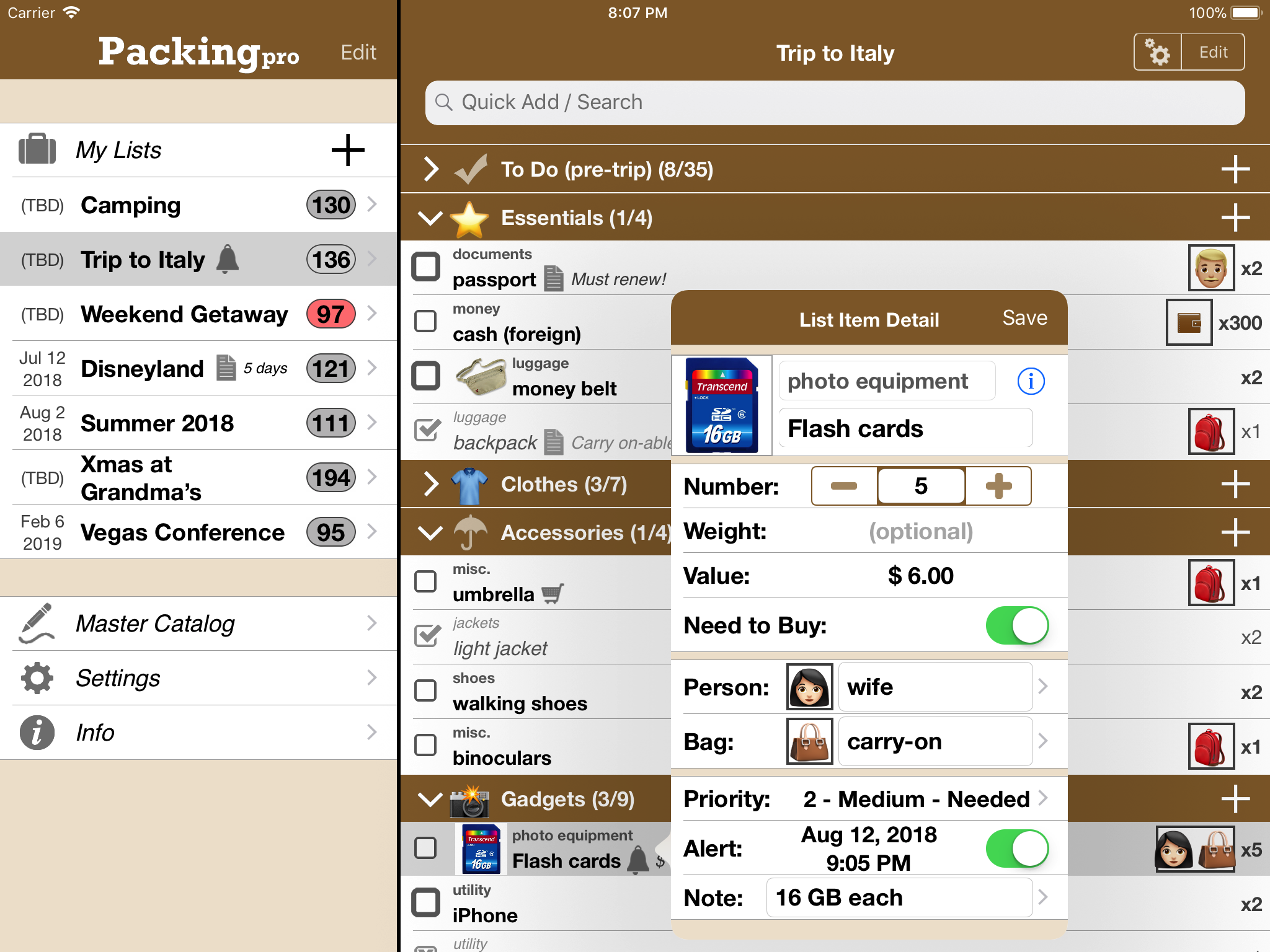
QuinnScape today announces a limited-time End-of-Summer / Back-to-School Sale of 66% off for its popular Packing Pro travel app. Packing Pro is a mobile travel packing list app that features unlimited, 100% customizable packing lists, an extensive, yet flexible, catalog, handy sample lists, iCloud auto-sync and various list sharing options. From now until Tuesday, September 4, Packing Pro can be purchased for only one third of its original price.
Taipei, Taiwan - QuinnScape today announces a limited-time End-of-Summer / Back-to-School Sale of 66% off for its popular Packing Pro travel app. From now until Tuesday, September 4, Packing Pro can be purchased for only $0.99 (USD) - one third of its original price of $2.99 - a great deal, and perfect timing for any last-chance traveling and for students heading off to university. Packing Pro has been the flagship travel packing app on Apple's iOS App Store for nearly 10 years, and has been updated and improved dozens of times, most recently adding helpful organizing and editing features this past spring.
During the nearly ten years that Packing Pro has been on Apple's App Store, it has been highlighted several times. Currently, it can be found in the "Travel Survival Kit" and "Travel Expenses" promotions. It has also ranked at #1 for iPads and #2 for iPhones in the U.S. App Store's Travel section. Besides Apple, Packing Pro has also been recognized by CNN, WSJ, BBC, The New York Times, Expedia and Budget Travel, and has earned glowing reviews on major tech and app blogs (Gizmodo, Mashable, Macworld, CNET and iPhone Life, among others).
Packing Pro is a mobile travel packing list app that features unlimited, 100% customizable packing lists, an extensive, yet flexible, catalog, handy sample lists, iCloud auto-sync and various list sharing options. A host of special functions include:
* Multi-item selection from catalog for speedy list building
* Multi-item editing for easy list & catalog management
* Collapsable categories with floating headers & running item tallies
* List sorting & filtering by packing status, priority, need to buy, bag and/or person
* Item, weight and value totals & subtotals
* Item images to eliminate any confusion - never again pack the wrong item
* Item & list alerts for user-set reminders
* Email export for file sharing
* Wireless printing
* Fully customized device support for all sizes of iPhone, iPod touch & iPad
* Full multi-lingual support for English, Spanish, French, German, Italian, Portuguese, Russian, Polish, Japanese & Chinese
Besides the core features listed above (which are also present in the basic Packing (+TO DO!) app), Packing Pro also gives its users the following Pro-level features:
* iCloud auto-syncing support
* Expert packing list wizard that can "automagically" create a list
* Email, iTunes, AirDrop, Dropbox & Box file sharing, backup & out-of-app editing support
* Customized design (themes, layout, fonts, colors, textures)
* Double-sized Master Catalog with over 800 items and to-do tasks
* Twice as many sample lists
* Smart Search (lists & catalog)
Packing Pro's huge End-of-Summer / Back-to-School sale comes at the perfect time for any last-chance traveling and for students heading off to university. Check it out today, and happy packing!
Pricing and Availability:
Packing Pro is a universal app that is available for purchase worldwide on the iPhone & iPad App Store for $2.99 USD (Now Only $0.99!), or the equivalent in local currency. The basic Packing (+TO DO!) sells for $0.99.
QuinnScape: http://www.quinnscape.com/
Packing Pro 13.0: http://www.quinnscape.com/PackingPro.asp
Purchase and Download: https://geo.itunes.apple.com/us/app/packing-pro/id312266675?mt=8&at=1l3v8Yv&pt=55410&ct=prmac
Video Demos: http://www.quinnscape.com/PackingPro-videodemo.asp
Screenshot: http://www.quinnscape.com/media/images/PackingPro-iPad-v12.4.png
App Icon: http://www.quinnscape.com/media/images/PackingPro-Icon-250x250.png
Since its founding in October 2008, QuinnScape has been managed by Quinn Genzel. Quinn is best known for his popular, top-ranking travel packing apps: Packing (+TO DO!) and Packing Pro. Packing Pro has been recognized by Apple, CNN, WSJ, BBC, National Geographic, Budget Travel, Fodor's, CNET, Macworld and a host of others as one of their top apps for traveling. Other app created by Quinn include a grocery shopping list app (Shopping Pro), nature appreciation apps (iLove Nature and iLove Birds), 3D VR action games (R.I.P and Ghost Buddy) and high-quality puzzles (the aQ's Pro Slider Puzzle series). Copyright (C) 2008-2018 QuinnScape. All Rights Reserved. Apple, the Apple logo, iPhone, iPod and iPad are registered trademarks of Apple Inc. in the U.S. and/or other countries.
*******
Link To Article: https://prmac.com/release-id-82946.htm
*******
---------------------------------------------------------------------------------
Note that you can alter delivered distributions at any time.
Login to your account on prMac to alter your channel selection, or to opt-out at any time.
End-of-Summer / Back-to-School Super Sale for Packing Pro Travel App - Published on 08/30/18
QuinnScape today announces a limited-time End-of-Summer / Back-to-School Sale of 66% off for its popular Packing Pro travel app. Packing Pro is a mobile travel packing list app that features unlimited, 100% customizable packing lists, an extensive, yet flexible, catalog, handy sample lists, iCloud auto-sync and various list sharing options. From now until Tuesday, September 4, Packing Pro can be purchased for only one third of its original price.
Taipei, Taiwan - QuinnScape today announces a limited-time End-of-Summer / Back-to-School Sale of 66% off for its popular Packing Pro travel app. From now until Tuesday, September 4, Packing Pro can be purchased for only $0.99 (USD) - one third of its original price of $2.99 - a great deal, and perfect timing for any last-chance traveling and for students heading off to university. Packing Pro has been the flagship travel packing app on Apple's iOS App Store for nearly 10 years, and has been updated and improved dozens of times, most recently adding helpful organizing and editing features this past spring.
During the nearly ten years that Packing Pro has been on Apple's App Store, it has been highlighted several times. Currently, it can be found in the "Travel Survival Kit" and "Travel Expenses" promotions. It has also ranked at #1 for iPads and #2 for iPhones in the U.S. App Store's Travel section. Besides Apple, Packing Pro has also been recognized by CNN, WSJ, BBC, The New York Times, Expedia and Budget Travel, and has earned glowing reviews on major tech and app blogs (Gizmodo, Mashable, Macworld, CNET and iPhone Life, among others).
Packing Pro is a mobile travel packing list app that features unlimited, 100% customizable packing lists, an extensive, yet flexible, catalog, handy sample lists, iCloud auto-sync and various list sharing options. A host of special functions include:
* Multi-item selection from catalog for speedy list building
* Multi-item editing for easy list & catalog management
* Collapsable categories with floating headers & running item tallies
* List sorting & filtering by packing status, priority, need to buy, bag and/or person
* Item, weight and value totals & subtotals
* Item images to eliminate any confusion - never again pack the wrong item
* Item & list alerts for user-set reminders
* Email export for file sharing
* Wireless printing
* Fully customized device support for all sizes of iPhone, iPod touch & iPad
* Full multi-lingual support for English, Spanish, French, German, Italian, Portuguese, Russian, Polish, Japanese & Chinese
Besides the core features listed above (which are also present in the basic Packing (+TO DO!) app), Packing Pro also gives its users the following Pro-level features:
* iCloud auto-syncing support
* Expert packing list wizard that can "automagically" create a list
* Email, iTunes, AirDrop, Dropbox & Box file sharing, backup & out-of-app editing support
* Customized design (themes, layout, fonts, colors, textures)
* Double-sized Master Catalog with over 800 items and to-do tasks
* Twice as many sample lists
* Smart Search (lists & catalog)
Packing Pro's huge End-of-Summer / Back-to-School sale comes at the perfect time for any last-chance traveling and for students heading off to university. Check it out today, and happy packing!
Pricing and Availability:
Packing Pro is a universal app that is available for purchase worldwide on the iPhone & iPad App Store for $2.99 USD (Now Only $0.99!), or the equivalent in local currency. The basic Packing (+TO DO!) sells for $0.99.
QuinnScape: http://www.quinnscape.com/
Packing Pro 13.0: http://www.quinnscape.com/PackingPro.asp
Purchase and Download: https://geo.itunes.apple.com/us/app/packing-pro/id312266675?mt=8&at=1l3v8Yv&pt=55410&ct=prmac
Video Demos: http://www.quinnscape.com/PackingPro-videodemo.asp
Screenshot: http://www.quinnscape.com/media/images/PackingPro-iPad-v12.4.png
App Icon: http://www.quinnscape.com/media/images/PackingPro-Icon-250x250.png

Since its founding in October 2008, QuinnScape has been managed by Quinn Genzel. Quinn is best known for his popular, top-ranking travel packing apps: Packing (+TO DO!) and Packing Pro. Packing Pro has been recognized by Apple, CNN, WSJ, BBC, National Geographic, Budget Travel, Fodor's, CNET, Macworld and a host of others as one of their top apps for traveling. Other app created by Quinn include a grocery shopping list app (Shopping Pro), nature appreciation apps (iLove Nature and iLove Birds), 3D VR action games (R.I.P and Ghost Buddy) and high-quality puzzles (the aQ's Pro Slider Puzzle series). Copyright (C) 2008-2018 QuinnScape. All Rights Reserved. Apple, the Apple logo, iPhone, iPod and iPad are registered trademarks of Apple Inc. in the U.S. and/or other countries.
*******
Link To Article: https://prmac.com/release-id-82946.htm
*******
---------------------------------------------------------------------------------
Note that you can alter delivered distributions at any time.
Login to your account on prMac to alter your channel selection, or to opt-out at any time.
Coin Flip AR for iOS Lets Users Record Life-changing Decisions
A new article has been published at prMac.
Coin Flip AR for iOS Lets Users Record Life-changing Decisions - Published on 08/30/18
PS it's our B.V. today released Coin Flip AR, the first-of-its-kind coin toss app for iOS featuring augmented reality. Not only does it allow users to flip virtual coins on any surface around them in mixed reality, but coin tosses can be recorded and shared with friends. Designed using Apple's ARKit, the innovative app is now a free download on the iTunes App Store. The release of Coin Flip AR makes casual decisions fun for anyone with an iPhone, iPod touch, or iPad.
Amsterdam, Netherlands - PS it's our B.V. today released Coin Flip AR, the first-of-its-kind coin toss app for iOS featuring augmented reality. Not only does it allow users to flip virtual coins on any surface around them in mixed reality, but coin tosses can be recorded and shared with friends. Designed using Apple's ARKit, the innovative app is now a free download on the iTunes App Store.
"Heads or tails?" asks Richard Pearson, lead developer for Coin Flip AR. "It's the way we make everyday decisions for ourselves or between friends. But these days we rarely even carry a coin in our pocket." The release of Coin Flip AR makes casual decisions fun for anyone with an iPhone, iPod touch, or iPad.
The App Store is filled with coin tossing apps, but Coin Flip AR is the first to seamlessly blend the real world with virtual coins. Holding up an iPhone or iPad, users can toss a coin on any surface in the room, whether that be a desk, a kitchen table, or even the floor.
"It's just plain fun to mix reality with technology," says Pearson. "And sharing videos of your coin tosses lets you connect with friends even when they are not in the same room."
Coin Flip AR's key feature, however, is sharing. By posting the coin toss video with their own reaction with the #LetTheCoinDecide tag, others on social media can see what a person is going through and offer opinions and support.
"It's also about sharing the burden with others," says Pearson. "The finer parts of the human experience are when we're understanding, empathizing, and helping one another. Wrestling with an important decision, letting the coin decide, benefiting from the feedback of others, and keeping yourself on track with encouragement from those around you are all invaluable tools."
Other features include customization of the coin, with over 760 icons to choose for head or tails, as well as gold or silver metal options. A helpful AR meter at the top of the screen allows users to make sure the lighting and setup of their scene is optimal for augmented reality recording. The app works in both landscape and portrait mode.
Coin Flip AR 1.1 is free and available now as free download from the iTunes App Store in the Productivity category.
Coin Flip AR 1.1: https://psitsour.com
Download from iTunes: https://itunes.apple.com/app/coin-flip-ar/id1405607272
Instagram Gallery: https://www.instagram.com/ourbv/
Media Assets: https://psitsour.com/presskit.html
PS it's our B.V. is a brand new app design studio focused on augmented reality app development and publishing for iOS. Its focus is on building original, fun, AR-powered social apps. Coin Flip AR is its first concept release, where the #LetTheCoinDecide movement is the main impetus of the app. All Material and Software (C) Copyright 2018 PS it's our B.V. All Rights Reserved. Apple, the Apple logo, iPhone, iPod and iPad are registered trademarks of Apple Inc. in the U.S. and/or other countries. Other trademarks and registered trademarks may be the property of their respective owners.
*******
Link To Article: https://prmac.com/release-id-82943.htm
*******
---------------------------------------------------------------------------------
Note that you can alter delivered distributions at any time.
Login to your account on prMac to alter your channel selection, or to opt-out at any time.
Coin Flip AR for iOS Lets Users Record Life-changing Decisions - Published on 08/30/18
PS it's our B.V. today released Coin Flip AR, the first-of-its-kind coin toss app for iOS featuring augmented reality. Not only does it allow users to flip virtual coins on any surface around them in mixed reality, but coin tosses can be recorded and shared with friends. Designed using Apple's ARKit, the innovative app is now a free download on the iTunes App Store. The release of Coin Flip AR makes casual decisions fun for anyone with an iPhone, iPod touch, or iPad.
Amsterdam, Netherlands - PS it's our B.V. today released Coin Flip AR, the first-of-its-kind coin toss app for iOS featuring augmented reality. Not only does it allow users to flip virtual coins on any surface around them in mixed reality, but coin tosses can be recorded and shared with friends. Designed using Apple's ARKit, the innovative app is now a free download on the iTunes App Store.
"Heads or tails?" asks Richard Pearson, lead developer for Coin Flip AR. "It's the way we make everyday decisions for ourselves or between friends. But these days we rarely even carry a coin in our pocket." The release of Coin Flip AR makes casual decisions fun for anyone with an iPhone, iPod touch, or iPad.
The App Store is filled with coin tossing apps, but Coin Flip AR is the first to seamlessly blend the real world with virtual coins. Holding up an iPhone or iPad, users can toss a coin on any surface in the room, whether that be a desk, a kitchen table, or even the floor.
"It's just plain fun to mix reality with technology," says Pearson. "And sharing videos of your coin tosses lets you connect with friends even when they are not in the same room."
Coin Flip AR's key feature, however, is sharing. By posting the coin toss video with their own reaction with the #LetTheCoinDecide tag, others on social media can see what a person is going through and offer opinions and support.
"It's also about sharing the burden with others," says Pearson. "The finer parts of the human experience are when we're understanding, empathizing, and helping one another. Wrestling with an important decision, letting the coin decide, benefiting from the feedback of others, and keeping yourself on track with encouragement from those around you are all invaluable tools."
Other features include customization of the coin, with over 760 icons to choose for head or tails, as well as gold or silver metal options. A helpful AR meter at the top of the screen allows users to make sure the lighting and setup of their scene is optimal for augmented reality recording. The app works in both landscape and portrait mode.
Coin Flip AR 1.1 is free and available now as free download from the iTunes App Store in the Productivity category.
Coin Flip AR 1.1: https://psitsour.com
Download from iTunes: https://itunes.apple.com/app/coin-flip-ar/id1405607272
Instagram Gallery: https://www.instagram.com/ourbv/
Media Assets: https://psitsour.com/presskit.html
PS it's our B.V. is a brand new app design studio focused on augmented reality app development and publishing for iOS. Its focus is on building original, fun, AR-powered social apps. Coin Flip AR is its first concept release, where the #LetTheCoinDecide movement is the main impetus of the app. All Material and Software (C) Copyright 2018 PS it's our B.V. All Rights Reserved. Apple, the Apple logo, iPhone, iPod and iPad are registered trademarks of Apple Inc. in the U.S. and/or other countries. Other trademarks and registered trademarks may be the property of their respective owners.
*******
Link To Article: https://prmac.com/release-id-82943.htm
*******
---------------------------------------------------------------------------------
Note that you can alter delivered distributions at any time.
Login to your account on prMac to alter your channel selection, or to opt-out at any time.
SecuritySpy 4.2.7: Update to macOS CCTV Software
A new article has been published at prMac.
SecuritySpy 4.2.7: Update to macOS CCTV Software - Published on 08/29/18
Ben Software today announced the release of SecuritySpy 4.2.7, an update to the premier multi-camera video surveillance software for the Mac. With powerful and flexible recording features, motion-activated events, and remote monitoring and configuration, SecuritySpy is designed for demanding video surveillance applications. This version adds many new features and improvements, including improved playback of captured footage, improved camera compatibility, and bug fixes.
London, United Kingdom - Ben Software today announced the release of SecuritySpy 4.2.7, an update to the premier multi-camera video surveillance software for the Mac. With powerful and flexible recording features, motion-activated events, and remote monitoring and configuration, SecuritySpy is designed for demanding video surveillance applications. This version adds many new features and improvements, including improved playback of captured footage, improved camera compatibility, and bug fixes.
"This update represents our ongoing commitment to maintain top-quality NVR software and respond to our customers' feedback" said Ben Bird, the developer of SecuritySpy. "We are proud to deliver a host of improvements that make SecuritySpy even more powerful."
The main features of SecuritySpy are as follows:
* Displays and records multiple cameras simultaneously
* Powerful capture features, with motion-detection and notifications
* Built-in secure web server for remote monitoring and administration
* Pan/Tilt/Zoom (PTZ) support
* Secure off-site backup of captured footage
* Browser feature for synchronised multi-camera playback of captured footage
* Supports all major brands of IP camera as well as ONVIF-compatible cameras
* Supports all industry-standard media formats (JPEG, MPEG-4, MxPEG, H.264, AAC)
* Extensively threaded and optimised to take full advantage of multi-core Macs
* Hardware-accelerated video compression and decompression
* Purpose-built iOS and tvOS apps for full access on iPhone, iPad and Apple TV
SecuritySpy supports virtually all network cameras on the market, including the popular Axis, Dahua, Canon, Amcrest, Hikvision, Samsung, Vivotek and Zavio ranges. SecuritySpy features advanced motion detection, which can be used to trigger recordings as well as email alerts, audio alarms, iOS push notifications and external devices. The built-in secure web server allows remote monitoring of live streams and captured footage from over the Internet, using a web browser or an iPhone, iPad or Apple TV.
Pricing and Availability:
Pricing is in British Pounds, Euros or US Dollars and depends on the number of cameras used, ranging from GBP 29.90 (approx. USD $42) for a single-camera license, to GBP 649.00 (approx. USD $930) for an unlimited-camera license. SecuritySpy supports any Mac running macOS (Mac OS X) 10.7 "Lion" through 10.13 "High Sierra." SecuritySpy can be tested for 30 days before purchase, with no demo limitations whatsoever.
Ben Software: http://www.bensoftware.com/
SecuritySpy 4.2.7: http://www.bensoftware.com/securityspy/
Download SecuritySpy: http://www.bensoftware.com/securityspy/SecuritySpy.dmg
Purchase: http://www.bensoftware.com/purchase/
Screenshot: http://www.bensoftware.com/securityspy/slideshow-0.png
Application Icon: http://bensoftware.com/securityspy/manual/ss-icon-256.png
Ben Software Ltd is an independent software development house focused on providing high-quality video-related software for the Mac platform. Copyright (C) 2018 Ben Software. All Rights Reserved. Apple, the Apple logo, Mac OS X, and Macintosh are registered trademarks of Apple Inc. in the U.S. and/or other countries.
*******
Link To Article: https://prmac.com/release-id-82944.htm
*******
---------------------------------------------------------------------------------
Note that you can alter delivered distributions at any time.
Login to your account on prMac to alter your channel selection, or to opt-out at any time.
SecuritySpy 4.2.7: Update to macOS CCTV Software - Published on 08/29/18
Ben Software today announced the release of SecuritySpy 4.2.7, an update to the premier multi-camera video surveillance software for the Mac. With powerful and flexible recording features, motion-activated events, and remote monitoring and configuration, SecuritySpy is designed for demanding video surveillance applications. This version adds many new features and improvements, including improved playback of captured footage, improved camera compatibility, and bug fixes.
London, United Kingdom - Ben Software today announced the release of SecuritySpy 4.2.7, an update to the premier multi-camera video surveillance software for the Mac. With powerful and flexible recording features, motion-activated events, and remote monitoring and configuration, SecuritySpy is designed for demanding video surveillance applications. This version adds many new features and improvements, including improved playback of captured footage, improved camera compatibility, and bug fixes.
"This update represents our ongoing commitment to maintain top-quality NVR software and respond to our customers' feedback" said Ben Bird, the developer of SecuritySpy. "We are proud to deliver a host of improvements that make SecuritySpy even more powerful."
The main features of SecuritySpy are as follows:
* Displays and records multiple cameras simultaneously
* Powerful capture features, with motion-detection and notifications
* Built-in secure web server for remote monitoring and administration
* Pan/Tilt/Zoom (PTZ) support
* Secure off-site backup of captured footage
* Browser feature for synchronised multi-camera playback of captured footage
* Supports all major brands of IP camera as well as ONVIF-compatible cameras
* Supports all industry-standard media formats (JPEG, MPEG-4, MxPEG, H.264, AAC)
* Extensively threaded and optimised to take full advantage of multi-core Macs
* Hardware-accelerated video compression and decompression
* Purpose-built iOS and tvOS apps for full access on iPhone, iPad and Apple TV
SecuritySpy supports virtually all network cameras on the market, including the popular Axis, Dahua, Canon, Amcrest, Hikvision, Samsung, Vivotek and Zavio ranges. SecuritySpy features advanced motion detection, which can be used to trigger recordings as well as email alerts, audio alarms, iOS push notifications and external devices. The built-in secure web server allows remote monitoring of live streams and captured footage from over the Internet, using a web browser or an iPhone, iPad or Apple TV.
Pricing and Availability:
Pricing is in British Pounds, Euros or US Dollars and depends on the number of cameras used, ranging from GBP 29.90 (approx. USD $42) for a single-camera license, to GBP 649.00 (approx. USD $930) for an unlimited-camera license. SecuritySpy supports any Mac running macOS (Mac OS X) 10.7 "Lion" through 10.13 "High Sierra." SecuritySpy can be tested for 30 days before purchase, with no demo limitations whatsoever.
Ben Software: http://www.bensoftware.com/
SecuritySpy 4.2.7: http://www.bensoftware.com/securityspy/
Download SecuritySpy: http://www.bensoftware.com/securityspy/SecuritySpy.dmg
Purchase: http://www.bensoftware.com/purchase/
Screenshot: http://www.bensoftware.com/securityspy/slideshow-0.png

Application Icon: http://bensoftware.com/securityspy/manual/ss-icon-256.png

Ben Software Ltd is an independent software development house focused on providing high-quality video-related software for the Mac platform. Copyright (C) 2018 Ben Software. All Rights Reserved. Apple, the Apple logo, Mac OS X, and Macintosh are registered trademarks of Apple Inc. in the U.S. and/or other countries.
*******
Link To Article: https://prmac.com/release-id-82944.htm
*******
---------------------------------------------------------------------------------
Note that you can alter delivered distributions at any time.
Login to your account on prMac to alter your channel selection, or to opt-out at any time.
Cisdem PDF Converter OCR V6.0.0: Lighter in Weight, More Accurate in OCR
A new article has been published at prMac.
Cisdem PDF Converter OCR V6.0.0: Lighter in Weight, More Accurate in OCR - Published on 08/28/18
Cisdem just released PDF Converter OCR 6.0 for macOS, a powerful Mac PDF converter with OCR capability. Cisdem PDF Converter OCR is designed to convert native, scanned, even protected PDFs into Word, PowerPoint, Excel, Keynote, Pages and other frequently-used formats, with original file quality highly preserved. Version 6.0 substantially improves OCR accuracy by manually marking in OCR applied zone. The package size has been compressed for more than 100MB.
Madelia, Minnesota - Cisdem just released the much-awaited PDF Converter OCR for Mac V6.0.0, a powerful Mac PDF converter featured with OCR capability to convert all types of PDFs to 16 formats, and create PDF from document in more than 10 formats. The newly updated version can substantially improve OCR accuracy by manually marking in OCR applied zone, also the package size has been compressed for more than 100MB.
Cisdem PDF Converter OCR for Mac, with its debut on Oct, 2013, is designed to convert native, scanned, even protected PDFs into Word, PowerPoint, Excel, Keynote, Pages and other frequently-used formats, with original file quality highly preserved. In other words, this tool enables users to edit or reuse existing PDF resources without paying for a highly priced PDF editor, users just need to save PDF as editable Word, or other preferred formats, then process as needed. In addition, it allows users to create PDF from documents at hand, and the adds-on to compress or protect a PDF output just make the files a more professional property.
New Features:
Cisdem PDF Converter OCR for Mac has inherited those great features from its previous versions, such as neat & user-friendly interface, multiple input/output, fast conversion, batch conversion, all that have won universal recognition from its users. And the latest version adds 2 main new features, aiming to bring its service to a higher level.
1. Smaller Size
To save more time and space on downloading, Cisdem PDF Converter OCR for mac has reduced its package size for more than 100MB, by preserving only 27 popular languages but still fully meet users' needs. This will facilitate users to fast work with Cisdem, converting and managing their PDF files.
2. More Accurate OCR
High conversion quality is always the contributor to keep Cisdem PDF Converter OCR for Mac popular on the market, and this time, the ambitious Cisdem Team manage to bring the conversion accuracy to a new level.
Besides improvements on conversion quality of native PDFs, Cisdem team builds in the advanced settings to improve OCR accuracy, by adding a manual mark feature in the OCR applied zone.
By default, all the contents under OCR mode will be marked as Texts, Images or Tables in different colorful areas. With this mark feature, users can revise or adjust to make a specific part of the file marked as Texts, Images or Tables as they want to output as. For illustration, if an image in the PDF file is just recognized as an image, but you want to extract the texts from this image, you can mark this image zone as text. Furthermore, users can drag the mark box's corners to resize OCR applied zone. Besides, if the PDF file is inverted, the "Rotate" toolbar allows users to adjust and the OCR results will be more precise.
Key Features:
* Convert Native, Scanned PDF and Protected PDF to 16 formats (Word, editable PDF, PowerPoint, Excel, Text, RTFD, Keynote, Pages, ePub, HTML, JPG, PNG, TIFF, BMP, GIF)
* Convert Images to editable formats;
* Create PDF from Word, PowerPoint, ePub, HTML, Images, etc;, also the PDF output can be compressed and protected;
* Batch Conversion
* Convert selected pages of a PDF
* Preview Files
* Recognize 27 languages
* Original file quality is highly retained
Price and Availability:
Cisdem PDF Converter OCR for Mac V6.0.0 is available on Cisdem's official website. You can get a lifetime license with $59.99 (USD) now with lifetime free upgrades. Free trial is provided and available. To get more information about Cisdem PDF Converter OCR for Mac, please visit its product page.
Cisdem: https://www.cisdem.com/
PDF Converter OCR: https://www.cisdem.com/pdf-converter-ocr-mac.html
Cisdem provides productivity and business software that helps Mac users to get their job done faster. Cisdem products include top rated PDF Tools, Utility Tools, Mobile Tools, Multimedia Tools and Free Tools. The company is dedicated in building highly efficient Mac software that make life easier and processes simpler. All Material and Software (C) Copyright 2018 Cisdem Inc. All Rights Reserved. Apple, the Apple logo, Mac OS X and Macintosh are registered trademarks of Apple Inc. in the U.S. and/or other countries. Other trademarks and registered trademarks may be the property of their respective owners.
*******
Link To Article: https://prmac.com/release-id-82941.htm
*******
---------------------------------------------------------------------------------
Note that you can alter delivered distributions at any time.
Login to your account on prMac to alter your channel selection, or to opt-out at any time.
Cisdem PDF Converter OCR V6.0.0: Lighter in Weight, More Accurate in OCR - Published on 08/28/18
Cisdem just released PDF Converter OCR 6.0 for macOS, a powerful Mac PDF converter with OCR capability. Cisdem PDF Converter OCR is designed to convert native, scanned, even protected PDFs into Word, PowerPoint, Excel, Keynote, Pages and other frequently-used formats, with original file quality highly preserved. Version 6.0 substantially improves OCR accuracy by manually marking in OCR applied zone. The package size has been compressed for more than 100MB.
Madelia, Minnesota - Cisdem just released the much-awaited PDF Converter OCR for Mac V6.0.0, a powerful Mac PDF converter featured with OCR capability to convert all types of PDFs to 16 formats, and create PDF from document in more than 10 formats. The newly updated version can substantially improve OCR accuracy by manually marking in OCR applied zone, also the package size has been compressed for more than 100MB.
Cisdem PDF Converter OCR for Mac, with its debut on Oct, 2013, is designed to convert native, scanned, even protected PDFs into Word, PowerPoint, Excel, Keynote, Pages and other frequently-used formats, with original file quality highly preserved. In other words, this tool enables users to edit or reuse existing PDF resources without paying for a highly priced PDF editor, users just need to save PDF as editable Word, or other preferred formats, then process as needed. In addition, it allows users to create PDF from documents at hand, and the adds-on to compress or protect a PDF output just make the files a more professional property.
New Features:
Cisdem PDF Converter OCR for Mac has inherited those great features from its previous versions, such as neat & user-friendly interface, multiple input/output, fast conversion, batch conversion, all that have won universal recognition from its users. And the latest version adds 2 main new features, aiming to bring its service to a higher level.
1. Smaller Size
To save more time and space on downloading, Cisdem PDF Converter OCR for mac has reduced its package size for more than 100MB, by preserving only 27 popular languages but still fully meet users' needs. This will facilitate users to fast work with Cisdem, converting and managing their PDF files.
2. More Accurate OCR
High conversion quality is always the contributor to keep Cisdem PDF Converter OCR for Mac popular on the market, and this time, the ambitious Cisdem Team manage to bring the conversion accuracy to a new level.
Besides improvements on conversion quality of native PDFs, Cisdem team builds in the advanced settings to improve OCR accuracy, by adding a manual mark feature in the OCR applied zone.
By default, all the contents under OCR mode will be marked as Texts, Images or Tables in different colorful areas. With this mark feature, users can revise or adjust to make a specific part of the file marked as Texts, Images or Tables as they want to output as. For illustration, if an image in the PDF file is just recognized as an image, but you want to extract the texts from this image, you can mark this image zone as text. Furthermore, users can drag the mark box's corners to resize OCR applied zone. Besides, if the PDF file is inverted, the "Rotate" toolbar allows users to adjust and the OCR results will be more precise.
Key Features:
* Convert Native, Scanned PDF and Protected PDF to 16 formats (Word, editable PDF, PowerPoint, Excel, Text, RTFD, Keynote, Pages, ePub, HTML, JPG, PNG, TIFF, BMP, GIF)
* Convert Images to editable formats;
* Create PDF from Word, PowerPoint, ePub, HTML, Images, etc;, also the PDF output can be compressed and protected;
* Batch Conversion
* Convert selected pages of a PDF
* Preview Files
* Recognize 27 languages
* Original file quality is highly retained
Price and Availability:
Cisdem PDF Converter OCR for Mac V6.0.0 is available on Cisdem's official website. You can get a lifetime license with $59.99 (USD) now with lifetime free upgrades. Free trial is provided and available. To get more information about Cisdem PDF Converter OCR for Mac, please visit its product page.
Cisdem: https://www.cisdem.com/
PDF Converter OCR: https://www.cisdem.com/pdf-converter-ocr-mac.html
Cisdem provides productivity and business software that helps Mac users to get their job done faster. Cisdem products include top rated PDF Tools, Utility Tools, Mobile Tools, Multimedia Tools and Free Tools. The company is dedicated in building highly efficient Mac software that make life easier and processes simpler. All Material and Software (C) Copyright 2018 Cisdem Inc. All Rights Reserved. Apple, the Apple logo, Mac OS X and Macintosh are registered trademarks of Apple Inc. in the U.S. and/or other countries. Other trademarks and registered trademarks may be the property of their respective owners.
*******
Link To Article: https://prmac.com/release-id-82941.htm
*******
---------------------------------------------------------------------------------
Note that you can alter delivered distributions at any time.
Login to your account on prMac to alter your channel selection, or to opt-out at any time.
Subscribe to:
Posts (Atom)