A new article has been published at prMac.
Spoiler Alert! Food Safety - Labeling and Tracking for the Food Industry - Published on 09/11/18
Ohio based Complete System Solutions, Inc. today announces Spoiler Alert Food Safety 1.5.1, an update to their popular mobile application. Spoiler Alert was specifically designed to change the way the food service industry labels, tracks and monitors the age of food product from fresh to finished. Easily configured for your products, built-in alerts take the guesswork out of what stage your product is in allowing owners and managers to monitor, even over multiple locations.
North Ridgeville, Ohio - Complete System Solutions, Inc. is pleased to announce the release of Spoiler Alert Food Safety 1.5.1, an update to their popular mobile application. Spoiler Alert was specifically designed to change the way the food service industry labels, tracks and monitors the age of food product from fresh to finished. Easily configured for your products, built-in alerts take the guesswork out of what stage your product is in allowing owners and managers to monitor, even over multiple locations.
With this powerful tool you can eliminate waste and maintain compliance with food safety regulations "preventing" Spoiler Alert features a unique label printing system, equipped with eco-friendly "wash-away" labels that adhere to any container, and dissolve completely under running water (in just seconds). Easily print legible labels allowing employees to see at-a-glance: the item, prep date/time and expiration date/time.
QR code scanning tells the system when product is sold or wasted for quick processing. Spoiler Alert is an open system solution that allows for import of product and employee information and export of label activity for long term archive or analysis. With the information provided by Spoiler Alert, owners and managers can make better decisions on product reorder points and prevent waste by acting before product goes out of date.
Easy to setup, easy to integrate and easy to use, this invaluable app and labeling system will more than pay for itself in food cost, time and waste savings. Spoiler Alert! This is the food safety app you've been waiting for.
* Labels, tracks and monitors the age of products from fresh to finished
* Easily configured and customizable
* Alerts on your iPhone, iPad and Apple Watch
* Free to share with staff
* Maintain compliance with food safety regulations
* No more illegible handwritten labels and paper log sheets
* QR code scanning for efficient product tracking
* Export of label activity for long term archive or analysis
* Eco-friendly "wash-away" labels (in just seconds)
Hardware Requirements
1) Brother WiFi capable QL- series printer such as the QL-810W or QL-820NWB (Available on our website).
2) Compatible label stock as sold on our website or any DK-4205, DK-2205 compatible labels (Dissolvable label stock available on our website).
Device Requirements:
* iPhone 5s or later and and iPod touch
* 5th generation iPad or later and iPad mini
* Requires iOS 10.3 or later
* 26.9 MB
Pricing and Availability:
Spoiler Alert Food Safety 1.5.1 is Free (with In-App Purchases) and available worldwide exclusively through the App Store in the Business category. For more information please contact Robert Balog.
Spoiler Alert Food Safety 1.5.1: https://www.spoileralertfoodsafety.com
Download from iTunes: https://itunes.apple.com/us/app/spoiler-alert-food-safety/id1230529808
YouTube Playlist: https://www.youtube.com/playlist?list=PLZj2R-4AdXY93rTXeT18Wt8SPUipqC72_
Screenshot: https://is3-ssl.mzstatic.com/image/thumb/Purple128/v4/99/81/0c/99810c49-b9a7-1275-5d43-d4059f7266ba/pr_source.jpg/643x0w.jpg
App Icon: https://www.dropbox.com/sh/l8f3uxeensu9303/AAA94kMM6zD-rKvl-x_KPo8-a?dl=0
Complete System Solutions, Inc. (CSS) has been developing software for over 25 years. Starting with large minicomputer systems used by major corporations. Since the introduction of iOS, CSS has been using that knowledge and applying it to iOS development. At CSS we specialize in seeing a need and making a solution to handle that need. All Material and Software (C) Copyright 2018 Complete System Solutions, Inc. All Rights Reserved. Apple, the Apple logo, iPhone, iPod and iPad are registered trademarks of Apple Inc. in the U.S. and/or other countries. Other trademarks and registered trademarks may be the property of their respective owners.
*******
Link To Article: https://prmac.com/release-id-82967.htm
*******
---------------------------------------------------------------------------------
Note that you can alter delivered distributions at any time.
Login to your account on prMac to alter your channel selection, or to opt-out at any time.


AnyTrans Now Allows iOS Users to Manage Ringtone & Apps without iTunes
A new article has been published at prMac.
AnyTrans Now Allows iOS Users to Manage Ringtone & Apps without iTunes - Published on 09/11/18
iMobie Inc. today announces its flagship product AnyTrans 7.0.0 for Mac and Windows. AnyTrans excels in mobile content management with bi-directional transfer across multiple devices. Now, users able to manage iPhone ringtones and apps without iTunes. Users have full freedom to select a favorite song from multiple resources like iPhone, iTunes Library, computer, or YouTube, to cut any part of the song as a ringtone in a straightforward way.
Chengdu, China - iMobie Inc. today announces its flagship product AnyTrans 7.0.0 for Mac and Windows, is able to manage iPhone ringtones and apps without iTunes. Nows, users have full freedom to select a favorite song from multiple resources like iPhone, iTunes Library, computer, or YouTube, to cut any part of the song as a ringtone in a straightforward way.
AnyTrans also brings users the ability to manage iOS apps, including download, backup, update, even reinstall and downgrade the needed app without worrying it be removed from App Store. Updated with Home Screen Manager, it's also the world's ONLY solution to rearrange apps via simple drag & drop. So all scattered apps will be kept organized like a breeze.
"Apple users always complaint about iTunes due to its restrictions of ringtone and apps management since iTunes 12.7, and many of them are still seeking for an alternative to iTunes," said Frank Kong, CEO of iMobie Inc. "Consequently, we strive to make a major update for AnyTrans with Ringtone Manager, App Downloader and Home Screen Manager, which not only enable users to customize ringtones easier, but also download and backup iPhone apps, even rearrange scattered apps by category or color."
Updated Features of AnyTrans:
Customize Ringtones from Multiple Media Resources:
AnyTrans is revamped to bring a more flexible and intuitive ringtone manager. Now, users can select their favorite music from iPhone, computer, iTunes library, even from YouTube, and cut any part of it as a ringtone by dragging and dropping. It also enables users to preview the tone in advance - making sure it's just what users want, simple and straightforward.
Take Full Control Over All iPhone iPad Apps at One Go:
Apart from making ringtones, AnyTrans also allows users to master all iPhone apps at one go - download any official app, or save copies of each version for backup. Just select the apps to update, install, uninstall, and all of them will go by one click, even downgrade, re-install them directly to another iDevice. Now, users never worry about apps are removed from App Store.
Get Apps Well-organized with Simple Drag & Drop:
AnyTrans is the world's ONLY solution that helps users organize iPhone apps smartly. Just 1 click, all scatted apps can be organized into folders by category or color in an automatic way. Users can also back up various iPhone screen layouts and restore any of them to iDevices freely. Better still, it helps clean up damaged icons without hassles.
Pricing and Availability:
AnyTrans is available for Windows and Mac: Personal License ($39.99) and Family License ($59.99). Users can purchase license from iMobie online store.
AnyTrans 7.0.0: https://www.imobie.com/anytrans/iphone-manager.htm
Download AnyTrans: https://www.imobie.com/anytrans/download.htm
iMobie Inc. was established at the end of 2011, and located in Tianfu Software Park, one of the biggest software engineering zones in China. The brand name iMobie is from I'M Optimistic, Brave, Independent and Efficient, which represents the main characters of their teammates. On the early stage of iMobie, they focus on developing iPhone, iPod, iPad transfer, manager and maintenance software for making users' Mobile Digital Life easier. All Material and Software (C) Copyright 2018 iMobie Inc. All Rights Reserved. Apple, the Apple logo, Mac OS X, iPhone, iPod, iPad and Macintosh are registered trademarks of Apple Inc. in the U.S. and/or other countries. Other trademarks and registered trademarks may be the property of their respective owners.
*******
Link To Article: https://prmac.com/release-id-82968.htm
*******
---------------------------------------------------------------------------------
Note that you can alter delivered distributions at any time.
Login to your account on prMac to alter your channel selection, or to opt-out at any time.
AnyTrans Now Allows iOS Users to Manage Ringtone & Apps without iTunes - Published on 09/11/18
iMobie Inc. today announces its flagship product AnyTrans 7.0.0 for Mac and Windows. AnyTrans excels in mobile content management with bi-directional transfer across multiple devices. Now, users able to manage iPhone ringtones and apps without iTunes. Users have full freedom to select a favorite song from multiple resources like iPhone, iTunes Library, computer, or YouTube, to cut any part of the song as a ringtone in a straightforward way.
Chengdu, China - iMobie Inc. today announces its flagship product AnyTrans 7.0.0 for Mac and Windows, is able to manage iPhone ringtones and apps without iTunes. Nows, users have full freedom to select a favorite song from multiple resources like iPhone, iTunes Library, computer, or YouTube, to cut any part of the song as a ringtone in a straightforward way.
AnyTrans also brings users the ability to manage iOS apps, including download, backup, update, even reinstall and downgrade the needed app without worrying it be removed from App Store. Updated with Home Screen Manager, it's also the world's ONLY solution to rearrange apps via simple drag & drop. So all scattered apps will be kept organized like a breeze.
"Apple users always complaint about iTunes due to its restrictions of ringtone and apps management since iTunes 12.7, and many of them are still seeking for an alternative to iTunes," said Frank Kong, CEO of iMobie Inc. "Consequently, we strive to make a major update for AnyTrans with Ringtone Manager, App Downloader and Home Screen Manager, which not only enable users to customize ringtones easier, but also download and backup iPhone apps, even rearrange scattered apps by category or color."
Updated Features of AnyTrans:
Customize Ringtones from Multiple Media Resources:
AnyTrans is revamped to bring a more flexible and intuitive ringtone manager. Now, users can select their favorite music from iPhone, computer, iTunes library, even from YouTube, and cut any part of it as a ringtone by dragging and dropping. It also enables users to preview the tone in advance - making sure it's just what users want, simple and straightforward.
Take Full Control Over All iPhone iPad Apps at One Go:
Apart from making ringtones, AnyTrans also allows users to master all iPhone apps at one go - download any official app, or save copies of each version for backup. Just select the apps to update, install, uninstall, and all of them will go by one click, even downgrade, re-install them directly to another iDevice. Now, users never worry about apps are removed from App Store.
Get Apps Well-organized with Simple Drag & Drop:
AnyTrans is the world's ONLY solution that helps users organize iPhone apps smartly. Just 1 click, all scatted apps can be organized into folders by category or color in an automatic way. Users can also back up various iPhone screen layouts and restore any of them to iDevices freely. Better still, it helps clean up damaged icons without hassles.
Pricing and Availability:
AnyTrans is available for Windows and Mac: Personal License ($39.99) and Family License ($59.99). Users can purchase license from iMobie online store.
AnyTrans 7.0.0: https://www.imobie.com/anytrans/iphone-manager.htm
Download AnyTrans: https://www.imobie.com/anytrans/download.htm
iMobie Inc. was established at the end of 2011, and located in Tianfu Software Park, one of the biggest software engineering zones in China. The brand name iMobie is from I'M Optimistic, Brave, Independent and Efficient, which represents the main characters of their teammates. On the early stage of iMobie, they focus on developing iPhone, iPod, iPad transfer, manager and maintenance software for making users' Mobile Digital Life easier. All Material and Software (C) Copyright 2018 iMobie Inc. All Rights Reserved. Apple, the Apple logo, Mac OS X, iPhone, iPod, iPad and Macintosh are registered trademarks of Apple Inc. in the U.S. and/or other countries. Other trademarks and registered trademarks may be the property of their respective owners.
*******
Link To Article: https://prmac.com/release-id-82968.htm
*******
---------------------------------------------------------------------------------
Note that you can alter delivered distributions at any time.
Login to your account on prMac to alter your channel selection, or to opt-out at any time.
QuickerTek Announces New 60W USB/USB-C Dual Port Charging Adapter
A new article has been published at prMac.
QuickerTek Announces New 60W USB/USB-C Dual Port Charging Adapter - Published on 09/10/18
Wichita based QuickerTek, Inc. introduces its new USB-C Power Adapter, an innovative, high-performance 60W USB/USB-C dual port charging adapter. Equipped with advanced circuit protection to prevent over charging, this new adaptor offers one of the fastest and most efficient charging experiences for the newest smart phones, all 12-inch MacBook's with USB-C, 2016-2018 13-inch and 15-inch MacBook Pro's, and other USB laptops and notebooks alike.
Wichita, Kansas - QuickerTek introduces its newest product, an innovative, high-performance 60W USB/USB-C dual port charging adapter allowing for one of the fastest and most efficient charging experiences for the newest smart phones, all 12-inch MacBook's with USB-C, 2016-2018 13-inch and 15-inch MacBook Pro's, and other USB laptops and notebooks alike.
It includes both a USB-C port enabling up to 45W of power delivery and a USB-A QC 3.0 port enabling up to 18W of charging power. It is also compatible with QuickerTek's Most Powerful Battery, giving our batteries the capability to work with both MagSafe 1 and 2 as well as any Mac charged through USB-C.
Specifications:
* Dimensions: 2" x 2" x .75"
* Input: 16 Vdc to 28 Vdc
* Output: 20 Vdc at 5A (USB-C) / 5.2 Vdc at 2A
* USB-C Port
* USB-A QC 3.0 port
* Built-in PD Chipset
The built-in PD Chipset dynamically detects devices to deliver optimum power level for maximum battery life and performance. It is equipped with the advanced circuit protections to prevent over charging. This product features an input of 16 Vdc to 28 Vdc and an output of 20 Vdc at 5A (USB-C) / 5.2 Vdc at 2A.
Pricing and Availability:
The USB-C Power Adapter is available at $49.95 (USD) from QuickerTek. Members of the press please contact Rick Estes.
QuickerTek: http://www.quickertek.com/
USB-C Power Adapter: http://quickertek.com/product/dual-port-usb-usb-c-battery-adapter/
Screenshot: https://i2.wp.com/quickertek.com/wp-content/uploads/2018/08/usb-c.jpg?fit=1500%2C1125
QuickerTek has been a recognized leading innovator of power/solar products, 802.11ac wireless products and USB-C power products for the Apple community. QuickerTek products can be purchased online and from authorized resellers. Copyright (C) 2009-2018 QuickerTek. All Rights Reserved. Apple, and the Apple logo, and MacBook Pro are registered trademarks of Apple Computer Inc. in the U.S. and/or other countries.
*******
Link To Article: https://prmac.com/release-id-82965.htm
*******
---------------------------------------------------------------------------------
Note that you can alter delivered distributions at any time.
Login to your account on prMac to alter your channel selection, or to opt-out at any time.
QuickerTek Announces New 60W USB/USB-C Dual Port Charging Adapter - Published on 09/10/18
Wichita based QuickerTek, Inc. introduces its new USB-C Power Adapter, an innovative, high-performance 60W USB/USB-C dual port charging adapter. Equipped with advanced circuit protection to prevent over charging, this new adaptor offers one of the fastest and most efficient charging experiences for the newest smart phones, all 12-inch MacBook's with USB-C, 2016-2018 13-inch and 15-inch MacBook Pro's, and other USB laptops and notebooks alike.
Wichita, Kansas - QuickerTek introduces its newest product, an innovative, high-performance 60W USB/USB-C dual port charging adapter allowing for one of the fastest and most efficient charging experiences for the newest smart phones, all 12-inch MacBook's with USB-C, 2016-2018 13-inch and 15-inch MacBook Pro's, and other USB laptops and notebooks alike.
It includes both a USB-C port enabling up to 45W of power delivery and a USB-A QC 3.0 port enabling up to 18W of charging power. It is also compatible with QuickerTek's Most Powerful Battery, giving our batteries the capability to work with both MagSafe 1 and 2 as well as any Mac charged through USB-C.
Specifications:
* Dimensions: 2" x 2" x .75"
* Input: 16 Vdc to 28 Vdc
* Output: 20 Vdc at 5A (USB-C) / 5.2 Vdc at 2A
* USB-C Port
* USB-A QC 3.0 port
* Built-in PD Chipset
The built-in PD Chipset dynamically detects devices to deliver optimum power level for maximum battery life and performance. It is equipped with the advanced circuit protections to prevent over charging. This product features an input of 16 Vdc to 28 Vdc and an output of 20 Vdc at 5A (USB-C) / 5.2 Vdc at 2A.
Pricing and Availability:
The USB-C Power Adapter is available at $49.95 (USD) from QuickerTek. Members of the press please contact Rick Estes.
QuickerTek: http://www.quickertek.com/
USB-C Power Adapter: http://quickertek.com/product/dual-port-usb-usb-c-battery-adapter/
Screenshot: https://i2.wp.com/quickertek.com/wp-content/uploads/2018/08/usb-c.jpg?fit=1500%2C1125

QuickerTek has been a recognized leading innovator of power/solar products, 802.11ac wireless products and USB-C power products for the Apple community. QuickerTek products can be purchased online and from authorized resellers. Copyright (C) 2009-2018 QuickerTek. All Rights Reserved. Apple, and the Apple logo, and MacBook Pro are registered trademarks of Apple Computer Inc. in the U.S. and/or other countries.
*******
Link To Article: https://prmac.com/release-id-82965.htm
*******
---------------------------------------------------------------------------------
Note that you can alter delivered distributions at any time.
Login to your account on prMac to alter your channel selection, or to opt-out at any time.
Output Factory for InDesign Now Can Use Contents of Anchored Text Frames
A new article has been published at prMac.
Output Factory for InDesign Now Can Use Contents of Anchored Text Frames - Published on 09/10/18
Zevrix Solutions announces Output Factory 2.3.9, a feature update to company's output automation solution for Adobe InDesign. Output Factory helps users automate printing and exporting from InDesign by offering batch processing, single page export, layer versioning, variable file names, custom scripts and more. The new version lets users insert the contents of anchored text frames into the variable names of output files by assigning a script label to the text boxes in InDesign document.
Toronto, Canada - Toronto (ON), Canada - September 10, 2018 - Zevrix Solutions today announces the release of Output Factory 2.3.9, a feature update to company's output automation plug-in for Adobe InDesign. Awarded 5 stars by InDesign Magazine, Output Factory automates and simplifies workflows of printers, ad agencies, publishers, and prepress houses worldwide. The software helps eliminate repetitive tasks and costly errors through batch processing with time-saving output options.
The new version extends the functionality of the script label feature which gives users an easy way to insert text from specific frames in InDesign document directly into variable output file names. The update enables users to harness the contents of so called anchored text frames which are anchored to an insertion point in the text flow. In previous versions only regular text boxes were supported.
"Using Output Factory is straightforward. You determine your settings and sit back while Output Factory does all the heavy lifting. The time savings are huge," writes Jamie McKee in a 5-star review in InDesign Magazine. "If you find yourself repeatedly exporting InDesign files in various formats, you owe it to yourself to install the free trial and see just how much time you'll save using Output Factory."
Output Factory supports printing as well as exporting to PDF, PostScript, EPS, Flash, IDML, EPUB and several image formats. It offers the following key features:
Output Factory supports printing as well as exporting to PDF, PostScript, EPS, Flash, IDML, EPUB and several image formats. It offers the following key features:
-Batch output of InDesign files
-Export every n pages as a single PDF file
-Output files to multiple formats with one click
-Variable output file names
-Layer versioning: output layer combinations as single files
-Eliminate errors with automatic preflight
-Create PDF security presets
Pricing and Availability:
Output Factory can be purchased from Zevrix website for US$169.95 (Lite version $119.95), as well as from authorized resellers and Adobe Exchange. Trial is also available for download. The update is free for the users of Output Factory 2.x, and $84.97 to upgrade from Output Factory 1.x and BatchOutput. Output Factory requires macOS 10.7-10.13 and Adobe InDesign CS3-CC 2018.
Zevrix Solutions: http://zevrix.com
Output Factory 2.3.9: http://zevrix.com/OutputFactory.php
Download Output Factory: http://zevrix.com/OutputFactory.dmg
Purchase: http://zevrix.com/store.php
Screenshot: http://zevrix.com/screenshots/of2/of2-pdf.jpg
Located in Toronto, Canada, Zevrix Solutions provides automation and productivity solutions for Adobe Creative Cloud and Creative Suite software, PDF workflows, graphic file diagnostics and Microsoft Office output on Mac OS. Zevrix is dedicated to help professionals increase their profits through automating everyday tasks, producing error-free documents, saving disk space and cutting production costs. For more information, visit their website. Copyright (C) 2018 Zevrix Solutions. All Rights Reserved. Other trademarks and registered trademarks may be the property of their respective owners.
*******
Link To Article: https://prmac.com/release-id-82963.htm
*******
---------------------------------------------------------------------------------
Note that you can alter delivered distributions at any time.
Login to your account on prMac to alter your channel selection, or to opt-out at any time.
Output Factory for InDesign Now Can Use Contents of Anchored Text Frames - Published on 09/10/18
Zevrix Solutions announces Output Factory 2.3.9, a feature update to company's output automation solution for Adobe InDesign. Output Factory helps users automate printing and exporting from InDesign by offering batch processing, single page export, layer versioning, variable file names, custom scripts and more. The new version lets users insert the contents of anchored text frames into the variable names of output files by assigning a script label to the text boxes in InDesign document.
Toronto, Canada - Toronto (ON), Canada - September 10, 2018 - Zevrix Solutions today announces the release of Output Factory 2.3.9, a feature update to company's output automation plug-in for Adobe InDesign. Awarded 5 stars by InDesign Magazine, Output Factory automates and simplifies workflows of printers, ad agencies, publishers, and prepress houses worldwide. The software helps eliminate repetitive tasks and costly errors through batch processing with time-saving output options.
The new version extends the functionality of the script label feature which gives users an easy way to insert text from specific frames in InDesign document directly into variable output file names. The update enables users to harness the contents of so called anchored text frames which are anchored to an insertion point in the text flow. In previous versions only regular text boxes were supported.
"Using Output Factory is straightforward. You determine your settings and sit back while Output Factory does all the heavy lifting. The time savings are huge," writes Jamie McKee in a 5-star review in InDesign Magazine. "If you find yourself repeatedly exporting InDesign files in various formats, you owe it to yourself to install the free trial and see just how much time you'll save using Output Factory."
Output Factory supports printing as well as exporting to PDF, PostScript, EPS, Flash, IDML, EPUB and several image formats. It offers the following key features:
Output Factory supports printing as well as exporting to PDF, PostScript, EPS, Flash, IDML, EPUB and several image formats. It offers the following key features:
-Batch output of InDesign files
-Export every n pages as a single PDF file
-Output files to multiple formats with one click
-Variable output file names
-Layer versioning: output layer combinations as single files
-Eliminate errors with automatic preflight
-Create PDF security presets
Pricing and Availability:
Output Factory can be purchased from Zevrix website for US$169.95 (Lite version $119.95), as well as from authorized resellers and Adobe Exchange. Trial is also available for download. The update is free for the users of Output Factory 2.x, and $84.97 to upgrade from Output Factory 1.x and BatchOutput. Output Factory requires macOS 10.7-10.13 and Adobe InDesign CS3-CC 2018.
Zevrix Solutions: http://zevrix.com
Output Factory 2.3.9: http://zevrix.com/OutputFactory.php
Download Output Factory: http://zevrix.com/OutputFactory.dmg
Purchase: http://zevrix.com/store.php
Screenshot: http://zevrix.com/screenshots/of2/of2-pdf.jpg

Located in Toronto, Canada, Zevrix Solutions provides automation and productivity solutions for Adobe Creative Cloud and Creative Suite software, PDF workflows, graphic file diagnostics and Microsoft Office output on Mac OS. Zevrix is dedicated to help professionals increase their profits through automating everyday tasks, producing error-free documents, saving disk space and cutting production costs. For more information, visit their website. Copyright (C) 2018 Zevrix Solutions. All Rights Reserved. Other trademarks and registered trademarks may be the property of their respective owners.
*******
Link To Article: https://prmac.com/release-id-82963.htm
*******
---------------------------------------------------------------------------------
Note that you can alter delivered distributions at any time.
Login to your account on prMac to alter your channel selection, or to opt-out at any time.
Cisdem Video Player 4.0 Released With Enhanced Playback and Conversion
A new article has been published at prMac.
Cisdem Video Player 4.0 Released With Enhanced Playback and Conversion - Published on 09/09/18
Cisdem Video Player for Mac has just been upgraded to version 4.0.0 with improved HD video playback and a faster better video conversion solution. The conversion speed increased more than 100%, with more supported devices and output formats. Meanwhile, because of the increased support for HD video codecs and hardware accelerated codecs, this Mac video player is more efficient at decoding and playing videos in 5K, 4K, 1080p, etc.
Madelia, Minnesota - Today, Cisdem released Video Player for Mac 4.0.0, which brings enhanced HD video experience and a more powerful video conversion solution, among other improvements.
Cisdem Video Player for Mac is a totally free media player with full support for videos (and audios) of almost all formats in any resolution including 5K, 4K UHD, 1080p HD, etc. Another major feature of this app is to help users convert videos to compatible formats for different devices and media players.
"The video conversion feature is one of the things that make Cisdem Video Player different," said William Smith, the manager of Cisdem's multimedia department. "And we want to make this feature more powerful. With this upgrade, the conversion speed is greatly improved. And there are more supported output formats and devices. At the same time, the improved HD video playback will make the viewing of HD videos and movies more enjoyable."
What's new in version 4.0.0:
1. Better HD video playback
Due to the increased support for HD video codecs and hardware accelerated codecs, Cisdem Video Player will be more efficient at decoding and playing videos of different formats in all resolutions including 5K, 4K Ultra HD, 1080p Full HD, etc.
2. Increased video conversion speed
The conversion speed increases more than 100% compared to the previous version.
3. More supported devices
Now users are able to convert videos in one click for more devices including iPhone X, iPhone 8/8 Plus, Samsung Galaxy Note 9/S9/S9 , Samsung Galaxy A9 Star/A9 Star Lite, etc.
4. More output formats
This Mac video player supports a wide various of conversion output formats including MP4, (the newly added) MP4 HEVC, M4V, MKV, MOV, MP3, M4A, AVI and more.
5. Auto Fit added as a new output resolution option
From video conversion settings, if one selects Auto Fit as the output resolution option, Cisdem Video Player will automatically use the most suitable resolution for the device on which one wants to play the video.
Main features of Cisdem Video Player for Mac:
* Allow users to play videos and audios totally for FREE
* Play video and audio files of almost all formats with no codec packs needed
* Smoothly play videos in 5K, 4K, 1080p and other resolutions without lagging, crashing or being choppy
* Enable users to easily add subtitle files, and automatically detect and display subtitles
* Allow users to effectively convert videos to compatible formats for iPhone, Android phones and other devices with optional in-app purchase
* Provide 3 free video conversions
For more information about Cisdem Video Player for Mac, please visit the Cisdem Video Player for Mac website.
Price and Availability:
Cisdem Video Player for Mac 4.0.0 is available on Cisdem's official website. Users can download and use it to play video and audio files totally free of charge. The video conversion feature is available with in-app purchase. Users can get a lifetime license for one Mac at $9.99, with lifetime free upgrades. Three free video conversions are offered.
Cisdem: https://www.cisdem.com/
Cisdem Video Player for Mac: https://www.cisdem.com/video-player-mac.html
Download Free Trial: https://www.cisdem.com/downloads/cisdem-videoplayer-45.dmg
Purchase: https://www.cisdem.com/video-player-mac/buy.html
Screenshot: https://www.cisdem.com/images/features/videoplayer/play.jpg
Application Icon: https://www.cisdem.com/images/appicon/videoplayer-icon100.png
Cisdem provides productivity and business software that helps Mac users to get their job done faster. Cisdem products include top rated software centered on PDF Conversion, PDF Management, Data Recovery, Multimedia, and File Management. The company is dedicated in building highly efficient Mac software that make life easier and processes simpler. All Material and Software (C) Copyright 2018 Cisdem. All Rights Reserved. Apple, the Apple logo, macOS and Macintosh are registered trademarks of Apple Inc. in the U.S. and/or other countries. Other trademarks and registered trademarks may be the property of their respective owners.
*******
Link To Article: https://prmac.com/release-id-82962.htm
*******
---------------------------------------------------------------------------------
Note that you can alter delivered distributions at any time.
Login to your account on prMac to alter your channel selection, or to opt-out at any time.
Cisdem Video Player 4.0 Released With Enhanced Playback and Conversion - Published on 09/09/18
Cisdem Video Player for Mac has just been upgraded to version 4.0.0 with improved HD video playback and a faster better video conversion solution. The conversion speed increased more than 100%, with more supported devices and output formats. Meanwhile, because of the increased support for HD video codecs and hardware accelerated codecs, this Mac video player is more efficient at decoding and playing videos in 5K, 4K, 1080p, etc.
Madelia, Minnesota - Today, Cisdem released Video Player for Mac 4.0.0, which brings enhanced HD video experience and a more powerful video conversion solution, among other improvements.
Cisdem Video Player for Mac is a totally free media player with full support for videos (and audios) of almost all formats in any resolution including 5K, 4K UHD, 1080p HD, etc. Another major feature of this app is to help users convert videos to compatible formats for different devices and media players.
"The video conversion feature is one of the things that make Cisdem Video Player different," said William Smith, the manager of Cisdem's multimedia department. "And we want to make this feature more powerful. With this upgrade, the conversion speed is greatly improved. And there are more supported output formats and devices. At the same time, the improved HD video playback will make the viewing of HD videos and movies more enjoyable."
What's new in version 4.0.0:
1. Better HD video playback
Due to the increased support for HD video codecs and hardware accelerated codecs, Cisdem Video Player will be more efficient at decoding and playing videos of different formats in all resolutions including 5K, 4K Ultra HD, 1080p Full HD, etc.
2. Increased video conversion speed
The conversion speed increases more than 100% compared to the previous version.
3. More supported devices
Now users are able to convert videos in one click for more devices including iPhone X, iPhone 8/8 Plus, Samsung Galaxy Note 9/S9/S9 , Samsung Galaxy A9 Star/A9 Star Lite, etc.
4. More output formats
This Mac video player supports a wide various of conversion output formats including MP4, (the newly added) MP4 HEVC, M4V, MKV, MOV, MP3, M4A, AVI and more.
5. Auto Fit added as a new output resolution option
From video conversion settings, if one selects Auto Fit as the output resolution option, Cisdem Video Player will automatically use the most suitable resolution for the device on which one wants to play the video.
Main features of Cisdem Video Player for Mac:
* Allow users to play videos and audios totally for FREE
* Play video and audio files of almost all formats with no codec packs needed
* Smoothly play videos in 5K, 4K, 1080p and other resolutions without lagging, crashing or being choppy
* Enable users to easily add subtitle files, and automatically detect and display subtitles
* Allow users to effectively convert videos to compatible formats for iPhone, Android phones and other devices with optional in-app purchase
* Provide 3 free video conversions
For more information about Cisdem Video Player for Mac, please visit the Cisdem Video Player for Mac website.
Price and Availability:
Cisdem Video Player for Mac 4.0.0 is available on Cisdem's official website. Users can download and use it to play video and audio files totally free of charge. The video conversion feature is available with in-app purchase. Users can get a lifetime license for one Mac at $9.99, with lifetime free upgrades. Three free video conversions are offered.
Cisdem: https://www.cisdem.com/
Cisdem Video Player for Mac: https://www.cisdem.com/video-player-mac.html
Download Free Trial: https://www.cisdem.com/downloads/cisdem-videoplayer-45.dmg
Purchase: https://www.cisdem.com/video-player-mac/buy.html
Screenshot: https://www.cisdem.com/images/features/videoplayer/play.jpg

Application Icon: https://www.cisdem.com/images/appicon/videoplayer-icon100.png

Cisdem provides productivity and business software that helps Mac users to get their job done faster. Cisdem products include top rated software centered on PDF Conversion, PDF Management, Data Recovery, Multimedia, and File Management. The company is dedicated in building highly efficient Mac software that make life easier and processes simpler. All Material and Software (C) Copyright 2018 Cisdem. All Rights Reserved. Apple, the Apple logo, macOS and Macintosh are registered trademarks of Apple Inc. in the U.S. and/or other countries. Other trademarks and registered trademarks may be the property of their respective owners.
*******
Link To Article: https://prmac.com/release-id-82962.htm
*******
---------------------------------------------------------------------------------
Note that you can alter delivered distributions at any time.
Login to your account on prMac to alter your channel selection, or to opt-out at any time.
Boom Brings Spotify & Tidal Streaming Services
A new article has been published at prMac.
Boom Brings Spotify & Tidal Streaming Services - Published on 09/09/18
Global Delight today announced Boom: Music Player & Equalizer 1.3.3, the significant update to their popular music player app with 3D Surround Sound for iPhone, iPad, and iPod touch devices. The latest version of Boom iOS brings in music streaming options for Spotify and Tidal along with Internet Radio and Podcast streaming. Users can also enjoy access to more than 20,000 local and international Radio stations and 20,000 Podcast stations across 120 countries.
Udupi, India - Global Delight today announced the release of Boom: Music Player & Equalizer 1.3.3, the significant update to their popular music player app with 3D Surround Sound for iPhone, iPad, and iPod touch devices. The latest version of Boom iOS brings in music streaming options for Spotify and Tidal along with Internet Radio and Podcast streaming.
This much-awaited update gives users the freedom to stream their favorite tracks from Spotify and Tidal with all the Boom effects and experience music with unbeatable quality, anytime, anywhere!
This update also brings in Internet Radio and Podcast streaming, where users can enjoy access to more than 20,000 local and international Radio stations and 20,000 Podcast stations across 120 countries.
"With the immersive 3D Sound technology of Boom, one doesn't just listen, but also feels the music live. With this update we are bringing this technology to a much broader audience by integrating popular music streaming services." Shared Ram Acharya, Chief Technical Officer, Global Delight.
Device Requirements:
* iPhone, iPad, and iPod touch
* Requires iOS 9.0 or later
* Universal Application
* 137.1 MB
Pricing and Availability
Boom: Music Player & Equalizer 1.3.3 is free and is available worldwide exclusively through the App Store in the Music category. The app offers a 7-day free trial with all the features. Users can opt for subscription plans 6 months and 1 year with the pricing of $11.99 and $23.99 respectively. But as an introductory offer, users can now enjoy a discounted price of just $6.99 for 6 months and $11.99 for 1 year.
Global Delight Technologies: https://www.globaldelight.com
Boom: Music Player & Equalizer 1.3.3: https://www.globaldelight.com/boomforios/
Download from App Store: https://itunes.apple.com/app/apple-store/id1065511007?pt=98420&ct=Press%20release&mt=8
Global Delight Technologies are the eminent creators of award-winning and state-of-the-art apps for iOS and Mac. Their exclusive array of products comprises; Boom and Boom 2, a system-wide volume booster and equalizer for Mac, Capto, a screen capture and recording tool for Mac, Camera Plus Pro, a camera app with professional-like capturing and editing features and Vizmato, a mobile movie editing app for iOS. All Material and Software (C) Copyright 2018 Global Delight Technologies. All Rights Reserved. Apple, the Apple logo, iPhone, iPod and iPad are registered trademarks of Apple Inc. in the U.S. and/or other countries. Other trademarks and registered trademarks may be the property of their respective owners.
*******
Link To Article: https://prmac.com/release-id-82961.htm
*******
---------------------------------------------------------------------------------
Note that you can alter delivered distributions at any time.
Login to your account on prMac to alter your channel selection, or to opt-out at any time.
Boom Brings Spotify & Tidal Streaming Services - Published on 09/09/18
Global Delight today announced Boom: Music Player & Equalizer 1.3.3, the significant update to their popular music player app with 3D Surround Sound for iPhone, iPad, and iPod touch devices. The latest version of Boom iOS brings in music streaming options for Spotify and Tidal along with Internet Radio and Podcast streaming. Users can also enjoy access to more than 20,000 local and international Radio stations and 20,000 Podcast stations across 120 countries.
Udupi, India - Global Delight today announced the release of Boom: Music Player & Equalizer 1.3.3, the significant update to their popular music player app with 3D Surround Sound for iPhone, iPad, and iPod touch devices. The latest version of Boom iOS brings in music streaming options for Spotify and Tidal along with Internet Radio and Podcast streaming.
This much-awaited update gives users the freedom to stream their favorite tracks from Spotify and Tidal with all the Boom effects and experience music with unbeatable quality, anytime, anywhere!
This update also brings in Internet Radio and Podcast streaming, where users can enjoy access to more than 20,000 local and international Radio stations and 20,000 Podcast stations across 120 countries.
"With the immersive 3D Sound technology of Boom, one doesn't just listen, but also feels the music live. With this update we are bringing this technology to a much broader audience by integrating popular music streaming services." Shared Ram Acharya, Chief Technical Officer, Global Delight.
Device Requirements:
* iPhone, iPad, and iPod touch
* Requires iOS 9.0 or later
* Universal Application
* 137.1 MB
Pricing and Availability
Boom: Music Player & Equalizer 1.3.3 is free and is available worldwide exclusively through the App Store in the Music category. The app offers a 7-day free trial with all the features. Users can opt for subscription plans 6 months and 1 year with the pricing of $11.99 and $23.99 respectively. But as an introductory offer, users can now enjoy a discounted price of just $6.99 for 6 months and $11.99 for 1 year.
Global Delight Technologies: https://www.globaldelight.com
Boom: Music Player & Equalizer 1.3.3: https://www.globaldelight.com/boomforios/
Download from App Store: https://itunes.apple.com/app/apple-store/id1065511007?pt=98420&ct=Press%20release&mt=8
Global Delight Technologies are the eminent creators of award-winning and state-of-the-art apps for iOS and Mac. Their exclusive array of products comprises; Boom and Boom 2, a system-wide volume booster and equalizer for Mac, Capto, a screen capture and recording tool for Mac, Camera Plus Pro, a camera app with professional-like capturing and editing features and Vizmato, a mobile movie editing app for iOS. All Material and Software (C) Copyright 2018 Global Delight Technologies. All Rights Reserved. Apple, the Apple logo, iPhone, iPod and iPad are registered trademarks of Apple Inc. in the U.S. and/or other countries. Other trademarks and registered trademarks may be the property of their respective owners.
*******
Link To Article: https://prmac.com/release-id-82961.htm
*******
---------------------------------------------------------------------------------
Note that you can alter delivered distributions at any time.
Login to your account on prMac to alter your channel selection, or to opt-out at any time.
NeoFinder Mac 7.3 - Gallery View, Display Filters, email cataloging
A new article has been published at prMac.
NeoFinder Mac 7.3 - Gallery View, Display Filters, email cataloging - Published on 09/07/18
Longtime Mac developer, Norbert M. Doerner today releases NeoFinder 7.3, the third major update for NeoFinder 7. NeoFinder helps anyone keep track of digital files, photos, songs, movies, fonts on hard drives, USB sticks, servers, Blu-ray disks, DVD-ROMs, CDROMs, and any other digital media. The new version adds the long-awaited display filter, gallery view (for Mac OS X 10.7 and newer!), the search for duplicates folders, cataloging email content, and 60 more features and improvements.
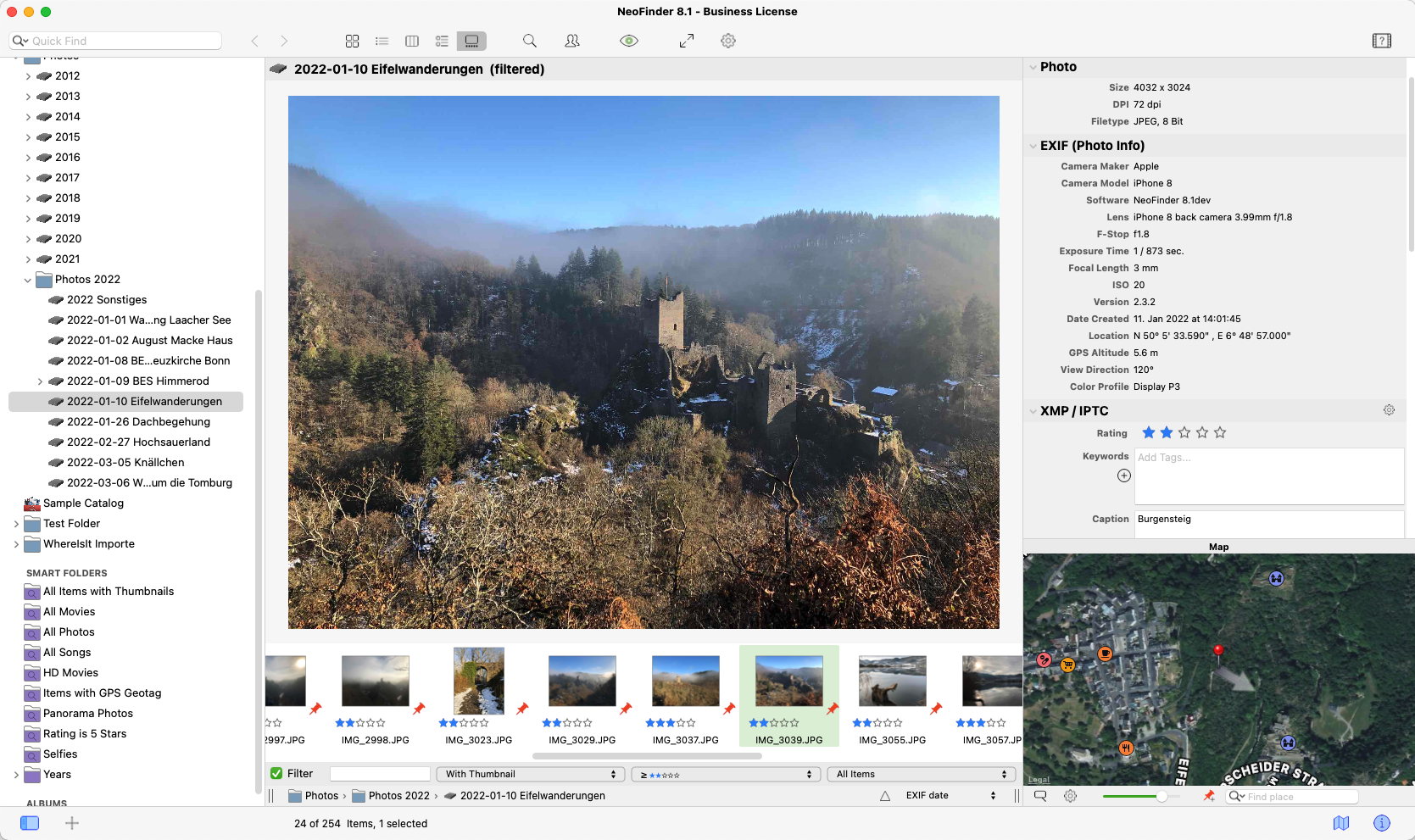
Bonn, Germany - Norbert M. Doerner today released NeoFinder 7.3, the third major update for NeoFinder 7. The new version adds more than 60 new features and enhancements, and is the most massive new version 7.x yet. The Gallery View shows photos in beautiful size, while keeping a list of the other items in the folder underneath it for navigation. The Display Filter allows to see only files of a certain kind, or name, label, or rating. Based on a lot of on-site feedback from clients, things like the cataloging of email contents have been added, or the search for duplicate folders.
New features and enhancements of NeoFinder 7.3:
* NeoFinder now has a Display Filter that you can use to filter items based on their kind, name, rating, label, or other attributes! That is highly useful when working with large amounts of data, and works in all five view types!
* NeoFinder now has a cool Gallery View! Not just in macOS Mojavo, like Apples Finder, but in all Mac OS X and macOS versions since 10.7!
* You can now update one or multiple media files in an existing catalog!
* NeoFinder can now catalog the text from email messages! Currently, .emlx (Apple Mail) and .eml (MS Outlook) formats are supported
* Many windows have a Help button that will open the suitable page in the NeoFinder Users Guide for you
* Find Duplicates can now find Duplicate Folders!
* In the Inspector, you can now Find Tags in Instagram by clicking on them
* The Find Editor now autocompletes keywords for you, using the keyword list in the Controlled Vocabulary
* You can copy and paste entire sets of XMP metadata from one file to another
* NeoFinder catalogs Affinity Publisher documents, and of course allows you to edit the whole set of XMP metadata for these, too!
* The XMP Editor in the Inspector now has a new Date editor, so you can change the XMP date for one or multiple items at once
* The XMP Presets Editor now has a date field as well
* NeoFinder can now of course catalog that XMP date field from existing files
* A new Filefinder Text Importer allows you to import the text files from that abandoned old disk cataloger
* You can now copy and paste GPS coordinates, and the XMP locations fields, separately
* You can now sort the catalog LIBRARY by Volume Modification Date as well
* The Movie Contact Sheet now has an option to turn off the time display in the thumbnails
* Also, the Movie Contact Sheet can now automatically be saved next to the original file, even when multiple video files are selected. That is a great way of creating a lot of these at once
* You can now duplicate Albums and Smart Folders, using the context menu
* The file information that the Movie Contact Sheet displays is much more detailed and precise now
* The Movie Contact Sheet now uses the modern AVFoundation in macOS for better results
* The main window has a new button that will open the free NeoFinder Video Tutorials for you
* NeoFinder can now catalog Aurora 2018 documents
* NeoFinder can now catalog the BWF, or BEXT records from ProTools, with date and unique ID values for audio files
* NeoFinder can now catalog thumbnails for Cinema 4D (".c4d") files, if that app is installed
* NeoFinder can now catalog ICNS thumbnails
* NeoFinder now catalogs thumbnails for stereoscopic MPO files
* NeoFinder can now catalog the lens name of the EXIF record, and display it in the Inspector, and search it in the "any text" parameter or QuickFind
* NeoFinder now catalogs the fps value of movies as floating point, allowing for values like 29.97
* Find Duplicates can now search for duplicate audio files by the BEXT record
* A new button can now display and reverse the sort order in the navigation bar of NeoFinder
* The Photo Contact sheet can now include a second line with details from each photo
* You can now download an entire folder with all files and subfolders from the Backblaze B2 and a Dropbox catalog!
* The LIBRARY sidebar now uses a more modern "view based" control from Apple. It will look better, and interactions are better with this
* You can now open an Album in a separate window, too
* Ejecting volumes now runs in the background, and won't block NeoFinder anymore
* You can now double click one or multiple keywords in the Controlled Vocabulary list to add these to the one selected file
* You can now remove files and folders from the Found Items list, to generate better reports
* The number of items of albums is now displayed in green
* Exporting a file using the Item menu will now also copy a possible sidecar XMP file to the target location
* The Web Gallery now adds the media info to its Details page
* The Web Gallery uses a lot less memory while generating the HTML pages for you
* The folder list in the Batch Cataloging window is now always hierarchically sorted by name, even if your NeoFinder database is placed on a APFS volume
* Date changes in the Auto Updater will now be used for all selected catalogs, not just one of them
* Updated the code to read the Audio CD cover art from Coverartarchive.org
* Cataloging certain malformed Sound Designer 2 audio files cannot crash NeoFinder anymore
* Fixes a problem of reading CD-TEXT from certain Audio-CDs in macOS Sierra and newer
* Fixes a problem cataloging EXIF date values in certain time zones
* Fixes a problem with losing folder comments and color labels during updating of a catalog
* Fixes a problem when exporting to XML with no thumbnails
* Fixes a problem with the precision when cataloging and pasting GPS Geotags
* Fixes a problem changing the XMP byline value in certain files
* Fixes a problem cataloging certain malformed AIFF audio files
* Fixes some problems in macOS Mojojava, but isn't yet completely certified due to the lack of the final macOS 10.14 version from Apple
* Improved reading of audio tags in certain Apple AAC files
* Improved reading of certain ID3 tags in MP3 and WAV files
* Improved code for searching Ratings
*I mproved code for the internal debug log feature
* Works around a weird bug in macOS removing the contextual menus in NeoFinder immediately after opening them (only macOS High Sierra and macOS Mohava)
* Many little improvements and fixes
* Please note: This will be the last NeoFinder version to support Mac OS X 10.7. If you still use that old Mac OS X, please check this NeoFinder version very carefully, and if anything doesn't work for you, please let us know immediately!
NeoFinder Highlights:
* Cataloging - NeoFinder catalogs metadata of songs, movies, fonts, and photos, including the MP3-Tags of several audio file formats, EXIF, GPS, and IPTC data of photos. NeoFinder also edits Adobe XMP data, including keywords. All these are arranged clearly in the user interface, and can be extensively searched. For numerous photo and video formats, fonts, text files, and even audio files, NeoFinder generates thumbnails during cataloging, displaying them in all list and icon views.
* Managing Metadata - The built-in XMP metadata editor with presets can edit and add keywords, ratings, descriptions, copyright information, and more to photos and videos.
* Networking - Store your catalog database on a server for access from all Macs in the network, and with the sidekick product abeMeda (was CDWinder for Windows) even from Microsoft Windows.
* Mobile - Keep your NeoFinder database with you on your iPhone or iPad with the separate NeoFinder for iOS app.
* Integration - Offering a tight connection to major productivity tools, such as Adobe Creative Suite, Microsoft Office, Roxio Toast, FileMaker Pro, Apples Spotlight and Finder, and the extensive support of drag&drop into other applications, NeoFinder can support many workflow scenarios. The AppleScript support in NeoFinder allows custom integrations of all kinds.
* Geotagging - Only NeoFinder offers the integrated GeoFinder, which searches for photos taken near a spot, or the KMZ export for coordinates and photo thumbnails as a way to give geolocated photos to friends. NeoFinder can even geotag photos itself, no other software needed. And only NeoFinder displays important facts about any geolocation in the truly unique Wikipedia Inspector.
* Since the initial release of CDFinder 1.0 in 1996, more than 85,000 customers in 101 countries around the world are using CDFinder and now NeoFinder to organize their digital library, and manage their data archive and backups, including NASA, IKEA, BBC, Mattel, Rand McNally, Pfizer, Random House, Oracle, and Warner Bros.
Language Support:
German, English, French, Swedish, Italian, Spanish, Dutch, and Japanese
System Requirements:
NeoFinder 7.3 requires Mac OS X 10.7 or later (Mac OS X v10.7 thru macOS High Sierra 10.13). Previous CDFinder and NeoFinder versions for older Mac OS versions are still available. Separate app for iOS (iPhone and iPad) is available.
Pricing and Availability:
NeoFinder 7.3 is a free update to all NeoFinder 7.x users. NeoFinder 7.x is a paid upgrade to licensed users of NeoFinder 6.x and the old CDFinder, upgrade price starting at 19 Euros. The price for new users starts at 29,00 (EUR). Multiple user packs are available for network users. Cross-grades for users of similar applications (Cinematica, DiskLibrary, FileFinder, CatFinder, Canto Cumulus, Disk Tracker, DiskCatalogMaker, Atomic View, iView Media Pro, Extensis Portfolio, and others) are available. A free NeoFinder demo version can be downloaded from the NeoFinder website.
NeoFinder 7.3: https://www.cdfinder.de/
Download NeoFinder for macOS: https://www.wfs-apps.de/updates/neofinder.7.3.zip
Purchase: https://www.cdfinder.de/en/order.html
Screenshot: https://www.cdfinder.de/main-screenshot.jpg
Application Icon: https://www.cdfinder.de/rw_common/images/NeoFinder%20Icon%20128%20px%20Alpha.png
Norbert M. Doerner is a computer scientist with a love for integration and cool products. He develops great Macintosh software since 1991. Popular products include the disk cataloger NeoFinder (was CDFinder), various plugins for the Finder, iPhoto and Aperture, and the audio transcription software F5.app. All Material and Software Copyright (C) 1991-2018 Norbert M. Doerner. Apple, the Apple logo, Mac and Macintosh are registered trademarks of Apple Inc. in the U.S. and/or other countries. Other trademarks and registered trademarks may be the property of their respective owners.
*******
Link To Article: https://prmac.com/release-id-82960.htm
*******
---------------------------------------------------------------------------------
Note that you can alter delivered distributions at any time.
Login to your account on prMac to alter your channel selection, or to opt-out at any time.
NeoFinder Mac 7.3 - Gallery View, Display Filters, email cataloging - Published on 09/07/18
Longtime Mac developer, Norbert M. Doerner today releases NeoFinder 7.3, the third major update for NeoFinder 7. NeoFinder helps anyone keep track of digital files, photos, songs, movies, fonts on hard drives, USB sticks, servers, Blu-ray disks, DVD-ROMs, CDROMs, and any other digital media. The new version adds the long-awaited display filter, gallery view (for Mac OS X 10.7 and newer!), the search for duplicates folders, cataloging email content, and 60 more features and improvements.
Bonn, Germany - Norbert M. Doerner today released NeoFinder 7.3, the third major update for NeoFinder 7. The new version adds more than 60 new features and enhancements, and is the most massive new version 7.x yet. The Gallery View shows photos in beautiful size, while keeping a list of the other items in the folder underneath it for navigation. The Display Filter allows to see only files of a certain kind, or name, label, or rating. Based on a lot of on-site feedback from clients, things like the cataloging of email contents have been added, or the search for duplicate folders.
New features and enhancements of NeoFinder 7.3:
* NeoFinder now has a Display Filter that you can use to filter items based on their kind, name, rating, label, or other attributes! That is highly useful when working with large amounts of data, and works in all five view types!
* NeoFinder now has a cool Gallery View! Not just in macOS Mojavo, like Apples Finder, but in all Mac OS X and macOS versions since 10.7!
* You can now update one or multiple media files in an existing catalog!
* NeoFinder can now catalog the text from email messages! Currently, .emlx (Apple Mail) and .eml (MS Outlook) formats are supported
* Many windows have a Help button that will open the suitable page in the NeoFinder Users Guide for you
* Find Duplicates can now find Duplicate Folders!
* In the Inspector, you can now Find Tags in Instagram by clicking on them
* The Find Editor now autocompletes keywords for you, using the keyword list in the Controlled Vocabulary
* You can copy and paste entire sets of XMP metadata from one file to another
* NeoFinder catalogs Affinity Publisher documents, and of course allows you to edit the whole set of XMP metadata for these, too!
* The XMP Editor in the Inspector now has a new Date editor, so you can change the XMP date for one or multiple items at once
* The XMP Presets Editor now has a date field as well
* NeoFinder can now of course catalog that XMP date field from existing files
* A new Filefinder Text Importer allows you to import the text files from that abandoned old disk cataloger
* You can now copy and paste GPS coordinates, and the XMP locations fields, separately
* You can now sort the catalog LIBRARY by Volume Modification Date as well
* The Movie Contact Sheet now has an option to turn off the time display in the thumbnails
* Also, the Movie Contact Sheet can now automatically be saved next to the original file, even when multiple video files are selected. That is a great way of creating a lot of these at once
* You can now duplicate Albums and Smart Folders, using the context menu
* The file information that the Movie Contact Sheet displays is much more detailed and precise now
* The Movie Contact Sheet now uses the modern AVFoundation in macOS for better results
* The main window has a new button that will open the free NeoFinder Video Tutorials for you
* NeoFinder can now catalog Aurora 2018 documents
* NeoFinder can now catalog the BWF, or BEXT records from ProTools, with date and unique ID values for audio files
* NeoFinder can now catalog thumbnails for Cinema 4D (".c4d") files, if that app is installed
* NeoFinder can now catalog ICNS thumbnails
* NeoFinder now catalogs thumbnails for stereoscopic MPO files
* NeoFinder can now catalog the lens name of the EXIF record, and display it in the Inspector, and search it in the "any text" parameter or QuickFind
* NeoFinder now catalogs the fps value of movies as floating point, allowing for values like 29.97
* Find Duplicates can now search for duplicate audio files by the BEXT record
* A new button can now display and reverse the sort order in the navigation bar of NeoFinder
* The Photo Contact sheet can now include a second line with details from each photo
* You can now download an entire folder with all files and subfolders from the Backblaze B2 and a Dropbox catalog!
* The LIBRARY sidebar now uses a more modern "view based" control from Apple. It will look better, and interactions are better with this
* You can now open an Album in a separate window, too
* Ejecting volumes now runs in the background, and won't block NeoFinder anymore
* You can now double click one or multiple keywords in the Controlled Vocabulary list to add these to the one selected file
* You can now remove files and folders from the Found Items list, to generate better reports
* The number of items of albums is now displayed in green
* Exporting a file using the Item menu will now also copy a possible sidecar XMP file to the target location
* The Web Gallery now adds the media info to its Details page
* The Web Gallery uses a lot less memory while generating the HTML pages for you
* The folder list in the Batch Cataloging window is now always hierarchically sorted by name, even if your NeoFinder database is placed on a APFS volume
* Date changes in the Auto Updater will now be used for all selected catalogs, not just one of them
* Updated the code to read the Audio CD cover art from Coverartarchive.org
* Cataloging certain malformed Sound Designer 2 audio files cannot crash NeoFinder anymore
* Fixes a problem of reading CD-TEXT from certain Audio-CDs in macOS Sierra and newer
* Fixes a problem cataloging EXIF date values in certain time zones
* Fixes a problem with losing folder comments and color labels during updating of a catalog
* Fixes a problem when exporting to XML with no thumbnails
* Fixes a problem with the precision when cataloging and pasting GPS Geotags
* Fixes a problem changing the XMP byline value in certain files
* Fixes a problem cataloging certain malformed AIFF audio files
* Fixes some problems in macOS Mojojava, but isn't yet completely certified due to the lack of the final macOS 10.14 version from Apple
* Improved reading of audio tags in certain Apple AAC files
* Improved reading of certain ID3 tags in MP3 and WAV files
* Improved code for searching Ratings
*I mproved code for the internal debug log feature
* Works around a weird bug in macOS removing the contextual menus in NeoFinder immediately after opening them (only macOS High Sierra and macOS Mohava)
* Many little improvements and fixes
* Please note: This will be the last NeoFinder version to support Mac OS X 10.7. If you still use that old Mac OS X, please check this NeoFinder version very carefully, and if anything doesn't work for you, please let us know immediately!
NeoFinder Highlights:
* Cataloging - NeoFinder catalogs metadata of songs, movies, fonts, and photos, including the MP3-Tags of several audio file formats, EXIF, GPS, and IPTC data of photos. NeoFinder also edits Adobe XMP data, including keywords. All these are arranged clearly in the user interface, and can be extensively searched. For numerous photo and video formats, fonts, text files, and even audio files, NeoFinder generates thumbnails during cataloging, displaying them in all list and icon views.
* Managing Metadata - The built-in XMP metadata editor with presets can edit and add keywords, ratings, descriptions, copyright information, and more to photos and videos.
* Networking - Store your catalog database on a server for access from all Macs in the network, and with the sidekick product abeMeda (was CDWinder for Windows) even from Microsoft Windows.
* Mobile - Keep your NeoFinder database with you on your iPhone or iPad with the separate NeoFinder for iOS app.
* Integration - Offering a tight connection to major productivity tools, such as Adobe Creative Suite, Microsoft Office, Roxio Toast, FileMaker Pro, Apples Spotlight and Finder, and the extensive support of drag&drop into other applications, NeoFinder can support many workflow scenarios. The AppleScript support in NeoFinder allows custom integrations of all kinds.
* Geotagging - Only NeoFinder offers the integrated GeoFinder, which searches for photos taken near a spot, or the KMZ export for coordinates and photo thumbnails as a way to give geolocated photos to friends. NeoFinder can even geotag photos itself, no other software needed. And only NeoFinder displays important facts about any geolocation in the truly unique Wikipedia Inspector.
* Since the initial release of CDFinder 1.0 in 1996, more than 85,000 customers in 101 countries around the world are using CDFinder and now NeoFinder to organize their digital library, and manage their data archive and backups, including NASA, IKEA, BBC, Mattel, Rand McNally, Pfizer, Random House, Oracle, and Warner Bros.
Language Support:
German, English, French, Swedish, Italian, Spanish, Dutch, and Japanese
System Requirements:
NeoFinder 7.3 requires Mac OS X 10.7 or later (Mac OS X v10.7 thru macOS High Sierra 10.13). Previous CDFinder and NeoFinder versions for older Mac OS versions are still available. Separate app for iOS (iPhone and iPad) is available.
Pricing and Availability:
NeoFinder 7.3 is a free update to all NeoFinder 7.x users. NeoFinder 7.x is a paid upgrade to licensed users of NeoFinder 6.x and the old CDFinder, upgrade price starting at 19 Euros. The price for new users starts at 29,00 (EUR). Multiple user packs are available for network users. Cross-grades for users of similar applications (Cinematica, DiskLibrary, FileFinder, CatFinder, Canto Cumulus, Disk Tracker, DiskCatalogMaker, Atomic View, iView Media Pro, Extensis Portfolio, and others) are available. A free NeoFinder demo version can be downloaded from the NeoFinder website.
NeoFinder 7.3: https://www.cdfinder.de/
Download NeoFinder for macOS: https://www.wfs-apps.de/updates/neofinder.7.3.zip
Purchase: https://www.cdfinder.de/en/order.html
Screenshot: https://www.cdfinder.de/main-screenshot.jpg
Application Icon: https://www.cdfinder.de/rw_common/images/NeoFinder%20Icon%20128%20px%20Alpha.png

Norbert M. Doerner is a computer scientist with a love for integration and cool products. He develops great Macintosh software since 1991. Popular products include the disk cataloger NeoFinder (was CDFinder), various plugins for the Finder, iPhoto and Aperture, and the audio transcription software F5.app. All Material and Software Copyright (C) 1991-2018 Norbert M. Doerner. Apple, the Apple logo, Mac and Macintosh are registered trademarks of Apple Inc. in the U.S. and/or other countries. Other trademarks and registered trademarks may be the property of their respective owners.
*******
Link To Article: https://prmac.com/release-id-82960.htm
*******
---------------------------------------------------------------------------------
Note that you can alter delivered distributions at any time.
Login to your account on prMac to alter your channel selection, or to opt-out at any time.
Subscribe to:
Posts (Atom)