A new article has been published at prMac.
iPhone XS Guidebook - eBook released for iPhone XS, XS Max, and iOS 12 - Published on 09/20/18
UK based Tap Guides today introduces iPhone XS Guidebook, a brand new eBook available in the Apple iBookstore that reveals everything you need to know about iPhone XS and iPhone XS Max. Priced at just $3.99, iPhone XS Guidebook is concise and jargon-free, enabling readers to become proficient with iPhone XS features such as Face ID, iOS 12, every built-in app, and the iPhone XS hardware in next to no time. It's also packed with large color images that help to visually explain tips and tutorials.
Poole, United Kingdom - Tap Guides is today delighted to announce its latest book: iPhone XS Guidebook. Brought to you by the expert team at Tap Guides, and written by best-selling technology author Thomas Anthony, iPhone XS Guidebook is packed with top tips and in-depth tutorials. You'll uncover the history of the iPhone's development from 2007 to 2018, learn about iPhone XS features such as Face ID, discover how to use iOS 12 and its built-in apps, plus much more.
The iPhone XS is the most advanced device Apple has ever created. It's made form a surgical-grade stainless steel, it has a gorgeous new gold finish on the front and back, it has better cameras, and of course, there's a bigger version to choose from: the iPhone XS Max. iPhone XS Guidebook explores both of these new devices, and unveils everything you need to know about iOS 12. By the time you've finished reading iPhone XS Guidebook you'll be pro in nearly everything iPhone and iOS related.
Inside you'll discover:
* The history of the iPhone
* The exclusive features of iPhone XS
* Face ID and 3D Touch
* Detailed app tutorials
* The secrets of mastering mobile photography
* How to edit photos
* Essential Settings and configurations
* Troubleshooting tips
Device Requirements:
* Available on iPhone, iPad, iPod touch, Mac & Kindle Devices
* Print Length: 512 Pages
Pricing and Availability:
iPhone XS Guidebook is $3.99 USD (or equivalent amount in other currencies) and available worldwide exclusively through the iBookstore in the Computers category.
Tap Guides: http://www.tapguides.co.uk/
iPhone XS Guidebook: https://itunes.apple.com/book/iphone-xs-guidebook/id1436709453
Screenshot (zip): http://www.tapguides.co.uk/wp-content/uploads/2018/09/iphone_xs_guidebook_screenshots.zip
Cover: http://www.tapguides.co.uk/wp-content/uploads/2018/09/iPhone_XS_Guidebook_Cover.jpg
Press Kit (zip): http://www.tapguides.co.uk/wp-content/uploads/2018/09/iphone-xs_guidebook_press_kit.zip
Launched in 2015, Tap Guides Ltd publishes eBooks and interactive apps that teach users how to use their iOS devices. Tap Guides most notable book to date is the iPad Pro Guidebook. Copyright (C) 2018 Tap Guides Ltd. All Rights Reserved. Apple, the Apple logo, iPhone, iPod and iPad are registered trademarks of Apple Inc. in the U.S. and/or other countries. Other trademarks and registered trademarks may be the property of their respective owners.
*******
Link To Article: https://prmac.com/release-id-82995.htm
*******
---------------------------------------------------------------------------------
Note that you can alter delivered distributions at any time.
Login to your account on prMac to alter your channel selection, or to opt-out at any time.


New Product Release: Pomfort Introduces the Silverstack Offload Manager
A new article has been published at prMac.
New Product Release: Pomfort Introduces the Silverstack Offload Manager - Published on 09/20/18
Munich based Pomfort today announced the immediate availability of the Silverstack Offload Manager. The Silverstack Offload Manager is based on the proven Silverstack copy and verification technology, and enables a secure, transparent, and easy handling of camera backups. It supports all kind of camera formats including RAW sequences, as well as photos, sound files, and other production documents. This gives the user full flexibility to work in any kind of production environment.
Munich, Germany - Pomfort, a leading provider of professional software solutions for digital media assets and color management in motion picture and broadcast production, today announced the immediate availability of the Silverstack Offload Manager. The Silverstack Offload Manager is based on the proven Silverstack copy and verification technology, and enables a secure, transparent, and easy handling of camera backups.
The Silverstack Offload Manager is tailored to the needs of anyone backing up camera footage on set. It offers an intuitive and highly effective way to complete all offload tasks for productions of any size and any budget. All offloaded media can be documented in clearly structured and automatically created offload reports.
The Silverstack Offload Manager supports all kind of camera formats including RAW sequences, as well as photos, sound files, and other production documents. This gives the user full flexibility to work in any kind of production environment.
The software is based on the market-leading Silverstack copy and verification technology, that productions around the world have trusted in for years. All files are copied using the common checksum methods xxHash, MD5, and SHA1. A two-step copy process consisting of the copy, as well as a separate verification step, makes sure that all backups are complete.
The Silverstack Offload Manager enables an intuitive and easy to handle copy process that gives users full transparency about their copy results. The automatically created offload reports document all copy jobs, and confirm that all offload tasks have been processed.
The Offload Manager comes with an additional benefit for productions that already work with Silverstack XT: During the backup process, the Silverstack Offload Manager extracts all camera metadata in the background. This metadata can be exported to Silverstack XT, where users can then manage, playback, and QC the project if required.
Features in the Silverstack Offload Manager:
* Single- or multi-destination backup of camera cards, with support for all camera formats
* Automatic creation of comprehensive offload reports to document all copy jobs
* Highly secure handling of camera footage, including the use of checksum methods xxHash, MD5, and SHA1
* Two-step copy and verification process to ensure copy completeness
* Export of projects, including camera metadata, to Silverstack XT and Silverstack Lab
"With the Silverstack Offload Manager, Pomfort has created a very compact and handy tool that can easily be used by anyone who is backing up camera footage on set", says Vincent Zettl, DIT and long-term user of Silverstack. "The Offload Manager is perfect for smaller productions, that often don't need the whole data management functionality of Silverstack, but still want to be sure that all their backups are done securely. For bigger productions I can see myself using the Offload Manager to run copy jobs on a second machine, and then manage all data in Silverstack XT."
System Requirements"
* Intel Mac with Mac OS X 10.12 or higher
Pricing and Availability
The Silverstack Offload Manager is available as a 1-year license for USD 139 / EUR 119, or as a project license starting from USD 35 / EUR 29.
The Silverstack Offload Manager can be purchased at Pomfort's web store. A 10-day free trial version is available for download.
Pomfort: https://pomfort.com
Silverstack Offload Manager: https://pomfort.com/offloadmanager/
Introduction Video: https://pomfort.com/videos/introduction-video-the-silverstack-offload-manager/
Store: https://pomfort.com/store/offloadmanager/oneyear/
Free Trial: https://pomfort.com/offloadmanager/try/
Media Assets: https://pomfort.com/press/
Pomfort's innovative software products revolutionize film production workflows worldwide. Dedicated to quality and stability, Pomfort develops and markets intelligent and high-quality software applications designed to simplify major daily tasks both on set and in post production. With skill and perseverance Pomfort has established itself as a major player in the film production technology industry over the last 8 years. Customers in more than 100 countries work with Pomfort's internationally renowned products Silverstack and LiveGrade Pro. Copyright (C) 2018 Pomfort. All Rights Reserved. Apple, the Apple logo, Mac OS X, iPhone, iPad, iPod and Macintosh are registered trademarks of Apple Inc. in the U.S. and/or other countries.
*******
Link To Article: https://prmac.com/release-id-82993.htm
*******
---------------------------------------------------------------------------------
Note that you can alter delivered distributions at any time.
Login to your account on prMac to alter your channel selection, or to opt-out at any time.
New Product Release: Pomfort Introduces the Silverstack Offload Manager - Published on 09/20/18
Munich based Pomfort today announced the immediate availability of the Silverstack Offload Manager. The Silverstack Offload Manager is based on the proven Silverstack copy and verification technology, and enables a secure, transparent, and easy handling of camera backups. It supports all kind of camera formats including RAW sequences, as well as photos, sound files, and other production documents. This gives the user full flexibility to work in any kind of production environment.
Munich, Germany - Pomfort, a leading provider of professional software solutions for digital media assets and color management in motion picture and broadcast production, today announced the immediate availability of the Silverstack Offload Manager. The Silverstack Offload Manager is based on the proven Silverstack copy and verification technology, and enables a secure, transparent, and easy handling of camera backups.
The Silverstack Offload Manager is tailored to the needs of anyone backing up camera footage on set. It offers an intuitive and highly effective way to complete all offload tasks for productions of any size and any budget. All offloaded media can be documented in clearly structured and automatically created offload reports.
The Silverstack Offload Manager supports all kind of camera formats including RAW sequences, as well as photos, sound files, and other production documents. This gives the user full flexibility to work in any kind of production environment.
The software is based on the market-leading Silverstack copy and verification technology, that productions around the world have trusted in for years. All files are copied using the common checksum methods xxHash, MD5, and SHA1. A two-step copy process consisting of the copy, as well as a separate verification step, makes sure that all backups are complete.
The Silverstack Offload Manager enables an intuitive and easy to handle copy process that gives users full transparency about their copy results. The automatically created offload reports document all copy jobs, and confirm that all offload tasks have been processed.
The Offload Manager comes with an additional benefit for productions that already work with Silverstack XT: During the backup process, the Silverstack Offload Manager extracts all camera metadata in the background. This metadata can be exported to Silverstack XT, where users can then manage, playback, and QC the project if required.
Features in the Silverstack Offload Manager:
* Single- or multi-destination backup of camera cards, with support for all camera formats
* Automatic creation of comprehensive offload reports to document all copy jobs
* Highly secure handling of camera footage, including the use of checksum methods xxHash, MD5, and SHA1
* Two-step copy and verification process to ensure copy completeness
* Export of projects, including camera metadata, to Silverstack XT and Silverstack Lab
"With the Silverstack Offload Manager, Pomfort has created a very compact and handy tool that can easily be used by anyone who is backing up camera footage on set", says Vincent Zettl, DIT and long-term user of Silverstack. "The Offload Manager is perfect for smaller productions, that often don't need the whole data management functionality of Silverstack, but still want to be sure that all their backups are done securely. For bigger productions I can see myself using the Offload Manager to run copy jobs on a second machine, and then manage all data in Silverstack XT."
System Requirements"
* Intel Mac with Mac OS X 10.12 or higher
Pricing and Availability
The Silverstack Offload Manager is available as a 1-year license for USD 139 / EUR 119, or as a project license starting from USD 35 / EUR 29.
The Silverstack Offload Manager can be purchased at Pomfort's web store. A 10-day free trial version is available for download.
Pomfort: https://pomfort.com
Silverstack Offload Manager: https://pomfort.com/offloadmanager/
Introduction Video: https://pomfort.com/videos/introduction-video-the-silverstack-offload-manager/
Store: https://pomfort.com/store/offloadmanager/oneyear/
Free Trial: https://pomfort.com/offloadmanager/try/
Media Assets: https://pomfort.com/press/
Pomfort's innovative software products revolutionize film production workflows worldwide. Dedicated to quality and stability, Pomfort develops and markets intelligent and high-quality software applications designed to simplify major daily tasks both on set and in post production. With skill and perseverance Pomfort has established itself as a major player in the film production technology industry over the last 8 years. Customers in more than 100 countries work with Pomfort's internationally renowned products Silverstack and LiveGrade Pro. Copyright (C) 2018 Pomfort. All Rights Reserved. Apple, the Apple logo, Mac OS X, iPhone, iPad, iPod and Macintosh are registered trademarks of Apple Inc. in the U.S. and/or other countries.
*******
Link To Article: https://prmac.com/release-id-82993.htm
*******
---------------------------------------------------------------------------------
Note that you can alter delivered distributions at any time.
Login to your account on prMac to alter your channel selection, or to opt-out at any time.
Dejal announces Simon 4.3 - Server Monitoring Tool
A new article has been published at prMac.
Dejal announces Simon 4.3 - Server Monitoring Tool - Published on 09/20/18
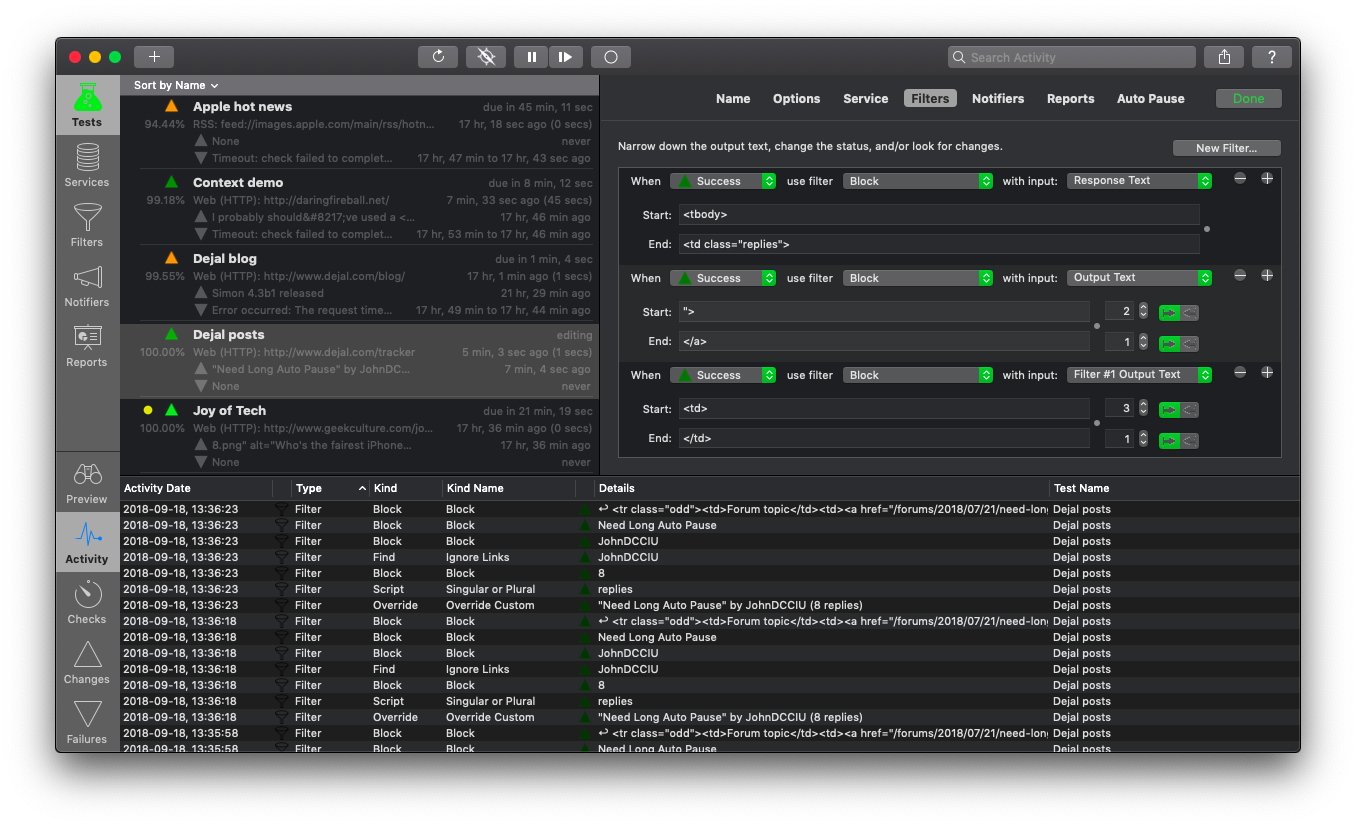
Portland-based Dejal Systems, LLC today announced Simon version 4.3, the essential server monitoring tool for macOS. Simon checks web pages, FTP and DNS servers, local or remote ports or volumes, and many other kinds of services for changes or failures. HTML reports enable remote viewing of a summary and/or details of Simon monitoring. This upgrade includes Mojave dark mode support and compatibility, a new meta refresh option, and much more.
Portland, Oregon - Dejal Systems, LLC today announced the immediate availability of Dejal Simon 4.3, the essential server monitoring tool for macOS. It checks web pages, FTP and DNS servers, local or remote ports or volumes, and other services for changes or failures, and notifies you via email, sound, speech, Twitter, SMS, HTML reports, and other means.
Add tests to Simon to track updated sites, to alert you when an important server goes down or recovers, check on Samba SMB, take periodic screenshots of the system, track posts and new comments on your or friends' blogs, check for web mail, make sure a key application is running, get notifications of updates to favorite news and entertainment websites, keep an eye on auctions, and many other uses.
Services include Web (HTTP) to check web pages (including secure ones, and supporting POST and cookies), FTP files and directory listings, DNS, Ping servers, see Twitter updates, watch a local Application, capture periodic Screenshots, watch for System Log Errors, and more. Plus, you can easily add your own services via custom port connections, AppleScripts, shell scripts, or Perl, PHP, Python, etc.
Use filters to avoid dynamic content and detect changes in the output of the service and other filters. You can look at multiple portions, or the 10th occurrence, find via simple text matching or powerful regular expressions. You can also remove HTML tags or numbers from the text, result in a change or failure if some text is found or missing, only detect a change if a number changes by some threshold, or is out of range, and many more possibilities.
Receive notification of changes, failures, and/or recoveries via various Actions, auto-generated Email messages, Growl notifications, Twitter updates or direct messages, SMS messages, an audible Sound, or customizable Speech. You can use custom scripts and port sessions for notifiers too.
HTML reports enable remote viewing of a summary and/or details of Simon monitoring. Reports can be saved to a local web server, or uploaded remotely. Customizable templates (with several examples provided) allow embedding in a web page, using a compact format suitable for viewing on PDAs and cellphones, creating a RSS feed, and more.
Version 4.3 is a free update for licensed Simon 4 customers. Changes include:
* Mojave dark mode and compatibility
* Added the ability to follow or not follow a meta refresh for each test
* Several improvements to the pause and auto-pause functions
* A number of refinements of services and filters
* Updated the default data
* Plus many other improvements
Language Support:
* English, French, German, Chinese
System Requirements:
* Intel Mac
* OS X version 10.10 or later
* 60 MB disk space
Pricing and Availability:
Dejal Simon 4.3 is available for a limited time for $59.00 USD (normally $99.00), and available as a full-featured demo. This is a free update for licensed Simon 4 users, with upgrades from version 3 available for $29.00 (normally $49.00). Simon is also available via Setapp.
Dejal Simon 4.3: https://www.dejal.com/simon/
Release Notes: https://www.dejal.com/simon/release/
Download Dejal Simon: https://www.dejal.com/download/?prod=simon&op=show&ref=pr
Screenshot: https://www.dejal.com/simon/images/full/tests-filters-activity.png
Application Icon: https://www.dejal.com/simon/images/icons/1024.png
Media Assets: https://www.dejal.com/simon/media/
Founded by David Sinclair in 1991, Dejal Systems, LLC was originally established in New Zealand, and later moved to Portland, Oregon in 2001. With a focus on the Mac, iPad and iPhone platforms, Dejal specializes in user-friendly and flexible utility software. Copyright 2018 Dejal Systems, LLC. All Rights Reserved. Dejal, the Dejal logo, and Simon are trademarks of Dejal Systems, LLC. Apple, the Apple logo, are registered trademarks of Apple Computer in the U.S. and/or other countries.
*******
Link To Article: https://prmac.com/release-id-82994.htm
*******
---------------------------------------------------------------------------------
Note that you can alter delivered distributions at any time.
Login to your account on prMac to alter your channel selection, or to opt-out at any time.
Dejal announces Simon 4.3 - Server Monitoring Tool - Published on 09/20/18
Portland-based Dejal Systems, LLC today announced Simon version 4.3, the essential server monitoring tool for macOS. Simon checks web pages, FTP and DNS servers, local or remote ports or volumes, and many other kinds of services for changes or failures. HTML reports enable remote viewing of a summary and/or details of Simon monitoring. This upgrade includes Mojave dark mode support and compatibility, a new meta refresh option, and much more.
Portland, Oregon - Dejal Systems, LLC today announced the immediate availability of Dejal Simon 4.3, the essential server monitoring tool for macOS. It checks web pages, FTP and DNS servers, local or remote ports or volumes, and other services for changes or failures, and notifies you via email, sound, speech, Twitter, SMS, HTML reports, and other means.
Add tests to Simon to track updated sites, to alert you when an important server goes down or recovers, check on Samba SMB, take periodic screenshots of the system, track posts and new comments on your or friends' blogs, check for web mail, make sure a key application is running, get notifications of updates to favorite news and entertainment websites, keep an eye on auctions, and many other uses.
Services include Web (HTTP) to check web pages (including secure ones, and supporting POST and cookies), FTP files and directory listings, DNS, Ping servers, see Twitter updates, watch a local Application, capture periodic Screenshots, watch for System Log Errors, and more. Plus, you can easily add your own services via custom port connections, AppleScripts, shell scripts, or Perl, PHP, Python, etc.
Use filters to avoid dynamic content and detect changes in the output of the service and other filters. You can look at multiple portions, or the 10th occurrence, find via simple text matching or powerful regular expressions. You can also remove HTML tags or numbers from the text, result in a change or failure if some text is found or missing, only detect a change if a number changes by some threshold, or is out of range, and many more possibilities.
Receive notification of changes, failures, and/or recoveries via various Actions, auto-generated Email messages, Growl notifications, Twitter updates or direct messages, SMS messages, an audible Sound, or customizable Speech. You can use custom scripts and port sessions for notifiers too.
HTML reports enable remote viewing of a summary and/or details of Simon monitoring. Reports can be saved to a local web server, or uploaded remotely. Customizable templates (with several examples provided) allow embedding in a web page, using a compact format suitable for viewing on PDAs and cellphones, creating a RSS feed, and more.
Version 4.3 is a free update for licensed Simon 4 customers. Changes include:
* Mojave dark mode and compatibility
* Added the ability to follow or not follow a meta refresh for each test
* Several improvements to the pause and auto-pause functions
* A number of refinements of services and filters
* Updated the default data
* Plus many other improvements
Language Support:
* English, French, German, Chinese
System Requirements:
* Intel Mac
* OS X version 10.10 or later
* 60 MB disk space
Pricing and Availability:
Dejal Simon 4.3 is available for a limited time for $59.00 USD (normally $99.00), and available as a full-featured demo. This is a free update for licensed Simon 4 users, with upgrades from version 3 available for $29.00 (normally $49.00). Simon is also available via Setapp.
Dejal Simon 4.3: https://www.dejal.com/simon/
Release Notes: https://www.dejal.com/simon/release/
Download Dejal Simon: https://www.dejal.com/download/?prod=simon&op=show&ref=pr
Screenshot: https://www.dejal.com/simon/images/full/tests-filters-activity.png
Application Icon: https://www.dejal.com/simon/images/icons/1024.png

Media Assets: https://www.dejal.com/simon/media/
Founded by David Sinclair in 1991, Dejal Systems, LLC was originally established in New Zealand, and later moved to Portland, Oregon in 2001. With a focus on the Mac, iPad and iPhone platforms, Dejal specializes in user-friendly and flexible utility software. Copyright 2018 Dejal Systems, LLC. All Rights Reserved. Dejal, the Dejal logo, and Simon are trademarks of Dejal Systems, LLC. Apple, the Apple logo, are registered trademarks of Apple Computer in the U.S. and/or other countries.
*******
Link To Article: https://prmac.com/release-id-82994.htm
*******
---------------------------------------------------------------------------------
Note that you can alter delivered distributions at any time.
Login to your account on prMac to alter your channel selection, or to opt-out at any time.
ABBYY TextGrabber and FineScanner Now Support Siri Shortcuts
A new article has been published at prMac.
ABBYY TextGrabber and FineScanner Now Support Siri Shortcuts - Published on 09/20/18
ABBYY today released the iOS 12-powered updates for its productivity applications FineScanner and TextGrabber. Leveraging the functionality of the mobile operating system, ABBYY has added the support of Siri Shortcuts, one of the most exciting new features of Apple's AI assistant Siri. With Siri Shortcuts, users can assign custom voice commands to documents saved in FineScanner so that they can quickly access them when needed.
Milpitas, California - ABBYY, a global provider of content intelligence solutions and services, today released the iOS 12-powered updates for its productivity applications FineScanner and TextGrabber. Leveraging the functionality of the mobile operating system, ABBYY has added the support of Siri Shortcuts, one of the most exciting new features of Apple's AI assistant Siri.
PCMag Editors' Choice in the mobile scanning category, ABBYY FineScanner automatically scans documents and book pages, recognizes the text on them retaining the original layout, allows to edit, annotate and sign, and helps to share as a PDF, DOCX or JPEG. Now the multifunctional app is fully compatible with iOS 12. With Siri Shortcuts, users can assign custom voice commands to documents saved in FineScanner so that they can quickly access them when needed. This time-saving functionality is designed for those who work with documents and papers on a regular basis, as well as for travelers who need to keep digital copies of important documents at hand. It is an organized, safe, and easy way to store and access important go-to documents and materials.
Featured on TechCrunch and VentureBeat, TextGrabber is also compatible with iOS 12. Now users can create and use custom Siri voice commands to instantly extract text from the latest photo or screenshot they took or saved in Gallery. This shortcut is a welcome addition for those who often work with paper-based content, documents, and books, along with those who attend presentations as it helps to easily capture slides. The digitized text can be edited, saved, shared, and translated into 104 languages, online or offline.
"iOS 12 comes with quite a few useful features and updates including faster app launch, Group FaceTime, improved augmented reality experiences, and screen time statistics. For us, it means that we can utilize these functionalities to make our mobile apps better for the user. We hope our new Siri Shortcuts will help people automate text capture and save time for more creative tasks", comments Bruce Orcutt, Senior Vice President of Product Marketing at ABBYY.
FineScanner and TextGrabber complement ABBYY's comprehensive portfolio of tools that simplify capture, digitization, and extraction of data. The company's offering ranges from top-of-the-line mobile-based optical character recognition (OCR) to enterprise-level automated document processing enabled by machine learning and semantics.
Availability and Pricing:
FineScanner for iOS is available on the App Store for free download. The full functionality of the app can be applied to five single or multi-page documents free of charge. To get unlimited access to the features, users are advised to purchase a premium subscription. FineScanner is compatible with iOS 10.0 or above, works on iPhone, iPad and supports an iMessage app. Siri Shortcuts require iOS 12.0 or above and an Internet connection.
TextGrabber for iOS is available on the App Store for free download. After the first three complimentary uses, some features require a subscription. TextGrabber is compatible with iOS 10.0 or above. Text recognition is performed on the device. For online translation and sharing, an Internet connection is required. Siri Shortcuts require iOS 12.0 or above and an Internet connection.
ABBYY: http://www.abbyy.com
ABBYY Mobile Apps: https://www.abbyy.com/mobile/?utm_source=prmac&utm_medium=pressrelease&utm_campaign=ios11
FineScanner on the App Store: https://itunes.apple.com/app/id534203582
TextGrabber on the App Store : https://itunes.apple.com/app/textgrabber-6-real-time-ocr/id438475005
Media assets: https://drive.google.com/drive/folders/1ZQOItjTocpwHQnXyEDE_JesczZpGJfpE
ABBYY is a global provider of content intelligence solutions and services. The company offers a complete range of AI-based technologies and solutions transforming business documents and content into business value. By providing digital transformation solutions to financial services, insurance, transportation, healthcare, and other industries, ABBYY helps organizations achieve the next wave of growth by understanding customers and delivering responsive real-time intelligent systems. The flexibility of ABBYY AI solutions enables customers to utilize a diverse range of advanced technologies, platforms and solutions for classification, text analytics, data and entity extraction, and data validation via any communication channel and in any format. ABBYY technologies are used and licensed by some of the largest international enterprises and government organizations, as well as SMBs and individuals. The company maintains offices in Australia, Cyprus, France, Germany, Japan, Russia, Spain,
Taiwan, the UK, Ukraine, and the United States. (C) Copyright 2018 ABBYY Solutions Ltd. All Rights Reserved. Apple, the Apple logo, iPhone, iPod and iPad are registered trademarks of Apple Inc. in the U.S. and/or other countries.
*******
Link To Article: https://prmac.com/release-id-82992.htm
*******
---------------------------------------------------------------------------------
Note that you can alter delivered distributions at any time.
Login to your account on prMac to alter your channel selection, or to opt-out at any time.
ABBYY TextGrabber and FineScanner Now Support Siri Shortcuts - Published on 09/20/18
ABBYY today released the iOS 12-powered updates for its productivity applications FineScanner and TextGrabber. Leveraging the functionality of the mobile operating system, ABBYY has added the support of Siri Shortcuts, one of the most exciting new features of Apple's AI assistant Siri. With Siri Shortcuts, users can assign custom voice commands to documents saved in FineScanner so that they can quickly access them when needed.
Milpitas, California - ABBYY, a global provider of content intelligence solutions and services, today released the iOS 12-powered updates for its productivity applications FineScanner and TextGrabber. Leveraging the functionality of the mobile operating system, ABBYY has added the support of Siri Shortcuts, one of the most exciting new features of Apple's AI assistant Siri.
PCMag Editors' Choice in the mobile scanning category, ABBYY FineScanner automatically scans documents and book pages, recognizes the text on them retaining the original layout, allows to edit, annotate and sign, and helps to share as a PDF, DOCX or JPEG. Now the multifunctional app is fully compatible with iOS 12. With Siri Shortcuts, users can assign custom voice commands to documents saved in FineScanner so that they can quickly access them when needed. This time-saving functionality is designed for those who work with documents and papers on a regular basis, as well as for travelers who need to keep digital copies of important documents at hand. It is an organized, safe, and easy way to store and access important go-to documents and materials.
Featured on TechCrunch and VentureBeat, TextGrabber is also compatible with iOS 12. Now users can create and use custom Siri voice commands to instantly extract text from the latest photo or screenshot they took or saved in Gallery. This shortcut is a welcome addition for those who often work with paper-based content, documents, and books, along with those who attend presentations as it helps to easily capture slides. The digitized text can be edited, saved, shared, and translated into 104 languages, online or offline.
"iOS 12 comes with quite a few useful features and updates including faster app launch, Group FaceTime, improved augmented reality experiences, and screen time statistics. For us, it means that we can utilize these functionalities to make our mobile apps better for the user. We hope our new Siri Shortcuts will help people automate text capture and save time for more creative tasks", comments Bruce Orcutt, Senior Vice President of Product Marketing at ABBYY.
FineScanner and TextGrabber complement ABBYY's comprehensive portfolio of tools that simplify capture, digitization, and extraction of data. The company's offering ranges from top-of-the-line mobile-based optical character recognition (OCR) to enterprise-level automated document processing enabled by machine learning and semantics.
Availability and Pricing:
FineScanner for iOS is available on the App Store for free download. The full functionality of the app can be applied to five single or multi-page documents free of charge. To get unlimited access to the features, users are advised to purchase a premium subscription. FineScanner is compatible with iOS 10.0 or above, works on iPhone, iPad and supports an iMessage app. Siri Shortcuts require iOS 12.0 or above and an Internet connection.
TextGrabber for iOS is available on the App Store for free download. After the first three complimentary uses, some features require a subscription. TextGrabber is compatible with iOS 10.0 or above. Text recognition is performed on the device. For online translation and sharing, an Internet connection is required. Siri Shortcuts require iOS 12.0 or above and an Internet connection.
ABBYY: http://www.abbyy.com
ABBYY Mobile Apps: https://www.abbyy.com/mobile/?utm_source=prmac&utm_medium=pressrelease&utm_campaign=ios11
FineScanner on the App Store: https://itunes.apple.com/app/id534203582
TextGrabber on the App Store : https://itunes.apple.com/app/textgrabber-6-real-time-ocr/id438475005
Media assets: https://drive.google.com/drive/folders/1ZQOItjTocpwHQnXyEDE_JesczZpGJfpE
ABBYY is a global provider of content intelligence solutions and services. The company offers a complete range of AI-based technologies and solutions transforming business documents and content into business value. By providing digital transformation solutions to financial services, insurance, transportation, healthcare, and other industries, ABBYY helps organizations achieve the next wave of growth by understanding customers and delivering responsive real-time intelligent systems. The flexibility of ABBYY AI solutions enables customers to utilize a diverse range of advanced technologies, platforms and solutions for classification, text analytics, data and entity extraction, and data validation via any communication channel and in any format. ABBYY technologies are used and licensed by some of the largest international enterprises and government organizations, as well as SMBs and individuals. The company maintains offices in Australia, Cyprus, France, Germany, Japan, Russia, Spain,
Taiwan, the UK, Ukraine, and the United States. (C) Copyright 2018 ABBYY Solutions Ltd. All Rights Reserved. Apple, the Apple logo, iPhone, iPod and iPad are registered trademarks of Apple Inc. in the U.S. and/or other countries.
*******
Link To Article: https://prmac.com/release-id-82992.htm
*******
---------------------------------------------------------------------------------
Note that you can alter delivered distributions at any time.
Login to your account on prMac to alter your channel selection, or to opt-out at any time.
Date Virtual Girls in Augmented Reality on your iPhone
A new article has been published at prMac.
Date Virtual Girls in Augmented Reality on your iPhone - Published on 09/20/18
Nevada based developer, WET Productions Inc. today introduces My Virtual Girlfriend AR, an augmented reality dating simulation game for IOS devices. My Virtual Girlfriend AR features thousands of girls to choose from and date, each with unique personalities and appearances. The goal of the game is to charm your way into the heart of your virtual date and eventually get her to fall in love with you. It combines both humor and light romance for a unique gaming experience.
Las Vegas, Nevada - WET Productions Inc. today is proud to announce the release and immediate availability of My Virtual Girlfriend AR, an augmented reality dating simulation game for IOS devices. My Virtual Girlfriend AR utilizes augmented reality allowing the player to date virtual girls in real life environments, bringing the dating simulation game genre to a whole new level.
Available on iOS devices that support ARkit, My Virtual Girlfriend AR features thousands of girls to choose from and date, each with unique personalities and appearances. The goal of the game is to charm your way into the heart of your virtual date and eventually get her to fall in love with you. It combines both humor and light romance for a unique gaming experience.
"We wanted to bring the My Virtual Girlfriend series to the next level by incorporating Augmented Reality into it, and through the help of our new team member and AR specialist, Kristof Giber, we were able to do just that," said Mike Amerson, President of WET Productions. "Our 'My Virtual' series of dating games have been wildly popular, and having amassed over 10 million downloads over the 8 years it has been available on iPhone. We hope to keep fans of the game happy by bringing them one step closer to reality, through augmented reality."
Device Requirements:
* You must be at least 17 years old to download this app
* iPhone and iPads
* Requires iOS 11.0 or later
* 142 MB
Pricing and Availability:
My Virtual Girlfriend AR is $2.99 USD (or equivalent amount in other currencies) and available worldwide exclusively through the App Store in the Games category. Promo codes are available to members of the press. For more information, please contact Mike Amerson.
My Virtual Girlfriend AR: http://www.myvirtualgirlfriendgame.com/mvgar.html
Purchase and Download: http://itunes.apple.com/app/my-virtual-girlfriend-ar/id1190016155
YouTube Video (Trailer): http://www.youtube.com/watch?v=T1AM-9Xv33g
Media Assets: http://www.myvirtualgirlfriendgame.com/press
Founded in 2003, WET Productions Inc. is an independent studio co-founded by industry veterans Mike Amerson and William Mallouk. Focused on development for mobile platforms, the company strives to make unique games that have broad appeal. Copyright (C) 2003-2018 WET Productions Inc. All Rights Reserved. Apple, the Apple logo, iPhone, iPod and iPad are registered trademarks of Apple Inc. in the U.S. and/or other countries.
*******
Link To Article: https://prmac.com/release-id-82991.htm
*******
---------------------------------------------------------------------------------
Note that you can alter delivered distributions at any time.
Login to your account on prMac to alter your channel selection, or to opt-out at any time.
Date Virtual Girls in Augmented Reality on your iPhone - Published on 09/20/18
Nevada based developer, WET Productions Inc. today introduces My Virtual Girlfriend AR, an augmented reality dating simulation game for IOS devices. My Virtual Girlfriend AR features thousands of girls to choose from and date, each with unique personalities and appearances. The goal of the game is to charm your way into the heart of your virtual date and eventually get her to fall in love with you. It combines both humor and light romance for a unique gaming experience.
Las Vegas, Nevada - WET Productions Inc. today is proud to announce the release and immediate availability of My Virtual Girlfriend AR, an augmented reality dating simulation game for IOS devices. My Virtual Girlfriend AR utilizes augmented reality allowing the player to date virtual girls in real life environments, bringing the dating simulation game genre to a whole new level.
Available on iOS devices that support ARkit, My Virtual Girlfriend AR features thousands of girls to choose from and date, each with unique personalities and appearances. The goal of the game is to charm your way into the heart of your virtual date and eventually get her to fall in love with you. It combines both humor and light romance for a unique gaming experience.
"We wanted to bring the My Virtual Girlfriend series to the next level by incorporating Augmented Reality into it, and through the help of our new team member and AR specialist, Kristof Giber, we were able to do just that," said Mike Amerson, President of WET Productions. "Our 'My Virtual' series of dating games have been wildly popular, and having amassed over 10 million downloads over the 8 years it has been available on iPhone. We hope to keep fans of the game happy by bringing them one step closer to reality, through augmented reality."
Device Requirements:
* You must be at least 17 years old to download this app
* iPhone and iPads
* Requires iOS 11.0 or later
* 142 MB
Pricing and Availability:
My Virtual Girlfriend AR is $2.99 USD (or equivalent amount in other currencies) and available worldwide exclusively through the App Store in the Games category. Promo codes are available to members of the press. For more information, please contact Mike Amerson.
My Virtual Girlfriend AR: http://www.myvirtualgirlfriendgame.com/mvgar.html
Purchase and Download: http://itunes.apple.com/app/my-virtual-girlfriend-ar/id1190016155
YouTube Video (Trailer): http://www.youtube.com/watch?v=T1AM-9Xv33g
Media Assets: http://www.myvirtualgirlfriendgame.com/press
Founded in 2003, WET Productions Inc. is an independent studio co-founded by industry veterans Mike Amerson and William Mallouk. Focused on development for mobile platforms, the company strives to make unique games that have broad appeal. Copyright (C) 2003-2018 WET Productions Inc. All Rights Reserved. Apple, the Apple logo, iPhone, iPod and iPad are registered trademarks of Apple Inc. in the U.S. and/or other countries.
*******
Link To Article: https://prmac.com/release-id-82991.htm
*******
---------------------------------------------------------------------------------
Note that you can alter delivered distributions at any time.
Login to your account on prMac to alter your channel selection, or to opt-out at any time.
Tropical Software Releases Discounted TopXNotes 1.8.7
A new article has been published at prMac.
Tropical Software Releases Discounted TopXNotes 1.8.7 - Published on 09/19/18
Florida based Tropical Software today announces TopXNotes 1.8.7, an update to their award-winning, full-featured personal information manager for macOS. Create, view, organize, and instantly access your Mac notes with TopXNotes. Version 1.8.7, our most stable, easiest-to-use version of TopXNotes, with a few new features, performance enhancements and bug fixes is being offered at a huge discount as a Back-to-School special.
Atlantic Beach, Florida - Tropical Software today is happy to announce that TopXNotes for Mac, an app that helps you to create a note by typing, dragging, or importing, has been updated to version 1.8.7 and is being offered at a huge discount as a "Back to School" special. The upgrade provides performance enhancements, a few new features, and bug fixes. TopXNotes 1.8.7 keeps your notes synchronized between TopXNotes for Mac and TopXNotes for iOS.
Get Organized with TopXNotes:
Tired of all those loose bits of information spread all over your hard drive in multiple documents requiring opening multiple apps to see them? Opening many apps sucks up your valuable Mac memory and slows it down. Are you tired of trying to remember which note was written in which application and where you put it? Use TopXNotes to import all your notes and organize them in one place with the option to password protect and encrypt sensitive information.
TopXNotes - Your Personal Information Organizer:
Use TopXNotes advanced drag and drop to create notes from any other text application, or to drag to import text and/or RTF documents. Or copy/cut and paste from other applications. Once the information is created, use TopXNotes' category system to create categories that meet your needs, or file in folder-like groups. Have one for home, one for office, and one for school, or a car project, or recipes, or anything at all.
TopXNotes - Your Personal Information Organizer:
As a Mac user, the Mac's desktop Finder is familiar to you, so you will find our NoteOrganizer highly intuitive. To improve that experience, we have moved beyond the Finder to allow you to build your own Categories (with names, icons and colors) to customize the experience for your needs. You will use the TopXNotes NoteOrganizer to organize your notes and quickly find things. TopXNotes NoteOrganizer lets you filter your notes by name, note page number, date created, date modified or category. You can also rapidly reverse sort or instantly switch between multiple NoteOrganizer display layouts.
TopXNotes - MultiView Convenience:
Use TopXNotes' unique MultiView feature to view more than one note at once in adjacent views. Think of it like opening a book to multiple pages at a time.
TopXNotes - MultiView Editing:
Using MultiView speeds up note editing by simplifying comparing notes, rearranging information from one note to another, combining notes, separating a long note into 2 or more notes, and other tasks. While you work, TopXNotes sliding Text toolbar automatically hovers right above where you are typing.
TopXNotes - MultiViewing:
In addition to helping edit your notes, TopXNotes MultiView allows you to show multiple notes on a theme at once. For instance, you might have a shopping list, budget and websites in adjacent notes for shopping. Alternatively, you might organize your day by having a list of calls, a list of errands, a project outline, and today's To-Do list side by side by side by side. There is no end to the combinations you will find useful.
TopXNotes - QuickNotes at your fingertips:
Once you have your notes organized, prioritize them with TopXNotes QuickNotes feature. Just click to check the QuickNotes category for your most critical information. Now you will be able to instantly access that note from the QuickNotes menu. Whether you have many windows open or the TopXNotes main window minimized, your QuickNotes are always instantly accessible from the desktop or from the TopXNotes Dock menu for your convenience.
TopXNotes - Security & Dual-Encryption:
Once you have your notes organized be sure to use our password protection to encrypt those notes with sensitive information, or you can set a password to shield all your notes from prying eyes, or you can do both (our unique "Dual-Encryption"). In this fashion, you have easy access to all your information, including the sensitive items.
TopXNotes Sync - Notes "On the Go":
Use TopXNotes Mac and its mobile partner, TopXNotes for iOS (for iPhone, iPad and iPod touch) to take those notes with you that you want while you are away including shopping lists, to-do lists, directions, or anything you want.
TopXNotes - Reviews:
TopXNotes was awarded 4 out of 5 mice by Macworld magazine in their "Summer of Mac Gems" series of reviews, by Macworld Australia, and later by Macworld UK. TopXNotes was rated "9 of 10" by Macsimum News (now part of MacTech), and highly rated by the Macintosh Guild, Macworld, Macworld UK and Mac360. Dennis Sellers rated it 10 of 10 for Apple Daily Report. TopXNotes has been critically reviewed with high marks on many occasions and you can find links to all the reviews on our website.
TopXNotes - Macworld Review:
Macworld praised the TopXNotes "clean, single window interface that puts controls for highlighting and marking up your text right at your fingertips," as well as for its "killer" QuickNotes feature.
TopXNotes - Mac User Group Review:
Sue Beal, president of the Upper Keys (Florida) Macintosh Users Group called TopXNotes "Inexpensive, unobtrusive, and just plain handy."
TopXNotes - Mac360:
Ron Mc Elfresh, of Mac360 stated: "I'm a notes freak. I have notes on everything. From to-do items to code snippets to tasks and projects to article ideas. Here's an understated, unloved, deceptively powerful notes app worthy of some Mac love...it's loaded with user features that set it apart from other note taking apps. TopXNotes is deceptively powerful and flexible, probably because the interface is immediately familiar."
Release Specific Information
TopXNotes 1.8.7 has the following changes:
New Features:
* Mac OS X 10.14 (Mohave) Ready
* The Tropical Store version of the app now requires a minimum MacOS version of 10.6.
* Added a new menu option that gives the user the ability to delete a note by page number.
Fixed:
* Insure TopXNotes "Groups" work correctly
Pricing and Availability:
Try Tropical's reliable TopXNotes 1.8.7 to "get organized" today! TopXNotes 1.8.7 is available for $9.95 (USD) from the Tropical Software web site, Amazon, and other select Macintosh software resellers. TopXNotes 1.8.7 is a free update to customers who have already purchased version 1.5 or later. Existing customers with an older version (previous to 1.5) can upgrade to version 1.8.7 for only $9.95 from the company's web site.
TopXNotes 1.8.7: http://www.tropic4.com/topxnotes.html
TopXNotes Anatomy: http://www.tropic4.com/anatomy.html
Download Free Trial (zip): http://www.tropic4.com/download/TopXNotes.zip
Purchase at Steep Discount: http://sites.fastspring.com/tropic4/product/TopXNotes
Macworld and Other Reviews: http://www.tropic4.com/products/topxnotes/reviews.html
App Icon: http://www.tropic4.com/images/GetOrganizedNoReflect.png
Tropical Software makes the award-winning TopXNotes, a modern personal note manager with state of the art proprietary encryption technology for the ultimate in securing personal information. Located in Atlantic Beach, Florida, Tropical Software is owned and operated by former Apple employee James Lee, and is dedicated to improving the lives of its customers by offering easy to use productivity software for Macs and Apple touch devices including iPhone, iPod touch and iPad. Copyright (C) 2018 Tropical Software. All Rights Reserved. Apple, the Apple logo, iPhone, iPod, iPad and Macintosh are registered trademarks of Apple Inc. in the U.S. and/or other countries.
*******
Link To Article: https://prmac.com/release-id-82990.htm
*******
---------------------------------------------------------------------------------
Note that you can alter delivered distributions at any time.
Login to your account on prMac to alter your channel selection, or to opt-out at any time.
Tropical Software Releases Discounted TopXNotes 1.8.7 - Published on 09/19/18
Florida based Tropical Software today announces TopXNotes 1.8.7, an update to their award-winning, full-featured personal information manager for macOS. Create, view, organize, and instantly access your Mac notes with TopXNotes. Version 1.8.7, our most stable, easiest-to-use version of TopXNotes, with a few new features, performance enhancements and bug fixes is being offered at a huge discount as a Back-to-School special.
Atlantic Beach, Florida - Tropical Software today is happy to announce that TopXNotes for Mac, an app that helps you to create a note by typing, dragging, or importing, has been updated to version 1.8.7 and is being offered at a huge discount as a "Back to School" special. The upgrade provides performance enhancements, a few new features, and bug fixes. TopXNotes 1.8.7 keeps your notes synchronized between TopXNotes for Mac and TopXNotes for iOS.
Get Organized with TopXNotes:
Tired of all those loose bits of information spread all over your hard drive in multiple documents requiring opening multiple apps to see them? Opening many apps sucks up your valuable Mac memory and slows it down. Are you tired of trying to remember which note was written in which application and where you put it? Use TopXNotes to import all your notes and organize them in one place with the option to password protect and encrypt sensitive information.
TopXNotes - Your Personal Information Organizer:
Use TopXNotes advanced drag and drop to create notes from any other text application, or to drag to import text and/or RTF documents. Or copy/cut and paste from other applications. Once the information is created, use TopXNotes' category system to create categories that meet your needs, or file in folder-like groups. Have one for home, one for office, and one for school, or a car project, or recipes, or anything at all.
TopXNotes - Your Personal Information Organizer:
As a Mac user, the Mac's desktop Finder is familiar to you, so you will find our NoteOrganizer highly intuitive. To improve that experience, we have moved beyond the Finder to allow you to build your own Categories (with names, icons and colors) to customize the experience for your needs. You will use the TopXNotes NoteOrganizer to organize your notes and quickly find things. TopXNotes NoteOrganizer lets you filter your notes by name, note page number, date created, date modified or category. You can also rapidly reverse sort or instantly switch between multiple NoteOrganizer display layouts.
TopXNotes - MultiView Convenience:
Use TopXNotes' unique MultiView feature to view more than one note at once in adjacent views. Think of it like opening a book to multiple pages at a time.
TopXNotes - MultiView Editing:
Using MultiView speeds up note editing by simplifying comparing notes, rearranging information from one note to another, combining notes, separating a long note into 2 or more notes, and other tasks. While you work, TopXNotes sliding Text toolbar automatically hovers right above where you are typing.
TopXNotes - MultiViewing:
In addition to helping edit your notes, TopXNotes MultiView allows you to show multiple notes on a theme at once. For instance, you might have a shopping list, budget and websites in adjacent notes for shopping. Alternatively, you might organize your day by having a list of calls, a list of errands, a project outline, and today's To-Do list side by side by side by side. There is no end to the combinations you will find useful.
TopXNotes - QuickNotes at your fingertips:
Once you have your notes organized, prioritize them with TopXNotes QuickNotes feature. Just click to check the QuickNotes category for your most critical information. Now you will be able to instantly access that note from the QuickNotes menu. Whether you have many windows open or the TopXNotes main window minimized, your QuickNotes are always instantly accessible from the desktop or from the TopXNotes Dock menu for your convenience.
TopXNotes - Security & Dual-Encryption:
Once you have your notes organized be sure to use our password protection to encrypt those notes with sensitive information, or you can set a password to shield all your notes from prying eyes, or you can do both (our unique "Dual-Encryption"). In this fashion, you have easy access to all your information, including the sensitive items.
TopXNotes Sync - Notes "On the Go":
Use TopXNotes Mac and its mobile partner, TopXNotes for iOS (for iPhone, iPad and iPod touch) to take those notes with you that you want while you are away including shopping lists, to-do lists, directions, or anything you want.
TopXNotes - Reviews:
TopXNotes was awarded 4 out of 5 mice by Macworld magazine in their "Summer of Mac Gems" series of reviews, by Macworld Australia, and later by Macworld UK. TopXNotes was rated "9 of 10" by Macsimum News (now part of MacTech), and highly rated by the Macintosh Guild, Macworld, Macworld UK and Mac360. Dennis Sellers rated it 10 of 10 for Apple Daily Report. TopXNotes has been critically reviewed with high marks on many occasions and you can find links to all the reviews on our website.
TopXNotes - Macworld Review:
Macworld praised the TopXNotes "clean, single window interface that puts controls for highlighting and marking up your text right at your fingertips," as well as for its "killer" QuickNotes feature.
TopXNotes - Mac User Group Review:
Sue Beal, president of the Upper Keys (Florida) Macintosh Users Group called TopXNotes "Inexpensive, unobtrusive, and just plain handy."
TopXNotes - Mac360:
Ron Mc Elfresh, of Mac360 stated: "I'm a notes freak. I have notes on everything. From to-do items to code snippets to tasks and projects to article ideas. Here's an understated, unloved, deceptively powerful notes app worthy of some Mac love...it's loaded with user features that set it apart from other note taking apps. TopXNotes is deceptively powerful and flexible, probably because the interface is immediately familiar."
Release Specific Information
TopXNotes 1.8.7 has the following changes:
New Features:
* Mac OS X 10.14 (Mohave) Ready
* The Tropical Store version of the app now requires a minimum MacOS version of 10.6.
* Added a new menu option that gives the user the ability to delete a note by page number.
Fixed:
* Insure TopXNotes "Groups" work correctly
Pricing and Availability:
Try Tropical's reliable TopXNotes 1.8.7 to "get organized" today! TopXNotes 1.8.7 is available for $9.95 (USD) from the Tropical Software web site, Amazon, and other select Macintosh software resellers. TopXNotes 1.8.7 is a free update to customers who have already purchased version 1.5 or later. Existing customers with an older version (previous to 1.5) can upgrade to version 1.8.7 for only $9.95 from the company's web site.
TopXNotes 1.8.7: http://www.tropic4.com/topxnotes.html
TopXNotes Anatomy: http://www.tropic4.com/anatomy.html
Download Free Trial (zip): http://www.tropic4.com/download/TopXNotes.zip
Purchase at Steep Discount: http://sites.fastspring.com/tropic4/product/TopXNotes
Macworld and Other Reviews: http://www.tropic4.com/products/topxnotes/reviews.html
App Icon: http://www.tropic4.com/images/GetOrganizedNoReflect.png

Tropical Software makes the award-winning TopXNotes, a modern personal note manager with state of the art proprietary encryption technology for the ultimate in securing personal information. Located in Atlantic Beach, Florida, Tropical Software is owned and operated by former Apple employee James Lee, and is dedicated to improving the lives of its customers by offering easy to use productivity software for Macs and Apple touch devices including iPhone, iPod touch and iPad. Copyright (C) 2018 Tropical Software. All Rights Reserved. Apple, the Apple logo, iPhone, iPod, iPad and Macintosh are registered trademarks of Apple Inc. in the U.S. and/or other countries.
*******
Link To Article: https://prmac.com/release-id-82990.htm
*******
---------------------------------------------------------------------------------
Note that you can alter delivered distributions at any time.
Login to your account on prMac to alter your channel selection, or to opt-out at any time.
MacX MediaTrans Updated for iOS 12 - Back up iPhone to Avoid Data Loss
A new article has been published at prMac.
MacX MediaTrans Updated for iOS 12 - Back up iPhone to Avoid Data Loss - Published on 09/19/18
MacXDVD Software today releases MacX MediaTrans 5.6, an important feature update to their popular multimedia solution for Mac and Windows. MediaTrans brings you a fast way to backup and transfer iOS data, including photos, music, videos, ringtone, iBook, Voice Memo, iTunes U, Podcast, and more. You can even import/export iTunes purchases and make them accessible to non-Apple devices. Version 5.6 fully supports Apple's newly launched iOS 12 and more.
Chengdu, China - MacXDVD Software announced today that the flagship iOS data management tool MacX MediaTrans has been updated to fully support Apple's newly launched iOS 12. Apple users can rest assured that they can always take advantage of the fastest way to back up their data and get enough space on iPhones before they upgrade to iOS12.
MacX MediaTrans supports all iDevices running on iOS 12, including 2018 newly-released iPhone XS, XS Max, XR, and new iPad Pro. Get the latest version at MacX MediaTrans Official Page.
iOS 12 focuses on delivering a swathe of significant performance improvements for the largest variety of Apple devices, available for all phones from the iPhone 5S upwards. However, even if the old phones were eligible for iOS 12, installing it was a gamble. At a size of 2.77GB, updating to iOS 12 places a high burden on 16GB and 32GB variants of iPhone 5S, iPhone SE, iPhone 6, iPhone 6S and iPhone 7. Based on the past experience, iOS 12 upgrade is also fraught with risks of getting the phones stuck in data backup & restore, or even worse, the data loss nightmare.
To help get both recent and older iPhones ready for iOS 12 upgrade, today, continuing the company's long-standing track of delivering day one support of iOS, MacXDVD offers full support for iOS 12 in its world's fastest iPhone data management solution - MacX MediaTrans. It is by far the most efficient alternative solution to iTunes, leading in speed, supported file types, storage management options, easiness, and more.
Depending on the size of the files, the program can reduce the backup time up by 40%-90% than its competitors. Files like photos (HEIC, PNG, JPG, TIFF), 4K/HD recordings in HEVC or H.264, music and movies (purchased or not), ringtones, books, etc. can be backed up to the computer and restored to iDevices in a flash. iOS users of small storage can also reclaim gigabytes of iPhone space to avoid "Not Enough Storage" issue during the software update by transferring the large-size video files and mass deleting the storage-hogging photos, albums, and other data.
There are advanced capabilities to convert incompatible videos into iPhone MP4/MP3, export HEIC photos in JPG, create own ringtones, mount iPhone iPad as hard drive, and manage media library, etc. Simply drag-and-drop clicks, users can leverage the latest features of iOS 12, and even switch content from older iPhones or Android to new iPhone XS, XS Max, and XR, no waiting or struggles.
Pricing and Availability
MacX MediaTrans is normally priced at $59.95 (USD) for a single license copy with lifetime free upgrade and one-to-one top-level technical support. To celebrate Apple's new releases and help users back up iPhone files easier, the iPhone data transfer tool now is 40% off in MacXDVD's official Special Offer.
MacX MediaTrans 5.6: https://www.macxdvd.com/mediatrans/
MacXDVD's official Special Offer: https://www.macxdvd.com/mediatrans/buy.htm
MacXDVD Software is a division of Digiarty Software Company, owns a professional multimedia software development team, providing a range of products for Macintosh Computer users, including MacX Video Converter, MacX DVD Ripper, DVD Author, DVD backup tools, etc, series of apps for Apple video player, and iPhone, iPad 2D and 3D video games. Copyright (C) 2018 MacXDVD Software. All Rights Reserved. Apple, the Apple logo and Macintosh are registered trademarks of Apple Inc. in the U.S. and/or other countries.
*******
Link To Article: https://prmac.com/release-id-82989.htm
*******
---------------------------------------------------------------------------------
Note that you can alter delivered distributions at any time.
Login to your account on prMac to alter your channel selection, or to opt-out at any time.
MacX MediaTrans Updated for iOS 12 - Back up iPhone to Avoid Data Loss - Published on 09/19/18
MacXDVD Software today releases MacX MediaTrans 5.6, an important feature update to their popular multimedia solution for Mac and Windows. MediaTrans brings you a fast way to backup and transfer iOS data, including photos, music, videos, ringtone, iBook, Voice Memo, iTunes U, Podcast, and more. You can even import/export iTunes purchases and make them accessible to non-Apple devices. Version 5.6 fully supports Apple's newly launched iOS 12 and more.
Chengdu, China - MacXDVD Software announced today that the flagship iOS data management tool MacX MediaTrans has been updated to fully support Apple's newly launched iOS 12. Apple users can rest assured that they can always take advantage of the fastest way to back up their data and get enough space on iPhones before they upgrade to iOS12.
MacX MediaTrans supports all iDevices running on iOS 12, including 2018 newly-released iPhone XS, XS Max, XR, and new iPad Pro. Get the latest version at MacX MediaTrans Official Page.
iOS 12 focuses on delivering a swathe of significant performance improvements for the largest variety of Apple devices, available for all phones from the iPhone 5S upwards. However, even if the old phones were eligible for iOS 12, installing it was a gamble. At a size of 2.77GB, updating to iOS 12 places a high burden on 16GB and 32GB variants of iPhone 5S, iPhone SE, iPhone 6, iPhone 6S and iPhone 7. Based on the past experience, iOS 12 upgrade is also fraught with risks of getting the phones stuck in data backup & restore, or even worse, the data loss nightmare.
To help get both recent and older iPhones ready for iOS 12 upgrade, today, continuing the company's long-standing track of delivering day one support of iOS, MacXDVD offers full support for iOS 12 in its world's fastest iPhone data management solution - MacX MediaTrans. It is by far the most efficient alternative solution to iTunes, leading in speed, supported file types, storage management options, easiness, and more.
Depending on the size of the files, the program can reduce the backup time up by 40%-90% than its competitors. Files like photos (HEIC, PNG, JPG, TIFF), 4K/HD recordings in HEVC or H.264, music and movies (purchased or not), ringtones, books, etc. can be backed up to the computer and restored to iDevices in a flash. iOS users of small storage can also reclaim gigabytes of iPhone space to avoid "Not Enough Storage" issue during the software update by transferring the large-size video files and mass deleting the storage-hogging photos, albums, and other data.
There are advanced capabilities to convert incompatible videos into iPhone MP4/MP3, export HEIC photos in JPG, create own ringtones, mount iPhone iPad as hard drive, and manage media library, etc. Simply drag-and-drop clicks, users can leverage the latest features of iOS 12, and even switch content from older iPhones or Android to new iPhone XS, XS Max, and XR, no waiting or struggles.
Pricing and Availability
MacX MediaTrans is normally priced at $59.95 (USD) for a single license copy with lifetime free upgrade and one-to-one top-level technical support. To celebrate Apple's new releases and help users back up iPhone files easier, the iPhone data transfer tool now is 40% off in MacXDVD's official Special Offer.
MacX MediaTrans 5.6: https://www.macxdvd.com/mediatrans/
MacXDVD's official Special Offer: https://www.macxdvd.com/mediatrans/buy.htm
MacXDVD Software is a division of Digiarty Software Company, owns a professional multimedia software development team, providing a range of products for Macintosh Computer users, including MacX Video Converter, MacX DVD Ripper, DVD Author, DVD backup tools, etc, series of apps for Apple video player, and iPhone, iPad 2D and 3D video games. Copyright (C) 2018 MacXDVD Software. All Rights Reserved. Apple, the Apple logo and Macintosh are registered trademarks of Apple Inc. in the U.S. and/or other countries.
*******
Link To Article: https://prmac.com/release-id-82989.htm
*******
---------------------------------------------------------------------------------
Note that you can alter delivered distributions at any time.
Login to your account on prMac to alter your channel selection, or to opt-out at any time.
Subscribe to:
Posts (Atom)