A new article has been published at prMac.
MaBaSoft Releases Currency Assistant 3.3 - Published on 10/22/18
MaBaSoft announces Currency Assistant 3.3, an important update to their currency converter for macOS. Currency Assistant is a very flexible currency conversion calculator that provides 174 currencies, including all major circulating currencies plus the 19 Eurozone legacy currencies, allows the creation of multiple converters, and automatically updates exchange rates over the Internet. Version 3.3 introduces support for Dark Mode and restores the automatic update of the IMF rates.
Milano, Italy - MaBaSoft announces the release of Currency Assistant 3.3, the latest version of their currency converter for macOS. Currency Assistant allows users to easily calculate conversions between 174 world currencies (all major circulating currencies plus the 19 Eurozone legacy currencies) and updates exchange rates automatically over the Internet. Version 3.3 solves the incompatibilities with macOS 10.4 Mojave, introduces support for Dark Mode, restores the automatic update of the International Monetary Fund rates, replaces the tape drawer with the tape sidebar, and introduces several minor improvements.
Currency Assistant is a very flexible currency converter; users can define multiple conversion windows which can contain up to 24 currencies. Converters are very easy to set up or edit and have an Action pop-up menu to quickly accomplish recurrent tasks, a Rate pop-up menu to view and copy exchange rates, and a tape to log results.
With Currency Assistant users can quickly calculate conversions to multiple currencies and automatically convert the result of expressions. In addition to that, multiple amounts can be copied from a spreadsheet or another document and pasted to the desired input display: Currency Assistant will automatically convert the pasted amounts and log results in the tape. Finally, Currency Assistant can import text files, Word documents, and text clippings containing series of amounts and automatically convert the enclosed values.
Working with results is also very easy. Amounts can be copied from a display or from the tape, conversions can be exported by dragging them from the tape to a document in another application, and the tape can be saved to a RTF or plain text file and printed. Moreover, configurable Copy Special commands allow users to copy results including ISO code, currency name, or symbol and quickly copy frequently used text snippets containing conversion results, ISO codes, currency names, and symbols.
Managing currencies is simple and straightforward with Currency Assistant. The Currencies window allows users to quickly search, sort, edit, batch edit, and restore currencies, set a base currency, and automatically update exchange rates. Currency Assistant uses the rates published by the European Central Bank, the International Monetary Fund, and the Bank of Italy to automatically update exchange rates.
Language Support:
* US English, German, French, Dutch, and Italian
System Requirements:
* macOS 10.11, 10.12, 10.13, or 10.14 (Mojave)
Pricing and Availability:
Currency Assistant 3.3 is now 50% off and available for just $8.95 (USD) for new users or $4.95 (USD) for Euro Assistant Pro registered users. Version 3.3 is a free update for registered version 3 users. Site and world-wide licenses are also available.
MaBaSoft: https://www.mabasoft.net/
Currency Assistant 3.3: https://www.mabasoft.net/products/currencyAssistant.html
Purchase Currency Assistant: https://sites.fastspring.com/mabasoft/product/all?language=en
Direct Download: https://www.mabasoft.net/downloads/files/Currency_Assistant_3.3.dmg
Release Notes: https://www.mabasoft.net/releaseNotes/currencyAssistant.html
Media Assets: https://www.mabasoft.net/pressImages/currencyAssistant.html
MaBaSoft, based in Milano, Italy, is a small independent company founded by Marco Damaschi and Barbara Canino in 1997. MaBaSoft develops quality system utilities and applications for the Macintosh. Copyright 1997-2018 MaBaSoft. All Rights Reserved. Apple, the Apple logo, Macintosh and macOS are registered trademarks of Apple Inc. in the U.S. and/or other countries. Other trademarks and registered trademarks may be the property of their respective owners.
*******
Link To Article: https://prmac.com/release-id-83077.htm
*******
---------------------------------------------------------------------------------
Note that you can alter delivered distributions at any time.
Login to your account on prMac to alter your channel selection, or to opt-out at any time.

mDecks Music releases Mapping Tonal Harmony Pro 7.2.5 for macOS
A new article has been published at prMac.
mDecks Music releases Mapping Tonal Harmony Pro 7.2.5 for macOS - Published on 10/22/18
Florida based mDecks Music LLC releases Mapping Tonal Harmony Pro 7.2.5, an important update to their interactive music theory app for macOS. Mapping Tonal Harmony Pro was envisioned as auxiliary material in the study of Tonal Harmony. It provides the student, teachers, composers and/or songwriters with a tool that will aid them in hearing, analyzing, foreseeing and composing harmonic progressions without struggle, in all keys alike. Study effortlessly tonal harmony in different styles.
Coral Springs, Florida - mDecks Music LLC is pleased to announce the release of Mapping Tonal Harmony Pro 7.2.5, an important update to their interactive music theory app for macOS. Mapping Tonal Harmony Pro was developed exclusively to study tonal harmony, cadences, chords and chord-scales, all accompanied by 7 workbooks to teach and study tonal harmony.
Mapping Tonal Harmony Pro has been envisioned as auxiliary material in the study of Tonal Harmony. The main objective of this app is to provide the student, teachers, composers and/or songwriters with a tool that will aid them in hearing, analyzing, foreseeing and composing harmonic progressions without struggle, in all keys alike. Study Tonal Harmony in different styles: Classical, Jazz, Rock/Pop, Blues, Gospel, Contemporary and more.
The map has seven levels of complexity, from the basic diatonic neighborhood advanced secondary functions in major and minor modes and is viewable in all 12 keys and enharmonic spellings, plus a functional view (relative to the tonic). Each level is also accompanied by its respective workbook available at mDecks.com for further study and research.
Create your own progressions and workouts or download progressions book files with, tonal harmony progressions, jazz theory progressions and workouts, or entires song progressions. View their harmonic analysis in different formats which you can view in any key and print:
7 Map Levels:
1) Basic Diatonic functions
2) IIIm and Deceptive Cadences
3) SubV7 and Neapolitan sixth (N6)
4) Secondary Dominants
5) Blues and other modes
6) Advanced Secondary Dominants
7) Complete Map with all functions
10 Map Layouts for different styles:
1) Jazz Standard
2) Blues
3) Late Baroque - Early Classical
4) Late Classical
5) Romanticism
6) Pop/Rock
7) Gospel
8) Contemporary Pop/Rock
9) Quartal Music
10) All Possibilities
9 Staff Layout Templates (and you can create your own):
1) Full Analysis
2) Analysis without scales
3) Omit Functional Analysis
4) Only Functional Analysis
5) Lead Sheet Standard
6) Lead Sheet Large
7) Lead Sheet Small
8) Smaller Tonal Harmony Worksheet
9) Tonal Harmony Worksheet
Version 7.2.5 sports a new Reharmonizer to create a reharmonization of the current progression. There are also new Play-along Styles: These new styles (starting with Z) will favor playing all the chord changes in the progression at all times. The other styles use a more loose approach, sometimes leaving some chord changes out to balance spacing in the bass & piano accompaniment. There is also new Auto-Spacing. Users can enable auto-spacing (progression panel's top menu) to automatically space chords appart avoiding overlapping in dense scores. Disable auto-spacing to evenly space quarter notes and measures. Play-along style now changes atuomatically to the default for that song when loading.
Play-along in different Styles such as Jazz, Blues, Bossa, Rock/Pop. Choose tempo, adjust volumes, reverb, or apply a limiter to any of the instruments. Mapping Tonal Harmony will play the functions using 3 to 6 voices, resolve voice-leading, add tensions for jazz using customizable voicing creation rules or using just chord-tones for classical progressions. You can adjust the volume of each voice independently, and use a bass sound on the lowest note if you like.
Create workouts in just one click to practice progressions in all twelve keys. View the voicings in standard music notation or in the piano keyboard. View the chord-scale and identify chord-tones, tensions and avoid notes. The score editor has all the necessary tools to create a complete song-form, including sections, repeats, DS. al Coda, Fine, First Endings, direct modulations and common-tone modulations
Save your songs to the catalog or export entire progressions-books and share them with other Mapping Tonal Harmony Pro users. Transpose your progression to any key and print it using any of the preloaded layouts or create your own.
System Requirements:
* macOS 10.12 or later
* 64-bit processor
* 116.3 MB
Pricing and Availability:
Mapping Tonal Harmony Pro 7.2.5 is $29.99 USD (or equivalent amount in other currencies) and available worldwide exclusively through the Mac App Store in the Music category.
mDecks Music: https://mdecks.com
Mapping Tonal Harmony Pro 7.2.5: https://mdecks.com/mapharmony.phtml
Purchase and Download (MAS): https://itunes.apple.com/us/app/mapping-tonal-harmony-pro/id599212305
Screenshot: https://mdecks.com/nueva/upload/mapping-tonal-harmony-promo-1800x800.jpg
Application Icon: http://mdecks.com/nueva/upload/mapping-icon-400x363.jpg
mDecks Music is dedicated to the creating of music software and books for intermediate to advanced musicians. Music Theory Apps: From tonal harmony, music scales & modes to sight-reading and ear training. Study Music Theory like never before with our apps.Music Theory Books: from Decoding the Circle of Fifths, Upper Structure Triads, Tonal Harmony to Piano Technique, Doubling on Woodwinds, Rhythmic Training. Music Theory Channel on YouTube: Free Online Music Theory Lessons & Tutorials. From Reharmonization Techniques, Advanced Jazz Chord-Scales to Decoding Beethoven. All Material and Software (C) Copyright 2018 mDecks Music LLC. All Rights Reserved. Apple, the Apple logo, Macintosh Mac OS X and macOS are registered trademarks of Apple Inc. in the U.S. and/or other countries. Other trademarks and registered trademarks may be the property of their respective owners.
*******
Link To Article: https://prmac.com/release-id-83079.htm
*******
---------------------------------------------------------------------------------
Note that you can alter delivered distributions at any time.
Login to your account on prMac to alter your channel selection, or to opt-out at any time.
mDecks Music releases Mapping Tonal Harmony Pro 7.2.5 for macOS - Published on 10/22/18
Florida based mDecks Music LLC releases Mapping Tonal Harmony Pro 7.2.5, an important update to their interactive music theory app for macOS. Mapping Tonal Harmony Pro was envisioned as auxiliary material in the study of Tonal Harmony. It provides the student, teachers, composers and/or songwriters with a tool that will aid them in hearing, analyzing, foreseeing and composing harmonic progressions without struggle, in all keys alike. Study effortlessly tonal harmony in different styles.
Coral Springs, Florida - mDecks Music LLC is pleased to announce the release of Mapping Tonal Harmony Pro 7.2.5, an important update to their interactive music theory app for macOS. Mapping Tonal Harmony Pro was developed exclusively to study tonal harmony, cadences, chords and chord-scales, all accompanied by 7 workbooks to teach and study tonal harmony.
Mapping Tonal Harmony Pro has been envisioned as auxiliary material in the study of Tonal Harmony. The main objective of this app is to provide the student, teachers, composers and/or songwriters with a tool that will aid them in hearing, analyzing, foreseeing and composing harmonic progressions without struggle, in all keys alike. Study Tonal Harmony in different styles: Classical, Jazz, Rock/Pop, Blues, Gospel, Contemporary and more.
The map has seven levels of complexity, from the basic diatonic neighborhood advanced secondary functions in major and minor modes and is viewable in all 12 keys and enharmonic spellings, plus a functional view (relative to the tonic). Each level is also accompanied by its respective workbook available at mDecks.com for further study and research.
Create your own progressions and workouts or download progressions book files with, tonal harmony progressions, jazz theory progressions and workouts, or entires song progressions. View their harmonic analysis in different formats which you can view in any key and print:
7 Map Levels:
1) Basic Diatonic functions
2) IIIm and Deceptive Cadences
3) SubV7 and Neapolitan sixth (N6)
4) Secondary Dominants
5) Blues and other modes
6) Advanced Secondary Dominants
7) Complete Map with all functions
10 Map Layouts for different styles:
1) Jazz Standard
2) Blues
3) Late Baroque - Early Classical
4) Late Classical
5) Romanticism
6) Pop/Rock
7) Gospel
8) Contemporary Pop/Rock
9) Quartal Music
10) All Possibilities
9 Staff Layout Templates (and you can create your own):
1) Full Analysis
2) Analysis without scales
3) Omit Functional Analysis
4) Only Functional Analysis
5) Lead Sheet Standard
6) Lead Sheet Large
7) Lead Sheet Small
8) Smaller Tonal Harmony Worksheet
9) Tonal Harmony Worksheet
Version 7.2.5 sports a new Reharmonizer to create a reharmonization of the current progression. There are also new Play-along Styles: These new styles (starting with Z) will favor playing all the chord changes in the progression at all times. The other styles use a more loose approach, sometimes leaving some chord changes out to balance spacing in the bass & piano accompaniment. There is also new Auto-Spacing. Users can enable auto-spacing (progression panel's top menu) to automatically space chords appart avoiding overlapping in dense scores. Disable auto-spacing to evenly space quarter notes and measures. Play-along style now changes atuomatically to the default for that song when loading.
Play-along in different Styles such as Jazz, Blues, Bossa, Rock/Pop. Choose tempo, adjust volumes, reverb, or apply a limiter to any of the instruments. Mapping Tonal Harmony will play the functions using 3 to 6 voices, resolve voice-leading, add tensions for jazz using customizable voicing creation rules or using just chord-tones for classical progressions. You can adjust the volume of each voice independently, and use a bass sound on the lowest note if you like.
Create workouts in just one click to practice progressions in all twelve keys. View the voicings in standard music notation or in the piano keyboard. View the chord-scale and identify chord-tones, tensions and avoid notes. The score editor has all the necessary tools to create a complete song-form, including sections, repeats, DS. al Coda, Fine, First Endings, direct modulations and common-tone modulations
Save your songs to the catalog or export entire progressions-books and share them with other Mapping Tonal Harmony Pro users. Transpose your progression to any key and print it using any of the preloaded layouts or create your own.
System Requirements:
* macOS 10.12 or later
* 64-bit processor
* 116.3 MB
Pricing and Availability:
Mapping Tonal Harmony Pro 7.2.5 is $29.99 USD (or equivalent amount in other currencies) and available worldwide exclusively through the Mac App Store in the Music category.
mDecks Music: https://mdecks.com
Mapping Tonal Harmony Pro 7.2.5: https://mdecks.com/mapharmony.phtml
Purchase and Download (MAS): https://itunes.apple.com/us/app/mapping-tonal-harmony-pro/id599212305
Screenshot: https://mdecks.com/nueva/upload/mapping-tonal-harmony-promo-1800x800.jpg

Application Icon: http://mdecks.com/nueva/upload/mapping-icon-400x363.jpg

mDecks Music is dedicated to the creating of music software and books for intermediate to advanced musicians. Music Theory Apps: From tonal harmony, music scales & modes to sight-reading and ear training. Study Music Theory like never before with our apps.Music Theory Books: from Decoding the Circle of Fifths, Upper Structure Triads, Tonal Harmony to Piano Technique, Doubling on Woodwinds, Rhythmic Training. Music Theory Channel on YouTube: Free Online Music Theory Lessons & Tutorials. From Reharmonization Techniques, Advanced Jazz Chord-Scales to Decoding Beethoven. All Material and Software (C) Copyright 2018 mDecks Music LLC. All Rights Reserved. Apple, the Apple logo, Macintosh Mac OS X and macOS are registered trademarks of Apple Inc. in the U.S. and/or other countries. Other trademarks and registered trademarks may be the property of their respective owners.
*******
Link To Article: https://prmac.com/release-id-83079.htm
*******
---------------------------------------------------------------------------------
Note that you can alter delivered distributions at any time.
Login to your account on prMac to alter your channel selection, or to opt-out at any time.
InPreflight for Adobe InDesign Now Supports Creative Cloud 2019
A new article has been published at prMac.
InPreflight for Adobe InDesign Now Supports Creative Cloud 2019 - Published on 10/22/18
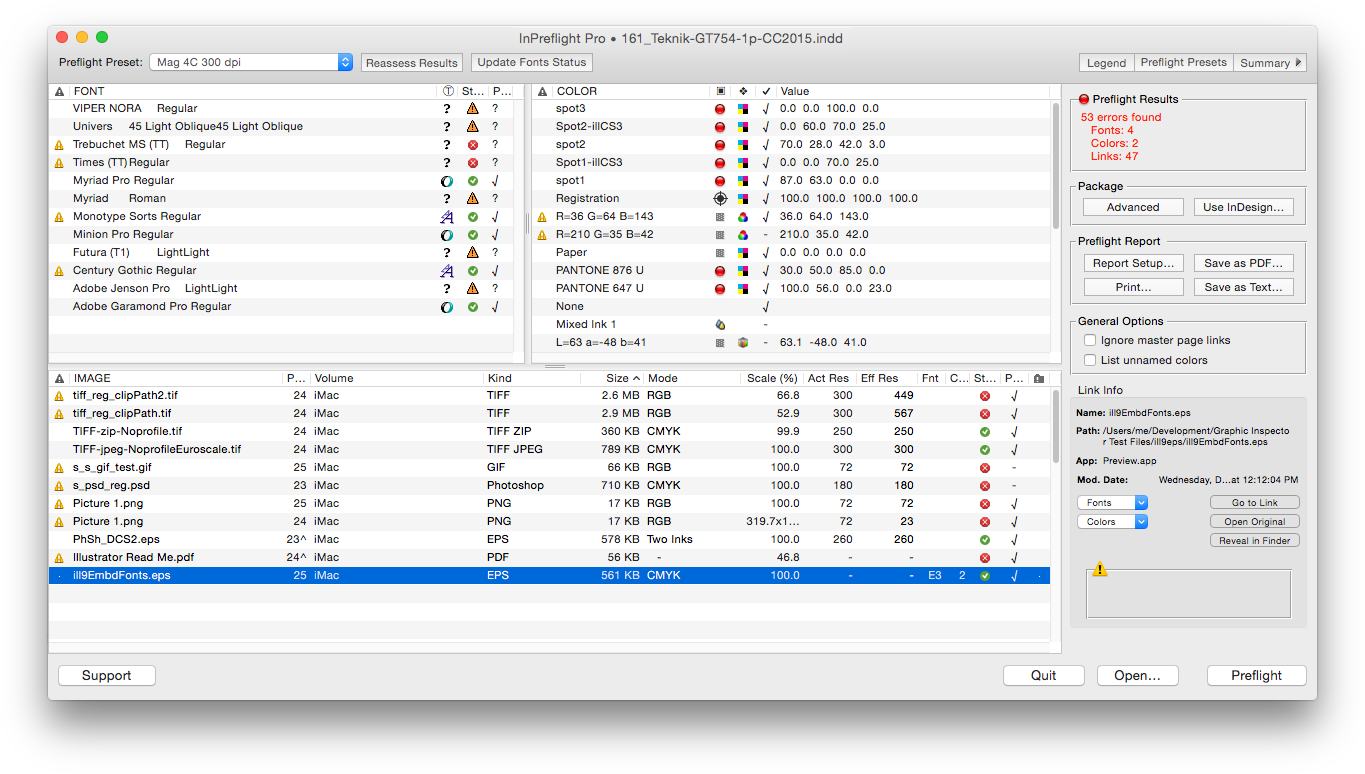
Zevrix Solutions announces InPreflight Pro 2.11.29, a compatibility update to its document preparation solution for Adobe InDesign. Described as "delightfully simple to use" by Macworld magazine, InPreflight is an all-in-one solution to check InDesign documents for errors, automatically collect multiple files for output, and ship them to final destination. The new version adds support for the 2019 release of InDesign CC featured as part of Adobe Creative Cloud.
Toronto (ON), Canada - Zevrix Solutions today announces the release of InPreflight Pro 2.11.29, a compatibility update to its document preparation solution for Adobe InDesign. InPreflight is a powerful all-in-one solution to check InDesign documents for errors, collect them for output, and ship to final destination. InPreflight helps graphics and print professionals prevent costly mistakes by uncovering hidden problems, save disk space through smart batch-packaging, and reduce production time and costs.
The new version of InPreflight adds support for the recently announced 2019 release of InDesign CC, featured as part of Adobe Creative Cloud. The update is offered free of charge to InPreflight users. The same version of InPreflight can be used with any release of InDesign from CS3 and later.
"InPreflight is very simple, it provides excellent display of document's elements with full control over preflighting and file collection," says Michael Anikst of Anikst Design in London, UK. "I am designing very big books on art, and InPreflight lets me keep all my documents in perfect order."
InPreflight Pro provides a robust, affordable, reliable and easy-to-use solution for printers, service providers, ad agencies, and publishing houses. It offers the following key features:
Batch-packaging:
* Package multiple InDesign documents automatically
* Collect all shared links into one folder, saving gigabytes of disk space and hours of production time
Quality control:
* Quickly check InDesign fonts, colors and links for common errors
* Create preflight presets for different projects
* Uncover hidden issues such as image compression, embedded fonts and illegal link locations
Graphic preflight reports:
* Print graphic reports and save them as PDF
* Detailed paragraph styles report for typography professionals
Pricing and Availability:
InPreflight Pro can be purchased from Zevrix website for $99.95 USD (Studio version: $39.95), as well as from authorized resellers and Adobe Exchange. Trial version is available for download. Update is free for licensed users of version 2, and $50 from earlier versions. InPreflight requires macOS 10.7-10.14 and Adobe InDesign CS3-CC 2019.
Zevrix Solutions: http://zevrix.com
InPreflight Pro 2.11.29: http://zevrix.com/InPreflight.php
Download InPreflight Pro: http://zevrix.com/InPreflight.dmg
Purchase InPreflight Pro: http://zevrix.com/store.php
Screenshot: http://zevrix.com/screenshots/ipf2/ipf2-main-no-doc.png
Located in Toronto, Canada, Zevrix Solutions provides automation and productivity solutions for Adobe Creative Cloud and Creative Suite software, PDF workflows, graphic file diagnostics and Microsoft Office output on Mac OS. Zevrix is dedicated to help professionals increase their profits through automating everyday tasks, producing error-free documents, saving disk space and cutting production costs. For more information, visit their website. Copyright (C) 2018 Zevrix Solutions. All Rights Reserved. Other trademarks and registered trademarks may be the property of their respective owners.
*******
Link To Article: https://prmac.com/release-id-83078.htm
*******
---------------------------------------------------------------------------------
Note that you can alter delivered distributions at any time.
Login to your account on prMac to alter your channel selection, or to opt-out at any time.
InPreflight for Adobe InDesign Now Supports Creative Cloud 2019 - Published on 10/22/18
Zevrix Solutions announces InPreflight Pro 2.11.29, a compatibility update to its document preparation solution for Adobe InDesign. Described as "delightfully simple to use" by Macworld magazine, InPreflight is an all-in-one solution to check InDesign documents for errors, automatically collect multiple files for output, and ship them to final destination. The new version adds support for the 2019 release of InDesign CC featured as part of Adobe Creative Cloud.
Toronto (ON), Canada - Zevrix Solutions today announces the release of InPreflight Pro 2.11.29, a compatibility update to its document preparation solution for Adobe InDesign. InPreflight is a powerful all-in-one solution to check InDesign documents for errors, collect them for output, and ship to final destination. InPreflight helps graphics and print professionals prevent costly mistakes by uncovering hidden problems, save disk space through smart batch-packaging, and reduce production time and costs.
The new version of InPreflight adds support for the recently announced 2019 release of InDesign CC, featured as part of Adobe Creative Cloud. The update is offered free of charge to InPreflight users. The same version of InPreflight can be used with any release of InDesign from CS3 and later.
"InPreflight is very simple, it provides excellent display of document's elements with full control over preflighting and file collection," says Michael Anikst of Anikst Design in London, UK. "I am designing very big books on art, and InPreflight lets me keep all my documents in perfect order."
InPreflight Pro provides a robust, affordable, reliable and easy-to-use solution for printers, service providers, ad agencies, and publishing houses. It offers the following key features:
Batch-packaging:
* Package multiple InDesign documents automatically
* Collect all shared links into one folder, saving gigabytes of disk space and hours of production time
Quality control:
* Quickly check InDesign fonts, colors and links for common errors
* Create preflight presets for different projects
* Uncover hidden issues such as image compression, embedded fonts and illegal link locations
Graphic preflight reports:
* Print graphic reports and save them as PDF
* Detailed paragraph styles report for typography professionals
Pricing and Availability:
InPreflight Pro can be purchased from Zevrix website for $99.95 USD (Studio version: $39.95), as well as from authorized resellers and Adobe Exchange. Trial version is available for download. Update is free for licensed users of version 2, and $50 from earlier versions. InPreflight requires macOS 10.7-10.14 and Adobe InDesign CS3-CC 2019.
Zevrix Solutions: http://zevrix.com
InPreflight Pro 2.11.29: http://zevrix.com/InPreflight.php
Download InPreflight Pro: http://zevrix.com/InPreflight.dmg
Purchase InPreflight Pro: http://zevrix.com/store.php
Screenshot: http://zevrix.com/screenshots/ipf2/ipf2-main-no-doc.png
Located in Toronto, Canada, Zevrix Solutions provides automation and productivity solutions for Adobe Creative Cloud and Creative Suite software, PDF workflows, graphic file diagnostics and Microsoft Office output on Mac OS. Zevrix is dedicated to help professionals increase their profits through automating everyday tasks, producing error-free documents, saving disk space and cutting production costs. For more information, visit their website. Copyright (C) 2018 Zevrix Solutions. All Rights Reserved. Other trademarks and registered trademarks may be the property of their respective owners.
*******
Link To Article: https://prmac.com/release-id-83078.htm
*******
---------------------------------------------------------------------------------
Note that you can alter delivered distributions at any time.
Login to your account on prMac to alter your channel selection, or to opt-out at any time.
Tardy Sweep for Late Students Adopted in Canada
A new article has been published at prMac.
Tardy Sweep for Late Students Adopted in Canada - Published on 10/20/18
Good School Tools announced that Tardy Sweep for Late Students version 1.4.0 for iOS devices has been released. This version is being used by Strathcona Christian Academy Secondary, Alberta, Canada, a Tardy Sweep customer for two years. Tardy Sweep helps school administrators speed students to class during tardy sweeps. Tardy slips are generated instantly. Detentions can be assigned automatically based on a preset number of tardies.
San Diego, California - Good School Tools announced today that Tardy Sweep for Late Students 1.4.0 for iPhone, iPad, and iPod touch devices is in use by Strathcona Christian Academy Secondary, Alberta, Canada, a previous Tardy Sweep customer of two years.
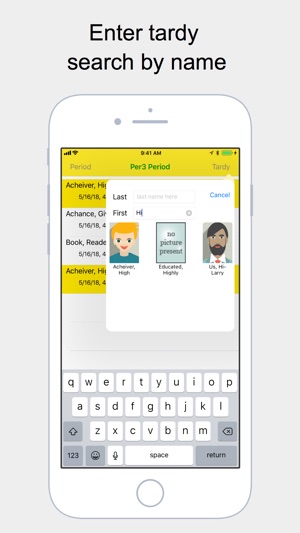
Tardy Sweep helps school administrators get students to class quickly. The school administration provides a roster containing student IDs and photos to each teacher's iPhone or iPad. The teacher can then quickly mark students tardy during sweeps around campus. That information is emailed, texted, or shared over wireless network to other administrator's and guardian phones.
"We have been using the tardy sweep App for two years now and are extremely pleased with it. It is allowed us to minimize the number of tardies that our students have been earning and it is a very efficient way of keeping records. It also has become a very good communication tool with our parents. I would highly recommend it to other schools." - Wes Merta, Assistant Principal Strathcona Christian Academy Secondary, Alberta, Canada.
Good School Tools has provided Tardy Sweep services as part of the GSTools app to LAUSD schools for nearly a decade. Tardy Sweep simplifies the input of the student roster. New subscription pricing allows a single administrator to set up the app and provide it free to other admins so the whole school benefits from this extraordinary tool at a single low cost.
A short list of 8 student identifiers may be entered via the app or imported from a .csv file created by Excel or Numbers or output from your existing SIS. Those eight identifiers include:
* Student ID
* First Name
* Last Name
* Birthday
* Grade
* Gender
* Email
* Phone
This short list of identifiers is designed to allow for immediate identification of students during tardy sweeps.
Tardy Sweep information is kept on your phone like all Good School Tools apps so you can access your critical information even when wireless networks are down. You may enter a PIN number so that only you know how to access the student information.
Device Requirements:
* iPhone 5s or later and iPod touch
* iPad 5th generation or later
* Requires iOS 11.0 or later
* 16.3 MB
Pricing and Availability:
Tardy Sweep for Late Students 1.4.0 is Free (With In-App Subscription Purchase options) and available exclusively through the App Store in the Education category. For more information, please contact Tim Walton.
Good School Tools: http://www.goodschooltools.com
Tardy Sweep for Late Students 1.4.0: http://goodschooltools.com/Tools/TardySweep/
Download from App Store: https://itunes.apple.com/us/app/tardy-sweep-for-late-students/id1384641832?ls=1&mt=8
Screenshot: https://is5-ssl.mzstatic.com/image/thumb/Purple118/v4/0f/40/03/0f400395-9e6b-56a3-21ac-eb74478aa5a3/mzl.jefezfnz.png/300x0w.jpg
App Icon: https://is2-ssl.mzstatic.com/image/thumb/Purple128/v4/58/6e/f6/586ef61f-cf55-3697-66d2-4b03931eea24/TardyAppIcon-0-1x_U007emarketing-0-0-GLES2_U002c0-512MB-sRGB-0-0-0-85-220-0-0-0-6.png/246x0w.jpg
San Diego based Good School Tools, previously operating as TrueIDApps and School ID, has been providing Southern California school districts with mobile apps for administering students during normal and emergency conditions for nearly 15 years. Their flagship product, GSTools provides a suite of mobile apps which streamline the administrators' job around school by providing critical student information, including photos, right on the administrators' iPhone or iPad. GSTools integrates with most SISs. Good School Tools other tools take information exported from SIS systems to provide administrators additional capabilities to run the schools more efficiently. All Material and Software (C) Copyright 2018 Good School Tools. All Rights Reserved. Apple, the Apple logo, iPhone, iPod and iPad are registered trademarks of Apple Inc. in the U.S. and/or other countries. Other trademarks and registered trademarks may be the property of their respective owners.
*******
Link To Article: https://prmac.com/release-id-83075.htm
*******
---------------------------------------------------------------------------------
Note that you can alter delivered distributions at any time.
Login to your account on prMac to alter your channel selection, or to opt-out at any time.
Tardy Sweep for Late Students Adopted in Canada - Published on 10/20/18
Good School Tools announced that Tardy Sweep for Late Students version 1.4.0 for iOS devices has been released. This version is being used by Strathcona Christian Academy Secondary, Alberta, Canada, a Tardy Sweep customer for two years. Tardy Sweep helps school administrators speed students to class during tardy sweeps. Tardy slips are generated instantly. Detentions can be assigned automatically based on a preset number of tardies.
San Diego, California - Good School Tools announced today that Tardy Sweep for Late Students 1.4.0 for iPhone, iPad, and iPod touch devices is in use by Strathcona Christian Academy Secondary, Alberta, Canada, a previous Tardy Sweep customer of two years.
Tardy Sweep helps school administrators get students to class quickly. The school administration provides a roster containing student IDs and photos to each teacher's iPhone or iPad. The teacher can then quickly mark students tardy during sweeps around campus. That information is emailed, texted, or shared over wireless network to other administrator's and guardian phones.
"We have been using the tardy sweep App for two years now and are extremely pleased with it. It is allowed us to minimize the number of tardies that our students have been earning and it is a very efficient way of keeping records. It also has become a very good communication tool with our parents. I would highly recommend it to other schools." - Wes Merta, Assistant Principal Strathcona Christian Academy Secondary, Alberta, Canada.
Good School Tools has provided Tardy Sweep services as part of the GSTools app to LAUSD schools for nearly a decade. Tardy Sweep simplifies the input of the student roster. New subscription pricing allows a single administrator to set up the app and provide it free to other admins so the whole school benefits from this extraordinary tool at a single low cost.
A short list of 8 student identifiers may be entered via the app or imported from a .csv file created by Excel or Numbers or output from your existing SIS. Those eight identifiers include:
* Student ID
* First Name
* Last Name
* Birthday
* Grade
* Gender
* Phone
This short list of identifiers is designed to allow for immediate identification of students during tardy sweeps.
Tardy Sweep information is kept on your phone like all Good School Tools apps so you can access your critical information even when wireless networks are down. You may enter a PIN number so that only you know how to access the student information.
Device Requirements:
* iPhone 5s or later and iPod touch
* iPad 5th generation or later
* Requires iOS 11.0 or later
* 16.3 MB
Pricing and Availability:
Tardy Sweep for Late Students 1.4.0 is Free (With In-App Subscription Purchase options) and available exclusively through the App Store in the Education category. For more information, please contact Tim Walton.
Good School Tools: http://www.goodschooltools.com
Tardy Sweep for Late Students 1.4.0: http://goodschooltools.com/Tools/TardySweep/
Download from App Store: https://itunes.apple.com/us/app/tardy-sweep-for-late-students/id1384641832?ls=1&mt=8
Screenshot: https://is5-ssl.mzstatic.com/image/thumb/Purple118/v4/0f/40/03/0f400395-9e6b-56a3-21ac-eb74478aa5a3/mzl.jefezfnz.png/300x0w.jpg
App Icon: https://is2-ssl.mzstatic.com/image/thumb/Purple128/v4/58/6e/f6/586ef61f-cf55-3697-66d2-4b03931eea24/TardyAppIcon-0-1x_U007emarketing-0-0-GLES2_U002c0-512MB-sRGB-0-0-0-85-220-0-0-0-6.png/246x0w.jpg
San Diego based Good School Tools, previously operating as TrueIDApps and School ID, has been providing Southern California school districts with mobile apps for administering students during normal and emergency conditions for nearly 15 years. Their flagship product, GSTools provides a suite of mobile apps which streamline the administrators' job around school by providing critical student information, including photos, right on the administrators' iPhone or iPad. GSTools integrates with most SISs. Good School Tools other tools take information exported from SIS systems to provide administrators additional capabilities to run the schools more efficiently. All Material and Software (C) Copyright 2018 Good School Tools. All Rights Reserved. Apple, the Apple logo, iPhone, iPod and iPad are registered trademarks of Apple Inc. in the U.S. and/or other countries. Other trademarks and registered trademarks may be the property of their respective owners.
*******
Link To Article: https://prmac.com/release-id-83075.htm
*******
---------------------------------------------------------------------------------
Note that you can alter delivered distributions at any time.
Login to your account on prMac to alter your channel selection, or to opt-out at any time.
FileMaker AWS S3 Plug-in Now Available - Cloud Manipulator
A new article has been published at prMac.
FileMaker AWS S3 Plug-in Now Available - Cloud Manipulator - Published on 10/21/18
Productive Computing, Inc. just released a new plug-in for Amazon Web Services S3 integration. Cloud Manipulator is a FileMaker plug-in that allows for communication between FileMaker and AWS S3. The plug-in comes complete with developer tools including a Functions Guide with full function details and available bucket and object fields, a Developer's Guide with detailed information and example scripting, and an unlocked demo file to exhibit all of the main features of the plug-in.
San Marcos, California - Productive Computing, Inc., a Platinum member of the FileMaker(R) Business Alliance, is proud to announce the release of Cloud Manipulator. This AWS FileMaker plug-in connects your FileMaker app to Amazon Web Services S3 storage. The Cloud Manipulator allows the user to upload, download, query info, and move buckets and objects in AWS S3 (Simple Storage Service).
"As a company, we've been using AWS in an increased capacity over the past few years for hosting, testing, and automated backup routines. We also have several hosting customers with advanced needs who use S3 for their document/file storage and are able to gain all the benefits that go along with S3. Our new plug-in makes working with files on S3 much easier and far more available to provide automated workflows for end-users without the FileMaker developer having to learn advanced programming languages or master the sophisticated S3 API.
"In my experience, I've found S3 storage to be arguably one of the most durable, flexible, and infinitely expandable storage technologies available. With the Cloud Manipulator plug-in for FileMaker, the world of S3 becomes more readily accessible for our FileMaker customers looking to have a world-class storage option at their fingertips." Marc Larochelle, Chief Executive Officer, Productive Computing, Inc.
The Cloud Manipulator Plug-in:
* Allows communication with Amazon Web Services S3 buckets, objects, and properties
* Enables FileMaker to upload and download object/files from AWS S3
* Manages buckets and folders
* Pulls object details such as when last modified, size, owner name, and storage class
* Creates, copies, moves, and deletes objects on AWS from FileMaker
* Uploads objects to standard AWS storage class and downloads objects from any storage class
The plug-in comes complete with developer tools including a Functions Guide with full function details and available bucket and object fields, a Developer's Guide with detailed information and example scripting, and an unlocked demo file to exhibit all of the main features of the plug-in.
The Cloud Manipulator plug-in is compatible with FileMaker client 15-17 and is available starting at $50 per year for a single user license. For more information on the Cloud Manipulator plug-in and system requirements visit the website or email our sales department.
Productive Computing, Inc.: http://www.productivecomputing.com
Cloud Manipulator: http://www.productivecomputing.com/aws-filemaker-integration
Since 1996, Productive Computing, Inc. has been helping its customers become more efficient and profitable by implementing custom software solutions using FileMaker Pro. Utilizing FileMaker Pro as a rapid application development tool, their certified FileMaker developers can create custom applications that a business can run on their Windows or Macintosh desktop computers, in a web browser, on an iPad or iPhone or shared simultaneously on all of these platforms. All Material and Software (C) Copyright 2018 Productive Computing, Inc. All Rights Reserved. Apple, the Apple logo, Macintosh Mac OS X and macOS are registered trademarks of Apple Inc. in the U.S. and/or other countries. Other trademarks and registered trademarks may be the property of their respective owners.
*******
Link To Article: https://prmac.com/release-id-83076.htm
*******
---------------------------------------------------------------------------------
Note that you can alter delivered distributions at any time.
Login to your account on prMac to alter your channel selection, or to opt-out at any time.
FileMaker AWS S3 Plug-in Now Available - Cloud Manipulator - Published on 10/21/18
Productive Computing, Inc. just released a new plug-in for Amazon Web Services S3 integration. Cloud Manipulator is a FileMaker plug-in that allows for communication between FileMaker and AWS S3. The plug-in comes complete with developer tools including a Functions Guide with full function details and available bucket and object fields, a Developer's Guide with detailed information and example scripting, and an unlocked demo file to exhibit all of the main features of the plug-in.
San Marcos, California - Productive Computing, Inc., a Platinum member of the FileMaker(R) Business Alliance, is proud to announce the release of Cloud Manipulator. This AWS FileMaker plug-in connects your FileMaker app to Amazon Web Services S3 storage. The Cloud Manipulator allows the user to upload, download, query info, and move buckets and objects in AWS S3 (Simple Storage Service).
"As a company, we've been using AWS in an increased capacity over the past few years for hosting, testing, and automated backup routines. We also have several hosting customers with advanced needs who use S3 for their document/file storage and are able to gain all the benefits that go along with S3. Our new plug-in makes working with files on S3 much easier and far more available to provide automated workflows for end-users without the FileMaker developer having to learn advanced programming languages or master the sophisticated S3 API.
"In my experience, I've found S3 storage to be arguably one of the most durable, flexible, and infinitely expandable storage technologies available. With the Cloud Manipulator plug-in for FileMaker, the world of S3 becomes more readily accessible for our FileMaker customers looking to have a world-class storage option at their fingertips." Marc Larochelle, Chief Executive Officer, Productive Computing, Inc.
The Cloud Manipulator Plug-in:
* Allows communication with Amazon Web Services S3 buckets, objects, and properties
* Enables FileMaker to upload and download object/files from AWS S3
* Manages buckets and folders
* Pulls object details such as when last modified, size, owner name, and storage class
* Creates, copies, moves, and deletes objects on AWS from FileMaker
* Uploads objects to standard AWS storage class and downloads objects from any storage class
The plug-in comes complete with developer tools including a Functions Guide with full function details and available bucket and object fields, a Developer's Guide with detailed information and example scripting, and an unlocked demo file to exhibit all of the main features of the plug-in.
The Cloud Manipulator plug-in is compatible with FileMaker client 15-17 and is available starting at $50 per year for a single user license. For more information on the Cloud Manipulator plug-in and system requirements visit the website or email our sales department.
Productive Computing, Inc.: http://www.productivecomputing.com
Cloud Manipulator: http://www.productivecomputing.com/aws-filemaker-integration
Since 1996, Productive Computing, Inc. has been helping its customers become more efficient and profitable by implementing custom software solutions using FileMaker Pro. Utilizing FileMaker Pro as a rapid application development tool, their certified FileMaker developers can create custom applications that a business can run on their Windows or Macintosh desktop computers, in a web browser, on an iPad or iPhone or shared simultaneously on all of these platforms. All Material and Software (C) Copyright 2018 Productive Computing, Inc. All Rights Reserved. Apple, the Apple logo, Macintosh Mac OS X and macOS are registered trademarks of Apple Inc. in the U.S. and/or other countries. Other trademarks and registered trademarks may be the property of their respective owners.
*******
Link To Article: https://prmac.com/release-id-83076.htm
*******
---------------------------------------------------------------------------------
Note that you can alter delivered distributions at any time.
Login to your account on prMac to alter your channel selection, or to opt-out at any time.
A new article has been published at prMac.
Image Resizer Tech for macOS - App for Batch Image Resizing - Published on 10/19/18
Orange Studio announces Image Resizer Tech 1.2, their macOS application for resizing images. It also cleans metadata (information about date, camera), and optimizes quality. It could be very helpful for content managers to resize images before uploading them to the server in some cases for front-end developers as well. And, it is a handy tool to use at home. Users can resize the batch of their large images in seconds and save them to archive or rewrite.
Ukraine - Orange Studio is pleased to announce the release and immediate availability of Image Resizer Tech 1.2, the macOS application for resizing images. In addition, the app cleans metadata (information about date, camera), and optimizes quality. It could be very helpful for content managers to resize images before uploading them to the server in some cases for frontend developers as well.
And just handy tool to use at home. You can resize the bunch of your large images in seconds and save them to archive or rewrite. Initially we made it for internal use, though realized that it could work for everyone.
We hadn't found an ideal and clean solution for our use case - to resize batches of images on the Mac (some apps with ugly designs, others - provide a bunch of options and are difficult to use). So we created our own.
3 simple steps and you've done it:
1. Drop images.
2. Select quality, max-width and save options
3. Press "Ressize" and That's it!
Main Features:
* Resize images to max-width
* Mojave Dark theme support
* JPEG/JPG, PNG, WEBP
* Folders Support
* Notifications
Application implements material design and clean appearance of the macOS system. When all images are resized, the user receives a notification, which can be turned off. We are thinking about new features - the main goal is to make it more useful for users and still have simple and natural settings.
We are pleased to provide such a convenient and reliable tool for macOS users. We will also be glad to hear your opinion about the product and features that needs to be implemented. We are currently providing it for free in the App Store, and are considering making it free with in-app purchases.
Example Minimum Requirements:
* Mac OS X Version 10.4 Tiger or higher
* 80 MB Hard Drive space
Pricing and Availability:
Image Resizer Tech 1.2 is free and is available worldwide exclusively through the Mac App Store in the Photography category.
Image Resizer Tech 1.2: http://image-resizer.tech
Download from Mac App Store: https://itunes.apple.com/us/app/image-resizer-tech/id1437007847?ls=1&mt=12
Image Resizer Tech on Medium: https://medium.com/image-resizer-tech
Orange Studio is a young creative studio from Ukraine. All Material and Software (C) Copyright 2018 Orange Studio. All Rights Reserved. Apple, the Apple logo, Macintosh Mac OS X and macOS are registered trademarks of Apple Inc. in the U.S. and/or other countries. Other trademarks and registered trademarks may be the property of their respective owners.
*******
Link To Article: https://prmac.com/release-id-83074.htm
*******
---------------------------------------------------------------------------------
Note that you can alter delivered distributions at any time.
Login to your account on prMac to alter your channel selection, or to opt-out at any time.
Image Resizer Tech for macOS - App for Batch Image Resizing - Published on 10/19/18
Orange Studio announces Image Resizer Tech 1.2, their macOS application for resizing images. It also cleans metadata (information about date, camera), and optimizes quality. It could be very helpful for content managers to resize images before uploading them to the server in some cases for front-end developers as well. And, it is a handy tool to use at home. Users can resize the batch of their large images in seconds and save them to archive or rewrite.
Ukraine - Orange Studio is pleased to announce the release and immediate availability of Image Resizer Tech 1.2, the macOS application for resizing images. In addition, the app cleans metadata (information about date, camera), and optimizes quality. It could be very helpful for content managers to resize images before uploading them to the server in some cases for frontend developers as well.
And just handy tool to use at home. You can resize the bunch of your large images in seconds and save them to archive or rewrite. Initially we made it for internal use, though realized that it could work for everyone.
We hadn't found an ideal and clean solution for our use case - to resize batches of images on the Mac (some apps with ugly designs, others - provide a bunch of options and are difficult to use). So we created our own.
3 simple steps and you've done it:
1. Drop images.
2. Select quality, max-width and save options
3. Press "Ressize" and That's it!
Main Features:
* Resize images to max-width
* Mojave Dark theme support
* JPEG/JPG, PNG, WEBP
* Folders Support
* Notifications
Application implements material design and clean appearance of the macOS system. When all images are resized, the user receives a notification, which can be turned off. We are thinking about new features - the main goal is to make it more useful for users and still have simple and natural settings.
We are pleased to provide such a convenient and reliable tool for macOS users. We will also be glad to hear your opinion about the product and features that needs to be implemented. We are currently providing it for free in the App Store, and are considering making it free with in-app purchases.
Example Minimum Requirements:
* Mac OS X Version 10.4 Tiger or higher
* 80 MB Hard Drive space
Pricing and Availability:
Image Resizer Tech 1.2 is free and is available worldwide exclusively through the Mac App Store in the Photography category.
Image Resizer Tech 1.2: http://image-resizer.tech
Download from Mac App Store: https://itunes.apple.com/us/app/image-resizer-tech/id1437007847?ls=1&mt=12
Image Resizer Tech on Medium: https://medium.com/image-resizer-tech
Orange Studio is a young creative studio from Ukraine. All Material and Software (C) Copyright 2018 Orange Studio. All Rights Reserved. Apple, the Apple logo, Macintosh Mac OS X and macOS are registered trademarks of Apple Inc. in the U.S. and/or other countries. Other trademarks and registered trademarks may be the property of their respective owners.
*******
Link To Article: https://prmac.com/release-id-83074.htm
*******
---------------------------------------------------------------------------------
Note that you can alter delivered distributions at any time.
Login to your account on prMac to alter your channel selection, or to opt-out at any time.
Mapping Tonal Harmony Pro 7 for macOS
A new article has been published at prMac.
Mapping Tonal Harmony Pro 7 for macOS - Published on 10/18/18
Mapping Tonal Harmony Pro has been envisioned as auxiliary material in the study of Tonal Harmony. The main objective of this app is to provide the student, teachers, composers and/or songwriters with a tool that will aid them in hearing, analyzing, foreseeing and composing harmonic progressions without struggle, in all keys alike. Study Tonal Harmony in different styles: Classical, Jazz, Rock/Pop, Blues, Gospel, Contemporary and more.
Coral Springs, Florida - Mapping Tonal Harmony Pro is an interactive music theory app to study tonal harmony, cadences, chords and chord-scales, accompanied by 7 workbooks to teach and study tonal harmony.
The map has seven levels of complexity, from the basic diatonic neighborhood advanced secondary functions in major and minor modes and is viewable in all 12 keys and enharmonic spellings, plus a functional view (relative to the tonic). Each level is also accompanied by its respective workbook available at mDecks.com for further study and research.
Features
--------
Create your own progressions and workouts or download progressions book files with, tonal harmony progressions, jazz theory progressions and workouts, or entires song progressions. View their harmonic analysis in different formats which you can view in any key and print.
7 Map Levels:
1) Basic Diatonic functions
2) IIIm and Deceptive Cadences
3) SubV7 and Neapolitan sixth (N6)
4) Secondary Dominants
5) Blues and other modes
6) Advanced Secondary Dominants
7) Complete Map with all functions
10 Map Layouts for different styles:
1) Jazz Standard
2) Blues
3) Late Baroque - Early Classical
4) Late Classical
5) Romanticism
6) Pop/Rock
7) Gospel
8) Contemporary Pop/Rock
9) Quartal Music
10) All Possibilities
9 Staff Layout Templates (and you can create your own):
1) Full Analysis
2) Analysis without scales
3) Omit Functional Analysis
4) Only Functional Analysis
5) Lead Sheet Standard
6) Lead Sheet Large
7) Lead Sheet Small
8) Smaller Tonal Harmony Worksheet
9) Tonal Harmony Worksheet
Play-along in different Styles such as Jazz, Blues, Bossa, Rock/Pop. Choose tempo, adjust volumes, reverb, or apply a limiter to any of the instruments.
Mapping Tonal Harmony will play the functions using 3 to 6 voices, resolve voice-leading, add tensions for jazz using customizable voicing creation rules or using just chord-tones for classical progressions. You can adjust the volume of each voice independently, and use a bass sound on the lowest note if you like.
Create workouts in just one click to practice progressions in all twelve keys.
View the voicings in standard music notation or in the piano keyboard.
View the chord-scale and identify chord-tones, tensions and avoid notes.
The score editor has all the necessary tools to create a complete song-form, including sections, repeats, DS. al Coda, Fine, First Endings, direct modulations and common-tone modulations
Save your songs to the catalog or export entire progressions-books and share them with other Mapping Tonal Harmony Pro users.
Transpose your progression to any key and print it using any of the preloaded layouts or create your own.
mDecks Music Website: https://mdecks.com
Product URL: https://mdecks.com/mapharmony.phtml
Direct Download Link: https://itunes.apple.com/us/app/mapping-tonal-harmony-pro/id599212305?ls=1&mt=12
Purchase Link: https://itunes.apple.com/us/app/mapping-tonal-harmony-pro/id599212305?ls=1&mt=12
Screenshot: https://mdecks.com/nueva/upload/mapping-tonal-harmony-promo-1800x800.jpg
Screenshot/App Icon: http://mdecks.com/nueva/upload/mapping-icon-400x363.jpg
mDecks Music is dedicated to the creating of music software and books for intermediate to advanced musicians. Music Theory Apps: From tonal harmony, music scales & modes to sight-reading and ear training. Study Music Theory like never before with our apps.Music Theory Books: from Decoding the Circle of Fifths, Upper Structure Triads, Tonal Harmony to Piano Technique, Doubling on Woodwinds, Rhythmic Training. Music Theory Channel on YouTube: Free Online Music Theory Lessons & Tutorials. From Reharmonization Techniques, Advanced Jazz Chord-Scales to Decoding Beethoven. All Material and Software (C) Copyright 2018 mDecks Music. All Rights Reserved. Apple, the Apple logo, Macintosh Mac OS X and macOS are registered trademarks of Apple Inc. in the U.S. and/or other countries. Other trademarks and registered trademarks may be the property of their respective owners.
*******
Link To Article: https://prmac.com/release-id-83073.htm
*******
---------------------------------------------------------------------------------
Note that you can alter delivered distributions at any time.
Login to your account on prMac to alter your channel selection, or to opt-out at any time.
Mapping Tonal Harmony Pro 7 for macOS - Published on 10/18/18
Mapping Tonal Harmony Pro has been envisioned as auxiliary material in the study of Tonal Harmony. The main objective of this app is to provide the student, teachers, composers and/or songwriters with a tool that will aid them in hearing, analyzing, foreseeing and composing harmonic progressions without struggle, in all keys alike. Study Tonal Harmony in different styles: Classical, Jazz, Rock/Pop, Blues, Gospel, Contemporary and more.
Coral Springs, Florida - Mapping Tonal Harmony Pro is an interactive music theory app to study tonal harmony, cadences, chords and chord-scales, accompanied by 7 workbooks to teach and study tonal harmony.
The map has seven levels of complexity, from the basic diatonic neighborhood advanced secondary functions in major and minor modes and is viewable in all 12 keys and enharmonic spellings, plus a functional view (relative to the tonic). Each level is also accompanied by its respective workbook available at mDecks.com for further study and research.
Features
--------
Create your own progressions and workouts or download progressions book files with, tonal harmony progressions, jazz theory progressions and workouts, or entires song progressions. View their harmonic analysis in different formats which you can view in any key and print.
7 Map Levels:
1) Basic Diatonic functions
2) IIIm and Deceptive Cadences
3) SubV7 and Neapolitan sixth (N6)
4) Secondary Dominants
5) Blues and other modes
6) Advanced Secondary Dominants
7) Complete Map with all functions
10 Map Layouts for different styles:
1) Jazz Standard
2) Blues
3) Late Baroque - Early Classical
4) Late Classical
5) Romanticism
6) Pop/Rock
7) Gospel
8) Contemporary Pop/Rock
9) Quartal Music
10) All Possibilities
9 Staff Layout Templates (and you can create your own):
1) Full Analysis
2) Analysis without scales
3) Omit Functional Analysis
4) Only Functional Analysis
5) Lead Sheet Standard
6) Lead Sheet Large
7) Lead Sheet Small
8) Smaller Tonal Harmony Worksheet
9) Tonal Harmony Worksheet
Play-along in different Styles such as Jazz, Blues, Bossa, Rock/Pop. Choose tempo, adjust volumes, reverb, or apply a limiter to any of the instruments.
Mapping Tonal Harmony will play the functions using 3 to 6 voices, resolve voice-leading, add tensions for jazz using customizable voicing creation rules or using just chord-tones for classical progressions. You can adjust the volume of each voice independently, and use a bass sound on the lowest note if you like.
Create workouts in just one click to practice progressions in all twelve keys.
View the voicings in standard music notation or in the piano keyboard.
View the chord-scale and identify chord-tones, tensions and avoid notes.
The score editor has all the necessary tools to create a complete song-form, including sections, repeats, DS. al Coda, Fine, First Endings, direct modulations and common-tone modulations
Save your songs to the catalog or export entire progressions-books and share them with other Mapping Tonal Harmony Pro users.
Transpose your progression to any key and print it using any of the preloaded layouts or create your own.
mDecks Music Website: https://mdecks.com
Product URL: https://mdecks.com/mapharmony.phtml
Direct Download Link: https://itunes.apple.com/us/app/mapping-tonal-harmony-pro/id599212305?ls=1&mt=12
Purchase Link: https://itunes.apple.com/us/app/mapping-tonal-harmony-pro/id599212305?ls=1&mt=12
Screenshot: https://mdecks.com/nueva/upload/mapping-tonal-harmony-promo-1800x800.jpg
Screenshot/App Icon: http://mdecks.com/nueva/upload/mapping-icon-400x363.jpg
mDecks Music is dedicated to the creating of music software and books for intermediate to advanced musicians. Music Theory Apps: From tonal harmony, music scales & modes to sight-reading and ear training. Study Music Theory like never before with our apps.Music Theory Books: from Decoding the Circle of Fifths, Upper Structure Triads, Tonal Harmony to Piano Technique, Doubling on Woodwinds, Rhythmic Training. Music Theory Channel on YouTube: Free Online Music Theory Lessons & Tutorials. From Reharmonization Techniques, Advanced Jazz Chord-Scales to Decoding Beethoven. All Material and Software (C) Copyright 2018 mDecks Music. All Rights Reserved. Apple, the Apple logo, Macintosh Mac OS X and macOS are registered trademarks of Apple Inc. in the U.S. and/or other countries. Other trademarks and registered trademarks may be the property of their respective owners.
*******
Link To Article: https://prmac.com/release-id-83073.htm
*******
---------------------------------------------------------------------------------
Note that you can alter delivered distributions at any time.
Login to your account on prMac to alter your channel selection, or to opt-out at any time.
Subscribe to:
Posts (Atom)