A new article has been published at prMac.
Bullet Hell with Minimalist Aesthetics: Solid Aether for Mac is Out Now - Published on 11/02/18
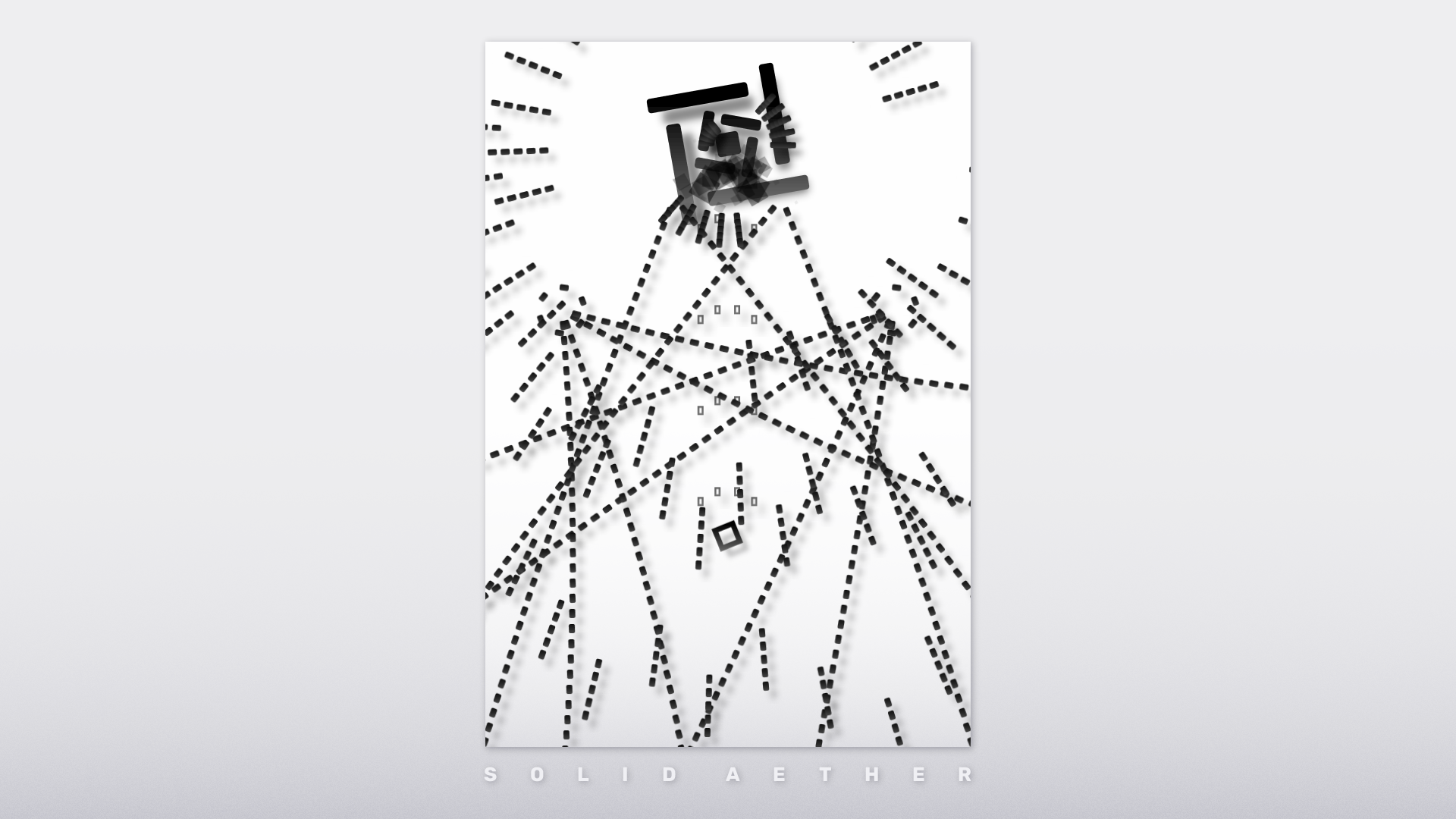
Japanese indie game developer, FAL Works today released Solid Aether, their shoot 'em up game for macOS. Simply designed, Solid Aether is a classic 2D shooter game, featuring a variety of bullet patterns that are generated continuously in a stylish black and white world. Players must dodge bullets and destroy enemies while enjoying various beautiful bullet patterns and the ambience in this abstract world. Each level is characterized by its own music and tendency of bullet patterns.
Kamakura-shi, Kanagawa - FAL Works today released a Mac version of their shoot 'em up game "Solid Aether." Solid Aether is a bullet hell shoot 'em up game that is extremely simple designed. It is a classic 2D shooter game featuring a variety of bullet patterns that are generated continuously in a stylish black and white world. Players will feel refreshed by dodging bullets and destroying enemies while enjoying various beautiful bullet patterns and the ambience in this abstract world.
"My motivation was to focus on one aesthetic aspect of bullet hell, which lies between simplicity and complexity, order and chaos, concreteness and abstraction," said the game designer FAL. "I believe that bullet patterns in shoot 'em up games are exactly a kind of generative art. I tried to focus on the art of bullet patterns in this game, and this is also why I chose a minimalist design. I hope you enjoy how various patterns can emerge from this minimal world."
Features:
* Minimalist and abstract art: The visual is artistically designed, based on black and white and using only rectangular-shaped elements, which offers an unique and comfortable gameplay
* Variety of bullet patterns: Consisting of countless bullets, the patterns will be deployed one after another
* Four unique levels: Each level is characterized by its own music and tendency of bullet patterns
* Extremely simple game mechanics: No bombs. No power-ups. No items. Just dodge and shoot
* Newbie friendly: You can easily recover from mistakes by destroying enemies and receiving extra lives, which lets you enjoy the game even if you aren't familiar with shmups
System Requirements:
* Mac OS and Windows
Pricing and Availability:
Solid Aether is $6.99 USD (or equivalent amount in other currencies) and now available on Steam and itch.io. It will also be ported to iOS and Android in the near future. For more information, please contact Kotaro Shiga.
Solid Aether: https://www.fal-works.com/solid-aether/
Purchase (itch.io): https://fal-works.itch.io/solid-aether
Purchase on Steam: https://store.steampowered.com/app/910730/Solid_Aether/
YouTube Video (Trailer): https://www.youtube.com/watch?v=FWvh1CpH37o
Screenshot: https://press.fal-works.com/solid_aether/images/screenshot-3.png
Media Assets: https://press.fal-works.com/sheet.php?p=solid_aether
FAL Works is an indie game and creative coding studio, composed solely of game designer and programmer FAL. All Material and Software (C) Copyright 2018 FAL Works. All Rights Reserved. Apple, the Apple logo, and macOS are registered trademarks of Apple Inc. in the U.S. and/or other countries. Other trademarks and registered trademarks may be the property of their respective owners.
*******
Link To Article: https://prmac.com/release-id-83112.htm
*******
---------------------------------------------------------------------------------
Note that you can alter delivered distributions at any time.
Login to your account on prMac to alter your channel selection, or to opt-out at any time.

Create Innovative Design with Endless Possibilities
A new article has been published at prMac.
Create Innovative Design with Endless Possibilities - Published on 11/01/18
Canvas GFX, Inc. releases the latest edition of the graphics software, Canvas Draw 5 for Mac. Canvas Draw 5 is stacked with an array of vector and raster image editing tools, built-in templates, and over 2000 symbols. Built with business professionals and creatives in mind, Canvas Draw 5 proves to be a diverse content creation tool with the power to generate projects, from precise technical drawings to metrics, from architectural design to logo design.
Victoria, Canada - Canvas GFX, Inc. releases the latest edition of the graphics software, Canvas Draw 5 for Mac. Canvas Draw 5 is stacked with an array of vector and raster image editing tools, built-in templates, and over 2000 symbols. Built with business professionals and creatives in mind, Canvas Draw 5 proves to be a diverse content creation tool with the power to generate projects, from precise technical drawings to metrics, from architectural design to logo design.
New Features
* Table tool - Allows for quick table generation, direct typing, and customizable cell borders, backgrounds, sizes, and look and feel.
* Dynamic Effects - Shadows, Reflections, Glow, and Soft Edge. Move and resize effects with the objects they are applied to.
* Smart Snaps - Visual aids to align and size objects relative to each other or to their place on the page, are added.
* SVGZ export - Now supported to create a single, compressed file for export.
* Touch Bar support - Swipe, tap, and slide to control many commonly-used functions in Canvas Draw, including sliders, opacity, and rotation.
* Styles tab - Added to the Type palette for creating character or paragraph styles and saving them for future use, as well as sharing them with other Canvas Draw users.
For a complete list of features and improvements, please see the Canvas Draw 5 for Mac release notes web page.
Availability and Pricing
Canvas Draw 5 for Mac is available for a 1-month free trial at the Canvas Draw 5 for Mac website, where you can also find system requirements and additional information. Canvas Draw 5 for Mac is available for $249 USD, a subscription of US $99 USD/year, and upgrade pricing for existing Canvas Draw owners for $125 USD.
ACD Systems International Inc.: http://www.acdsee.com
Canvas Draw 5 for Mac: https://www.canvasgfx.com/en/products/canvas-draw
Canvas Draw 5 for Mac Release Notes: https://www.canvasgfx.com/en/support/canvas-draw/release-notes/5
ACD Systems is the largest and most respected independent digital image editing and management provider in the world. The company was founded in 1993 in Texas by technology and imaging visionary Doug Vandekerkhove. Doug foresaw the importance of the convergence of analog and digital (print, photos, scans, video and metadata) in the 80's, revolutionizing how analog and digital information was used in pre-Web applications. Today ACD holds seven patents, and millions of ACDSee products are in use throughout the world. ACD Systems has offices in the United States and Canada, supported by a team of global channel partners. With a product family that includes ACDSee Pro 5, ACDSee Pro Mac, ACDSee 14 photo editing and management solutions, and Canvas technical illustration software, the company serves millions of consumers, small and medium sized businesses, government agencies and educational institutions, and corporate customers. All Material and Software (C) Copyright 2018 ACD Systems.
All Rights Reserved. Apple, the Apple logo, Macintosh, Mac OS X, and macOS are registered trademarks of Apple Inc. in the U.S. and/or other countries. Other trademarks and registered trademarks may be the property of their respective owners.
*******
Link To Article: https://prmac.com/release-id-83111.htm
*******
---------------------------------------------------------------------------------
Note that you can alter delivered distributions at any time.
Login to your account on prMac to alter your channel selection, or to opt-out at any time.
Create Innovative Design with Endless Possibilities - Published on 11/01/18
Canvas GFX, Inc. releases the latest edition of the graphics software, Canvas Draw 5 for Mac. Canvas Draw 5 is stacked with an array of vector and raster image editing tools, built-in templates, and over 2000 symbols. Built with business professionals and creatives in mind, Canvas Draw 5 proves to be a diverse content creation tool with the power to generate projects, from precise technical drawings to metrics, from architectural design to logo design.
Victoria, Canada - Canvas GFX, Inc. releases the latest edition of the graphics software, Canvas Draw 5 for Mac. Canvas Draw 5 is stacked with an array of vector and raster image editing tools, built-in templates, and over 2000 symbols. Built with business professionals and creatives in mind, Canvas Draw 5 proves to be a diverse content creation tool with the power to generate projects, from precise technical drawings to metrics, from architectural design to logo design.
New Features
* Table tool - Allows for quick table generation, direct typing, and customizable cell borders, backgrounds, sizes, and look and feel.
* Dynamic Effects - Shadows, Reflections, Glow, and Soft Edge. Move and resize effects with the objects they are applied to.
* Smart Snaps - Visual aids to align and size objects relative to each other or to their place on the page, are added.
* SVGZ export - Now supported to create a single, compressed file for export.
* Touch Bar support - Swipe, tap, and slide to control many commonly-used functions in Canvas Draw, including sliders, opacity, and rotation.
* Styles tab - Added to the Type palette for creating character or paragraph styles and saving them for future use, as well as sharing them with other Canvas Draw users.
For a complete list of features and improvements, please see the Canvas Draw 5 for Mac release notes web page.
Availability and Pricing
Canvas Draw 5 for Mac is available for a 1-month free trial at the Canvas Draw 5 for Mac website, where you can also find system requirements and additional information. Canvas Draw 5 for Mac is available for $249 USD, a subscription of US $99 USD/year, and upgrade pricing for existing Canvas Draw owners for $125 USD.
ACD Systems International Inc.: http://www.acdsee.com
Canvas Draw 5 for Mac: https://www.canvasgfx.com/en/products/canvas-draw
Canvas Draw 5 for Mac Release Notes: https://www.canvasgfx.com/en/support/canvas-draw/release-notes/5
ACD Systems is the largest and most respected independent digital image editing and management provider in the world. The company was founded in 1993 in Texas by technology and imaging visionary Doug Vandekerkhove. Doug foresaw the importance of the convergence of analog and digital (print, photos, scans, video and metadata) in the 80's, revolutionizing how analog and digital information was used in pre-Web applications. Today ACD holds seven patents, and millions of ACDSee products are in use throughout the world. ACD Systems has offices in the United States and Canada, supported by a team of global channel partners. With a product family that includes ACDSee Pro 5, ACDSee Pro Mac, ACDSee 14 photo editing and management solutions, and Canvas technical illustration software, the company serves millions of consumers, small and medium sized businesses, government agencies and educational institutions, and corporate customers. All Material and Software (C) Copyright 2018 ACD Systems.
All Rights Reserved. Apple, the Apple logo, Macintosh, Mac OS X, and macOS are registered trademarks of Apple Inc. in the U.S. and/or other countries. Other trademarks and registered trademarks may be the property of their respective owners.
*******
Link To Article: https://prmac.com/release-id-83111.htm
*******
---------------------------------------------------------------------------------
Note that you can alter delivered distributions at any time.
Login to your account on prMac to alter your channel selection, or to opt-out at any time.
Recosoft releases PDF2ID 2019 - PDF to InDesign CC 2019 plug-in ships
A new article has been published at prMac.
Recosoft releases PDF2ID 2019 - PDF to InDesign CC 2019 plug-in ships - Published on 11/01/18
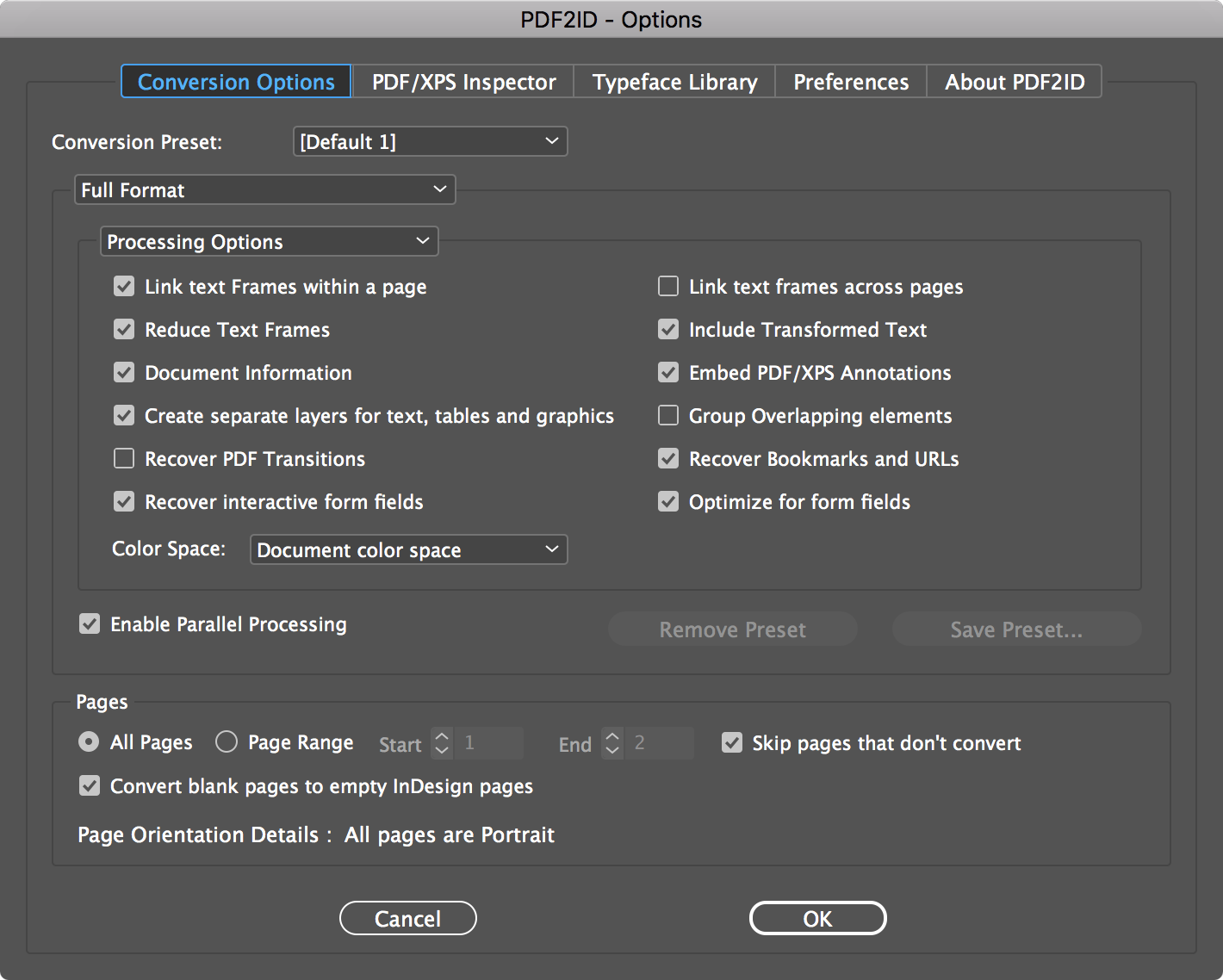
Recosoft Corporation today releases PDF2ID 2018, the latest version of its PDF-to-InDesign plug-in for Adobe InDesign CC 2019 for macOS and Windows. PDF2ID converts PDF and Windows XPS files into fully editable InDesign files allowing PDF and XPS file content recovery and reuse within InDesign. The new version recovers interactive form-objects in a PDF fileas well as includes a completely modernized table processing and formation technology resulting in even more complex tables being recognized.
Osaka, Japan - Recosoft Corporation, the developers of workflow automation plug-ins for Adobe(R) Creative Cloud(R) and creators of PDF conversion software, has shipped PDF2ID 2019 the newest version of its PDF-to-InDesign plug-in for Adobe InDesign(R) CC 2019 for both the macOS and Windows platforms. Additionally, PDF2ID 2019 now recovers interactive form-objects in a PDF file placing these into a separate forms-layer within the resulting InDesign CC document. Finally, PDF2ID 2019 includes a completely modernized table processing and formation technology resulting in even more complex tables being recognized.
"PDF2ID 2019 is the culmination of the numerous feedback we have received from Creative Professionals over the years; we are excited that our latest PDF-to-InDesign technology has been engineered to support Adobe InDesign CC 2019" stated Paramjit Chadha, MD, Recosoft Corporation.
PDF2ID converts PDF and Windows XPS files into fully editable InDesign files allowing PDF and XPS file content recovery and reuse within InDesign. PDF2ID is the de-facto PDF conversion plug-in for InDesign, allowing anyone to open, convert and edit PDF and XPS documents in InDesign; eliminating the need to acquire additional PDF and XPS conversion tools. Key new features include:
* Support for InDesign CC 2019 - PDF2ID 2019 now supports and integrates with InDesign CC 2019. InDesign CC through CC 2018 are supported as well.
* Interactive form field recovery - PDF2ID 2019 now recovers interactive form field objects such as text-fields, buttons, lists and signature fields with the properties and creates a separate layer that contains the form objects (available in PDF2ID Professional only).
* Modernized Table Recognition and Processing - The table recognition and processing of PDF2ID 2019 contains a new and modernized engine based on an advanced technology infrastructure that allows identifying and recovering even more tables and creating a table graphics layer for table related vector graphics and images.
* Layout processing and Font mapping enhancements - Layout processing and Font mapping enhancements have been made further reducing styles sheets created and improving accuracy in many instances.
System Requirements
* macOS 10.10.x or higher
* :Intel based Mac
* Windows 7, Windows 8/8.1 or Windows 10
* Minimum Pentium III computer
* :InDesign CC, CC 2014, CC 2015, CC 2017, CC 2018 or CC 2019
PDF2ID 2019 is available immediately in the following configurations from the Recosoft web store (per license):
PDF2ID Standard 2019 US$199.00
PDF2ID Professional 2019 US$299.00
PDF2ID Standard 2019 Upgrade US$99.00
PDF2ID Professional 2019 Upgrade US$149.00
Recosoft Corporation: https://www.recosoft.com
PDF2ID 2019: https://www.recosoft.com/products/pdf2id
Screenshot: http://www.recosoftcorporation.com/ftpenglish2/pdf-to-indesign-cc.png
Recosoft Corporation has pioneered PDF2Office(R), the de-facto PDF-to-Excel, PDF-to-Word, PDF-to-PowerPoint, PDF-to-OmniGraffle conversion utility; PDF2Office(R) for iWork, the PDF-to-Keynote, PDF-to-Numbers and PDF-to-Pages conversion application; ID2Office, the InDesign-to-Word, InDesign-to-PowerPoint converter; and PDF2ID(R) the de-facto PDF-to-InDesign conversion tool. The company is a leader in designing and delivering PDF converters and InDesign software solutions enhancing workflow automation and productivity. IR2Office, ID2Office, PDF2Office, PDF2ID, PDFtoID are trademarks or registered trademarks of Recosoft Corporation in the US and/or other countries. Microsoft, Excel, PowerPoint, Word and the Office logo are trademarks or registered trademarks of Microsoft Corporation in the US and/or other countries. Adobe, Illustrator, InDesign and Creative Cloud are either registered trademarks or trademarks of Adobe System Incorporated in the US and/or other countries. Apple,
Macintosh, macOS, Mac, Numbers, Keynote, Pages, iWork, iPod, iPhone, iOS, iPAD are either trademarks or registered trademarks of Apple, Inc. in the US and or other countries. All other trademarks are recognized and are the property of their respective owners.
*******
Link To Article: https://prmac.com/release-id-83110.htm
*******
---------------------------------------------------------------------------------
Note that you can alter delivered distributions at any time.
Login to your account on prMac to alter your channel selection, or to opt-out at any time.
Recosoft releases PDF2ID 2019 - PDF to InDesign CC 2019 plug-in ships - Published on 11/01/18
Recosoft Corporation today releases PDF2ID 2018, the latest version of its PDF-to-InDesign plug-in for Adobe InDesign CC 2019 for macOS and Windows. PDF2ID converts PDF and Windows XPS files into fully editable InDesign files allowing PDF and XPS file content recovery and reuse within InDesign. The new version recovers interactive form-objects in a PDF fileas well as includes a completely modernized table processing and formation technology resulting in even more complex tables being recognized.
Osaka, Japan - Recosoft Corporation, the developers of workflow automation plug-ins for Adobe(R) Creative Cloud(R) and creators of PDF conversion software, has shipped PDF2ID 2019 the newest version of its PDF-to-InDesign plug-in for Adobe InDesign(R) CC 2019 for both the macOS and Windows platforms. Additionally, PDF2ID 2019 now recovers interactive form-objects in a PDF file placing these into a separate forms-layer within the resulting InDesign CC document. Finally, PDF2ID 2019 includes a completely modernized table processing and formation technology resulting in even more complex tables being recognized.
"PDF2ID 2019 is the culmination of the numerous feedback we have received from Creative Professionals over the years; we are excited that our latest PDF-to-InDesign technology has been engineered to support Adobe InDesign CC 2019" stated Paramjit Chadha, MD, Recosoft Corporation.
PDF2ID converts PDF and Windows XPS files into fully editable InDesign files allowing PDF and XPS file content recovery and reuse within InDesign. PDF2ID is the de-facto PDF conversion plug-in for InDesign, allowing anyone to open, convert and edit PDF and XPS documents in InDesign; eliminating the need to acquire additional PDF and XPS conversion tools. Key new features include:
* Support for InDesign CC 2019 - PDF2ID 2019 now supports and integrates with InDesign CC 2019. InDesign CC through CC 2018 are supported as well.
* Interactive form field recovery - PDF2ID 2019 now recovers interactive form field objects such as text-fields, buttons, lists and signature fields with the properties and creates a separate layer that contains the form objects (available in PDF2ID Professional only).
* Modernized Table Recognition and Processing - The table recognition and processing of PDF2ID 2019 contains a new and modernized engine based on an advanced technology infrastructure that allows identifying and recovering even more tables and creating a table graphics layer for table related vector graphics and images.
* Layout processing and Font mapping enhancements - Layout processing and Font mapping enhancements have been made further reducing styles sheets created and improving accuracy in many instances.
System Requirements
* macOS 10.10.x or higher
* :Intel based Mac
* Windows 7, Windows 8/8.1 or Windows 10
* Minimum Pentium III computer
* :InDesign CC, CC 2014, CC 2015, CC 2017, CC 2018 or CC 2019
PDF2ID 2019 is available immediately in the following configurations from the Recosoft web store (per license):
PDF2ID Standard 2019 US$199.00
PDF2ID Professional 2019 US$299.00
PDF2ID Standard 2019 Upgrade US$99.00
PDF2ID Professional 2019 Upgrade US$149.00
Recosoft Corporation: https://www.recosoft.com
PDF2ID 2019: https://www.recosoft.com/products/pdf2id
Screenshot: http://www.recosoftcorporation.com/ftpenglish2/pdf-to-indesign-cc.png
Recosoft Corporation has pioneered PDF2Office(R), the de-facto PDF-to-Excel, PDF-to-Word, PDF-to-PowerPoint, PDF-to-OmniGraffle conversion utility; PDF2Office(R) for iWork, the PDF-to-Keynote, PDF-to-Numbers and PDF-to-Pages conversion application; ID2Office, the InDesign-to-Word, InDesign-to-PowerPoint converter; and PDF2ID(R) the de-facto PDF-to-InDesign conversion tool. The company is a leader in designing and delivering PDF converters and InDesign software solutions enhancing workflow automation and productivity. IR2Office, ID2Office, PDF2Office, PDF2ID, PDFtoID are trademarks or registered trademarks of Recosoft Corporation in the US and/or other countries. Microsoft, Excel, PowerPoint, Word and the Office logo are trademarks or registered trademarks of Microsoft Corporation in the US and/or other countries. Adobe, Illustrator, InDesign and Creative Cloud are either registered trademarks or trademarks of Adobe System Incorporated in the US and/or other countries. Apple,
Macintosh, macOS, Mac, Numbers, Keynote, Pages, iWork, iPod, iPhone, iOS, iPAD are either trademarks or registered trademarks of Apple, Inc. in the US and or other countries. All other trademarks are recognized and are the property of their respective owners.
*******
Link To Article: https://prmac.com/release-id-83110.htm
*******
---------------------------------------------------------------------------------
Note that you can alter delivered distributions at any time.
Login to your account on prMac to alter your channel selection, or to opt-out at any time.
Pubblog Announces MailSteward 13
A new article has been published at prMac.
Pubblog Announces MailSteward 13 - Published on 11/01/18
Pubblog today announces MailSteward 13, an important update to the company's ultimate email archiving solution for the Mac. MailSteward archives email in a relational database for easy access and safe backup of all your email. Version 13 is fully compatible with macOS 10.14 (Mojave) including a new Dark Mode option. This release also implements a more robust method for scheduling using the macOS launchd service and several minor bug fixes.
Murfreesboro, Tennessee - Pubblog announces the release of MailSteward 13, the ultimate email management system. Store years of e-mail in a secure, searchable archive. This new upgrade makes MailSteward fully compatible with macOS 10.14 (Mojave) including a new Dark Mode option. This release also implements a more robust method for scheduling using the macOS "launchd" service and several minor bug fixes.
MailSteward works seamlessly with Apple Mail app or Postbox app to archive all your e-mail in a relational database on your Mac. MailSteward has a wealth of features for importing, tagging, saving, and exporting your vital e-mail information in a number of standard data formats.
To understand just how powerful and easy-to-use MailSteward is, download the free version of MailSteward and try it out for as long as you like. The free version is full-feature but limited to a maximum 15,000 e-mails. All versions of MailSteward require macOS 10.11 or higher
(El Capitan, Sierra, High Sierra, Mojave). Any free version may be upgraded to a licensed version by entering a license key.
MailSteward comes in three versions, MailSteward Lite ($24.95), MailSteward ($49.95), and MailSteward Pro ($99.95) available for purchase in the pubblog online store. Regular MailSteward, using SQLite, can handle large volumes of e-mail, 250,000 or more but for very large volumes which require an industrial-grade relational database server, MailSteward Pro is the best solution. MailSteward Pro requires MySQL database server software to be installed and running.
MailSteward 13: https://mailsteward.com
Download Free Version: https://mailsteward.com/download.html
Pubblog Store: https://store.pubblog.com
Located in Murfreesboro, Tennessee, Pubblog is a multimedia internet publishing company providing applications for the Mac platform. Copyright (C) 2012-2018 Pubblog. All Rights Reserved. Apple, the Apple logo and Mac are registered trademarks of Apple Inc. in the U.S. and/or other countries.
*******
Link To Article: https://prmac.com/release-id-83109.htm
*******
---------------------------------------------------------------------------------
Note that you can alter delivered distributions at any time.
Login to your account on prMac to alter your channel selection, or to opt-out at any time.
Pubblog Announces MailSteward 13 - Published on 11/01/18
Pubblog today announces MailSteward 13, an important update to the company's ultimate email archiving solution for the Mac. MailSteward archives email in a relational database for easy access and safe backup of all your email. Version 13 is fully compatible with macOS 10.14 (Mojave) including a new Dark Mode option. This release also implements a more robust method for scheduling using the macOS launchd service and several minor bug fixes.
Murfreesboro, Tennessee - Pubblog announces the release of MailSteward 13, the ultimate email management system. Store years of e-mail in a secure, searchable archive. This new upgrade makes MailSteward fully compatible with macOS 10.14 (Mojave) including a new Dark Mode option. This release also implements a more robust method for scheduling using the macOS "launchd" service and several minor bug fixes.
MailSteward works seamlessly with Apple Mail app or Postbox app to archive all your e-mail in a relational database on your Mac. MailSteward has a wealth of features for importing, tagging, saving, and exporting your vital e-mail information in a number of standard data formats.
To understand just how powerful and easy-to-use MailSteward is, download the free version of MailSteward and try it out for as long as you like. The free version is full-feature but limited to a maximum 15,000 e-mails. All versions of MailSteward require macOS 10.11 or higher
(El Capitan, Sierra, High Sierra, Mojave). Any free version may be upgraded to a licensed version by entering a license key.
MailSteward comes in three versions, MailSteward Lite ($24.95), MailSteward ($49.95), and MailSteward Pro ($99.95) available for purchase in the pubblog online store. Regular MailSteward, using SQLite, can handle large volumes of e-mail, 250,000 or more but for very large volumes which require an industrial-grade relational database server, MailSteward Pro is the best solution. MailSteward Pro requires MySQL database server software to be installed and running.
MailSteward 13: https://mailsteward.com
Download Free Version: https://mailsteward.com/download.html
Pubblog Store: https://store.pubblog.com
Located in Murfreesboro, Tennessee, Pubblog is a multimedia internet publishing company providing applications for the Mac platform. Copyright (C) 2012-2018 Pubblog. All Rights Reserved. Apple, the Apple logo and Mac are registered trademarks of Apple Inc. in the U.S. and/or other countries.
*******
Link To Article: https://prmac.com/release-id-83109.htm
*******
---------------------------------------------------------------------------------
Note that you can alter delivered distributions at any time.
Login to your account on prMac to alter your channel selection, or to opt-out at any time.
Hungry Worms Is Now Easier to Play and Super Animated
A new article has been published at prMac.
Hungry Worms Is Now Easier to Play and Super Animated - Published on 10/30/18
EOCodes LLC announces a new version of its game Hungry Worms, available free for Android and iOS devices. The game now offers better graphics and improvements including a touchscreen mode to move your worm, an option to build your own worm with over 25 different characters and choose your preferred background to play.
Tampa, FL - EOCodes LLC is proud to announce the release of a new version of its game Hungry Worms, this new version is available free for AiPhone, iPad, iPod touch, and Android devices.
EOCodes is proud to introduce their new version of Hungry Worms, one of the most popular and addictive games around the world with over 1 million downloads, now with better graphics and improvements including a touchscreen mode to move your worm, an option to build your own worm with over 25 different characters and choose your preferred background to play.
Another great improvements on this new version of Hungry Worms is the game animations and the way to speed up yourself, just double click on the screen and your worm will be moving super-fast, this is great to get more food or to escape from another worms when their chase you. Also you can challenge your friends online to beat them and reach the higher score. Playing Hungry worms is now more easy than ever, just remember to eat, that's all what you need to do, eat and stay away from the other worms. Can you be the biggest worm of the game? Hungry Worms is free and is available for Android and IOS devices.
Device Requirements:
* iPhone, iPad, and iPod or any Android device (Phones and Tablets).
* Requires iOS 8.0 or later (Apple devices) and 4.0 or later (Android devices).
* 86 MB (IOS devices) or 31 MB (Android devices).
Pricing and Availability:
Hungry Worms is free and available worldwide exclusively through the Apps Stores in the Games category.
Hungry-Worms 3.0: https://itunes.apple.com/us/app/hungry-worms/id1168363437
Download from Google Store: https://play.google.com/store/apps/details?id=com.emanuel.hungryworms&hl=en_US
Screenshot: https://lh3.googleusercontent.com/DtECR3P8p_FZtjB7xC1wR3TlvQ_CE9SHZes_wmtzsyLWCNQdHU6t_LKa_mbSgcaJH8Y=w1920-h969-rw
App Icon: https://lh3.googleusercontent.com/O-D1_DvZmzF-3lP3Uffm9SBlP9kh8Pl2ai9gR_-KOwKQipys5Ei_nRVNzcp0lg0ouA=s180-rw
EOCodes is a Development Company located at Tampa Florida. Established on May 2014 by Emanuel Ortiz. We are working on other games and applications for Apple and Android. All Material and Software (C) Copyright 2018 EOCodes. All Rights Reserved. Apple, the Apple logo, iPhone, iPod and iPad are registered trademarks of Apple Inc. in the U.S. and/or other countries. Other trademarks and registered trademarks may be the property of their respective owners.
*******
Link To Article: https://prmac.com/release-id-83108.htm
*******
---------------------------------------------------------------------------------
Note that you can alter delivered distributions at any time.
Login to your account on prMac to alter your channel selection, or to opt-out at any time.
Hungry Worms Is Now Easier to Play and Super Animated - Published on 10/30/18
EOCodes LLC announces a new version of its game Hungry Worms, available free for Android and iOS devices. The game now offers better graphics and improvements including a touchscreen mode to move your worm, an option to build your own worm with over 25 different characters and choose your preferred background to play.
Tampa, FL - EOCodes LLC is proud to announce the release of a new version of its game Hungry Worms, this new version is available free for AiPhone, iPad, iPod touch, and Android devices.
EOCodes is proud to introduce their new version of Hungry Worms, one of the most popular and addictive games around the world with over 1 million downloads, now with better graphics and improvements including a touchscreen mode to move your worm, an option to build your own worm with over 25 different characters and choose your preferred background to play.
Another great improvements on this new version of Hungry Worms is the game animations and the way to speed up yourself, just double click on the screen and your worm will be moving super-fast, this is great to get more food or to escape from another worms when their chase you. Also you can challenge your friends online to beat them and reach the higher score. Playing Hungry worms is now more easy than ever, just remember to eat, that's all what you need to do, eat and stay away from the other worms. Can you be the biggest worm of the game? Hungry Worms is free and is available for Android and IOS devices.
Device Requirements:
* iPhone, iPad, and iPod or any Android device (Phones and Tablets).
* Requires iOS 8.0 or later (Apple devices) and 4.0 or later (Android devices).
* 86 MB (IOS devices) or 31 MB (Android devices).
Pricing and Availability:
Hungry Worms is free and available worldwide exclusively through the Apps Stores in the Games category.
Hungry-Worms 3.0: https://itunes.apple.com/us/app/hungry-worms/id1168363437
Download from Google Store: https://play.google.com/store/apps/details?id=com.emanuel.hungryworms&hl=en_US
Screenshot: https://lh3.googleusercontent.com/DtECR3P8p_FZtjB7xC1wR3TlvQ_CE9SHZes_wmtzsyLWCNQdHU6t_LKa_mbSgcaJH8Y=w1920-h969-rw
App Icon: https://lh3.googleusercontent.com/O-D1_DvZmzF-3lP3Uffm9SBlP9kh8Pl2ai9gR_-KOwKQipys5Ei_nRVNzcp0lg0ouA=s180-rw
EOCodes is a Development Company located at Tampa Florida. Established on May 2014 by Emanuel Ortiz. We are working on other games and applications for Apple and Android. All Material and Software (C) Copyright 2018 EOCodes. All Rights Reserved. Apple, the Apple logo, iPhone, iPod and iPad are registered trademarks of Apple Inc. in the U.S. and/or other countries. Other trademarks and registered trademarks may be the property of their respective owners.
*******
Link To Article: https://prmac.com/release-id-83108.htm
*******
---------------------------------------------------------------------------------
Note that you can alter delivered distributions at any time.
Login to your account on prMac to alter your channel selection, or to opt-out at any time.
Deliver Now Supports macOS Mojave - File Transfer App
A new article has been published at prMac.
Deliver Now Supports macOS Mojave - File Transfer App - Published on 10/31/18
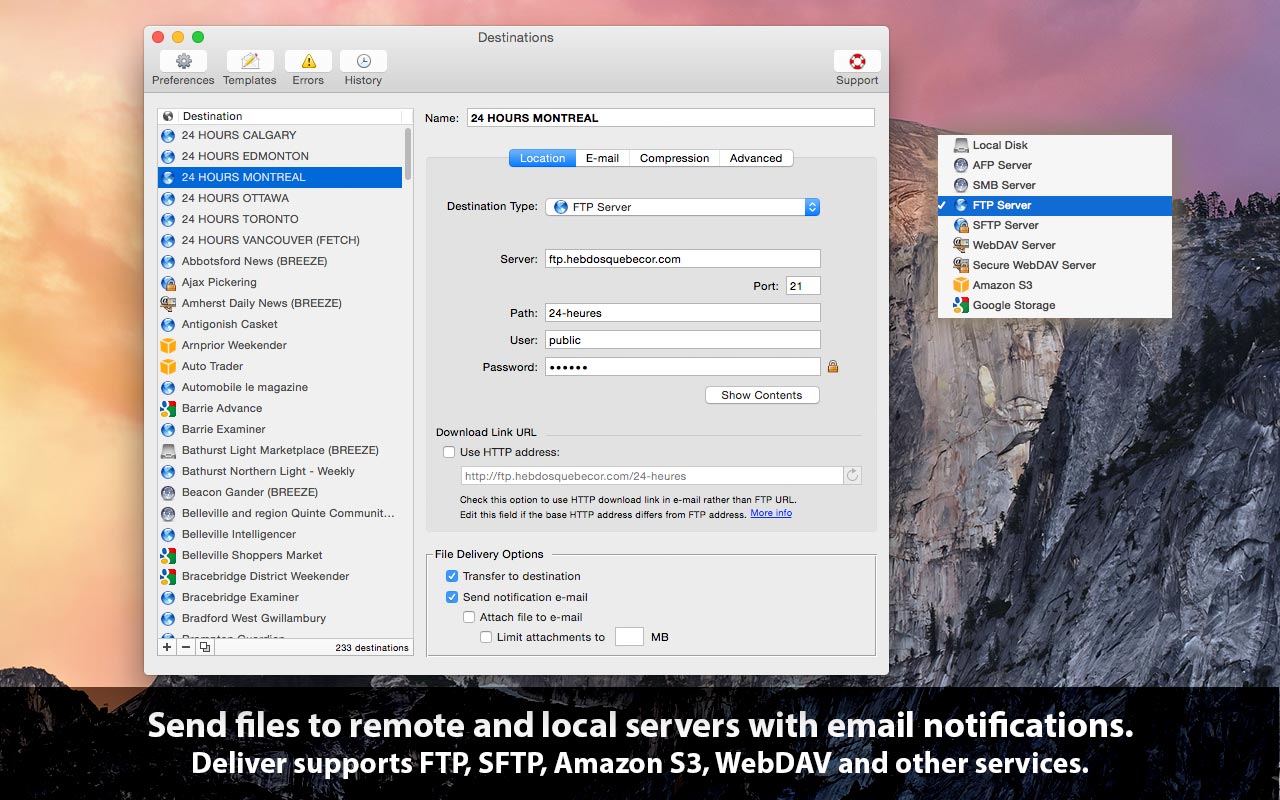
Zevrix Solutions announces Deliver 2.6.7, a compatibility update to company's file transfer solution with automatic email notifications. Deliver lets users send files to FTP, SFTP, Amazon S3, WebDAV and other remote and local servers. The app offers automatic email delivery notifications, multi-destination transfer, file encryption and compression, upload history, and other powerful capabilities. The new version introduces support for macOS 10.14 Mojave, and fixes some FTP connection issues.
Toronto (ON), Canada - Zevrix Solutions today announces Deliver 2.6.7, a compatibility update to the company's file transfer solution for remote and local destinations. Deliver lets users send files over the Internet and local networks with automatic email notifications. The app offers file compression, delivery history, and other powerful capabilities. It supports FTP, SFTP, Amazon S3, WebDAV and other remote and local services, and allows to send files to multiple destinations at once.
The new version introduces support for the recently released macOS 10.14 Mojave and is offered as a free update to licensed users. While Deliver is fully compatible with the new Dark Mode, the app currently preserves its original appearance. A dark appearance will be introduced in the future. The update also fixes connection issue that occurred during file transfer to some FTP sites.
"Deliver gives plenty to like," writes Natalia Nowak on Mac360, a Mac app reviews site. "It's a secure document delivery system with tracking built in, and straightforward and comprehensive user interface."
Deliver automatically notifies recipients of file deliveries by email, which eliminates the need to compose and send confirmations for each transfer manually. Users only need to drop their files on the program's icon to upload the documents to the desired destination. A customizable email confirmation will be automatically issued upon delivery. Recipients can download the file using a link in the notification email.
Deliver offers the following key features:
* Transfer files to FTP, Google Storage, Amazon S3 and other servers
* Automatic email notifications
* Hyperlink to file for instant download by recipients
* Compress files automatically (zip/dmg)
* Encrypt disk images with passwords
* Create lo-res PDF on the fly and attach to e-mail
* Transfer history
Pricing and Availability:
Deliver can be purchased from Zevrix website for $19.95 (USD), as well as from Apple Mac App Store and authorized resellers. Trial is also available for download. The update is free for licensed users of Deliver 2.x. Deliver requires macOS 10.7-10.14.
Zevrix Solutions: http://zevrix.com
Deliver 2.6.7: http://zevrix.com/Deliver.php
Download Deliver: http://zevrix.com/Deliver.dmg
Purchase Deliver: http://zevrix.com/store.php
Screenshot: http://zevrix.com/screenshots/deliver-2/MAS/deliver-mas-location.jpg
Located in Toronto, Canada, Zevrix Solutions provides automation and productivity solutions for Adobe Creative Cloud and Creative Suite software, PDF workflows, graphic file diagnostics and Microsoft Office output on Mac OS. Zevrix is dedicated to help professionals increase their profits through automating everyday tasks, producing error-free documents, saving disk space and cutting production costs. For more information, visit their website. Copyright (C) 2018 Zevrix Solutions. All Rights Reserved. Other trademarks and registered trademarks may be the property of their respective owners.
*******
Link To Article: https://prmac.com/release-id-83107.htm
*******
---------------------------------------------------------------------------------
Note that you can alter delivered distributions at any time.
Login to your account on prMac to alter your channel selection, or to opt-out at any time.
Deliver Now Supports macOS Mojave - File Transfer App - Published on 10/31/18
Zevrix Solutions announces Deliver 2.6.7, a compatibility update to company's file transfer solution with automatic email notifications. Deliver lets users send files to FTP, SFTP, Amazon S3, WebDAV and other remote and local servers. The app offers automatic email delivery notifications, multi-destination transfer, file encryption and compression, upload history, and other powerful capabilities. The new version introduces support for macOS 10.14 Mojave, and fixes some FTP connection issues.
Toronto (ON), Canada - Zevrix Solutions today announces Deliver 2.6.7, a compatibility update to the company's file transfer solution for remote and local destinations. Deliver lets users send files over the Internet and local networks with automatic email notifications. The app offers file compression, delivery history, and other powerful capabilities. It supports FTP, SFTP, Amazon S3, WebDAV and other remote and local services, and allows to send files to multiple destinations at once.
The new version introduces support for the recently released macOS 10.14 Mojave and is offered as a free update to licensed users. While Deliver is fully compatible with the new Dark Mode, the app currently preserves its original appearance. A dark appearance will be introduced in the future. The update also fixes connection issue that occurred during file transfer to some FTP sites.
"Deliver gives plenty to like," writes Natalia Nowak on Mac360, a Mac app reviews site. "It's a secure document delivery system with tracking built in, and straightforward and comprehensive user interface."
Deliver automatically notifies recipients of file deliveries by email, which eliminates the need to compose and send confirmations for each transfer manually. Users only need to drop their files on the program's icon to upload the documents to the desired destination. A customizable email confirmation will be automatically issued upon delivery. Recipients can download the file using a link in the notification email.
Deliver offers the following key features:
* Transfer files to FTP, Google Storage, Amazon S3 and other servers
* Automatic email notifications
* Hyperlink to file for instant download by recipients
* Compress files automatically (zip/dmg)
* Encrypt disk images with passwords
* Create lo-res PDF on the fly and attach to e-mail
* Transfer history
Pricing and Availability:
Deliver can be purchased from Zevrix website for $19.95 (USD), as well as from Apple Mac App Store and authorized resellers. Trial is also available for download. The update is free for licensed users of Deliver 2.x. Deliver requires macOS 10.7-10.14.
Zevrix Solutions: http://zevrix.com
Deliver 2.6.7: http://zevrix.com/Deliver.php
Download Deliver: http://zevrix.com/Deliver.dmg
Purchase Deliver: http://zevrix.com/store.php
Screenshot: http://zevrix.com/screenshots/deliver-2/MAS/deliver-mas-location.jpg
Located in Toronto, Canada, Zevrix Solutions provides automation and productivity solutions for Adobe Creative Cloud and Creative Suite software, PDF workflows, graphic file diagnostics and Microsoft Office output on Mac OS. Zevrix is dedicated to help professionals increase their profits through automating everyday tasks, producing error-free documents, saving disk space and cutting production costs. For more information, visit their website. Copyright (C) 2018 Zevrix Solutions. All Rights Reserved. Other trademarks and registered trademarks may be the property of their respective owners.
*******
Link To Article: https://prmac.com/release-id-83107.htm
*******
---------------------------------------------------------------------------------
Note that you can alter delivered distributions at any time.
Login to your account on prMac to alter your channel selection, or to opt-out at any time.
WaterField Debuts Sutter Tech Sling for New Apple iPad Pros, MacBook Air
A new article has been published at prMac.
WaterField Debuts Sutter Tech Sling for New Apple iPad Pros, MacBook Air - Published on 10/31/18
WaterField's new Sutter Tech Sling brings a professional aesthetic to the sporty utility of a single-strap backpack. Designed to hold Apple's new iPad Pro and Apple Pencil or the new MacBook Air, the ergonomic Sling rests comfortably on the back making it an ideal daypack for commutes or adventures. Sling orders through Nov. 9 will include a complimentary, plushly-padded new WaterField Stylus Pencil Case with a dedicated Apple Pencil slot, a pocket for tips and caps, and space for accessories.
San Francisco, California - WaterField Designs, a San Francisco designer and manufacturer of custom laptop sleeves, bags and device-specific cases, introduces the Sutter Tech Sling bag, a sophisticated one-strap backpack in two sizes, with dedicated pockets to hold Apple's new iPad Pro and Apple Pencil, or new MacBook Air. Designed for comfort and easy accessibility, the meticulously-crafted Sutter Tech Sling combines the utility of a sling with a professional aesthetic, a smart choice for creative professionals, commuters and travelers. Sling orders through November 9 will include a complimentary new WaterField Stylus Pencil Case, a plushly-padded accessory case with a dedicated Apple Pencil pocket.
"The lifestyle of a 21st-century creative professional calls for a comfortable, agile bag with a refined look," explained company owner Gary Waterfield. "When we set out to design a Sling that creatives could carry for work, commuting, and traveling, we focused on comfort and function. Thanks to extensive ergonomic testing, you'll feel how nicely the bag sits against your back and how easily you can access your gear."
The Sutter Sling is intentionally designed with features for easy-access and comfort:
* While remaining on one shoulder, the bag easily shifts to the front, allowing quick access to items in the exterior pocket from either side
* A unique swivel strap attachment grants 180-degree rotation so the bag rests flat against the body whether worn over one shoulder or crossbody
* A wide shoulder strap with a built-in, moveable shoulder pad distributes weight evenly
* A one-handed cam lock buckle lets users adjust how the bag rests against their body without removing the bag
* The thoughtfully-placed iPad compartment keeps the back of the bag comfortably flat
* Rear mesh padding enhances airflow and cushioning
* Double, waterproof zippers enable entry to the main compartment from either side
* A gold, water-resistant liner lights up the interior of the bag for increased visibility
* An interior key fob attachment keeps keys quickly findable
Available in two sizes and a choice of premium materials, the Sutter Tech Sling remains compact even when fully packed. A tailor-fitted, padded laptop/tablet compartment in the Standard size holds: the new 11-inch Apple iPad Pro or Surface Pro 6, and the Full-size holds: the new 12.9-inch Apple iPad Pro, the new MacBook Air, a 13-inch MacBook Pro, or the Surface Laptop 2. Three pen pockets " for the Apple Pencil and ballpoints " and an open-topped pocket, help keep gear organized inside, leaving ample interior space for a water bottle, notebook, wallet, and more. An exterior pocket, hidden behind the leather panel, is protected from the elements with inset waterproof zippers and keeps items like a phone, train tickets, and mints within quick reach.
Ideal for creative techies, WaterField's new Stylus Pencil Case is a plushly-padded waxed canvas or ballistic nylon pencil pouch with a dedicated Apple Pencil compartment and an interior pocket for extra tips, caps or other accessories. The Stylus Pencil Case and the Sutter Tech Sling join a wide range of WaterField iPad bags and accessories, including a variety of iPad sleeves, the iPad Pro Gear Case, and the Leather Case for the Apple Pencil.
Standard size:
* 11.5 x 8 x 3 inches; 1.25 lbs. Fits 11-inch iPad Pro, and similarly-sized tablets
Full size:
* 14 x 9.5 x 3 inches; 1.5 lbs. Fits 12.9-inch iPad Pro, MacBook Air, 13-inch MacBook Pro Retina or Touchbar, Surface Pro 6, Surface Laptop 2, and similarly-sized devices
Colors:
* Tan waxed canvas with distressed, full-grain chocolate leather panel or black ballistic nylon with full-grain black leather panel
Pricing and Availability:
The Sutter Tech Sling Bag is priced at $169 - $179 (USD). The Stylus Pencil Case is $39. (Complimentary with Sutter Sling orders through November 9, 2018.) Colors: Tan waxed canvas or black ballistic nylon. Dimensions: 7.25~8 x 2.25 x .75~2 inches; 2.5 oz.
Pre-order now. Shipping begins November 9, 2018.
iPad Pro Gear Case: $49. Waxed canvas with leather. Leather Case for the Apple Pencil: $29. Grizzly, full-grain, distressed leather. Available now.
The Sutter Tech Sling: https://www.sfbags.com/products/tech-sling-bag
YouTube Video (Demo): https://www.youtube.com/watch?v=uJ-kIHahd5A
The Stylus Pencil Case: https://www.sfbags.com/products/stylus-pencil-case
WaterField Designs is an innovative San Francisco designer and manufacturer of bags and cases for tech-savvy consumers who want to stylishly and responsibly transport their technology. WaterField manufactures custom-fitted, high-quality cases and bags for a full-range of laptop computers, smartphones, tablets, gaming devices, and other digital gear. All products are manufactured to exacting standards entirely in San Francisco. More information at "Our Story." WaterField Designs, SFBags, iPad Pro Gear Case, Stylus Pencil Case, and Sutter Tech Sling Bag are trademarks of WaterField Designs. (C) 2018. All Rights Reserved. Other company and product names may be trademarks of their respective owners.
*******
Link To Article: https://prmac.com/release-id-83104.htm
*******
---------------------------------------------------------------------------------
Note that you can alter delivered distributions at any time.
Login to your account on prMac to alter your channel selection, or to opt-out at any time.
WaterField Debuts Sutter Tech Sling for New Apple iPad Pros, MacBook Air - Published on 10/31/18
WaterField's new Sutter Tech Sling brings a professional aesthetic to the sporty utility of a single-strap backpack. Designed to hold Apple's new iPad Pro and Apple Pencil or the new MacBook Air, the ergonomic Sling rests comfortably on the back making it an ideal daypack for commutes or adventures. Sling orders through Nov. 9 will include a complimentary, plushly-padded new WaterField Stylus Pencil Case with a dedicated Apple Pencil slot, a pocket for tips and caps, and space for accessories.
San Francisco, California - WaterField Designs, a San Francisco designer and manufacturer of custom laptop sleeves, bags and device-specific cases, introduces the Sutter Tech Sling bag, a sophisticated one-strap backpack in two sizes, with dedicated pockets to hold Apple's new iPad Pro and Apple Pencil, or new MacBook Air. Designed for comfort and easy accessibility, the meticulously-crafted Sutter Tech Sling combines the utility of a sling with a professional aesthetic, a smart choice for creative professionals, commuters and travelers. Sling orders through November 9 will include a complimentary new WaterField Stylus Pencil Case, a plushly-padded accessory case with a dedicated Apple Pencil pocket.
"The lifestyle of a 21st-century creative professional calls for a comfortable, agile bag with a refined look," explained company owner Gary Waterfield. "When we set out to design a Sling that creatives could carry for work, commuting, and traveling, we focused on comfort and function. Thanks to extensive ergonomic testing, you'll feel how nicely the bag sits against your back and how easily you can access your gear."
The Sutter Sling is intentionally designed with features for easy-access and comfort:
* While remaining on one shoulder, the bag easily shifts to the front, allowing quick access to items in the exterior pocket from either side
* A unique swivel strap attachment grants 180-degree rotation so the bag rests flat against the body whether worn over one shoulder or crossbody
* A wide shoulder strap with a built-in, moveable shoulder pad distributes weight evenly
* A one-handed cam lock buckle lets users adjust how the bag rests against their body without removing the bag
* The thoughtfully-placed iPad compartment keeps the back of the bag comfortably flat
* Rear mesh padding enhances airflow and cushioning
* Double, waterproof zippers enable entry to the main compartment from either side
* A gold, water-resistant liner lights up the interior of the bag for increased visibility
* An interior key fob attachment keeps keys quickly findable
Available in two sizes and a choice of premium materials, the Sutter Tech Sling remains compact even when fully packed. A tailor-fitted, padded laptop/tablet compartment in the Standard size holds: the new 11-inch Apple iPad Pro or Surface Pro 6, and the Full-size holds: the new 12.9-inch Apple iPad Pro, the new MacBook Air, a 13-inch MacBook Pro, or the Surface Laptop 2. Three pen pockets " for the Apple Pencil and ballpoints " and an open-topped pocket, help keep gear organized inside, leaving ample interior space for a water bottle, notebook, wallet, and more. An exterior pocket, hidden behind the leather panel, is protected from the elements with inset waterproof zippers and keeps items like a phone, train tickets, and mints within quick reach.
Ideal for creative techies, WaterField's new Stylus Pencil Case is a plushly-padded waxed canvas or ballistic nylon pencil pouch with a dedicated Apple Pencil compartment and an interior pocket for extra tips, caps or other accessories. The Stylus Pencil Case and the Sutter Tech Sling join a wide range of WaterField iPad bags and accessories, including a variety of iPad sleeves, the iPad Pro Gear Case, and the Leather Case for the Apple Pencil.
Standard size:
* 11.5 x 8 x 3 inches; 1.25 lbs. Fits 11-inch iPad Pro, and similarly-sized tablets
Full size:
* 14 x 9.5 x 3 inches; 1.5 lbs. Fits 12.9-inch iPad Pro, MacBook Air, 13-inch MacBook Pro Retina or Touchbar, Surface Pro 6, Surface Laptop 2, and similarly-sized devices
Colors:
* Tan waxed canvas with distressed, full-grain chocolate leather panel or black ballistic nylon with full-grain black leather panel
Pricing and Availability:
The Sutter Tech Sling Bag is priced at $169 - $179 (USD). The Stylus Pencil Case is $39. (Complimentary with Sutter Sling orders through November 9, 2018.) Colors: Tan waxed canvas or black ballistic nylon. Dimensions: 7.25~8 x 2.25 x .75~2 inches; 2.5 oz.
Pre-order now. Shipping begins November 9, 2018.
iPad Pro Gear Case: $49. Waxed canvas with leather. Leather Case for the Apple Pencil: $29. Grizzly, full-grain, distressed leather. Available now.
The Sutter Tech Sling: https://www.sfbags.com/products/tech-sling-bag
YouTube Video (Demo): https://www.youtube.com/watch?v=uJ-kIHahd5A
The Stylus Pencil Case: https://www.sfbags.com/products/stylus-pencil-case
WaterField Designs is an innovative San Francisco designer and manufacturer of bags and cases for tech-savvy consumers who want to stylishly and responsibly transport their technology. WaterField manufactures custom-fitted, high-quality cases and bags for a full-range of laptop computers, smartphones, tablets, gaming devices, and other digital gear. All products are manufactured to exacting standards entirely in San Francisco. More information at "Our Story." WaterField Designs, SFBags, iPad Pro Gear Case, Stylus Pencil Case, and Sutter Tech Sling Bag are trademarks of WaterField Designs. (C) 2018. All Rights Reserved. Other company and product names may be trademarks of their respective owners.
*******
Link To Article: https://prmac.com/release-id-83104.htm
*******
---------------------------------------------------------------------------------
Note that you can alter delivered distributions at any time.
Login to your account on prMac to alter your channel selection, or to opt-out at any time.
Subscribe to:
Posts (Atom)