A new article has been published at prMac.
Cisdem Video Converter Adds Supported Sites to Video Download Function - Published on 12/08/18
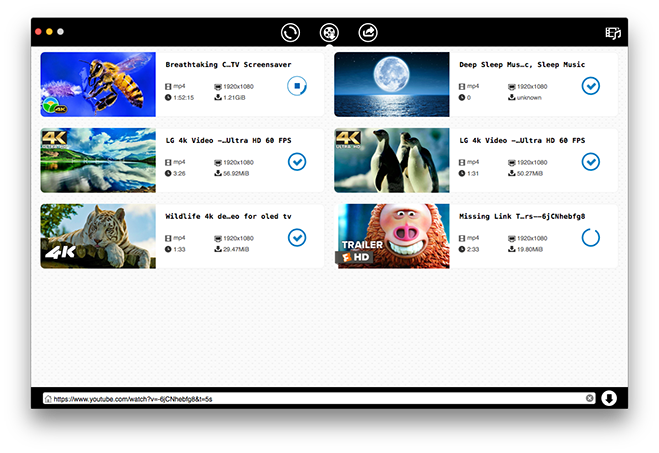
Cisdem Video Converter for Mac 3.10.0 upgrade adds more supported sites to its download function along with improved overall download performance. Cisdem Video Converter is an all-around video downloader, video converter, DVD ripper, video editor and video compressor. It can download SD, HD and 4K UHD videos from more than 1000 sites including YouTube, Facebook, Twitter, Vimeo, Dailymotion, Metacafe, Instagram, etc.
Madelia, Minnesota - Cisdem announces the release of Cisdem Video Converter for Mac 3.10.0. This update adds more than 20 supported sites to its video download function, which can already download videos from over 1000 sites including YouTube.
Cisdem Video Converter is an all-around video downloader, video converter, DVD ripper, video editor and video compressor. It can download SD, HD and 4K UHD videos from more than 1000 sites including YouTube, Facebook, Twitter, Vimeo, Dailymotion, Metacafe, Instagram, etc.
"Despite its name, Cisdem Video Converter is also a powerful video downloader," said Edward Riley, Cisdem's project manager. "The previous versions can already download videos from more than 1000 sites that provide video content. That includes all popular video sharing sites and social networking sites. It's a very long list. And this update makes the list even longer. In addition to the newly added supported sites, the update has also fixed the download failure of some YouTube videos and improved the overall download performance."
What's New in Version 3.10.0
1. Add support for more websites
2. Fix the download failure of partial YouTube videos
Main Features of Cisdem Video Converter for Mac
1. Download SD, HD and 4K UHD videos from more than 1000 sites
Users can use this Mac video converter to download videos, individually or in batch, from YouTube, Facebook and many other sites with high speed and high quality.
2. Convert video and audio files to various formats without losing quality
This video converter for Mac supports all common video and audio formats as the input format and output format. It allows users to easily convert videos and audios, individually or in batch, to make them perfectly compatible with media players, iPhones, Android devices, video editing software, video-sharing platforms, or for other purposes.
3. Convert DVD and DVD folder to MP4, AVI, MP3, MKV, etc.
It is also able to rip DVDs and DVD folders to different video or audio formats so that these movies and series can become easily available at your fingertips.
4. Compress video size and help save disk space
This app can also help users shrink video file size and save storage space. It will downsize video files with minimum quality loss.
5. Crop, rotate, watermark videos and perform other basic editing tasks
It can also do some basic video editing such as merging, trimming, cropping, rotating, watermarking, adding subtitles, adding effects, etc.
Price and Availability
Cisdem Video Converter for Mac 3.10.0 is available for download and purchase on Cisdem's official website. You can get a lifetime license with $49.99 with lifetime free upgrades. A free trial is available on the Cisdem Video Converter for Mac website. To get more information about Cisdem Data Recovery for Mac, please visit the Cisdem Video Converter for Mac website.
Cisdem: https://www.cisdem.com/
Cisdem Video Converter for Mac: https://www.cisdem.com/video-converter-mac.html
Download Free Trial: https://www.cisdem.com/downloads/cisdem-videoconverter-17.dmg
Purchase: https://www.cisdem.com/video-converter-mac/buy.html
Screenshot: https://www.cisdem.com/images/features/videoconverter/new_scroll3.png
Application Icon: https://www.cisdem.com/images/appicon/videoconverter-icon100.png
Cisdem provides productivity and business software that helps Mac users to get their job done faster. Cisdem products include top rated software centered on PDF Conversion, PDF Management, Data Recovery, and File Management. The company is dedicated in building highly efficient Mac software that make life easier and processes simpler. All Material and Software (C) Copyright 2018 Cisdem. All Rights Reserved. Apple, the Apple logo, Mac OS X and Macintosh are registered trademarks of Apple Inc. in the U.S. and/or other countries. Other trademarks and registered trademarks may be the property of their respective owners.
*******
Link To Article: https://prmac.com/release-id-83187.htm
*******
---------------------------------------------------------------------------------
Note that you can alter delivered distributions at any time.
Login to your account on prMac to alter your channel selection, or to opt-out at any time.


Qoppa's Free PDF Reader, Annotator, Form Filler on Mac App Store
A new article has been published at prMac.
Qoppa's Free PDF Reader, Annotator, Form Filler on Mac App Store - Published on 12/07/18
Atlanta based Qoppa Software today announces PDF Studio Viewer 2018, an important update to their free and easy-to-use PDF Reader for macOS. Fully compliant with the new PDF 2.0 standards and Adobe PDF Specifications, PDF Studio Viewer's user-friendly design makes PDF creation, markup, and editing easier, including advanced view tools including the loupe, pan and zoom and more. Version 2.2 offers digital signature validation improvements, as well as other important bug fixes.
Atlanta, Georgia - PDF Studio Viewer, Qoppa's friendly and reliable PDF reader / annotator / form filler, is now available on the Mac App store, and it is completely free to download, without any in-app purchases. If you are a Mac user unable to markup a PDF document, fill tax forms, or simply need more features than available in the Preview application, try downloading Qoppa's Free PDF Reader from Itunes App store. PDF Studio Viewer is an easy to use PDF Reader that comes with a lot of viewing, printing, searching and annotating features.
Features:
* Fully compliant with the new PDF 2.0 standards & Adobe PDF Specifications
* User friendly design makes PDF creation, markup, and editing easier
* Top customer satisfaction rate & responsive customer service
View PDFs:
* Display PDFs in high fidelity with full Retina & 5k screen support
* Advanced view tools including the loupe, pan and zoom
* View PDFs as single page, continuous scroll, facing (2 up), facing continuous, cover and cover continuous
* View and save file attachments
* Show / hide PDF layers
* Display rulers & grids
* Open encrypted (password protected) documents (including 256 bit encryption)
Advanced User Interface:
* Modern ribbon toolbar (classic toolbar also available)
* Quick navigation with thumbnail, bookmark and comment panes
* Search text in multiple documents using advanced search tool
Annotate & Markup PDFs:
* Text annotations: Typewriter, callout, text box, & sticky note
* Text markups: Text highlight, text underline, text cross-out, text squiggly, text replace, & text instert
* Shape Annotations: Circle, polygon, square, cloud, line, arrow, pencil
Fill & Save Forms:
* Fill Forms: Text fields, Multi line text areas, Combo box, Radio button, Check box
* Display and validates digital signatures
* Support for JavaScript formatting and validation
Advanced Printing:
* Advanced dialog with print preview
* Print current view option
* Duplex (2 sided) printing
* Multiple pages per sheet
* Booklet printing
Advanced Searching:
* Search through current document, all open documents
* Search all documents within a folder
* Search content, annotation, form fields, metadata, filename
Customer Support:
* Online - Step-by-step tutorials as well as answers to most common questions on just about anything you would need
* Help Tab -> Online User Guide
* Help Tab -> Knowledge Base
Within PDF Studio:
Contact us from within PDF Studio by going to Help Tab > Email Support and sending us an email or question. This is the most effective way for us to assist you as it will provide us a copy of the PDF Studio error logs which will help us to resolve any problems you may have.
Mac Versions
PDF Studio Viewer works on macOS 10.14 Mojave, macOS 10.13 High Sierra, macOS 10.12 Sierra, Mac OS X 10.11 (El Capitan), 10.10 (Yosemite), 10.9 (Mavericks), 10.8 (Mountain Lion), 10.7 (Lion).
Need More Functionality?
For more editing features, such as content editing, OCR, optimizer, form creation, digital signatures, PDF comparison, measuring tools, imposition, permanent redaction, preflight, Qoppa Software also publishes PDF Studio Pro, the advanced edition of our PDF reader app.
Qoppa Software: https://www.qoppa.com
PDF Studio Viewer 2018 (v2.2): https://www.qoppa.com/pdfstudioviewer/
PDF Developer Tools : https://www.qoppa.com/javapdf/
Download from Mac App Store: https://itunes.apple.com/app/pdf-studio-viewer-2018/id1349436734
Affordable Advanced PDF Editor for Mac: https://www.qoppa.com/pdfstudio/
Automated PDF Handling - Server Side: https://www.qoppa.com/pdfautomation/
Qoppa Software is located in Atlanta, GA and is a leading producer of PDF solutions. Qoppa Software offers a suite of highly portable products that cover every aspect of PDF processes and integrate seamlessly into document workflows, including end-user, server and PDF library products. Qoppa's products are carefully designed to provide the highest level of performance and reliability. Copyright (C) 2012 Qoppa Software. All Rights Reserved. Apple, the Apple logo, and OS X are registered trademarks of Apple Inc. in the U.S. and/or other countries.
*******
Link To Article: https://prmac.com/release-id-83191.htm
*******
---------------------------------------------------------------------------------
Note that you can alter delivered distributions at any time.
Login to your account on prMac to alter your channel selection, or to opt-out at any time.
Qoppa's Free PDF Reader, Annotator, Form Filler on Mac App Store - Published on 12/07/18
Atlanta based Qoppa Software today announces PDF Studio Viewer 2018, an important update to their free and easy-to-use PDF Reader for macOS. Fully compliant with the new PDF 2.0 standards and Adobe PDF Specifications, PDF Studio Viewer's user-friendly design makes PDF creation, markup, and editing easier, including advanced view tools including the loupe, pan and zoom and more. Version 2.2 offers digital signature validation improvements, as well as other important bug fixes.
Atlanta, Georgia - PDF Studio Viewer, Qoppa's friendly and reliable PDF reader / annotator / form filler, is now available on the Mac App store, and it is completely free to download, without any in-app purchases. If you are a Mac user unable to markup a PDF document, fill tax forms, or simply need more features than available in the Preview application, try downloading Qoppa's Free PDF Reader from Itunes App store. PDF Studio Viewer is an easy to use PDF Reader that comes with a lot of viewing, printing, searching and annotating features.
Features:
* Fully compliant with the new PDF 2.0 standards & Adobe PDF Specifications
* User friendly design makes PDF creation, markup, and editing easier
* Top customer satisfaction rate & responsive customer service
View PDFs:
* Display PDFs in high fidelity with full Retina & 5k screen support
* Advanced view tools including the loupe, pan and zoom
* View PDFs as single page, continuous scroll, facing (2 up), facing continuous, cover and cover continuous
* View and save file attachments
* Show / hide PDF layers
* Display rulers & grids
* Open encrypted (password protected) documents (including 256 bit encryption)
Advanced User Interface:
* Modern ribbon toolbar (classic toolbar also available)
* Quick navigation with thumbnail, bookmark and comment panes
* Search text in multiple documents using advanced search tool
Annotate & Markup PDFs:
* Text annotations: Typewriter, callout, text box, & sticky note
* Text markups: Text highlight, text underline, text cross-out, text squiggly, text replace, & text instert
* Shape Annotations: Circle, polygon, square, cloud, line, arrow, pencil
Fill & Save Forms:
* Fill Forms: Text fields, Multi line text areas, Combo box, Radio button, Check box
* Display and validates digital signatures
* Support for JavaScript formatting and validation
Advanced Printing:
* Advanced dialog with print preview
* Print current view option
* Duplex (2 sided) printing
* Multiple pages per sheet
* Booklet printing
Advanced Searching:
* Search through current document, all open documents
* Search all documents within a folder
* Search content, annotation, form fields, metadata, filename
Customer Support:
* Online - Step-by-step tutorials as well as answers to most common questions on just about anything you would need
* Help Tab -> Online User Guide
* Help Tab -> Knowledge Base
Within PDF Studio:
Contact us from within PDF Studio by going to Help Tab > Email Support and sending us an email or question. This is the most effective way for us to assist you as it will provide us a copy of the PDF Studio error logs which will help us to resolve any problems you may have.
Mac Versions
PDF Studio Viewer works on macOS 10.14 Mojave, macOS 10.13 High Sierra, macOS 10.12 Sierra, Mac OS X 10.11 (El Capitan), 10.10 (Yosemite), 10.9 (Mavericks), 10.8 (Mountain Lion), 10.7 (Lion).
Need More Functionality?
For more editing features, such as content editing, OCR, optimizer, form creation, digital signatures, PDF comparison, measuring tools, imposition, permanent redaction, preflight, Qoppa Software also publishes PDF Studio Pro, the advanced edition of our PDF reader app.
Qoppa Software: https://www.qoppa.com
PDF Studio Viewer 2018 (v2.2): https://www.qoppa.com/pdfstudioviewer/
PDF Developer Tools : https://www.qoppa.com/javapdf/
Download from Mac App Store: https://itunes.apple.com/app/pdf-studio-viewer-2018/id1349436734
Affordable Advanced PDF Editor for Mac: https://www.qoppa.com/pdfstudio/
Automated PDF Handling - Server Side: https://www.qoppa.com/pdfautomation/
Qoppa Software is located in Atlanta, GA and is a leading producer of PDF solutions. Qoppa Software offers a suite of highly portable products that cover every aspect of PDF processes and integrate seamlessly into document workflows, including end-user, server and PDF library products. Qoppa's products are carefully designed to provide the highest level of performance and reliability. Copyright (C) 2012 Qoppa Software. All Rights Reserved. Apple, the Apple logo, and OS X are registered trademarks of Apple Inc. in the U.S. and/or other countries.
*******
Link To Article: https://prmac.com/release-id-83191.htm
*******
---------------------------------------------------------------------------------
Note that you can alter delivered distributions at any time.
Login to your account on prMac to alter your channel selection, or to opt-out at any time.
Speed PRO+ 2.5 adds a huge iOS12 upgrade and support for all iOS devices
A new article has been published at prMac.
Speed PRO+ 2.5 adds a huge iOS12 upgrade and support for all iOS devices - Published on 12/07/18
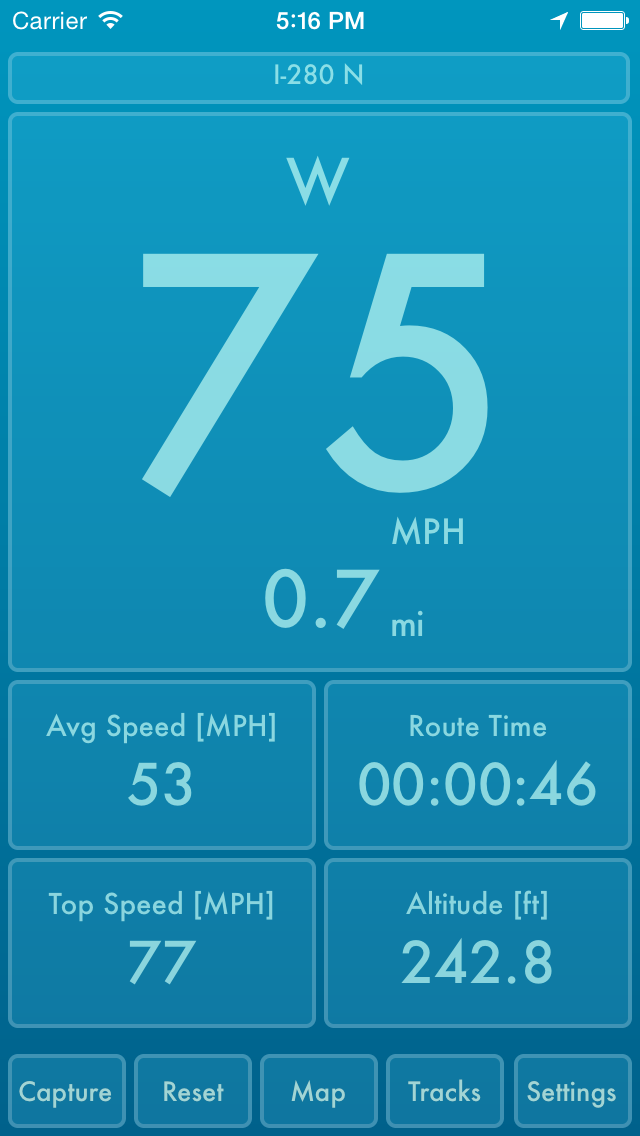
Austin based Mother Tucker, LLC today announces Speed PRO+ 2.5, an update to their GPS and Activity tracking app for iPhones and iPads. Featuring a full-screen display of average speed, top speed, distance, route time, altitude and more, Speed PRO+ gives users a realtime dashboard and map view of their current track and allows them to save their tracks with GPS and activity data. Version 2.5 adds a huge iOS12 upgrade, support for all iOS devices, and expands themes to saved tracks.
Austin, Texas - Mother Tucker, LLC today is proud to announce the release of Speed PRO+ 2.5, an update to their GPS and Activity tracking app for iPhones and iPads. Designed for GPS-equipped iPhones and iPads, Speed PRO+ gives users a realtime dashboard and map view of their current track and allows them to save their tracks with GPS and activity data. The most significant features are: realtime tracking; saved tracks; automatic pause/resume; downloadable altitude readings; track editing; and customizable speedometer themes.
Main Features:
* GPS & Activity Tracking (Step Count, Stairs Ascended, Stairs Descended)
* Track Database: iCloud or local
* Track Editing: Trim off the unwanted portions in your saved tracks
* 'Background Updates' location option allows your app to execute in the background
* Full-screen display of your Speed, Average Speed, Top Speed, Distance, Route Time, Altitude and Course
* Pause/Resume tracking by tapping Speedometer
* Auto Pause/Resume option keeps the app paused when you're stopped
* Auto Pause At option allows you to control the speed at which the app auto pauses & resumes
* Silent Mode option to turn off sound effects
* Orientation Lock option
* Option to remove the fractions from the displayed speed
* Reset Confirmations option (Turn On if you want a confirmation sheet when you tap 'Reset')
* Navigate back to the camera with a Left or Right swipe
* Share Map&Speedometer snapshots
* Share Track in KML format
* Altitude source option ("Device," "MapQuest," "USGS")
* Portrait and Landscape orientation support
* Camera Background option: Turn on to show a live feed of your camera in the speedometer background
* Mirroring option for HUD on windshield
* Units option ("Miles," "Km")
* GPS Accuracy option
* 'Background Updates' location option allows your app to execute in the background
* Built-in Speedometer Themes
* Custom Theme lets you choose your speedometer colors with a color picker
Camera Features:
* Take a Photo by Single Tapping anywhere
* Start/Stop Recording by Double Tapping anywhere
* Set Focus by Pressing & Holding 1 finger on desired point
* Set Exposure by Pressing & Holding 2 fingers on desired point
* Navigate back to the speedometer with a Left or Right swipe
* Your videos and photos are saved to your Saved Photos Album
* EXIF (Camera Timestamp GPS)
Device Requirements:
* iPhone and iPad WiFi
* iOS 11.0 or higher
* Universal Application
* 17.0 MB Hard Drive space
Pricing and Availability:
Speed PRO+ 2.5 is Free for a limited time and available worldwide exclusively through the App Store in the Navigation category.
Mother Tucker: http://www.mothertuckerllc.com
Speed PRO+ 2.5: http://www.mothertuckerllc.com/speedpro/speedpro.html
Download from iTunes: http://itunes.apple.com/us/app/speed-pro+/id510776298
Screenshot: http://www.mothertuckerllc.com/speedpro/10.PNG
App Icon: http://www.mothertuckerllc.com/speedpro256x256.png
Located in Austin, TX, Mother Tucker, LLC was founded in 2009 by Raymond Perez and Nicole Tucker Perez. Mother Tucker, LLC develops software for iOS devices including many that were featured by Apple. Copyright (C) 2009-2018 Mother Tucker, LLC. All Rights Reserved. Apple, the Apple logo, iPhone, iPod and iPad are registered trademarks of Apple Inc. in the U.S. and/or other countries.
*******
Link To Article: https://prmac.com/release-id-83190.htm
*******
---------------------------------------------------------------------------------
Note that you can alter delivered distributions at any time.
Login to your account on prMac to alter your channel selection, or to opt-out at any time.
Speed PRO+ 2.5 adds a huge iOS12 upgrade and support for all iOS devices - Published on 12/07/18
Austin based Mother Tucker, LLC today announces Speed PRO+ 2.5, an update to their GPS and Activity tracking app for iPhones and iPads. Featuring a full-screen display of average speed, top speed, distance, route time, altitude and more, Speed PRO+ gives users a realtime dashboard and map view of their current track and allows them to save their tracks with GPS and activity data. Version 2.5 adds a huge iOS12 upgrade, support for all iOS devices, and expands themes to saved tracks.
Austin, Texas - Mother Tucker, LLC today is proud to announce the release of Speed PRO+ 2.5, an update to their GPS and Activity tracking app for iPhones and iPads. Designed for GPS-equipped iPhones and iPads, Speed PRO+ gives users a realtime dashboard and map view of their current track and allows them to save their tracks with GPS and activity data. The most significant features are: realtime tracking; saved tracks; automatic pause/resume; downloadable altitude readings; track editing; and customizable speedometer themes.
Main Features:
* GPS & Activity Tracking (Step Count, Stairs Ascended, Stairs Descended)
* Track Database: iCloud or local
* Track Editing: Trim off the unwanted portions in your saved tracks
* 'Background Updates' location option allows your app to execute in the background
* Full-screen display of your Speed, Average Speed, Top Speed, Distance, Route Time, Altitude and Course
* Pause/Resume tracking by tapping Speedometer
* Auto Pause/Resume option keeps the app paused when you're stopped
* Auto Pause At option allows you to control the speed at which the app auto pauses & resumes
* Silent Mode option to turn off sound effects
* Orientation Lock option
* Option to remove the fractions from the displayed speed
* Reset Confirmations option (Turn On if you want a confirmation sheet when you tap 'Reset')
* Navigate back to the camera with a Left or Right swipe
* Share Map&Speedometer snapshots
* Share Track in KML format
* Altitude source option ("Device," "MapQuest," "USGS")
* Portrait and Landscape orientation support
* Camera Background option: Turn on to show a live feed of your camera in the speedometer background
* Mirroring option for HUD on windshield
* Units option ("Miles," "Km")
* GPS Accuracy option
* 'Background Updates' location option allows your app to execute in the background
* Built-in Speedometer Themes
* Custom Theme lets you choose your speedometer colors with a color picker
Camera Features:
* Take a Photo by Single Tapping anywhere
* Start/Stop Recording by Double Tapping anywhere
* Set Focus by Pressing & Holding 1 finger on desired point
* Set Exposure by Pressing & Holding 2 fingers on desired point
* Navigate back to the speedometer with a Left or Right swipe
* Your videos and photos are saved to your Saved Photos Album
* EXIF (Camera Timestamp GPS)
Device Requirements:
* iPhone and iPad WiFi
* iOS 11.0 or higher
* Universal Application
* 17.0 MB Hard Drive space
Pricing and Availability:
Speed PRO+ 2.5 is Free for a limited time and available worldwide exclusively through the App Store in the Navigation category.
Mother Tucker: http://www.mothertuckerllc.com
Speed PRO+ 2.5: http://www.mothertuckerllc.com/speedpro/speedpro.html
Download from iTunes: http://itunes.apple.com/us/app/speed-pro+/id510776298
Screenshot: http://www.mothertuckerllc.com/speedpro/10.PNG
App Icon: http://www.mothertuckerllc.com/speedpro256x256.png

Located in Austin, TX, Mother Tucker, LLC was founded in 2009 by Raymond Perez and Nicole Tucker Perez. Mother Tucker, LLC develops software for iOS devices including many that were featured by Apple. Copyright (C) 2009-2018 Mother Tucker, LLC. All Rights Reserved. Apple, the Apple logo, iPhone, iPod and iPad are registered trademarks of Apple Inc. in the U.S. and/or other countries.
*******
Link To Article: https://prmac.com/release-id-83190.htm
*******
---------------------------------------------------------------------------------
Note that you can alter delivered distributions at any time.
Login to your account on prMac to alter your channel selection, or to opt-out at any time.
Pixelmator Pro update adds professional color grading tool
A new article has been published at prMac.
Pixelmator Pro update adds professional color grading tool - Published on 12/06/18
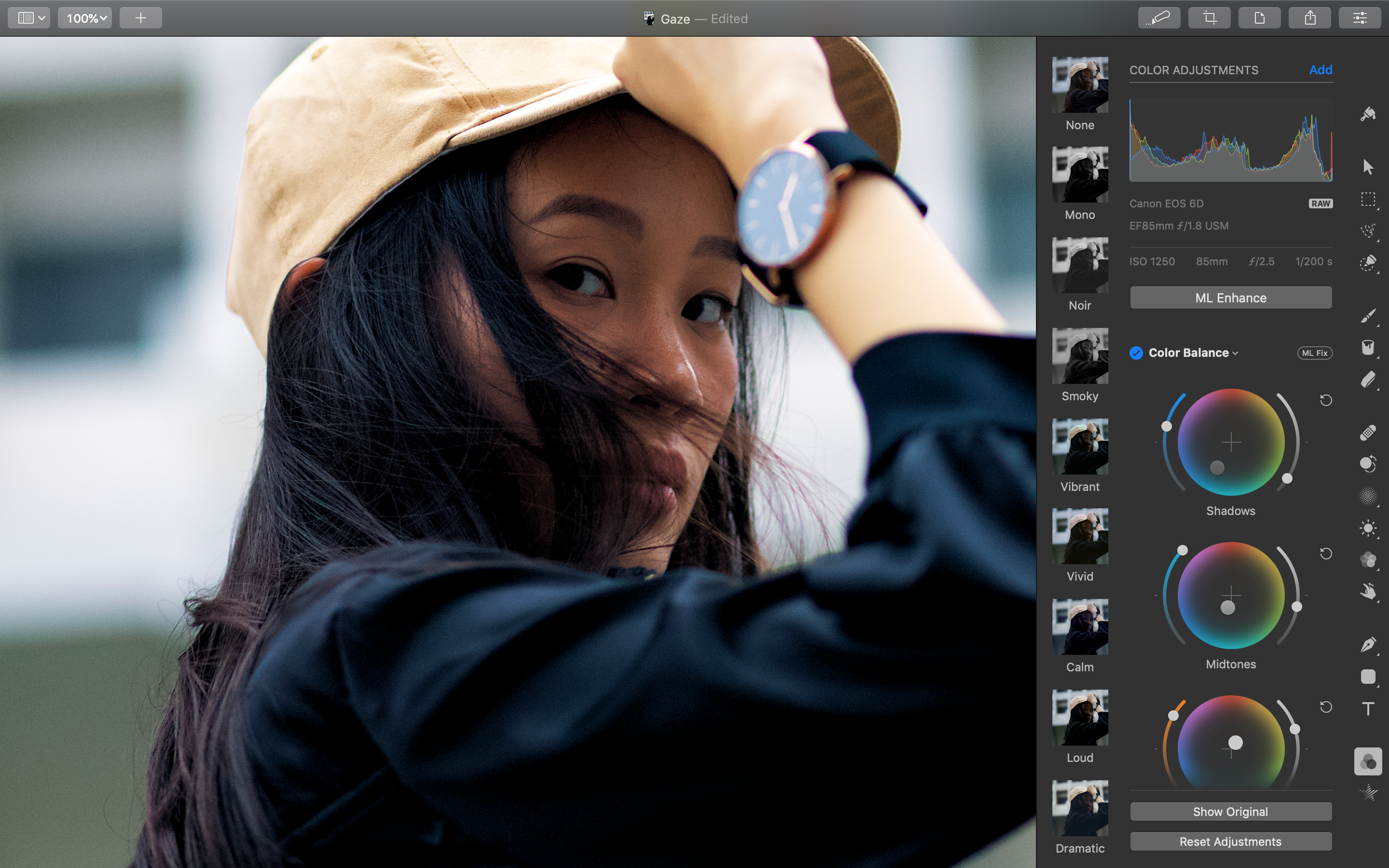
The Pixelmator Team today released Pixelmator Pro 1.2.4, an important update to their powerful image editor for macOS. Pixelmator Pro features a modern single-window interface, nondestructive, GPU-powered image editing tools, machine learning-enhanced editing features, and more. Version 1.2.4 adds a redesigned Color Balance adjustment inspired by professional color grading tools, the ability to resize images using different scaling algorithms, two new Automator actions, and more.
Vilnius, Lithuania - The Pixelmator Team today updated Pixelmator Pro to version 1.2.4, which adds a redesigned Color Balance adjustment inspired by professional color grading tools, the ability to resize images using different scaling algorithms, two new Automator actions, and more. Pixelmator Pro was also awarded the Mac App of the Year award on Apple's Best of 2018 list.
"It's been an incredible year for Pixelmator Pro," said Saulius Dailide, one of the founders of the Pixelmator Team. "We've shipped so many great updates since the 1.0 release with so many great new features, making Pixelmator Pro better and better with each release. And we've just been honored with a Mac App of the Year award as well, which is a fantastic way to close out the year."
The redesigned Color Balance adjustment brings a much more fluid and intuitive way to adjust the color balance of photos, inspired by professional video grading and editing tools. Video professionals need the fastest and easiest way to get exact color looks and the wheel interface is a favorite among them. It lets you easily add a color tint to the shadows, midtones, and highlights of an image, also adjusting the brightness and saturation of colors in each range. And Color Balance can now be improved automatically using a Core ML-powered algorithm trained on 20 million professional photos. Which makes creating beautiful photographs using Pixelmator Pro easier than ever.
With this latest update, users can now resize images using scaling algorithms designed for specific uses in image editing. The Lanczos algorithm better preserves small details when downsizing, Nearest Neighbor lets users resize pixel art while keeping the signature blocky look, while Bilinear is useful for resizing photographic images as it's fast and naturally softens edges. Pixelmator Pro 1.2.4 also includes a range of additional new features, like two new Pixelmator Pro actions for the Automator app, an improved Grain adjustment that adds film-style grain in a more natural and realistic way, as well as other improvements and fixes.
On Tuesday, Pixelmator Pro was also honored with the Mac App of the Year award for making "a huge range of pro-level image-editing tools accessible to all." The award came almost exactly a year after Pixelmator Pro was initially released on the Mac App Store and crowns a busy year for the Pixelmator Team, which included many significant updates to Pixelmator Pro, the unveiling of a new photo editing app for iPad, and updates to the original Pixelmator apps on macOS and iOS.
Pixelmator Pro 1.2.4: http://www.pixelmator.com/pro/
Purchase and Download from Mac App Store: https://itunes.apple.com/app/pixelmator-pro/id1289583905
Vimeo Video (Color Balance): https://vimeo.com/304638822
Screenshot: http://pixelmator-download.s3.amazonaws.com/press/pro/Pixelmator-Pro-1.2.4.png
App Icon: http://download.pixelmator.com/press/pro/Pixelmator-Pro-Icon.png
Founded in 2007 by two brothers, Saulius Dailide and Aidas Dailide, the Pixelmator Team develops powerful image editing apps for Mac and iOS. The team's apps have been honored with multiple Mac App of the Year awards, an iPad App of the Year award, an Apple Design Award, and many others. Pixelmator for iPad was featured at the Apple Special Event in October 2014. All Material and Software (C) Copyright 2007-2018 Pixelmator. All Rights Reserved. Apple, the Apple logo, Macintosh, iPhone, iPad, and macOS are registered trademarks of Apple Inc. in the U.S. and/or other countries. Other trademarks and registered trademarks may be the property of their respective owners.
*******
Link To Article: https://prmac.com/release-id-83188.htm
*******
---------------------------------------------------------------------------------
Note that you can alter delivered distributions at any time.
Login to your account on prMac to alter your channel selection, or to opt-out at any time.
Pixelmator Pro update adds professional color grading tool - Published on 12/06/18
The Pixelmator Team today released Pixelmator Pro 1.2.4, an important update to their powerful image editor for macOS. Pixelmator Pro features a modern single-window interface, nondestructive, GPU-powered image editing tools, machine learning-enhanced editing features, and more. Version 1.2.4 adds a redesigned Color Balance adjustment inspired by professional color grading tools, the ability to resize images using different scaling algorithms, two new Automator actions, and more.
Vilnius, Lithuania - The Pixelmator Team today updated Pixelmator Pro to version 1.2.4, which adds a redesigned Color Balance adjustment inspired by professional color grading tools, the ability to resize images using different scaling algorithms, two new Automator actions, and more. Pixelmator Pro was also awarded the Mac App of the Year award on Apple's Best of 2018 list.
"It's been an incredible year for Pixelmator Pro," said Saulius Dailide, one of the founders of the Pixelmator Team. "We've shipped so many great updates since the 1.0 release with so many great new features, making Pixelmator Pro better and better with each release. And we've just been honored with a Mac App of the Year award as well, which is a fantastic way to close out the year."
The redesigned Color Balance adjustment brings a much more fluid and intuitive way to adjust the color balance of photos, inspired by professional video grading and editing tools. Video professionals need the fastest and easiest way to get exact color looks and the wheel interface is a favorite among them. It lets you easily add a color tint to the shadows, midtones, and highlights of an image, also adjusting the brightness and saturation of colors in each range. And Color Balance can now be improved automatically using a Core ML-powered algorithm trained on 20 million professional photos. Which makes creating beautiful photographs using Pixelmator Pro easier than ever.
With this latest update, users can now resize images using scaling algorithms designed for specific uses in image editing. The Lanczos algorithm better preserves small details when downsizing, Nearest Neighbor lets users resize pixel art while keeping the signature blocky look, while Bilinear is useful for resizing photographic images as it's fast and naturally softens edges. Pixelmator Pro 1.2.4 also includes a range of additional new features, like two new Pixelmator Pro actions for the Automator app, an improved Grain adjustment that adds film-style grain in a more natural and realistic way, as well as other improvements and fixes.
On Tuesday, Pixelmator Pro was also honored with the Mac App of the Year award for making "a huge range of pro-level image-editing tools accessible to all." The award came almost exactly a year after Pixelmator Pro was initially released on the Mac App Store and crowns a busy year for the Pixelmator Team, which included many significant updates to Pixelmator Pro, the unveiling of a new photo editing app for iPad, and updates to the original Pixelmator apps on macOS and iOS.
Pixelmator Pro 1.2.4: http://www.pixelmator.com/pro/
Purchase and Download from Mac App Store: https://itunes.apple.com/app/pixelmator-pro/id1289583905
Vimeo Video (Color Balance): https://vimeo.com/304638822
Screenshot: http://pixelmator-download.s3.amazonaws.com/press/pro/Pixelmator-Pro-1.2.4.png
App Icon: http://download.pixelmator.com/press/pro/Pixelmator-Pro-Icon.png
Founded in 2007 by two brothers, Saulius Dailide and Aidas Dailide, the Pixelmator Team develops powerful image editing apps for Mac and iOS. The team's apps have been honored with multiple Mac App of the Year awards, an iPad App of the Year award, an Apple Design Award, and many others. Pixelmator for iPad was featured at the Apple Special Event in October 2014. All Material and Software (C) Copyright 2007-2018 Pixelmator. All Rights Reserved. Apple, the Apple logo, Macintosh, iPhone, iPad, and macOS are registered trademarks of Apple Inc. in the U.S. and/or other countries. Other trademarks and registered trademarks may be the property of their respective owners.
*******
Link To Article: https://prmac.com/release-id-83188.htm
*******
---------------------------------------------------------------------------------
Note that you can alter delivered distributions at any time.
Login to your account on prMac to alter your channel selection, or to opt-out at any time.
PowerOne 6.1 Delivers Powerful New Calculator Template Features
A new article has been published at prMac.
PowerOne 6.1 Delivers Powerful New Calculator Template Features - Published on 12/06/18
Infinity Softworks today releases PowerOne 6.1, an important update to the company's flagship utility for iOS devices. PowerOne delivers the most innovative way to perform multiple calculations quickly, accurately, and easily, while adding the ability to create, edit, and share templates directly from an iPhone or iPad. PowerOne Premium adds a number of useful features for individuals needing more power out of PowerOne, including the access to a wider variety of pre-created templates and themes.
Portland, Oregon - Infinity Softworks is proud to announce the release of PowerOne 6.1 today, a whole new take on mobile-focused, frequently-used calculations. With its combination of a simple interface for using and editing templates, PowerOne ensures that calculations are performed accurately, quickly, and consistently.
Additionally, PowerOne Premium adds a number of useful features for individuals needing more power out of PowerOne, including the access to a wider variety of pre-created templates and themes, create your own custom templates, as well as the ability to share templates with other PowerOne Premium users. PowerOne Premium is available as an in-app subscription service. Key features of PowerOne Premium include:
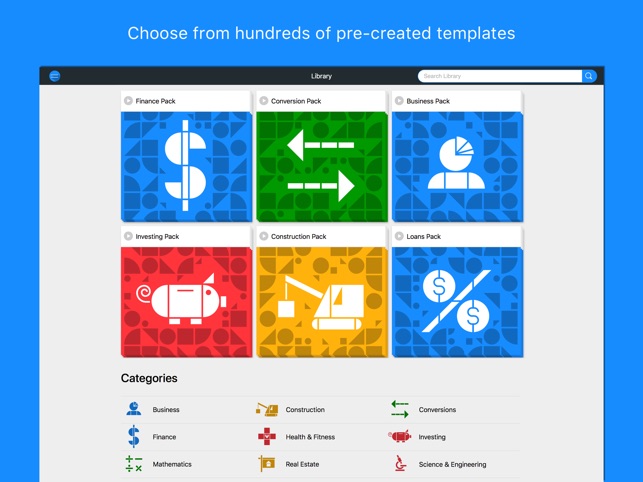
* Access to over 300 library templates
* Ability to create and edit templates
* Share templates with other Premium customers
* Share results with more sources
* Customize the look and feel with more themes
* Support future development of PowerOne
"PowerOne Premium is a great new way to get the most out of PowerOne," said Elia Freedman, Infinity Softworks CEO. "We've listened to our customers' feedback, and we're confident that this is precisely what they need to be more productive on the go."
Device Requirements:
* iPhone, iPad, and iPod touch
* Requires iOS 11.0 or later
* 8.7 MB
Pricing and Availability:
PowerOne 6.1 is Free (With In-App Purchases) and available worldwide exclusively through the App Store in the Utilities category. PowerOne Premium is available as an in-app subscription service for $2.99 per month or $19.99 per year. More information can be found at PowerOne online. For more information, please contact Elia Freedman.
Infinity Softworks: http://www.infinitysw.com
PowerOne 6.1: https://power.one
Download from iTunes: https://itunes.apple.com/app/powerone-calculator/id1141498515
PowerOne Premium Pricing: https://power.one/pricing
Screenshot: https://is2-ssl.mzstatic.com/image/thumb/Purple128/v4/da/a0/05/daa00583-f97d-0e1e-22fa-2f13df8e52e6/pr_source.png/643x0w.jpg
App Icon: https://is3-ssl.mzstatic.com/image/thumb/Purple128/v4/73/ef/8c/73ef8cd8-7b1f-84a1-ae53-99b8c2d187ae/AppIcon-0-1x_U007emarketing-0-0-GLES2_U002c0-512MB-sRGB-0-0-0-85-220-0-0-0-7.png/246x0w.jpg
Based in Portland, OR, Infinity Softworks, Inc. has been creating calculator software since 1997. Its products have been distributed to more than 20 million users on platforms ranging from iOS, Android and Windows to Palm, Windows Mobile and BlackBerry. Infinity Softworks' products have been licensed by The College Board, DEWALT Tools, Sony and many others. PowerOne was voted top Finance App by Apple in 2010. All Material and Software (C) Copyright 2018 Infinity Softworks, Inc. All Rights Reserved. Apple, the Apple logo, iPhone, iPod and iPad are registered trademarks of Apple Inc. in the U.S. and/or other countries. Other trademarks and registered trademarks may be the property of their respective owners.
*******
Link To Article: https://prmac.com/release-id-83185.htm
*******
---------------------------------------------------------------------------------
Note that you can alter delivered distributions at any time.
Login to your account on prMac to alter your channel selection, or to opt-out at any time.
PowerOne 6.1 Delivers Powerful New Calculator Template Features - Published on 12/06/18
Infinity Softworks today releases PowerOne 6.1, an important update to the company's flagship utility for iOS devices. PowerOne delivers the most innovative way to perform multiple calculations quickly, accurately, and easily, while adding the ability to create, edit, and share templates directly from an iPhone or iPad. PowerOne Premium adds a number of useful features for individuals needing more power out of PowerOne, including the access to a wider variety of pre-created templates and themes.
Portland, Oregon - Infinity Softworks is proud to announce the release of PowerOne 6.1 today, a whole new take on mobile-focused, frequently-used calculations. With its combination of a simple interface for using and editing templates, PowerOne ensures that calculations are performed accurately, quickly, and consistently.
Additionally, PowerOne Premium adds a number of useful features for individuals needing more power out of PowerOne, including the access to a wider variety of pre-created templates and themes, create your own custom templates, as well as the ability to share templates with other PowerOne Premium users. PowerOne Premium is available as an in-app subscription service. Key features of PowerOne Premium include:
* Access to over 300 library templates
* Ability to create and edit templates
* Share templates with other Premium customers
* Share results with more sources
* Customize the look and feel with more themes
* Support future development of PowerOne
"PowerOne Premium is a great new way to get the most out of PowerOne," said Elia Freedman, Infinity Softworks CEO. "We've listened to our customers' feedback, and we're confident that this is precisely what they need to be more productive on the go."
Device Requirements:
* iPhone, iPad, and iPod touch
* Requires iOS 11.0 or later
* 8.7 MB
Pricing and Availability:
PowerOne 6.1 is Free (With In-App Purchases) and available worldwide exclusively through the App Store in the Utilities category. PowerOne Premium is available as an in-app subscription service for $2.99 per month or $19.99 per year. More information can be found at PowerOne online. For more information, please contact Elia Freedman.
Infinity Softworks: http://www.infinitysw.com
PowerOne 6.1: https://power.one
Download from iTunes: https://itunes.apple.com/app/powerone-calculator/id1141498515
PowerOne Premium Pricing: https://power.one/pricing
Screenshot: https://is2-ssl.mzstatic.com/image/thumb/Purple128/v4/da/a0/05/daa00583-f97d-0e1e-22fa-2f13df8e52e6/pr_source.png/643x0w.jpg
App Icon: https://is3-ssl.mzstatic.com/image/thumb/Purple128/v4/73/ef/8c/73ef8cd8-7b1f-84a1-ae53-99b8c2d187ae/AppIcon-0-1x_U007emarketing-0-0-GLES2_U002c0-512MB-sRGB-0-0-0-85-220-0-0-0-7.png/246x0w.jpg

Based in Portland, OR, Infinity Softworks, Inc. has been creating calculator software since 1997. Its products have been distributed to more than 20 million users on platforms ranging from iOS, Android and Windows to Palm, Windows Mobile and BlackBerry. Infinity Softworks' products have been licensed by The College Board, DEWALT Tools, Sony and many others. PowerOne was voted top Finance App by Apple in 2010. All Material and Software (C) Copyright 2018 Infinity Softworks, Inc. All Rights Reserved. Apple, the Apple logo, iPhone, iPod and iPad are registered trademarks of Apple Inc. in the U.S. and/or other countries. Other trademarks and registered trademarks may be the property of their respective owners.
*******
Link To Article: https://prmac.com/release-id-83185.htm
*******
---------------------------------------------------------------------------------
Note that you can alter delivered distributions at any time.
Login to your account on prMac to alter your channel selection, or to opt-out at any time.
Recosoft ships ID2Office 2019 - Export InDesign to Word, PPT & Keynote
A new article has been published at prMac.
Recosoft ships ID2Office 2019 - Export InDesign to Word, PPT & Keynote - Published on 12/06/18
Recosoft Corporation today releases ID2Office 2019, the latest version of its InDesign to Microsoft Word, PowerPoint and Apple Keynote conversion plug-in for Mac and Windows. ID2Office converts InDesign files to common Office formats such as Microsoft Word, PowerPoint and Apple Keynote while maintaining the layout fidelity. ID2Office 2019 adds support for Adobe InDesign CC 2019, recognizes the split/span property, and now allows converting images to JPEG type.
Osaka, Japan - Recosoft Corporation the developers of workflow automation plug-ins for Adobe(R) Creative Cloud(R) and creators of PDF conversion software has released ID2Office 2019, the newest version of the InDesign to Word, PowerPoint and Keynote formats conversion plug-in for Adobe InDesign(R) CC 2019.
ID2Office 2019 adds support for Adobe InDesign CC 2019, the latest release of InDesign CC for macOS and Windows. Additionally, ID2Office 2019 recognizes the split/span property, resulting in enhanced layout preservation. Finally, ID2Office 2019 now allows converting images to JPEG type, significantly reducing the file size of image-centric documents.
"ID2Office 2019 includes many enhancements that were requested by our customers over the years; supporting InDesign CC 2019 guarantees unfettered usage of ID2Office with the latest version of Adobe InDesign"
Paramjit Chadha, MD, Recosoft Corporation
ID2Office converts InDesign files to editable Microsoft Word, PowerPoint and Apple Keynote formats; converting the text, associated styles, paragraph structure, corresponding property information, frames linking, tables, graphics and other objects while matching and maintaining the layout fidelity, resulting in enhanced workflow automation for Creative Professionals. Key New Features include:
* Support for InDesign Creative Cloud 2019:
ID2Office 2019 now supports and integrates with InDesign CC 2019. InDesign CC through CC 2018 are supported as well.
* JPEG image export:
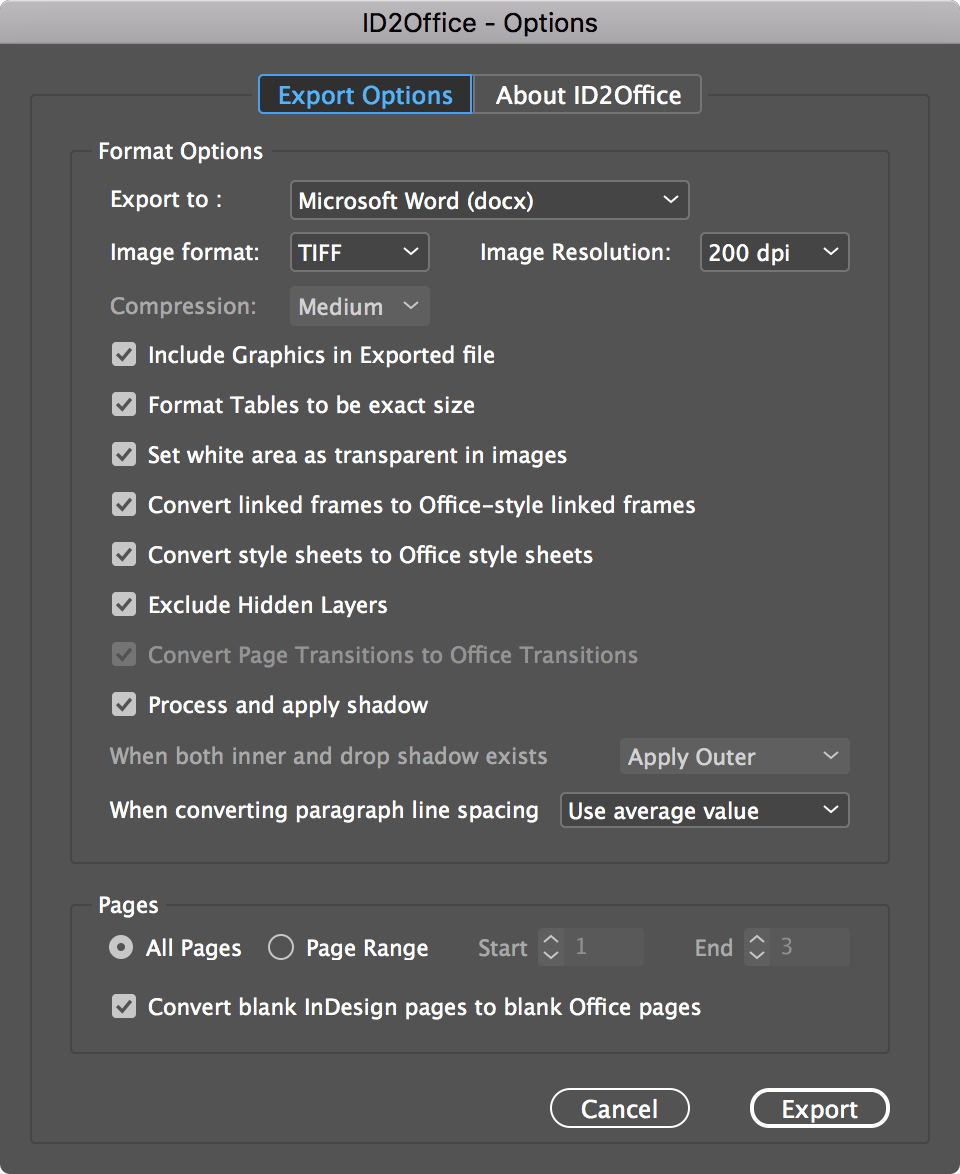
You can now specify JPEG as the image type and specify the compression quality of the JPEG images; resulting in smaller file sizes.
* Split/Span property recognition:
ID2Office 2019 includes layout enhancements where span/split column property are recognized, and the layout is preserved as accurately as possible when converting to any of the supported formats.
* Additional InDesign property support:
Tab markers are now processed and replicated accurately. Additionally, grouped objects with text/tables are now editable in the resulting Word, PowerPoint and Keynote file.
System Requirements
* macOS 10.10.x or higher
* Intel based Mac
* Windows 7, Windows 8 or Windows 10
* Minimum Pentium III computer
* InDesign CC, CC 2014, CC 2015, CC 2017, CC 2018 or CC 2019
Pricing and Availability:
ID2Office 2019 is available immediately in the following configurations from the Recosoft web store (per license):
* ID2Office Standard 2019 Annual subscription (macOS/Windows) $199.00 (USD)
* ID2Office Professional 2019 Annual subscription (macOS only) $249.00 (USD)
Recosoft Corporation: https://www.recosoft.com
ID2Office 2019: https://www.recosoft.com/products/id2office
Screenshot (ID2Office 2019): http://www.recosoftcorporation.com/ftpenglish2/Export-InDesign-to-Word-Using-ID2Office-2019.png
Recosoft Corporation has pioneered PDF2Office(R), the de-facto PDF-to-Excel, PDF-to-Word, PDF-to-PowerPoint, PDF-to-OmniGraffle conversion utility; PDF2Office(R) for iWork, the PDF-to-Keynote, PDF-to-Numbers and PDF-to-Pages conversion application; ID2Office, the InDesign-to-Word, InDesign-to-PowerPoint converter; and PDF2ID(R) the de-facto PDF-to-InDesign conversion tool. The company is a leader in designing and delivering PDF converters and InDesign software solutions enhancing workflow automation and productivity. ID2Office, PDF2Office, PDF2ID, PDFtoID are trademarks or registered trademarks of Recosoft Corporation in the US and/or other countries. Microsoft, Excel, PowerPoint, Word and the Office logo are trademarks or registered trademarks of Microsoft Corporation in the US and/or other countries. Adobe, InDesign and Creative Cloud are either registered trademarks or trademarks of Adobe System Incorporated in the US and/or other countries. Apple, Macintosh, macOS, Mac, Numbers,
Keynote, Pages, iWork, iPod, iPhone, iOS, iPad are either trademarks or registered trademarks of Apple, Inc. in the US and or other countries. All other trademarks are recognized and are the property of their respective owners.
*******
Link To Article: https://prmac.com/release-id-83184.htm
*******
---------------------------------------------------------------------------------
Note that you can alter delivered distributions at any time.
Login to your account on prMac to alter your channel selection, or to opt-out at any time.
Recosoft ships ID2Office 2019 - Export InDesign to Word, PPT & Keynote - Published on 12/06/18
Recosoft Corporation today releases ID2Office 2019, the latest version of its InDesign to Microsoft Word, PowerPoint and Apple Keynote conversion plug-in for Mac and Windows. ID2Office converts InDesign files to common Office formats such as Microsoft Word, PowerPoint and Apple Keynote while maintaining the layout fidelity. ID2Office 2019 adds support for Adobe InDesign CC 2019, recognizes the split/span property, and now allows converting images to JPEG type.
Osaka, Japan - Recosoft Corporation the developers of workflow automation plug-ins for Adobe(R) Creative Cloud(R) and creators of PDF conversion software has released ID2Office 2019, the newest version of the InDesign to Word, PowerPoint and Keynote formats conversion plug-in for Adobe InDesign(R) CC 2019.
ID2Office 2019 adds support for Adobe InDesign CC 2019, the latest release of InDesign CC for macOS and Windows. Additionally, ID2Office 2019 recognizes the split/span property, resulting in enhanced layout preservation. Finally, ID2Office 2019 now allows converting images to JPEG type, significantly reducing the file size of image-centric documents.
"ID2Office 2019 includes many enhancements that were requested by our customers over the years; supporting InDesign CC 2019 guarantees unfettered usage of ID2Office with the latest version of Adobe InDesign"
Paramjit Chadha, MD, Recosoft Corporation
ID2Office converts InDesign files to editable Microsoft Word, PowerPoint and Apple Keynote formats; converting the text, associated styles, paragraph structure, corresponding property information, frames linking, tables, graphics and other objects while matching and maintaining the layout fidelity, resulting in enhanced workflow automation for Creative Professionals. Key New Features include:
* Support for InDesign Creative Cloud 2019:
ID2Office 2019 now supports and integrates with InDesign CC 2019. InDesign CC through CC 2018 are supported as well.
* JPEG image export:
You can now specify JPEG as the image type and specify the compression quality of the JPEG images; resulting in smaller file sizes.
* Split/Span property recognition:
ID2Office 2019 includes layout enhancements where span/split column property are recognized, and the layout is preserved as accurately as possible when converting to any of the supported formats.
* Additional InDesign property support:
Tab markers are now processed and replicated accurately. Additionally, grouped objects with text/tables are now editable in the resulting Word, PowerPoint and Keynote file.
System Requirements
* macOS 10.10.x or higher
* Intel based Mac
* Windows 7, Windows 8 or Windows 10
* Minimum Pentium III computer
* InDesign CC, CC 2014, CC 2015, CC 2017, CC 2018 or CC 2019
Pricing and Availability:
ID2Office 2019 is available immediately in the following configurations from the Recosoft web store (per license):
* ID2Office Standard 2019 Annual subscription (macOS/Windows) $199.00 (USD)
* ID2Office Professional 2019 Annual subscription (macOS only) $249.00 (USD)
Recosoft Corporation: https://www.recosoft.com
ID2Office 2019: https://www.recosoft.com/products/id2office
Screenshot (ID2Office 2019): http://www.recosoftcorporation.com/ftpenglish2/Export-InDesign-to-Word-Using-ID2Office-2019.png
Recosoft Corporation has pioneered PDF2Office(R), the de-facto PDF-to-Excel, PDF-to-Word, PDF-to-PowerPoint, PDF-to-OmniGraffle conversion utility; PDF2Office(R) for iWork, the PDF-to-Keynote, PDF-to-Numbers and PDF-to-Pages conversion application; ID2Office, the InDesign-to-Word, InDesign-to-PowerPoint converter; and PDF2ID(R) the de-facto PDF-to-InDesign conversion tool. The company is a leader in designing and delivering PDF converters and InDesign software solutions enhancing workflow automation and productivity. ID2Office, PDF2Office, PDF2ID, PDFtoID are trademarks or registered trademarks of Recosoft Corporation in the US and/or other countries. Microsoft, Excel, PowerPoint, Word and the Office logo are trademarks or registered trademarks of Microsoft Corporation in the US and/or other countries. Adobe, InDesign and Creative Cloud are either registered trademarks or trademarks of Adobe System Incorporated in the US and/or other countries. Apple, Macintosh, macOS, Mac, Numbers,
Keynote, Pages, iWork, iPod, iPhone, iOS, iPad are either trademarks or registered trademarks of Apple, Inc. in the US and or other countries. All other trademarks are recognized and are the property of their respective owners.
*******
Link To Article: https://prmac.com/release-id-83184.htm
*******
---------------------------------------------------------------------------------
Note that you can alter delivered distributions at any time.
Login to your account on prMac to alter your channel selection, or to opt-out at any time.
AlphaDigits Top Rated Mobile Apps November 2018
A new article has been published at prMac.
AlphaDigits Top Rated Mobile Apps November 2018 - Published on 12/04/18
Mobile app review publisher AlphaDigits has named top rated applications for November 2018. Scandy Pro is a special 3D scanner. Shiba's Adventure is an app for dog lovers. Identiti offers the way to math success. Bookie allows downloading the books for free. Hidden Wordz takes the word creation game to a new level.
Long Island, New York - Mobile app review publisher AlphaDigits has named top rated applications for November 2018. AlphaDigits names five top class mobile apps every month based on the reviews published in the website during the particular month. This website has now released the names of top rated mobile apps for the month of November.
Scandy Pro (10/10): For all those artists out there, Scandy Pro puts the power of 3D scanning in your hands, so you can capture art when you see it. You don't need to have your special 3D scanner by your side. With your iPhone you'll be able to scan and save and make your manipulations later. Once you complete taking a scan, all you do is save it and then pull it up for editing and use when you are ready for it.
Shiba's Adventure (9.5/10): If you love cute little dogs, you have to try out Shiba's Adventure. Kids and adults alike will get a kick out of this game because its retro RPG with a Minecraft look and feel. The gist of the game is you are a dog, and a cute one at that, so that in and of itself makes you a target. As this dog, you must drop into a dungeon and survive the many perils that surround you.
Identiti (9/10): Not everyone is a superstar at math. Some are born with it, and the rest have to work hard at it. If you are one of the lucky members of the latter group, know that it doesn't have to be difficult to get better. You can play your way to math success simply by downloading "Identiti".
Bookie (8.5/10): This app also allows you to download books for free, which is one of this app's best features. This will allow you to read books at your own pace, at your own convenience, as well as build an impressive digital library to take anywhere - all at the tips of your fingers, from anywhere, at any place, at any time. The Bookie app is available for Android devices.
Hidden Wordz (8/10): Word games are the craze if you're looking for entertainment that's not just about defense and destruction, Hidden Wordz is one to download. It takes the word creation game to a new level by introducing different topics with sets of words that revolve around those topics and within game sounds and graphics that make this game stand out from the others.
Joe Ellen, an Editor at AlphaDigits said, "We have redesigned our network websites AppReviewsLive and AppsandApplications to give a minimalist effect. We hope our readers can enjoy distraction free reading now." Developers can also contact AlphaDigits through the onsite form, mail or the contact form to get their apps reviewed.
AlphaDigits: https://alphadigits.com
Submit App for Review: https://alphadigits.com/submit-app-for-review/
AlphaDigits is a review site run by a few app marketers. Enjoying the support from a handy amount of regular visitors, AlphaDigits provides reviews for iPhone, iPad and Android apps. Copyright (C) 2018 AlphaDigits. All Rights Reserved. Apple, the Apple logo, iPhone, iPod and iPad are registered trademarks of Apple Inc. in the U.S. and/or other countries.
*******
Link To Article: https://prmac.com/release-id-83186.htm
*******
---------------------------------------------------------------------------------
Note that you can alter delivered distributions at any time.
Login to your account on prMac to alter your channel selection, or to opt-out at any time.
AlphaDigits Top Rated Mobile Apps November 2018 - Published on 12/04/18
Mobile app review publisher AlphaDigits has named top rated applications for November 2018. Scandy Pro is a special 3D scanner. Shiba's Adventure is an app for dog lovers. Identiti offers the way to math success. Bookie allows downloading the books for free. Hidden Wordz takes the word creation game to a new level.
Long Island, New York - Mobile app review publisher AlphaDigits has named top rated applications for November 2018. AlphaDigits names five top class mobile apps every month based on the reviews published in the website during the particular month. This website has now released the names of top rated mobile apps for the month of November.
Scandy Pro (10/10): For all those artists out there, Scandy Pro puts the power of 3D scanning in your hands, so you can capture art when you see it. You don't need to have your special 3D scanner by your side. With your iPhone you'll be able to scan and save and make your manipulations later. Once you complete taking a scan, all you do is save it and then pull it up for editing and use when you are ready for it.
Shiba's Adventure (9.5/10): If you love cute little dogs, you have to try out Shiba's Adventure. Kids and adults alike will get a kick out of this game because its retro RPG with a Minecraft look and feel. The gist of the game is you are a dog, and a cute one at that, so that in and of itself makes you a target. As this dog, you must drop into a dungeon and survive the many perils that surround you.
Identiti (9/10): Not everyone is a superstar at math. Some are born with it, and the rest have to work hard at it. If you are one of the lucky members of the latter group, know that it doesn't have to be difficult to get better. You can play your way to math success simply by downloading "Identiti".
Bookie (8.5/10): This app also allows you to download books for free, which is one of this app's best features. This will allow you to read books at your own pace, at your own convenience, as well as build an impressive digital library to take anywhere - all at the tips of your fingers, from anywhere, at any place, at any time. The Bookie app is available for Android devices.
Hidden Wordz (8/10): Word games are the craze if you're looking for entertainment that's not just about defense and destruction, Hidden Wordz is one to download. It takes the word creation game to a new level by introducing different topics with sets of words that revolve around those topics and within game sounds and graphics that make this game stand out from the others.
Joe Ellen, an Editor at AlphaDigits said, "We have redesigned our network websites AppReviewsLive and AppsandApplications to give a minimalist effect. We hope our readers can enjoy distraction free reading now." Developers can also contact AlphaDigits through the onsite form, mail or the contact form to get their apps reviewed.
AlphaDigits: https://alphadigits.com
Submit App for Review: https://alphadigits.com/submit-app-for-review/
AlphaDigits is a review site run by a few app marketers. Enjoying the support from a handy amount of regular visitors, AlphaDigits provides reviews for iPhone, iPad and Android apps. Copyright (C) 2018 AlphaDigits. All Rights Reserved. Apple, the Apple logo, iPhone, iPod and iPad are registered trademarks of Apple Inc. in the U.S. and/or other countries.
*******
Link To Article: https://prmac.com/release-id-83186.htm
*******
---------------------------------------------------------------------------------
Note that you can alter delivered distributions at any time.
Login to your account on prMac to alter your channel selection, or to opt-out at any time.
Subscribe to:
Posts (Atom)