A new article has been published at prMac.
Medidex Launches Drug Abuse Prevention Features on MedManage mHealth App - Published on 01/25/19
Medidex Inc. and Count It! Lock It! Drop It! have launched a new partnership to add drug abuse prevention features to the MedManage 2.3.1 mobile app for iOS and Android devices. MedManage can help patients keep track of medications and reduce risk of possible medication misuse. Features of the app include a daily dose tracking calendar/log, medication info lookup, clear usage instructions, drug adherence charts, and a med drop box locator to dispose of unused supply.
New York City, New York - Medidex Inc. is proud to announce the release and availability of MedManage 2.3.1, their cloud-based medication management system for patients, nurses, or caregivers, available now for iPhone, iPad, iPod touch, and Android devices.
The app allows common tasks which are often done manually or from memory to be done in the digital world. Create a portable medication list with directions so you never forget to take medication no matter where you are, understand information and look up side effects and warnings about the medication you are taking and find a permanent medication disposal drop box near you if you have unwanted or unused medication.
Count It! Lock It! Drop It!, with similar goals around medication adherence and medication safety, worked with MedManage to make another valuable resource available to its users; a drop box finder. This finder allows the app user to find a permanent disposal site nearest to the zip code they type in. MedManage locates the nearest site along with the location's address, phone number and hours of operation.
Idle medications left in drug cabinets are easy targets for experimentation and abuse. Now it's as simple as ever to dispose of your unwanted, expired or unused prescription medication and help reduce access to prescriptions in the home. Read more about the partnership at the Medidex Announcement Blog.
Count It! Lock It! Drop It! (R) (CLD) is a comprehensive community initiative for prescription drug misuse prevention based in Coffee County, Tennessee and locally in all 95 counties of Tennessee. The CLD initiative is leading a statewide effort associated with BlueCross BlueShield of Tennessee, Inc., an Independent Licensee of the Blue Cross and Blue Shield Association to combat the misuse of prescription medication focusing on three simple steps: Count your pills, Lock them up, and Drop them for proper disposal. According to the Tennessee Department of Health, 6,879,698 opioid prescriptions were written in 2017, and it is CLD's mission is to create a cultural shift around prescription drug misuse to help keep communities safe and drug-free.
Device Requirements:
* iPhone, iPad, and iPod touch
* Universal Application
* Requires iOS 10.0 or later
* 77.8 MB
Pricing and Availability:
MedManage 2.3.1 is free and is available worldwide through the App Store in the Medical category. An Android version of the app is available through Google Play.
Medidex: http://medidexhealth.com
MedManage 2.3.1: http://mymedicationlog.com
More Information: https://themedidex.com/medidex-partners-with-cld/
Download from App Store: https://itunes.apple.com/app/medmanage/id1352800344
Download from Google Play: https://play.google.com/store/apps/details?id=medidex.com.medmanage
Partnership Image: https://themedidex.com/wp-content/uploads/2019/01/CLD-and-Medidex.png
The founding ideology of Medidex is providing a secure and user-friendly platform for patients to easily manage their health records and to allow patients to share their records with multiple doctors and other healthcare providers conveniently. We hope to empower patients in their ability to connect to digital and mobile health tools and democratize ownership of health records. For providers, we plan to continuously help support and innovate their practices and organizations to keep up with fast-paced digital changes. The services include but are not limited to Electronic Health Records (EHR), Practice Management, and Patient Portals which will include communication tools, health record storage, real-time health information transfer, device connectibility, and analytics. All Material and Software (C) Copyright 2019 Medidex. All Rights Reserved. Apple, the Apple logo, iPhone, iPod and iPad are registered trademarks of Apple Inc. in the U.S. and/or other countries. Other trademarks
and registered trademarks may be the property of their respective owners.
*******
Link To Article: https://prmac.com/release-id-83276.htm
*******
---------------------------------------------------------------------------------
Note that you can alter delivered distributions at any time.
Login to your account on prMac to alter your channel selection, or to opt-out at any time.


Chickku App Brings Local into Social
A new article has been published at prMac.
Chickku App Brings Local into Social - Published on 01/24/19
Chickku LLC recently launched Chickku 1.2.4, the latest version of its local social app for iOS and Android devices. Leveraging location-based technology, Chickku helps users connect with other people for common causes and interests, places and businesses in their local vicinity. Users can find like-minded friends in their area, join a local issue, discover places of interests around their location, rate and recommend restaurants and other hangouts, and even buy or sell things locally for free.
Fremont, California - Chickku LLC recently launched the latest version (1.2.4) of its local social app, Chickku app. The app, which can be downloaded from Apple iTunes and Google Play Store for free, helps users connect with other people, for common causes and interests, places and businesses in their local vicinity.
"Chickku app is a special platform that effectively uses location based technology to bring people together. With Chickku app, you can find like-minded friends in your area, join a local issue, discover places of interests around your location, rate and recommend restaurants and other hangouts, and even buy or sell things locally for free!," exclaims Sudeep Kaushik, CEO, Chickku LLC.
The app helps users in the following ways:
* Make new friends nearby: The app helps users to find people with similar interests and hobbies living in their vicinity. Like-minded people can communicate through instant messaging in the app, make introductions and meet to discuss and follow their mutual interests.
* Social profile: Users can create a dedicated wall page to showcase themselves so that people in their vicinity can get to know them and connect with them.
* Local causes: Every community faces some challenges and fights together to alleviate pain points. With Chickku app, users can find social causes in their area and participate in making their community a better place to live.
* Local promotions: Users can find local promotions, sale, discounts on their favourite products sold by the shops in their locality. Tuning into the Chickku app helps people save money by finding instant local deals..
* Local events: The app helps users find local gigs and events. From their favourite band playing in a club to a flash sale to cultural events, users can choose to get notifications of all the events happening in their area.
* Ratings & Recommendations: Users can find ratings and reviews by the neighbourhood on local restaurants, shops, and even service providers. The recommendations and reviews help users make educated purchasing.
* Buy/Sell locally: The free Chickku platform helps sellers showcase their products & services, and pricing & deals, online. Buyers, on the other hand, can find products they are looking for and can look up their prices before making a purchase decision.
* Instant Private Messaging: Users as well as local businesses can communicate with each easily with Instant Private Messaging feature provided inside the App. Connecting locally has never been easier.
Device Requirement:
* OS Requirements: iOS 9.0 or later & Android 4.1 and up
* Compatible with iPhone, iPad, and iPod touch
* Size: iOS - 43.9 MB & Android - 23 MB
Pricing and Availability:
Chickku 1.2.4 is currently available for free on the App Store under the Social Networking category and Google Play under the Dating category.
Chickku 1.2.4: https://chickku.com/
Download from iTunes: https://itunes.apple.com/us/app/chickku/id1148037924
Download from Google Play: https://play.google.com/store/apps/details?id=com.chickku.breakout&hl=en
App Screenshots 1 : https://lh3.googleusercontent.com/Zp4U1bdAWBORS_o037YZCofn5Prjk9SIByLyeNepZSjqQTlfbt32V3SMZIGhef1Z908=w1338-h694
App Screenshots 2: https://lh3.googleusercontent.com/dr_plGYVgHJwAAm0D4wmKKEPr2tJKEUH6ISAvQQL29sF8GSDSzyv1KPsQkAM54YFsjg=w1338-h694
App Icon: https://lh3.googleusercontent.com/b6EsTaqd3Pf1tZiaEVZFAH6u2hkYv1itOqSY2aELYKmKuyZ2sjPzxVOUr0ouTsamE88=s180
Chickku LLC is a Software Development and Services company that is dedicated to providing useful Apps and Services to general consumers and businesses. At present the company has launched a product called Chickku Local, a mobile app platform that is aimed at connecting local consumers and users with local business and providing its users with enhanced local experience. All Material and Software (C) Copyright 2019 Chickku LLC. All Rights Reserved. Apple, the Apple logo, iPhone, iPod, and iPad are registered trademarks of Apple Inc. in the U.S. and/or other countries. Other trademarks and registered trademarks may be the property of their respective owners.
*******
Link To Article: https://prmac.com/release-id-83275.htm
*******
---------------------------------------------------------------------------------
Note that you can alter delivered distributions at any time.
Login to your account on prMac to alter your channel selection, or to opt-out at any time.
Chickku App Brings Local into Social - Published on 01/24/19
Chickku LLC recently launched Chickku 1.2.4, the latest version of its local social app for iOS and Android devices. Leveraging location-based technology, Chickku helps users connect with other people for common causes and interests, places and businesses in their local vicinity. Users can find like-minded friends in their area, join a local issue, discover places of interests around their location, rate and recommend restaurants and other hangouts, and even buy or sell things locally for free.
Fremont, California - Chickku LLC recently launched the latest version (1.2.4) of its local social app, Chickku app. The app, which can be downloaded from Apple iTunes and Google Play Store for free, helps users connect with other people, for common causes and interests, places and businesses in their local vicinity.
"Chickku app is a special platform that effectively uses location based technology to bring people together. With Chickku app, you can find like-minded friends in your area, join a local issue, discover places of interests around your location, rate and recommend restaurants and other hangouts, and even buy or sell things locally for free!," exclaims Sudeep Kaushik, CEO, Chickku LLC.
The app helps users in the following ways:
* Make new friends nearby: The app helps users to find people with similar interests and hobbies living in their vicinity. Like-minded people can communicate through instant messaging in the app, make introductions and meet to discuss and follow their mutual interests.
* Social profile: Users can create a dedicated wall page to showcase themselves so that people in their vicinity can get to know them and connect with them.
* Local causes: Every community faces some challenges and fights together to alleviate pain points. With Chickku app, users can find social causes in their area and participate in making their community a better place to live.
* Local promotions: Users can find local promotions, sale, discounts on their favourite products sold by the shops in their locality. Tuning into the Chickku app helps people save money by finding instant local deals..
* Local events: The app helps users find local gigs and events. From their favourite band playing in a club to a flash sale to cultural events, users can choose to get notifications of all the events happening in their area.
* Ratings & Recommendations: Users can find ratings and reviews by the neighbourhood on local restaurants, shops, and even service providers. The recommendations and reviews help users make educated purchasing.
* Buy/Sell locally: The free Chickku platform helps sellers showcase their products & services, and pricing & deals, online. Buyers, on the other hand, can find products they are looking for and can look up their prices before making a purchase decision.
* Instant Private Messaging: Users as well as local businesses can communicate with each easily with Instant Private Messaging feature provided inside the App. Connecting locally has never been easier.
Device Requirement:
* OS Requirements: iOS 9.0 or later & Android 4.1 and up
* Compatible with iPhone, iPad, and iPod touch
* Size: iOS - 43.9 MB & Android - 23 MB
Pricing and Availability:
Chickku 1.2.4 is currently available for free on the App Store under the Social Networking category and Google Play under the Dating category.
Chickku 1.2.4: https://chickku.com/
Download from iTunes: https://itunes.apple.com/us/app/chickku/id1148037924
Download from Google Play: https://play.google.com/store/apps/details?id=com.chickku.breakout&hl=en
App Screenshots 1 : https://lh3.googleusercontent.com/Zp4U1bdAWBORS_o037YZCofn5Prjk9SIByLyeNepZSjqQTlfbt32V3SMZIGhef1Z908=w1338-h694
App Screenshots 2: https://lh3.googleusercontent.com/dr_plGYVgHJwAAm0D4wmKKEPr2tJKEUH6ISAvQQL29sF8GSDSzyv1KPsQkAM54YFsjg=w1338-h694
App Icon: https://lh3.googleusercontent.com/b6EsTaqd3Pf1tZiaEVZFAH6u2hkYv1itOqSY2aELYKmKuyZ2sjPzxVOUr0ouTsamE88=s180
Chickku LLC is a Software Development and Services company that is dedicated to providing useful Apps and Services to general consumers and businesses. At present the company has launched a product called Chickku Local, a mobile app platform that is aimed at connecting local consumers and users with local business and providing its users with enhanced local experience. All Material and Software (C) Copyright 2019 Chickku LLC. All Rights Reserved. Apple, the Apple logo, iPhone, iPod, and iPad are registered trademarks of Apple Inc. in the U.S. and/or other countries. Other trademarks and registered trademarks may be the property of their respective owners.
*******
Link To Article: https://prmac.com/release-id-83275.htm
*******
---------------------------------------------------------------------------------
Note that you can alter delivered distributions at any time.
Login to your account on prMac to alter your channel selection, or to opt-out at any time.
File Extractor for macOS Quickly Extracts Files Hidden in Other Files
A new article has been published at prMac.
File Extractor for macOS Quickly Extracts Files Hidden in Other Files - Published on 01/24/19
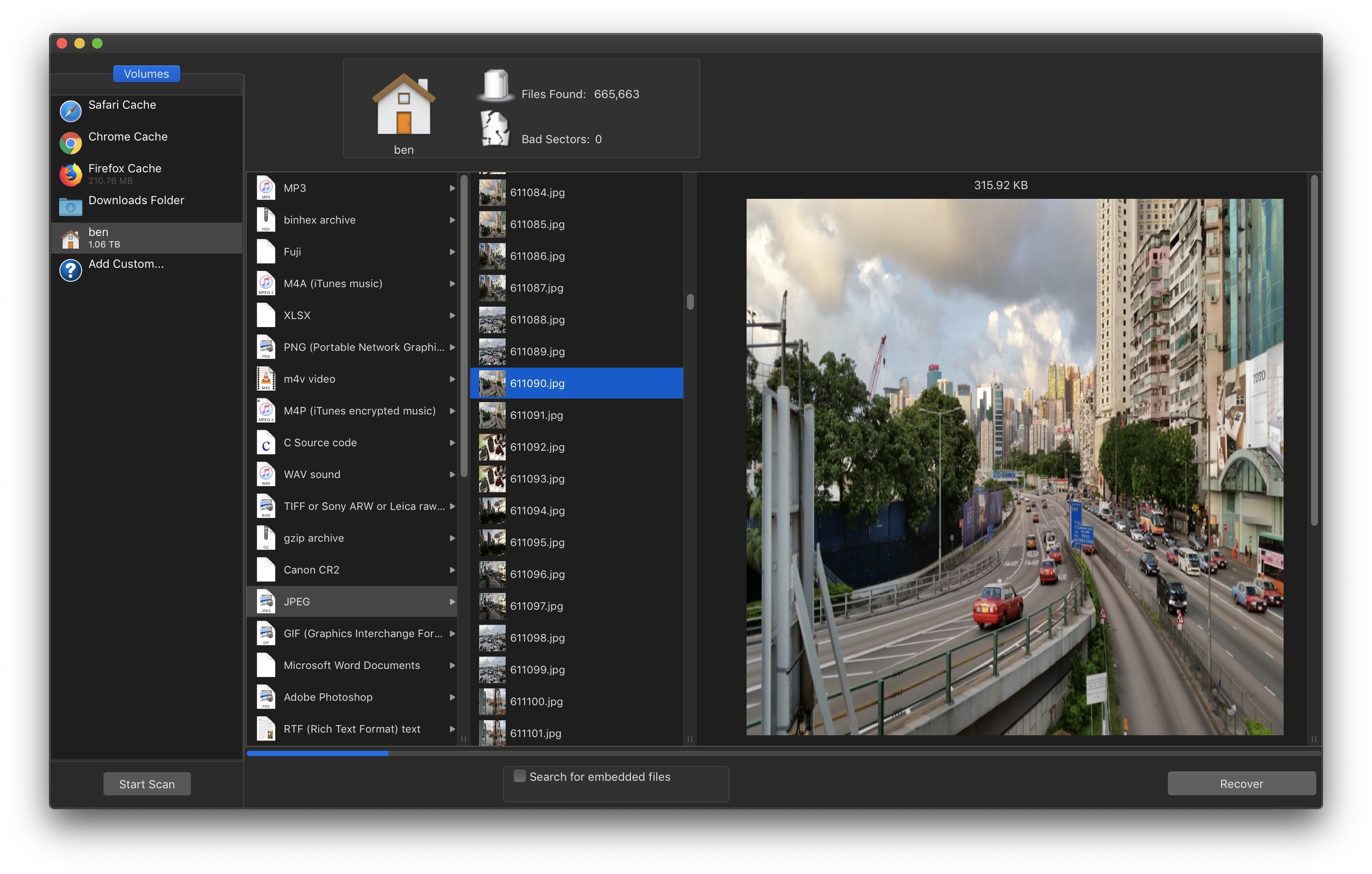
New Zealand-based developer Mac OS X File Recovery announces File Extractor 1.0, their new file extraction utility for macOS computers. File Extractor quickly extracts files that are hidden inside other files stored on a Mac's hard drive. The app offers the ability to extract JPG, MP3, GIF, and many other types of files that are embedded inside PDF files, PSD files, DMG disk images, and much more. The app makes use of the same codebase used to develop data recovery software for the CIA and FBI.
Auckland, New Zealand - Independent developer Mac OS X File Recovery today is proud to announce the release and immediate availability of File Extractor 1.0, their new file extraction utility for macOS computers. The app offers users the ability to extract files embedded inside other files, such as PDFs, DMG disk images, and many other files formats. File Extractor can recover over 100 different file formats.
File Extractor can extract text files, graphics images, individual files, and other types of files embedded in any blob of data. Once the files have been scanned, users can select the files they'd like to recover with just a few clicks of their mouse. The app uses state-of-the-art algorithms to extract data, even from third-party formats that might otherwise be inaccessible.
"File Extractor is the result of five years of development, which resulted in bulk data recovery software that was purchased and used by the United States Central Intelligence Agency (CIA) and Federal Bureau of Investigation (FBI)," says Mac OS X File Recovery CEO Ben Slaney. "While there are competitors on the market, they are slower, and their results are nowhere near as robust."
The app is an excellent utility for use when the need arises to extract data from files, browser caches, DMG disk images, and other data sources. Users will find File Extractor especially helpful when attempting to extract files from those pesky third-party file formats.
File Extractor uses state-of-the-art algorithms designed to extract data from any type of file. Users will be surprised at the quantity, quality, and types of data the app will extract from source files. All extracted text is saved as "Raw Text (Plain)" files, meaning they can be read in any plain text editor, like the macOS TextEdit app.
Deleted files can be recovered from disk images created using Disk Utility, as the app can scan deleted files from the disk image. The feature can also be used with SD cards, hard drives, and other media types. (On .DMG files created from a digital camera's memory card (using Disk Utility) users can recover deleted files from their camera or recover files if the card becomes corrupted.)
File Extractor can scan:
* PDF files (extracts both text and images)
* Graphics images (it can extract separate images contained in them (such as PSD files))
* Disk images (with the .dmg extension) to recover deleted files
* Any large complex filetype. For example, JPG files embedded in Photoshop documents
* Browser caches. Users can view the files they contain using File Extractor
* Corrupted documents for information that can be salvaged
"I believe users will be amazed at the files they can extract and recover by using File Extractor," continues Ben. "The app is the ultimate file extraction utility, easily out performing any of the competitors available for the macOS operating system on the market today. I can't wait to hear how our users take advantage of its power!"
Device Requirements:
* Mac OS X 10.7 or later (macOS Mojave compatible)
* 64-bit processor
* 2.0 MB
Pricing and Availability:
File Extractor 1.0 is only $14 USD (or an equivalent amount in other currencies) and is available worldwide exclusively through the publisher's website. A free trial download is also available. Review codes are available to members of the press upon request.
Mac OS X File Recovery: http://www.macosxfilerecovery.com/
File Extractor 1.0: https://macdaddy.io/file-extractor/
Download File Extractor: https://macdaddy.io/FileExtractor.zip
Purchase File Extractor: https://sites.fastspring.com/felixdev/product/fileextractor?source=macdaddy
Screenshot: https://macdaddy.io/wp-content/uploads/2019/01/File-Extractor-Screenshot-2-jpg.jpg
Based in Auckland, New Zealand, Mac OS X File Recovery is a subsidiary company of MacDaddy.io founded in 2010. With CEO Ben Slaney at the helm, the Mac OS X File Recovery website has become a leading authority on data recovery by providing both data recovery technology, as well as news on the latest research and developments in the field. Copyright (C) 2019 Mac OS X File Recovery. All Rights Reserved. Apple, the Apple logo, and OS X are registered trademarks of Apple Inc. in the U.S. and/or other countries. Other trademarks and registered trademarks may be the property of their respective owners.
*******
Link To Article: https://prmac.com/release-id-83274.htm
*******
---------------------------------------------------------------------------------
Note that you can alter delivered distributions at any time.
Login to your account on prMac to alter your channel selection, or to opt-out at any time.
File Extractor for macOS Quickly Extracts Files Hidden in Other Files - Published on 01/24/19
New Zealand-based developer Mac OS X File Recovery announces File Extractor 1.0, their new file extraction utility for macOS computers. File Extractor quickly extracts files that are hidden inside other files stored on a Mac's hard drive. The app offers the ability to extract JPG, MP3, GIF, and many other types of files that are embedded inside PDF files, PSD files, DMG disk images, and much more. The app makes use of the same codebase used to develop data recovery software for the CIA and FBI.
Auckland, New Zealand - Independent developer Mac OS X File Recovery today is proud to announce the release and immediate availability of File Extractor 1.0, their new file extraction utility for macOS computers. The app offers users the ability to extract files embedded inside other files, such as PDFs, DMG disk images, and many other files formats. File Extractor can recover over 100 different file formats.
File Extractor can extract text files, graphics images, individual files, and other types of files embedded in any blob of data. Once the files have been scanned, users can select the files they'd like to recover with just a few clicks of their mouse. The app uses state-of-the-art algorithms to extract data, even from third-party formats that might otherwise be inaccessible.
"File Extractor is the result of five years of development, which resulted in bulk data recovery software that was purchased and used by the United States Central Intelligence Agency (CIA) and Federal Bureau of Investigation (FBI)," says Mac OS X File Recovery CEO Ben Slaney. "While there are competitors on the market, they are slower, and their results are nowhere near as robust."
The app is an excellent utility for use when the need arises to extract data from files, browser caches, DMG disk images, and other data sources. Users will find File Extractor especially helpful when attempting to extract files from those pesky third-party file formats.
File Extractor uses state-of-the-art algorithms designed to extract data from any type of file. Users will be surprised at the quantity, quality, and types of data the app will extract from source files. All extracted text is saved as "Raw Text (Plain)" files, meaning they can be read in any plain text editor, like the macOS TextEdit app.
Deleted files can be recovered from disk images created using Disk Utility, as the app can scan deleted files from the disk image. The feature can also be used with SD cards, hard drives, and other media types. (On .DMG files created from a digital camera's memory card (using Disk Utility) users can recover deleted files from their camera or recover files if the card becomes corrupted.)
File Extractor can scan:
* PDF files (extracts both text and images)
* Graphics images (it can extract separate images contained in them (such as PSD files))
* Disk images (with the .dmg extension) to recover deleted files
* Any large complex filetype. For example, JPG files embedded in Photoshop documents
* Browser caches. Users can view the files they contain using File Extractor
* Corrupted documents for information that can be salvaged
"I believe users will be amazed at the files they can extract and recover by using File Extractor," continues Ben. "The app is the ultimate file extraction utility, easily out performing any of the competitors available for the macOS operating system on the market today. I can't wait to hear how our users take advantage of its power!"
Device Requirements:
* Mac OS X 10.7 or later (macOS Mojave compatible)
* 64-bit processor
* 2.0 MB
Pricing and Availability:
File Extractor 1.0 is only $14 USD (or an equivalent amount in other currencies) and is available worldwide exclusively through the publisher's website. A free trial download is also available. Review codes are available to members of the press upon request.
Mac OS X File Recovery: http://www.macosxfilerecovery.com/
File Extractor 1.0: https://macdaddy.io/file-extractor/
Download File Extractor: https://macdaddy.io/FileExtractor.zip
Purchase File Extractor: https://sites.fastspring.com/felixdev/product/fileextractor?source=macdaddy
Screenshot: https://macdaddy.io/wp-content/uploads/2019/01/File-Extractor-Screenshot-2-jpg.jpg
Based in Auckland, New Zealand, Mac OS X File Recovery is a subsidiary company of MacDaddy.io founded in 2010. With CEO Ben Slaney at the helm, the Mac OS X File Recovery website has become a leading authority on data recovery by providing both data recovery technology, as well as news on the latest research and developments in the field. Copyright (C) 2019 Mac OS X File Recovery. All Rights Reserved. Apple, the Apple logo, and OS X are registered trademarks of Apple Inc. in the U.S. and/or other countries. Other trademarks and registered trademarks may be the property of their respective owners.
*******
Link To Article: https://prmac.com/release-id-83274.htm
*******
---------------------------------------------------------------------------------
Note that you can alter delivered distributions at any time.
Login to your account on prMac to alter your channel selection, or to opt-out at any time.
WaterField's New Sutter Slim Backpack Lightens the Work Load
A new article has been published at prMac.
WaterField's New Sutter Slim Backpack Lightens the Work Load - Published on 01/24/19
San Francisco based designer, WaterField Designs introduces the Sutter Slim Backpack, an efficiently-designed backpack for professionals with padded MacBook Pro and iPad compartments and balanced pockets to carry office essentials in a sleek profile. The svelte aesthetic looks sharp with professional office attire or more casual travel wear. YKK waterproof zipper secures exterior top pocket for ultra-convenient, quick access, especially when the bag is set down or resting on suitcase handles.
San Francisco, California - WaterField Designs, a San Francisco designer and manufacturer of custom laptop sleeves, bags and device-specific cases, introduces the Sutter Slim Backpack, a lightweight, executive-style pack for work or travel. The meticulously-designed laptop backpack includes padded compartments for both a MacBook Pro and iPad and evenly-distributed pockets to balance the load for comfort and efficiency. With its sleek, streamlined aesthetic, the Sutter Slim Backpack is the ideal bag to carry a day's work essentials. Customers who order the Slim through January 31 will receive a complimentary WaterField Tech Pocket.
"When gathering customer input for WaterField's recent Sutter Tech Sling crowdsourced-design project, it became clear that there's a strong need for a lightweight, executive backpack to carry a day's work and tech gear," explained owner Gary Waterfield. "The Slim's weight-balanced design makes efficient use of space. No matter how much you stuff the bag, it keeps its svelte shape and remains comfortable on your back."
Highly-functional features enhance the comfort and sleek styling of the Sutter Slim Backpack:
* Two plushly-padded compartments cushion up to a 15-inch MacBook Pro and 12.9-inch iPad Pro.
* Rear panel slides over wheeled-suitcase handles for hands-free airport navigation.
* Efficiently-placed pockets in distinct zones prevent bulging and ensure a balanced carry.
* YKK waterproof zipper secures exterior top pocket for ultra-convenient, quick access, especially when the bag is set down or resting on suitcase handles.
* Interior open-topped pockets organize tech accessories.
* Swing-around front pocket, accessible from either side with the bag still on one shoulder, lies behind a full-grain leather panel that extends beyond the zippers to protect contents from the elements.
* Key fob inside the front pocket allows quick key retrieval without fully removing the bag.
* Gold, water-resistant liner lights up the interior for increased visibility.
* Stiffened side and bottom panels prevent sagging and help keep bag more upright when set down.
* Ergonomic, padded shoulder straps and rear mesh padding enhance comfort and airflow.
* Comfortable leather handle facilitates an easy grab-and-go from a car seat or overhead bin.
* Rugged tan waxed canvas or black ballistic nylon with a premium full-grain leather panel presents a look that will upgrade any wardrobe.
Early adopters who order the new Sutter Slim Backpack by January 31, 2019, will receive a matching complimentary Tech Pocket. WaterField's newest gear pouch, the Tech Pocket organizes the frequently-used, small tech gear ubiquitous in today's digital society. Lined with super-soft, almost cashmere-like padding, the case closes with a silent, snap-shut magnet. The main compartment and two internal pockets organize dongles, adapters, keys, an iPhone and more. A front pocket for additional accessories closes with a self-locking YKK zipper. Loops at either end of the case can attach to a strap or carabiner.
Pricing and Availability:
The Sutter Slim Backpack:
* Price: $229
* One size: 15.5 x 11.5 x 3.75 inches; 2.2 lbs.
Colors and materials: Tan waxed canvas with distressed, full-grain chocolate leather panel or black ballistic nylon with full-grain black leather panel.
* Padded laptop compartment: fits up to a 15-inch MacBook Pro or 15-inch Surface Book.
* Padded tablet compartment: fits up to a 13-inch iPad or Surface Pro.
* Pre-order now. Shipping begins February 1, 2019.
The Tech Pocket
* Price: $49. (Complimentary with Sutter Slim Backpack orders through January 31, 2019.)
* Colors: Tan waxed canvas or black ballistic nylon.
* Dimensions: 7.5 x 4.75 inches; 2.5 oz.
* Available now.
The Sutter Slim Backpack: https://www.sfbags.com/products/sutter-slim-backpack
YouTube Video (Demo): https://www.youtube.com/watch?v=JHHtfbV2s3w
The Tech Pocket: https://www.sfbags.com/products/tech-pocket-gear-case
WaterField Designs is an innovative San Francisco designer and manufacturer of bags and cases for tech-savvy consumers who want to stylishly and responsibly transport their technology. WaterField manufactures custom-fitted, high-quality cases and bags for a full-range of laptop computers, smartphones, tablets, gaming devices and other digital gear. WaterField Designs, Sutter Sling, Sutter Slim Backpack, and Tech Pocket are trademarks of WaterField Designs. Copyright (C) 2019 WaterField Designs. All Rights Reserved. Other trademarks and registered trademarks may be the property of their respective owners.
*******
Link To Article: https://prmac.com/release-id-83273.htm
*******
---------------------------------------------------------------------------------
Note that you can alter delivered distributions at any time.
Login to your account on prMac to alter your channel selection, or to opt-out at any time.
WaterField's New Sutter Slim Backpack Lightens the Work Load - Published on 01/24/19
San Francisco based designer, WaterField Designs introduces the Sutter Slim Backpack, an efficiently-designed backpack for professionals with padded MacBook Pro and iPad compartments and balanced pockets to carry office essentials in a sleek profile. The svelte aesthetic looks sharp with professional office attire or more casual travel wear. YKK waterproof zipper secures exterior top pocket for ultra-convenient, quick access, especially when the bag is set down or resting on suitcase handles.
San Francisco, California - WaterField Designs, a San Francisco designer and manufacturer of custom laptop sleeves, bags and device-specific cases, introduces the Sutter Slim Backpack, a lightweight, executive-style pack for work or travel. The meticulously-designed laptop backpack includes padded compartments for both a MacBook Pro and iPad and evenly-distributed pockets to balance the load for comfort and efficiency. With its sleek, streamlined aesthetic, the Sutter Slim Backpack is the ideal bag to carry a day's work essentials. Customers who order the Slim through January 31 will receive a complimentary WaterField Tech Pocket.
"When gathering customer input for WaterField's recent Sutter Tech Sling crowdsourced-design project, it became clear that there's a strong need for a lightweight, executive backpack to carry a day's work and tech gear," explained owner Gary Waterfield. "The Slim's weight-balanced design makes efficient use of space. No matter how much you stuff the bag, it keeps its svelte shape and remains comfortable on your back."
Highly-functional features enhance the comfort and sleek styling of the Sutter Slim Backpack:
* Two plushly-padded compartments cushion up to a 15-inch MacBook Pro and 12.9-inch iPad Pro.
* Rear panel slides over wheeled-suitcase handles for hands-free airport navigation.
* Efficiently-placed pockets in distinct zones prevent bulging and ensure a balanced carry.
* YKK waterproof zipper secures exterior top pocket for ultra-convenient, quick access, especially when the bag is set down or resting on suitcase handles.
* Interior open-topped pockets organize tech accessories.
* Swing-around front pocket, accessible from either side with the bag still on one shoulder, lies behind a full-grain leather panel that extends beyond the zippers to protect contents from the elements.
* Key fob inside the front pocket allows quick key retrieval without fully removing the bag.
* Gold, water-resistant liner lights up the interior for increased visibility.
* Stiffened side and bottom panels prevent sagging and help keep bag more upright when set down.
* Ergonomic, padded shoulder straps and rear mesh padding enhance comfort and airflow.
* Comfortable leather handle facilitates an easy grab-and-go from a car seat or overhead bin.
* Rugged tan waxed canvas or black ballistic nylon with a premium full-grain leather panel presents a look that will upgrade any wardrobe.
Early adopters who order the new Sutter Slim Backpack by January 31, 2019, will receive a matching complimentary Tech Pocket. WaterField's newest gear pouch, the Tech Pocket organizes the frequently-used, small tech gear ubiquitous in today's digital society. Lined with super-soft, almost cashmere-like padding, the case closes with a silent, snap-shut magnet. The main compartment and two internal pockets organize dongles, adapters, keys, an iPhone and more. A front pocket for additional accessories closes with a self-locking YKK zipper. Loops at either end of the case can attach to a strap or carabiner.
Pricing and Availability:
The Sutter Slim Backpack:
* Price: $229
* One size: 15.5 x 11.5 x 3.75 inches; 2.2 lbs.
Colors and materials: Tan waxed canvas with distressed, full-grain chocolate leather panel or black ballistic nylon with full-grain black leather panel.
* Padded laptop compartment: fits up to a 15-inch MacBook Pro or 15-inch Surface Book.
* Padded tablet compartment: fits up to a 13-inch iPad or Surface Pro.
* Pre-order now. Shipping begins February 1, 2019.
The Tech Pocket
* Price: $49. (Complimentary with Sutter Slim Backpack orders through January 31, 2019.)
* Colors: Tan waxed canvas or black ballistic nylon.
* Dimensions: 7.5 x 4.75 inches; 2.5 oz.
* Available now.
The Sutter Slim Backpack: https://www.sfbags.com/products/sutter-slim-backpack
YouTube Video (Demo): https://www.youtube.com/watch?v=JHHtfbV2s3w
The Tech Pocket: https://www.sfbags.com/products/tech-pocket-gear-case
WaterField Designs is an innovative San Francisco designer and manufacturer of bags and cases for tech-savvy consumers who want to stylishly and responsibly transport their technology. WaterField manufactures custom-fitted, high-quality cases and bags for a full-range of laptop computers, smartphones, tablets, gaming devices and other digital gear. WaterField Designs, Sutter Sling, Sutter Slim Backpack, and Tech Pocket are trademarks of WaterField Designs. Copyright (C) 2019 WaterField Designs. All Rights Reserved. Other trademarks and registered trademarks may be the property of their respective owners.
*******
Link To Article: https://prmac.com/release-id-83273.htm
*******
---------------------------------------------------------------------------------
Note that you can alter delivered distributions at any time.
Login to your account on prMac to alter your channel selection, or to opt-out at any time.
Medidex Launches Drug Abuse Prevention Features on MedManage mHealth App
A new article has been published at prMac.
Medidex Launches Drug Abuse Prevention Features on MedManage mHealth App - Published on 01/23/19
Medidex Inc.(R) and Count It! Lock It! Drop It!(R) have launched a new partnership to add drug abuse prevention features to the MedManage 2.3.1 mobile app for iOS and Android devices. MedManage can help patients keep track of medications and reduce risk of possible medication misuse. Features of the app include a daily dose tracking calendar/log, medication info lookup, clear usage instructions, drug adherence charts, and a med drop box locator to dispose of unused supply.
New York City, New York - Medidex Inc. is proud to announce the release and availability of MedManage 2.3.1, their cloud-based medication management system for patients, nurses, or caregivers, available now for iPhone, iPad, iPod touch, and Android devices.
The app allows common tasks which are often done manually or from memory to be done in the digital world. Create a portable medication list with directions so you never forget to take medication no matter where you are, understand information and look up side effects and warnings about the medication you are taking and find a permanent medication disposal drop box near you if you have unwanted or unused medication.
Count It! Lock It! Drop It!, with similar goals around medication adherence and medication safety, worked with MedManage to make another valuable resource available to its users; a drop box finder. This finder allows the app user to find a permanent disposal site nearest to the zip code they type in. MedManage locates the nearest site along with the location's address, phone number and hours of operation.
Idle medications left in drug cabinets are easy targets for experimentation and abuse. Now it's as simple as ever to dispose of your unwanted, expired or unused prescription medication and help reduce access to prescriptions in the home. Read more about the partnership at the Medidex Announcement Blog.
Count It! Lock It! Drop It! (R) (CLD) is a comprehensive community initiative for prescription drug misuse prevention based in Coffee County, Tennessee and locally in all 95 counties of Tennessee. The CLD initiative is leading a statewide effort associated with BlueCross BlueShield of Tennessee, Inc., an Independent Licensee of the Blue Cross and Blue Shield Association to combat the misuse of prescription medication focusing on three simple steps: Count your pills, Lock them up, and Drop them for proper disposal. According to the Tennessee Department of Health, 6,879,698 opioid prescriptions were written in 2017, and it is CLD's mission is to create a cultural shift around prescription drug misuse to help keep communities safe and drug-free.
Device Requirements:
* iPhone, iPad, and iPod touch
* Universal Application
* Requires iOS 10.0 or later
* 77.8 MB
Pricing and Availability:
MedManage 2.3.1 is free and is available worldwide through the App Store in the Medical category. An Android version of the app is available through Google Play.
Medidex Inc.: http://medidexhealth.com
MedManage 2.3.1: http://mymedicationlog.com
Download from App Store: https://itunes.apple.com/us/app/medmanage/id1352800344?ls=1&mt=8
Download from Google Play: https://play.google.com/store/apps/details?id=medidex.com.medmanage
Announcement Blog : https://themedidex.com/medidex-partners-with-cld/
Partnership Image: https://themedidex.com/wp-content/uploads/2019/01/CLD-and-Medidex.png
The founding ideology of Medidex is providing a secure and user-friendly platform for patients to easily manage their health records and to allow patients to share their records with multiple doctors and other healthcare providers conveniently. We hope to empower patients in their ability to connect to digital and mobile health tools and democratize ownership of health records. For providers, we plan to continuously help support and innovate their practices and organizations to keep up with fast-paced digital changes. The services include but are not limited to Electronic Health Records (EHR), Practice Management, and Patient Portals which will include communication tools, health record storage, real-time health information transfer, device connectibility, and analytics. All Material and Software (C) Copyright 2019 Medidex. All Rights Reserved. Apple, the Apple logo, iPhone, iPod and iPad are registered trademarks of Apple Inc. in the U.S. and/or other countries. Other trademarks
and registered trademarks may be the property of their respective owners.
*******
Link To Article: https://prmac.com/release-id-83272.htm
*******
---------------------------------------------------------------------------------
Note that you can alter delivered distributions at any time.
Login to your account on prMac to alter your channel selection, or to opt-out at any time.
Medidex Launches Drug Abuse Prevention Features on MedManage mHealth App - Published on 01/23/19
Medidex Inc.(R) and Count It! Lock It! Drop It!(R) have launched a new partnership to add drug abuse prevention features to the MedManage 2.3.1 mobile app for iOS and Android devices. MedManage can help patients keep track of medications and reduce risk of possible medication misuse. Features of the app include a daily dose tracking calendar/log, medication info lookup, clear usage instructions, drug adherence charts, and a med drop box locator to dispose of unused supply.
New York City, New York - Medidex Inc. is proud to announce the release and availability of MedManage 2.3.1, their cloud-based medication management system for patients, nurses, or caregivers, available now for iPhone, iPad, iPod touch, and Android devices.
The app allows common tasks which are often done manually or from memory to be done in the digital world. Create a portable medication list with directions so you never forget to take medication no matter where you are, understand information and look up side effects and warnings about the medication you are taking and find a permanent medication disposal drop box near you if you have unwanted or unused medication.
Count It! Lock It! Drop It!, with similar goals around medication adherence and medication safety, worked with MedManage to make another valuable resource available to its users; a drop box finder. This finder allows the app user to find a permanent disposal site nearest to the zip code they type in. MedManage locates the nearest site along with the location's address, phone number and hours of operation.
Idle medications left in drug cabinets are easy targets for experimentation and abuse. Now it's as simple as ever to dispose of your unwanted, expired or unused prescription medication and help reduce access to prescriptions in the home. Read more about the partnership at the Medidex Announcement Blog.
Count It! Lock It! Drop It! (R) (CLD) is a comprehensive community initiative for prescription drug misuse prevention based in Coffee County, Tennessee and locally in all 95 counties of Tennessee. The CLD initiative is leading a statewide effort associated with BlueCross BlueShield of Tennessee, Inc., an Independent Licensee of the Blue Cross and Blue Shield Association to combat the misuse of prescription medication focusing on three simple steps: Count your pills, Lock them up, and Drop them for proper disposal. According to the Tennessee Department of Health, 6,879,698 opioid prescriptions were written in 2017, and it is CLD's mission is to create a cultural shift around prescription drug misuse to help keep communities safe and drug-free.
Device Requirements:
* iPhone, iPad, and iPod touch
* Universal Application
* Requires iOS 10.0 or later
* 77.8 MB
Pricing and Availability:
MedManage 2.3.1 is free and is available worldwide through the App Store in the Medical category. An Android version of the app is available through Google Play.
Medidex Inc.: http://medidexhealth.com
MedManage 2.3.1: http://mymedicationlog.com
Download from App Store: https://itunes.apple.com/us/app/medmanage/id1352800344?ls=1&mt=8
Download from Google Play: https://play.google.com/store/apps/details?id=medidex.com.medmanage
Announcement Blog : https://themedidex.com/medidex-partners-with-cld/
Partnership Image: https://themedidex.com/wp-content/uploads/2019/01/CLD-and-Medidex.png
The founding ideology of Medidex is providing a secure and user-friendly platform for patients to easily manage their health records and to allow patients to share their records with multiple doctors and other healthcare providers conveniently. We hope to empower patients in their ability to connect to digital and mobile health tools and democratize ownership of health records. For providers, we plan to continuously help support and innovate their practices and organizations to keep up with fast-paced digital changes. The services include but are not limited to Electronic Health Records (EHR), Practice Management, and Patient Portals which will include communication tools, health record storage, real-time health information transfer, device connectibility, and analytics. All Material and Software (C) Copyright 2019 Medidex. All Rights Reserved. Apple, the Apple logo, iPhone, iPod and iPad are registered trademarks of Apple Inc. in the U.S. and/or other countries. Other trademarks
and registered trademarks may be the property of their respective owners.
*******
Link To Article: https://prmac.com/release-id-83272.htm
*******
---------------------------------------------------------------------------------
Note that you can alter delivered distributions at any time.
Login to your account on prMac to alter your channel selection, or to opt-out at any time.
SwiftCapture 1.2 - Update to macOS Video Capture and Animation Software
A new article has been published at prMac.
SwiftCapture 1.2 - Update to macOS Video Capture and Animation Software - Published on 01/23/19
Ben Software today announced SwiftCapture 1.2,, a major update to the high-performance video capture application for macOS. SwiftCapture's powerful features and intuitive user interface allow users to create high-quality video recordings, timelapse captures and stop-motion movies from a variety of video and audio input devices. Version 1.2 is compatible with macOS Mojave, improved audio/video synchronisation, AppleScript enhancements, enhanced support for Blackmagic devices, bug fixes and more.
London, United Kingdom - Ben Software today announced the release of SwiftCapture 1.2, a major update to the high-performance video capture application for the Mac. SwiftCapture's powerful features and intuitive user interface allow users to create high-quality video recordings, timelapse captures and stop-motion movies from a variety of video and audio input devices.
SwiftCapture supports any video input device that works on a Mac, including built-in FaceTime and iSight cameras, USB webcams and the popular Blackmagic range of devices for analog, HDMI and SDI input.
The main features of SwiftCapture are as follows:
* Supports any Mac-compatible video input, including Blackmagic devices
* Supports any Mac-compatible audio input
* Records standard MOV and MP4 movie files, which have wide compatibility
* Timelapse and stop-motion capture features
* Hardware-accelerated video encoding
* Easy image capture, including copy-and-paste and drag-and-drop
* Image adjustments: brightness, contrast, saturation and sharpness
* Ability to add a text overly, for example date and time
* Applescript control for automation
New features in this version are as follows:
* Compatible with macOS 10.14 "Mojave"
* More reliable audio capture from Blackmagic devices
* Improved video frame timings from Blackmagic devices
* Automatic video format detection for Blackmagic devices
* Improved audio/video synchronisation
* Efficiency improvements resulting in lower CPU usage
* AppleScript enhancements
* Bug fixes
Pricing and Availability:
SwiftCapture costs GBP 29 (approx. USD $38) for a single-user license and GBP 399 (approx. USD $530) for a site license. A 30-day fully-functional trial version of SwiftCapture is available for download.
Ben Software: http://www.bensoftware.com/
SwiftCapture 1.2: http://www.bensoftware.com/swiftcapture/
Download SwiftCapture: http://www.bensoftware.com/swiftcapture/SwiftCapture.dmg
Purchase SwiftCapture: http://www.bensoftware.com/purchase/
Screenshot: http://www.bensoftware.com/swiftcapture/manual/capture.png
Application Icon: http://www.bensoftware.com/swiftcapture/icon_256x256.png
Ben Software Ltd is an independent software development house focused on providing high-quality video-related software for the Mac platform. Copyright (C) 2019 Ben Software. All Rights Reserved. Apple, the Apple logo, Mac OS X, and Macintosh are registered trademarks of Apple Inc. in the U.S. and/or other countries.
*******
Link To Article: https://prmac.com/release-id-83271.htm
*******
---------------------------------------------------------------------------------
Note that you can alter delivered distributions at any time.
Login to your account on prMac to alter your channel selection, or to opt-out at any time.
SwiftCapture 1.2 - Update to macOS Video Capture and Animation Software - Published on 01/23/19
Ben Software today announced SwiftCapture 1.2,, a major update to the high-performance video capture application for macOS. SwiftCapture's powerful features and intuitive user interface allow users to create high-quality video recordings, timelapse captures and stop-motion movies from a variety of video and audio input devices. Version 1.2 is compatible with macOS Mojave, improved audio/video synchronisation, AppleScript enhancements, enhanced support for Blackmagic devices, bug fixes and more.
London, United Kingdom - Ben Software today announced the release of SwiftCapture 1.2, a major update to the high-performance video capture application for the Mac. SwiftCapture's powerful features and intuitive user interface allow users to create high-quality video recordings, timelapse captures and stop-motion movies from a variety of video and audio input devices.
SwiftCapture supports any video input device that works on a Mac, including built-in FaceTime and iSight cameras, USB webcams and the popular Blackmagic range of devices for analog, HDMI and SDI input.
The main features of SwiftCapture are as follows:
* Supports any Mac-compatible video input, including Blackmagic devices
* Supports any Mac-compatible audio input
* Records standard MOV and MP4 movie files, which have wide compatibility
* Timelapse and stop-motion capture features
* Hardware-accelerated video encoding
* Easy image capture, including copy-and-paste and drag-and-drop
* Image adjustments: brightness, contrast, saturation and sharpness
* Ability to add a text overly, for example date and time
* Applescript control for automation
New features in this version are as follows:
* Compatible with macOS 10.14 "Mojave"
* More reliable audio capture from Blackmagic devices
* Improved video frame timings from Blackmagic devices
* Automatic video format detection for Blackmagic devices
* Improved audio/video synchronisation
* Efficiency improvements resulting in lower CPU usage
* AppleScript enhancements
* Bug fixes
Pricing and Availability:
SwiftCapture costs GBP 29 (approx. USD $38) for a single-user license and GBP 399 (approx. USD $530) for a site license. A 30-day fully-functional trial version of SwiftCapture is available for download.
Ben Software: http://www.bensoftware.com/
SwiftCapture 1.2: http://www.bensoftware.com/swiftcapture/
Download SwiftCapture: http://www.bensoftware.com/swiftcapture/SwiftCapture.dmg
Purchase SwiftCapture: http://www.bensoftware.com/purchase/
Screenshot: http://www.bensoftware.com/swiftcapture/manual/capture.png

Application Icon: http://www.bensoftware.com/swiftcapture/icon_256x256.png

Ben Software Ltd is an independent software development house focused on providing high-quality video-related software for the Mac platform. Copyright (C) 2019 Ben Software. All Rights Reserved. Apple, the Apple logo, Mac OS X, and Macintosh are registered trademarks of Apple Inc. in the U.S. and/or other countries.
*******
Link To Article: https://prmac.com/release-id-83271.htm
*******
---------------------------------------------------------------------------------
Note that you can alter delivered distributions at any time.
Login to your account on prMac to alter your channel selection, or to opt-out at any time.
LinkOptimizer for InDesign Fixes Issues with Umlauts in Image Names
A new article has been published at prMac.
LinkOptimizer for InDesign Fixes Issues with Umlauts in Image Names - Published on 01/23/19
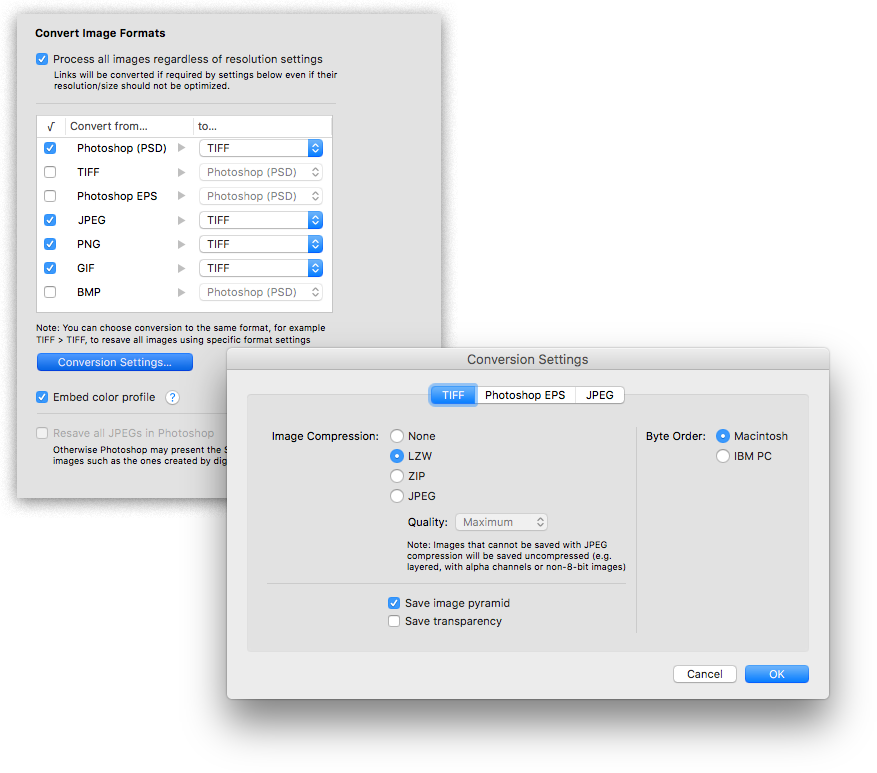
Zevrix Solutions announces LinkOptimizer 5.2.17, a maintenance update to company's workflow automation tool for Adobe InDesign. LinkOptimizer lets users automatically scale and crop images to their InDesign dimensions at specified target resolution, convert image formats and colors, embed profiles and more. The new version fixes an error caused by processing of images with umlauts and other accented characters in their names, which could affect workflows in German and other European languages.
Toronto (ON), Canada - Zevrix Solutions today announces LinkOptimizer 5.2.17, a maintenance update to its image processing automation solution for Adobe InDesign. LinkOptimizer automates complex image manipulation tasks and helps users reduce the size of InDesign links, save prepress costs, and easily repurpose InDesign documents for web and mobile devices.
The new version fixes an error that prevented LinkOptimizer from properly processing images with umlauts and other accented characters in their names. This update will help simplify workflows of users who work with German, French and other European languages by eliminating the need to replace special characters in image names in order to optimize their InDesign jobs.
"Today LinkOptimizer batched a huge book project and another magazine project in minutes vs. hours. Now I can take the afternoon off and drink beer," says Brian Donahue, owner of Bedesign studio in Minneapolis, Minnesota. "Thanks for freeing up my afternoon, rather than doing production work."
LinkOptimizer works automatically with Photoshop to eliminate the excess image data of InDesign links, convert image formats, and perform essential image adjustments. For example, with just a click of a button users can:
* Optimize batches of InDesign files and books
* Scale and crop images to match their dimensions in InDesign
* Convert RGB images to specific CMYK profile
* Change their resolution to 300 dpi
* Resave JPEGs as TIFF
* Run a Photoshop action on each image.
As a result users can save gigabytes of disk space and countless hours of optimizing images manually, accelerate document output, reduce job turnaround and cut costs through faster processing.
Pricing and Availability:
LinkOptimizer can be purchased from Zevrix website for $259.95 USD (Lite version: $179.95) as well as from Adobe Exchange and authorized resellers. Trial is also available for download. The update is free for LinkOptimizer 5.x users and $130 to upgrade from previous versions. LinkOptimizer requires macOS 10.7-10.14 and Adobe InDesign / Photoshop CS5-CC 2019.
Zevrix Solutions: http://zevrix.com
LinkOptimizer 5.2.17: http://zevrix.com/LinkOptimizer.php
Download LinkOptimizer: http://zevrix.com/LinkOptimizer.dmg
Purchase: http://zevrix.com/store.php
Screenshot: http://zevrix.com/screenshots/lo5/convert.png
Located in Toronto, Canada, Zevrix Solutions provides automation and productivity solutions for Adobe Creative Cloud and Creative Suite software, PDF workflows, graphic file diagnostics and Microsoft Office output on Mac OS. Zevrix is dedicated to help professionals increase their profits through automating everyday tasks, producing error-free documents, saving disk space and cutting production costs. For more information, visit their website. Copyright (C) 2019 Zevrix Solutions. All Rights Reserved. Other trademarks and registered trademarks may be the property of their respective owners.
*******
Link To Article: https://prmac.com/release-id-83270.htm
*******
---------------------------------------------------------------------------------
Note that you can alter delivered distributions at any time.
Login to your account on prMac to alter your channel selection, or to opt-out at any time.
LinkOptimizer for InDesign Fixes Issues with Umlauts in Image Names - Published on 01/23/19
Zevrix Solutions announces LinkOptimizer 5.2.17, a maintenance update to company's workflow automation tool for Adobe InDesign. LinkOptimizer lets users automatically scale and crop images to their InDesign dimensions at specified target resolution, convert image formats and colors, embed profiles and more. The new version fixes an error caused by processing of images with umlauts and other accented characters in their names, which could affect workflows in German and other European languages.
Toronto (ON), Canada - Zevrix Solutions today announces LinkOptimizer 5.2.17, a maintenance update to its image processing automation solution for Adobe InDesign. LinkOptimizer automates complex image manipulation tasks and helps users reduce the size of InDesign links, save prepress costs, and easily repurpose InDesign documents for web and mobile devices.
The new version fixes an error that prevented LinkOptimizer from properly processing images with umlauts and other accented characters in their names. This update will help simplify workflows of users who work with German, French and other European languages by eliminating the need to replace special characters in image names in order to optimize their InDesign jobs.
"Today LinkOptimizer batched a huge book project and another magazine project in minutes vs. hours. Now I can take the afternoon off and drink beer," says Brian Donahue, owner of Bedesign studio in Minneapolis, Minnesota. "Thanks for freeing up my afternoon, rather than doing production work."
LinkOptimizer works automatically with Photoshop to eliminate the excess image data of InDesign links, convert image formats, and perform essential image adjustments. For example, with just a click of a button users can:
* Optimize batches of InDesign files and books
* Scale and crop images to match their dimensions in InDesign
* Convert RGB images to specific CMYK profile
* Change their resolution to 300 dpi
* Resave JPEGs as TIFF
* Run a Photoshop action on each image.
As a result users can save gigabytes of disk space and countless hours of optimizing images manually, accelerate document output, reduce job turnaround and cut costs through faster processing.
Pricing and Availability:
LinkOptimizer can be purchased from Zevrix website for $259.95 USD (Lite version: $179.95) as well as from Adobe Exchange and authorized resellers. Trial is also available for download. The update is free for LinkOptimizer 5.x users and $130 to upgrade from previous versions. LinkOptimizer requires macOS 10.7-10.14 and Adobe InDesign / Photoshop CS5-CC 2019.
Zevrix Solutions: http://zevrix.com
LinkOptimizer 5.2.17: http://zevrix.com/LinkOptimizer.php
Download LinkOptimizer: http://zevrix.com/LinkOptimizer.dmg
Purchase: http://zevrix.com/store.php
Screenshot: http://zevrix.com/screenshots/lo5/convert.png
Located in Toronto, Canada, Zevrix Solutions provides automation and productivity solutions for Adobe Creative Cloud and Creative Suite software, PDF workflows, graphic file diagnostics and Microsoft Office output on Mac OS. Zevrix is dedicated to help professionals increase their profits through automating everyday tasks, producing error-free documents, saving disk space and cutting production costs. For more information, visit their website. Copyright (C) 2019 Zevrix Solutions. All Rights Reserved. Other trademarks and registered trademarks may be the property of their respective owners.
*******
Link To Article: https://prmac.com/release-id-83270.htm
*******
---------------------------------------------------------------------------------
Note that you can alter delivered distributions at any time.
Login to your account on prMac to alter your channel selection, or to opt-out at any time.
Subscribe to:
Posts (Atom)