A new article has been published at prMac.
HITCASE Announces Ferra - A Handcrafted Premium Leather iPhone Case - Published on 02/27/19
Vancouver based HITCASE today announces Ferra, a premium, handcrafted, full grain leather drop resistant case for iPhone X, Xs and Xs Max. The first product to be released in the all-new Design Series, Ferra combines traditional leatherwork with beautiful stainless steel touchpoints, compatible with the magnetic HITCASE TrueLUX iPhone Lens system for better content capture. The Ferra case is offered in Saddle Brown and Black, with a soft microfiber interior cradles the iPhone.
Vancouver, British Columbia - HITCASE announces the first product to be released in the all-new Design Series - Ferra(TM), a premium, handcrafted, full grain leather drop resistant case for iPhone X, Xs and Xs Max. Ferra combines traditional leatherwork with beautiful stainless steel touchpoints, compatible with the magnetic HITCASE TrueLUX(TM) iPhone Lens system for better content capture.
"We're proud to have brought innovative products to market like the Hitcase Pro, Shield Link, and Splash, but we wanted to push our design further," comments Brooks Bergreen, Founder and CEO of HITCASE. "Based on research we've discovered that between pickups, swipes and other interactions the average smartphone user touches their device between 2400-5000 times per day. Over the past 12 months, our design team at HITCASE has been focused on one central question: How does it feel? We're excited to bring this new approach in case protectives to the devices we value most, so they look and more importantly feel beautiful in your hands and this is the thought process behind the new Design Series, beginning with Ferra."
Hand cut, dyed, sewn and pressed, Ferra is craftsmanship you can feel. Made with premium, hand-dyed full grain Italian leather and stainless steel beveled hardware, Ferra is the first-ever leather product designed and manufactured by HITCASE and is the only leather case on the market to integrate lenses with our easy to use TrueLUX(R) magnetic lens system (Wide, SuperWide, Macro) for creative photography options. Ferra for the iPhone X/Xs, Xs Max can be purchased today for $59.99 USD on Hitcase.com.
"While we are known for building tough adventure products and lenses, this new direction for the company with our all-new Design Series is opening HITCASE to new customers, continuing our expansion and growth as a company and we couldn't be more excited," said Bergreen.
HITCASE Ferra(TM) Features:
* Full grain leather case. Strong, durable, soft
* Crafted by hand = hand sewn, dyed, cut and pressed
* Two color options: Saddle Brown and Black
* Premium 400 series stainless steel hardware
* Soft microfiber interior cradles your iPhone
* Drop protection to 6ft/2m
* Easily pocketable with a confident grip
* Wireless charging compatible
* Lightweight: 30g
* Slim design: 161mm x 81mm x 10.5mm
Pricing and Availability:
Offered in two hand-dyed colors: Saddle Brown and Black, retailing for $59.99 )USD). Use Ferra with the optional magnetic TrueLUX lens system with precision-grade optical glass. Seamlessly attach, remove and swap between three lens options: SuperWide, Wide and Macro. Available for $39.99 ea. 1-year product warranty. Additional HITCASE protective cases include the Splash, Crio, Shield LINK and PRO and the TrueLUX magnetic lens system are all part of the HITCASE Active and Adventure Series.
HITCASE: http://www.hitcase.com
Ferra Leather Case: http://hitcase.com/pages/Leather-iPhone-Case-Ferra
Purchase: https://www.hitcase.com/collections/leather-ferra
Headquartered in Vancouver, British Columbia, Canada, under the brand HITCASE, makes the world's most innovative mobile accessories using patented technologies and quality materials. By designing industry-leading device protection, the TrueLUX(R) lens system and versatile mounts, our products protect devices while turning them into a better camera. HITCASE is getting the world Ready for Adventure(R), one HITCASE at a time. All Material and Software (C) Copyright 2019 HIT Technologies Inc. All Rights Reserved. Apple, the Apple logo, iPhone, iPod and iPad are registered trademarks of Apple Inc. in the U.S. and/or other countries. Other trademarks and registered trademarks may be the property of their respective owners.
*******
Link To Article: https://prmac.com/release-id-83320.htm
*******
---------------------------------------------------------------------------------
Note that you can alter delivered distributions at any time.
Login to your account on prMac to alter your channel selection, or to opt-out at any time.

Output Factory for InDesign Reduces Security Hassles on macOS Mojave
A new article has been published at prMac.
Output Factory for InDesign Reduces Security Hassles on macOS Mojave - Published on 02/27/19
Zevrix Solutions announces Output Factory 2.3.17, a maintenance update to company's output automation solution for Adobe InDesign. Output Factory automates printing and exporting from InDesign. The app offers batch processing, layer versioning, custom scripts integration and other time-saving options. The new version eliminates the hassles associated with Apple Event sandboxing - a security measure introduced in macOS Mojave that prevents access to control other apps without user authorization.
Toronto (ON), Canada - Zevrix Solutions today announces the release of Output Factory 2.3.17, a maintenance update to company's output automation tool for Adobe InDesign. Awarded 5 stars by InDesign Magazine, Output Factory automates and simplifies workflows of printers, publishers, prepress houses, and ad agencies worldwide. The software helps eradicate repetitive tasks and costly errors through batch processing with time-saving output options.
The new version eliminates the hassles associated with Apple Event sandboxing, a new security measure introduced in macOS Mojave. Under the new policy, apps can no longer control other apps without user authorization, which directly affects such tools as Output Factory that require access to InDesign and other system resources to perform complex workflow automation tasks. The new update of Output Factory streamlines the authorization process by clearing all permissions during launch time, which assures consistent interruption-free batch processing. The app will also reset Apple Event permissions automatically if the authorization was previously revoked by accident.
"Using Output Factory is straightforward... The time savings are huge," writes Jamie McKee in InDesign Magazine. "If you find yourself repeatedly exporting InDesign files in various formats, you owe it to yourself to install the free trial and see just how much time you'll save using Output Factory."
Output Factory supports printing as well as exporting to PDF, PostScript, EPS, Flash, IDML, EPUB and several image formats. It offers the following key features:
* Output multiple InDesign files automatically
* Export page groups as a single PDF files
* Variable output file names
* Create PDF security presets
* Output files to multiple formats with one click
* Layer versioning: output layer combinations as single files
* Eliminate errors with automatic preflight
Pricing and Availability:
Output Factory can be purchased from Zevrix website for $169.95 USD (Lite version $119.95), as well as from authorized resellers and Adobe Exchange. Trial is also available for download. The update is free for the users of Output Factory 2.x, and $84.97 to upgrade from Output Factory 1.x and BatchOutput. Output Factory requires macOS 10.7-10.14 and Adobe InDesign CS3-CC 2019.
Zevrix Solutions: http://zevrix.com
Output Factory 2.3.17: http://zevrix.com/OutputFactory.php
Download Output Factory: http://zevrix.com/OutputFactory.dmg
Purchase: http://zevrix.com/store.php
Screenshot: http://zevrix.com/screenshots/of2/of2-pdf.jpg
Located in Toronto, Canada, Zevrix Solutions provides automation and productivity solutions for Adobe Creative Cloud and Creative Suite software, PDF workflows, graphic file diagnostics and Microsoft Office output on Mac OS. Zevrix is dedicated to help professionals increase their profits through automating everyday tasks, producing error-free documents, saving disk space and cutting production costs. For more information, visit their website. Copyright (C) 2019 Zevrix Solutions. All Rights Reserved. Other trademarks and registered trademarks may be the property of their respective owners.
*******
Link To Article: https://prmac.com/release-id-83319.htm
*******
---------------------------------------------------------------------------------
Note that you can alter delivered distributions at any time.
Login to your account on prMac to alter your channel selection, or to opt-out at any time.
Output Factory for InDesign Reduces Security Hassles on macOS Mojave - Published on 02/27/19
Zevrix Solutions announces Output Factory 2.3.17, a maintenance update to company's output automation solution for Adobe InDesign. Output Factory automates printing and exporting from InDesign. The app offers batch processing, layer versioning, custom scripts integration and other time-saving options. The new version eliminates the hassles associated with Apple Event sandboxing - a security measure introduced in macOS Mojave that prevents access to control other apps without user authorization.
Toronto (ON), Canada - Zevrix Solutions today announces the release of Output Factory 2.3.17, a maintenance update to company's output automation tool for Adobe InDesign. Awarded 5 stars by InDesign Magazine, Output Factory automates and simplifies workflows of printers, publishers, prepress houses, and ad agencies worldwide. The software helps eradicate repetitive tasks and costly errors through batch processing with time-saving output options.
The new version eliminates the hassles associated with Apple Event sandboxing, a new security measure introduced in macOS Mojave. Under the new policy, apps can no longer control other apps without user authorization, which directly affects such tools as Output Factory that require access to InDesign and other system resources to perform complex workflow automation tasks. The new update of Output Factory streamlines the authorization process by clearing all permissions during launch time, which assures consistent interruption-free batch processing. The app will also reset Apple Event permissions automatically if the authorization was previously revoked by accident.
"Using Output Factory is straightforward... The time savings are huge," writes Jamie McKee in InDesign Magazine. "If you find yourself repeatedly exporting InDesign files in various formats, you owe it to yourself to install the free trial and see just how much time you'll save using Output Factory."
Output Factory supports printing as well as exporting to PDF, PostScript, EPS, Flash, IDML, EPUB and several image formats. It offers the following key features:
* Output multiple InDesign files automatically
* Export page groups as a single PDF files
* Variable output file names
* Create PDF security presets
* Output files to multiple formats with one click
* Layer versioning: output layer combinations as single files
* Eliminate errors with automatic preflight
Pricing and Availability:
Output Factory can be purchased from Zevrix website for $169.95 USD (Lite version $119.95), as well as from authorized resellers and Adobe Exchange. Trial is also available for download. The update is free for the users of Output Factory 2.x, and $84.97 to upgrade from Output Factory 1.x and BatchOutput. Output Factory requires macOS 10.7-10.14 and Adobe InDesign CS3-CC 2019.
Zevrix Solutions: http://zevrix.com
Output Factory 2.3.17: http://zevrix.com/OutputFactory.php
Download Output Factory: http://zevrix.com/OutputFactory.dmg
Purchase: http://zevrix.com/store.php
Screenshot: http://zevrix.com/screenshots/of2/of2-pdf.jpg

Located in Toronto, Canada, Zevrix Solutions provides automation and productivity solutions for Adobe Creative Cloud and Creative Suite software, PDF workflows, graphic file diagnostics and Microsoft Office output on Mac OS. Zevrix is dedicated to help professionals increase their profits through automating everyday tasks, producing error-free documents, saving disk space and cutting production costs. For more information, visit their website. Copyright (C) 2019 Zevrix Solutions. All Rights Reserved. Other trademarks and registered trademarks may be the property of their respective owners.
*******
Link To Article: https://prmac.com/release-id-83319.htm
*******
---------------------------------------------------------------------------------
Note that you can alter delivered distributions at any time.
Login to your account on prMac to alter your channel selection, or to opt-out at any time.
Unique, Challenging 3D Word Search Game Launches for iOS
A new article has been published at prMac.
Unique, Challenging 3D Word Search Game Launches for iOS - Published on 02/26/19
Arizona based Adducive today introduces Lexiblox, a unique, challenging 3D word game for iOS devices. Players rotate letter blocks and each combination spells one and only one word. The game requires a strong vocabulary and a good memory since most of the letters are facing away from you. Even so, it has a relaxed, playful feel. This one-of-a-kind puzzle comes with music, sound effects and graphics created especially for this app.
Chandler, Arizona - A unique, challenging 3D word game for iPhones and iPads called Lexiblox launches today, according to Adducive, its publisher. Players rotate letter blocks that look like children's toys. Each combination of blocks spells only one word. This novel setup leads to words that don't fit common patterns or shared letters. There are hundreds of words in the levels included in the game and they do not repeat. The puzzles, music, sounds and graphics were all created especially for Lexiblox.
"I wanted to create the ideal casual mobile game, something easy to pick up where you left off and hard to put down," said Brian Krause, founder of Adducive and the game's creator. Krause came up with the concept for game, wrote the puzzles, music, and code and designed the graphics and user interface. It is an independently developed, one-man app. He has been developing for iOS since 2008, and is a former math teacher and Google engineer.
The game requires a strong vocabulary and a good memory since most of the letters are facing away from you. Even so, it has a relaxed, playful feel. The soundtrack is mellow and jazzy and clouds float in the background while you play. The Lexiblox shuffle onto the screen between words and levels with charming choreography.
The game is available for iPhone, iPad and iPod touch devices running iOS 11.0 or later. Its full price is $3.99 but is available for $1.99 through Friday, March 1. The game has no ads, currencies or additional downloads and is ready for hours of enjoyment as soon as you buy it.
Adducive: http://adducive.com
Lexiblox 1.0: http://lexiblox.com
Lexiblox on the App Store: https://itunes.apple.com/app/id1412262458
Media Assets: https://drive.google.com/open?id=1nxhwXG8qEMhfBFhRGq7nlduvcdQopS_x
Adducive was founded in 1997 as a publishing and consulting firm specializing in mobile technology. Its owner, Brian Krause, has decades of experience in all phases of software development and has worked with start-ups, major technology firms and non-profit organizations in Silicon Valley and worldwide. He has been developing for iOS since 2008. All Material and Software (C) Copyright 2019 Adducive. All Rights Reserved. Apple, the Apple logo, iPhone, iPod and iPad are registered trademarks of Apple Inc. in the U.S. and/or other countries. Other trademarks and registered trademarks may be the property of their respective owners.
*******
Link To Article: https://prmac.com/release-id-83318.htm
*******
---------------------------------------------------------------------------------
Note that you can alter delivered distributions at any time.
Login to your account on prMac to alter your channel selection, or to opt-out at any time.
Unique, Challenging 3D Word Search Game Launches for iOS - Published on 02/26/19
Arizona based Adducive today introduces Lexiblox, a unique, challenging 3D word game for iOS devices. Players rotate letter blocks and each combination spells one and only one word. The game requires a strong vocabulary and a good memory since most of the letters are facing away from you. Even so, it has a relaxed, playful feel. This one-of-a-kind puzzle comes with music, sound effects and graphics created especially for this app.
Chandler, Arizona - A unique, challenging 3D word game for iPhones and iPads called Lexiblox launches today, according to Adducive, its publisher. Players rotate letter blocks that look like children's toys. Each combination of blocks spells only one word. This novel setup leads to words that don't fit common patterns or shared letters. There are hundreds of words in the levels included in the game and they do not repeat. The puzzles, music, sounds and graphics were all created especially for Lexiblox.
"I wanted to create the ideal casual mobile game, something easy to pick up where you left off and hard to put down," said Brian Krause, founder of Adducive and the game's creator. Krause came up with the concept for game, wrote the puzzles, music, and code and designed the graphics and user interface. It is an independently developed, one-man app. He has been developing for iOS since 2008, and is a former math teacher and Google engineer.
The game requires a strong vocabulary and a good memory since most of the letters are facing away from you. Even so, it has a relaxed, playful feel. The soundtrack is mellow and jazzy and clouds float in the background while you play. The Lexiblox shuffle onto the screen between words and levels with charming choreography.
The game is available for iPhone, iPad and iPod touch devices running iOS 11.0 or later. Its full price is $3.99 but is available for $1.99 through Friday, March 1. The game has no ads, currencies or additional downloads and is ready for hours of enjoyment as soon as you buy it.
Adducive: http://adducive.com
Lexiblox 1.0: http://lexiblox.com
Lexiblox on the App Store: https://itunes.apple.com/app/id1412262458
Media Assets: https://drive.google.com/open?id=1nxhwXG8qEMhfBFhRGq7nlduvcdQopS_x
Adducive was founded in 1997 as a publishing and consulting firm specializing in mobile technology. Its owner, Brian Krause, has decades of experience in all phases of software development and has worked with start-ups, major technology firms and non-profit organizations in Silicon Valley and worldwide. He has been developing for iOS since 2008. All Material and Software (C) Copyright 2019 Adducive. All Rights Reserved. Apple, the Apple logo, iPhone, iPod and iPad are registered trademarks of Apple Inc. in the U.S. and/or other countries. Other trademarks and registered trademarks may be the property of their respective owners.
*******
Link To Article: https://prmac.com/release-id-83318.htm
*******
---------------------------------------------------------------------------------
Note that you can alter delivered distributions at any time.
Login to your account on prMac to alter your channel selection, or to opt-out at any time.
SuperTab 4.0 for Mac released - Major Update to Powerful App Switcher
A new article has been published at prMac.
SuperTab 4.0 for Mac released - Major Update to Powerful App Switcher - Published on 02/26/19
California based SpriTec Software today announces SuperTab 4.0, a major feature update to its award-winning App Switcher for macOS. SuperTab takes the App Switcher way beyond just apps: it gives users instant access to their Files, Folders, Windows, Web Sites, Calendars, Screen Shots, Recents, Clipboard History, Dock Items, Desktop Contents, Dropbox, Custom Clipboards, and more - all within the App Switcher, and all just a click or keypress away.
San Diego, California - SpriTec Software is excited to announce the release of SuperTab 4.0 for Mac. SuperTab allows users to completely replace the Mac's built-in Command-Tab App Switcher with a vastly more powerful and flexible Switcher that provides instant access to much more than just Active Apps. With SuperTab, users can add any or all of the following to the App Switcher:
* Active Apps
* Recent Apps
* Recent Documents
* Recent Folders
* Any Files, Folders or Apps
* App Windows
* Dock Contents
* Any Folder Contents
* Dropbox Contents
* Calendar Events
* Clipboard History
* Multiple Clipboards
* Web Site Bookmarks
* Screen Shots
* Countdown Timers
* Stopwatches
* Tagged Files & Folders
* Finder Sidebar Items
* Snagit Captures
* Saved Spotlight Searches
* Saved Display Configurations
Additionally, users can customize, configure and even colorize the App Switcher to suit their own work flows and personal styles.
And with this 4.0 release, SuperTab gains the following key new features:
* Tab Row Splitting - Users can now split their Tab Rows to get more rows on screen without using more space
* Recent Folders - Users gain access to their recently accessed folders to round out all things recent: Apps/Docs/Folders
* Hand Off Support - Users can now use SuperTab to transfer to their Mac tasks started on another Apple device
* Countdown Timers - Users can create countdown timers to never again miss an important deadline or event
* Stopwatches - Users can now create stopwatches to let them track how long tasks take - no need to dig out a phone
* Video and Interactive Screen Shots on Mojave - Mojave users can now take video and interactive Screen Shots
* Enhanced Drag-and-Drop - Users can drag images and text from any app directly into SuperTab
* Application Windows - The Application Windows Tab Row now can include windows from Apps in all Spaces
* Desktop Contents - User can opt to include Disk Drives in their Desktop Folder Contents Tab Row
* AppleScript scriptability - Users can now control SuperTab via AppleScript to show it, select its items and more
* Setup Wizard - SuperTab now offers a simple setup wizard to help users install and configure SuperTab
* Auto Update - SuperTab now has built-in Auto Update to help users ensure they have the latest fixes and features
"We are excited to offer our users all our new features, but we are especially to roll out Tab Row Splitting," explained Ando Sonenblick, owner of SpriTec Software. "Allowing users to split their Tab Rows lets them place more Tab Rows on screen, giving them more features at their fingertips, in turn making them more productive - all while taking no additional screen space. And at 50%-off its regular price, this release offers users the most "Bang for their Buck" of any version of SuperTab."
SuperTab 4.0 is compatible with the following versions of macOS:
* "Mojave" (10.14)
* "Hight Sierra" (10.13)
* "Sierra" (10.12)
* "El Capitan" (10.11)
* "Yosemite" (10.10)
* "Mavericks" (10.9)
* "Mountain Lion" (10.8)
Pricing and Availability:
SuperTab 4.0 is free to download and install and is fully-functional for 30 days. After 30 days, it remains fully-functional but will occasionally ask users to register. Users can take advantage of a special 50%-off sale price of only $10 (USD), which is good now through April, 2019. Users of earlier versions of SuperTab can upgrade to 4.0 for $2.99 (USD).
SuperTab 4.0: http://www.supertab.me
Version Details: http://www.supertab.me/FourPointOhRelease.html
QuickStart Guide: http://www.supertab.me/QuickStart.html
Download SuperTab: http://www.supertab.me/Download.html
Purchase SuperTab: http://www.supertab.me/Register.html
Media Assets: http://www.supertab.me/SuperTabScreenShots.html
Located in San Diego, California, SpriTec Software creates apps for the macOS platform. SpriTec Software is helmed by Ando Sonenblick, an Apple/GoPro/Adobe/DivX veteran with over 30 years of development experience. Copyright (C) 2019 SpriTec Software. All Rights Reserved. Apple, the Apple logo, Mac OS X, macOS, and Macintosh are registered trademarks of Apple Inc. in the U.S. and/or other countries. All other trademarks and trade names are the property of their respective owners.
*******
Link To Article: https://prmac.com/release-id-83317.htm
*******
---------------------------------------------------------------------------------
Note that you can alter delivered distributions at any time.
Login to your account on prMac to alter your channel selection, or to opt-out at any time.
SuperTab 4.0 for Mac released - Major Update to Powerful App Switcher - Published on 02/26/19
California based SpriTec Software today announces SuperTab 4.0, a major feature update to its award-winning App Switcher for macOS. SuperTab takes the App Switcher way beyond just apps: it gives users instant access to their Files, Folders, Windows, Web Sites, Calendars, Screen Shots, Recents, Clipboard History, Dock Items, Desktop Contents, Dropbox, Custom Clipboards, and more - all within the App Switcher, and all just a click or keypress away.
San Diego, California - SpriTec Software is excited to announce the release of SuperTab 4.0 for Mac. SuperTab allows users to completely replace the Mac's built-in Command-Tab App Switcher with a vastly more powerful and flexible Switcher that provides instant access to much more than just Active Apps. With SuperTab, users can add any or all of the following to the App Switcher:
* Active Apps
* Recent Apps
* Recent Documents
* Recent Folders
* Any Files, Folders or Apps
* App Windows
* Dock Contents
* Any Folder Contents
* Dropbox Contents
* Calendar Events
* Clipboard History
* Multiple Clipboards
* Web Site Bookmarks
* Screen Shots
* Countdown Timers
* Stopwatches
* Tagged Files & Folders
* Finder Sidebar Items
* Snagit Captures
* Saved Spotlight Searches
* Saved Display Configurations
Additionally, users can customize, configure and even colorize the App Switcher to suit their own work flows and personal styles.
And with this 4.0 release, SuperTab gains the following key new features:
* Tab Row Splitting - Users can now split their Tab Rows to get more rows on screen without using more space
* Recent Folders - Users gain access to their recently accessed folders to round out all things recent: Apps/Docs/Folders
* Hand Off Support - Users can now use SuperTab to transfer to their Mac tasks started on another Apple device
* Countdown Timers - Users can create countdown timers to never again miss an important deadline or event
* Stopwatches - Users can now create stopwatches to let them track how long tasks take - no need to dig out a phone
* Video and Interactive Screen Shots on Mojave - Mojave users can now take video and interactive Screen Shots
* Enhanced Drag-and-Drop - Users can drag images and text from any app directly into SuperTab
* Application Windows - The Application Windows Tab Row now can include windows from Apps in all Spaces
* Desktop Contents - User can opt to include Disk Drives in their Desktop Folder Contents Tab Row
* AppleScript scriptability - Users can now control SuperTab via AppleScript to show it, select its items and more
* Setup Wizard - SuperTab now offers a simple setup wizard to help users install and configure SuperTab
* Auto Update - SuperTab now has built-in Auto Update to help users ensure they have the latest fixes and features
"We are excited to offer our users all our new features, but we are especially to roll out Tab Row Splitting," explained Ando Sonenblick, owner of SpriTec Software. "Allowing users to split their Tab Rows lets them place more Tab Rows on screen, giving them more features at their fingertips, in turn making them more productive - all while taking no additional screen space. And at 50%-off its regular price, this release offers users the most "Bang for their Buck" of any version of SuperTab."
SuperTab 4.0 is compatible with the following versions of macOS:
* "Mojave" (10.14)
* "Hight Sierra" (10.13)
* "Sierra" (10.12)
* "El Capitan" (10.11)
* "Yosemite" (10.10)
* "Mavericks" (10.9)
* "Mountain Lion" (10.8)
Pricing and Availability:
SuperTab 4.0 is free to download and install and is fully-functional for 30 days. After 30 days, it remains fully-functional but will occasionally ask users to register. Users can take advantage of a special 50%-off sale price of only $10 (USD), which is good now through April, 2019. Users of earlier versions of SuperTab can upgrade to 4.0 for $2.99 (USD).
SuperTab 4.0: http://www.supertab.me
Version Details: http://www.supertab.me/FourPointOhRelease.html
QuickStart Guide: http://www.supertab.me/QuickStart.html
Download SuperTab: http://www.supertab.me/Download.html
Purchase SuperTab: http://www.supertab.me/Register.html
Media Assets: http://www.supertab.me/SuperTabScreenShots.html
Located in San Diego, California, SpriTec Software creates apps for the macOS platform. SpriTec Software is helmed by Ando Sonenblick, an Apple/GoPro/Adobe/DivX veteran with over 30 years of development experience. Copyright (C) 2019 SpriTec Software. All Rights Reserved. Apple, the Apple logo, Mac OS X, macOS, and Macintosh are registered trademarks of Apple Inc. in the U.S. and/or other countries. All other trademarks and trade names are the property of their respective owners.
*******
Link To Article: https://prmac.com/release-id-83317.htm
*******
---------------------------------------------------------------------------------
Note that you can alter delivered distributions at any time.
Login to your account on prMac to alter your channel selection, or to opt-out at any time.
WaterField Intros Minimalist Sling Pouch to Relieve Over-stuffed Pockets
A new article has been published at prMac.
WaterField Intros Minimalist Sling Pouch to Relieve Over-stuffed Pockets - Published on 02/26/19
San Francisco designer and manufacturer, WaterField Designs introduces the Sutter Sling Pouch, a minimalist crossbody Sling to carry daily necessities. Available in full-grain leather and tan waxed canvas or black ballistic nylon, the meticulously-crafted Sutter Sling Pouch keeps valuables secure and easily accessible. This modern, professional-looking version of the popular waist pack, rests comfortably on one's back or chest leaving hands free.
San Francisco, California - WaterField Designs, a San Francisco designer and manufacturer of custom laptop sleeves, bags and device-specific cases, introduces the Sutter Sling Pouch, a minimalist crossbody Sling to carry daily necessities too bulky or plentiful to fit into pants pockets. Available in full-grain leather and tan waxed canvas or black ballistic nylon, the meticulously-crafted Sutter Sling Pouch keeps valuables secure and easily accessible. This modern, professional-looking version of the popular waist pack, rests comfortably on one's back or chest leaving hands free.
"The Sling Pouch fills a special niche: it's an all-purpose bag that fits more than your pocket, but less than a messenger; it's the ideal everyday carry for minimalists," explained company owner Gary Waterfield. "The crossbody Sling Pouch is easy to access and so comfortable that you hardly notice it's there, and yet it holds all your most important items while adding a flash of style to any outfit."
Sutter Sling Pouch Features:
* Angled strap attachment creates clean look and keeps bag flat against the back or chest
* Quick-adjust metal cam lock easily tightens/loosens the strap
* Front, ultra-soft-lined pocket is ideal for iPhones and other quick-access items
* Two interior, open-topped pockets store small items like Air Pods
* Key fob facilitates convenient key retrieval
* Gold, rip-stop liner lights up the interior, so contents are easy to locate
* Back panel is padded with firm, closed-cell foam that is lined with moisture-wicking mesh, providing extra cushioning for the back or chest and for pouch contents
* YKK water-repellent zippers keep contents secure
* Available in rugged tan waxed canvas or black ballistic nylon, with premium leather accents
Gaming enthusiasts can score two bags in one and transform their Sutter Sling Pouch into a Nintendo Switch carrying case by inserting WaterField's new custom-fitted Switch Taco console holder. Firm, shock-absorbing foam envelopes the Switch inside a waxed canvas or ballistic nylon shell, custom-fitted for the Pouch. Raised 6-mm neoprene padding protects the screen, keeps the console centered, and keeps Joy-Cons in a neutral position. An interior pocket holds a WaterField 10-game-card holder, 20-game-card wallet, or loose games. With the Switch Taco, gamers can carry daily essentials all in one place, because to them, the Switch *is* a daily essential.
The Sutter Sling Pouch joins the WaterField Sutter Collection as its most minimalist bag. The Sutter Slim Backpack and the Sutter Tech Sling provide modern, stylish alternatives for carrying larger computers and tablets.
Pouch dimensions:
* 10.25 x 6.25 x 2.75 inches; 12 oz.
Taco dimensions:
* 10 x 6 x 1 inches; 5 oz.
Pricing and Availability:
The Sutter Sling Pouch is priced at $119 (USD) and is shipping now. Available le in Tan waxed canvas with distressed, full-grain chocolate leather panel or black ballistic nylon with full-grain black leather panel. The Switch Taco is prices only $19 (USD). Available in Tan waxed canvas or 1050 denier black ballistic nylon with black trim.
WaterField Designs: http://www.sfbags.com/
Sutter Sling Pouch: https://www.sfbags.com/products/sutter-sling-pouch
YouTube Video (Demo): https://www.youtube.com/watch?v=UDlATnTiges
WaterField Designs is an innovative San Francisco designer and manufacturer of bags and cases for tech-savvy consumers who want to stylishly and responsibly transport their technology. WaterField manufactures custom-fitted, high-quality cases and bags for a full-range of laptop computers, smartphones, tablets, gaming devices and other digital gear. All products are manufactured to exacting standards entirely in San Francisco. More information at "Our Story." Copyright (C) 2019 WaterField Designs. All Rights Reserved. Other trademarks and registered trademarks may be the property of their respective owners.
*******
Link To Article: https://prmac.com/release-id-83316.htm
*******
---------------------------------------------------------------------------------
Note that you can alter delivered distributions at any time.
Login to your account on prMac to alter your channel selection, or to opt-out at any time.
WaterField Intros Minimalist Sling Pouch to Relieve Over-stuffed Pockets - Published on 02/26/19
San Francisco designer and manufacturer, WaterField Designs introduces the Sutter Sling Pouch, a minimalist crossbody Sling to carry daily necessities. Available in full-grain leather and tan waxed canvas or black ballistic nylon, the meticulously-crafted Sutter Sling Pouch keeps valuables secure and easily accessible. This modern, professional-looking version of the popular waist pack, rests comfortably on one's back or chest leaving hands free.
San Francisco, California - WaterField Designs, a San Francisco designer and manufacturer of custom laptop sleeves, bags and device-specific cases, introduces the Sutter Sling Pouch, a minimalist crossbody Sling to carry daily necessities too bulky or plentiful to fit into pants pockets. Available in full-grain leather and tan waxed canvas or black ballistic nylon, the meticulously-crafted Sutter Sling Pouch keeps valuables secure and easily accessible. This modern, professional-looking version of the popular waist pack, rests comfortably on one's back or chest leaving hands free.
"The Sling Pouch fills a special niche: it's an all-purpose bag that fits more than your pocket, but less than a messenger; it's the ideal everyday carry for minimalists," explained company owner Gary Waterfield. "The crossbody Sling Pouch is easy to access and so comfortable that you hardly notice it's there, and yet it holds all your most important items while adding a flash of style to any outfit."
Sutter Sling Pouch Features:
* Angled strap attachment creates clean look and keeps bag flat against the back or chest
* Quick-adjust metal cam lock easily tightens/loosens the strap
* Front, ultra-soft-lined pocket is ideal for iPhones and other quick-access items
* Two interior, open-topped pockets store small items like Air Pods
* Key fob facilitates convenient key retrieval
* Gold, rip-stop liner lights up the interior, so contents are easy to locate
* Back panel is padded with firm, closed-cell foam that is lined with moisture-wicking mesh, providing extra cushioning for the back or chest and for pouch contents
* YKK water-repellent zippers keep contents secure
* Available in rugged tan waxed canvas or black ballistic nylon, with premium leather accents
Gaming enthusiasts can score two bags in one and transform their Sutter Sling Pouch into a Nintendo Switch carrying case by inserting WaterField's new custom-fitted Switch Taco console holder. Firm, shock-absorbing foam envelopes the Switch inside a waxed canvas or ballistic nylon shell, custom-fitted for the Pouch. Raised 6-mm neoprene padding protects the screen, keeps the console centered, and keeps Joy-Cons in a neutral position. An interior pocket holds a WaterField 10-game-card holder, 20-game-card wallet, or loose games. With the Switch Taco, gamers can carry daily essentials all in one place, because to them, the Switch *is* a daily essential.
The Sutter Sling Pouch joins the WaterField Sutter Collection as its most minimalist bag. The Sutter Slim Backpack and the Sutter Tech Sling provide modern, stylish alternatives for carrying larger computers and tablets.
Pouch dimensions:
* 10.25 x 6.25 x 2.75 inches; 12 oz.
Taco dimensions:
* 10 x 6 x 1 inches; 5 oz.
Pricing and Availability:
The Sutter Sling Pouch is priced at $119 (USD) and is shipping now. Available le in Tan waxed canvas with distressed, full-grain chocolate leather panel or black ballistic nylon with full-grain black leather panel. The Switch Taco is prices only $19 (USD). Available in Tan waxed canvas or 1050 denier black ballistic nylon with black trim.
WaterField Designs: http://www.sfbags.com/
Sutter Sling Pouch: https://www.sfbags.com/products/sutter-sling-pouch
YouTube Video (Demo): https://www.youtube.com/watch?v=UDlATnTiges
WaterField Designs is an innovative San Francisco designer and manufacturer of bags and cases for tech-savvy consumers who want to stylishly and responsibly transport their technology. WaterField manufactures custom-fitted, high-quality cases and bags for a full-range of laptop computers, smartphones, tablets, gaming devices and other digital gear. All products are manufactured to exacting standards entirely in San Francisco. More information at "Our Story." Copyright (C) 2019 WaterField Designs. All Rights Reserved. Other trademarks and registered trademarks may be the property of their respective owners.
*******
Link To Article: https://prmac.com/release-id-83316.htm
*******
---------------------------------------------------------------------------------
Note that you can alter delivered distributions at any time.
Login to your account on prMac to alter your channel selection, or to opt-out at any time.
Keep It 1.6 adds text recognition, improves notes, PDF editing and more
A new article has been published at prMac.
Keep It 1.6 adds text recognition, improves notes, PDF editing and more - Published on 02/25/19
UK based Reinvented Software releases Keep It 1.6, an update to their popular notebook, scrapbook and organizer for macOS. Keep It is ideal for writing notes, saving web links, organizing documents, and finding them again. This version adds text recognition for scanned PDFs and images, support for importing from a scanner, and Continuity Camera to import directly from an iPad or iPhone, along with improvements to notes, PDF editing, and lots more.
Swansea, United Kingdom - Reinvented Software is pleased to announce Keep It 1.6 is now available. This version adds text recognition for scanned PDFs and images, support for importing from a scanner, and Continuity Camera to import directly from an iPad or iPhone, along with improvements to notes, PDF editing, and lots more.
Keep It is a notebook, scrapbook and organizer, ideal for writing notes, saving web links, organizing documents, and finding them again. Available on Mac, iPad and iPhone, Keep It is the destination for all those things you want to put somewhere, confident you will find them again later. Keep It is the successor to Together, a brand new app that preserves the very best of its predecessor, but recast for today and the future.
Keep It 1.6 can now recognize printed text in images and scanned PDFs. Keep It does this on your Mac using the latest machine learning, computer vision and image processing technologies for the most efficient and accurate results. To complement this new capability, Keep It can now import PDFs or images from a scanner, or directly from your iPad or iPhone using Continuity Camera in macOS Mojave, rotate and remove pages in PDFs, and rotate images.
Keep It 1.6 includes further improvements to notes and text editing in general. Notes can now contain dividers, and it's also possible to show attached images at a smaller size. Keep It will also preserve dividers when importing from Evernote. Insert the date and time, in notes, rich text files, plain text files and Markdown documents.
Keep It 1.6 includes many other smaller new features and improvement. Its Share extension can now create items in formats other than notes. Strikethrough and underline text in PDFs. Names in the item list or thumbnails now wrap for up to two lines. It's now possible to search for items by generic types of media such as images, audio and movies rather than a specific file type. View rich text files in Dark Mode on macOS Mojave.
About Keep It:
Pretty much anything can be added to Keep It, including notes, web links, Markdown, rich and plain text documents, PDFs, images, or any other kind of file, using drag and drop, its share extension, the Services menu, or a browser bookmarklet. Keep It can also create new files of any type from stationery, and uses iCloud to make everything available across your devices and to share folders and items with others.
Keep It has all the organization tools you could need, including folders, tags, colored labels, and bundles. Keep It stores everything you add as files in folders that you can access in the Finder on Mac or the Files app on iOS, and open in other apps for editing. Saving files to these folders will automatically add them.
Building on Together, just about everything in Keep It has been improved or streamlined to work consistently across Mac and iOS, while taking advantage of each platform's unique strengths. Keep It's innovative tag filter that can drill down through combinations of related tags, and works in conjunction with search, which offers suggestions and makes it easy to combine terms. Keep It for Mac's Compact Mode reduces the app to a single column, ideal for using as a floating window, or alongside another full screen app in split view, as you would on iPad.
Pricing and Availability:
Keep It for Mac 1.6 requires macOS 10.13 High Sierra or later, and is available as a free 15-day trial. A license for Keep It for Mac costs $49.99, and will include all Keep It Version 1.x updates. Together 3 users can purchase a $24.99 upgrade, or get a free copy if Together 3 was purchased during its final 6 months on sale. Keep It is also available on the Mac App Store, also with a free trial, and a choice of one-time purchases to buy Keep It, upgrade from Together, along with monthly ($2.49) or yearly ($19.99) subscriptions. Keep It for iPad and iPhone is available separately with either monthly ($1.49) or yearly ($9.99) subscriptions.
Keep It for Mac: http://reinventedsoftware.com/keepit/
Download (Free Trial): http://reinventedsoftware.com/keepIt/downloads/KeepIt.dmg
Screenshot: http://reinventedsoftware.com/keepit/screenshots/screenshot.png
Reinvented Software was founded in August 2004 by long-time Mac developer Steve Harris who, having wasted 10 years working for other people, decided to dedicate his life to making the best software in the world - software for the Mac. Copyright (C) 2004-2019 Reinvented Software. All Rights Reserved. Apple, the Apple logo, Mac OS X, iPhone, iPad, iPod, and Macintosh are registered trademarks of Apple Inc. in the U.S. and/or other countries.
*******
Link To Article: https://prmac.com/release-id-83314.htm
*******
---------------------------------------------------------------------------------
Note that you can alter delivered distributions at any time.
Login to your account on prMac to alter your channel selection, or to opt-out at any time.
Keep It 1.6 adds text recognition, improves notes, PDF editing and more - Published on 02/25/19
UK based Reinvented Software releases Keep It 1.6, an update to their popular notebook, scrapbook and organizer for macOS. Keep It is ideal for writing notes, saving web links, organizing documents, and finding them again. This version adds text recognition for scanned PDFs and images, support for importing from a scanner, and Continuity Camera to import directly from an iPad or iPhone, along with improvements to notes, PDF editing, and lots more.
Swansea, United Kingdom - Reinvented Software is pleased to announce Keep It 1.6 is now available. This version adds text recognition for scanned PDFs and images, support for importing from a scanner, and Continuity Camera to import directly from an iPad or iPhone, along with improvements to notes, PDF editing, and lots more.
Keep It is a notebook, scrapbook and organizer, ideal for writing notes, saving web links, organizing documents, and finding them again. Available on Mac, iPad and iPhone, Keep It is the destination for all those things you want to put somewhere, confident you will find them again later. Keep It is the successor to Together, a brand new app that preserves the very best of its predecessor, but recast for today and the future.
Keep It 1.6 can now recognize printed text in images and scanned PDFs. Keep It does this on your Mac using the latest machine learning, computer vision and image processing technologies for the most efficient and accurate results. To complement this new capability, Keep It can now import PDFs or images from a scanner, or directly from your iPad or iPhone using Continuity Camera in macOS Mojave, rotate and remove pages in PDFs, and rotate images.
Keep It 1.6 includes further improvements to notes and text editing in general. Notes can now contain dividers, and it's also possible to show attached images at a smaller size. Keep It will also preserve dividers when importing from Evernote. Insert the date and time, in notes, rich text files, plain text files and Markdown documents.
Keep It 1.6 includes many other smaller new features and improvement. Its Share extension can now create items in formats other than notes. Strikethrough and underline text in PDFs. Names in the item list or thumbnails now wrap for up to two lines. It's now possible to search for items by generic types of media such as images, audio and movies rather than a specific file type. View rich text files in Dark Mode on macOS Mojave.
About Keep It:
Pretty much anything can be added to Keep It, including notes, web links, Markdown, rich and plain text documents, PDFs, images, or any other kind of file, using drag and drop, its share extension, the Services menu, or a browser bookmarklet. Keep It can also create new files of any type from stationery, and uses iCloud to make everything available across your devices and to share folders and items with others.
Keep It has all the organization tools you could need, including folders, tags, colored labels, and bundles. Keep It stores everything you add as files in folders that you can access in the Finder on Mac or the Files app on iOS, and open in other apps for editing. Saving files to these folders will automatically add them.
Building on Together, just about everything in Keep It has been improved or streamlined to work consistently across Mac and iOS, while taking advantage of each platform's unique strengths. Keep It's innovative tag filter that can drill down through combinations of related tags, and works in conjunction with search, which offers suggestions and makes it easy to combine terms. Keep It for Mac's Compact Mode reduces the app to a single column, ideal for using as a floating window, or alongside another full screen app in split view, as you would on iPad.
Pricing and Availability:
Keep It for Mac 1.6 requires macOS 10.13 High Sierra or later, and is available as a free 15-day trial. A license for Keep It for Mac costs $49.99, and will include all Keep It Version 1.x updates. Together 3 users can purchase a $24.99 upgrade, or get a free copy if Together 3 was purchased during its final 6 months on sale. Keep It is also available on the Mac App Store, also with a free trial, and a choice of one-time purchases to buy Keep It, upgrade from Together, along with monthly ($2.49) or yearly ($19.99) subscriptions. Keep It for iPad and iPhone is available separately with either monthly ($1.49) or yearly ($9.99) subscriptions.
Keep It for Mac: http://reinventedsoftware.com/keepit/
Download (Free Trial): http://reinventedsoftware.com/keepIt/downloads/KeepIt.dmg
Screenshot: http://reinventedsoftware.com/keepit/screenshots/screenshot.png
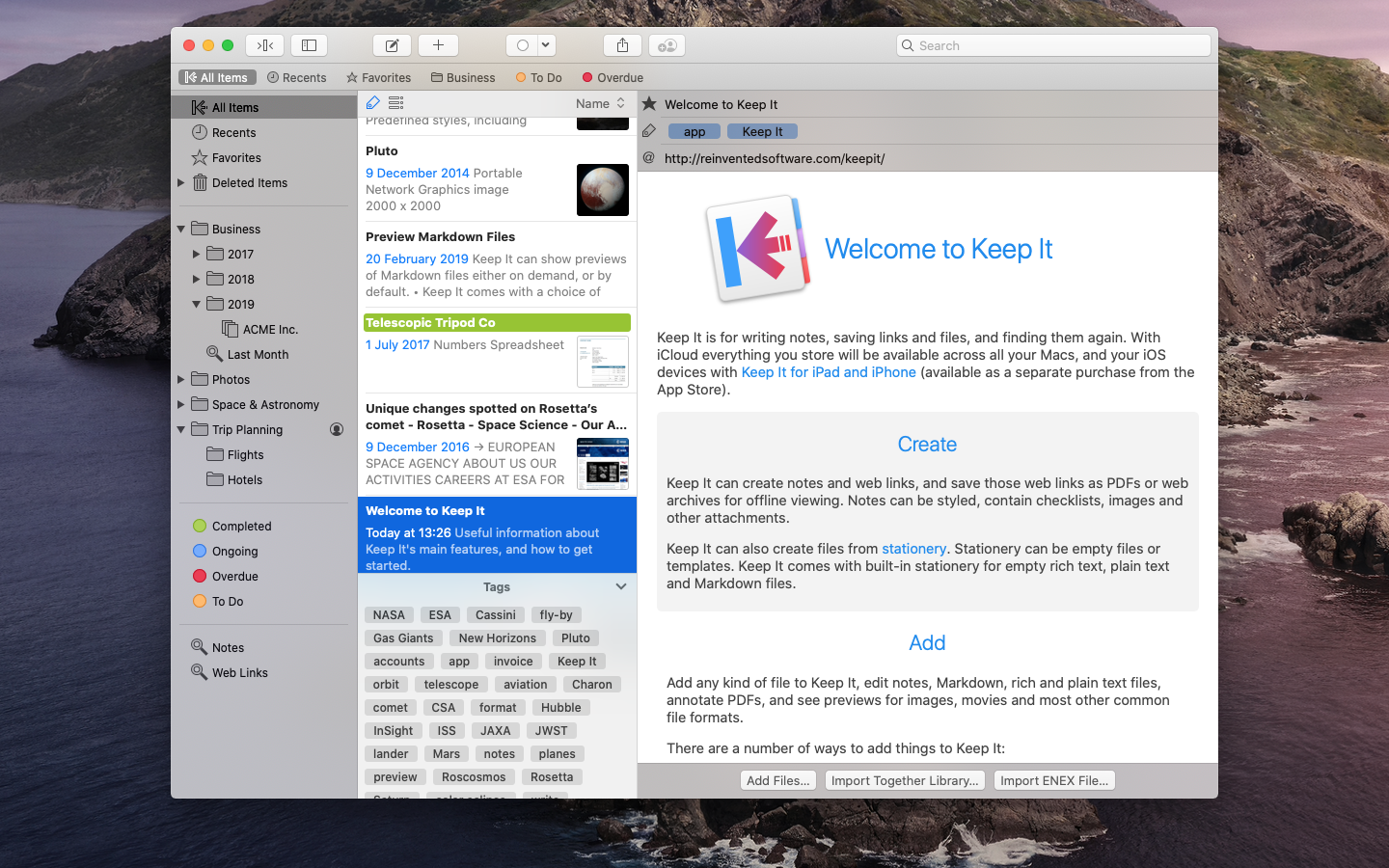
Reinvented Software was founded in August 2004 by long-time Mac developer Steve Harris who, having wasted 10 years working for other people, decided to dedicate his life to making the best software in the world - software for the Mac. Copyright (C) 2004-2019 Reinvented Software. All Rights Reserved. Apple, the Apple logo, Mac OS X, iPhone, iPad, iPod, and Macintosh are registered trademarks of Apple Inc. in the U.S. and/or other countries.
*******
Link To Article: https://prmac.com/release-id-83314.htm
*******
---------------------------------------------------------------------------------
Note that you can alter delivered distributions at any time.
Login to your account on prMac to alter your channel selection, or to opt-out at any time.
24U Software releases 24U Phidgets Plug-In 3.1 for FileMaker Pro
A new article has been published at prMac.
24U Software releases 24U Phidgets Plug-In 3.1 for FileMaker Pro - Published on 02/25/19
Long time Czech developer, 24U has released 24U Phidgets Plug-In 3.1, the popular plug-in for integrating FileMaker solutions with hardware devices, such as relays, environmental sensors, RFID, and more, Supporting FileMaker Pro 14 through 17, 24U Phidgets Plug-In allows FileMaker Pro to interact with various Phidgets boards to let a custom app control physical devices and physical devices to control the custom app. Version 3.1 brings support for iOS and includes re-designed examples.
Zvole, Czech Republic - 24U has released 24U Phidgets Plug-In 3.1 for FileMaker Pro 14 through 17. The popular plug-in for integrating FileMaker solutions with hardware devices, such as relays, environmental sensors, RFID, and more, now brings support for iOS and re-designed examples.
What's new in version 3.1:
* Version for iOS lets custom FileMaker apps control Phidgets directly from iPhone or iPad
* Better and nicer examples for exploring 24U Phidgets Plug-In even on iPhone or iPad
Benefits of the new feature:
Having the plug-in included in native iOS apps allows FileMaker developers to incorporate interaction with Phidgets devices even into custom FileMaker apps running on iPhone or iPad. The new improved examples let developers easily learn and test 24U Phidgets Plug-In even on iPhone or iPad and better understand how to use it in their apps.
About 24U Phidgets Plug-In:
24U Phidgets Plug-In allows FileMaker Pro to interact with various Phidgets boards to let a custom app control physical devices and physical devices to control the custom app. 24U Phidgets Plug-In allows FileMaker Pro users to:
* Read and write RFID tags to track goods, assets and people
* Capture sensor data to collect environmental data such as temperature or force
* Control servo motors to automate moving parts of robots and machines
* Read digital and analog inputs to control your solution by physical controls
* Set digital outputs to switch lights and other electrical devices
* Display text on an LCD display to create custom user interface such as cashbox
* Set analog outputs to control electronic equipment
* Compatibility with VINT lets you use the latest Phidgets devices
Sample uses of 24U Phidgets Plug-In:
Existing customers use 24U Phidgets Plug-in in a wide range of different industries, including compliance testing of electrical equipment, sorting sheep, opening door to gym for customers identified by RFID loyalty card, or robotics prototyping.
"We had a hospital client and we used the 24U Phidgets Plug-In together with an RFID reader for tracking patient charts. The results were quite amazing. Prior to installing this the hospital lost charts on daily basis. When a chart was misplaced it was very difficult to find. The introduction of the chart tracking system meant that everyone knew the location of the chart by looking at the patient screen," said Joe Byrne, CEO of Glanmire Electronics
For Owen Caldwell, technology manager at Cal Poly Pomona Foundation, Inc., 24U Phidgets Plug-In makes it possible to prepare useful projects for electrical engineering major students. At FileMaker DevCon 2014 Owen said: "With Phidgets we've been able to create projects that are not only pertinent to their field but also beneficial to the workplace. We are looking at wiring up the offices to do 3D temperature mapping. With this I am hoping to be able to determine what effect the occupancy of the office has on the overall environment."
System Requirements and Compatibility:
* OS X 10.10 Yosemite or newer and FileMaker Pro 14 or newer (macOS High Sierra 10.13 and FileMaker Pro 17.Recommended)
* Windows 7 and FileMaker Pro 14 or newer (Windows 10 and FileMaker Pro 17 Recommended)
* Supports iOS 11.0 or newer and requires FileMaker iOSAppSDK 16.0.1 or newer
Pricing and Availability:
24U Phidgets Plug-In 3.1 is immediately available for download free of charge as a fully functional 14-days trial version, which can be activated after purchasing a license code. Licenses for 24U Phidgets Plug-In start at $79 per user and device or $249 (USD) per user with unlimited devices. Licenses for iOS apps start at $499 (USD) per app with up to 20 users. Optional Premium Support and Implementation service are available with the purchase of 24U Phidgets Plug-In 3.1.
24U Software: http://www.24usoftware.com/
Phidgets Plug-In 3.1: http://www.24usoftware.com/Phidgets
Download Phidgets Plug-In: https://www.24uSoftware.com/Phidgets#download
Purchase a License: https://www.24uSoftware.com/Phidgets#buy
Media Assets: http://www.24usoftware.com/pr/
With a team of full-time testers, web, plug-in, Mac, Windows, Linux, iOS, and Android native app developers, and FileMaker certified developers, led by the FileMaker DevCon 2015 Developer Cup champion, 24U excels in taking care of existing FileMaker solutions, optimizing their performance, identifying and resolving potential issues and liabilities, improving reliability, stability and scalability, integrating them with other systems including various hardware devices, and extending them beyond expectation. We help global businesses around the world to maintain sustainable growth by working with their in-house developers or completely taking care of the maintenance and development of their business solutions. (C) 2019 24U s.r.o. All rights reserved. 24U, 24U Software, and Email OSAX are trademarks of 24U s.r.o. FileMaker is a trademark of FileMaker, Inc., registered in the U.S. and other countries. All other trademarks are the property of their respective owners.
*******
Link To Article: https://prmac.com/release-id-83313.htm
*******
---------------------------------------------------------------------------------
Note that you can alter delivered distributions at any time.
Login to your account on prMac to alter your channel selection, or to opt-out at any time.
24U Software releases 24U Phidgets Plug-In 3.1 for FileMaker Pro - Published on 02/25/19
Long time Czech developer, 24U has released 24U Phidgets Plug-In 3.1, the popular plug-in for integrating FileMaker solutions with hardware devices, such as relays, environmental sensors, RFID, and more, Supporting FileMaker Pro 14 through 17, 24U Phidgets Plug-In allows FileMaker Pro to interact with various Phidgets boards to let a custom app control physical devices and physical devices to control the custom app. Version 3.1 brings support for iOS and includes re-designed examples.
Zvole, Czech Republic - 24U has released 24U Phidgets Plug-In 3.1 for FileMaker Pro 14 through 17. The popular plug-in for integrating FileMaker solutions with hardware devices, such as relays, environmental sensors, RFID, and more, now brings support for iOS and re-designed examples.
What's new in version 3.1:
* Version for iOS lets custom FileMaker apps control Phidgets directly from iPhone or iPad
* Better and nicer examples for exploring 24U Phidgets Plug-In even on iPhone or iPad
Benefits of the new feature:
Having the plug-in included in native iOS apps allows FileMaker developers to incorporate interaction with Phidgets devices even into custom FileMaker apps running on iPhone or iPad. The new improved examples let developers easily learn and test 24U Phidgets Plug-In even on iPhone or iPad and better understand how to use it in their apps.
About 24U Phidgets Plug-In:
24U Phidgets Plug-In allows FileMaker Pro to interact with various Phidgets boards to let a custom app control physical devices and physical devices to control the custom app. 24U Phidgets Plug-In allows FileMaker Pro users to:
* Read and write RFID tags to track goods, assets and people
* Capture sensor data to collect environmental data such as temperature or force
* Control servo motors to automate moving parts of robots and machines
* Read digital and analog inputs to control your solution by physical controls
* Set digital outputs to switch lights and other electrical devices
* Display text on an LCD display to create custom user interface such as cashbox
* Set analog outputs to control electronic equipment
* Compatibility with VINT lets you use the latest Phidgets devices
Sample uses of 24U Phidgets Plug-In:
Existing customers use 24U Phidgets Plug-in in a wide range of different industries, including compliance testing of electrical equipment, sorting sheep, opening door to gym for customers identified by RFID loyalty card, or robotics prototyping.
"We had a hospital client and we used the 24U Phidgets Plug-In together with an RFID reader for tracking patient charts. The results were quite amazing. Prior to installing this the hospital lost charts on daily basis. When a chart was misplaced it was very difficult to find. The introduction of the chart tracking system meant that everyone knew the location of the chart by looking at the patient screen," said Joe Byrne, CEO of Glanmire Electronics
For Owen Caldwell, technology manager at Cal Poly Pomona Foundation, Inc., 24U Phidgets Plug-In makes it possible to prepare useful projects for electrical engineering major students. At FileMaker DevCon 2014 Owen said: "With Phidgets we've been able to create projects that are not only pertinent to their field but also beneficial to the workplace. We are looking at wiring up the offices to do 3D temperature mapping. With this I am hoping to be able to determine what effect the occupancy of the office has on the overall environment."
System Requirements and Compatibility:
* OS X 10.10 Yosemite or newer and FileMaker Pro 14 or newer (macOS High Sierra 10.13 and FileMaker Pro 17.Recommended)
* Windows 7 and FileMaker Pro 14 or newer (Windows 10 and FileMaker Pro 17 Recommended)
* Supports iOS 11.0 or newer and requires FileMaker iOSAppSDK 16.0.1 or newer
Pricing and Availability:
24U Phidgets Plug-In 3.1 is immediately available for download free of charge as a fully functional 14-days trial version, which can be activated after purchasing a license code. Licenses for 24U Phidgets Plug-In start at $79 per user and device or $249 (USD) per user with unlimited devices. Licenses for iOS apps start at $499 (USD) per app with up to 20 users. Optional Premium Support and Implementation service are available with the purchase of 24U Phidgets Plug-In 3.1.
24U Software: http://www.24usoftware.com/
Phidgets Plug-In 3.1: http://www.24usoftware.com/Phidgets
Download Phidgets Plug-In: https://www.24uSoftware.com/Phidgets#download
Purchase a License: https://www.24uSoftware.com/Phidgets#buy
Media Assets: http://www.24usoftware.com/pr/
With a team of full-time testers, web, plug-in, Mac, Windows, Linux, iOS, and Android native app developers, and FileMaker certified developers, led by the FileMaker DevCon 2015 Developer Cup champion, 24U excels in taking care of existing FileMaker solutions, optimizing their performance, identifying and resolving potential issues and liabilities, improving reliability, stability and scalability, integrating them with other systems including various hardware devices, and extending them beyond expectation. We help global businesses around the world to maintain sustainable growth by working with their in-house developers or completely taking care of the maintenance and development of their business solutions. (C) 2019 24U s.r.o. All rights reserved. 24U, 24U Software, and Email OSAX are trademarks of 24U s.r.o. FileMaker is a trademark of FileMaker, Inc., registered in the U.S. and other countries. All other trademarks are the property of their respective owners.
*******
Link To Article: https://prmac.com/release-id-83313.htm
*******
---------------------------------------------------------------------------------
Note that you can alter delivered distributions at any time.
Login to your account on prMac to alter your channel selection, or to opt-out at any time.
Subscribe to:
Posts (Atom)