A new article has been published at prMac.
Funpax launches exciting strategy RPG - Ancient Creed! - Published on 02/26/19
Explore an enchanting yet dangerous fantasy world in Ancient Creed! Adventure is at every corner of this magical continent with over 50 legendary heroes to recruit from and form your party of 5. Join millions of players worldwide and reminisce your favourite past time playing WC in the world of Azeross! With nearly 100 maps and different game modes, there is always something to do in Ancient Creed!
Singapore, Singapore - Funpax is pleased to announce that Ancient Creed for iOS is released and available on iOS! Adventure is at every corner of this magical continent with over 50 legendary heroes to recruit from and form your party of 5. Join millions of players worldwide and reminisce your favourite past time playing WC in the world of Azeross! With nearly 100 maps and different game modes, there is always something to do in Ancient Creed!
Ancient Creed is a strategic fantasy RPG Card Game where players can choose and customize their teams while unlocking more heroes at the same time. players will be able to battle enemies in strategic combat and fight other players' team in PvP combat. With over 50 legendary heroes such as demon hunter and dark wyrm to choose from, players will be able to pick their favorite heroes and unlock new content as they advance in the game.
Players can battle though the campaigns to level up their heroes and gain valuable equipment for leveling/ upgrading their heroes. Completing the normal campaigns will also unlock the epic campaigns which are more difficult but provide better rewards than the normal campaigns. Players are also able to get soul shards of heroes in epic campaigns to unlock a hero.
There is nearly 100 maps and various game modes to choose from and with the game updated regularly. Players can join a guild and earn attractive prizes by assisting friends/ guildmates. Players can join forces to defeat the world boss together! Players can also battle other players in the arena for the number 1 ranking in their server. Apart from battling other players in the same server, players are also able to battle players in other servers in the cross-server PVP battle!
There is also weekly code giveaways on the Ancient Creed Facebook page where players can engage and interact with the GM and other players to complete their gaming experience.
Players' Reviews:
"Very nice game. I want to mention that there are always something to do and the units look every unique.
Also, it's not ptw."
"Love it. Game is fun, addicting, easy to learn and has lots of different things to do! Worth the download"
Key game features:
* LEAD YOUR OWN EPIC PARTY
* Choose from over 50 Heroes, from Blademaster to Frostwrym, Medusa to Devastator.
* Strategically build your party with Tanks, Damage Dealers, Healers, Stunners and Disablers Heroes. Form Your Own MOBA Party!
* Collect Shards scattered throughout the world to upgrade your Heroes into an unstoppable force.
* Upgrade your own artifacts and equipment along the way!
* SET YOUR OWN MILESTONE IN EACH SERVERS!
* Challenge players from all over the world and become The Ultra Blaze Arena Specialist.
* Advance to the Epic Arena and earn the title of Warrior of Glory!
* Create or Join a Guild, earn attractive prizes by assisting your friends/guildmates. Take part in the World Boss fight every night to progress the game even further!
* MOBILE HEROES COLLECTION *
* WORLD CHAT ALWAYS AVAILABLE 24/7 *
* TRAIN UNIQUE HEROES WITH MULTIPLE LEVELS OF UPGRADES *
* RECRUIT FROM OVER 50 LEGENDARY HEROES *
* STRATEGIZE YOUR BATTLES *
* INTENSE GLOBAL PVP BATTLES! *
* A VARIETY OF GAME MODES FOR YOU TO CHOOSE FROM *
* JOURNEY TO THE WORLD OF RELICS AND DISCOVER NEW GEMS AND ARTIFACTS IN A MYSTERIOUS WORLD! *
Please visit our Facebook page for the latest game news and updates. For bug report and other issues, please message our GM team on Facebook.
What are you waiting for? Join millions of players over the world for an amazing adventure in Ancient Creed now! Download free now!
Device Requirements:
* iPhone, iPad, and iPod touch
* Requires iOS 8.0 or later
* Universal Application
* 218.4 MB
Pricing and Availability:
Ancient Creed is free and is available worldwide exclusively through the App Store in the Games category. Convenient in-app purchases are available.
Ancient Creed 1.0: http://itunes.apple.com/us/app/ancient-creed/id1442746286
FunPax is a social gaming platform that brings together players from all over the world. As a committed entrant in the SEA mobile gaming industry, FunPax is fully invested in bringing the most promising content from Chinese game developers, deep localization and publishing for international markets. All Material and Software (C) Copyright 2019 FunPax. All Rights Reserved. Apple, the Apple logo, iPhone, iPod and iPad are registered trademarks of Apple Inc. in the U.S. and/or other countries. Other trademarks and registered trademarks may be the property of their respective owners.
*******
Link To Article: https://prmac.com/release-id-83324.htm
*******
---------------------------------------------------------------------------------
Note that you can alter delivered distributions at any time.
Login to your account on prMac to alter your channel selection, or to opt-out at any time.

AlphaDigits Top Rated Mobile Apps February 2019
A new article has been published at prMac.
AlphaDigits Top Rated Mobile Apps February 2019 - Published on 03/01/19
Mobile app review publisher AlphaDigits has named top rated applications for February 2019. SLT Maker creates amazing 3D images from the comfort of your own iPhone. The Money Pouch uses data analytics to help define a portfolio that works best for you. LazyHabit helps individuals to complete tasks. Auction Price Finder helps search eBay. Color Query Pro allows users to take a snapshot of an item that has a color they want to recreate or understand better.
Long Island, New York - Mobile app review publisher AlphaDigits has named top rated applications for February 2019. AlphaDigits names five top class mobile apps every month based on the reviews published in the website during the particular month. This website has now released the names of top rated mobile apps for the month of February.
SLT Maker (10/10): Now you can create amazing 3D images from the comfort of your own iPhone, as long as it's an X, XS, XS Max or XR and as long you have one more very important app, STL Maker. With these two you can turn your iPhone into a 3D scanner that takes top quality images. These newer versions of iPhone have what's called a True Depth front facing camera.
The Money Pouch (9.5/10): This is an app that uses data analytics to help define a portfolio that works best for you, given your goals, what you are able to invest and your appetite for risk. All you have to do is download the app, provide it with essential information about yourself and what you aim to accomplish, and the app takes care of the rest.
LazyHabit (9/10): Now, contrary to the name of the app, we are not all lazy about getting things done, it's just that we lack motivation and sometimes there are too many things to think about before we even get to the task. That gives us even more excuses to not get things done. LazyHabit takes all of those steps that may need to be done beforehand and provides a subtle and guided tour on the individual tasks to perform to inch your way towards completing the full item.
Auction Price Finder (8.5/10): The whole concept of the app is pretty straight-forward. When you want to search eBay for a particular item, you type in what you're looking for in the search function, and from there, you can specify which country you want and what price range you're looking to stay in. You can also check a box that excludes the shipping cost of the item.
Color Query Pro (8/10): There are a ton of colors out there to enjoy and incorporate into our daily lives, and if you are graphics designer, interior decorator, or just anyone who wants to be able to capture a color and use it again, either in paint or to match it up with something else, you need expert help. That's where Color Query Pro comes to the rescue. It's an app that downloads for a small fee. It allows users to take a snapshot of an item that has a color they want to recreate or understand better.
Joe Ellen, an Editor at AlphaDigits said, "If you are looking to generate reviews on App Store and Play Store, our marketing experts can do that for you." Developers can also contact AlphaDigits through the onsite form, mail or the contact form to get their apps reviewed.
AlphaDigits: https://alphadigits.com
Submit App for Review: https://alphadigits.com/submit-app-for-review/
AlphaDigits is a review site run by a few app marketers. Enjoying the support from a handy amount of regular visitors, AlphaDigits provides reviews for iPhone, iPad and Android apps. Copyright (C) 2019 AlphaDigits. All Rights Reserved. Apple, the Apple logo, iPhone, iPod and iPad are registered trademarks of Apple Inc. in the U.S. and/or other countries.
*******
Link To Article: https://prmac.com/release-id-83323.htm
*******
---------------------------------------------------------------------------------
Note that you can alter delivered distributions at any time.
Login to your account on prMac to alter your channel selection, or to opt-out at any time.
AlphaDigits Top Rated Mobile Apps February 2019 - Published on 03/01/19
Mobile app review publisher AlphaDigits has named top rated applications for February 2019. SLT Maker creates amazing 3D images from the comfort of your own iPhone. The Money Pouch uses data analytics to help define a portfolio that works best for you. LazyHabit helps individuals to complete tasks. Auction Price Finder helps search eBay. Color Query Pro allows users to take a snapshot of an item that has a color they want to recreate or understand better.
Long Island, New York - Mobile app review publisher AlphaDigits has named top rated applications for February 2019. AlphaDigits names five top class mobile apps every month based on the reviews published in the website during the particular month. This website has now released the names of top rated mobile apps for the month of February.
SLT Maker (10/10): Now you can create amazing 3D images from the comfort of your own iPhone, as long as it's an X, XS, XS Max or XR and as long you have one more very important app, STL Maker. With these two you can turn your iPhone into a 3D scanner that takes top quality images. These newer versions of iPhone have what's called a True Depth front facing camera.
The Money Pouch (9.5/10): This is an app that uses data analytics to help define a portfolio that works best for you, given your goals, what you are able to invest and your appetite for risk. All you have to do is download the app, provide it with essential information about yourself and what you aim to accomplish, and the app takes care of the rest.
LazyHabit (9/10): Now, contrary to the name of the app, we are not all lazy about getting things done, it's just that we lack motivation and sometimes there are too many things to think about before we even get to the task. That gives us even more excuses to not get things done. LazyHabit takes all of those steps that may need to be done beforehand and provides a subtle and guided tour on the individual tasks to perform to inch your way towards completing the full item.
Auction Price Finder (8.5/10): The whole concept of the app is pretty straight-forward. When you want to search eBay for a particular item, you type in what you're looking for in the search function, and from there, you can specify which country you want and what price range you're looking to stay in. You can also check a box that excludes the shipping cost of the item.
Color Query Pro (8/10): There are a ton of colors out there to enjoy and incorporate into our daily lives, and if you are graphics designer, interior decorator, or just anyone who wants to be able to capture a color and use it again, either in paint or to match it up with something else, you need expert help. That's where Color Query Pro comes to the rescue. It's an app that downloads for a small fee. It allows users to take a snapshot of an item that has a color they want to recreate or understand better.
Joe Ellen, an Editor at AlphaDigits said, "If you are looking to generate reviews on App Store and Play Store, our marketing experts can do that for you." Developers can also contact AlphaDigits through the onsite form, mail or the contact form to get their apps reviewed.
AlphaDigits: https://alphadigits.com
Submit App for Review: https://alphadigits.com/submit-app-for-review/
AlphaDigits is a review site run by a few app marketers. Enjoying the support from a handy amount of regular visitors, AlphaDigits provides reviews for iPhone, iPad and Android apps. Copyright (C) 2019 AlphaDigits. All Rights Reserved. Apple, the Apple logo, iPhone, iPod and iPad are registered trademarks of Apple Inc. in the U.S. and/or other countries.
*******
Link To Article: https://prmac.com/release-id-83323.htm
*******
---------------------------------------------------------------------------------
Note that you can alter delivered distributions at any time.
Login to your account on prMac to alter your channel selection, or to opt-out at any time.
GeekSuit, LLC introduces Client Folder Maker 5.0 for macOS
A new article has been published at prMac.
GeekSuit, LLC introduces Client Folder Maker 5.0 for macOS - Published on 03/01/19
Texas based GeekSuit, LLC today proudly introduces Client Folder Maker 5.0, an important feature update to their popular folder creation and management utility for macOS. Client Folder Maker allows anyone to set up a hierarchy of folders once, then instantly re-create that hierarchy in any specified folder with just a few clicks of the mouse. Version 5.0 is a virtually brand new application that introduces many new customer requested features, as well as builds on existing features.
Lake Dallas, Texas - GeekSuit today is proud to announce the release of Client Folder Maker 5.0, an important feature update to their popular folder creation and management utility for macOS. Perfect for the busy web developer, graphic designer, app developer, or prepress operator, Client Folder Maker allows anyone to set up a hierarchy of folders once, then instantly re-create that hierarchy in any specified folder with just a few clicks of the mouse. Users can activate any chosen preset via a Menu Item, Keyboard Shortcut, the Services Menu or even a new Finder Extension.
After setting a pre-determined archive folder (or the Desktop), simply enter the Client or Project Name, the Job or Version Number, and click the "Create Folder" button. Instantly, a new folder hierarchy is created within its own Archive Folder (or the Desktop). Client Folder Maker will faithfully create the folder structure based on the client's name and the number associated with that job - with all the support folders and files inside.
Client Folder Maker utilizes a very simple approach to building custom folder sets for any job. Easily add, rename, or delete folders in the hierarchy and create new files under the folder tree. The hidden gem is CFM's limitless customization of tag variables, so the possibilities for personal customization are endless.
Among Client Folder Maker's most useful features is its ability to import and export Presets via Drag & Drop. Effortlessly drag any Preset to the Desktop for setting up another machine, to save and archive, or even share them with friends and colleagues. Existing Presets can be sorted in any way in the list. Users can also add useful descriptions for each Preset to better describe its use under different conditions.
Client Folder Maker doesn't stop there. Users can also designate content to be auto-imported from existing source files. This feature easily copies content from any text file into the newly created files in the new folders. It is prefect for users who find themselves using the same base content in their projects, such as custom HTML markup, jQuery, CSS files, and more.
Features:
* User-defined keyboard shortcut
* Colored labels
* Custom folder views
* Auto-incrementing variables
* Import/export settings via drag/drop
* Preset descriptions
* Custom permissions
* File content copying
* Stays out of the way
* Can be invoked via Contextual Menu, Menu Item or Keyboard shortcut
* Limitless Customization
* Zero Footprint
"I am very excited about this update! Client Folder Maker has long been the solution for any Mac user who provides a service and creates new job folders for their clients," explained GeekSuit CEO Ray Barber. "With version 5.0, we've completely overhauled the application with many new features that I'm sure our customers will immediately recognize and appreciate. Many features are customer driven. An important new feature is that CFM now allows users to set their Archive Folder at the Preset level. It's no longer a global setting."
Client Folder Maker 5.0 is a virtually brand new application that introduces many new customer requested features, as well as builds on existing features.
1) Archive Folder Re-Implemented:
* The Archive Folder is now set at the Preset level (instead of globally). Now, each Preset can have its own Archive Folder set, where newly created Hierarchies will go. Or the user can merely choose their Desktop as their Archive Folder.
2) Resizable and Modernized Window:
* Upgraded the window to use modern automatic layout, making it adapt better for localization and resizing.
* The presets list now uses a source list style, and the width can be resized.
* The window is now resizable horizontally as well as vertically.
* Modernized the layout to eliminate old-fashioned dead space and boxes, while keeping the familiar controls.
3) Preset-Specific Archive Folder:
* Moved the archive folder path to be preset-specific, so each preset can create folders in their own parent folder.
* When adding a new preset, the archive folder defaults to the last-selected one, if any.
* Improved the appearance of the path control when one isn't set.
4) Custom Icon & Label Color for Root Folder:
* Added an image well to the right of the Preset Label, where an image can be dropped or pasted.
* If an image is chosen, it is used as the icon of the root folder when invoking a Preset.
* Right-click on the Image Well to show the Label Colors, to assign a label color to the created root folder.
5) New Date Variable:
* Added support for a {Date} variable, which displays a field automatically populated with today's date, in the preferred short date format.
* For advanced users, the {Date} variable also supports specifying a custom format using the standard Unicode conventions.
* Dates can have their own custom separators. e.g. "{Date yyMMdd'T'hhmmss}" to output "181228T134527".
6) New AUTO feature:
* Users can have new numbered folder structures. Each time this Preset is invoked, it is incremented by one (1).
7) Other Changes:
* Now supports Dark Mode under Mojave.
* Icon for Preset Files - Files created when dragging Presets to the Desktop now have a custom icon.
* Changed the "Directory Name" field prompt to "Folder Name" to be more consistent and intuitive.
* Renamed the preset name prompt, and moved the launch at login prompt to the same line as the other preferences.
* Tweaked the color of the label text under the color swatches, to be more visible in dark mode with a light background behind.
* Added tooltips to the preset controls.
Client Folder Maker ships with default Presents for the design or prepress minded, as well as a simple website structure for web developers. Both have their own unique tag variables, but can easily be customized for any working environment. Despite its namesake, Client Folder Maker's default presets aren't limited to simply a "client name" or a "job number." As long as the chosen words or phrases are surrounded in braces, anyone can create and use any tags they wish.
System Requirements:
* OS X 10.8.5 or later
* 64-bit processor
* 0.5 MB
Pricing and Availability:
Client Folder Maker 5.0 is only $4.99 USD (or an equivalent amount in other currencies), and is available through the App Store in the Productivity category. There is a 15 day free trial available. Promo codes are available for members of the press.
Client Folder Maker 5.0: https://clientfoldermaker.com/
Purchase and Download from Mac App Store: https://itunes.apple.com/app/client-folder-maker/id456941247
Screenshot 1: https://is4-ssl.mzstatic.com/image/thumb/Purple113/v4/6d/ae/4a/6dae4adc-29f8-05fb-b407-1da4faf1ae42/pr_source.png/643x0w.jpg
Screenshot 2: https://is3-ssl.mzstatic.com/image/thumb/Purple113/v4/98/71/30/98713053-36af-312c-cee3-624749d56be5/pr_source.png/643x0w.jpg
Application Icon: http://a4.mzstatic.com/us/r30/Purple69/v4/0f/6e/05/0f6e058a-7b3d-b5be-c73a-a32f79c449b4/icon256.png
New Date Formating Options: http://www.unicode.org/reports/tr35/tr35-31/tr35-dates.html#Date_Format_Patterns
Headquartered in Lake Dallas, Texas, GeekSuit, LLC is a leading evangelist for the Mac platform since 1999, including popular website brands prMac, MacDeveloper, App Review Helper and others. Copyright 1999-2019 GeekSuit, LLC. All Rights Reserved. Apple, the Apple logo and Macintosh are registered trademarks of Apple Computer in the U.S. and/or other countries. All other registered trademarks may be the property of their respective owners.
*******
Link To Article: https://prmac.com/release-id-83322.htm
*******
---------------------------------------------------------------------------------
Note that you can alter delivered distributions at any time.
Login to your account on prMac to alter your channel selection, or to opt-out at any time.
GeekSuit, LLC introduces Client Folder Maker 5.0 for macOS - Published on 03/01/19
Texas based GeekSuit, LLC today proudly introduces Client Folder Maker 5.0, an important feature update to their popular folder creation and management utility for macOS. Client Folder Maker allows anyone to set up a hierarchy of folders once, then instantly re-create that hierarchy in any specified folder with just a few clicks of the mouse. Version 5.0 is a virtually brand new application that introduces many new customer requested features, as well as builds on existing features.
Lake Dallas, Texas - GeekSuit today is proud to announce the release of Client Folder Maker 5.0, an important feature update to their popular folder creation and management utility for macOS. Perfect for the busy web developer, graphic designer, app developer, or prepress operator, Client Folder Maker allows anyone to set up a hierarchy of folders once, then instantly re-create that hierarchy in any specified folder with just a few clicks of the mouse. Users can activate any chosen preset via a Menu Item, Keyboard Shortcut, the Services Menu or even a new Finder Extension.
After setting a pre-determined archive folder (or the Desktop), simply enter the Client or Project Name, the Job or Version Number, and click the "Create Folder" button. Instantly, a new folder hierarchy is created within its own Archive Folder (or the Desktop). Client Folder Maker will faithfully create the folder structure based on the client's name and the number associated with that job - with all the support folders and files inside.
Client Folder Maker utilizes a very simple approach to building custom folder sets for any job. Easily add, rename, or delete folders in the hierarchy and create new files under the folder tree. The hidden gem is CFM's limitless customization of tag variables, so the possibilities for personal customization are endless.
Among Client Folder Maker's most useful features is its ability to import and export Presets via Drag & Drop. Effortlessly drag any Preset to the Desktop for setting up another machine, to save and archive, or even share them with friends and colleagues. Existing Presets can be sorted in any way in the list. Users can also add useful descriptions for each Preset to better describe its use under different conditions.
Client Folder Maker doesn't stop there. Users can also designate content to be auto-imported from existing source files. This feature easily copies content from any text file into the newly created files in the new folders. It is prefect for users who find themselves using the same base content in their projects, such as custom HTML markup, jQuery, CSS files, and more.
Features:
* User-defined keyboard shortcut
* Colored labels
* Custom folder views
* Auto-incrementing variables
* Import/export settings via drag/drop
* Preset descriptions
* Custom permissions
* File content copying
* Stays out of the way
* Can be invoked via Contextual Menu, Menu Item or Keyboard shortcut
* Limitless Customization
* Zero Footprint
"I am very excited about this update! Client Folder Maker has long been the solution for any Mac user who provides a service and creates new job folders for their clients," explained GeekSuit CEO Ray Barber. "With version 5.0, we've completely overhauled the application with many new features that I'm sure our customers will immediately recognize and appreciate. Many features are customer driven. An important new feature is that CFM now allows users to set their Archive Folder at the Preset level. It's no longer a global setting."
Client Folder Maker 5.0 is a virtually brand new application that introduces many new customer requested features, as well as builds on existing features.
1) Archive Folder Re-Implemented:
* The Archive Folder is now set at the Preset level (instead of globally). Now, each Preset can have its own Archive Folder set, where newly created Hierarchies will go. Or the user can merely choose their Desktop as their Archive Folder.
2) Resizable and Modernized Window:
* Upgraded the window to use modern automatic layout, making it adapt better for localization and resizing.
* The presets list now uses a source list style, and the width can be resized.
* The window is now resizable horizontally as well as vertically.
* Modernized the layout to eliminate old-fashioned dead space and boxes, while keeping the familiar controls.
3) Preset-Specific Archive Folder:
* Moved the archive folder path to be preset-specific, so each preset can create folders in their own parent folder.
* When adding a new preset, the archive folder defaults to the last-selected one, if any.
* Improved the appearance of the path control when one isn't set.
4) Custom Icon & Label Color for Root Folder:
* Added an image well to the right of the Preset Label, where an image can be dropped or pasted.
* If an image is chosen, it is used as the icon of the root folder when invoking a Preset.
* Right-click on the Image Well to show the Label Colors, to assign a label color to the created root folder.
5) New Date Variable:
* Added support for a {Date} variable, which displays a field automatically populated with today's date, in the preferred short date format.
* For advanced users, the {Date} variable also supports specifying a custom format using the standard Unicode conventions.
* Dates can have their own custom separators. e.g. "{Date yyMMdd'T'hhmmss}" to output "181228T134527".
6) New AUTO feature:
* Users can have new numbered folder structures. Each time this Preset is invoked, it is incremented by one (1).
7) Other Changes:
* Now supports Dark Mode under Mojave.
* Icon for Preset Files - Files created when dragging Presets to the Desktop now have a custom icon.
* Changed the "Directory Name" field prompt to "Folder Name" to be more consistent and intuitive.
* Renamed the preset name prompt, and moved the launch at login prompt to the same line as the other preferences.
* Tweaked the color of the label text under the color swatches, to be more visible in dark mode with a light background behind.
* Added tooltips to the preset controls.
Client Folder Maker ships with default Presents for the design or prepress minded, as well as a simple website structure for web developers. Both have their own unique tag variables, but can easily be customized for any working environment. Despite its namesake, Client Folder Maker's default presets aren't limited to simply a "client name" or a "job number." As long as the chosen words or phrases are surrounded in braces, anyone can create and use any tags they wish.
System Requirements:
* OS X 10.8.5 or later
* 64-bit processor
* 0.5 MB
Pricing and Availability:
Client Folder Maker 5.0 is only $4.99 USD (or an equivalent amount in other currencies), and is available through the App Store in the Productivity category. There is a 15 day free trial available. Promo codes are available for members of the press.
Client Folder Maker 5.0: https://clientfoldermaker.com/
Purchase and Download from Mac App Store: https://itunes.apple.com/app/client-folder-maker/id456941247
Screenshot 1: https://is4-ssl.mzstatic.com/image/thumb/Purple113/v4/6d/ae/4a/6dae4adc-29f8-05fb-b407-1da4faf1ae42/pr_source.png/643x0w.jpg
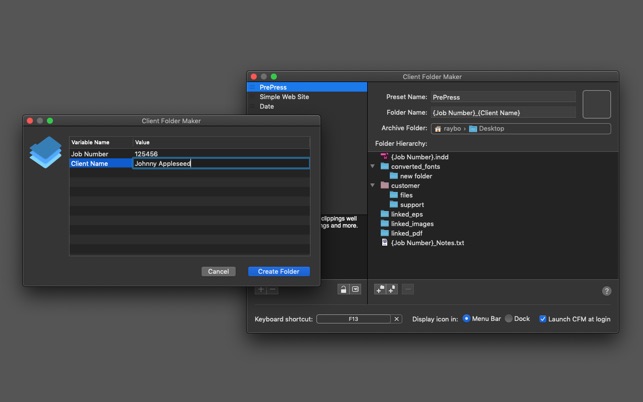
Screenshot 2: https://is3-ssl.mzstatic.com/image/thumb/Purple113/v4/98/71/30/98713053-36af-312c-cee3-624749d56be5/pr_source.png/643x0w.jpg
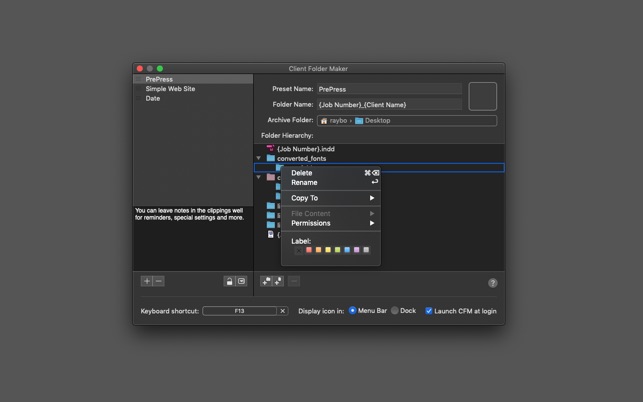
Application Icon: http://a4.mzstatic.com/us/r30/Purple69/v4/0f/6e/05/0f6e058a-7b3d-b5be-c73a-a32f79c449b4/icon256.png

New Date Formating Options: http://www.unicode.org/reports/tr35/tr35-31/tr35-dates.html#Date_Format_Patterns
Headquartered in Lake Dallas, Texas, GeekSuit, LLC is a leading evangelist for the Mac platform since 1999, including popular website brands prMac, MacDeveloper, App Review Helper and others. Copyright 1999-2019 GeekSuit, LLC. All Rights Reserved. Apple, the Apple logo and Macintosh are registered trademarks of Apple Computer in the U.S. and/or other countries. All other registered trademarks may be the property of their respective owners.
*******
Link To Article: https://prmac.com/release-id-83322.htm
*******
---------------------------------------------------------------------------------
Note that you can alter delivered distributions at any time.
Login to your account on prMac to alter your channel selection, or to opt-out at any time.
HITCASE Announces Ferra - A Handcrafted Premium Leather iPhone Case
A new article has been published at prMac.
HITCASE Announces Ferra - A Handcrafted Premium Leather iPhone Case - Published on 02/27/19
Vancouver based HITCASE today announces Ferra, a premium, handcrafted, full grain leather drop resistant case for iPhone X, Xs and Xs Max. The first product to be released in the all-new Design Series, Ferra combines traditional leatherwork with beautiful stainless steel touchpoints, compatible with the magnetic HITCASE TrueLUX iPhone Lens system for better content capture. The Ferra case is offered in Saddle Brown and Black, with a soft microfiber interior cradles the iPhone.
Vancouver, British Columbia - HITCASE announces the first product to be released in the all-new Design Series - Ferra(TM), a premium, handcrafted, full grain leather drop resistant case for iPhone X, Xs and Xs Max. Ferra combines traditional leatherwork with beautiful stainless steel touchpoints, compatible with the magnetic HITCASE TrueLUX(TM) iPhone Lens system for better content capture.
"We're proud to have brought innovative products to market like the Hitcase Pro, Shield Link, and Splash, but we wanted to push our design further," comments Brooks Bergreen, Founder and CEO of HITCASE. "Based on research we've discovered that between pickups, swipes and other interactions the average smartphone user touches their device between 2400-5000 times per day. Over the past 12 months, our design team at HITCASE has been focused on one central question: How does it feel? We're excited to bring this new approach in case protectives to the devices we value most, so they look and more importantly feel beautiful in your hands and this is the thought process behind the new Design Series, beginning with Ferra."
Hand cut, dyed, sewn and pressed, Ferra is craftsmanship you can feel. Made with premium, hand-dyed full grain Italian leather and stainless steel beveled hardware, Ferra is the first-ever leather product designed and manufactured by HITCASE and is the only leather case on the market to integrate lenses with our easy to use TrueLUX(R) magnetic lens system (Wide, SuperWide, Macro) for creative photography options. Ferra for the iPhone X/Xs, Xs Max can be purchased today for $59.99 USD on Hitcase.com.
"While we are known for building tough adventure products and lenses, this new direction for the company with our all-new Design Series is opening HITCASE to new customers, continuing our expansion and growth as a company and we couldn't be more excited," said Bergreen.
HITCASE Ferra(TM) Features:
* Full grain leather case. Strong, durable, soft
* Crafted by hand = hand sewn, dyed, cut and pressed
* Two color options: Saddle Brown and Black
* Premium 400 series stainless steel hardware
* Soft microfiber interior cradles your iPhone
* Drop protection to 6ft/2m
* Easily pocketable with a confident grip
* Wireless charging compatible
* Lightweight: 30g
* Slim design: 161mm x 81mm x 10.5mm
Pricing and Availability:
Offered in two hand-dyed colors: Saddle Brown and Black, retailing for $59.99 )USD). Use Ferra with the optional magnetic TrueLUX lens system with precision-grade optical glass. Seamlessly attach, remove and swap between three lens options: SuperWide, Wide and Macro. Available for $39.99 ea. 1-year product warranty. Additional HITCASE protective cases include the Splash, Crio, Shield LINK and PRO and the TrueLUX magnetic lens system are all part of the HITCASE Active and Adventure Series.
HITCASE: http://www.hitcase.com
Ferra Leather Case: http://hitcase.com/pages/Leather-iPhone-Case-Ferra
Purchase: https://www.hitcase.com/collections/leather-ferra
Headquartered in Vancouver, British Columbia, Canada, under the brand HITCASE, makes the world's most innovative mobile accessories using patented technologies and quality materials. By designing industry-leading device protection, the TrueLUX(R) lens system and versatile mounts, our products protect devices while turning them into a better camera. HITCASE is getting the world Ready for Adventure(R), one HITCASE at a time. All Material and Software (C) Copyright 2019 HIT Technologies Inc. All Rights Reserved. Apple, the Apple logo, iPhone, iPod and iPad are registered trademarks of Apple Inc. in the U.S. and/or other countries. Other trademarks and registered trademarks may be the property of their respective owners.
*******
Link To Article: https://prmac.com/release-id-83320.htm
*******
---------------------------------------------------------------------------------
Note that you can alter delivered distributions at any time.
Login to your account on prMac to alter your channel selection, or to opt-out at any time.
HITCASE Announces Ferra - A Handcrafted Premium Leather iPhone Case - Published on 02/27/19
Vancouver based HITCASE today announces Ferra, a premium, handcrafted, full grain leather drop resistant case for iPhone X, Xs and Xs Max. The first product to be released in the all-new Design Series, Ferra combines traditional leatherwork with beautiful stainless steel touchpoints, compatible with the magnetic HITCASE TrueLUX iPhone Lens system for better content capture. The Ferra case is offered in Saddle Brown and Black, with a soft microfiber interior cradles the iPhone.
Vancouver, British Columbia - HITCASE announces the first product to be released in the all-new Design Series - Ferra(TM), a premium, handcrafted, full grain leather drop resistant case for iPhone X, Xs and Xs Max. Ferra combines traditional leatherwork with beautiful stainless steel touchpoints, compatible with the magnetic HITCASE TrueLUX(TM) iPhone Lens system for better content capture.
"We're proud to have brought innovative products to market like the Hitcase Pro, Shield Link, and Splash, but we wanted to push our design further," comments Brooks Bergreen, Founder and CEO of HITCASE. "Based on research we've discovered that between pickups, swipes and other interactions the average smartphone user touches their device between 2400-5000 times per day. Over the past 12 months, our design team at HITCASE has been focused on one central question: How does it feel? We're excited to bring this new approach in case protectives to the devices we value most, so they look and more importantly feel beautiful in your hands and this is the thought process behind the new Design Series, beginning with Ferra."
Hand cut, dyed, sewn and pressed, Ferra is craftsmanship you can feel. Made with premium, hand-dyed full grain Italian leather and stainless steel beveled hardware, Ferra is the first-ever leather product designed and manufactured by HITCASE and is the only leather case on the market to integrate lenses with our easy to use TrueLUX(R) magnetic lens system (Wide, SuperWide, Macro) for creative photography options. Ferra for the iPhone X/Xs, Xs Max can be purchased today for $59.99 USD on Hitcase.com.
"While we are known for building tough adventure products and lenses, this new direction for the company with our all-new Design Series is opening HITCASE to new customers, continuing our expansion and growth as a company and we couldn't be more excited," said Bergreen.
HITCASE Ferra(TM) Features:
* Full grain leather case. Strong, durable, soft
* Crafted by hand = hand sewn, dyed, cut and pressed
* Two color options: Saddle Brown and Black
* Premium 400 series stainless steel hardware
* Soft microfiber interior cradles your iPhone
* Drop protection to 6ft/2m
* Easily pocketable with a confident grip
* Wireless charging compatible
* Lightweight: 30g
* Slim design: 161mm x 81mm x 10.5mm
Pricing and Availability:
Offered in two hand-dyed colors: Saddle Brown and Black, retailing for $59.99 )USD). Use Ferra with the optional magnetic TrueLUX lens system with precision-grade optical glass. Seamlessly attach, remove and swap between three lens options: SuperWide, Wide and Macro. Available for $39.99 ea. 1-year product warranty. Additional HITCASE protective cases include the Splash, Crio, Shield LINK and PRO and the TrueLUX magnetic lens system are all part of the HITCASE Active and Adventure Series.
HITCASE: http://www.hitcase.com
Ferra Leather Case: http://hitcase.com/pages/Leather-iPhone-Case-Ferra
Purchase: https://www.hitcase.com/collections/leather-ferra
Headquartered in Vancouver, British Columbia, Canada, under the brand HITCASE, makes the world's most innovative mobile accessories using patented technologies and quality materials. By designing industry-leading device protection, the TrueLUX(R) lens system and versatile mounts, our products protect devices while turning them into a better camera. HITCASE is getting the world Ready for Adventure(R), one HITCASE at a time. All Material and Software (C) Copyright 2019 HIT Technologies Inc. All Rights Reserved. Apple, the Apple logo, iPhone, iPod and iPad are registered trademarks of Apple Inc. in the U.S. and/or other countries. Other trademarks and registered trademarks may be the property of their respective owners.
*******
Link To Article: https://prmac.com/release-id-83320.htm
*******
---------------------------------------------------------------------------------
Note that you can alter delivered distributions at any time.
Login to your account on prMac to alter your channel selection, or to opt-out at any time.
Output Factory for InDesign Reduces Security Hassles on macOS Mojave
A new article has been published at prMac.
Output Factory for InDesign Reduces Security Hassles on macOS Mojave - Published on 02/27/19
Zevrix Solutions announces Output Factory 2.3.17, a maintenance update to company's output automation solution for Adobe InDesign. Output Factory automates printing and exporting from InDesign. The app offers batch processing, layer versioning, custom scripts integration and other time-saving options. The new version eliminates the hassles associated with Apple Event sandboxing - a security measure introduced in macOS Mojave that prevents access to control other apps without user authorization.
Toronto (ON), Canada - Zevrix Solutions today announces the release of Output Factory 2.3.17, a maintenance update to company's output automation tool for Adobe InDesign. Awarded 5 stars by InDesign Magazine, Output Factory automates and simplifies workflows of printers, publishers, prepress houses, and ad agencies worldwide. The software helps eradicate repetitive tasks and costly errors through batch processing with time-saving output options.
The new version eliminates the hassles associated with Apple Event sandboxing, a new security measure introduced in macOS Mojave. Under the new policy, apps can no longer control other apps without user authorization, which directly affects such tools as Output Factory that require access to InDesign and other system resources to perform complex workflow automation tasks. The new update of Output Factory streamlines the authorization process by clearing all permissions during launch time, which assures consistent interruption-free batch processing. The app will also reset Apple Event permissions automatically if the authorization was previously revoked by accident.
"Using Output Factory is straightforward... The time savings are huge," writes Jamie McKee in InDesign Magazine. "If you find yourself repeatedly exporting InDesign files in various formats, you owe it to yourself to install the free trial and see just how much time you'll save using Output Factory."
Output Factory supports printing as well as exporting to PDF, PostScript, EPS, Flash, IDML, EPUB and several image formats. It offers the following key features:
* Output multiple InDesign files automatically
* Export page groups as a single PDF files
* Variable output file names
* Create PDF security presets
* Output files to multiple formats with one click
* Layer versioning: output layer combinations as single files
* Eliminate errors with automatic preflight
Pricing and Availability:
Output Factory can be purchased from Zevrix website for $169.95 USD (Lite version $119.95), as well as from authorized resellers and Adobe Exchange. Trial is also available for download. The update is free for the users of Output Factory 2.x, and $84.97 to upgrade from Output Factory 1.x and BatchOutput. Output Factory requires macOS 10.7-10.14 and Adobe InDesign CS3-CC 2019.
Zevrix Solutions: http://zevrix.com
Output Factory 2.3.17: http://zevrix.com/OutputFactory.php
Download Output Factory: http://zevrix.com/OutputFactory.dmg
Purchase: http://zevrix.com/store.php
Screenshot: http://zevrix.com/screenshots/of2/of2-pdf.jpg
Located in Toronto, Canada, Zevrix Solutions provides automation and productivity solutions for Adobe Creative Cloud and Creative Suite software, PDF workflows, graphic file diagnostics and Microsoft Office output on Mac OS. Zevrix is dedicated to help professionals increase their profits through automating everyday tasks, producing error-free documents, saving disk space and cutting production costs. For more information, visit their website. Copyright (C) 2019 Zevrix Solutions. All Rights Reserved. Other trademarks and registered trademarks may be the property of their respective owners.
*******
Link To Article: https://prmac.com/release-id-83319.htm
*******
---------------------------------------------------------------------------------
Note that you can alter delivered distributions at any time.
Login to your account on prMac to alter your channel selection, or to opt-out at any time.
Output Factory for InDesign Reduces Security Hassles on macOS Mojave - Published on 02/27/19
Zevrix Solutions announces Output Factory 2.3.17, a maintenance update to company's output automation solution for Adobe InDesign. Output Factory automates printing and exporting from InDesign. The app offers batch processing, layer versioning, custom scripts integration and other time-saving options. The new version eliminates the hassles associated with Apple Event sandboxing - a security measure introduced in macOS Mojave that prevents access to control other apps without user authorization.
Toronto (ON), Canada - Zevrix Solutions today announces the release of Output Factory 2.3.17, a maintenance update to company's output automation tool for Adobe InDesign. Awarded 5 stars by InDesign Magazine, Output Factory automates and simplifies workflows of printers, publishers, prepress houses, and ad agencies worldwide. The software helps eradicate repetitive tasks and costly errors through batch processing with time-saving output options.
The new version eliminates the hassles associated with Apple Event sandboxing, a new security measure introduced in macOS Mojave. Under the new policy, apps can no longer control other apps without user authorization, which directly affects such tools as Output Factory that require access to InDesign and other system resources to perform complex workflow automation tasks. The new update of Output Factory streamlines the authorization process by clearing all permissions during launch time, which assures consistent interruption-free batch processing. The app will also reset Apple Event permissions automatically if the authorization was previously revoked by accident.
"Using Output Factory is straightforward... The time savings are huge," writes Jamie McKee in InDesign Magazine. "If you find yourself repeatedly exporting InDesign files in various formats, you owe it to yourself to install the free trial and see just how much time you'll save using Output Factory."
Output Factory supports printing as well as exporting to PDF, PostScript, EPS, Flash, IDML, EPUB and several image formats. It offers the following key features:
* Output multiple InDesign files automatically
* Export page groups as a single PDF files
* Variable output file names
* Create PDF security presets
* Output files to multiple formats with one click
* Layer versioning: output layer combinations as single files
* Eliminate errors with automatic preflight
Pricing and Availability:
Output Factory can be purchased from Zevrix website for $169.95 USD (Lite version $119.95), as well as from authorized resellers and Adobe Exchange. Trial is also available for download. The update is free for the users of Output Factory 2.x, and $84.97 to upgrade from Output Factory 1.x and BatchOutput. Output Factory requires macOS 10.7-10.14 and Adobe InDesign CS3-CC 2019.
Zevrix Solutions: http://zevrix.com
Output Factory 2.3.17: http://zevrix.com/OutputFactory.php
Download Output Factory: http://zevrix.com/OutputFactory.dmg
Purchase: http://zevrix.com/store.php
Screenshot: http://zevrix.com/screenshots/of2/of2-pdf.jpg

Located in Toronto, Canada, Zevrix Solutions provides automation and productivity solutions for Adobe Creative Cloud and Creative Suite software, PDF workflows, graphic file diagnostics and Microsoft Office output on Mac OS. Zevrix is dedicated to help professionals increase their profits through automating everyday tasks, producing error-free documents, saving disk space and cutting production costs. For more information, visit their website. Copyright (C) 2019 Zevrix Solutions. All Rights Reserved. Other trademarks and registered trademarks may be the property of their respective owners.
*******
Link To Article: https://prmac.com/release-id-83319.htm
*******
---------------------------------------------------------------------------------
Note that you can alter delivered distributions at any time.
Login to your account on prMac to alter your channel selection, or to opt-out at any time.
Unique, Challenging 3D Word Search Game Launches for iOS
A new article has been published at prMac.
Unique, Challenging 3D Word Search Game Launches for iOS - Published on 02/26/19
Arizona based Adducive today introduces Lexiblox, a unique, challenging 3D word game for iOS devices. Players rotate letter blocks and each combination spells one and only one word. The game requires a strong vocabulary and a good memory since most of the letters are facing away from you. Even so, it has a relaxed, playful feel. This one-of-a-kind puzzle comes with music, sound effects and graphics created especially for this app.
Chandler, Arizona - A unique, challenging 3D word game for iPhones and iPads called Lexiblox launches today, according to Adducive, its publisher. Players rotate letter blocks that look like children's toys. Each combination of blocks spells only one word. This novel setup leads to words that don't fit common patterns or shared letters. There are hundreds of words in the levels included in the game and they do not repeat. The puzzles, music, sounds and graphics were all created especially for Lexiblox.
"I wanted to create the ideal casual mobile game, something easy to pick up where you left off and hard to put down," said Brian Krause, founder of Adducive and the game's creator. Krause came up with the concept for game, wrote the puzzles, music, and code and designed the graphics and user interface. It is an independently developed, one-man app. He has been developing for iOS since 2008, and is a former math teacher and Google engineer.
The game requires a strong vocabulary and a good memory since most of the letters are facing away from you. Even so, it has a relaxed, playful feel. The soundtrack is mellow and jazzy and clouds float in the background while you play. The Lexiblox shuffle onto the screen between words and levels with charming choreography.
The game is available for iPhone, iPad and iPod touch devices running iOS 11.0 or later. Its full price is $3.99 but is available for $1.99 through Friday, March 1. The game has no ads, currencies or additional downloads and is ready for hours of enjoyment as soon as you buy it.
Adducive: http://adducive.com
Lexiblox 1.0: http://lexiblox.com
Lexiblox on the App Store: https://itunes.apple.com/app/id1412262458
Media Assets: https://drive.google.com/open?id=1nxhwXG8qEMhfBFhRGq7nlduvcdQopS_x
Adducive was founded in 1997 as a publishing and consulting firm specializing in mobile technology. Its owner, Brian Krause, has decades of experience in all phases of software development and has worked with start-ups, major technology firms and non-profit organizations in Silicon Valley and worldwide. He has been developing for iOS since 2008. All Material and Software (C) Copyright 2019 Adducive. All Rights Reserved. Apple, the Apple logo, iPhone, iPod and iPad are registered trademarks of Apple Inc. in the U.S. and/or other countries. Other trademarks and registered trademarks may be the property of their respective owners.
*******
Link To Article: https://prmac.com/release-id-83318.htm
*******
---------------------------------------------------------------------------------
Note that you can alter delivered distributions at any time.
Login to your account on prMac to alter your channel selection, or to opt-out at any time.
Unique, Challenging 3D Word Search Game Launches for iOS - Published on 02/26/19
Arizona based Adducive today introduces Lexiblox, a unique, challenging 3D word game for iOS devices. Players rotate letter blocks and each combination spells one and only one word. The game requires a strong vocabulary and a good memory since most of the letters are facing away from you. Even so, it has a relaxed, playful feel. This one-of-a-kind puzzle comes with music, sound effects and graphics created especially for this app.
Chandler, Arizona - A unique, challenging 3D word game for iPhones and iPads called Lexiblox launches today, according to Adducive, its publisher. Players rotate letter blocks that look like children's toys. Each combination of blocks spells only one word. This novel setup leads to words that don't fit common patterns or shared letters. There are hundreds of words in the levels included in the game and they do not repeat. The puzzles, music, sounds and graphics were all created especially for Lexiblox.
"I wanted to create the ideal casual mobile game, something easy to pick up where you left off and hard to put down," said Brian Krause, founder of Adducive and the game's creator. Krause came up with the concept for game, wrote the puzzles, music, and code and designed the graphics and user interface. It is an independently developed, one-man app. He has been developing for iOS since 2008, and is a former math teacher and Google engineer.
The game requires a strong vocabulary and a good memory since most of the letters are facing away from you. Even so, it has a relaxed, playful feel. The soundtrack is mellow and jazzy and clouds float in the background while you play. The Lexiblox shuffle onto the screen between words and levels with charming choreography.
The game is available for iPhone, iPad and iPod touch devices running iOS 11.0 or later. Its full price is $3.99 but is available for $1.99 through Friday, March 1. The game has no ads, currencies or additional downloads and is ready for hours of enjoyment as soon as you buy it.
Adducive: http://adducive.com
Lexiblox 1.0: http://lexiblox.com
Lexiblox on the App Store: https://itunes.apple.com/app/id1412262458
Media Assets: https://drive.google.com/open?id=1nxhwXG8qEMhfBFhRGq7nlduvcdQopS_x
Adducive was founded in 1997 as a publishing and consulting firm specializing in mobile technology. Its owner, Brian Krause, has decades of experience in all phases of software development and has worked with start-ups, major technology firms and non-profit organizations in Silicon Valley and worldwide. He has been developing for iOS since 2008. All Material and Software (C) Copyright 2019 Adducive. All Rights Reserved. Apple, the Apple logo, iPhone, iPod and iPad are registered trademarks of Apple Inc. in the U.S. and/or other countries. Other trademarks and registered trademarks may be the property of their respective owners.
*******
Link To Article: https://prmac.com/release-id-83318.htm
*******
---------------------------------------------------------------------------------
Note that you can alter delivered distributions at any time.
Login to your account on prMac to alter your channel selection, or to opt-out at any time.
SuperTab 4.0 for Mac released - Major Update to Powerful App Switcher
A new article has been published at prMac.
SuperTab 4.0 for Mac released - Major Update to Powerful App Switcher - Published on 02/26/19
California based SpriTec Software today announces SuperTab 4.0, a major feature update to its award-winning App Switcher for macOS. SuperTab takes the App Switcher way beyond just apps: it gives users instant access to their Files, Folders, Windows, Web Sites, Calendars, Screen Shots, Recents, Clipboard History, Dock Items, Desktop Contents, Dropbox, Custom Clipboards, and more - all within the App Switcher, and all just a click or keypress away.
San Diego, California - SpriTec Software is excited to announce the release of SuperTab 4.0 for Mac. SuperTab allows users to completely replace the Mac's built-in Command-Tab App Switcher with a vastly more powerful and flexible Switcher that provides instant access to much more than just Active Apps. With SuperTab, users can add any or all of the following to the App Switcher:
* Active Apps
* Recent Apps
* Recent Documents
* Recent Folders
* Any Files, Folders or Apps
* App Windows
* Dock Contents
* Any Folder Contents
* Dropbox Contents
* Calendar Events
* Clipboard History
* Multiple Clipboards
* Web Site Bookmarks
* Screen Shots
* Countdown Timers
* Stopwatches
* Tagged Files & Folders
* Finder Sidebar Items
* Snagit Captures
* Saved Spotlight Searches
* Saved Display Configurations
Additionally, users can customize, configure and even colorize the App Switcher to suit their own work flows and personal styles.
And with this 4.0 release, SuperTab gains the following key new features:
* Tab Row Splitting - Users can now split their Tab Rows to get more rows on screen without using more space
* Recent Folders - Users gain access to their recently accessed folders to round out all things recent: Apps/Docs/Folders
* Hand Off Support - Users can now use SuperTab to transfer to their Mac tasks started on another Apple device
* Countdown Timers - Users can create countdown timers to never again miss an important deadline or event
* Stopwatches - Users can now create stopwatches to let them track how long tasks take - no need to dig out a phone
* Video and Interactive Screen Shots on Mojave - Mojave users can now take video and interactive Screen Shots
* Enhanced Drag-and-Drop - Users can drag images and text from any app directly into SuperTab
* Application Windows - The Application Windows Tab Row now can include windows from Apps in all Spaces
* Desktop Contents - User can opt to include Disk Drives in their Desktop Folder Contents Tab Row
* AppleScript scriptability - Users can now control SuperTab via AppleScript to show it, select its items and more
* Setup Wizard - SuperTab now offers a simple setup wizard to help users install and configure SuperTab
* Auto Update - SuperTab now has built-in Auto Update to help users ensure they have the latest fixes and features
"We are excited to offer our users all our new features, but we are especially to roll out Tab Row Splitting," explained Ando Sonenblick, owner of SpriTec Software. "Allowing users to split their Tab Rows lets them place more Tab Rows on screen, giving them more features at their fingertips, in turn making them more productive - all while taking no additional screen space. And at 50%-off its regular price, this release offers users the most "Bang for their Buck" of any version of SuperTab."
SuperTab 4.0 is compatible with the following versions of macOS:
* "Mojave" (10.14)
* "Hight Sierra" (10.13)
* "Sierra" (10.12)
* "El Capitan" (10.11)
* "Yosemite" (10.10)
* "Mavericks" (10.9)
* "Mountain Lion" (10.8)
Pricing and Availability:
SuperTab 4.0 is free to download and install and is fully-functional for 30 days. After 30 days, it remains fully-functional but will occasionally ask users to register. Users can take advantage of a special 50%-off sale price of only $10 (USD), which is good now through April, 2019. Users of earlier versions of SuperTab can upgrade to 4.0 for $2.99 (USD).
SuperTab 4.0: http://www.supertab.me
Version Details: http://www.supertab.me/FourPointOhRelease.html
QuickStart Guide: http://www.supertab.me/QuickStart.html
Download SuperTab: http://www.supertab.me/Download.html
Purchase SuperTab: http://www.supertab.me/Register.html
Media Assets: http://www.supertab.me/SuperTabScreenShots.html
Located in San Diego, California, SpriTec Software creates apps for the macOS platform. SpriTec Software is helmed by Ando Sonenblick, an Apple/GoPro/Adobe/DivX veteran with over 30 years of development experience. Copyright (C) 2019 SpriTec Software. All Rights Reserved. Apple, the Apple logo, Mac OS X, macOS, and Macintosh are registered trademarks of Apple Inc. in the U.S. and/or other countries. All other trademarks and trade names are the property of their respective owners.
*******
Link To Article: https://prmac.com/release-id-83317.htm
*******
---------------------------------------------------------------------------------
Note that you can alter delivered distributions at any time.
Login to your account on prMac to alter your channel selection, or to opt-out at any time.
SuperTab 4.0 for Mac released - Major Update to Powerful App Switcher - Published on 02/26/19
California based SpriTec Software today announces SuperTab 4.0, a major feature update to its award-winning App Switcher for macOS. SuperTab takes the App Switcher way beyond just apps: it gives users instant access to their Files, Folders, Windows, Web Sites, Calendars, Screen Shots, Recents, Clipboard History, Dock Items, Desktop Contents, Dropbox, Custom Clipboards, and more - all within the App Switcher, and all just a click or keypress away.
San Diego, California - SpriTec Software is excited to announce the release of SuperTab 4.0 for Mac. SuperTab allows users to completely replace the Mac's built-in Command-Tab App Switcher with a vastly more powerful and flexible Switcher that provides instant access to much more than just Active Apps. With SuperTab, users can add any or all of the following to the App Switcher:
* Active Apps
* Recent Apps
* Recent Documents
* Recent Folders
* Any Files, Folders or Apps
* App Windows
* Dock Contents
* Any Folder Contents
* Dropbox Contents
* Calendar Events
* Clipboard History
* Multiple Clipboards
* Web Site Bookmarks
* Screen Shots
* Countdown Timers
* Stopwatches
* Tagged Files & Folders
* Finder Sidebar Items
* Snagit Captures
* Saved Spotlight Searches
* Saved Display Configurations
Additionally, users can customize, configure and even colorize the App Switcher to suit their own work flows and personal styles.
And with this 4.0 release, SuperTab gains the following key new features:
* Tab Row Splitting - Users can now split their Tab Rows to get more rows on screen without using more space
* Recent Folders - Users gain access to their recently accessed folders to round out all things recent: Apps/Docs/Folders
* Hand Off Support - Users can now use SuperTab to transfer to their Mac tasks started on another Apple device
* Countdown Timers - Users can create countdown timers to never again miss an important deadline or event
* Stopwatches - Users can now create stopwatches to let them track how long tasks take - no need to dig out a phone
* Video and Interactive Screen Shots on Mojave - Mojave users can now take video and interactive Screen Shots
* Enhanced Drag-and-Drop - Users can drag images and text from any app directly into SuperTab
* Application Windows - The Application Windows Tab Row now can include windows from Apps in all Spaces
* Desktop Contents - User can opt to include Disk Drives in their Desktop Folder Contents Tab Row
* AppleScript scriptability - Users can now control SuperTab via AppleScript to show it, select its items and more
* Setup Wizard - SuperTab now offers a simple setup wizard to help users install and configure SuperTab
* Auto Update - SuperTab now has built-in Auto Update to help users ensure they have the latest fixes and features
"We are excited to offer our users all our new features, but we are especially to roll out Tab Row Splitting," explained Ando Sonenblick, owner of SpriTec Software. "Allowing users to split their Tab Rows lets them place more Tab Rows on screen, giving them more features at their fingertips, in turn making them more productive - all while taking no additional screen space. And at 50%-off its regular price, this release offers users the most "Bang for their Buck" of any version of SuperTab."
SuperTab 4.0 is compatible with the following versions of macOS:
* "Mojave" (10.14)
* "Hight Sierra" (10.13)
* "Sierra" (10.12)
* "El Capitan" (10.11)
* "Yosemite" (10.10)
* "Mavericks" (10.9)
* "Mountain Lion" (10.8)
Pricing and Availability:
SuperTab 4.0 is free to download and install and is fully-functional for 30 days. After 30 days, it remains fully-functional but will occasionally ask users to register. Users can take advantage of a special 50%-off sale price of only $10 (USD), which is good now through April, 2019. Users of earlier versions of SuperTab can upgrade to 4.0 for $2.99 (USD).
SuperTab 4.0: http://www.supertab.me
Version Details: http://www.supertab.me/FourPointOhRelease.html
QuickStart Guide: http://www.supertab.me/QuickStart.html
Download SuperTab: http://www.supertab.me/Download.html
Purchase SuperTab: http://www.supertab.me/Register.html
Media Assets: http://www.supertab.me/SuperTabScreenShots.html
Located in San Diego, California, SpriTec Software creates apps for the macOS platform. SpriTec Software is helmed by Ando Sonenblick, an Apple/GoPro/Adobe/DivX veteran with over 30 years of development experience. Copyright (C) 2019 SpriTec Software. All Rights Reserved. Apple, the Apple logo, Mac OS X, macOS, and Macintosh are registered trademarks of Apple Inc. in the U.S. and/or other countries. All other trademarks and trade names are the property of their respective owners.
*******
Link To Article: https://prmac.com/release-id-83317.htm
*******
---------------------------------------------------------------------------------
Note that you can alter delivered distributions at any time.
Login to your account on prMac to alter your channel selection, or to opt-out at any time.
Subscribe to:
Posts (Atom)