A new article has been published at prMac.
Moth Software announces Mail Archiver X 5.0 - Published on 03/18/19
Moth Software today announces Mail Archiver X 5.0 for Mac OS X, an important feature update to their app designed as a companion to the user's email application. Particularly valuable for businesses and individuals alike, Mail Archiver X allows consolidation, archiving, and permanent storage of emails. Emails may be saved in the application's native database format, Evernote, Filemaker or PDF. Version 5.0 adds support for encrypting archives, Mojave's DarkMode. Archiving is now much faster.
Heidesheim, Germany - Moth Software is proud to announce the release of Mail Archiver X 5.0 for Mac OS X, an update to their app that serves as a companion to the user's current email client, allowing consolidation, archiving, and permanent storage of emails. Emails may be saved in the application's native database format, Evernote, Filemaker, or PDF. Archiving emails from a variety of email applications into a single database, the app prevents accidental deletions, facilitates quick searches, and eliminates the storage size limits imposed by many email apps and companies. By saving emails in a single, standardized format, users are ensured that they can read all their emails, even those from legacy applications, from which they have subsequently migrated.
Following the archiving process, users may browse or search from the Mail Archiver X viewer.
Version 5 adds support for encrypting archives. "Encrypting archives has been a feature that has been requested often. Finally, it's available, " says Moth Software spokesperson, Beatrix Willius, "especially with regard to the GPDR from 2018".
Other new Features for Mail Archiver X 5.0 are:
* Added support for Mojave's DarkMode.
* There is now a Pro version which allows either single users and workgroups to archive and view mails from multiple computers.
* A new parser makes archiving faster. The archived emails look much better.
* It's possible to download external resources so that emails can be preserved completely.
Feature Highlights of Mail Archiver X are:
* An ideal email management and archive solution
* Protect and save all emails in a single archive folder
* Archives emails from the following formats: Mail, Outlook, Postbox, Powermail, Thunderbird, and standard mbox
* Exports emails to the following formats: Internal Database, Evernote, Filemaker, PDF, mbox, or Text
* Built-in email database browser
* Filemaker support, when using the Filemaker Version 13 browser
Pricing and Availability:
Mail Archiver X 5.0 costs $44.95 (USD) and is available directly from Moth Software. A free, fully-functional, 10-day trial version can be downloaded. Mail Archiver X 5.0 comes with a 30-day, money back guarantee. Review copies are available upon request.
Version 5 is a paid update:
Users who bought after 1-Feb-2018 can get the update for free. Users who bought the application before 1-Feb-2018 can buy the application for 50% off the full price.
Mail Archiver X 5.0: https://www.mothsoftware.com
Download Mail Archiver X: https://www.mothsoftware.com/content/download/download.php
Store: https://www.mothsoftware.com/content/store/store.php
Located in Heidesheim, Germany, the Moth Software team is a small independent software company founded by Beatrix Willius in 2004. Beatrix is an experienced project leader and developer with several years experience in Realbasic, Microsoft Access, Visual Basic, SQL, AppleScript and Filemaker. Copyright (C) 2004-2019 Moth Software. All Rights Reserved. Apple, the Apple logo, and Mac OS X are registered trademarks of Apple Inc. in the U.S. and/or other countries. All other trademarks and registered trademarks may be the property of their respective owners.
*******
Link To Article: https://prmac.com/release-id-83346.htm
*******
---------------------------------------------------------------------------------
Note that you can alter delivered distributions at any time.
Login to your account on prMac to alter your channel selection, or to opt-out at any time.

FmPro Migrator 8.74 Improves FileMaker to LiveCode & MySQL Data Transfer
A new article has been published at prMac.
FmPro Migrator 8.74 Improves FileMaker to LiveCode & MySQL Data Transfer - Published on 03/18/19
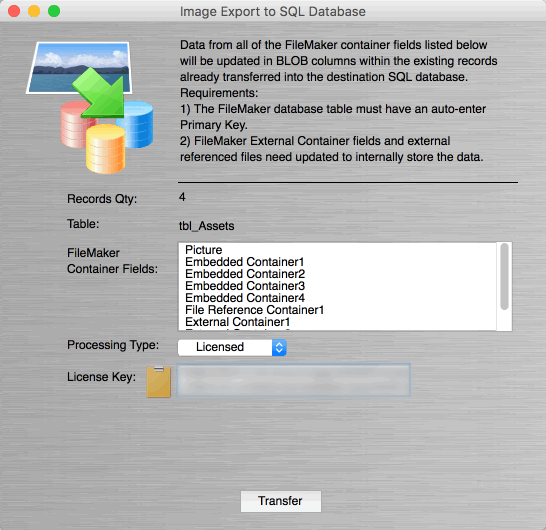
California based .com Solutions Inc. has released FmPro Migrator Platinum Edition 8.74, supporting FileMaker Pro Advanced 11-17 on macOS and Windows. FmPro Migrator is a stand-alone application which quickly and accurately migrates FileMaker Pro, Access, VFP databases to MySQL, Oracle, SQL Server, Sybase, DB2 and more. Version 8.74 is a maintenance release improving FileMaker to LiveCode, Image Export to SQL, data transfer to MySQL and AppleScript automation.
Fremont, California - .com Solutions Inc. has released FmPro Migrator Platinum Edition 8.74 as a maintenance release providing improvements to the FileMaker to LiveCode, Image Export to SQL, data transfers to MySQL and AppleScript automation. This release supports FileMaker Pro Advanced 11 - 17 on macOS and Windows. A summary of improvements in FmPro Migrator 8.74 includes:
* Fixed an issue with the LiveCode conversion project FmPro Converted Scripts.txt output file growing too large.
* Added local variables to the CreateConnectionObject handler in the LiveCode template stack.
* Fixed cosmetic issue in display of the Image Export SQL results text if 0 records were transferred. Also, added the clearing of the results text when switching tables.
* Fixed a cosmetic text label issue within the Manage Deleted Fields window.
* Updated the list of reserved words to support MySQL 8 when creating tables.
* Improved the display of Unicode error messages returned from database servers during the Get Fieldsize, Create Table and TransferData steps.
* Image Export to SQL error reports now contain the name of the table as part of the filename and the number of errors listed at the top of the report.
* Fixed an incorrect error message about 2 copies of FileMaker running on macOS due to the PSConversionHelper.xpc also running.
Pricing and Availability:
FmPro Migrator Developer Edition is priced at ($199) per developer, FmPro Migrator Platinum Edition is priced at ($599) per developer, and both versions are available immediately.
FmPro Migrator 8.74: http://www.fmpromigrator.com/products/fmpro_migrator/index.html
Image Export SQL Data Transfer Feature: http://www.fmpromigrator.com/products/fmpro_migrator/index.html#image_transfer
Download FmPro Migrator: http://www.fmpromigrator.com/downloads/demo_software/index.html#fmpro_migrator_demo
Purchase: https://sites.fastspring.com/fmpromigrator/instant/fmpromigratorplat_year_sub_fs1
Screenshot: https://www.fmpromigrator.com/images/fmpro_migrator/Image_Export_SQL_graphics/Image_Export_SQL_Screenshot_546_530.gif
Founded in 1999 by David Simpson in Sunny California, .com Solutions Inc. develops multi-platform graphical applications supporting FileMaker Pro, SQLite, Oracle, MySQL, Access, SQL Server, Sybase, DB2, PostgreSQL, VB6, LiveCode and Visual FoxPro developers. FmPro Script Diff, compares and edits FileMaker Pro scripts. SQLite Diff compares SQLite database schema and data. Copyright (C) 1999-2019 .com Solutions Inc. All Rights Reserved. FileMaker is a registered trademark of FileMaker, Inc. - An Apple Subsidiary. Apple, the Apple logo and macOS platforms are trademarks of Apple Inc. in the U.S. and/or other countries.
*******
Link To Article: https://prmac.com/release-id-83345.htm
*******
---------------------------------------------------------------------------------
Note that you can alter delivered distributions at any time.
Login to your account on prMac to alter your channel selection, or to opt-out at any time.
FmPro Migrator 8.74 Improves FileMaker to LiveCode & MySQL Data Transfer - Published on 03/18/19
California based .com Solutions Inc. has released FmPro Migrator Platinum Edition 8.74, supporting FileMaker Pro Advanced 11-17 on macOS and Windows. FmPro Migrator is a stand-alone application which quickly and accurately migrates FileMaker Pro, Access, VFP databases to MySQL, Oracle, SQL Server, Sybase, DB2 and more. Version 8.74 is a maintenance release improving FileMaker to LiveCode, Image Export to SQL, data transfer to MySQL and AppleScript automation.
Fremont, California - .com Solutions Inc. has released FmPro Migrator Platinum Edition 8.74 as a maintenance release providing improvements to the FileMaker to LiveCode, Image Export to SQL, data transfers to MySQL and AppleScript automation. This release supports FileMaker Pro Advanced 11 - 17 on macOS and Windows. A summary of improvements in FmPro Migrator 8.74 includes:
* Fixed an issue with the LiveCode conversion project FmPro Converted Scripts.txt output file growing too large.
* Added local variables to the CreateConnectionObject handler in the LiveCode template stack.
* Fixed cosmetic issue in display of the Image Export SQL results text if 0 records were transferred. Also, added the clearing of the results text when switching tables.
* Fixed a cosmetic text label issue within the Manage Deleted Fields window.
* Updated the list of reserved words to support MySQL 8 when creating tables.
* Improved the display of Unicode error messages returned from database servers during the Get Fieldsize, Create Table and TransferData steps.
* Image Export to SQL error reports now contain the name of the table as part of the filename and the number of errors listed at the top of the report.
* Fixed an incorrect error message about 2 copies of FileMaker running on macOS due to the PSConversionHelper.xpc also running.
Pricing and Availability:
FmPro Migrator Developer Edition is priced at ($199) per developer, FmPro Migrator Platinum Edition is priced at ($599) per developer, and both versions are available immediately.
FmPro Migrator 8.74: http://www.fmpromigrator.com/products/fmpro_migrator/index.html
Image Export SQL Data Transfer Feature: http://www.fmpromigrator.com/products/fmpro_migrator/index.html#image_transfer
Download FmPro Migrator: http://www.fmpromigrator.com/downloads/demo_software/index.html#fmpro_migrator_demo
Purchase: https://sites.fastspring.com/fmpromigrator/instant/fmpromigratorplat_year_sub_fs1
Screenshot: https://www.fmpromigrator.com/images/fmpro_migrator/Image_Export_SQL_graphics/Image_Export_SQL_Screenshot_546_530.gif
Founded in 1999 by David Simpson in Sunny California, .com Solutions Inc. develops multi-platform graphical applications supporting FileMaker Pro, SQLite, Oracle, MySQL, Access, SQL Server, Sybase, DB2, PostgreSQL, VB6, LiveCode and Visual FoxPro developers. FmPro Script Diff, compares and edits FileMaker Pro scripts. SQLite Diff compares SQLite database schema and data. Copyright (C) 1999-2019 .com Solutions Inc. All Rights Reserved. FileMaker is a registered trademark of FileMaker, Inc. - An Apple Subsidiary. Apple, the Apple logo and macOS platforms are trademarks of Apple Inc. in the U.S. and/or other countries.
*******
Link To Article: https://prmac.com/release-id-83345.htm
*******
---------------------------------------------------------------------------------
Note that you can alter delivered distributions at any time.
Login to your account on prMac to alter your channel selection, or to opt-out at any time.
Satisfy your Sweet Craving with Ice Cream Sim Bamba Ice Cream 2
A new article has been published at prMac.
Satisfy your Sweet Craving with Ice Cream Sim Bamba Ice Cream 2 - Published on 03/15/19
Mezmedia Pte Ltd. today announces Bamba Ice Cream 2, the long-awaited sequel to Bamba's super popular ice-cream making game for iOS and Android devices. Kids can make their own dream dessert with Bamba Ice Cream 2! Slice apples, strawberries, or even fish, drop them into the machine and out comes a custom-flavored sundae scoop. Easily create fancy waffles and pancakes, flip them high, stack them in a pile and plop more scoops of delicious frozen delights on them and so much more!
Singapore - Mezmedia Pte Ltd. is happy to announce Bamba Ice Cream 2, the long-awaited sequel to Bamba's super popular ice-cream making game for iOS and Android devices. Fans have long asked for a sequel to the original released over 5 years ago, and their patience have been rewarded. In Bamba Ice Cream 2, we have made this ice-cream making simulation more fun and more engaging. We've given the player the freedom to create the ice cream dish of their dreams, there are endless possibilities and combinations due to the variety of ingredients, flavours, toppings to choose from in the app.
Players can choose to make a perfect looking triple-scoop chocolate-chip gelato with a cherry on top, or a messy, crazy sundae stack of ten multi-flavoured scoops. It's all up to their creativity and imagination. In Bamba Ice Cream 2, they can make fancy waffles and pancakes too, toss and flip them up high, drop them in a big stack and plop more scoops of wacky ice cream scoops onto them. Then finish with weird toppings like Fishbone, Spiders and Slugs! These are all done via a realistic physics-engine based on Unity 3D.
At the start of the game, players slice (Fruit-ninja style) wacky ingredients like Rotten Apple or Smelly Fish. They choose an ice-cream bowl (from a selection which includes weird ones like Ostrich Shell, Monster Mouth and Toilet Bowl), put the sliced ingredients into a machine and make their custom ice cream flavour.
Next they come to the ice-cream assembly level, where there are over 30 flavours to choose from, starting with the regular ones like Chocolate, Vanilla and Strawberry, to wild and wacky ones like Dragonfruit, Anchovies and Toothpaste! When done, players can top their frozen creation with over 20 different toppings, ranging from the normal (Cherries, Strawberries) to the far-out (Cockroach, Anchor and Tombstone).
There are infinite combinations of ice cream dessert players can make which guarantees repeated gameplay. In Bamba Ice Cream 2, not only can they make their dream ice cream dish, but also their dream Waffle stack or their dream Milkshake. When players are done making the Ice Cream, Milkshake and Waffle, they 'pay' at the cashier and start 'eating'! After that, a Special Gift awaits!
This app is pure fun for the family and especially for children, and a great way to satisfy their ice-cream cravings!
In Bamba Ice Cream 2, the makers of the app added a new feature called the Recipe Book, which contains a series of quests that the players can work towards to unlock special ingredients, bowls, flavours, waffles and so on. For example, to unlock the Cactus Cup, players have to make an Ice Cream dish out of a Tin Can, three scoops of Squid Ice Cream and top it off with three Chocolate Chip cookies. There are a lot of quests to complete, with more added with every update.
"Every child wants their Ice Cream, but they can't always have it, so that's how we came up with the first Bamba Ice Cream. For the sequel, we've given it a physics engine, and improved the engagement levels, and presented more opportunities where parent and child can play together, which we find is an important part of the child's leaning journey", said John Ng, co-founder of Mezmedia, the studio behind the Bamba series of education apps for kids.
Supported Languages
* Bamba Ice Cream 2 is designed to be language-free
Device Requirements:
* iPhone and iPad
* Android devices
* Requires iOS 10.0 or later, Android 6.0 or later
Pricing and Availability:
Bamba Ice Cream 2 is Free (With In-App Purchases) and available worldwide through the App Store and Google Play in the Education category. For more information, please contact John Ng.
Bamba Ice Cream 2: http://www.bambatown.com/app/bamba-ice-cream-2/
Download from the App Store: https://itunes.apple.com/app/bamba-ice-cream-2/id1455064808
Download from Google Play: https://play.google.com/store/apps/details?id=com.mezmedia.bambaicecream_shopkitchen
YouTube Video (Official Trailer): https://www.youtube.com/watch?v=7UWzuTxRymA
Promotional Image: http://www.bambatown.com/press/screenshots_icecream2_for_PR.png
App Icon: http://www.bambatown.com/press/iOS_ice_cream2_icon.png
Mezmedia is an interactive studio based in Singapore. Under the Bamba brand, we create fun interactive toys for kids. It is our belief that interactive toys offer a new and exciting way to educate young children, learning through play. Our apps are designed to stimulate a child's imagination and creativity. Copyright (C) 2019 Mezmedia Pte Ltd. All Rights Reserved. Apple, the Apple logo, iPhone, iPod and iPad are registered trademarks of Apple Inc. in the U.S. and/or other countries.
*******
Link To Article: https://prmac.com/release-id-83344.htm
*******
---------------------------------------------------------------------------------
Note that you can alter delivered distributions at any time.
Login to your account on prMac to alter your channel selection, or to opt-out at any time.
Satisfy your Sweet Craving with Ice Cream Sim Bamba Ice Cream 2 - Published on 03/15/19
Mezmedia Pte Ltd. today announces Bamba Ice Cream 2, the long-awaited sequel to Bamba's super popular ice-cream making game for iOS and Android devices. Kids can make their own dream dessert with Bamba Ice Cream 2! Slice apples, strawberries, or even fish, drop them into the machine and out comes a custom-flavored sundae scoop. Easily create fancy waffles and pancakes, flip them high, stack them in a pile and plop more scoops of delicious frozen delights on them and so much more!
Singapore - Mezmedia Pte Ltd. is happy to announce Bamba Ice Cream 2, the long-awaited sequel to Bamba's super popular ice-cream making game for iOS and Android devices. Fans have long asked for a sequel to the original released over 5 years ago, and their patience have been rewarded. In Bamba Ice Cream 2, we have made this ice-cream making simulation more fun and more engaging. We've given the player the freedom to create the ice cream dish of their dreams, there are endless possibilities and combinations due to the variety of ingredients, flavours, toppings to choose from in the app.
Players can choose to make a perfect looking triple-scoop chocolate-chip gelato with a cherry on top, or a messy, crazy sundae stack of ten multi-flavoured scoops. It's all up to their creativity and imagination. In Bamba Ice Cream 2, they can make fancy waffles and pancakes too, toss and flip them up high, drop them in a big stack and plop more scoops of wacky ice cream scoops onto them. Then finish with weird toppings like Fishbone, Spiders and Slugs! These are all done via a realistic physics-engine based on Unity 3D.
At the start of the game, players slice (Fruit-ninja style) wacky ingredients like Rotten Apple or Smelly Fish. They choose an ice-cream bowl (from a selection which includes weird ones like Ostrich Shell, Monster Mouth and Toilet Bowl), put the sliced ingredients into a machine and make their custom ice cream flavour.
Next they come to the ice-cream assembly level, where there are over 30 flavours to choose from, starting with the regular ones like Chocolate, Vanilla and Strawberry, to wild and wacky ones like Dragonfruit, Anchovies and Toothpaste! When done, players can top their frozen creation with over 20 different toppings, ranging from the normal (Cherries, Strawberries) to the far-out (Cockroach, Anchor and Tombstone).
There are infinite combinations of ice cream dessert players can make which guarantees repeated gameplay. In Bamba Ice Cream 2, not only can they make their dream ice cream dish, but also their dream Waffle stack or their dream Milkshake. When players are done making the Ice Cream, Milkshake and Waffle, they 'pay' at the cashier and start 'eating'! After that, a Special Gift awaits!
This app is pure fun for the family and especially for children, and a great way to satisfy their ice-cream cravings!
In Bamba Ice Cream 2, the makers of the app added a new feature called the Recipe Book, which contains a series of quests that the players can work towards to unlock special ingredients, bowls, flavours, waffles and so on. For example, to unlock the Cactus Cup, players have to make an Ice Cream dish out of a Tin Can, three scoops of Squid Ice Cream and top it off with three Chocolate Chip cookies. There are a lot of quests to complete, with more added with every update.
"Every child wants their Ice Cream, but they can't always have it, so that's how we came up with the first Bamba Ice Cream. For the sequel, we've given it a physics engine, and improved the engagement levels, and presented more opportunities where parent and child can play together, which we find is an important part of the child's leaning journey", said John Ng, co-founder of Mezmedia, the studio behind the Bamba series of education apps for kids.
Supported Languages
* Bamba Ice Cream 2 is designed to be language-free
Device Requirements:
* iPhone and iPad
* Android devices
* Requires iOS 10.0 or later, Android 6.0 or later
Pricing and Availability:
Bamba Ice Cream 2 is Free (With In-App Purchases) and available worldwide through the App Store and Google Play in the Education category. For more information, please contact John Ng.
Bamba Ice Cream 2: http://www.bambatown.com/app/bamba-ice-cream-2/
Download from the App Store: https://itunes.apple.com/app/bamba-ice-cream-2/id1455064808
Download from Google Play: https://play.google.com/store/apps/details?id=com.mezmedia.bambaicecream_shopkitchen
YouTube Video (Official Trailer): https://www.youtube.com/watch?v=7UWzuTxRymA
Promotional Image: http://www.bambatown.com/press/screenshots_icecream2_for_PR.png

App Icon: http://www.bambatown.com/press/iOS_ice_cream2_icon.png

Mezmedia is an interactive studio based in Singapore. Under the Bamba brand, we create fun interactive toys for kids. It is our belief that interactive toys offer a new and exciting way to educate young children, learning through play. Our apps are designed to stimulate a child's imagination and creativity. Copyright (C) 2019 Mezmedia Pte Ltd. All Rights Reserved. Apple, the Apple logo, iPhone, iPod and iPad are registered trademarks of Apple Inc. in the U.S. and/or other countries.
*******
Link To Article: https://prmac.com/release-id-83344.htm
*******
---------------------------------------------------------------------------------
Note that you can alter delivered distributions at any time.
Login to your account on prMac to alter your channel selection, or to opt-out at any time.
Project management at your fingertips
A new article has been published at prMac.
Project management at your fingertips - Published on 03/14/19
ProjectWizards releases Merlin Project for iPad, the company's popular professional project management app. Merlin Project is the standard for project management in industries such as Architecture & Construction, Media & Agencies, Development & IT, Education and others. With Merlin Project, you simply create the flow of your tasks, determine duration and dependencies, and define fixed milestones. With just a few clicks, you can transform a complex plan into an elegant and expressive mind map.
Melle, Germany - For 15 years, Merlin Project has been at the heart of all project managers on the Mac. Now with the new version ProjectWizards also makes the iPad a powerful project tool.
Apple's magic tablet attracts everyone. Whether holding it up like a piece of paper in a meeting, appreciating its light weight when travelling, or using it as an intuitive tool and letting your fingers fly over its glass: Everyone loves the iPad. So it was obvious for ProjectWizards to prepare their favorite tool for the next decade. Now users have their projects within reach: Move Gantt bars and Kanban cards with just one finger and effortlessly wipe through large project plans. Experience all the powerful Merlin Project features on the iPad.
The patented MagicSync synchronizes all project data with all devices. If your tablet is already in the meeting room, but you want to make a last, quick change, this is no problem. Modify it on the Mac - by the time you're in the meeting, everything's synchronized. But Merlin Project doesn't just run on the iPad. On an iPhone, it displays all project content in portrait format as compact lists and shows a dynamic Gantt chart in landscape format.
Try Merlin Project for iPad free for 30 days. The price for the monthly subscription is $6.99 (USD), the annual subscription is $69.99. The new Merlin Project for iPad replaces the previous Merlin Project Go. Customers who have already subscribed, will automatically receive the new version at the old price.
ProjectWizards: https://www.projectwizards.net
Merlin Project: https://www.projectwizards.net/en/merlin-project
Download from the App Store: https://itunes.apple.com/app/merlin-project/id1043550230
Product image (Kanban Board): https://pws-8e80.kxcdn.com/content/merlin-project/kanban_en.jpg
Product image (Project assignments and their utilization): https://pws-8e80.kxcdn.com/content/merlin-project/wbs/assignment_en.jpg
Product image (Mind map): https://pws-8e80.kxcdn.com/content/merlin-project/mindmap_en.jpg
We are ProjectWizards. We help people solve complex tasks with ease. Our project management software allows Mac users to turn big ideas into reality in a stunningly simple way. We conjure up code so you can experience project management magic. We develop software for both small and complex projects. Software that's intuitive to use and can be customized to suit, so you can focus on what really matters: your project. Our software solutions are the tools you need to become more productive and efficient in achieving your goal. Copyright (C) 2019 ProjectWizards. All Rights Reserved. Apple, the Apple logo, iPhone, iPod, iPad, macOS, and Macintosh are registered trademarks of Apple Inc. in the U.S. and/or other countries.
*******
Link To Article: https://prmac.com/release-id-83343.htm
*******
---------------------------------------------------------------------------------
Note that you can alter delivered distributions at any time.
Login to your account on prMac to alter your channel selection, or to opt-out at any time.
Project management at your fingertips - Published on 03/14/19
ProjectWizards releases Merlin Project for iPad, the company's popular professional project management app. Merlin Project is the standard for project management in industries such as Architecture & Construction, Media & Agencies, Development & IT, Education and others. With Merlin Project, you simply create the flow of your tasks, determine duration and dependencies, and define fixed milestones. With just a few clicks, you can transform a complex plan into an elegant and expressive mind map.
Melle, Germany - For 15 years, Merlin Project has been at the heart of all project managers on the Mac. Now with the new version ProjectWizards also makes the iPad a powerful project tool.
Apple's magic tablet attracts everyone. Whether holding it up like a piece of paper in a meeting, appreciating its light weight when travelling, or using it as an intuitive tool and letting your fingers fly over its glass: Everyone loves the iPad. So it was obvious for ProjectWizards to prepare their favorite tool for the next decade. Now users have their projects within reach: Move Gantt bars and Kanban cards with just one finger and effortlessly wipe through large project plans. Experience all the powerful Merlin Project features on the iPad.
The patented MagicSync synchronizes all project data with all devices. If your tablet is already in the meeting room, but you want to make a last, quick change, this is no problem. Modify it on the Mac - by the time you're in the meeting, everything's synchronized. But Merlin Project doesn't just run on the iPad. On an iPhone, it displays all project content in portrait format as compact lists and shows a dynamic Gantt chart in landscape format.
Try Merlin Project for iPad free for 30 days. The price for the monthly subscription is $6.99 (USD), the annual subscription is $69.99. The new Merlin Project for iPad replaces the previous Merlin Project Go. Customers who have already subscribed, will automatically receive the new version at the old price.
ProjectWizards: https://www.projectwizards.net
Merlin Project: https://www.projectwizards.net/en/merlin-project
Download from the App Store: https://itunes.apple.com/app/merlin-project/id1043550230
Product image (Kanban Board): https://pws-8e80.kxcdn.com/content/merlin-project/kanban_en.jpg

Product image (Project assignments and their utilization): https://pws-8e80.kxcdn.com/content/merlin-project/wbs/assignment_en.jpg

Product image (Mind map): https://pws-8e80.kxcdn.com/content/merlin-project/mindmap_en.jpg

We are ProjectWizards. We help people solve complex tasks with ease. Our project management software allows Mac users to turn big ideas into reality in a stunningly simple way. We conjure up code so you can experience project management magic. We develop software for both small and complex projects. Software that's intuitive to use and can be customized to suit, so you can focus on what really matters: your project. Our software solutions are the tools you need to become more productive and efficient in achieving your goal. Copyright (C) 2019 ProjectWizards. All Rights Reserved. Apple, the Apple logo, iPhone, iPod, iPad, macOS, and Macintosh are registered trademarks of Apple Inc. in the U.S. and/or other countries.
*******
Link To Article: https://prmac.com/release-id-83343.htm
*******
---------------------------------------------------------------------------------
Note that you can alter delivered distributions at any time.
Login to your account on prMac to alter your channel selection, or to opt-out at any time.
RemoteSight 1.4: Network Video Streaming for Video Surveillance
A new article has been published at prMac.
RemoteSight 1.4: Network Video Streaming for Video Surveillance - Published on 03/14/19
Ben Software today announced the release of RemoteSight 1.4, an update to their video and audio network streaming software. RemoteSight supports a variety of devices, such as built-in iSight / FaceTime cameras included in many Macs, as well as USB webcams and Blackmagic devices. Designed to operate as part of a video surveillance system, RemoteSight integrates seamlessly with SecuritySpy, the premier multi-camera video surveillance software for macOS.
London, United Kingdom - Ben Software today announced the release of RemoteSight 1.4, an update to their video and audio network streaming software. RemoteSight supports a variety of devices, such as built-in iSight / FaceTime cameras included in many Macs, as well as USB webcams and Blackmagic devices. Designed to operate as part of a video surveillance system, RemoteSight integrates seamlessly with SecuritySpy, the premier multi-camera video surveillance software for macOS.
"This update represents our ongoing commitment to maintaining top quality software and responding to our customers' feedback" said Ben Bird, the developer of RemoteSight. "Many organisations as well as home users already have a network of computers with built-in cameras; RemoteSight allows users to inexpensively utilise these cameras for the purposes of video security."
RemoteSight can also be used as a standalone application for remotely monitoring anything happening on or around a particular computer, or for adding live images to web pages. RemoteSight effectively turns the computer's camera into a network IP camera that can be viewed using a web browser such as Safari, Chrome or FireFox.
The main features of RemoteSight are:
* Streams video and audio from its built-in web interface
* Supports most Mac-compatible cameras and audio input devices
* Screen capture
* Runs in the background with low CPU usage
* Integrates seamlessly with SecuritySpy
* Supports both JPEG HTTP and H.264 RTSP streaming formats
* Remote monitoring over a local network or over the Internet
New features in this version include:
* 64-bit app for full compatibility with current and future macOS systems
* Redesigned web interface
* Support for H.264 RTSP streaming
* Support for live audio via the web interface
* Support for Blackmagic video input devices
* Improved text overlays with more date options
* Efficiency improvements for higher performance
* IPv6 support
RemoteSight can be downloaded and tested free of charge for 30 days before purchasing. Pricing is in British Pounds, Euros or US Dollars, and both single-user and site licenses are available, for GBP 18.90 (approx. $26) and GBP 189.00 (approx. $260) respectively.
RemoteSight 1.4: http://www.bensoftware.com/remotesight/
SecuritySpy macOS CCTV Software: http://www.bensoftware.com/securityspy/
Download RemoteSight: http://www.bensoftware.com/remotesight/RemoteSight.dmg
Purchase RemoteSight: http://www.bensoftware.com/purchase/
Screenshot: https://www.bensoftware.com/remotesight/m_main.png
Application Icon: https://www.bensoftware.com/remotesight/img/mainlogo.gif
Ben Software Ltd is an independent software development house focused on providing high-quality video-related software for the Mac platform. Copyright (C) 2019 Ben Software. All Rights Reserved. Apple, the Apple logo, Mac OS X, and Macintosh are registered trademarks of Apple Inc. in the U.S. and/or other countries.
*******
Link To Article: https://prmac.com/release-id-83342.htm
*******
---------------------------------------------------------------------------------
Note that you can alter delivered distributions at any time.
Login to your account on prMac to alter your channel selection, or to opt-out at any time.
RemoteSight 1.4: Network Video Streaming for Video Surveillance - Published on 03/14/19
Ben Software today announced the release of RemoteSight 1.4, an update to their video and audio network streaming software. RemoteSight supports a variety of devices, such as built-in iSight / FaceTime cameras included in many Macs, as well as USB webcams and Blackmagic devices. Designed to operate as part of a video surveillance system, RemoteSight integrates seamlessly with SecuritySpy, the premier multi-camera video surveillance software for macOS.
London, United Kingdom - Ben Software today announced the release of RemoteSight 1.4, an update to their video and audio network streaming software. RemoteSight supports a variety of devices, such as built-in iSight / FaceTime cameras included in many Macs, as well as USB webcams and Blackmagic devices. Designed to operate as part of a video surveillance system, RemoteSight integrates seamlessly with SecuritySpy, the premier multi-camera video surveillance software for macOS.
"This update represents our ongoing commitment to maintaining top quality software and responding to our customers' feedback" said Ben Bird, the developer of RemoteSight. "Many organisations as well as home users already have a network of computers with built-in cameras; RemoteSight allows users to inexpensively utilise these cameras for the purposes of video security."
RemoteSight can also be used as a standalone application for remotely monitoring anything happening on or around a particular computer, or for adding live images to web pages. RemoteSight effectively turns the computer's camera into a network IP camera that can be viewed using a web browser such as Safari, Chrome or FireFox.
The main features of RemoteSight are:
* Streams video and audio from its built-in web interface
* Supports most Mac-compatible cameras and audio input devices
* Screen capture
* Runs in the background with low CPU usage
* Integrates seamlessly with SecuritySpy
* Supports both JPEG HTTP and H.264 RTSP streaming formats
* Remote monitoring over a local network or over the Internet
New features in this version include:
* 64-bit app for full compatibility with current and future macOS systems
* Redesigned web interface
* Support for H.264 RTSP streaming
* Support for live audio via the web interface
* Support for Blackmagic video input devices
* Improved text overlays with more date options
* Efficiency improvements for higher performance
* IPv6 support
RemoteSight can be downloaded and tested free of charge for 30 days before purchasing. Pricing is in British Pounds, Euros or US Dollars, and both single-user and site licenses are available, for GBP 18.90 (approx. $26) and GBP 189.00 (approx. $260) respectively.
RemoteSight 1.4: http://www.bensoftware.com/remotesight/
SecuritySpy macOS CCTV Software: http://www.bensoftware.com/securityspy/
Download RemoteSight: http://www.bensoftware.com/remotesight/RemoteSight.dmg
Purchase RemoteSight: http://www.bensoftware.com/purchase/
Screenshot: https://www.bensoftware.com/remotesight/m_main.png

Application Icon: https://www.bensoftware.com/remotesight/img/mainlogo.gif

Ben Software Ltd is an independent software development house focused on providing high-quality video-related software for the Mac platform. Copyright (C) 2019 Ben Software. All Rights Reserved. Apple, the Apple logo, Mac OS X, and Macintosh are registered trademarks of Apple Inc. in the U.S. and/or other countries.
*******
Link To Article: https://prmac.com/release-id-83342.htm
*******
---------------------------------------------------------------------------------
Note that you can alter delivered distributions at any time.
Login to your account on prMac to alter your channel selection, or to opt-out at any time.
AnyTrans Now Wirelessly Manages Android Content Via Computer, App & Web
A new article has been published at prMac.
AnyTrans Now Wirelessly Manages Android Content Via Computer, App & Web - Published on 03/14/19
iMobie Inc. today announces AnyTrans Android Manager 7.0.0 for Mac and Windows. AnyTrans brings an in-depth manager for users to manage Android content in different scenarios, across multiple platforms. AnyTrans is revamped to let users take complete control of Android content on computer more conveniently via Wi-Fi. Version 7 is the first remarkable update that covers desktop program, web app, and mobile app with a whole new UI.
Newark, California - iMobie Inc., an industry-leading developer focused on Android and iOS software, today announced its Android manager 7.0.0, available both on Mac and Windows. It's the first remarkable update that covers desktop program, web app, and mobile app with a whole new UI. V7.0.0 brings an in-depth manager for users to manage Android content in different scenarios, across multiple platforms.
AnyTrans is revamped to let users take complete control of Android content on computer more conveniently via Wi-Fi. For iPhone-to-Android switchers, they're provided with a comprehensive migration solution, ensuring they can move over everything important from iPhone, iPad, iTunes library, iTunes backups, iCloud and iCloud backups. The web app also enables users to transfer photos, music, videos and more files instantly between phone and computer, no software required. Better yet, with AnyTrans Android app, users can even share files directly from phone to phone by simply scanning a QR code.
"Aiming to meet users' needs to manage Android content across multiple platforms, we are devoted to optimizing and perfecting our product. The newly-released AnyTrans consolidates desktop program, Android app, and web app seamlessly, providing an all-in-one content management channel for users," said Frank Kong, CEO of iMobie Inc. "Meanwhile, to help iOS-to-Android switchers migrate data to new Android phone breezily, we've perfected 1-click migration feature to make sure users can get what they matter from multiple resources."
Master Whole Content with an In-depth Manager:
With a well-optimized UI, AnyTrans allows users to wirelessly in-depth manage Android content, like photos, music, messages, contacts, etc. For those who want to switch from iPhone to the new Samsung Galaxy S10, it makes sure users can move over crucial content from iPhone, iPad, iTunes library, iTunes backups, iCloud and iCloud backups. Downloading online videos to Android phones and computer is also easier than ever.
Enjoy an Instant Transfer with Lighter Experience:
Want to export photos to computer quickly? AnyTrans has got you covered with a lighter web app. By simply scanning a QR code, users can move photos, videos, and more between Android and computer smoothly and seamlessly. No USB cables, no software required. It not only helps users save more storage (80M ) on computer, but also brings them a more lightweight and faster transfer.
Share Files from Phone-to-Phone Directly and Wirelessly:
AnyTrans also brings Android users a quick Android data transfer. No USB cable: it helps batch share documents, Zip files, or other files to the receiver's phone in a blink of an eye. Users can also check and lock the needed file they want via 1-click search feature, and share it with family, friends, or colleagues instantly. No need to take the risk to upload files to a third-party cloud for sharing.
Pricing and Availability:
AnyTrans 7.0.0 is available for both Windows and Mac. License available from iMobie online store.
AnyTrans Android Manager 7.0.0: https://www.imobie.com/anytrans/android-manager.htm
Download AnyTrans: https://www.imobie.com/anytrans/download.htm
AnyTrans Online Store: https://www.imobie.com/anytrans/buy-android-manager.htm
AnyTrans Android App on Google Play : https://play.google.com/store/apps/details?id=com.imobie.anytrans
AnyTrans User Guides: https://www.imobie.com/anytrans/guide-android.htm
iMobie Inc., established in 2011, and located in Central Ave, Newark CA, is an advanced software developer dedicated to making the digital life simpler for all iOS, Android, and Mac users worldwide. We believe that all our efforts are worthwhile since over 8 million happy users have been served by iMobie products and services. All Material and Software (C) Copyright 2019 iMobie Inc. All Rights Reserved. Apple, the Apple logo, Mac OS X, iPhone, iPod, iPad and Macintosh are registered trademarks of Apple Inc. in the U.S. and/or other countries. Other trademarks and registered trademarks may be the property of their respective owners.
*******
Link To Article: https://prmac.com/release-id-83339.htm
*******
---------------------------------------------------------------------------------
Note that you can alter delivered distributions at any time.
Login to your account on prMac to alter your channel selection, or to opt-out at any time.
AnyTrans Now Wirelessly Manages Android Content Via Computer, App & Web - Published on 03/14/19
iMobie Inc. today announces AnyTrans Android Manager 7.0.0 for Mac and Windows. AnyTrans brings an in-depth manager for users to manage Android content in different scenarios, across multiple platforms. AnyTrans is revamped to let users take complete control of Android content on computer more conveniently via Wi-Fi. Version 7 is the first remarkable update that covers desktop program, web app, and mobile app with a whole new UI.
Newark, California - iMobie Inc., an industry-leading developer focused on Android and iOS software, today announced its Android manager 7.0.0, available both on Mac and Windows. It's the first remarkable update that covers desktop program, web app, and mobile app with a whole new UI. V7.0.0 brings an in-depth manager for users to manage Android content in different scenarios, across multiple platforms.
AnyTrans is revamped to let users take complete control of Android content on computer more conveniently via Wi-Fi. For iPhone-to-Android switchers, they're provided with a comprehensive migration solution, ensuring they can move over everything important from iPhone, iPad, iTunes library, iTunes backups, iCloud and iCloud backups. The web app also enables users to transfer photos, music, videos and more files instantly between phone and computer, no software required. Better yet, with AnyTrans Android app, users can even share files directly from phone to phone by simply scanning a QR code.
"Aiming to meet users' needs to manage Android content across multiple platforms, we are devoted to optimizing and perfecting our product. The newly-released AnyTrans consolidates desktop program, Android app, and web app seamlessly, providing an all-in-one content management channel for users," said Frank Kong, CEO of iMobie Inc. "Meanwhile, to help iOS-to-Android switchers migrate data to new Android phone breezily, we've perfected 1-click migration feature to make sure users can get what they matter from multiple resources."
Master Whole Content with an In-depth Manager:
With a well-optimized UI, AnyTrans allows users to wirelessly in-depth manage Android content, like photos, music, messages, contacts, etc. For those who want to switch from iPhone to the new Samsung Galaxy S10, it makes sure users can move over crucial content from iPhone, iPad, iTunes library, iTunes backups, iCloud and iCloud backups. Downloading online videos to Android phones and computer is also easier than ever.
Enjoy an Instant Transfer with Lighter Experience:
Want to export photos to computer quickly? AnyTrans has got you covered with a lighter web app. By simply scanning a QR code, users can move photos, videos, and more between Android and computer smoothly and seamlessly. No USB cables, no software required. It not only helps users save more storage (80M ) on computer, but also brings them a more lightweight and faster transfer.
Share Files from Phone-to-Phone Directly and Wirelessly:
AnyTrans also brings Android users a quick Android data transfer. No USB cable: it helps batch share documents, Zip files, or other files to the receiver's phone in a blink of an eye. Users can also check and lock the needed file they want via 1-click search feature, and share it with family, friends, or colleagues instantly. No need to take the risk to upload files to a third-party cloud for sharing.
Pricing and Availability:
AnyTrans 7.0.0 is available for both Windows and Mac. License available from iMobie online store.
AnyTrans Android Manager 7.0.0: https://www.imobie.com/anytrans/android-manager.htm
Download AnyTrans: https://www.imobie.com/anytrans/download.htm
AnyTrans Online Store: https://www.imobie.com/anytrans/buy-android-manager.htm
AnyTrans Android App on Google Play : https://play.google.com/store/apps/details?id=com.imobie.anytrans
AnyTrans User Guides: https://www.imobie.com/anytrans/guide-android.htm
iMobie Inc., established in 2011, and located in Central Ave, Newark CA, is an advanced software developer dedicated to making the digital life simpler for all iOS, Android, and Mac users worldwide. We believe that all our efforts are worthwhile since over 8 million happy users have been served by iMobie products and services. All Material and Software (C) Copyright 2019 iMobie Inc. All Rights Reserved. Apple, the Apple logo, Mac OS X, iPhone, iPod, iPad and Macintosh are registered trademarks of Apple Inc. in the U.S. and/or other countries. Other trademarks and registered trademarks may be the property of their respective owners.
*******
Link To Article: https://prmac.com/release-id-83339.htm
*******
---------------------------------------------------------------------------------
Note that you can alter delivered distributions at any time.
Login to your account on prMac to alter your channel selection, or to opt-out at any time.
iziTime Work Planning App is Now Compatible With Dropbox
A new article has been published at prMac.
iziTime Work Planning App is Now Compatible With Dropbox - Published on 03/13/19
HooliApps, a publisher of utilities and mobile games, announces version 6 of iziTime for iOS devices is now synced with Dropbox. The iziTime mobile app allows you to enter daily work schedules and overtime worked, and calculate the total time worked. The app is now compatible with Dropbox, users can save their schedules in the cloud and access them from their iOS and Android devices.
Forbach, Other - HooliApps, a publisher of utilities and mobile games, today announced that version 6 of iziTime for iPhone, iPad, and iPod touch devices is now synced with Dropbox. The update has been published in the App Store
The addition of this feature is the answer to the demand of many users to share their data between their devices, smartphones and tablets, and to ensure the retention of their data in case of malfunction or change of their phone.
"Users will be able to save their work schedules in a simple, secure and free way on their Dropbox personal account, and also to be able to use the application on all their mobile devices. Dropbox is a reference among the various online storage services," says the developer.
Features:
* Enter scheduled working hours and hours (arrival time, departure time, breaks, comments, and overtime)
* Night time management
* Cut-off work management (morning, afternoon)
* Multi schedules and projects
* Automatic calculation of the total duration worked
* Adjustable hourly rate (eg 90% / 75% for ambulance attendants)
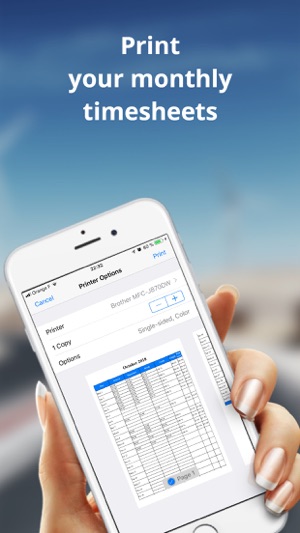
* Print weekly time sheets / monthly / yearly (PDF, csv)
The app is translated into 27 languages, and is actively used by over 18,000 users (47% in France, 13% in Italy, 3.8% in the United States, 2.3% in Germany, 2.3 % in Vietnam, 0.5% in Poland, 0.4% in Russia).
Device Requirements:
* iPhone, iPad, and iPod touch
* Requires iOS 9.0 or later
* Universal Application
* 37.2 MB
Pricing and Availability:
iziTime : Work Planning 6.0 is free and is available worldwide exclusively through the App Store in the Utilities category. Subscriptions are available as convenient in-app purchases.
Hooliapps: https://www.hooliapps.com/
iziTime : Work Planning 6.0: https://www.hooliapps.com/izitime/
App Store: https://itunes.apple.com/app/izitime-planning-de-travail/id1173642542?mt=8
Screenshot: https://is4-ssl.mzstatic.com/image/thumb/Purple128/v4/3e/70/f0/3e70f0ef-b2ff-f16a-a0f9-1a3e66f71461/pr_source.jpg/300x0w.jpg
App Icon: https://is5-ssl.mzstatic.com/image/thumb/Purple124/v4/63/a2/cf/63a2cfd5-f0c0-6ee2-d133-ea7bcf0d3c7c/AppIcon-0-1x_U007emarketing-0-0-85-220-0-10.png/246x0w.jpg
HooliApps is a developer of iOS apps. All Material and Software (C) Copyright 2019 HooliApps. All Rights Reserved. Apple, the Apple logo, iPhone, iPod and iPad are registered trademarks of Apple Inc. in the U.S. and/or other countries. Other trademarks and registered trademarks may be the property of their respective owners.
*******
Link To Article: https://prmac.com/release-id-83341.htm
*******
---------------------------------------------------------------------------------
Note that you can alter delivered distributions at any time.
Login to your account on prMac to alter your channel selection, or to opt-out at any time.
iziTime Work Planning App is Now Compatible With Dropbox - Published on 03/13/19
HooliApps, a publisher of utilities and mobile games, announces version 6 of iziTime for iOS devices is now synced with Dropbox. The iziTime mobile app allows you to enter daily work schedules and overtime worked, and calculate the total time worked. The app is now compatible with Dropbox, users can save their schedules in the cloud and access them from their iOS and Android devices.
Forbach, Other - HooliApps, a publisher of utilities and mobile games, today announced that version 6 of iziTime for iPhone, iPad, and iPod touch devices is now synced with Dropbox. The update has been published in the App Store
The addition of this feature is the answer to the demand of many users to share their data between their devices, smartphones and tablets, and to ensure the retention of their data in case of malfunction or change of their phone.
"Users will be able to save their work schedules in a simple, secure and free way on their Dropbox personal account, and also to be able to use the application on all their mobile devices. Dropbox is a reference among the various online storage services," says the developer.
Features:
* Enter scheduled working hours and hours (arrival time, departure time, breaks, comments, and overtime)
* Night time management
* Cut-off work management (morning, afternoon)
* Multi schedules and projects
* Automatic calculation of the total duration worked
* Adjustable hourly rate (eg 90% / 75% for ambulance attendants)
* Print weekly time sheets / monthly / yearly (PDF, csv)
The app is translated into 27 languages, and is actively used by over 18,000 users (47% in France, 13% in Italy, 3.8% in the United States, 2.3% in Germany, 2.3 % in Vietnam, 0.5% in Poland, 0.4% in Russia).
Device Requirements:
* iPhone, iPad, and iPod touch
* Requires iOS 9.0 or later
* Universal Application
* 37.2 MB
Pricing and Availability:
iziTime : Work Planning 6.0 is free and is available worldwide exclusively through the App Store in the Utilities category. Subscriptions are available as convenient in-app purchases.
Hooliapps: https://www.hooliapps.com/
iziTime : Work Planning 6.0: https://www.hooliapps.com/izitime/
App Store: https://itunes.apple.com/app/izitime-planning-de-travail/id1173642542?mt=8
Screenshot: https://is4-ssl.mzstatic.com/image/thumb/Purple128/v4/3e/70/f0/3e70f0ef-b2ff-f16a-a0f9-1a3e66f71461/pr_source.jpg/300x0w.jpg
App Icon: https://is5-ssl.mzstatic.com/image/thumb/Purple124/v4/63/a2/cf/63a2cfd5-f0c0-6ee2-d133-ea7bcf0d3c7c/AppIcon-0-1x_U007emarketing-0-0-85-220-0-10.png/246x0w.jpg

HooliApps is a developer of iOS apps. All Material and Software (C) Copyright 2019 HooliApps. All Rights Reserved. Apple, the Apple logo, iPhone, iPod and iPad are registered trademarks of Apple Inc. in the U.S. and/or other countries. Other trademarks and registered trademarks may be the property of their respective owners.
*******
Link To Article: https://prmac.com/release-id-83341.htm
*******
---------------------------------------------------------------------------------
Note that you can alter delivered distributions at any time.
Login to your account on prMac to alter your channel selection, or to opt-out at any time.
Subscribe to:
Posts (Atom)