A new article has been published at prMac.
Share your iPhone or iPad display wirelessly on your computer - Published on 04/15/19
AirBeamTV today presents Mirror for Mac or Windows PC 3.3.1, an update to their popular wireless presentation app for iOS devices. A must-have app for anyone who gives presentations, Mirror for Mac or Windows PC gives every iPhone or iPad owner an easy and effective way to mirror the display of their phone or tablet on a Mac or PC. It's a perfect solution for any classroom or training environment. Version 3.3.1 offers bugfixes and stability improvements.
Naarden, Netherlands - Today, AirBeamTV presents the new app "Mirror for Mac or Windows PC". With this app every iPhone or iPad owner can mirror the display of their phone or tablet on a Mac or PC.
Wireless phone screen sharing:
The idea for the app arose from the demand of app developers and other professionals who could not find an easy wireless alternative for presenting the content of their phone. "Nowadays it is common practice to connect your computer with a cable to a projector or large TV screen during presentations or demonstrations. Our new app makes it possible to share your phone screen with the same setup without the need of an AppleTV or additional cables," says Jan van Ottele, CEO of AirBeamTV.
Ideal classroom solution:
In addition, according to Van Ottele, the app is excellent to use in a classroom or training environment. "Especially when teaching at external locations, it is usually not practically organized in terms of technology and you are dependent on the computer systems present. However, with our app you can always share videos, photos and apps from your own phone, as long as the computer or screen you are viewing them is connected to the internet and has the free Chrome browser."
Device Requirements:
* iPhone, iPad, and iPod touch
* Requires iOS 12.0 or later
* 124 MB
Pricing and Availability:
Mirror for Mac or Windows PC 3.3.1 is free to download in the App Store. Users can test the app free before upgrading to the paid version ($4.99 in the US App Store). The premium version has no time limits for mirroring and supports lifetime updates. For both the free and the paid version, everyone can count on fast and free customer service.
Mirror for Mac or Windows PC 3.3.1: https://www.airbeam.tv/mirror-iphone-ipad-screen/mac-windows/
Download from the App Store: https://itunes.apple.com/app/mirror-to-mac-or-windows-pc/id1350663974
YouTube Video: https://www.youtube.com/watch?v=Fzn2sTJEFYM
Media Assets: https://www.dropbox.com/sh/8ax8pfhegyiddek/AACdb7rcifregdERcMoW21wka?dl=0
Since 2014, AirBeamTV is the market leader in easy and smart "screen mirorring" solutions for Apple's iOS and MacOS devices such as iPhones and MacBooks. The company sells screen mirroring applications for most major TV brands, including Samsung, LG, Sony, Panasonic, Philips, Roku and many more. From the picturesque village of Naarden, The Netherlands, a diverse and motivated team of programmers works daily on developing and improving innovative apps. All Material and Software (C) Copyright 2014-2018 AirBeamTV. All Rights Reserved. Apple, the Apple logo, macOS, iPhone, iPad, iPod and Macintosh are registered trademarks of Apple Inc. in the U.S. and/or other countries. Other trademarks and registered trademarks may be the property of their respective owners.
*******
Link To Article: https://prmac.com/release-id-83375.htm
*******
---------------------------------------------------------------------------------
Note that you can alter delivered distributions at any time.
Login to your account on prMac to alter your channel selection, or to opt-out at any time.

GraphicConverter 10.7 Adds Dehaze Batch Action, New JPEG Convert Service
A new article has been published at prMac.
GraphicConverter 10.7 Adds Dehaze Batch Action, New JPEG Convert Service - Published on 04/15/19
German indie development team Lemke Software GmbH today announces GraphicConverter 10.7, an important update to their award-winning image editing utility for macOS. The app offers users the ability to convert most any format graphic file to one of nearly 80 other graphic formats. Version 10.7 brings a dehaze batch action, the ability to sort by rating and aspect ratio as well as resolution and pixel size, converting to JPEG at 75 or 85 percent, and much more.
Peine, Germany - Independent developer, Lemke Software GmbH today is proud to announce the release and immediate availability of GraphicConverter 10.7, an important update to their popular image editing utility for macOS. The utility has become known as the "Swiss Army Knife" of image editing applications, and allows users to convert any of over 200 graphic file formats into any of almost 80 other graphic formats.
GraphicConverter's 1.5 million users around the globe will appreciate the new features version 10.7 brings to the app. New features include a dehaze batch action, a new service to convert JPEG files to 75 or 85 percent, the ability to import exported LR keywords into the keyword palette, and much, much more.
"GraphicConverter has long been one of the most popular image editing utilities available for the Mac," says Thorsten Lemke, founder of Lemke Software GmbH. "This new version builds on GraphicConverter's already great feature set, providing both new and improved features for our users."
New Features Include:
* Browser context menu: append path to iptc caption
* Offset GPS date/time stamp command
* Dehaze batch action
* Clear of keyword palette
* Import of exported LR keywords into keyword palette
* Sort by rating & aspect ratio and resolution & pixel size added
* Sort folders separate
* A new service: convert to JPEG at 75 or 85 percent
* Sliders in dialogs moveable by scrollwheel
* Image context menu entry for animation: save frames as separate GIFs/PNGs
* Browser context menu: copy exif date to other metadata dates
GraphicConverter has long been one of the most respected image utility tools available for the Mac. Apple was even impressed enough to have included GraphicConverter as a default app on many of their Mac models.
While Lemke Software added several great new features to version 10.7, the improvements didn't stop there, as the new version also offers considerable improvements to the app's previous features.
Feature Improvements Include:
* Display of autofocus point of some FUJI cameras
* Open with application will be called with all selected files at once (macOS 10.10 or later)
* Option to disable slideshow effects on 10.13.x or earlier
* Option to disable display of zoom during slideshow zoom
* Find duplicate resolves aliases and symlinks
* Improved ratio display in browser
* Localizations
As always, GraphicConverter 10.7 is the best way available on the Mac to capture, import, convert, and export images. The app also offers power image editing and slideshow capabilities, and provides color management profiles, 3D image support and much more.
Feature Include:
* Ability to open files in 200 graphics formats
* Ability to export to almost 80 different formats
* Import directly from camera (also RAW)
* Catalog generation (web, print, picture)
* TWAIN and image capture interface for scanners
* Direct support of the photo services Flickr and locr
* Graphical file and picture browser
* Slide show functions
* Powerful batch processor feature
* Support for Applescript
* Express picture enhancement function
* Powerful functions for editing pictures
* Advanced effects and filters
* Plug-in architecture
* Color management with ColorSync and ICC profiles
* 3D image support
* Supports the latest technologies of the different Mac OS versions
* Multilingual (12 available languages)
* Image verifier
* Ability to browse local copies on cloud services like Dropbox, SkyDrive, Amazon Cloud and Google Drive
"We've made GraphicConverter 10.7 easier to use than ever, thanks to the informative tutorial videos we've posted on out YouTube page," continues Thorsten. "Users who would like to try GraphicConverter to make sure it fits their needs can download a trial version and follow along with the video tutorials. Plus, version 10.7 is a totally free update to any version 10.x customers."
GraphicConverter 10.7 provides the best way to capture, import, convert, and export images on the Mac. The utility's graphic conversion features alone are worth the price of the app. Users are encouraged to try GraphicConverter today.
System Requirements:
* Requires OS X 10.9 or higher
* 64-bit processor
* 145 MB
Pricing/Availability:
GraphicConverter 10.7 is only $39.95 USD (or an equivalent amount in other currencies) and is available worldwide through the Mac App Store in the Photography category. It can also be directly purchased online from the Lemkesoft website. GraphicConverter 10.7 is a free update for all customers of version 10.x. Upgrades from older versions of GraphicConverter are available for $25.95 USD.
Lemke Software: https://www.lemkesoft.de/en/image-editing-slideshow-browser-batch-conversion-metadata-and-more-on-your-mac/
GraphicConverter 10.7: https://www.lemkesoft.de/en/products/graphicconverter/
Download GraphicConverter: https://www.lemkesoft.de/en/products/graphicconverter/download/
Purchase: https://www.lemkesoft.de/en/order/
Purchase and Download (MAS): https://itunes.apple.com/app/graphicconverter-10/id1090470302
YouTube Channel (Tutorial Videos): https://www.youtube.com/channel/UCAtl9qcyQ3-hxhYnSCkbZ7Q
Based in Peine, Germany, Lemke Software GmbH is a developer and publisher of Macintosh software. Founded by Thorsten Lemke in 2002, the main focus and passion of Lemke Software is centered on the maintenance and further development of GraphicConverter. Lemke Software also develops individual solutions for special customer requirements. All Material and Software (C) Copyright 2019 Lemke Software GmbH. All Rights Reserved. Apple, the Apple logo, Macintosh Mac OS X, and macOS are registered trademarks of Apple Inc. in the U.S. and/or other countries. Other trademarks and registered trademarks may be the property of their respective owners.
*******
Link To Article: https://prmac.com/release-id-83374.htm
*******
---------------------------------------------------------------------------------
Note that you can alter delivered distributions at any time.
Login to your account on prMac to alter your channel selection, or to opt-out at any time.
GraphicConverter 10.7 Adds Dehaze Batch Action, New JPEG Convert Service - Published on 04/15/19
German indie development team Lemke Software GmbH today announces GraphicConverter 10.7, an important update to their award-winning image editing utility for macOS. The app offers users the ability to convert most any format graphic file to one of nearly 80 other graphic formats. Version 10.7 brings a dehaze batch action, the ability to sort by rating and aspect ratio as well as resolution and pixel size, converting to JPEG at 75 or 85 percent, and much more.
Peine, Germany - Independent developer, Lemke Software GmbH today is proud to announce the release and immediate availability of GraphicConverter 10.7, an important update to their popular image editing utility for macOS. The utility has become known as the "Swiss Army Knife" of image editing applications, and allows users to convert any of over 200 graphic file formats into any of almost 80 other graphic formats.
GraphicConverter's 1.5 million users around the globe will appreciate the new features version 10.7 brings to the app. New features include a dehaze batch action, a new service to convert JPEG files to 75 or 85 percent, the ability to import exported LR keywords into the keyword palette, and much, much more.
"GraphicConverter has long been one of the most popular image editing utilities available for the Mac," says Thorsten Lemke, founder of Lemke Software GmbH. "This new version builds on GraphicConverter's already great feature set, providing both new and improved features for our users."
New Features Include:
* Browser context menu: append path to iptc caption
* Offset GPS date/time stamp command
* Dehaze batch action
* Clear of keyword palette
* Import of exported LR keywords into keyword palette
* Sort by rating & aspect ratio and resolution & pixel size added
* Sort folders separate
* A new service: convert to JPEG at 75 or 85 percent
* Sliders in dialogs moveable by scrollwheel
* Image context menu entry for animation: save frames as separate GIFs/PNGs
* Browser context menu: copy exif date to other metadata dates
GraphicConverter has long been one of the most respected image utility tools available for the Mac. Apple was even impressed enough to have included GraphicConverter as a default app on many of their Mac models.
While Lemke Software added several great new features to version 10.7, the improvements didn't stop there, as the new version also offers considerable improvements to the app's previous features.
Feature Improvements Include:
* Display of autofocus point of some FUJI cameras
* Open with application will be called with all selected files at once (macOS 10.10 or later)
* Option to disable slideshow effects on 10.13.x or earlier
* Option to disable display of zoom during slideshow zoom
* Find duplicate resolves aliases and symlinks
* Improved ratio display in browser
* Localizations
As always, GraphicConverter 10.7 is the best way available on the Mac to capture, import, convert, and export images. The app also offers power image editing and slideshow capabilities, and provides color management profiles, 3D image support and much more.
Feature Include:
* Ability to open files in 200 graphics formats
* Ability to export to almost 80 different formats
* Import directly from camera (also RAW)
* Catalog generation (web, print, picture)
* TWAIN and image capture interface for scanners
* Direct support of the photo services Flickr and locr
* Graphical file and picture browser
* Slide show functions
* Powerful batch processor feature
* Support for Applescript
* Express picture enhancement function
* Powerful functions for editing pictures
* Advanced effects and filters
* Plug-in architecture
* Color management with ColorSync and ICC profiles
* 3D image support
* Supports the latest technologies of the different Mac OS versions
* Multilingual (12 available languages)
* Image verifier
* Ability to browse local copies on cloud services like Dropbox, SkyDrive, Amazon Cloud and Google Drive
"We've made GraphicConverter 10.7 easier to use than ever, thanks to the informative tutorial videos we've posted on out YouTube page," continues Thorsten. "Users who would like to try GraphicConverter to make sure it fits their needs can download a trial version and follow along with the video tutorials. Plus, version 10.7 is a totally free update to any version 10.x customers."
GraphicConverter 10.7 provides the best way to capture, import, convert, and export images on the Mac. The utility's graphic conversion features alone are worth the price of the app. Users are encouraged to try GraphicConverter today.
System Requirements:
* Requires OS X 10.9 or higher
* 64-bit processor
* 145 MB
Pricing/Availability:
GraphicConverter 10.7 is only $39.95 USD (or an equivalent amount in other currencies) and is available worldwide through the Mac App Store in the Photography category. It can also be directly purchased online from the Lemkesoft website. GraphicConverter 10.7 is a free update for all customers of version 10.x. Upgrades from older versions of GraphicConverter are available for $25.95 USD.
Lemke Software: https://www.lemkesoft.de/en/image-editing-slideshow-browser-batch-conversion-metadata-and-more-on-your-mac/
GraphicConverter 10.7: https://www.lemkesoft.de/en/products/graphicconverter/
Download GraphicConverter: https://www.lemkesoft.de/en/products/graphicconverter/download/
Purchase: https://www.lemkesoft.de/en/order/
Purchase and Download (MAS): https://itunes.apple.com/app/graphicconverter-10/id1090470302
YouTube Channel (Tutorial Videos): https://www.youtube.com/channel/UCAtl9qcyQ3-hxhYnSCkbZ7Q
Based in Peine, Germany, Lemke Software GmbH is a developer and publisher of Macintosh software. Founded by Thorsten Lemke in 2002, the main focus and passion of Lemke Software is centered on the maintenance and further development of GraphicConverter. Lemke Software also develops individual solutions for special customer requirements. All Material and Software (C) Copyright 2019 Lemke Software GmbH. All Rights Reserved. Apple, the Apple logo, Macintosh Mac OS X, and macOS are registered trademarks of Apple Inc. in the U.S. and/or other countries. Other trademarks and registered trademarks may be the property of their respective owners.
*******
Link To Article: https://prmac.com/release-id-83374.htm
*******
---------------------------------------------------------------------------------
Note that you can alter delivered distributions at any time.
Login to your account on prMac to alter your channel selection, or to opt-out at any time.
School ID Now Supports Suicide Lifelines
A new article has been published at prMac.
School ID Now Supports Suicide Lifelines - Published on 04/11/19
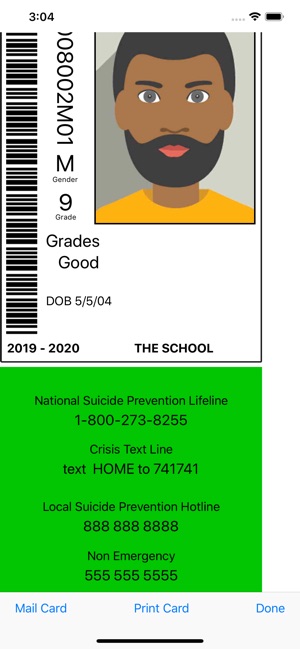
California based Good School Tools today announced School ID Cards and Photos 4.0.0, an important update to their popular educational app for iOS devices. With this useful app, individual student IDs are distributed directly to the student's phone. There is no need to print cards or rely on students to carry them. Mug-books are created and displayed on the phone. Immediately find a group of students by name, gender, and grade. Version 4.0 now includes Suicide Lifelines and more.
San Diego, California - Good School Tools announced today that School ID Cards and Photos version 4.0.0, will include information on every student ID for the National and Local Suicide Prevention Hotlines, the Crisis Text Line, and Campus Police.
Governor Brown of California signed SB 972 (authored by Senator Anthony Portantino) into law in September 2018 to address the increase of student suicides by mandating Suicide Lifeline information be included on every student ID card. This law goes into effect July 1, 2019. Good School Tools has responded by putting the mandated National and Local Suicide Prevention Hotline numbers on every ID card. Good School Tools also includes the Crisis Text Line number and local Campus Police contact information.
Tim Walton of Good School Tools said: "We are appalled by the increase in teen suicides. School ID provides the perfect means to impact this problem by providing IDs right on a student's smart phone. We hope students will take advantage of the hotline and crisis information available right on their phones to reach out to the help they need. School ID is already in use in Los Angeles and NYC schools. We are aware that other states have begun legislation to require student IDs and to include Lifeline information on those IDs. School ID is priced at $199/yr/school so that as many schools as possible can benefit from the use of the app. We have also partnered with a number of school photographers who provide student photo IDs as a part of their normal services. We hope to see more partnerships evolve so that we may help safeguard our students."
Device Requirements:
* iPhone 5s or later and iPod touch
* iPad 5th generation or later
* Requires iOS 11.0 or later
* 16.3 MB
Pricing and Availability:
Apps are Free (With In-App Subscription Purchase options) and available exclusively through the App Store in the Education category. For more information, please contact Tim Walton.
Good School Tools: http://www.goodschooltools.com
School ID Cards and Photos .4.0.0: http://www.goodschooltools.com/Tools/SchoolID/
Download from App Store: https://itunes.apple.com/app/school-id-cards-and-photos/id362528188
Screenshot: https://is2-ssl.mzstatic.com/image/thumb/Purple123/v4/aa/7b/13/aa7b13f0-74e5-b7f5-643d-7554b43e9d8d/pr_source.png/300x0w.jpg
App Icon: https://is5-ssl.mzstatic.com/image/thumb/Purple113/v4/ab/83/c4/ab83c451-c307-98e8-a9a8-24db497a2f00/IDIcon-0-1x_U007emarketing-0-0-GLES2_U002c0-512MB-sRGB-0-0-0-85-220-0-0-0-7.png/246x0w.jpg
San Diego based Good School Tools, previously operating as TrueIDApps and School ID, has been providing Southern California school districts with mobile apps for administering students during normal and emergency conditions for nearly 15 years. Their flagship product, GSTools provides a suite of mobile apps which streamline the administrators' job around school by providing critical student information, including photos, right on the administrators' iPhone or iPad. GSTools integrates with most SISs. Good School Tools other tools take information exported from SIS systems to provide administrators additional capabilities to run the schools more efficiently. All Material and Software (C) Copyright 2019 Good School Tools. All Rights Reserved. Apple, the Apple logo, iPhone, iPod and iPad are registered trademarks of Apple Inc. in the U.S. and/or other countries. Other trademarks and registered trademarks may be the property of their respective owners.
*******
Link To Article: https://prmac.com/release-id-83372.htm
*******
---------------------------------------------------------------------------------
Note that you can alter delivered distributions at any time.
Login to your account on prMac to alter your channel selection, or to opt-out at any time.
School ID Now Supports Suicide Lifelines - Published on 04/11/19
California based Good School Tools today announced School ID Cards and Photos 4.0.0, an important update to their popular educational app for iOS devices. With this useful app, individual student IDs are distributed directly to the student's phone. There is no need to print cards or rely on students to carry them. Mug-books are created and displayed on the phone. Immediately find a group of students by name, gender, and grade. Version 4.0 now includes Suicide Lifelines and more.
San Diego, California - Good School Tools announced today that School ID Cards and Photos version 4.0.0, will include information on every student ID for the National and Local Suicide Prevention Hotlines, the Crisis Text Line, and Campus Police.
Governor Brown of California signed SB 972 (authored by Senator Anthony Portantino) into law in September 2018 to address the increase of student suicides by mandating Suicide Lifeline information be included on every student ID card. This law goes into effect July 1, 2019. Good School Tools has responded by putting the mandated National and Local Suicide Prevention Hotline numbers on every ID card. Good School Tools also includes the Crisis Text Line number and local Campus Police contact information.
Tim Walton of Good School Tools said: "We are appalled by the increase in teen suicides. School ID provides the perfect means to impact this problem by providing IDs right on a student's smart phone. We hope students will take advantage of the hotline and crisis information available right on their phones to reach out to the help they need. School ID is already in use in Los Angeles and NYC schools. We are aware that other states have begun legislation to require student IDs and to include Lifeline information on those IDs. School ID is priced at $199/yr/school so that as many schools as possible can benefit from the use of the app. We have also partnered with a number of school photographers who provide student photo IDs as a part of their normal services. We hope to see more partnerships evolve so that we may help safeguard our students."
Device Requirements:
* iPhone 5s or later and iPod touch
* iPad 5th generation or later
* Requires iOS 11.0 or later
* 16.3 MB
Pricing and Availability:
Apps are Free (With In-App Subscription Purchase options) and available exclusively through the App Store in the Education category. For more information, please contact Tim Walton.
Good School Tools: http://www.goodschooltools.com
School ID Cards and Photos .4.0.0: http://www.goodschooltools.com/Tools/SchoolID/
Download from App Store: https://itunes.apple.com/app/school-id-cards-and-photos/id362528188
Screenshot: https://is2-ssl.mzstatic.com/image/thumb/Purple123/v4/aa/7b/13/aa7b13f0-74e5-b7f5-643d-7554b43e9d8d/pr_source.png/300x0w.jpg
App Icon: https://is5-ssl.mzstatic.com/image/thumb/Purple113/v4/ab/83/c4/ab83c451-c307-98e8-a9a8-24db497a2f00/IDIcon-0-1x_U007emarketing-0-0-GLES2_U002c0-512MB-sRGB-0-0-0-85-220-0-0-0-7.png/246x0w.jpg
San Diego based Good School Tools, previously operating as TrueIDApps and School ID, has been providing Southern California school districts with mobile apps for administering students during normal and emergency conditions for nearly 15 years. Their flagship product, GSTools provides a suite of mobile apps which streamline the administrators' job around school by providing critical student information, including photos, right on the administrators' iPhone or iPad. GSTools integrates with most SISs. Good School Tools other tools take information exported from SIS systems to provide administrators additional capabilities to run the schools more efficiently. All Material and Software (C) Copyright 2019 Good School Tools. All Rights Reserved. Apple, the Apple logo, iPhone, iPod and iPad are registered trademarks of Apple Inc. in the U.S. and/or other countries. Other trademarks and registered trademarks may be the property of their respective owners.
*******
Link To Article: https://prmac.com/release-id-83372.htm
*******
---------------------------------------------------------------------------------
Note that you can alter delivered distributions at any time.
Login to your account on prMac to alter your channel selection, or to opt-out at any time.
XPAND K.K. Launches XPAND.CODES Reader App
A new article has been published at prMac.
XPAND K.K. Launches XPAND.CODES Reader App - Published on 04/07/19
XPAND K.K., which provides "XPAND.CODES", the barcode solution for signs, announces XPAND.CODES Reader App for iOS devices, is available today. XPAND.CODES Reader is a free multi barcode reader that can read QR/XPAND/EAN codes quickly and with precision. It helps users to scan various barcodes whether near or far and to obtain additional information on smartphones.
Tokyo, Japan - XPAND K.K., which provides "XPAND.CODES", the barcode solution for signs, has announced the launch of XPAND.CODES Reader App for iOS mobile device today. XPAND.CODES Reader is a free multi barcode reader that can read QR/XPAND/EAN codes quickly and with precision. It helps users to scan various barcodes whether near or far and to obtain additional information on smartphones. XPAND K.K. is also developing an app for Android devices.
"Through our collaboration with Belgium's Vision Smarts, we have equipped it with a high-functioning reading engine, which you can use to read the XPAND codes displayed on the large displays inside of stadiums. The addition of our new mobile app allows for an experience of linking various spaces with the internet, making it the easiest and the most valuable barcode reader." said Toworu Nanmoku, CEO of XPAND.
"When we set out to develop our barcode and QR code reader software, it was to read codes that were blurry or difficult to read on product packages. It is very exciting and gratifying to see XPAND take the technology in a totally different and useful direction." added Benoit Maison, CEO of Vision Smarts.
XPAND.CODES Reader Features:
* Point your camera towards the QR/XPAND/EAN codes to connect to the Internet
* Indoor mapping & navigation service inside shopping malls and exhibitions ? Coming soon!
* No usage fees, no ads and no registering of personal information
* The app requires only access to the camera for reading barcodes and to location information for navigation
To celebrate its release, XPAND offers XPAND Sign free edition globally which you can try XPAND Code for free.
XPAND Code is a barcode for space that was created during the design process for traffic signs. Nanmoku developed this as a way to expand information on signs while working on the designs of Tokyo Metro train information signs for the 2020 Olympic Games. This new barcode follows in the footsteps of EAN/UPC Code and QR Code links with your smartphone even from far away distances without ruining the design of the sign or scenery. In addition to locations such as restaurants all over Japan, XPAND Code has started to be utilized in public transportation and public spaces. The Tokyo Metro train information sign design won the IIID Award2017.
XPAND was able to successfully scan at a span of 20 to 60 meters/ 60 to 200 feet, across a road.
See a movie of a distance scan at Shinjuku Alta Vision.
Device Requirements:
* iPhone, iPad, and iPod touch
* Requires iOS 11.0 or later
* 13.2 MB
Pricing and Availability:
XPAND.CODES Reader is free and is available worldwide exclusively through the App Store in the Utilities category.
XPAND Official Site: https://xpand.codes/en/
Vision Smarts Official Site: http://www.visionsmarts.com/
XPAND Sign Free Edition Link: https://xpand.codes/en/20190403-01-xpandsigngratis/
Download from the App Store: https://itunes.apple.com/us/app/xpand-codes-reader/id1456737997
Scan Movie Link: https://youtu.be/dl7noo5HDlQ
IIID Award2017 Link: http://iiidaward.net/
XPAND K.K. was established for the development and operation of XPAND.CODES. Its predecessor is the design company "Ginza Design of Communications Gsk", which has worked on numerous traffic designs. "XPAND.CODES" was created in order to realize a system that can link with smartphones from a distance without ruining the designs of signs and the scenery. In order to popularize XPAND.CODES, XPAND K.K. was established in September, 2017, and relocated to Higashimatsuyama City and conducted third-party allocation of shares in February 2018, strengthening the organization. With the relocation and capital increase, the design consignment work of Ginza Design of Communications Gsk has also been integrated into XPAND K.K. All Material and Software (C) Copyright 2019 XPAND K.K. All Rights Reserved. Apple, the Apple logo, iPhone, iPod and iPad are registered trademarks of Apple Inc. in the U.S. and/or other countries. Other trademarks and registered trademarks may be the property of their
respective owners.
*******
Link To Article: https://prmac.com/release-id-83371.htm
*******
---------------------------------------------------------------------------------
Note that you can alter delivered distributions at any time.
Login to your account on prMac to alter your channel selection, or to opt-out at any time.
XPAND K.K. Launches XPAND.CODES Reader App - Published on 04/07/19
XPAND K.K., which provides "XPAND.CODES", the barcode solution for signs, announces XPAND.CODES Reader App for iOS devices, is available today. XPAND.CODES Reader is a free multi barcode reader that can read QR/XPAND/EAN codes quickly and with precision. It helps users to scan various barcodes whether near or far and to obtain additional information on smartphones.
Tokyo, Japan - XPAND K.K., which provides "XPAND.CODES", the barcode solution for signs, has announced the launch of XPAND.CODES Reader App for iOS mobile device today. XPAND.CODES Reader is a free multi barcode reader that can read QR/XPAND/EAN codes quickly and with precision. It helps users to scan various barcodes whether near or far and to obtain additional information on smartphones. XPAND K.K. is also developing an app for Android devices.
"Through our collaboration with Belgium's Vision Smarts, we have equipped it with a high-functioning reading engine, which you can use to read the XPAND codes displayed on the large displays inside of stadiums. The addition of our new mobile app allows for an experience of linking various spaces with the internet, making it the easiest and the most valuable barcode reader." said Toworu Nanmoku, CEO of XPAND.
"When we set out to develop our barcode and QR code reader software, it was to read codes that were blurry or difficult to read on product packages. It is very exciting and gratifying to see XPAND take the technology in a totally different and useful direction." added Benoit Maison, CEO of Vision Smarts.
XPAND.CODES Reader Features:
* Point your camera towards the QR/XPAND/EAN codes to connect to the Internet
* Indoor mapping & navigation service inside shopping malls and exhibitions ? Coming soon!
* No usage fees, no ads and no registering of personal information
* The app requires only access to the camera for reading barcodes and to location information for navigation
To celebrate its release, XPAND offers XPAND Sign free edition globally which you can try XPAND Code for free.
XPAND Code is a barcode for space that was created during the design process for traffic signs. Nanmoku developed this as a way to expand information on signs while working on the designs of Tokyo Metro train information signs for the 2020 Olympic Games. This new barcode follows in the footsteps of EAN/UPC Code and QR Code links with your smartphone even from far away distances without ruining the design of the sign or scenery. In addition to locations such as restaurants all over Japan, XPAND Code has started to be utilized in public transportation and public spaces. The Tokyo Metro train information sign design won the IIID Award2017.
XPAND was able to successfully scan at a span of 20 to 60 meters/ 60 to 200 feet, across a road.
See a movie of a distance scan at Shinjuku Alta Vision.
Device Requirements:
* iPhone, iPad, and iPod touch
* Requires iOS 11.0 or later
* 13.2 MB
Pricing and Availability:
XPAND.CODES Reader is free and is available worldwide exclusively through the App Store in the Utilities category.
XPAND Official Site: https://xpand.codes/en/
Vision Smarts Official Site: http://www.visionsmarts.com/
XPAND Sign Free Edition Link: https://xpand.codes/en/20190403-01-xpandsigngratis/
Download from the App Store: https://itunes.apple.com/us/app/xpand-codes-reader/id1456737997
Scan Movie Link: https://youtu.be/dl7noo5HDlQ
IIID Award2017 Link: http://iiidaward.net/
XPAND K.K. was established for the development and operation of XPAND.CODES. Its predecessor is the design company "Ginza Design of Communications Gsk", which has worked on numerous traffic designs. "XPAND.CODES" was created in order to realize a system that can link with smartphones from a distance without ruining the designs of signs and the scenery. In order to popularize XPAND.CODES, XPAND K.K. was established in September, 2017, and relocated to Higashimatsuyama City and conducted third-party allocation of shares in February 2018, strengthening the organization. With the relocation and capital increase, the design consignment work of Ginza Design of Communications Gsk has also been integrated into XPAND K.K. All Material and Software (C) Copyright 2019 XPAND K.K. All Rights Reserved. Apple, the Apple logo, iPhone, iPod and iPad are registered trademarks of Apple Inc. in the U.S. and/or other countries. Other trademarks and registered trademarks may be the property of their
respective owners.
*******
Link To Article: https://prmac.com/release-id-83371.htm
*******
---------------------------------------------------------------------------------
Note that you can alter delivered distributions at any time.
Login to your account on prMac to alter your channel selection, or to opt-out at any time.
Lilith Games, behind 2017 hit A Robots Tale, release AFK Arena on mobile
A new article has been published at prMac.
Lilith Games, behind 2017 hit A Robots Tale, release AFK Arena on mobile - Published on 04/09/19
Lilith Games releases AFK Arena, a free-to-play idle battler with a large roster of original heroes, drawn in a beautiful art-style. The game encourages players to team up with each other and form guilds, as players battle evil forces in the game's story as well as compete against fellow players in ranked competition. AFK is designed to reward players for having the app installed, payers can get EXP and gems to use when they log back in, as their heroes never rest in their fight against evil.
Shanghai, China - Enter the world of Esperia as mobile game publisher Lilith Games today released AFK Arena on Android and iOS devices. Build a squad of five from an abundance of varied heroes, then level them up and lead them into battle against the forces of evil in this stylish, free-to-play idle-RPG. With a gameplay system designed to auto farm for players, a stacked roster of unlockable heroes and stunning art design, AFK Arena gives players a strategic battle-experience with RPG elements.
In AFK Arena, players must bring together over 40 heroes from 6 factions and of 3 different rarities. In Esperia, the Lightbearers, Graveborn, Celestials, Hypogean, Maulers and Wilders all do battle - for and against each other. Each faction brings its own bonuses, as well as weaknesses that other factions can exploit. This means that players must always be prepared to learn the best hero combinations and apply them to succeed.
Once a squad of brave adventurers has been assembled, it is time to battle up through the King's Tower, explore the Arcane Labyrinth and traverse the mythical Peaks of Time. Maps are randomly generated, offering a complex, ever-changing experience for players to navigate when setting out on an expedition.
Rewards are plentiful for those who are successful in battle, allowing players to upgrade their heroes levels and equip them with better gear. Players can enjoy AFK's spoils of war because of the games idle mechanic - so that even when in meetings, attending class or running errands, players can feel at ease knowing their heroes are doing battle in Esperia.
Key Features:
* Over 40 heroes, across 3 levels of rarity and representing 6 factions
* Strategic team formations and upgrade system
* Players can get back their resources when de-levelling a hero, to level up a new one
* No daily task commitment, pick up and play when you want!
* Team up with players from around the world to explore Esperia together
* Or compete for glory, points and prizes in the Arena of Heroes
* Randomly generated maps for increased replayability
* Stunning art design
Adventurers don't have to go it alone - form guild houses with players from around the world to explore the mysteries that Esperia holds. Players can call on their allies to join them in arms, overcoming the deadly trials the world throws at them, and gaining deserved rewards together.
Alternatively, those who are strong and brave enough can seek out personal glories in the Arena of Heroes, where the great are remembered, and the weak are cast aside. Only the victors of numerous battles can win rewards and climb the rankings, demonstrating who has the power and strength to rule over all others in AFK Arena.
Device Requirements:
* iPhone, iPad, and iPod touch
* Requires iOS 8.0 or later
* 226.5 MB
Pricing and Availability:
AFK Arena 1.15.07 is Free (With In-App Purchases) and available worldwide through the App Store in the Games category. There is also an Android version on Google Play.
Lilith Games: https://www.lilithgames.com/en
AFK Arena 1.15.07: https://itunes.apple.com/app/afk-arena/id1375425432
Media Assets: https://drive.google.com/drive/folders/1bs3NoqSuip1f-wRYJf4lpDT4KldZXq3X
Lilith's first self-developed game "Legend of Xiao Bingbing" topped the charts in multiple countries around the world and has generated a total revenue flow of more than 5 billion RMB since its release. "Art of Conquest," released in September 2017, and "Rise of Civilizations," released one year later, have both achieved average monthly revenues of more than 100 million RMB. Another self-developed game, "Abi: A Robot's Tale," was selected by the Apple App Store as "Best Indie Game of the Year" in 2017. Today, Lilith has more than four hundred employees and has brought the joy of gaming to more than 100 million players worldwide. All Material and Software (C) Copyright 2019 LilithGame Co., Ltd. All Rights Reserved. Apple, the Apple logo, iPhone, iPod and iPad are registered trademarks of Apple Inc. in the U.S. and/or other countries. Other trademarks and registered trademarks may be the property of their respective owners.
*******
Link To Article: https://prmac.com/release-id-83370.htm
*******
---------------------------------------------------------------------------------
Note that you can alter delivered distributions at any time.
Login to your account on prMac to alter your channel selection, or to opt-out at any time.
Lilith Games, behind 2017 hit A Robots Tale, release AFK Arena on mobile - Published on 04/09/19
Lilith Games releases AFK Arena, a free-to-play idle battler with a large roster of original heroes, drawn in a beautiful art-style. The game encourages players to team up with each other and form guilds, as players battle evil forces in the game's story as well as compete against fellow players in ranked competition. AFK is designed to reward players for having the app installed, payers can get EXP and gems to use when they log back in, as their heroes never rest in their fight against evil.
Shanghai, China - Enter the world of Esperia as mobile game publisher Lilith Games today released AFK Arena on Android and iOS devices. Build a squad of five from an abundance of varied heroes, then level them up and lead them into battle against the forces of evil in this stylish, free-to-play idle-RPG. With a gameplay system designed to auto farm for players, a stacked roster of unlockable heroes and stunning art design, AFK Arena gives players a strategic battle-experience with RPG elements.
In AFK Arena, players must bring together over 40 heroes from 6 factions and of 3 different rarities. In Esperia, the Lightbearers, Graveborn, Celestials, Hypogean, Maulers and Wilders all do battle - for and against each other. Each faction brings its own bonuses, as well as weaknesses that other factions can exploit. This means that players must always be prepared to learn the best hero combinations and apply them to succeed.
Once a squad of brave adventurers has been assembled, it is time to battle up through the King's Tower, explore the Arcane Labyrinth and traverse the mythical Peaks of Time. Maps are randomly generated, offering a complex, ever-changing experience for players to navigate when setting out on an expedition.
Rewards are plentiful for those who are successful in battle, allowing players to upgrade their heroes levels and equip them with better gear. Players can enjoy AFK's spoils of war because of the games idle mechanic - so that even when in meetings, attending class or running errands, players can feel at ease knowing their heroes are doing battle in Esperia.
Key Features:
* Over 40 heroes, across 3 levels of rarity and representing 6 factions
* Strategic team formations and upgrade system
* Players can get back their resources when de-levelling a hero, to level up a new one
* No daily task commitment, pick up and play when you want!
* Team up with players from around the world to explore Esperia together
* Or compete for glory, points and prizes in the Arena of Heroes
* Randomly generated maps for increased replayability
* Stunning art design
Adventurers don't have to go it alone - form guild houses with players from around the world to explore the mysteries that Esperia holds. Players can call on their allies to join them in arms, overcoming the deadly trials the world throws at them, and gaining deserved rewards together.
Alternatively, those who are strong and brave enough can seek out personal glories in the Arena of Heroes, where the great are remembered, and the weak are cast aside. Only the victors of numerous battles can win rewards and climb the rankings, demonstrating who has the power and strength to rule over all others in AFK Arena.
Device Requirements:
* iPhone, iPad, and iPod touch
* Requires iOS 8.0 or later
* 226.5 MB
Pricing and Availability:
AFK Arena 1.15.07 is Free (With In-App Purchases) and available worldwide through the App Store in the Games category. There is also an Android version on Google Play.
Lilith Games: https://www.lilithgames.com/en
AFK Arena 1.15.07: https://itunes.apple.com/app/afk-arena/id1375425432
Media Assets: https://drive.google.com/drive/folders/1bs3NoqSuip1f-wRYJf4lpDT4KldZXq3X
Lilith's first self-developed game "Legend of Xiao Bingbing" topped the charts in multiple countries around the world and has generated a total revenue flow of more than 5 billion RMB since its release. "Art of Conquest," released in September 2017, and "Rise of Civilizations," released one year later, have both achieved average monthly revenues of more than 100 million RMB. Another self-developed game, "Abi: A Robot's Tale," was selected by the Apple App Store as "Best Indie Game of the Year" in 2017. Today, Lilith has more than four hundred employees and has brought the joy of gaming to more than 100 million players worldwide. All Material and Software (C) Copyright 2019 LilithGame Co., Ltd. All Rights Reserved. Apple, the Apple logo, iPhone, iPod and iPad are registered trademarks of Apple Inc. in the U.S. and/or other countries. Other trademarks and registered trademarks may be the property of their respective owners.
*******
Link To Article: https://prmac.com/release-id-83370.htm
*******
---------------------------------------------------------------------------------
Note that you can alter delivered distributions at any time.
Login to your account on prMac to alter your channel selection, or to opt-out at any time.
ConnectSocial Users Can Now Make Free Audio/Video Calls Across the World
A new article has been published at prMac.
ConnectSocial Users Can Now Make Free Audio/Video Calls Across the World - Published on 04/09/19
ConnectSocial Inc., releases ConnectSocial: Secure Network 3.0, an important update to the company's popular viral social app for iOS and Android. Connectsocial is a premium social network that enables users to connect and interact in a secure manner. Version 3.0 introduces free audio and video calling to facilitate better networking between people. The feature enables users to make high-quality audio and HD video calls to others in their network, free of cost, without any fear of eavesdropping.
Palo Alto, California - ConnectSocial Inc, the Silicon Valley-based tech firm, recently added a new feature to their viral social app, ConnectSocial, known for offering a highly secure social platform to users. The new 'Call' feature adds to the functionality of the already feature-rich app by enabling users to make free audio and video calls across their network, without any fear of eavesdropping.
"ConnectSocial is all about freedom to expression. We want to give our users the freedom to be themselves without worrying about their privacy or data. Therefore, we pay utmost attention to security and enable users to control their feed and also how they interact with others on the platform. ConnectSocial is one of the few social platforms that gives users full control by allowing them to block, hide, or report any posts they don't like or feel safe about," says Tariku Bogale, Founder of ConnectSocial Inc, responsible for developing the ConnectSocial app.
The newly added feature enables ConnectSocial app users to make high-quality audio and HD video calls to other users on their network with just a tap, bringing people closer to each other than ever before.
"The call feature was a natural addition to the app. At ConnectSocial, we want to add more value to the lives of our users and will come up with more such thoughtful additions in the future that will redefine the social experience of our users," shares Tariku.
Key aspects of the call feature in the ConnectSocial app:
* Users can make free audio calls to their contacts on ConnectSocial app and speak uninterrupted without any fear of eavesdropping
* The app enables HD video calling between users; bridging distances across the globe
* It is possible to switch from audio to video and vice-versa at any point during a call
* Users can put the call on mute or speakerphone, according to their requirement
* There is no extra charge for placing calls
* The app utilizes data as opposed to your cellular provider's calling minutes to place a call
ConnectSocial is one of the few apps that allows both audio and video calling in an exceptionally secure environment. The ad-free network keeps user data and information absolutely secure and private while facilitating interaction in real-time. It is also possible to chat and send text messages to contacts on ConnectSocial while also creating shared rides to save money, fuel, and the environment.
Device Requirements for iPhone:
* Size: 76.3 MB
* System: Requires iOS 10.0 or later.
* Compatible with iPhone, iPad, and iPod touch. Compatible with iPhone, iPad, and iPod touch.
Device Requirements for Android:
* Size: 45 MB
* System: 5.0 and up
Pricing and Availability:
Enjoy the freedom of self-expression on ConnectSocial app at only $0.99 a month or $7.99 a year (save 33%). You can start with a 3-day free trial and feel the difference for yourself.
ConnectSocial: Secure Network 3.0: https://www.connect.social/
Download from iTunes: https://itunes.apple.com/app/connectsocial/id1358306579
Download from Google Play: https://play.google.com/store/apps/details?id=com.connectsocials
YouTube Video: https://www.youtube.com/watch?v=SnT0ls6jmUE
Screenshot: https://lh3.googleusercontent.com/O2JvPFIpCgvO1MNqg7ejtfOGhiyw4DY9ef2W2Xg4L2cILLEHiNW5e8IsgNLs42p1DA8=w1315-h669-rw
App Icon: https://is2-ssl.mzstatic.com/image/thumb/Purple128/v4/f9/95/1f/f9951ffe-507c-3920-29a8-7807de8f62ef/AppIcon-1x_U007emarketing-0-0-GLES2_U002c0-512MB-sRGB-0-0-0-85-220-0-0-0-9.png/738x0w.jpg
ConnectSocial(R) is a revolutionary social networking platform founded in 2018 in Palo Alto, CA. ConnectSocial(R) Inc identified the need for an alternative to Facebook and other major social networking apps, and ConnectSocial(R) was born. The paid app offers users multiple benefits included greater security, an ad-free experience, and a self-moderating community along with other standard features such as the ability to post and share photos, videos, form groups and comment on other users photos and videos. All Material and Software (C) Copyright 2019 ConnectSocial(R) Inc. All Rights Reserved. Apple, the Apple logo, iPhone, iPod and iPad are registered trademarks of Apple Inc. in the U.S. and/or other countries. Other trademarks and registered trademarks may be the property of their respective owners.
*******
Link To Article: https://prmac.com/release-id-83369.htm
*******
---------------------------------------------------------------------------------
Note that you can alter delivered distributions at any time.
Login to your account on prMac to alter your channel selection, or to opt-out at any time.
ConnectSocial Users Can Now Make Free Audio/Video Calls Across the World - Published on 04/09/19
ConnectSocial Inc., releases ConnectSocial: Secure Network 3.0, an important update to the company's popular viral social app for iOS and Android. Connectsocial is a premium social network that enables users to connect and interact in a secure manner. Version 3.0 introduces free audio and video calling to facilitate better networking between people. The feature enables users to make high-quality audio and HD video calls to others in their network, free of cost, without any fear of eavesdropping.
Palo Alto, California - ConnectSocial Inc, the Silicon Valley-based tech firm, recently added a new feature to their viral social app, ConnectSocial, known for offering a highly secure social platform to users. The new 'Call' feature adds to the functionality of the already feature-rich app by enabling users to make free audio and video calls across their network, without any fear of eavesdropping.
"ConnectSocial is all about freedom to expression. We want to give our users the freedom to be themselves without worrying about their privacy or data. Therefore, we pay utmost attention to security and enable users to control their feed and also how they interact with others on the platform. ConnectSocial is one of the few social platforms that gives users full control by allowing them to block, hide, or report any posts they don't like or feel safe about," says Tariku Bogale, Founder of ConnectSocial Inc, responsible for developing the ConnectSocial app.
The newly added feature enables ConnectSocial app users to make high-quality audio and HD video calls to other users on their network with just a tap, bringing people closer to each other than ever before.
"The call feature was a natural addition to the app. At ConnectSocial, we want to add more value to the lives of our users and will come up with more such thoughtful additions in the future that will redefine the social experience of our users," shares Tariku.
Key aspects of the call feature in the ConnectSocial app:
* Users can make free audio calls to their contacts on ConnectSocial app and speak uninterrupted without any fear of eavesdropping
* The app enables HD video calling between users; bridging distances across the globe
* It is possible to switch from audio to video and vice-versa at any point during a call
* Users can put the call on mute or speakerphone, according to their requirement
* There is no extra charge for placing calls
* The app utilizes data as opposed to your cellular provider's calling minutes to place a call
ConnectSocial is one of the few apps that allows both audio and video calling in an exceptionally secure environment. The ad-free network keeps user data and information absolutely secure and private while facilitating interaction in real-time. It is also possible to chat and send text messages to contacts on ConnectSocial while also creating shared rides to save money, fuel, and the environment.
Device Requirements for iPhone:
* Size: 76.3 MB
* System: Requires iOS 10.0 or later.
* Compatible with iPhone, iPad, and iPod touch. Compatible with iPhone, iPad, and iPod touch.
Device Requirements for Android:
* Size: 45 MB
* System: 5.0 and up
Pricing and Availability:
Enjoy the freedom of self-expression on ConnectSocial app at only $0.99 a month or $7.99 a year (save 33%). You can start with a 3-day free trial and feel the difference for yourself.
ConnectSocial: Secure Network 3.0: https://www.connect.social/
Download from iTunes: https://itunes.apple.com/app/connectsocial/id1358306579
Download from Google Play: https://play.google.com/store/apps/details?id=com.connectsocials
YouTube Video: https://www.youtube.com/watch?v=SnT0ls6jmUE
Screenshot: https://lh3.googleusercontent.com/O2JvPFIpCgvO1MNqg7ejtfOGhiyw4DY9ef2W2Xg4L2cILLEHiNW5e8IsgNLs42p1DA8=w1315-h669-rw
App Icon: https://is2-ssl.mzstatic.com/image/thumb/Purple128/v4/f9/95/1f/f9951ffe-507c-3920-29a8-7807de8f62ef/AppIcon-1x_U007emarketing-0-0-GLES2_U002c0-512MB-sRGB-0-0-0-85-220-0-0-0-9.png/738x0w.jpg

ConnectSocial(R) is a revolutionary social networking platform founded in 2018 in Palo Alto, CA. ConnectSocial(R) Inc identified the need for an alternative to Facebook and other major social networking apps, and ConnectSocial(R) was born. The paid app offers users multiple benefits included greater security, an ad-free experience, and a self-moderating community along with other standard features such as the ability to post and share photos, videos, form groups and comment on other users photos and videos. All Material and Software (C) Copyright 2019 ConnectSocial(R) Inc. All Rights Reserved. Apple, the Apple logo, iPhone, iPod and iPad are registered trademarks of Apple Inc. in the U.S. and/or other countries. Other trademarks and registered trademarks may be the property of their respective owners.
*******
Link To Article: https://prmac.com/release-id-83369.htm
*******
---------------------------------------------------------------------------------
Note that you can alter delivered distributions at any time.
Login to your account on prMac to alter your channel selection, or to opt-out at any time.
Podcasts by myTuner - The Ultimate Podcast App Has Arrived to iOS
A new article has been published at prMac.
Podcasts by myTuner - The Ultimate Podcast App Has Arrived to iOS - Published on 04/09/19
The myTuner Radio Team brings you big news about its latest podcast app, Podcasts by myTuner. This practical free app features 20 million podcast episodes from more than 200 countries/territories and in 50 different languages for you to stream or listen to offline. You can discover new podcasts from 16 different categories, search for your favorite ones by title, author or check the top searches. In addition, you can also set alerts, so you don't miss any of your favorite podcasts on this app.
Porto, Portugal - The myTuner radio team is very excited about the release of the brand new version of Podcasts by myTuner. Podcasts by myTuner provides you with the ultimate mobile experience when it comes to listening to Podcasts! You can easily find the best podcasts based on its tailored algorithm, presented in a modern, beautiful and easy to use interface.
This practical app features 20 million podcast episodes from more than 200 countries/territories and in 50 different languages for you to stream or listen to offline. You can discover new podcasts from 16 different categories, search for your favorite ones by title, author or check the top searches. In addition, you can also set alerts, so you don't miss any of your favorite podcasts on this great free app!
No matter if you are a recent podcast user or a podcast addict that uses all the advanced features, you will have all that you need in this free podcast player app. With a huge variety of podcast categories, top podcasts by country, trending episodes or episodes by language (among many other options to choose from), you will be able to stream or download your favorite podcast episodes for free, anywhere and anytime!
Key features:
* Listen to over 20 million podcast episodes in more than 200 countries / territories
* Discover podcast channels from 16 different categories, including sports, comedy, technology and news
* Subscribe podcasts by country, language or category
* Listen to your favorite podcasts in 50 different languages
* Optional notifications for new episodes from subscribed podcasts
* Download podcasts to listen offline or stream them immediately
* Adjustable playback speed
* Supports Apple CarPlay
Other features:
* Search by podcast title, episode title, author name or top searches
* Personalize the home tab with the subscribed podcasts, top podcasts/episodes and preferred categories
* Manage list of episodes in progress, new episodes, downloaded episodes and subscribed podcasts
* Download episodes and delete played episodes automatically
* Manage mobile data for playing and downloading episodes
* Voice boost to make shows easier to listen to
* Set skip timer (forward and back seconds)
* Sort order of episodes (from oldest to newest or from newest to oldest)
* Sleep timer with advanced options like gradual volume decrease
* Alarm clock
* Easily share your favorite podcast shows and podcast episodes
* Supports AirPlay and ChromeCast
From entertainment and comedy to news and sports, you can explore Podcasts by myTuner with an always up to date database and discover the right podcasts for you!
Language Support:
Podcasts by myTuner supports English, French, German, Spanish and Portuguese (European and Brazilian), but the episodes can be listened in 50 different languages.
Device Requirements:
* iPhone, iPod touch, iPad and Apple TV
* Requires iOS 10.0 or later
* 94.1 MB of free space
* Supports Apple CarPlay
Pricing and Availability:
Podcasts by myTuner version 1.0 is currently available for Free for iOS, on the App Store, in the News category. Version 1.1 for the Apple TV is now also available for Free (it was $2.99 before).
myTuner: http://mytuner-radio.com/
Download from the App Store: https://itunes.apple.com/app/apple-store/id1056101508?pt=420029&ct=release_pr&at=11l64h
Screenshot: https://mytuner-radio.com/media/news/2019/04/08/pbm_final.png
App Icon: https://is5-ssl.mzstatic.com/image/thumb/Purple123/v4/f5/28/82/f52882fd-14e1-c210-2306-2643b7b6038f/AppIcon-0-1x_U007emarketing-0-0-GLES2_U002c0-512MB-sRGB-0-0-0-85-220-0-0-0-10.png/690x0w.jpg
Based in Porto, Portugal, AppGeneration Software specializes in software development and editorial content to provide a unique experience centered on smartphones and tablets. Copyright (C) 2019 AppGeneration and myTuner Radio. All Rights Reserved. Apple, the Apple logo, iPhone, iPod, and iPad are registered trademarks of Apple Inc. in the U.S. and/or other countries.
*******
Link To Article: https://prmac.com/release-id-83368.htm
*******
---------------------------------------------------------------------------------
Note that you can alter delivered distributions at any time.
Login to your account on prMac to alter your channel selection, or to opt-out at any time.
Podcasts by myTuner - The Ultimate Podcast App Has Arrived to iOS - Published on 04/09/19
The myTuner Radio Team brings you big news about its latest podcast app, Podcasts by myTuner. This practical free app features 20 million podcast episodes from more than 200 countries/territories and in 50 different languages for you to stream or listen to offline. You can discover new podcasts from 16 different categories, search for your favorite ones by title, author or check the top searches. In addition, you can also set alerts, so you don't miss any of your favorite podcasts on this app.
Porto, Portugal - The myTuner radio team is very excited about the release of the brand new version of Podcasts by myTuner. Podcasts by myTuner provides you with the ultimate mobile experience when it comes to listening to Podcasts! You can easily find the best podcasts based on its tailored algorithm, presented in a modern, beautiful and easy to use interface.
This practical app features 20 million podcast episodes from more than 200 countries/territories and in 50 different languages for you to stream or listen to offline. You can discover new podcasts from 16 different categories, search for your favorite ones by title, author or check the top searches. In addition, you can also set alerts, so you don't miss any of your favorite podcasts on this great free app!
No matter if you are a recent podcast user or a podcast addict that uses all the advanced features, you will have all that you need in this free podcast player app. With a huge variety of podcast categories, top podcasts by country, trending episodes or episodes by language (among many other options to choose from), you will be able to stream or download your favorite podcast episodes for free, anywhere and anytime!
Key features:
* Listen to over 20 million podcast episodes in more than 200 countries / territories
* Discover podcast channels from 16 different categories, including sports, comedy, technology and news
* Subscribe podcasts by country, language or category
* Listen to your favorite podcasts in 50 different languages
* Optional notifications for new episodes from subscribed podcasts
* Download podcasts to listen offline or stream them immediately
* Adjustable playback speed
* Supports Apple CarPlay
Other features:
* Search by podcast title, episode title, author name or top searches
* Personalize the home tab with the subscribed podcasts, top podcasts/episodes and preferred categories
* Manage list of episodes in progress, new episodes, downloaded episodes and subscribed podcasts
* Download episodes and delete played episodes automatically
* Manage mobile data for playing and downloading episodes
* Voice boost to make shows easier to listen to
* Set skip timer (forward and back seconds)
* Sort order of episodes (from oldest to newest or from newest to oldest)
* Sleep timer with advanced options like gradual volume decrease
* Alarm clock
* Easily share your favorite podcast shows and podcast episodes
* Supports AirPlay and ChromeCast
From entertainment and comedy to news and sports, you can explore Podcasts by myTuner with an always up to date database and discover the right podcasts for you!
Language Support:
Podcasts by myTuner supports English, French, German, Spanish and Portuguese (European and Brazilian), but the episodes can be listened in 50 different languages.
Device Requirements:
* iPhone, iPod touch, iPad and Apple TV
* Requires iOS 10.0 or later
* 94.1 MB of free space
* Supports Apple CarPlay
Pricing and Availability:
Podcasts by myTuner version 1.0 is currently available for Free for iOS, on the App Store, in the News category. Version 1.1 for the Apple TV is now also available for Free (it was $2.99 before).
myTuner: http://mytuner-radio.com/
Download from the App Store: https://itunes.apple.com/app/apple-store/id1056101508?pt=420029&ct=release_pr&at=11l64h
Screenshot: https://mytuner-radio.com/media/news/2019/04/08/pbm_final.png

App Icon: https://is5-ssl.mzstatic.com/image/thumb/Purple123/v4/f5/28/82/f52882fd-14e1-c210-2306-2643b7b6038f/AppIcon-0-1x_U007emarketing-0-0-GLES2_U002c0-512MB-sRGB-0-0-0-85-220-0-0-0-10.png/690x0w.jpg

Based in Porto, Portugal, AppGeneration Software specializes in software development and editorial content to provide a unique experience centered on smartphones and tablets. Copyright (C) 2019 AppGeneration and myTuner Radio. All Rights Reserved. Apple, the Apple logo, iPhone, iPod, and iPad are registered trademarks of Apple Inc. in the U.S. and/or other countries.
*******
Link To Article: https://prmac.com/release-id-83368.htm
*******
---------------------------------------------------------------------------------
Note that you can alter delivered distributions at any time.
Login to your account on prMac to alter your channel selection, or to opt-out at any time.
Subscribe to:
Posts (Atom)