A new article has been published at prMac.
Appleclean Now Available for Mac OS X and macOS - Published on 05/28/19
Rixstep today announces appleclean, a free utility for all versions of OS X and macOS, from 10.6 Snow Leopard to 10.14 Mojave. Compatibility is predicted for 10.15 as well. Downloads can have a half dozen or more extended attributes. Unzipped items inherit the same attributes. Ordinary users have no way to detect these attributes and no way to remove them, something that can lead to insurmountable issues. Appleclean is an attempt to counter that. A mere 4 KB download, and free.
London, England - London-based Rixstep today is proud to announce the release of appleclean, a free command-line utility for all versions of Apple's OS X and macOS, from 10.6 Snow Leopard to 10.14 Mojave. Compatibility is predicted for 10.15 as well.
Apple's metadata mania is getting out of hand. Downloading anything from the web, whether or not it be through Apple's default web browser Safari, can result in a half dozen or more 'extended attributes' stuck to the download. If the download is zipped, then unzipping will result in each and every item inheriting the same extended attributes. Ordinary non-technical users have no way to detect these extended attributes with their 'Finder' 'file manager' and no way to remove them - something that can lead to insurmountable issues.
Rixstep's appleclean is an attempt to counter that - it's a mere 4 KB download, and of course it's free.
How appleclean Works
There is a slight difficulty in using appleclean: it has to be run from the command line (no known exceptions). But after that users are home free. There are no special settings, or anything to add to the command line, nothing at all. Just run it. (It should be fairly instantaneous.)
appleclean works recursively: starting at its own location, it cleans everything in its own directory and all subdirectories.
What appleclean Does
appleclean is an iterative project. appleclean can be further enhanced at any time. At present, appleclean not only removes extended attributes, but also all special 'file flags' - something else Apple's 'Finder' 'file manager' will not reveal.
Compatibility
Appleclean is compatible with all versions of Apple's OS X and macOS, from 10.6 Snow Leopard to 10.14 Mojave. Compatibility is predicted for 10.15 as well.
Rixstep: https://rixstep.com
Press Release: https://rixstep.com/1/20190525,00.shtml
Direct Download Link: http://ftp://rixstep.com/appleclean.zip
Rixstep is a constellation of programmers and support staff from Radsoft Laboratories who tired of Windows vulnerabilities, Linux driver issues, and cursing x86 hardware all day long. The Rixstep domain was registered in May 2002 and went online in October of the same year. It is wholly owned and run by the Bloatbusters. All Material and Software (C) Copyright 2019 Rixstep. All Rights Reserved. Apple, the Apple logo, Macintosh Mac OS X and macOS are registered trademarks of Apple Inc. in the U.S. and/or other countries. Other trademarks and registered trademarks may be the property of their respective owners.
*******
Link To Article: https://prmac.com/release-id-83465.htm
*******
---------------------------------------------------------------------------------
Note that you can alter delivered distributions at any time.
Login to your account on prMac to alter your channel selection, or to opt-out at any time.

Sphinx Solutions Open a New Development Centre in Baner, Pune
A new article has been published at prMac.
Sphinx Solutions Open a New Development Centre in Baner, Pune - Published on 05/28/19
Sphinx Solutions announces its new development center at Baner. The bigger and brighter office space is all set to offer better IT solutions to the client. Spread over more than 10,000 square feet, the new office with its state-of-the-art facilities offers a great place to innovate and experiment. Its well thought out and fantastic design makes it conducive to collaboration.
Pune, Maharashtra - Sphinx Solutions, an India-based IT service provider is thrill to announce the opening of a new development center at Baner, Pune, India. Space will house the vibrant team of developers, designers, and marketers under one roof.
Spread over more than 10,000 square feet, the new office with its state-of-the-art facilities offers a great place to innovate and experiment. It's well thought, and fantastic design makes it conducive to collaboration.
Commenting on the new space, Mr. Anand Mahajan, CEO said, "We are excited to start working in this bigger and brighter development center. This move was only possible because of a hardworking team and our trustworthy clients. Also, this has escalated the self-esteem of our team to offer better solutions. And we look forward to a healthy workplace environment."
This new development space is located in close proximity to some of the world's leading companies. As one of the fastest-growing tech companies, Sphinx's goal is to empower brands through world-class technology and software support.
Sphinx Solutions is a young and vibrant company established with the vision to offer top-notch mobile & web apps and result-driven software solutions globally. Incorporated in 2010, Sphinx is now an ISO 9001:2015 company with CMMI 3 appraisal.
With a team of 80 highly dedicated and skilled consultant who has successfully developed 500 projects, Sphinx majorly works on custom software and mobile application development. Recently, they added ICO, Blockchain app development, chatbot app development, and RPA in their service list.
Their award-winning apps and entrepreneur solution have generated revenue for companies around the world, including Disney, Nissan, and Daiichi Sankyo, Vivino, Dahmakan, Seekmi.
If you would like more information about this topic, please visit the Sphinx Solution website, or email Anand Mahajan.
Sphinx Solution Mobile App Development: https://www.sphinx-solution.com/mobile-app-development/
Sphinx Solution is one of leading company established with the vision to offer mobile & web apps and result-driven software solutions across the globe. All Material and Software (C) Copyright 2019 Sphinx Solution. All Rights Reserved. Apple, the Apple logo, iPhone, iPod and iPad are registered trademarks of Apple Inc. in the U.S. and/or other countries. Other trademarks and registered trademarks may be the property of their respective owners.
*******
Link To Article: https://prmac.com/release-id-83464.htm
*******
---------------------------------------------------------------------------------
Note that you can alter delivered distributions at any time.
Login to your account on prMac to alter your channel selection, or to opt-out at any time.
Sphinx Solutions Open a New Development Centre in Baner, Pune - Published on 05/28/19
Sphinx Solutions announces its new development center at Baner. The bigger and brighter office space is all set to offer better IT solutions to the client. Spread over more than 10,000 square feet, the new office with its state-of-the-art facilities offers a great place to innovate and experiment. Its well thought out and fantastic design makes it conducive to collaboration.
Pune, Maharashtra - Sphinx Solutions, an India-based IT service provider is thrill to announce the opening of a new development center at Baner, Pune, India. Space will house the vibrant team of developers, designers, and marketers under one roof.
Spread over more than 10,000 square feet, the new office with its state-of-the-art facilities offers a great place to innovate and experiment. It's well thought, and fantastic design makes it conducive to collaboration.
Commenting on the new space, Mr. Anand Mahajan, CEO said, "We are excited to start working in this bigger and brighter development center. This move was only possible because of a hardworking team and our trustworthy clients. Also, this has escalated the self-esteem of our team to offer better solutions. And we look forward to a healthy workplace environment."
This new development space is located in close proximity to some of the world's leading companies. As one of the fastest-growing tech companies, Sphinx's goal is to empower brands through world-class technology and software support.
Sphinx Solutions is a young and vibrant company established with the vision to offer top-notch mobile & web apps and result-driven software solutions globally. Incorporated in 2010, Sphinx is now an ISO 9001:2015 company with CMMI 3 appraisal.
With a team of 80 highly dedicated and skilled consultant who has successfully developed 500 projects, Sphinx majorly works on custom software and mobile application development. Recently, they added ICO, Blockchain app development, chatbot app development, and RPA in their service list.
Their award-winning apps and entrepreneur solution have generated revenue for companies around the world, including Disney, Nissan, and Daiichi Sankyo, Vivino, Dahmakan, Seekmi.
If you would like more information about this topic, please visit the Sphinx Solution website, or email Anand Mahajan.
Sphinx Solution Mobile App Development: https://www.sphinx-solution.com/mobile-app-development/
Sphinx Solution is one of leading company established with the vision to offer mobile & web apps and result-driven software solutions across the globe. All Material and Software (C) Copyright 2019 Sphinx Solution. All Rights Reserved. Apple, the Apple logo, iPhone, iPod and iPad are registered trademarks of Apple Inc. in the U.S. and/or other countries. Other trademarks and registered trademarks may be the property of their respective owners.
*******
Link To Article: https://prmac.com/release-id-83464.htm
*******
---------------------------------------------------------------------------------
Note that you can alter delivered distributions at any time.
Login to your account on prMac to alter your channel selection, or to opt-out at any time.
Output Factory Lite for Adobe InDesign Is Now on Sale on BundleHunt
A new article has been published at prMac.
Output Factory Lite for Adobe InDesign Is Now on Sale on BundleHunt - Published on 05/29/19
Zevrix Solutions announces that Output Factory Lite, the company's output automation solution for Adobe InDesign, is available on software discount site BundleHunt. The bundle deal lets users select up to 30 premium Mac apps at a starting price of $5 only. Output Factory Lite automates printing and exporting from InDesign to PDF and PostScript. The app offers batch processing, layer versioning, custom scripts integration, variable file names, automatic preflighting and other time-saving options.
Toronto (ON), Canada - Zevrix Solutions announces that Output Factory Lite, the company's output automation solution for Adobe InDesign, is available on software discount site BundleHunt as part of their Spring MacOS Bundle. The deal lets users select up to 30 premium Mac apps at a starting price of $5 only offering savings of over 90% of the software price. BundleHunt lets users build their own Mac bundle with highly-rated apps ranging from workflow streamlining productivity software to niche apps for investment tracking to online learning courses.
Output Factory lets printers, ad agencies and publishing houses worldwide eliminate repetitive tasks, streamline their output workflows, and easily repurpose InDesign files for the web and mobile devices. Users only need to queue the desired InDesign files and select pre-defined output options. The software will then print the files or save them to PDF or other formats with just a click of a button. The BundleHunt offer lets users save up to $110 on each copy of Output Factory Lite.
"With Output Factory, I've got our magazine production down to six minutes from three hours," says Jeff Middleton, a graphic designer from Toronto, Canada. "Once I set up all my presets, it was insane how fast it was. I load all my InDesign docs into Output Factory, press play, go grab a coffee and come back to my entire magazine."
Output Factory Lite supports printing as well as exporting to PDF and PostScript. The software offers the following key features:
* Output multiple InDesign files automatically
* Export page groups as a single PDF files
* Output files to multiple formats with one click
* Create PDF security presets
* Variable output file names
* Layer versioning: output layer combinations as single files
* Eliminate errors with automatic preflight
Pricing and Availability:
Output Factory Lite can be purchased on BundleHunt as part of its Spring Bundle at the starting price of $5. Trial version is also available for download. BundleHunt customers are eligible to upgrade their Output Factory Lite licenses to the full version (which supports many other output formats) at a standard price of $50. Output Factory requires macOS 10.7-10.14 and Adobe InDesign CS3-CC 2019.
Zevrix Solutions: http://zevrix.com
Output Factory Lite: https://bundlehunt.com/
Download Output Factory Lite: http://zevrix.com/OutputFactory.dmg
Screenshot: http://zevrix.com/screenshots/of2/of2-pdf.jpg
Located in Toronto, Canada, Zevrix Solutions provides automation and productivity solutions for Adobe Creative Cloud and Creative Suite software, PDF workflows, graphic file diagnostics and Microsoft Office output on Mac OS. Zevrix is dedicated to help professionals increase their profits through automating everyday tasks, producing error-free documents, saving disk space and cutting production costs. For more information, visit their website. Copyright (C) 2019 Zevrix Solutions. All Rights Reserved. Other trademarks and registered trademarks may be the property of their respective owners.
*******
Link To Article: https://prmac.com/release-id-83462.htm
*******
---------------------------------------------------------------------------------
Note that you can alter delivered distributions at any time.
Login to your account on prMac to alter your channel selection, or to opt-out at any time.
Output Factory Lite for Adobe InDesign Is Now on Sale on BundleHunt - Published on 05/29/19
Zevrix Solutions announces that Output Factory Lite, the company's output automation solution for Adobe InDesign, is available on software discount site BundleHunt. The bundle deal lets users select up to 30 premium Mac apps at a starting price of $5 only. Output Factory Lite automates printing and exporting from InDesign to PDF and PostScript. The app offers batch processing, layer versioning, custom scripts integration, variable file names, automatic preflighting and other time-saving options.
Toronto (ON), Canada - Zevrix Solutions announces that Output Factory Lite, the company's output automation solution for Adobe InDesign, is available on software discount site BundleHunt as part of their Spring MacOS Bundle. The deal lets users select up to 30 premium Mac apps at a starting price of $5 only offering savings of over 90% of the software price. BundleHunt lets users build their own Mac bundle with highly-rated apps ranging from workflow streamlining productivity software to niche apps for investment tracking to online learning courses.
Output Factory lets printers, ad agencies and publishing houses worldwide eliminate repetitive tasks, streamline their output workflows, and easily repurpose InDesign files for the web and mobile devices. Users only need to queue the desired InDesign files and select pre-defined output options. The software will then print the files or save them to PDF or other formats with just a click of a button. The BundleHunt offer lets users save up to $110 on each copy of Output Factory Lite.
"With Output Factory, I've got our magazine production down to six minutes from three hours," says Jeff Middleton, a graphic designer from Toronto, Canada. "Once I set up all my presets, it was insane how fast it was. I load all my InDesign docs into Output Factory, press play, go grab a coffee and come back to my entire magazine."
Output Factory Lite supports printing as well as exporting to PDF and PostScript. The software offers the following key features:
* Output multiple InDesign files automatically
* Export page groups as a single PDF files
* Output files to multiple formats with one click
* Create PDF security presets
* Variable output file names
* Layer versioning: output layer combinations as single files
* Eliminate errors with automatic preflight
Pricing and Availability:
Output Factory Lite can be purchased on BundleHunt as part of its Spring Bundle at the starting price of $5. Trial version is also available for download. BundleHunt customers are eligible to upgrade their Output Factory Lite licenses to the full version (which supports many other output formats) at a standard price of $50. Output Factory requires macOS 10.7-10.14 and Adobe InDesign CS3-CC 2019.
Zevrix Solutions: http://zevrix.com
Output Factory Lite: https://bundlehunt.com/
Download Output Factory Lite: http://zevrix.com/OutputFactory.dmg
Screenshot: http://zevrix.com/screenshots/of2/of2-pdf.jpg

Located in Toronto, Canada, Zevrix Solutions provides automation and productivity solutions for Adobe Creative Cloud and Creative Suite software, PDF workflows, graphic file diagnostics and Microsoft Office output on Mac OS. Zevrix is dedicated to help professionals increase their profits through automating everyday tasks, producing error-free documents, saving disk space and cutting production costs. For more information, visit their website. Copyright (C) 2019 Zevrix Solutions. All Rights Reserved. Other trademarks and registered trademarks may be the property of their respective owners.
*******
Link To Article: https://prmac.com/release-id-83462.htm
*******
---------------------------------------------------------------------------------
Note that you can alter delivered distributions at any time.
Login to your account on prMac to alter your channel selection, or to opt-out at any time.
MacXDVD 9th Anniversary: Get Free Licenses of MacX Video Converter Pro
A new article has been published at prMac.
MacXDVD 9th Anniversary: Get Free Licenses of MacX Video Converter Pro - Published on 05/28/19
Celebrating 9 years in the multimedia software industry, MacXDVD Software announced it will be giving away its flagship MacX Video Converter Pro from now to May 31. MacX Video Converter Pro is a feature-packed HEVC video converter that can compress and convert 4K/multi-track HD videos to HEVC/H.265 to save storage space and bandwidth consumption. Get ultimate control over 4K resolution videos, HEVC files and almost all sorts of video sources.
Chengdu, China - MacXDVD Software is commemorating its 9th anniversary, for which reason unlimited copies of MacX Video Converter Pro are given away. Every customer interested in MacXDVD's grand anniversary giveaway is welcomed to join in the celebration, get the giveaway gift for free before May 31, 2019, and share the joy on anniversary giveaway page.
Since MacXDVD introduced its first multimedia software to the market in 2010, tens of thousands customers have leveraged the power of its home-use software to bridge DVDs, videos and audios with their PCs, TVs, smartphones, tablets, game consoles, and more, with no more restriction. This achievement owns to its unremitting endeavor in developing high-quality and truly customer-focused products. And now in its 9th year, MacXDVD has become a big shot in the multimedia software industry and has been thumbed up by over 200 million customers worldwide, spanning across the U.S.A, U.K, Japan, Germany and many other regions.
Now as a way to continue that support and celebrate its 9th anniversary, MacXDVD awards its flagship MacX Video Converter Pro to all new and loyal customers. After repetitive updates over the past 9 years, the giveaway gift ushers in a new video converting era, giving customers an ultimate control over 4K resolution videos, HEVC files and almost all sorts of video sources. The most recent breakthrough in level-3 hardware acceleration lets it enjoy absolute advantages in processing speed (conversion frequency reaches as high as 300fps) over other rivals and strike a perfect balance between the file size and output quality.
By far, the video converter is capable of making diversified video formats all-purpose. It can decode and encode various video formats, e.g. 4K to 1080p, MOV to MP4, AVI to MOV, HEVC to H.264, MKV to MP4, and more, so that video lovers can play them on media players, iPhone, iPad, Android, Xbox, PSP or share them on YouTube, Facebook. It is skilled at basic video editing jobs and adjusting video resolution, codec, frame rate, bitrate or so for desired output quality and file size. To enter the contest, customers can just submit a valid email address to get the license code. There is no more condition attached.
To spark the 2019 anniversary celebration, MacXDVD Software also offers huge price cutting as high as 70% off. Customers can get its best-selling media suite inclusive of MacX DVD Ripper Pro, MacX Video Converter Pro and MacX MediaTrans for next to nothing, precisely at $49.95 only.
Pricing and Availability
MacXDVD 9th anniversary giveaway takes place from now to the end of May, 2019. All customers are eligible to win MacX Video Converter Pro for free. Step 1: Go to the anniversary giveaway page. Step 2: Enter a valid email address and click Get License Code, after which a license key will be presented to you in the pop-up window automatically. Step 3: Download the program and activate the license key as soon as possible.
anniversary giveaway page: https://www.macxdvd.com/giveaway/giveaway.htm
MacX Video Converter Pro: https://www.macxdvd.com/mac-video-converter-pro/
MacXDVD Software is a division of Digiarty Software Company, owns a professional multimedia software development team, providing a range of products for Macintosh Computer users, including MacX Video Converter, MacX DVD Ripper, DVD Author, DVD backup tools, etc, series of apps for Apple video player, and iPhone, iPad 2D and 3D video games. Copyright (C) 2017 MacXDVD Software. All Rights Reserved. Apple, the Apple logo and Macintosh are registered trademarks of Apple Inc. in the U.S. and/or other countries.
*******
Link To Article: https://prmac.com/release-id-83461.htm
*******
---------------------------------------------------------------------------------
Note that you can alter delivered distributions at any time.
Login to your account on prMac to alter your channel selection, or to opt-out at any time.
MacXDVD 9th Anniversary: Get Free Licenses of MacX Video Converter Pro - Published on 05/28/19
Celebrating 9 years in the multimedia software industry, MacXDVD Software announced it will be giving away its flagship MacX Video Converter Pro from now to May 31. MacX Video Converter Pro is a feature-packed HEVC video converter that can compress and convert 4K/multi-track HD videos to HEVC/H.265 to save storage space and bandwidth consumption. Get ultimate control over 4K resolution videos, HEVC files and almost all sorts of video sources.
Chengdu, China - MacXDVD Software is commemorating its 9th anniversary, for which reason unlimited copies of MacX Video Converter Pro are given away. Every customer interested in MacXDVD's grand anniversary giveaway is welcomed to join in the celebration, get the giveaway gift for free before May 31, 2019, and share the joy on anniversary giveaway page.
Since MacXDVD introduced its first multimedia software to the market in 2010, tens of thousands customers have leveraged the power of its home-use software to bridge DVDs, videos and audios with their PCs, TVs, smartphones, tablets, game consoles, and more, with no more restriction. This achievement owns to its unremitting endeavor in developing high-quality and truly customer-focused products. And now in its 9th year, MacXDVD has become a big shot in the multimedia software industry and has been thumbed up by over 200 million customers worldwide, spanning across the U.S.A, U.K, Japan, Germany and many other regions.
Now as a way to continue that support and celebrate its 9th anniversary, MacXDVD awards its flagship MacX Video Converter Pro to all new and loyal customers. After repetitive updates over the past 9 years, the giveaway gift ushers in a new video converting era, giving customers an ultimate control over 4K resolution videos, HEVC files and almost all sorts of video sources. The most recent breakthrough in level-3 hardware acceleration lets it enjoy absolute advantages in processing speed (conversion frequency reaches as high as 300fps) over other rivals and strike a perfect balance between the file size and output quality.
By far, the video converter is capable of making diversified video formats all-purpose. It can decode and encode various video formats, e.g. 4K to 1080p, MOV to MP4, AVI to MOV, HEVC to H.264, MKV to MP4, and more, so that video lovers can play them on media players, iPhone, iPad, Android, Xbox, PSP or share them on YouTube, Facebook. It is skilled at basic video editing jobs and adjusting video resolution, codec, frame rate, bitrate or so for desired output quality and file size. To enter the contest, customers can just submit a valid email address to get the license code. There is no more condition attached.
To spark the 2019 anniversary celebration, MacXDVD Software also offers huge price cutting as high as 70% off. Customers can get its best-selling media suite inclusive of MacX DVD Ripper Pro, MacX Video Converter Pro and MacX MediaTrans for next to nothing, precisely at $49.95 only.
Pricing and Availability
MacXDVD 9th anniversary giveaway takes place from now to the end of May, 2019. All customers are eligible to win MacX Video Converter Pro for free. Step 1: Go to the anniversary giveaway page. Step 2: Enter a valid email address and click Get License Code, after which a license key will be presented to you in the pop-up window automatically. Step 3: Download the program and activate the license key as soon as possible.
anniversary giveaway page: https://www.macxdvd.com/giveaway/giveaway.htm
MacX Video Converter Pro: https://www.macxdvd.com/mac-video-converter-pro/
MacXDVD Software is a division of Digiarty Software Company, owns a professional multimedia software development team, providing a range of products for Macintosh Computer users, including MacX Video Converter, MacX DVD Ripper, DVD Author, DVD backup tools, etc, series of apps for Apple video player, and iPhone, iPad 2D and 3D video games. Copyright (C) 2017 MacXDVD Software. All Rights Reserved. Apple, the Apple logo and Macintosh are registered trademarks of Apple Inc. in the U.S. and/or other countries.
*******
Link To Article: https://prmac.com/release-id-83461.htm
*******
---------------------------------------------------------------------------------
Note that you can alter delivered distributions at any time.
Login to your account on prMac to alter your channel selection, or to opt-out at any time.
Tekton Technologies releases System Activity Monitors 3.7 for iOS
A new article has been published at prMac.
Tekton Technologies releases System Activity Monitors 3.7 for iOS - Published on 05/27/19
Tekton Technologies today announces System Activity Monitors 3.7, a comprehensive health check App for iOS devices. This useful App monitors the memory usage, battery life, and disk information. System Monitor helps to free memory and speed up the iOS device. It provides an easy-to-use, and visual graphical presentation of the entire device information as well as provides highly useful battery tips and memory tips. Version 3.7 offers improved performance, and now supports iPhone Xs and Xs Max.
Chennai, India - Tekton Technologies today announces System Activity Monitors 3.7, a comprehensive health check App for iOS devices. The App monitors the memory usage, battery life, and disk information. It provides a easy to visualize graphical presentation of entire device information and provides highly useful battery tips and memory tips.The iOS App monitors the memory in use, provides a real-time live graph view of the memory in use, frees up unused memory to speed up the iPhone, monitors battery life, disk information and other activities on the user's device. It also activates helpful alerts set by users, letting them know when their device's systems have reached certain limits.
Feature Highlights:
* Monitors used memory and frees unused memory of background Apps, by reclaiming the memory unused
* Excellent battery tips for increasing battery life.
* All the system information, like hardware specs and software specs in one place, that is quite easy to view.
* Real-time live graph of the memory in use.
* Used Space Pie-Chart and 3D bar graphs of used memory
* Useful battery life and time information
* Disk and device information, showing free and used space
* IP address acquired, hardware address and more
* Helpful alerts notify users when their iOS device reaches system limits
Upon opening the application, the user may watch as the speedometer in first tab, Memory in Use, decreases. This vivid display demonstrates the app freeing the device's memory and shows the user the amount of memory remaining in use. If they prefer, users may also double tap the speedometer display to view the memory break up in a handy bar graph in the same vivid colors.
The battery tab offers an engaging display, the color of which is alterable by the user, showing the percentage of battery charge remaining, as well as the time it will take to recharge the device at its current state. Tapping on the battery allows the user to view a comprehensive list of how long the user can expect to use the device for various purposes before charging will be necessary. Here, the user may also set his or her own Battery Health as well as the device's Low Battery Level; when the device reaches this level the app will remind the user to charge it.
The system info tab, provides a comprehensive and detailed information of your entire iPhone or iPad all in one place, without having to search for all of them.
Users may want to close out of some such processes they may not realize are draining battery. The Disk Information tab provides a pie chart displaying the amount of memory available and the amount currently used, providing the information in understandable percentages as well as megabytes. The device's personal settings are also available, making it easy for the user to locate the operating system, IP address, last boot, hardware address, and more.
System Monitor 3.7 provides a wide-ranging health check; this comprehensive App combines health monitoring functions usually reserved for individual, dedicated apps. The vibrant 3D visuals along with impressive sound effects enhance the health check experience, making it easy to use and enjoyable for all users.
Look no further!, "System Monitor - Battery Health, Free Memory and Used Space", features a rich and helpful program that you have never before experienced on your device. Check out the product page for more info.
Device Requirements:
* iPhone, iPad, or iPod touch
* Requires iOS 8.1 or later
* 19.1 MB
Pricing and Availability:
System Activity Monitors - Memory, Battery and space used 3.7 is $0.99 (USD) and available worldwide exclusively through the App Store in the Productivity category. Review copies are available on request.
System Activity Monitors 3.7: https://sysmon.tektontek.com
Purchase and Download: https://itunes.apple.com/app/id386118145
Screnshot (Features): https://www.dropbox.com/s/am31lzh85o5g4w8/iTunes1-6.5-inch.jpg?dl=0
Screenshot (iOS Memory View): https://www.dropbox.com/s/j4043s1nvmfyrs5/iTunes2-6.5-inch.jpg?dl=0
Screenshot (Real time memory graphs on iOS): https://www.dropbox.com/s/g3x5uf1h5eafdjd/iTunes3-6.5-inch.jpg?dl=0
App Icon: https://www.dropbox.com/s/d8gvolbcpariwye/SysMon512v4.png?dl=0
Tekton Technologies is a software technology company that focuses on mobile Apps for the consumer, providing the most apt usability for the mobile user. It focuses on creating unique and optimal App experiences for the user. The company has developed great Apps available on the App Store for iOS devices and has a great user base for their Apps. They also developed successful solutions for their clients in the mobile and Internet space, such as mobile based coupons, mobile food ordering and many other innovations. Copyright (C) 2019 Tekton Technologies. All Rights Reserved. Apple, the Apple logo, iPhone, and iPod are registered trademarks of Apple Inc. in the U.S. and/or other countries. Other trademarks and registered trademarks may be the property of their respective owners.
*******
Link To Article: https://prmac.com/release-id-83460.htm
*******
---------------------------------------------------------------------------------
Note that you can alter delivered distributions at any time.
Login to your account on prMac to alter your channel selection, or to opt-out at any time.
Tekton Technologies releases System Activity Monitors 3.7 for iOS - Published on 05/27/19
Tekton Technologies today announces System Activity Monitors 3.7, a comprehensive health check App for iOS devices. This useful App monitors the memory usage, battery life, and disk information. System Monitor helps to free memory and speed up the iOS device. It provides an easy-to-use, and visual graphical presentation of the entire device information as well as provides highly useful battery tips and memory tips. Version 3.7 offers improved performance, and now supports iPhone Xs and Xs Max.
Chennai, India - Tekton Technologies today announces System Activity Monitors 3.7, a comprehensive health check App for iOS devices. The App monitors the memory usage, battery life, and disk information. It provides a easy to visualize graphical presentation of entire device information and provides highly useful battery tips and memory tips.The iOS App monitors the memory in use, provides a real-time live graph view of the memory in use, frees up unused memory to speed up the iPhone, monitors battery life, disk information and other activities on the user's device. It also activates helpful alerts set by users, letting them know when their device's systems have reached certain limits.
Feature Highlights:
* Monitors used memory and frees unused memory of background Apps, by reclaiming the memory unused
* Excellent battery tips for increasing battery life.
* All the system information, like hardware specs and software specs in one place, that is quite easy to view.
* Real-time live graph of the memory in use.
* Used Space Pie-Chart and 3D bar graphs of used memory
* Useful battery life and time information
* Disk and device information, showing free and used space
* IP address acquired, hardware address and more
* Helpful alerts notify users when their iOS device reaches system limits
Upon opening the application, the user may watch as the speedometer in first tab, Memory in Use, decreases. This vivid display demonstrates the app freeing the device's memory and shows the user the amount of memory remaining in use. If they prefer, users may also double tap the speedometer display to view the memory break up in a handy bar graph in the same vivid colors.
The battery tab offers an engaging display, the color of which is alterable by the user, showing the percentage of battery charge remaining, as well as the time it will take to recharge the device at its current state. Tapping on the battery allows the user to view a comprehensive list of how long the user can expect to use the device for various purposes before charging will be necessary. Here, the user may also set his or her own Battery Health as well as the device's Low Battery Level; when the device reaches this level the app will remind the user to charge it.
The system info tab, provides a comprehensive and detailed information of your entire iPhone or iPad all in one place, without having to search for all of them.
Users may want to close out of some such processes they may not realize are draining battery. The Disk Information tab provides a pie chart displaying the amount of memory available and the amount currently used, providing the information in understandable percentages as well as megabytes. The device's personal settings are also available, making it easy for the user to locate the operating system, IP address, last boot, hardware address, and more.
System Monitor 3.7 provides a wide-ranging health check; this comprehensive App combines health monitoring functions usually reserved for individual, dedicated apps. The vibrant 3D visuals along with impressive sound effects enhance the health check experience, making it easy to use and enjoyable for all users.
Look no further!, "System Monitor - Battery Health, Free Memory and Used Space", features a rich and helpful program that you have never before experienced on your device. Check out the product page for more info.
Device Requirements:
* iPhone, iPad, or iPod touch
* Requires iOS 8.1 or later
* 19.1 MB
Pricing and Availability:
System Activity Monitors - Memory, Battery and space used 3.7 is $0.99 (USD) and available worldwide exclusively through the App Store in the Productivity category. Review copies are available on request.
System Activity Monitors 3.7: https://sysmon.tektontek.com
Purchase and Download: https://itunes.apple.com/app/id386118145
Screnshot (Features): https://www.dropbox.com/s/am31lzh85o5g4w8/iTunes1-6.5-inch.jpg?dl=0

Screenshot (iOS Memory View): https://www.dropbox.com/s/j4043s1nvmfyrs5/iTunes2-6.5-inch.jpg?dl=0

Screenshot (Real time memory graphs on iOS): https://www.dropbox.com/s/g3x5uf1h5eafdjd/iTunes3-6.5-inch.jpg?dl=0

App Icon: https://www.dropbox.com/s/d8gvolbcpariwye/SysMon512v4.png?dl=0

Tekton Technologies is a software technology company that focuses on mobile Apps for the consumer, providing the most apt usability for the mobile user. It focuses on creating unique and optimal App experiences for the user. The company has developed great Apps available on the App Store for iOS devices and has a great user base for their Apps. They also developed successful solutions for their clients in the mobile and Internet space, such as mobile based coupons, mobile food ordering and many other innovations. Copyright (C) 2019 Tekton Technologies. All Rights Reserved. Apple, the Apple logo, iPhone, and iPod are registered trademarks of Apple Inc. in the U.S. and/or other countries. Other trademarks and registered trademarks may be the property of their respective owners.
*******
Link To Article: https://prmac.com/release-id-83460.htm
*******
---------------------------------------------------------------------------------
Note that you can alter delivered distributions at any time.
Login to your account on prMac to alter your channel selection, or to opt-out at any time.
LinkOptimizer for InDesign Adds PNG Export Options for Image Conversion
A new article has been published at prMac.
LinkOptimizer for InDesign Adds PNG Export Options for Image Conversion - Published on 05/27/19
Zevrix Solutions announces LinkOptimizer 5.2.22, a feature update to company's workflow automation solution for Adobe InDesign. Awarded 4 out of 5 stars by Computer Arts magazine, LinkOptimizer allows users to reduce InDesign link size by eliminating excess image data The app can also assign colors profiles, perform image adjustments and convert file formats. The new version lets users define PNG export options directly in LinkOptimizer to simplify the conversion of InDesign links to PNG format.
Toronto (ON), Canada - Zevrix Solutions today announces LinkOptimizer 5.2.22, a feature update to its image processing automation solution for Adobe InDesign. LinkOptimizer is designed to automate complex image manipulation tasks and allows users to reduce the size of InDesign links, save production costs, and easily repurpose InDesign documents for web and mobile devices.
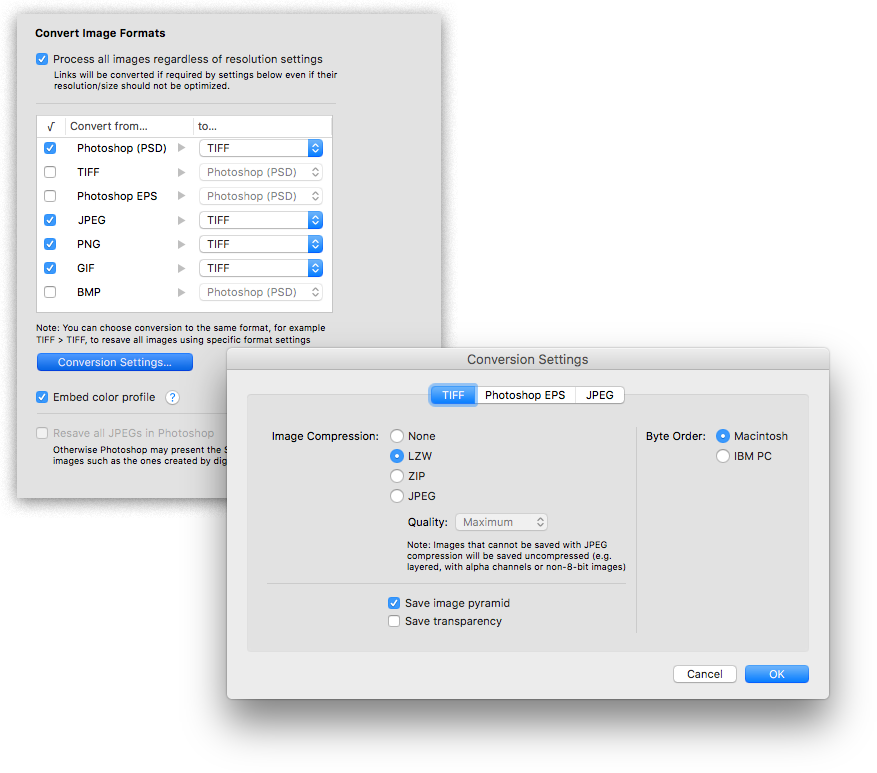
The new version lets users define PNG export options directly in LinkOptimizer, which simplifies the conversion of InDesign links to PNG format. Users have access to all PNG saving options available in Photoshop such as image interlacing and file compression. The update also addresses an issue that could result in incorrect reading of TIFF and JPEG conversion settings, and improves user experience of the application after the trial period has expired.
"Thank you for this fantastic plug-in", says Gopa Campbell of Gopa & Ted2, a design studio in Albuquerque, New Mexico. "What it just did for me in a book with 132 images is amazing. LinkOptimizer saved me what would have been three extremely tedious hours of Photoshop tweaking and InDesign reimporting."
LinkOptimizer works automatically with Photoshop to eliminate the excess image data of InDesign links, convert image formats, and perform essential image adjustments. For example, with just a click of a button users can:
* Optimize batches of InDesign files and books
* Scale and crop images to match their dimensions in InDesign
* Convert RGB images to specific CMYK profile
* Change their resolution to 300 dpi
* Re-save JPEGs as TIFF
* Run a Photoshop action on each image.
As a result users can save gigabytes of disk space and countless hours of optimizing images manually, accelerate document output, reduce job turnaround and cut costs through faster processing.
Pricing and Availability:
LinkOptimizer can be purchased from Zevrix website for $259.95 USD (Lite version: $179.95) as well as from Adobe Exchange and authorized resellers. Trial is also available for download. The update is free for LinkOptimizer 5.x users and $130 to upgrade from previous versions. LinkOptimizer requires macOS 10.7-10.14 and Adobe InDesign / Photoshop CS5-CC 2019.
Zevrix Solutions: http://zevrix.com
LinkOptimizer 5.2.22: http://zevrix.com/LinkOptimizer.php
Download LinkOptimizer: http://zevrix.com/LinkOptimizer.dmg
Purchase: http://zevrix.com/store.php
Screenshot: http://zevrix.com/screenshots/lo5/convert.png
Located in Toronto, Canada, Zevrix Solutions provides automation and productivity solutions for Adobe Creative Cloud and Creative Suite software, PDF workflows, graphic file diagnostics and Microsoft Office output on Mac OS. Zevrix is dedicated to help professionals increase their profits through automating everyday tasks, producing error-free documents, saving disk space and cutting production costs. For more information, visit their website. Copyright (C) 2019 Zevrix Solutions. All Rights Reserved. Other trademarks and registered trademarks may be the property of their respective owners.
*******
Link To Article: https://prmac.com/release-id-83459.htm
*******
---------------------------------------------------------------------------------
Note that you can alter delivered distributions at any time.
Login to your account on prMac to alter your channel selection, or to opt-out at any time.
LinkOptimizer for InDesign Adds PNG Export Options for Image Conversion - Published on 05/27/19
Zevrix Solutions announces LinkOptimizer 5.2.22, a feature update to company's workflow automation solution for Adobe InDesign. Awarded 4 out of 5 stars by Computer Arts magazine, LinkOptimizer allows users to reduce InDesign link size by eliminating excess image data The app can also assign colors profiles, perform image adjustments and convert file formats. The new version lets users define PNG export options directly in LinkOptimizer to simplify the conversion of InDesign links to PNG format.
Toronto (ON), Canada - Zevrix Solutions today announces LinkOptimizer 5.2.22, a feature update to its image processing automation solution for Adobe InDesign. LinkOptimizer is designed to automate complex image manipulation tasks and allows users to reduce the size of InDesign links, save production costs, and easily repurpose InDesign documents for web and mobile devices.
The new version lets users define PNG export options directly in LinkOptimizer, which simplifies the conversion of InDesign links to PNG format. Users have access to all PNG saving options available in Photoshop such as image interlacing and file compression. The update also addresses an issue that could result in incorrect reading of TIFF and JPEG conversion settings, and improves user experience of the application after the trial period has expired.
"Thank you for this fantastic plug-in", says Gopa Campbell of Gopa & Ted2, a design studio in Albuquerque, New Mexico. "What it just did for me in a book with 132 images is amazing. LinkOptimizer saved me what would have been three extremely tedious hours of Photoshop tweaking and InDesign reimporting."
LinkOptimizer works automatically with Photoshop to eliminate the excess image data of InDesign links, convert image formats, and perform essential image adjustments. For example, with just a click of a button users can:
* Optimize batches of InDesign files and books
* Scale and crop images to match their dimensions in InDesign
* Convert RGB images to specific CMYK profile
* Change their resolution to 300 dpi
* Re-save JPEGs as TIFF
* Run a Photoshop action on each image.
As a result users can save gigabytes of disk space and countless hours of optimizing images manually, accelerate document output, reduce job turnaround and cut costs through faster processing.
Pricing and Availability:
LinkOptimizer can be purchased from Zevrix website for $259.95 USD (Lite version: $179.95) as well as from Adobe Exchange and authorized resellers. Trial is also available for download. The update is free for LinkOptimizer 5.x users and $130 to upgrade from previous versions. LinkOptimizer requires macOS 10.7-10.14 and Adobe InDesign / Photoshop CS5-CC 2019.
Zevrix Solutions: http://zevrix.com
LinkOptimizer 5.2.22: http://zevrix.com/LinkOptimizer.php
Download LinkOptimizer: http://zevrix.com/LinkOptimizer.dmg
Purchase: http://zevrix.com/store.php
Screenshot: http://zevrix.com/screenshots/lo5/convert.png
Located in Toronto, Canada, Zevrix Solutions provides automation and productivity solutions for Adobe Creative Cloud and Creative Suite software, PDF workflows, graphic file diagnostics and Microsoft Office output on Mac OS. Zevrix is dedicated to help professionals increase their profits through automating everyday tasks, producing error-free documents, saving disk space and cutting production costs. For more information, visit their website. Copyright (C) 2019 Zevrix Solutions. All Rights Reserved. Other trademarks and registered trademarks may be the property of their respective owners.
*******
Link To Article: https://prmac.com/release-id-83459.htm
*******
---------------------------------------------------------------------------------
Note that you can alter delivered distributions at any time.
Login to your account on prMac to alter your channel selection, or to opt-out at any time.
Tropical Software Releases Discounted TopXNotes 1.8.8
A new article has been published at prMac.
Tropical Software Releases Discounted TopXNotes 1.8.8 - Published on 05/25/19
Florida based Tropical Software today announces TopXNotes 1.8.8, an update to their award-winning, full-featured personal information manager for macOS. Create, view, organize, and instantly access your Mac notes with TopXNotes. The most stable, and easiest-to-use, version 1.8.8, , sports a few new features, performance enhancements and bug fixes TopXNotes 1.8.8 keeps your notes synchronized between TopXNotes for Mac and TopXNotes for iOS. It is now being offered at a huge discount.
Atlantic Beach, Florida - Tropical Software today is happy to announce that TopXNotes for Mac, an app that helps you to create a note by typing, dragging, or importing, has been updated to version 1.8.8 and is being offered at a huge discount as a "Back to School" special. The upgrade provides performance enhancements, a few new features, and bug fixes. TopXNotes 1.8.8 keeps your notes synchronized between TopXNotes for Mac and TopXNotes for iOS.
Get Organized with TopXNotes:
Tired of all those loose bits of information spread all over your hard drive in multiple documents requiring opening multiple apps to see them? Opening many apps sucks up your valuable Mac memory and slows it down. Are you tired of trying to remember which note was written in which application and where you put it? Use TopXNotes to import all your notes and organize them in one place with the option to password protect and encrypt sensitive information.
Release-Specific Information
TopXNotes 1.8.8 has the following changes:
New Features:
* Final 1.x update.
* "Check for Update" will re-direct to a "Paid Update" page when TopXNotes 2 becomes available.
* Added a new menu option that gives the user the ability to delete a note by page number.
Fixed:
* Fixed TopXNotes 2 Issue #080 - "Samples and Templates menus not sorted alphabetically on Mojave".
* Fixed rare crash if adjust of locks made during quit.
Pricing and Availability:
Try Tropical's reliable TopXNotes 1.8.8 to "get organized" today! TopXNotes 1.8.8 is available for $9.95 (USD) from the Tropical Software web site, Amazon, and other select Macintosh software resellers. TopXNotes 1.8.8 is a free update to customers who have already purchased version 1.5 or later. Existing customers with an older version (previous to 1.5) can upgrade to version 1.8.8 for only $9.95 from the company's web site.
TopXNotes 1.8.8: http://www.tropic4.com/topxnotes.html
TopXNotes Anatomy: http://www.tropic4.com/topxnotesanatomy.html
Download Free Trial (zip): http://www.tropic4.com/download/TopXNotes.zip
Purchase at Steep Discount: http://sites.fastspring.com/tropic4/product/TopXNotes
Macworld and Other Reviews: http://www.tropic4.com/products/topxnotes/reviews.html
App Icon: http://www.tropic4.com/images/GetOrganizedNoReflect.png
Tropical Software makes the award-winning TopXNotes, a modern personal note manager with state of the art proprietary encryption technology for the ultimate in securing personal information. Located in Atlantic Beach, Florida, Tropical Software is owned and operated by former Apple employee James Lee, and is dedicated to improving the lives of its customers by offering easy to use productivity software for Macs and Apple touch devices including iPhone, iPod touch and iPad. Copyright (C) 2019 Tropical Software. All Rights Reserved. Apple, the Apple logo, iPhone, iPod, iPad and Macintosh are registered trademarks of Apple Inc. in the U.S. and/or other countries.
*******
Link To Article: https://prmac.com/release-id-83458.htm
*******
---------------------------------------------------------------------------------
Note that you can alter delivered distributions at any time.
Login to your account on prMac to alter your channel selection, or to opt-out at any time.
Tropical Software Releases Discounted TopXNotes 1.8.8 - Published on 05/25/19
Florida based Tropical Software today announces TopXNotes 1.8.8, an update to their award-winning, full-featured personal information manager for macOS. Create, view, organize, and instantly access your Mac notes with TopXNotes. The most stable, and easiest-to-use, version 1.8.8, , sports a few new features, performance enhancements and bug fixes TopXNotes 1.8.8 keeps your notes synchronized between TopXNotes for Mac and TopXNotes for iOS. It is now being offered at a huge discount.
Atlantic Beach, Florida - Tropical Software today is happy to announce that TopXNotes for Mac, an app that helps you to create a note by typing, dragging, or importing, has been updated to version 1.8.8 and is being offered at a huge discount as a "Back to School" special. The upgrade provides performance enhancements, a few new features, and bug fixes. TopXNotes 1.8.8 keeps your notes synchronized between TopXNotes for Mac and TopXNotes for iOS.
Get Organized with TopXNotes:
Tired of all those loose bits of information spread all over your hard drive in multiple documents requiring opening multiple apps to see them? Opening many apps sucks up your valuable Mac memory and slows it down. Are you tired of trying to remember which note was written in which application and where you put it? Use TopXNotes to import all your notes and organize them in one place with the option to password protect and encrypt sensitive information.
Release-Specific Information
TopXNotes 1.8.8 has the following changes:
New Features:
* Final 1.x update.
* "Check for Update" will re-direct to a "Paid Update" page when TopXNotes 2 becomes available.
* Added a new menu option that gives the user the ability to delete a note by page number.
Fixed:
* Fixed TopXNotes 2 Issue #080 - "Samples and Templates menus not sorted alphabetically on Mojave".
* Fixed rare crash if adjust of locks made during quit.
Pricing and Availability:
Try Tropical's reliable TopXNotes 1.8.8 to "get organized" today! TopXNotes 1.8.8 is available for $9.95 (USD) from the Tropical Software web site, Amazon, and other select Macintosh software resellers. TopXNotes 1.8.8 is a free update to customers who have already purchased version 1.5 or later. Existing customers with an older version (previous to 1.5) can upgrade to version 1.8.8 for only $9.95 from the company's web site.
TopXNotes 1.8.8: http://www.tropic4.com/topxnotes.html
TopXNotes Anatomy: http://www.tropic4.com/topxnotesanatomy.html
Download Free Trial (zip): http://www.tropic4.com/download/TopXNotes.zip
Purchase at Steep Discount: http://sites.fastspring.com/tropic4/product/TopXNotes
Macworld and Other Reviews: http://www.tropic4.com/products/topxnotes/reviews.html
App Icon: http://www.tropic4.com/images/GetOrganizedNoReflect.png

Tropical Software makes the award-winning TopXNotes, a modern personal note manager with state of the art proprietary encryption technology for the ultimate in securing personal information. Located in Atlantic Beach, Florida, Tropical Software is owned and operated by former Apple employee James Lee, and is dedicated to improving the lives of its customers by offering easy to use productivity software for Macs and Apple touch devices including iPhone, iPod touch and iPad. Copyright (C) 2019 Tropical Software. All Rights Reserved. Apple, the Apple logo, iPhone, iPod, iPad and Macintosh are registered trademarks of Apple Inc. in the U.S. and/or other countries.
*******
Link To Article: https://prmac.com/release-id-83458.htm
*******
---------------------------------------------------------------------------------
Note that you can alter delivered distributions at any time.
Login to your account on prMac to alter your channel selection, or to opt-out at any time.
Subscribe to:
Posts (Atom)