A new article has been published at prMac.
Pocket Tokyo - an interactive 3D Tokyo city guide on iOS - Published on 06/19/19
Sola K.K. announces Pocket Tokyo, a new interactive JRPG-like Tokyo city guide application for iOS and soon Android devices. Pocket Tokyo is a new generation of map based applications built on the real 3D map of Tokyo equipped with both GPS and Tap navigation modes. The user can explore Tokyo from any geographical location in the Tap mode, while in Tokyo the GPS mode can be activated to track the user's movement. In both game modes all Tokyo landmarks are covered with interactive guides.
Tokyo, Japan - Sola K.K. announces Pocket Tokyo, a new interactive JRPG-like Tokyo city guide application for iOS and soon Android devices.
Pocket Tokyo is a new generation of map based applications built on the real 3D map of Tokyo equipped with both GPS and Tap navigation modes. The user can explore Tokyo from any geographical location in the Tap mode, while in Tokyo the GPS mode can be activated to track the user's movement. In both modes, all the famous spots and landmarks of the city are covered with interactive guides.
Pocket Tokyo is an interactive Tokyo city guide accessible from anywhere in the world. The user controls a Drone floating over the accurate 3D model of the city. The goal of the game is unlocking all the Tokyo landmarks, visit all the famous spots to create an interactive city guide. With the upcoming 2020 Tokyo Olympic Games in mind the purpose of the application is to make navigation in Tokyo -a quite challenging task for most foreigners- a bit easier.
Features:
* Accurate 3D map of Tokyo
* Navigation and Story game modes
* GPS and Tap based navigation
* JRPG-like game elements
* Interactive guides
* Interactive conversations and NPCs
* Customization (Home, Character, Drone, Map)
* Intuitive visual based navigation
* Dictionary
* Tokyo Landmarks in 3D
Navigation is completely visual based, the user is not required to know the city, all the important places and landmarks are displayed as 3D objects on the map. The application also includes other useful features such as a built-in English-Japanese/Japanese-English dictionary, guidebooks, tips and tricks, cultural references and address search functions. The application was the designed in a way that it can be both enjoyed as a game and as a navigation tool. It includes several JRPG game elements, customization, interactive dialogues, NPCs a Home location and location based story missions in the future.
Pricing and Availability:
Pocket Tokyo is available for free worldwide on both the App Store in the Navigation category in English.
Sola: https://www.sola-air.com/en/
Pocket Tokyo 0.96: https://pockettokyo.sola-air.com/
Download from the App Store: https://apps.apple.com/app/pocket-tokyo/id1459972085
YouTube Video: https://www.youtube.com/watch?v=LMSw1Iksmak
Screenshot Promo: https://pockettokyo.sola-air.com/wp-content/uploads/2019/06/Mockup2phones.png
App Icon: https://pockettokyo.sola-air.com/wp-content/uploads/2019/06/RoundedIcon.png
Based in the heart of Tokyo, Japan, Sola K.K (Sola Kabushiki Kaisha-stock company) was established in 2008 by CEO Keisuke Yoshimura, a fast growing IT company, software and application developer. Sola features IT infrastructure and system development and is ISO 9001 and ISO 27001 certified. All Material and Software (C) Copyright 2008-2019 Sola K.K. All Rights Reserved. Apple, the Apple logo, iPhone, iPod and iPad are registered trademarks of Apple Inc. in the U.S. and/or other countries. Other trademarks and registered trademarks may be the property of their respective owners.
*******
Link To Article: https://prmac.com/release-id-83503.htm
*******
---------------------------------------------------------------------------------
Note that you can alter delivered distributions at any time.
Login to your account on prMac to alter your channel selection, or to opt-out at any time.



Share your Mac screen on a Sharp TV
A new article has been published at prMac.
Share your Mac screen on a Sharp TV - Published on 06/19/19
AirBeamTV today releasees Mirror for Sharp TV, its new screen mirroring app exclusively developed for Mac computers. Easily mirror the screen of your Mac to any Sharp TV models from 2012 and onward. No wires and no additional hardware is necessary. You can also stream individual video files from your Mac to your TV. Also, this app works without the need for an Apple TV or Airplay. The app also works on Sharp Android TVs and Sharp Roku TVs.
Naarden, Netherlands - Today, AirBeamTV presents the new screen mirroring app for Mac computers exclusively developed for Sharp Smart TVs.
Sharp back in the game:
Last month, Sharp announced it agreed to establish a new form of partnership with TV manufacturer Hisense Limited to re-enter television business in the U.S.A. market the second half of 2019. Sharp will try to get a foothold in the growing market of cutting edge 4K/8K televisions.
Screen mirroring app for Mac:
AirBeamTV, global market leader in screen mirroring apps for Apple products, announced they have launched this new mirroring app for Mac users to provide existing and future Sharp TV owners a cutting-edge mirroring app.
According to the company's CEO, Jan Van Ottele, AirBeamTV is adapting to the changing landscape of Smart TVs in the US market. "We have received a lot of requests from Mac users to provide a high-quality screen mirroring app for newer TV brands. With our app, Mac owners can share videos, photos and apps from any Mac device to Sharp TV models from 2012 and onward". Important to notice is that the app also supports Sharp TVs running on the Android TV or Roku TV operating systems, or Sharp TVs using the Aquos sub brand.
Device Requirements
* Macbook, MacBook Pro, iMac, Mac Mini & Mac Pro
* Requires MacOS 10.10 (Yosemite) or newer
Pricing and Availability:
Mirror for Sharp TV is free to download on AirBeamTV's website (trial version). Users can test the app free before upgrading to the paid version ($9.99 directly from AirBeamTV). The premium version has no time limits for mirroring and supports lifetime updates. For both the trial and the paid version, everyone can count on fast and free customer service.
Mirror for Sharp TV: https://www.airbeam.tv/mirror-your-mac-screen/sharp/
Download Trial (MacOS): https://s3.amazonaws.com/airbeamtv-nm-mirror-for-sharp/MirrorSharpTV.dmg
Purchase Mirror for Sharp TV: https://secure.2checkout.com/order/checkout.php?PRODS=22233867&QTY=1&CART=1&CARD=1&SHORT_FORM=1
YouTube Video: https://www.youtube.com/watch?v=CamYi3LuBCc
Media Assets: https://www.dropbox.com/sh/pc7dnivg7y6xxzq/AAAZHPqBLDCiWQDOoW_oax6Ra?dl=0
Since 2014, AirBeamTV is the market leader in easy and smart "screen mirroring" solutions for Apple's iOS and MacOS devices such as iPhones and MacBooks. The company sells screen mirroring applications for most major TV brands, including Samsung, LG, Sony, Panasonic, Philips, Roku and many more. From the picturesque village of Naarden, The Netherlands, a diverse and motivated team of programmers works daily on developing and improving innovative apps. All Material and Software (C) Copyright 2014-2019 AirBeamTV. All Rights Reserved. Apple, the Apple logo, macOS, iPhone, iPad, iPod and Macintosh are registered trademarks of Apple Inc. in the U.S. and/or other countries. Other trademarks and registered trademarks may be the property of their respective owners.
*******
Link To Article: https://prmac.com/release-id-83502.htm
*******
---------------------------------------------------------------------------------
Note that you can alter delivered distributions at any time.
Login to your account on prMac to alter your channel selection, or to opt-out at any time.
Share your Mac screen on a Sharp TV - Published on 06/19/19
AirBeamTV today releasees Mirror for Sharp TV, its new screen mirroring app exclusively developed for Mac computers. Easily mirror the screen of your Mac to any Sharp TV models from 2012 and onward. No wires and no additional hardware is necessary. You can also stream individual video files from your Mac to your TV. Also, this app works without the need for an Apple TV or Airplay. The app also works on Sharp Android TVs and Sharp Roku TVs.
Naarden, Netherlands - Today, AirBeamTV presents the new screen mirroring app for Mac computers exclusively developed for Sharp Smart TVs.
Sharp back in the game:
Last month, Sharp announced it agreed to establish a new form of partnership with TV manufacturer Hisense Limited to re-enter television business in the U.S.A. market the second half of 2019. Sharp will try to get a foothold in the growing market of cutting edge 4K/8K televisions.
Screen mirroring app for Mac:
AirBeamTV, global market leader in screen mirroring apps for Apple products, announced they have launched this new mirroring app for Mac users to provide existing and future Sharp TV owners a cutting-edge mirroring app.
According to the company's CEO, Jan Van Ottele, AirBeamTV is adapting to the changing landscape of Smart TVs in the US market. "We have received a lot of requests from Mac users to provide a high-quality screen mirroring app for newer TV brands. With our app, Mac owners can share videos, photos and apps from any Mac device to Sharp TV models from 2012 and onward". Important to notice is that the app also supports Sharp TVs running on the Android TV or Roku TV operating systems, or Sharp TVs using the Aquos sub brand.
Device Requirements
* Macbook, MacBook Pro, iMac, Mac Mini & Mac Pro
* Requires MacOS 10.10 (Yosemite) or newer
Pricing and Availability:
Mirror for Sharp TV is free to download on AirBeamTV's website (trial version). Users can test the app free before upgrading to the paid version ($9.99 directly from AirBeamTV). The premium version has no time limits for mirroring and supports lifetime updates. For both the trial and the paid version, everyone can count on fast and free customer service.
Mirror for Sharp TV: https://www.airbeam.tv/mirror-your-mac-screen/sharp/
Download Trial (MacOS): https://s3.amazonaws.com/airbeamtv-nm-mirror-for-sharp/MirrorSharpTV.dmg
Purchase Mirror for Sharp TV: https://secure.2checkout.com/order/checkout.php?PRODS=22233867&QTY=1&CART=1&CARD=1&SHORT_FORM=1
YouTube Video: https://www.youtube.com/watch?v=CamYi3LuBCc
Media Assets: https://www.dropbox.com/sh/pc7dnivg7y6xxzq/AAAZHPqBLDCiWQDOoW_oax6Ra?dl=0
Since 2014, AirBeamTV is the market leader in easy and smart "screen mirroring" solutions for Apple's iOS and MacOS devices such as iPhones and MacBooks. The company sells screen mirroring applications for most major TV brands, including Samsung, LG, Sony, Panasonic, Philips, Roku and many more. From the picturesque village of Naarden, The Netherlands, a diverse and motivated team of programmers works daily on developing and improving innovative apps. All Material and Software (C) Copyright 2014-2019 AirBeamTV. All Rights Reserved. Apple, the Apple logo, macOS, iPhone, iPad, iPod and Macintosh are registered trademarks of Apple Inc. in the U.S. and/or other countries. Other trademarks and registered trademarks may be the property of their respective owners.
*******
Link To Article: https://prmac.com/release-id-83502.htm
*******
---------------------------------------------------------------------------------
Note that you can alter delivered distributions at any time.
Login to your account on prMac to alter your channel selection, or to opt-out at any time.
Add GIFs in Apple Mail with Mailbutler's GIPHY Extension
A new article has been published at prMac.
Add GIFs in Apple Mail with Mailbutler's GIPHY Extension - Published on 06/19/19
Mailbutler introduces free GIPHY extension for Apple Mail on macOS. Making it easy for anyone to create fun, meaningful content that instantly connects with the recipient, the GIPHY extension enables users to easily drop in GIFs - animated, looped video shorts - from the GIPHY library to their emails without leaving their inbox. Using imaginative and culture-centric GIFs adds humour and delight to everyday conversations, increasing engagement through visually stimulating email communication.
Berlin, Germany - Mailbutler GmbH, provider of the leading email enhancing software, released a GIPHY extension for Apple Mail. The free, easy-to-install plugin allows users to search for, preview and add GIFs from the GIPHY library, which serves up more than 1 billion GIFs on a daily basis, to their emails. With the pressure to stand out in a crowded inbox, Mailbutler's GIPHY extension makes it easy for anyone to create fun, meaningful content that instantly connects with the recipient.
"In today's world full of distractions, it's increasingly difficult to capture a reader's attention. Whether you want to create a dynamic email newsletter, or just wish to have some fun with your colleagues, you can add your personal touch through a GIF when words are just not enough," said Tobias Knobl, CEO and cofounder of Mailbutler.
A study concerned with Dell's email campaign confirms the overwhelmingly positive impact GIFs can have on email marketing. It showed that emails with GIFs are 6% more likely to be opened and 42% more likely to gain clicks for an email's embedded links. Emails with GIFs also experienced a 103% increase in conversion rate, and a 109% increase in revenue for Dell.
With Mailbutler's GIPHY extension, users no longer need to exhaust themselves googling for instructions or downloading and converting files to make them compatible with their email provider. The extension brings them a possibility to simply access the entire GIPHY library and add GIFs with one click within their inbox, thus creating more engaging content and ultimately increasing conversion rates and revenue for the company.
Mailbutler: https://www.mailbutler.io/
GIPHY Extension: https://www.mailbutler.io/giphy/
Study - Dell's email marketing campaign: https://www.marketingsherpa.com/article/case-study/gif-centric-email-campaign
The GIPHY extension is a separate plugin made by Mailbutler, whose main product is a productivity software extension for Apple Mail and Gmail. It is the best and easiest way for Apple Mail and Gmail users to manage their inbox productively, strengthen email professionalism and reveal valuable CRM insights. It provide features such as Email Tracking, Send Later, Snooze, Follow-Up, Signatures, Message Templates, Tasks and Notes. All Material and Software (C) Copyright 2019 Mailbutler GmbH. All Rights Reserved. Apple, the Apple logo, Macintosh, Mac OS X and macOS are registered trademarks of Apple Inc. in the U.S. and/or other countries.
*******
Link To Article: https://prmac.com/release-id-83501.htm
*******
---------------------------------------------------------------------------------
Note that you can alter delivered distributions at any time.
Login to your account on prMac to alter your channel selection, or to opt-out at any time.
Add GIFs in Apple Mail with Mailbutler's GIPHY Extension - Published on 06/19/19
Mailbutler introduces free GIPHY extension for Apple Mail on macOS. Making it easy for anyone to create fun, meaningful content that instantly connects with the recipient, the GIPHY extension enables users to easily drop in GIFs - animated, looped video shorts - from the GIPHY library to their emails without leaving their inbox. Using imaginative and culture-centric GIFs adds humour and delight to everyday conversations, increasing engagement through visually stimulating email communication.
Berlin, Germany - Mailbutler GmbH, provider of the leading email enhancing software, released a GIPHY extension for Apple Mail. The free, easy-to-install plugin allows users to search for, preview and add GIFs from the GIPHY library, which serves up more than 1 billion GIFs on a daily basis, to their emails. With the pressure to stand out in a crowded inbox, Mailbutler's GIPHY extension makes it easy for anyone to create fun, meaningful content that instantly connects with the recipient.
"In today's world full of distractions, it's increasingly difficult to capture a reader's attention. Whether you want to create a dynamic email newsletter, or just wish to have some fun with your colleagues, you can add your personal touch through a GIF when words are just not enough," said Tobias Knobl, CEO and cofounder of Mailbutler.
A study concerned with Dell's email campaign confirms the overwhelmingly positive impact GIFs can have on email marketing. It showed that emails with GIFs are 6% more likely to be opened and 42% more likely to gain clicks for an email's embedded links. Emails with GIFs also experienced a 103% increase in conversion rate, and a 109% increase in revenue for Dell.
With Mailbutler's GIPHY extension, users no longer need to exhaust themselves googling for instructions or downloading and converting files to make them compatible with their email provider. The extension brings them a possibility to simply access the entire GIPHY library and add GIFs with one click within their inbox, thus creating more engaging content and ultimately increasing conversion rates and revenue for the company.
Mailbutler: https://www.mailbutler.io/
GIPHY Extension: https://www.mailbutler.io/giphy/
Study - Dell's email marketing campaign: https://www.marketingsherpa.com/article/case-study/gif-centric-email-campaign
The GIPHY extension is a separate plugin made by Mailbutler, whose main product is a productivity software extension for Apple Mail and Gmail. It is the best and easiest way for Apple Mail and Gmail users to manage their inbox productively, strengthen email professionalism and reveal valuable CRM insights. It provide features such as Email Tracking, Send Later, Snooze, Follow-Up, Signatures, Message Templates, Tasks and Notes. All Material and Software (C) Copyright 2019 Mailbutler GmbH. All Rights Reserved. Apple, the Apple logo, Macintosh, Mac OS X and macOS are registered trademarks of Apple Inc. in the U.S. and/or other countries.
*******
Link To Article: https://prmac.com/release-id-83501.htm
*******
---------------------------------------------------------------------------------
Note that you can alter delivered distributions at any time.
Login to your account on prMac to alter your channel selection, or to opt-out at any time.
Typinator 8 offers usage statistics, Magic Keys, mini menu bar, and more
A new article has been published at prMac.
Typinator 8 offers usage statistics, Magic Keys, mini menu bar, and more - Published on 06/18/19
Ergonis Software releases Typinator 8.0, a major update to their highly acclaimed text expander for macOS.Typinator is a powerful, yet elegantly simple solution that automates the process of inserting frequently used text and auto-correcting typing errors. Version 8.0 offers a new statistics mode, Magic Keys, a new graphical mini menu bar, and more. With PopChar 8.2 or newer installed, you can now use Typinator to search for & insert arbitrary Unicode characters by their name or Unicode number.
Perg, Austria - Ergonis Software today released Typinator 8.0, a major new version of their highly acclaimed text expander. Typinator 8 offers a new statistics mode, where you can see the usage counts for abbreviations and sets, and how long ago an abbreviation has been used most recently. You can also sort your snippets by these values, to see which abbreviations you are using frequently and which ones you may have forgotten about.
Another great new feature of Typinator 8 is Magic Keys. You can now use the modifier keys Shift, Control, Option, and Command in abbreviations as if they were real characters. This allows you to use them as special trigger characters and offers a simple way to avoid conflicts in abbreviations.
A very slick user interface enhancement is the new "mini menu bar" right above the expansion field, where you can find all markers and editing functions in one central place. A nice side effect of this improvement is that the expansion field is now wider and you have more space to enter your expansions.
New is also the integration with Ergonis' award-winning PopChar. With PopChar 8.2 or newer installed, you can now use Typinator to search for and insert arbitrary Unicode characters by their name or Unicode number. In combination with a hotkey for Typinator's quick search, this is a great way to type arbitrary Unicode characters without taking your hands off the keyboard.
A long list of further new features and enhancements makes Typinator 8 the best text expander ever. Visit Ergonis Software's website to learn more about the changes in this release and to download and try the new version.
Typinator is a powerful, yet elegantly simple solution that boosts your productivity by automating the process of inserting frequently used text and auto-correcting typing errors. Across all applications, it detects specific sequences of typed characters and automatically replaces them with text snippets, graphics, URLs, dates and special characters.
System Requirements:
* OS X Mountain Lion (10.8) or newer
* Recommended for macOS Mojave (10.14)
Availability and Ordering:
Typinator can be purchased securely on the Ergonis Software website. The upgrade to Typinator 8 is free for anyone who purchased a license for Typinator on or after January 1st, 2019. Upgrade paths are available for owners of older licenses. For information about purchases, including enterprise licenses, volume discounts, and upgrade pricing offers, see the company's web site.
Ergonis Software: https://www.ergonis.com/
Typinator 8.0: https://www.ergonis.com/products/typinator
Download Typinator: https://www.ergonis.com/downloads/typinator-install.dmg
Purchase Typinator: https://store.ergonis.com/products/typinator
Screenshot (Typinator - define abbreviations): https://www.ergonis.com/press/2019/20190618/typinator-screen.png
Screenshot (Typinator in dark mode): https://www.ergonis.com/press/2019/20190618/typinator-screen-dark.png
Headquartered in Perg, Austria, Ergonis Software Gmbh is a privately held software development company founded in 2002. With a focus on innovation, Ergonis develops ergonomic and intuitive software that boosts the productivity of Mac and PC users alike. Copyright 2002-2019 Ergonis Software Gmbh. All Rights Reserved. Ergonis products are either registered trademarks or trademarks of Ergonis Software GmbH. Other company and product names may be trademarks of their respective owners.
*******
Link To Article: https://prmac.com/release-id-83500.htm
*******
---------------------------------------------------------------------------------
Note that you can alter delivered distributions at any time.
Login to your account on prMac to alter your channel selection, or to opt-out at any time.
Typinator 8 offers usage statistics, Magic Keys, mini menu bar, and more - Published on 06/18/19
Ergonis Software releases Typinator 8.0, a major update to their highly acclaimed text expander for macOS.Typinator is a powerful, yet elegantly simple solution that automates the process of inserting frequently used text and auto-correcting typing errors. Version 8.0 offers a new statistics mode, Magic Keys, a new graphical mini menu bar, and more. With PopChar 8.2 or newer installed, you can now use Typinator to search for & insert arbitrary Unicode characters by their name or Unicode number.
Perg, Austria - Ergonis Software today released Typinator 8.0, a major new version of their highly acclaimed text expander. Typinator 8 offers a new statistics mode, where you can see the usage counts for abbreviations and sets, and how long ago an abbreviation has been used most recently. You can also sort your snippets by these values, to see which abbreviations you are using frequently and which ones you may have forgotten about.
Another great new feature of Typinator 8 is Magic Keys. You can now use the modifier keys Shift, Control, Option, and Command in abbreviations as if they were real characters. This allows you to use them as special trigger characters and offers a simple way to avoid conflicts in abbreviations.
A very slick user interface enhancement is the new "mini menu bar" right above the expansion field, where you can find all markers and editing functions in one central place. A nice side effect of this improvement is that the expansion field is now wider and you have more space to enter your expansions.
New is also the integration with Ergonis' award-winning PopChar. With PopChar 8.2 or newer installed, you can now use Typinator to search for and insert arbitrary Unicode characters by their name or Unicode number. In combination with a hotkey for Typinator's quick search, this is a great way to type arbitrary Unicode characters without taking your hands off the keyboard.
A long list of further new features and enhancements makes Typinator 8 the best text expander ever. Visit Ergonis Software's website to learn more about the changes in this release and to download and try the new version.
Typinator is a powerful, yet elegantly simple solution that boosts your productivity by automating the process of inserting frequently used text and auto-correcting typing errors. Across all applications, it detects specific sequences of typed characters and automatically replaces them with text snippets, graphics, URLs, dates and special characters.
System Requirements:
* OS X Mountain Lion (10.8) or newer
* Recommended for macOS Mojave (10.14)
Availability and Ordering:
Typinator can be purchased securely on the Ergonis Software website. The upgrade to Typinator 8 is free for anyone who purchased a license for Typinator on or after January 1st, 2019. Upgrade paths are available for owners of older licenses. For information about purchases, including enterprise licenses, volume discounts, and upgrade pricing offers, see the company's web site.
Ergonis Software: https://www.ergonis.com/
Typinator 8.0: https://www.ergonis.com/products/typinator
Download Typinator: https://www.ergonis.com/downloads/typinator-install.dmg
Purchase Typinator: https://store.ergonis.com/products/typinator
Screenshot (Typinator - define abbreviations): https://www.ergonis.com/press/2019/20190618/typinator-screen.png

Screenshot (Typinator in dark mode): https://www.ergonis.com/press/2019/20190618/typinator-screen-dark.png

Headquartered in Perg, Austria, Ergonis Software Gmbh is a privately held software development company founded in 2002. With a focus on innovation, Ergonis develops ergonomic and intuitive software that boosts the productivity of Mac and PC users alike. Copyright 2002-2019 Ergonis Software Gmbh. All Rights Reserved. Ergonis products are either registered trademarks or trademarks of Ergonis Software GmbH. Other company and product names may be trademarks of their respective owners.
*******
Link To Article: https://prmac.com/release-id-83500.htm
*******
---------------------------------------------------------------------------------
Note that you can alter delivered distributions at any time.
Login to your account on prMac to alter your channel selection, or to opt-out at any time.
Poker Omnibus W50P Celebrates 50 Years of World Series of Poker History
A new article has been published at prMac.
Poker Omnibus W50P Celebrates 50 Years of World Series of Poker History - Published on 06/18/19
Enjoy stories, peruse results and records, relive key hands, and read book reviews, and explore more about the World Series of Poker. Browse by year, category, or player. Special features include Poker Greats playing card decks (including the Poker Hall of Fame, the Women in Poker Hall of Fame, Main Event Winners, and Main Event Runners-Up), hand nicknames, player nicknames, and player catchphrases. The Poker Omnibus W50P iPhone and iPad app is available now in the App Store.
Belmont, Massachusetts - ThetaPhone is proud to announce the release of the Poker Omnibus W50P, the first iPhone and iPad app dedicated to the World Series of Poker's history, players, and records. As the World Series of Poker celebrates its 50th running, you can now peruse stories, results, hands, book reviews, and more about the festival that helped make poker the world's most popular card game.
In half a century, the WSOP has grown from a small cash game to over a hundred bracelet events in 2019 and spread from Las Vegas, around the U.S. (with the WSOP Circuit), and across the world (with the WSOP Europe and Asia-Pacific). Browse by year or by category or by player. Learn hand nicknames, player nicknames, player catchphrases. Read special articles on the Big One for One Drop (the world's first million-dollar buyin poker tournament), the Ladies Championship, and the Casino Employees tournament.
Relive nearly one hundred key hands in World Series of Poker history and see what else these players have accomplished. View a vast assortment of WSOP records: firsts, career records (including the progression of some of the major ones like the youngest bracelet winner), decade leaders (for each of the WSOP's five decades), single-year records, single-event records, and women's records.
Special features include the complete history of the Last Former Main Event Champion Standing, the Last Woman Standing, and the Last Celebrity Standing along with a comparison of the three by year. Thumb through virtual Poker Greats playing card decks, including the Poker Hall of Fame, the Women in Poker Hall of Fame, Main Event Winners, and Main Event Runners-Up.
Enjoy reviews of over 30 major books about the World Series of Poker, including an overview, table of contents (even for books that don't have one!), and errata.
Poker trivia abounds throughout the Omnibus:
* Which WSOP Main Event champion had never flown on a plane before his life-changing trip to Las Vegas?
* Which winner entered the tournament only because he'd won a bet on a horse?
* Which runner-up was able to enter the tournament because he won the lottery?
* Which runner-up probably wasn't the runner-up?
* Who were the first husband and wife to both win WSOP bracelets? (It wasn't Bob and Sandy Stupak; they weren't even second.)
* Which obscure bracelet winner might have been the youngest bracelet winner for over a decade without anyone ever acknowledging it? (Until now, that is!)
The Poker Omnibus W50P will be updated after this year's festival (Michael Mizrachi and Jim Bechtel have already rewritten poker history this month).
Pricing and Availability:
Poker Omnibus W50P is a Universal Purchase ($9.99 in the U.S.) available today in the App Store for iPhone, iPad, and iPod touch devices running iOS 10 or higher. No ads, in-app purchases, or registration. Free updates for life.
Poker Omnibus W50P: https://w50p.com
Purchase and Download (iOS): https://apps.apple.com/app/poker-omnibus-w50p/id1463225335
Screenshots: https://w50p.com/screenshots.html
App Icon: https://w50p.com/Graphics/w50pIcon.png
Press Kit: https://w50p.com/presskit.html
Located in Belmont, Massachusetts, ThetaPhone was founded in 2008 by Robert Jen and is dedicated to developing awesome iOS apps for the iPhone, iPad, and iPod touch. All Material and Software (C) 2019 ThetaPhone / All Rights Reserved. Apple, iPad, iPhone, iPod touch, and iOS are registered trademarks of Apple Computer in the U.S. and/or other countries.
*******
Link To Article: https://prmac.com/release-id-83499.htm
*******
---------------------------------------------------------------------------------
Note that you can alter delivered distributions at any time.
Login to your account on prMac to alter your channel selection, or to opt-out at any time.
Poker Omnibus W50P Celebrates 50 Years of World Series of Poker History - Published on 06/18/19
Enjoy stories, peruse results and records, relive key hands, and read book reviews, and explore more about the World Series of Poker. Browse by year, category, or player. Special features include Poker Greats playing card decks (including the Poker Hall of Fame, the Women in Poker Hall of Fame, Main Event Winners, and Main Event Runners-Up), hand nicknames, player nicknames, and player catchphrases. The Poker Omnibus W50P iPhone and iPad app is available now in the App Store.
Belmont, Massachusetts - ThetaPhone is proud to announce the release of the Poker Omnibus W50P, the first iPhone and iPad app dedicated to the World Series of Poker's history, players, and records. As the World Series of Poker celebrates its 50th running, you can now peruse stories, results, hands, book reviews, and more about the festival that helped make poker the world's most popular card game.
In half a century, the WSOP has grown from a small cash game to over a hundred bracelet events in 2019 and spread from Las Vegas, around the U.S. (with the WSOP Circuit), and across the world (with the WSOP Europe and Asia-Pacific). Browse by year or by category or by player. Learn hand nicknames, player nicknames, player catchphrases. Read special articles on the Big One for One Drop (the world's first million-dollar buyin poker tournament), the Ladies Championship, and the Casino Employees tournament.
Relive nearly one hundred key hands in World Series of Poker history and see what else these players have accomplished. View a vast assortment of WSOP records: firsts, career records (including the progression of some of the major ones like the youngest bracelet winner), decade leaders (for each of the WSOP's five decades), single-year records, single-event records, and women's records.
Special features include the complete history of the Last Former Main Event Champion Standing, the Last Woman Standing, and the Last Celebrity Standing along with a comparison of the three by year. Thumb through virtual Poker Greats playing card decks, including the Poker Hall of Fame, the Women in Poker Hall of Fame, Main Event Winners, and Main Event Runners-Up.
Enjoy reviews of over 30 major books about the World Series of Poker, including an overview, table of contents (even for books that don't have one!), and errata.
Poker trivia abounds throughout the Omnibus:
* Which WSOP Main Event champion had never flown on a plane before his life-changing trip to Las Vegas?
* Which winner entered the tournament only because he'd won a bet on a horse?
* Which runner-up was able to enter the tournament because he won the lottery?
* Which runner-up probably wasn't the runner-up?
* Who were the first husband and wife to both win WSOP bracelets? (It wasn't Bob and Sandy Stupak; they weren't even second.)
* Which obscure bracelet winner might have been the youngest bracelet winner for over a decade without anyone ever acknowledging it? (Until now, that is!)
The Poker Omnibus W50P will be updated after this year's festival (Michael Mizrachi and Jim Bechtel have already rewritten poker history this month).
Pricing and Availability:
Poker Omnibus W50P is a Universal Purchase ($9.99 in the U.S.) available today in the App Store for iPhone, iPad, and iPod touch devices running iOS 10 or higher. No ads, in-app purchases, or registration. Free updates for life.
Poker Omnibus W50P: https://w50p.com
Purchase and Download (iOS): https://apps.apple.com/app/poker-omnibus-w50p/id1463225335
Screenshots: https://w50p.com/screenshots.html
App Icon: https://w50p.com/Graphics/w50pIcon.png

Press Kit: https://w50p.com/presskit.html
Located in Belmont, Massachusetts, ThetaPhone was founded in 2008 by Robert Jen and is dedicated to developing awesome iOS apps for the iPhone, iPad, and iPod touch. All Material and Software (C) 2019 ThetaPhone / All Rights Reserved. Apple, iPad, iPhone, iPod touch, and iOS are registered trademarks of Apple Computer in the U.S. and/or other countries.
*******
Link To Article: https://prmac.com/release-id-83499.htm
*******
---------------------------------------------------------------------------------
Note that you can alter delivered distributions at any time.
Login to your account on prMac to alter your channel selection, or to opt-out at any time.
Packing Pro 13.1 Summer Update Expands Editing Options for Travel App
A new article has been published at prMac.
Packing Pro 13.1 Summer Update Expands Editing Options for Travel App - Published on 06/17/19
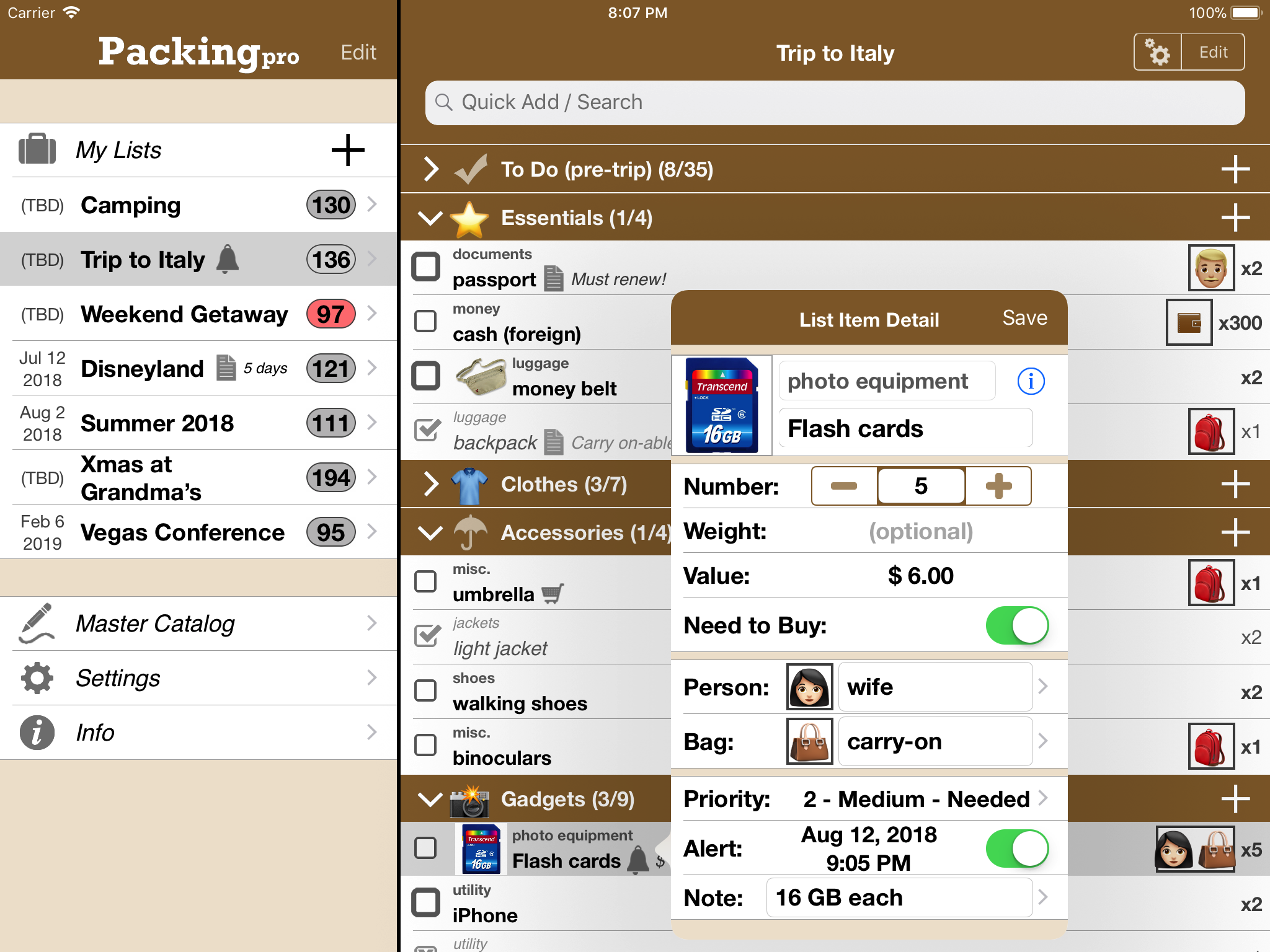
QuinnScape announces Packing Pro 13.1, a nice summer update that expands on existing list editing features. Packing Pro is a mobile travel packing list app that features unlimited, 100% customizable packing lists, an extensive, yet flexible, catalog, handy sample lists, iCloud auto-sync and various list sharing options. Users can now move and copy list items to new list categories, duplicate list items found via searching. Lastly, users are now prompted to set an alert for newly created lists.
Taipei, Taiwan - QuinnScape announces the release of Packing Pro 13.1, a nice summer update that expands on existing list editing features. For example, users can now move and copy list items to new list categories, verses just existing ones before. They can also opt to duplicate list items found via searching (duplicating items was only possible via catalog selection or direct entry in the past). Lastly, users are now prompted to set an alert for newly created lists.
During the ten years that Packing Pro has been on Apple's App Store, Packing Pro has been highlighted there several times, such as in the "Travel Essentials," "Travel Survival Kit" and "Travel Expenses" promotions, among others. It has also ranked at #1 for iPads and #2 for iPhones in the U.S. App Store's Travel section. Besides Apple, Packing Pro has also been recognized by CNN, WSJ, BBC, The New York Times, Expedia and Budget Travel, and has earned glowing reviews on major tech and app blogs (Gizmodo, Mashable, Macworld, CNET and iPhone Life, among others).
Packing Pro is a mobile travel packing list app that features unlimited, 100% customizable packing lists, an extensive, yet flexible, catalog, handy sample lists, iCloud auto-sync and various list sharing options. A host of special functions include:
* Multi-item selection from catalog for speedy list building
* Multi-item editing for easy list & catalog management
* Collapsable categories with floating headers & running item tallies
* List sorting & filtering by packing status, priority, need to buy, bag and/or person
* Item, weight, value and packing status totals & subtotals
* Item images to eliminate any confusion - never again pack the wrong item
* Item & list alerts for user-set reminders
* Email export for list & file sharing
* Wireless printing
* Fully customized device support for all sizes of iPhone, iPad & iPod touch
* Full multi-lingual support for English, Spanish, French, German, Italian, Portuguese, Russian, Polish, Japanese & Chinese
Besides the core features listed above (which are also present in the basic Packing (+TO DO!) app), Packing Pro also gives its users the following Pro-level features:
* iCloud auto-syncing support
* Expert packing list wizard that can "automagically" create a list
* Email, iTunes, AirDrop, Dropbox & Box file sharing, backup & out-of-app editing support
* Customized design (themes, layout, fonts, colors, textures)
* Double-sized Master Catalog with over 800 items and to-do tasks
* Twice as many sample lists
* Smart Search (lists & catalog)
Packing Pro version 13.1 is an important update with expanded editing features, just in time for the busy summer travel season. Check it out today, and happy travels!
Pricing and Availability:
Packing Pro is a universal app that is available for purchase worldwide on the iPhone & iPad App Store for US$ 2.99, or the equivalent in local currency. The basic Packing (+TO DO!) sells for just $0.99 (USD).
QuinnScape: http://www.quinnscape.com/
Packing Pro 13.1: http://www.quinnscape.com/PackingPro.asp
Purchase and Download: https://geo.itunes.apple.com/us/app/packing-pro/id312266675?mt=8&at=1l3v8Yv&pt=55410&ct=prmac
Video Demos: http://www.quinnscape.com/PackingPro-videodemo.asp
Screenshot: http://www.quinnscape.com/media/images/PackingPro-iPad-v12.4.png
App Icon: http://www.quinnscape.com/media/images/PackingPro2019-icon-250x250.png
Since its founding in October 2008, QuinnScape has been managed by Quinn Genzel. Quinn is best known for his popular, top-ranking travel packing apps: Packing (+TO DO!) and Packing Pro. Packing Pro has been recognized by Apple, CNN, WSJ, BBC, National Geographic, Budget Travel, Fodor's, CNET, Macworld and a host of others as one of their top apps for traveling. Other app created by Quinn include a grocery shopping list app (Shopping Pro), nature appreciation apps (iLove Nature and iLove Birds), 3D VR action games (R.I.P and Ghost Buddy) and high-quality puzzles (the aQ's Pro Slider Puzzle series). Copyright (C) 2008-2019 QuinnScape. All Rights Reserved. Apple, the Apple logo, iPhone, iPod and iPad are registered trademarks of Apple Inc. in the U.S. and/or other countries.
*******
Link To Article: https://prmac.com/release-id-83498.htm
*******
---------------------------------------------------------------------------------
Note that you can alter delivered distributions at any time.
Login to your account on prMac to alter your channel selection, or to opt-out at any time.
Packing Pro 13.1 Summer Update Expands Editing Options for Travel App - Published on 06/17/19
QuinnScape announces Packing Pro 13.1, a nice summer update that expands on existing list editing features. Packing Pro is a mobile travel packing list app that features unlimited, 100% customizable packing lists, an extensive, yet flexible, catalog, handy sample lists, iCloud auto-sync and various list sharing options. Users can now move and copy list items to new list categories, duplicate list items found via searching. Lastly, users are now prompted to set an alert for newly created lists.
Taipei, Taiwan - QuinnScape announces the release of Packing Pro 13.1, a nice summer update that expands on existing list editing features. For example, users can now move and copy list items to new list categories, verses just existing ones before. They can also opt to duplicate list items found via searching (duplicating items was only possible via catalog selection or direct entry in the past). Lastly, users are now prompted to set an alert for newly created lists.
During the ten years that Packing Pro has been on Apple's App Store, Packing Pro has been highlighted there several times, such as in the "Travel Essentials," "Travel Survival Kit" and "Travel Expenses" promotions, among others. It has also ranked at #1 for iPads and #2 for iPhones in the U.S. App Store's Travel section. Besides Apple, Packing Pro has also been recognized by CNN, WSJ, BBC, The New York Times, Expedia and Budget Travel, and has earned glowing reviews on major tech and app blogs (Gizmodo, Mashable, Macworld, CNET and iPhone Life, among others).
Packing Pro is a mobile travel packing list app that features unlimited, 100% customizable packing lists, an extensive, yet flexible, catalog, handy sample lists, iCloud auto-sync and various list sharing options. A host of special functions include:
* Multi-item selection from catalog for speedy list building
* Multi-item editing for easy list & catalog management
* Collapsable categories with floating headers & running item tallies
* List sorting & filtering by packing status, priority, need to buy, bag and/or person
* Item, weight, value and packing status totals & subtotals
* Item images to eliminate any confusion - never again pack the wrong item
* Item & list alerts for user-set reminders
* Email export for list & file sharing
* Wireless printing
* Fully customized device support for all sizes of iPhone, iPad & iPod touch
* Full multi-lingual support for English, Spanish, French, German, Italian, Portuguese, Russian, Polish, Japanese & Chinese
Besides the core features listed above (which are also present in the basic Packing (+TO DO!) app), Packing Pro also gives its users the following Pro-level features:
* iCloud auto-syncing support
* Expert packing list wizard that can "automagically" create a list
* Email, iTunes, AirDrop, Dropbox & Box file sharing, backup & out-of-app editing support
* Customized design (themes, layout, fonts, colors, textures)
* Double-sized Master Catalog with over 800 items and to-do tasks
* Twice as many sample lists
* Smart Search (lists & catalog)
Packing Pro version 13.1 is an important update with expanded editing features, just in time for the busy summer travel season. Check it out today, and happy travels!
Pricing and Availability:
Packing Pro is a universal app that is available for purchase worldwide on the iPhone & iPad App Store for US$ 2.99, or the equivalent in local currency. The basic Packing (+TO DO!) sells for just $0.99 (USD).
QuinnScape: http://www.quinnscape.com/
Packing Pro 13.1: http://www.quinnscape.com/PackingPro.asp
Purchase and Download: https://geo.itunes.apple.com/us/app/packing-pro/id312266675?mt=8&at=1l3v8Yv&pt=55410&ct=prmac
Video Demos: http://www.quinnscape.com/PackingPro-videodemo.asp
Screenshot: http://www.quinnscape.com/media/images/PackingPro-iPad-v12.4.png
App Icon: http://www.quinnscape.com/media/images/PackingPro2019-icon-250x250.png

Since its founding in October 2008, QuinnScape has been managed by Quinn Genzel. Quinn is best known for his popular, top-ranking travel packing apps: Packing (+TO DO!) and Packing Pro. Packing Pro has been recognized by Apple, CNN, WSJ, BBC, National Geographic, Budget Travel, Fodor's, CNET, Macworld and a host of others as one of their top apps for traveling. Other app created by Quinn include a grocery shopping list app (Shopping Pro), nature appreciation apps (iLove Nature and iLove Birds), 3D VR action games (R.I.P and Ghost Buddy) and high-quality puzzles (the aQ's Pro Slider Puzzle series). Copyright (C) 2008-2019 QuinnScape. All Rights Reserved. Apple, the Apple logo, iPhone, iPod and iPad are registered trademarks of Apple Inc. in the U.S. and/or other countries.
*******
Link To Article: https://prmac.com/release-id-83498.htm
*******
---------------------------------------------------------------------------------
Note that you can alter delivered distributions at any time.
Login to your account on prMac to alter your channel selection, or to opt-out at any time.
Cisdem Duplicate Finder for Mac 4.6.0 Has Improved Interface and Speed
A new article has been published at prMac.
Cisdem Duplicate Finder for Mac 4.6.0 Has Improved Interface and Speed - Published on 06/14/19
Cisdem has upgraded its duplicate file finder for Mac to version 4.6.0, which brings improved user interface and better performance. Cisdem Duplicate Finder is a lightweight, easy to use and powerful duplicate file finder for Mac. Users can use it to look for duplicate photos, music files, videos, documents, archives and other kinds of duplicate files on Mac's internal storage, external HD, SSD, USB flash drive, memory cards, etc.
Madelia, Minnesota - Cisdem Duplicate Finder for Mac has been upgraded to version 4.6.0 with improved user interface and increased speed of finding duplicate files. Cisdem Duplicate Finder is a lightweight, easy to use and powerful duplicate file finder for Mac. Users can use it to look for duplicate photos, music files, videos, documents, archives and other kinds of duplicate files on Mac's internal storage, external HD, SSD, USB flash drive, memory cards, etc. The Auto-Select and One-click Deletion features allow users to remove unwanted duplicate files all at once.
"Many of us may have gigabytes of duplicate files on our computers, it's almost impossible to accurately and quickly find them all by hand," said Edward Riley, Cisdem's project manager. "That's why we developed Cisdem Duplicate Finder. This upgrade makes it even faster to look for duplicate files on supported devices. The scanning speed is significantly increased. You just need to click the Scan button, have a sip of your drink and let this duplicate file finder work its magic."
What's New in Version 4.6.0:
1. Refined interface
2. Improved duplicates finding speed
3. Fixed some minor bugs
Main Features:
1. Support various file types and formats
This duplicate file finder for Mac can scan selected folders and drives to look for duplicate images, audios, videos, documents and other types of files. Users can set it to identify duplicates by content (default) or by filename.
2. Find similar images
In addition to duplicate images, it can also find similar images. Users can set the similar level in settings.
3. Support various storage devices
This Mac duplicate file finder can also find duplicate files on external storage devices such as external HD, SSD, SD card, etc.
4. Remove duplicates from iTunes and Photos
Cisdem Duplicate Finder can find and delete duplicates in iTunes and Photos apps without damaging the libraries. It's as safe as manual deletion.
5. Allow side-by-side preview
There are three preview modes for users to choose from. One can zoom in or out for better view.
6. Multiple selection options including Auto-Select
By default, this duplicate file finder for macOS will automatically select duplicate copies for users to delete. Totally, there are 4 selection options. With respect to similar images, there are 7 options including Select Lowest Resolution.
7. Allow high degree of customization Users can choose from multiple scan methods and removal methods according to their needs. In addition, there are scan filters, folder exclusion, extension exclusion and other options, enabling users to have control over the scan and removal process.
Price and Availability:
Cisdem Duplicate Finder for Mac 4.6.0 is available for download and purchase on the Cisdem website. Users can purchase a lifetime license for $29.99 and enjoy lifetime free upgrades. A free trial is available for download at the Cisdem website.
Cisdem: https://www.cisdem.com/
Cisdem Duplicate Finder for Mac: https://www.cisdem.com/duplicate-finder-mac.html
Download Free Trial: https://www.cisdem.com/downloads/cisdem-duplicatefinder-4.dmg
Cisdem provides productivity and business software that helps Mac users to get their job done faster. Cisdem products include top rated software centered on PDF Conversion, PDF Management, Data Recovery, and File Management. The company is dedicated in building highly efficient Mac software that make life easier and processes simpler. All Material and Software (C) Copyright 2019 Cisdem. All Rights Reserved. Apple, the Apple logo, Mac OS X and Macintosh are registered trademarks of Apple Inc. in the U.S. and/or other countries. Other trademarks and registered trademarks may be the property of their respective owners.
*******
Link To Article: https://prmac.com/release-id-83497.htm
*******
---------------------------------------------------------------------------------
Note that you can alter delivered distributions at any time.
Login to your account on prMac to alter your channel selection, or to opt-out at any time.
Cisdem Duplicate Finder for Mac 4.6.0 Has Improved Interface and Speed - Published on 06/14/19
Cisdem has upgraded its duplicate file finder for Mac to version 4.6.0, which brings improved user interface and better performance. Cisdem Duplicate Finder is a lightweight, easy to use and powerful duplicate file finder for Mac. Users can use it to look for duplicate photos, music files, videos, documents, archives and other kinds of duplicate files on Mac's internal storage, external HD, SSD, USB flash drive, memory cards, etc.
Madelia, Minnesota - Cisdem Duplicate Finder for Mac has been upgraded to version 4.6.0 with improved user interface and increased speed of finding duplicate files. Cisdem Duplicate Finder is a lightweight, easy to use and powerful duplicate file finder for Mac. Users can use it to look for duplicate photos, music files, videos, documents, archives and other kinds of duplicate files on Mac's internal storage, external HD, SSD, USB flash drive, memory cards, etc. The Auto-Select and One-click Deletion features allow users to remove unwanted duplicate files all at once.
"Many of us may have gigabytes of duplicate files on our computers, it's almost impossible to accurately and quickly find them all by hand," said Edward Riley, Cisdem's project manager. "That's why we developed Cisdem Duplicate Finder. This upgrade makes it even faster to look for duplicate files on supported devices. The scanning speed is significantly increased. You just need to click the Scan button, have a sip of your drink and let this duplicate file finder work its magic."
What's New in Version 4.6.0:
1. Refined interface
2. Improved duplicates finding speed
3. Fixed some minor bugs
Main Features:
1. Support various file types and formats
This duplicate file finder for Mac can scan selected folders and drives to look for duplicate images, audios, videos, documents and other types of files. Users can set it to identify duplicates by content (default) or by filename.
2. Find similar images
In addition to duplicate images, it can also find similar images. Users can set the similar level in settings.
3. Support various storage devices
This Mac duplicate file finder can also find duplicate files on external storage devices such as external HD, SSD, SD card, etc.
4. Remove duplicates from iTunes and Photos
Cisdem Duplicate Finder can find and delete duplicates in iTunes and Photos apps without damaging the libraries. It's as safe as manual deletion.
5. Allow side-by-side preview
There are three preview modes for users to choose from. One can zoom in or out for better view.
6. Multiple selection options including Auto-Select
By default, this duplicate file finder for macOS will automatically select duplicate copies for users to delete. Totally, there are 4 selection options. With respect to similar images, there are 7 options including Select Lowest Resolution.
7. Allow high degree of customization Users can choose from multiple scan methods and removal methods according to their needs. In addition, there are scan filters, folder exclusion, extension exclusion and other options, enabling users to have control over the scan and removal process.
Price and Availability:
Cisdem Duplicate Finder for Mac 4.6.0 is available for download and purchase on the Cisdem website. Users can purchase a lifetime license for $29.99 and enjoy lifetime free upgrades. A free trial is available for download at the Cisdem website.
Cisdem: https://www.cisdem.com/
Cisdem Duplicate Finder for Mac: https://www.cisdem.com/duplicate-finder-mac.html
Download Free Trial: https://www.cisdem.com/downloads/cisdem-duplicatefinder-4.dmg
Cisdem provides productivity and business software that helps Mac users to get their job done faster. Cisdem products include top rated software centered on PDF Conversion, PDF Management, Data Recovery, and File Management. The company is dedicated in building highly efficient Mac software that make life easier and processes simpler. All Material and Software (C) Copyright 2019 Cisdem. All Rights Reserved. Apple, the Apple logo, Mac OS X and Macintosh are registered trademarks of Apple Inc. in the U.S. and/or other countries. Other trademarks and registered trademarks may be the property of their respective owners.
*******
Link To Article: https://prmac.com/release-id-83497.htm
*******
---------------------------------------------------------------------------------
Note that you can alter delivered distributions at any time.
Login to your account on prMac to alter your channel selection, or to opt-out at any time.
Subscribe to:
Posts (Atom)