A new article has been published at prMac.
Merge SX 1.1.1 is now available in the Mac App Store - Published on 08/22/19
Charlotte based developer, einstein's legacy introduces Merge SX 1.1.1, a macOS application that seamlessly joins a collection of videos into a single movie. The software features an intuitive user interface, gesture-based tray management, preview generation, and options for sharing your output movie with other applications and various video-centric internet services. Effortlessly share your output directly to Vimeo, Facebook, Twitter or other popular internet services.
Charlotte, North Carolina - einstein's legacy v2.0, LLC announces the release and immediate availability of Merge SX 1.1.1. Merge SX helps professional and amateur video content creators seamlessly join a collection of videos into a single movie. The software features a simple user interface, gesture-based tray management, preview generation, and options for sharing your output movie with other applications or various video-centric internet services.
"Joining movies together should be a simple task. We built Merge SX to make the task 'what you see is what you get' simple," says einstein's legacy Chief Product Officer Douglas A. Welton. "We also included functions for previewing your output and sharing the results to make this tool a must-have for content creators in education, advertising, digital signage, video production, and stage performance."
Merge SX 1.1.1 includes the following key features:
Easy Organization - Use drag'n'drop to position the segments in the desired order for the final movie output.
Automatic Chapters - Create a chapter track with visual markers located at the beginning of each segment.
Track Thinning - Limit the output movie to include only the video and audio tracks from each segment source.
Precise Navigation - Double-click the in-point or out-point handles to set movie segment length with frame-level accuracy.
Modern Codecs - Create new movies in a variety of formats (e.g., H.264, HEVC, etc.) for a range of playback situations.
Background Exports - New movies are created in the background, enabling you to continue working without waiting.
Simple Segmentation - Include all or part of a movie in the output by adjusting the in-point and out-point handles.
Sharing - Share your output directly to Vimeo, Facebook, Twitter or other popular internet services.
System Requirements:
* Macintosh Computer and OS X 10.14 (Mojave)
Pricing and Availability:
Merge SX 1.1.1 is available as a free download from the Mac App Store in the Video category. Additional functionality to remove watermarked content is available via in-app purchases. Promo codes are available to members of the press. For more information, please contact Douglas A. Welton.
einstein's legacy: http://www.einsteinslegacy.com
Merge SX 1.1.1: http://www.einsteinslegacy.com/products/merge.html
Download from the Mac App Store: https://itunes.apple.com/app/merge-sx/id1330230422
Screenshot: http://www.einsteinslegacy.com/images/pr/screens/merge.png
Application Icon: http://www.einsteinslegacy.com/images/pr/icons/merge.png
At einstein's legacy, we make Macintosh applications for creative professionals who handle video, images and quartz compositions. einstein's legacy v2.0, LLC is located in Charlotte, NC. Copyright (C) 2011-2019 einstein's legacy. All Rights Reserved. Apple, the Apple logo, Macintosh, iPhone, iPod, iPad and Mac OS X are registered trademarks of Apple Inc. in the U.S. and/or other countries. Other trademarks and registered trademarks may be the property of their respective owners.
*******
Link To Article: https://prmac.com/release-id-83610.htm
*******
---------------------------------------------------------------------------------
Note that you can alter delivered distributions at any time.
Login to your account on prMac to alter your channel selection, or to opt-out at any time.



ChronoSync Express Updated To Version 1.3.2
A new article has been published at prMac.
ChronoSync Express Updated To Version 1.3.2 - Published on 08/21/19
Econ Technologies today releases ChronoSync Express 1.3.2, an important update to their entry level version of ChronoSync for macOS. It provides the basic file synchronization, backup & scheduling capabilities found in ChronoSync but at a more affordable price. Version 1.3.2 includes improved support for synchronizing files with iPads and iPhones via InterConneX and support for macOS Catalina, as well as includes several bug fixes related to invoking Trial Synchronizations,
Casselberry, Florida - In conjunction with the reinvented InterConneX 2.0 for iOS, Econ Technologies today is proud to announce the release of ChronoSync Express 1.3.2, an important update to their entry level version of ChronoSync for macOS. ChronoSync Express 1.3.2 includes improved support for synchronizing files with iPads and iPhones via InterConneX and support for macOS Catalina. Additionally this version includes several bug fixes related to invoking Trial Synchronizations, the Home Folder Backup Assistant and the "Read-Only Destination" readiness warning.
ChronoSync Express is a free update from the Mac App Store! If you don't already own ChronoSync Express, you can find it on the Mac App Store for $24.99 (USD). Or try ChronoSync Express along with over 140 other Apps as part of the Setapp subscription service. ChronoSync Express is designed to work on macOS version 10.10 and newer.
ChronoSync Express is part of a suite of macOS and iOS products. ChronoSync Express is the entry level version of ChronoSync, the complete synchronization and backup utility for macOS. It is the perfect tool for those who want to synchronize files and folders between two computers. It can also perform local backups to external hard drives, NAS devices and file servers. For high performance file sharing, it is fully compatible with ChronoAgent. It can even exchange files with iOS devices running InterConneX and send completion notifications to your iPhone via ChronoMonitor.
Econ Technologies: https://www.econtechnologies.com/index.html
ChronoSync Express 1.3.2: https://www.econtechnologies.com/chronosync-express/overview.html
Purchase from the Mac App Store: https://apps.apple.com/app/chronosync-express/id904801687
Setapp Listing: https://setapp.com/apps/chronosync-express?utm_medium=affiliate+program&utm_source=134&utm_campaign=www.econtechnologies.com
Media Assets: https://www.econtechnologies.com/about/media.html
Econ Technologies, Inc has been creating Apple(R) software for over 20 years including ChronoSync(TM) for Mac(R) OS X , ChronoAgent(TM) for Mac(R) OS X, and InterConneX for the iPad & iPhone. All Material and Software (C) Copyright 2019 Econ Technologies. All Rights Reserved. Apple, the Apple logo, Macintosh and macOS are registered trademarks of Apple Inc. in the U.S. and/or other countries. Other trademarks and registered trademarks may be the property of their respective owners.
*******
Link To Article: https://prmac.com/release-id-83609.htm
*******
---------------------------------------------------------------------------------
Note that you can alter delivered distributions at any time.
Login to your account on prMac to alter your channel selection, or to opt-out at any time.
ChronoSync Express Updated To Version 1.3.2 - Published on 08/21/19
Econ Technologies today releases ChronoSync Express 1.3.2, an important update to their entry level version of ChronoSync for macOS. It provides the basic file synchronization, backup & scheduling capabilities found in ChronoSync but at a more affordable price. Version 1.3.2 includes improved support for synchronizing files with iPads and iPhones via InterConneX and support for macOS Catalina, as well as includes several bug fixes related to invoking Trial Synchronizations,
Casselberry, Florida - In conjunction with the reinvented InterConneX 2.0 for iOS, Econ Technologies today is proud to announce the release of ChronoSync Express 1.3.2, an important update to their entry level version of ChronoSync for macOS. ChronoSync Express 1.3.2 includes improved support for synchronizing files with iPads and iPhones via InterConneX and support for macOS Catalina. Additionally this version includes several bug fixes related to invoking Trial Synchronizations, the Home Folder Backup Assistant and the "Read-Only Destination" readiness warning.
ChronoSync Express is a free update from the Mac App Store! If you don't already own ChronoSync Express, you can find it on the Mac App Store for $24.99 (USD). Or try ChronoSync Express along with over 140 other Apps as part of the Setapp subscription service. ChronoSync Express is designed to work on macOS version 10.10 and newer.
ChronoSync Express is part of a suite of macOS and iOS products. ChronoSync Express is the entry level version of ChronoSync, the complete synchronization and backup utility for macOS. It is the perfect tool for those who want to synchronize files and folders between two computers. It can also perform local backups to external hard drives, NAS devices and file servers. For high performance file sharing, it is fully compatible with ChronoAgent. It can even exchange files with iOS devices running InterConneX and send completion notifications to your iPhone via ChronoMonitor.
Econ Technologies: https://www.econtechnologies.com/index.html
ChronoSync Express 1.3.2: https://www.econtechnologies.com/chronosync-express/overview.html
Purchase from the Mac App Store: https://apps.apple.com/app/chronosync-express/id904801687
Setapp Listing: https://setapp.com/apps/chronosync-express?utm_medium=affiliate+program&utm_source=134&utm_campaign=www.econtechnologies.com
Media Assets: https://www.econtechnologies.com/about/media.html
Econ Technologies, Inc has been creating Apple(R) software for over 20 years including ChronoSync(TM) for Mac(R) OS X , ChronoAgent(TM) for Mac(R) OS X, and InterConneX for the iPad & iPhone. All Material and Software (C) Copyright 2019 Econ Technologies. All Rights Reserved. Apple, the Apple logo, Macintosh and macOS are registered trademarks of Apple Inc. in the U.S. and/or other countries. Other trademarks and registered trademarks may be the property of their respective owners.
*******
Link To Article: https://prmac.com/release-id-83609.htm
*******
---------------------------------------------------------------------------------
Note that you can alter delivered distributions at any time.
Login to your account on prMac to alter your channel selection, or to opt-out at any time.
spotfindr released for iOS/Android - Find Your Next Favorite Spot
A new article has been published at prMac.
spotfindr released for iOS/Android - Find Your Next Favorite Spot - Published on 08/21/19
Indie developer, Michael Hitzker today releases spotfindr 6.0.0 (Ferdinand), an important update to his popular local drone spot and event finder for iOS and Android devices. spotfindr lets drone pilots share great drone spots and events. The app features a pretty UI and also offers a web version where people can view all your submitted spots and events. When creating spots, you can specify whether it is near a restricted area or not and add photos, videos and some categories.
Tragwein, Austria - Independent developer, Michael Hitzker today is thrilled to announce the release of spotfindr 6.0.0 (Ferdinand), an important update to his popular local drone spot and event finder for iOS and Android devices. With spotfindr, drone pilots can share their favorite spots to fly at and help other pilots discover their next favorite spot. Moreover, users can create an own profile where their submissions are visible. Another crucial factor in favor of spotfindr is the ability to add information about flight restrictions near that spot. The modern and clean User interface already drew dozens of pilots towards the app who now prefer to use spotfindr over any other spot finding app.
Since version 6.0.0 (Ferdinand) pilots can add FPV events like meetups and races. This is a huge advantage over other spot finding apps as they lack such a feature and is another crucial step towards growing the FPV community.
Device Requirements:
* iPhone, iPad, and iPod touch
* Requires iOS 12.1 or later
* 20.3 MB
Pricing and Availability:
spotfindr 6.0.0 is Free, ad supported (users can also donate directly to the creator). and available in Europe, North America, Australia, New Zealand and some other countries through the App Store in the Travel category. There is also an Android version available on Google Play. With almost 1000 downloads on iOS and Android, around 200 submitted spots and roughly 300 Users in just two months, spotfindr is the fastest growing FPV app in the market.
Michael Hitzker: http://www.michaelhitzker.com
spotfindr 6.0: http://www.spotfindr.app
Download from the App Store: https://apps.apple.com/us/app/spotfindr/id1466536309
Download from Google Play: https://play.google.com/store/apps/details?id=com.spotfindr
Media Assets: https://drive.google.com/open?id=18XQcSBWRtzr4vdyTaHjqx_vROKJy02bQ
Michael Hitzker is a passionate App developer, FPV pilot and student from Upper Austria and has started coding in 2015 with just 15 years of age. Within the last 1.5 years, he has published 6 apps with spotfindr being the most successful. Being in his last year of school, he dreams of becoming a full-time app developer after graduating. Recently, he has also got into marketing, about which he wants to learn more in the future. All Material and Software (C) Copyright 2019 Michael Hitzker. All Rights Reserved. Apple, the Apple logo, iPhone, iPod and iPad are registered trademarks of Apple Inc. in the U.S. and/or other countries. Other trademarks and registered trademarks may be the property of their respective owners.
*******
Link To Article: https://prmac.com/release-id-83608.htm
*******
---------------------------------------------------------------------------------
Note that you can alter delivered distributions at any time.
Login to your account on prMac to alter your channel selection, or to opt-out at any time.
spotfindr released for iOS/Android - Find Your Next Favorite Spot - Published on 08/21/19
Indie developer, Michael Hitzker today releases spotfindr 6.0.0 (Ferdinand), an important update to his popular local drone spot and event finder for iOS and Android devices. spotfindr lets drone pilots share great drone spots and events. The app features a pretty UI and also offers a web version where people can view all your submitted spots and events. When creating spots, you can specify whether it is near a restricted area or not and add photos, videos and some categories.
Tragwein, Austria - Independent developer, Michael Hitzker today is thrilled to announce the release of spotfindr 6.0.0 (Ferdinand), an important update to his popular local drone spot and event finder for iOS and Android devices. With spotfindr, drone pilots can share their favorite spots to fly at and help other pilots discover their next favorite spot. Moreover, users can create an own profile where their submissions are visible. Another crucial factor in favor of spotfindr is the ability to add information about flight restrictions near that spot. The modern and clean User interface already drew dozens of pilots towards the app who now prefer to use spotfindr over any other spot finding app.
Since version 6.0.0 (Ferdinand) pilots can add FPV events like meetups and races. This is a huge advantage over other spot finding apps as they lack such a feature and is another crucial step towards growing the FPV community.
Device Requirements:
* iPhone, iPad, and iPod touch
* Requires iOS 12.1 or later
* 20.3 MB
Pricing and Availability:
spotfindr 6.0.0 is Free, ad supported (users can also donate directly to the creator). and available in Europe, North America, Australia, New Zealand and some other countries through the App Store in the Travel category. There is also an Android version available on Google Play. With almost 1000 downloads on iOS and Android, around 200 submitted spots and roughly 300 Users in just two months, spotfindr is the fastest growing FPV app in the market.
Michael Hitzker: http://www.michaelhitzker.com
spotfindr 6.0: http://www.spotfindr.app
Download from the App Store: https://apps.apple.com/us/app/spotfindr/id1466536309
Download from Google Play: https://play.google.com/store/apps/details?id=com.spotfindr
Media Assets: https://drive.google.com/open?id=18XQcSBWRtzr4vdyTaHjqx_vROKJy02bQ
Michael Hitzker is a passionate App developer, FPV pilot and student from Upper Austria and has started coding in 2015 with just 15 years of age. Within the last 1.5 years, he has published 6 apps with spotfindr being the most successful. Being in his last year of school, he dreams of becoming a full-time app developer after graduating. Recently, he has also got into marketing, about which he wants to learn more in the future. All Material and Software (C) Copyright 2019 Michael Hitzker. All Rights Reserved. Apple, the Apple logo, iPhone, iPod and iPad are registered trademarks of Apple Inc. in the U.S. and/or other countries. Other trademarks and registered trademarks may be the property of their respective owners.
*******
Link To Article: https://prmac.com/release-id-83608.htm
*******
---------------------------------------------------------------------------------
Note that you can alter delivered distributions at any time.
Login to your account on prMac to alter your channel selection, or to opt-out at any time.
Man Vs. Missiles: Combat (Chapter 2) Now Released for iOS and Android
A new article has been published at prMac.
Man Vs. Missiles: Combat (Chapter 2) Now Released for iOS and Android - Published on 08/21/19
Spiel Studios Pvt. Ltd. releases Man Vs. Missiles: Combat v1.0, their latest game title for iOS and Android devices. This is the Second chapter in the popular series - Man Vs. Missiles which has over 5 Million downloads across both platforms worldwide. In this casual, fun, simple, yet challenging game, players will test their piloting skills by flying their plane for as long as they can, while avoiding enemy jets which are continuously trying to bring you down. You also have a gun to shoot back.
Mumbai, India - Spiel Studios Pvt. Ltd. is pleased to announce the release of Man Vs. Missiles: Combat, their latest addictive and challenging game for iOS and Android devices. In this casual, fun, simple yet challenging game, players will test their piloting skills by flying their plane for as long as they can, while avoiding and destroying incoming enemy jets which are continuously trying to bring them down.
To counter these enemy jets, the players are also equipped with an on-board aircraft gun which they can use to shoot the jets down. The players also have a health bar which reduces on every damage it sustains from the bullets of these enemy jets.
Pickup power-ups like shield & boost to protect you from the jets and go faster respectively. Also deploy flares to destroy these jets when they get too hot to handle. Start from Level 1 and climb up the ladder as you complete each level with unique objectives. With each level you pass, you get new planes and upgrades which get unlocked in the shop. Spend the coins that you collect during the game to buy these items. Also invite your friends and post your high score on Game Center and Play Services.
Get the game now and start playing for Free! Man Vs. Missiles: Combat is the Second chapter of the popular series - Man Vs. Missiles which was released in late 2017 and has over 5 Million downloads across iOS/Android with an average of 4.3 stars. MvM: Combat is a continuation to the original game with the core idea remaining the same, but with new gameplay and controls.
Device Requirements:
* iPhone, iPad, and iPod touch
* Requires iOS 10.0 or later.
* 145 MB
Pricing and Availability:
Man Vs. Missiles: Combat v1.0 is Free (With In-App Purchases) and available worldwide through the App Store in the Games category. There is also an Android version available on Google Play.
Man Vs. Missiles: Combat 1.0: http://www.spielstudios.com/man-vs-missiles-combat
Download from the App Store: https://apps.apple.com/app/man-vs-missiles-combat/id1462882461
Download with Google Play: https://play.google.com/store/apps/details?id=com.spiel.manvsmissiles2
YouTube Video (Official Promo): https://www.youtube.com/watch?v=ACGfDVQbrbk
Cover Art: http://www.spielstudios.com/docs/MvM2_Cover_1280x720.png
App Icon: http://www.spielstudios.com/docs/MvM2_Icon_Rounded.png
Spiel Studios Pvt. Ltd. is a game development company headquartered in Mumbai, India and a publishing arm in New York, USA, with primary focus on releasing quality games for the iOS/Android platforms. Founded in 2007, Spiel has been on the forefront of providing players high quality games for the online and handheld platforms. All Material and Software (C) Copyright 2007-2019 Spiel Inc. All Rights Reserved. Apple, the Apple logo, iPhone, iPod and iPad are registered trademarks of Apple Inc. in the U.S. and/or other countries. Other trademarks and registered trademarks may be the property of their respective owners.
*******
Link To Article: https://prmac.com/release-id-83607.htm
*******
---------------------------------------------------------------------------------
Note that you can alter delivered distributions at any time.
Login to your account on prMac to alter your channel selection, or to opt-out at any time.
Man Vs. Missiles: Combat (Chapter 2) Now Released for iOS and Android - Published on 08/21/19
Spiel Studios Pvt. Ltd. releases Man Vs. Missiles: Combat v1.0, their latest game title for iOS and Android devices. This is the Second chapter in the popular series - Man Vs. Missiles which has over 5 Million downloads across both platforms worldwide. In this casual, fun, simple, yet challenging game, players will test their piloting skills by flying their plane for as long as they can, while avoiding enemy jets which are continuously trying to bring you down. You also have a gun to shoot back.
Mumbai, India - Spiel Studios Pvt. Ltd. is pleased to announce the release of Man Vs. Missiles: Combat, their latest addictive and challenging game for iOS and Android devices. In this casual, fun, simple yet challenging game, players will test their piloting skills by flying their plane for as long as they can, while avoiding and destroying incoming enemy jets which are continuously trying to bring them down.
To counter these enemy jets, the players are also equipped with an on-board aircraft gun which they can use to shoot the jets down. The players also have a health bar which reduces on every damage it sustains from the bullets of these enemy jets.
Pickup power-ups like shield & boost to protect you from the jets and go faster respectively. Also deploy flares to destroy these jets when they get too hot to handle. Start from Level 1 and climb up the ladder as you complete each level with unique objectives. With each level you pass, you get new planes and upgrades which get unlocked in the shop. Spend the coins that you collect during the game to buy these items. Also invite your friends and post your high score on Game Center and Play Services.
Get the game now and start playing for Free! Man Vs. Missiles: Combat is the Second chapter of the popular series - Man Vs. Missiles which was released in late 2017 and has over 5 Million downloads across iOS/Android with an average of 4.3 stars. MvM: Combat is a continuation to the original game with the core idea remaining the same, but with new gameplay and controls.
Device Requirements:
* iPhone, iPad, and iPod touch
* Requires iOS 10.0 or later.
* 145 MB
Pricing and Availability:
Man Vs. Missiles: Combat v1.0 is Free (With In-App Purchases) and available worldwide through the App Store in the Games category. There is also an Android version available on Google Play.
Man Vs. Missiles: Combat 1.0: http://www.spielstudios.com/man-vs-missiles-combat
Download from the App Store: https://apps.apple.com/app/man-vs-missiles-combat/id1462882461
Download with Google Play: https://play.google.com/store/apps/details?id=com.spiel.manvsmissiles2
YouTube Video (Official Promo): https://www.youtube.com/watch?v=ACGfDVQbrbk
Cover Art: http://www.spielstudios.com/docs/MvM2_Cover_1280x720.png

App Icon: http://www.spielstudios.com/docs/MvM2_Icon_Rounded.png

Spiel Studios Pvt. Ltd. is a game development company headquartered in Mumbai, India and a publishing arm in New York, USA, with primary focus on releasing quality games for the iOS/Android platforms. Founded in 2007, Spiel has been on the forefront of providing players high quality games for the online and handheld platforms. All Material and Software (C) Copyright 2007-2019 Spiel Inc. All Rights Reserved. Apple, the Apple logo, iPhone, iPod and iPad are registered trademarks of Apple Inc. in the U.S. and/or other countries. Other trademarks and registered trademarks may be the property of their respective owners.
*******
Link To Article: https://prmac.com/release-id-83607.htm
*******
---------------------------------------------------------------------------------
Note that you can alter delivered distributions at any time.
Login to your account on prMac to alter your channel selection, or to opt-out at any time.
Divide SX 1.1.1 is now available in the Mac App Store
A new article has been published at prMac.
Divide SX 1.1.1 is now available in the Mac App Store - Published on 08/21/19
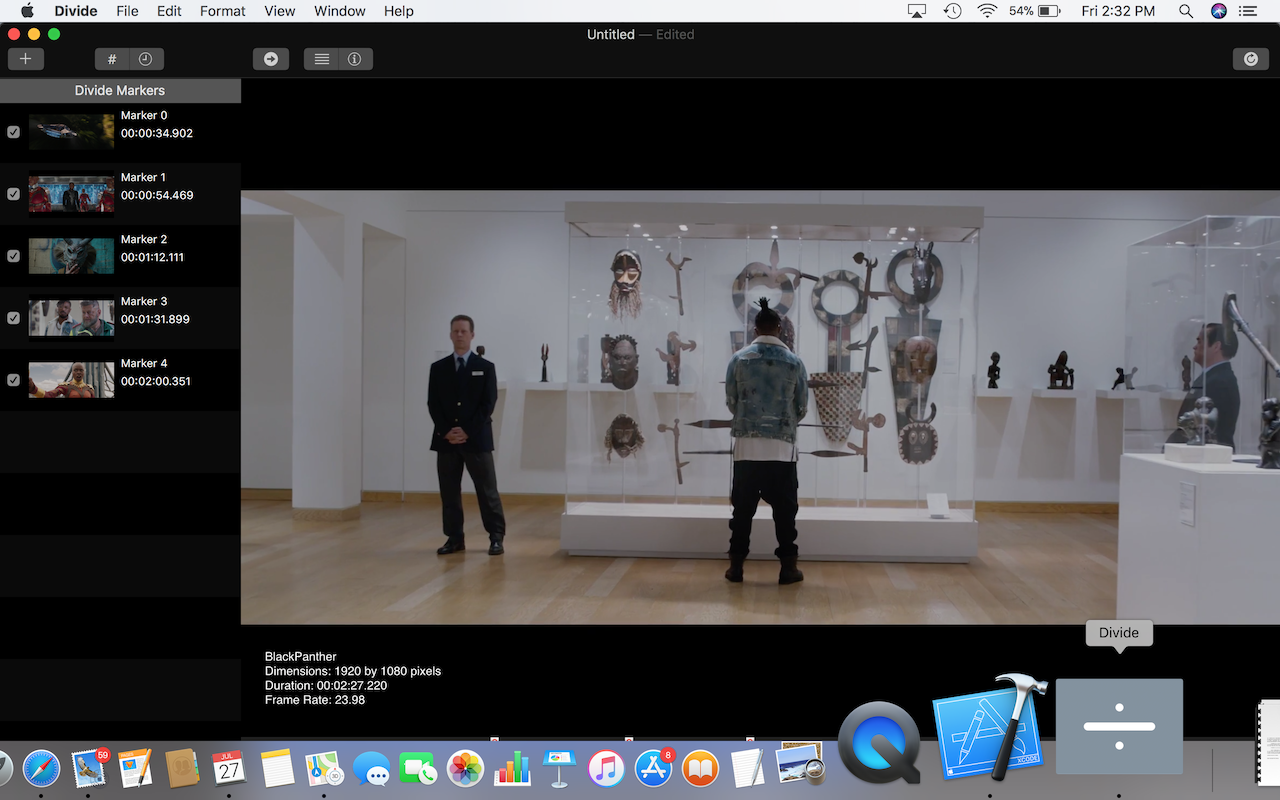
Charlotte based developer, einstein's legacy introduces Divide SX 1.1.1, a video slicing application for macOS that partitions your movies into an arbitrary number of segments. Divide SX features easy organization, a segment-level preview panel, segment sharing, and Precise Navigation Mode - which gives you frame-accurate control over the length of each segment. Automatically add time markers based on a user-requested count or interval timing.
Charlotte, North Carolina - einstein's legacy v2.0, LLC today announces the release and immediate availability of Divide SX 1.1.1., a video slicing application, that partitions your movies into an arbitrary number of segments. Divide SX features easy organization, a segment-level preview panel, segment sharing, and Precise Navigation Mode - which gives you frame-accurate control over the length of each segment.
"The motivation behind the creation of Divide SX was to build a simple product that could quickly and easily chop a video up into an arbitrary set of clips." says einstein's legacy Chief Product Officer Douglas A. Welton. "So, we've focussed on a small set of essential functions to ensure that users can be more productive when they are doing this task."
Divide SX 1.1.1 includes the following key features:
Easy Organization - Drag'n'drop the segment markers to position them at the desired time for creating movie segments.
Precise Navigation - Double-click the segment markers to set segment begin and end points with frame-level accuracy.
Segment Sharing - Share individual segments using Vimeo, Facebook or other popular internet services.
Background Exports - New movies are created in the background, enabling you to continue working without waiting.
Automatic Segments - Automatically add time markers based on a user-requested count or interval timing.
Modern Codecs - Create new movies in a variety of formats (e.g., H.264, HEVC, etc.) for a range of playback situations.
Segment Previews - Create a list of segments and their attributes before exporting to ensure you are getting what you expect.
System Requirements:
* Macintosh Computer and OS X 10.14 (Mojave)
Pricing and Availability:
Divide SX 1.1.1 is available as a free download from the Mac App Store in the Video category. Additional functionality to remove watermarked content is available via in-app purchases. Promo codes are available to members of the press. For more information, please contact Douglas A. Welton.
einstein's legacy: http://www.einsteinslegacy.com
Divide SX 1.1.1: http://www.einsteinslegacy.com/products/divide.html
Download from the Mac App Store: https://itunes.apple.com/app/divide/id1361326391
Screenshot: http://www.einsteinslegacy.com/images/pr/screens/divide.png
Application Icon: http://www.einsteinslegacy.com/images/pr/icons/divide.png
At einstein's legacy, we make Macintosh applications for creative professionals who handle video, images and quartz compositions. einstein's legacy v2.0, LLC is located in Charlotte, NC. Copyright (C) 2011-2019 einstein's legacy. All Rights Reserved. Apple, the Apple logo, Macintosh, iPhone, iPod, iPad and Mac OS X are registered trademarks of Apple Inc. in the U.S. and/or other countries. Other trademarks and registered trademarks may be the property of their respective owners.
*******
Link To Article: https://prmac.com/release-id-83606.htm
*******
---------------------------------------------------------------------------------
Note that you can alter delivered distributions at any time.
Login to your account on prMac to alter your channel selection, or to opt-out at any time.
Divide SX 1.1.1 is now available in the Mac App Store - Published on 08/21/19
Charlotte based developer, einstein's legacy introduces Divide SX 1.1.1, a video slicing application for macOS that partitions your movies into an arbitrary number of segments. Divide SX features easy organization, a segment-level preview panel, segment sharing, and Precise Navigation Mode - which gives you frame-accurate control over the length of each segment. Automatically add time markers based on a user-requested count or interval timing.
Charlotte, North Carolina - einstein's legacy v2.0, LLC today announces the release and immediate availability of Divide SX 1.1.1., a video slicing application, that partitions your movies into an arbitrary number of segments. Divide SX features easy organization, a segment-level preview panel, segment sharing, and Precise Navigation Mode - which gives you frame-accurate control over the length of each segment.
"The motivation behind the creation of Divide SX was to build a simple product that could quickly and easily chop a video up into an arbitrary set of clips." says einstein's legacy Chief Product Officer Douglas A. Welton. "So, we've focussed on a small set of essential functions to ensure that users can be more productive when they are doing this task."
Divide SX 1.1.1 includes the following key features:
Easy Organization - Drag'n'drop the segment markers to position them at the desired time for creating movie segments.
Precise Navigation - Double-click the segment markers to set segment begin and end points with frame-level accuracy.
Segment Sharing - Share individual segments using Vimeo, Facebook or other popular internet services.
Background Exports - New movies are created in the background, enabling you to continue working without waiting.
Automatic Segments - Automatically add time markers based on a user-requested count or interval timing.
Modern Codecs - Create new movies in a variety of formats (e.g., H.264, HEVC, etc.) for a range of playback situations.
Segment Previews - Create a list of segments and their attributes before exporting to ensure you are getting what you expect.
System Requirements:
* Macintosh Computer and OS X 10.14 (Mojave)
Pricing and Availability:
Divide SX 1.1.1 is available as a free download from the Mac App Store in the Video category. Additional functionality to remove watermarked content is available via in-app purchases. Promo codes are available to members of the press. For more information, please contact Douglas A. Welton.
einstein's legacy: http://www.einsteinslegacy.com
Divide SX 1.1.1: http://www.einsteinslegacy.com/products/divide.html
Download from the Mac App Store: https://itunes.apple.com/app/divide/id1361326391
Screenshot: http://www.einsteinslegacy.com/images/pr/screens/divide.png
Application Icon: http://www.einsteinslegacy.com/images/pr/icons/divide.png

At einstein's legacy, we make Macintosh applications for creative professionals who handle video, images and quartz compositions. einstein's legacy v2.0, LLC is located in Charlotte, NC. Copyright (C) 2011-2019 einstein's legacy. All Rights Reserved. Apple, the Apple logo, Macintosh, iPhone, iPod, iPad and Mac OS X are registered trademarks of Apple Inc. in the U.S. and/or other countries. Other trademarks and registered trademarks may be the property of their respective owners.
*******
Link To Article: https://prmac.com/release-id-83606.htm
*******
---------------------------------------------------------------------------------
Note that you can alter delivered distributions at any time.
Login to your account on prMac to alter your channel selection, or to opt-out at any time.
ElcomSoft Phone Breaker 9.15 Supports iOS 13 and iPadOS beta
A new article has been published at prMac.
ElcomSoft Phone Breaker 9.15 Supports iOS 13 and iPadOS beta - Published on 08/20/19
ElcomSoft announces ElcomSoft Phone Breaker 9.15 now offers the ability to download iCloud backups created with iPhone and iPad devices running iOS 13 and iPadOS beta. Both public and developer betas of iOS 13 are supported including the new iPadOS. ElcomSoft Phone Viewer is also updated to support local (iTunes) and iCloud backups produced by iOS 13 devices.
Moscow - ElcomSoft Co. Ltd. is pleased to announce the release of ElcomSoft Phone Breaker 9.15, which adds the ability to download iCloud backups created with iPhone and iPad devices running iOS 13 and iPadOS beta. Both public and developer betas of iOS 13 are supported including the new iPadOS.
In addition, the tool fixes an issue with iCloud authentication tokens. For months, the use of iCloud authentication tokens was severely limited. ElcomSoft Phone Breaker was only able to use tokens produced by macOS on the very same computer the token was created on.
The update is now able to extract the complete, fully-featured iCloud authentication tokens from macOS computers and use that token on any other computer. The token can be used to authenticate into iCloud without using the login, password and two-factor authentication process. However, the authentication token cannot be used for accessing backups, iCloud Keychain, Messages and Health categories.
ElcomSoft Phone Viewer is also updated to support local (iTunes) and iCloud backups produced by iOS 13 devices. Both tools add preliminary support for the latest beta version of macOS 10.15 (Catalina).
The update is free of charge to all customers who purchased or renewed their ElcomSoft Phone Breaker or ElcomSoft Mobile Forensic Bundle license within one year. Discounted renewal is available to customers whose maintenance plan has already expired.
ElcomSoft Phone Breaker release notes:
* Added support for iCloud backups produced by beta versions of iOS 13 and iPadOS
* Fixed the issue of downloading and decrypting a small number of iOS 11 and 12 iCloud backups
* Extracts fully-featured iCloud tokens (will work on other computers) from macOS
* Added preliminary support for macOS 10.15 (Catalina) beta
* Various bug fixes and performance improvements
ElcomSoft Phone Viewer release notes:
* Added support for local iCloud backups produced by beta versions of iOS 13 and iPadOS
* Added preliminary support for macOS 10.15 (Catalina) beta
* Various bug fixes and performance improvements
Read more about it at the ElcomSoft website.
ElcomSoft Co. Ltd.: http://www.elcomsoft.com
Elcomsoft Phone Breaker 9.15: https://www.elcomsoft.com/eppb.html
Founded in 1990, ElcomSoft Co. Ltd. develops state-of-the-art computer forensics tools, provides computer forensics training and computer evidence consulting services. Since 1997, ElcomSoft has been providing support to businesses, law enforcement, military, and intelligence agencies. ElcomSoft tools are used by most of the Fortune 500 corporations, multiple branches of the military all over the world, foreign governments, and all major accounting firms. ElcomSoft and its officers are members of the Russian Cryptology Association. ElcomSoft is a Microsoft Partner (Gold Application Development and Gold Intelligent Systems), Intel Premier Elite Partner and member of NVIDIA's CUDA/GPU Computing Registered Developer Program. All Material and Software (C) Copyright 2019 ElcomSoft Co. Ltd. All Rights Reserved. Apple, the Apple logo, iPhone, iPod and iPad are registered trademarks of Apple Inc. in the U.S. and/or other countries. Other trademarks and registered trademarks may be the
property of their respective owners.
*******
Link To Article: https://prmac.com/release-id-83605.htm
*******
---------------------------------------------------------------------------------
Note that you can alter delivered distributions at any time.
Login to your account on prMac to alter your channel selection, or to opt-out at any time.
ElcomSoft Phone Breaker 9.15 Supports iOS 13 and iPadOS beta - Published on 08/20/19
ElcomSoft announces ElcomSoft Phone Breaker 9.15 now offers the ability to download iCloud backups created with iPhone and iPad devices running iOS 13 and iPadOS beta. Both public and developer betas of iOS 13 are supported including the new iPadOS. ElcomSoft Phone Viewer is also updated to support local (iTunes) and iCloud backups produced by iOS 13 devices.
Moscow - ElcomSoft Co. Ltd. is pleased to announce the release of ElcomSoft Phone Breaker 9.15, which adds the ability to download iCloud backups created with iPhone and iPad devices running iOS 13 and iPadOS beta. Both public and developer betas of iOS 13 are supported including the new iPadOS.
In addition, the tool fixes an issue with iCloud authentication tokens. For months, the use of iCloud authentication tokens was severely limited. ElcomSoft Phone Breaker was only able to use tokens produced by macOS on the very same computer the token was created on.
The update is now able to extract the complete, fully-featured iCloud authentication tokens from macOS computers and use that token on any other computer. The token can be used to authenticate into iCloud without using the login, password and two-factor authentication process. However, the authentication token cannot be used for accessing backups, iCloud Keychain, Messages and Health categories.
ElcomSoft Phone Viewer is also updated to support local (iTunes) and iCloud backups produced by iOS 13 devices. Both tools add preliminary support for the latest beta version of macOS 10.15 (Catalina).
The update is free of charge to all customers who purchased or renewed their ElcomSoft Phone Breaker or ElcomSoft Mobile Forensic Bundle license within one year. Discounted renewal is available to customers whose maintenance plan has already expired.
ElcomSoft Phone Breaker release notes:
* Added support for iCloud backups produced by beta versions of iOS 13 and iPadOS
* Fixed the issue of downloading and decrypting a small number of iOS 11 and 12 iCloud backups
* Extracts fully-featured iCloud tokens (will work on other computers) from macOS
* Added preliminary support for macOS 10.15 (Catalina) beta
* Various bug fixes and performance improvements
ElcomSoft Phone Viewer release notes:
* Added support for local iCloud backups produced by beta versions of iOS 13 and iPadOS
* Added preliminary support for macOS 10.15 (Catalina) beta
* Various bug fixes and performance improvements
Read more about it at the ElcomSoft website.
ElcomSoft Co. Ltd.: http://www.elcomsoft.com
Elcomsoft Phone Breaker 9.15: https://www.elcomsoft.com/eppb.html
Founded in 1990, ElcomSoft Co. Ltd. develops state-of-the-art computer forensics tools, provides computer forensics training and computer evidence consulting services. Since 1997, ElcomSoft has been providing support to businesses, law enforcement, military, and intelligence agencies. ElcomSoft tools are used by most of the Fortune 500 corporations, multiple branches of the military all over the world, foreign governments, and all major accounting firms. ElcomSoft and its officers are members of the Russian Cryptology Association. ElcomSoft is a Microsoft Partner (Gold Application Development and Gold Intelligent Systems), Intel Premier Elite Partner and member of NVIDIA's CUDA/GPU Computing Registered Developer Program. All Material and Software (C) Copyright 2019 ElcomSoft Co. Ltd. All Rights Reserved. Apple, the Apple logo, iPhone, iPod and iPad are registered trademarks of Apple Inc. in the U.S. and/or other countries. Other trademarks and registered trademarks may be the
property of their respective owners.
*******
Link To Article: https://prmac.com/release-id-83605.htm
*******
---------------------------------------------------------------------------------
Note that you can alter delivered distributions at any time.
Login to your account on prMac to alter your channel selection, or to opt-out at any time.
30 Minutes From Zero to App Stores, with Juto Business App Builder
A new article has been published at prMac.
30 Minutes From Zero to App Stores, with Juto Business App Builder - Published on 08/20/19
Juto announces the global release of Juto Business Apps. Business owners can now have their very own mobile app with no IT experience necessary. All it takes is 30 minutes to set up, using Juto Business Apps' app builder. Apps are normally available in app stores within 48-72 hours of submission. Juto puts a custom app into the iOS App Store and Google Play for employees, contractors and suppliers to install and use on their iPhones, iPads and Android phones or tablets.
Perth, Western Australia - App building platform, Juto, announce the global release of Juto Business Apps. Using Juto Business Apps, business owners can now create their own custom mobile app for streamlining their business operations, with no IT experience necessary. All it takes is 30 minutes to set up.
Business owners have full control over the functionality, design, and workflows within the app. Simply define the workflows, databases, integrations, and forms using the easy to use online app builder and Juto will bundle it all together to create the company's own mobile app, which staff can download from the App Store and Google Play.
"As an agency that has built apps for many of Australia's top organisations, we noticed many of the business apps we were building had similar goals: business owners wanted their own app for their own business processes. Juto was born from the idea that business owners should have complete control of their own app, without needing to learn how to code so they can deploy to their workforce quickly and cost-effectively so they can focus on growing their business" said Mike Cunneen, Juto founder, and CEO.
After a successful local beta program with industries including, transport, health and safety and construction, Juto Business Apps is now available to businesses all around the world, connecting seamlessly into existing workflows through the Asana integration. Some of the features include:
* White-labelled - Complete control over the branding of the app
* Custom - Define your own databases, forms, and workflows
* Fast - Live on the App Stores in days, not months
* Efficient - Streamline workflows and reduce admin time and manual paperwork
* Integrated - Connects seamlessly into Asana to enhance existing workflows
* Compliant - No more lost paperwork
* Flexible - Easily modify at any time at no extra cost to business owners
"We are extremely excited by the results our users are seeing with their Juto apps. For example, one of our users in the transportation sector saw immediate savings of over $90,000/year by reducing unnecessary administration costs and increased employee efficiency through their Juto app. " Said Mike Cunneen.
Creating a custom workflow app using the traditional agency approach would cost business owners upwards of $75,000, take 4-6 months to complete and does not give the business complete control to update and modify their app as their business evolves.
Using Juto, businesses can now create their custom app according to their own requirements in just 30 minutes. Businesses also have complete control to modify as their requirements change, all at a fraction of the cost of hiring a developer or agency, through a simple monthly fee.
The Juto platform has been designed to support the existing workflows of businesses and currently integrates with Asana, with other integrations including Web Hooks, Trello, Slack, and Jira being released over the coming months. Juto Business Apps is now available worldwide supporting both iOS and Android devices.
Juto App Builder: https://ju.to
Media Assets: https://drive.google.com/open?id=1GDNKcBHCa1t3e1r1vBVUS_7cFVoPQvMd
Juto App Builder for Business Apps has been developed in-house by App Workshop, a highly respected app development company in Perth, Western Australia. App Workshop focuses on enabling businesses, government agencies and not-for-profits to dramatically improve efficiency while reducing costs by using cutting-edge technology solutions. All Material and Software (C) Copyright 2019 Juto App Builder. All Rights Reserved. Apple, the Apple logo, iPhone, iPod and iPad are registered trademarks of Apple Inc. in the U.S. and/or other countries. Other trademarks and registered trademarks may be the property of their respective owners.
*******
Link To Article: https://prmac.com/release-id-83604.htm
*******
---------------------------------------------------------------------------------
Note that you can alter delivered distributions at any time.
Login to your account on prMac to alter your channel selection, or to opt-out at any time.
30 Minutes From Zero to App Stores, with Juto Business App Builder - Published on 08/20/19
Juto announces the global release of Juto Business Apps. Business owners can now have their very own mobile app with no IT experience necessary. All it takes is 30 minutes to set up, using Juto Business Apps' app builder. Apps are normally available in app stores within 48-72 hours of submission. Juto puts a custom app into the iOS App Store and Google Play for employees, contractors and suppliers to install and use on their iPhones, iPads and Android phones or tablets.
Perth, Western Australia - App building platform, Juto, announce the global release of Juto Business Apps. Using Juto Business Apps, business owners can now create their own custom mobile app for streamlining their business operations, with no IT experience necessary. All it takes is 30 minutes to set up.
Business owners have full control over the functionality, design, and workflows within the app. Simply define the workflows, databases, integrations, and forms using the easy to use online app builder and Juto will bundle it all together to create the company's own mobile app, which staff can download from the App Store and Google Play.
"As an agency that has built apps for many of Australia's top organisations, we noticed many of the business apps we were building had similar goals: business owners wanted their own app for their own business processes. Juto was born from the idea that business owners should have complete control of their own app, without needing to learn how to code so they can deploy to their workforce quickly and cost-effectively so they can focus on growing their business" said Mike Cunneen, Juto founder, and CEO.
After a successful local beta program with industries including, transport, health and safety and construction, Juto Business Apps is now available to businesses all around the world, connecting seamlessly into existing workflows through the Asana integration. Some of the features include:
* White-labelled - Complete control over the branding of the app
* Custom - Define your own databases, forms, and workflows
* Fast - Live on the App Stores in days, not months
* Efficient - Streamline workflows and reduce admin time and manual paperwork
* Integrated - Connects seamlessly into Asana to enhance existing workflows
* Compliant - No more lost paperwork
* Flexible - Easily modify at any time at no extra cost to business owners
"We are extremely excited by the results our users are seeing with their Juto apps. For example, one of our users in the transportation sector saw immediate savings of over $90,000/year by reducing unnecessary administration costs and increased employee efficiency through their Juto app. " Said Mike Cunneen.
Creating a custom workflow app using the traditional agency approach would cost business owners upwards of $75,000, take 4-6 months to complete and does not give the business complete control to update and modify their app as their business evolves.
Using Juto, businesses can now create their custom app according to their own requirements in just 30 minutes. Businesses also have complete control to modify as their requirements change, all at a fraction of the cost of hiring a developer or agency, through a simple monthly fee.
The Juto platform has been designed to support the existing workflows of businesses and currently integrates with Asana, with other integrations including Web Hooks, Trello, Slack, and Jira being released over the coming months. Juto Business Apps is now available worldwide supporting both iOS and Android devices.
Juto App Builder: https://ju.to
Media Assets: https://drive.google.com/open?id=1GDNKcBHCa1t3e1r1vBVUS_7cFVoPQvMd
Juto App Builder for Business Apps has been developed in-house by App Workshop, a highly respected app development company in Perth, Western Australia. App Workshop focuses on enabling businesses, government agencies and not-for-profits to dramatically improve efficiency while reducing costs by using cutting-edge technology solutions. All Material and Software (C) Copyright 2019 Juto App Builder. All Rights Reserved. Apple, the Apple logo, iPhone, iPod and iPad are registered trademarks of Apple Inc. in the U.S. and/or other countries. Other trademarks and registered trademarks may be the property of their respective owners.
*******
Link To Article: https://prmac.com/release-id-83604.htm
*******
---------------------------------------------------------------------------------
Note that you can alter delivered distributions at any time.
Login to your account on prMac to alter your channel selection, or to opt-out at any time.
Subscribe to:
Posts (Atom)