A new article has been published at prMac.
Safari Extractor 1.0 is Now Available - Published on 10/13/19
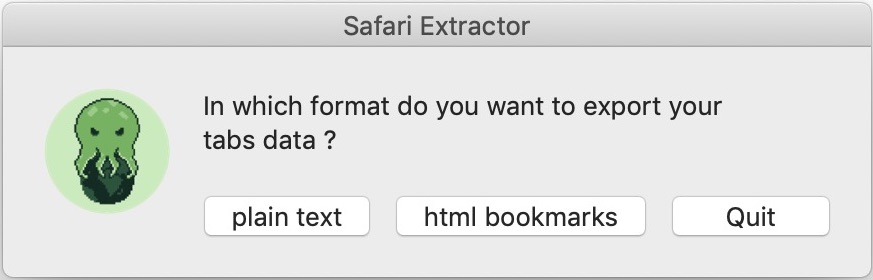
Safari Extractor is a little utility that exports the name and URL of all web pages actives in a user's current Safari session. This means that all their Safari windows and tabs will be scanned to extract this information. You can save the data to either a plain text file, or to a HTML bookmarks document (universal standard), ready for importing to another web browser or to share with anyone.
Santiago, Metropolitana - MarioGT Software is proud to announce the release and immediate availability of Safari Extractor, their app for macOS. Safari Extractor is a little utility that exports the name and URL of all web pages active in your current Safari session. This means that all of a user's Safari windows and tabs will be scanned to extract this informantion. Users can save the data to either a plain text file, or to a HTML bookmarks document (universal standard), ready for importing to another web browser or to share with anyone.
This app saves the bookmarks info of all Safari tabs currently opened, not only the ones in the frontmost window (like the built-in Safari function). Users can have hundreds of tabs opened in several windows, and they don't want to spent time in bookmarking every one in every window, or simply don't want to bookmark them in Safari at all. For example, when a users only wants a bookmarks or flat text file for sharing with a friend, colleague, or for archiving and saving their current active tabs for later use. With "Safari Extractor" users can make this happened in just 1 click.
Features:
* Fast and lightweight
* Produces standard and universal HTML bookmarks document (Netscape Bookmark File Format).
* Produces a flat text file with summary and detailed info about every Safari tabs and windows active.
Language Support:
* English
System Requirements:
* Requires OS X 10.10 or higher
* Compatible with macOS 10.15 Catalina
* 64-bit processor
* 2 MB
Pricing/Availability:
Safari Extractor is completely free, however, if users wish, they can donate any amount of money to make possible the future development of this app.
MarioGT Software: https://www.mariogt.com/index.html
Safari Extractor: https://www.mariogt.com/safari-extractor.html
Direct Download Link: https://www.mariogt.com/appsChest/Safari-Extractor-Release1-0.zip
Donation Link: https://www.paypal.com/cgi-bin/webscr?cmd=_s-xclick&hosted_button_id=AJ6DM7CWC2786&source=url
Screenshot: https://www.mariogt.com/Media/safariExtractorMedia/safariExtractor-screen-main.jpg
App Icon: https://www.mariogt.com/Media/safariExtractorMedia/pulpo.png
MarioGT Software is a chilean developer of useful Apps (Donationware, Shareware & Commercial) for macOS, iPhone & iPad. Their mission is straightforward and simple, developing utilities that are small, not too resource hungry, and above all, enrich a user's digital life. All Material and Software (C) Copyright 2019 MarioGT Software. All Rights Reserved. Apple, the Apple logo, Macintosh Mac OS X and macOS are registered trademarks of Apple Inc. in the U.S. and/or other countries. Other trademarks and registered trademarks may be the property of their respective owners.
*******
Link To Article: https://prmac.com/release-id-83710.htm
*******
---------------------------------------------------------------------------------
Note that you can alter delivered distributions at any time.
Login to your account on prMac to alter your channel selection, or to opt-out at any time.


Smultron 12 - The Text Editor for All of Us
A new article has been published at prMac.
Smultron 12 - The Text Editor for All of Us - Published on 10/11/19
Peter Borg Apps announces Smultron 12 for macOS, the text editor for all of us. Smultron is a powerful and confident text editor without being complicated. Its elegance and simplicity helps everyone being creative and to write and edit all sorts of texts. Use Smultron to write everything from a web page, a script, a to do list, a novel to a whole app. Smultron is designed for both beginners and experts. It is a joy to use and it has all the text tools a user needs.
Stockholm, Sweden - Peter Borg Apps is proud to announce the release and immediate availability of Smultron 12 for macOS, the text editor for all of us. Smultron is powerful and confident without being complicated. Its elegance and simplicity helps everyone being creative and to write and edit all sorts of texts. Use Smultron to write everything from a web page, a script, a to do list, a novel to a whole app.
Smultron is designed for both beginners and experts. It is a joy to use and it has all the text tools one needs. And everyone can use it because it is translated into many languages and has full support for accessibility.
The new Smultron 12 is the best ever Smultron with many new features and improvements:
* Text scanner - get text from image or from iPhone/iPad camera (only for 10.15 Catalina)
* Improved Advanced Find with text preview
* Support for vertical text
* Faster and more energy efficient
* Cheaper
* Improved accessibility and right-to-left support
* Updated for macOS 10.15 Catalina
* Many more improvements and bug fixes
Requirements:
* macOS Mojave 10.14.4 or later
* macOS 10.15 Catalina Compatible
Pricing and Availability:
Smultron is available now at the Peter Borg Apps website for a special introductory price of $4.99 USD - upgrade and site licenses are available.
Peter Borg Apps: https://www.peterborgapps.com/
Smultron 12: https://www.peterborgapps.com/smultron
Direct Download Link: https://www.peterborgapps.com/downloads/Smultron12.zip
Purchase Link: https://sites.fastspring.com/peterborgapps/product/smultron
Screenshot: https://www.peterborgapps.com/images/smultron-screenshot-1.jpg
Screenshot/App Icon: https://www.peterborgapps.com/images/smultron-logo.png
Peter Borg Apps is a small, but great, company that creates apps for macOS, iOS, watchOS and tvOS. We believe in creating easy to use, powerful and elegant apps. All Material and Software (C) Copyright 2019 Peter Borg Apps. All Rights Reserved. Apple, the Apple logo, Macintosh Mac OS X and macOS are registered trademarks of Apple Inc. in the U.S. and/or other countries. Other trademarks and registered trademarks may be the property of their respective owners.
*******
Link To Article: https://prmac.com/release-id-83709.htm
*******
---------------------------------------------------------------------------------
Note that you can alter delivered distributions at any time.
Login to your account on prMac to alter your channel selection, or to opt-out at any time.
Smultron 12 - The Text Editor for All of Us - Published on 10/11/19
Peter Borg Apps announces Smultron 12 for macOS, the text editor for all of us. Smultron is a powerful and confident text editor without being complicated. Its elegance and simplicity helps everyone being creative and to write and edit all sorts of texts. Use Smultron to write everything from a web page, a script, a to do list, a novel to a whole app. Smultron is designed for both beginners and experts. It is a joy to use and it has all the text tools a user needs.
Stockholm, Sweden - Peter Borg Apps is proud to announce the release and immediate availability of Smultron 12 for macOS, the text editor for all of us. Smultron is powerful and confident without being complicated. Its elegance and simplicity helps everyone being creative and to write and edit all sorts of texts. Use Smultron to write everything from a web page, a script, a to do list, a novel to a whole app.
Smultron is designed for both beginners and experts. It is a joy to use and it has all the text tools one needs. And everyone can use it because it is translated into many languages and has full support for accessibility.
The new Smultron 12 is the best ever Smultron with many new features and improvements:
* Text scanner - get text from image or from iPhone/iPad camera (only for 10.15 Catalina)
* Improved Advanced Find with text preview
* Support for vertical text
* Faster and more energy efficient
* Cheaper
* Improved accessibility and right-to-left support
* Updated for macOS 10.15 Catalina
* Many more improvements and bug fixes
Requirements:
* macOS Mojave 10.14.4 or later
* macOS 10.15 Catalina Compatible
Pricing and Availability:
Smultron is available now at the Peter Borg Apps website for a special introductory price of $4.99 USD - upgrade and site licenses are available.
Peter Borg Apps: https://www.peterborgapps.com/
Smultron 12: https://www.peterborgapps.com/smultron
Direct Download Link: https://www.peterborgapps.com/downloads/Smultron12.zip
Purchase Link: https://sites.fastspring.com/peterborgapps/product/smultron
Screenshot: https://www.peterborgapps.com/images/smultron-screenshot-1.jpg
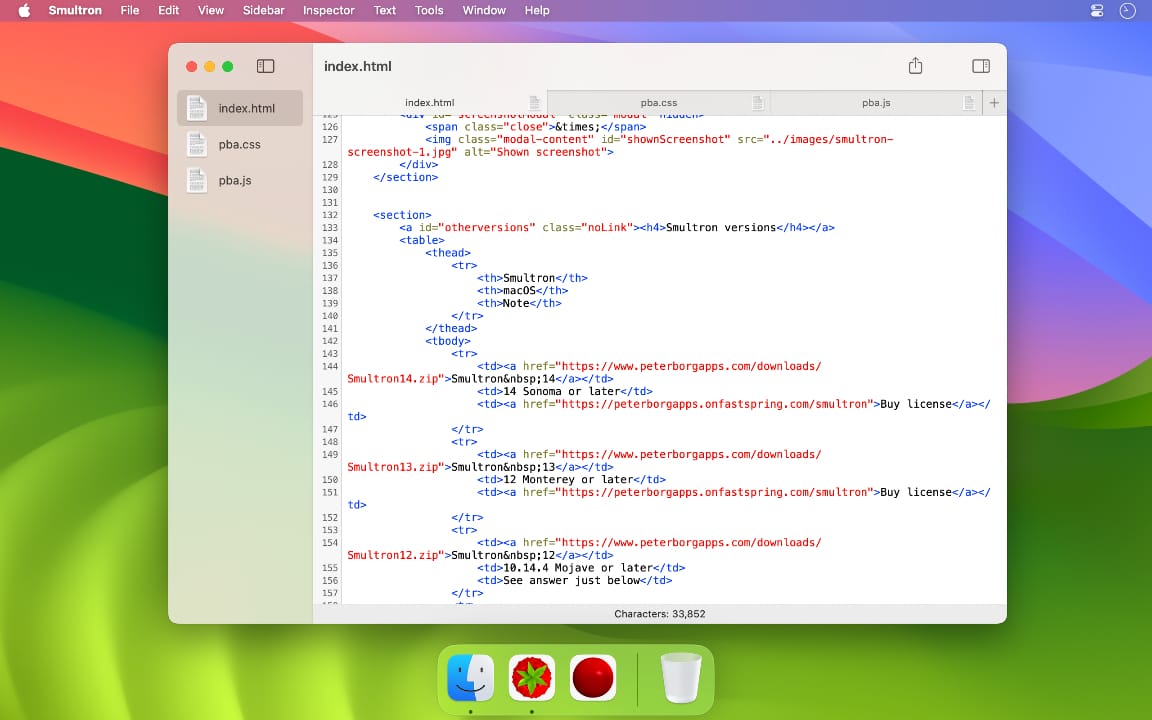
Screenshot/App Icon: https://www.peterborgapps.com/images/smultron-logo.png

Peter Borg Apps is a small, but great, company that creates apps for macOS, iOS, watchOS and tvOS. We believe in creating easy to use, powerful and elegant apps. All Material and Software (C) Copyright 2019 Peter Borg Apps. All Rights Reserved. Apple, the Apple logo, Macintosh Mac OS X and macOS are registered trademarks of Apple Inc. in the U.S. and/or other countries. Other trademarks and registered trademarks may be the property of their respective owners.
*******
Link To Article: https://prmac.com/release-id-83709.htm
*******
---------------------------------------------------------------------------------
Note that you can alter delivered distributions at any time.
Login to your account on prMac to alter your channel selection, or to opt-out at any time.
MaBaSoft Releases World Clock Deluxe 4.16.2
A new article has been published at prMac.
MaBaSoft Releases World Clock Deluxe 4.16.2 - Published on 10/10/19
MaBaSoft announces World Clock Deluxe 4.16.2, an update to their world time utility for macOS. World Clock Deluxe comes with over 1,600 cities and 200 time zones, displays multiple clocks in a horizontal or vertical palette, in the menu bar, or in the Dock, calculates corresponding times in different cities, and allows users to easily identify the best time for meetings across multiple time zones. Version 4.16.2 solves the incompatibilities with macOS 10.15 Catalina and fixes some minor bugs.
Milano, Italy - MaBaSoft announces World Clock Deluxe 4.16.2, the latest version of their popular world time utility for macOS. World Clock Deluxe is a reliable and easy-to-use time tool for companies and organizations regularly communicating with people across the world, frequent travelers, and home users having family or friends in other countries or time zones.
World Clock Deluxe displays multiple digital or analog clocks in a highly configurable horizontal or vertical palette, in the menu bar, and in the Dock, and can show the time in over 1,600 cities and 200 time zones and world times, including Greenwich Mean Time, Coordinated Universal Time, and Internet Time. It comes with a variety of date and time formats and can display seconds, weekday, date, date change, time zone, offset from UTC, and offset from local time.
With World Clock Deluxe users can easily organize clocks so that they always have a good overview of the displayed times. Colors and labels can be assigned to clocks to quickly single out the local clock or different groups of clocks. Clocks can be sorted by name, time, longitude, longitude offset, or label. Seldom used clocks can be hidden and different clocks can be displayed in the palette, in the menu bar, and in the Dock.
World Clock Deluxe also helps users with phone calls to other countries and international meetings. The Time Converter quickly calculates corresponding dates and times in different cities or time zones, while the Meeting Planner allows users to easily identify the best time for online chats, conference calls, or video conferences across multiple time zones. Conversion results and meeting details can be easily shared via Mail or Messages, saved to a note, or added to a reminder.
With World Clock Deluxe, users can finally show the weather all over the world. World Clock Deluxe downloads National Oceanic and Atmospheric Administration (NOAA) weather reports and displays temperature, pressure, visibility, wind conditions, and precipitations.
Version 4.16.2 solves the incompatibilities with macOS 10.15 Catalina, updates daylight-saving time information for Fiji and Norfolk Island, and fixes some minor bugs.
Language Support:
* English, German, French, Dutch, and Italian
System Requirements:
* macOS 10.11, 10.12, 10.13, 10.14, or 10.15 (Catalina)
Pricing and Availability:
World Clock Deluxe 4.16.2 is a free update for registered version 4 users. It is $10.00 (USD) for users who purchased version 3, and costs $19.00 (USD) for new users. Family, Site, and World-wide licenses are also available.
MaBaSoft: https://www.mabasoft.net/
World Clock Deluxe 4.16.2: https://www.mabasoft.net/products/worldClockDeluxeX.html
Purchase World Clock Deluxe: https://sites.fastspring.com/mabasoft/product/all?language=en
Direct Download: https://www.mabasoft.net/downloads/files/World_Clock_Deluxe_4.16.2.dmg
Release Notes: https://www.mabasoft.net/releaseNotes/worldClockDeluxeX.html
Media Assets: https://www.mabasoft.net/pressImages/worldClockDeluxeX.html
MaBaSoft, based in Milano, Italy, is a small independent company founded by Marco Damaschi and Barbara Canino in 1997. MaBaSoft develops quality system utilities and applications for the Macintosh. All Material and Software Copyright 1997-2019 MaBaSoft. All Rights Reserved. Apple, the Apple logo and Mac are registered trademarks of Apple Inc. in the U.S. and/or other countries. Other trademarks and registered trademarks may be the property of their respective owners.
*******
Link To Article: https://prmac.com/release-id-83708.htm
*******
---------------------------------------------------------------------------------
Note that you can alter delivered distributions at any time.
Login to your account on prMac to alter your channel selection, or to opt-out at any time.
MaBaSoft Releases World Clock Deluxe 4.16.2 - Published on 10/10/19
MaBaSoft announces World Clock Deluxe 4.16.2, an update to their world time utility for macOS. World Clock Deluxe comes with over 1,600 cities and 200 time zones, displays multiple clocks in a horizontal or vertical palette, in the menu bar, or in the Dock, calculates corresponding times in different cities, and allows users to easily identify the best time for meetings across multiple time zones. Version 4.16.2 solves the incompatibilities with macOS 10.15 Catalina and fixes some minor bugs.
Milano, Italy - MaBaSoft announces World Clock Deluxe 4.16.2, the latest version of their popular world time utility for macOS. World Clock Deluxe is a reliable and easy-to-use time tool for companies and organizations regularly communicating with people across the world, frequent travelers, and home users having family or friends in other countries or time zones.
World Clock Deluxe displays multiple digital or analog clocks in a highly configurable horizontal or vertical palette, in the menu bar, and in the Dock, and can show the time in over 1,600 cities and 200 time zones and world times, including Greenwich Mean Time, Coordinated Universal Time, and Internet Time. It comes with a variety of date and time formats and can display seconds, weekday, date, date change, time zone, offset from UTC, and offset from local time.
With World Clock Deluxe users can easily organize clocks so that they always have a good overview of the displayed times. Colors and labels can be assigned to clocks to quickly single out the local clock or different groups of clocks. Clocks can be sorted by name, time, longitude, longitude offset, or label. Seldom used clocks can be hidden and different clocks can be displayed in the palette, in the menu bar, and in the Dock.
World Clock Deluxe also helps users with phone calls to other countries and international meetings. The Time Converter quickly calculates corresponding dates and times in different cities or time zones, while the Meeting Planner allows users to easily identify the best time for online chats, conference calls, or video conferences across multiple time zones. Conversion results and meeting details can be easily shared via Mail or Messages, saved to a note, or added to a reminder.
With World Clock Deluxe, users can finally show the weather all over the world. World Clock Deluxe downloads National Oceanic and Atmospheric Administration (NOAA) weather reports and displays temperature, pressure, visibility, wind conditions, and precipitations.
Version 4.16.2 solves the incompatibilities with macOS 10.15 Catalina, updates daylight-saving time information for Fiji and Norfolk Island, and fixes some minor bugs.
Language Support:
* English, German, French, Dutch, and Italian
System Requirements:
* macOS 10.11, 10.12, 10.13, 10.14, or 10.15 (Catalina)
Pricing and Availability:
World Clock Deluxe 4.16.2 is a free update for registered version 4 users. It is $10.00 (USD) for users who purchased version 3, and costs $19.00 (USD) for new users. Family, Site, and World-wide licenses are also available.
MaBaSoft: https://www.mabasoft.net/
World Clock Deluxe 4.16.2: https://www.mabasoft.net/products/worldClockDeluxeX.html
Purchase World Clock Deluxe: https://sites.fastspring.com/mabasoft/product/all?language=en
Direct Download: https://www.mabasoft.net/downloads/files/World_Clock_Deluxe_4.16.2.dmg
Release Notes: https://www.mabasoft.net/releaseNotes/worldClockDeluxeX.html
Media Assets: https://www.mabasoft.net/pressImages/worldClockDeluxeX.html
MaBaSoft, based in Milano, Italy, is a small independent company founded by Marco Damaschi and Barbara Canino in 1997. MaBaSoft develops quality system utilities and applications for the Macintosh. All Material and Software Copyright 1997-2019 MaBaSoft. All Rights Reserved. Apple, the Apple logo and Mac are registered trademarks of Apple Inc. in the U.S. and/or other countries. Other trademarks and registered trademarks may be the property of their respective owners.
*******
Link To Article: https://prmac.com/release-id-83708.htm
*******
---------------------------------------------------------------------------------
Note that you can alter delivered distributions at any time.
Login to your account on prMac to alter your channel selection, or to opt-out at any time.
MacXDVD Rolls Out Support for macOS Catalina on DVD Converting Solution
A new article has been published at prMac.
MacXDVD Rolls Out Support for macOS Catalina on DVD Converting Solution - Published on 10/11/19
MacXDVD today announces MacX DVD Ripper Pro 6.2.4, an important update to its flagship DVD ripper. MacX DVD Ripper Pro is able to rip protected/homemade DVDs to any format fast and efficiently. Easily convert DVDs into MP4 H.264 and H.265 formats for more convenient use on any platforms, including MacBooks; iOS and Android devices; Apple TV, Chromecast; Roku devices as well as popular web browsers. Version 6.2.4 offers support for macOS Catalina.
Chengdu, China - MacXDVD Software, the leading multimedia software developer, today announces a significant upgrade of its flagship MacX DVD Ripper Pro and other media helpers with support for macOS Catalina. This upgrade means that Mac users are able to rip any DVD discs while enjoying the benefits of macOS Catalina.
The latest macOS Catalina makes a great next step for Mac with automatic dark mode, redesigned apps, and improved Find My Mac feature etc, definitely being a worthy upgrade for Mac. But few programs in the industry own the full support of Catalina, and even some still adopt 32-bit apps, which will stop working with macOS Catalina. To keep up the pace with the new macOS and introduce a focus on 64-bit apps, MacXDVD includes macOS Catalina in support of its leading DVD ripper.
The upgraded MacX DVD Ripper Pro V6.2.4 allows macOS Catalina users to rip and backup any DVDs to MP4, MOV, AVCHD, MKV, iPhone 11/Pro/Max, 2019 iPad Pro, Apple TV, 4K TV, Samsung, Huawei within 5 minutes. One-click to digitize the overstocked DVD discs, regardless of 99-title DVDs, TV series discs, latest-released movies, homemade discs, etc. to personal movie library on Mac or portable devices.
Besides the macOS Catalina support, MacXDVD also makes some other enhancements for its DVD ripping software, for example, adding new output profiles for iPhone 11, 11 Pro/Max, new 10.2-inch iPad and new Apple TV for both, fixing the occasional sound error when converting a few DVD, and fixing some minor bugs.
Pricing and Availability
MacX DVD Ripper Pro is normally priced at $59.95 for a single license copy per year. To celebrate the new Apple releases, the upgraded MacX Media Management Suite, f.t. the upgraded DVD ripper, together with its 4K video converter, iPhone manager, and media player, is 70% off at $49.95 only, totally for savings of $120. Check more details & discounts on MacXDVD Official Special Offer page.
MacXDVD Official Special Offer: https://www.macxdvd.com/special-offer/
MacX DVD Ripper Pro 6.2.4: https://www.macxdvd.com/mac-dvd-ripper-pro/
MacXDVD Software is a division of Digiarty Software Company, owns a professional multimedia software development team, providing a range of products for Macintosh Computer users, including MacX Video Converter, MacX DVD Ripper, DVD Author, DVD backup tools, etc, series of apps for Apple video player, and iPhone, iPad 2D and 3D video games. Copyright (C) 2019 MacXDVD Software. All Rights Reserved. Apple, the Apple logo and Macintosh are registered trademarks of Apple Inc. in the U.S. and/or other countries.
*******
Link To Article: https://prmac.com/release-id-83707.htm
*******
---------------------------------------------------------------------------------
Note that you can alter delivered distributions at any time.
Login to your account on prMac to alter your channel selection, or to opt-out at any time.
MacXDVD Rolls Out Support for macOS Catalina on DVD Converting Solution - Published on 10/11/19
MacXDVD today announces MacX DVD Ripper Pro 6.2.4, an important update to its flagship DVD ripper. MacX DVD Ripper Pro is able to rip protected/homemade DVDs to any format fast and efficiently. Easily convert DVDs into MP4 H.264 and H.265 formats for more convenient use on any platforms, including MacBooks; iOS and Android devices; Apple TV, Chromecast; Roku devices as well as popular web browsers. Version 6.2.4 offers support for macOS Catalina.
Chengdu, China - MacXDVD Software, the leading multimedia software developer, today announces a significant upgrade of its flagship MacX DVD Ripper Pro and other media helpers with support for macOS Catalina. This upgrade means that Mac users are able to rip any DVD discs while enjoying the benefits of macOS Catalina.
The latest macOS Catalina makes a great next step for Mac with automatic dark mode, redesigned apps, and improved Find My Mac feature etc, definitely being a worthy upgrade for Mac. But few programs in the industry own the full support of Catalina, and even some still adopt 32-bit apps, which will stop working with macOS Catalina. To keep up the pace with the new macOS and introduce a focus on 64-bit apps, MacXDVD includes macOS Catalina in support of its leading DVD ripper.
The upgraded MacX DVD Ripper Pro V6.2.4 allows macOS Catalina users to rip and backup any DVDs to MP4, MOV, AVCHD, MKV, iPhone 11/Pro/Max, 2019 iPad Pro, Apple TV, 4K TV, Samsung, Huawei within 5 minutes. One-click to digitize the overstocked DVD discs, regardless of 99-title DVDs, TV series discs, latest-released movies, homemade discs, etc. to personal movie library on Mac or portable devices.
Besides the macOS Catalina support, MacXDVD also makes some other enhancements for its DVD ripping software, for example, adding new output profiles for iPhone 11, 11 Pro/Max, new 10.2-inch iPad and new Apple TV for both, fixing the occasional sound error when converting a few DVD, and fixing some minor bugs.
Pricing and Availability
MacX DVD Ripper Pro is normally priced at $59.95 for a single license copy per year. To celebrate the new Apple releases, the upgraded MacX Media Management Suite, f.t. the upgraded DVD ripper, together with its 4K video converter, iPhone manager, and media player, is 70% off at $49.95 only, totally for savings of $120. Check more details & discounts on MacXDVD Official Special Offer page.
MacXDVD Official Special Offer: https://www.macxdvd.com/special-offer/
MacX DVD Ripper Pro 6.2.4: https://www.macxdvd.com/mac-dvd-ripper-pro/
MacXDVD Software is a division of Digiarty Software Company, owns a professional multimedia software development team, providing a range of products for Macintosh Computer users, including MacX Video Converter, MacX DVD Ripper, DVD Author, DVD backup tools, etc, series of apps for Apple video player, and iPhone, iPad 2D and 3D video games. Copyright (C) 2019 MacXDVD Software. All Rights Reserved. Apple, the Apple logo and Macintosh are registered trademarks of Apple Inc. in the U.S. and/or other countries.
*******
Link To Article: https://prmac.com/release-id-83707.htm
*******
---------------------------------------------------------------------------------
Note that you can alter delivered distributions at any time.
Login to your account on prMac to alter your channel selection, or to opt-out at any time.
ChronoSync and ChronoAgent Ready for macOS 10.15, Catalina
A new article has been published at prMac.
ChronoSync and ChronoAgent Ready for macOS 10.15, Catalina - Published on 10/10/19
Econ Technologies announced that ChronoSync and ChronoAgent are updated for macOS Catalina. ChronoSync now recognizes APFS Volume Groups so you can create Bootable Backups of Catalina! This required extensive development and testing to ensure continued reliable backups for our customers ready to transition from Mojave to Catalina. ChronoSync is the complete sync, backup, and bootable backup app for the Mac. ChronoAgent runs on the destination Mac providing a direct connection to ChronoSync.
Casselberry, Florida - ChronoSync 4.9.5 and ChronoAgent 1.9.3 are updated for macOS 10.15, "Catalina"! This is not just any old maintenance release. ChronoSync now recognizes APFS Volume Groups so you can create Bootable Backups of Catalina! This required extensive development and testing to ensure continued reliable backups for our customers ready to transition from Mojave to Catalina.
"I challenged our Engineers to make macOS 10.15 backups as easy as ever despite the extensive file system changes in Catalina. The result is a reliable tool ready for the future of macOS.", said Duilio Proni, President of Econ Technologies, Inc. He added, "The Bootable Backup Setup Assistant is a demonstration of how we can take a complicated task and walk our customers through the steps to create a full bootable backup of Catalina!"
As Mac users transition to Catalina, there are always questions and uncertainty. We've published the 'Catalina Update Tech Note' to help our customers ensure their Mojave backup is safe, make the transition to Catalina, and answer common questions encountered along the way.
ChronoSync 4.9.5 includes a long list of bug fixes, enhanced reliability and improved performance. Along with ChronoSync 4.9.5, ChronoAgent 1.9.3 has undergone similar changes to support Mac-to-Mac syncing and backup on Catalina.
Owners of ChronoSync can install the update immediately for free! Owners of ChronoAgent have the same deal, they can install the update immediately for free! If you don't already own ChronoSync or ChronoAgent, download the Apps today and start the 15-day free trial to learn how ChronoSync with ChronoAgent is your best long-term backup investment for Mac.
ChronoSync, the multipurpose Mac App for local and cloud backup, bootable backup and folder synchronizing is designed to work on macOS version 10.11 and newer. Full working trial licenses are available or purchase ChronoSync for $49.99. ChronoAgent 1.9.3, the indispensable companion app to ChronoSync, allows any Mac to accept direct, secure, high performance connections from any ChronoSync Mac or any InterConneX iOS device to access or transfer data for only $14.99 (USD). Full working trial licenses are available for either App. InterConneX is the file storage, file management, and file sharing iOS app for the iPhone and iPad.
Econ Technologies: https://www.econtechnologies.com//index.html
Catalina Update Tech Note: https://www.econtechnologies.com/chronosync/TN-CS-Catalina-Update.html
ChronoSync Release Notes: https://www.econtechnologies.com/chronosync/notes.html
ChronoAgent Release Notes: https://www.econtechnologies.com/chronoagent/notes.html
Media Assets: https://www.econtechnologies.com/about/media.html
Econ Technologies, Inc has been creating Apple(R) software for over 20 years including ChronoSync(TM) for macOS and ChronoAgent(TM) for macOS. Check out our Press Page for artwork and more information about are complete lineup of Mac and iOS apps. All Material and Software (C) Copyright 2019 Econ Technologies. All Rights Reserved. Apple, the Apple logo, Macintosh and macOS are registered trademarks of Apple Inc. in the U.S. and/or other countries. Other trademarks and registered trademarks may be the property of their respective owners.
*******
Link To Article: https://prmac.com/release-id-83705.htm
*******
---------------------------------------------------------------------------------
Note that you can alter delivered distributions at any time.
Login to your account on prMac to alter your channel selection, or to opt-out at any time.
ChronoSync and ChronoAgent Ready for macOS 10.15, Catalina - Published on 10/10/19
Econ Technologies announced that ChronoSync and ChronoAgent are updated for macOS Catalina. ChronoSync now recognizes APFS Volume Groups so you can create Bootable Backups of Catalina! This required extensive development and testing to ensure continued reliable backups for our customers ready to transition from Mojave to Catalina. ChronoSync is the complete sync, backup, and bootable backup app for the Mac. ChronoAgent runs on the destination Mac providing a direct connection to ChronoSync.
Casselberry, Florida - ChronoSync 4.9.5 and ChronoAgent 1.9.3 are updated for macOS 10.15, "Catalina"! This is not just any old maintenance release. ChronoSync now recognizes APFS Volume Groups so you can create Bootable Backups of Catalina! This required extensive development and testing to ensure continued reliable backups for our customers ready to transition from Mojave to Catalina.
"I challenged our Engineers to make macOS 10.15 backups as easy as ever despite the extensive file system changes in Catalina. The result is a reliable tool ready for the future of macOS.", said Duilio Proni, President of Econ Technologies, Inc. He added, "The Bootable Backup Setup Assistant is a demonstration of how we can take a complicated task and walk our customers through the steps to create a full bootable backup of Catalina!"
As Mac users transition to Catalina, there are always questions and uncertainty. We've published the 'Catalina Update Tech Note' to help our customers ensure their Mojave backup is safe, make the transition to Catalina, and answer common questions encountered along the way.
ChronoSync 4.9.5 includes a long list of bug fixes, enhanced reliability and improved performance. Along with ChronoSync 4.9.5, ChronoAgent 1.9.3 has undergone similar changes to support Mac-to-Mac syncing and backup on Catalina.
Owners of ChronoSync can install the update immediately for free! Owners of ChronoAgent have the same deal, they can install the update immediately for free! If you don't already own ChronoSync or ChronoAgent, download the Apps today and start the 15-day free trial to learn how ChronoSync with ChronoAgent is your best long-term backup investment for Mac.
ChronoSync, the multipurpose Mac App for local and cloud backup, bootable backup and folder synchronizing is designed to work on macOS version 10.11 and newer. Full working trial licenses are available or purchase ChronoSync for $49.99. ChronoAgent 1.9.3, the indispensable companion app to ChronoSync, allows any Mac to accept direct, secure, high performance connections from any ChronoSync Mac or any InterConneX iOS device to access or transfer data for only $14.99 (USD). Full working trial licenses are available for either App. InterConneX is the file storage, file management, and file sharing iOS app for the iPhone and iPad.
Econ Technologies: https://www.econtechnologies.com//index.html
Catalina Update Tech Note: https://www.econtechnologies.com/chronosync/TN-CS-Catalina-Update.html
ChronoSync Release Notes: https://www.econtechnologies.com/chronosync/notes.html
ChronoAgent Release Notes: https://www.econtechnologies.com/chronoagent/notes.html
Media Assets: https://www.econtechnologies.com/about/media.html
Econ Technologies, Inc has been creating Apple(R) software for over 20 years including ChronoSync(TM) for macOS and ChronoAgent(TM) for macOS. Check out our Press Page for artwork and more information about are complete lineup of Mac and iOS apps. All Material and Software (C) Copyright 2019 Econ Technologies. All Rights Reserved. Apple, the Apple logo, Macintosh and macOS are registered trademarks of Apple Inc. in the U.S. and/or other countries. Other trademarks and registered trademarks may be the property of their respective owners.
*******
Link To Article: https://prmac.com/release-id-83705.htm
*******
---------------------------------------------------------------------------------
Note that you can alter delivered distributions at any time.
Login to your account on prMac to alter your channel selection, or to opt-out at any time.
Pixelmator Pro gets major update with macOS Catalina support
A new article has been published at prMac.
Pixelmator Pro gets major update with macOS Catalina support - Published on 10/10/19
The Pixelmator Team today released Pixelmator Pro 1.5 Avalon, a major update to the award-winning Mac image editor. Pixelmator Pro is an incredibly powerful, beautiful, and easy to use image editor designed exclusively for Mac Version 1.5 adds support for the new macOS Catalina, the incredible upcoming Mac Pro and Pro Display XDR, adds machine-learning powered noise removal powered by Core ML, and brings significant performance improvements.
Vilnius, Lithuania - The Pixelmator Team today released Pixelmator Pro 1.5 Avalon, a major update to the award-winning Mac image editor designed to make powerful professional tools accessible to everyday users. The update adds support for the new macOS Catalina, the incredible upcoming Mac Pro and Pro Display XDR, adds machine-learning powered noise removal powered by Core ML, and brings significant performance improvements.
"With macOS Catalina and Sidecar, users have brand new ways of interacting with Mac apps," said Saulius Dailide, one of the founders of the Pixelmator Team. "And thanks to the incredible painting engine, powerful painting tools, and advanced illustration tools in Pixelmator Pro, Sidecar support brings an incredible image editing experience enhanced by the precision of Apple Pencil."
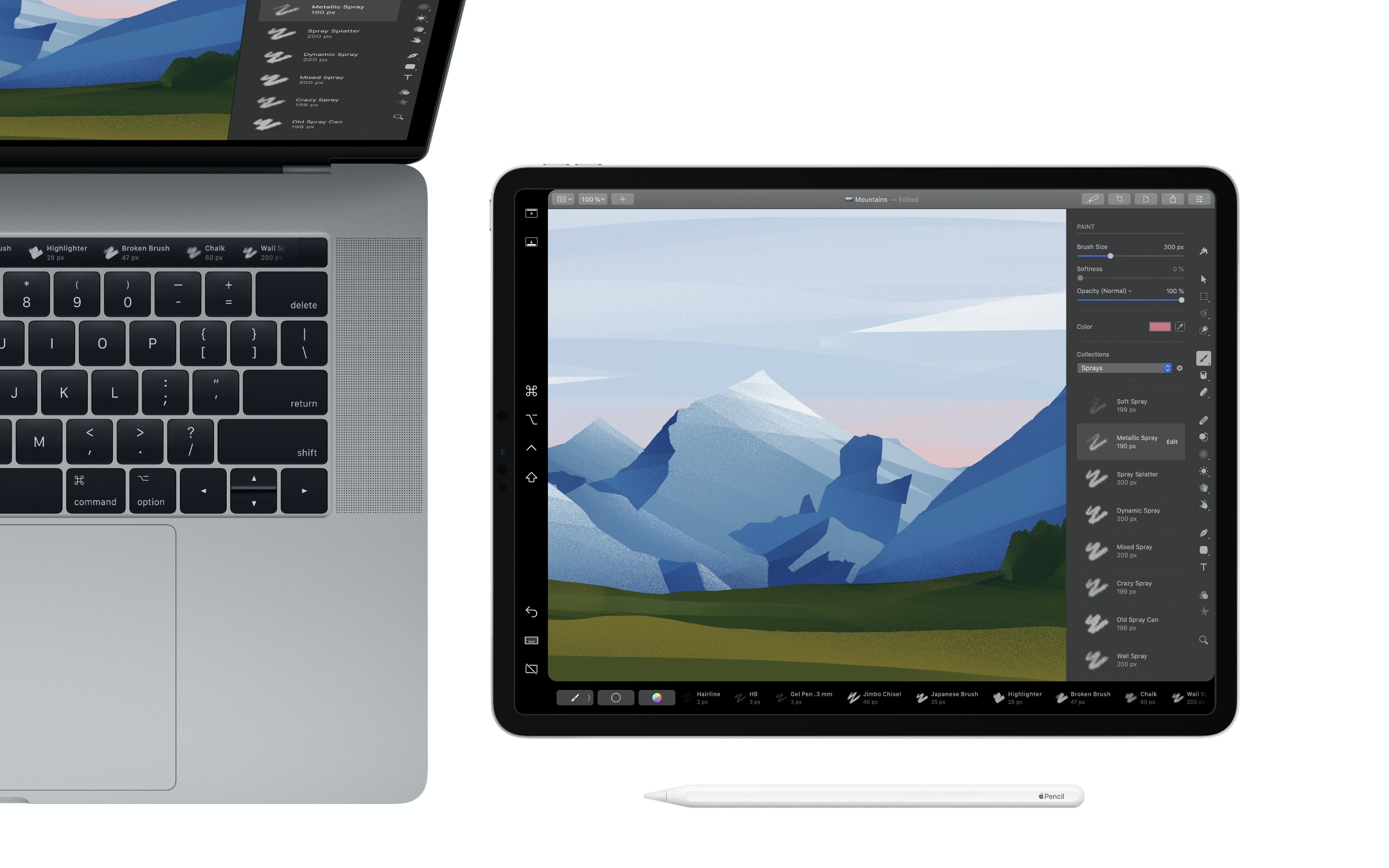
Pixelmator Pro is fully compatible with macOS 10.15 Catalina, bringing support for Sidecar and Apple Pencil. So Pixelmator Pro users can now extend their desktop workspace with iPad and take advantage of the precision of Apple Pencil to paint, retouch, and illustrate with unmatched ease and accuracy. The double-tap gesture of Apple Pencil is also fully supported, letting users double-tap to instantly undo and redo, switch between the Paint and Erase tools, or show the Apple Colors window. In addition, as Pixelmator Pro fully supports Touch Bar, handy controls appear when using Sidecar even if your Mac doesn't have a Touch Bar.
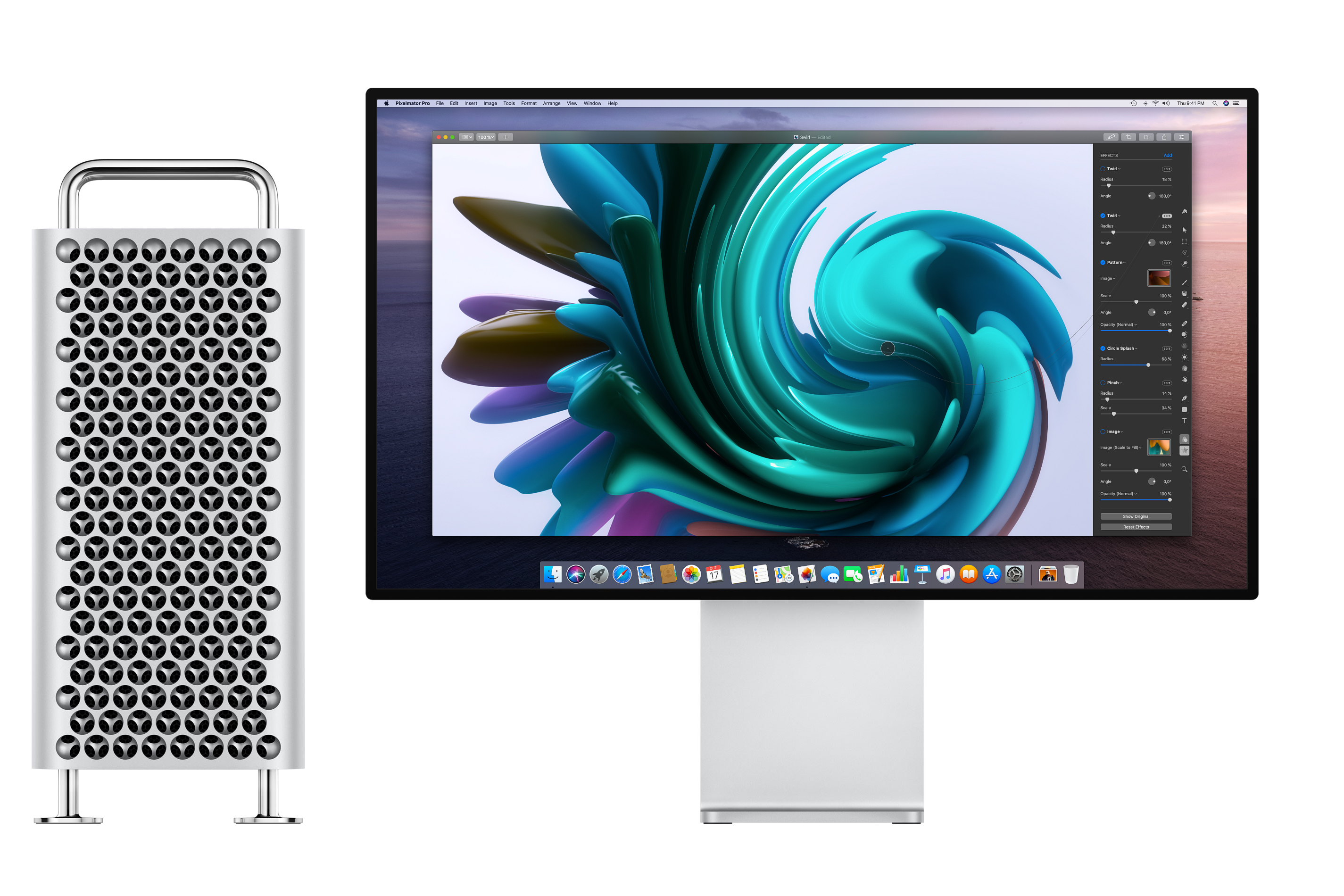
The Pixelmator Pro editing engine has been updated and optimized to take full advantage of the incredible power of the new Mac Pro. With multiple graphics processors in Mac Pro, users will see big performance boosts in Pixelmator Pro and performance increases even more with each additional GPU. Thanks to multi-GPU processing, Pixelmator Pro applies the new Core ML-powered ML Denoise up to 2.5 times faster and renders effects up to 2 times faster on Mac Pro with 2 GPUs compared to iMac Pro.
Pro Display XDR and Pixelmator Pro unlock all-new image editing workflows. The display's true 10-bit color depth and P3 wide color gamut are natively supported. And, when editing RAW photos on Pro Display XDR, the new Extended Dynamic Range Mode lets users see previously invisible detail without compressing the dynamic range of the rest of the photo for a never-before-possible editing and viewing experience
ML Denoise is an amazing machine learning-powered noise removal tool. Integrated via Core ML, ML Denoise effortlessly removes luminance and color noise created by cameras in low-light photos. What's more, it can even reduce artifacts caused by image compression algorithms, noticeably improving image quality. Traditional noise removal approaches usually introduce blurring and loss of detail, whereas ML Denoise has been trained to intelligently preserve details, even when fixing noise that has been partially removed by cameras or editing software.
Pixelmator Pro 1.5 Avalon brings a number of additional new features, such as full support for SF Symbols. Users can now open SF Symbols templates and customize them to create their own symbols, even dragging and dropping symbols right into existing documents. What's more, the update brings some significant performance improvements. With a new end-to-end Metal-powered rendering pipeline and a redesigned zoom engine, zooming and scrolling is at least 10x faster, painting is up to 2.4x faster, and effects are applied and rendered up to 2.7x faster.
Pixelmator Pro 1.5 Avalon: https://www.pixelmator.com/pro/
Purchase and Download (Mac App Store): https://itunes.apple.com/app/pixelmator-pro/id1289583905
Screenshot (Mac Pro and Pro Display XDR support): http://upload-cdn.pixelmator.com/Pixelmator-Pro-1.5---1.-Lead-Image.jpg
Screenshot (macOS Catalina and Sidecar support): http://upload-cdn.pixelmator.com/Pixelmator-Pro-1.5---2.-macOS-Catalina-and-Sidecar.jpg
Application Icon: http://download.pixelmator.com/press/pro/Pixelmator-Pro-Icon.png
Press Kit (zip): http://pixelmator-download.s3.amazonaws.com/press/Pixelmator-Pro-1.5-Press-Kit.zip
Founded in 2007 by two brothers, Saulius Dailide and Aidas Dailide, the Pixelmator Team develops powerful image editing apps for Mac and iOS. The team's apps have been honored with multiple Mac App of the Year awards, an iPad App of the Year award, an Apple Design Award, and many others. Pixelmator for iPad was featured at the Apple Special Event in October 2014. All Material and Software (C) Copyright 2007-2019 Pixelmator. All Rights Reserved. Apple, the Apple logo, Macintosh, iPhone, iPad, and macOS are registered trademarks of Apple Inc. in the U.S. and/or other countries. Other trademarks and registered trademarks may be the property of their respective owners.
*******
Link To Article: https://prmac.com/release-id-83706.htm
*******
---------------------------------------------------------------------------------
Note that you can alter delivered distributions at any time.
Login to your account on prMac to alter your channel selection, or to opt-out at any time.
Pixelmator Pro gets major update with macOS Catalina support - Published on 10/10/19
The Pixelmator Team today released Pixelmator Pro 1.5 Avalon, a major update to the award-winning Mac image editor. Pixelmator Pro is an incredibly powerful, beautiful, and easy to use image editor designed exclusively for Mac Version 1.5 adds support for the new macOS Catalina, the incredible upcoming Mac Pro and Pro Display XDR, adds machine-learning powered noise removal powered by Core ML, and brings significant performance improvements.
Vilnius, Lithuania - The Pixelmator Team today released Pixelmator Pro 1.5 Avalon, a major update to the award-winning Mac image editor designed to make powerful professional tools accessible to everyday users. The update adds support for the new macOS Catalina, the incredible upcoming Mac Pro and Pro Display XDR, adds machine-learning powered noise removal powered by Core ML, and brings significant performance improvements.
"With macOS Catalina and Sidecar, users have brand new ways of interacting with Mac apps," said Saulius Dailide, one of the founders of the Pixelmator Team. "And thanks to the incredible painting engine, powerful painting tools, and advanced illustration tools in Pixelmator Pro, Sidecar support brings an incredible image editing experience enhanced by the precision of Apple Pencil."
Pixelmator Pro is fully compatible with macOS 10.15 Catalina, bringing support for Sidecar and Apple Pencil. So Pixelmator Pro users can now extend their desktop workspace with iPad and take advantage of the precision of Apple Pencil to paint, retouch, and illustrate with unmatched ease and accuracy. The double-tap gesture of Apple Pencil is also fully supported, letting users double-tap to instantly undo and redo, switch between the Paint and Erase tools, or show the Apple Colors window. In addition, as Pixelmator Pro fully supports Touch Bar, handy controls appear when using Sidecar even if your Mac doesn't have a Touch Bar.
The Pixelmator Pro editing engine has been updated and optimized to take full advantage of the incredible power of the new Mac Pro. With multiple graphics processors in Mac Pro, users will see big performance boosts in Pixelmator Pro and performance increases even more with each additional GPU. Thanks to multi-GPU processing, Pixelmator Pro applies the new Core ML-powered ML Denoise up to 2.5 times faster and renders effects up to 2 times faster on Mac Pro with 2 GPUs compared to iMac Pro.
Pro Display XDR and Pixelmator Pro unlock all-new image editing workflows. The display's true 10-bit color depth and P3 wide color gamut are natively supported. And, when editing RAW photos on Pro Display XDR, the new Extended Dynamic Range Mode lets users see previously invisible detail without compressing the dynamic range of the rest of the photo for a never-before-possible editing and viewing experience
ML Denoise is an amazing machine learning-powered noise removal tool. Integrated via Core ML, ML Denoise effortlessly removes luminance and color noise created by cameras in low-light photos. What's more, it can even reduce artifacts caused by image compression algorithms, noticeably improving image quality. Traditional noise removal approaches usually introduce blurring and loss of detail, whereas ML Denoise has been trained to intelligently preserve details, even when fixing noise that has been partially removed by cameras or editing software.
Pixelmator Pro 1.5 Avalon brings a number of additional new features, such as full support for SF Symbols. Users can now open SF Symbols templates and customize them to create their own symbols, even dragging and dropping symbols right into existing documents. What's more, the update brings some significant performance improvements. With a new end-to-end Metal-powered rendering pipeline and a redesigned zoom engine, zooming and scrolling is at least 10x faster, painting is up to 2.4x faster, and effects are applied and rendered up to 2.7x faster.
Pixelmator Pro 1.5 Avalon: https://www.pixelmator.com/pro/
Purchase and Download (Mac App Store): https://itunes.apple.com/app/pixelmator-pro/id1289583905
Screenshot (Mac Pro and Pro Display XDR support): http://upload-cdn.pixelmator.com/Pixelmator-Pro-1.5---1.-Lead-Image.jpg
Screenshot (macOS Catalina and Sidecar support): http://upload-cdn.pixelmator.com/Pixelmator-Pro-1.5---2.-macOS-Catalina-and-Sidecar.jpg
Application Icon: http://download.pixelmator.com/press/pro/Pixelmator-Pro-Icon.png
Press Kit (zip): http://pixelmator-download.s3.amazonaws.com/press/Pixelmator-Pro-1.5-Press-Kit.zip
Founded in 2007 by two brothers, Saulius Dailide and Aidas Dailide, the Pixelmator Team develops powerful image editing apps for Mac and iOS. The team's apps have been honored with multiple Mac App of the Year awards, an iPad App of the Year award, an Apple Design Award, and many others. Pixelmator for iPad was featured at the Apple Special Event in October 2014. All Material and Software (C) Copyright 2007-2019 Pixelmator. All Rights Reserved. Apple, the Apple logo, Macintosh, iPhone, iPad, and macOS are registered trademarks of Apple Inc. in the U.S. and/or other countries. Other trademarks and registered trademarks may be the property of their respective owners.
*******
Link To Article: https://prmac.com/release-id-83706.htm
*******
---------------------------------------------------------------------------------
Note that you can alter delivered distributions at any time.
Login to your account on prMac to alter your channel selection, or to opt-out at any time.
GraphicConverter 11.1 Adds Multiple New Features
A new article has been published at prMac.
GraphicConverter 11.1 Adds Multiple New Features - Published on 10/10/19
German indie development team Lemke Software GmbH today announces GraphicConverter 11.1, an important update to their award-winning image editing utility for macOS. The app can convert most any format graphic file to one of over 90 other graphic formats. Version 11.1 brings a long list of new and updated features, including a new picture invert duo-tone feature, new browser context menus, an autoplay option for QuickLook, new slideshow shortcuts, a macro batch action, and much more.
Peine, Germany - Independent developer, Lemke Software GmbH today is proud to announce the release and immediate availability of GraphicConverter 11.1, an important update to their popular image editing utility for macOS. The utility, considered by many as the "Swiss Army Knife" of image editing applications, can convert any of over 200 graphic file formats into any of over 90 other graphic formats.
Users of GraphicConverter will find a large number of exciting new features in version 11.1, including a "fetch all used keywords" function, Duo-Tone Picture Invert, the ability to store the current frame of a movie next to the movie, a Preferences Browser Cache: prefetch option, and much more.
"GraphicConverter 11.1 offers important new functions that users will find incredibly useful," says Thorsten Lemke, founder of Lemke Software GmbH. "We've also updated numerous previously-existing functions, still keeping things simple, while offering a wealth of functions that no other program can come close to."
New Features Include:
* Browser: fetch all used keywords function
* Browser: fetch all used locations function
* Image context menu inside border: offers change of color
* Picture Invert: Duo-Tone
* Browser: location palette
* Preferences: General/Misc option to select launch language different to system language
* Image context menu: copy and apply aspect ratio
* Browser: Option-Space stores the current frame of a movie next to the movie
* Browser context menu: Interpolate Exif date enforced added
* Browser context menu: Quick Convert into same Folder added
* Browser context menu: Add XMP Faces as Finder Tags
* Preferences Browser Cache: prefetch option
* Browser context menu in flat view: Open enclosing Folder in new Browser added
Updated features Include
* Localizations
* Browser prefs: option to assign space key to full screen preview
* Removed obsolete IPTC/URL comment from dialogs
* Prefs convert&modify autoconvert: added optional additional delay for slow volumes
* Added automatic deselection before page change
* Added format options to c source export format
* Added show submenu to browser context menu
* Rewrite of interpolate Exif code; will now catch more cases
* Autoplay option for QuickLook
* Prefs slideshow: option to auto continue after click into file list
* Preferences browser/misc: show path in footer
* LUTs submenu is now sorted
* Scale pdf supports non-proportional scaling
* Sorting mode: orientation & name
* Preferences memory: option to ignore selection as change of document
* Batch action: macro
* Edit/find QR code detects now bar codes, too
* Slideshow shortcuts: q zooms 100%; w shows fullscreen
* Measure of line dumps the angle to the comment area
* Replaced command = shortcut with command 1 due a conflict with command + on US layout keyboards
GraphicConverter 11.1 continues to offer the best way for users to edit images on the Mac. Users can use the app to capture, import, convert, and export images, using the apps powerful image editing and slideshow capabilities, ability to import directly from cameras (even in the RAW format),powerful batch processor features, and so much more.
Features Include:
* Ability to open files in 200 graphics formats
* Ability to export to over 90 different formats
* Graphical file and picture browser
* Slide show functions
* Powerful batch processor feature
* Import directly from camera (also RAW)
* Catalog generation (web, print, picture)
* TWAIN and image capture interface for scanners
* Direct support of the photo services Flickr and locr
* Support for Applescript
* Express picture enhancement function
* Powerful functions for editing pictures
* Advanced effects and filters
* Plug-in architecture
* Color management with ColorSync and ICC profiles
* 3D image support
* Supports the latest technologies of the different macOS versions
* Multilingual (12 available languages)
* Image verifier
* Ability to browse local copies on cloud services like Dropbox, SkyDrive, Amazon Cloud and Google Drive
* Record Macros: Save time by recording steps and applying them to other files
* RAW Developer: A full-screen dialog is now available when opening RAW files
* Unpack Archives: View or unpack archive files
* Wide Equalization: Reduce distortion present in wide-angle shots
* Gradients: Easily create color gradients with up to 10 colors
* Duo-Tone: Color shots with two colors to duo-tone images
* Apple Finder Tags: Use the context menu to directly display and change Finder tags
GraphicConverter 11.1's new functionality provides even more power than before. New browser features include the ability to fetch all used image keywords and fetch all used image locations. The new features make the app even easier to use than previous versions have.
Users can also now copy and apple image aspect rations, take advantage of the app's new picture invert: duo-tone feature, and more. New browser context menu additions include interpolate Exif date enforced, quick convert into same folder, and add XMP faces as finder tags.
"The new features we've added to GraphicConverter 11.1 makes it a better value than ever for both beginner and advanced users," continues Thorsten. "We encourage Mac users to download the trial version and give it a try. We're sure once they try it, they'll find out that it's perfect for any graphic editor's needs."
Language Support:
English, Germany, French, Japanese, Chinese (simplified and traditional), Portuguese, Spanish, Danish, Swedish and Italian
System Requirements:
* Requires OS X 10.9 or higher
* Compatible with macOS 10.15 Catalina
* 64-bit processor
* 153.5 MB
Pricing/Availability:
GraphicConverter 11.1 is only $39.95 USD (or an equivalent amount in other currencies) and is available worldwide through the Mac App Store in the Photography category. It can also be directly purchased online from the Lemkesoft website. Upgrades from older versions of GraphicConverter are available for $25.95 USD. The upgrade is free for all customers of version 11.0
GraphicConverter 11.1: https://www.lemkesoft.de/en/products/graphicconverter/
Download GraphicConverter: https://www.lemkesoft.de/en/products/graphicconverter/download/
Purchase and Download from Mac App Store: https://itunes.apple.com/app/graphicconverter11/id1465576485
Purchase: https://www.lemkesoft.de/en/order/
Newsletter: https://www.lemkesoft.info/newsletter/graphicconverter_en_2019.html
YouTube Channel (Tutorial Videos): https://www.youtube.com/channel/UCAtl9qcyQ3-hxhYnSCkbZ7Q
Based in Peine, Germany, Lemke Software GmbH is a developer and publisher of Macintosh software. Founded by Thorsten Lemke in 2002, the main focus and passion of Lemke Software is centered on the maintenance and further development of GraphicConverter. Lemke Software also develops individual solutions for special customer requirements. All Material and Software (C) Copyright 2019 Lemke Software GmbH. All Rights Reserved. Apple, the Apple logo, Macintosh Mac OS X, and macOS are registered trademarks of Apple Inc. in the U.S. and/or other countries. Other trademarks and registered trademarks may be the property of their respective owners.
*******
Link To Article: https://prmac.com/release-id-83703.htm
*******
---------------------------------------------------------------------------------
Note that you can alter delivered distributions at any time.
Login to your account on prMac to alter your channel selection, or to opt-out at any time.
GraphicConverter 11.1 Adds Multiple New Features - Published on 10/10/19
German indie development team Lemke Software GmbH today announces GraphicConverter 11.1, an important update to their award-winning image editing utility for macOS. The app can convert most any format graphic file to one of over 90 other graphic formats. Version 11.1 brings a long list of new and updated features, including a new picture invert duo-tone feature, new browser context menus, an autoplay option for QuickLook, new slideshow shortcuts, a macro batch action, and much more.
Peine, Germany - Independent developer, Lemke Software GmbH today is proud to announce the release and immediate availability of GraphicConverter 11.1, an important update to their popular image editing utility for macOS. The utility, considered by many as the "Swiss Army Knife" of image editing applications, can convert any of over 200 graphic file formats into any of over 90 other graphic formats.
Users of GraphicConverter will find a large number of exciting new features in version 11.1, including a "fetch all used keywords" function, Duo-Tone Picture Invert, the ability to store the current frame of a movie next to the movie, a Preferences Browser Cache: prefetch option, and much more.
"GraphicConverter 11.1 offers important new functions that users will find incredibly useful," says Thorsten Lemke, founder of Lemke Software GmbH. "We've also updated numerous previously-existing functions, still keeping things simple, while offering a wealth of functions that no other program can come close to."
New Features Include:
* Browser: fetch all used keywords function
* Browser: fetch all used locations function
* Image context menu inside border: offers change of color
* Picture Invert: Duo-Tone
* Browser: location palette
* Preferences: General/Misc option to select launch language different to system language
* Image context menu: copy and apply aspect ratio
* Browser: Option-Space stores the current frame of a movie next to the movie
* Browser context menu: Interpolate Exif date enforced added
* Browser context menu: Quick Convert into same Folder added
* Browser context menu: Add XMP Faces as Finder Tags
* Preferences Browser Cache: prefetch option
* Browser context menu in flat view: Open enclosing Folder in new Browser added
Updated features Include
* Localizations
* Browser prefs: option to assign space key to full screen preview
* Removed obsolete IPTC/URL comment from dialogs
* Prefs convert&modify autoconvert: added optional additional delay for slow volumes
* Added automatic deselection before page change
* Added format options to c source export format
* Added show submenu to browser context menu
* Rewrite of interpolate Exif code; will now catch more cases
* Autoplay option for QuickLook
* Prefs slideshow: option to auto continue after click into file list
* Preferences browser/misc: show path in footer
* LUTs submenu is now sorted
* Scale pdf supports non-proportional scaling
* Sorting mode: orientation & name
* Preferences memory: option to ignore selection as change of document
* Batch action: macro
* Edit/find QR code detects now bar codes, too
* Slideshow shortcuts: q zooms 100%; w shows fullscreen
* Measure of line dumps the angle to the comment area
* Replaced command = shortcut with command 1 due a conflict with command + on US layout keyboards
GraphicConverter 11.1 continues to offer the best way for users to edit images on the Mac. Users can use the app to capture, import, convert, and export images, using the apps powerful image editing and slideshow capabilities, ability to import directly from cameras (even in the RAW format),powerful batch processor features, and so much more.
Features Include:
* Ability to open files in 200 graphics formats
* Ability to export to over 90 different formats
* Graphical file and picture browser
* Slide show functions
* Powerful batch processor feature
* Import directly from camera (also RAW)
* Catalog generation (web, print, picture)
* TWAIN and image capture interface for scanners
* Direct support of the photo services Flickr and locr
* Support for Applescript
* Express picture enhancement function
* Powerful functions for editing pictures
* Advanced effects and filters
* Plug-in architecture
* Color management with ColorSync and ICC profiles
* 3D image support
* Supports the latest technologies of the different macOS versions
* Multilingual (12 available languages)
* Image verifier
* Ability to browse local copies on cloud services like Dropbox, SkyDrive, Amazon Cloud and Google Drive
* Record Macros: Save time by recording steps and applying them to other files
* RAW Developer: A full-screen dialog is now available when opening RAW files
* Unpack Archives: View or unpack archive files
* Wide Equalization: Reduce distortion present in wide-angle shots
* Gradients: Easily create color gradients with up to 10 colors
* Duo-Tone: Color shots with two colors to duo-tone images
* Apple Finder Tags: Use the context menu to directly display and change Finder tags
GraphicConverter 11.1's new functionality provides even more power than before. New browser features include the ability to fetch all used image keywords and fetch all used image locations. The new features make the app even easier to use than previous versions have.
Users can also now copy and apple image aspect rations, take advantage of the app's new picture invert: duo-tone feature, and more. New browser context menu additions include interpolate Exif date enforced, quick convert into same folder, and add XMP faces as finder tags.
"The new features we've added to GraphicConverter 11.1 makes it a better value than ever for both beginner and advanced users," continues Thorsten. "We encourage Mac users to download the trial version and give it a try. We're sure once they try it, they'll find out that it's perfect for any graphic editor's needs."
Language Support:
English, Germany, French, Japanese, Chinese (simplified and traditional), Portuguese, Spanish, Danish, Swedish and Italian
System Requirements:
* Requires OS X 10.9 or higher
* Compatible with macOS 10.15 Catalina
* 64-bit processor
* 153.5 MB
Pricing/Availability:
GraphicConverter 11.1 is only $39.95 USD (or an equivalent amount in other currencies) and is available worldwide through the Mac App Store in the Photography category. It can also be directly purchased online from the Lemkesoft website. Upgrades from older versions of GraphicConverter are available for $25.95 USD. The upgrade is free for all customers of version 11.0
GraphicConverter 11.1: https://www.lemkesoft.de/en/products/graphicconverter/
Download GraphicConverter: https://www.lemkesoft.de/en/products/graphicconverter/download/
Purchase and Download from Mac App Store: https://itunes.apple.com/app/graphicconverter11/id1465576485
Purchase: https://www.lemkesoft.de/en/order/
Newsletter: https://www.lemkesoft.info/newsletter/graphicconverter_en_2019.html
YouTube Channel (Tutorial Videos): https://www.youtube.com/channel/UCAtl9qcyQ3-hxhYnSCkbZ7Q
Based in Peine, Germany, Lemke Software GmbH is a developer and publisher of Macintosh software. Founded by Thorsten Lemke in 2002, the main focus and passion of Lemke Software is centered on the maintenance and further development of GraphicConverter. Lemke Software also develops individual solutions for special customer requirements. All Material and Software (C) Copyright 2019 Lemke Software GmbH. All Rights Reserved. Apple, the Apple logo, Macintosh Mac OS X, and macOS are registered trademarks of Apple Inc. in the U.S. and/or other countries. Other trademarks and registered trademarks may be the property of their respective owners.
*******
Link To Article: https://prmac.com/release-id-83703.htm
*******
---------------------------------------------------------------------------------
Note that you can alter delivered distributions at any time.
Login to your account on prMac to alter your channel selection, or to opt-out at any time.
Subscribe to:
Posts (Atom)