A new article has been published at prMac.
Hunter Research and Technology Releases Theodolite for Apple Watch - Published on 10/23/19
The classic explorer's tool comes to your wrist. Virginia based Hunter Research and Technology's popular iOS app Theodolite is now available as an independent watchOS app for Apple Watch, placing a suite of finely tuned measuring instruments on your wrist. Theodolite for Watch combines a compass, inclinometer, and GPS into one indispensable app, in a brilliant evolution of a centuries-old instrument still critical to today's navigation measurements on land, at sea, or in the air.
Williamsburg, Virginia - Theodolite for iPhone and iPad set a new benchmark for Augmented Reality apps on iOS, and now this powerful tool is optimized for Apple Watch, placing a suite of finely tuned measuring instruments on your wrist. Theodolite for Watch combines a compass, inclinometer, and GPS into one indispensable app, in a brilliant evolution of a centuries-old instrument still critical to today's navigation measurements on land, at sea, or in the air.
Theodolite for Watch combines data from the device sensors into an Attitude and Heading Reference System (AHRS) layout that resembles the glass cockpit of a modern aircraft. The new app displays compass bearing (yaw angle), pitch angle, and roll angle in a compact format accessible at a glance on a wearable screen. This data is further augmented by latitude, longitude, and altitude from GPS, as well as sun and moon position.
Theodolite has settings for true or magnetic compass mode, altitude units in feet or meters, and position format in decimal degrees or degrees-minutes-seconds. An artificial horizon can be shown in the center of the app display, and the app's level reference can be set to flat or vertical orientations of the Watch.
Theodolite runs on Series 1-5 Apple Watch models with watchOS 6 or later. On Watch models without a built-in compass sensor, Theodolite uses the device's gyro sensor to measure compass angle. A twist of the watch's digital crown adjusts and calibrates the gyro to the sun position, moon position, or a known bearing. The calibration is easy, and can be repeated as often as desired.
Theodolite for iPhone and iPad was one of the earliest augmented reality apps for iOS when it debuted in 2009, a pioneer in bringing AR and sensor technology to millions of consumers and professionals in their outdoor adventures and on the job. Now Theodolite for Watch brings this indispensable technology to your wrist.
Theodolite for Watch is available through the iOS App Store on an iPhone/iPad, or customers can go to the App Store directly on their Apple Watch and search "Theodolite for Watch" using dictation or scribble. Theodolite for Watch is available for an introductory price of $1.99 (USD).
Theodolite for Watch: http://hrtapps.com/theodolitewatch/
Purchase and Download from the App Store: https://apps.apple.com/app/theodolite-for-watch/id1480791708
Theodolite for Watch - Overview Video: https://www.youtube.com/watch?v=nxCFnJ67Ghk&feature=youtu.be
Screenshot: http://hrtapps.com/theodolitewatch/images/ss2g.jpg
Theodolite for iOS: http://hrtapps.com/theodolite/
Hunter Research and Technology is run by Dr. Craig Hunter, a practicing engineer with over 25 years of experience in engineering and software development. Dr. Hunter received the NASA Software of the Year Award and an Apple Design Award (Best Scientific Computing Solution on Mac OS X) for his work in software development. He founded Hunter Research and Technology in 2008 to create innovative apps that leverage the advanced hardware and software capabilities of iOS devices and Macs. The company has numerous apps available on the App Store, and develops apps for a range of clients worldwide. Copyright (C) 2019 Hunter Research and Technology. All Rights Reserved. Apple, Apple Watch, iPhone, iPad, watchOS, and iOS are registered trademarks of Apple Inc. in the U.S. and/or other countries.
*******
Link To Article: https://prmac.com/release-id-83728.htm
*******
---------------------------------------------------------------------------------
Note that you can alter delivered distributions at any time.
Login to your account on prMac to alter your channel selection, or to opt-out at any time.


PDF Checkpoint Now Can Process Affinity PDF Files
A new article has been published at prMac.
PDF Checkpoint Now Can Process Affinity PDF Files - Published on 10/23/19
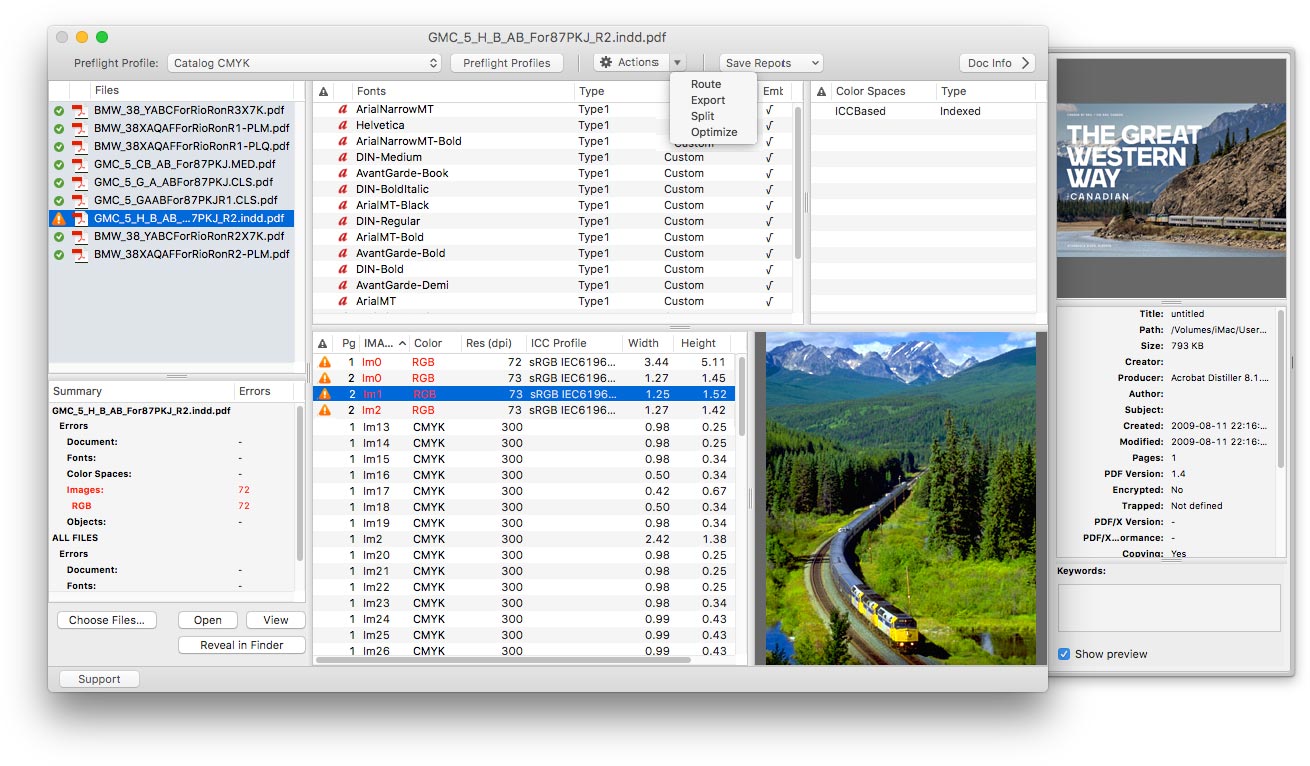
Zevrix Solutions announces PDF Checkpoint 1.9.6, a feature update to company's PDF preflight and conversion automation tool. Remarkably fast, PDF Checkpoint automatically preflights, exports as images, optimizes and splits multiple Adobe PDF files. The software can also convert PDF document colors, which helps users easily prepare files for print and web. The new version can process PDF files created by the Affinity line of professional creative products by Serif: Publisher, Designer and Photo.
Toronto (ON), Canada - Zevrix Solutions today announces PDF Checkpoint 1.9.6, a feature update to company's PDF preflight and conversion automation tool. Remarkably fast, PDF Checkpoint automatically preflights, splits, exports as images and optimizes multiple Adobe PDF files. PDF Checkpoint is an ideal solution for users who need a fast, affordable and easy to use app to check PDF files for errors and convert them to the desired format and color space.
The new version adds the ability to process PDF files created by the Affinity line of professional creative products developed by Serif: Publisher, Designer and Photo. Affinity tools offer an affordable and powerful alternative to the industry-standard trio of Adobe InDesign, Illustrator and Photoshop. With PDF Checkpoint, Affinity users now have a low-cost PDF preflight and conversion solution that can process dozens of files with one click.
"It's a great idea to enable color profile conversion in PDF files so easily," says Dr. Wolfgang Lorenz from Munich, Germany. "PDF Checkpoint saves me a lot of time when submitting ads for large magazines."
PDF Checkpoint is designed to automate and simplify PDF workflows of publishers, ad agencies, printers and graphic designers:
* Batch conversion and preflighting of PDF files
* Check PDF fonts, colors, images and metadata for specific attributes
* Convert PDF color mode using ICC profiles
* Split files into single page PDFs
* Export PDF as images with specific resolution, color and page scale
* Check files for specific PDF/X tags
For example, users can preflight a folder of PDF files and convert them to TIFF images at 300 dpi while scaling each page by 50%. Users can also create print-ready PDFs from such apps as Apple Pages and Swift Publisher by converting colors to the recommended CMYK profile.
Pricing and availability:
PDF Checkpoint can be purchased on Mac App Store and Zevrix website for $39.95 (USD), as well as from authorized resellers. The update is free to licensed users. Trial is also available for download. PDF Checkpoint requires macOS 10.8-10.15.
Zevrix Solutions: http://zevrix.com
PDF Checkpoint 1.9.6: http://zevrix.com/PDFCheckpoint.php
Download PDF Checkpoint: http://zevrix.com/PDFCheckpoint.dmg
Purchase: http://zevrix.com/store.php
Screenshot: http://zevrix.com/screenshots/pdfcheckpoint/pdfc-main-sierra.jpg
Located in Toronto, Canada, Zevrix Solutions provides automation and productivity solutions for Adobe Creative Cloud and Creative Suite software, PDF workflows, graphic file diagnostics and Microsoft Office output on Mac OS. Zevrix is dedicated to help professionals increase their profits through automating everyday tasks, producing error-free documents, saving disk space and cutting production costs. For more information, visit their website. Copyright (C) 2019 Zevrix Solutions. All Rights Reserved. Other trademarks and registered trademarks may be the property of their respective owners.
*******
Link To Article: https://prmac.com/release-id-83729.htm
*******
---------------------------------------------------------------------------------
Note that you can alter delivered distributions at any time.
Login to your account on prMac to alter your channel selection, or to opt-out at any time.
PDF Checkpoint Now Can Process Affinity PDF Files - Published on 10/23/19
Zevrix Solutions announces PDF Checkpoint 1.9.6, a feature update to company's PDF preflight and conversion automation tool. Remarkably fast, PDF Checkpoint automatically preflights, exports as images, optimizes and splits multiple Adobe PDF files. The software can also convert PDF document colors, which helps users easily prepare files for print and web. The new version can process PDF files created by the Affinity line of professional creative products by Serif: Publisher, Designer and Photo.
Toronto (ON), Canada - Zevrix Solutions today announces PDF Checkpoint 1.9.6, a feature update to company's PDF preflight and conversion automation tool. Remarkably fast, PDF Checkpoint automatically preflights, splits, exports as images and optimizes multiple Adobe PDF files. PDF Checkpoint is an ideal solution for users who need a fast, affordable and easy to use app to check PDF files for errors and convert them to the desired format and color space.
The new version adds the ability to process PDF files created by the Affinity line of professional creative products developed by Serif: Publisher, Designer and Photo. Affinity tools offer an affordable and powerful alternative to the industry-standard trio of Adobe InDesign, Illustrator and Photoshop. With PDF Checkpoint, Affinity users now have a low-cost PDF preflight and conversion solution that can process dozens of files with one click.
"It's a great idea to enable color profile conversion in PDF files so easily," says Dr. Wolfgang Lorenz from Munich, Germany. "PDF Checkpoint saves me a lot of time when submitting ads for large magazines."
PDF Checkpoint is designed to automate and simplify PDF workflows of publishers, ad agencies, printers and graphic designers:
* Batch conversion and preflighting of PDF files
* Check PDF fonts, colors, images and metadata for specific attributes
* Convert PDF color mode using ICC profiles
* Split files into single page PDFs
* Export PDF as images with specific resolution, color and page scale
* Check files for specific PDF/X tags
For example, users can preflight a folder of PDF files and convert them to TIFF images at 300 dpi while scaling each page by 50%. Users can also create print-ready PDFs from such apps as Apple Pages and Swift Publisher by converting colors to the recommended CMYK profile.
Pricing and availability:
PDF Checkpoint can be purchased on Mac App Store and Zevrix website for $39.95 (USD), as well as from authorized resellers. The update is free to licensed users. Trial is also available for download. PDF Checkpoint requires macOS 10.8-10.15.
Zevrix Solutions: http://zevrix.com
PDF Checkpoint 1.9.6: http://zevrix.com/PDFCheckpoint.php
Download PDF Checkpoint: http://zevrix.com/PDFCheckpoint.dmg
Purchase: http://zevrix.com/store.php
Screenshot: http://zevrix.com/screenshots/pdfcheckpoint/pdfc-main-sierra.jpg
Located in Toronto, Canada, Zevrix Solutions provides automation and productivity solutions for Adobe Creative Cloud and Creative Suite software, PDF workflows, graphic file diagnostics and Microsoft Office output on Mac OS. Zevrix is dedicated to help professionals increase their profits through automating everyday tasks, producing error-free documents, saving disk space and cutting production costs. For more information, visit their website. Copyright (C) 2019 Zevrix Solutions. All Rights Reserved. Other trademarks and registered trademarks may be the property of their respective owners.
*******
Link To Article: https://prmac.com/release-id-83729.htm
*******
---------------------------------------------------------------------------------
Note that you can alter delivered distributions at any time.
Login to your account on prMac to alter your channel selection, or to opt-out at any time.
Output Factory Server for InDesign Now Updates Modified Links in Books
A new article has been published at prMac.
Output Factory Server for InDesign Now Updates Modified Links in Books - Published on 10/22/19
Zevrix Solutions announces Output Factory Server 2.2.2, a feature update to company's output automation solution for Adobe InDesign. The app automates printing and exporting from InDesign by processing files from watched hot folders. Output Factory Server offers layer versioning, preflighting, email notifications, variable file names, custom scripts and more. The new version enables the option to automatically update modified image links in all chapters of InDesign book files in the queue.
Toronto (ON), Canada - Zevrix Solutions today announces the release of Output Factory Server 2.2.2, a feature update to company's output automation solution for Adobe InDesign. The software automates InDesign production workflow by processing files from hot folders. Output Factory Server offloads printing and exporting from InDesign to a central system leaving operator workstations free from the output process.
The new version adds the ability to automatically update modified links in InDesign book parts. In earlier versions this powerful feature was ignored during book processing. The new option saves users the time and hassle of updating image links throughout all book chapters manually. In addition, Output Factory Server now automatically resaves files with the current InDesign version if needed and fixes an issue where the page dimensions variable file name tokens caused an error when processing books.
"Output Factory Server is an extremely useful utility for a busy production facility or advertising agency", writes David Creamer in Layers magazine. "The setup process is simple and users experience is very straightforward. It can save lots of time - which equates to money."
Output Factory Server is designed to run on a dedicated Mac station where it can serve unlimited InDesign users on a network via hot folders. Users can create hot folders for different output targets such as hi-res PDF, image conversion, color printing, and so on. The app offers the following key features:
* Output InDesign files automatically from hot folders
* Supports PDF, PostScript, print, TIFF, Flash and other formats
* Output to multiple formats from a single hot folder
* Automatic email notifications
* Layer versioning
* Variable output file names
* Run custom scripts
* Automatic preflighting
* PDF security presets for different workflows
Pricing and Availability:
Output Factory Server can be purchased from Zevrix web site for $699.95 (USD), as well as from authorized resellers. Trial is also available for download. The upgrade to version 2 is $350 for the licensed users of Output Factory Server 1.x and BatchOutput Server. Output Factory Server requires macOS 10.8-10.15 and Adobe InDesign CS5-CC 2019.
Zevrix Solutions: http://zevrix.com
Output Factory Server 2.2.2: http://zevrix.com/OutputFactoryServer.php
Download Output Factory Server: http://zevrix.com/OutputFactoryServer.dmg
Purchase: http://zevrix.com/store.php
Screenshot: http://zevrix.com/screenshots/ofs2/ofs-main-pdf.jpg
Located in Toronto, Canada, Zevrix Solutions provides automation and productivity solutions for Adobe Creative Cloud and Creative Suite software, PDF workflows, graphic file diagnostics and Microsoft Office output on Mac OS. Zevrix is dedicated to help professionals increase their profits through automating everyday tasks, producing error-free documents, saving disk space and cutting production costs. For more information, visit their website. Copyright (C) 2019 Zevrix Solutions. All Rights Reserved. Other trademarks and registered trademarks may be the property of their respective owners.
*******
Link To Article: https://prmac.com/release-id-83727.htm
*******
---------------------------------------------------------------------------------
Note that you can alter delivered distributions at any time.
Login to your account on prMac to alter your channel selection, or to opt-out at any time.
Output Factory Server for InDesign Now Updates Modified Links in Books - Published on 10/22/19
Zevrix Solutions announces Output Factory Server 2.2.2, a feature update to company's output automation solution for Adobe InDesign. The app automates printing and exporting from InDesign by processing files from watched hot folders. Output Factory Server offers layer versioning, preflighting, email notifications, variable file names, custom scripts and more. The new version enables the option to automatically update modified image links in all chapters of InDesign book files in the queue.
Toronto (ON), Canada - Zevrix Solutions today announces the release of Output Factory Server 2.2.2, a feature update to company's output automation solution for Adobe InDesign. The software automates InDesign production workflow by processing files from hot folders. Output Factory Server offloads printing and exporting from InDesign to a central system leaving operator workstations free from the output process.
The new version adds the ability to automatically update modified links in InDesign book parts. In earlier versions this powerful feature was ignored during book processing. The new option saves users the time and hassle of updating image links throughout all book chapters manually. In addition, Output Factory Server now automatically resaves files with the current InDesign version if needed and fixes an issue where the page dimensions variable file name tokens caused an error when processing books.
"Output Factory Server is an extremely useful utility for a busy production facility or advertising agency", writes David Creamer in Layers magazine. "The setup process is simple and users experience is very straightforward. It can save lots of time - which equates to money."
Output Factory Server is designed to run on a dedicated Mac station where it can serve unlimited InDesign users on a network via hot folders. Users can create hot folders for different output targets such as hi-res PDF, image conversion, color printing, and so on. The app offers the following key features:
* Output InDesign files automatically from hot folders
* Supports PDF, PostScript, print, TIFF, Flash and other formats
* Output to multiple formats from a single hot folder
* Automatic email notifications
* Layer versioning
* Variable output file names
* Run custom scripts
* Automatic preflighting
* PDF security presets for different workflows
Pricing and Availability:
Output Factory Server can be purchased from Zevrix web site for $699.95 (USD), as well as from authorized resellers. Trial is also available for download. The upgrade to version 2 is $350 for the licensed users of Output Factory Server 1.x and BatchOutput Server. Output Factory Server requires macOS 10.8-10.15 and Adobe InDesign CS5-CC 2019.
Zevrix Solutions: http://zevrix.com
Output Factory Server 2.2.2: http://zevrix.com/OutputFactoryServer.php
Download Output Factory Server: http://zevrix.com/OutputFactoryServer.dmg
Purchase: http://zevrix.com/store.php
Screenshot: http://zevrix.com/screenshots/ofs2/ofs-main-pdf.jpg

Located in Toronto, Canada, Zevrix Solutions provides automation and productivity solutions for Adobe Creative Cloud and Creative Suite software, PDF workflows, graphic file diagnostics and Microsoft Office output on Mac OS. Zevrix is dedicated to help professionals increase their profits through automating everyday tasks, producing error-free documents, saving disk space and cutting production costs. For more information, visit their website. Copyright (C) 2019 Zevrix Solutions. All Rights Reserved. Other trademarks and registered trademarks may be the property of their respective owners.
*******
Link To Article: https://prmac.com/release-id-83727.htm
*******
---------------------------------------------------------------------------------
Note that you can alter delivered distributions at any time.
Login to your account on prMac to alter your channel selection, or to opt-out at any time.
TopXNotes Apple Notes App Review by Marcel Dufresne of Mause Reviews
A new article has been published at prMac.
TopXNotes Apple Notes App Review by Marcel Dufresne of Mause Reviews - Published on 10/22/19
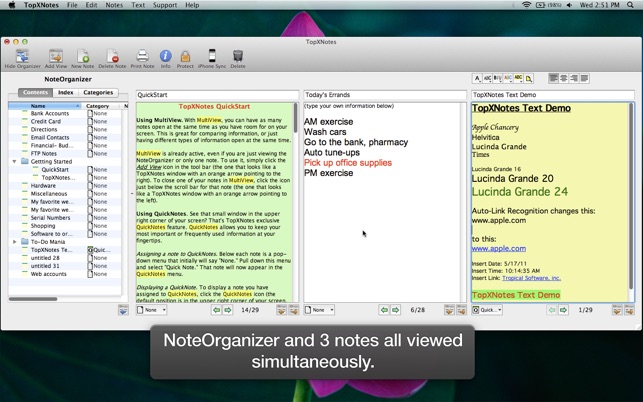
Florida based Tropical Software announced that its TopXNotes Mac note organizer has been very favorably reviewed by Marcel Dufresne of Mause Reviews. Create, view, organize, and instantly access your Mac notes with TopXNotes. TopXNotes 2 keeps your notes synchronized between TopXNotes for Mac and TopXNotes for iOS. Think of TopXNotes as a collection place where you can save and organize information you need to remember, but can't.
Atlantic Beach, Florida - Tropical Software announced that its TopXNotes Mac note organizer has been very favorably reviewed by Marcel Dufresne of Mause Reviews. Mr. Dufresne has completed over 500 reviews of Mac apps in 30 years of reviewing Mac apps. Quoting the review, Mr. Dufresne stated: "TopXNotes from Tropical Software is a top of the line note organizer. " Think of TopXNotes as a collection place where you can save and organize information you need to remember, but can't.
"We are very pleased with the detailed and careful consideration Mr. Dufresne has given TopXNotes," stated Tropical Software president James Lee. "In Mause Reviews full review of TopXNotes, Mr. Dufresne thoroughly explored our hybrid Apple note organizer and password-protector. We are thrilled he has recognized the value of our unique and easy-to-use approach."
Mr. Dufresne goes on to say, "Someone has gone as far as to say that it is like Stickies on Steroids."
The review notes "Read on and have a look how you can manage your-text based notes like to-do lists, call lists, contact notes, and just about anything else."
The review summarizes with " There are many note taking apps out in the market. TopXNotes is a top of the line text editor with an affordable price."
TopXNotes had been previously awarded 4 out of 5 mice by Macworld magazine in their "Summer of Mac Gems" series of reviews. Then TopXNotes was favored by the reviewer for its "clean, single window interface that puts controls for highlighting and marking up your text right at your fingertips," as well as its exclusive QuickNotes feature.
TopXNotes has also been highly rated by Macsimum News (9 out of 10), Version Tracker (5.0), and MacUpdate (5.0). Tropical Software was the first to support export of notes to Classic iPod and also makes TopXNotes touch for iOS that can be synced with TopXNotes for Mac.
System Requirements:
* macOS 10.5.8 or later, up to macOS 10.14.
* 14.4 MB
Pricing and Availability:
TopXNotes 1.8 is $29.95 USD (or equivalent amount in other currencies) and available worldwide through the Mac App Store in the Productivity category or from the company's web site.
Tropical Software: http://www.tropic4.com
TopXNotes 1.8: http://www.tropic4.com/topxnotes.html
TopXNotes Review by Marcel Dufresne of Mause Reviews: https://mausereviews.wordpress.com/2019/10/09/topxnotes/
Download from Mac App Store: https://itunes.apple.com/app/topxnotes/id410968879
Screenshot: https://is3-ssl.mzstatic.com/image/thumb/Purple/v4/aa/29/37/aa29374e-f3f0-da41-7d53-f0e68a1617bb/mzl.oglkvikn.png/643x0w.jpg
Application Icon: http://a4.mzstatic.com/us/r1000/096/Purple/v4/fe/b3/e4/feb3e4d9-67a0-3e64-dd62-f228196a2b32/TopXNotes.175x175-75.png
Tropical Software makes the award-winning TopXNotes, a modern personal note manager with state of the art proprietary encryption technology for the ultimate in securing personal information. Tropical Software's flagship products, TopXNotes and TopXNotes iPod, are modern note organizing tools. Each emphasizes our dedication to providing easy to use and learn to use Mac productivity tools. For more information, email or call Tropical Software. Copyright (C) 2019 Tropical Software. All Rights Reserved. Apple, the Apple logo, iPhone, iPod, iPad and Macintosh are registered trademarks of Apple Inc. in the U.S. and/or other countries. All other trademarks and trade names are the property of their respective owners.
*******
Link To Article: https://prmac.com/release-id-83726.htm
*******
---------------------------------------------------------------------------------
Note that you can alter delivered distributions at any time.
Login to your account on prMac to alter your channel selection, or to opt-out at any time.
TopXNotes Apple Notes App Review by Marcel Dufresne of Mause Reviews - Published on 10/22/19
Florida based Tropical Software announced that its TopXNotes Mac note organizer has been very favorably reviewed by Marcel Dufresne of Mause Reviews. Create, view, organize, and instantly access your Mac notes with TopXNotes. TopXNotes 2 keeps your notes synchronized between TopXNotes for Mac and TopXNotes for iOS. Think of TopXNotes as a collection place where you can save and organize information you need to remember, but can't.
Atlantic Beach, Florida - Tropical Software announced that its TopXNotes Mac note organizer has been very favorably reviewed by Marcel Dufresne of Mause Reviews. Mr. Dufresne has completed over 500 reviews of Mac apps in 30 years of reviewing Mac apps. Quoting the review, Mr. Dufresne stated: "TopXNotes from Tropical Software is a top of the line note organizer. " Think of TopXNotes as a collection place where you can save and organize information you need to remember, but can't.
"We are very pleased with the detailed and careful consideration Mr. Dufresne has given TopXNotes," stated Tropical Software president James Lee. "In Mause Reviews full review of TopXNotes, Mr. Dufresne thoroughly explored our hybrid Apple note organizer and password-protector. We are thrilled he has recognized the value of our unique and easy-to-use approach."
Mr. Dufresne goes on to say, "Someone has gone as far as to say that it is like Stickies on Steroids."
The review notes "Read on and have a look how you can manage your-text based notes like to-do lists, call lists, contact notes, and just about anything else."
The review summarizes with " There are many note taking apps out in the market. TopXNotes is a top of the line text editor with an affordable price."
TopXNotes had been previously awarded 4 out of 5 mice by Macworld magazine in their "Summer of Mac Gems" series of reviews. Then TopXNotes was favored by the reviewer for its "clean, single window interface that puts controls for highlighting and marking up your text right at your fingertips," as well as its exclusive QuickNotes feature.
TopXNotes has also been highly rated by Macsimum News (9 out of 10), Version Tracker (5.0), and MacUpdate (5.0). Tropical Software was the first to support export of notes to Classic iPod and also makes TopXNotes touch for iOS that can be synced with TopXNotes for Mac.
System Requirements:
* macOS 10.5.8 or later, up to macOS 10.14.
* 14.4 MB
Pricing and Availability:
TopXNotes 1.8 is $29.95 USD (or equivalent amount in other currencies) and available worldwide through the Mac App Store in the Productivity category or from the company's web site.
Tropical Software: http://www.tropic4.com
TopXNotes 1.8: http://www.tropic4.com/topxnotes.html
TopXNotes Review by Marcel Dufresne of Mause Reviews: https://mausereviews.wordpress.com/2019/10/09/topxnotes/
Download from Mac App Store: https://itunes.apple.com/app/topxnotes/id410968879
Screenshot: https://is3-ssl.mzstatic.com/image/thumb/Purple/v4/aa/29/37/aa29374e-f3f0-da41-7d53-f0e68a1617bb/mzl.oglkvikn.png/643x0w.jpg
Application Icon: http://a4.mzstatic.com/us/r1000/096/Purple/v4/fe/b3/e4/feb3e4d9-67a0-3e64-dd62-f228196a2b32/TopXNotes.175x175-75.png

Tropical Software makes the award-winning TopXNotes, a modern personal note manager with state of the art proprietary encryption technology for the ultimate in securing personal information. Tropical Software's flagship products, TopXNotes and TopXNotes iPod, are modern note organizing tools. Each emphasizes our dedication to providing easy to use and learn to use Mac productivity tools. For more information, email or call Tropical Software. Copyright (C) 2019 Tropical Software. All Rights Reserved. Apple, the Apple logo, iPhone, iPod, iPad and Macintosh are registered trademarks of Apple Inc. in the U.S. and/or other countries. All other trademarks and trade names are the property of their respective owners.
*******
Link To Article: https://prmac.com/release-id-83726.htm
*******
---------------------------------------------------------------------------------
Note that you can alter delivered distributions at any time.
Login to your account on prMac to alter your channel selection, or to opt-out at any time.
Typs is on a mission to cure Texting Anxiety
A new article has been published at prMac.
Typs is on a mission to cure Texting Anxiety - Published on 10/21/19
California based Textfeed, Inc. today releases Typs 1.0.8, an app with a mission to cure texting anxiety by giving people access to the best text messages, and feedback from a caring community. The app offers text messages for a variety of categories that people can copy/paste into their messaging platform of choice. Categories include "Flirt," "Just matched," "Ask him/her out" and many more. Texts are ranked within categories in a Reddit-esque upvote/downvote format.
West Hollywood, California - Textfeed, Inc., a mobile app startup, is on a mission to cure texting anxiety. To do this, they've created a crowd-sourced network of high-quality text messages for a variety of categories that people can copy/paste into their messaging platform of choice. Categories include "Flirt", "Just matched", "Ask him/her out" and many more. Texts are ranked within categories in a Reddit-esque upvote/downvote format.
"Texting anxiety is a serious issue which affects 1 in 5 people in the US. We've felt this issue first-hand as founders, and our goal is to help reduce the stress and anxiety that comes with texting someone you really care about." said Gil Demeter, CEO and Co-Founder. "The Huffington Post agrees, having published an article titled 'Beat Text Message Anxiety in New Relationships' telling readers to not 'let waiting and responding to text messages take over [their] life.'"
Everyone has found themselves in a situation where they simply don't know how to reply to a text message, or initiate a texting conversation. Typically, people either go with the first thing that comes to mind, sit around for hours and send some over-the-top response, or ask their friends for advice. As a result, relationships take a toll. All it takes is one bad text message to cause a catastrophe. The New York Times, in their article titled "Bubbles Carry a lot of Weight", talks about the stress & anxiety that texting and the time between text messages causes. Texting anxiety is causing as much harm as social media in 2019, yet it is talked about on a significantly smaller scale.
On the Typs app, people can submit text messages that are then voted on by the community. People can comment on texts & give advice and tips based on personal experience. Users have the ability to follow their favorite texters and build a community of like-minded people they can share ideas and texts with.
Device Requirements:
* iPhone, iPad, and iPod touch
* Requires iOS 9.0 or later
* 18.5 MB
Pricing and Availability:
Typs 1.0.8 is Free and available worldwide exclusively through the App Store in the Lifestyle category. For more information, check out Typs's website or contact Gil Demeter.
Typs 1.0.8: https://www.typsapp.com/
Download from the App Store: https://apps.apple.com/us/app/typs-text-messages-for-dating/id1472098305
Screenshot 1: https://drive.google.com/file/d/1yti5vje105uVpEu4fDUBaF0urRmgwqdd/view?usp=sharing
Screenshot 2: https://drive.google.com/file/d/1nU76rHledQMbrCA9qRoDefYkvyNdtjGF/view?usp=sharing
App Icon: https://drive.google.com/file/d/1D6wg2To9is7JCkIQVXopDLM1bDkWjdLB/view?usp=sharing
Textfeed, Inc. is a mobile app startup created by a venture capitalist, serial entrepreneur, and a digital marketing ninja. All 3 founders have experienced the anxiety and stress that comes with texting, having used most of the dating apps in existence. The idea of Typs started initially with just a group chat where the founders would share text messages that worked for them in certain situations. Word spread and tons of people started asking to join the group chat, and it got to the point where it was clear there was an obvious problem that a very high number of people were experiencing. This spawned the idea of Typs - A crowdsourced network of high-quality text messages for a variety of situations, voted on by the community. It's like asking your best friend for texting advice, but way better. All Material and Software (C) Copyright 2019 Textfeed, Inc. All Rights Reserved. Apple, the Apple logo, iPhone, iPod and iPad are registered trademarks of Apple Inc. in the U.S. and/or other
countries. Other trademarks and registered trademarks may be the property of their respective owners.
*******
Link To Article: https://prmac.com/release-id-83723.htm
*******
---------------------------------------------------------------------------------
Note that you can alter delivered distributions at any time.
Login to your account on prMac to alter your channel selection, or to opt-out at any time.
Typs is on a mission to cure Texting Anxiety - Published on 10/21/19
California based Textfeed, Inc. today releases Typs 1.0.8, an app with a mission to cure texting anxiety by giving people access to the best text messages, and feedback from a caring community. The app offers text messages for a variety of categories that people can copy/paste into their messaging platform of choice. Categories include "Flirt," "Just matched," "Ask him/her out" and many more. Texts are ranked within categories in a Reddit-esque upvote/downvote format.
West Hollywood, California - Textfeed, Inc., a mobile app startup, is on a mission to cure texting anxiety. To do this, they've created a crowd-sourced network of high-quality text messages for a variety of categories that people can copy/paste into their messaging platform of choice. Categories include "Flirt", "Just matched", "Ask him/her out" and many more. Texts are ranked within categories in a Reddit-esque upvote/downvote format.
"Texting anxiety is a serious issue which affects 1 in 5 people in the US. We've felt this issue first-hand as founders, and our goal is to help reduce the stress and anxiety that comes with texting someone you really care about." said Gil Demeter, CEO and Co-Founder. "The Huffington Post agrees, having published an article titled 'Beat Text Message Anxiety in New Relationships' telling readers to not 'let waiting and responding to text messages take over [their] life.'"
Everyone has found themselves in a situation where they simply don't know how to reply to a text message, or initiate a texting conversation. Typically, people either go with the first thing that comes to mind, sit around for hours and send some over-the-top response, or ask their friends for advice. As a result, relationships take a toll. All it takes is one bad text message to cause a catastrophe. The New York Times, in their article titled "Bubbles Carry a lot of Weight", talks about the stress & anxiety that texting and the time between text messages causes. Texting anxiety is causing as much harm as social media in 2019, yet it is talked about on a significantly smaller scale.
On the Typs app, people can submit text messages that are then voted on by the community. People can comment on texts & give advice and tips based on personal experience. Users have the ability to follow their favorite texters and build a community of like-minded people they can share ideas and texts with.
Device Requirements:
* iPhone, iPad, and iPod touch
* Requires iOS 9.0 or later
* 18.5 MB
Pricing and Availability:
Typs 1.0.8 is Free and available worldwide exclusively through the App Store in the Lifestyle category. For more information, check out Typs's website or contact Gil Demeter.
Typs 1.0.8: https://www.typsapp.com/
Download from the App Store: https://apps.apple.com/us/app/typs-text-messages-for-dating/id1472098305
Screenshot 1: https://drive.google.com/file/d/1yti5vje105uVpEu4fDUBaF0urRmgwqdd/view?usp=sharing
Screenshot 2: https://drive.google.com/file/d/1nU76rHledQMbrCA9qRoDefYkvyNdtjGF/view?usp=sharing
App Icon: https://drive.google.com/file/d/1D6wg2To9is7JCkIQVXopDLM1bDkWjdLB/view?usp=sharing
Textfeed, Inc. is a mobile app startup created by a venture capitalist, serial entrepreneur, and a digital marketing ninja. All 3 founders have experienced the anxiety and stress that comes with texting, having used most of the dating apps in existence. The idea of Typs started initially with just a group chat where the founders would share text messages that worked for them in certain situations. Word spread and tons of people started asking to join the group chat, and it got to the point where it was clear there was an obvious problem that a very high number of people were experiencing. This spawned the idea of Typs - A crowdsourced network of high-quality text messages for a variety of situations, voted on by the community. It's like asking your best friend for texting advice, but way better. All Material and Software (C) Copyright 2019 Textfeed, Inc. All Rights Reserved. Apple, the Apple logo, iPhone, iPod and iPad are registered trademarks of Apple Inc. in the U.S. and/or other
countries. Other trademarks and registered trademarks may be the property of their respective owners.
*******
Link To Article: https://prmac.com/release-id-83723.htm
*******
---------------------------------------------------------------------------------
Note that you can alter delivered distributions at any time.
Login to your account on prMac to alter your channel selection, or to opt-out at any time.
Wolf Online 2 released for iOS/Android - Realistic Animal Hunting
A new article has been published at prMac.
Wolf Online 2 released for iOS/Android - Realistic Animal Hunting - Published on 10/21/19
Seoul baed developer, 1Games today releases Wolf Online 2, its fun-to-play animal action/adventure game for iOS and Android devices. Featuring wolves as main characters, Wolf Online 2 expresses the wilderness as is. Players hunt animals using terrain features, compete with other wolves, and survive from the fights with stronger predators to become the most powerful, superior wolf. The new version features realistic graphics and animations, background designs, with enhanced AI.
Seoul, Korea - 1Games is proud to announce the release of Wolf Online 2, its fun-to-play animal action/adventure game developed for iOS and Android devices. Wolf Online 2 is a realistic game that expressed wilderness as is. Players can hunt animals using terrain features, compete with other wolves, and survive from the fights with stronger predators to become the most powerful, superior wolf.
Since a player must be an animal instead of human, s/he can run, bite, attack other animals with arms and legs. The players can also bite and drag any part to dry up blood faster, hide behind rocks or bushes and make a surprise attack, and summon fellow wolves by howling to hunt preys together.
Using the customizing function, a player can create his or her own unique wolf character by changing its sex, appearance, and skin color, and experience various hunting areas such as desserts, glaciers, or grasslands that are similar to real environments to hunt animals.
Features of Game:
* Strategic Hunting and Battles
* Enhanced Graphics and Artificial Intelligence
* You can create your Own Unique Character!
4. Realistic Animal Simulator
* Guild/Ranking and Cloud Storage System
You can hunt hundreds of types of carnivores, omnivores and herbivores such as elephants, giraffes, penguins, otters, and boars in various areas.
Device Requirements:
* Rated 12+
* iPhone, iPad, and iPod touch
* Optimized for iPhone 5, iPhone 6/6 Plus
* Requires iOS 9.0 or later
* 1.3GB
Pricing and Availability:
Wolf Online 2 is Free (with in-app purchases) and available worldwide through the App Store in the Games category. There is also an Android version available on Google Play. For more information, please contact Erika G. Spivey.
Games of 1Games: https://apps.apple.com/us/developer/1games/id347530156
Download from the App Store: https://apps.apple.com/app/id1482703672
Download from Google Play: https://play.google.com/store/apps/details?id=com.playonegames.WolfOnline2
YouTube Video (Trailer): https://www.youtube.com/watch?v=8eI13aA2r5Y
YouTube Video (Event): https://www.youtube.com/watch?v=Bi6NPyZO5PQ
Media Assets: https://drive.google.com/drive/folders/1gJlFkwm6vItj3Choz6zS2HhYrtVIN33n?usp=sharing
Mobile game company, 1Games is a specialized mobile game company and has been provided more than 300 mobile games. It aims to target the global mobile game markets by providing with differentiated games and has developed various genres of games such as adventure, action, and racing. The company shares a love of games with thousands of players by supporting and then publishing fresh and original game productions from young smaller studios. Including Life of Wolf Series and Wolf Online Game Series which recorded 5 millions downloads, Cat Friends, Puppy Land Online, Life of Black Tiger, Bus Turbo Racing, Theme Park Rider, Wolf Online, Murder Online, Dinos Online,Wild Animals Online. It has developed and released about 300 various mobile games. All Material and Software (C) Copyright 2019 / 1Games. All Rights Reserved. Apple, the Apple logo, iPhone, iPod and iPad are registered trademarks of Apple Inc. in the U.S. and/or other countries. Other trademarks and registered trademarks may be
the property of their respective owners.
*******
Link To Article: https://prmac.com/release-id-83725.htm
*******
---------------------------------------------------------------------------------
Note that you can alter delivered distributions at any time.
Login to your account on prMac to alter your channel selection, or to opt-out at any time.
Wolf Online 2 released for iOS/Android - Realistic Animal Hunting - Published on 10/21/19
Seoul baed developer, 1Games today releases Wolf Online 2, its fun-to-play animal action/adventure game for iOS and Android devices. Featuring wolves as main characters, Wolf Online 2 expresses the wilderness as is. Players hunt animals using terrain features, compete with other wolves, and survive from the fights with stronger predators to become the most powerful, superior wolf. The new version features realistic graphics and animations, background designs, with enhanced AI.
Seoul, Korea - 1Games is proud to announce the release of Wolf Online 2, its fun-to-play animal action/adventure game developed for iOS and Android devices. Wolf Online 2 is a realistic game that expressed wilderness as is. Players can hunt animals using terrain features, compete with other wolves, and survive from the fights with stronger predators to become the most powerful, superior wolf.
Since a player must be an animal instead of human, s/he can run, bite, attack other animals with arms and legs. The players can also bite and drag any part to dry up blood faster, hide behind rocks or bushes and make a surprise attack, and summon fellow wolves by howling to hunt preys together.
Using the customizing function, a player can create his or her own unique wolf character by changing its sex, appearance, and skin color, and experience various hunting areas such as desserts, glaciers, or grasslands that are similar to real environments to hunt animals.
Features of Game:
* Strategic Hunting and Battles
* Enhanced Graphics and Artificial Intelligence
* You can create your Own Unique Character!
4. Realistic Animal Simulator
* Guild/Ranking and Cloud Storage System
You can hunt hundreds of types of carnivores, omnivores and herbivores such as elephants, giraffes, penguins, otters, and boars in various areas.
Device Requirements:
* Rated 12+
* iPhone, iPad, and iPod touch
* Optimized for iPhone 5, iPhone 6/6 Plus
* Requires iOS 9.0 or later
* 1.3GB
Pricing and Availability:
Wolf Online 2 is Free (with in-app purchases) and available worldwide through the App Store in the Games category. There is also an Android version available on Google Play. For more information, please contact Erika G. Spivey.
Games of 1Games: https://apps.apple.com/us/developer/1games/id347530156
Download from the App Store: https://apps.apple.com/app/id1482703672
Download from Google Play: https://play.google.com/store/apps/details?id=com.playonegames.WolfOnline2
YouTube Video (Trailer): https://www.youtube.com/watch?v=8eI13aA2r5Y
YouTube Video (Event): https://www.youtube.com/watch?v=Bi6NPyZO5PQ
Media Assets: https://drive.google.com/drive/folders/1gJlFkwm6vItj3Choz6zS2HhYrtVIN33n?usp=sharing
Mobile game company, 1Games is a specialized mobile game company and has been provided more than 300 mobile games. It aims to target the global mobile game markets by providing with differentiated games and has developed various genres of games such as adventure, action, and racing. The company shares a love of games with thousands of players by supporting and then publishing fresh and original game productions from young smaller studios. Including Life of Wolf Series and Wolf Online Game Series which recorded 5 millions downloads, Cat Friends, Puppy Land Online, Life of Black Tiger, Bus Turbo Racing, Theme Park Rider, Wolf Online, Murder Online, Dinos Online,Wild Animals Online. It has developed and released about 300 various mobile games. All Material and Software (C) Copyright 2019 / 1Games. All Rights Reserved. Apple, the Apple logo, iPhone, iPod and iPad are registered trademarks of Apple Inc. in the U.S. and/or other countries. Other trademarks and registered trademarks may be
the property of their respective owners.
*******
Link To Article: https://prmac.com/release-id-83725.htm
*******
---------------------------------------------------------------------------------
Note that you can alter delivered distributions at any time.
Login to your account on prMac to alter your channel selection, or to opt-out at any time.
QContractor is a Free Estimating App for Contractors
A new article has been published at prMac.
QContractor is a Free Estimating App for Contractors - Published on 10/18/19
QContractor is a fast, accurate job estimation tool that captures customer needs and turns them into estimates, instantly. It works for any combination of equipment, products, services or expertise that contractors offer their clients. It's a multi format solution so it will work on phone, tablet, or computer.
Clacton-on-sea, Essex - QContractor revolutionizes the estimating process with its sheer speed of setup. UK-based Q-Group Technology, recently launched QContractor 3.0. This significant update, re-designed from the ground up, illustrates the company's commitment in building powerful mobile estimating experiences for contractors worldwide.
With more than 2000 signed up in the initial 9-month soft launch Q-Group is paving the way for change in the rapidly expanding and competitive SME contractor market. QContractor provides contractors across multiple industries with a completely free, quick and simple solution for capturing customer requirements, turning them instantly into estimates.
"We have a very clear objective," says Matt Dodd, CEO of Q-Group. "We will support contractors by spearheading the transition to technology in the SME marketplace. Our biggest competitor is change, thousands of contractors are sick of estimating, and yet so many resist the change to technology. We understand this, which is why we are focusing on one key area, estimating. QContractor supports contractors by making the transition as easy as possible to set up and use as they gradually take on technology to fulfil what has always been a pen to paper exercise".
Innovative features of QContractor include:
* Free cloud based estimating software that's not full of adverts and really is free to use.
* Setup takes a matter of minutes.
* Web console to manage products and services from a computer screen.
* Mobile app to use on the go, saving time contractors normally spend writing things down.
* Instant reports straight from the app, gives customers the information they want, immediately.
* Secure hosting on industry leading global platforms means data is safe and secure.
New to version 3.0:
* A far simpler interface which gets contractors into their estimates immediately. No more setting up first, simply click 'Create Estimate' and QContractor allows the user to customise their products and services as they go.
* Items and labour prices are stored in the user's master database ready for the next time they need them. No more updating item lists first, QContractor manages this automatically.
* Easily alter prices within the estimate to reflect the project requirements without the worry of changing master item lists.
* Instant synchronisation to the web console allowing the contractor to carry on where they left off from a computer.
* Brand new report layout can be customised for each project.
* Access to QC Pro via a monthly subscription which adds even more new features such as different report types, photos, annotations with more in the pipeline.
QContractor is designed to focus purely on creating and delivering estimates quickly and professionally to customers. It's completely free, and it's available now. To speak with a member of the team, please contact us.
Devices Requirements:
* iPhone, iPad and iPod touch
* Universal Application
* iOS 11.0 or later
* 63.4 MB
Pricing and Availability:
QContractor 3.0 is free and is available worldwide through the App Store in the Business category. In-app purchases are available.
QContractor 3.0: https://www.qcontractor.com
Downalod from the App Store: https://apps.apple.com/gb/app/qcontractor/id1193069561
Download images: http://dl.qcontractor.com/assets/QContractorPressPack.zip
Q Group Technology Limited is a software start-up founded with the dedicated goal of creating intuitive and indispensable applications for small and medium sized contractors, across all market sectors, which increase productivity. We believe that a well thought out suite of software tools with simple user interfaces can transform a contractor's business practices for the better. We are constantly developing new ideas to push the boundaries of what is possible in a modern application centric world. Our team have honed their skills over many years in the technology industry, complimented with hands on experience as contractors. We develop our products and services using our robust technical and practical experience. Our long-term goal is to create an all-platform ecosystem of professional business applications with supporting management and administration tools. We are confident that when solution sets such as this become the industry standard, the the overall level of
professionalism for the SME Contractor will be increased immeasurably. All Material and Software (C) Copyright 2019 Q Group Technology Limited. All Rights Reserved. Apple, the Apple logo, iPhone, iPod and iPad are registered trademarks of Apple Inc. in the U.S. and/or other countries. Other trademarks and registered trademarks may be the property of their respective owners.
*******
Link To Article: https://prmac.com/release-id-83722.htm
*******
---------------------------------------------------------------------------------
Note that you can alter delivered distributions at any time.
Login to your account on prMac to alter your channel selection, or to opt-out at any time.
QContractor is a Free Estimating App for Contractors - Published on 10/18/19
QContractor is a fast, accurate job estimation tool that captures customer needs and turns them into estimates, instantly. It works for any combination of equipment, products, services or expertise that contractors offer their clients. It's a multi format solution so it will work on phone, tablet, or computer.
Clacton-on-sea, Essex - QContractor revolutionizes the estimating process with its sheer speed of setup. UK-based Q-Group Technology, recently launched QContractor 3.0. This significant update, re-designed from the ground up, illustrates the company's commitment in building powerful mobile estimating experiences for contractors worldwide.
With more than 2000 signed up in the initial 9-month soft launch Q-Group is paving the way for change in the rapidly expanding and competitive SME contractor market. QContractor provides contractors across multiple industries with a completely free, quick and simple solution for capturing customer requirements, turning them instantly into estimates.
"We have a very clear objective," says Matt Dodd, CEO of Q-Group. "We will support contractors by spearheading the transition to technology in the SME marketplace. Our biggest competitor is change, thousands of contractors are sick of estimating, and yet so many resist the change to technology. We understand this, which is why we are focusing on one key area, estimating. QContractor supports contractors by making the transition as easy as possible to set up and use as they gradually take on technology to fulfil what has always been a pen to paper exercise".
Innovative features of QContractor include:
* Free cloud based estimating software that's not full of adverts and really is free to use.
* Setup takes a matter of minutes.
* Web console to manage products and services from a computer screen.
* Mobile app to use on the go, saving time contractors normally spend writing things down.
* Instant reports straight from the app, gives customers the information they want, immediately.
* Secure hosting on industry leading global platforms means data is safe and secure.
New to version 3.0:
* A far simpler interface which gets contractors into their estimates immediately. No more setting up first, simply click 'Create Estimate' and QContractor allows the user to customise their products and services as they go.
* Items and labour prices are stored in the user's master database ready for the next time they need them. No more updating item lists first, QContractor manages this automatically.
* Easily alter prices within the estimate to reflect the project requirements without the worry of changing master item lists.
* Instant synchronisation to the web console allowing the contractor to carry on where they left off from a computer.
* Brand new report layout can be customised for each project.
* Access to QC Pro via a monthly subscription which adds even more new features such as different report types, photos, annotations with more in the pipeline.
QContractor is designed to focus purely on creating and delivering estimates quickly and professionally to customers. It's completely free, and it's available now. To speak with a member of the team, please contact us.
Devices Requirements:
* iPhone, iPad and iPod touch
* Universal Application
* iOS 11.0 or later
* 63.4 MB
Pricing and Availability:
QContractor 3.0 is free and is available worldwide through the App Store in the Business category. In-app purchases are available.
QContractor 3.0: https://www.qcontractor.com
Downalod from the App Store: https://apps.apple.com/gb/app/qcontractor/id1193069561
Download images: http://dl.qcontractor.com/assets/QContractorPressPack.zip
Q Group Technology Limited is a software start-up founded with the dedicated goal of creating intuitive and indispensable applications for small and medium sized contractors, across all market sectors, which increase productivity. We believe that a well thought out suite of software tools with simple user interfaces can transform a contractor's business practices for the better. We are constantly developing new ideas to push the boundaries of what is possible in a modern application centric world. Our team have honed their skills over many years in the technology industry, complimented with hands on experience as contractors. We develop our products and services using our robust technical and practical experience. Our long-term goal is to create an all-platform ecosystem of professional business applications with supporting management and administration tools. We are confident that when solution sets such as this become the industry standard, the the overall level of
professionalism for the SME Contractor will be increased immeasurably. All Material and Software (C) Copyright 2019 Q Group Technology Limited. All Rights Reserved. Apple, the Apple logo, iPhone, iPod and iPad are registered trademarks of Apple Inc. in the U.S. and/or other countries. Other trademarks and registered trademarks may be the property of their respective owners.
*******
Link To Article: https://prmac.com/release-id-83722.htm
*******
---------------------------------------------------------------------------------
Note that you can alter delivered distributions at any time.
Login to your account on prMac to alter your channel selection, or to opt-out at any time.
Subscribe to:
Posts (Atom)