A new article has been published at prMac.
LinkOptimizer for Adobe InDesign Now Supports macOS Catalina - Published on 10/30/19
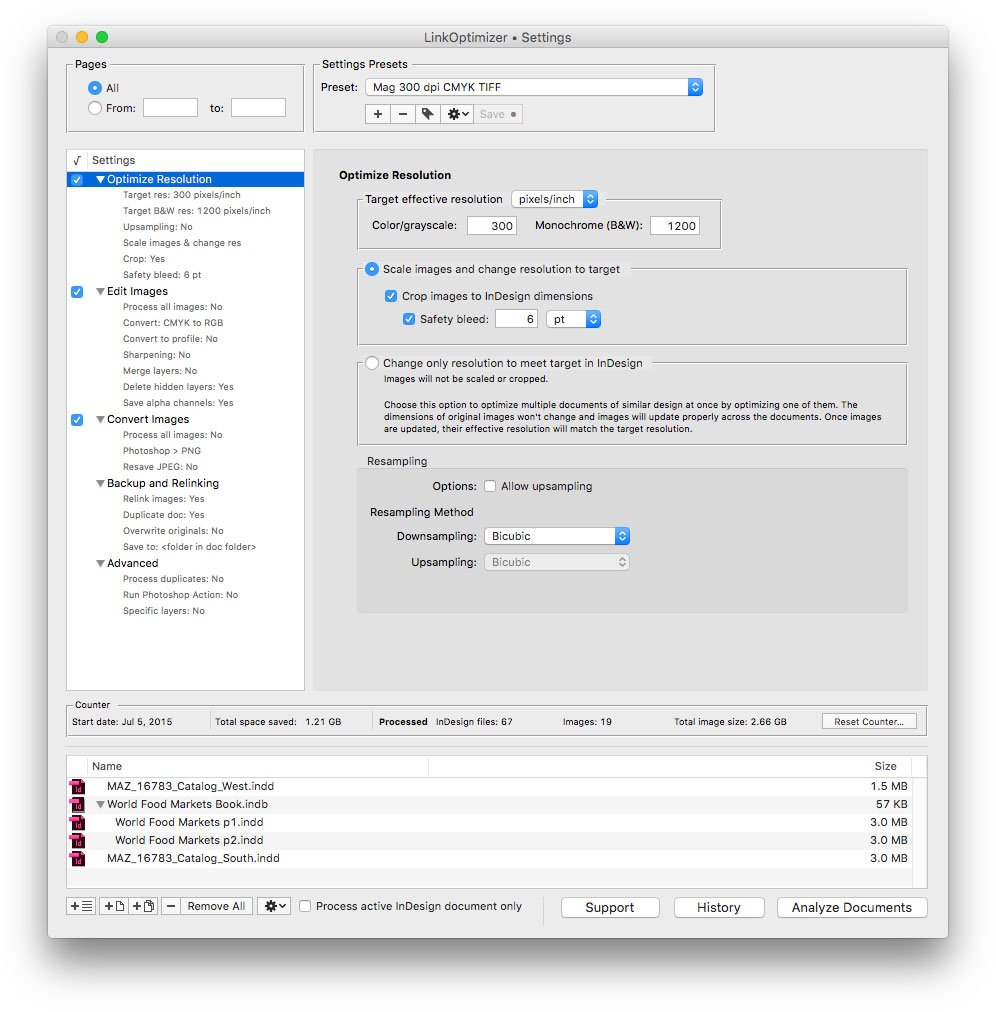
Zevrix Solutions announces LinkOptimizer 5.3.11, a compatibility update to company's workflow automation solution for Adobe InDesign. Awarded 4 out of 5 stars by Computer Arts magazine, LinkOptimizer can reduce InDesign link size by resizing images to their final dimensions at a target resolution specified. The app can also assign colors profiles, convert file formats, and perform image adjustments. The new version makes LinkOptimizer compatible with the recently released macOS 10.15 Catalina.
Toronto (ON), Canada - Zevrix Solutions today announces the release of LinkOptimizer 5.3.11, a compatibility update to company's image workflow automation solution for Adobe InDesign. LinkOptimizer automates complex image manipulation tasks and helps InDesign users reduce the link size, save time and production costs, and repurpose InDesign documents for web and mobile devices.
The new version introduces support for the recently released macOS 10.15 Catalina by solving several issues that could result in incorrect location of duplicated InDesign document as well as image relinking errors on the new system. The update is offered free of charge to the licensed users of version 5.
"LinkOptimizer has changed my life and saved me days and days of work as a retoucher for an international quarterly magazine," says Steve Krason of Chicago based SK Design Group. "It's a lifesaver".
LinkOptimizer works automatically with Photoshop to eliminate the excess image data of InDesign links, perform essential image adjustments such as color conversion and sharpening, and convert image formats. For example, with just a click of a button users can:
* Batch process multiple InDesign files and books
* Scale and crop images to match their dimensions in InDesign
* Change their resolution to 300 dpi
* Convert RGB images to specific CMYK profile
* Flatten images
* Resave JPEGs as PSD
* Run a Photoshop action on each image
As a result users can save gigabytes of disk space and countless hours of optimizing images manually, accelerate document output, reduce job turnaround and cut costs through faster processing.
Pricing and Availability:
LinkOptimizer can be purchased from Zevrix website for $259.95 USD (Lite version: $179.95) as well as from Adobe Exchange and authorized resellers. Trial is also available for download. The update is free for LinkOptimizer 5.x users and $130 to upgrade from previous versions. LinkOptimizer requires macOS 10.8-10.15 and Adobe InDesign / Photoshop CS5-CC 2019.
Zevrix Solutions: http://zevrix.com
LinkOptimizer 5.3.11: http://zevrix.com/LinkOptimizer.php
Download LinkOptimizer: http://zevrix.com/LinkOptimizer.dmg
Purchase: http://zevrix.com/store.php
Screenshot: http://zevrix.com/screenshots/lo5/res-win.jpg
Located in Toronto, Canada, Zevrix Solutions provides automation and productivity solutions for Adobe Creative Cloud and Creative Suite software, PDF workflows, graphic file diagnostics and Microsoft Office output on Mac OS. Zevrix is dedicated to help professionals increase their profits through automating everyday tasks, producing error-free documents, saving disk space and cutting production costs. For more information, visit their website. Copyright (C) 2019 Zevrix Solutions. All Rights Reserved. Other trademarks and registered trademarks may be the property of their respective owners.
*******
Link To Article: https://prmac.com/release-id-83741.htm
*******
---------------------------------------------------------------------------------
Note that you can alter delivered distributions at any time.
Login to your account on prMac to alter your channel selection, or to opt-out at any time.

PFiddlesoft Releases UI Browser 2.9.0
A new article has been published at prMac.
PFiddlesoft Releases UI Browser 2.9.0 - Published on 10/29/19
PFiddlesoft today announced the release of version 2.9.0 of its popular product, UI Browser, the "ultimate assistant" for GUI Scripting with AppleScript, and a developer utility for exploring Apple's Accessibility API. Version 2.9.0 of UI Browser adds support for new Accessibility features introduced by Apple in macOS Catalina 10.15. UI Browser requires OS X Yosemite 10.10 or later.
Quechee, Vermont - UI Browser helps you to explore, manipulate, and monitor the user interface of most macOS applications running on your computer. With the push of a button, it also generates AppleScript statements to control any application using GUI Scripting, even applications that are not otherwise scriptable. No other utility provides all of the information you need in order to write scripts using GUI Scripting.
Version 2.9.0 of UI Browser adds support for new Accessibility features introduced by Apple in macOS Catalina 10.15. UI Browser requires OS X Yosemite 10.10 or later.
In addition, version 2.9.0 adds these new features:
* UI Browser now automatically highlights the target application's UI element under the cursor when in Screen Reader mode.
* UI Browser now refreshes its browser view automatically when it is brought to the front if a window or other UI element in the target application was created or destroyed while UI Browser was in the background.
* UI Browser now has a Validate button in the Notifications drawer to show information from Apple's Accessibility Definitions file, like the Validate buttons in the Actions and Attributes drawers.
* UI Browser now follows VoiceOver best practices when speaking its own Accessibility labels.
* UI Browser implements numerous performance enhancements and a number of minor bug fixes.
Download a free, full-featured 30-day trial version of UI Browser now at the UI Browser website. New customers may purchase UI Browser for $55. It is a free upgrade for registered owners of UI Browser 2.0.0 and later. UI Browser 1.4.1 is no longer supported and no free upgrade path is available.
PFiddlesoft: https://pfiddlesoft.com
UI Browser 2.9.0: https://pfiddlesoft.com/uibrowser
Direct Download Link: https://pfiddlesoft.com/uibrowser/downloads/UIBrowser290.dmg
Purchase Link: https://pfiddlesoft.com/uibrowser/index-downloads.html
Formed by Bill Cheeseman to develop and market Macintosh software based on Apple's Accessibility technologies, PFiddlesoft(TM) has unmatched experience controlling the Macintosh Graphical User Interface using AppleScript and other technologies. PFiddlesoft distributes applications written by Bill Cheeseman and formerly distributed by PreFab Software, Inc., including UI Browser, UI Actions, Event Taps Testbench, and the PFiddlesoft Frameworks. These products for Mac OS X carry on the tradition of PreFab Player, a seminal product released for the classic Mac OS in 1994. UI Browser was first released in 2003 to support Apple's GUI Scripting and Accessibility technologies. It was followed in 2004 by UI Actions, implementing "universal attachability" for AppleScript, and in 2007 by Event Taps Testbench, a free developer utility to explore Quartz Event Taps. The PFiddle Collection was introduced in 2010. It is a growing collection of useful and fun Macintosh software. All Material and
Software (C) Copyright 2019 PFiddlesoft is a trademark of PreForm Assistive Technologies, LLC. All Rights Reserved. Apple, the Apple logo, Mac OS X and Macintosh are registered trademarks of Apple Inc. in the U.S. and/or other countries.
*******
Link To Article: https://prmac.com/release-id-83740.htm
*******
---------------------------------------------------------------------------------
Note that you can alter delivered distributions at any time.
Login to your account on prMac to alter your channel selection, or to opt-out at any time.
PFiddlesoft Releases UI Browser 2.9.0 - Published on 10/29/19
PFiddlesoft today announced the release of version 2.9.0 of its popular product, UI Browser, the "ultimate assistant" for GUI Scripting with AppleScript, and a developer utility for exploring Apple's Accessibility API. Version 2.9.0 of UI Browser adds support for new Accessibility features introduced by Apple in macOS Catalina 10.15. UI Browser requires OS X Yosemite 10.10 or later.
Quechee, Vermont - UI Browser helps you to explore, manipulate, and monitor the user interface of most macOS applications running on your computer. With the push of a button, it also generates AppleScript statements to control any application using GUI Scripting, even applications that are not otherwise scriptable. No other utility provides all of the information you need in order to write scripts using GUI Scripting.
Version 2.9.0 of UI Browser adds support for new Accessibility features introduced by Apple in macOS Catalina 10.15. UI Browser requires OS X Yosemite 10.10 or later.
In addition, version 2.9.0 adds these new features:
* UI Browser now automatically highlights the target application's UI element under the cursor when in Screen Reader mode.
* UI Browser now refreshes its browser view automatically when it is brought to the front if a window or other UI element in the target application was created or destroyed while UI Browser was in the background.
* UI Browser now has a Validate button in the Notifications drawer to show information from Apple's Accessibility Definitions file, like the Validate buttons in the Actions and Attributes drawers.
* UI Browser now follows VoiceOver best practices when speaking its own Accessibility labels.
* UI Browser implements numerous performance enhancements and a number of minor bug fixes.
Download a free, full-featured 30-day trial version of UI Browser now at the UI Browser website. New customers may purchase UI Browser for $55. It is a free upgrade for registered owners of UI Browser 2.0.0 and later. UI Browser 1.4.1 is no longer supported and no free upgrade path is available.
PFiddlesoft: https://pfiddlesoft.com
UI Browser 2.9.0: https://pfiddlesoft.com/uibrowser
Direct Download Link: https://pfiddlesoft.com/uibrowser/downloads/UIBrowser290.dmg
Purchase Link: https://pfiddlesoft.com/uibrowser/index-downloads.html
Formed by Bill Cheeseman to develop and market Macintosh software based on Apple's Accessibility technologies, PFiddlesoft(TM) has unmatched experience controlling the Macintosh Graphical User Interface using AppleScript and other technologies. PFiddlesoft distributes applications written by Bill Cheeseman and formerly distributed by PreFab Software, Inc., including UI Browser, UI Actions, Event Taps Testbench, and the PFiddlesoft Frameworks. These products for Mac OS X carry on the tradition of PreFab Player, a seminal product released for the classic Mac OS in 1994. UI Browser was first released in 2003 to support Apple's GUI Scripting and Accessibility technologies. It was followed in 2004 by UI Actions, implementing "universal attachability" for AppleScript, and in 2007 by Event Taps Testbench, a free developer utility to explore Quartz Event Taps. The PFiddle Collection was introduced in 2010. It is a growing collection of useful and fun Macintosh software. All Material and
Software (C) Copyright 2019 PFiddlesoft is a trademark of PreForm Assistive Technologies, LLC. All Rights Reserved. Apple, the Apple logo, Mac OS X and Macintosh are registered trademarks of Apple Inc. in the U.S. and/or other countries.
*******
Link To Article: https://prmac.com/release-id-83740.htm
*******
---------------------------------------------------------------------------------
Note that you can alter delivered distributions at any time.
Login to your account on prMac to alter your channel selection, or to opt-out at any time.
Hellrule, An Unique Action Autorunner Coming Soon to iOS & Android
A new article has been published at prMac.
Hellrule, An Unique Action Autorunner Coming Soon to iOS & Android - Published on 10/28/19
Pedrocorp announce the upcoming release of Hellrule, its exciting new game for iOS and Android devices. Hellrule is a 2D auto-runner action platformer videogame with a horror setting expected to be released in late 2019 or early 2020. As such, it draws some inspiration from the old Castlevanias, Ghosts and Goblins, etc. However, on top of that it adds some modern features, such as 3D-like graphics with lighting effects.
Miranda de Ebro, Spain - Pedrocorp is proud to announce the upcoming release of Hellrule, its exciting new game for iPhone, iPad, iPod touch, and Android devices. The game is a mix of nostalgia and modernness. As such, it draws some inspiration from the old Castlevanias, Ghosts and Goblins, etc. However, on top of that it adds some modern features, such as 3D-like graphics with lighting effects.
The main point of this video game is providing simple fun, without the hassle of F2P, pay to win, etc. It's just a game anyone can play at any time in order to keep moving forward in their adventure or giving another try to some level they are struggling with.
It is an auto-runner in terms of mechanics, a game where the hero is running by default. However, it is not an endless one. Instead, it contains a set of carefully designed levels, each of which has a differentiated personality and proposes a different challenge. Part of its sound track is composed and performed by El Reno Renardo, a Spanish freak metal band.
The expected release date is late 2019 or early 2020. It will be initially released for mobile platforms (Android and iOS), but there are plans of releasing it in a second phase for PC (Linux and Windows) and potentially Nintendo Switch. The game is powered by the Godot game engine.
Pedrocorp: http://pedrocorp.net
Hellrule: http://pedrocorp.net#hellrule
TouTube Trailer: https://www.youtube.com/watch?v=qd2qAy8Ok7g
Press Kit: http://pedrocorp.net/hellrule/presskit.zip
Pedrocorp is a one-man brand whose goal is to develop quality video games with a distinctive style. All Material and Software (C) Copyright 2019 Pedrocorp. All Rights Reserved. Apple, the Apple logo, iPhone, iPod and iPad are registered trademarks of Apple Inc. in the U.S. and/or other countries. Other trademarks and registered trademarks may be the property of their respective owners.
*******
Link To Article: https://prmac.com/release-id-83739.htm
*******
---------------------------------------------------------------------------------
Note that you can alter delivered distributions at any time.
Login to your account on prMac to alter your channel selection, or to opt-out at any time.
Hellrule, An Unique Action Autorunner Coming Soon to iOS & Android - Published on 10/28/19
Pedrocorp announce the upcoming release of Hellrule, its exciting new game for iOS and Android devices. Hellrule is a 2D auto-runner action platformer videogame with a horror setting expected to be released in late 2019 or early 2020. As such, it draws some inspiration from the old Castlevanias, Ghosts and Goblins, etc. However, on top of that it adds some modern features, such as 3D-like graphics with lighting effects.
Miranda de Ebro, Spain - Pedrocorp is proud to announce the upcoming release of Hellrule, its exciting new game for iPhone, iPad, iPod touch, and Android devices. The game is a mix of nostalgia and modernness. As such, it draws some inspiration from the old Castlevanias, Ghosts and Goblins, etc. However, on top of that it adds some modern features, such as 3D-like graphics with lighting effects.
The main point of this video game is providing simple fun, without the hassle of F2P, pay to win, etc. It's just a game anyone can play at any time in order to keep moving forward in their adventure or giving another try to some level they are struggling with.
It is an auto-runner in terms of mechanics, a game where the hero is running by default. However, it is not an endless one. Instead, it contains a set of carefully designed levels, each of which has a differentiated personality and proposes a different challenge. Part of its sound track is composed and performed by El Reno Renardo, a Spanish freak metal band.
The expected release date is late 2019 or early 2020. It will be initially released for mobile platforms (Android and iOS), but there are plans of releasing it in a second phase for PC (Linux and Windows) and potentially Nintendo Switch. The game is powered by the Godot game engine.
Pedrocorp: http://pedrocorp.net
Hellrule: http://pedrocorp.net#hellrule
TouTube Trailer: https://www.youtube.com/watch?v=qd2qAy8Ok7g
Press Kit: http://pedrocorp.net/hellrule/presskit.zip
Pedrocorp is a one-man brand whose goal is to develop quality video games with a distinctive style. All Material and Software (C) Copyright 2019 Pedrocorp. All Rights Reserved. Apple, the Apple logo, iPhone, iPod and iPad are registered trademarks of Apple Inc. in the U.S. and/or other countries. Other trademarks and registered trademarks may be the property of their respective owners.
*******
Link To Article: https://prmac.com/release-id-83739.htm
*******
---------------------------------------------------------------------------------
Note that you can alter delivered distributions at any time.
Login to your account on prMac to alter your channel selection, or to opt-out at any time.
64BitApps Releases PDF Plus v.1.3 for macOS
A new article has been published at prMac.
64BitApps Releases PDF Plus v.1.3 for macOS - Published on 10/29/19
64BitApps today releases PDF Plus 1.3, an update to thee new macOS app that allows users to merge, split, crop and watermark their PDF documents in batch mode. PDF Plus can also edit the properties of PDF files in batch mode. The user can easily define the pages or page intervals that will be processed and the location where the output PDF documents will be saved. Version 1.3 features a brand new user interface and users can now cover the entire page with watermarks.
Craiova, Romania -64BitApps, the software company that brought Mac users apps such as Icon Plus, Image Plus and ImageSize, announces the release of PDF Plus v.1.3, a Mac app that allows users to merge, split, crop and watermark their PDF documents in batch mode. PDF Plus comes with a very intuitive user interface which presents all the software's features in a very clear manner right from the start. There are six main features that PDF Plus offers: Merge PDF Documents, Split PDF Documents, Crop PDF Documents, Watermark PDF Documents, Convert PDF Documents to Images and Edit PDF Properties.
PDF Plus can merge, split, crop, watermark and convert batches of PDF files which leads to increased productivity and less time wasted on editing documents one by one. PDF Plus can also edit the properties of PDF files in batch mode. The user can easily define the pages or page intervals that will be processed and the location where the output PDF documents will be saved.
Version 1.3 of PDF Plus brings to the table a brand new user interface which now offers resizeable windows, larger previews and support for Dark Mode in macOS Mojave and later and for the Watemark feature the option to cover the entire page with watermarks.
Pricing and Availability:
PDF Plus is priced at $4.99 (USD) and can be purchased from the Mac App Store and from 64BitApps online. More information about this app and the features it offers can be found at 64BitApps.
64BitApps: https://64bitapps.com
PDF Plus 1.3: https://64bitapps.com/pdf-plus-merge-split-crop-and-watermark-pdfs/
Purchase and Download from Mac App Store: https://apps.apple.com/us/app/pdf-plus-merge-split-crop-and-watermark-pdfs/id1225929895
Purchase from 64BitApps: https://64bitapps.com/pdf-plus-merge-split-crop-and-watermark-pdfs/#pricing
Screenshot: https://64bitapps.com/wp-content/uploads/slider17/Screenshot42.png
App Icon: https://64bitapps.com/wp-content/uploads/2015/05/pdf-plus.png
Since 2016, 64BitApps has been creating quality macOS apps such as Icon Plus, PDF Plus, ImageSize, Image Crop and Video Plus, apps which are used by thousands of Mac users from all around the world. All Material and Software (C) Copyright 2019 Day 1 Solutions SRL. All Rights Reserved. Apple, the Apple logo, and macOS are registered trademarks of Apple Inc. in the U.S. and/or other countries. Other trademarks and registered trademarks may be the property of their respective owners.
*******
Link To Article: https://prmac.com/release-id-83738.htm
*******
---------------------------------------------------------------------------------
Note that you can alter delivered distributions at any time.
Login to your account on prMac to alter your channel selection, or to opt-out at any time.
64BitApps Releases PDF Plus v.1.3 for macOS - Published on 10/29/19
64BitApps today releases PDF Plus 1.3, an update to thee new macOS app that allows users to merge, split, crop and watermark their PDF documents in batch mode. PDF Plus can also edit the properties of PDF files in batch mode. The user can easily define the pages or page intervals that will be processed and the location where the output PDF documents will be saved. Version 1.3 features a brand new user interface and users can now cover the entire page with watermarks.
Craiova, Romania -64BitApps, the software company that brought Mac users apps such as Icon Plus, Image Plus and ImageSize, announces the release of PDF Plus v.1.3, a Mac app that allows users to merge, split, crop and watermark their PDF documents in batch mode. PDF Plus comes with a very intuitive user interface which presents all the software's features in a very clear manner right from the start. There are six main features that PDF Plus offers: Merge PDF Documents, Split PDF Documents, Crop PDF Documents, Watermark PDF Documents, Convert PDF Documents to Images and Edit PDF Properties.
PDF Plus can merge, split, crop, watermark and convert batches of PDF files which leads to increased productivity and less time wasted on editing documents one by one. PDF Plus can also edit the properties of PDF files in batch mode. The user can easily define the pages or page intervals that will be processed and the location where the output PDF documents will be saved.
Version 1.3 of PDF Plus brings to the table a brand new user interface which now offers resizeable windows, larger previews and support for Dark Mode in macOS Mojave and later and for the Watemark feature the option to cover the entire page with watermarks.
Pricing and Availability:
PDF Plus is priced at $4.99 (USD) and can be purchased from the Mac App Store and from 64BitApps online. More information about this app and the features it offers can be found at 64BitApps.
64BitApps: https://64bitapps.com
PDF Plus 1.3: https://64bitapps.com/pdf-plus-merge-split-crop-and-watermark-pdfs/
Purchase and Download from Mac App Store: https://apps.apple.com/us/app/pdf-plus-merge-split-crop-and-watermark-pdfs/id1225929895
Purchase from 64BitApps: https://64bitapps.com/pdf-plus-merge-split-crop-and-watermark-pdfs/#pricing
Screenshot: https://64bitapps.com/wp-content/uploads/slider17/Screenshot42.png

App Icon: https://64bitapps.com/wp-content/uploads/2015/05/pdf-plus.png

Since 2016, 64BitApps has been creating quality macOS apps such as Icon Plus, PDF Plus, ImageSize, Image Crop and Video Plus, apps which are used by thousands of Mac users from all around the world. All Material and Software (C) Copyright 2019 Day 1 Solutions SRL. All Rights Reserved. Apple, the Apple logo, and macOS are registered trademarks of Apple Inc. in the U.S. and/or other countries. Other trademarks and registered trademarks may be the property of their respective owners.
*******
Link To Article: https://prmac.com/release-id-83738.htm
*******
---------------------------------------------------------------------------------
Note that you can alter delivered distributions at any time.
Login to your account on prMac to alter your channel selection, or to opt-out at any time.
BatchOutput for Microsoft Word Now Supports macOS Catalina
A new article has been published at prMac.
BatchOutput for Microsoft Word Now Supports macOS Catalina - Published on 10/28/19
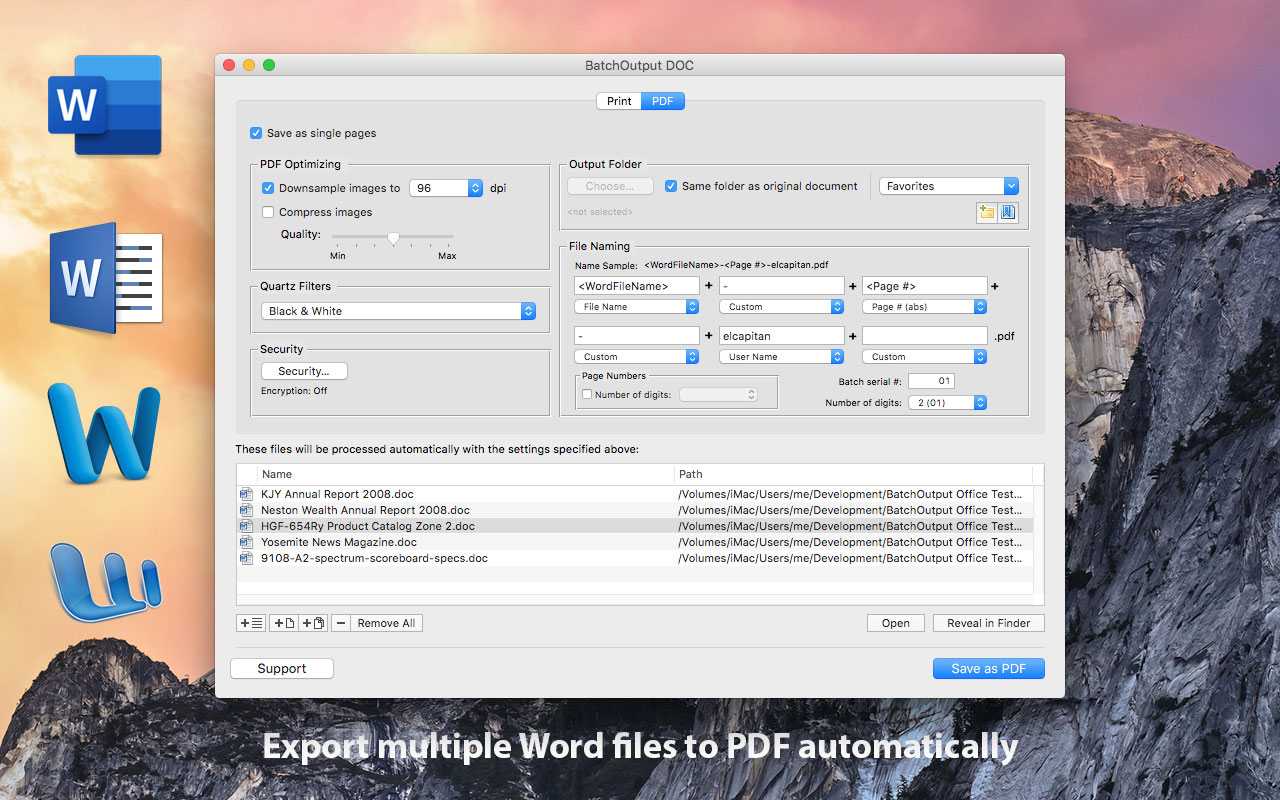
Zevrix Solutions announces BatchOutput DOC 2.5.13, a compatibility update to company's output automation solution for Microsoft Word. The only Word tool of its kind on the Mac market, BatchOutput automates printing and exporting to PDF from Word. The app offers batch printing, PDF security, variable file names, single page export and more. The new version adds support for the recently released macOS 10.15 Catalina and improves handling of Word documents on non-standard Office installations.
Toronto (ON), Canada - Zevrix Solutions announces the release of BatchOutput DOC 2.5.13, a security update to its output automation solution for Microsoft Word on macOS. The only batch processing tool for Word on the Mac market, the software helps users eliminate repetitive tasks through automation of printing and professional PDF output.
The new version introduces support for the recently released macOS 10.15 Catalina and is offered as a free update to the licensed users. The update also addresses an issue in which Microsoft Word could not be located if it wasn't installed in the system's Applications folder. In addition, the new version ensures that Word documents open as expected in rare situations when the files bearing Word extensions are not by default associated with Word in the system.
"BatchOutput does very well what is supposed to do," says Giorgio La Scala from Cologny, Switzerland. "Developers also provide top notch support that is fast and efficient... Very impressed by the level of dedication to customer satisfaction."
In addition to batch printing, BatchOutput DOC allows to carry out professional PDF production directly from Word, bringing advanced PDF creation options right to the user's fingertips:
* Print and export multiple Word documents to PDF with a single click
* Variable output file names
* Split Word files into single page PDFs
* Encrypt and password-protect PDF documents
* Reduce PDF file size and optimize documents for web, print and mobile devices
* Change PDF color tone, brightness and other properties
BatchOutput DOC is a part of the Zevrix BatchOutput family of products, which also includes output automation solutions for Microsoft Excel, PowerPoint, Adobe InDesign, and PDF workflows.
Pricing and Availability:
BatchOutput DOC can be purchased for $19.95 (USD) from the Zevrix Solutions website as well as from authorized resellers and Mac App Store. Trial is also available for download. The update is free for users of version 2 and $20 from version 1. BatchOutput DOC requires macOS 10.8-10.15 and Microsoft Word 2008-2019.
Zevrix Solutions: http://zevrix.com
BatchOutput DOC 2.5.13: http://zevrix.com/BatchOutputOffice.php
Download BatchOutput DOC: http://zevrix.com/BatchOutputOffice.dmg
Purchase: http://zevrix.com/store.php
Screenshot: http://zevrix.com/screenshots/bo-office/MAS/bodoc-pdf-mas.jpg
Located in Toronto, Canada, Zevrix Solutions provides automation and productivity solutions for Adobe Creative Cloud and Creative Suite software, PDF workflows, graphic file diagnostics and Microsoft Office output on Mac OS. Zevrix is dedicated to help professionals increase their profits through automating everyday tasks, producing error-free documents, saving disk space and cutting production costs. For more information, visit their website. Copyright (C) 2019 Zevrix Solutions. All Rights Reserved. Other trademarks and registered trademarks may be the property of their respective owners.
*******
Link To Article: https://prmac.com/release-id-83737.htm
*******
---------------------------------------------------------------------------------
Note that you can alter delivered distributions at any time.
Login to your account on prMac to alter your channel selection, or to opt-out at any time.
BatchOutput for Microsoft Word Now Supports macOS Catalina - Published on 10/28/19
Zevrix Solutions announces BatchOutput DOC 2.5.13, a compatibility update to company's output automation solution for Microsoft Word. The only Word tool of its kind on the Mac market, BatchOutput automates printing and exporting to PDF from Word. The app offers batch printing, PDF security, variable file names, single page export and more. The new version adds support for the recently released macOS 10.15 Catalina and improves handling of Word documents on non-standard Office installations.
Toronto (ON), Canada - Zevrix Solutions announces the release of BatchOutput DOC 2.5.13, a security update to its output automation solution for Microsoft Word on macOS. The only batch processing tool for Word on the Mac market, the software helps users eliminate repetitive tasks through automation of printing and professional PDF output.
The new version introduces support for the recently released macOS 10.15 Catalina and is offered as a free update to the licensed users. The update also addresses an issue in which Microsoft Word could not be located if it wasn't installed in the system's Applications folder. In addition, the new version ensures that Word documents open as expected in rare situations when the files bearing Word extensions are not by default associated with Word in the system.
"BatchOutput does very well what is supposed to do," says Giorgio La Scala from Cologny, Switzerland. "Developers also provide top notch support that is fast and efficient... Very impressed by the level of dedication to customer satisfaction."
In addition to batch printing, BatchOutput DOC allows to carry out professional PDF production directly from Word, bringing advanced PDF creation options right to the user's fingertips:
* Print and export multiple Word documents to PDF with a single click
* Variable output file names
* Split Word files into single page PDFs
* Encrypt and password-protect PDF documents
* Reduce PDF file size and optimize documents for web, print and mobile devices
* Change PDF color tone, brightness and other properties
BatchOutput DOC is a part of the Zevrix BatchOutput family of products, which also includes output automation solutions for Microsoft Excel, PowerPoint, Adobe InDesign, and PDF workflows.
Pricing and Availability:
BatchOutput DOC can be purchased for $19.95 (USD) from the Zevrix Solutions website as well as from authorized resellers and Mac App Store. Trial is also available for download. The update is free for users of version 2 and $20 from version 1. BatchOutput DOC requires macOS 10.8-10.15 and Microsoft Word 2008-2019.
Zevrix Solutions: http://zevrix.com
BatchOutput DOC 2.5.13: http://zevrix.com/BatchOutputOffice.php
Download BatchOutput DOC: http://zevrix.com/BatchOutputOffice.dmg
Purchase: http://zevrix.com/store.php
Screenshot: http://zevrix.com/screenshots/bo-office/MAS/bodoc-pdf-mas.jpg
Located in Toronto, Canada, Zevrix Solutions provides automation and productivity solutions for Adobe Creative Cloud and Creative Suite software, PDF workflows, graphic file diagnostics and Microsoft Office output on Mac OS. Zevrix is dedicated to help professionals increase their profits through automating everyday tasks, producing error-free documents, saving disk space and cutting production costs. For more information, visit their website. Copyright (C) 2019 Zevrix Solutions. All Rights Reserved. Other trademarks and registered trademarks may be the property of their respective owners.
*******
Link To Article: https://prmac.com/release-id-83737.htm
*******
---------------------------------------------------------------------------------
Note that you can alter delivered distributions at any time.
Login to your account on prMac to alter your channel selection, or to opt-out at any time.
New Eureka Dating App Allows Users to Express Love Secretly
A new article has been published at prMac.
New Eureka Dating App Allows Users to Express Love Secretly - Published on 10/28/19
Eureka.Fun LLC announce Eureka Dating App 1.1, available for iOS and Android devices. Eureka is a unique platform that enables users to express love in a completely new and easy way! Empowered with a robust mobility solution and advanced discovery algorithm, Eureka helps users across the USA to turn their crush into soulmates. If you either find it difficult or just don't have the opportunity to approach your workplace or college or even best friend crush, Eureka is going to help you!
Palo Alto, California - Eureka.Fun LLC announced the launch of the mobile app, Eureka Dating App 1.1, available for iPhone, iPad, iPod touch, and Android devices. Eureka Love makes it easier to find love among friends, college mates, neighbors or simply other people on the user's phone contact list. Finding out about others feelings becomes hassle free and actually quite fun with Eureka Love App.
"Looking for a romantic partner is a delicate matter, that's why we built a dating app which protects our customer and put them in the best spot to start a new meaningful relationship," says Marta Muske, Eureka Love General Manager. "Safety, security and privacy are at the foundation of Eureka Love App. We worked with experts in the dating and software areas to build protections into Eureka Dating, first of all connecting users only to known people and also including the ability to report and block anyone on Eureka. These features give the user more control and peace of mind."
How It Works
The user can download Eureka App on their mobile (available in Google Play Store and iOS App Store). After signing-in, there are some questions to fill in the profile. Then the user can sync their contacts from ther mobile phone and invite people they are interested in to join Eureka Love App as well. The app will send a secret email to the chosen friends to join Eureka. Eureka Dating allows the user to express Secret Crush on the person they like. But only if the crush is mutual, both the users will be notified. Otherwise, feelings will be kept private.
Key Features
* Secret Crush lets the user match with people they already know. It is well known fact that people very often may have feelings to college mates, colleagues, neighbors. In addition, it saves a lot of time to explore potential romantic relationship within extended circles, like work, school college, church, neighborhood. The user can use secret like feature towards one or two of his friends and wait until they like him back. If they don't put like as well on user's name, no one will know about that.
* Relationship insights: the user stays away from spammers, connects only with people they know or met in real life.
In short, Eureka app delivers users' feelings straight to their love and comes back only with an affirmative answer! Eureka.Fun LLC is based in Palo Alto, CA and was founded in early 2019. To learn more about Eureka.Fun LLC and how to find love among friends, visit the Eureka Love website today.
Device Requirements:
* iPhone, iPad, and iPod touch
* Requires iOS 9.0 or later
* 19.9 MB
Pricing and Availability:
Eureka Love 1.1 is free and is available worldwide through the App Store in the Lifestyle category. An Android version is also available in the Google Play Store.
Eureka Dating App 1.1: http://eurekaloveapp.com
YouTube Video: http://www.youtube.com/watch?v=Vsb8f5JNN2U
Download from App Store: https://apps.apple.com/app/eureka-dating-app/id1457012782?ls=1
Download from Google Play: https://play.google.com/store/apps/details?id=com.eurekaloveapp
Palo Alto, CA-based Eureka.fun LLC is a developer of iOS and Android apps. All Material and Software (C) Copyright 2019 Eureka.fun LLC. All Rights Reserved. Apple, the Apple logo, iPhone, iPod and iPad are registered trademarks of Apple Inc. in the U.S. and/or other countries. Other trademarks and registered trademarks may be the property of their respective owners.
*******
Link To Article: https://prmac.com/release-id-83734.htm
*******
---------------------------------------------------------------------------------
Note that you can alter delivered distributions at any time.
Login to your account on prMac to alter your channel selection, or to opt-out at any time.
New Eureka Dating App Allows Users to Express Love Secretly - Published on 10/28/19
Eureka.Fun LLC announce Eureka Dating App 1.1, available for iOS and Android devices. Eureka is a unique platform that enables users to express love in a completely new and easy way! Empowered with a robust mobility solution and advanced discovery algorithm, Eureka helps users across the USA to turn their crush into soulmates. If you either find it difficult or just don't have the opportunity to approach your workplace or college or even best friend crush, Eureka is going to help you!
Palo Alto, California - Eureka.Fun LLC announced the launch of the mobile app, Eureka Dating App 1.1, available for iPhone, iPad, iPod touch, and Android devices. Eureka Love makes it easier to find love among friends, college mates, neighbors or simply other people on the user's phone contact list. Finding out about others feelings becomes hassle free and actually quite fun with Eureka Love App.
"Looking for a romantic partner is a delicate matter, that's why we built a dating app which protects our customer and put them in the best spot to start a new meaningful relationship," says Marta Muske, Eureka Love General Manager. "Safety, security and privacy are at the foundation of Eureka Love App. We worked with experts in the dating and software areas to build protections into Eureka Dating, first of all connecting users only to known people and also including the ability to report and block anyone on Eureka. These features give the user more control and peace of mind."
How It Works
The user can download Eureka App on their mobile (available in Google Play Store and iOS App Store). After signing-in, there are some questions to fill in the profile. Then the user can sync their contacts from ther mobile phone and invite people they are interested in to join Eureka Love App as well. The app will send a secret email to the chosen friends to join Eureka. Eureka Dating allows the user to express Secret Crush on the person they like. But only if the crush is mutual, both the users will be notified. Otherwise, feelings will be kept private.
Key Features
* Secret Crush lets the user match with people they already know. It is well known fact that people very often may have feelings to college mates, colleagues, neighbors. In addition, it saves a lot of time to explore potential romantic relationship within extended circles, like work, school college, church, neighborhood. The user can use secret like feature towards one or two of his friends and wait until they like him back. If they don't put like as well on user's name, no one will know about that.
* Relationship insights: the user stays away from spammers, connects only with people they know or met in real life.
In short, Eureka app delivers users' feelings straight to their love and comes back only with an affirmative answer! Eureka.Fun LLC is based in Palo Alto, CA and was founded in early 2019. To learn more about Eureka.Fun LLC and how to find love among friends, visit the Eureka Love website today.
Device Requirements:
* iPhone, iPad, and iPod touch
* Requires iOS 9.0 or later
* 19.9 MB
Pricing and Availability:
Eureka Love 1.1 is free and is available worldwide through the App Store in the Lifestyle category. An Android version is also available in the Google Play Store.
Eureka Dating App 1.1: http://eurekaloveapp.com
YouTube Video: http://www.youtube.com/watch?v=Vsb8f5JNN2U
Download from App Store: https://apps.apple.com/app/eureka-dating-app/id1457012782?ls=1
Download from Google Play: https://play.google.com/store/apps/details?id=com.eurekaloveapp
Palo Alto, CA-based Eureka.fun LLC is a developer of iOS and Android apps. All Material and Software (C) Copyright 2019 Eureka.fun LLC. All Rights Reserved. Apple, the Apple logo, iPhone, iPod and iPad are registered trademarks of Apple Inc. in the U.S. and/or other countries. Other trademarks and registered trademarks may be the property of their respective owners.
*******
Link To Article: https://prmac.com/release-id-83734.htm
*******
---------------------------------------------------------------------------------
Note that you can alter delivered distributions at any time.
Login to your account on prMac to alter your channel selection, or to opt-out at any time.
PasswordWallet Offers Secure Password Management for Mac Owners
A new article has been published at prMac.
PasswordWallet Offers Secure Password Management for Mac Owners - Published on 10/28/19
Independent developer Selznick Scientific Software today announces PasswordWallet 4.8.10 for macOS, an important update to their best-selling password management solution. The app allow users to easily manage and store password and private information on their Mac, and automatically sync the information between their Mac and all of their devices via Dropbox. Version 4.8.10 brings improved operation with macOS Dark Mode, as well as bug fixes and performance improvements.
Tucson, Arizona - Selznick Scientific Software today is pleased to announce the release and immediate availability of PasswordWallet 4.8.10 for macOS, an important update to their popular password management solution. The easy-to-use app allows users to easily manage and store automatically sync all of their passwords and other important information between their Mac abd all of their other devices via Dropbox.
PasswordWallet is available for the macOS, iOS, Android, and Windows device platforms. Simple and secure, PasswordWallet encrypts and stores passwords and other private information in one convenient location, all accessible with a single password. All information automatically syncs between the Mac and the other devices, allowing users to automatically keep their password information up to date with no manual syncing needed.
"Let's face it, with all of the passwords and other important information we need to keep track of today, it's impossible to keep all that sensitive, personal information in our heads," shared PasswordWallet creator Sanford Selznick. "You can't write down the information, as it could fall into the wrong hands. A post-it note in your desk drawer doesn't equal secure. PasswordWallet allows you to remember one master password to unlock all of your valuable private information, anytime and anywhere.
Feature Highlights:
* Retrieve passwords quickly and effortlessly
* All information kept encrypted for full security
* Access passwords, usernames, and other private info with a single master password
* Synchronize passwords from a Mac to an iPhone or iPod touch
* Share passwords between Mac, Windows and Android compatible devices
* Fill usernames and passwords with PasswordWallet's unique "works-anywhere" Auto-Typing technology
* Backup and restore iPhone data with no special software (no need for iTunes)
* Enter multiple usernames and passwords across multiple web pages with Auto-Typing
* Uses fast BlowFish encryption algorithm with 448-bit keys to protect data
* Passwords copied to the clipboard are automatically deleted after they are pasted
* The master password can be kept in the macOS keychain
* Organize passwords into an unlimited number of user-defined categories
* Compatible with Windows XP through Windows 10
* Network Synchronization Wizard enables one touch sync between multiple devices
* Full Dropbox synchronization support via Dropbox Tokens
* Personalize synchronization preferences
* Advanced auto-fill of username and password for web sites
* Integrated Help function is always available
PasswordWallet for macOS features the industry's most flexible backup and restore functionality, requiring no special software, not even iTunes, All exports are fully encrypted using fast Blowfish encryption using 448-bit keys for full security. The app encrypts and stores passwords, usernames, PIN numbers, combinations, personal notes, and other private information and keeps them safe and always available via Dropbox.
New in Version 4.8.10 for macOS:
* Improved operation in Dark Mode
* Fixes screen artifacts issue in the "Notes" app some users experienced
A single master password locks and unlocks access to all password information. Users can save URLS along with usernames and passwords, allowing PasswordWallet to launch the user's default browser and autofill user login information. The app's convenient Auto-Typing feature automatically fills in usernames and passwords, allowing quick-and-easy login to any website.
Usernames and passwords are automatically and securely cleared from the macOS clipboard after they are pasted. The Auto-Typing feature works systemwide, so it works anywhere, including security dialogs, keychain, software registration screens, and even in the Terminal app.
System Requirements:
* Mac OS X 10.14 or later
* macOS Mojave and macOS Catalina compatible
* 14.4 MB
Pricing and Availability:
PasswordWallet 4.8.10 for Mac is $19.99 USD (or an equivalent amount in other currencies), with no subscriptions or memberships required. A free trial download is available directly from the Selznick Scientific Software website. Owners of version 4.x can upgrade free. PasswordWallet 4.8.18 for iPhone is $4.99 USD, and is available exclusively through the App Store in the Utilities category. An Android version is available in the Google Play Store for $4.99 USD. A Windows version is available for $19.99 on the Selznick Scientific Software website. Review copies available on request.
Selznick Scientific Software: http://www.selznick.com/
PasswordWallet 4.8.10 for macOS: http://www.selznick.com/products/passwordwallet/mac/index.htm
PasswordWallet 4.8.18 for iOS: https://apps.apple.com/us/app/passwordwallet-password-manager/id295999660?
Screenshot 1: http://www.selznick.com/images/pw_images/mac/PW_470_002.png
Screenshot 2: http://www.selznick.com/images/pw_images/mac/PW003.png
Screenshot 3: http://www.selznick.com/images/pw_images/mac/PW_470_001.png
Headquartered in sunny Tucson, Arizona, Selznick Scientific Software, LLC is a privately held company founded in 1998 by Sanford Selznick. With over 24 years experience as a developer, Sanford's aim is to develop unique and useful utilities for the Macintosh, Windows and Mobile platforms, with an emphasis on total customer satisfaction. Copyright (C) 1998-2019 Selznick Scientific Software, LLC. All Rights Reserved. Apple, Mac, iPhone, and the Apple logo are registered trademarks of Apple Computer Inc. in the U.S. and/or other countries. Windows is a trademark of Microsoft, Inc. Android is a registered trademark of Google, Inc. Palm is a registered trademark of Palm, Inc., and Dropbox is a registered trademark of Dropbox, Inc. Other registered trademarks may be the property of their respective owners.
*******
Link To Article: https://prmac.com/release-id-83736.htm
*******
---------------------------------------------------------------------------------
Note that you can alter delivered distributions at any time.
Login to your account on prMac to alter your channel selection, or to opt-out at any time.
PasswordWallet Offers Secure Password Management for Mac Owners - Published on 10/28/19
Independent developer Selznick Scientific Software today announces PasswordWallet 4.8.10 for macOS, an important update to their best-selling password management solution. The app allow users to easily manage and store password and private information on their Mac, and automatically sync the information between their Mac and all of their devices via Dropbox. Version 4.8.10 brings improved operation with macOS Dark Mode, as well as bug fixes and performance improvements.
Tucson, Arizona - Selznick Scientific Software today is pleased to announce the release and immediate availability of PasswordWallet 4.8.10 for macOS, an important update to their popular password management solution. The easy-to-use app allows users to easily manage and store automatically sync all of their passwords and other important information between their Mac abd all of their other devices via Dropbox.
PasswordWallet is available for the macOS, iOS, Android, and Windows device platforms. Simple and secure, PasswordWallet encrypts and stores passwords and other private information in one convenient location, all accessible with a single password. All information automatically syncs between the Mac and the other devices, allowing users to automatically keep their password information up to date with no manual syncing needed.
"Let's face it, with all of the passwords and other important information we need to keep track of today, it's impossible to keep all that sensitive, personal information in our heads," shared PasswordWallet creator Sanford Selznick. "You can't write down the information, as it could fall into the wrong hands. A post-it note in your desk drawer doesn't equal secure. PasswordWallet allows you to remember one master password to unlock all of your valuable private information, anytime and anywhere.
Feature Highlights:
* Retrieve passwords quickly and effortlessly
* All information kept encrypted for full security
* Access passwords, usernames, and other private info with a single master password
* Synchronize passwords from a Mac to an iPhone or iPod touch
* Share passwords between Mac, Windows and Android compatible devices
* Fill usernames and passwords with PasswordWallet's unique "works-anywhere" Auto-Typing technology
* Backup and restore iPhone data with no special software (no need for iTunes)
* Enter multiple usernames and passwords across multiple web pages with Auto-Typing
* Uses fast BlowFish encryption algorithm with 448-bit keys to protect data
* Passwords copied to the clipboard are automatically deleted after they are pasted
* The master password can be kept in the macOS keychain
* Organize passwords into an unlimited number of user-defined categories
* Compatible with Windows XP through Windows 10
* Network Synchronization Wizard enables one touch sync between multiple devices
* Full Dropbox synchronization support via Dropbox Tokens
* Personalize synchronization preferences
* Advanced auto-fill of username and password for web sites
* Integrated Help function is always available
PasswordWallet for macOS features the industry's most flexible backup and restore functionality, requiring no special software, not even iTunes, All exports are fully encrypted using fast Blowfish encryption using 448-bit keys for full security. The app encrypts and stores passwords, usernames, PIN numbers, combinations, personal notes, and other private information and keeps them safe and always available via Dropbox.
New in Version 4.8.10 for macOS:
* Improved operation in Dark Mode
* Fixes screen artifacts issue in the "Notes" app some users experienced
A single master password locks and unlocks access to all password information. Users can save URLS along with usernames and passwords, allowing PasswordWallet to launch the user's default browser and autofill user login information. The app's convenient Auto-Typing feature automatically fills in usernames and passwords, allowing quick-and-easy login to any website.
Usernames and passwords are automatically and securely cleared from the macOS clipboard after they are pasted. The Auto-Typing feature works systemwide, so it works anywhere, including security dialogs, keychain, software registration screens, and even in the Terminal app.
System Requirements:
* Mac OS X 10.14 or later
* macOS Mojave and macOS Catalina compatible
* 14.4 MB
Pricing and Availability:
PasswordWallet 4.8.10 for Mac is $19.99 USD (or an equivalent amount in other currencies), with no subscriptions or memberships required. A free trial download is available directly from the Selznick Scientific Software website. Owners of version 4.x can upgrade free. PasswordWallet 4.8.18 for iPhone is $4.99 USD, and is available exclusively through the App Store in the Utilities category. An Android version is available in the Google Play Store for $4.99 USD. A Windows version is available for $19.99 on the Selznick Scientific Software website. Review copies available on request.
Selznick Scientific Software: http://www.selznick.com/
PasswordWallet 4.8.10 for macOS: http://www.selznick.com/products/passwordwallet/mac/index.htm
PasswordWallet 4.8.18 for iOS: https://apps.apple.com/us/app/passwordwallet-password-manager/id295999660?
Screenshot 1: http://www.selznick.com/images/pw_images/mac/PW_470_002.png

Screenshot 2: http://www.selznick.com/images/pw_images/mac/PW003.png

Screenshot 3: http://www.selznick.com/images/pw_images/mac/PW_470_001.png

Headquartered in sunny Tucson, Arizona, Selznick Scientific Software, LLC is a privately held company founded in 1998 by Sanford Selznick. With over 24 years experience as a developer, Sanford's aim is to develop unique and useful utilities for the Macintosh, Windows and Mobile platforms, with an emphasis on total customer satisfaction. Copyright (C) 1998-2019 Selznick Scientific Software, LLC. All Rights Reserved. Apple, Mac, iPhone, and the Apple logo are registered trademarks of Apple Computer Inc. in the U.S. and/or other countries. Windows is a trademark of Microsoft, Inc. Android is a registered trademark of Google, Inc. Palm is a registered trademark of Palm, Inc., and Dropbox is a registered trademark of Dropbox, Inc. Other registered trademarks may be the property of their respective owners.
*******
Link To Article: https://prmac.com/release-id-83736.htm
*******
---------------------------------------------------------------------------------
Note that you can alter delivered distributions at any time.
Login to your account on prMac to alter your channel selection, or to opt-out at any time.
Subscribe to:
Posts (Atom)