A new article has been published at prMac.
SongOwl gives users 100s of new ways to see their music collection - Published on 01/21/20
Ontario based indoe developer, Mike Clay today announces SongOwl 1.0, his new Apple Music library manager/player for iPhone. SongOwl approaches navigation in a non-linear way that allows users to configure grouping and sorting options for each view in over 100 different ways. As the user saves these preferences, they are stored in sequence as a reusable navigation pattern called a Path. You can even seed paths with specific collections, turning basically anything into it's own mini-library.
Barrie, Ontario - Independent developer, Mike Clay is proud to announce the release of SongOwl 1.0, his new Apple Music library manager/player for iPhone. Unlike other library browsers, SongOwl approaches navigation in a non-linear way that allows users to configure grouping and sorting options for each view in over 100 different ways. As the user saves these preferences, they are stored in sequence as a reusable navigation pattern called a "Path". You can even "seed" paths with specific collections, turning basically anything into it's own mini-library. For instance, you could create a path specifically for The Beatles which shows albums followed by composers, allowing you to split Lennon from McCartney.
"One of Apple Music's best features is the ability to build this awesome library," explains SongOwl developer Mike Clay, "but it doesn't feel very good to actually use it. There's so many other things they have to accomplish in that app that there just isn't much space left." Despite having launched a successful music player before, Clay says it's a challenge he hadn't previously tackled directly. "When I started Cs [Music Player] all the third party options adopted pretty much the same basic structure as the stock player. You had to have an Artists tab and a Playlists tab, etc. When Apple Music came out, that pushed a lot of users my way - seeking out that classic interface. But it's a lot of baggage; I never really took a step back and asked if there was a better way to approach this."
Little conveniences are found throughout the app that seem indispensable once you've tried them. Users can "snapshot" any library view as a favorite, to be quickly accessed from a dedicated tab. "I tend to obsess a little bit when I find a new band or song, and I listen again and again," says Clay. "so I live in the Favorites tab, because it keeps that stuff a single tap away." Users can easily filter out songs that aren't on their device or safe for work, set a custom theme color, and even preview tracks without interrupting their existing playback queues.
Device Requirements:
* iPhone, iPad, and iPod touch
* Requires iOS 13.0 or later
* 4.1 MB
Pricing and Availability:
SongOwl 1.0 is $1.99 USD (or equivalent amount in other currencies) and available worldwide exclusively through the App Store in the Music category.
SongOwl 1.0: https://apps.apple.com/app/songowl/id1492630850
Media Assets: https://drive.google.com/drive/folders/1EcV6jOP_h4oEHsRalvd9s1b5GGyxW5zP?usp=sharing
Mike Clay is a self-taught independent developer who has been developing for iOS since 2014. His previous music-related apps Cs Music Player and Miximum have been downloaded in 140 countries. All Material and Software (C) Copyright 2020 Michael Clay. All Rights Reserved. Apple, Apple Music, the Apple logo, iPhone, iPod and iPad are registered trademarks of Apple Inc. in the U.S. and/or other countries. Other trademarks and registered trademarks may be the property of their respective owners.
*******
Link To Article: https://prmac.com/release-id-83878.htm
*******
---------------------------------------------------------------------------------
Note that you can alter delivered distributions at any time.
Login to your account on prMac to alter your channel selection, or to opt-out at any time.

Station 3.0 - Multilevel Dock for macOS
A new article has been published at prMac.
Station 3.0 - Multilevel Dock for macOS - Published on 01/21/20
True North Software today introduces Station 3.0, their multilevel (hierarchical) launcher for macOS. Station promotes a more natural organization of applications and documents into folders. With nested folders, you can arrange items in Station in a way that fits your workflow with an uncluttered look and feel. Scalability is greatly increased through logical groupings thus increasing the sheer number of items that can be added to Station without having to shrink the launcher size.
Rockford, Minnesota - True North Software today is very proud to announce the release of Station 3.0, the company's multilevel (hierarchical) launcher for macOS. Station promotes a more natural organization of applications and documents into folders. With nested folders, you can arrange items in Station in a way that fits your workflow with an uncluttered look and feel. Scalability is greatly increased through logical groupings thus increasing the sheer number of items that can be added to Station without having to shrink the launcher size.
Productivity is increased because related items can be grouped together into a single folder. For example, one folder can contain work related items and another folder gaming items. Another useful feature of Station is the ability to launch, all at once, the items in a launch folder. This is useful when switching between tasks like business and spreadsheets to graphics work. With ten levels of folders available, enough space is provided to spread out even the most diverse set of applications and documents.
Station has been quickly evolving through new features and enhancements over the past several releases and version 3.0 continues that growth. Many customers looking for an alternative for DragThing have found a new home with Station. Version 3.0 offers many new features:
New Features:
* The contents of Finder folders stored within Station can now be browsed through a live list menu
* A favorites window was added that is sourced from a designated Station folder
* Weblinks can now be renamed in the same manner as folder items
* Added a Station Keyboard Summary file that shows the key combinations that are used in Station
* Added a utility to identify panels containing broken links
New Preferences:
* A preference was added to choose the default action for Finder folders ("Open Finder Folder" or "Show List View")
* A preference was added to set the volume level for sounds within Station
* A preference was add to customize spacing between items
* A global key preference was added to show the Favorites window
* A global key preference was added to collapse all open panels
* A global key preference was added to open the Favorites window
Enhancements:
* User interface refinements
* Some speed optimizations
* Other enhancements
System Requirements:
* Requires macOS 10.13 or higher
* 64-bit processor
* 19.9 MB
Pricing and Availability:
Station 3.0 is priced at $14.99 (USD) and is available through the Mac App Store in the Productivity category. A demo version is available from the True North Website. For more information, please contact Brendan Murphy.
True North Software: http://www.truenorthsoftware.com
Station 3.0: http://www.truenorthsoftware.com/station/
Purchase and Download (MAS): https://itunes.apple.com/app/station/id1126126612
Screenshot: http://www.truenorthsoftware.com/resources/station_3-0_screenshot.png
Application Icon: http://www.truenorthsoftware.com/resources/StationIcon.png
Located in Rockford, Minnesota/USA, True North Software, founded in 2003, provides design solutions for Apple platforms. With a passion for Apple technologies, our focus is to provide real world solutions that make a difference in the lives of people. All Material and Software (C) 2003-2020 True North Software / All Rights Reserved. Apple, the Apple logo, iPod, the iPod logo, are registered trademarks of Apple Computer in the U.S. and/or other countries.
*******
Link To Article: https://prmac.com/release-id-83880.htm
*******
---------------------------------------------------------------------------------
Note that you can alter delivered distributions at any time.
Login to your account on prMac to alter your channel selection, or to opt-out at any time.
Station 3.0 - Multilevel Dock for macOS - Published on 01/21/20
True North Software today introduces Station 3.0, their multilevel (hierarchical) launcher for macOS. Station promotes a more natural organization of applications and documents into folders. With nested folders, you can arrange items in Station in a way that fits your workflow with an uncluttered look and feel. Scalability is greatly increased through logical groupings thus increasing the sheer number of items that can be added to Station without having to shrink the launcher size.
Rockford, Minnesota - True North Software today is very proud to announce the release of Station 3.0, the company's multilevel (hierarchical) launcher for macOS. Station promotes a more natural organization of applications and documents into folders. With nested folders, you can arrange items in Station in a way that fits your workflow with an uncluttered look and feel. Scalability is greatly increased through logical groupings thus increasing the sheer number of items that can be added to Station without having to shrink the launcher size.
Productivity is increased because related items can be grouped together into a single folder. For example, one folder can contain work related items and another folder gaming items. Another useful feature of Station is the ability to launch, all at once, the items in a launch folder. This is useful when switching between tasks like business and spreadsheets to graphics work. With ten levels of folders available, enough space is provided to spread out even the most diverse set of applications and documents.
Station has been quickly evolving through new features and enhancements over the past several releases and version 3.0 continues that growth. Many customers looking for an alternative for DragThing have found a new home with Station. Version 3.0 offers many new features:
New Features:
* The contents of Finder folders stored within Station can now be browsed through a live list menu
* A favorites window was added that is sourced from a designated Station folder
* Weblinks can now be renamed in the same manner as folder items
* Added a Station Keyboard Summary file that shows the key combinations that are used in Station
* Added a utility to identify panels containing broken links
New Preferences:
* A preference was added to choose the default action for Finder folders ("Open Finder Folder" or "Show List View")
* A preference was added to set the volume level for sounds within Station
* A preference was add to customize spacing between items
* A global key preference was added to show the Favorites window
* A global key preference was added to collapse all open panels
* A global key preference was added to open the Favorites window
Enhancements:
* User interface refinements
* Some speed optimizations
* Other enhancements
System Requirements:
* Requires macOS 10.13 or higher
* 64-bit processor
* 19.9 MB
Pricing and Availability:
Station 3.0 is priced at $14.99 (USD) and is available through the Mac App Store in the Productivity category. A demo version is available from the True North Website. For more information, please contact Brendan Murphy.
True North Software: http://www.truenorthsoftware.com
Station 3.0: http://www.truenorthsoftware.com/station/
Purchase and Download (MAS): https://itunes.apple.com/app/station/id1126126612
Screenshot: http://www.truenorthsoftware.com/resources/station_3-0_screenshot.png

Application Icon: http://www.truenorthsoftware.com/resources/StationIcon.png

Located in Rockford, Minnesota/USA, True North Software, founded in 2003, provides design solutions for Apple platforms. With a passion for Apple technologies, our focus is to provide real world solutions that make a difference in the lives of people. All Material and Software (C) 2003-2020 True North Software / All Rights Reserved. Apple, the Apple logo, iPod, the iPod logo, are registered trademarks of Apple Computer in the U.S. and/or other countries.
*******
Link To Article: https://prmac.com/release-id-83880.htm
*******
---------------------------------------------------------------------------------
Note that you can alter delivered distributions at any time.
Login to your account on prMac to alter your channel selection, or to opt-out at any time.
GoNGet Apps: Hire The Best Talent For Local Work
A new article has been published at prMac.
GoNGet Apps: Hire The Best Talent For Local Work - Published on 01/21/20
Michigan based U.S. Publications, Inc. today announces GoNGet for iOS and Android. With GoNGet, it's easy to get any work done by the right person with the right expertise. Users post errands or projects that they don't want to do or have time to do and they name their price. The GoNGet Service Provider app searches the GoNGet User app in his/her local area and contacts the user directly to work out the details. The service provider receives payment after the job is complete.
Macomb, Michigan - U.S. Publications, Inc. today is proud to announce the release of GoNGet for iOS and Android. With GoNGet, it's easy to get any work done by the right person with the right expertise. Need your driveway shoveled? Want to get an in-home massage? Need your car detailed? Just post a job, list your price and professionals will start applying immediately. Developed by U.S. Publications, Inc., GoNGet User and GoNGet Service Provider apps is a match that works.
"It's a pretty simple concept and we've made it even simpler to connect people," Simon Gojcaj, president, U.S. Publications, Inc. says. "Our apps bridge the gap between people needing services and people providing services. It's kind of like the Uber for errands and chores."
Users post errands or projects that they don't want to do or have time to do and they name their price. The GoNGet Service Provider app searches the GoNGet User app in his/her local area and contacts the user directly to work out the details. The chat feature allows for some back and forth negotiation, if needed, and the user can hire on the spot. The service provider receives payment after the job is complete.
These apps are ideal for users who have a busy lifestyle with those who have some time and skills. For example, a mom of four has a lot of juggling to do, while a college student or retiree may have some time on their hands and be looking to make a little extra cash. From buying groceries to filling up the car with gas, whatever the job, GoNGet is the place to connect.
Pricing and Availability:
Both GoNGet apps (GoNGet 1.1) are free and available through the App Store in the Business category. There is no subscription or dues required. The user is in control. It's like having a personal assistant at your fingertips - just tap the app. There are also apps available on Google PLay.
GoNGet 1.1: http://gonget.com
GoNGet Users on the App Store: https://apps.apple.com/us/app/gonget-users/id1489053038
GoNGet Service Providers on the App Store: https://apps.apple.com/us/app/gonget-service-providers/id1489052928
GoNGet Users on Google Play: https://play.google.com/store/apps/details?id=com.gonget.users
GoNGet Service Providers on the Google Play: https://play.google.com/store/apps/details?id=com.gonget.serviceproviders
Screenshot: https://gonget.com/images/phone-2.png
U.S. Publications, Inc. (USP) creates mobile solutions across all major mobile device operating systems. USP recently launched GoNGet. With GoNGet, it is easy to get any work done by the right person who has the expertise. Want to get your lawn mowed? Want to get a home spa? Want to get your car cleaned? Just post a job, put your price and professionals will start applying immediately. All Material and Software (C) Copyright 2020 U.S. Publications, Inc. All Rights Reserved. Apple, the Apple logo, iPhone, iPod and iPad are registered trademarks of Apple Inc. in the U.S. and/or other countries. Other trademarks and registered trademarks may be the property of their respective owners.
*******
Link To Article: https://prmac.com/release-id-83879.htm
*******
---------------------------------------------------------------------------------
Note that you can alter delivered distributions at any time.
Login to your account on prMac to alter your channel selection, or to opt-out at any time.
GoNGet Apps: Hire The Best Talent For Local Work - Published on 01/21/20
Michigan based U.S. Publications, Inc. today announces GoNGet for iOS and Android. With GoNGet, it's easy to get any work done by the right person with the right expertise. Users post errands or projects that they don't want to do or have time to do and they name their price. The GoNGet Service Provider app searches the GoNGet User app in his/her local area and contacts the user directly to work out the details. The service provider receives payment after the job is complete.
Macomb, Michigan - U.S. Publications, Inc. today is proud to announce the release of GoNGet for iOS and Android. With GoNGet, it's easy to get any work done by the right person with the right expertise. Need your driveway shoveled? Want to get an in-home massage? Need your car detailed? Just post a job, list your price and professionals will start applying immediately. Developed by U.S. Publications, Inc., GoNGet User and GoNGet Service Provider apps is a match that works.
"It's a pretty simple concept and we've made it even simpler to connect people," Simon Gojcaj, president, U.S. Publications, Inc. says. "Our apps bridge the gap between people needing services and people providing services. It's kind of like the Uber for errands and chores."
Users post errands or projects that they don't want to do or have time to do and they name their price. The GoNGet Service Provider app searches the GoNGet User app in his/her local area and contacts the user directly to work out the details. The chat feature allows for some back and forth negotiation, if needed, and the user can hire on the spot. The service provider receives payment after the job is complete.
These apps are ideal for users who have a busy lifestyle with those who have some time and skills. For example, a mom of four has a lot of juggling to do, while a college student or retiree may have some time on their hands and be looking to make a little extra cash. From buying groceries to filling up the car with gas, whatever the job, GoNGet is the place to connect.
Pricing and Availability:
Both GoNGet apps (GoNGet 1.1) are free and available through the App Store in the Business category. There is no subscription or dues required. The user is in control. It's like having a personal assistant at your fingertips - just tap the app. There are also apps available on Google PLay.
GoNGet 1.1: http://gonget.com
GoNGet Users on the App Store: https://apps.apple.com/us/app/gonget-users/id1489053038
GoNGet Service Providers on the App Store: https://apps.apple.com/us/app/gonget-service-providers/id1489052928
GoNGet Users on Google Play: https://play.google.com/store/apps/details?id=com.gonget.users
GoNGet Service Providers on the Google Play: https://play.google.com/store/apps/details?id=com.gonget.serviceproviders
Screenshot: https://gonget.com/images/phone-2.png

U.S. Publications, Inc. (USP) creates mobile solutions across all major mobile device operating systems. USP recently launched GoNGet. With GoNGet, it is easy to get any work done by the right person who has the expertise. Want to get your lawn mowed? Want to get a home spa? Want to get your car cleaned? Just post a job, put your price and professionals will start applying immediately. All Material and Software (C) Copyright 2020 U.S. Publications, Inc. All Rights Reserved. Apple, the Apple logo, iPhone, iPod and iPad are registered trademarks of Apple Inc. in the U.S. and/or other countries. Other trademarks and registered trademarks may be the property of their respective owners.
*******
Link To Article: https://prmac.com/release-id-83879.htm
*******
---------------------------------------------------------------------------------
Note that you can alter delivered distributions at any time.
Login to your account on prMac to alter your channel selection, or to opt-out at any time.
360Works Scribe 4 Released - For FileMaker OCR, PDF Merge and More
A new article has been published at prMac.
360Works Scribe 4 Released - For FileMaker OCR, PDF Merge and More - Published on 01/20/20
Atlanta based developer, 360Works today releases Scribe 4, a new major version of their popular FileMaker plug-in. 360Works Scribe is the ultimate document automation plug-in for FileMaker. It allows integration with Word, Excel, and PDF documents. Version 4 adds the ability to read scanned documents with Optical Character Recognition functionality as well as the ability to merge PDFs and get meta-data from them, plus multiple fixes for existing functionality in Scribe.
Atlanta, Georgia - 360Works today is excited to announce a new major version of a popular 360Works plug-in, introducing Scribe 4! 360Works Scribe is the ultimate document automation plug-in for FileMaker; it allows integration with Word, Excel, and PDF documents.
In this release, we are taking it to the next level by adding in the ability to read your scanned documents, such as receipts, forms, or contract PDF files, with OCR (Optical Character Recognition) functionality. Additionally, we added features to allow you to merge PDFs and get meta-data from them, plus multiple fixes for existing functionality in Scribe.
New OCR Functionality:
Scribe 4 ships with brand new OCR functionality to read your scanned documents and extract text to be added into FileMaker. For example, a law firm can scan in loads of paper legal contracts and have the text extracted and imported into the appropriate FileMaker records!Scribe leverages the technology of Amazon Textract which goes beyond simple OCR by not only extracting text but also identifying key information like the contents of fields in forms.
New PDF Merge Feature:
We added two new functions to merge and manipulate PDFs with Scribe. For example, if you have a couple of PDFs stored in container fields, the new function ScribePDFMerge allows the two PDFs to be merged together. The new ScribePDFSplice function allows a multi-page PDF to be split up into smaller PDFs. This is beneficial if you have containers with multi-page PDFs, and only need to utilize a specific part of the entire PDF file.
Get PDF Meta-Data:
You can now get meta-data about a PDF, such as the name of the author and page count. The new ScribeGetPDFAttributes function will return various meta-data about a PDF. This can be helpful if you want to have FileMaker manage PDF files according to the author or number of pages specified in the meta-data.
Multiple Improvements To Existing Functionality:
We also made several upgrades to the existing Scribe functionality. When using Excel with Scribe, the Excel cell reading and writing images to Excel cells has been greatly improved. We also made fixes for the ScribeDocSubstitute function for replacing a value.
Availability:
Scribe 4 is available now. Active maintenance subscribers for Scribe or the 360Works Portfolio Bundle can download new major version 4 at no additional cost. All purchases within the last 12 months are still under an active maintenance subscription. If the maintenance on Scribe has not been renewed within the last 12 months, you will need to purchase a new license to use Scribe 4.
For new license purchases, we have several license types available based on number of users, client-side or server-side usage, and a solution bundle license for developers with a vertical market solution. A free, fully functional demo is available to test Scribe. While in demo mode, Scribe will run for 2 hours every time you launch FileMaker (or FileMaker Server, for server deployment). Full pricing, license type information, and the demo version can be accessed at the Scribe product page.
360Works Scribe 4: https://360works.com/filemaker-pdf-plugin/
Release Notes: https://360works.com/article-detail/#!?id=scribe-4-filemaker-released
360Works Portfolio Bundle Deal: https://360works.com/portfolio/
Download FileMaker Demo File: https://s3.amazonaws.com/static.360works.com/demos/scribe/Scribe+Textract+Demo.fmp12.zip
Located in metro Atlanta, 360Works, a FileMaker Platinum Business Alliance member, has been providing FileMaker-based solutions for more than a decade. The company is a leading developer of both shrink-wrapped and custom FileMaker database design solutions for clients such as NASA, Bernard Hodes Group, US Marines, Make-A-Wish foundation and others. The company is credited for its forward-thinking solutions, dedication and unparalleled client service. FileMaker, Inc. is a subsidiary of Apple Inc. FileMaker, and the FileMaker logo are trademarks or registered trademarks of FileMaker Incorporated.
*******
Link To Article: https://prmac.com/release-id-83876.htm
*******
---------------------------------------------------------------------------------
Note that you can alter delivered distributions at any time.
Login to your account on prMac to alter your channel selection, or to opt-out at any time.
360Works Scribe 4 Released - For FileMaker OCR, PDF Merge and More - Published on 01/20/20
Atlanta based developer, 360Works today releases Scribe 4, a new major version of their popular FileMaker plug-in. 360Works Scribe is the ultimate document automation plug-in for FileMaker. It allows integration with Word, Excel, and PDF documents. Version 4 adds the ability to read scanned documents with Optical Character Recognition functionality as well as the ability to merge PDFs and get meta-data from them, plus multiple fixes for existing functionality in Scribe.
Atlanta, Georgia - 360Works today is excited to announce a new major version of a popular 360Works plug-in, introducing Scribe 4! 360Works Scribe is the ultimate document automation plug-in for FileMaker; it allows integration with Word, Excel, and PDF documents.
In this release, we are taking it to the next level by adding in the ability to read your scanned documents, such as receipts, forms, or contract PDF files, with OCR (Optical Character Recognition) functionality. Additionally, we added features to allow you to merge PDFs and get meta-data from them, plus multiple fixes for existing functionality in Scribe.
New OCR Functionality:
Scribe 4 ships with brand new OCR functionality to read your scanned documents and extract text to be added into FileMaker. For example, a law firm can scan in loads of paper legal contracts and have the text extracted and imported into the appropriate FileMaker records!Scribe leverages the technology of Amazon Textract which goes beyond simple OCR by not only extracting text but also identifying key information like the contents of fields in forms.
New PDF Merge Feature:
We added two new functions to merge and manipulate PDFs with Scribe. For example, if you have a couple of PDFs stored in container fields, the new function ScribePDFMerge allows the two PDFs to be merged together. The new ScribePDFSplice function allows a multi-page PDF to be split up into smaller PDFs. This is beneficial if you have containers with multi-page PDFs, and only need to utilize a specific part of the entire PDF file.
Get PDF Meta-Data:
You can now get meta-data about a PDF, such as the name of the author and page count. The new ScribeGetPDFAttributes function will return various meta-data about a PDF. This can be helpful if you want to have FileMaker manage PDF files according to the author or number of pages specified in the meta-data.
Multiple Improvements To Existing Functionality:
We also made several upgrades to the existing Scribe functionality. When using Excel with Scribe, the Excel cell reading and writing images to Excel cells has been greatly improved. We also made fixes for the ScribeDocSubstitute function for replacing a value.
Availability:
Scribe 4 is available now. Active maintenance subscribers for Scribe or the 360Works Portfolio Bundle can download new major version 4 at no additional cost. All purchases within the last 12 months are still under an active maintenance subscription. If the maintenance on Scribe has not been renewed within the last 12 months, you will need to purchase a new license to use Scribe 4.
For new license purchases, we have several license types available based on number of users, client-side or server-side usage, and a solution bundle license for developers with a vertical market solution. A free, fully functional demo is available to test Scribe. While in demo mode, Scribe will run for 2 hours every time you launch FileMaker (or FileMaker Server, for server deployment). Full pricing, license type information, and the demo version can be accessed at the Scribe product page.
360Works Scribe 4: https://360works.com/filemaker-pdf-plugin/
Release Notes: https://360works.com/article-detail/#!?id=scribe-4-filemaker-released
360Works Portfolio Bundle Deal: https://360works.com/portfolio/
Download FileMaker Demo File: https://s3.amazonaws.com/static.360works.com/demos/scribe/Scribe+Textract+Demo.fmp12.zip
Located in metro Atlanta, 360Works, a FileMaker Platinum Business Alliance member, has been providing FileMaker-based solutions for more than a decade. The company is a leading developer of both shrink-wrapped and custom FileMaker database design solutions for clients such as NASA, Bernard Hodes Group, US Marines, Make-A-Wish foundation and others. The company is credited for its forward-thinking solutions, dedication and unparalleled client service. FileMaker, Inc. is a subsidiary of Apple Inc. FileMaker, and the FileMaker logo are trademarks or registered trademarks of FileMaker Incorporated.
*******
Link To Article: https://prmac.com/release-id-83876.htm
*******
---------------------------------------------------------------------------------
Note that you can alter delivered distributions at any time.
Login to your account on prMac to alter your channel selection, or to opt-out at any time.
ArtOptimizer for Illustrator Adds Preserve Details 2 Upscale Method
A new article has been published at prMac.
ArtOptimizer for Illustrator Adds Preserve Details 2 Upscale Method - Published on 01/20/20
Zevrix Solutions announces the release of ArtOptimizer 3.0.8, a feature update to company's image workflow automation tool for Adobe Illustrator. ArtOptimizer helps users reduce the size of Illustrator links and automate complex image transformations. The software also offers image format and color conversion, batch processing, settings presets, and much more. The new version adds support for the Preserve Details 2.0 resampling method - the most advanced upscaling technology in Photoshop.
Toronto (ON), Canada - Zevrix Solutions today announce release of ArtOptimizer 3.0.8 for Adobe Illustrator, a feature update to company's image workflow automation solution. The only tool of its kind for the Mac platform, ArtOptimizer eliminates the excess image data of Illustrator picture links and performs essential image adjustments. The software helps users save disk space as well as cut production time and reduce operational costs through automation of complex image manipulation tasks.
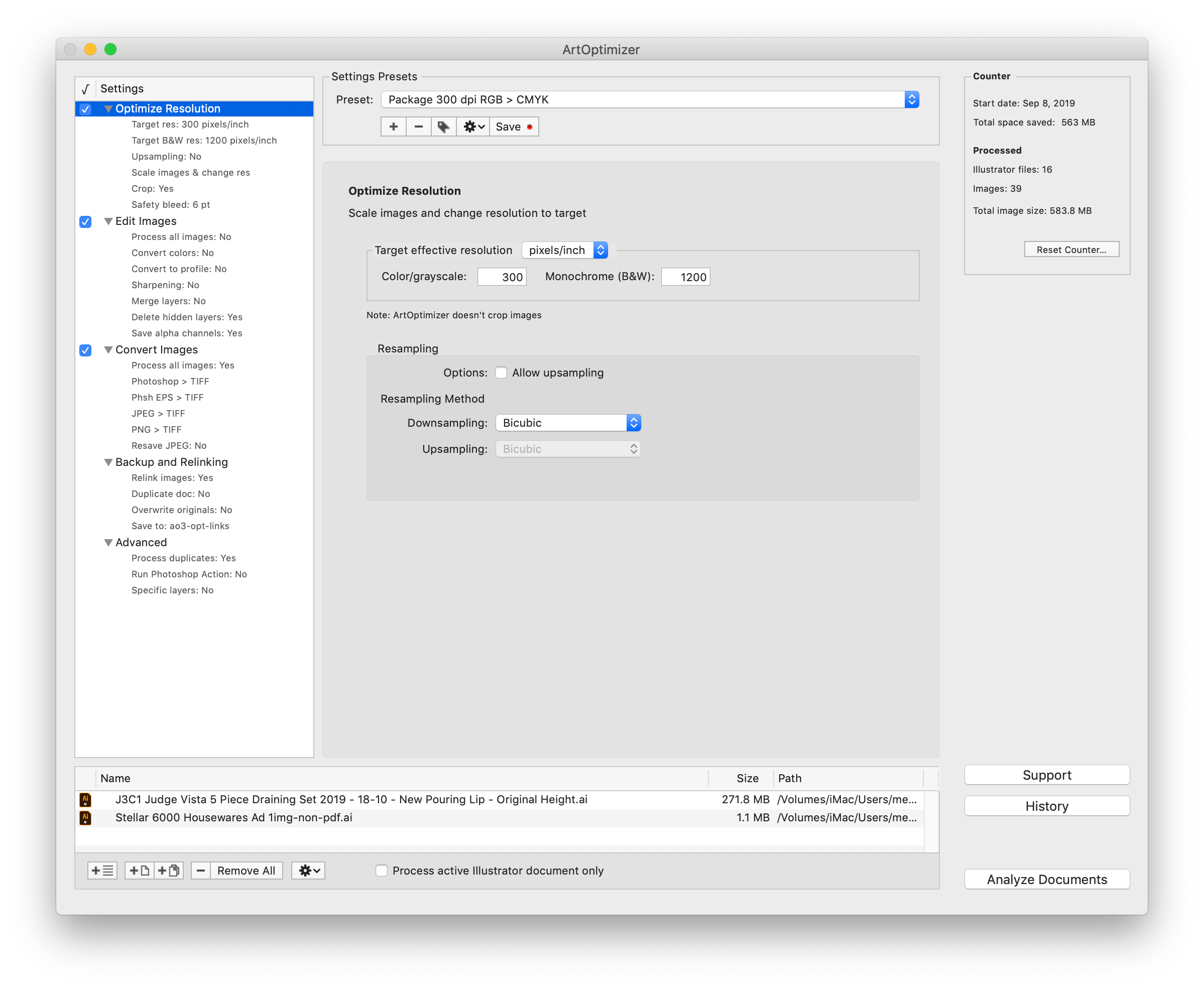
The new version adds support for the Preserve Details 2.0 resampling method, a new upscaling algorithm introduced in Photoshop CC 2018. The new option is the most advanced upscaling technology in Photoshop, which utilizes artificial intelligence to interpolate much more effectively. With this algorithm, image size can increase dramatically with surprisingly little loss of quality. ArtOptimizer users now can select the Preserve Details 2.0 method directly in the app in order to apply it automatically to Illustrator links that require upscaling.
ArtOptimizer is a powerful automation solution for users in the print, prepress, and web design industries. For example, with just a click of a button users can:
* Batch-process Illustrator files
* Scale images in Photoshop to match their dimensions in Illustrator
* Change image resolution to 300 dpi
* Convert RGB images to CMYK profile
* Resave JPEG files as TIFF
* Merge layers and delete unused ones
In the end of processing ArtOptimizer reimports images to Illustrator at 100% in their precise position. As a result users can save gigabytes of disk space and countless hours of optimizing images manually. In addition, ArtOptimizer helps users accelerate document printing and exporting to PDF, speed up file transfer to service providers, reduce job turnaround, and cut costs through faster processing.
Pricing and Availability:
ArtOptimizer can be purchased from Zevrix web site for $120 (USD), as well as from authorized resellers and Adobe Exchange. Licensed users of earlier versions can upgrade to ArtOptimizer 3 for $60. Trial is also available for download. ArtOptimizer requires macOS 10.8-10.15 and Adobe Illustrator/Photoshop CS6-2020.
Zevrix Solutions: http://zevrix.com
ArtOptimizer 3.0.8: http://zevrix.com/ArtOptimizer.php
Download ArtOptimizer: http://zevrix.com/ArtOptimizer.dmg
Purchase: http://zevrix.com/store.php
Screenshot: http://zevrix.com/screenshots/ao3/ao3-res-win.png
Located in Toronto, Canada, Zevrix Solutions provides automation and productivity solutions for Adobe Creative Cloud and Creative Suite software, PDF workflows, graphic file diagnostics and Microsoft Office output on Mac OS. Zevrix is dedicated to help professionals increase their profits through automating everyday tasks, producing error-free documents, saving disk space and cutting production costs. For more information, visit their website. Copyright (C) 2020 Zevrix Solutions. All Rights Reserved. Other trademarks and registered trademarks may be the property of their respective owners.
*******
Link To Article: https://prmac.com/release-id-83877.htm
*******
---------------------------------------------------------------------------------
Note that you can alter delivered distributions at any time.
Login to your account on prMac to alter your channel selection, or to opt-out at any time.
ArtOptimizer for Illustrator Adds Preserve Details 2 Upscale Method - Published on 01/20/20
Zevrix Solutions announces the release of ArtOptimizer 3.0.8, a feature update to company's image workflow automation tool for Adobe Illustrator. ArtOptimizer helps users reduce the size of Illustrator links and automate complex image transformations. The software also offers image format and color conversion, batch processing, settings presets, and much more. The new version adds support for the Preserve Details 2.0 resampling method - the most advanced upscaling technology in Photoshop.
Toronto (ON), Canada - Zevrix Solutions today announce release of ArtOptimizer 3.0.8 for Adobe Illustrator, a feature update to company's image workflow automation solution. The only tool of its kind for the Mac platform, ArtOptimizer eliminates the excess image data of Illustrator picture links and performs essential image adjustments. The software helps users save disk space as well as cut production time and reduce operational costs through automation of complex image manipulation tasks.
The new version adds support for the Preserve Details 2.0 resampling method, a new upscaling algorithm introduced in Photoshop CC 2018. The new option is the most advanced upscaling technology in Photoshop, which utilizes artificial intelligence to interpolate much more effectively. With this algorithm, image size can increase dramatically with surprisingly little loss of quality. ArtOptimizer users now can select the Preserve Details 2.0 method directly in the app in order to apply it automatically to Illustrator links that require upscaling.
ArtOptimizer is a powerful automation solution for users in the print, prepress, and web design industries. For example, with just a click of a button users can:
* Batch-process Illustrator files
* Scale images in Photoshop to match their dimensions in Illustrator
* Change image resolution to 300 dpi
* Convert RGB images to CMYK profile
* Resave JPEG files as TIFF
* Merge layers and delete unused ones
In the end of processing ArtOptimizer reimports images to Illustrator at 100% in their precise position. As a result users can save gigabytes of disk space and countless hours of optimizing images manually. In addition, ArtOptimizer helps users accelerate document printing and exporting to PDF, speed up file transfer to service providers, reduce job turnaround, and cut costs through faster processing.
Pricing and Availability:
ArtOptimizer can be purchased from Zevrix web site for $120 (USD), as well as from authorized resellers and Adobe Exchange. Licensed users of earlier versions can upgrade to ArtOptimizer 3 for $60. Trial is also available for download. ArtOptimizer requires macOS 10.8-10.15 and Adobe Illustrator/Photoshop CS6-2020.
Zevrix Solutions: http://zevrix.com
ArtOptimizer 3.0.8: http://zevrix.com/ArtOptimizer.php
Download ArtOptimizer: http://zevrix.com/ArtOptimizer.dmg
Purchase: http://zevrix.com/store.php
Screenshot: http://zevrix.com/screenshots/ao3/ao3-res-win.png
Located in Toronto, Canada, Zevrix Solutions provides automation and productivity solutions for Adobe Creative Cloud and Creative Suite software, PDF workflows, graphic file diagnostics and Microsoft Office output on Mac OS. Zevrix is dedicated to help professionals increase their profits through automating everyday tasks, producing error-free documents, saving disk space and cutting production costs. For more information, visit their website. Copyright (C) 2020 Zevrix Solutions. All Rights Reserved. Other trademarks and registered trademarks may be the property of their respective owners.
*******
Link To Article: https://prmac.com/release-id-83877.htm
*******
---------------------------------------------------------------------------------
Note that you can alter delivered distributions at any time.
Login to your account on prMac to alter your channel selection, or to opt-out at any time.
Further Expansion for CNet Training HQ in 2020
A new article has been published at prMac.
Further Expansion for CNet Training HQ in 2020 - Published on 01/18/20
CNet Training is continuing to expand its team with the appointment of two new team members at CNet's HQ in Suffolk, UK. New Instructor Andrew Reeves will join the strong team of highly experienced CNet Instructors who deliver data centre and network infrastructure programs across the globe. Andrew will work as part of the technical team to deliver high-quality network infrastructure education programs from The Global Digital Infrastructure Education Framework.
Bury St Edmunds, Suffolk - New Instructor Andrew Reeves will join the strong team of highly experienced CNet Instructors who deliver data centre and network infrastructure programs across the globe. Andrew will work as part of the technical team to deliver high-quality network infrastructure education programs from The Global Digital Infrastructure Education Framework. His role will also involve assessing learner's performance and marking assignments in support of the BTEC Qualifications quality process.
Andrew joins CNet following 15 years experience in the IT Services industry including project management roles with high profile network infrastructure organisations. Andrew displays skills in leadership, change management, project management, Enterprise Resource Planning tool implementation and service delivery. In previous roles, Andrew has also undertaken a project management role in a variety of large installation projects including work with The London Olympics, BBC, Walt Disney, Westgate Oxford, Bloomberg. More recently he was responsible for the implementation of a disaster recovery team to eight European datacentres incorporating a quality improvement plan.
Andy Brisbane has also joined the CNet team as Market Researcher. Andrew will work alongside the sales and marketing teams to provide insight into opportunities and to support the company in achieving on-going growth opportunities. Andrew joins the team from an analytical background and has experience in working to develop critical leads and processes and research management.
Andrew Stevens, President and CEO, CNet Training, says, "What a great start to the new decade, we are delighted to expand the CNet Training team again. CNet is focused on continuing its growth throughout the digital infrastructure industry and this expansion comes at an exciting and busy time for the business. The new team members are a fantastic addition to the team, they will work alongside the existing strong team of individuals employed by CNet across the world to help strengthen and further grow the global brand identity and reputation."
For more information on CNet Training's programs, please go to the CNet Training website or call +44 (0) 1284 767100.
CNet Training: https://www.cnet-training.com
CNet Training is the global leader in technical education for the digital infrastructure industry, comprising the data centre and network infrastructure sectors, and has been delivering industry education since 1996. CNet is the only industry dedicated education provider in the world to offer both internationally recognised qualifications and official certifications. All Material and Software (C) Copyright 2020 CNet Training. All Rights Reserved. Apple, the Apple logo, Macintosh Mac OS X and macOS are registered trademarks of Apple Inc. in the U.S. and/or other countries. Other trademarks and registered trademarks may be the property of their respective owners.
*******
Link To Article: https://prmac.com/release-id-83875.htm
*******
---------------------------------------------------------------------------------
Note that you can alter delivered distributions at any time.
Login to your account on prMac to alter your channel selection, or to opt-out at any time.
Further Expansion for CNet Training HQ in 2020 - Published on 01/18/20
CNet Training is continuing to expand its team with the appointment of two new team members at CNet's HQ in Suffolk, UK. New Instructor Andrew Reeves will join the strong team of highly experienced CNet Instructors who deliver data centre and network infrastructure programs across the globe. Andrew will work as part of the technical team to deliver high-quality network infrastructure education programs from The Global Digital Infrastructure Education Framework.
Bury St Edmunds, Suffolk - New Instructor Andrew Reeves will join the strong team of highly experienced CNet Instructors who deliver data centre and network infrastructure programs across the globe. Andrew will work as part of the technical team to deliver high-quality network infrastructure education programs from The Global Digital Infrastructure Education Framework. His role will also involve assessing learner's performance and marking assignments in support of the BTEC Qualifications quality process.
Andrew joins CNet following 15 years experience in the IT Services industry including project management roles with high profile network infrastructure organisations. Andrew displays skills in leadership, change management, project management, Enterprise Resource Planning tool implementation and service delivery. In previous roles, Andrew has also undertaken a project management role in a variety of large installation projects including work with The London Olympics, BBC, Walt Disney, Westgate Oxford, Bloomberg. More recently he was responsible for the implementation of a disaster recovery team to eight European datacentres incorporating a quality improvement plan.
Andy Brisbane has also joined the CNet team as Market Researcher. Andrew will work alongside the sales and marketing teams to provide insight into opportunities and to support the company in achieving on-going growth opportunities. Andrew joins the team from an analytical background and has experience in working to develop critical leads and processes and research management.
Andrew Stevens, President and CEO, CNet Training, says, "What a great start to the new decade, we are delighted to expand the CNet Training team again. CNet is focused on continuing its growth throughout the digital infrastructure industry and this expansion comes at an exciting and busy time for the business. The new team members are a fantastic addition to the team, they will work alongside the existing strong team of individuals employed by CNet across the world to help strengthen and further grow the global brand identity and reputation."
For more information on CNet Training's programs, please go to the CNet Training website or call +44 (0) 1284 767100.
CNet Training: https://www.cnet-training.com
CNet Training is the global leader in technical education for the digital infrastructure industry, comprising the data centre and network infrastructure sectors, and has been delivering industry education since 1996. CNet is the only industry dedicated education provider in the world to offer both internationally recognised qualifications and official certifications. All Material and Software (C) Copyright 2020 CNet Training. All Rights Reserved. Apple, the Apple logo, Macintosh Mac OS X and macOS are registered trademarks of Apple Inc. in the U.S. and/or other countries. Other trademarks and registered trademarks may be the property of their respective owners.
*******
Link To Article: https://prmac.com/release-id-83875.htm
*******
---------------------------------------------------------------------------------
Note that you can alter delivered distributions at any time.
Login to your account on prMac to alter your channel selection, or to opt-out at any time.
Cisdem Document Reader Ver5.1.0 Optimizes File Display Quality
A new article has been published at prMac.
Cisdem Document Reader Ver5.1.0 Optimizes File Display Quality - Published on 01/16/20
Cisdem announces Cisdem Document Reader for Mac 5.1.0, the update their intuitive and effective software for macOS. The update offers the WPD display quality optimized and crash issue fixed. It's a useful program to open PDF, XPS/OXPS, Visio, WPS, DjVu, WPD, and Winmail.dat on Mac at the same. Users can also export your files as PDF/image or only extract image from a document.
Madelia, Minnesota - Cisdem announces version 5.1.0 of Document Reader, one of their intuitive and effective software for macOS. This new version optimized WPD display quality and fixed the crash issue. Cisdem Document Reader enables users to view multiple file types including PDF, XPS/OXPS, Visio, WPS, DjVu, WPD, and Winmail.dat within one program. Users can adjust view modes; navigate to certain results by keywords; print or save the file into the PDF form.
"In the previous version (5.0.0), we optimize XPS display quality and Improved DjVu file opening speed for Cisdem Document Reader. But in less than 10 days, we immediately released another version (5.1.0) due to the discovery of some minor issues", said Edward Riley, the project manager of Cisdem. "We are committed to developing higher quality programs and bring good experience to our users. Once any issues appear, we will improve and upgrade the programs right away according to more advanced technology."
What's New in Version 5.1.0?
* Optimize WPD display quality
* Fixed the crash issue
Main Functions
* Support to open 7 document file types
Users can read PDF, VISIO (VSD, VSDX, VDX, and VST), WordPerfect (WPD), WPS, XPS, OXPS, DjVu, PDF and Winmail.dat files on Mac.
* Open various file types at the same time
The software can open multiple documents in different tabs. Just drag the files you want to read into the interface of the Cisdem Document Reader.
* Equipped with a set of reading tools
It offers a set of tools to enhance users' reading experience, such as full screen, view modes, page navigation, zoom & rotate, bookmark, etc.
* Print files as PDF
Specify the available printer, presets, copies, page ranges, and save your documents as PDF or PostScript.
* Keyword Search
This feature helps users quickly locate a word, character, or phrase with keywords, which greatly save time and let works go efficiency.
* Export file and extract image
It saves the file as PDF, TXT, PNG, JPEG, TIFF, BMP, and GIF. Or users can directly extract image from a document.
Price and Availability
Cisdem Document Reader for Mac 5.1.0 is worldwide exclusively through the official Cisdem website. It's completely free to open PDF files. While each of the other 6 file types is priced at $9.99. There is also a great discount for the full version, finally priced at $29.99. The free trial is available for download at the Cisdem website.
Cisdem: https://www.cisdem.com/
Cisdem Document Reader 5.1.0: https://www.cisdem.com/document-reader-mac.html
Download the Free Trial : https://www.cisdem.com/downloads/cisdem-documentreader-18.dmg
Cisdem provides productivity and business software that helps Mac users to get their job done faster. Cisdem products include top rated software centered on PDF Conversion, PDF Management, Data Recovery, and File Management. The company is dedicated in building highly efficient Mac software that make life easier and processes simpler. All Material and Software (C) Copyright 2020 Cisdem. All Rights Reserved. Apple, the Apple logo, Mac OS X and Macintosh are registered trademarks of Apple Inc. in the U.S. and/or other countries. Other trademarks and registered trademarks may be the property of their respective owners.
*******
Link To Article: https://prmac.com/release-id-83872.htm
*******
---------------------------------------------------------------------------------
Note that you can alter delivered distributions at any time.
Login to your account on prMac to alter your channel selection, or to opt-out at any time.
Cisdem Document Reader Ver5.1.0 Optimizes File Display Quality - Published on 01/16/20
Cisdem announces Cisdem Document Reader for Mac 5.1.0, the update their intuitive and effective software for macOS. The update offers the WPD display quality optimized and crash issue fixed. It's a useful program to open PDF, XPS/OXPS, Visio, WPS, DjVu, WPD, and Winmail.dat on Mac at the same. Users can also export your files as PDF/image or only extract image from a document.
Madelia, Minnesota - Cisdem announces version 5.1.0 of Document Reader, one of their intuitive and effective software for macOS. This new version optimized WPD display quality and fixed the crash issue. Cisdem Document Reader enables users to view multiple file types including PDF, XPS/OXPS, Visio, WPS, DjVu, WPD, and Winmail.dat within one program. Users can adjust view modes; navigate to certain results by keywords; print or save the file into the PDF form.
"In the previous version (5.0.0), we optimize XPS display quality and Improved DjVu file opening speed for Cisdem Document Reader. But in less than 10 days, we immediately released another version (5.1.0) due to the discovery of some minor issues", said Edward Riley, the project manager of Cisdem. "We are committed to developing higher quality programs and bring good experience to our users. Once any issues appear, we will improve and upgrade the programs right away according to more advanced technology."
What's New in Version 5.1.0?
* Optimize WPD display quality
* Fixed the crash issue
Main Functions
* Support to open 7 document file types
Users can read PDF, VISIO (VSD, VSDX, VDX, and VST), WordPerfect (WPD), WPS, XPS, OXPS, DjVu, PDF and Winmail.dat files on Mac.
* Open various file types at the same time
The software can open multiple documents in different tabs. Just drag the files you want to read into the interface of the Cisdem Document Reader.
* Equipped with a set of reading tools
It offers a set of tools to enhance users' reading experience, such as full screen, view modes, page navigation, zoom & rotate, bookmark, etc.
* Print files as PDF
Specify the available printer, presets, copies, page ranges, and save your documents as PDF or PostScript.
* Keyword Search
This feature helps users quickly locate a word, character, or phrase with keywords, which greatly save time and let works go efficiency.
* Export file and extract image
It saves the file as PDF, TXT, PNG, JPEG, TIFF, BMP, and GIF. Or users can directly extract image from a document.
Price and Availability
Cisdem Document Reader for Mac 5.1.0 is worldwide exclusively through the official Cisdem website. It's completely free to open PDF files. While each of the other 6 file types is priced at $9.99. There is also a great discount for the full version, finally priced at $29.99. The free trial is available for download at the Cisdem website.
Cisdem: https://www.cisdem.com/
Cisdem Document Reader 5.1.0: https://www.cisdem.com/document-reader-mac.html
Download the Free Trial : https://www.cisdem.com/downloads/cisdem-documentreader-18.dmg
Cisdem provides productivity and business software that helps Mac users to get their job done faster. Cisdem products include top rated software centered on PDF Conversion, PDF Management, Data Recovery, and File Management. The company is dedicated in building highly efficient Mac software that make life easier and processes simpler. All Material and Software (C) Copyright 2020 Cisdem. All Rights Reserved. Apple, the Apple logo, Mac OS X and Macintosh are registered trademarks of Apple Inc. in the U.S. and/or other countries. Other trademarks and registered trademarks may be the property of their respective owners.
*******
Link To Article: https://prmac.com/release-id-83872.htm
*******
---------------------------------------------------------------------------------
Note that you can alter delivered distributions at any time.
Login to your account on prMac to alter your channel selection, or to opt-out at any time.
Subscribe to:
Posts (Atom)