A new article has been published at prMac.
Free Imposition Software Now Available for Adobe InDesign Users - Published on 01/30/20
Meadows Publishing Solutions has released an updated version of their Meadows Productivity Suite, a completely free set of software utilities for Adobe InDesign. The MPS Pro Suite provides advanced imposition features that allow users to quickly create multi-up imposition layouts of graphics, PDF files, or InDesign documents. The software provides full control over content placement and positioning, and is also now compatible with Adobe InDesign 2020 for Macintosh and Windows.
Schaumburg, Illinois - Meadows Publishing Solutions today announced a new release of their Meadows Productivity Suite software, a completely Free set of software tools for Adobe InDesign that have been designed to streamline multi-up impositions, and other publishing tasks. The new release is now compatible with all Adobe InDesign 2020 and macOS Catalina systems.
About the Free Productivity Suite:
The MPS Pro Suite currently includes an advanced multi-up imposition utility, allowing users to quickly create multi-up imposition layouts of graphics, PDF files, or InDesign documents. The process is driven by a user interface that allows for the specification of trim size, bleed, spacing, and rotation of the imposed elements.
As the imposed elements are placed, crop and bleed marks can also be added automatically, and assigned to InDesign layers as they are created. For two-page impositions, the user can choose from one of several duplex modes, which ensures the imposed content will back up properly when printed. Control over content placement and fitting is also provided via a set of preference options.
The MPS Pro Suite comes with a comprehensive set of documentation, including a set of tutorial files. In addition, online help for the software is being made available via the Meadows support ticketing system.
To receive a free copy of the MPS Pro Suite, users simply visit the Meadows web site and fill in the short registration form. A confirmation email is then sent with all of the download and installation details. Please visit our online press center for logos, images, and product information. For more information, please contact John Kriho, President, Meadows Publishing Solutions.
Meadows Publishing Solutions: http://www.meadowsps.com
MPS Pro Suite: http://www.meadowsps.com/mpsprosupport
More Information: http://www.meadowsps.com/site/marketing/productinfo/company_info.htm
Register for Free: http://www.meadowsps.com/mpspro
Screenshot: http://www.meadowsps.com/site/marketing/pressreleases/graphics/mps-pro-suite-screen-shot.jpg
Media Assets: http://www.meadowsps.com/press
Meadows Publishing Solutions is a software development and integration company specializing in commercial and custom plug-in modules for Adobe InDesign and Adobe Acrobat as well as other extensible technologies. Meadows has developed a number of popular software packages for the database publishing and variable data printing markets, including their award-winning products AutoPrice and DesignMerge. Founded in 1991, Meadows is based just outside of Chicago in Schaumburg, Illinois. All Material and Software (C) Copyright 2020 Meadows Publishing Solutions. All Rights Reserved. Apple, the Apple logo, macOS and Macintosh are registered trademarks of Apple Inc. in the U.S. and/or other countries. Other trademarks and registered trademarks may be the property of their respective owners.
*******
Link To Article: https://prmac.com/release-id-83902.htm
*******
---------------------------------------------------------------------------------
Note that you can alter delivered distributions at any time.
Login to your account on prMac to alter your channel selection, or to opt-out at any time.


BatchOutput PDF Adds Printer Paper Tray Selection Based on Document Text
A new article has been published at prMac.
BatchOutput PDF Adds Printer Paper Tray Selection Based on Document Text - Published on 01/29/20
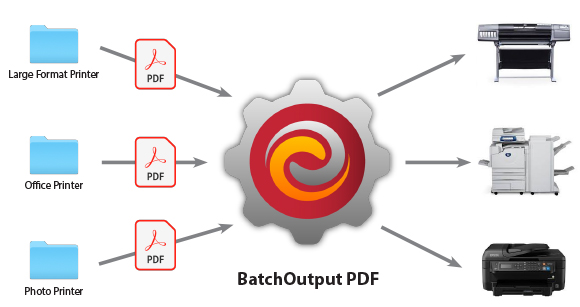
Zevrix Solutions releases BatchOutput PDF 2.3, a feature update to company's PDF printing automation solution. The only tool for automatic PDF printing on the Mac market, the app processes PDF files from watched hot folders. BatchOutput PDF saves users the time and effort of printing PDFs manually. Users only need to drop PDFs into hot folders for automatic printing. The new version adds an option to select specific printer paper tray for certain pages based on specific text in PDF document.
Toronto (ON), Canada - Zevrix Solutions announces the release of BatchOutput PDF 2.3, a feature update to the company's PDF printing automation solution for Mac. The only consumer-oriented product for automatic PDF printing on the Apple market, the software allows users to process PDF documents from watched hot folders. The app saves customers the time and effort of opening and printing each document manually.
The new version introduces an advanced option to use text from PDF document for paper tray selection for specific pages. The page where the first occurrence of the search string is found will be printed from the tray defined in the "First page from" printer option. The rest of the pages will be printed from the "Remaining from" tray. This option saves users hours of manual page sorting when printing receipts, invoices, legal documents, and other paperwork
"The cost is very low compared to the power this app has," says Mark Lenaerts of ZwartOpWit printing company in Herenthout, Belgium. "We produce thousands of prints every week and direct them to the right printers with the correct settings. To be able to make adjustments in one place for every workflow is easy and efficient."
BatchOutput PDF helps users eliminate countless repetitive tasks of opening PDF files and adjusting print settings manually by bypassing the print dialog. The app offers the following key features:
* Print PDFs automatically from hot folders
* Create hot folders for different print settings
* Specify password for encrypted PDFs
* Detailed output history
* Save time and hassle of printing each PDF manually
In addition to the single-user version of the program, Zevrix also offers BatchOutput PDF Server that can serve unlimited users on a network.
Pricing and Availability:
BatchOutput PDF can be purchased from Zevrix website for $24.95 USD (Server version $99.95), as well as from Mac App Store and authorized resellers. The update is free for licensed users of version 2. Trial is also available for download. BatchOutput PDF supports macOS 10.8-10.15.
Zevrix Solutions: http://zevrix.com
BatchOutput PDF 2.3: http://zevrix.com/BatchOutputPDF.php
Download BatchOutput PDF: http://zevrix.com/BatchOutputPDF.dmg
Purchase: http://zevrix.com/store.php
Screenshot: http://zevrix.com/screenshots/bo-pdf/bopdf-diagram-580.jpg
Located in Toronto, Canada, Zevrix Solutions provides automation and productivity solutions for Adobe Creative Cloud and Creative Suite software, PDF workflows, graphic file diagnostics and Microsoft Office output on Mac OS. Zevrix is dedicated to help professionals increase their profits through automating everyday tasks, producing error-free documents, saving disk space and cutting production costs. For more information, visit their website. Copyright (C) 2020 Zevrix Solutions. All Rights Reserved. Other trademarks and registered trademarks may be the property of their respective owners.
*******
Link To Article: https://prmac.com/release-id-83900.htm
*******
---------------------------------------------------------------------------------
Note that you can alter delivered distributions at any time.
Login to your account on prMac to alter your channel selection, or to opt-out at any time.
BatchOutput PDF Adds Printer Paper Tray Selection Based on Document Text - Published on 01/29/20
Zevrix Solutions releases BatchOutput PDF 2.3, a feature update to company's PDF printing automation solution. The only tool for automatic PDF printing on the Mac market, the app processes PDF files from watched hot folders. BatchOutput PDF saves users the time and effort of printing PDFs manually. Users only need to drop PDFs into hot folders for automatic printing. The new version adds an option to select specific printer paper tray for certain pages based on specific text in PDF document.
Toronto (ON), Canada - Zevrix Solutions announces the release of BatchOutput PDF 2.3, a feature update to the company's PDF printing automation solution for Mac. The only consumer-oriented product for automatic PDF printing on the Apple market, the software allows users to process PDF documents from watched hot folders. The app saves customers the time and effort of opening and printing each document manually.
The new version introduces an advanced option to use text from PDF document for paper tray selection for specific pages. The page where the first occurrence of the search string is found will be printed from the tray defined in the "First page from" printer option. The rest of the pages will be printed from the "Remaining from" tray. This option saves users hours of manual page sorting when printing receipts, invoices, legal documents, and other paperwork
"The cost is very low compared to the power this app has," says Mark Lenaerts of ZwartOpWit printing company in Herenthout, Belgium. "We produce thousands of prints every week and direct them to the right printers with the correct settings. To be able to make adjustments in one place for every workflow is easy and efficient."
BatchOutput PDF helps users eliminate countless repetitive tasks of opening PDF files and adjusting print settings manually by bypassing the print dialog. The app offers the following key features:
* Print PDFs automatically from hot folders
* Create hot folders for different print settings
* Specify password for encrypted PDFs
* Detailed output history
* Save time and hassle of printing each PDF manually
In addition to the single-user version of the program, Zevrix also offers BatchOutput PDF Server that can serve unlimited users on a network.
Pricing and Availability:
BatchOutput PDF can be purchased from Zevrix website for $24.95 USD (Server version $99.95), as well as from Mac App Store and authorized resellers. The update is free for licensed users of version 2. Trial is also available for download. BatchOutput PDF supports macOS 10.8-10.15.
Zevrix Solutions: http://zevrix.com
BatchOutput PDF 2.3: http://zevrix.com/BatchOutputPDF.php
Download BatchOutput PDF: http://zevrix.com/BatchOutputPDF.dmg
Purchase: http://zevrix.com/store.php
Screenshot: http://zevrix.com/screenshots/bo-pdf/bopdf-diagram-580.jpg
Located in Toronto, Canada, Zevrix Solutions provides automation and productivity solutions for Adobe Creative Cloud and Creative Suite software, PDF workflows, graphic file diagnostics and Microsoft Office output on Mac OS. Zevrix is dedicated to help professionals increase their profits through automating everyday tasks, producing error-free documents, saving disk space and cutting production costs. For more information, visit their website. Copyright (C) 2020 Zevrix Solutions. All Rights Reserved. Other trademarks and registered trademarks may be the property of their respective owners.
*******
Link To Article: https://prmac.com/release-id-83900.htm
*******
---------------------------------------------------------------------------------
Note that you can alter delivered distributions at any time.
Login to your account on prMac to alter your channel selection, or to opt-out at any time.
Artifex to Showcase SmartOffice Enterprise Solutions at 2020 RSAC
A new article has been published at prMac.
Artifex to Showcase SmartOffice Enterprise Solutions at 2020 RSAC - Published on 01/29/20
California based Artifex Software Inc. will be exhibiting at the upcoming 2020 RSA Conference at the Moscone Convention Center in San Francisco, CA from February 24 - 27, booth #4224 North Hall. Artifex will be offering live demonstrations of SmartOffice, the company's mobile document editing application. SmartOffice enables anyone to view, edit, create, share, present and print Microsoft Office and PDF documents on mobile devices.
Novato, California - Artifex Software, Inc., the developer of SmartOffice, will be exhibiting at the upcoming 2020 RSA Conference at the Moscone Convention Center in San Francisco, CA from February 24 - 27, booth #4224 North Hall.
SmartOffice is a lightweight and easy-to-use mobile document productivity suite. View, edit, create, print, present and share Microsoft Office and PDF documents via your mobile device. SmartOffice has been designed to provide an intuitive easy-to-use mobile workflow, perfect for today's on-the-go world. New features include PDF form filling, full-screen viewing mode, and support for footnotes and endnotes. Additional advanced features are slated for release later in the year.
Artifex will showcase how leading organizations rely on SmartOffice to empower their mobile workforce. SmartOffice offers a variety of solutions that can be securely incorporated into an enterprise document workflow platform. The SmartOffice SDK seamlessly and securely integrates with EFSS, MDM or EMM environments, while the SmartOffice Mobile App can be wrapped within an enterprise security platform.
"In 2019 alone, over 4 billion records were exposed due to data breaches, so taking measures to prevent a breach in today's increasingly mobile work environment is critical to an organization's security," said Miles Jones, President of Artifex. "Mobile workforces need to conduct their work efficiently, while Enterprise IT departments must be diligent in securing their networks. The SmartOffice SDK makes it easy to incorporate these essential work functions into enterprise security platforms. We like to refer to SmartOffice as the 'securable alternative' to MS Office for mobile."
SmartOffice SDK provides all the functionality and features of our SmartOffice app, available to be secured within an enterprise's encrypted network. Enterprise IT departments can prevent data breaches via SmartOffice SDK's controlled access permission tools and customizable document editing controls, that extend down to the user or document level. Enterprise information is secured while employees are empowered to work with their MS Office and PDF documents while on-the-go.
"SmartOffice makes tremendous sense for mobile platform companies and organizations looking for a securable document viewing/editing tool for mobile deployment," said Lisa Fenn, Director of Marketing for Artifex. "SmartOffice's small footprint is well suited for mobile devices and was designed to integrate within enterprise security platforms. In addition, SmartOffice is fully functional without Internet connectivity. Files can be saved and edited locally with no Internet dependency. Not only does SmartOffice seamlessly support MS Office documents, but it also provides the added benefit of PDF viewing and annotation capabilities."
For more information and a demo of SmartOffice, please visit the Artifex booth #4224 Moscone Center, North Hall. Or, contact Artifex Software online.
Artifex Software: https://artifex.com/
SmartOffice: https://artifex.com/products/smartoffice/
Booth @4224 North Hall Moscone Center: https://www.rsaconference.com/usa/expo-and-sponsors/artifex-software
For over 25 years Artifex Software has provided premier document management solutions to top-level global customers including Adobe, BlackBerry, Google, Dropbox, IBM, Intel, HP, Xerox, LG Electronics, BenQ, Garmin, and more. With teams of engineers and leadership talent on three continents, North America, Europe, and Asia, we are positioned to help ensure your needs are met. All Material and Software (C) Copyright 2020 Artifex Software, Inc. All Rights Reserved. Apple, the Apple logo, iPhone, iPod and iPad are registered trademarks of Apple Inc. in the U.S. and/or other countries. Other trademarks and registered trademarks may be the property of their respective owners.
*******
Link To Article: https://prmac.com/release-id-83899.htm
*******
---------------------------------------------------------------------------------
Note that you can alter delivered distributions at any time.
Login to your account on prMac to alter your channel selection, or to opt-out at any time.
Artifex to Showcase SmartOffice Enterprise Solutions at 2020 RSAC - Published on 01/29/20
California based Artifex Software Inc. will be exhibiting at the upcoming 2020 RSA Conference at the Moscone Convention Center in San Francisco, CA from February 24 - 27, booth #4224 North Hall. Artifex will be offering live demonstrations of SmartOffice, the company's mobile document editing application. SmartOffice enables anyone to view, edit, create, share, present and print Microsoft Office and PDF documents on mobile devices.
Novato, California - Artifex Software, Inc., the developer of SmartOffice, will be exhibiting at the upcoming 2020 RSA Conference at the Moscone Convention Center in San Francisco, CA from February 24 - 27, booth #4224 North Hall.
SmartOffice is a lightweight and easy-to-use mobile document productivity suite. View, edit, create, print, present and share Microsoft Office and PDF documents via your mobile device. SmartOffice has been designed to provide an intuitive easy-to-use mobile workflow, perfect for today's on-the-go world. New features include PDF form filling, full-screen viewing mode, and support for footnotes and endnotes. Additional advanced features are slated for release later in the year.
Artifex will showcase how leading organizations rely on SmartOffice to empower their mobile workforce. SmartOffice offers a variety of solutions that can be securely incorporated into an enterprise document workflow platform. The SmartOffice SDK seamlessly and securely integrates with EFSS, MDM or EMM environments, while the SmartOffice Mobile App can be wrapped within an enterprise security platform.
"In 2019 alone, over 4 billion records were exposed due to data breaches, so taking measures to prevent a breach in today's increasingly mobile work environment is critical to an organization's security," said Miles Jones, President of Artifex. "Mobile workforces need to conduct their work efficiently, while Enterprise IT departments must be diligent in securing their networks. The SmartOffice SDK makes it easy to incorporate these essential work functions into enterprise security platforms. We like to refer to SmartOffice as the 'securable alternative' to MS Office for mobile."
SmartOffice SDK provides all the functionality and features of our SmartOffice app, available to be secured within an enterprise's encrypted network. Enterprise IT departments can prevent data breaches via SmartOffice SDK's controlled access permission tools and customizable document editing controls, that extend down to the user or document level. Enterprise information is secured while employees are empowered to work with their MS Office and PDF documents while on-the-go.
"SmartOffice makes tremendous sense for mobile platform companies and organizations looking for a securable document viewing/editing tool for mobile deployment," said Lisa Fenn, Director of Marketing for Artifex. "SmartOffice's small footprint is well suited for mobile devices and was designed to integrate within enterprise security platforms. In addition, SmartOffice is fully functional without Internet connectivity. Files can be saved and edited locally with no Internet dependency. Not only does SmartOffice seamlessly support MS Office documents, but it also provides the added benefit of PDF viewing and annotation capabilities."
For more information and a demo of SmartOffice, please visit the Artifex booth #4224 Moscone Center, North Hall. Or, contact Artifex Software online.
Artifex Software: https://artifex.com/
SmartOffice: https://artifex.com/products/smartoffice/
Booth @4224 North Hall Moscone Center: https://www.rsaconference.com/usa/expo-and-sponsors/artifex-software
For over 25 years Artifex Software has provided premier document management solutions to top-level global customers including Adobe, BlackBerry, Google, Dropbox, IBM, Intel, HP, Xerox, LG Electronics, BenQ, Garmin, and more. With teams of engineers and leadership talent on three continents, North America, Europe, and Asia, we are positioned to help ensure your needs are met. All Material and Software (C) Copyright 2020 Artifex Software, Inc. All Rights Reserved. Apple, the Apple logo, iPhone, iPod and iPad are registered trademarks of Apple Inc. in the U.S. and/or other countries. Other trademarks and registered trademarks may be the property of their respective owners.
*******
Link To Article: https://prmac.com/release-id-83899.htm
*******
---------------------------------------------------------------------------------
Note that you can alter delivered distributions at any time.
Login to your account on prMac to alter your channel selection, or to opt-out at any time.
LinkOptimizer for Adobe InDesign Now Can Scale Layer Styles in Photoshop
A new article has been published at prMac.
LinkOptimizer for Adobe InDesign Now Can Scale Layer Styles in Photoshop - Published on 01/28/20
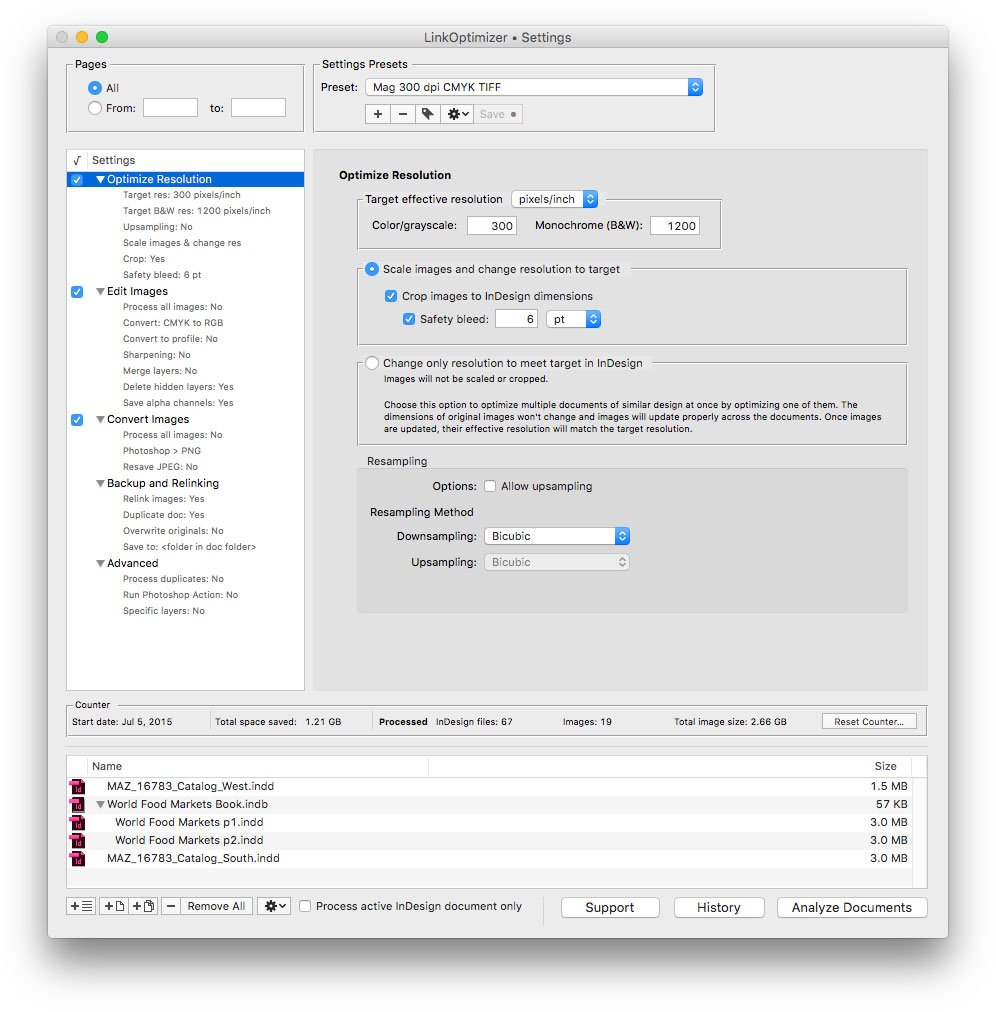
Zevrix Solutions announces LinkOptimizer 5.4.6, a feature update to company's workflow automation tool for Adobe InDesign. LinkOptimizer lets users automatically scale and crop images to their InDesign dimensions at a target resolution, convert image formats and colors, adjust sharpening, run Photoshop actions, rename links and more. The new version adds support for the Scale Styles option in Photoshop that allows to keep layer effects in proportion to the parent layers when resizing the image.
Toronto (ON), Canada - Zevrix Solutions today announces LinkOptimizer 5.4.6, a feature update to the company's workflow automation tool for Adobe InDesign. LinkOptimizer automates complex image manipulation tasks and allows users to significantly reduce the size of InDesign links, save processing time, and reduce production costs.
The new version adds support to the Scale Style option in Photoshop that allows to scale the layer effects in the resized image. The new feature lets LinkOptimizer users retain the original layer structure of optimized InDesign links instead of having to merge image layers during processing. Photoshop layers had to be merged in previous versions of the plug-in to preserve the proportional appearance of drop shadows, bevels, overlays and other layer effects.
"Today LinkOptimizer batched a huge book project and another magazine project in minutes vs. hours. Now I can take the afternoon off and drink beer," says Brian Donahue, owner of Bedesign studio in Minneapolis, Minnesota. "Thanks for freeing up my afternoon, rather than doing production work."
LinkOptimizer works automatically with Photoshop to perform essential image adjustments, convert image formats, and eliminate the excess image data of InDesign links. For example, with just a click of a button users can:
* Process dozens of InDesign files
* Scale and crop images to match their dimensions in InDesign
* Change their resolution to 300 dpi
* Convert RGB images to a CMYK profile
* Resave PNG files as TIFF
* Run a Photoshop action on each image.
At the end of processing, LinkOptimizer reimports images to InDesign at 100% in their precise position. As a result, users can save gigabytes of disk space, accelerate document output, reduce job turnaround and cut costs through faster processing.
Pricing and Availability:
LinkOptimizer can be purchased from Zevrix website for $259.95 USD (Light version: $179.95) as well as from Adobe Exchange and authorized resellers. Trial is also available for download. The update is free for LinkOptimizer 5.x users and $130 to upgrade from previous versions. LinkOptimizer requires macOS 10.8-10.15 and Adobe InDesign / Photoshop CS5-2020.
Zevrix Solutions: http://zevrix.com
LinkOptimizer 5.4.6: http://zevrix.com/LinkOptimizer.php
Download LinkOptimizer: http://zevrix.com/LinkOptimizer.dmg
Purchase: http://zevrix.com/store.php
Screenshot: http://zevrix.com/screenshots/lo5/res-win.jpg
Located in Toronto, Canada, Zevrix Solutions provides automation and productivity solutions for Adobe Creative Cloud and Creative Suite software, PDF workflows, graphic file diagnostics and Microsoft Office output on Mac OS. Zevrix is dedicated to help professionals increase their profits through automating everyday tasks, producing error-free documents, saving disk space and cutting production costs. For more information, visit their website. Copyright (C) 2020 Zevrix Solutions. All Rights Reserved. Other trademarks and registered trademarks may be the property of their respective owners.
*******
Link To Article: https://prmac.com/release-id-83898.htm
*******
---------------------------------------------------------------------------------
Note that you can alter delivered distributions at any time.
Login to your account on prMac to alter your channel selection, or to opt-out at any time.
LinkOptimizer for Adobe InDesign Now Can Scale Layer Styles in Photoshop - Published on 01/28/20
Zevrix Solutions announces LinkOptimizer 5.4.6, a feature update to company's workflow automation tool for Adobe InDesign. LinkOptimizer lets users automatically scale and crop images to their InDesign dimensions at a target resolution, convert image formats and colors, adjust sharpening, run Photoshop actions, rename links and more. The new version adds support for the Scale Styles option in Photoshop that allows to keep layer effects in proportion to the parent layers when resizing the image.
Toronto (ON), Canada - Zevrix Solutions today announces LinkOptimizer 5.4.6, a feature update to the company's workflow automation tool for Adobe InDesign. LinkOptimizer automates complex image manipulation tasks and allows users to significantly reduce the size of InDesign links, save processing time, and reduce production costs.
The new version adds support to the Scale Style option in Photoshop that allows to scale the layer effects in the resized image. The new feature lets LinkOptimizer users retain the original layer structure of optimized InDesign links instead of having to merge image layers during processing. Photoshop layers had to be merged in previous versions of the plug-in to preserve the proportional appearance of drop shadows, bevels, overlays and other layer effects.
"Today LinkOptimizer batched a huge book project and another magazine project in minutes vs. hours. Now I can take the afternoon off and drink beer," says Brian Donahue, owner of Bedesign studio in Minneapolis, Minnesota. "Thanks for freeing up my afternoon, rather than doing production work."
LinkOptimizer works automatically with Photoshop to perform essential image adjustments, convert image formats, and eliminate the excess image data of InDesign links. For example, with just a click of a button users can:
* Process dozens of InDesign files
* Scale and crop images to match their dimensions in InDesign
* Change their resolution to 300 dpi
* Convert RGB images to a CMYK profile
* Resave PNG files as TIFF
* Run a Photoshop action on each image.
At the end of processing, LinkOptimizer reimports images to InDesign at 100% in their precise position. As a result, users can save gigabytes of disk space, accelerate document output, reduce job turnaround and cut costs through faster processing.
Pricing and Availability:
LinkOptimizer can be purchased from Zevrix website for $259.95 USD (Light version: $179.95) as well as from Adobe Exchange and authorized resellers. Trial is also available for download. The update is free for LinkOptimizer 5.x users and $130 to upgrade from previous versions. LinkOptimizer requires macOS 10.8-10.15 and Adobe InDesign / Photoshop CS5-2020.
Zevrix Solutions: http://zevrix.com
LinkOptimizer 5.4.6: http://zevrix.com/LinkOptimizer.php
Download LinkOptimizer: http://zevrix.com/LinkOptimizer.dmg
Purchase: http://zevrix.com/store.php
Screenshot: http://zevrix.com/screenshots/lo5/res-win.jpg
Located in Toronto, Canada, Zevrix Solutions provides automation and productivity solutions for Adobe Creative Cloud and Creative Suite software, PDF workflows, graphic file diagnostics and Microsoft Office output on Mac OS. Zevrix is dedicated to help professionals increase their profits through automating everyday tasks, producing error-free documents, saving disk space and cutting production costs. For more information, visit their website. Copyright (C) 2020 Zevrix Solutions. All Rights Reserved. Other trademarks and registered trademarks may be the property of their respective owners.
*******
Link To Article: https://prmac.com/release-id-83898.htm
*******
---------------------------------------------------------------------------------
Note that you can alter delivered distributions at any time.
Login to your account on prMac to alter your channel selection, or to opt-out at any time.
InterConneX 2.0.1 Now Available
A new article has been published at prMac.
InterConneX 2.0.1 Now Available - Published on 01/28/20
Econ Technologies, Inc is proud to announce the release of InterConneX 2.0.1, an update to their file management and storage app for the iPhone & iPad. Version 2.0.1 offers better support for Dynamic Type font sizes that can be configured in iOS. Beyond the usability changes, many minor issues have been resolved to make InterConneX even more reliable. Some minor cloud-based connection problems have been resolved and some rare crashes have been rectified.
Casselberry, Florida - Econ Technologies, Inc is proud to announce the release of InterConneX 2.0.1, the file sharing and management App for iOS, is available for immediate install! The latest InterConneX offers better support for Dynamic Type font sizes that can be configured in iOS. Beyond the usability changes, many minor issues have been resolved to make InterConneX even more reliable. Some minor cloud-based connection problems have been resolved and some rare crashes have been rectified.
InterConneX is a great utility to manage files on your iPad as the multi-tasking support for 'Split View' or 'Slide Over' makes Dragging & Dropping files between sharespaces in order to copy items to your Mac or cloud storage buckets easy.
Duilio Proni, President of Econ Technologies, Inc. said "Now that the iPad Pro is a viable laptop replacement for everyday use, InterConneX simplifies handing off your files between Macs, iPads and iPhones."
InterConneX is a file management & storage app for the iPhone & iPad that enables you to control & share all your files & folders in one location, like on a Mac. Share files with other iPads and iPhones running InterConneX or share files with Macs running ChronoSync or ChronoAgent. The lineup of InterConneX, ChronoSync, and ChronoAgent links your files between iPhone, iPad, and Mac while harnessing the power of Backblaze B2, Amazon AWS, Google Cloud and SFTP Servers. Try InterConneX for free. The first 3 sharespaces are free. If you need more, add unlimited sharespaces for $9.99 (USD).
Econ Technologies: https://www.econtechnologies.com/
InterConneX Overview: https://www.econtechnologies.com/interconnex/overview.html
InterConneX Release Notes: https://www.econtechnologies.com/interconnex/notes.html
Media Resources: https://www.econtechnologies.com/about/media.html
Econ Technologies, Inc has been creating Apple(R) software for over 20 years including ChronoSync(TM) for Mac(R) OS X , ChronoAgent(TM) for Mac(R) OS X, and InterConneX for the iPad & iPhone. All Material and Software (C) Copyright 2020 Econ Technologies. All Rights Reserved. Apple, the Apple logo, Macintosh and macOS are registered trademarks of Apple Inc. in the U.S. and/or other countries. Other trademarks and registered trademarks may be the property of their respective owners.
*******
Link To Article: https://prmac.com/release-id-83897.htm
*******
---------------------------------------------------------------------------------
Note that you can alter delivered distributions at any time.
Login to your account on prMac to alter your channel selection, or to opt-out at any time.
InterConneX 2.0.1 Now Available - Published on 01/28/20
Econ Technologies, Inc is proud to announce the release of InterConneX 2.0.1, an update to their file management and storage app for the iPhone & iPad. Version 2.0.1 offers better support for Dynamic Type font sizes that can be configured in iOS. Beyond the usability changes, many minor issues have been resolved to make InterConneX even more reliable. Some minor cloud-based connection problems have been resolved and some rare crashes have been rectified.
Casselberry, Florida - Econ Technologies, Inc is proud to announce the release of InterConneX 2.0.1, the file sharing and management App for iOS, is available for immediate install! The latest InterConneX offers better support for Dynamic Type font sizes that can be configured in iOS. Beyond the usability changes, many minor issues have been resolved to make InterConneX even more reliable. Some minor cloud-based connection problems have been resolved and some rare crashes have been rectified.
InterConneX is a great utility to manage files on your iPad as the multi-tasking support for 'Split View' or 'Slide Over' makes Dragging & Dropping files between sharespaces in order to copy items to your Mac or cloud storage buckets easy.
Duilio Proni, President of Econ Technologies, Inc. said "Now that the iPad Pro is a viable laptop replacement for everyday use, InterConneX simplifies handing off your files between Macs, iPads and iPhones."
InterConneX is a file management & storage app for the iPhone & iPad that enables you to control & share all your files & folders in one location, like on a Mac. Share files with other iPads and iPhones running InterConneX or share files with Macs running ChronoSync or ChronoAgent. The lineup of InterConneX, ChronoSync, and ChronoAgent links your files between iPhone, iPad, and Mac while harnessing the power of Backblaze B2, Amazon AWS, Google Cloud and SFTP Servers. Try InterConneX for free. The first 3 sharespaces are free. If you need more, add unlimited sharespaces for $9.99 (USD).
Econ Technologies: https://www.econtechnologies.com/
InterConneX Overview: https://www.econtechnologies.com/interconnex/overview.html
InterConneX Release Notes: https://www.econtechnologies.com/interconnex/notes.html
Media Resources: https://www.econtechnologies.com/about/media.html
Econ Technologies, Inc has been creating Apple(R) software for over 20 years including ChronoSync(TM) for Mac(R) OS X , ChronoAgent(TM) for Mac(R) OS X, and InterConneX for the iPad & iPhone. All Material and Software (C) Copyright 2020 Econ Technologies. All Rights Reserved. Apple, the Apple logo, Macintosh and macOS are registered trademarks of Apple Inc. in the U.S. and/or other countries. Other trademarks and registered trademarks may be the property of their respective owners.
*******
Link To Article: https://prmac.com/release-id-83897.htm
*******
---------------------------------------------------------------------------------
Note that you can alter delivered distributions at any time.
Login to your account on prMac to alter your channel selection, or to opt-out at any time.
Mailbutler Launches Outlook Add-in to Boost Email Productivity
A new article has been published at prMac.
Mailbutler Launches Outlook Add-in to Boost Email Productivity - Published on 01/28/20
Mailbutler, provider of the leading email productivity software, is now available on Microsoft Outlook. Mailbutler brings missing functionalities of modern emailing back to the users inbox, with time-saving tools such as snooze, send later, templates, signatures, tracking, and more. The Mailbutler extension for Outlook offers a simple solution to increase the capability of Outlook to handle personal as well as work related emails within a team or as a single user.
Berlin, Germany - Mailbutler, the creator of the leading email extension that helps professionals and teams enhance their inbox, is now available for Microsoft Outlook. After having been requested by many Outlook users, the extension can finally be downloaded in the Microsoft app store (AppSource) or through the Mailbutler website. The extension offers its users an easy way to have a more powerful inbox and optimize their everyday workflow. The add-in works just like the one that was already available for Apple Mail and Gmail users - it's a timesaving, must-have tool that includes features such as tracking details, follow up reminders, scheduling, message templates and more.
Key feature overview:
* Tracking: turn on read receipts to find out if, when and where your email or link was opened
* Send Later: compose emails ahead of time and schedule them to be sent at a specific date and time
* Signatures: create professional signatures with templates for you and your team
* Message Templates: save time by using pre-written messages
* Integrations: sync emails to your favorite project manager and productivity tools
Tobias Knobl, CEO and co-founder of Mailbutler said: "Over the years we have been asked plenty of times to make Mailbutler available for Outlook users. We have worked hard on making this happen and are grateful for the support coming our way. Writing emails is indispensable nowadays and can be a hassle. Mailbutler's features allow you to minimize the amount of time spend in your inbox."
Pricing and Availability:
Users can choose between three different types of subscriptions. Mailbutler Essential: Free, up to 30 actions for Professional and Business Features Mailbutler Professional: starting at Euro 6.50 per month, unlimited Professional features and up to 30 actions for Business features
Mailbutler Business: starting at Euro 24.95 per month, unlimited access to all features
Mailbutler: https://www.mailbutler.io/?utm_source=&utm_medium=press-release&utm_campaign=Outlook%2520Release
Mailbutler for Outlook: https://www.mailbutler.io/outlook?utm_source=&utm_medium=press-release&utm_campaign=Outlook%2520Release
Mailbutler was founded with the vision to make the life of email users easier, and help them complete their daily tasks in the most convenient and elegant way. Their product Mailbutler is an extension for Gmail, Apple Mail, Outlook, iOS and Android which adds many powerful features like Tracking, Send Later, Signature, Message Templates, Snooze and much more to the Inbox. All Material and Software (C) Copyright 2020 Mailbutler GmbH. All Rights Reserved. Apple, the Apple logo, Macintosh, and macOS are registered trademarks of Apple Inc. in the U.S. and/or other countries.
*******
Link To Article: https://prmac.com/release-id-83896.htm
*******
---------------------------------------------------------------------------------
Note that you can alter delivered distributions at any time.
Login to your account on prMac to alter your channel selection, or to opt-out at any time.
Mailbutler Launches Outlook Add-in to Boost Email Productivity - Published on 01/28/20
Mailbutler, provider of the leading email productivity software, is now available on Microsoft Outlook. Mailbutler brings missing functionalities of modern emailing back to the users inbox, with time-saving tools such as snooze, send later, templates, signatures, tracking, and more. The Mailbutler extension for Outlook offers a simple solution to increase the capability of Outlook to handle personal as well as work related emails within a team or as a single user.
Berlin, Germany - Mailbutler, the creator of the leading email extension that helps professionals and teams enhance their inbox, is now available for Microsoft Outlook. After having been requested by many Outlook users, the extension can finally be downloaded in the Microsoft app store (AppSource) or through the Mailbutler website. The extension offers its users an easy way to have a more powerful inbox and optimize their everyday workflow. The add-in works just like the one that was already available for Apple Mail and Gmail users - it's a timesaving, must-have tool that includes features such as tracking details, follow up reminders, scheduling, message templates and more.
Key feature overview:
* Tracking: turn on read receipts to find out if, when and where your email or link was opened
* Send Later: compose emails ahead of time and schedule them to be sent at a specific date and time
* Signatures: create professional signatures with templates for you and your team
* Message Templates: save time by using pre-written messages
* Integrations: sync emails to your favorite project manager and productivity tools
Tobias Knobl, CEO and co-founder of Mailbutler said: "Over the years we have been asked plenty of times to make Mailbutler available for Outlook users. We have worked hard on making this happen and are grateful for the support coming our way. Writing emails is indispensable nowadays and can be a hassle. Mailbutler's features allow you to minimize the amount of time spend in your inbox."
Pricing and Availability:
Users can choose between three different types of subscriptions. Mailbutler Essential: Free, up to 30 actions for Professional and Business Features Mailbutler Professional: starting at Euro 6.50 per month, unlimited Professional features and up to 30 actions for Business features
Mailbutler Business: starting at Euro 24.95 per month, unlimited access to all features
Mailbutler: https://www.mailbutler.io/?utm_source=&utm_medium=press-release&utm_campaign=Outlook%2520Release
Mailbutler for Outlook: https://www.mailbutler.io/outlook?utm_source=&utm_medium=press-release&utm_campaign=Outlook%2520Release
Mailbutler was founded with the vision to make the life of email users easier, and help them complete their daily tasks in the most convenient and elegant way. Their product Mailbutler is an extension for Gmail, Apple Mail, Outlook, iOS and Android which adds many powerful features like Tracking, Send Later, Signature, Message Templates, Snooze and much more to the Inbox. All Material and Software (C) Copyright 2020 Mailbutler GmbH. All Rights Reserved. Apple, the Apple logo, Macintosh, and macOS are registered trademarks of Apple Inc. in the U.S. and/or other countries.
*******
Link To Article: https://prmac.com/release-id-83896.htm
*******
---------------------------------------------------------------------------------
Note that you can alter delivered distributions at any time.
Login to your account on prMac to alter your channel selection, or to opt-out at any time.
WinX Free DVD Ripper for Mac Geared up for Apple Rack-mounted Mac Pro
A new article has been published at prMac.
WinX Free DVD Ripper for Mac Geared up for Apple Rack-mounted Mac Pro - Published on 01/27/20
Digiarty Software today excitedly announces that its macOS Catalina compatible WinX Free DVD Ripper for Mac is ready to help digitize DVDs on Apple's rack-mountable Mac Pro. WinX DVD Ripper for Mac was designed specifically to rip DVD or DVD ISO to all video formats. It gives you ultra-fast ripping speed with support of multi-core CPU and Intel/NVIDIA-powered GPU hardware acceleration to boost the speed of DVD decoding, processing, and encoding.
Chengdu, China - Digiarty Software today excitedly announces that its macOS Catalina compatible WinX Free DVD Ripper for Mac is ready to work on Apple's rack-mountable Mac Pro. This program will help rip DVDs to MOV, MP4, or other file formats on the all-new Mac Pro for easy archiving and playback.
About a month after launch, rack-mount Mac Pro is now available to order, starting from $6,499. Quite expensive as this computer is, it is "extreme in every way", described in Apple's official website. The base model is configured with 3.5GHz 8 core Intel Xeon W CPU, Turbo Boost up to 4.0GHz, 32GB (4x8GB) of DDR4 ECC memory, Radeon Pro 580X GPU with 8GB of GDDR5 memory, and 256GB SSD storage. And the top model, costing $54,048, comes with 2.5GHz 28 core Intel Xeon W processor, Turbo Boost up to 4.4GHz, 1.5TB (12x128GB) of DDR4 ECC memory, Two Radeon Pro Vega II Duo with 2x32GB of HBM2 memory each, and 8TB SSD storage.
This Mac Pro is created for professionals to do production rendering and other heavy-duty tasks. But pros may still have a slew of DVD discs that need to be ripped as mainstream file formats, MP4 for instance. WinX Free DVD Ripper for Mac can rip DVD on this Mac Pro at super fast speed. This is because it supports using multi-core CPU and Intel/NVIDIA-powered GPU hardware acceleration to boost the speed of DVD decoding, processing, and encoding. This large-capacity computer can store a lot of titles.
Main Features of WinX Free DVD Ripper for Mac:
* Rip homemade and purchased DVDs to MKV, MP4 (H.264/HEVC), MOV, ISO image, MP3, etc. ISO file and VIDEO_TS folder can also be converted to those popular formats.
* Rip DVD to iPhone, iPad, Apple TV, iTunes, iDVD, iMovie, Final Cut Pro, Samsung, Huawei, Xbox, PS4, YouTube, and more platforms.
* Backup DVD to ISO image or VIDEO_TS folder at 1:1 ratio, and then save them to the computer or somewhere.
* Edit before delivering output file: cut off trailers, ads, tidbits, or any unwanted parts to reduce file size; crop image; disable subtitle; add external subtitle; use forced subtitle; merge multiple titles into a single file; deinterlace video; adjust video audio parameters such as resolution and bit rate.
Pricing and Availability
WinX Free DVD Ripper for Mac is fully compatible with macOS Catalina, Mojave, and lower systems. So besides the new Mac Pro tower and rack versions, it can also work on iMac Pro, iMac, Mac mini, MacBook Pro and MacBook Air as long as the OS is supported.
Digiarty Software: https://www.winxdvd.com/
DVD ripper for Mac : https://www.winxdvd.com/dvd-ripper-mac-free/
With nearly 14 years of development, Digiarty has become a world-leading provider of personal and home-use video audio applications based on macOS and Windows. It is offering easy-to-use free DVD ripper for Mac and Windows, DVD copy software, DVD burner, HD video converter, online video downloader, media player, iPhone file manager and so on for movie/music addicts, handset owners, game players, and more. All Material and Software (C) Copyright 2020 Digiarty Software, Inc. All Rights Reserved. Apple, the Apple logo, macOS, iPhone, iPod and iPad are registered trademarks of Apple Inc. in the U.S. and/or other countries. Other trademarks and registered trademarks may be the property of their respective owners.
*******
Link To Article: https://prmac.com/release-id-83889.htm
*******
---------------------------------------------------------------------------------
Note that you can alter delivered distributions at any time.
Login to your account on prMac to alter your channel selection, or to opt-out at any time.
WinX Free DVD Ripper for Mac Geared up for Apple Rack-mounted Mac Pro - Published on 01/27/20
Digiarty Software today excitedly announces that its macOS Catalina compatible WinX Free DVD Ripper for Mac is ready to help digitize DVDs on Apple's rack-mountable Mac Pro. WinX DVD Ripper for Mac was designed specifically to rip DVD or DVD ISO to all video formats. It gives you ultra-fast ripping speed with support of multi-core CPU and Intel/NVIDIA-powered GPU hardware acceleration to boost the speed of DVD decoding, processing, and encoding.
Chengdu, China - Digiarty Software today excitedly announces that its macOS Catalina compatible WinX Free DVD Ripper for Mac is ready to work on Apple's rack-mountable Mac Pro. This program will help rip DVDs to MOV, MP4, or other file formats on the all-new Mac Pro for easy archiving and playback.
About a month after launch, rack-mount Mac Pro is now available to order, starting from $6,499. Quite expensive as this computer is, it is "extreme in every way", described in Apple's official website. The base model is configured with 3.5GHz 8 core Intel Xeon W CPU, Turbo Boost up to 4.0GHz, 32GB (4x8GB) of DDR4 ECC memory, Radeon Pro 580X GPU with 8GB of GDDR5 memory, and 256GB SSD storage. And the top model, costing $54,048, comes with 2.5GHz 28 core Intel Xeon W processor, Turbo Boost up to 4.4GHz, 1.5TB (12x128GB) of DDR4 ECC memory, Two Radeon Pro Vega II Duo with 2x32GB of HBM2 memory each, and 8TB SSD storage.
This Mac Pro is created for professionals to do production rendering and other heavy-duty tasks. But pros may still have a slew of DVD discs that need to be ripped as mainstream file formats, MP4 for instance. WinX Free DVD Ripper for Mac can rip DVD on this Mac Pro at super fast speed. This is because it supports using multi-core CPU and Intel/NVIDIA-powered GPU hardware acceleration to boost the speed of DVD decoding, processing, and encoding. This large-capacity computer can store a lot of titles.
Main Features of WinX Free DVD Ripper for Mac:
* Rip homemade and purchased DVDs to MKV, MP4 (H.264/HEVC), MOV, ISO image, MP3, etc. ISO file and VIDEO_TS folder can also be converted to those popular formats.
* Rip DVD to iPhone, iPad, Apple TV, iTunes, iDVD, iMovie, Final Cut Pro, Samsung, Huawei, Xbox, PS4, YouTube, and more platforms.
* Backup DVD to ISO image or VIDEO_TS folder at 1:1 ratio, and then save them to the computer or somewhere.
* Edit before delivering output file: cut off trailers, ads, tidbits, or any unwanted parts to reduce file size; crop image; disable subtitle; add external subtitle; use forced subtitle; merge multiple titles into a single file; deinterlace video; adjust video audio parameters such as resolution and bit rate.
Pricing and Availability
WinX Free DVD Ripper for Mac is fully compatible with macOS Catalina, Mojave, and lower systems. So besides the new Mac Pro tower and rack versions, it can also work on iMac Pro, iMac, Mac mini, MacBook Pro and MacBook Air as long as the OS is supported.
Digiarty Software: https://www.winxdvd.com/
DVD ripper for Mac : https://www.winxdvd.com/dvd-ripper-mac-free/
With nearly 14 years of development, Digiarty has become a world-leading provider of personal and home-use video audio applications based on macOS and Windows. It is offering easy-to-use free DVD ripper for Mac and Windows, DVD copy software, DVD burner, HD video converter, online video downloader, media player, iPhone file manager and so on for movie/music addicts, handset owners, game players, and more. All Material and Software (C) Copyright 2020 Digiarty Software, Inc. All Rights Reserved. Apple, the Apple logo, macOS, iPhone, iPod and iPad are registered trademarks of Apple Inc. in the U.S. and/or other countries. Other trademarks and registered trademarks may be the property of their respective owners.
*******
Link To Article: https://prmac.com/release-id-83889.htm
*******
---------------------------------------------------------------------------------
Note that you can alter delivered distributions at any time.
Login to your account on prMac to alter your channel selection, or to opt-out at any time.
Subscribe to:
Posts (Atom)