A new article has been published at prMac.
Remote Control for Mac / Windows PC - Sale 80% Off - Published on 02/05/20
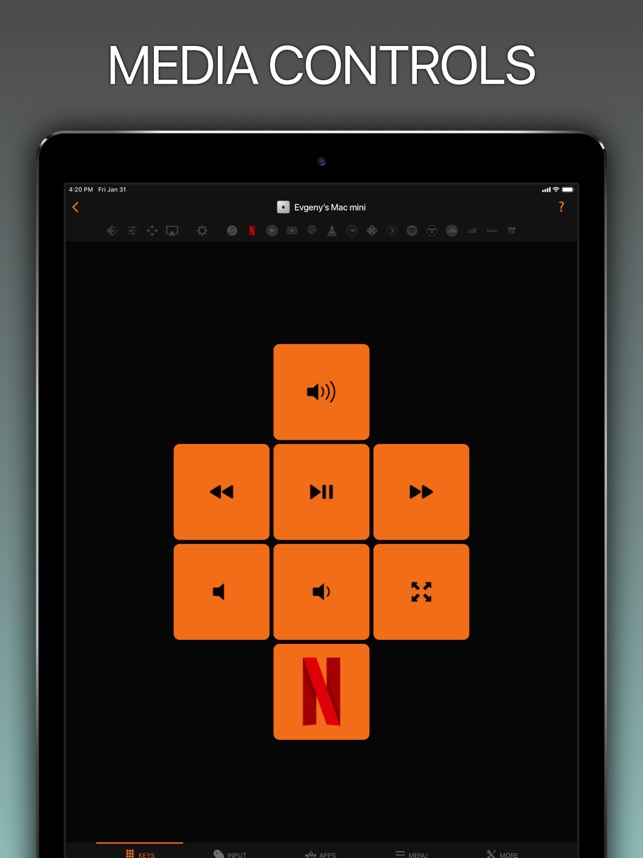
indie developer, Evgeny Cherpak announces a limited time sale for Remote, Mouse & Keyboard Pro for macOS / Windows. The app celebrates 6 years in the making, and now adds support for Windows PC. Easily Use your iOS device as a Mac/Windows trackpad and keyboard. Take full control of your computer from anywhere in your home or office. Control your Mac or Windows computer with multimedia controls, keyboard, mouse, app and system actions & AirPlay controls.
Netanya, Israel - Independent developer, Evgeny Cherpak today is proud to announce a limited time sale for Remote, Mouse & Keyboard Pro for macOS / Windows. The app celebrates 6 years in the making, and now adds support for Windows PC. Control your Mac or Windows computer with multimedia controls, keyboard, mouse, app and system actions & AirPlay controls. Take full control of your computer from anywhere in your home or office.
Tired of sitting on the couch, having to handle keyboard and mouse on your lap to control your home media center computer? Use Remote Control on your iPhone or iPad as a trackpad and keyboard to comfortably browse on the big screen TV. Using AirPlay Mirroring and an Apple TV, your Mac could be located anywhere in your home. Simply select your Apple TV from the list of available AirPlay devices and control your Mac from the comfort of your couch or bed.
You can even start any app on your Mac, send your Mac to sleep, wake it up and perform many more useful actions to control your Mac remotely. All you need to do is download the Mac Helper application and connect your Mac and iOS device to the same WiFi. Remote Control will guide you through the simple setup process.
At A Glance:
* Control volume, playback and Airplay mirroring of your Mac/Windows
* Use your iOS device as a Mac/Windows trackpad and keyboard
* Launch and quit Apps on your Mac comfortably from your iOS device
* Control any app on your Mac using its menu
* Restart or shut down your Mac, change display brightness and many more useful actions
* Enjoy the ease of use in a slick user interface you will love
* Use the Personal Hotspot of your iOS device to control your Mac when you don't have access to other networks
* Control popular multimedia apps and websites like iTunes, Netflix, YouTube and etc;
* 3 steps, under 30 seconds super easy setup
Press:
* Lifehacker: "This iOS app lets me control nearly every aspect of my Mac from my iPhone or iPad"
* MacStories: "Remote for Mac is perfect for controlling a Mac that serves as a media center"
* MacObserver: "This setup gives me full control of my Mac in the palm of my hand from anywhere in my house"
* Cult Of Mac: "Remote for Mac adds the convenience that we expect from our devices in the 21st century."
* TechRadar: "If you've a headless Mac you need to command " or just one elsewhere in your home you can't be bothered actually walking over to " this app is first-rate stuff"
* IMore: "Remote Control for Mac covers a lot of bases. If you've got a Mac somewhere in your house that you use for media management, Remote Control for Mac is a must-have"
* IGeeksBlog: "Wow!! the app does indeed think about user's every need."
System Requirements:
* Mac with macOS 10.10/PC with Windows 7.0 or above and free helper app installed;
* iPhone, iPad or iPod touch with iOS 11 or above;
* Shared wireless network connection between your computer and iOS device.
Helper App:
Download free helper app online.
Device Requirements:
* Compatible with iPhone, iPad, and iPod touch
* Requires iOS 11.0 and watchOS 6.0 or later
* 43.1 MB
Pricing and Availability:
For a limited time, Remote, Mouse & Keyboard Pro 2020.5 is only $1.99 (usually $10 USD) and available worldwide exclusively through the App Store in the Utilities category.
Evgeny Cherpak: https://www.cherpake.com
Remote, Mouse & Keyboard Pro 2020.5: https://cherpake.com/remote-control-mac/
Purchase and Download from the App Store: https://geo.itunes.apple.com/us/app/id884153085
Screenshot: https://is5-ssl.mzstatic.com/image/thumb/Purple113/v4/eb/36/27/eb362744-5772-ebe4-a9ea-131d4091730b/pr_source.jpg/643x0w.jpg
App Icon: https://is3-ssl.mzstatic.com/image/thumb/Purple113/v4/f1/81/02/f181027f-21c6-5b2e-6177-51ae78dd080c/AppIcon-0-0-1x_U007emarketing-0-0-0-10-0-0-sRGB-0-0-0-GLES2_U002c0-512MB-85-220-0-0.png/246x0w.png
Located in Netanya, Israel, Evgeny Cherpak is an independent developer. His mission is to fill the gaps in the Apple eco-system integration. Evgeny's apps are designed to offer iOS and macOS users the ability to use the devices to improve their productivity, streamline tasks, and offer more time to enjoy life. All Material and Software (C) Copyright 2020 Evgeny Cherpak. All Rights Reserved. Apple, the Apple logo, macOS, iPhone, iPod and iPad are registered trademarks of Apple Inc. in the U.S. and/or other countries. Other trademarks and registered trademarks may be the property of their respective owners.
*******
Link To Article: https://prmac.com/release-id-83911.htm
*******
---------------------------------------------------------------------------------
Note that you can alter delivered distributions at any time.
Login to your account on prMac to alter your channel selection, or to opt-out at any time.


Output Factory for Adobe InDesign Improves Modified Links Auto-Update
A new article has been published at prMac.
Output Factory for Adobe InDesign Improves Modified Links Auto-Update - Published on 02/05/20
Zevrix Solutions announces Output Factory 2.4.21, a maintenance update to company's output automation plug-in for Adobe InDesign. Output Factory automates printing and exporting from InDesign helping users eliminate repetitive tasks and avoid costly errors through batch processing and auto-preflighting. The new version restores the option to update InDesign links automatically on macOS Catalina, which was disabled due to a bug, and improves PNG file export with transparent background.
Toronto (ON), Canada - Zevrix Solutions today announces the release of Output Factory 2.4.21, a maintenance update to company's output automation plug-in for Adobe InDesign. Awarded 5 stars by InDesign Magazine, Output Factory automates and simplifies workflows of printers, prepress houses, publishers, and design agencies worldwide. The software helps eliminate repetitive tasks and costly errors through batch processing, automatic preflight, and time-saving output options.
The new version restores the option to automatically update InDesign links before processing on macOS Catalina, which was disabled due to a bug in InDesign's AppleScript engine. The update also improves the reliability of PNG file export with transparent background and addresses an issue that affected exporting of non-consecutive page ranges of InDesign documents with alternate layouts as single files.
"Using Output Factory is straightforward. You determine your settings and sit back while Output Factory does all the heavy lifting. The time savings are huge," writes Jamie McKee in InDesign Magazine. "If you find yourself repeatedly exporting InDesign files in various formats, you owe it to yourself to install the free trial and see just how much time you'll save using Output Factory."
Output Factory supports printing as well as exporting to PDF, EPS, PostScript, Flash, HTML, EPUB and several image formats. The software offers the following key features:
* Batch output of InDesign files
* Variable output file names
* Export page groups as a single files
* Output files to multiple formats with one click
* Create PDF security presets
* Layer versioning: output layer combinations as single files
* Eliminate errors with automatic preflight
* Send output files to FTP and other servers
Pricing and Availability:
Output Factory can be purchased from Zevrix website for $170 USD (Lite version $120), as well as from authorized resellers and Adobe Exchange. Trial is also available for download. The update is free for the users of Output Factory 2.x, and $85 to upgrade from Output Factory 1.x and BatchOutput. Output Factory requires macOS 10.8-10.15 and Adobe InDesign CS5-2020.
Zevrix Solutions: http://zevrix.com
Output Factory 2.4.21: http://zevrix.com/OutputFactory.php
Download Output Factory: http://zevrix.com/OutputFactory.dmg
Purchase: http://zevrix.com/store.php
Screenshot: http://zevrix.com/screenshots/of2/of2-pdf.jpg
Located in Toronto, Canada, Zevrix Solutions provides automation and productivity solutions for Adobe Creative Cloud and Creative Suite software, PDF workflows, graphic file diagnostics and Microsoft Office output on Mac OS. Zevrix is dedicated to help professionals increase their profits through automating everyday tasks, producing error-free documents, saving disk space and cutting production costs. For more information, visit their website. Copyright (C) 2020 Zevrix Solutions. All Rights Reserved. Other trademarks and registered trademarks may be the property of their respective owners.
*******
Link To Article: https://prmac.com/release-id-83910.htm
*******
---------------------------------------------------------------------------------
Note that you can alter delivered distributions at any time.
Login to your account on prMac to alter your channel selection, or to opt-out at any time.
Output Factory for Adobe InDesign Improves Modified Links Auto-Update - Published on 02/05/20
Zevrix Solutions announces Output Factory 2.4.21, a maintenance update to company's output automation plug-in for Adobe InDesign. Output Factory automates printing and exporting from InDesign helping users eliminate repetitive tasks and avoid costly errors through batch processing and auto-preflighting. The new version restores the option to update InDesign links automatically on macOS Catalina, which was disabled due to a bug, and improves PNG file export with transparent background.
Toronto (ON), Canada - Zevrix Solutions today announces the release of Output Factory 2.4.21, a maintenance update to company's output automation plug-in for Adobe InDesign. Awarded 5 stars by InDesign Magazine, Output Factory automates and simplifies workflows of printers, prepress houses, publishers, and design agencies worldwide. The software helps eliminate repetitive tasks and costly errors through batch processing, automatic preflight, and time-saving output options.
The new version restores the option to automatically update InDesign links before processing on macOS Catalina, which was disabled due to a bug in InDesign's AppleScript engine. The update also improves the reliability of PNG file export with transparent background and addresses an issue that affected exporting of non-consecutive page ranges of InDesign documents with alternate layouts as single files.
"Using Output Factory is straightforward. You determine your settings and sit back while Output Factory does all the heavy lifting. The time savings are huge," writes Jamie McKee in InDesign Magazine. "If you find yourself repeatedly exporting InDesign files in various formats, you owe it to yourself to install the free trial and see just how much time you'll save using Output Factory."
Output Factory supports printing as well as exporting to PDF, EPS, PostScript, Flash, HTML, EPUB and several image formats. The software offers the following key features:
* Batch output of InDesign files
* Variable output file names
* Export page groups as a single files
* Output files to multiple formats with one click
* Create PDF security presets
* Layer versioning: output layer combinations as single files
* Eliminate errors with automatic preflight
* Send output files to FTP and other servers
Pricing and Availability:
Output Factory can be purchased from Zevrix website for $170 USD (Lite version $120), as well as from authorized resellers and Adobe Exchange. Trial is also available for download. The update is free for the users of Output Factory 2.x, and $85 to upgrade from Output Factory 1.x and BatchOutput. Output Factory requires macOS 10.8-10.15 and Adobe InDesign CS5-2020.
Zevrix Solutions: http://zevrix.com
Output Factory 2.4.21: http://zevrix.com/OutputFactory.php
Download Output Factory: http://zevrix.com/OutputFactory.dmg
Purchase: http://zevrix.com/store.php
Screenshot: http://zevrix.com/screenshots/of2/of2-pdf.jpg

Located in Toronto, Canada, Zevrix Solutions provides automation and productivity solutions for Adobe Creative Cloud and Creative Suite software, PDF workflows, graphic file diagnostics and Microsoft Office output on Mac OS. Zevrix is dedicated to help professionals increase their profits through automating everyday tasks, producing error-free documents, saving disk space and cutting production costs. For more information, visit their website. Copyright (C) 2020 Zevrix Solutions. All Rights Reserved. Other trademarks and registered trademarks may be the property of their respective owners.
*******
Link To Article: https://prmac.com/release-id-83910.htm
*******
---------------------------------------------------------------------------------
Note that you can alter delivered distributions at any time.
Login to your account on prMac to alter your channel selection, or to opt-out at any time.
1 million users celebrated with new Install Disk Creator release
A new article has been published at prMac.
1 million users celebrated with new Install Disk Creator release - Published on 02/04/20
MacDaddy releases Install Disk Creator, a new version of the free utility for macOS. Install Disk Creator makes it easier to create a clean install of new and old macOS versions, and provides a method to downgrade from macOS Catalina to previous versions. Formerly only accomplished via the entry of arcane commands into the Terminal app, Install Disk Creator makes the process of creating a bootable install disk simple enough for any experience level user to perform.
Amsterdam, The Netherlands - Recently passing the 1 million user mark, MacDaddy announces a new version of the free utility Install Disk Creator, which makes it easier to create a clean install of new and old macOS versions, and provides a method to downgrade from macOS Catalina to previous versions - an elusive task which has been made difficult in the latest macOS release.
"An ever increasing number of people want to have a bootable macOS USB stick installer on hand, for disaster recovery as well as having an easy way to reinstall macOS or make a clean install" said Benedict Slaney, CEO of MacDaddy. "With over a million users now, we are getting a lot of positive feedback from the community about the simplicity of the tool."
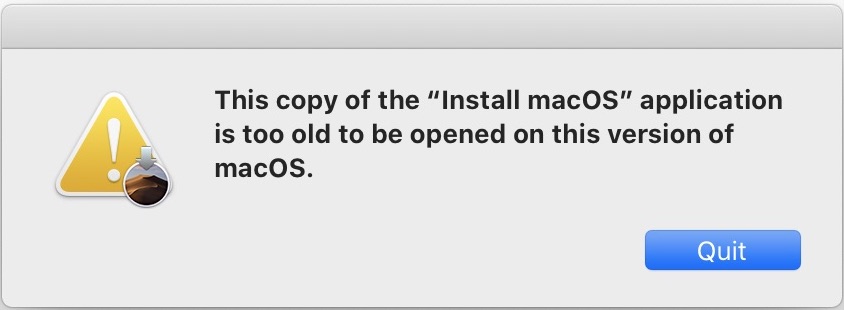
Since the release of macOS Catalina it has been made harder to downgrade to an earlier version of macOS. If you download a Mojave version or earlier of the operating system, upon double clicking you are greeted with an error message stating: "This copy of 'Install macOS' application is too old to be opened in this version of macOS" and then it quits.
Some users - particularly those irked by the lack of 32 bit app compatibility in maOS Catalina - desire to downgrade the operating system. Install Disk Creator can just as easily make a bootable installer out of early macOS versions as later ones. Double click on it, and it will find and automatically select any version of macOS that is present. You can then proceed to boot of the newly created USB stick, and can even downgrade the version of macOS without performing a clean installation. Once booted, the installer allows you to install over the top of the existing operating system, even if it's to install an earlier version over the top of a later version.
Install Disk Creator is a free app that does one thing, and does it well. With one million happy users and positive reviews around the web, it's worth giving a try to have a bootable USB stick on hand for if disaster strikes, or just to have the flexibility to run the operating system version that you prefer.
Install Disk Creator 1.4.1: https://macdaddy.io/install-disk-creator/
Screenshot of macOS Catalina refusing to downgrade OS: https://macdaddy.io/TooOldMacOS.jpg
Google Analytics screenshot of passing the 1 million user mark: https://macdaddy.io/idcdownloadstats.jpg
MacDaddy is based in Amsterdam, The Netherlands. Through his endeavors, CEO Benedict Slaney has created MacDaddy, which has become a leading provider of utilities and other software. Copyright (C) 2020 MacDaddy, All Rights Reserved. Apple, the Apple logo, and OS X are registered trademarks of Apple Inc. in the U.S. and/or other countries.
*******
Link To Article: https://prmac.com/release-id-83909.htm
*******
---------------------------------------------------------------------------------
Note that you can alter delivered distributions at any time.
Login to your account on prMac to alter your channel selection, or to opt-out at any time.
1 million users celebrated with new Install Disk Creator release - Published on 02/04/20
MacDaddy releases Install Disk Creator, a new version of the free utility for macOS. Install Disk Creator makes it easier to create a clean install of new and old macOS versions, and provides a method to downgrade from macOS Catalina to previous versions. Formerly only accomplished via the entry of arcane commands into the Terminal app, Install Disk Creator makes the process of creating a bootable install disk simple enough for any experience level user to perform.
Amsterdam, The Netherlands - Recently passing the 1 million user mark, MacDaddy announces a new version of the free utility Install Disk Creator, which makes it easier to create a clean install of new and old macOS versions, and provides a method to downgrade from macOS Catalina to previous versions - an elusive task which has been made difficult in the latest macOS release.
"An ever increasing number of people want to have a bootable macOS USB stick installer on hand, for disaster recovery as well as having an easy way to reinstall macOS or make a clean install" said Benedict Slaney, CEO of MacDaddy. "With over a million users now, we are getting a lot of positive feedback from the community about the simplicity of the tool."
Since the release of macOS Catalina it has been made harder to downgrade to an earlier version of macOS. If you download a Mojave version or earlier of the operating system, upon double clicking you are greeted with an error message stating: "This copy of 'Install macOS' application is too old to be opened in this version of macOS" and then it quits.
Some users - particularly those irked by the lack of 32 bit app compatibility in maOS Catalina - desire to downgrade the operating system. Install Disk Creator can just as easily make a bootable installer out of early macOS versions as later ones. Double click on it, and it will find and automatically select any version of macOS that is present. You can then proceed to boot of the newly created USB stick, and can even downgrade the version of macOS without performing a clean installation. Once booted, the installer allows you to install over the top of the existing operating system, even if it's to install an earlier version over the top of a later version.
Install Disk Creator is a free app that does one thing, and does it well. With one million happy users and positive reviews around the web, it's worth giving a try to have a bootable USB stick on hand for if disaster strikes, or just to have the flexibility to run the operating system version that you prefer.
Install Disk Creator 1.4.1: https://macdaddy.io/install-disk-creator/
Screenshot of macOS Catalina refusing to downgrade OS: https://macdaddy.io/TooOldMacOS.jpg
Google Analytics screenshot of passing the 1 million user mark: https://macdaddy.io/idcdownloadstats.jpg

MacDaddy is based in Amsterdam, The Netherlands. Through his endeavors, CEO Benedict Slaney has created MacDaddy, which has become a leading provider of utilities and other software. Copyright (C) 2020 MacDaddy, All Rights Reserved. Apple, the Apple logo, and OS X are registered trademarks of Apple Inc. in the U.S. and/or other countries.
*******
Link To Article: https://prmac.com/release-id-83909.htm
*******
---------------------------------------------------------------------------------
Note that you can alter delivered distributions at any time.
Login to your account on prMac to alter your channel selection, or to opt-out at any time.
Nifty File Lists: simple, powerful file list creation tool enters beta
A new article has been published at prMac.
Nifty File Lists: simple, powerful file list creation tool enters beta - Published on 02/04/20
publicspace.net today announces the release of beta 6 of their new Nifty File Lists product. This simple, powerful file list creation tool can save file lists in CSV, TSV and HTML formats for import into MS Excel, Apple Numbers, databases, content management systems and statistics packages. It can extract a wide range of file metadata including Spotlight, EXIF, IPTC, GPS, AV and ID3 tags, offers deep customization and sorting and can work via copy/paste with all leading spreadsheet solutions.
Luxembourg, Luxembourg - publicspace today announces that its latest Mac-only product, Nifty File Lists is now in public beta testing. Nifty File Lists joins publicspace's portfolio of photography & media-centric file management utilities, including A Better Finder Rename, A Better Finder Attributes and the "Big Mean Folder Machine".
Nifty File Lists is a simple, powerful file list creation tool that can save file lists in Comma-Separated Values (CSV) and Tab-Separated Values (TSV) formats for import into MS Excel, Apple Numbers, database, content management and statistics packages. It can also save HTML files and interact via copy/paste with spreadsheets and HTML editing tools.
Nifty File Lists features a powerful, multi-threaded meta-data extraction system that covers everything from basic file information, such as file name, path, size, creation and modification dates, over Spotlight-accessible meta-data information, including document attributes (e.g. title, authors, contributors, comments, copyright, etc.), photo, video and image attributes (content creation date, camera, lens, exposure, GPS information) to EXIF, GPS, IPTC, ID3 and AV tags.
The product was developed from the ground-up using the latest macOS technologies and application programming interfaces. It features a best-of-class user interface including a clever scheduling system that prioritizes user visible data retrieval to allow for fine-tuning of output even while the output system is still processing.
Nifty File Lists is designed for users managing large file collections and is particularly suited for managing digital photography (EXIF, GPS, IPTC), music (ID3) and video (Spotlight, common AV tags) collections. Through its Spotlight interface it can also extract meta-information from a wide range of document formats, such as PDF, MS Word, etc.
Nifty File Lists is fully macOS 10.15 Catalina compatible and requires at least macOS 10.14 Mojave.
System Requirements:
* Mac OS X 10.14 Mojave and later
Pricing and Availability:
Nifty File Lists costs $17.95 (USD). Family, Small Business, Business and Enterprise licensing is also available. Customers may chose to include a "forever upgrade" with their purchase.
publicspace: http://www.publicspace.net/
Nifty File Lists: http://www.publicspace.net/NiftyFileLists/
Download Nifty File Lists: http://www.publicspace.net/download/NiftyFileLists.dmg
Online Store: http://www.publicspace.net/NiftyFileLists/order.html
publicspace was founded by Frank Reiff in 1996 with the aim of producing affordable best-of-breed software for the Macintosh. In the past decade, our A Better Finder series of file utilities and our MacBreakZ personal ergonomic assistant have become familiar fixtures of the Macintosh community. publicspace also produces "The Big Mean Folder Machine" and Vitamin-R. Copyright (C) 2020 publicspace. All Rights Reserved. Apple, the Apple logo and Mac are registered trademarks of Apple Inc. in the U.S. and/or other countries.
*******
Link To Article: https://prmac.com/release-id-83908.htm
*******
---------------------------------------------------------------------------------
Note that you can alter delivered distributions at any time.
Login to your account on prMac to alter your channel selection, or to opt-out at any time.
Nifty File Lists: simple, powerful file list creation tool enters beta - Published on 02/04/20
publicspace.net today announces the release of beta 6 of their new Nifty File Lists product. This simple, powerful file list creation tool can save file lists in CSV, TSV and HTML formats for import into MS Excel, Apple Numbers, databases, content management systems and statistics packages. It can extract a wide range of file metadata including Spotlight, EXIF, IPTC, GPS, AV and ID3 tags, offers deep customization and sorting and can work via copy/paste with all leading spreadsheet solutions.
Luxembourg, Luxembourg - publicspace today announces that its latest Mac-only product, Nifty File Lists is now in public beta testing. Nifty File Lists joins publicspace's portfolio of photography & media-centric file management utilities, including A Better Finder Rename, A Better Finder Attributes and the "Big Mean Folder Machine".
Nifty File Lists is a simple, powerful file list creation tool that can save file lists in Comma-Separated Values (CSV) and Tab-Separated Values (TSV) formats for import into MS Excel, Apple Numbers, database, content management and statistics packages. It can also save HTML files and interact via copy/paste with spreadsheets and HTML editing tools.
Nifty File Lists features a powerful, multi-threaded meta-data extraction system that covers everything from basic file information, such as file name, path, size, creation and modification dates, over Spotlight-accessible meta-data information, including document attributes (e.g. title, authors, contributors, comments, copyright, etc.), photo, video and image attributes (content creation date, camera, lens, exposure, GPS information) to EXIF, GPS, IPTC, ID3 and AV tags.
The product was developed from the ground-up using the latest macOS technologies and application programming interfaces. It features a best-of-class user interface including a clever scheduling system that prioritizes user visible data retrieval to allow for fine-tuning of output even while the output system is still processing.
Nifty File Lists is designed for users managing large file collections and is particularly suited for managing digital photography (EXIF, GPS, IPTC), music (ID3) and video (Spotlight, common AV tags) collections. Through its Spotlight interface it can also extract meta-information from a wide range of document formats, such as PDF, MS Word, etc.
Nifty File Lists is fully macOS 10.15 Catalina compatible and requires at least macOS 10.14 Mojave.
System Requirements:
* Mac OS X 10.14 Mojave and later
Pricing and Availability:
Nifty File Lists costs $17.95 (USD). Family, Small Business, Business and Enterprise licensing is also available. Customers may chose to include a "forever upgrade" with their purchase.
publicspace: http://www.publicspace.net/
Nifty File Lists: http://www.publicspace.net/NiftyFileLists/
Download Nifty File Lists: http://www.publicspace.net/download/NiftyFileLists.dmg
Online Store: http://www.publicspace.net/NiftyFileLists/order.html
publicspace was founded by Frank Reiff in 1996 with the aim of producing affordable best-of-breed software for the Macintosh. In the past decade, our A Better Finder series of file utilities and our MacBreakZ personal ergonomic assistant have become familiar fixtures of the Macintosh community. publicspace also produces "The Big Mean Folder Machine" and Vitamin-R. Copyright (C) 2020 publicspace. All Rights Reserved. Apple, the Apple logo and Mac are registered trademarks of Apple Inc. in the U.S. and/or other countries.
*******
Link To Article: https://prmac.com/release-id-83908.htm
*******
---------------------------------------------------------------------------------
Note that you can alter delivered distributions at any time.
Login to your account on prMac to alter your channel selection, or to opt-out at any time.
iPhone Owners Escape to Astral in a New Augmented Reality Game
A new article has been published at prMac.
iPhone Owners Escape to Astral in a New Augmented Reality Game - Published on 02/02/20
Astral World LP announces the new augmented reality game Astral World 1.04 for iPhone devices, set in a magical universe where everything is not as it seems. Players enter astral to chase intruders and catch criminals across streets of the seemingly mundane city. Every successful mission results in new levels, more mana points and health, and even the ability to make an astral selfie.
Richmond Hill, Canada - Astral World LP is proud to announce the release and availability of The Astral World 1.04 for the iPhone. Technically a fitness application, Astral World puts the typical process far beyond what is accustomed thanks to the augmented reality technologies.
The backstory of the game tells about the Astral World, a hidden parallel dimension where legendary mages work as police force to prevent unauthorized sorcery and to protect the reality from the Astral World beings. Unfortunately, there is also another side of the conflict - the Dark Side, whose ultimate goal is to unleash astral terrors on Earth.
Being easy to grasp, the gameplay is extremely addictive. A player dives into the Astral World on his or her phone and scans the vicinity. The goal is to find and capture astral beings represented on the screen as emoticons. Magic powers of the player character give a clue on what to do next, and whether the target is close. And if it's not, the player should wander around searching, which technically means making a certain number of steps.
When the astral being is near, the phone briefly vibrates indicating that the astral emanations have become exceptionally strong. Now, the player must identify and capture the astral being. The Astral World is deceptive, and everyone is under a cloud of suspicion, so the player must closely inspect the surroundings first to identify the correct person. Quickly tapping the screen as soon as an emoticon appears allows the player to scan the astral being, capture it, and score. Scores advance the player to higher experience levels opening new scenarios and raising his or her health and mana bars.
At any moment in the game, the player can take an Astral Selfie - a special magic photo that projects astral emoticons to player's face. Also, reflecting the recent iOS dark mode, in Astral World the player also can choose between light and dark sides to play for.
Device Requirement:
* iPhone XR, XS, XS Max, 11, 11 Pro, 11 Pro Max
* iOS 13.0 or later
* 42 MB
Pricing and Availability:
Astral World 1.04 is free ans is available worldwide through the App Store in the Games category.
Convenient in-app purchases are available.
The Astral World 1.04: https://astral-world.com/
Download from the App Store: https://apps.apple.com/us/app/the-astral-world/id1482672362
YouTube Trailer: https://youtu.be/UJkjVk8EgB4
Astral World LP is a provider of software products for iOS. Astral World is the first AR game developed by the company. All Material and Software (C) Copyright 2020 Inverse Metric LLC. All Rights Reserved. Apple, the Apple logo, iPhone, iPod and iPad are registered trademarks of Apple Inc. in the U.S. and/or other countries. Other trademarks and registered trademarks may be the property of their respective owners.
*******
Link To Article: https://prmac.com/release-id-83907.htm
*******
---------------------------------------------------------------------------------
Note that you can alter delivered distributions at any time.
Login to your account on prMac to alter your channel selection, or to opt-out at any time.
iPhone Owners Escape to Astral in a New Augmented Reality Game - Published on 02/02/20
Astral World LP announces the new augmented reality game Astral World 1.04 for iPhone devices, set in a magical universe where everything is not as it seems. Players enter astral to chase intruders and catch criminals across streets of the seemingly mundane city. Every successful mission results in new levels, more mana points and health, and even the ability to make an astral selfie.
Richmond Hill, Canada - Astral World LP is proud to announce the release and availability of The Astral World 1.04 for the iPhone. Technically a fitness application, Astral World puts the typical process far beyond what is accustomed thanks to the augmented reality technologies.
The backstory of the game tells about the Astral World, a hidden parallel dimension where legendary mages work as police force to prevent unauthorized sorcery and to protect the reality from the Astral World beings. Unfortunately, there is also another side of the conflict - the Dark Side, whose ultimate goal is to unleash astral terrors on Earth.
Being easy to grasp, the gameplay is extremely addictive. A player dives into the Astral World on his or her phone and scans the vicinity. The goal is to find and capture astral beings represented on the screen as emoticons. Magic powers of the player character give a clue on what to do next, and whether the target is close. And if it's not, the player should wander around searching, which technically means making a certain number of steps.
When the astral being is near, the phone briefly vibrates indicating that the astral emanations have become exceptionally strong. Now, the player must identify and capture the astral being. The Astral World is deceptive, and everyone is under a cloud of suspicion, so the player must closely inspect the surroundings first to identify the correct person. Quickly tapping the screen as soon as an emoticon appears allows the player to scan the astral being, capture it, and score. Scores advance the player to higher experience levels opening new scenarios and raising his or her health and mana bars.
At any moment in the game, the player can take an Astral Selfie - a special magic photo that projects astral emoticons to player's face. Also, reflecting the recent iOS dark mode, in Astral World the player also can choose between light and dark sides to play for.
Device Requirement:
* iPhone XR, XS, XS Max, 11, 11 Pro, 11 Pro Max
* iOS 13.0 or later
* 42 MB
Pricing and Availability:
Astral World 1.04 is free ans is available worldwide through the App Store in the Games category.
Convenient in-app purchases are available.
The Astral World 1.04: https://astral-world.com/
Download from the App Store: https://apps.apple.com/us/app/the-astral-world/id1482672362
YouTube Trailer: https://youtu.be/UJkjVk8EgB4
Astral World LP is a provider of software products for iOS. Astral World is the first AR game developed by the company. All Material and Software (C) Copyright 2020 Inverse Metric LLC. All Rights Reserved. Apple, the Apple logo, iPhone, iPod and iPad are registered trademarks of Apple Inc. in the U.S. and/or other countries. Other trademarks and registered trademarks may be the property of their respective owners.
*******
Link To Article: https://prmac.com/release-id-83907.htm
*******
---------------------------------------------------------------------------------
Note that you can alter delivered distributions at any time.
Login to your account on prMac to alter your channel selection, or to opt-out at any time.
AlphaDigits Top Rated Mobile Apps January 2020
A new article has been published at prMac.
AlphaDigits Top Rated Mobile Apps January 2020 - Published on 02/02/20
Mobile app review publisher AlphaDigits has named top rated applications for January 2020. VideoProc is a good video editing tool. AlphaDigits names five top class mobile apps every month based on the reviews published in the website during the particular month. Bleeker St turns the tables on making poor purchases. It does take some practice to get it right in Swiperly game. Pop Queue uses your location to map out your hangout places. tellows has one of the largest databases of phone numbers.
Long Island, New York - Mobile app review publisher AlphaDigits has named top rated applications for January 2020. AlphaDigits names five top class mobile apps every month based on the reviews published in the website during the particular month. This website has now released the names of top rated mobile apps for the month of January.
VideoProc (10/10): Some of the issues that social media users face when posting video clips to YouTube or Instagram are file size and maintaining overall quality of the video when viewed in either app. Videos taken are typically 4K resolution and can be fairly large. The angle may be skewed, there may be a fisheye effect, and so on. Users need a good video editing tool that provides a wide variety of features, is easy to use and produces solid results, so that stories told on Instagram or YouTube have maximum impact. That program is VideoProc.
Bleeker St (9.5/10): This app turns the tables on making poor purchases by bringing people together to check out brands they love. It allows you to scan the user community offerings to see if anyone is hosting a demo party for something you may be interested in, sign up to attend, and then enjoy as the item is demoed and used. You can even try it out yourself and there is no pressure to buy.
Swiperly (9/10): What is really nice about this app is that it provides a description of the game and a practice area so you can get a feel for how to swipe and what it takes to move the ball the way you want it to go. The How to Play screen also keeps your stats, so you can quickly see where you stand. The ball can roll left or right, jump and climb stairs. And while that sounds simple enough, it does take some practice to get it right.
Pop Queue (8.5/10): It uses your location to map out eateries, shopping, libraries and other such hangout places where you can go and spend some time. The app finds these destinations and color codes them to indicate how many people are at that location. This gives you an idea of which places are rockin and which places may serve up some simple solitude. The app can be used in this way to find you a place to hang out, whether you are in your own neighborhood, are vacationing or traveling for business.
tellows (8/10): This app has one of the largest databases of numbers, making it a very reliable user reporting service for phone numbers and spam. It is also powered by its user community, so you know that it is legit. It allows users to see if an incoming call is a known or unknown number, it will block unwanted calls so you are not bothered by them at all.
Joe Ellen, an Editor at AlphaDigits said, "Along with our other network websites AppReviews.Live and AppsandApplications.com, AlphaDigits reached a new height in terms of traffic by reaching the Alexa rank around 110K."Developers can also contact AlphaDigits through the onsite form, mail or the contact form to get their apps reviewed.
AlphaDigits: https://alphadigits.com/
Submit App for Review: https://alphadigits.com/submit-app-for-review/
AlphaDigits is a review site run by a few app marketers. Enjoying the support from a handy amount of regular visitors, AlphaDigits provides reviews for iPhone, iPad and Android apps. Copyright (C) 2020 AlphaDigits. All Rights Reserved. Apple, the Apple logo, iPhone, iPod and iPad are registered trademarks of Apple Inc. in the U.S. and/or other countries.
*******
Link To Article: https://prmac.com/release-id-83906.htm
*******
---------------------------------------------------------------------------------
Note that you can alter delivered distributions at any time.
Login to your account on prMac to alter your channel selection, or to opt-out at any time.
AlphaDigits Top Rated Mobile Apps January 2020 - Published on 02/02/20
Mobile app review publisher AlphaDigits has named top rated applications for January 2020. VideoProc is a good video editing tool. AlphaDigits names five top class mobile apps every month based on the reviews published in the website during the particular month. Bleeker St turns the tables on making poor purchases. It does take some practice to get it right in Swiperly game. Pop Queue uses your location to map out your hangout places. tellows has one of the largest databases of phone numbers.
Long Island, New York - Mobile app review publisher AlphaDigits has named top rated applications for January 2020. AlphaDigits names five top class mobile apps every month based on the reviews published in the website during the particular month. This website has now released the names of top rated mobile apps for the month of January.
VideoProc (10/10): Some of the issues that social media users face when posting video clips to YouTube or Instagram are file size and maintaining overall quality of the video when viewed in either app. Videos taken are typically 4K resolution and can be fairly large. The angle may be skewed, there may be a fisheye effect, and so on. Users need a good video editing tool that provides a wide variety of features, is easy to use and produces solid results, so that stories told on Instagram or YouTube have maximum impact. That program is VideoProc.
Bleeker St (9.5/10): This app turns the tables on making poor purchases by bringing people together to check out brands they love. It allows you to scan the user community offerings to see if anyone is hosting a demo party for something you may be interested in, sign up to attend, and then enjoy as the item is demoed and used. You can even try it out yourself and there is no pressure to buy.
Swiperly (9/10): What is really nice about this app is that it provides a description of the game and a practice area so you can get a feel for how to swipe and what it takes to move the ball the way you want it to go. The How to Play screen also keeps your stats, so you can quickly see where you stand. The ball can roll left or right, jump and climb stairs. And while that sounds simple enough, it does take some practice to get it right.
Pop Queue (8.5/10): It uses your location to map out eateries, shopping, libraries and other such hangout places where you can go and spend some time. The app finds these destinations and color codes them to indicate how many people are at that location. This gives you an idea of which places are rockin and which places may serve up some simple solitude. The app can be used in this way to find you a place to hang out, whether you are in your own neighborhood, are vacationing or traveling for business.
tellows (8/10): This app has one of the largest databases of numbers, making it a very reliable user reporting service for phone numbers and spam. It is also powered by its user community, so you know that it is legit. It allows users to see if an incoming call is a known or unknown number, it will block unwanted calls so you are not bothered by them at all.
Joe Ellen, an Editor at AlphaDigits said, "Along with our other network websites AppReviews.Live and AppsandApplications.com, AlphaDigits reached a new height in terms of traffic by reaching the Alexa rank around 110K."Developers can also contact AlphaDigits through the onsite form, mail or the contact form to get their apps reviewed.
AlphaDigits: https://alphadigits.com/
Submit App for Review: https://alphadigits.com/submit-app-for-review/
AlphaDigits is a review site run by a few app marketers. Enjoying the support from a handy amount of regular visitors, AlphaDigits provides reviews for iPhone, iPad and Android apps. Copyright (C) 2020 AlphaDigits. All Rights Reserved. Apple, the Apple logo, iPhone, iPod and iPad are registered trademarks of Apple Inc. in the U.S. and/or other countries.
*******
Link To Article: https://prmac.com/release-id-83906.htm
*******
---------------------------------------------------------------------------------
Note that you can alter delivered distributions at any time.
Login to your account on prMac to alter your channel selection, or to opt-out at any time.
The Spirits of Kelley Family Adventure game now on Steam
A new article has been published at prMac.
The Spirits of Kelley Family Adventure game now on Steam - Published on 02/03/20
Itallian indie studio, MoonMonky Studio today releases The Spirits of Kelley Family, the desktop version of their hand drawn, point-and-click adventure game for macOS and Windows. What the hell has happened to the Kelley family? It seems that their souls have been trapped in four mysterious crystals inside an old mansion. Luckily you came to free them! Solve all intricate puzzles to retrieve the Elemental Crystals and finally release their souls.
Torino, Italy - MoonMonky Studio today is proud to announce The Spirits of Kelley Family, the desktop version of their hand drawn, point-and-click adventure game available for macOS and Windows. What the hell has happened to the Kelley family? It seems that their souls have been trapped in four mysterious crystals inside an old mansion. Luckily you came to free them! Solve all puzzles to retrieve the Elemental Crystals and finally release their souls.
Review by SpazioGames.it: "The Spirits of the Kelley Family is the first project of an Italian design team and for this we felt compelled to give it a voice. MoonMonkey's point-and-click adventure manages to present itself worthy, thanks mainly to an interesting graphic style and a plot that at the end veers sharply towards an unexpected epilogue. A pleasant pastime with limited longevity. Especially aimed at lovers of the point and click genre."
Alvin Kelley has just moved with his family into an old mansion. Here Alvin will enjoy a well-deserved retirement playing with alchemy, an old passion sidelined for too long. And then there's Jimi, the little Alvin son. He's curious as much as his father! It's so nice to play with father's potions. However, the tranquility of the family will be disturbed by an old acquaintance returned to visit him... And you are here to - save them of course!
Features:
* Intricate puzzles and exciting mini-games to solve
* Fantastic hand-drawn environments
* A lot of items to find
* Plot articulated and exciting
* The Spirits of Kelley Family is translated in Italian and in English
The Spirits of Kelley Family for macOS and Windows is available now on Steam. There is a 30% off discount until the end of February 2020. For more information, please contact Federico Chiummento.
The Spirits of Kelley Family: http://builderslabs.eu/tskf.html
Download from Steam: https://store.steampowered.com/app/1215710/The_Spirits_of_Kelley_Family/
Screenshot: https://steamcdn-a.akamaihd.net/steam/apps/1215710/extras/7.png?t=1580458827
MoonMonky is a small indie studio that dreams of transforming passion in a job. It was born from the meeting of two twenty guys with a shared passion for video games. All Material and Software (C) Copyright 2016 MoonMonky. All Rights Reserved. Apple, the Apple logo, macOS, iPhone, iPod and iPad are registered trademarks of Apple Inc. in the U.S. and/or other countries. Other trademarks and registered trademarks may be the property of their respective owners.
*******
Link To Article: https://prmac.com/release-id-83905.htm
*******
---------------------------------------------------------------------------------
Note that you can alter delivered distributions at any time.
Login to your account on prMac to alter your channel selection, or to opt-out at any time.
The Spirits of Kelley Family Adventure game now on Steam - Published on 02/03/20
Itallian indie studio, MoonMonky Studio today releases The Spirits of Kelley Family, the desktop version of their hand drawn, point-and-click adventure game for macOS and Windows. What the hell has happened to the Kelley family? It seems that their souls have been trapped in four mysterious crystals inside an old mansion. Luckily you came to free them! Solve all intricate puzzles to retrieve the Elemental Crystals and finally release their souls.
Torino, Italy - MoonMonky Studio today is proud to announce The Spirits of Kelley Family, the desktop version of their hand drawn, point-and-click adventure game available for macOS and Windows. What the hell has happened to the Kelley family? It seems that their souls have been trapped in four mysterious crystals inside an old mansion. Luckily you came to free them! Solve all puzzles to retrieve the Elemental Crystals and finally release their souls.
Review by SpazioGames.it: "The Spirits of the Kelley Family is the first project of an Italian design team and for this we felt compelled to give it a voice. MoonMonkey's point-and-click adventure manages to present itself worthy, thanks mainly to an interesting graphic style and a plot that at the end veers sharply towards an unexpected epilogue. A pleasant pastime with limited longevity. Especially aimed at lovers of the point and click genre."
Alvin Kelley has just moved with his family into an old mansion. Here Alvin will enjoy a well-deserved retirement playing with alchemy, an old passion sidelined for too long. And then there's Jimi, the little Alvin son. He's curious as much as his father! It's so nice to play with father's potions. However, the tranquility of the family will be disturbed by an old acquaintance returned to visit him... And you are here to - save them of course!
Features:
* Intricate puzzles and exciting mini-games to solve
* Fantastic hand-drawn environments
* A lot of items to find
* Plot articulated and exciting
* The Spirits of Kelley Family is translated in Italian and in English
The Spirits of Kelley Family for macOS and Windows is available now on Steam. There is a 30% off discount until the end of February 2020. For more information, please contact Federico Chiummento.
The Spirits of Kelley Family: http://builderslabs.eu/tskf.html
Download from Steam: https://store.steampowered.com/app/1215710/The_Spirits_of_Kelley_Family/
Screenshot: https://steamcdn-a.akamaihd.net/steam/apps/1215710/extras/7.png?t=1580458827

MoonMonky is a small indie studio that dreams of transforming passion in a job. It was born from the meeting of two twenty guys with a shared passion for video games. All Material and Software (C) Copyright 2016 MoonMonky. All Rights Reserved. Apple, the Apple logo, macOS, iPhone, iPod and iPad are registered trademarks of Apple Inc. in the U.S. and/or other countries. Other trademarks and registered trademarks may be the property of their respective owners.
*******
Link To Article: https://prmac.com/release-id-83905.htm
*******
---------------------------------------------------------------------------------
Note that you can alter delivered distributions at any time.
Login to your account on prMac to alter your channel selection, or to opt-out at any time.
Subscribe to:
Posts (Atom)