A new article has been published at prMac.
iMazing Update Adds Powerful New Way to Manage iPhone Photo Library - Published on 03/09/20
Independent developer DigiDNA announces iMazing 2.11 for macOS, an important update for their popular iOS device management app. Version 2.11 brings a powerful new way to manage and transfer iPhone and iPad photos, giving users the ability to browse their entire mobile photo library in high resolution from their Mac with minimal loading times. Photographers can access detailed metadata and a wealth of export options, and families will enjoy intuitive workflows and a gorgeous full screen mode.
Geneva, Switzerland - Independent developer DigiDNA is proud to announce the release and immediate availability of iMazing 2.11 for macOS. iMazing is the powerful iOS device management app that allows transferring of messages, music, files, and other types of data from any iPhone, iPad or iPod touch device. iMazing is the must-have tool for iOS devices, allowing users to create local backups, transfer photos, music and any files between their device and Macs or Windows PCs, print text messages, and so much more. Version 2.11 brings a new way to manage and transfer photos from an iOS or iPadOS device.
iMazing 2.11 debuts a new way for users to manage and transfer iPhone and iPad photos from their Mac. After connecting their iPhone or iPad and their computer via USB or Wi-FI, the entire photo library becomes available within seconds, streamed straight from the device. The new feature enables previewing high resolution images before actually importing them. Users can view all photo metadata, including location, detailed camera settings, number of views, last shared date and more.
"Photographers will appreciate the attention to detail and raw power on display," says DigiDNA's Gregorio Zanon. "More casual snappers will enjoy being able to browse their library seamlessly and export just the photos they need."
Additional information is also listed for each photo. That information includes original versions of edited photos, both the video and image elements of Live Photos, and pre-bokeh effect versions of photos taken using the device's Portrait Camera app feature.
Technical Specifications Include:
Browsing & Filtering:
* 3 different views: Moments, Grid and List
* Browse by media type, album or smart album
* All available metadata displayed
* Browse hidden assets like originals of edited photos
* Full screen mode (just double click the image, hit esc to exit)
* Open location in Google Maps (double-click the map)
* Date filters, text search, sort by any field
Export Options:
* Include pre-portrait effect versions of Portrait mode photos
* Include all frames of bursts
* Include originals of edited items
* Include video component of Live Photos
* Automatically organize exports in a folder hierarchy, by moment and media type
* Recover photos from albums synced with iTunes or the Finder
* HEIC to JPEG conversion, adjustable quality
Mac Import Options:
* Create From my Mac albums on iPhone or iPad
* Add photos to albums via drag and drop (no sync)
Delete Options:
* Bulk delete photos from the Camera Roll (not available if iCloud Photo Library is enabled)
* Remove photos or entire albums from synced albums
Backup Options:
* Browse and recover from any iMazing backup snapshot
* Browse and recover from iTunes or Finder backups
* Encrypted backups are fully supported, if backup password is known
When used in combination with iMazing's Time Machine-like automatic iOS backups, the new Photos tool enables users to recover deleted photos, even if they've been fully removed from both the device and from iCloud. The entire Photo library of any Apple mobile touch device can be archived, making it always browsable in high resolution at blazingly fast speeds.
"Users can also create and manage iOS Photo albums by dropping photos in iMazing, and delete items from the Camera Roll in bulk," continues Gregorio. "The new Photos tool is currently available only in the macOS version of iMazing. The Windows PC version is scheduled for release this Summer."
System Requirements:
* macOS 10.9 or higher
* Compatible with macOS 10.15 Catalina
* Windows version requires Windows 7 or higher
* iPhone, iPad, and iPod touch
* Supports all iOS versions
* 150 MB
Pricing/Availability:
iMazing 2.11 for macOS is free to download and is available worldwide exclusively through the iMazing website. Browsing photos and data is entirely free. Premium features require the purchase of a license. A Single License (1 computer) is $44.99 USD, Universal license (2 computers) is $49.99, Family license (5 computers) is $69.99. The 2.11 (macOS) update is free for all iMazing 2 license owners.
iMazing Photos 2.11: https://imazing.com/iphone-photos-transfer
More Information: https://imazing.com/blog/iphone-photos-for-the-pros
Download iMazing: https://imazing.com/download
Banners: https://www.dropbox.com/sh/txnvx183f1tcpfm/AABtoOs5MVQqgKl2Igf_FE8Ya?dl=0
Media Assets: https://imazing.com/media
Headquartered in Geneva, Switzerland, DigiDNA is an independent software developer company incorporated in 2008 under the name of DigiDNA Sarl. In 2013 the company and its products were granted the Swiss Label. DigiDNA's software proudly carries the crossbow - symbolizing Swiss precision work and quality products. DigiDNA is committed to helping users get the most out of their Apple mobile devices by providing innovative and efficient solutions to common mobile data access and transfer problems. iMazing (formerly DiskAid) is DigiDNA's flagship application for Mac and PC. All Material and Software (C) Copyright 2008-2020 DigiDNA Sarl. All Rights Reserved. Apple, the Apple logo, iPhone, iPad and iPod are registered trademarks of Apple Inc. in the U.S. and/or other countries. Other trademarks and registered trademarks may be the property of their respective owners.
*******
Link To Article: https://prmac.com/release-id-83956.htm
*******
---------------------------------------------------------------------------------
Note that you can alter delivered distributions at any time.
Login to your account on prMac to alter your channel selection, or to opt-out at any time.

Default Folder X 5.4.3 improves performance and previews, fixes bugs
A new article has been published at prMac.
Default Folder X 5.4.3 improves performance and previews, fixes bugs - Published on 03/06/20
St. Clair Software releases Default Folder X 5.4.3 today, an update to their award-winning utility for macOS. Default Folder X enhances the file dialogs in all macOS applications. It provides fast navigation to your files, convenient previews, integrated Spotlight tagging, and more. Default Folder X's custom keyboard shortcuts put favorite and recent folders at your fingertips. Version 5.4.3 improves performance with the Finder and on slow networks, adds convenience features and fixes bugs.
Denver, Colorado - St. Clair Software is pleased to announce the availability of Default Folder X version 5.4.3 today. This release of its award-winning utility for enhancing Open and Save dialogs delivers better performance when interacting with the Finder, ForkLift and Path Finder, as well as when saving files over slow networks. It also refines Default Folder X's on-the-fly previews, which are available as you browse files using its menus and in Open dialogs. New enhancements and AppleScript commands also speed up user workflows, and more than a dozen issues and bugs have been addressed.
Default Folder X's custom keyboard shortcuts put your favorite and recent folders at your fingertips. Pop-up menus let you quickly navigate your folders and open Finder windows. Previews, file information, Spotlight tagging and comments are there when you need them. Open, save, and get back to work: Default Folder X speeds your workflow by making file management fast and efficient.
The changes in Default Folder X 5.4.3 include:
* Faster interaction with the Finder, ForkLift and Path Finder
* Improved speed when saving files over slow networks
* Refined preview capabilities
* Additional AppleScript commands to manage Default Folder X's drawer in the Finder and to display its menus
* Fixes for a number of compatibility issues, including problems with Pro Tools, Fission, TotalFinder and macOS's screen capture
For a complete change history, visit St. Clair Software online.
System Requirements:
* macOS 10.10 through 10.15
Pricing and Availability:
Default Folder X 5.4.3 is a free update for existing version 5 users. New licenses are $34.95 (USD) and upgrades from version 4 and prior are $14.95. Please see the St. Clair Software web site for screencasts, screenshots, a full change log, and additional feature information. St. Clair Software strongly recommends that anyone using Default Folder X install this update.
Default Folder X 5.4.3: http://www.stclairsoft.com/DefaultFolderX/index.html
Detailed Change History: http://www.stclairsoft.com/DefaultFolderX/release.html
Download Default Folder X: http://www.stclairsoft.com/cgi-bin/dl.cgi?DX
Purchase Default Folder X: http://www.stclairsoft.com/store/
Based in Denver, Colorado, St. Clair Software is a privately held company that has been specializing in utilities and custom software solutions for the Macintosh since 1988. St. Clair Software can be contacted at: St. Clair Software, 271 S. Emerson Street, Denver, CO, USA 80209. Apple, Macintosh, macOS and Finder are registered trademarks of Apple Inc. in the U.S. and/or other countries.
*******
Link To Article: https://prmac.com/release-id-83955.htm
*******
---------------------------------------------------------------------------------
Note that you can alter delivered distributions at any time.
Login to your account on prMac to alter your channel selection, or to opt-out at any time.
Default Folder X 5.4.3 improves performance and previews, fixes bugs - Published on 03/06/20
St. Clair Software releases Default Folder X 5.4.3 today, an update to their award-winning utility for macOS. Default Folder X enhances the file dialogs in all macOS applications. It provides fast navigation to your files, convenient previews, integrated Spotlight tagging, and more. Default Folder X's custom keyboard shortcuts put favorite and recent folders at your fingertips. Version 5.4.3 improves performance with the Finder and on slow networks, adds convenience features and fixes bugs.
Denver, Colorado - St. Clair Software is pleased to announce the availability of Default Folder X version 5.4.3 today. This release of its award-winning utility for enhancing Open and Save dialogs delivers better performance when interacting with the Finder, ForkLift and Path Finder, as well as when saving files over slow networks. It also refines Default Folder X's on-the-fly previews, which are available as you browse files using its menus and in Open dialogs. New enhancements and AppleScript commands also speed up user workflows, and more than a dozen issues and bugs have been addressed.
Default Folder X's custom keyboard shortcuts put your favorite and recent folders at your fingertips. Pop-up menus let you quickly navigate your folders and open Finder windows. Previews, file information, Spotlight tagging and comments are there when you need them. Open, save, and get back to work: Default Folder X speeds your workflow by making file management fast and efficient.
The changes in Default Folder X 5.4.3 include:
* Faster interaction with the Finder, ForkLift and Path Finder
* Improved speed when saving files over slow networks
* Refined preview capabilities
* Additional AppleScript commands to manage Default Folder X's drawer in the Finder and to display its menus
* Fixes for a number of compatibility issues, including problems with Pro Tools, Fission, TotalFinder and macOS's screen capture
For a complete change history, visit St. Clair Software online.
System Requirements:
* macOS 10.10 through 10.15
Pricing and Availability:
Default Folder X 5.4.3 is a free update for existing version 5 users. New licenses are $34.95 (USD) and upgrades from version 4 and prior are $14.95. Please see the St. Clair Software web site for screencasts, screenshots, a full change log, and additional feature information. St. Clair Software strongly recommends that anyone using Default Folder X install this update.
Default Folder X 5.4.3: http://www.stclairsoft.com/DefaultFolderX/index.html
Detailed Change History: http://www.stclairsoft.com/DefaultFolderX/release.html
Download Default Folder X: http://www.stclairsoft.com/cgi-bin/dl.cgi?DX
Purchase Default Folder X: http://www.stclairsoft.com/store/
Based in Denver, Colorado, St. Clair Software is a privately held company that has been specializing in utilities and custom software solutions for the Macintosh since 1988. St. Clair Software can be contacted at: St. Clair Software, 271 S. Emerson Street, Denver, CO, USA 80209. Apple, Macintosh, macOS and Finder are registered trademarks of Apple Inc. in the U.S. and/or other countries.
*******
Link To Article: https://prmac.com/release-id-83955.htm
*******
---------------------------------------------------------------------------------
Note that you can alter delivered distributions at any time.
Login to your account on prMac to alter your channel selection, or to opt-out at any time.
ArtOptimizer for Illustrator Now Can Sharpen All Layers In Photoshop
A new article has been published at prMac.
ArtOptimizer for Illustrator Now Can Sharpen All Layers In Photoshop - Published on 03/04/20
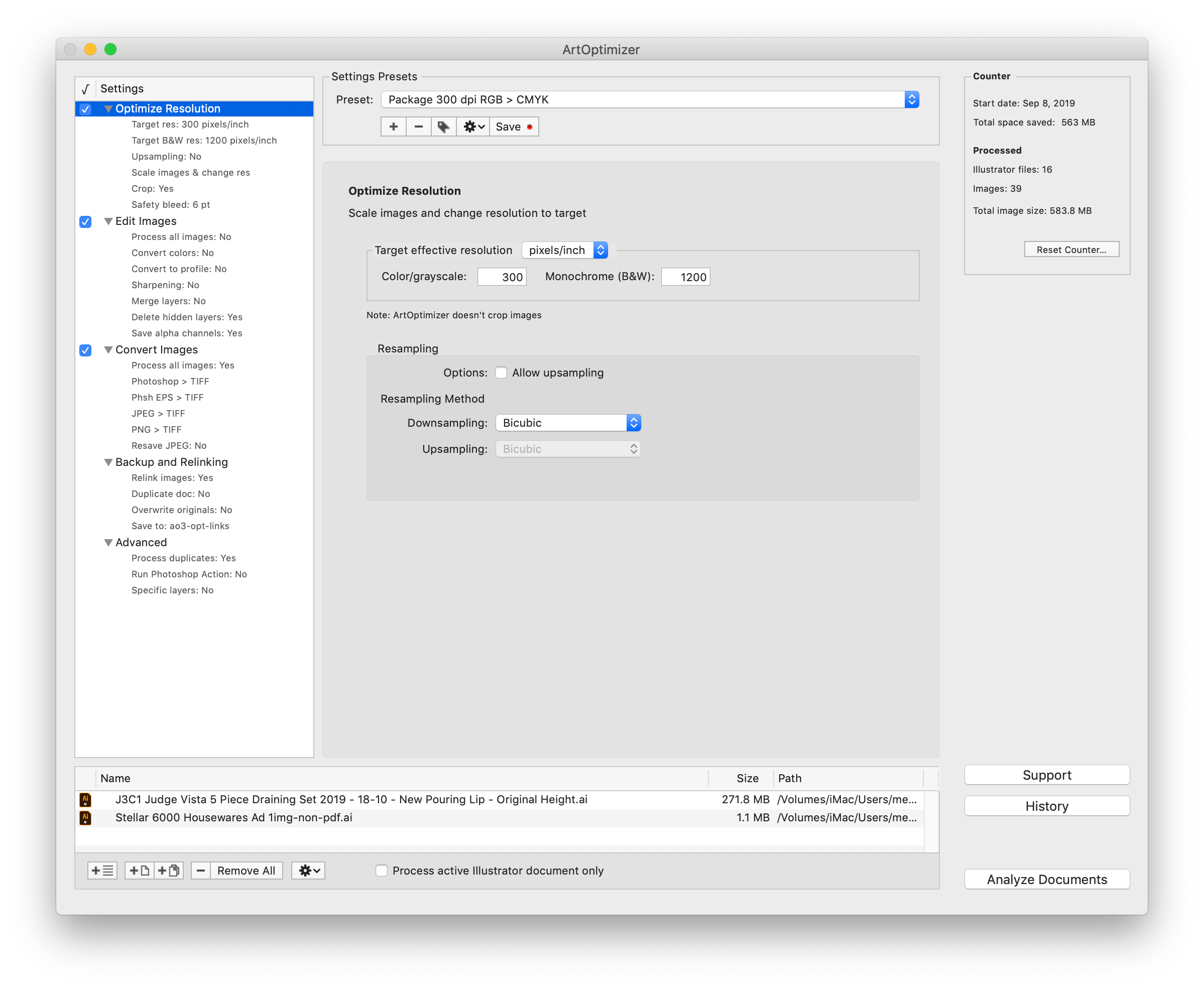
Zevrix Solutions announces the release of ArtOptimizer 3.1.1, a feature update to company's workflow automation solution for Adobe Illustrator. ArtOptimizer helps reduce the size of Illustrator links and automate complex image transformations. The app also offers file format and color conversion, batch processing, settings presets and more. The new version can automatically sharpen all image layers in Photoshop automatically without having to merge layers in order to sharpen the entire image.
Toronto (ON), Canada - Zevrix Solutions today announce release of ArtOptimizer 3.1.1 for Adobe Illustrator, a feature update to company's image workflow automation solution. The only tool of its kind on the Mac market, ArtOptimizer eliminates the excess image data of Illustrator links and performs essential image adjustments. The software helps users save disk space as well as cut production time through automation of complex image manipulation tasks.
The new version can automatically sharpen all image layers in Photoshop automatically without having to merge layers first in order to sharpen the entire image. ArtOptimizer will only sharpen the relevant pixel layers while ignoring adjustment and fill layers. In addition, the update allows users to use images with forward slashes in their file path, improves memory management, and removes the redundant option to run the app in full screen mode.
ArtOptimizer is a powerful automation solution for users in the print, prepress, and web design industries. For example, with just a click of a button users can:
* Batch-process Illustrator files
* Scale images in Photoshop to match their dimensions in Illustrator
* Change image resolution to the desired target
* Convert RGB images to CMYK profile
* Resave JPEG files as TIFF
* Merge layers and delete unused ones
* Run Photoshop action on each image
In the end of processing ArtOptimizer reimports images to Illustrator at 100% in their precise position. As a result users can save gigabytes of disk space and countless hours of optimizing images manually. In addition, ArtOptimizer helps users accelerate document printing and exporting to PDF, speed up file transfer to service providers, reduce job turnaround, and cut costs through faster processing.
Pricing and Availability:
ArtOptimizer can be purchased from Zevrix web site for $120 (USD), as well as from authorized resellers and Adobe Exchange. Licensed users of earlier versions can upgrade to ArtOptimizer 3 for $60. Trial is also available for download. ArtOptimizer requires macOS 10.8-10.15 and Adobe Illustrator/Photoshop CS6-2020.
Zevrix Solutions: http://zevrix.com
ArtOptimizer 3.1.1: http://zevrix.com/ArtOptimizer.php
Download ArtOptimizer: http://zevrix.com/ArtOptimizer.dmg
Purchase: http://zevrix.com/store.php
Screenshot: http://zevrix.com/screenshots/ao3/ao3-res-win.png
Located in Toronto, Canada, Zevrix Solutions provides automation and productivity solutions for Adobe Creative Cloud and Creative Suite software, PDF workflows, graphic file diagnostics and Microsoft Office output on Mac OS. Zevrix is dedicated to help professionals increase their profits through automating everyday tasks, producing error-free documents, saving disk space and cutting production costs. For more information, visit their website. Copyright (C) 2020 Zevrix Solutions. All Rights Reserved. Other trademarks and registered trademarks may be the property of their respective owners.
*******
Link To Article: https://prmac.com/release-id-83954.htm
*******
---------------------------------------------------------------------------------
Note that you can alter delivered distributions at any time.
Login to your account on prMac to alter your channel selection, or to opt-out at any time.
ArtOptimizer for Illustrator Now Can Sharpen All Layers In Photoshop - Published on 03/04/20
Zevrix Solutions announces the release of ArtOptimizer 3.1.1, a feature update to company's workflow automation solution for Adobe Illustrator. ArtOptimizer helps reduce the size of Illustrator links and automate complex image transformations. The app also offers file format and color conversion, batch processing, settings presets and more. The new version can automatically sharpen all image layers in Photoshop automatically without having to merge layers in order to sharpen the entire image.
Toronto (ON), Canada - Zevrix Solutions today announce release of ArtOptimizer 3.1.1 for Adobe Illustrator, a feature update to company's image workflow automation solution. The only tool of its kind on the Mac market, ArtOptimizer eliminates the excess image data of Illustrator links and performs essential image adjustments. The software helps users save disk space as well as cut production time through automation of complex image manipulation tasks.
The new version can automatically sharpen all image layers in Photoshop automatically without having to merge layers first in order to sharpen the entire image. ArtOptimizer will only sharpen the relevant pixel layers while ignoring adjustment and fill layers. In addition, the update allows users to use images with forward slashes in their file path, improves memory management, and removes the redundant option to run the app in full screen mode.
ArtOptimizer is a powerful automation solution for users in the print, prepress, and web design industries. For example, with just a click of a button users can:
* Batch-process Illustrator files
* Scale images in Photoshop to match their dimensions in Illustrator
* Change image resolution to the desired target
* Convert RGB images to CMYK profile
* Resave JPEG files as TIFF
* Merge layers and delete unused ones
* Run Photoshop action on each image
In the end of processing ArtOptimizer reimports images to Illustrator at 100% in their precise position. As a result users can save gigabytes of disk space and countless hours of optimizing images manually. In addition, ArtOptimizer helps users accelerate document printing and exporting to PDF, speed up file transfer to service providers, reduce job turnaround, and cut costs through faster processing.
Pricing and Availability:
ArtOptimizer can be purchased from Zevrix web site for $120 (USD), as well as from authorized resellers and Adobe Exchange. Licensed users of earlier versions can upgrade to ArtOptimizer 3 for $60. Trial is also available for download. ArtOptimizer requires macOS 10.8-10.15 and Adobe Illustrator/Photoshop CS6-2020.
Zevrix Solutions: http://zevrix.com
ArtOptimizer 3.1.1: http://zevrix.com/ArtOptimizer.php
Download ArtOptimizer: http://zevrix.com/ArtOptimizer.dmg
Purchase: http://zevrix.com/store.php
Screenshot: http://zevrix.com/screenshots/ao3/ao3-res-win.png
Located in Toronto, Canada, Zevrix Solutions provides automation and productivity solutions for Adobe Creative Cloud and Creative Suite software, PDF workflows, graphic file diagnostics and Microsoft Office output on Mac OS. Zevrix is dedicated to help professionals increase their profits through automating everyday tasks, producing error-free documents, saving disk space and cutting production costs. For more information, visit their website. Copyright (C) 2020 Zevrix Solutions. All Rights Reserved. Other trademarks and registered trademarks may be the property of their respective owners.
*******
Link To Article: https://prmac.com/release-id-83954.htm
*******
---------------------------------------------------------------------------------
Note that you can alter delivered distributions at any time.
Login to your account on prMac to alter your channel selection, or to opt-out at any time.
Duplicacy: lock-free deduplication backup tool with a new web interface
A new article has been published at prMac.
Duplicacy: lock-free deduplication backup tool with a new web interface - Published on 03/03/20
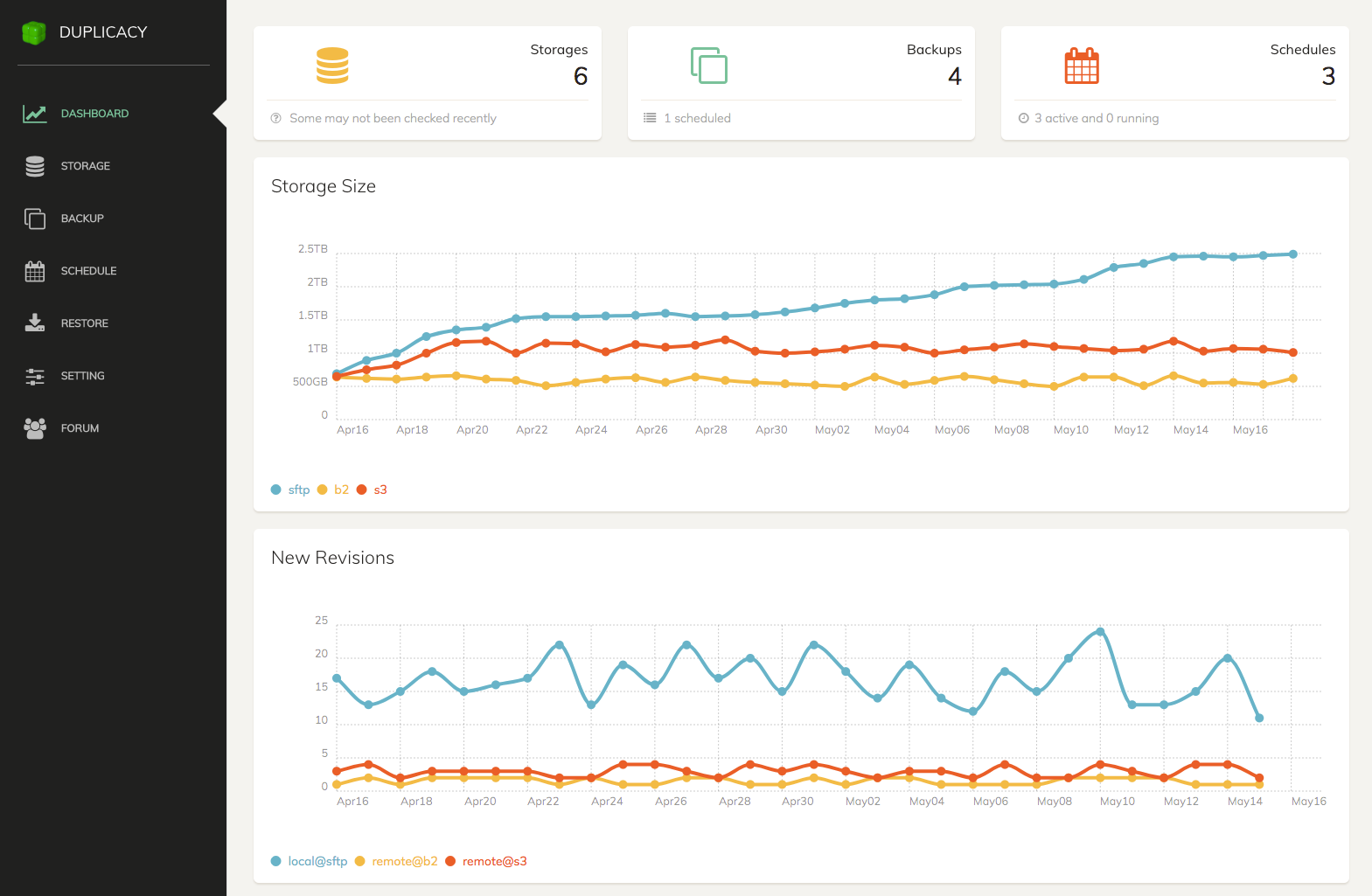
Acrosync LLC today releases Duplicacy Wed Edition 1.2.1, a web interface to Duplicacy, their popular cross-platform network & cloud backup tool based on the idea of lock-free deduplication. Duplicacy can easily backup multiple clients to most popular cloud-based storage services, without the need for any file locks. With the addition of the newly designed web-based GUI, the intuitive dashboard presents several statistical charts providing insights into the overall health of backups & storages.
Clifton Park, New York - Acrosync LLC today is pleased to announce the release and immediate availability of Duplicacy Web Edition 1.2.1, a web interface for the popular open-source backup tool Duplicacy. Duplicacy is the most advanced backup tool, offering 3 unparalleled features that can't be found in any other backup tools.
First, Duplicacy takes a unique database-less approach where every chunk is saved independently using its hash as the file name to facilitate quick lookups. The removal of a centralized chunk database means Duplicacy is more robust and less error-prone, and this simple yet elegant design makes implementing advanced features much easier.
In addition, Duplicacy is the only deduplication backup tool that allows multiple computers to back up to the same cloud storage, taking advantage of cross-computer deduplication whenever possible, without direct communication between them. In a large-scale deployment, this feature is essential for minimizing the cost of network bandwidth and storage, as well as maximizing backup speeds.
But the most distinguishing feature of Duplicacy is a novel technology called Lock-Free Deduplication, which works by relying on the basic file system API to manage deduplicated chunks without using any locks. A two-step fossil collection algorithm is devised to solve the fundamental problem of deleting unreferenced chunks under the lock-free condition, making the deletion of old backups possible. Lock-Free Deduplication not only enables the data-baseless approach and cross-computer deduplication, but also brings other important benefits, such as allowing a prune job to run in parallel with multiple backup jobs.
With the addition of the newly designed web-based GUI, Duplicacy users can now effortlessly set up backup, copy, check, and prune jobs that will reliably protect important data while making the most efficient use of local or cloud storage space. The intuitive dashboard presents several statistical charts providing insights into the overall health of backups and storages.
System Requirements:
* Mac OS X 10.10 or higher
* 64-bit processor
* 13.7 MB
Pricing and Availability:
A personal license for Duplicacy Web Edition costs $20.00 (USD) for one computer for the first year and $5.00 (USD) per year afterwards. The commercial costs $50.00 per computer per year.
Duplicacy Web Edition 1.2.1: https://duplicacy.com
More Information: https://duplicacy.com/download.html
Download Duplicacy Web Edition: https://acrosync.com/duplicacy-web/duplicacy_web_osx_x64_1.2.1.dmg
Purchase: https://duplicacy.com/buy.html
Screenshot: https://duplicacy.com/img/dwe_dashboard.png
Application Icon: https://duplicacy.com/img/duplicacy.png
Based in Clifton Park, New York, Acrosync LLC was founded in 2011 in order to focus on building reliable and robust cross-platform software solutions for efficient storage backup and synchronization. All Material and Software Copyright (C) 2020 Acrosync LLC. All Rights Reserved. Apple, the Apple logo, macOS, iPhone, iPod and iPad are registered trademarks of Apple Inc. in the U.S. and/or other countries. Other trademarks and registered trademarks may be the property of their respective owners.
*******
Link To Article: https://prmac.com/release-id-83953.htm
*******
---------------------------------------------------------------------------------
Note that you can alter delivered distributions at any time.
Login to your account on prMac to alter your channel selection, or to opt-out at any time.
Duplicacy: lock-free deduplication backup tool with a new web interface - Published on 03/03/20
Acrosync LLC today releases Duplicacy Wed Edition 1.2.1, a web interface to Duplicacy, their popular cross-platform network & cloud backup tool based on the idea of lock-free deduplication. Duplicacy can easily backup multiple clients to most popular cloud-based storage services, without the need for any file locks. With the addition of the newly designed web-based GUI, the intuitive dashboard presents several statistical charts providing insights into the overall health of backups & storages.
Clifton Park, New York - Acrosync LLC today is pleased to announce the release and immediate availability of Duplicacy Web Edition 1.2.1, a web interface for the popular open-source backup tool Duplicacy. Duplicacy is the most advanced backup tool, offering 3 unparalleled features that can't be found in any other backup tools.
First, Duplicacy takes a unique database-less approach where every chunk is saved independently using its hash as the file name to facilitate quick lookups. The removal of a centralized chunk database means Duplicacy is more robust and less error-prone, and this simple yet elegant design makes implementing advanced features much easier.
In addition, Duplicacy is the only deduplication backup tool that allows multiple computers to back up to the same cloud storage, taking advantage of cross-computer deduplication whenever possible, without direct communication between them. In a large-scale deployment, this feature is essential for minimizing the cost of network bandwidth and storage, as well as maximizing backup speeds.
But the most distinguishing feature of Duplicacy is a novel technology called Lock-Free Deduplication, which works by relying on the basic file system API to manage deduplicated chunks without using any locks. A two-step fossil collection algorithm is devised to solve the fundamental problem of deleting unreferenced chunks under the lock-free condition, making the deletion of old backups possible. Lock-Free Deduplication not only enables the data-baseless approach and cross-computer deduplication, but also brings other important benefits, such as allowing a prune job to run in parallel with multiple backup jobs.
With the addition of the newly designed web-based GUI, Duplicacy users can now effortlessly set up backup, copy, check, and prune jobs that will reliably protect important data while making the most efficient use of local or cloud storage space. The intuitive dashboard presents several statistical charts providing insights into the overall health of backups and storages.
System Requirements:
* Mac OS X 10.10 or higher
* 64-bit processor
* 13.7 MB
Pricing and Availability:
A personal license for Duplicacy Web Edition costs $20.00 (USD) for one computer for the first year and $5.00 (USD) per year afterwards. The commercial costs $50.00 per computer per year.
Duplicacy Web Edition 1.2.1: https://duplicacy.com
More Information: https://duplicacy.com/download.html
Download Duplicacy Web Edition: https://acrosync.com/duplicacy-web/duplicacy_web_osx_x64_1.2.1.dmg
Purchase: https://duplicacy.com/buy.html
Screenshot: https://duplicacy.com/img/dwe_dashboard.png
Application Icon: https://duplicacy.com/img/duplicacy.png

Based in Clifton Park, New York, Acrosync LLC was founded in 2011 in order to focus on building reliable and robust cross-platform software solutions for efficient storage backup and synchronization. All Material and Software Copyright (C) 2020 Acrosync LLC. All Rights Reserved. Apple, the Apple logo, macOS, iPhone, iPod and iPad are registered trademarks of Apple Inc. in the U.S. and/or other countries. Other trademarks and registered trademarks may be the property of their respective owners.
*******
Link To Article: https://prmac.com/release-id-83953.htm
*******
---------------------------------------------------------------------------------
Note that you can alter delivered distributions at any time.
Login to your account on prMac to alter your channel selection, or to opt-out at any time.
FmPro Migrator 8.87 Adds FileMaker 18 Table Consolidation on Catalina
A new article has been published at prMac.
FmPro Migrator 8.87 Adds FileMaker 18 Table Consolidation on Catalina - Published on 03/03/20
California based .com Solutions Inc. has released FmPro Migrator Developer Edition 8.87. FmPro Migrator is a stand-alone application which quickly and accurately migrates FileMaker Pro, Access, VFP databases to MySQL, Oracle, SQL Server, Sybase, DB2 and more. Version 8.87 is a maintenance release adding support for FileMaker 18 table consolidation projects on macOS Catalina, along with improvements to VFP and PHP Conversions and AppleScript automation.
Fremont, California - .com Solutions Inc. has released FmPro Migrator Developer Edition 8.87 as a maintenance release adding support for FileMaker 18 table consolidation projects on macOS Catalina. This release supports FileMaker Pro Advanced 11 - 18 on macOS. A summary of improvements in FmPro Migrator 8.87 includes:
* Added compatibility with macOS 10.15 Catalina when creating TOs and Relationships
* Fixed an issue updating TO base table names having Unicode characters
* Improved the data import scripts by specifying the source database filename; Scripts will still need to be slightly modified to map the fields from the correct source table to the destination table in situations where there are multiple tables in a source file
* Added a new feature to the layout creation Pass #2 processing to allow restarting layout processing starting at the currently selected layout when holding the Shift key while clicking this button
* The individual Custom Functions creation feature for FileMaker databases checks for whether FileMaker 15 versions are being used and prompts for using the newer and improved Clipboard XML creation feature instead
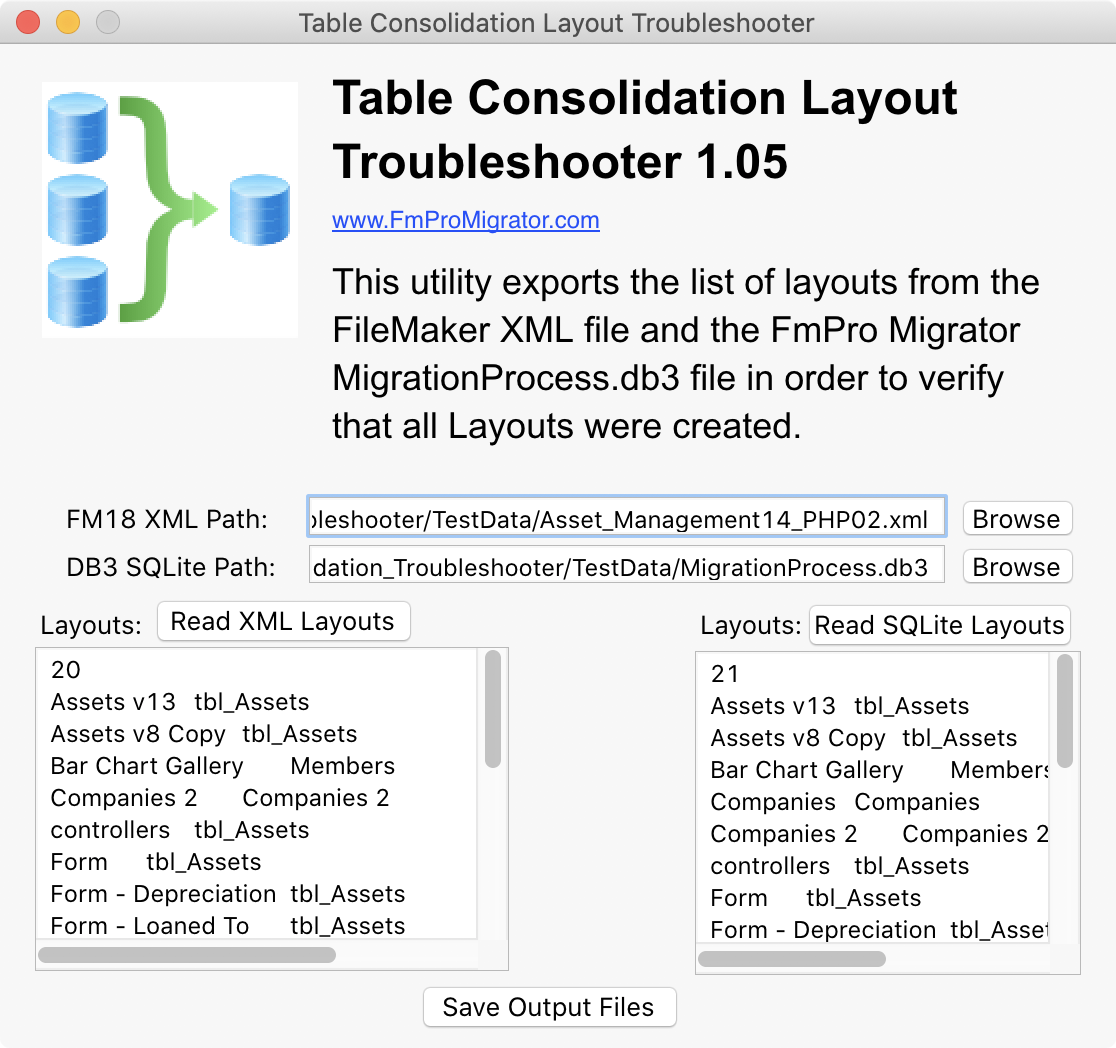
* Added a new Table Consolidation Layout Troubleshooter app; This tool uses the new FileMaker 18 XML file to help troubleshoot issues with missing layouts during the automated Pass#1 layout creation process
VFP:
* Fixed an issue with Field IDs = 0 being created within FileMaker databases from VFP DBF files. This problem resulted in the fields being "invisible" to the FileMaker database and not allowing importing or deletion of the fields.
* Fixed an issue with VFP PRG code script steps not being properly commented when pasting into FileMaker.
PHP:
* Fixed the database connection info for PostgreSQL database connections in the app/Config/database.php file.
General:
* FmPro Migrator is now notarized by Apple to prevent warnings when launching the app on macOS 10.15 Catalina.
Pricing and Availability:
FmPro Migrator Developer Edition is priced at $199 (USD) per developer, FmPro Migrator Platinum Edition is priced at $599 per developer, and both versions are available immediately. A functional demo version of FmPro Migrator may be downloaded online.
FmPro Migrator 8.87: https://www.fmpromigrator.com/products/fmpro_migrator/index.html
FileMaker Table Consolidation Feature: https://www.fmpromigrator.com/products/fmpro_migrator/index.html#table_consolidation
Download FmPro Migrator: https://www.fmpromigrator.com/downloads/demo_software/index.html#fmpro_migrator_demo
Purchase: https://sites.fastspring.com/fmpromigrator/instant/fmpromigratorde_year_sub_fs1
Screenshot (Table Consolidation Troubleshooter): https://www.fmpromigrator.com/images/fmpro_migrator/TCT_105_screenshot_1116_1048.png
TCT Icon: https://www.fmpromigrator.com/images/fmpro_migrator/TCTicon_512_512_04.png
Founded in 1999 by David Simpson in Sunny California, .com Solutions Inc. develops multi-platform graphical applications supporting FileMaker Pro, SQLite, Oracle, MySQL, Access, SQL Server, Sybase, DB2, PostgreSQL, VB6, LiveCode and Visual FoxPro developers. FmPro Script Diff, compares and edits FileMaker Pro scripts. SQLite Diff compares SQLite database schema and data. Copyright (C) 1999-2020 .com Solutions Inc. All Rights Reserved. FileMaker is a registered trademark of FileMaker, Inc. - An Apple Subsidiary. Apple, the Apple logo and macOS platforms are trademarks of Apple Inc. in the U.S. and/or other countries.
*******
Link To Article: https://prmac.com/release-id-83951.htm
*******
---------------------------------------------------------------------------------
Note that you can alter delivered distributions at any time.
Login to your account on prMac to alter your channel selection, or to opt-out at any time.
FmPro Migrator 8.87 Adds FileMaker 18 Table Consolidation on Catalina - Published on 03/03/20
California based .com Solutions Inc. has released FmPro Migrator Developer Edition 8.87. FmPro Migrator is a stand-alone application which quickly and accurately migrates FileMaker Pro, Access, VFP databases to MySQL, Oracle, SQL Server, Sybase, DB2 and more. Version 8.87 is a maintenance release adding support for FileMaker 18 table consolidation projects on macOS Catalina, along with improvements to VFP and PHP Conversions and AppleScript automation.
Fremont, California - .com Solutions Inc. has released FmPro Migrator Developer Edition 8.87 as a maintenance release adding support for FileMaker 18 table consolidation projects on macOS Catalina. This release supports FileMaker Pro Advanced 11 - 18 on macOS. A summary of improvements in FmPro Migrator 8.87 includes:
* Added compatibility with macOS 10.15 Catalina when creating TOs and Relationships
* Fixed an issue updating TO base table names having Unicode characters
* Improved the data import scripts by specifying the source database filename; Scripts will still need to be slightly modified to map the fields from the correct source table to the destination table in situations where there are multiple tables in a source file
* Added a new feature to the layout creation Pass #2 processing to allow restarting layout processing starting at the currently selected layout when holding the Shift key while clicking this button
* The individual Custom Functions creation feature for FileMaker databases checks for whether FileMaker 15 versions are being used and prompts for using the newer and improved Clipboard XML creation feature instead
* Added a new Table Consolidation Layout Troubleshooter app; This tool uses the new FileMaker 18 XML file to help troubleshoot issues with missing layouts during the automated Pass#1 layout creation process
VFP:
* Fixed an issue with Field IDs = 0 being created within FileMaker databases from VFP DBF files. This problem resulted in the fields being "invisible" to the FileMaker database and not allowing importing or deletion of the fields.
* Fixed an issue with VFP PRG code script steps not being properly commented when pasting into FileMaker.
PHP:
* Fixed the database connection info for PostgreSQL database connections in the app/Config/database.php file.
General:
* FmPro Migrator is now notarized by Apple to prevent warnings when launching the app on macOS 10.15 Catalina.
Pricing and Availability:
FmPro Migrator Developer Edition is priced at $199 (USD) per developer, FmPro Migrator Platinum Edition is priced at $599 per developer, and both versions are available immediately. A functional demo version of FmPro Migrator may be downloaded online.
FmPro Migrator 8.87: https://www.fmpromigrator.com/products/fmpro_migrator/index.html
FileMaker Table Consolidation Feature: https://www.fmpromigrator.com/products/fmpro_migrator/index.html#table_consolidation
Download FmPro Migrator: https://www.fmpromigrator.com/downloads/demo_software/index.html#fmpro_migrator_demo
Purchase: https://sites.fastspring.com/fmpromigrator/instant/fmpromigratorde_year_sub_fs1
Screenshot (Table Consolidation Troubleshooter): https://www.fmpromigrator.com/images/fmpro_migrator/TCT_105_screenshot_1116_1048.png
TCT Icon: https://www.fmpromigrator.com/images/fmpro_migrator/TCTicon_512_512_04.png
Founded in 1999 by David Simpson in Sunny California, .com Solutions Inc. develops multi-platform graphical applications supporting FileMaker Pro, SQLite, Oracle, MySQL, Access, SQL Server, Sybase, DB2, PostgreSQL, VB6, LiveCode and Visual FoxPro developers. FmPro Script Diff, compares and edits FileMaker Pro scripts. SQLite Diff compares SQLite database schema and data. Copyright (C) 1999-2020 .com Solutions Inc. All Rights Reserved. FileMaker is a registered trademark of FileMaker, Inc. - An Apple Subsidiary. Apple, the Apple logo and macOS platforms are trademarks of Apple Inc. in the U.S. and/or other countries.
*******
Link To Article: https://prmac.com/release-id-83951.htm
*******
---------------------------------------------------------------------------------
Note that you can alter delivered distributions at any time.
Login to your account on prMac to alter your channel selection, or to opt-out at any time.
The Witch's Forest released for iOS and Android
A new article has been published at prMac.
The Witch's Forest released for iOS and Android - Published on 03/03/20
Seoul-based indie game developer, Toward Inc. releases The Witch's Forest 1.1.9, an update to the company's fun-to-play Black Forest casual RPG title for iOS and Android devices. Featuring a beautiful and unique graphic design, The Witch's Forest offers a unique style of gameplay. Players only grow the world tree The forest was beautiful and tranquil due to the World Tree and the witch, the sources of magic. Version 1.1.9 offers minor bug fixes with optimaized performance.
Seoul, Korea - Indie game developer, Toward Inc. is proud to announce the release of The Witch's Forest 1.1.9, an update to the company's fun-to-play Black Forest casual RPG title for iOS and Android devices. Version 1.1.9 offers minor bug fixes with optimaized performance. Featuring a beautiful and unique graphic design, The Witch's Forest offers a unique style of gameplay. Players only grow the world tree The forest was beautiful and tranquil due to the World Tree and the witch, the sources of magic.
One day, the world tree began to burn because of an unknown power. The witch, the guardian of the forest, lost her power, and the forest became contaminated. Owing to the Light Sprite's sacrifice, the world tree began to sprout again, and the witch awakened. Grow the World Tree to recover the magic power to purify the forest with the witch and reveal the mysterious power!
Game Features:
* Collect spirits to restore the world's magic
* Explore the forest and collect various items
* Upgrade and craft equipment to strengthen your witch
* Purify the forest by defeating monsters
* Quick and easy battles
* Decorate your witch with beautiful and unique hairstyles and wings
* Conquer the mysterious tower to reveal the source of your power
Device Requirements:
* iPhone, iPad and iPod touch
* Requires iOS 10.0 or later
* 340.9 MB
Pricing and Availability:
The Witch's Forest 1.1.9 is Free (With In-App Purchases) and available worldwide exclusively through the App Store in the Games category. There is also an Android version available on Google Play. For more info, please contact Shin Bosik.
The Witch's Forest 1.1.9: https://shs092.wixsite.com/toward
Download from the App Store: https://apps.apple.com/us/app/the-witchs-forest/id979116679
Download from Google Play: https://play.google.com/store/apps/details?id=com.towardmobile.blackforest
Youtube Video (Game Trailer): https://www.youtube.com/watch?v=xLPXrIdssM8
Screenshot1: http://14.32.233.150/screenshot/ScreenShot-EN_14.png
App Icon: http://14.32.233.150/screenshot/Icon_05_512.png
Toward Inc. creates mobile games and edutainment. The team members come from various entertainment industries such as PC game development, online game development, mobile game development and animation studios. Such versatility and experience allows for quick adaptation to different platforms and engines and also for superior risk management. All Material and Software (C) Copyright 2020 Toward Inc. All Rights Reserved. Apple, the Apple logo, iPhone, iPod and iPad are registered trademarks of Apple Inc. in the U.S. and/or other countries. Other trademarks and registered trademarks may be the property of their respective owners.
*******
Link To Article: https://prmac.com/release-id-83952.htm
*******
---------------------------------------------------------------------------------
Note that you can alter delivered distributions at any time.
Login to your account on prMac to alter your channel selection, or to opt-out at any time.
The Witch's Forest released for iOS and Android - Published on 03/03/20
Seoul-based indie game developer, Toward Inc. releases The Witch's Forest 1.1.9, an update to the company's fun-to-play Black Forest casual RPG title for iOS and Android devices. Featuring a beautiful and unique graphic design, The Witch's Forest offers a unique style of gameplay. Players only grow the world tree The forest was beautiful and tranquil due to the World Tree and the witch, the sources of magic. Version 1.1.9 offers minor bug fixes with optimaized performance.
Seoul, Korea - Indie game developer, Toward Inc. is proud to announce the release of The Witch's Forest 1.1.9, an update to the company's fun-to-play Black Forest casual RPG title for iOS and Android devices. Version 1.1.9 offers minor bug fixes with optimaized performance. Featuring a beautiful and unique graphic design, The Witch's Forest offers a unique style of gameplay. Players only grow the world tree The forest was beautiful and tranquil due to the World Tree and the witch, the sources of magic.
One day, the world tree began to burn because of an unknown power. The witch, the guardian of the forest, lost her power, and the forest became contaminated. Owing to the Light Sprite's sacrifice, the world tree began to sprout again, and the witch awakened. Grow the World Tree to recover the magic power to purify the forest with the witch and reveal the mysterious power!
Game Features:
* Collect spirits to restore the world's magic
* Explore the forest and collect various items
* Upgrade and craft equipment to strengthen your witch
* Purify the forest by defeating monsters
* Quick and easy battles
* Decorate your witch with beautiful and unique hairstyles and wings
* Conquer the mysterious tower to reveal the source of your power
Device Requirements:
* iPhone, iPad and iPod touch
* Requires iOS 10.0 or later
* 340.9 MB
Pricing and Availability:
The Witch's Forest 1.1.9 is Free (With In-App Purchases) and available worldwide exclusively through the App Store in the Games category. There is also an Android version available on Google Play. For more info, please contact Shin Bosik.
The Witch's Forest 1.1.9: https://shs092.wixsite.com/toward
Download from the App Store: https://apps.apple.com/us/app/the-witchs-forest/id979116679
Download from Google Play: https://play.google.com/store/apps/details?id=com.towardmobile.blackforest
Youtube Video (Game Trailer): https://www.youtube.com/watch?v=xLPXrIdssM8
Screenshot1: http://14.32.233.150/screenshot/ScreenShot-EN_14.png

App Icon: http://14.32.233.150/screenshot/Icon_05_512.png

Toward Inc. creates mobile games and edutainment. The team members come from various entertainment industries such as PC game development, online game development, mobile game development and animation studios. Such versatility and experience allows for quick adaptation to different platforms and engines and also for superior risk management. All Material and Software (C) Copyright 2020 Toward Inc. All Rights Reserved. Apple, the Apple logo, iPhone, iPod and iPad are registered trademarks of Apple Inc. in the U.S. and/or other countries. Other trademarks and registered trademarks may be the property of their respective owners.
*******
Link To Article: https://prmac.com/release-id-83952.htm
*******
---------------------------------------------------------------------------------
Note that you can alter delivered distributions at any time.
Login to your account on prMac to alter your channel selection, or to opt-out at any time.
AlphaDigits Top Rated Mobile Apps February 2020
A new article has been published at prMac.
AlphaDigits Top Rated Mobile Apps February 2020 - Published on 03/01/20
Mobile app review publisher AlphaDigits has named top rated applications for February 2020. Dreamstime is a free download, and all you pay for is the image. Filez app gives you total control over your files. Business VPN by KeepSolid is one strong contender in the VPN market. Comic Draw is super easy to use and gives great results. In Bricks Color Pick, the bricks are colored, and your job is to make sure the ball and the brick which it hits are of the same color.
Long Island, New York - Mobile app review publisher AlphaDigits has named top rated applications for February 2020. AlphaDigits names five top class mobile apps every month based on the reviews published in the website during the particular month. This website has now released the names of top rated mobile apps for the month of February.
Dreamstime (10/10): It's a free download, and all you pay for is the image you wish to purchase. There are no subscription fees, no monthly costs, nothing. You pay for what you get. While the service started on the web, accessible by a desktop, it has expanded its horizons to be one-click away. You might be in tweeting at an event and need something slick to post. Dreamstime is there in a snap. All you do is find what you are looking for, purchase and use.
Filez (9.5/10): Most android phones come with some sort of file manager pre-installed, but they are often very limited in terms of features and usability. Filez app gives you total control over your files. The home screen of Filez app gives you a nice overview of your recent files. The side menu gives you one-click access to certain kind of files such as images, documents, music and you can adjust magnification level of the icon using minimize and maximize tool at the bottom of the home screen.
KeepSolid (9/10): Choosing the right VPN is essential to making sure your business runs well. You need to provide safe and secure access that is reliable without compromising your data. Business VPN by KeepSolid is one strong contender in this market. You can create admin accounts and allow your admins to set up enough accounts for each of your employees. The admins do all the work internally while KeepSolid takes care of the servers through which your data will be accessible.
Comic Draw (8.5/10): A graphics pen is a must-have for this ap, otherwise taking advantage of all the great tools will go to waste. You can use it with your fingers, but the precision you might need will not be attainable without the use of a pen. That said, being an app that works on the iPad, it's not as robust and feature rich as a dedicated graphics tablet, but if you are looking for something that's super easy to use and gives great results, Comic Draw has it.
Bricks Color Pick (8/10): In this game the bricks are colored, and your job is to make sure the ball and the brick which it hits are of the same color. Sounds pretty easy at first, but the speed at which the ball keeps bouncing off keeps increasing second by second, and there are 6 different colors to choose from. The game begins with a basic combination of two colors, green and yellow, but if you are playing it for the first time, even that seems difficult.
Joe Ellen, an Editor at AlphaDigits said, "Our app marketers can help indie developer to market their apps at a competitive price." Developers can also contact AlphaDigits through the onsite form, mail or the contact form to get their apps reviewed.
AlphaDigits: https://alphadigits.com/
Submit App for Review: https://alphadigits.com/submit-app-for-review/
AlphaDigits is a review site run by a few app marketers. Enjoying the support from a handy amount of regular visitors, AlphaDigits provides reviews for iPhone, iPad and Android apps. Copyright (C) 2020 AlphaDigits. All Rights Reserved. Apple, the Apple logo, iPhone, iPod and iPad are registered trademarks of Apple Inc. in the U.S. and/or other countries.
*******
Link To Article: https://prmac.com/release-id-83950.htm
*******
---------------------------------------------------------------------------------
Note that you can alter delivered distributions at any time.
Login to your account on prMac to alter your channel selection, or to opt-out at any time.
AlphaDigits Top Rated Mobile Apps February 2020 - Published on 03/01/20
Mobile app review publisher AlphaDigits has named top rated applications for February 2020. Dreamstime is a free download, and all you pay for is the image. Filez app gives you total control over your files. Business VPN by KeepSolid is one strong contender in the VPN market. Comic Draw is super easy to use and gives great results. In Bricks Color Pick, the bricks are colored, and your job is to make sure the ball and the brick which it hits are of the same color.
Long Island, New York - Mobile app review publisher AlphaDigits has named top rated applications for February 2020. AlphaDigits names five top class mobile apps every month based on the reviews published in the website during the particular month. This website has now released the names of top rated mobile apps for the month of February.
Dreamstime (10/10): It's a free download, and all you pay for is the image you wish to purchase. There are no subscription fees, no monthly costs, nothing. You pay for what you get. While the service started on the web, accessible by a desktop, it has expanded its horizons to be one-click away. You might be in tweeting at an event and need something slick to post. Dreamstime is there in a snap. All you do is find what you are looking for, purchase and use.
Filez (9.5/10): Most android phones come with some sort of file manager pre-installed, but they are often very limited in terms of features and usability. Filez app gives you total control over your files. The home screen of Filez app gives you a nice overview of your recent files. The side menu gives you one-click access to certain kind of files such as images, documents, music and you can adjust magnification level of the icon using minimize and maximize tool at the bottom of the home screen.
KeepSolid (9/10): Choosing the right VPN is essential to making sure your business runs well. You need to provide safe and secure access that is reliable without compromising your data. Business VPN by KeepSolid is one strong contender in this market. You can create admin accounts and allow your admins to set up enough accounts for each of your employees. The admins do all the work internally while KeepSolid takes care of the servers through which your data will be accessible.
Comic Draw (8.5/10): A graphics pen is a must-have for this ap, otherwise taking advantage of all the great tools will go to waste. You can use it with your fingers, but the precision you might need will not be attainable without the use of a pen. That said, being an app that works on the iPad, it's not as robust and feature rich as a dedicated graphics tablet, but if you are looking for something that's super easy to use and gives great results, Comic Draw has it.
Bricks Color Pick (8/10): In this game the bricks are colored, and your job is to make sure the ball and the brick which it hits are of the same color. Sounds pretty easy at first, but the speed at which the ball keeps bouncing off keeps increasing second by second, and there are 6 different colors to choose from. The game begins with a basic combination of two colors, green and yellow, but if you are playing it for the first time, even that seems difficult.
Joe Ellen, an Editor at AlphaDigits said, "Our app marketers can help indie developer to market their apps at a competitive price." Developers can also contact AlphaDigits through the onsite form, mail or the contact form to get their apps reviewed.
AlphaDigits: https://alphadigits.com/
Submit App for Review: https://alphadigits.com/submit-app-for-review/
AlphaDigits is a review site run by a few app marketers. Enjoying the support from a handy amount of regular visitors, AlphaDigits provides reviews for iPhone, iPad and Android apps. Copyright (C) 2020 AlphaDigits. All Rights Reserved. Apple, the Apple logo, iPhone, iPod and iPad are registered trademarks of Apple Inc. in the U.S. and/or other countries.
*******
Link To Article: https://prmac.com/release-id-83950.htm
*******
---------------------------------------------------------------------------------
Note that you can alter delivered distributions at any time.
Login to your account on prMac to alter your channel selection, or to opt-out at any time.
Subscribe to:
Posts (Atom)