A new article has been published at prMac.
Cell4pets Is Buying iPhones & Offering Biggest Bonus Yet - No Disruption - Published on 03/26/20
Cell4pets is offering their biggest bonus yet for used iPhones and iPads. The mission at Cell4pets is to find responsible and loving homes for the millions of abandoned and abused dogs and cats. The company is offering an additional $15.00 when you sell them an iPhone or iPad. Enter Coupon Code StaySafe at checkout to receive the bonus. They will buy iPhone 6s up through iPhone 11 Pro Max. They resell your device and take a portion of every sale and donate it to the North Shore Animal League.
Mechanicsburg, Pennsylvania - CoronaVirus Update - No Disruption Of Cell4pets Services - They have made all the required adjustments and are following local and state guidance. Cell4pets is offering top dollar for iPhones and iPads. Sell an iPhone or iPad today and earn an additional $15.00! Go to Cell4pets and enter the details about an iPhone or iPad. At checkout, enter Coupon Code "StaySafe" for an additional $15.00. Cell4pets offers some of the highest payouts in the industry, typically 30% more than the carriers.
Extending the life cycle of electronic devices keeps them out of landfills. It's estimated there are millions if not a billion unused cell phones in the US. It is Cell4pets mission to reduce the amount of unused electronic devices that end up in landfills. By refurbishing, reselling, or recycling, Cell4pets is helping to save the planet and giving back to no-kill animal shelters.
Factors impacting the price received for a device.
* Model: It's simple, iPhones, iPads, and Galaxy phones bring the highest offers. The newer the model the higher the offer
* Condition: Please read descriptions carefully. Good and Flawless devices receive significantly more than Fair, Cracked or Broken
* Manufacturer: Apple and Samsung have an edge over the other smartphone manufacturers due to higher global demand
Earn significantly more for iPhones or Samsung phones when selling a device to Cell4pets. Cell4pets has made it really simple to sell iPhones and iPads online. The process is quick and easy, just three simple steps! Cell4pets offers an instant price quote for used Apple iPhones, iPads or Samsung Galaxy smartphones making the entire process seamless. They provide a Priority USPS label and offer different payout options. Even if a device is not listed on the portal, a request can be sent to their team of technicians.
Cell4pets: https://cell4pets.com
Sell Your iPhone For More: https://cell4pets.com/devices/sell/iphone
Sell Your iPad For More: https://cell4pets.com/devices/sell/ipad
Our Mission: https://cell4pets.com/about/
Located in Mechanicsburg, Pennsylvania, Cell4pets has been in the electronic surplus business for 20 years. With a solid reputation, the company is 5 Star rated on Trust Pilot, with 660 100% positive feedbacks on eBay, and 670 all positive reviews on Swappa. All Material and Software (C) Copyright 2020 Cell4pets. All Rights Reserved. Apple, the Apple logo, iPhone, iPod and iPad are registered trademarks of Apple Inc. in the U.S. and/or other countries. Other trademarks and registered trademarks may be the property of their respective owners.
*******
Link To Article: https://prmac.com/release-id-83969.htm
*******
---------------------------------------------------------------------------------
Note that you can alter delivered distributions at any time.
Login to your account on prMac to alter your channel selection, or to opt-out at any time.

Adobe InDesign Plug-Ins and PDF Tools on 50% off Spring Sale
A new article has been published at prMac.
Adobe InDesign Plug-Ins and PDF Tools on 50% off Spring Sale - Published on 03/25/20
Zevrix Solutions, a developer of automation solutions for Adobe InDesign, PDF workflows and Microsoft Office, announces today a spring sale until April 3. The company offers 50% discount on all products including upgrades. Zevrix offers plug-ins for InDesign that automate document printing and exporting, reduce linked image size, and simplify file packaging. The company's software also automates PDF printing and conversion, image and vector file preflighting, and output from Microsoft Office.
Toronto, Canada - Zevrix Solutions, a developer of automation solutions for Adobe InDesign, PDF workflows and Microsoft Office, announces today a spring sale until April 3. Zevrix offers 50% discount on everything in its online store including product upgrades. The company offers several popular plug-ins for Adobe InDesign and Illustrator, which help professionals automate document output, automate repetitive tasks, save disk space, and cut production costs.
"Zevrix software its the best kept secret out there for the Graphic Design industry," says Darren Rath of eponymous design studio in Melbourne, Australia. "It rocks and continues to impress and improve at a scary rate... Thanks to Zevrix products, every piece of artwork that flies out of here requires no intervention by the prepress departments."
The following products are available on sale:
* LinkOptimizer for InDesign, a plug-in that reduces link size by eliminating excess image data, performs essential picture adjustments, and converts file formats. LinkOptimizer lets users save gigabytes of disk space, cut down on processing time, and reduce production costs.
* Output Factory for InDesign, a document printing and exporting automation solution that offers batch output, layer versioning, export as single pages, preflighting, variable file names, and more. A server version that processes files from watched hot folders is also available.
* Package Central for InDesign, a server-grade tool that automates packaging of InDesign documents from hot folders. The app automatically collects InDesign documents along with their links and fonts with the ability to include PDF and IDML files, send email notifications, assign variable folder names and more.
* Zevrix tools for PDF workflows let users batch print PDF files and automate preflighting, color conversion and format exchange. The company also offers batch output solutions for Microsoft Office, file delivery automation tools, and quality control software for images and vector graphic files.
Pricing and Availability:
Zevrix software can be purchased at 50% off until April 3, 2020 from Zevrix website. For details, please visit the website. Product trials are also available for download. All Zevrix products require macOS 10.8-10.15; InDesign and Illustrator solutions require Adobe Creative Cloud CS5-2020 software.
Zevrix Solutions Sale: http://zevrix.com
Download Applications: http://zevrix.com/download.php
Purchase: http://zevrix.com/store.php
Screenshot: http://zevrix.com/screenshots/of2/of2-pdf.jpg
Located in Toronto, Canada, Zevrix Solutions provides automation and productivity solutions for Adobe Creative Cloud and Creative Suite software, PDF workflows, graphic file diagnostics and Microsoft Office output on Mac OS. Zevrix is dedicated to help professionals increase their profits through automating everyday tasks, producing error-free documents, saving disk space and cutting production costs. For more information, visit their website. Copyright (C) 2020 Zevrix Solutions. All Rights Reserved. Other trademarks and registered trademarks may be the property of their respective owners.
*******
Link To Article: https://prmac.com/release-id-83968.htm
*******
---------------------------------------------------------------------------------
Note that you can alter delivered distributions at any time.
Login to your account on prMac to alter your channel selection, or to opt-out at any time.
Adobe InDesign Plug-Ins and PDF Tools on 50% off Spring Sale - Published on 03/25/20
Zevrix Solutions, a developer of automation solutions for Adobe InDesign, PDF workflows and Microsoft Office, announces today a spring sale until April 3. The company offers 50% discount on all products including upgrades. Zevrix offers plug-ins for InDesign that automate document printing and exporting, reduce linked image size, and simplify file packaging. The company's software also automates PDF printing and conversion, image and vector file preflighting, and output from Microsoft Office.
Toronto, Canada - Zevrix Solutions, a developer of automation solutions for Adobe InDesign, PDF workflows and Microsoft Office, announces today a spring sale until April 3. Zevrix offers 50% discount on everything in its online store including product upgrades. The company offers several popular plug-ins for Adobe InDesign and Illustrator, which help professionals automate document output, automate repetitive tasks, save disk space, and cut production costs.
"Zevrix software its the best kept secret out there for the Graphic Design industry," says Darren Rath of eponymous design studio in Melbourne, Australia. "It rocks and continues to impress and improve at a scary rate... Thanks to Zevrix products, every piece of artwork that flies out of here requires no intervention by the prepress departments."
The following products are available on sale:
* LinkOptimizer for InDesign, a plug-in that reduces link size by eliminating excess image data, performs essential picture adjustments, and converts file formats. LinkOptimizer lets users save gigabytes of disk space, cut down on processing time, and reduce production costs.
* Output Factory for InDesign, a document printing and exporting automation solution that offers batch output, layer versioning, export as single pages, preflighting, variable file names, and more. A server version that processes files from watched hot folders is also available.
* Package Central for InDesign, a server-grade tool that automates packaging of InDesign documents from hot folders. The app automatically collects InDesign documents along with their links and fonts with the ability to include PDF and IDML files, send email notifications, assign variable folder names and more.
* Zevrix tools for PDF workflows let users batch print PDF files and automate preflighting, color conversion and format exchange. The company also offers batch output solutions for Microsoft Office, file delivery automation tools, and quality control software for images and vector graphic files.
Pricing and Availability:
Zevrix software can be purchased at 50% off until April 3, 2020 from Zevrix website. For details, please visit the website. Product trials are also available for download. All Zevrix products require macOS 10.8-10.15; InDesign and Illustrator solutions require Adobe Creative Cloud CS5-2020 software.
Zevrix Solutions Sale: http://zevrix.com
Download Applications: http://zevrix.com/download.php
Purchase: http://zevrix.com/store.php
Screenshot: http://zevrix.com/screenshots/of2/of2-pdf.jpg

Located in Toronto, Canada, Zevrix Solutions provides automation and productivity solutions for Adobe Creative Cloud and Creative Suite software, PDF workflows, graphic file diagnostics and Microsoft Office output on Mac OS. Zevrix is dedicated to help professionals increase their profits through automating everyday tasks, producing error-free documents, saving disk space and cutting production costs. For more information, visit their website. Copyright (C) 2020 Zevrix Solutions. All Rights Reserved. Other trademarks and registered trademarks may be the property of their respective owners.
*******
Link To Article: https://prmac.com/release-id-83968.htm
*******
---------------------------------------------------------------------------------
Note that you can alter delivered distributions at any time.
Login to your account on prMac to alter your channel selection, or to opt-out at any time.
Extreme Bowling Challenge for iOS, Android, AppleTV, Windows PC, Xbox
A new article has been published at prMac.
Extreme Bowling Challenge for iOS, Android, AppleTV, Windows PC, Xbox - Published on 03/24/20
Magnin & Associates today introduces Extreme Bowling Challenge 1.0, their new game for iOS, Android, Apple TV, Windows PC and Xbox, where it's like having your own bowling alley in your pocket! Have a lane to yourself, bowl up to 3 AI players, or challenge up to 3 friends online. The game optionally shares player accomplishments through Facebook, Twitter, email, or instant messaging. The Universal App supports iPhone, iPod touch, and iPad, including standard, Retina, and iPhone X displays.
Farmers Branch, Texas, USA - Magnin & Associates today introduces Extreme Bowling Challenge 1.0, their new game for iOS, Android, Apple TV, Windows PC, and Xbox.
It's like having your own bowling alley in your pocket:
* Have a lane to yourself
* Bowl against up to 3 AI players
* Challenge up to 3 friends online
Five unique types of gameplay:
* Normal 10-frame bowling game with automatic scoring
* Curve ball - pins are positioned on a curve stretching the length of the lane
* Interception - avoid a sliding triangular block which knocks you off course
* Ramp - your ball goes airborne off a ramp, landing just before the pins
* Turbulence - giant blowers from either side push your ball off course
The game is multiplayer and multi-platform, supporting most popular smartphones, tablets, and computers. Optionally share player accomplishments with Facebook, Twitter, email, or instant messaging. Universal App - supports iPhone, iPod touch, and iPad, including standard, Retina, and iPhone X displays.
The game was produced by Ed Magnin, programmed by Willie Johnson, Jr, playtested by game dev student interns from Richland College - Daniel Batts and Lorenzo Torres, along with Dallas ISD, Conrad H-TECH students - David Hayes, Amber Roberson, and Collin Porter. Matt Campana created the sound effects.
According to Ed Magnin, "It is like having a bowling alley in your pocket, with traditional as well as extreme gameplay modes, both single player or multiplayer with up to 3 online friends."
Device Requirements (iOS):
* Compatible with iPhone, iPad, and iPod touch
* Requires iOS 9.0 or later
* Universal App (includes Standard, Retina, and iPhone X and XS displays)
* 133.5 MB
* Rated 4+
Pricing and Availability:
Extreme Bowling Challenge 1.0 is $2.99 USD (or an equivalent amount in other currencies) and available worldwide through the App Store in the Games category for iPhone, iPad, and Apple TV. An Android version is available worldwide from both Google Play and the Amazon AppStore. A Windows 10 PC and Xbox version is available from the Windows Store. For more information, please contact Ed Magnin.
Magnin & Associates: http://MagninGames.com
Extreme Bowling Challenge 1.0: http://MagninGames.com/bowling
YouTube Video: https://www.youtube.com/watch?v=2SVu_LGKMdU
Game Credits: https://www.pinterest.com/pin/477733472974317360/
Screenshot (Title Screen): http://magningames.com/iphone/bowling/images/Title.png
App Icon: http://MagninGames.com/iphone/bowling/images/Icon_144.png
Ed Magnin has been actively involved in the game industry since 1979. Earlier in his career he worked for some of the top game developers of their day - MicroProse, Cinemaware, Virgin Games, and Park Place Productions. In 1993, he founded Magnin & Associates and has focused on handheld games ever since. They have created over 30 games for iOS (with over a million App Store downloads). Most are also available for Android, Apple TV, Windows 10 PC and Xbox. All Material and Software (C) Copyright 2020 Magnin & Associates. All Rights Reserved. Apple, the Apple logo, iPhone, iPod and iPad are registered trademarks of Apple Inc. in the U.S. and/or other countries. Other trademarks and registered trademarks may be the property of their respective owners.
*******
Link To Article: https://prmac.com/release-id-83967.htm
*******
---------------------------------------------------------------------------------
Note that you can alter delivered distributions at any time.
Login to your account on prMac to alter your channel selection, or to opt-out at any time.
Extreme Bowling Challenge for iOS, Android, AppleTV, Windows PC, Xbox - Published on 03/24/20
Magnin & Associates today introduces Extreme Bowling Challenge 1.0, their new game for iOS, Android, Apple TV, Windows PC and Xbox, where it's like having your own bowling alley in your pocket! Have a lane to yourself, bowl up to 3 AI players, or challenge up to 3 friends online. The game optionally shares player accomplishments through Facebook, Twitter, email, or instant messaging. The Universal App supports iPhone, iPod touch, and iPad, including standard, Retina, and iPhone X displays.
Farmers Branch, Texas, USA - Magnin & Associates today introduces Extreme Bowling Challenge 1.0, their new game for iOS, Android, Apple TV, Windows PC, and Xbox.
It's like having your own bowling alley in your pocket:
* Have a lane to yourself
* Bowl against up to 3 AI players
* Challenge up to 3 friends online
Five unique types of gameplay:
* Normal 10-frame bowling game with automatic scoring
* Curve ball - pins are positioned on a curve stretching the length of the lane
* Interception - avoid a sliding triangular block which knocks you off course
* Ramp - your ball goes airborne off a ramp, landing just before the pins
* Turbulence - giant blowers from either side push your ball off course
The game is multiplayer and multi-platform, supporting most popular smartphones, tablets, and computers. Optionally share player accomplishments with Facebook, Twitter, email, or instant messaging. Universal App - supports iPhone, iPod touch, and iPad, including standard, Retina, and iPhone X displays.
The game was produced by Ed Magnin, programmed by Willie Johnson, Jr, playtested by game dev student interns from Richland College - Daniel Batts and Lorenzo Torres, along with Dallas ISD, Conrad H-TECH students - David Hayes, Amber Roberson, and Collin Porter. Matt Campana created the sound effects.
According to Ed Magnin, "It is like having a bowling alley in your pocket, with traditional as well as extreme gameplay modes, both single player or multiplayer with up to 3 online friends."
Device Requirements (iOS):
* Compatible with iPhone, iPad, and iPod touch
* Requires iOS 9.0 or later
* Universal App (includes Standard, Retina, and iPhone X and XS displays)
* 133.5 MB
* Rated 4+
Pricing and Availability:
Extreme Bowling Challenge 1.0 is $2.99 USD (or an equivalent amount in other currencies) and available worldwide through the App Store in the Games category for iPhone, iPad, and Apple TV. An Android version is available worldwide from both Google Play and the Amazon AppStore. A Windows 10 PC and Xbox version is available from the Windows Store. For more information, please contact Ed Magnin.
Magnin & Associates: http://MagninGames.com
Extreme Bowling Challenge 1.0: http://MagninGames.com/bowling
YouTube Video: https://www.youtube.com/watch?v=2SVu_LGKMdU
Game Credits: https://www.pinterest.com/pin/477733472974317360/
Screenshot (Title Screen): http://magningames.com/iphone/bowling/images/Title.png

App Icon: http://MagninGames.com/iphone/bowling/images/Icon_144.png

Ed Magnin has been actively involved in the game industry since 1979. Earlier in his career he worked for some of the top game developers of their day - MicroProse, Cinemaware, Virgin Games, and Park Place Productions. In 1993, he founded Magnin & Associates and has focused on handheld games ever since. They have created over 30 games for iOS (with over a million App Store downloads). Most are also available for Android, Apple TV, Windows 10 PC and Xbox. All Material and Software (C) Copyright 2020 Magnin & Associates. All Rights Reserved. Apple, the Apple logo, iPhone, iPod and iPad are registered trademarks of Apple Inc. in the U.S. and/or other countries. Other trademarks and registered trademarks may be the property of their respective owners.
*******
Link To Article: https://prmac.com/release-id-83967.htm
*******
---------------------------------------------------------------------------------
Note that you can alter delivered distributions at any time.
Login to your account on prMac to alter your channel selection, or to opt-out at any time.
LinkOptimizer for Adobe InDesign Adds New Duplicate Image Name Options
A new article has been published at prMac.
LinkOptimizer for Adobe InDesign Adds New Duplicate Image Name Options - Published on 03/24/20
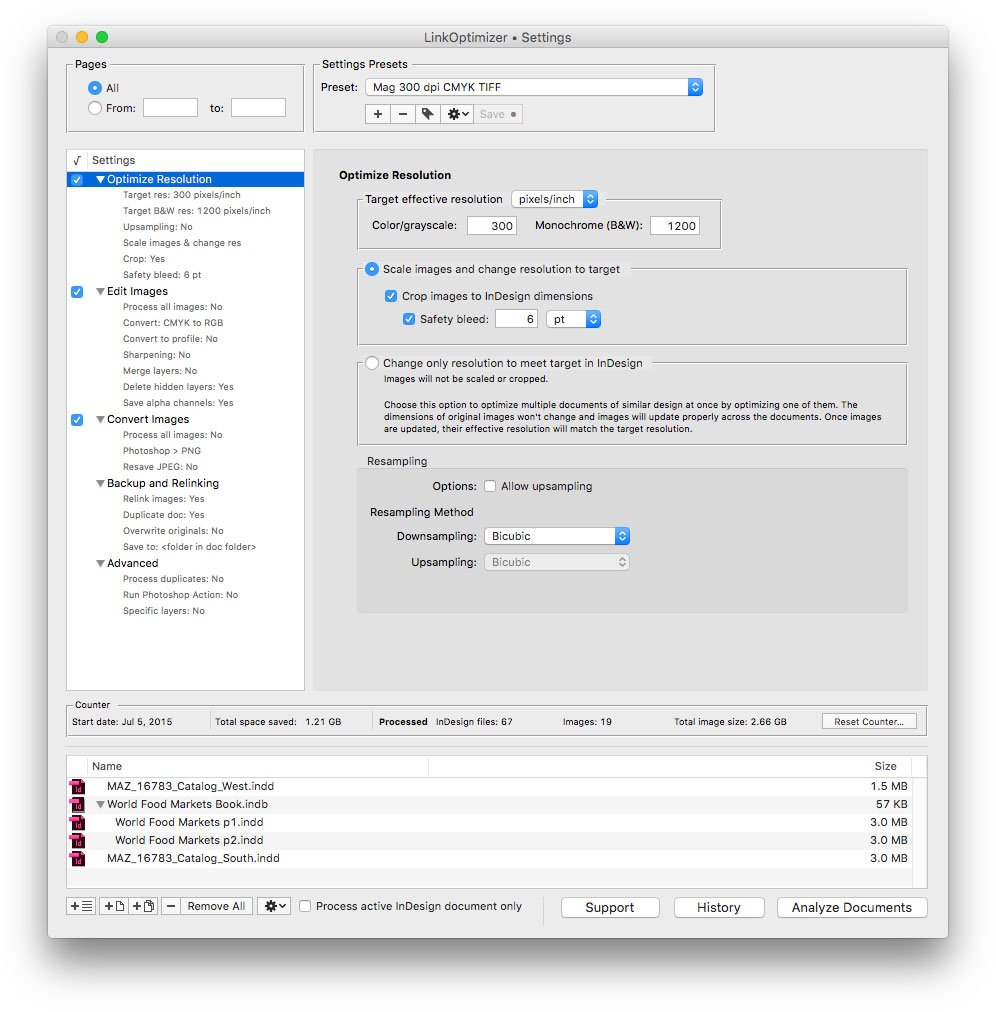
Zevrix Solutions announces LinkOptimizer 5.4.15, a feature update to company's workflow automation solution for Adobe InDesign. LinkOptimizer automatically scales and crops images to their InDesign dimensions at a target resolution, converts image formats and colors, adjusts sharpening, runs Photoshop actions and more. The new version adds new options for variable names of duplicate image links, improves memory management, and addresses an InDesign bug on macOS Catalina.
Toronto (ON), Canada - Zevrix Solutions today announces LinkOptimizer 5.4.15, a feature update to company's image processing automation tool for Adobe InDesign. LinkOptimizer automates complex image manipulation tasks and allows users to reduce the size of InDesign links, save processing time, and decrease production costs.
The new version adds advanced options for the naming of duplicate InDesign links during processing. Users can now assign unique names to duplicates by using a random number or by appending a serial number to the variable file name. The update also improves memory management and addresses a bug in InDesign that caused an error when updating links during analyzing on macOS Catalina.
"LinkOptimizer has changed my life and saved me days and days of work as a retoucher for an international quarterly magazine," says Steve Krason of Chicago based SK Design Group. "It's a lifesaver".
LinkOptimizer works automatically with Adobe Photoshop to eliminate the excess image data of InDesign links, perform essential image adjustments and convert various image formats. For example, with just a click of a button users can:
* Scale and crop images to match their dimensions in InDesign
* Change their resolution to 300 ppi
* Convert all RGB images to CMYK
* Resave all JPEG images as TIFF
* Run a Photoshop Action on each image
At the end of processing, LinkOptimizer will reimport images to InDesign at 100% in their precise position. The resulting savings of disk space, time and resources can be dramatic:
* Save gigabytes of disk space
* Accelerate document output
* Save endless hours - and even days - of manually optimizing image size, resolution and formats
* Reduce job turnaround drastically and cut costs through faster processing
Pricing and Availability:
LinkOptimizer can be purchased from Zevrix website for $259.95 USD (Light version: $179.95) as well as from Adobe Exchange and authorized resellers. Trial is also available for download. The update is free for LinkOptimizer 5.x users and $130 to upgrade from previous versions. LinkOptimizer requires macOS 10.8-10.15 and Adobe InDesign / Photoshop CS5-2020.
Zevrix Solutions: http://zevrix.com
LinkOptimizer 5.4.15: http://zevrix.com/LinkOptimizer.php
Download LinkOptimizer: http://zevrix.com/LinkOptimizer.dmg
Purchase: http://zevrix.com/store.php
Screenshot: http://zevrix.com/screenshots/lo5/res-win.jpg
Located in Toronto, Canada, Zevrix Solutions provides automation and productivity solutions for Adobe Creative Cloud and Creative Suite software, PDF workflows, graphic file diagnostics and Microsoft Office output on Mac OS. Zevrix is dedicated to help professionals increase their profits through automating everyday tasks, producing error-free documents, saving disk space and cutting production costs. For more information, visit their website. Copyright (C) 2020 Zevrix Solutions. All Rights Reserved. Other trademarks and registered trademarks may be the property of their respective owners.
*******
Link To Article: https://prmac.com/release-id-83966.htm
*******
---------------------------------------------------------------------------------
Note that you can alter delivered distributions at any time.
Login to your account on prMac to alter your channel selection, or to opt-out at any time.
LinkOptimizer for Adobe InDesign Adds New Duplicate Image Name Options - Published on 03/24/20
Zevrix Solutions announces LinkOptimizer 5.4.15, a feature update to company's workflow automation solution for Adobe InDesign. LinkOptimizer automatically scales and crops images to their InDesign dimensions at a target resolution, converts image formats and colors, adjusts sharpening, runs Photoshop actions and more. The new version adds new options for variable names of duplicate image links, improves memory management, and addresses an InDesign bug on macOS Catalina.
Toronto (ON), Canada - Zevrix Solutions today announces LinkOptimizer 5.4.15, a feature update to company's image processing automation tool for Adobe InDesign. LinkOptimizer automates complex image manipulation tasks and allows users to reduce the size of InDesign links, save processing time, and decrease production costs.
The new version adds advanced options for the naming of duplicate InDesign links during processing. Users can now assign unique names to duplicates by using a random number or by appending a serial number to the variable file name. The update also improves memory management and addresses a bug in InDesign that caused an error when updating links during analyzing on macOS Catalina.
"LinkOptimizer has changed my life and saved me days and days of work as a retoucher for an international quarterly magazine," says Steve Krason of Chicago based SK Design Group. "It's a lifesaver".
LinkOptimizer works automatically with Adobe Photoshop to eliminate the excess image data of InDesign links, perform essential image adjustments and convert various image formats. For example, with just a click of a button users can:
* Scale and crop images to match their dimensions in InDesign
* Change their resolution to 300 ppi
* Convert all RGB images to CMYK
* Resave all JPEG images as TIFF
* Run a Photoshop Action on each image
At the end of processing, LinkOptimizer will reimport images to InDesign at 100% in their precise position. The resulting savings of disk space, time and resources can be dramatic:
* Save gigabytes of disk space
* Accelerate document output
* Save endless hours - and even days - of manually optimizing image size, resolution and formats
* Reduce job turnaround drastically and cut costs through faster processing
Pricing and Availability:
LinkOptimizer can be purchased from Zevrix website for $259.95 USD (Light version: $179.95) as well as from Adobe Exchange and authorized resellers. Trial is also available for download. The update is free for LinkOptimizer 5.x users and $130 to upgrade from previous versions. LinkOptimizer requires macOS 10.8-10.15 and Adobe InDesign / Photoshop CS5-2020.
Zevrix Solutions: http://zevrix.com
LinkOptimizer 5.4.15: http://zevrix.com/LinkOptimizer.php
Download LinkOptimizer: http://zevrix.com/LinkOptimizer.dmg
Purchase: http://zevrix.com/store.php
Screenshot: http://zevrix.com/screenshots/lo5/res-win.jpg
Located in Toronto, Canada, Zevrix Solutions provides automation and productivity solutions for Adobe Creative Cloud and Creative Suite software, PDF workflows, graphic file diagnostics and Microsoft Office output on Mac OS. Zevrix is dedicated to help professionals increase their profits through automating everyday tasks, producing error-free documents, saving disk space and cutting production costs. For more information, visit their website. Copyright (C) 2020 Zevrix Solutions. All Rights Reserved. Other trademarks and registered trademarks may be the property of their respective owners.
*******
Link To Article: https://prmac.com/release-id-83966.htm
*******
---------------------------------------------------------------------------------
Note that you can alter delivered distributions at any time.
Login to your account on prMac to alter your channel selection, or to opt-out at any time.
Cisdem Document Reader V5.2.0 Refines Memory Usage and Fixes Bugs
A new article has been published at prMac.
Cisdem Document Reader V5.2.0 Refines Memory Usage and Fixes Bugs - Published on 03/20/20
Cisdem announces it has upgraded Document Reader 5.2.0 with memory usage optimized and bugs fixed. The app is an easy-to-use tool that supports to open PDF, WPD, WPS, XPS, OXPS, Visio, DjVu, and Winmail.dat files on Mac. It also comes integrated with comprehensive document viewing features, such as full-screen support, page navigation, zoom, rotation, search support, bookmarks, print, etc.
Arizona - Cisdem Document Reader for Mac has been upgraded to version 5.2.0, aiming at optimizing memory usage and fixing minor bugs. Cisdem Document Reader is an easy-to-use tool that supports to open PDF, WPD, WPS, XPS, OXPS, Visio, DjVu, and Winmail.dat files on Mac. It comes integrated with comprehensive document viewing features, such as full-screen support, page navigation, zoom, rotation, search support, bookmarks, print, etc. Meanwhile, you can export files as PDF, text or image for easy editing and sharing.
"The coronavirus outbreak has triggered a trial run for studying and working from home", said Edward Riley, the project manager of Cisdem. "To make reading easier, we upgraded our Document Reader. Hopefully, it meets your basic demands and improves your studying and working efficiency. Finally what I have to say is washing your hands frequently and using facemasks to fight Covid-19 together!"
What's New in Version 5.2.0?
* Refined memory usage.
* Fixed the crash issue.
* Fixed the unable to export photos issue for some documents.
* Fix minor bugs.
Main Functions
* Open Different Types of Files
Importing files into the program by dragging-n-dropping. It lets you open PDF, WordPerfect, WPS, XPS/OXPS, Visio, DjVu, and Winmail.dat files simultaneously in multiple tabs.
* Export Files to Other Formats
Users can convert to PDF, Text, and image (PNG, JPEG, BMP, GIF, and TIFF) format. When it comes to exporting multi-page files, you can specify the page ranges or just choose a single page.
* Extract Images from Documents
Users are capable of extracting images including PNG, JPEG, BMP, GIF or TIFF from files. Also, you can select the page ranges of documents as well.
* Print Documents
The software will auto-connect to an available printer to help you print documents on Mac. Everything thing you should do is to customize Preset, Pages, Pages per Sheet, Border, etc.
* Search the Content in Files
Users can quickly find a word, character, or phrase in the file by entering a keyword in the search bar.
* A set of Tools to Make Reading More Fluent
It's packed with some useful tools including full-screen reading, two viewing modes, page navigation, zoom & rotate, bookmark, etc.
Price and Availability
It's free to open PDF files on Mac, while the other 6 file types are priced at $9.99. But there is a great discount for the full version which is priced at $29.99. All of them are lifetime licenses and can be upgraded to the newest version for free.
Cisdem Document Reader 5.2.0 is worldwide exclusively through the official website, while the free trial is also available for download at the official website.
About Cisdem
Cisdem, an international leading software company established in 2009, is committed to creating reliable utility tools, PDF tools, multimedia tools, and some mobile tools for both business and home Mac users. For more details and information, please visit the Cisdem website.
Cisdem: https://www.cisdem.com/
Cisdem Document Reader 5.2.0 for Mac: https://www.cisdem.com/document-reader-mac.html
Download the Free Trial : https://www.cisdem.com/downloads/cisdem-appcrypt-14.dmg
Cisdem provides productivity and business software that helps Mac users to get their job done faster. Cisdem products include top rated software centered on PDF Conversion, PDF Management, Data Recovery, and File Management. The company is dedicated in building highly efficient Mac software that make life easier and processes simpler. All Material and Software (C) Copyright 2020 Cisdem. All Rights Reserved. Apple, the Apple logo, Mac OS X and Macintosh are registered trademarks of Apple Inc. in the U.S. and/or other countries. Other trademarks and registered trademarks may be the property of their respective owners.
*******
Link To Article: https://prmac.com/release-id-83965.htm
*******
---------------------------------------------------------------------------------
Note that you can alter delivered distributions at any time.
Login to your account on prMac to alter your channel selection, or to opt-out at any time.
Cisdem Document Reader V5.2.0 Refines Memory Usage and Fixes Bugs - Published on 03/20/20
Cisdem announces it has upgraded Document Reader 5.2.0 with memory usage optimized and bugs fixed. The app is an easy-to-use tool that supports to open PDF, WPD, WPS, XPS, OXPS, Visio, DjVu, and Winmail.dat files on Mac. It also comes integrated with comprehensive document viewing features, such as full-screen support, page navigation, zoom, rotation, search support, bookmarks, print, etc.
Arizona - Cisdem Document Reader for Mac has been upgraded to version 5.2.0, aiming at optimizing memory usage and fixing minor bugs. Cisdem Document Reader is an easy-to-use tool that supports to open PDF, WPD, WPS, XPS, OXPS, Visio, DjVu, and Winmail.dat files on Mac. It comes integrated with comprehensive document viewing features, such as full-screen support, page navigation, zoom, rotation, search support, bookmarks, print, etc. Meanwhile, you can export files as PDF, text or image for easy editing and sharing.
"The coronavirus outbreak has triggered a trial run for studying and working from home", said Edward Riley, the project manager of Cisdem. "To make reading easier, we upgraded our Document Reader. Hopefully, it meets your basic demands and improves your studying and working efficiency. Finally what I have to say is washing your hands frequently and using facemasks to fight Covid-19 together!"
What's New in Version 5.2.0?
* Refined memory usage.
* Fixed the crash issue.
* Fixed the unable to export photos issue for some documents.
* Fix minor bugs.
Main Functions
* Open Different Types of Files
Importing files into the program by dragging-n-dropping. It lets you open PDF, WordPerfect, WPS, XPS/OXPS, Visio, DjVu, and Winmail.dat files simultaneously in multiple tabs.
* Export Files to Other Formats
Users can convert to PDF, Text, and image (PNG, JPEG, BMP, GIF, and TIFF) format. When it comes to exporting multi-page files, you can specify the page ranges or just choose a single page.
* Extract Images from Documents
Users are capable of extracting images including PNG, JPEG, BMP, GIF or TIFF from files. Also, you can select the page ranges of documents as well.
* Print Documents
The software will auto-connect to an available printer to help you print documents on Mac. Everything thing you should do is to customize Preset, Pages, Pages per Sheet, Border, etc.
* Search the Content in Files
Users can quickly find a word, character, or phrase in the file by entering a keyword in the search bar.
* A set of Tools to Make Reading More Fluent
It's packed with some useful tools including full-screen reading, two viewing modes, page navigation, zoom & rotate, bookmark, etc.
Price and Availability
It's free to open PDF files on Mac, while the other 6 file types are priced at $9.99. But there is a great discount for the full version which is priced at $29.99. All of them are lifetime licenses and can be upgraded to the newest version for free.
Cisdem Document Reader 5.2.0 is worldwide exclusively through the official website, while the free trial is also available for download at the official website.
About Cisdem
Cisdem, an international leading software company established in 2009, is committed to creating reliable utility tools, PDF tools, multimedia tools, and some mobile tools for both business and home Mac users. For more details and information, please visit the Cisdem website.
Cisdem: https://www.cisdem.com/
Cisdem Document Reader 5.2.0 for Mac: https://www.cisdem.com/document-reader-mac.html
Download the Free Trial : https://www.cisdem.com/downloads/cisdem-appcrypt-14.dmg
Cisdem provides productivity and business software that helps Mac users to get their job done faster. Cisdem products include top rated software centered on PDF Conversion, PDF Management, Data Recovery, and File Management. The company is dedicated in building highly efficient Mac software that make life easier and processes simpler. All Material and Software (C) Copyright 2020 Cisdem. All Rights Reserved. Apple, the Apple logo, Mac OS X and Macintosh are registered trademarks of Apple Inc. in the U.S. and/or other countries. Other trademarks and registered trademarks may be the property of their respective owners.
*******
Link To Article: https://prmac.com/release-id-83965.htm
*******
---------------------------------------------------------------------------------
Note that you can alter delivered distributions at any time.
Login to your account on prMac to alter your channel selection, or to opt-out at any time.
WaterField Unveils Hitch Crossbody Laptop Brief for New MacBook and iPad
A new article has been published at prMac.
WaterField Unveils Hitch Crossbody Laptop Brief for New MacBook and iPad - Published on 03/19/20
San Francisco's WaterField Designs unveils the handcrafted Hitch Crossbody Brief, a spacious vertical laptop and tablet crossbody bag in a streamlined form that functions as an everyday carry or briefcase. Two sizes, each with dual padded compartments, fit daily work necessities, the new Apple 12.9-inch iPad Pro with Magic Keyboard, plus the newly-announced MacBook Air or anticipated MacBook Pro 14-inch, or the 16-inch MacBook Pro.
San Francisco, California - WaterField Designs, an innovative leader in custom laptop sleeves, bags, and cases for digital-minded professionals announces the new Hitch Crossbody Laptop Brief in two sizes: the "Compact" to fit Apple's newly-announced 13-inch MacBook Air, the anticipated 14-inch MacBook Pro, or the 13-inch Surface Pro, and the "Full" to fit the 16-inch Apple MacBook Pro or the 15-inch Surface Pro.
The bag's clean lines keep the look compact even as subtle expanders add depth and capacity to the bag's front pockets. Each Hitch Crossbody Brief includes two padded interior compartments: one for a laptop and another for Apple's new 12.9-inch iPad Pro with Magic Keyboard.
The bag's clean lines keep the look compact even as subtle expanders add depth and capacity to the bag's front pockets. The Hitch Crossbody Brief is suitable for business, travel, or casual use, and its padded tech compartments and three carry options make it an optimal briefcase for a day at the office.
"The Hitch is so comfortable even when it's packed, and it keeps all my gear easy to access," said company owner Gary Waterfield. "The vertical design keeps the weight distributed. It holds a lot but stays really sleek looking"it's sharp enough to serve as an office briefcase. The adjustable shoulder strap can be worn crossbody or off one shoulder."
Every detail on the Hitch Crossbody Brief is carefully devised for ease of use and esthetic appeal. A spacious main compartment, accessed from either side, features a padded laptop and padded tablet sleeve. Two sizes suit laptops as large as the upcoming 14-inch and the 16-inch MacBook Pro and tablets up to 12.9 inches. Gold rip-stop lining lights up the interior making it easy to find everything else needed for a day's work, even at the bottom of the bag. Interior open-topped pockets, pen slots, and a quick-retrieval key tether are all raised off the bottom for convenient access and balanced weight distribution.
A zippered front pocket is larger than it appears thanks to subtle, cleverly-designed expanders, so it can hold bulky items like a power brick or mouse without bulging. Inside the front pocket, additional organizational pockets keep quick-access items easy to locate. Flexible carry options include a comfortable and removable suspension shoulder strap, two briefcase-style handles, and a convenient wheeled suitcase passthrough. A full-grain leather base and front panel reinforce the bag and add a bit of luxury to this handsome laptop bag.
Users choose from a durable black ballistic nylon or rugged tan waxed canvas base. They can then opt for accents in one of two premium, full-grain leather colors. The Hitch Crossbody Brief joins an extensive line of WaterField tech-friendly messenger bags, briefcases, backpacks, and duffel bags designed for commuting, for supporting professionals at the office, and for improving the travel experience.
Colors:
* Black ballistic nylon with black or chocolate full-grain leather or tan waxed canvas with chocolate or grizzly full-grain leather
Dimensions and Weight:
* Compact; 10.375 x 13.25 x 3.75 inches; Canvas"1.8 lbs. Ballistic 1.5 lbs. (Fits new 13-inch MacBook Air, anticipated 14-inch MacBook Pro & Surface Pro 13-inch.)
* Long; 11.75 x 15 x 3.75 inches; Canvas; 2.2 lbs. Ballistic; 1.8 lbs. (Fits MacBook Pro 16-inch and Surface Pro 15-inch.)
Pricing and Availability:
The Hitch Crossbody Brief is priced: (Compact $249). and Full $259 (USD). Pre-order now. First production run ships as soon as we are back in our San Fransico sewing studio.
WaterField Designs: http://www.sfbags.com/
Hitch Crossbody Brief: https://www.sfbags.com/products/hitch-crossbody-laptop-brief/
YouTube Video (Tour of the Hitch Crossbody Brief): https://www.youtube.com/watch?v=MZ7hbn_-jAw
Screenshot: https://cdn.shopify.com/s/files/1/0281/2796/products/Lifestyle-3_680fc1fd-7be6-4d96-aa36-d77e10aa6fe8_1800x1800.jpg
WaterField Designs is an innovative San Francisco designer and manufacturer of bags and cases for tech-savvy consumers who want to stylishly and responsibly transport their technology. WaterField manufactures custom-fitted, high-quality cases and bags for a full-range of laptop computers, smartphones, tablets, gaming devices, and other digital gear. All products are manufactured to exacting standards entirely in San Francisco. WaterField Designs, SFBags, and Hitch Crossbody Brief are trademarks of WaterField Designs. Copyright (C) 2020 WaterField Designs. All Rights Reserved. Other trademarks and registered trademarks may be the property of their respective owners.
*******
Link To Article: https://prmac.com/release-id-83964.htm
*******
---------------------------------------------------------------------------------
Note that you can alter delivered distributions at any time.
Login to your account on prMac to alter your channel selection, or to opt-out at any time.
WaterField Unveils Hitch Crossbody Laptop Brief for New MacBook and iPad - Published on 03/19/20
San Francisco's WaterField Designs unveils the handcrafted Hitch Crossbody Brief, a spacious vertical laptop and tablet crossbody bag in a streamlined form that functions as an everyday carry or briefcase. Two sizes, each with dual padded compartments, fit daily work necessities, the new Apple 12.9-inch iPad Pro with Magic Keyboard, plus the newly-announced MacBook Air or anticipated MacBook Pro 14-inch, or the 16-inch MacBook Pro.
San Francisco, California - WaterField Designs, an innovative leader in custom laptop sleeves, bags, and cases for digital-minded professionals announces the new Hitch Crossbody Laptop Brief in two sizes: the "Compact" to fit Apple's newly-announced 13-inch MacBook Air, the anticipated 14-inch MacBook Pro, or the 13-inch Surface Pro, and the "Full" to fit the 16-inch Apple MacBook Pro or the 15-inch Surface Pro.
The bag's clean lines keep the look compact even as subtle expanders add depth and capacity to the bag's front pockets. Each Hitch Crossbody Brief includes two padded interior compartments: one for a laptop and another for Apple's new 12.9-inch iPad Pro with Magic Keyboard.
The bag's clean lines keep the look compact even as subtle expanders add depth and capacity to the bag's front pockets. The Hitch Crossbody Brief is suitable for business, travel, or casual use, and its padded tech compartments and three carry options make it an optimal briefcase for a day at the office.
"The Hitch is so comfortable even when it's packed, and it keeps all my gear easy to access," said company owner Gary Waterfield. "The vertical design keeps the weight distributed. It holds a lot but stays really sleek looking"it's sharp enough to serve as an office briefcase. The adjustable shoulder strap can be worn crossbody or off one shoulder."
Every detail on the Hitch Crossbody Brief is carefully devised for ease of use and esthetic appeal. A spacious main compartment, accessed from either side, features a padded laptop and padded tablet sleeve. Two sizes suit laptops as large as the upcoming 14-inch and the 16-inch MacBook Pro and tablets up to 12.9 inches. Gold rip-stop lining lights up the interior making it easy to find everything else needed for a day's work, even at the bottom of the bag. Interior open-topped pockets, pen slots, and a quick-retrieval key tether are all raised off the bottom for convenient access and balanced weight distribution.
A zippered front pocket is larger than it appears thanks to subtle, cleverly-designed expanders, so it can hold bulky items like a power brick or mouse without bulging. Inside the front pocket, additional organizational pockets keep quick-access items easy to locate. Flexible carry options include a comfortable and removable suspension shoulder strap, two briefcase-style handles, and a convenient wheeled suitcase passthrough. A full-grain leather base and front panel reinforce the bag and add a bit of luxury to this handsome laptop bag.
Users choose from a durable black ballistic nylon or rugged tan waxed canvas base. They can then opt for accents in one of two premium, full-grain leather colors. The Hitch Crossbody Brief joins an extensive line of WaterField tech-friendly messenger bags, briefcases, backpacks, and duffel bags designed for commuting, for supporting professionals at the office, and for improving the travel experience.
Colors:
* Black ballistic nylon with black or chocolate full-grain leather or tan waxed canvas with chocolate or grizzly full-grain leather
Dimensions and Weight:
* Compact; 10.375 x 13.25 x 3.75 inches; Canvas"1.8 lbs. Ballistic 1.5 lbs. (Fits new 13-inch MacBook Air, anticipated 14-inch MacBook Pro & Surface Pro 13-inch.)
* Long; 11.75 x 15 x 3.75 inches; Canvas; 2.2 lbs. Ballistic; 1.8 lbs. (Fits MacBook Pro 16-inch and Surface Pro 15-inch.)
Pricing and Availability:
The Hitch Crossbody Brief is priced: (Compact $249). and Full $259 (USD). Pre-order now. First production run ships as soon as we are back in our San Fransico sewing studio.
WaterField Designs: http://www.sfbags.com/
Hitch Crossbody Brief: https://www.sfbags.com/products/hitch-crossbody-laptop-brief/
YouTube Video (Tour of the Hitch Crossbody Brief): https://www.youtube.com/watch?v=MZ7hbn_-jAw
Screenshot: https://cdn.shopify.com/s/files/1/0281/2796/products/Lifestyle-3_680fc1fd-7be6-4d96-aa36-d77e10aa6fe8_1800x1800.jpg

WaterField Designs is an innovative San Francisco designer and manufacturer of bags and cases for tech-savvy consumers who want to stylishly and responsibly transport their technology. WaterField manufactures custom-fitted, high-quality cases and bags for a full-range of laptop computers, smartphones, tablets, gaming devices, and other digital gear. All products are manufactured to exacting standards entirely in San Francisco. WaterField Designs, SFBags, and Hitch Crossbody Brief are trademarks of WaterField Designs. Copyright (C) 2020 WaterField Designs. All Rights Reserved. Other trademarks and registered trademarks may be the property of their respective owners.
*******
Link To Article: https://prmac.com/release-id-83964.htm
*******
---------------------------------------------------------------------------------
Note that you can alter delivered distributions at any time.
Login to your account on prMac to alter your channel selection, or to opt-out at any time.
Graphic Inspector Addresses macOS Catalina Memory Bug: Image Check Tool
A new article has been published at prMac.
Graphic Inspector Addresses macOS Catalina Memory Bug: Image Check Tool - Published on 03/18/20
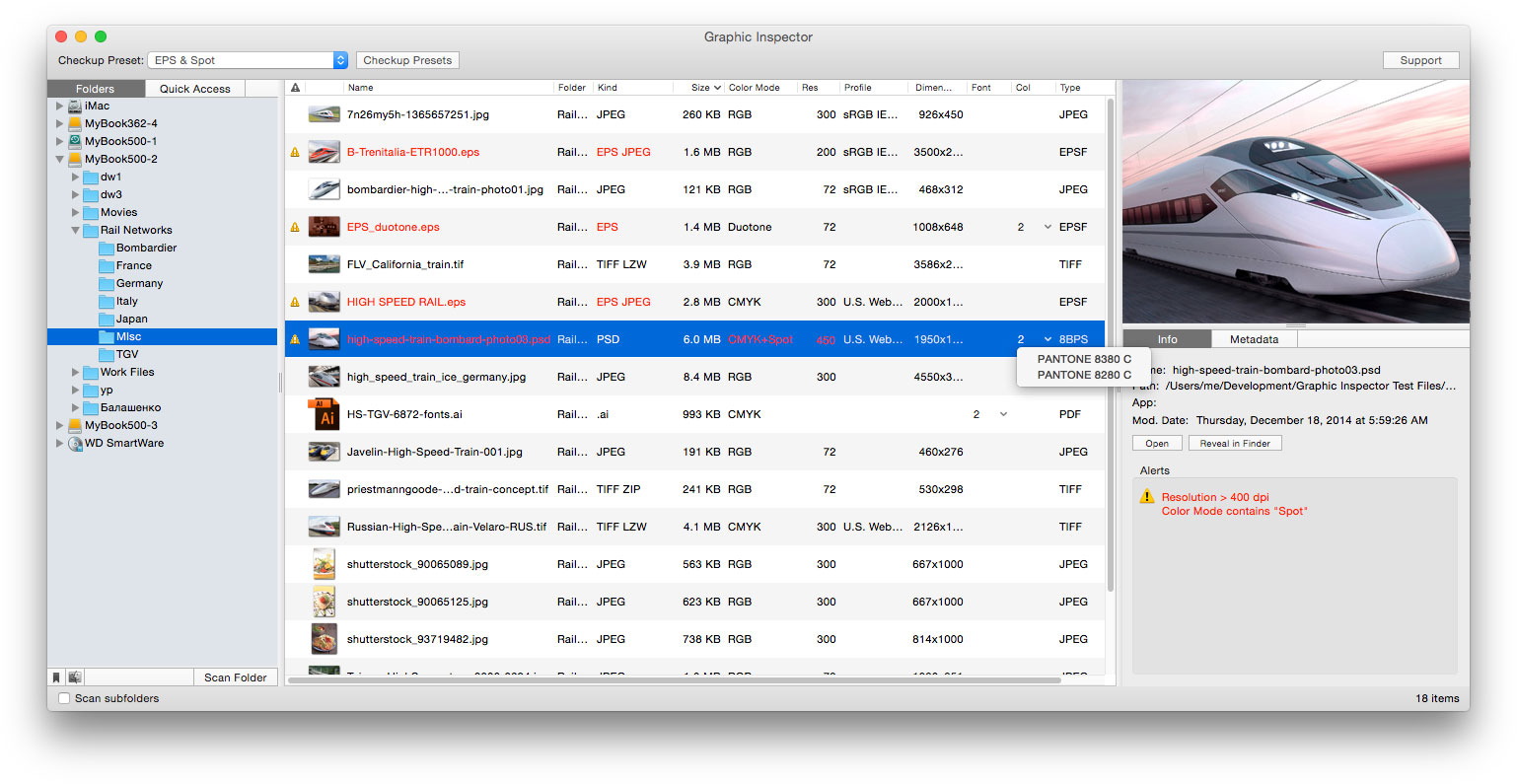
Zevrix Solutions announces Graphic Inspector 2.4.6, a bug fix update to company's quality control tool for images and vector graphics files. Graphic Inspector can flag images and Illustrator files with specific attributes such as resolution, color, spot channels, fonts and more. The app is the only tool on the market that preflights both bitmap and vector files. The new version addresses a memory bug on macOS Catalina that prevented the app from retrieving icon previews of large file batches.
Toronto (ON), Canada - Zevrix Solutions today announces the release of Graphic Inspector 2.4.6, a security update to company's quality control solution for images and vector graphic files. The software can check entire folders of documents for potential problems according to specific workflow requirements. Graphic Inspector is the only tool on the market that lets the graphics industry professionals inspect both raster images and Adobe Illustrator documents.
The new version addresses an issue that made Graphic Inspector hang when retrieving icon previews for large batches of files on macOS Catalina. The problem was eventually traced to a memory bug introduced on macOS 10.15. The new update restores uninterrupted file processing of large image folders by Graphic Inspector. In the meantime, the display of icon previews on Catalina is temporarily suspended even if this option is checked in the app's preferences. Until a workaround is found, Graphic Inspector will always display generic icons for all files.
"Graphic Inspector displays every bit of useful information about vector or raster graphic files and flags the ones that match rules you define," writes Jay Nelson in Layers magazine. "With its combination of price, utility, and thoughtful design, Graphic Inspector is a rare gem."
Graphic Inspector is designed to help users of any trade, whether it's print, prepress, web design, or digital photography. For example, users can quickly locate files whose color mode is CMYK, format - TIFF, resolution is below 300 dpi, ICC profile isn't "US Web Coated" and so on. The app offers the following key features:
* Check multiple images and vector files for potential problems
* Customizable checkup presets
* Common checks such as resolution, color mode, ICC profile
* Professional prepress checks: spot colors, fonts in vector files, image compression and more
* Search image EXIF, IPTC and GPS metadata
Pricing and Availability:
Graphic Inspector can be purchased from the Zevrix web site for $19.95 (USD), as well as from authorized resellers. Trial is also available for download. The update is free for users of version 2 ($10 to upgrade from version 1). Graphic Inspector requires macOS 10.8-10.15.
Zevrix Solutions: http://zevrix.com
Graphic Inspector 2.4.6: http://zevrix.com/GraphicInspector.php
Download Graphic Inspector: http://zevrix.com/GraphicInspector.dmg
Purchase: http://zevrix.com/store.php
Screenshot: http://zevrix.com/screenshots/gi2/gi2-main.jpg
Located in Toronto, Canada, Zevrix Solutions provides automation and productivity solutions for Adobe Creative Cloud and Creative Suite software, PDF workflows, graphic file diagnostics and Microsoft Office output on Mac OS. Zevrix is dedicated to help professionals increase their profits through automating everyday tasks, producing error-free documents, saving disk space and cutting production costs. For more information, visit their website. Copyright (C) 2020 Zevrix Solutions. All Rights Reserved. Other trademarks and registered trademarks may be the property of their respective owners.
*******
Link To Article: https://prmac.com/release-id-83963.htm
*******
---------------------------------------------------------------------------------
Note that you can alter delivered distributions at any time.
Login to your account on prMac to alter your channel selection, or to opt-out at any time.
Graphic Inspector Addresses macOS Catalina Memory Bug: Image Check Tool - Published on 03/18/20
Zevrix Solutions announces Graphic Inspector 2.4.6, a bug fix update to company's quality control tool for images and vector graphics files. Graphic Inspector can flag images and Illustrator files with specific attributes such as resolution, color, spot channels, fonts and more. The app is the only tool on the market that preflights both bitmap and vector files. The new version addresses a memory bug on macOS Catalina that prevented the app from retrieving icon previews of large file batches.
Toronto (ON), Canada - Zevrix Solutions today announces the release of Graphic Inspector 2.4.6, a security update to company's quality control solution for images and vector graphic files. The software can check entire folders of documents for potential problems according to specific workflow requirements. Graphic Inspector is the only tool on the market that lets the graphics industry professionals inspect both raster images and Adobe Illustrator documents.
The new version addresses an issue that made Graphic Inspector hang when retrieving icon previews for large batches of files on macOS Catalina. The problem was eventually traced to a memory bug introduced on macOS 10.15. The new update restores uninterrupted file processing of large image folders by Graphic Inspector. In the meantime, the display of icon previews on Catalina is temporarily suspended even if this option is checked in the app's preferences. Until a workaround is found, Graphic Inspector will always display generic icons for all files.
"Graphic Inspector displays every bit of useful information about vector or raster graphic files and flags the ones that match rules you define," writes Jay Nelson in Layers magazine. "With its combination of price, utility, and thoughtful design, Graphic Inspector is a rare gem."
Graphic Inspector is designed to help users of any trade, whether it's print, prepress, web design, or digital photography. For example, users can quickly locate files whose color mode is CMYK, format - TIFF, resolution is below 300 dpi, ICC profile isn't "US Web Coated" and so on. The app offers the following key features:
* Check multiple images and vector files for potential problems
* Customizable checkup presets
* Common checks such as resolution, color mode, ICC profile
* Professional prepress checks: spot colors, fonts in vector files, image compression and more
* Search image EXIF, IPTC and GPS metadata
Pricing and Availability:
Graphic Inspector can be purchased from the Zevrix web site for $19.95 (USD), as well as from authorized resellers. Trial is also available for download. The update is free for users of version 2 ($10 to upgrade from version 1). Graphic Inspector requires macOS 10.8-10.15.
Zevrix Solutions: http://zevrix.com
Graphic Inspector 2.4.6: http://zevrix.com/GraphicInspector.php
Download Graphic Inspector: http://zevrix.com/GraphicInspector.dmg
Purchase: http://zevrix.com/store.php
Screenshot: http://zevrix.com/screenshots/gi2/gi2-main.jpg
Located in Toronto, Canada, Zevrix Solutions provides automation and productivity solutions for Adobe Creative Cloud and Creative Suite software, PDF workflows, graphic file diagnostics and Microsoft Office output on Mac OS. Zevrix is dedicated to help professionals increase their profits through automating everyday tasks, producing error-free documents, saving disk space and cutting production costs. For more information, visit their website. Copyright (C) 2020 Zevrix Solutions. All Rights Reserved. Other trademarks and registered trademarks may be the property of their respective owners.
*******
Link To Article: https://prmac.com/release-id-83963.htm
*******
---------------------------------------------------------------------------------
Note that you can alter delivered distributions at any time.
Login to your account on prMac to alter your channel selection, or to opt-out at any time.
Subscribe to:
Posts (Atom)