A new article has been published at prMac.
Lemon.io Waives Fees to Connect Crisis-Hit Startups to Top Developers - Published on 04/09/20
Lemon is a marketplace of vetted offshore developers. To help relieve the pressure startups are experiencing now, we've decided to cut our rates nearly in half by waiving all commissions on our side and asking our engineers to reduce their hourly rates too.
Kyiv, Ukraine - The outbreak of COVID-19 has wreaked havoc across many industries globally, forcing a large number of startups to put their development plans on hold as they enter full survival mode. What's more, as a result of the general downturn, freelance programmers and outsourcing teams are losing projects, leaving them with increasing amounts of spare time on their hands.
Lemon.io, a platform that matches tech startups with the best software developers, has come up with a way to bridge the gap and help the affected startups to keep fighting in times of uncertainty. The solution is twofold:
1. The platform will forgo its fees completely for two months for startups hit hard by the crisis and those pitching in to fight the pandemic.
2. The developers on Lemon.io will support the initiative by lowering their own rates by at least 33 percent.
A curated marketplace for startups on one side and vetted software developers and firms on the other, Lemon.io has already attracted over 350 professionals and teams from across Eastern Europe.
The average hourly rate on Lemon.io is about $45, but for startups affected by the coronavirus crisis, it's going down to approximately $25 for the first two months on projects of 200 hours and longer. This is a no-strings-attached offer that doesn't require the customers to stay on the platform after the normal rates kick in.
In no way do lower rates mean lower quality, however. The platform's strict selection process consists of multiple steps: an English language and portfolio assessment, a reference check, a skills test, and a personal interview. Only three out of ten applicants get accepted on Lemon.io on average.
It only takes up to 24 hours to find a perfectly matched developer who will get things up and running. Startups can apply to get lower rates on the Lemon.io website.
Lemon.io: https://lemon.io/dontpanic/
Don't Panic by Lemon.io: https://www.producthunt.com/posts/don-t-panic-by-lemon-io
Screenshot: https://ibb.co/VCy0b4f
App Icon: https://ibb.co/r3ZRDwh
Lemon.io matches early-stage startups with vetted offshore software developers. Lemon is on a mission to help early-stage startups to navigate through constant uncertainty by making at least one thing certain: instant access to extra dev hands. After the customer fills out the project description, Lemon combines matching algorithms with the human touch to connect them with the perfect developer within hours. All Material and Software (C) Copyright 2020 Lemon.io. All Rights Reserved. Apple, the Apple logo, Macintosh Mac OS X and macOS are registered trademarks of Apple Inc. in the U.S. and/or other countries. Other trademarks and registered trademarks may be the property of their respective owners.
*******
Link To Article: https://prmac.com/release-id-84004.htm
*******
---------------------------------------------------------------------------------
Note that you can alter delivered distributions at any time.
Login to your account on prMac to alter your channel selection, or to opt-out at any time.

Databuzz Releases fmAccounting Link (Xero Edition) v2
A new article has been published at prMac.
Databuzz Releases fmAccounting Link (Xero Edition) v2 - Published on 04/10/20
Databuzz today announced fmAccounting Link (Xero Edition) v2, a major update to their FileMaker solution that integrates with the Xero Accounting Software. fmAccounting Link (Xero Edition) v2 now runs natively on the FileMaker 16 or higher platforms, including FileMaker Pro, FileMaker Go and FileMaker Server without requiring a FileMaker plug-in. fmAccounting Link (Xero Edition) removes double data entry and human errors saving your company significant time and money.
Sydney, Australia - Databuzz today announced fmAccounting Link (Xero Edition) v2, a major update to their FileMaker solution that integrates with the Xero Accounting Software. fmAccounting Link (Xero Edition) v2 now runs natively on the FileMaker 16 or higher platforms, including FileMaker Pro, FileMaker Go and FileMaker Server without requiring a FileMaker plug-in.
fmAccounting Link (Xero Edition) allows you to upload and download data between your FileMaker solution and Xero, the easy to use online accounting software that's designed specifically for small businesses. fmAccounting Link (Xero Edition) removes double data entry and human errors saving your company significant time, money and hassle by automating the exchange of data between FileMaker and Xero.
fmAccounting Link (Xero Edition) is completely unlocked allowing you to integrate it into your FileMaker solution. You can copy and paste examples showing you how to authenticate with the Xero API and upload Contacts, Invoices, Bills, Payments, Purchase Orders and more at the click of a button.
What's New in v2
* rewritten to use native FileMaker functions and script steps
* runs natively on FileMaker v16 or later and no longer requires a FileMaker plug-in
* faster downloads and uploads between FileMaker and the Xero API
* updated to work with the OAuth 2.0 authentication flow
* supports FileMaker WebDirect and FileMaker Go clients
"fmAccounting Link (Xero Edition) now runs natively on the FileMaker Platform and is even easier to integrate," said Andrew Duncan, CEO of Databuzz. "We've seen improvements of up to 35% when running the native scripts and functions compared with the plug-in versions."
fmAccounting Link (Xero Edition) features include:
* works with FileMaker Pro v16 or later
* completely unlocked
* can be hosted by FileMaker Pro, FileMaker Server or FileMaker Cloud
* works with Macintosh and Windows
* includes support for FileMaker Server scheduled scripts and Perform Script on Server
* supports multiple Xero Organisations
* includes examples for both the main Accounting API and the Payroll API
fmAccounting Link (Xero Edition) includes examples for over 20 Xero API endpoints including:
* Organisations: authenticate multiple Xero Organisations
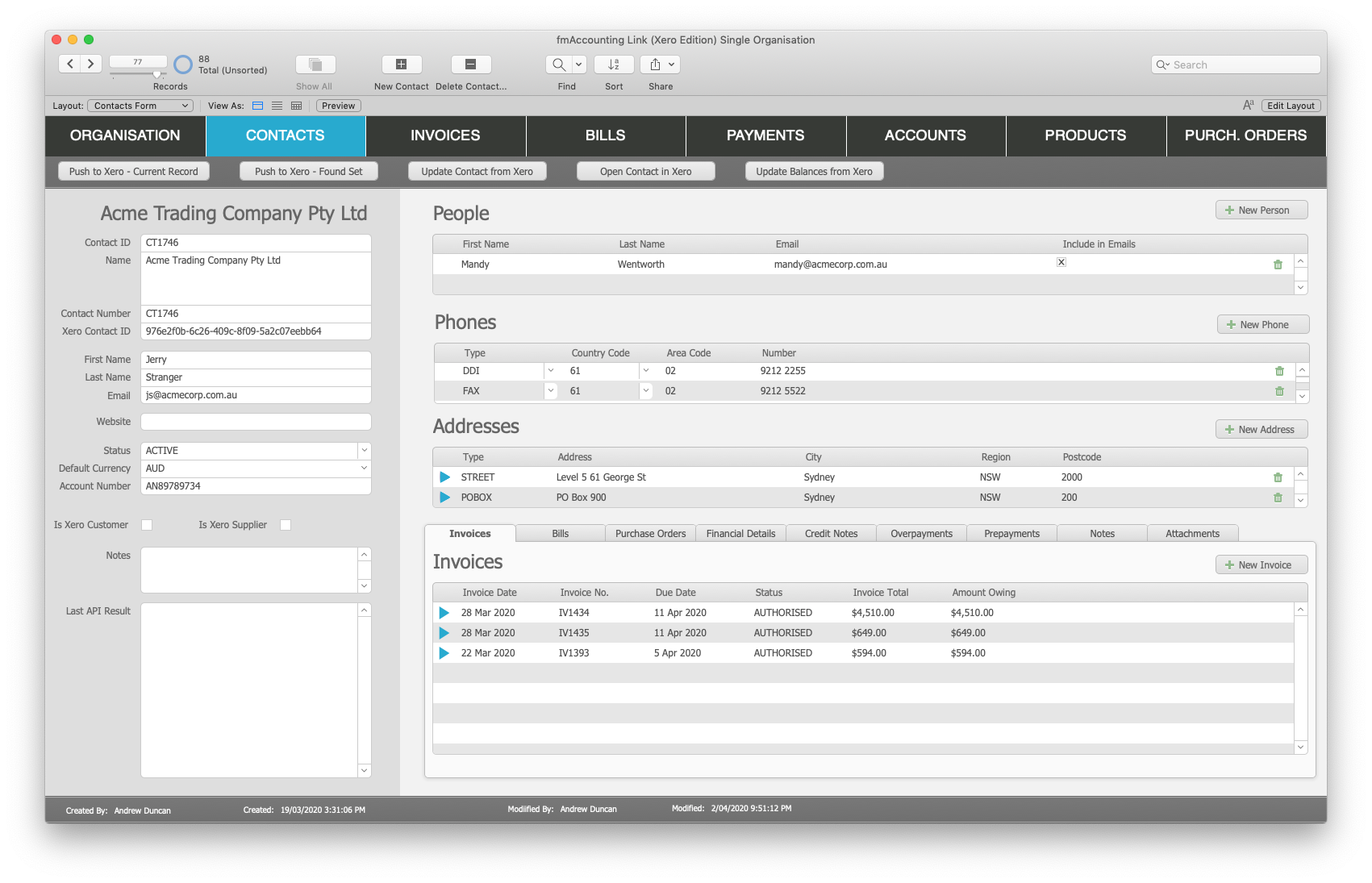
* Contacts: download and upload Contacts
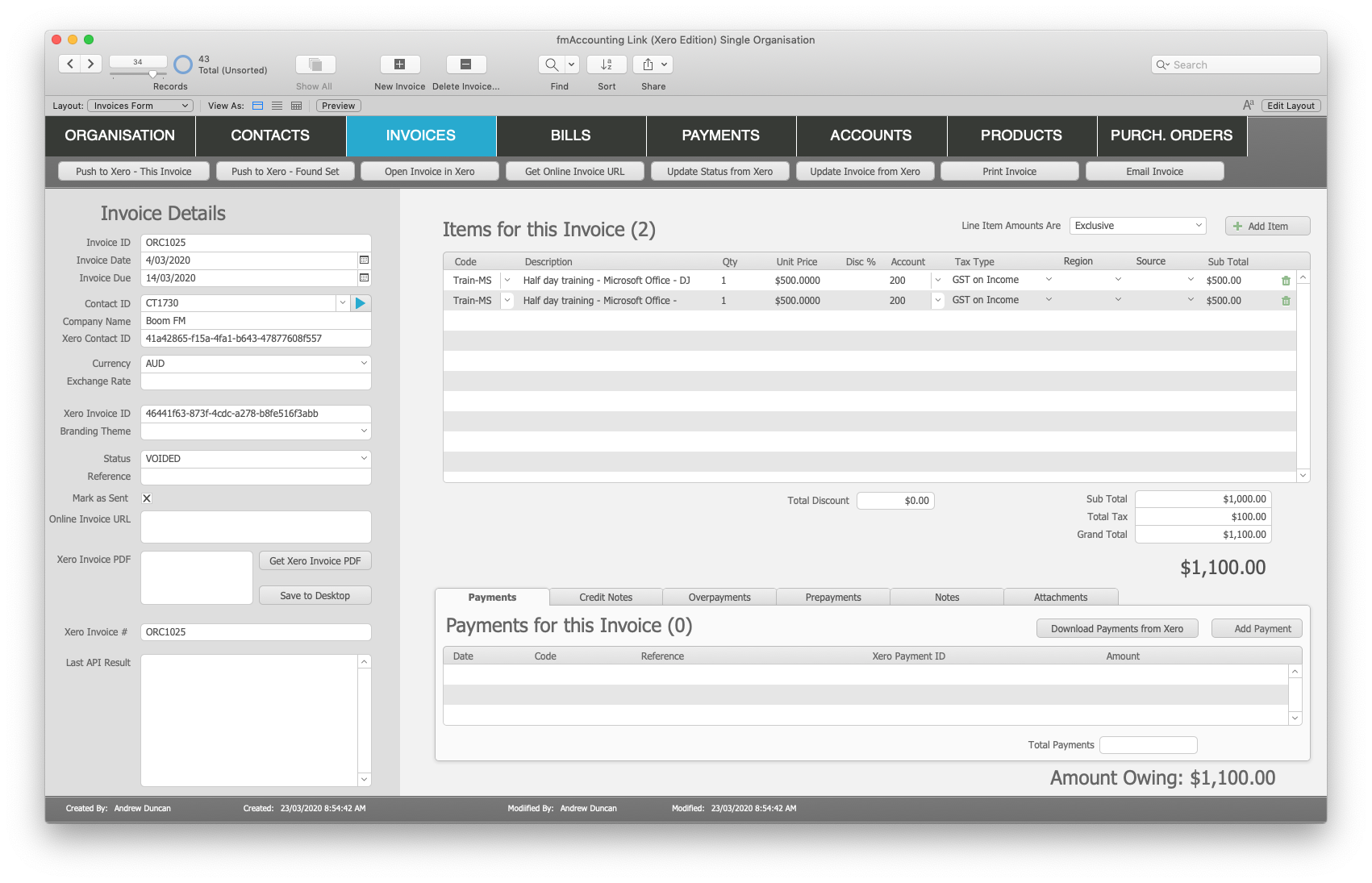
* Invoices: download and upload Invoices
* Bills: download and upload Bills (including Bill line items)
* Products (Items): download and upload Products
* Purchase Orders: download and upload Purchase Orders
* Payments: download and upload Payments against an Invoice
* Employees: download and upload Employees
* Timesheets: download and upload Timesheets to Xero
* Account Codes: download and upload Account Codes from Xero
* Tax Rates: download and upload Tax Rates from Xero
* Bank Transactions: download and upload BankTransactions from Xero
* Tracking Categories: download and upload Tracking Categories from Xero
* Manual Journals: download and upload Manual Journals
Availability, Pricing, and Compatibility
fmAccounting Link (Xero Edition) v2 is available in a number of licenses: Company, Vertical Solution and Developer. It is available now from the Databuzz website at https://www.databuzz.com.au/. Company Licenses start at AUD $695.00. fmAccounting Link (Xero Edition) v2 requires FileMaker Pro v16 or later. A free 14 day trial version is also available.
Upgrade Information
fmAccounting Link (Xero Edition) v2 is a free upgrade for owners of fmAccounting Link (Xero Edition) v1 who purchased a license on or after December 01, 2019. All other owners of fmAccounting Link (Xero Edition) v1 can upgrade for 50% off the current price, discount coupons will be sent directly to existing customers. Please contact Databuzz if you have not received your coupon.
Databuzz: https://www.databuzz.com.au/
fmAccounting Link (Xero Edition): https://www.databuzz.com.au/fmaccounting-link-xero-edition/
Purchase Link: https://www.databuzz.com.au/product-category/xero/
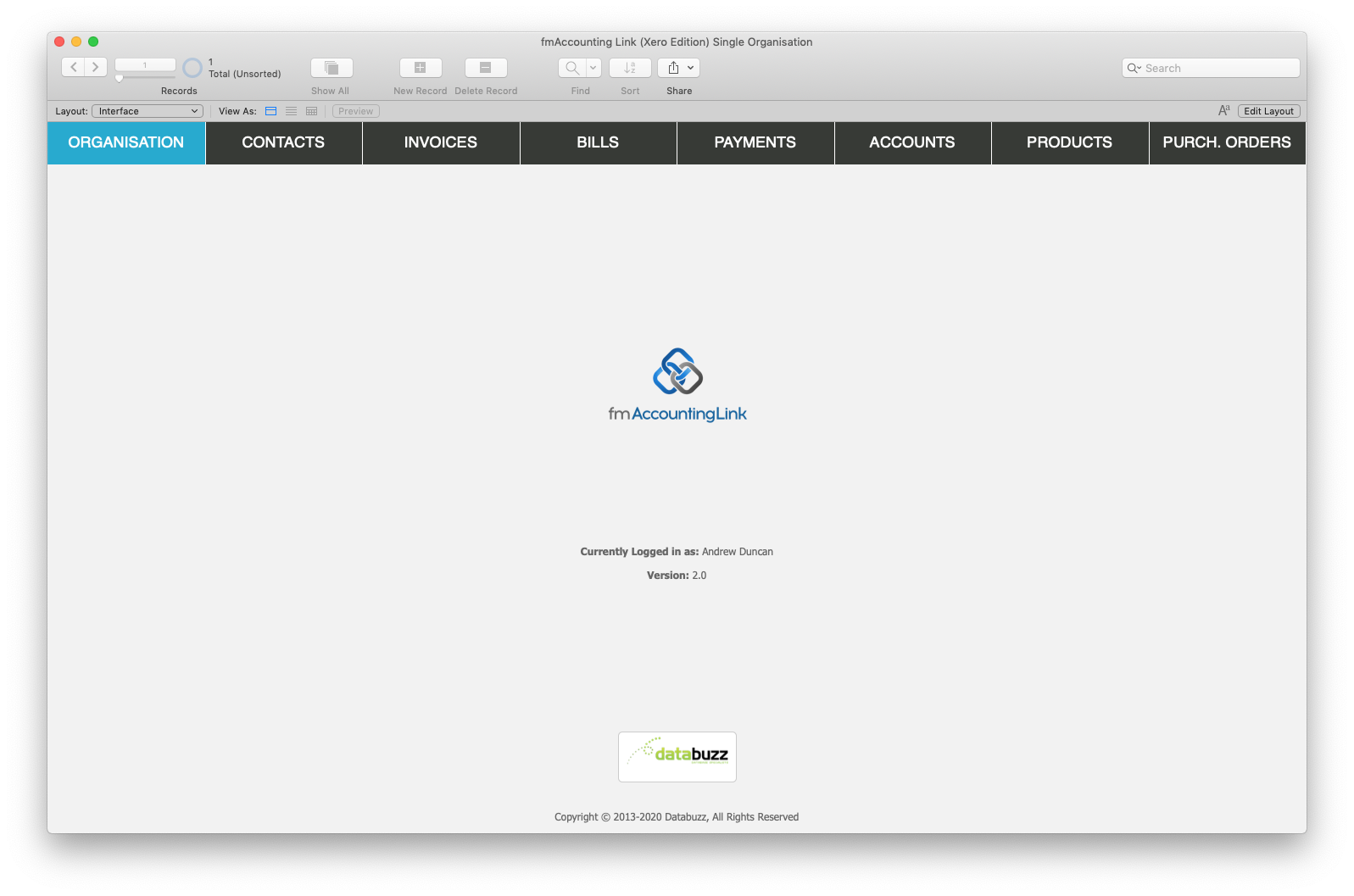
Screenshot 1: https://www.databuzz.com.au/wp-content/uploads/2020/04/Xero-v2-Home-Screen.png
Screenshot 2: https://www.databuzz.com.au/wp-content/uploads/2020/04/Xero-v2-Invoice-Details.png
Screenshot 2: https://www.databuzz.com.au/wp-content/uploads/2020/04/Xero-v2-Contact-Details.png
Databuzz is a Claris Partner and long-standing member of the FileMaker Business Alliance and a Xero Approved Developer. We have been developing and deploying FileMaker solutions for clients in Australia and internationally since 1999. Our clients are individuals, small- medium businesses, government agencies and multi-national corporations. Databuzz was founded by Andrew Duncan, a Certified FileMaker 18 Developer. For more information please visit our website. All Material and Software (C) Copyright 2020 Databuzz. All Rights Reserved. Apple, the Apple logo, Macintosh Mac OS X and macOS are registered trademarks of Apple Inc. in the U.S. and/or other countries. Other trademarks and registered trademarks may be the property of their respective owners.
*******
Link To Article: https://prmac.com/release-id-84005.htm
*******
---------------------------------------------------------------------------------
Note that you can alter delivered distributions at any time.
Login to your account on prMac to alter your channel selection, or to opt-out at any time.
Databuzz Releases fmAccounting Link (Xero Edition) v2 - Published on 04/10/20
Databuzz today announced fmAccounting Link (Xero Edition) v2, a major update to their FileMaker solution that integrates with the Xero Accounting Software. fmAccounting Link (Xero Edition) v2 now runs natively on the FileMaker 16 or higher platforms, including FileMaker Pro, FileMaker Go and FileMaker Server without requiring a FileMaker plug-in. fmAccounting Link (Xero Edition) removes double data entry and human errors saving your company significant time and money.
Sydney, Australia - Databuzz today announced fmAccounting Link (Xero Edition) v2, a major update to their FileMaker solution that integrates with the Xero Accounting Software. fmAccounting Link (Xero Edition) v2 now runs natively on the FileMaker 16 or higher platforms, including FileMaker Pro, FileMaker Go and FileMaker Server without requiring a FileMaker plug-in.
fmAccounting Link (Xero Edition) allows you to upload and download data between your FileMaker solution and Xero, the easy to use online accounting software that's designed specifically for small businesses. fmAccounting Link (Xero Edition) removes double data entry and human errors saving your company significant time, money and hassle by automating the exchange of data between FileMaker and Xero.
fmAccounting Link (Xero Edition) is completely unlocked allowing you to integrate it into your FileMaker solution. You can copy and paste examples showing you how to authenticate with the Xero API and upload Contacts, Invoices, Bills, Payments, Purchase Orders and more at the click of a button.
What's New in v2
* rewritten to use native FileMaker functions and script steps
* runs natively on FileMaker v16 or later and no longer requires a FileMaker plug-in
* faster downloads and uploads between FileMaker and the Xero API
* updated to work with the OAuth 2.0 authentication flow
* supports FileMaker WebDirect and FileMaker Go clients
"fmAccounting Link (Xero Edition) now runs natively on the FileMaker Platform and is even easier to integrate," said Andrew Duncan, CEO of Databuzz. "We've seen improvements of up to 35% when running the native scripts and functions compared with the plug-in versions."
fmAccounting Link (Xero Edition) features include:
* works with FileMaker Pro v16 or later
* completely unlocked
* can be hosted by FileMaker Pro, FileMaker Server or FileMaker Cloud
* works with Macintosh and Windows
* includes support for FileMaker Server scheduled scripts and Perform Script on Server
* supports multiple Xero Organisations
* includes examples for both the main Accounting API and the Payroll API
fmAccounting Link (Xero Edition) includes examples for over 20 Xero API endpoints including:
* Organisations: authenticate multiple Xero Organisations
* Contacts: download and upload Contacts
* Invoices: download and upload Invoices
* Bills: download and upload Bills (including Bill line items)
* Products (Items): download and upload Products
* Purchase Orders: download and upload Purchase Orders
* Payments: download and upload Payments against an Invoice
* Employees: download and upload Employees
* Timesheets: download and upload Timesheets to Xero
* Account Codes: download and upload Account Codes from Xero
* Tax Rates: download and upload Tax Rates from Xero
* Bank Transactions: download and upload BankTransactions from Xero
* Tracking Categories: download and upload Tracking Categories from Xero
* Manual Journals: download and upload Manual Journals
Availability, Pricing, and Compatibility
fmAccounting Link (Xero Edition) v2 is available in a number of licenses: Company, Vertical Solution and Developer. It is available now from the Databuzz website at https://www.databuzz.com.au/. Company Licenses start at AUD $695.00. fmAccounting Link (Xero Edition) v2 requires FileMaker Pro v16 or later. A free 14 day trial version is also available.
Upgrade Information
fmAccounting Link (Xero Edition) v2 is a free upgrade for owners of fmAccounting Link (Xero Edition) v1 who purchased a license on or after December 01, 2019. All other owners of fmAccounting Link (Xero Edition) v1 can upgrade for 50% off the current price, discount coupons will be sent directly to existing customers. Please contact Databuzz if you have not received your coupon.
Databuzz: https://www.databuzz.com.au/
fmAccounting Link (Xero Edition): https://www.databuzz.com.au/fmaccounting-link-xero-edition/
Purchase Link: https://www.databuzz.com.au/product-category/xero/
Screenshot 1: https://www.databuzz.com.au/wp-content/uploads/2020/04/Xero-v2-Home-Screen.png
Screenshot 2: https://www.databuzz.com.au/wp-content/uploads/2020/04/Xero-v2-Invoice-Details.png
Screenshot 2: https://www.databuzz.com.au/wp-content/uploads/2020/04/Xero-v2-Contact-Details.png
Databuzz is a Claris Partner and long-standing member of the FileMaker Business Alliance and a Xero Approved Developer. We have been developing and deploying FileMaker solutions for clients in Australia and internationally since 1999. Our clients are individuals, small- medium businesses, government agencies and multi-national corporations. Databuzz was founded by Andrew Duncan, a Certified FileMaker 18 Developer. For more information please visit our website. All Material and Software (C) Copyright 2020 Databuzz. All Rights Reserved. Apple, the Apple logo, Macintosh Mac OS X and macOS are registered trademarks of Apple Inc. in the U.S. and/or other countries. Other trademarks and registered trademarks may be the property of their respective owners.
*******
Link To Article: https://prmac.com/release-id-84005.htm
*******
---------------------------------------------------------------------------------
Note that you can alter delivered distributions at any time.
Login to your account on prMac to alter your channel selection, or to opt-out at any time.
Gadget Center Launches
A new article has been published at prMac.
Gadget Center Launches - Published on 04/09/20
Mohammad Tariqul Islam announces a new website, Gadget Center. We are a group of tech enthusiast who love tech and like to share our interest across the globe. We are a group of students from various major. We work on our free time. Our one and only mission is to provide our readers to up-to-date information about tech.
New York, New York Mohammad Tariqul Islam today announced, a new website Gadget Center. It is a new website and offers a new way for tech consumers to explore the world of technology.
Our primary target is consumers with little budget want to get the best product in that budget line. The readers will also able to get latest tech news, new tips and tricks to make life a bit easier. The initial work of the website started on August 2019. As a small group is behind Gadget Center, the release took longer.
"I've high expectation for this website, we are giving our best" says Tariqul Islam, Editor-in-chief.
Features of Gadget Center include.
1. Latest tech news
2. Giveaways
3. Reviews of Phones, Laptop, Desktop, mini PCs, CPU
4. Various Tips & Tricks
Gadget Center will be available to the readers starting 02-04-2020. For more information on Gadget Center, visit the website.
About Gadget Center: We are a group of tech enthusiast who love tech and like to share our interest across the globe. We are a group of students from various major. We work on our free time. Our one and only mission is to provide our readers to up-to-date information about tech.
Gadget Center: http://gadgetcenter.net
Youtube Videos: http://youtube.com/gadgetcenter
Meet team GadgetCenter. These are the folks working hard to provide in-depth reporting, commentary and a daily dose of gadget news for readers from all around the world. The Editor-in-chief is Md. Tariqul Islam
and the Senior Editor is Md. Sifatul Islam. All Material and Software (C) Copyright 2020 Gadget Center. All Rights Reserved. Apple, the Apple logo, iPhone, iPod and iPad are registered trademarks of Apple Inc. in the U.S. and/or other countries. Other trademarks and registered trademarks may be the property of their respective owners.
*******
Link To Article: https://prmac.com/release-id-84003.htm
*******
---------------------------------------------------------------------------------
Note that you can alter delivered distributions at any time.
Login to your account on prMac to alter your channel selection, or to opt-out at any time.
Gadget Center Launches - Published on 04/09/20
Mohammad Tariqul Islam announces a new website, Gadget Center. We are a group of tech enthusiast who love tech and like to share our interest across the globe. We are a group of students from various major. We work on our free time. Our one and only mission is to provide our readers to up-to-date information about tech.
New York, New York Mohammad Tariqul Islam today announced, a new website Gadget Center. It is a new website and offers a new way for tech consumers to explore the world of technology.
Our primary target is consumers with little budget want to get the best product in that budget line. The readers will also able to get latest tech news, new tips and tricks to make life a bit easier. The initial work of the website started on August 2019. As a small group is behind Gadget Center, the release took longer.
"I've high expectation for this website, we are giving our best" says Tariqul Islam, Editor-in-chief.
Features of Gadget Center include.
1. Latest tech news
2. Giveaways
3. Reviews of Phones, Laptop, Desktop, mini PCs, CPU
4. Various Tips & Tricks
Gadget Center will be available to the readers starting 02-04-2020. For more information on Gadget Center, visit the website.
About Gadget Center: We are a group of tech enthusiast who love tech and like to share our interest across the globe. We are a group of students from various major. We work on our free time. Our one and only mission is to provide our readers to up-to-date information about tech.
Gadget Center: http://gadgetcenter.net
Youtube Videos: http://youtube.com/gadgetcenter
Meet team GadgetCenter. These are the folks working hard to provide in-depth reporting, commentary and a daily dose of gadget news for readers from all around the world. The Editor-in-chief is Md. Tariqul Islam
and the Senior Editor is Md. Sifatul Islam. All Material and Software (C) Copyright 2020 Gadget Center. All Rights Reserved. Apple, the Apple logo, iPhone, iPod and iPad are registered trademarks of Apple Inc. in the U.S. and/or other countries. Other trademarks and registered trademarks may be the property of their respective owners.
*******
Link To Article: https://prmac.com/release-id-84003.htm
*******
---------------------------------------------------------------------------------
Note that you can alter delivered distributions at any time.
Login to your account on prMac to alter your channel selection, or to opt-out at any time.
MacAppware Releases MacOptimizer 4.2
A new article has been published at prMac.
MacAppware Releases MacOptimizer 4.2 - Published on 04/27/20
California based MacAppware today announces MacOptimizer 4.2, a new upgrade to its speedy disk utility application for Mac OS X. MacOptimizer can quickly help you clean, repair and organize your Mac. Speed up your Mac, fix common problems on your computer, and organize your Mac desktop using this fast and efficient disk utility application. Version 4.x boasts a bevy of new features to analyze and boost memory, speed up Internet browsing, monitor CPU and battery usage, and more.
San Francisco, California - MacAppware, a division of 128bit Technologies, announced today a new upgrade to its speedy disk utility application for Mac. MacOptimizer 4.2 is now available and boasts a bevy of new features to optimize and clean your hard drive, maximize battery life, free memory, organize your Desktop, and more. The main features of MacOptimizer 4.2 include:
* Free Cache - Clear your system of temporary files causing poor performance and stability, clear browser caches (Safari, Chrome, Firefox), and clean your font caches if you experience text problems (cleans system, Adobe and Microsoft font caches).
* Optimization - Optimize and repair your Mac so your OS and applications run faster, analyze and quit memory hogs, monitor CPU usage, maximize the life of your laptop battery, cleanup files on your Mac, and manage apps that start up automatically when you boot your Mac.
* Maintenance - Run system maintenance tasks to keep your Mac running smoothly.
* System Tweaks - Get easy access to hidden OS X settings and other useful tweaks that make it easier to work on your Mac. Categorized by General, System Finder, Dock, Safari, Interface and Other.
* Language Buster - Remove unnecessary language files to recover space on your Mac.
* Desktop Genie - Clean up your Desktop to speed up your Mac.
More Details On MacOptimizer:
No operating system is perfect, and Mac OS X is no exception. Do you have applications that keep crashing or don't even open? Have you noticed your Mac is running slower? Are you having trouble locating files or folders on your Desktop? MacOptimizer is an incredibly fast and efficient disk utility to quickly help you speed up and organize your Mac. MacOptimizer 4.2 gets your Mac back in shape with quick, essential tools:
* Battery optimization to maximize the charge of an unplugged laptop
* Clean your system and font caches
* Clean your browser caches (Safari, Chrome, Firefox)
* Optimize your Mac
* Find and stop apps that hog memory
* Manage startup items
* Monitor CPU usage
* Speed up Internet browsing
* Repair Disk Permissions
* Speed up Mail
* Free up inactive memory
* Cleanup unnecessary files taking up space
* Run regular maintenance
* Customize system settings
* Remove unnecessary language files
* Flush DNS cache
* Clean and organize your Desktop
* Adjust system settings with a simple click
* And more ,,,
New in Version 4 (over 40 new features):
* Updated user interface
* Check S.M.A.R.T. status
* Disable automatic Emoji substitution
* Remove date and time stamp from screenshots
* Save to disk (not iCloud) by default
* Disable system from sleeping
* Disable App Nap
* Restart System automatically when frozen
* Check for Software Updates daily
* Disable power button from activating Sleep mode
* Disable App Resume
* Add extra information to Login window
* Show one application at a time
* Change Launchpad layout
* Disable Spaces from sorting based on recent use
* Disable Gatekeeper
* Enable Recent Items menu in Dock
* Add a blank space to Dock
* Disable standard delay in rendering a Web page
* Enable Safari DNS Prefetching
* Disable resume function in Safari
* Disable animations when opening and closing windows
* Disable animations when opening a Quick Look window
* Accelerated playback when adjusting the window size
* Disable animation when opening the Info window in Finder
* Disable full screen animation of macOS
* Disable "Stay on front" for help windows
* Change notification banner display time
* Make Crash Reporter appear as notification
* Disable ruler in TextEdit
* Enable half star ratings in iTunes
* Disable Warning when emptying Trash
* Stop Photos from opening automatically
* Disable attachments preview in Mail
* Disable send-mail tone in Mail
* Copy and Paste only the email address in Mail
* Create Send shortcut in Mail App (Command Enter)
* Speed up Time Machine backups
* Enable debug menu in Mac App Store
* Shred file or folder
* Instant Shutdown (may lose anything unsaved)
Even if you have a brand new Mac you can still find MacOptimizer helpful in cleaning up unnecessary language files, keeping your Desktop organized, analyzing your memory and CPU usage, and keeping your Mac running like new at all times. It's better to regularly take care of your Mac rather than wait until something bad happens.
Pricing and Availability:
MacOptimizer 2.0 supports Mac OS X 10.9 (64bit) and newer, and is now available for purchase on the MacAppware website for only $29.99 (USD).
MacAppware: https://macappware.com
MacOptimizer 4.2: https://macappware.com/software/mac-optimizer/
Purchase MacOptimizer: https://sites.fastspring.com/macappware/product/macoptimizer4
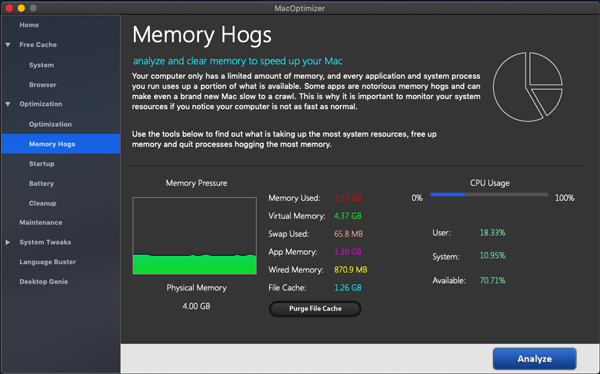
Screenshot: https://macappware.com/wp-content/uploads/2019/04/MacOptimizer-4-Optimization-Memory-Hogs.png
Application Icon: https://www.macappware.com/images/im/MacOptimizer_256.png
: https://macappware.com/wp-content/uploads/2019/04/MacOptimizer-4-Optimization-Memory-Hogs.png
MacAppware is a division of 128bit Technologies and a dedicated Mac software developer currently offering disk utility applications, graphic design bundles and unique commercial use fonts. Copyright (C) 2020 128bit Technologies. All Rights Reserved. Apple, the Apple logo, Mac OS X, and Macintosh are registered trademarks of Apple Inc. in the U.S. and/or other countries.
*******
Link To Article: https://prmac.com/release-id-83999.htm
*******
---------------------------------------------------------------------------------
Note that you can alter delivered distributions at any time.
Login to your account on prMac to alter your channel selection, or to opt-out at any time.
MacAppware Releases MacOptimizer 4.2 - Published on 04/27/20
California based MacAppware today announces MacOptimizer 4.2, a new upgrade to its speedy disk utility application for Mac OS X. MacOptimizer can quickly help you clean, repair and organize your Mac. Speed up your Mac, fix common problems on your computer, and organize your Mac desktop using this fast and efficient disk utility application. Version 4.x boasts a bevy of new features to analyze and boost memory, speed up Internet browsing, monitor CPU and battery usage, and more.
San Francisco, California - MacAppware, a division of 128bit Technologies, announced today a new upgrade to its speedy disk utility application for Mac. MacOptimizer 4.2 is now available and boasts a bevy of new features to optimize and clean your hard drive, maximize battery life, free memory, organize your Desktop, and more. The main features of MacOptimizer 4.2 include:
* Free Cache - Clear your system of temporary files causing poor performance and stability, clear browser caches (Safari, Chrome, Firefox), and clean your font caches if you experience text problems (cleans system, Adobe and Microsoft font caches).
* Optimization - Optimize and repair your Mac so your OS and applications run faster, analyze and quit memory hogs, monitor CPU usage, maximize the life of your laptop battery, cleanup files on your Mac, and manage apps that start up automatically when you boot your Mac.
* Maintenance - Run system maintenance tasks to keep your Mac running smoothly.
* System Tweaks - Get easy access to hidden OS X settings and other useful tweaks that make it easier to work on your Mac. Categorized by General, System Finder, Dock, Safari, Interface and Other.
* Language Buster - Remove unnecessary language files to recover space on your Mac.
* Desktop Genie - Clean up your Desktop to speed up your Mac.
More Details On MacOptimizer:
No operating system is perfect, and Mac OS X is no exception. Do you have applications that keep crashing or don't even open? Have you noticed your Mac is running slower? Are you having trouble locating files or folders on your Desktop? MacOptimizer is an incredibly fast and efficient disk utility to quickly help you speed up and organize your Mac. MacOptimizer 4.2 gets your Mac back in shape with quick, essential tools:
* Battery optimization to maximize the charge of an unplugged laptop
* Clean your system and font caches
* Clean your browser caches (Safari, Chrome, Firefox)
* Optimize your Mac
* Find and stop apps that hog memory
* Manage startup items
* Monitor CPU usage
* Speed up Internet browsing
* Repair Disk Permissions
* Speed up Mail
* Free up inactive memory
* Cleanup unnecessary files taking up space
* Run regular maintenance
* Customize system settings
* Remove unnecessary language files
* Flush DNS cache
* Clean and organize your Desktop
* Adjust system settings with a simple click
* And more ,,,
New in Version 4 (over 40 new features):
* Updated user interface
* Check S.M.A.R.T. status
* Disable automatic Emoji substitution
* Remove date and time stamp from screenshots
* Save to disk (not iCloud) by default
* Disable system from sleeping
* Disable App Nap
* Restart System automatically when frozen
* Check for Software Updates daily
* Disable power button from activating Sleep mode
* Disable App Resume
* Add extra information to Login window
* Show one application at a time
* Change Launchpad layout
* Disable Spaces from sorting based on recent use
* Disable Gatekeeper
* Enable Recent Items menu in Dock
* Add a blank space to Dock
* Disable standard delay in rendering a Web page
* Enable Safari DNS Prefetching
* Disable resume function in Safari
* Disable animations when opening and closing windows
* Disable animations when opening a Quick Look window
* Accelerated playback when adjusting the window size
* Disable animation when opening the Info window in Finder
* Disable full screen animation of macOS
* Disable "Stay on front" for help windows
* Change notification banner display time
* Make Crash Reporter appear as notification
* Disable ruler in TextEdit
* Enable half star ratings in iTunes
* Disable Warning when emptying Trash
* Stop Photos from opening automatically
* Disable attachments preview in Mail
* Disable send-mail tone in Mail
* Copy and Paste only the email address in Mail
* Create Send shortcut in Mail App (Command Enter)
* Speed up Time Machine backups
* Enable debug menu in Mac App Store
* Shred file or folder
* Instant Shutdown (may lose anything unsaved)
Even if you have a brand new Mac you can still find MacOptimizer helpful in cleaning up unnecessary language files, keeping your Desktop organized, analyzing your memory and CPU usage, and keeping your Mac running like new at all times. It's better to regularly take care of your Mac rather than wait until something bad happens.
Pricing and Availability:
MacOptimizer 2.0 supports Mac OS X 10.9 (64bit) and newer, and is now available for purchase on the MacAppware website for only $29.99 (USD).
MacAppware: https://macappware.com
MacOptimizer 4.2: https://macappware.com/software/mac-optimizer/
Purchase MacOptimizer: https://sites.fastspring.com/macappware/product/macoptimizer4
Screenshot: https://macappware.com/wp-content/uploads/2019/04/MacOptimizer-4-Optimization-Memory-Hogs.png
Application Icon: https://www.macappware.com/images/im/MacOptimizer_256.png

: https://macappware.com/wp-content/uploads/2019/04/MacOptimizer-4-Optimization-Memory-Hogs.png
MacAppware is a division of 128bit Technologies and a dedicated Mac software developer currently offering disk utility applications, graphic design bundles and unique commercial use fonts. Copyright (C) 2020 128bit Technologies. All Rights Reserved. Apple, the Apple logo, Mac OS X, and Macintosh are registered trademarks of Apple Inc. in the U.S. and/or other countries.
*******
Link To Article: https://prmac.com/release-id-83999.htm
*******
---------------------------------------------------------------------------------
Note that you can alter delivered distributions at any time.
Login to your account on prMac to alter your channel selection, or to opt-out at any time.
A New Space Just For Social Media Creators to Collaborate
A new article has been published at prMac.
A New Space Just For Social Media Creators to Collaborate - Published on 04/24/20
California-based startup, Collabspace, Inc., announces Collabspace 2.5 for iOS and Android devices, its popular collaboration app for social media content creators. Collabspace allows social media creators to connect with each other for collabs and creative freelancing gigs. Creators can collaborate to produce higher quality content and supercharge their audience growth through cross-promotion and networking opportunities.
Los Angeles, California - California-based startup, Collabspace, Inc., has recently announced the launch of the latest version of its popular cross-platform collaboration app for social media content creators, Collabspace 2.5. Available in iOS and Android versions, the app enables thousands of online content creators, influencers, and freelancers to collaborate and keep their audiences growing around the world.
The team behind Collabspace realized that with social media becoming the new reality for modern communication, millions of Creators, artists, influencers and podcasters are creating engaging and educational content on YouTube, Instagram, and other digital platforms every day, but not all content creators easily develop huge audiences. Collabspace provides a solution so that in addition to creating great content on a consistent basis, content creators can more easily engage in self-marketing through collaboration and cross-promotion.
"One of the most effective strategies for audience growth is to collaborate with other Creators. In fact, YouTube itself has said that 'Collaborations can be a powerful way to reach new viewers [and] forge connections to find a broader audience.' Yet many Creators don't know how to find collabs on YouTube or Instagram to help them grow," explains Daniel McKenzie, Founder of Collabspace.
To make it easier than ever for content creators to find collabs and network with other creators, the new Collabspace app has created an online community where creators can post projects, find paid creative freelancing gigs, and connect with nearby creators. The app is powered by intuitive search and discovery features that include powerful filters so users can easily find collaboration opportunities matching their own unique style and content. Each day, the app automatically searches through the global Collabspace community to send users personalized potential matches for new collab opportunities.
In addition, content creators can also use Collabspace to find paid creative freelancing gigs, make plans to attend industry events and meet-ups, respond to posted projects, join local groups of content creators, and browse the Collabspace leaderboards all within a dynamic community designed to accelerate creative networking and expression.
The following are just a few key features of the app that make it easier for content creators across different platforms to work together:
* Daily suggested potential collab matches.
* Project postings inviting creators to collaborate on specific ideas.
* Local groups to connect with nearby content creators.
* Ability to send or request paid offers for creative freelancing gigs.
* Advanced filters to discover customized collab opportunities.
"Collabspace is a revolutionary platform that has been designed for creators in any niche. The platform brings content creators together to collaborate and share ideas, which is one of the best ways to create dynamic content that audiences love. The idea of collaboration itself includes an element of organic marketing, based on cross-promotion, which helps content creators increase their followers by cross-pollinating audiences and generating fresh ideas," explains Daniel. "Our app is aimed at bringing the digital creative community together so creators can join hands in producing influential content and propel each other's growth across social media through creative collaboration," he adds.
For those who want to launch a career as a YouTube or Instagram influencer, podcaster, or other digital content creator, or who plan to leverage social platforms to find paid creative freelancing gigs, Collabspace proves to be a useful platform to connect with other creators, collaborate, and tap into new strategies for building audiences around the world.
Device Requirements:
* iPhone, iPad, and iPod touch
* Requires iOS 10.0 or later
* 94.8 MB
Pricing and Availability:
Collabspace 2.5 is free and is available worldwide through the App Store in the Social Networking category. Pro and Elite subscriptions are available as a convenient in-app purchase.
Collabspace 2.5: https://www.collabspace.co/
Download from the App Store: https://apps.apple.com/us/app/collabspace/id1316399337?ls=1
Download from Google Play: https://play.google.com/store/apps/details?id=com.collabspace.collabspaceapp
Screenshot 1: https://lh3.googleusercontent.com/298n4aqqLG5Imrs9TiplFXgN4w_rkYJ7vg6BrGyLzQWySuEm3Tuw1svOJX2CB3hKb5kZ=w720-h310-rw
Screenshot 2: https://lh3.googleusercontent.com/nzTlnLf1N_WdJ3tOYaWYzoDdfbVXrFevaLWWEDLAwsmNzScm0s7BnFv4VzLkY7QoBA=w720-h310-rw
App Icon: https://lh3.googleusercontent.com/a3xEuZ8DrgETWWd_jYQDvArtgxhM3jUyjRNWveAn-ejt1HteQFWcM7jEQpuMcMn6Lw=s180-rw
Founded in 2019 by Daniel McKenzie, Collabspace is a platform that connects creators, influencers, and creative freelancers for collaboration opportunities. Headquartered in Los Angeles, California and downloaded in over 50 countries around the world, Collabspace is a first-of-its-kind, cross-platform collaboration network for Creators focused on growing audiences across social media platforms, especially YouTube and Instagram. All Material and Software (C) Copyright 2020 Collabspace. All Rights Reserved. Apple, the Apple logo, iPhone, iPod and iPad are registered trademarks of Apple Inc. in the U.S. and/or other countries. Other trademarks and registered trademarks may be the property of their respective owners.
*******
Link To Article: https://prmac.com/release-id-83998.htm
*******
---------------------------------------------------------------------------------
Note that you can alter delivered distributions at any time.
Login to your account on prMac to alter your channel selection, or to opt-out at any time.
A New Space Just For Social Media Creators to Collaborate - Published on 04/24/20
California-based startup, Collabspace, Inc., announces Collabspace 2.5 for iOS and Android devices, its popular collaboration app for social media content creators. Collabspace allows social media creators to connect with each other for collabs and creative freelancing gigs. Creators can collaborate to produce higher quality content and supercharge their audience growth through cross-promotion and networking opportunities.
Los Angeles, California - California-based startup, Collabspace, Inc., has recently announced the launch of the latest version of its popular cross-platform collaboration app for social media content creators, Collabspace 2.5. Available in iOS and Android versions, the app enables thousands of online content creators, influencers, and freelancers to collaborate and keep their audiences growing around the world.
The team behind Collabspace realized that with social media becoming the new reality for modern communication, millions of Creators, artists, influencers and podcasters are creating engaging and educational content on YouTube, Instagram, and other digital platforms every day, but not all content creators easily develop huge audiences. Collabspace provides a solution so that in addition to creating great content on a consistent basis, content creators can more easily engage in self-marketing through collaboration and cross-promotion.
"One of the most effective strategies for audience growth is to collaborate with other Creators. In fact, YouTube itself has said that 'Collaborations can be a powerful way to reach new viewers [and] forge connections to find a broader audience.' Yet many Creators don't know how to find collabs on YouTube or Instagram to help them grow," explains Daniel McKenzie, Founder of Collabspace.
To make it easier than ever for content creators to find collabs and network with other creators, the new Collabspace app has created an online community where creators can post projects, find paid creative freelancing gigs, and connect with nearby creators. The app is powered by intuitive search and discovery features that include powerful filters so users can easily find collaboration opportunities matching their own unique style and content. Each day, the app automatically searches through the global Collabspace community to send users personalized potential matches for new collab opportunities.
In addition, content creators can also use Collabspace to find paid creative freelancing gigs, make plans to attend industry events and meet-ups, respond to posted projects, join local groups of content creators, and browse the Collabspace leaderboards all within a dynamic community designed to accelerate creative networking and expression.
The following are just a few key features of the app that make it easier for content creators across different platforms to work together:
* Daily suggested potential collab matches.
* Project postings inviting creators to collaborate on specific ideas.
* Local groups to connect with nearby content creators.
* Ability to send or request paid offers for creative freelancing gigs.
* Advanced filters to discover customized collab opportunities.
"Collabspace is a revolutionary platform that has been designed for creators in any niche. The platform brings content creators together to collaborate and share ideas, which is one of the best ways to create dynamic content that audiences love. The idea of collaboration itself includes an element of organic marketing, based on cross-promotion, which helps content creators increase their followers by cross-pollinating audiences and generating fresh ideas," explains Daniel. "Our app is aimed at bringing the digital creative community together so creators can join hands in producing influential content and propel each other's growth across social media through creative collaboration," he adds.
For those who want to launch a career as a YouTube or Instagram influencer, podcaster, or other digital content creator, or who plan to leverage social platforms to find paid creative freelancing gigs, Collabspace proves to be a useful platform to connect with other creators, collaborate, and tap into new strategies for building audiences around the world.
Device Requirements:
* iPhone, iPad, and iPod touch
* Requires iOS 10.0 or later
* 94.8 MB
Pricing and Availability:
Collabspace 2.5 is free and is available worldwide through the App Store in the Social Networking category. Pro and Elite subscriptions are available as a convenient in-app purchase.
Collabspace 2.5: https://www.collabspace.co/
Download from the App Store: https://apps.apple.com/us/app/collabspace/id1316399337?ls=1
Download from Google Play: https://play.google.com/store/apps/details?id=com.collabspace.collabspaceapp
Screenshot 1: https://lh3.googleusercontent.com/298n4aqqLG5Imrs9TiplFXgN4w_rkYJ7vg6BrGyLzQWySuEm3Tuw1svOJX2CB3hKb5kZ=w720-h310-rw
Screenshot 2: https://lh3.googleusercontent.com/nzTlnLf1N_WdJ3tOYaWYzoDdfbVXrFevaLWWEDLAwsmNzScm0s7BnFv4VzLkY7QoBA=w720-h310-rw
App Icon: https://lh3.googleusercontent.com/a3xEuZ8DrgETWWd_jYQDvArtgxhM3jUyjRNWveAn-ejt1HteQFWcM7jEQpuMcMn6Lw=s180-rw
Founded in 2019 by Daniel McKenzie, Collabspace is a platform that connects creators, influencers, and creative freelancers for collaboration opportunities. Headquartered in Los Angeles, California and downloaded in over 50 countries around the world, Collabspace is a first-of-its-kind, cross-platform collaboration network for Creators focused on growing audiences across social media platforms, especially YouTube and Instagram. All Material and Software (C) Copyright 2020 Collabspace. All Rights Reserved. Apple, the Apple logo, iPhone, iPod and iPad are registered trademarks of Apple Inc. in the U.S. and/or other countries. Other trademarks and registered trademarks may be the property of their respective owners.
*******
Link To Article: https://prmac.com/release-id-83998.htm
*******
---------------------------------------------------------------------------------
Note that you can alter delivered distributions at any time.
Login to your account on prMac to alter your channel selection, or to opt-out at any time.
Pro Mouse 1.4 Customizes and Enhances the macOS Mouse Pointer
A new article has been published at prMac.
Pro Mouse 1.4 Customizes and Enhances the macOS Mouse Pointer - Published on 04/24/20
San Francisco-based indie developer, Alec Summers announces Pro Mouse 1.4, an important update to his mouse enhancement tool for macOS. The app allows users to customize and enhance their Mac's mouse pointer, adding the ability to draw anywhere on the screen, zoom into the smallest details, and highlight parts of the screen to focus on what matters. Version 1.4 brings the option to "fill" the mouse halo to make it a solid color, adjusts the limits on the size of the mouse halo, and more.
San Francisco, CA - Independent developer, Alec Summers is pleased to announce the release and immediate availability of Pro Mouse 1.4, an important update to his mouse enhancement tool for macOS. Pro Mouse allows users to run demos, presentations, and tutorials like a pro by customizing and enhancing the Mac's mouse pointer to bring focus to what matters. The app allows users to quickly locate the mouse pointer, draw anywhere on the screen, zoom into any location, and highlight portions of the screen.
Pro Mouse is a standalone macOS utility that runs quietly in the background until needed. The app allows users to quickly locate their mouse pointer on-screen, thanks to the app's customizable mouse halo, which can be customized to change the halo's color, size, and thickness.
"Pro Mouse helps users make their presentations stand out. Gone are the days of losing your mouse cursor on screen or being unable to easily focus attention on important information," says Alec Summers, developer of Pro Mouse. "Now users can draw on screen to highlight important areas on the display, zoom in to better show even the smallest details, and customize your Mouse Halo."
Features include:
* Customize the Mouse Halo's Color, Size & Thickness
* Draw anywhere on the screen
* Zoom in on even the smallest of details
* Highlight part of the screen to bring focus on what matters with Searchlight
* Customize the pen's color and thickness
* Set Hot Keys to enable certain Pro Mouse features
* Automatically hide Halo after inactivity option
* Automatically clear drawing(s)
* Quickly enable/disable Pro Mouse straight from the status bar
* Works across full screen apps and multiple displays
* Works with conference call software such as Zoom and Google Hangouts
* Works with screen capture apps
* Specify any key combo for shortcuts to turn on/off Pro Mouse features with a keyboard shortcut
* Preference panels to help navigate all the available settings
* Users can launch the app with the last on/off states.
Pro Mouse will have your audience following your every click. It's easy to highlight what matters in your presentations, tutorials, and demos, even on video conference calls. Using Pro Mouse's drawing capabilities, you can draw on the screen, then clear the drawings with a click of a button.
The app's live tracking Zoom and Searchlight features allow users to emphasize specific areas of the screen, even over video. No matter if you're on a video conference call, using a full screen app, or using multiple displays, Pro Mouse works with them all.
Users can customized the Mouse Halo's and the pen's color, size, and thickness. Users can set custom hot keys to enable certain Mouse Pro features. Pro Mouse can quickly be enabled or disabled from the Mac's status bar.
What's New in Version 1.4:
* Fixed issue some users were reporting with external displays
* Adjusted limits on the size of the mouse halo
* Added option to 'fill' the halo to make it a solid color
* Users can now switch off all Pro Mouse features with 1 click from the menu item
* Added Portuguese localization
"We don't collect and/or store your data, period. That's our one sentence Privacy Policy," continues Alec. "We don't track or record our users' on-screen actions, and never save any identifying information."
Device Requirements:
* macOS 10.13 or later
* Compatible with macOS Catalina 10.15
* 64-bit processor
* 32.2 MB
Pricing and Availability:
Pro Mouse 1.4 is only $3.99 USD (or an equivalent amount in other currencies) and is available worldwide exclusively through the Mac App Store in the Utilities category. Redeem codes are available to journalists from the developer upon request.
Pro Mouse 1.4 for Mac: http://www.alecsummers.com/portfolio/pro-mouse-for-mac/
Purchase and Download from the Mac App Store: https://apps.apple.com/us/app/pro-mouse/id1505869474?ls=1
Screenshot: Drawing: http://www.alecsummers.com/wp-content/uploads/2020/04/Pro-Mouse-Draw-gif.gif
Screenshot: Zooming: http://www.alecsummers.com/wp-content/uploads/2020/04/Pro-Mouse-Zoom-gif.gif
Logo Header: http://www.alecsummers.com/wp-content/uploads/2020/04/pro-mouse-header.png
App Icon: http://www.alecsummers.com/wp-content/uploads/2020/04/icon.png
San Francisco, California-based independent developer Alec Summers has over 10 years experience in app development. Alec also has years of experience in running small startups, but also enjoys the occasional side project. All Material and Software (C) Copyright 2020 Alec Summers. All Rights Reserved. Apple, the Apple logo, Macintosh Mac OS X and macOS are registered trademarks of Apple Inc. in the U.S. and/or other countries. Other trademarks and registered trademarks may be the property of their respective owners.
*******
Link To Article: https://prmac.com/release-id-83997.htm
*******
---------------------------------------------------------------------------------
Note that you can alter delivered distributions at any time.
Login to your account on prMac to alter your channel selection, or to opt-out at any time.
Pro Mouse 1.4 Customizes and Enhances the macOS Mouse Pointer - Published on 04/24/20
San Francisco-based indie developer, Alec Summers announces Pro Mouse 1.4, an important update to his mouse enhancement tool for macOS. The app allows users to customize and enhance their Mac's mouse pointer, adding the ability to draw anywhere on the screen, zoom into the smallest details, and highlight parts of the screen to focus on what matters. Version 1.4 brings the option to "fill" the mouse halo to make it a solid color, adjusts the limits on the size of the mouse halo, and more.
San Francisco, CA - Independent developer, Alec Summers is pleased to announce the release and immediate availability of Pro Mouse 1.4, an important update to his mouse enhancement tool for macOS. Pro Mouse allows users to run demos, presentations, and tutorials like a pro by customizing and enhancing the Mac's mouse pointer to bring focus to what matters. The app allows users to quickly locate the mouse pointer, draw anywhere on the screen, zoom into any location, and highlight portions of the screen.
Pro Mouse is a standalone macOS utility that runs quietly in the background until needed. The app allows users to quickly locate their mouse pointer on-screen, thanks to the app's customizable mouse halo, which can be customized to change the halo's color, size, and thickness.
"Pro Mouse helps users make their presentations stand out. Gone are the days of losing your mouse cursor on screen or being unable to easily focus attention on important information," says Alec Summers, developer of Pro Mouse. "Now users can draw on screen to highlight important areas on the display, zoom in to better show even the smallest details, and customize your Mouse Halo."
Features include:
* Customize the Mouse Halo's Color, Size & Thickness
* Draw anywhere on the screen
* Zoom in on even the smallest of details
* Highlight part of the screen to bring focus on what matters with Searchlight
* Customize the pen's color and thickness
* Set Hot Keys to enable certain Pro Mouse features
* Automatically hide Halo after inactivity option
* Automatically clear drawing(s)
* Quickly enable/disable Pro Mouse straight from the status bar
* Works across full screen apps and multiple displays
* Works with conference call software such as Zoom and Google Hangouts
* Works with screen capture apps
* Specify any key combo for shortcuts to turn on/off Pro Mouse features with a keyboard shortcut
* Preference panels to help navigate all the available settings
* Users can launch the app with the last on/off states.
Pro Mouse will have your audience following your every click. It's easy to highlight what matters in your presentations, tutorials, and demos, even on video conference calls. Using Pro Mouse's drawing capabilities, you can draw on the screen, then clear the drawings with a click of a button.
The app's live tracking Zoom and Searchlight features allow users to emphasize specific areas of the screen, even over video. No matter if you're on a video conference call, using a full screen app, or using multiple displays, Pro Mouse works with them all.
Users can customized the Mouse Halo's and the pen's color, size, and thickness. Users can set custom hot keys to enable certain Mouse Pro features. Pro Mouse can quickly be enabled or disabled from the Mac's status bar.
What's New in Version 1.4:
* Fixed issue some users were reporting with external displays
* Adjusted limits on the size of the mouse halo
* Added option to 'fill' the halo to make it a solid color
* Users can now switch off all Pro Mouse features with 1 click from the menu item
* Added Portuguese localization
"We don't collect and/or store your data, period. That's our one sentence Privacy Policy," continues Alec. "We don't track or record our users' on-screen actions, and never save any identifying information."
Device Requirements:
* macOS 10.13 or later
* Compatible with macOS Catalina 10.15
* 64-bit processor
* 32.2 MB
Pricing and Availability:
Pro Mouse 1.4 is only $3.99 USD (or an equivalent amount in other currencies) and is available worldwide exclusively through the Mac App Store in the Utilities category. Redeem codes are available to journalists from the developer upon request.
Pro Mouse 1.4 for Mac: http://www.alecsummers.com/portfolio/pro-mouse-for-mac/
Purchase and Download from the Mac App Store: https://apps.apple.com/us/app/pro-mouse/id1505869474?ls=1
Screenshot: Drawing: http://www.alecsummers.com/wp-content/uploads/2020/04/Pro-Mouse-Draw-gif.gif

Screenshot: Zooming: http://www.alecsummers.com/wp-content/uploads/2020/04/Pro-Mouse-Zoom-gif.gif

Logo Header: http://www.alecsummers.com/wp-content/uploads/2020/04/pro-mouse-header.png

App Icon: http://www.alecsummers.com/wp-content/uploads/2020/04/icon.png

San Francisco, California-based independent developer Alec Summers has over 10 years experience in app development. Alec also has years of experience in running small startups, but also enjoys the occasional side project. All Material and Software (C) Copyright 2020 Alec Summers. All Rights Reserved. Apple, the Apple logo, Macintosh Mac OS X and macOS are registered trademarks of Apple Inc. in the U.S. and/or other countries. Other trademarks and registered trademarks may be the property of their respective owners.
*******
Link To Article: https://prmac.com/release-id-83997.htm
*******
---------------------------------------------------------------------------------
Note that you can alter delivered distributions at any time.
Login to your account on prMac to alter your channel selection, or to opt-out at any time.
Output Factory Server for InDesign Improves XMP Metadata Handling
A new article has been published at prMac.
Output Factory Server for InDesign Improves XMP Metadata Handling - Published on 04/22/20
Zevrix Solutions announces Output Factory Server 2.2.15, a maintenance update to company's output automation tool for Adobe InDesign. The app automates printing and exporting from InDesign in multi-user environments by processing files from watched hot folders. Output Factory offers auto-preflight, layer versioning, email notifications, variable file names, custom scripts and more. The new version improves the XMP variable engine that allows to use InDesign file metadata in output file names.
Toronto (ON), Canada - Zevrix Solutions today announces the release of Output Factory Server 2.2.15, a maintenance update to company's output automation solution for Adobe InDesign. The software automates InDesign production workflow for workgroups by processing files from hot folders. Output Factory Server offloads printing and exporting from InDesign to a central system leaving operator workstations free from the output process.
The new version improves the XMP Variables engine, a powerful feature that allows users to insert specific InDesign file metadata entries into the variable output file names. The update addresses a number of issues that resulted in UI malfunctions on macOS Catalina and fixes a bug that rendered the first XMP preset in the list uneditable. In a future update, Zevrix plans to extend the XMP variable abilities to the app's email notifications by letting users send alerts to email addresses stored in InDesign metadata.
"Output Factory Server is an extremely useful utility for a busy production facility or advertising agency", writes David Creamer in Layers magazine. "It can save lots of time - which equates to money."
Output Factory Server is designed to run on a dedicated Mac station where it can serve unlimited users on a network via watched hot folders. Users can create hot folders for different output targets such as hi-res PDF, color printing, image conversion and so on. The app offers the following key features:
* Output InDesign files automatically from hot folders
* Supports print, PDF, PostScript, TIFF, EPUB and other formats
* Automatic email notifications
* Output to multiple formats from a single hot folder
* Layer versioning
* Variable output file names
* Run custom scripts
* Automatic preflighting
* PDF security presets for different workflows
* Send final files to FTP and other servers
Pricing and Availability:
Output Factory Server can be purchased from Zevrix web site for $699.95 (USD), as well as from authorized resellers. Trial is also available for download. The upgrade to version 2 is $350 for the licensed users of Output Factory Server 1.x and BatchOutput Server. Output Factory Server requires macOS 10.8-10.15 and Adobe InDesign CS5-CC 2020.
Zevrix Solutions: http://zevrix.com
Output Factory Server 2.2.15: http://zevrix.com/OutputFactoryServer.php
Download Output Factory Server: http://zevrix.com/OutputFactoryServer.dmg
Purchase: http://zevrix.com/store.php
Screenshot: http://zevrix.com/screenshots/ofs2/ofs-main-pdf.jpg
Located in Toronto, Canada, Zevrix Solutions provides automation and productivity solutions for Adobe Creative Cloud and Creative Suite software, PDF workflows, graphic file diagnostics and Microsoft Office output on Mac OS. Zevrix is dedicated to help professionals increase their profits through automating everyday tasks, producing error-free documents, saving disk space and cutting production costs. For more information, visit their website. Copyright (C) 2020 Zevrix Solutions. All Rights Reserved. Other trademarks and registered trademarks may be the property of their respective owners.
*******
Link To Article: https://prmac.com/release-id-83996.htm
*******
---------------------------------------------------------------------------------
Note that you can alter delivered distributions at any time.
Login to your account on prMac to alter your channel selection, or to opt-out at any time.
Output Factory Server for InDesign Improves XMP Metadata Handling - Published on 04/22/20
Zevrix Solutions announces Output Factory Server 2.2.15, a maintenance update to company's output automation tool for Adobe InDesign. The app automates printing and exporting from InDesign in multi-user environments by processing files from watched hot folders. Output Factory offers auto-preflight, layer versioning, email notifications, variable file names, custom scripts and more. The new version improves the XMP variable engine that allows to use InDesign file metadata in output file names.
Toronto (ON), Canada - Zevrix Solutions today announces the release of Output Factory Server 2.2.15, a maintenance update to company's output automation solution for Adobe InDesign. The software automates InDesign production workflow for workgroups by processing files from hot folders. Output Factory Server offloads printing and exporting from InDesign to a central system leaving operator workstations free from the output process.
The new version improves the XMP Variables engine, a powerful feature that allows users to insert specific InDesign file metadata entries into the variable output file names. The update addresses a number of issues that resulted in UI malfunctions on macOS Catalina and fixes a bug that rendered the first XMP preset in the list uneditable. In a future update, Zevrix plans to extend the XMP variable abilities to the app's email notifications by letting users send alerts to email addresses stored in InDesign metadata.
"Output Factory Server is an extremely useful utility for a busy production facility or advertising agency", writes David Creamer in Layers magazine. "It can save lots of time - which equates to money."
Output Factory Server is designed to run on a dedicated Mac station where it can serve unlimited users on a network via watched hot folders. Users can create hot folders for different output targets such as hi-res PDF, color printing, image conversion and so on. The app offers the following key features:
* Output InDesign files automatically from hot folders
* Supports print, PDF, PostScript, TIFF, EPUB and other formats
* Automatic email notifications
* Output to multiple formats from a single hot folder
* Layer versioning
* Variable output file names
* Run custom scripts
* Automatic preflighting
* PDF security presets for different workflows
* Send final files to FTP and other servers
Pricing and Availability:
Output Factory Server can be purchased from Zevrix web site for $699.95 (USD), as well as from authorized resellers. Trial is also available for download. The upgrade to version 2 is $350 for the licensed users of Output Factory Server 1.x and BatchOutput Server. Output Factory Server requires macOS 10.8-10.15 and Adobe InDesign CS5-CC 2020.
Zevrix Solutions: http://zevrix.com
Output Factory Server 2.2.15: http://zevrix.com/OutputFactoryServer.php
Download Output Factory Server: http://zevrix.com/OutputFactoryServer.dmg
Purchase: http://zevrix.com/store.php
Screenshot: http://zevrix.com/screenshots/ofs2/ofs-main-pdf.jpg

Located in Toronto, Canada, Zevrix Solutions provides automation and productivity solutions for Adobe Creative Cloud and Creative Suite software, PDF workflows, graphic file diagnostics and Microsoft Office output on Mac OS. Zevrix is dedicated to help professionals increase their profits through automating everyday tasks, producing error-free documents, saving disk space and cutting production costs. For more information, visit their website. Copyright (C) 2020 Zevrix Solutions. All Rights Reserved. Other trademarks and registered trademarks may be the property of their respective owners.
*******
Link To Article: https://prmac.com/release-id-83996.htm
*******
---------------------------------------------------------------------------------
Note that you can alter delivered distributions at any time.
Login to your account on prMac to alter your channel selection, or to opt-out at any time.
Subscribe to:
Posts (Atom)