A new article has been published at prMac.
TunesKit Offers 2020 Halloween Giveaway and Big Discounts - Published on 11/02/20
TunesKit Studio has recently launched a big Halloween promotion with a free gift and up to 50% off discount for all users. It lasts for two weeks only and will end on Nov. 9th, 2020. This promotion includes 4 parts, including a 100% free giveaway for TunesKit Video Repair, up to 20% off discount for other video software, up to 50% off discount for video bundles, and 10% off coupon code for use storewide.
Shenzhen, Guangdong - Halloween is around the corner. Have you prepared your candy or tricks? How would you spend this special night with your family or friends? To help you create or enhance your spooky Halloween videos, the multimedia provider TunesKit Studio has rolled out a super Halloween offer, and all its flagship video solutions are on the list for sale.
TunesKit 2020 Halloween Sale is now available on its official website, or you can simply visit the page to get the free gift and more. Specifically, this promotion includes 4 parts, including a 100% free giveaway for TunesKit Video Repair, up to 20% off discount for other video software, up to 50% off discount for video bundles, and 10% off coupon code for use storewide.
Part 1. Time-limited giveaway for TunesKit Video Repair
TunesKit Video Repair is an efficient video repair tool dedicated to fixing various kinds of video or audio corruptions, such as MP4 video header corruption, video not playing on the computer, black screen, out of sync, choppy or grainy video, etc. If your well-prepared scary video is broken, you can try TunesKit Repair for Video.
Now the software is free for users, and everyone can easily get the free license code as long as you join the campaign early, as only the first 1,000 users can win the freebie per day. Yet, if you didn't get it today, don't worry; you'll have another chance the next day.
Part 2. Enjoy up to 20% off discount for video solutions
Besides this free candy, users can also get an up to 20% off discount for all TunesKit video programs, including TunesKit M4V Converter, TunesKit Video Cutter, TunesKit Video Converter, and TunesKit Screen Recorder.
If you want to save Halloween moves from the iTunes store to your computer, you can try M4V Converter, a powerful iTunes M4V to MP4 converter for Windows and Mac. If you would like to convert your Halloween video format or remove unwanted clips, TunesKit Video Converter or Cutter is your best choice, because it will help you achieve the purpose without any quality. Also, TunesKit Screen Recorder is a useful and easy-to-use video recording tool for you, in case you're going to make an innovative short video for Halloween party.
Part 3. Get more video tools and save more
In this part, TunesKit offers four video-related bundles among the aforementioned video applications, with up to 50% off discount. In other words, if you want two or more video solutions, you can get it in the form of bundle and thus save more money. All the bundled products will provide lifetime license, with lifelong free upgrades.
Part 4. Share to get 10% off coupon code from TunesKit
Besides video solutions, TunesKit also provides other desktop audio solutions and iOS utilities such as Music Converter for Spotify, Audio Converter, iOS System Recovery, etc. To those who are not in need of video solutions, TunesKit provides a 10% discount code for all users. Once you share the campaign page to social platforms such as Facebook, Twitter, or Pinterest, you'll receive a 10% off coupon code. You can use it to buy any products you want from the TunesKit store.
TunesKit 2020 Halloween Sale is now running and will end on November 9, 2020. Time is limited, if you like it, just grab this rare opportunity and take action now.
TunesKit Software: https://www.tuneskit.com/
Come and Join the Campaign: https://www.tuneskit.com/special/2020-halloween-sales/index.html
TunesKit Software is an innovative software provider, dedicated to offering easy-to-use yet powerful multimedia software and iOS utilities for Mac and Windows users. Currently, the company has already developed some popular programs such as media converter, video cutter, video converter, screen recorder, iOS system recovery, iPhone data recovery, and some other freeware. And all its products have received numerous satisfied users from more than 150 countries all over the world. All Material and Software (C) Copyright 2020 TunesKit Software. All Rights Reserved. Apple, the Apple logo, Macintosh Mac OS X and macOS are registered trademarks of Apple Inc. in the U.S. and/or other countries. Other trademarks and registered trademarks may be the property of their respective owners.
*******
Link To Article: https://prmac.com/release-id-84189.htm
*******
---------------------------------------------------------------------------------
Note that you can alter delivered distributions at any time.
Login to your account on prMac to alter your channel selection, or to opt-out at any time.

Innovative Fanny Pack Combines Subtlety and Phone Radiation Protection
A new article has been published at prMac.
Innovative Fanny Pack Combines Subtlety and Phone Radiation Protection - Published on 11/01/20
A new product is now launched which provides the convenience of a hip pack while having a discreet profile to complement the rest of your look, rather than take centre stage. The new hipi hip bag revolutionizes fanny pack design with a slimming and minimalist aesthetic, two zippable widths to wear on hips or waist, four distinct pockets and tethered reels, plus cellphone radiation protection.
Munich, Bavaria - The last few years have seen the return of the hip pack or bum bag (as it is called in Britain) or fanny pack (as it is called in the USA). An icon of the 1980s, it has come back to acceptable fashion as a convenient way to carry around your essentials.
This is bolstered by the ubiquitous desire to always have one's mobile phone at hand - to be contactable, take photos, pay with or to access your email, music, appointments, tickets or even your groceries list. This trend has been embraced by the fashion industry, youth and celebrities, but not everyone may want to make this rather conspicuous fashion statement.
A new product is now launched which provides the convenience of a hip pack while having a discreet profile to complement the rest of your look, rather than take centre stage. Called the hipi, this hip pack is designed to have a flat and sleek profile, which is enabled by separate pockets arranged to fit close to the body, as well as its stretch fabric material. It is produced by Munich-based accessories startup Vectordesigns UG.
"I always wanted a pouch that would carry my essentials but which was also subtle and match everything I wore," says hipi designer and Vectordesigns owner, Su-Lin Chee. "I also don't like handbags as they tend to be left behind or stolen. That's how I ended up designing the hipi and it has indeed been my passion project."
"Especially when I became a mother, I needed to have my hands free to carry my little one. Rather than fish around a cavernous bag, I can with the fingers of one hand grab my car keys, for example, while holding my child."
"Even before children, I used to love clubbing and dancing, and who can dance with a handbag on you? At the same time, I always worried about my cards and phone when on the dance floor."
Security is an important factor in the design of the hipi. Those travelling to less secure countries need not worry about bags with straps which may be easily snatched by motorcycle thieves, nor pickpockets lifting phones from back pockets (not to mention sitting on one's phone!).
The hipi allows you to separate between your absolute essentials, and other less valuable items. You may then feel secure leaving a larger bag containing anything from a water bottle and cosmetics to snacks and toys, on a restaurant seat or shopping cart, while having your valuables securely with you.
Office warriors, meanwhile, may appreciate being able to nip out to the restrooms, pantry or cafetaria with cash, phone and access card in the hipi, without having to bring the entire handbag.
Unlike running belts which are often one large compartment in which items may move around, the hipi has separate pockets so that your essentials are always at the right place. These are specifically three pockets in the front to fit the phone, keys and sunglasses respectively, as well as a back pocket to fit a passport, checkbook, tissue paper or coins, etc. The phone and keys pockets feature D-rings to which optional retractable reel accessories for added security may be attached.
Unlike running belts which need to be stepped into as well, the hipi comes with luxury golden zippers, which may be zipped on to wear on the hips or waist.
"The hipi is great for leggings, which I tend to wear a lot because they are so comfortable and which often don't have pockets themselves," continues Chee. "But I also wanted to wear them with skirt or dresses, which often have higher waists."
"As a bonus, the wide band gives a slimming effect and modestly covers the groin and bottom, for women like myself who feel conscious of wearing tight-fitting leggings."
The phone pocket of the hipi is additionally lined with silver-composition radiation barrier fabric to protect the user's body from mobile phone radiation.
The hipi currently comes in two sizes of small (UK size 8-10, US size 4-6, EU size 34-40) and medium (UK size 12-16, US size 8-12, EU size 42-46).
It is available to buy online, as well as in three shops in Munich: Milla Shoes am Wiener Platz, Isar Kollektiv at Forum Schwanthalerhohe and Convertini Shoes in Waldtrudering.
hipi: https://www.hipi.fit/
hipi Product Information: https://www.hipi.fit/product/
Purchase Link: https://www.hipi.fit/buy/
Vectordesigns UG (Unternehmensgesellschaft) was founded in Munich, Germany to design, produce and sell bags and accessories. It is registered in Amstgericht Munchen with the Handelsregister number HRB 245700. Helmed by owner Chee Su-Lin, the owner and company takes joy in producing ideas for urban mobility. First founded as a company in Malaysia, it produced integrated public transport maps and guides, as well as provided contract design and publishing services. Today, Vectordesigns' flagship product is the hipi protective phone belt. All Material and Software (C) Copyright 2020 Vectordesigns UG. All Rights Reserved. Apple, the Apple logo, iPhone, iPod and iPad are registered trademarks of Apple Inc. in the U.S. and/or other countries. Other trademarks and registered trademarks may be the property of their respective owners.
*******
Link To Article: https://prmac.com/release-id-84188.htm
*******
---------------------------------------------------------------------------------
Note that you can alter delivered distributions at any time.
Login to your account on prMac to alter your channel selection, or to opt-out at any time.
Innovative Fanny Pack Combines Subtlety and Phone Radiation Protection - Published on 11/01/20
A new product is now launched which provides the convenience of a hip pack while having a discreet profile to complement the rest of your look, rather than take centre stage. The new hipi hip bag revolutionizes fanny pack design with a slimming and minimalist aesthetic, two zippable widths to wear on hips or waist, four distinct pockets and tethered reels, plus cellphone radiation protection.
Munich, Bavaria - The last few years have seen the return of the hip pack or bum bag (as it is called in Britain) or fanny pack (as it is called in the USA). An icon of the 1980s, it has come back to acceptable fashion as a convenient way to carry around your essentials.
This is bolstered by the ubiquitous desire to always have one's mobile phone at hand - to be contactable, take photos, pay with or to access your email, music, appointments, tickets or even your groceries list. This trend has been embraced by the fashion industry, youth and celebrities, but not everyone may want to make this rather conspicuous fashion statement.
A new product is now launched which provides the convenience of a hip pack while having a discreet profile to complement the rest of your look, rather than take centre stage. Called the hipi, this hip pack is designed to have a flat and sleek profile, which is enabled by separate pockets arranged to fit close to the body, as well as its stretch fabric material. It is produced by Munich-based accessories startup Vectordesigns UG.
"I always wanted a pouch that would carry my essentials but which was also subtle and match everything I wore," says hipi designer and Vectordesigns owner, Su-Lin Chee. "I also don't like handbags as they tend to be left behind or stolen. That's how I ended up designing the hipi and it has indeed been my passion project."
"Especially when I became a mother, I needed to have my hands free to carry my little one. Rather than fish around a cavernous bag, I can with the fingers of one hand grab my car keys, for example, while holding my child."
"Even before children, I used to love clubbing and dancing, and who can dance with a handbag on you? At the same time, I always worried about my cards and phone when on the dance floor."
Security is an important factor in the design of the hipi. Those travelling to less secure countries need not worry about bags with straps which may be easily snatched by motorcycle thieves, nor pickpockets lifting phones from back pockets (not to mention sitting on one's phone!).
The hipi allows you to separate between your absolute essentials, and other less valuable items. You may then feel secure leaving a larger bag containing anything from a water bottle and cosmetics to snacks and toys, on a restaurant seat or shopping cart, while having your valuables securely with you.
Office warriors, meanwhile, may appreciate being able to nip out to the restrooms, pantry or cafetaria with cash, phone and access card in the hipi, without having to bring the entire handbag.
Unlike running belts which are often one large compartment in which items may move around, the hipi has separate pockets so that your essentials are always at the right place. These are specifically three pockets in the front to fit the phone, keys and sunglasses respectively, as well as a back pocket to fit a passport, checkbook, tissue paper or coins, etc. The phone and keys pockets feature D-rings to which optional retractable reel accessories for added security may be attached.
Unlike running belts which need to be stepped into as well, the hipi comes with luxury golden zippers, which may be zipped on to wear on the hips or waist.
"The hipi is great for leggings, which I tend to wear a lot because they are so comfortable and which often don't have pockets themselves," continues Chee. "But I also wanted to wear them with skirt or dresses, which often have higher waists."
"As a bonus, the wide band gives a slimming effect and modestly covers the groin and bottom, for women like myself who feel conscious of wearing tight-fitting leggings."
The phone pocket of the hipi is additionally lined with silver-composition radiation barrier fabric to protect the user's body from mobile phone radiation.
The hipi currently comes in two sizes of small (UK size 8-10, US size 4-6, EU size 34-40) and medium (UK size 12-16, US size 8-12, EU size 42-46).
It is available to buy online, as well as in three shops in Munich: Milla Shoes am Wiener Platz, Isar Kollektiv at Forum Schwanthalerhohe and Convertini Shoes in Waldtrudering.
hipi: https://www.hipi.fit/
hipi Product Information: https://www.hipi.fit/product/
Purchase Link: https://www.hipi.fit/buy/
Vectordesigns UG (Unternehmensgesellschaft) was founded in Munich, Germany to design, produce and sell bags and accessories. It is registered in Amstgericht Munchen with the Handelsregister number HRB 245700. Helmed by owner Chee Su-Lin, the owner and company takes joy in producing ideas for urban mobility. First founded as a company in Malaysia, it produced integrated public transport maps and guides, as well as provided contract design and publishing services. Today, Vectordesigns' flagship product is the hipi protective phone belt. All Material and Software (C) Copyright 2020 Vectordesigns UG. All Rights Reserved. Apple, the Apple logo, iPhone, iPod and iPad are registered trademarks of Apple Inc. in the U.S. and/or other countries. Other trademarks and registered trademarks may be the property of their respective owners.
*******
Link To Article: https://prmac.com/release-id-84188.htm
*******
---------------------------------------------------------------------------------
Note that you can alter delivered distributions at any time.
Login to your account on prMac to alter your channel selection, or to opt-out at any time.
Algebra Touch unveils logarithms manipulative for remote education
A new article has been published at prMac.
Algebra Touch unveils logarithms manipulative for remote education - Published on 10/29/20
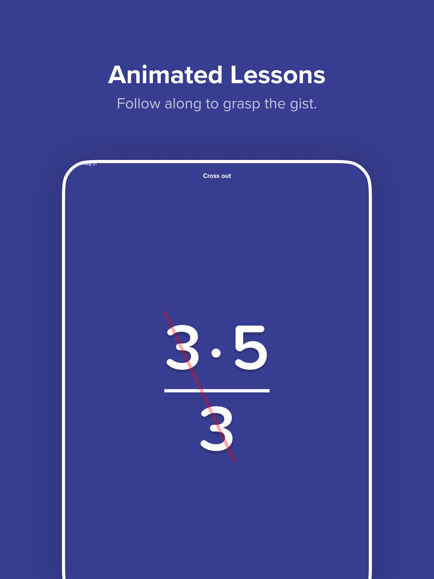
Indie developer Sean Berry releases Algebra Touch 1.1 for iOS devices. Made in collaboration with Bryan Bazilauskas, Algebra Touch is a supplemental learning aid that gives you the power to play with algebra directly. Version 1.1 unveils brand new logarithms math manipulative. This new math manipulative demonstrates their fundamental relationship to exponents, and will help students even after passing their tests, especially in understanding graphs for world events.
Saint Paul, Minnesota - The best selling algebra app for iOS, Algebra Touch, has unveiled a brand new logarithms manipulative in collaboration with teacher Bryan Bazilauskas. Logarithms are part of standardized curriculums across the country and are notoriously difficult to grasp. Most students squeak by and enter adulthood without fully understanding what they are. This new math manipulative demonstrates their fundamental relationship to exponents, and will help students even after passing their tests, especially in understanding graphs for world events.
With remote digital learning spiking during 2020, now more than ever people are seeking out online educational resources. Algebra Touch has been around since 2010, but has recently been completely remade for modern iOS devices. This latest content update with Logarithms takes advantage of the new platform created with this remake, which enables custom gestures for each topic, rather than relying on a universal interface.
This is Regular Berry's first teacher collaboration for a math manipulative, and they're looking for more teachers to create with. Most people remember that one teacher who really brought their subject to life, where going to their class was the highlight of their day. We're looking for that kind of teacher who can spark inspiration in their students.
Device Requirements:
* iPhone, iPad, and iPod touch
* Requires iOS 11.4 or later
* 0.1 MB
Pricing and Availability:
Algebra Touch 1.1 is Free (With In-App Purchases) and available worldwide exclusively through the App Store in the Education category. There's two versions of Algebra Touch. One is free to try. The other is made to support Apple's Schoolwork app, which allows teachers to assign remote activities to students and track their progress.
Algebra Touch 1.1: http://www.algebratouch.com
Download from the App Store: https://apps.apple.com/us/app/algebra-touch-all-ages/id1512834904
Screenshot: https://is4-ssl.mzstatic.com/image/thumb/PurpleSource114/v4/05/45/58/0545581c-b43c-5703-be91-b0aa4d9c9058/dd080acb-6e07-4923-8248-d5d9843019db_lessons.png/434x0w.png
App Icon: https://is5-ssl.mzstatic.com/image/thumb/Purple114/v4/7d/01/97/7d01978a-070b-75c7-feef-3fcb080fe01b/AppIcon-0-0-1x_U007emarketing-0-0-0-10-0-0-sRGB-0-0-0-GLES2_U002c0-512MB-85-220-0-0.png/640x0w.webp
Regular Berry has been making math apps since 2008. Started on the desktop with shareware, they pivoted to the App Store in 2010 soon after the release of the iPad. Copyright (C) 2020 Regular Berry Software LLC. All Rights Reserved. Apple, the Apple logo, iPhone, iPod touch and iPad are registered trademarks of Apple Inc. in the U.S. and/or other countries.
*******
Link To Article: https://prmac.com/release-id-84187.htm
*******
---------------------------------------------------------------------------------
Note that you can alter delivered distributions at any time.
Login to your account on prMac to alter your channel selection, or to opt-out at any time.
Algebra Touch unveils logarithms manipulative for remote education - Published on 10/29/20
Indie developer Sean Berry releases Algebra Touch 1.1 for iOS devices. Made in collaboration with Bryan Bazilauskas, Algebra Touch is a supplemental learning aid that gives you the power to play with algebra directly. Version 1.1 unveils brand new logarithms math manipulative. This new math manipulative demonstrates their fundamental relationship to exponents, and will help students even after passing their tests, especially in understanding graphs for world events.
Saint Paul, Minnesota - The best selling algebra app for iOS, Algebra Touch, has unveiled a brand new logarithms manipulative in collaboration with teacher Bryan Bazilauskas. Logarithms are part of standardized curriculums across the country and are notoriously difficult to grasp. Most students squeak by and enter adulthood without fully understanding what they are. This new math manipulative demonstrates their fundamental relationship to exponents, and will help students even after passing their tests, especially in understanding graphs for world events.
With remote digital learning spiking during 2020, now more than ever people are seeking out online educational resources. Algebra Touch has been around since 2010, but has recently been completely remade for modern iOS devices. This latest content update with Logarithms takes advantage of the new platform created with this remake, which enables custom gestures for each topic, rather than relying on a universal interface.
This is Regular Berry's first teacher collaboration for a math manipulative, and they're looking for more teachers to create with. Most people remember that one teacher who really brought their subject to life, where going to their class was the highlight of their day. We're looking for that kind of teacher who can spark inspiration in their students.
Device Requirements:
* iPhone, iPad, and iPod touch
* Requires iOS 11.4 or later
* 0.1 MB
Pricing and Availability:
Algebra Touch 1.1 is Free (With In-App Purchases) and available worldwide exclusively through the App Store in the Education category. There's two versions of Algebra Touch. One is free to try. The other is made to support Apple's Schoolwork app, which allows teachers to assign remote activities to students and track their progress.
Algebra Touch 1.1: http://www.algebratouch.com
Download from the App Store: https://apps.apple.com/us/app/algebra-touch-all-ages/id1512834904
Screenshot: https://is4-ssl.mzstatic.com/image/thumb/PurpleSource114/v4/05/45/58/0545581c-b43c-5703-be91-b0aa4d9c9058/dd080acb-6e07-4923-8248-d5d9843019db_lessons.png/434x0w.png
App Icon: https://is5-ssl.mzstatic.com/image/thumb/Purple114/v4/7d/01/97/7d01978a-070b-75c7-feef-3fcb080fe01b/AppIcon-0-0-1x_U007emarketing-0-0-0-10-0-0-sRGB-0-0-0-GLES2_U002c0-512MB-85-220-0-0.png/640x0w.webp

Regular Berry has been making math apps since 2008. Started on the desktop with shareware, they pivoted to the App Store in 2010 soon after the release of the iPad. Copyright (C) 2020 Regular Berry Software LLC. All Rights Reserved. Apple, the Apple logo, iPhone, iPod touch and iPad are registered trademarks of Apple Inc. in the U.S. and/or other countries.
*******
Link To Article: https://prmac.com/release-id-84187.htm
*******
---------------------------------------------------------------------------------
Note that you can alter delivered distributions at any time.
Login to your account on prMac to alter your channel selection, or to opt-out at any time.
MacX YTB Downloader Adds Proxy Server to Access & Grab Blocked YTB Video
A new article has been published at prMac.
MacX YTB Downloader Adds Proxy Server to Access & Grab Blocked YTB Video - Published on 10/29/20
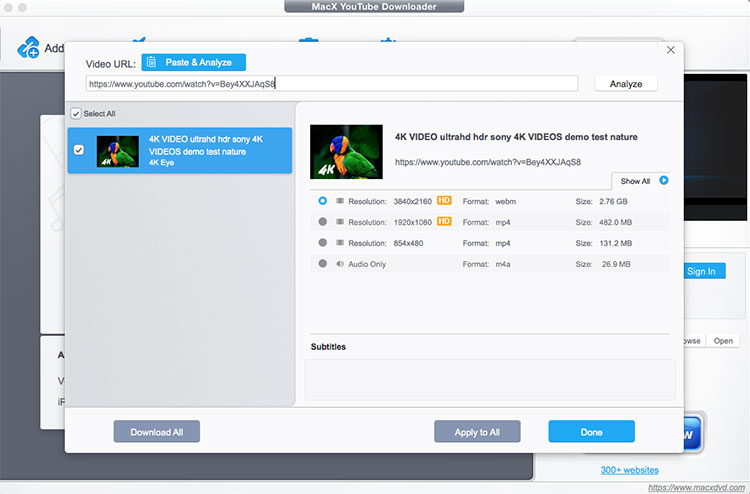
Digiarty Software, Inc. today announces MacX YTB Downloader for macOS. With MacX YTB Downloader, users can download video from Facebook, YTB, Instagram, and 300+ other sites in high definition and fast speed. This update includes fresh proxy server support and regular kernel enhancement, addressing the private YouTube video, Watch Later playlist and blocked videos not available for downloading issues for some users.
Chengdu, China - Digiarty Software, Inc. (MacXDVD) has made a major update to its MacX YTB Downloader in response to the recent video download failure issue. This update includes fresh proxy server support and regular kernel enhancement, addressing the private YouTube video, Watch Later playlist and blocked videos not available for downloading issues for some users.
The newly updated MacX YTB Downloader is built with proxy server support, which acts as a gateway between users and the internet. Instead of connecting to YouTube server directly, the client creates a connection to the proxy server built in MacX YTB Downloader and requests for the appointed resource on YouTube site. This keeps users' personal information and browsing habit more private, and also allows them to access and even grab the blocked resources of YouTube in current area.
This MacX online video grabber also makes an enhancement of the kernel algorithm, which grabs and analyzes the source video URL address faster, and acquires the video file with full information accurately. It solves YouTube video analysis failure owing to the instability of the software greatly. Besides, some small bugs are also fixed in the latest version of the program.
Beyond that, if you failed to parse encrypted or blocked YouTube video previously, the new version YTB downloader can easily parse them in coordination with the proxy server.
In brief, MacX YTB Downloader v5.1.6 has improved all-round:
* Grab any YouTube contents, including YouTube playlists, private video, or blocked video in whatever format and resolution
* Auto detect YouTube videos opened in browser. And save video offline from YouTube and 300+ sites
* Acquire YouTube video in batch thanks to multi-threading and batch downloading tech - And it makes a reasonable layout of CPU usage and network bandwidth while downloading to ensure the smooth running of other tasks on macOS
Certainly, everything complicated is in the software background. For users, the only thing is to set the proxy port according to the type of the proxy server. Then it's all the same with the regular downloads: Parse the video URL address and download the video.
Pricing and Availability:
MacX YTB Downloader is a free video downloader for Mac users to save videos offline from YouTube, Facebook, Dailymotion, and 300 sites. This 100% safe and clean YouTube downloader is available on macOS Catalina or earlier, tracing to Mac OS X 10.5. Get the free MacX YTB Downloader now!
If you'd like to convert the offline YouTube videos, you can move to its advanced edition, MacX Video Converter Pro, which enables customers to download and convert YouTube videos freely. This software is normally priced at $59.95 (USD), but now you can get it at $29.95 in MacXDVD Special Offer activity. Take your chance! Opportunity knocks but once.
MacX YTB Downloader v5.1.6: https://www.macxdvd.com/free-youtube-video-downloader-mac/
Screenshot: https://www.macxdvd.com/free-youtube-video-downloader-mac/image-style/index-image/col8-1-18.jpg
MacX Video Converter Pro: https://www.macxdvd.com/mac-video-converter-pro/
MacXDVD Special Offer: https://www.macxdvd.com/special-offer/
Digiarty Software, Inc. (MacXDVD) is a division of Digiarty Software Company, owns a professional multimedia software development team, providing a range of products for Macintosh Computer users, including MacX Video Converter, MacX YTB Downloader, MacX DVD Ripper, DVD Author, DVD backup tools, etc, series of apps for Apple video player, and iPhone, iPad 2D and 3D video games. Copyright (C) 2020 MacXDVD Software. All Rights Reserved. Apple, the Apple logo and Macintosh are registered trademarks of Apple Inc. in the U.S. and/or other countries.
*******
Link To Article: https://prmac.com/release-id-84186.htm
*******
---------------------------------------------------------------------------------
Note that you can alter delivered distributions at any time.
Login to your account on prMac to alter your channel selection, or to opt-out at any time.
MacX YTB Downloader Adds Proxy Server to Access & Grab Blocked YTB Video - Published on 10/29/20
Digiarty Software, Inc. today announces MacX YTB Downloader for macOS. With MacX YTB Downloader, users can download video from Facebook, YTB, Instagram, and 300+ other sites in high definition and fast speed. This update includes fresh proxy server support and regular kernel enhancement, addressing the private YouTube video, Watch Later playlist and blocked videos not available for downloading issues for some users.
Chengdu, China - Digiarty Software, Inc. (MacXDVD) has made a major update to its MacX YTB Downloader in response to the recent video download failure issue. This update includes fresh proxy server support and regular kernel enhancement, addressing the private YouTube video, Watch Later playlist and blocked videos not available for downloading issues for some users.
The newly updated MacX YTB Downloader is built with proxy server support, which acts as a gateway between users and the internet. Instead of connecting to YouTube server directly, the client creates a connection to the proxy server built in MacX YTB Downloader and requests for the appointed resource on YouTube site. This keeps users' personal information and browsing habit more private, and also allows them to access and even grab the blocked resources of YouTube in current area.
This MacX online video grabber also makes an enhancement of the kernel algorithm, which grabs and analyzes the source video URL address faster, and acquires the video file with full information accurately. It solves YouTube video analysis failure owing to the instability of the software greatly. Besides, some small bugs are also fixed in the latest version of the program.
Beyond that, if you failed to parse encrypted or blocked YouTube video previously, the new version YTB downloader can easily parse them in coordination with the proxy server.
In brief, MacX YTB Downloader v5.1.6 has improved all-round:
* Grab any YouTube contents, including YouTube playlists, private video, or blocked video in whatever format and resolution
* Auto detect YouTube videos opened in browser. And save video offline from YouTube and 300+ sites
* Acquire YouTube video in batch thanks to multi-threading and batch downloading tech - And it makes a reasonable layout of CPU usage and network bandwidth while downloading to ensure the smooth running of other tasks on macOS
Certainly, everything complicated is in the software background. For users, the only thing is to set the proxy port according to the type of the proxy server. Then it's all the same with the regular downloads: Parse the video URL address and download the video.
Pricing and Availability:
MacX YTB Downloader is a free video downloader for Mac users to save videos offline from YouTube, Facebook, Dailymotion, and 300 sites. This 100% safe and clean YouTube downloader is available on macOS Catalina or earlier, tracing to Mac OS X 10.5. Get the free MacX YTB Downloader now!
If you'd like to convert the offline YouTube videos, you can move to its advanced edition, MacX Video Converter Pro, which enables customers to download and convert YouTube videos freely. This software is normally priced at $59.95 (USD), but now you can get it at $29.95 in MacXDVD Special Offer activity. Take your chance! Opportunity knocks but once.
MacX YTB Downloader v5.1.6: https://www.macxdvd.com/free-youtube-video-downloader-mac/
Screenshot: https://www.macxdvd.com/free-youtube-video-downloader-mac/image-style/index-image/col8-1-18.jpg
MacX Video Converter Pro: https://www.macxdvd.com/mac-video-converter-pro/
MacXDVD Special Offer: https://www.macxdvd.com/special-offer/
Digiarty Software, Inc. (MacXDVD) is a division of Digiarty Software Company, owns a professional multimedia software development team, providing a range of products for Macintosh Computer users, including MacX Video Converter, MacX YTB Downloader, MacX DVD Ripper, DVD Author, DVD backup tools, etc, series of apps for Apple video player, and iPhone, iPad 2D and 3D video games. Copyright (C) 2020 MacXDVD Software. All Rights Reserved. Apple, the Apple logo and Macintosh are registered trademarks of Apple Inc. in the U.S. and/or other countries.
*******
Link To Article: https://prmac.com/release-id-84186.htm
*******
---------------------------------------------------------------------------------
Note that you can alter delivered distributions at any time.
Login to your account on prMac to alter your channel selection, or to opt-out at any time.
Tropical Software releases iAddressX 4 to Apple Mac App Store
A new article has been published at prMac.
Tropical Software releases iAddressX 4 to Apple Mac App Store - Published on 10/29/20
Longtime Florida based developer, Tropical Software announced iAddressX 4 for macOS was released to Apple Mac App Store. Use iAddressX to navigate contacts from a small icon in the system menu, and to initiate various tasks including printing of Dymo labels, dialing iPhone and/or Skype calls, sending SMS messages to Skype pals or friends' cell phones, and more. Now a 64-bit only app, the new version adds a new preferences option to dial iPhone via FaceTime, a new Maps feature, and much more.
Atlantic Beach, Florida - Tropical Software today is pleased to announce that iAddressX 4 is available for macOS in Apple's Mac App Store. Use iAddressX to navigate contacts from a small icon in the system menu, and to initiate various tasks including printing of Dymo labels, dialing iPhone and/or Skype calls, sending SMS messages to Skype pals or friends' cell phones, and more. Interested users can visit the Tropical Software website to try reliable iAddressX 4 for free today.
System Menu Convenience and iAddressX:
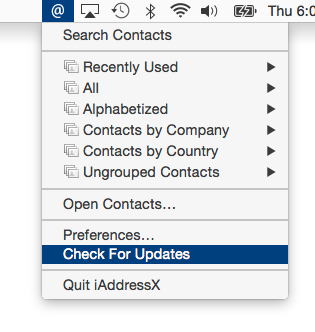
From the first release of Macintosh computers, the main menu bar, also called the system menu, has been a central Mac navigational feature. iAddressX has now returned to the Mac system menu as a status item, allowing easy access to almost everything related to contacts from hierarchical menus.
Dial iPhone:
* Dial using Facetime, iPhone, Skype or an old-fashioned landline
Navigate Contacts:
* Navigate contacts from a small icon in the system menu and access many contact options
Dymo Support:
* Print to your Dymo Label printer right from iAddressX
Search:
* Search your contacts directly from the menu bar
Skype:
* Initiate a call or chat using Skype
* Send SMS messages to Skype pals
Maps:
* View any contact's location on Apple or Google Maps
A Brief History of iAddressX:
Tropical Software President James Lee explains the return of iAddressX: "iAddressX was developed by Michael Balle-Pedersen, a Software Engineer at Apple Inc. Before he worked at Apple, Michael released versions running in macOS 10.3 and 10.4. I discovered iAddressX languishing after Michael went to work for Apple and we were able to acquire iAddressX. We immediately developed a version that ran under macOS 10.5 (Leopard) that is still available. Thanks to help from many friends, we were able to get iAddressX working in macOS 10.7 through 10.15. In-house expert Lewis Garrett put the final touches on this release."
iAddressX 4 has the following changes:
New Features:
* iAddressX is now a 64-bit App only (Do not install this update if your system is 32-bit only)
* Added Preferences option to Dial iPhone using Apple's "FaceTime" dialing options
* Maps feature that allows selecting Apple or Google Maps of a contact address
* Changes required by macOS 10.15 (Catalina)
Changed Features:
* Include build number in version string displayed in About
* Modify Dial menu command to include the Dialing method
* Change "Map Of using:" Menu command default selection to "Apple Maps"
* Change Dialing default from "Speaker" to "FaceTime via iPhone"
* Moved Preferences "About" tab to be first (leftmost) tab
* Changed "Start iAddressX upon login" preference setting checkbox to unchecked
Fixed:
* "View Read Me" menu command appeared not to be working because its window was obscured by other windows. The ReadMe.rtf window will now be forced to the front
* Corrected misspelling in "Display Order:" menu item
* Improved display of menu bar iAddressX @ icon when Appearance is Dark Mode
* "View Read Me" menu command, when Appearance is set to "Dark Mode", displayed Read Me too dark to read
iAddressX- Reviews:
iAddressX was reviewed a few times many years ago and we hope it will once again get good reviews for its design and convenience. We are looking for feedback from prior iAddressX customers and new users for what they would like to see us develop in the future.
Pricing and Availability:
Try Tropical Software's reliable iAddressX 4 for free our web site today! iAddressX 4 is only $19.95 (USD) from or the Apple Mac App Store.
iAddressX 4: http://www.tropic4.com/iaddressx.html
Purchase and Download from the Mac App Store: https://apps.apple.com/us/app/iaddressx/id1531939198
Screenshot: https://www.tropic4.com/images/MainiAXmenuthumb.png
Application Icon: http://www.tropic4.com/images/iaddressx.png
Tropical Software makes the award-winning TopXNotes, a modern personal Mac note manager with state of the art proprietary encryption technology for the ultimate in securing personal information. We also offer KitchenTimer, a general-purpose timer, 2Remember, a lightweight easy to use reminder app with a minimal screen footprint, and iAddressX for navigating and accessing your contacts. Located in Atlantic Beach, Florida, Tropical Software is owned and operated by former Apple employee James Lee, and is dedicated to improving the lives of its customers by offering easy to use productivity software for Macs and Apple touch devices including iPhone, iPod touch and iPad. Copyright (C) 2020 Tropical Software-All Rights Reserved. Apple, the Apple logo, macOS, iPhone, iPod, iPad and Macintosh are registered trademarks of Apple Inc. in the U.S. and/or other countries.
*******
Link To Article: https://prmac.com/release-id-84185.htm
*******
---------------------------------------------------------------------------------
Note that you can alter delivered distributions at any time.
Login to your account on prMac to alter your channel selection, or to opt-out at any time.
Tropical Software releases iAddressX 4 to Apple Mac App Store - Published on 10/29/20
Longtime Florida based developer, Tropical Software announced iAddressX 4 for macOS was released to Apple Mac App Store. Use iAddressX to navigate contacts from a small icon in the system menu, and to initiate various tasks including printing of Dymo labels, dialing iPhone and/or Skype calls, sending SMS messages to Skype pals or friends' cell phones, and more. Now a 64-bit only app, the new version adds a new preferences option to dial iPhone via FaceTime, a new Maps feature, and much more.
Atlantic Beach, Florida - Tropical Software today is pleased to announce that iAddressX 4 is available for macOS in Apple's Mac App Store. Use iAddressX to navigate contacts from a small icon in the system menu, and to initiate various tasks including printing of Dymo labels, dialing iPhone and/or Skype calls, sending SMS messages to Skype pals or friends' cell phones, and more. Interested users can visit the Tropical Software website to try reliable iAddressX 4 for free today.
System Menu Convenience and iAddressX:
From the first release of Macintosh computers, the main menu bar, also called the system menu, has been a central Mac navigational feature. iAddressX has now returned to the Mac system menu as a status item, allowing easy access to almost everything related to contacts from hierarchical menus.
Dial iPhone:
* Dial using Facetime, iPhone, Skype or an old-fashioned landline
Navigate Contacts:
* Navigate contacts from a small icon in the system menu and access many contact options
Dymo Support:
* Print to your Dymo Label printer right from iAddressX
Search:
* Search your contacts directly from the menu bar
Skype:
* Initiate a call or chat using Skype
* Send SMS messages to Skype pals
Maps:
* View any contact's location on Apple or Google Maps
A Brief History of iAddressX:
Tropical Software President James Lee explains the return of iAddressX: "iAddressX was developed by Michael Balle-Pedersen, a Software Engineer at Apple Inc. Before he worked at Apple, Michael released versions running in macOS 10.3 and 10.4. I discovered iAddressX languishing after Michael went to work for Apple and we were able to acquire iAddressX. We immediately developed a version that ran under macOS 10.5 (Leopard) that is still available. Thanks to help from many friends, we were able to get iAddressX working in macOS 10.7 through 10.15. In-house expert Lewis Garrett put the final touches on this release."
iAddressX 4 has the following changes:
New Features:
* iAddressX is now a 64-bit App only (Do not install this update if your system is 32-bit only)
* Added Preferences option to Dial iPhone using Apple's "FaceTime" dialing options
* Maps feature that allows selecting Apple or Google Maps of a contact address
* Changes required by macOS 10.15 (Catalina)
Changed Features:
* Include build number in version string displayed in About
* Modify Dial menu command to include the Dialing method
* Change "Map Of using:" Menu command default selection to "Apple Maps"
* Change Dialing default from "Speaker" to "FaceTime via iPhone"
* Moved Preferences "About" tab to be first (leftmost) tab
* Changed "Start iAddressX upon login" preference setting checkbox to unchecked
Fixed:
* "View Read Me" menu command appeared not to be working because its window was obscured by other windows. The ReadMe.rtf window will now be forced to the front
* Corrected misspelling in "Display Order:" menu item
* Improved display of menu bar iAddressX @ icon when Appearance is Dark Mode
* "View Read Me" menu command, when Appearance is set to "Dark Mode", displayed Read Me too dark to read
iAddressX- Reviews:
iAddressX was reviewed a few times many years ago and we hope it will once again get good reviews for its design and convenience. We are looking for feedback from prior iAddressX customers and new users for what they would like to see us develop in the future.
Pricing and Availability:
Try Tropical Software's reliable iAddressX 4 for free our web site today! iAddressX 4 is only $19.95 (USD) from or the Apple Mac App Store.
iAddressX 4: http://www.tropic4.com/iaddressx.html
Purchase and Download from the Mac App Store: https://apps.apple.com/us/app/iaddressx/id1531939198
Screenshot: https://www.tropic4.com/images/MainiAXmenuthumb.png
Application Icon: http://www.tropic4.com/images/iaddressx.png

Tropical Software makes the award-winning TopXNotes, a modern personal Mac note manager with state of the art proprietary encryption technology for the ultimate in securing personal information. We also offer KitchenTimer, a general-purpose timer, 2Remember, a lightweight easy to use reminder app with a minimal screen footprint, and iAddressX for navigating and accessing your contacts. Located in Atlantic Beach, Florida, Tropical Software is owned and operated by former Apple employee James Lee, and is dedicated to improving the lives of its customers by offering easy to use productivity software for Macs and Apple touch devices including iPhone, iPod touch and iPad. Copyright (C) 2020 Tropical Software-All Rights Reserved. Apple, the Apple logo, macOS, iPhone, iPod, iPad and Macintosh are registered trademarks of Apple Inc. in the U.S. and/or other countries.
*******
Link To Article: https://prmac.com/release-id-84185.htm
*******
---------------------------------------------------------------------------------
Note that you can alter delivered distributions at any time.
Login to your account on prMac to alter your channel selection, or to opt-out at any time.
HistoryHound searches your browser history on Big Sur and Apple Silicon
A new article has been published at prMac.
HistoryHound searches your browser history on Big Sur and Apple Silicon - Published on 10/27/20
Colorado-based developer St. Clair Software today releases HistoryHound 2.3, an update to their fast, efficient, multi-browser utility for searching the contents of web pages and RSS feeds. HistoryHound is a personal web search. Even if you use more than one browser and don't remember where you saw something, HistoryHound can find it. Version 2.3 offers refined search capabilities and support for macOS 11.0 Big Sur and Macs powered by Apple Silicon.
Denver, CO - St. Clair Software is pleased to announce the release of HistoryHound 2.3 for macOS. HistoryHound lets you search the content of all web sites you've visited recently, plus all the pages you've bookmarked. It's a "personal web search." Just type in a few words that you remember reading and HistoryHound will give you a list of pages you've viewed recently, ranked by relevance. You don't have to remember the title of the page, which browser you were using at the time, or when you saw it - HistoryHound will find it for you. And HistoryHound respects your privacy. Its indexing and searching is all done locally on your Mac, not in the Cloud.
What's New:
This update adds support for macOS 11.0 Big Sur and is a universal application, natively supporting Macs powered by both Intel and Apple Silicon processors. HistoryHound's search engine now also supports Google-like search filters, allowing you to narrow searches to specific web sites or to apply search terms only to the title or URL of a page. This release also allows manual re-indexing of pages when errors occur and resolves a number of bugs.
System Requirements:
* macOS 10.9 through 11.0
* Any supported web browsers: Safari, Chrome, Edge, Firefox, OmniWeb, Brave, Opera, Vivaldi, NetNewsWire
Pricing and Availability:
HistoryHound 2.3 is a free update for existing HistoryHound users. It costs $14.95 (USD) for new users. Please see the St. Clair Software web site for screenshots, a full change log, and additional feature information.
HistoryHound 2.3: https://www.stclairsoft.com/HistoryHound/index.html
Detailed Change History: https://www.stclairsoft.com/HistoryHound/release.html
Download HistoryHound: https://www.stclairsoft.com/cgi-bin/dl.cgi?HH
Purchase HistoryHound: https://www.stclairsoft.com/store/
Based in Denver, Colorado, St. Clair Software is a privately held company that has been specializing in utilities and custom software solutions for the Macintosh since 1988. St. Clair Software can be contacted at: St. Clair Software, 271 S. Emerson Street, Denver, CO, USA 80209. Copyright (C) 1988-2020 St. Clair Software. All Rights Reserved. Apple, Macintosh, macOS and Finder are registered trademarks of Apple Inc. in the U.S. and/or other countries.
*******
Link To Article: https://prmac.com/release-id-84184.htm
*******
---------------------------------------------------------------------------------
Note that you can alter delivered distributions at any time.
Login to your account on prMac to alter your channel selection, or to opt-out at any time.
HistoryHound searches your browser history on Big Sur and Apple Silicon - Published on 10/27/20
Colorado-based developer St. Clair Software today releases HistoryHound 2.3, an update to their fast, efficient, multi-browser utility for searching the contents of web pages and RSS feeds. HistoryHound is a personal web search. Even if you use more than one browser and don't remember where you saw something, HistoryHound can find it. Version 2.3 offers refined search capabilities and support for macOS 11.0 Big Sur and Macs powered by Apple Silicon.
Denver, CO - St. Clair Software is pleased to announce the release of HistoryHound 2.3 for macOS. HistoryHound lets you search the content of all web sites you've visited recently, plus all the pages you've bookmarked. It's a "personal web search." Just type in a few words that you remember reading and HistoryHound will give you a list of pages you've viewed recently, ranked by relevance. You don't have to remember the title of the page, which browser you were using at the time, or when you saw it - HistoryHound will find it for you. And HistoryHound respects your privacy. Its indexing and searching is all done locally on your Mac, not in the Cloud.
What's New:
This update adds support for macOS 11.0 Big Sur and is a universal application, natively supporting Macs powered by both Intel and Apple Silicon processors. HistoryHound's search engine now also supports Google-like search filters, allowing you to narrow searches to specific web sites or to apply search terms only to the title or URL of a page. This release also allows manual re-indexing of pages when errors occur and resolves a number of bugs.
System Requirements:
* macOS 10.9 through 11.0
* Any supported web browsers: Safari, Chrome, Edge, Firefox, OmniWeb, Brave, Opera, Vivaldi, NetNewsWire
Pricing and Availability:
HistoryHound 2.3 is a free update for existing HistoryHound users. It costs $14.95 (USD) for new users. Please see the St. Clair Software web site for screenshots, a full change log, and additional feature information.
HistoryHound 2.3: https://www.stclairsoft.com/HistoryHound/index.html
Detailed Change History: https://www.stclairsoft.com/HistoryHound/release.html
Download HistoryHound: https://www.stclairsoft.com/cgi-bin/dl.cgi?HH
Purchase HistoryHound: https://www.stclairsoft.com/store/
Based in Denver, Colorado, St. Clair Software is a privately held company that has been specializing in utilities and custom software solutions for the Macintosh since 1988. St. Clair Software can be contacted at: St. Clair Software, 271 S. Emerson Street, Denver, CO, USA 80209. Copyright (C) 1988-2020 St. Clair Software. All Rights Reserved. Apple, Macintosh, macOS and Finder are registered trademarks of Apple Inc. in the U.S. and/or other countries.
*******
Link To Article: https://prmac.com/release-id-84184.htm
*******
---------------------------------------------------------------------------------
Note that you can alter delivered distributions at any time.
Login to your account on prMac to alter your channel selection, or to opt-out at any time.
Saving Daylight - An App That Rages Against the Dying of the Light
A new article has been published at prMac.
Saving Daylight - An App That Rages Against the Dying of the Light - Published on 10/27/20
California based indie developer 359 North Inc. announces Saving Daylight, its new app for iOS devices. Saving Daylight offers quick access to how much sunlight is left today at any location on Earth, along with comprehensive solar data for any time or place on the planet. Users can easily search by name, search Contacts, or search a map to find places they want to check. Easily explore the entire planet, compare, contrast, create videos and check out reports.
San Rafael, California - Independent developer 359 North Inc. is proud to announce the release and availability of Saving Daylight, its new app for iPhone, iPad, and iPod touch devices. Ever get in trouble for coming home after dark? Saving Daylight can help you avoid that troubling situation.
Get alerts the way you want them for sunrise, noon, and sunset. If you're curious, you can explore the entire planet, compare, contrast, create videos and check out reports. But at its heart, Saving Daylight gives you a clear, unambiguous readout of the light you've got left when you're outdoors.
* Going hiking, biking, or outdoors for any reason? Plan and manage your activity
* Moving to a new city? Get the low-down on sunlight in your new digs
* Real Estate Agent? Show the benefit of your area's sunlight to prospective residents
* Just like cool stuff? Check out the light ring videos when you tap on the big ring
On the main view the light ring gives you a quick readout for your current location, and a quick swipe left or right takes you to other locations of interest for the same solar data. Below the light ring a table presents all the particular data of the location in view.
If you tap the light ring, you get an explosion of fun detail: compare two different locations, explore a location, make a movie, and generate a report suitable for printing that gives a year-round description of your selected location, and compares it to other locations around the globe.
Localized into six additional languages besides American English: Simplified Chinese, French, German, Japanese, Polish, and Spanish.
Device Requirements:
* iPhone, iPad, and iPod touch
* iOS 13.0 or later
* Universal Application
* 10.9 MB
Pricing and Availability:
Saving Daylight is free and is available worldwide exclusively through the App Store in the Utilities category.
359 North: https://www.359north.com
Saving Daylight: https://www.359north.com/savingdaylight
Download From the App Store: https://apps.apple.com/us/app/saving-daylight/id1281186839
Video Example: https://www.linkedin.com/posts/steve-mykytyn-190148_ios-app-reykjavik-activity-6725151778364649472-BdjG
Screenshot: https://images.squarespace-cdn.com/content/v1/5d118b7cfa40be00012f99e4/1602619844493-9WAEEP24BBTJKG076ZN1/ke17ZwdGBToddI8pDm48kK5ucfQ9XVJ77tUDBLEM12MUqsxRUqqbr1mOJYKfIPR7LoDQ9mXPOjoJoqy81S2I8GRo6ASst2s6pLvNAu_PZdIjfafJmSvmEk-b4oekexz_mQ7QVyVfK-0Qn8zHX7Oz_
359 North Inc. is a California corporation based in San Rafael. We write fun and safe apps with no spyware. All Material and Software (C) Copyright 2020 359 North Inc. All Rights Reserved. Apple, the Apple logo, iPhone, iPod and iPad are registered trademarks of Apple Inc. in the U.S. and/or other countries. Other trademarks and registered trademarks may be the property of their respective owners.
*******
Link To Article: https://prmac.com/release-id-84183.htm
*******
---------------------------------------------------------------------------------
Note that you can alter delivered distributions at any time.
Login to your account on prMac to alter your channel selection, or to opt-out at any time.
Saving Daylight - An App That Rages Against the Dying of the Light - Published on 10/27/20
California based indie developer 359 North Inc. announces Saving Daylight, its new app for iOS devices. Saving Daylight offers quick access to how much sunlight is left today at any location on Earth, along with comprehensive solar data for any time or place on the planet. Users can easily search by name, search Contacts, or search a map to find places they want to check. Easily explore the entire planet, compare, contrast, create videos and check out reports.
San Rafael, California - Independent developer 359 North Inc. is proud to announce the release and availability of Saving Daylight, its new app for iPhone, iPad, and iPod touch devices. Ever get in trouble for coming home after dark? Saving Daylight can help you avoid that troubling situation.
Get alerts the way you want them for sunrise, noon, and sunset. If you're curious, you can explore the entire planet, compare, contrast, create videos and check out reports. But at its heart, Saving Daylight gives you a clear, unambiguous readout of the light you've got left when you're outdoors.
* Going hiking, biking, or outdoors for any reason? Plan and manage your activity
* Moving to a new city? Get the low-down on sunlight in your new digs
* Real Estate Agent? Show the benefit of your area's sunlight to prospective residents
* Just like cool stuff? Check out the light ring videos when you tap on the big ring
On the main view the light ring gives you a quick readout for your current location, and a quick swipe left or right takes you to other locations of interest for the same solar data. Below the light ring a table presents all the particular data of the location in view.
If you tap the light ring, you get an explosion of fun detail: compare two different locations, explore a location, make a movie, and generate a report suitable for printing that gives a year-round description of your selected location, and compares it to other locations around the globe.
Localized into six additional languages besides American English: Simplified Chinese, French, German, Japanese, Polish, and Spanish.
Device Requirements:
* iPhone, iPad, and iPod touch
* iOS 13.0 or later
* Universal Application
* 10.9 MB
Pricing and Availability:
Saving Daylight is free and is available worldwide exclusively through the App Store in the Utilities category.
359 North: https://www.359north.com
Saving Daylight: https://www.359north.com/savingdaylight
Download From the App Store: https://apps.apple.com/us/app/saving-daylight/id1281186839
Video Example: https://www.linkedin.com/posts/steve-mykytyn-190148_ios-app-reykjavik-activity-6725151778364649472-BdjG
Screenshot: https://images.squarespace-cdn.com/content/v1/5d118b7cfa40be00012f99e4/1602619844493-9WAEEP24BBTJKG076ZN1/ke17ZwdGBToddI8pDm48kK5ucfQ9XVJ77tUDBLEM12MUqsxRUqqbr1mOJYKfIPR7LoDQ9mXPOjoJoqy81S2I8GRo6ASst2s6pLvNAu_PZdIjfafJmSvmEk-b4oekexz_mQ7QVyVfK-0Qn8zHX7Oz_
359 North Inc. is a California corporation based in San Rafael. We write fun and safe apps with no spyware. All Material and Software (C) Copyright 2020 359 North Inc. All Rights Reserved. Apple, the Apple logo, iPhone, iPod and iPad are registered trademarks of Apple Inc. in the U.S. and/or other countries. Other trademarks and registered trademarks may be the property of their respective owners.
*******
Link To Article: https://prmac.com/release-id-84183.htm
*******
---------------------------------------------------------------------------------
Note that you can alter delivered distributions at any time.
Login to your account on prMac to alter your channel selection, or to opt-out at any time.
Subscribe to:
Posts (Atom)