A new article has been published at prMac.
BatchOutput for Microsoft Word Now Supports macOS Big Sur - Published on 11/18/20
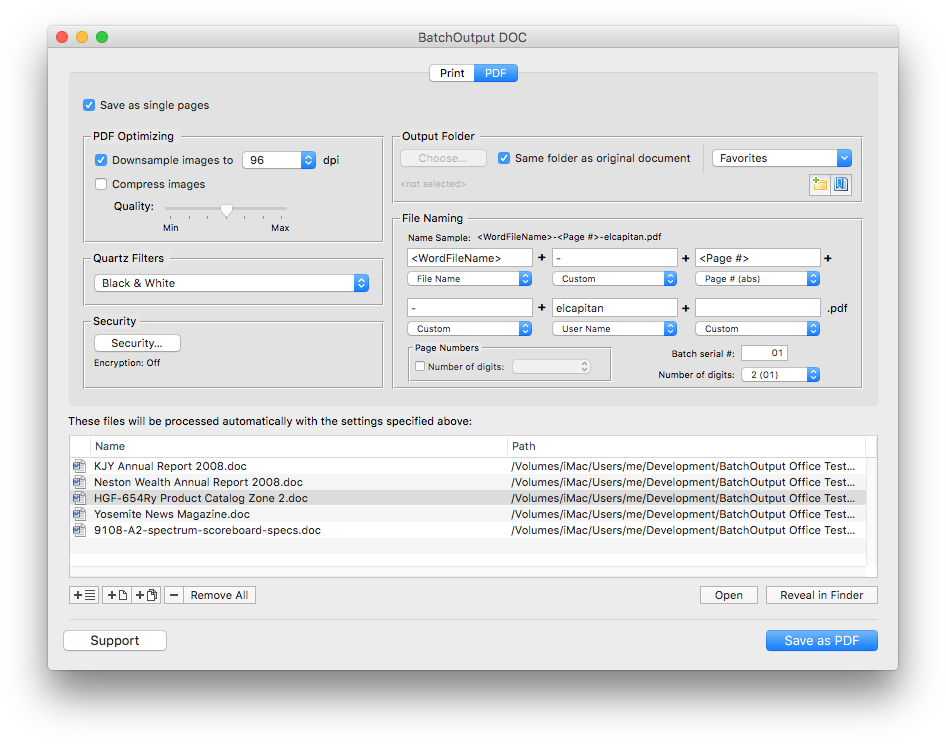
Zevrix Solutions announces BatchOutput DOC 2.5.19, a compatibility update to company's output automation solution for Microsoft Word. The only Word tool of its kind for the Mac platform, BatchOutput automates printing and exporting to PDF from Word. The app offers batch printing, variable file names, PDF security, single page export and more. The new version adds support for the recently released macOS 11 Big Sur and automatically corrects file permissions during license activation.
Toronto (ON), Canada - Zevrix Solutions announces the release of BatchOutput DOC 2.5.19, a compatibility update to its output automation solution for Microsoft Word on macOS. The only batch processing tool for Word on the Mac market, the software helps users eliminate repetitive tasks through automation of printing and professional PDF output.
The new version introduces support for the recently released macOS 11 Big Sur and is offered as a free update to the licensed users. In addition, the new update automatically fixes file permissions that could prevent successful license activation.
"BatchOutput does very well what is supposed to do," says Giorgio La Scala from Cologny, Switzerland. "Developers also provide top notch support that is fast and efficient... Very impressed by the level of dedication to customer satisfaction."
In addition to batch printing, BatchOutput DOC lets users carry out professional PDF production directly from Word by bringing advanced PDF creation options right to the user's fingertips:
* Print and export multiple Word documents to PDF with a single click
* Variable output file names
* Split Word files into single page PDFs
* Reduce PDF file size and optimize documents for web, print and mobile devices
* Change PDF color tone, brightness and other properties
* Encrypt and password-protect PDF documents
BatchOutput DOC is a part of the Zevrix BatchOutput family of products, which also includes output automation solutions for Microsoft Excel, PowerPoint, Adobe InDesign, and PDF workflows.
Pricing and Availability:
BatchOutput DOC can be purchased for $19.95 (USD) from the Zevrix Solutions website as well as from authorized resellers and Mac App Store. Trial is also available for download. The update is free for users of version 2 and $10 to upgrade from version 1. BatchOutput DOC requires macOS 10.8-11 and Microsoft Word 2008-2019.
Zevrix Solutions: https://zevrix.com/store
BatchOutput DOC 2.5.19: https://zevrix.com/batchoutputoffice
Download BatchOutput DOC: https://zevrix.com/downloads/BatchOutputOffice.dmg
Purchase: https://zevrix.com/store
Screenshot: https://zevrix.com/wp-content/uploads/2020/08/bodoc-pdf-946.png
Located in Toronto, Canada, Zevrix Solutions provides automation and productivity solutions for Adobe Creative Cloud and Creative Suite software, PDF workflows, graphic file diagnostics and Microsoft Office output on Mac OS. Zevrix is dedicated to help professionals increase their profits through automating everyday tasks, producing error-free documents, saving disk space and cutting production costs. For more information, visit their website. Copyright (C) 2020 Zevrix Solutions. All Rights Reserved. Other trademarks and registered trademarks may be the property of their respective owners.
*******
Link To Article: https://prmac.com/release-id-84208.htm
*******
---------------------------------------------------------------------------------
Note that you can alter delivered distributions at any time.
Login to your account on prMac to alter your channel selection, or to opt-out at any time.

Digital Notebook Carbo 2 Brings Mac Catalyst App & iOS 14 Enhancement
A new article has been published at prMac.
Digital Notebook Carbo 2 Brings Mac Catalyst App & iOS 14 Enhancement - Published on 11/18/20
Creaceed releases Carbo version 2.0, a major update to their digital notebook app for iPhone, iPad, and Mac. Carbo lets you capture and organize handwritten notes and sketches either by shooting with the camera or by drawing on screen with Apple Pencil, revealing their outstanding pixel-free quality and their expressiveness. Carbo 2 brings Mac support through a new Mac Catalyst app running on macOS 11 Big Sur with Optimized for Mac technology to offer a true Mac experience.
Mons, Belgium - Creaceed releases Carbo version 2.0, a major update to their digital notebook app for iPhone, iPad, and Mac. Carbo 2 brings Mac support through a new Mac Catalyst app running on macOS 11 Big Sur with Optimized for Mac technology to offer a true Mac experience. Carbo 2 now comes as a universal app for iPhone, iPad, and Mac, fulfilling the vision of bridging handwriting & the digital ecosystem.
Carbo lets you capture and organize handwritten notes and sketches either by shooting with the camera or by drawing on screen with Apple Pencil, revealing their outstanding pixel-free quality and their expressiveness. This makes a lot of sense on iPad and iPhone as these are great input & viewing mobile devices, but now these notes can also be accessed & edited from the Mac through a refined Mac Catalyst app, providing the full productive experience on all your Apple devices. Carbo 2 now also offers photo import from the new & more capable iOS 14 photo picker (filter, search, etc.).
Carbo 2 is thus an excellent companion to get your handwriting into the digital age, be it notes or sketches, and organize them. Take a picture of your document with your iPhone or iPad and now also view or edit it on the Mac.
New features in 2.0:
* New Mac Catalyst app (Optimized for Mac) running on macOS 11 Big Sur
* Optimized for macOS 11 look & feel for a great Mac experience
* Metal-based note rendering (Metal is Mac only, pixel-free on all devices)
iOS 14 enhancements:
* Photo import from the new & more capable iOS 14 photo picker (filter, search, etc.)
* Improved handling of user privacy with support for photo albums security constraints of iOS 14
* Use of modern SF Symbols design language (Mac only)
Other features include:
* Hybrid visualization technology: note picture is cleaned up and turned into a highly accurate monochrome representation
* Drawing support: highly accurate and natural sketching capabilities. Full support for Apple Pencil & 3D Touch pressure sensitivity
* Notes can be stored either on device, or in the cloud using Evernote, Dropbox, and iCloud
* Efficient file-based storage (typical note is 400KB)
* Up to 1200-dpi black-and-white high-fidelity exports for print
Pricing and Availability:
Carbo 2 requires an iPhone or iPad running iOS 13.0 or later, or a Mac running macOS 11 Big Sur. The universal app can now be freely downloaded on the App Store. Premium Pack is a one-time in-app purchase and removes the 10-note limit. It can be purchased within the app for $14.99/15.99Euro. Carbo 2 is a free update for version 1.x users.
Carbo 2.0.2: https://creaceed.com/carbo
Download from the Mac App Store: https://itunes.apple.com/app/id956811074?mt=8&pt=11162&at=1l3vojn&ct=prmac
Press Kit (zip): https://creaceed.com/downloads/presskit_carbo2.zip
Creaceed is a Belgian company that has been making apps for over 10 years, focusing on image processing technologies in the fields of document scanning, note taking, photo and video processing. Other apps like Hydra, Emulsio, and Prizmo have been awarded by the press and featured by Apple on multiple occasions. Copyright 2008-2020 Creaceed. All Rights Reserved. Apple, the Apple logo, Macintosh, iOS, OS X, iPhone, iPad are registered trademarks of Apple Computer in the U.S. and/or other countries.
*******
Link To Article: https://prmac.com/release-id-84209.htm
*******
---------------------------------------------------------------------------------
Note that you can alter delivered distributions at any time.
Login to your account on prMac to alter your channel selection, or to opt-out at any time.
Digital Notebook Carbo 2 Brings Mac Catalyst App & iOS 14 Enhancement - Published on 11/18/20
Creaceed releases Carbo version 2.0, a major update to their digital notebook app for iPhone, iPad, and Mac. Carbo lets you capture and organize handwritten notes and sketches either by shooting with the camera or by drawing on screen with Apple Pencil, revealing their outstanding pixel-free quality and their expressiveness. Carbo 2 brings Mac support through a new Mac Catalyst app running on macOS 11 Big Sur with Optimized for Mac technology to offer a true Mac experience.
Mons, Belgium - Creaceed releases Carbo version 2.0, a major update to their digital notebook app for iPhone, iPad, and Mac. Carbo 2 brings Mac support through a new Mac Catalyst app running on macOS 11 Big Sur with Optimized for Mac technology to offer a true Mac experience. Carbo 2 now comes as a universal app for iPhone, iPad, and Mac, fulfilling the vision of bridging handwriting & the digital ecosystem.
Carbo lets you capture and organize handwritten notes and sketches either by shooting with the camera or by drawing on screen with Apple Pencil, revealing their outstanding pixel-free quality and their expressiveness. This makes a lot of sense on iPad and iPhone as these are great input & viewing mobile devices, but now these notes can also be accessed & edited from the Mac through a refined Mac Catalyst app, providing the full productive experience on all your Apple devices. Carbo 2 now also offers photo import from the new & more capable iOS 14 photo picker (filter, search, etc.).
Carbo 2 is thus an excellent companion to get your handwriting into the digital age, be it notes or sketches, and organize them. Take a picture of your document with your iPhone or iPad and now also view or edit it on the Mac.
New features in 2.0:
* New Mac Catalyst app (Optimized for Mac) running on macOS 11 Big Sur
* Optimized for macOS 11 look & feel for a great Mac experience
* Metal-based note rendering (Metal is Mac only, pixel-free on all devices)
iOS 14 enhancements:
* Photo import from the new & more capable iOS 14 photo picker (filter, search, etc.)
* Improved handling of user privacy with support for photo albums security constraints of iOS 14
* Use of modern SF Symbols design language (Mac only)
Other features include:
* Hybrid visualization technology: note picture is cleaned up and turned into a highly accurate monochrome representation
* Drawing support: highly accurate and natural sketching capabilities. Full support for Apple Pencil & 3D Touch pressure sensitivity
* Notes can be stored either on device, or in the cloud using Evernote, Dropbox, and iCloud
* Efficient file-based storage (typical note is 400KB)
* Up to 1200-dpi black-and-white high-fidelity exports for print
Pricing and Availability:
Carbo 2 requires an iPhone or iPad running iOS 13.0 or later, or a Mac running macOS 11 Big Sur. The universal app can now be freely downloaded on the App Store. Premium Pack is a one-time in-app purchase and removes the 10-note limit. It can be purchased within the app for $14.99/15.99Euro. Carbo 2 is a free update for version 1.x users.
Carbo 2.0.2: https://creaceed.com/carbo
Download from the Mac App Store: https://itunes.apple.com/app/id956811074?mt=8&pt=11162&at=1l3vojn&ct=prmac
Press Kit (zip): https://creaceed.com/downloads/presskit_carbo2.zip
Creaceed is a Belgian company that has been making apps for over 10 years, focusing on image processing technologies in the fields of document scanning, note taking, photo and video processing. Other apps like Hydra, Emulsio, and Prizmo have been awarded by the press and featured by Apple on multiple occasions. Copyright 2008-2020 Creaceed. All Rights Reserved. Apple, the Apple logo, Macintosh, iOS, OS X, iPhone, iPad are registered trademarks of Apple Computer in the U.S. and/or other countries.
*******
Link To Article: https://prmac.com/release-id-84209.htm
*******
---------------------------------------------------------------------------------
Note that you can alter delivered distributions at any time.
Login to your account on prMac to alter your channel selection, or to opt-out at any time.
SecuritySpy 5.3: Major update to macOS CCTV Software
A new article has been published at prMac.
SecuritySpy 5.3: Major update to macOS CCTV Software - Published on 11/17/20
Ben Software today announced the release of SecuritySpy 5.3, a major update to the premier multi-camera video surveillance software for Mac. With smart motion detection powered by AI, flexible recording features, remote monitoring, and an intuitive user interface, SecuritySpy is ideal for all CCTV applications, from professional to home. Version 5.3 adds HomeKit integration, support for macOS 11 Big Sur, instant video replay, and a host of other new features and improvements.
London, United Kingdom - Ben Software today announced the release of SecuritySpy 5.3, a major update to the premier multi-camera video surveillance software for Mac. With smart motion detection powered by AI, flexible recording features, remote monitoring, and an intuitive user interface, SecuritySpy is ideal for all CCTV applications, from professional to home. Version 5.3 adds HomeKit integration, support for macOS 11 Big Sur, instant video replay, and a host of other new features and improvements. In addition, SecuritySpy is now a universal application that runs natively on both Intel and Apple Silicon (M1) Macs, allowing for blazingly fast performance on both platforms.
"This update represents our ongoing commitment to maintain cutting edge macOS NVR software and respond to our customers' feedback" said Ben Bird, the developer of SecuritySpy. "We are thrilled to be delivering such exciting new features, including a universal build of our product that allows SecuritySpy to run with superb performance on the next generation of Apple Silicon Macs with the M1 chip."
SecuritySpy supports virtually all network cameras on the market, including the popular Axis, Cisco, Dahua, Canon, Amcrest, Hikvision, Vivotek and Zavio ranges. SecuritySpy features advanced AI-powered motion detection, which can be used to trigger recordings as well as email alerts, audio alarms, iOS push notifications and HomeKit accessories. The built-in secure web server allows remote monitoring of live streams and captured footage from over the Internet, using a web browser or our SecuritySpy app for iPhone, iPad and Apple TV.
The main features of SecuritySpy are as follows:
* Supports all major brands of IP camera as well as ONVIF-compatible cameras
* Carefully designed user interface and automatic camera detection for easy setup
* AI-powered smart motion and object detection for accurate triggering of recording
* Efficient software design allows one Mac to handle high numbers of cameras
* Built-in secure web server for remote monitoring and administration
* Automatic DDNS, port forwarding and SSL/TLS certificate generation for easy web setup
* Flexible scheduling options for recording at particular times of the day or week
* Browser feature for synchronised multi-camera playback and AI-powered object search
* Supports all industry-standard media formats (H.265, H.264, MPEG-4, JPEG, AAC)
* Hardware-accelerated video compression and decompression for low CPU usage
* Companion iOS and tvOS apps for iPhone, iPad and Apple TV
* Notifications including alarms, emails, scripts and iOS Push Notifications
* Pan/Tilt/Zoom (PTZ) support using virtual joystick
* Secure off-site backup of captured footage
* Integration with home automated systems such as HomeKit, Indigo and Control4
* Supports non-IP cameras such as built-in cameras, USB webcams and Blackmagic devices
New features in this update include:
* Compatible with macOS 11 Big Sur
* Universal build that runs natively on both Intel and Apple Silicon Macs
* HomeKit integration: connect Triggers/Actions to HomeKit accessories
* New instant video replay function in live video windows
* New function to save a movie file of recent activity at any time
* Drag and drop images from video windows to the Finder and other apps
* Support for external GPU devices for accelerated video encoding
* New Video Decoder Pressure display in the Camera Info Window
Pricing is in British Pounds, Euros or US Dollars and depends on the number of cameras used, ranging from GBP 29.90 (approx. USD $40) for a single-camera license, to GBP 649.00 (approx. USD $880) for an unlimited-camera license. SecuritySpy 5.3 requires macOS 10.13 High Sierra or later. SecuritySpy can be tested for 30 days before purchase, with no demo limitations.
Ben Software: https://www.bensoftware.com/
SecuritySpy 5.3: https://www.bensoftware.com/securityspy/
Download SecuritySpy: https://www.bensoftware.com/securityspy/SecuritySpy.dmg
Purchase: https://www.bensoftware.com/purchase/
Screenshot: https://www.bensoftware.com/img/videowindow.jpg
Application Icon: https://www.bensoftware.com/securityspy/manual/icon_256x256.png
Ben Software Ltd is an independent software development house focused on providing high-quality video-related software for the Mac platform. Copyright (C) 2020 Ben Software. All Rights Reserved. Apple, the Apple logo, Mac OS X, and Macintosh are registered trademarks of Apple Inc. in the U.S. and/or other countries.
*******
Link To Article: https://prmac.com/release-id-84207.htm
*******
---------------------------------------------------------------------------------
Note that you can alter delivered distributions at any time.
Login to your account on prMac to alter your channel selection, or to opt-out at any time.
SecuritySpy 5.3: Major update to macOS CCTV Software - Published on 11/17/20
Ben Software today announced the release of SecuritySpy 5.3, a major update to the premier multi-camera video surveillance software for Mac. With smart motion detection powered by AI, flexible recording features, remote monitoring, and an intuitive user interface, SecuritySpy is ideal for all CCTV applications, from professional to home. Version 5.3 adds HomeKit integration, support for macOS 11 Big Sur, instant video replay, and a host of other new features and improvements.
London, United Kingdom - Ben Software today announced the release of SecuritySpy 5.3, a major update to the premier multi-camera video surveillance software for Mac. With smart motion detection powered by AI, flexible recording features, remote monitoring, and an intuitive user interface, SecuritySpy is ideal for all CCTV applications, from professional to home. Version 5.3 adds HomeKit integration, support for macOS 11 Big Sur, instant video replay, and a host of other new features and improvements. In addition, SecuritySpy is now a universal application that runs natively on both Intel and Apple Silicon (M1) Macs, allowing for blazingly fast performance on both platforms.
"This update represents our ongoing commitment to maintain cutting edge macOS NVR software and respond to our customers' feedback" said Ben Bird, the developer of SecuritySpy. "We are thrilled to be delivering such exciting new features, including a universal build of our product that allows SecuritySpy to run with superb performance on the next generation of Apple Silicon Macs with the M1 chip."
SecuritySpy supports virtually all network cameras on the market, including the popular Axis, Cisco, Dahua, Canon, Amcrest, Hikvision, Vivotek and Zavio ranges. SecuritySpy features advanced AI-powered motion detection, which can be used to trigger recordings as well as email alerts, audio alarms, iOS push notifications and HomeKit accessories. The built-in secure web server allows remote monitoring of live streams and captured footage from over the Internet, using a web browser or our SecuritySpy app for iPhone, iPad and Apple TV.
The main features of SecuritySpy are as follows:
* Supports all major brands of IP camera as well as ONVIF-compatible cameras
* Carefully designed user interface and automatic camera detection for easy setup
* AI-powered smart motion and object detection for accurate triggering of recording
* Efficient software design allows one Mac to handle high numbers of cameras
* Built-in secure web server for remote monitoring and administration
* Automatic DDNS, port forwarding and SSL/TLS certificate generation for easy web setup
* Flexible scheduling options for recording at particular times of the day or week
* Browser feature for synchronised multi-camera playback and AI-powered object search
* Supports all industry-standard media formats (H.265, H.264, MPEG-4, JPEG, AAC)
* Hardware-accelerated video compression and decompression for low CPU usage
* Companion iOS and tvOS apps for iPhone, iPad and Apple TV
* Notifications including alarms, emails, scripts and iOS Push Notifications
* Pan/Tilt/Zoom (PTZ) support using virtual joystick
* Secure off-site backup of captured footage
* Integration with home automated systems such as HomeKit, Indigo and Control4
* Supports non-IP cameras such as built-in cameras, USB webcams and Blackmagic devices
New features in this update include:
* Compatible with macOS 11 Big Sur
* Universal build that runs natively on both Intel and Apple Silicon Macs
* HomeKit integration: connect Triggers/Actions to HomeKit accessories
* New instant video replay function in live video windows
* New function to save a movie file of recent activity at any time
* Drag and drop images from video windows to the Finder and other apps
* Support for external GPU devices for accelerated video encoding
* New Video Decoder Pressure display in the Camera Info Window
Pricing is in British Pounds, Euros or US Dollars and depends on the number of cameras used, ranging from GBP 29.90 (approx. USD $40) for a single-camera license, to GBP 649.00 (approx. USD $880) for an unlimited-camera license. SecuritySpy 5.3 requires macOS 10.13 High Sierra or later. SecuritySpy can be tested for 30 days before purchase, with no demo limitations.
Ben Software: https://www.bensoftware.com/
SecuritySpy 5.3: https://www.bensoftware.com/securityspy/
Download SecuritySpy: https://www.bensoftware.com/securityspy/SecuritySpy.dmg
Purchase: https://www.bensoftware.com/purchase/
Screenshot: https://www.bensoftware.com/img/videowindow.jpg

Application Icon: https://www.bensoftware.com/securityspy/manual/icon_256x256.png

Ben Software Ltd is an independent software development house focused on providing high-quality video-related software for the Mac platform. Copyright (C) 2020 Ben Software. All Rights Reserved. Apple, the Apple logo, Mac OS X, and Macintosh are registered trademarks of Apple Inc. in the U.S. and/or other countries.
*******
Link To Article: https://prmac.com/release-id-84207.htm
*******
---------------------------------------------------------------------------------
Note that you can alter delivered distributions at any time.
Login to your account on prMac to alter your channel selection, or to opt-out at any time.
LinkOptimizer Server for Adobe InDesign Now Supports Creative Cloud 2021
A new article has been published at prMac.
LinkOptimizer Server for Adobe InDesign Now Supports Creative Cloud 2021 - Published on 11/17/20
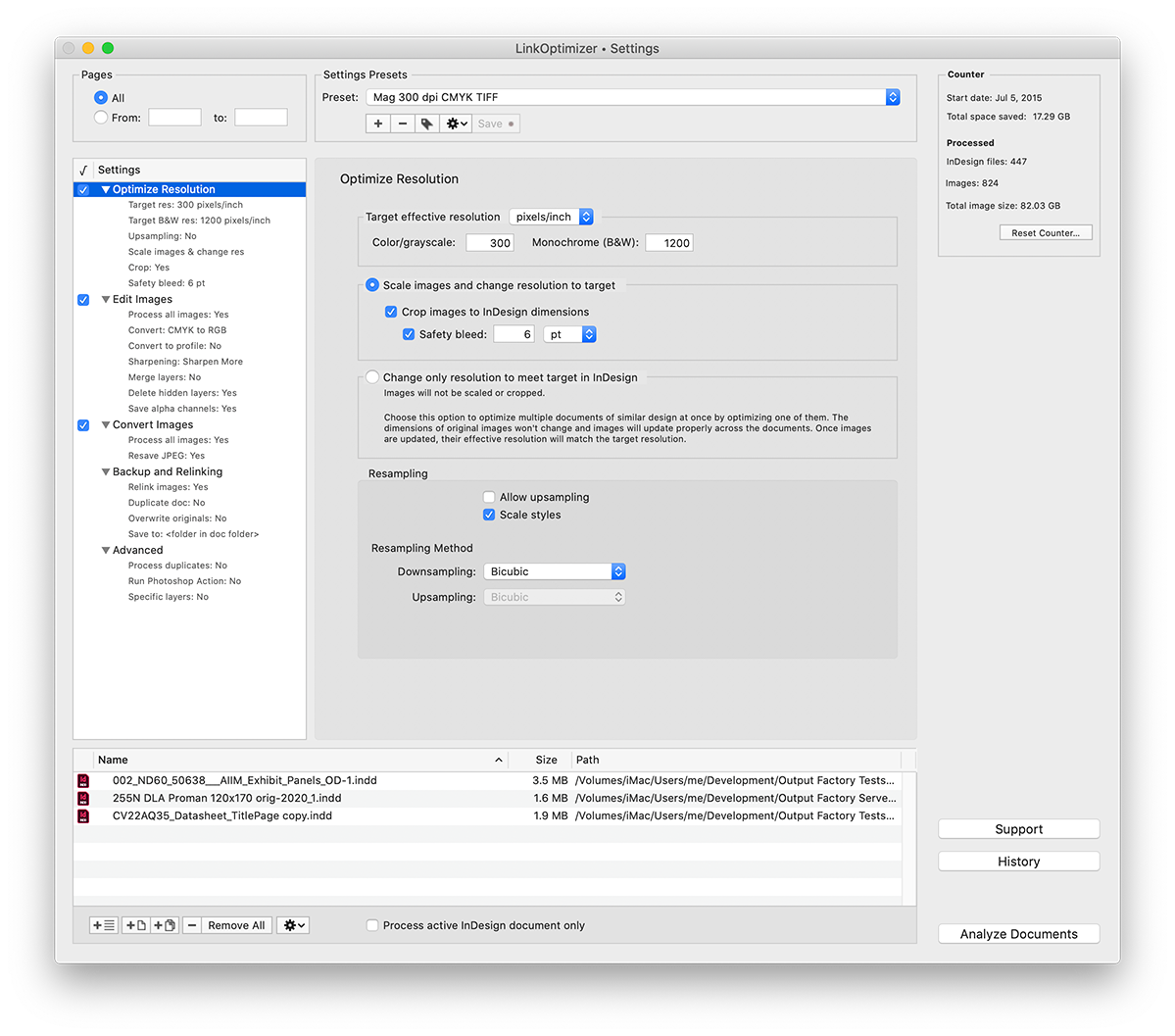
Zevrix Solutions announces LinkOptimizer Server 6.0.7, a compatibility update to company's image workflow solution for Adobe InDesign. LinkOptimizer automates complex image manipulation tasks and allows users to reduce link size, convert images, optimize resolution and more. The workgroup version can serve unlimited users via network hot folders and combine LinkOptimizer processing with standard output formats. The new update adds support to the recently released InDesign and Photoshop 2021.
Toronto (ON), Canada - Zevrix Solutions today announces LinkOptimizer Server 6.0.7, a compatibility update to the multi-user version of company's workflow automation tool for Adobe InDesign. LinkOptimizer automates complex image manipulation tasks and lets users reduce the size of InDesign links, convert images, assign color profiles and more. The app saves customers countless hours - and even days - of manual processing through automation of repetitive tasks multiplied by centralized hot folder operations.
LinkOptimizer Server is provided as an integral part of Zevrix Output Factory Server - the company's long-running solution to automate InDesign's printing and exporting from watched hot folders. LinkOptimizer takes advantage of the existing and time-proven hot folder facilities of Output Factory Server that automates workflows of printers, publishers, ad agencies, and prepress houses worldwide for well over a decade.
Long requested by LinkOptimizer customers, the new server version is able to serve unlimited InDesign users on a network from a single installation via watched hot folders. And since LinkOptimizer is part of Output Factory Server, it empowers users to combine LinkOptimizer processing with standard output workflows such as PDF, print, EPUB and other formats. For example, customers can resize, convert and relink images by LinkOptimizer - and then export the optimized InDesign file to PDF automatically in one step. The operator only needs to drop the InDesign file into a single hot folder that invokes the multi-workflow processing.
The final combined product branded as Output Factory Server 3 also enable InDesign workgroups to convert image link formats, resize and crop images to their InDesign dimensions, output InDesign layers and their combinations as single files, assign variable file names, perform automatic preflighting, issue email notifications and much more.
Pricing and Availability:
Output Factory Server 3 with built-in LinkOptimizer Server can be purchased from Zevrix web site for $699.95 (USD), as well as from authorized resellers. Trial is also available for download. The upgrade cost is $350 for the licensed users of earlier Output Factory Server versions and BatchOutput Server. LinkOptimizer users can get a $200 discount. Output Factory Server requires macOS 10.12 or later and Adobe InDesign CC 2018-2021.
Zevrix Solutions: https://zevrix.com
LinkOptimizer Server 6.0.7: https://zevrix.com/outputfactoryserver
Download LinkOptimizer Server: https://zevrix.com/downloads/OutputFactoryServer.dmg
Purchase: https://zevrix.com/store
Screenshot: https://zevrix.com/wp-content/uploads/2020/08/lo5-win-res-tr.png
Located in Toronto, Canada, Zevrix Solutions provides automation and productivity solutions for Adobe Creative Cloud and Creative Suite software, PDF workflows, graphic file diagnostics and Microsoft Office output on Mac OS. Zevrix is dedicated to help professionals increase their profits through automating everyday tasks, producing error-free documents, saving disk space and cutting production costs. For more information, visit their website. Copyright (C) 2020 Zevrix Solutions. All Rights Reserved. Other trademarks and registered trademarks may be the property of their respective owners.
*******
Link To Article: https://prmac.com/release-id-84206.htm
*******
---------------------------------------------------------------------------------
Note that you can alter delivered distributions at any time.
Login to your account on prMac to alter your channel selection, or to opt-out at any time.
LinkOptimizer Server for Adobe InDesign Now Supports Creative Cloud 2021 - Published on 11/17/20
Zevrix Solutions announces LinkOptimizer Server 6.0.7, a compatibility update to company's image workflow solution for Adobe InDesign. LinkOptimizer automates complex image manipulation tasks and allows users to reduce link size, convert images, optimize resolution and more. The workgroup version can serve unlimited users via network hot folders and combine LinkOptimizer processing with standard output formats. The new update adds support to the recently released InDesign and Photoshop 2021.
Toronto (ON), Canada - Zevrix Solutions today announces LinkOptimizer Server 6.0.7, a compatibility update to the multi-user version of company's workflow automation tool for Adobe InDesign. LinkOptimizer automates complex image manipulation tasks and lets users reduce the size of InDesign links, convert images, assign color profiles and more. The app saves customers countless hours - and even days - of manual processing through automation of repetitive tasks multiplied by centralized hot folder operations.
LinkOptimizer Server is provided as an integral part of Zevrix Output Factory Server - the company's long-running solution to automate InDesign's printing and exporting from watched hot folders. LinkOptimizer takes advantage of the existing and time-proven hot folder facilities of Output Factory Server that automates workflows of printers, publishers, ad agencies, and prepress houses worldwide for well over a decade.
Long requested by LinkOptimizer customers, the new server version is able to serve unlimited InDesign users on a network from a single installation via watched hot folders. And since LinkOptimizer is part of Output Factory Server, it empowers users to combine LinkOptimizer processing with standard output workflows such as PDF, print, EPUB and other formats. For example, customers can resize, convert and relink images by LinkOptimizer - and then export the optimized InDesign file to PDF automatically in one step. The operator only needs to drop the InDesign file into a single hot folder that invokes the multi-workflow processing.
The final combined product branded as Output Factory Server 3 also enable InDesign workgroups to convert image link formats, resize and crop images to their InDesign dimensions, output InDesign layers and their combinations as single files, assign variable file names, perform automatic preflighting, issue email notifications and much more.
Pricing and Availability:
Output Factory Server 3 with built-in LinkOptimizer Server can be purchased from Zevrix web site for $699.95 (USD), as well as from authorized resellers. Trial is also available for download. The upgrade cost is $350 for the licensed users of earlier Output Factory Server versions and BatchOutput Server. LinkOptimizer users can get a $200 discount. Output Factory Server requires macOS 10.12 or later and Adobe InDesign CC 2018-2021.
Zevrix Solutions: https://zevrix.com
LinkOptimizer Server 6.0.7: https://zevrix.com/outputfactoryserver
Download LinkOptimizer Server: https://zevrix.com/downloads/OutputFactoryServer.dmg
Purchase: https://zevrix.com/store
Screenshot: https://zevrix.com/wp-content/uploads/2020/08/lo5-win-res-tr.png
Located in Toronto, Canada, Zevrix Solutions provides automation and productivity solutions for Adobe Creative Cloud and Creative Suite software, PDF workflows, graphic file diagnostics and Microsoft Office output on Mac OS. Zevrix is dedicated to help professionals increase their profits through automating everyday tasks, producing error-free documents, saving disk space and cutting production costs. For more information, visit their website. Copyright (C) 2020 Zevrix Solutions. All Rights Reserved. Other trademarks and registered trademarks may be the property of their respective owners.
*******
Link To Article: https://prmac.com/release-id-84206.htm
*******
---------------------------------------------------------------------------------
Note that you can alter delivered distributions at any time.
Login to your account on prMac to alter your channel selection, or to opt-out at any time.
Noodlesoft Releases Hazel 5
A new article has been published at prMac.
Noodlesoft Releases Hazel 5 - Published on 11/16/20
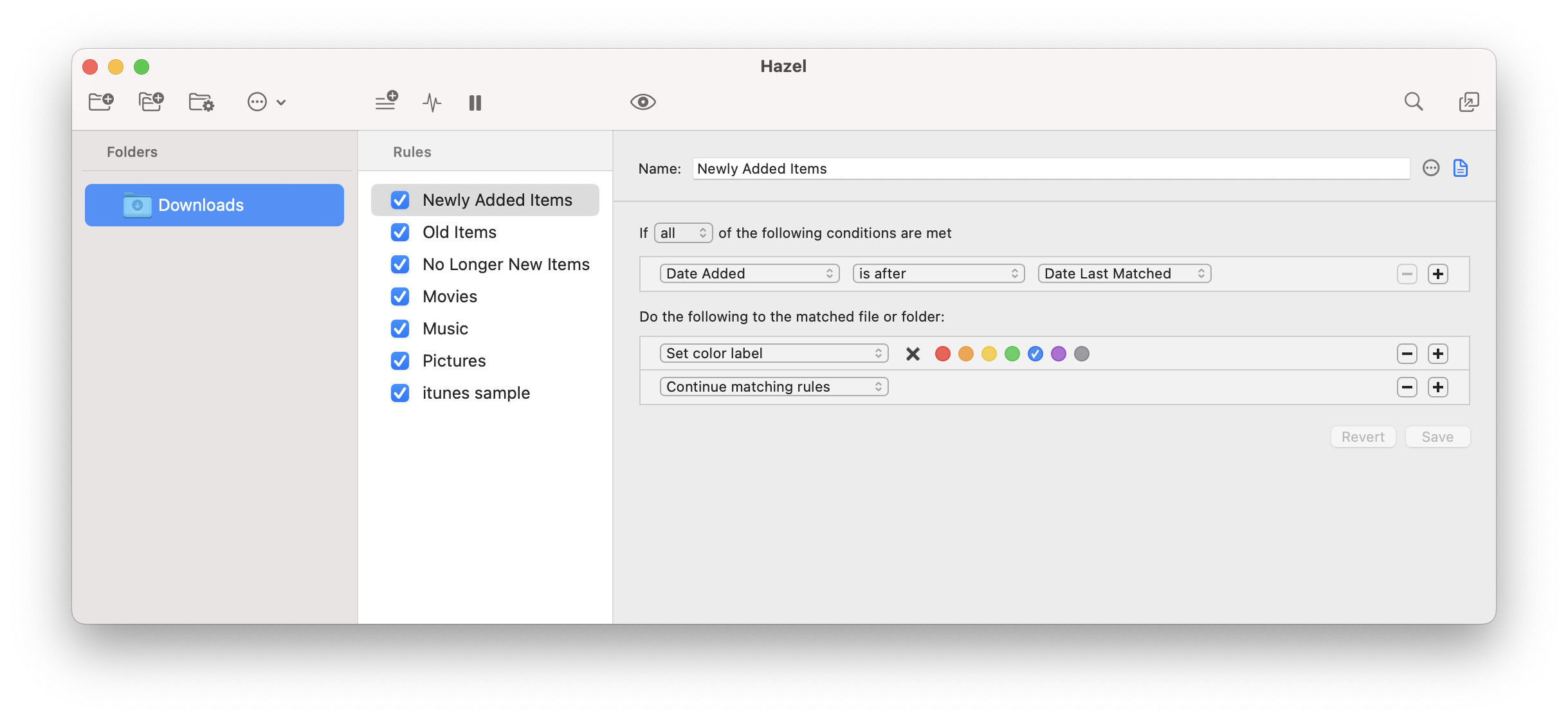
Noodlesoft releases Hazel 5, a major update to its popular housekeeping utility for macOS. With Hazel's powerful rule engine, users can easily create workflows that keep files organized automatically. Hazel also features options for managing the Trash & includes an intuitive application uninstaller. Hazel 5 is now a standalone app instead of preference pane. Sporting an improved user interface, the main window now combines folders, rulesets & rules for easier and quicker navigation and editing.
New York, New York - Noodlesoft today is proud to announce the availability of Hazel 5, a major update to their popular housekeeping utility for macOS. Using Hazel's powerful rule engine, users can easily create workflows that keep files organized automatically. Hazel also features options for managing your Trash and includes an intuitive application uninstaller. Hazel 5 adds numerous features, improvements and fixes.
Hazel 5 is now a standalone app instead of preference pane. With this change comes an improved user interface. The main window now combines folders, rulesets and rules for easier and quicker navigation and editing. Folders can now be organized into groups. This version also features improvements to the rule status and preview interfaces.
Hazel 5 introduces lists and tables. You can now have patterns match against items in a list or table, making them even more powerful than before. Lists and tables can be created within Hazel or loaded in from an external file. Hazel 5 also provides compatibility with macOS Big Sur and Apple Silicon.
System Requirements:
* Hazel 5 requires macOS 10.13 (High Sierra) or later
Pricing and Availability:
Existing registered users can upgrade for $20 (USD). Those who purchased from January 1, 2020 onwards will get a free upgrade. For more information, please contact Paul Kim.
Hazel 5: https://www.noodlesoft.com
Download Hazel: https://www.noodlesoft.com/Products/Hazel/download
Purchase Hazel: https://www.noodlesoft.com/store
Screenshot: https://www.noodlesoft.com/kb/uploads/main.png
Application Icon: https://www.noodlesoft.com/kb/uploads/Hazel-256x256.png
Noodlesoft, LLC is an independent developer of software for macOS since 2007. All Material and Software (C) Copyright 2007-2020 Noodlesoft, LLC. All Rights Reserved. Apple, the Apple logo, macOS and Macintosh are registered trademarks of Apple Inc. in the U.S. and/or other countries. Other trademarks and registered trademarks may be the property of their respective owners.
*******
Link To Article: https://prmac.com/release-id-84205.htm
*******
---------------------------------------------------------------------------------
Note that you can alter delivered distributions at any time.
Login to your account on prMac to alter your channel selection, or to opt-out at any time.
Noodlesoft Releases Hazel 5 - Published on 11/16/20
Noodlesoft releases Hazel 5, a major update to its popular housekeeping utility for macOS. With Hazel's powerful rule engine, users can easily create workflows that keep files organized automatically. Hazel also features options for managing the Trash & includes an intuitive application uninstaller. Hazel 5 is now a standalone app instead of preference pane. Sporting an improved user interface, the main window now combines folders, rulesets & rules for easier and quicker navigation and editing.
New York, New York - Noodlesoft today is proud to announce the availability of Hazel 5, a major update to their popular housekeeping utility for macOS. Using Hazel's powerful rule engine, users can easily create workflows that keep files organized automatically. Hazel also features options for managing your Trash and includes an intuitive application uninstaller. Hazel 5 adds numerous features, improvements and fixes.
Hazel 5 is now a standalone app instead of preference pane. With this change comes an improved user interface. The main window now combines folders, rulesets and rules for easier and quicker navigation and editing. Folders can now be organized into groups. This version also features improvements to the rule status and preview interfaces.
Hazel 5 introduces lists and tables. You can now have patterns match against items in a list or table, making them even more powerful than before. Lists and tables can be created within Hazel or loaded in from an external file. Hazel 5 also provides compatibility with macOS Big Sur and Apple Silicon.
System Requirements:
* Hazel 5 requires macOS 10.13 (High Sierra) or later
Pricing and Availability:
Existing registered users can upgrade for $20 (USD). Those who purchased from January 1, 2020 onwards will get a free upgrade. For more information, please contact Paul Kim.
Hazel 5: https://www.noodlesoft.com
Download Hazel: https://www.noodlesoft.com/Products/Hazel/download
Purchase Hazel: https://www.noodlesoft.com/store
Screenshot: https://www.noodlesoft.com/kb/uploads/main.png
Application Icon: https://www.noodlesoft.com/kb/uploads/Hazel-256x256.png

Noodlesoft, LLC is an independent developer of software for macOS since 2007. All Material and Software (C) Copyright 2007-2020 Noodlesoft, LLC. All Rights Reserved. Apple, the Apple logo, macOS and Macintosh are registered trademarks of Apple Inc. in the U.S. and/or other countries. Other trademarks and registered trademarks may be the property of their respective owners.
*******
Link To Article: https://prmac.com/release-id-84205.htm
*******
---------------------------------------------------------------------------------
Note that you can alter delivered distributions at any time.
Login to your account on prMac to alter your channel selection, or to opt-out at any time.
ChronoSync Updated For Big Sur
A new article has been published at prMac.
ChronoSync Updated For Big Sur - Published on 11/12/20
Econ Technologies, Inc. today announced that ChronoSync 4.9.12 is updated for macOS 11 Big Sur. ChronoSync is the multipurpose Mac app for local and cloud backup, bootable backup, and folder synchronizing. Version 4.9.12 introduces the new 'Data Volume-Only' backup to keep all user Home Folders safely backed up. Coinciding with this new feature, Econ Technologies, Inc is publishing a new Tech Note that explains the procedure for creating and maintaining a new Big Sur Bootable Backup and more.
Casselberry, Florida - Econ Technologies, Inc. today announced that ChronoSync 4.9.12 is updated for macOS 11, "Big Sur." ChronoSync, the professionals' choice for backup and synchronization, is ready for macOS 11, Big Sur, after a flurry of changes and tweaks to ensure continued reliability as people begin updating to the latest version of macOS.
With the release of Big Sur, macOS 11, there are big changes to how bootable backups are performed. ChronoSync 4.9.12 introduces the new 'Data Volume-Only' backup to keep all user Home Folders safely backed up. Coinciding with this new feature, Econ Technologies, Inc is publishing a new Tech Note, "Bootable Backups on macOS 11, Big Sur". This Tech Note explains the procedure for creating and maintaining a new Big Sur Bootable Backup and how to safeguard your data using the Data Volume-Only backup.
Other changes in this release improve stability and reliability, correct some cosmetic glitches under the new macOS, and fix a number of minor bugs. Joseph Japes, Marketing Director at Econ Technologies, said, "Our customers rely on ChronoSync to protect their data." He adds, "They expect us to be ready for each new evolution of macOS. With ChronoSync 4.9.12 they can begin the transition to Big Sur knowing their data is safe now and after this major macOS update."
ChronoSync, the multipurpose Mac App for local and cloud backup, bootable backup and folder synchronizing is designed to work on macOS 10.11 and newer. Full working trial licenses are available or purchase ChronoSync for $49.99 (USD). Owners of ChronoSync can install the update immediately for free! If you don't already own ChronoSync, download today and start the 15-day free trial to learn how ChronoSync is your best long-term investment for your Mac's backups and synchronizations.
ChronoAgent, the indispensable companion app to ChronoSync, runs on the destination Mac and connects directly to ChronoSync on the source Mac. Full working trial licenses are available or purchase ChronoAgent for $14.99 (USD). The ChronoSync to ChronoAgent connection provides a direct, high performance, and encrypted connection. It is simply the best way to establish a connection between two Macs to transfer files.
Econ Technologies: https://www.econtechnologies.com
Bootable Backups on Big Sur: https://www.econtechnologies.com/chronosync/TN-CS-BigSurBootable.html
ChronoSync 4.9.12 Release Notes: https://www.econtechnologies.com/chronosync/notes.html
Media Resources: https://www.econtechnologies.com/about/media.html
Econ Technologies, Inc has been creating Apple(R) software for over 20 years including ChronoSync(TM) for Mac(R) OS X , ChronoAgent(TM) for Mac(R) OS X, and InterConneX for the iPad & iPhone. All Material and Software (C) Copyright 2020 Econ Technologies. All Rights Reserved. Apple, the Apple logo, Macintosh and macOS are registered trademarks of Apple Inc. in the U.S. and/or other countries. Other trademarks and registered trademarks may be the property of their respective owners.
*******
Link To Article: https://prmac.com/release-id-84204.htm
*******
---------------------------------------------------------------------------------
Note that you can alter delivered distributions at any time.
Login to your account on prMac to alter your channel selection, or to opt-out at any time.
ChronoSync Updated For Big Sur - Published on 11/12/20
Econ Technologies, Inc. today announced that ChronoSync 4.9.12 is updated for macOS 11 Big Sur. ChronoSync is the multipurpose Mac app for local and cloud backup, bootable backup, and folder synchronizing. Version 4.9.12 introduces the new 'Data Volume-Only' backup to keep all user Home Folders safely backed up. Coinciding with this new feature, Econ Technologies, Inc is publishing a new Tech Note that explains the procedure for creating and maintaining a new Big Sur Bootable Backup and more.
Casselberry, Florida - Econ Technologies, Inc. today announced that ChronoSync 4.9.12 is updated for macOS 11, "Big Sur." ChronoSync, the professionals' choice for backup and synchronization, is ready for macOS 11, Big Sur, after a flurry of changes and tweaks to ensure continued reliability as people begin updating to the latest version of macOS.
With the release of Big Sur, macOS 11, there are big changes to how bootable backups are performed. ChronoSync 4.9.12 introduces the new 'Data Volume-Only' backup to keep all user Home Folders safely backed up. Coinciding with this new feature, Econ Technologies, Inc is publishing a new Tech Note, "Bootable Backups on macOS 11, Big Sur". This Tech Note explains the procedure for creating and maintaining a new Big Sur Bootable Backup and how to safeguard your data using the Data Volume-Only backup.
Other changes in this release improve stability and reliability, correct some cosmetic glitches under the new macOS, and fix a number of minor bugs. Joseph Japes, Marketing Director at Econ Technologies, said, "Our customers rely on ChronoSync to protect their data." He adds, "They expect us to be ready for each new evolution of macOS. With ChronoSync 4.9.12 they can begin the transition to Big Sur knowing their data is safe now and after this major macOS update."
ChronoSync, the multipurpose Mac App for local and cloud backup, bootable backup and folder synchronizing is designed to work on macOS 10.11 and newer. Full working trial licenses are available or purchase ChronoSync for $49.99 (USD). Owners of ChronoSync can install the update immediately for free! If you don't already own ChronoSync, download today and start the 15-day free trial to learn how ChronoSync is your best long-term investment for your Mac's backups and synchronizations.
ChronoAgent, the indispensable companion app to ChronoSync, runs on the destination Mac and connects directly to ChronoSync on the source Mac. Full working trial licenses are available or purchase ChronoAgent for $14.99 (USD). The ChronoSync to ChronoAgent connection provides a direct, high performance, and encrypted connection. It is simply the best way to establish a connection between two Macs to transfer files.
Econ Technologies: https://www.econtechnologies.com
Bootable Backups on Big Sur: https://www.econtechnologies.com/chronosync/TN-CS-BigSurBootable.html
ChronoSync 4.9.12 Release Notes: https://www.econtechnologies.com/chronosync/notes.html
Media Resources: https://www.econtechnologies.com/about/media.html
Econ Technologies, Inc has been creating Apple(R) software for over 20 years including ChronoSync(TM) for Mac(R) OS X , ChronoAgent(TM) for Mac(R) OS X, and InterConneX for the iPad & iPhone. All Material and Software (C) Copyright 2020 Econ Technologies. All Rights Reserved. Apple, the Apple logo, Macintosh and macOS are registered trademarks of Apple Inc. in the U.S. and/or other countries. Other trademarks and registered trademarks may be the property of their respective owners.
*******
Link To Article: https://prmac.com/release-id-84204.htm
*******
---------------------------------------------------------------------------------
Note that you can alter delivered distributions at any time.
Login to your account on prMac to alter your channel selection, or to opt-out at any time.
Best-in-Class Team Mileage Solution Released by Driversnote
A new article has been published at prMac.
Best-in-Class Team Mileage Solution Released by Driversnote - Published on 11/11/20
Leading iOS mileage tracker app, Driversnote, launches new "Driversnote Teams" functionality, releasing their team mileage logging solution world-wide. Mileage reimbursement for companies is streamlined significantly when using Driversnote Teams.
Copenhagen, Denmark - Driversnote, a Copenhagen-based mileage logbook app with over 700,000 users in more than 150 countries, has launched a market-leading team mileage tracking solution to users around the world. Available for users of the popular iOS app, Driversnote Teams builds on the popular app with added functionality to reduce workload through the entire mileage reimbursement process.
Driversnote CEO and Co-Founder, Martin Poulsen, said, "A common request from our users in recent months - both drivers and business owners - has been an environment where mileage reports can be created, sent, reviewed, and approved without any complicated steps. Driversnote Teams is the result of significant development work, and the early response to its launch has been exceptional."
Designed to simplify the process of business mileage reimbursement, Driversnote Teams has been released to excitement from current and new customers alike. Team administrators will assign roles as required, allowing drivers to easily submit mileage reports to their approvers - whether that's their line manager, the finance team, or directly to the accountant.
The process for drivers is even easier when they use the Driversnote iBeacon, allowing them to automatically track all of their driving and never forget to log a trip again. Trips are quickly reviewed and classified as business or personal in the Trip Inbox, after which the completed mileage report can be shared with approvers at the click of a button without needing to leave the app.
Approvers also benefit from the new Teams interface - they can now approve or reject mileage reimbursement claims in seconds, and with all reports being sent in the same format, reviewing mileage reports can be managed much faster than before.
Driversnote Teams has successfully built on Driversnote's best-in-class mileage tracking app to make the mileage reimbursement process simpler and faster for all involved - saving time and money for businesses and employees alike.
Device Requirements:
* iPhone, iPad, and iPod touch
* Requires iOS 10.0 or later
* 91.9 MB
Pricing and Availability:
Mileage Tracker by Driversnote 3.0.17 is free and is available worldwide through the App Store in the business category.
Mileage Tracker by Driversnote 3.0.17: https://www.driversnote.com/
Download From the App Store: https://apps.apple.com/app/mileage-tracker-by-driversnote/id924418916
Serving over 700,000 users around the world, Driversnote makes working life simpler for customers while saving them time and money with their mileage logbook app. All Material and Software (C) Copyright 2020 Driversnote. All Rights Reserved. Apple, the Apple logo, iPhone, iPod and iPad are registered trademarks of Apple Inc. in the U.S. and/or other countries. Other trademarks and registered trademarks may be the property of their respective owners.
*******
Link To Article: https://prmac.com/release-id-84203.htm
*******
---------------------------------------------------------------------------------
Note that you can alter delivered distributions at any time.
Login to your account on prMac to alter your channel selection, or to opt-out at any time.
Best-in-Class Team Mileage Solution Released by Driversnote - Published on 11/11/20
Leading iOS mileage tracker app, Driversnote, launches new "Driversnote Teams" functionality, releasing their team mileage logging solution world-wide. Mileage reimbursement for companies is streamlined significantly when using Driversnote Teams.
Copenhagen, Denmark - Driversnote, a Copenhagen-based mileage logbook app with over 700,000 users in more than 150 countries, has launched a market-leading team mileage tracking solution to users around the world. Available for users of the popular iOS app, Driversnote Teams builds on the popular app with added functionality to reduce workload through the entire mileage reimbursement process.
Driversnote CEO and Co-Founder, Martin Poulsen, said, "A common request from our users in recent months - both drivers and business owners - has been an environment where mileage reports can be created, sent, reviewed, and approved without any complicated steps. Driversnote Teams is the result of significant development work, and the early response to its launch has been exceptional."
Designed to simplify the process of business mileage reimbursement, Driversnote Teams has been released to excitement from current and new customers alike. Team administrators will assign roles as required, allowing drivers to easily submit mileage reports to their approvers - whether that's their line manager, the finance team, or directly to the accountant.
The process for drivers is even easier when they use the Driversnote iBeacon, allowing them to automatically track all of their driving and never forget to log a trip again. Trips are quickly reviewed and classified as business or personal in the Trip Inbox, after which the completed mileage report can be shared with approvers at the click of a button without needing to leave the app.
Approvers also benefit from the new Teams interface - they can now approve or reject mileage reimbursement claims in seconds, and with all reports being sent in the same format, reviewing mileage reports can be managed much faster than before.
Driversnote Teams has successfully built on Driversnote's best-in-class mileage tracking app to make the mileage reimbursement process simpler and faster for all involved - saving time and money for businesses and employees alike.
Device Requirements:
* iPhone, iPad, and iPod touch
* Requires iOS 10.0 or later
* 91.9 MB
Pricing and Availability:
Mileage Tracker by Driversnote 3.0.17 is free and is available worldwide through the App Store in the business category.
Mileage Tracker by Driversnote 3.0.17: https://www.driversnote.com/
Download From the App Store: https://apps.apple.com/app/mileage-tracker-by-driversnote/id924418916
Serving over 700,000 users around the world, Driversnote makes working life simpler for customers while saving them time and money with their mileage logbook app. All Material and Software (C) Copyright 2020 Driversnote. All Rights Reserved. Apple, the Apple logo, iPhone, iPod and iPad are registered trademarks of Apple Inc. in the U.S. and/or other countries. Other trademarks and registered trademarks may be the property of their respective owners.
*******
Link To Article: https://prmac.com/release-id-84203.htm
*******
---------------------------------------------------------------------------------
Note that you can alter delivered distributions at any time.
Login to your account on prMac to alter your channel selection, or to opt-out at any time.
Subscribe to:
Posts (Atom)