A new article has been published at prMac.
PFiddlesoft Releases UI Browser 3.0.0 - Published on 12/03/20
PFiddlesoft releases UI Browser 3.0.0, an update to the "ultimate assistant" for Apple's AppleScript GUI Scripting and Accessibility technologies in macOS Sierra 10.12 or later. UI Browser helps Mac users to explore, manipulate, and monitor the user interface of most macOS applications running on their computer.
Quechee, Vermont - PFiddlesoft today announced the release of version 3.0.0 of its popular product, UI Browser, the ultimate assistant for GUI Scripting with AppleScript, and a developer utility for exploring Apple's Accessibility API.
UI Browser helps you to explore, manipulate, and monitor the user interface of most macOS applications running on your computer. With the push of a button, it also generates AppleScript statements to control any application using GUI Scripting, even applications that are not otherwise scriptable. No other utility provides all of the information you need in order to write scripts using GUI Scripting.
UI Browser 3 is a Universal app. It runs natively on an Apple silicon Mac under macOS Big Sur 11 as a 30-day free trial and with a Paddle registration key. It must use Rosetta translation on an Apple silicon Mac with an existing UI Browser 2 eSellerate key.
Version 3.0.0 requires macOS Sierra 10.12 or later. In addition, it includes these new features:
* UI Browser's Target menu now includes a ControlCenter menu item on macOS Big Sur 11 to access the new Clock, Control Center and other menu extras.
* UI Browser now presents a contextual menu to generate an AppleScript statement when the user right-clicks or Control-clicks a UI element in the main browser view, an attribute in the Attributes drawer or an action in the Actions drawer.
* UI Browser now displays a header at the top of each browser column showing the level and number of elements in the column.
* UI Browser now displays user notifications instead of alerts on macOS Mojave 10.14 and later for some events, to avoid interrupting the user.
* UI Browser's Screen Reader can now monitor a single process chosen in its new Process pop-up menu.
* The UI Browser application icon is now badged when a target application is chosen on macOS Mojave 10.14 and later.
* UI Browser now requires macOS Sierra 10.12 or later.
* UI Browser implements performance enhancements and a number of minor bug fixes.
Download a free, full-featured 30-day trial version of UI Browser now at the UI Browser 3.0.0 website.
UI Browser is based on the PFiddlesoft Frameworks, including the PFAssistive and PFEventTaps Frameworks. The frameworks are written using Objective-C, and they support 64-bit architectures using reference counted memory management and ARC. Developers can license the PFiddlesoft Frameworks for distribution or use with their own products that use Apple's Accessibility and Quartz Event Taps technologies. The frameworks may be licensed free of charge for personal use or for distribution or use with a free software product. A modest license fee is required to distribute or use the frameworks with a product for which payment is requested or required. Source code is available for a separate fee. Different terms apply to large or established commercial software developers. For more information, go to pfiddlesoft.com/frameworks/.
PFiddlesoft(TM) has unmatched experience controlling the Macintosh Graphical User Interface using AppleScript and other technologies. PFiddlesoft is a trademark of PreForm Assistive Technologies, LLC, a company formed by Bill Cheeseman to develop and market Macintosh software based on Apple's Accessibility technologies. PFiddlesoft distributes applications written by Bill Cheeseman, including UI Browser, Event Taps Testbench, and the PFiddlesoft Frameworks. These products for macOS carry on the tradition of PreFab Player, a seminal product released for the classic Mac OS in 1994. UI Browser was first released in 2003 to support Apple's GUI Scripting and Accessibility technologies. It was followed in 2007 by Event Taps Testbench, a free developer utility to explore Quartz Event Taps.
Pricing and Availability:
Users may purchase a registration key for UI Browser 3 for $55. It is a free upgrade for owners of an existing UI Browser 2 Paddle or eSellerate key. However, owners of a UI Browser 2 eSellerate key purchased on or before June 30, 2019 must purchase a Paddle key to run UI Browser on an Apple silicon Mac as a native process instead of using Rosetta translation. UI Browser 1.4.1 is no longer supported and no free upgrade path is available.
PFiddlesoft: https://pfiddlesoft.com
UI Browser 3.0.0: https://pfiddlesoft.com/uibrowser
Purchase Link: https://pfiddlesoft.com/uibrowser
Direct Download Link: https://pfiddlesoft.com/uibrowser/downloads/UIBrowser300.dmg
Screenshots: https://pfiddlesoft.com/uibrowser/views.html
Formed by Bill Cheeseman to develop and market Macintosh software based on Apple's Accessibility technologies, PFiddlesoft(TM) has unmatched experience controlling the Macintosh Graphical User Interface using AppleScript and other technologies. PFiddlesoft distributes applications written by Bill Cheeseman and formerly distributed by PreFab Software, Inc., including UI Browser, UI Actions, Event Taps Testbench, and the PFiddlesoft Frameworks. These products for Mac OS X carry on the tradition of PreFab Player, a seminal product released for the classic Mac OS in 1994. UI Browser was first released in 2003 to support Apple's GUI Scripting and Accessibility technologies. It was followed in 2004 by UI Actions, implementing "universal attachability" for AppleScript, and in 2007 by Event Taps Testbench, a free developer utility to explore Quartz Event Taps. The PFiddle Collection was introduced in 2010. It is a growing collection of useful and fun Macintosh software. All Material and
Software (C) Copyright 2020 PFiddlesoft is a trademark of PreForm Assistive Technologies, LLC. All Rights Reserved. Apple, the Apple logo, Mac OS X and Macintosh are registered trademarks of Apple Inc. in the U.S. and/or other countries.
*******
Link To Article: https://prmac.com/release-id-84240.htm
*******
---------------------------------------------------------------------------------
Note that you can alter delivered distributions at any time.
Login to your account on prMac to alter your channel selection, or to opt-out at any time.

InDesign Automation Bundle on Entrepreneur Store Sale Until December 8
A new article has been published at prMac.
InDesign Automation Bundle on Entrepreneur Store Sale Until December 8 - Published on 12/03/20
Developer of automation plug-ins for Adobe InDesign, Zevrix Solutions has partnered with Entrepreneur to offer InDesign users a highly discounted bundle of company's workflow automation tools. Users can get LinkOptimizer, Output Factory, Package Central and InPreflight Pro for $49 only until December 8. The deal offers customers a 93% discount. The apps automate InDesign image workflow and output tasks, allow file collection from hot folders, and offer expert preflight options.
Toronto, Canada - Zevrix Solutions, a developer of automation tools for Adobe InDesign, announces today that it has partnered with Entrepreneur to offer a highly discounted bundle of company's workflow automation plug-ins. InDesign users can get LinkOptimizer, Output Factory, InPreflight Pro and Package Central for $49 only until December 8. The deal saves customers $630 - a 93% discount. Zevrix software helps users reduce InDesign link size, streamline document packaging, automate image and output workflows, and work shorter hours through automation of repetitive tasks.
"Zevrix software is the best kept secret for the Graphic Design industry," says Darren Rath, a design studio owner in Melbourne, Australia. "Thanks to Zevrix products, every piece of artwork that flies out of here requires no intervention by the prepress departments."
The bundle is available on Entrepreneur which seeks to inspire, inform and celebrate entrepreneurs. The company offers real solutions to the challenges that entrepreneurs face, including tips, tools, insider news and an online marketplace to help build "and grow" customer's business. The shop carries a bundle of Zevrix InDesign automation tools:
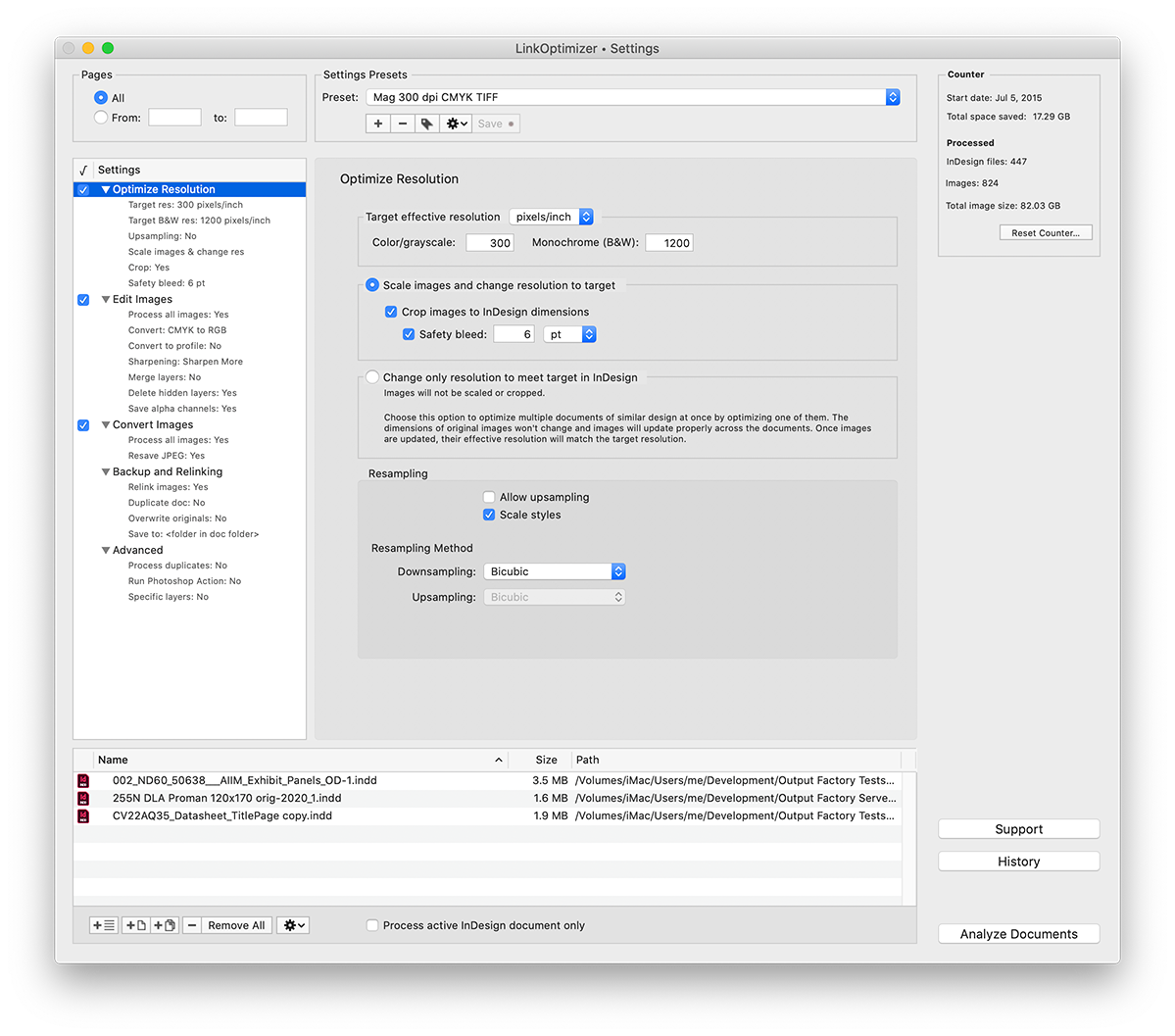
* LinkOptimizer lets users reduce InDesign link size by eliminating excess image data, perform image adjustments, convert file formats and their color profiles. The software saves users countless hours of optimizing images manually and helps cut costs through faster processing.
* Output Factory automates printing and exporting from InDesign and offers batch output, layer versioning, single page export, preflighting, variable file names and more.
* The last product on sale is Package Central which automates InDesign file packaging by processing files from watched hot folders. The software offloads file packaging from InDesign to a central system leaving operator workstations free from the collection process.
Pricing and Availability:
Zevrix InDesign bundle can be purchased on Entrepreneur Shop for $49 (USD) until December 8, 2020. Product trials are also available for download. All products require macOS 10.8-11.0 and Adobe InDesign CS5-CC 2021 software.
Zevrix Workflow App Bundle For Adobe InDesign: https://store.entrepreneur.com/sales/zevrix-adobe-indesign-app-bundle
Download LinkOptimizer: https://zevrix.com/downloads/LinkOptimizer.dmg
Screenshot: https://zevrix.com/wp-content/uploads/2020/08/lo5-win-res-tr.png
Located in Toronto, Canada, Zevrix Solutions provides automation and productivity solutions for Adobe Creative Cloud and Creative Suite software, PDF workflows, graphic file diagnostics and Microsoft Office output on Mac OS. Zevrix is dedicated to help professionals increase their profits through automating everyday tasks, producing error-free documents, saving disk space and cutting production costs. For more information, visit their website. Copyright (C) 2020 Zevrix Solutions. All Rights Reserved. Other trademarks and registered trademarks may be the property of their respective owners.
*******
Link To Article: https://prmac.com/release-id-84239.htm
*******
---------------------------------------------------------------------------------
Note that you can alter delivered distributions at any time.
Login to your account on prMac to alter your channel selection, or to opt-out at any time.
InDesign Automation Bundle on Entrepreneur Store Sale Until December 8 - Published on 12/03/20
Developer of automation plug-ins for Adobe InDesign, Zevrix Solutions has partnered with Entrepreneur to offer InDesign users a highly discounted bundle of company's workflow automation tools. Users can get LinkOptimizer, Output Factory, Package Central and InPreflight Pro for $49 only until December 8. The deal offers customers a 93% discount. The apps automate InDesign image workflow and output tasks, allow file collection from hot folders, and offer expert preflight options.
Toronto, Canada - Zevrix Solutions, a developer of automation tools for Adobe InDesign, announces today that it has partnered with Entrepreneur to offer a highly discounted bundle of company's workflow automation plug-ins. InDesign users can get LinkOptimizer, Output Factory, InPreflight Pro and Package Central for $49 only until December 8. The deal saves customers $630 - a 93% discount. Zevrix software helps users reduce InDesign link size, streamline document packaging, automate image and output workflows, and work shorter hours through automation of repetitive tasks.
"Zevrix software is the best kept secret for the Graphic Design industry," says Darren Rath, a design studio owner in Melbourne, Australia. "Thanks to Zevrix products, every piece of artwork that flies out of here requires no intervention by the prepress departments."
The bundle is available on Entrepreneur which seeks to inspire, inform and celebrate entrepreneurs. The company offers real solutions to the challenges that entrepreneurs face, including tips, tools, insider news and an online marketplace to help build "and grow" customer's business. The shop carries a bundle of Zevrix InDesign automation tools:
* LinkOptimizer lets users reduce InDesign link size by eliminating excess image data, perform image adjustments, convert file formats and their color profiles. The software saves users countless hours of optimizing images manually and helps cut costs through faster processing.
* Output Factory automates printing and exporting from InDesign and offers batch output, layer versioning, single page export, preflighting, variable file names and more.
* The last product on sale is Package Central which automates InDesign file packaging by processing files from watched hot folders. The software offloads file packaging from InDesign to a central system leaving operator workstations free from the collection process.
Pricing and Availability:
Zevrix InDesign bundle can be purchased on Entrepreneur Shop for $49 (USD) until December 8, 2020. Product trials are also available for download. All products require macOS 10.8-11.0 and Adobe InDesign CS5-CC 2021 software.
Zevrix Workflow App Bundle For Adobe InDesign: https://store.entrepreneur.com/sales/zevrix-adobe-indesign-app-bundle
Download LinkOptimizer: https://zevrix.com/downloads/LinkOptimizer.dmg
Screenshot: https://zevrix.com/wp-content/uploads/2020/08/lo5-win-res-tr.png
Located in Toronto, Canada, Zevrix Solutions provides automation and productivity solutions for Adobe Creative Cloud and Creative Suite software, PDF workflows, graphic file diagnostics and Microsoft Office output on Mac OS. Zevrix is dedicated to help professionals increase their profits through automating everyday tasks, producing error-free documents, saving disk space and cutting production costs. For more information, visit their website. Copyright (C) 2020 Zevrix Solutions. All Rights Reserved. Other trademarks and registered trademarks may be the property of their respective owners.
*******
Link To Article: https://prmac.com/release-id-84239.htm
*******
---------------------------------------------------------------------------------
Note that you can alter delivered distributions at any time.
Login to your account on prMac to alter your channel selection, or to opt-out at any time.
AlphaDigits Announces Top Rated Mobile Apps for November 2020
A new article has been published at prMac.
AlphaDigits Announces Top Rated Mobile Apps for November 2020 - Published on 12/02/20
Mobile app review publisher AlphaDigits has named top-rated applications for November 2020. Mindoo is an inquisitive trivia app. Dhiway SEQR protects users against information theft. LogicLike tests your knowledge and makes you think hard. Vulture sets out to accomplish the goal of centralizing social media. Brain Jam is a Perfect thinking game with fun puzzles and challenges.
Long Island, New York - Mobile app review publisher AlphaDigits has named top-rated applications for November 2020. AlphaDigits names five top class mobile apps every month based on the reviews published on the website during the particular month. This website has now released the names of top-rated mobile apps for the month of November.
Mindoo (10/10): This is an inquisitive trivia app that is perfect for people of all ages. The application is equipped with different quizzes to improve players' overall knowledge across a vast array of topics. Once players finish downloading the app, they will see a screen with several topics. Those topics include Art, People, Miscellaneous, Politics & Economy, Sport, Geography, Transportation, and traffic. There are also two game modes that allow you to choose, which are original and shuffle.
Dhiway SEQR (9.5/10): This app advises whether or not to trust specific websites and content through real-time security warnings. In a world where security compromise is the order, Dhiway SEQR protects users against information theft. This is the best application currently to protect your privacy against unsafe advertisement websites that collect and share your device information.
LogicLike (9/10): Developers create all of these different types of gaming genres intending to challenge the person who is holding the controller or mobile device. However, some of the more interesting and challenging games reside in the world of logic games. They create logic games to test your knowledge, make you think hard, and the overall goal of learning and building intelligence. LogicLike is an application that fits into the category because this game executes on that and much more.
Vulture (8.5/10): This app sets out to accomplish the goal of centralizing social media and making the internet more accessible. Vulture is going to be an extremely powerful application as more users take the step in downloading it and integrating their social media applications. This app also checks the applications that tend to weaken the span of the average mobile user's battery life.
Brain Jam (8/10): This app has three sections filled with a different set of games. Those sections are Starter, Escape and Fill, and Microgames. The starter section is basic with levels that most kids should be able to get through. Brain Jam increases in difficulty as you complete each level. The learning curve for each of the games in the level is low, which is good since it is hard to hold the attention span of younger age groups in today's gaming market.
Joe Ellen, an Editor at AlphaDigits said, "We can generate installs and reviews for your app on App Store and Play Store. Our ASO team can also rank your app for relevant keywords". Developers can also contact AlphaDigits through the onsite form or mail to get their apps reviewed.
AlphaDigits: https://alphadigits.com/
Submit App for Review: https://alphadigits.com/submit-app-for-review/
AlphaDigits is a review site run by a few app marketers. Enjoying the support from a handy amount of regular visitors, AlphaDigits provides reviews for iPhone, iPad and Android apps. Copyright (C) 2020 AlphaDigits. All Rights Reserved. Apple, the Apple logo, iPhone, iPod and iPad are registered trademarks of Apple Inc. in the U.S. and/or other countries.
*******
Link To Article: https://prmac.com/release-id-84238.htm
*******
---------------------------------------------------------------------------------
Note that you can alter delivered distributions at any time.
Login to your account on prMac to alter your channel selection, or to opt-out at any time.
AlphaDigits Announces Top Rated Mobile Apps for November 2020 - Published on 12/02/20
Mobile app review publisher AlphaDigits has named top-rated applications for November 2020. Mindoo is an inquisitive trivia app. Dhiway SEQR protects users against information theft. LogicLike tests your knowledge and makes you think hard. Vulture sets out to accomplish the goal of centralizing social media. Brain Jam is a Perfect thinking game with fun puzzles and challenges.
Long Island, New York - Mobile app review publisher AlphaDigits has named top-rated applications for November 2020. AlphaDigits names five top class mobile apps every month based on the reviews published on the website during the particular month. This website has now released the names of top-rated mobile apps for the month of November.
Mindoo (10/10): This is an inquisitive trivia app that is perfect for people of all ages. The application is equipped with different quizzes to improve players' overall knowledge across a vast array of topics. Once players finish downloading the app, they will see a screen with several topics. Those topics include Art, People, Miscellaneous, Politics & Economy, Sport, Geography, Transportation, and traffic. There are also two game modes that allow you to choose, which are original and shuffle.
Dhiway SEQR (9.5/10): This app advises whether or not to trust specific websites and content through real-time security warnings. In a world where security compromise is the order, Dhiway SEQR protects users against information theft. This is the best application currently to protect your privacy against unsafe advertisement websites that collect and share your device information.
LogicLike (9/10): Developers create all of these different types of gaming genres intending to challenge the person who is holding the controller or mobile device. However, some of the more interesting and challenging games reside in the world of logic games. They create logic games to test your knowledge, make you think hard, and the overall goal of learning and building intelligence. LogicLike is an application that fits into the category because this game executes on that and much more.
Vulture (8.5/10): This app sets out to accomplish the goal of centralizing social media and making the internet more accessible. Vulture is going to be an extremely powerful application as more users take the step in downloading it and integrating their social media applications. This app also checks the applications that tend to weaken the span of the average mobile user's battery life.
Brain Jam (8/10): This app has three sections filled with a different set of games. Those sections are Starter, Escape and Fill, and Microgames. The starter section is basic with levels that most kids should be able to get through. Brain Jam increases in difficulty as you complete each level. The learning curve for each of the games in the level is low, which is good since it is hard to hold the attention span of younger age groups in today's gaming market.
Joe Ellen, an Editor at AlphaDigits said, "We can generate installs and reviews for your app on App Store and Play Store. Our ASO team can also rank your app for relevant keywords". Developers can also contact AlphaDigits through the onsite form or mail to get their apps reviewed.
AlphaDigits: https://alphadigits.com/
Submit App for Review: https://alphadigits.com/submit-app-for-review/
AlphaDigits is a review site run by a few app marketers. Enjoying the support from a handy amount of regular visitors, AlphaDigits provides reviews for iPhone, iPad and Android apps. Copyright (C) 2020 AlphaDigits. All Rights Reserved. Apple, the Apple logo, iPhone, iPod and iPad are registered trademarks of Apple Inc. in the U.S. and/or other countries.
*******
Link To Article: https://prmac.com/release-id-84238.htm
*******
---------------------------------------------------------------------------------
Note that you can alter delivered distributions at any time.
Login to your account on prMac to alter your channel selection, or to opt-out at any time.
Feeder 4 for Mac adds iCloud, improves podcast creation, and much more
A new article has been published at prMac.
Feeder 4 for Mac adds iCloud, improves podcast creation, and much more - Published on 12/02/20
Longtime UK based developer, Reinvented Software today releases Feeder 4, an important feature update to their RSS and podcast publishing app for macOS. Feeder was specifically developed for creating, editing, and self-publishing RSS and podcast feeds. Version 4 introduces a brand new look for macOS Big Sur, iCloud syncing and sharing, new episode previews for podcasts and improvements for podcast seasons, improved feed and item editors, and with this release Feeder is built for Apple silicon.
Swansea, United Kingdom - Reinvented Software is pleased to announce the release of RSS and podcast publishing app Feeder 4 for Mac today. Version 4 introduces a brand new look for macOS Big Sur, iCloud syncing and sharing, new episode previews for podcasts and improvements for podcast seasons, improved feed and item editors, and with this release Feeder is built for Apple silicon.
Feeder is for creating, editing, and self-publishing RSS and podcast feeds. For podcasters, Feeder creates feeds that meet all of the Apple Podcast requirements, previews seasons and episodes as they will appear in the Podcasts app, and can upload media files to all kinds of FTP servers, WebDAV and Amazon S3. For Mac app developers, Feeder can create Sparkle appcast feeds, and automatically generating signatures to help ensure app updates are delivered reliably and securely.
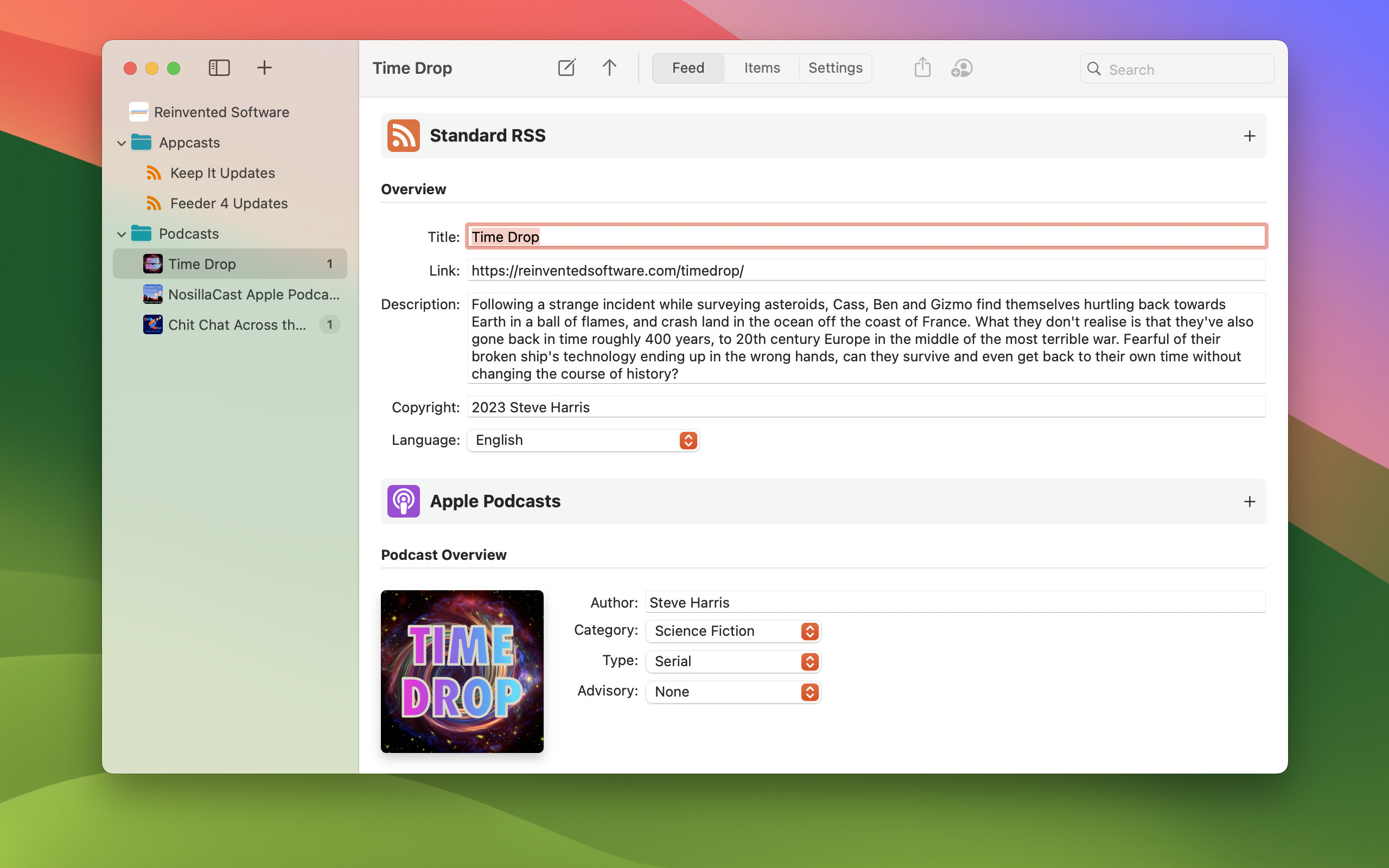
With Feeder 4, it's now possible to manage your feeds on all your Macs, and invite others to collaborate with iCloud. For podcasters, Feeder 4 shows podcasts as they will appear in Apple's Podcasts app: seasons, trailers and bonuses are grouped and listed in the correct order, and a new per-episode preview shows how each episode will look. Many Feeder users publish multiple feeds, and Feeder's new sidebar can show site icons, and icons based on a podcast's artwork, so that you can more easily identify feeds.
Feeder 4 takes full advantage of the new features of macOS Big Sur, with a full-height sidebar, colour-coded icons in the sidebar, an inset item list, sectioned toolbar, collapsible search field, and new icons throughout the app.
Feeder 4.0 is $39.99 (USD) and is available from Reinvented Software and the Mac App Store. Feeder 3 users can upgrade for $19.99, with free upgrades from Reinvented Software for anyone who purchased Feeder 3 in the last year. Feeder 4 is built for both Intel and Apple silicon Macs, requires macOS 10.14 or later.
Feeder 4: https://reinventedsoftware.com/feeder/
Purchase and Download from the Mac App Store: https://apps.apple.com/us/app/feeder-4/id1541467266
Screenshot (Serial podcast preview): https://reinventedsoftware.com/feeder/gallery-media/shot2.jpg
Application Icon: https://reinventedsoftware.com/feeder/images/Feeder512.png
Reinvented Software was founded in August 2004 by long-time Mac developer Steve Harris who, having wasted 10 years working for other people, decided to dedicate his life to making the best software in the world - software for the Mac. Copyright (C) 2020 Reinvented Software. All Rights Reserved. Apple, the Apple logo, iPhone, iPad, iPod, iCloud and macOS platforms are trademarks of Apple Inc. in the U.S. and/or other countries.
*******
Link To Article: https://prmac.com/release-id-84237.htm
*******
---------------------------------------------------------------------------------
Note that you can alter delivered distributions at any time.
Login to your account on prMac to alter your channel selection, or to opt-out at any time.
Feeder 4 for Mac adds iCloud, improves podcast creation, and much more - Published on 12/02/20
Longtime UK based developer, Reinvented Software today releases Feeder 4, an important feature update to their RSS and podcast publishing app for macOS. Feeder was specifically developed for creating, editing, and self-publishing RSS and podcast feeds. Version 4 introduces a brand new look for macOS Big Sur, iCloud syncing and sharing, new episode previews for podcasts and improvements for podcast seasons, improved feed and item editors, and with this release Feeder is built for Apple silicon.
Swansea, United Kingdom - Reinvented Software is pleased to announce the release of RSS and podcast publishing app Feeder 4 for Mac today. Version 4 introduces a brand new look for macOS Big Sur, iCloud syncing and sharing, new episode previews for podcasts and improvements for podcast seasons, improved feed and item editors, and with this release Feeder is built for Apple silicon.
Feeder is for creating, editing, and self-publishing RSS and podcast feeds. For podcasters, Feeder creates feeds that meet all of the Apple Podcast requirements, previews seasons and episodes as they will appear in the Podcasts app, and can upload media files to all kinds of FTP servers, WebDAV and Amazon S3. For Mac app developers, Feeder can create Sparkle appcast feeds, and automatically generating signatures to help ensure app updates are delivered reliably and securely.
With Feeder 4, it's now possible to manage your feeds on all your Macs, and invite others to collaborate with iCloud. For podcasters, Feeder 4 shows podcasts as they will appear in Apple's Podcasts app: seasons, trailers and bonuses are grouped and listed in the correct order, and a new per-episode preview shows how each episode will look. Many Feeder users publish multiple feeds, and Feeder's new sidebar can show site icons, and icons based on a podcast's artwork, so that you can more easily identify feeds.
Feeder 4 takes full advantage of the new features of macOS Big Sur, with a full-height sidebar, colour-coded icons in the sidebar, an inset item list, sectioned toolbar, collapsible search field, and new icons throughout the app.
Feeder 4.0 is $39.99 (USD) and is available from Reinvented Software and the Mac App Store. Feeder 3 users can upgrade for $19.99, with free upgrades from Reinvented Software for anyone who purchased Feeder 3 in the last year. Feeder 4 is built for both Intel and Apple silicon Macs, requires macOS 10.14 or later.
Feeder 4: https://reinventedsoftware.com/feeder/
Purchase and Download from the Mac App Store: https://apps.apple.com/us/app/feeder-4/id1541467266
Screenshot (Serial podcast preview): https://reinventedsoftware.com/feeder/gallery-media/shot2.jpg
Application Icon: https://reinventedsoftware.com/feeder/images/Feeder512.png

Reinvented Software was founded in August 2004 by long-time Mac developer Steve Harris who, having wasted 10 years working for other people, decided to dedicate his life to making the best software in the world - software for the Mac. Copyright (C) 2020 Reinvented Software. All Rights Reserved. Apple, the Apple logo, iPhone, iPad, iPod, iCloud and macOS platforms are trademarks of Apple Inc. in the U.S. and/or other countries.
*******
Link To Article: https://prmac.com/release-id-84237.htm
*******
---------------------------------------------------------------------------------
Note that you can alter delivered distributions at any time.
Login to your account on prMac to alter your channel selection, or to opt-out at any time.
NeoFinder 7.7 released - Apple Silicon and macOS 11
A new article has been published at prMac.
NeoFinder 7.7 released - Apple Silicon and macOS 11 - Published on 12/02/20
Norbert M. Doerner today released NeoFinder 7.7, an update to the Digital Asset Manager and Disk Cataloger for macOS. The new NeoFinder 7.7 contains "universal" code to run native on both Apple Intel and Apple Silicon hardware. All functions have been tested and certified to run in macOS 11. A list of places makes it easier to edit and assign XMP location information fields. Cataloging introduces support for ePub, Pixelmator, and rtfd files, color labels for Smart Folders and Albums and more.
Bonn, Germany - Norbert M. Doerner today released NeoFinder 7.7, an important update to the Digital Asset Manager and Disk Cataloger for macOS. The new NeoFinder contains "universal" code to run native on both Apple Intel and "Apple Silicon" hardware.
All functions have been tested and certified to run in macOS 11. A list of places makes it easier to edit and assign XMP location information fields. Cataloging introduces support for ePub, Pixelmator, and rtfd files. Color labels for Smart Folders and Albums make it easier to handle very large amounts of data. XMP data cataloged reads XMP Asset Relations used by video producers in Adobe Premiere and similar tools.
The new version is free for NeoFinder 7.x customers.
"Apple Silicon" ARM M1 support:
NeoFinder 7.7 is a "universal" binary, containing code for both Intel and "Apple Silicon" ARM hardware. Thus, the full native speed of the new M1 Macs can be used. Just as CDFinder 1.0 had supported the new PowerPC chips 25 years ago, and NeoFinder was the first to make the transition to Carbon, then Intel, Cocoa, and later to 64-bit, NeoFinder 7.7 is now running natively on the new Apple hardware.
Certified for macOS 11:
All features of NeoFinder have been carefully tested and adjusted to run smoothly in macOS 11. We had to work around a couple of bugs that Apple hasn't fixed yet, and adjust the user interface to the drastic changes that Apple made. We very strongly recommend our customers to wait with updating to macOS 11 at least until Apple has released 11.3 or better 11.4 for bug fixes.
Additional Video Metadata:
NeoFinder has cataloged visual thumbnails and video metadata like duration and pixel sizes for a long time already. NeoFinder 7.7 now catalogs information about embedded audio tracks, their codecs, bitrates and encodings, and language. NeoFinder also records the presence of subtitles and their languages, and the video bitrate. The Find Editor has additional Video related search parameters, such as the availability of subtitles, or audio codecs.
List of Places for XMP Editor:
A new list of XMP Places, consisting of the actual location name, city, state, and country, along with possible GPS geotags for these. This list is used when entering XMP place data in the XMP editor, and assures a consistent and thus searchable metadata structure. Renaming locations, cities, states, or even countries in that list also allow to change existing data in all cataloged files, providing a consistent use of the data.
Color Labels for Smart Folders and Albums:
Color Labels can now be used to improve working with large numbers of Albums and Smart Folders.
Catalog Pixelmator ".pxd" files:
NeoFinder 7.7 catalogs thumbnails of the popular Pixelmator photo editor, in the ".pxd" file format.
Catalog ePub electronic books:
Embedded cover art and metadata of .epub electronic books is cataloged, displayed, and can be searched.
If you are interested in this amazing new technology, we can provide you a review license for NeoFinder Mac, and even a license code for NeoFinder iOS. And we are of course here for any questions you may have. New licenses start at 29 Euros for a NeoFinder Private License
NeoFinder Highlights:
* Cataloging - NeoFinder catalogs metadata of songs, movies, fonts, and photos, including the MP3-Tags of several audio file formats, EXIF, GPS, and IPTC data of photos. NeoFinder also edits Adobe XMP data, including keywords, persons, and ratings. All these are arranged clearly in the user interface, and can be extensively searched. For numerous photo and video formats, fonts, text files, and even audio files, NeoFinder generates thumbnails during cataloging, displaying them in all list and icon views.
* Managing Metadata - The built-in XMP metadata editor with presets can edit and add keywords, ratings, persons, descriptions, copyright information, custom fields, and more to photos and videos.
* Networking - Store your catalog database on a server for access from all Macs in the network, and with the sidekick product abeMeda (was CDWinder for Windows) even from Microsoft Windows.
* Mobile - Keep your NeoFinder database with you on your iPhone or iPad with the separate NeoFinder for iOS app.
* Integration - Offering a tight connection to major productivity tools, such as Adobe Creative Suite, Microsoft Office, Roxio Toast, FileMaker Pro, Apples Spotlight and Finder, and the extensive support of drag&drop into other applications, NeoFinder can support many workflow scenarios. The AppleScript support in NeoFinder allows custom integrations of all kinds.
* Geotagging - Only NeoFinder offers the integrated GeoFinder, which searches for photos taken near a spot, or the KMZ export for coordinates and photo thumbnails as a way to give geolocated photos to friends. NeoFinder can even geotag photos itself, no other software needed. And only NeoFinder displays important facts about any geolocation in the truly unique Wikipedia Inspector.
Since the initial release of CDFinder 1.0 in 1996, more than 97,000 customers in 102 countries around the world are using CDFinder and now NeoFinder to organize their digital library, and manage their data archive and backups, including NASA, IKEA, BBC, Mattel, Rand McNally, Pfizer, Random House, Oracle, and Warner Bros.
Language Support:
* German, English, French, Swedish, Italian, Spanish, Dutch, and Japanese
System Requirements:
* Mac OS X v10.9 - macOS 11
* Previous CDFinder and NeoFinder versions for older Mac OS versions are still available
* Separate app for iOS (iPhone and iPad) is available
Pricing and Availability:
The price for new users starts at 29,00 (EUR). Multiple user packs are available for network users. Cross-grades for users of similar applications (Cinematica, DiskLibrary, FileFinder, CatFinder, Canto Cumulus, Disk Tracker, DiskCatalogMaker, Atomic View, iView Media Pro, Extensis Portfolio, and others) are available. A free NeoFinder demo version can be downloaded from the NeoFinder website.
NeoFinder 7.7: https://www.cdfinder.de/
Download NeoFinder for macOS: https://www.wfs-apps.de/updates/neofinder.7.7.zip
Purchase NeoFinder: https://www.cdfinder.de/en/order.html
Screenshot: https://www.cdfinder.de/Images/01.Gallery.view.light.jpeg
Application Icon: https://www.cdfinder.de/rw_common/images/NeoFinder%20Icon%20128%20px%20Alpha.png
Norbert M. Doerner is a computer scientist with a love for integration and cool products. He develops great Macintosh software since 1991. Popular products include the disk cataloger NeoFinder (was CDFinder), various plugins for the Finder, iPhoto and Aperture, and the audio transcription software F5.app. All Material and Software Copyright (C) 1991-2020 Norbert M. Doerner. Apple, the Apple logo, Mac and Macintosh are registered trademarks of Apple Inc. in the U.S. and/or other countries. Other trademarks and registered trademarks may be the property of their respective owners.
*******
Link To Article: https://prmac.com/release-id-84236.htm
*******
---------------------------------------------------------------------------------
Note that you can alter delivered distributions at any time.
Login to your account on prMac to alter your channel selection, or to opt-out at any time.
NeoFinder 7.7 released - Apple Silicon and macOS 11 - Published on 12/02/20
Norbert M. Doerner today released NeoFinder 7.7, an update to the Digital Asset Manager and Disk Cataloger for macOS. The new NeoFinder 7.7 contains "universal" code to run native on both Apple Intel and Apple Silicon hardware. All functions have been tested and certified to run in macOS 11. A list of places makes it easier to edit and assign XMP location information fields. Cataloging introduces support for ePub, Pixelmator, and rtfd files, color labels for Smart Folders and Albums and more.
Bonn, Germany - Norbert M. Doerner today released NeoFinder 7.7, an important update to the Digital Asset Manager and Disk Cataloger for macOS. The new NeoFinder contains "universal" code to run native on both Apple Intel and "Apple Silicon" hardware.
All functions have been tested and certified to run in macOS 11. A list of places makes it easier to edit and assign XMP location information fields. Cataloging introduces support for ePub, Pixelmator, and rtfd files. Color labels for Smart Folders and Albums make it easier to handle very large amounts of data. XMP data cataloged reads XMP Asset Relations used by video producers in Adobe Premiere and similar tools.
The new version is free for NeoFinder 7.x customers.
"Apple Silicon" ARM M1 support:
NeoFinder 7.7 is a "universal" binary, containing code for both Intel and "Apple Silicon" ARM hardware. Thus, the full native speed of the new M1 Macs can be used. Just as CDFinder 1.0 had supported the new PowerPC chips 25 years ago, and NeoFinder was the first to make the transition to Carbon, then Intel, Cocoa, and later to 64-bit, NeoFinder 7.7 is now running natively on the new Apple hardware.
Certified for macOS 11:
All features of NeoFinder have been carefully tested and adjusted to run smoothly in macOS 11. We had to work around a couple of bugs that Apple hasn't fixed yet, and adjust the user interface to the drastic changes that Apple made. We very strongly recommend our customers to wait with updating to macOS 11 at least until Apple has released 11.3 or better 11.4 for bug fixes.
Additional Video Metadata:
NeoFinder has cataloged visual thumbnails and video metadata like duration and pixel sizes for a long time already. NeoFinder 7.7 now catalogs information about embedded audio tracks, their codecs, bitrates and encodings, and language. NeoFinder also records the presence of subtitles and their languages, and the video bitrate. The Find Editor has additional Video related search parameters, such as the availability of subtitles, or audio codecs.
List of Places for XMP Editor:
A new list of XMP Places, consisting of the actual location name, city, state, and country, along with possible GPS geotags for these. This list is used when entering XMP place data in the XMP editor, and assures a consistent and thus searchable metadata structure. Renaming locations, cities, states, or even countries in that list also allow to change existing data in all cataloged files, providing a consistent use of the data.
Color Labels for Smart Folders and Albums:
Color Labels can now be used to improve working with large numbers of Albums and Smart Folders.
Catalog Pixelmator ".pxd" files:
NeoFinder 7.7 catalogs thumbnails of the popular Pixelmator photo editor, in the ".pxd" file format.
Catalog ePub electronic books:
Embedded cover art and metadata of .epub electronic books is cataloged, displayed, and can be searched.
If you are interested in this amazing new technology, we can provide you a review license for NeoFinder Mac, and even a license code for NeoFinder iOS. And we are of course here for any questions you may have. New licenses start at 29 Euros for a NeoFinder Private License
NeoFinder Highlights:
* Cataloging - NeoFinder catalogs metadata of songs, movies, fonts, and photos, including the MP3-Tags of several audio file formats, EXIF, GPS, and IPTC data of photos. NeoFinder also edits Adobe XMP data, including keywords, persons, and ratings. All these are arranged clearly in the user interface, and can be extensively searched. For numerous photo and video formats, fonts, text files, and even audio files, NeoFinder generates thumbnails during cataloging, displaying them in all list and icon views.
* Managing Metadata - The built-in XMP metadata editor with presets can edit and add keywords, ratings, persons, descriptions, copyright information, custom fields, and more to photos and videos.
* Networking - Store your catalog database on a server for access from all Macs in the network, and with the sidekick product abeMeda (was CDWinder for Windows) even from Microsoft Windows.
* Mobile - Keep your NeoFinder database with you on your iPhone or iPad with the separate NeoFinder for iOS app.
* Integration - Offering a tight connection to major productivity tools, such as Adobe Creative Suite, Microsoft Office, Roxio Toast, FileMaker Pro, Apples Spotlight and Finder, and the extensive support of drag&drop into other applications, NeoFinder can support many workflow scenarios. The AppleScript support in NeoFinder allows custom integrations of all kinds.
* Geotagging - Only NeoFinder offers the integrated GeoFinder, which searches for photos taken near a spot, or the KMZ export for coordinates and photo thumbnails as a way to give geolocated photos to friends. NeoFinder can even geotag photos itself, no other software needed. And only NeoFinder displays important facts about any geolocation in the truly unique Wikipedia Inspector.
Since the initial release of CDFinder 1.0 in 1996, more than 97,000 customers in 102 countries around the world are using CDFinder and now NeoFinder to organize their digital library, and manage their data archive and backups, including NASA, IKEA, BBC, Mattel, Rand McNally, Pfizer, Random House, Oracle, and Warner Bros.
Language Support:
* German, English, French, Swedish, Italian, Spanish, Dutch, and Japanese
System Requirements:
* Mac OS X v10.9 - macOS 11
* Previous CDFinder and NeoFinder versions for older Mac OS versions are still available
* Separate app for iOS (iPhone and iPad) is available
Pricing and Availability:
The price for new users starts at 29,00 (EUR). Multiple user packs are available for network users. Cross-grades for users of similar applications (Cinematica, DiskLibrary, FileFinder, CatFinder, Canto Cumulus, Disk Tracker, DiskCatalogMaker, Atomic View, iView Media Pro, Extensis Portfolio, and others) are available. A free NeoFinder demo version can be downloaded from the NeoFinder website.
NeoFinder 7.7: https://www.cdfinder.de/
Download NeoFinder for macOS: https://www.wfs-apps.de/updates/neofinder.7.7.zip
Purchase NeoFinder: https://www.cdfinder.de/en/order.html
Screenshot: https://www.cdfinder.de/Images/01.Gallery.view.light.jpeg

Application Icon: https://www.cdfinder.de/rw_common/images/NeoFinder%20Icon%20128%20px%20Alpha.png

Norbert M. Doerner is a computer scientist with a love for integration and cool products. He develops great Macintosh software since 1991. Popular products include the disk cataloger NeoFinder (was CDFinder), various plugins for the Finder, iPhoto and Aperture, and the audio transcription software F5.app. All Material and Software Copyright (C) 1991-2020 Norbert M. Doerner. Apple, the Apple logo, Mac and Macintosh are registered trademarks of Apple Inc. in the U.S. and/or other countries. Other trademarks and registered trademarks may be the property of their respective owners.
*******
Link To Article: https://prmac.com/release-id-84236.htm
*******
---------------------------------------------------------------------------------
Note that you can alter delivered distributions at any time.
Login to your account on prMac to alter your channel selection, or to opt-out at any time.
iPad-Based Feedback Kiosk App Provides Real-Time Customer Feedback
A new article has been published at prMac.
iPad-Based Feedback Kiosk App Provides Real-Time Customer Feedback - Published on 12/02/20
California-based development team SurveyStance today announces SurveyStance Pro - Survey Stance Feedback Kiosk 7.0, an important update to their popular real-time customer feedback app for iPad devices. SurveyStance Pro provides real-time feedback from customers by placing the iPad in high-traffic areas, allowing them to tap a range of emoji, including smiley faces, to quickly respond to survey questions. Version 7.0 brings numerous enhancements.
Newport Beach, California - SurveyStance today is proud to announce the release and immediate availability of SurveyStance Pro - Survey Stance Feedback Kiosk 7.0, an important update to their popular real-time customer feedback app for iPad devices. By launching the app and placing it in the provided secure stand in a high-traffic area, users can capture immediate feedback from customers, as they tap a range of emoji smiley faces to respond to questions.
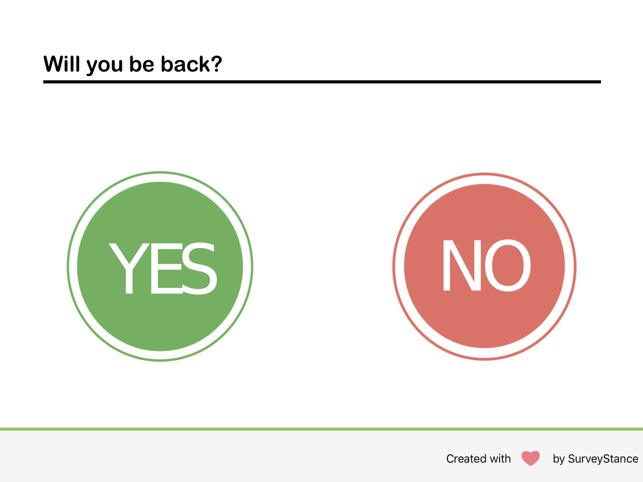
SurveyStance Pro offers frictionless customer feedback, by allowing customers or employees to answer quick, one-tap survey questions. The app allows participants to tap their finger on the iPad's screen to use smiley emoji, stars, thumbs up or thumbs down, a numeric scale, Yes/No, and custom forms of input.
"The SurveyStance Feedback Kiosk is an iPad based Survey Kiosk designed to capture real time customer feedback or employee feedback while they are in the moment," shares SurveyStance executive Natalie Nicole. "Setting up the Feedback Kiosk at your business is simple, as SurveyStance provides everything you need, including the iPad, the iPad Stand Kiosk, the Emoji Based Feedback Software, and detailed customer feedback reporting and dashboards."
SurveyStance Pro allows customers to provide in-person answers to surveys, allowing companies to gain immediate feedback. Quick and easy questions maximize user response, and there is no need for those lengthy email surveys that most customers don't even bother to fill out.
Using the SurveyStance Feedback Reporting Portal, clients can track numerous items of data, including customer satisfaction levels, the time of day when customers are most happy as well as least happy, why customers feel the way they do, and more. Instant email or text alerts are available to alert users to negative reviews, so they can act on them quickly.
Features of SurveyStance Pro - SurveyStance Feedback Kiosk 7.0 include:
* Instant notifications when feedback is received
* The ability to create a customized welcome screen with company logo
* Upload a Logo, Customized Text, Choose Colors and Custom Questions
* Survey Reset Timeout resets survey to first question when survey is not completed
* Offline Mode captures feedback even without WiFi - Syncs when WiFi is available
* Prevent fake rates by requiring 'Swipe to Start Survey'
* Feedback Dashboard provide 24/7 access to customer feedback dashboards
* Automated reports sent to user's email on a weekly basis
* Kiosk Lock Mode prevents anyone from closing the survey
* Can be left unattended, making it perfect for 24/7 responses
* Skip question logic allows displaying questions based on previous responses
* Much more
The SurveyStance Pro - SurveyStance Feedback Kiosk system is available in Software Only, Full Kiosk, and Enterprise options. The company offers a full service Survey Kiosk experience to allow a client's customers or employees to capture immediate feedback.
The Full Kiosk option provides the required software, an iPad, a secure stand, remote iPad management, one-on-one personalized setup, a dedicated account manager, and more. An Enterprise option also includes custom reporting and API integrations. The Software Only option is available for clients that already have an iPad and Kiosk Stand. A free software trial is also available to pilot via their website.
Device Requirements:
* Compatible with iPad
* Requires iOS 10.0 or later
* Compatible With iOS 14
* 82.9 MB
Pricing and Availability:
SurveyStance Pro - SurveyStance Feedback Kiosk 7.0 is free and is available worldwide exclusively through the App Store in the Business category. The app requires a paid company subscription prior to usage. All pricing plans are on a month-to-month basis. Pricing starts at $29/mo per device kiosk. Plans are also available starting at $59/mo that include the iPad and stand. For more information, contact SurveyStance.
SurveyStance - Customer Feedback: https://www.surveystance.com
SurveyStance Pro - SurveyStance Feedback Kiosk 7.0: https://www.surveystance.com/feedback-survey-kiosk/
Download From the App Store: https://apps.apple.com/us/app/surveystance-pro/id1449570510
Screenshot 1: https://is5-ssl.mzstatic.com/image/thumb/Purple123/v4/21/36/c9/2136c992-099b-3064-61d6-e285e477ae38/mzl.dzqoyfnk.png/643x0w.jpg
Screenshot 2: https://is1-ssl.mzstatic.com/image/thumb/Purple113/v4/c1/2e/23/c12e23ef-8d3c-c2d1-f90e-7131362dae49/mzl.utegqdac.png/643x0w.jpg
Application Icon: https://is4-ssl.mzstatic.com/image/thumb/Purple124/v4/df/c2/c0/dfc2c00e-ec23-8763-816e-0b4ac6f5980c/AppIcon-0-0-1x_U007emarketing-0-0-0-5-0-0-sRGB-0-0-0-GLES2_U002c0-512MB-85-220-0-0.png/600x600wa.png
SurveyStance is a passionate and dedicated team of rockstars. They wake up everyday focused on helping businesses take the friction out of communicating with customers, employees, and visitors. The company is based out of sunny Southern California but they serve their clients all around the world. The company's mission is to ensure that every business is collecting customer and employee feedback for continuous improvement opportunities. The team is committed to going above and beyond for their clients. All Material and Software (C) Copyright 2020 SurveyStance. All Rights Reserved. Apple, the Apple logo, iPhone, iPod and iPad are registered trademarks of Apple Inc. in the U.S. and/or other countries. Other trademarks and registered trademarks may be the property of their respective owners.
*******
Link To Article: https://prmac.com/release-id-84235.htm
*******
---------------------------------------------------------------------------------
Note that you can alter delivered distributions at any time.
Login to your account on prMac to alter your channel selection, or to opt-out at any time.
iPad-Based Feedback Kiosk App Provides Real-Time Customer Feedback - Published on 12/02/20
California-based development team SurveyStance today announces SurveyStance Pro - Survey Stance Feedback Kiosk 7.0, an important update to their popular real-time customer feedback app for iPad devices. SurveyStance Pro provides real-time feedback from customers by placing the iPad in high-traffic areas, allowing them to tap a range of emoji, including smiley faces, to quickly respond to survey questions. Version 7.0 brings numerous enhancements.
Newport Beach, California - SurveyStance today is proud to announce the release and immediate availability of SurveyStance Pro - Survey Stance Feedback Kiosk 7.0, an important update to their popular real-time customer feedback app for iPad devices. By launching the app and placing it in the provided secure stand in a high-traffic area, users can capture immediate feedback from customers, as they tap a range of emoji smiley faces to respond to questions.
SurveyStance Pro offers frictionless customer feedback, by allowing customers or employees to answer quick, one-tap survey questions. The app allows participants to tap their finger on the iPad's screen to use smiley emoji, stars, thumbs up or thumbs down, a numeric scale, Yes/No, and custom forms of input.
"The SurveyStance Feedback Kiosk is an iPad based Survey Kiosk designed to capture real time customer feedback or employee feedback while they are in the moment," shares SurveyStance executive Natalie Nicole. "Setting up the Feedback Kiosk at your business is simple, as SurveyStance provides everything you need, including the iPad, the iPad Stand Kiosk, the Emoji Based Feedback Software, and detailed customer feedback reporting and dashboards."
SurveyStance Pro allows customers to provide in-person answers to surveys, allowing companies to gain immediate feedback. Quick and easy questions maximize user response, and there is no need for those lengthy email surveys that most customers don't even bother to fill out.
Using the SurveyStance Feedback Reporting Portal, clients can track numerous items of data, including customer satisfaction levels, the time of day when customers are most happy as well as least happy, why customers feel the way they do, and more. Instant email or text alerts are available to alert users to negative reviews, so they can act on them quickly.
Features of SurveyStance Pro - SurveyStance Feedback Kiosk 7.0 include:
* Instant notifications when feedback is received
* The ability to create a customized welcome screen with company logo
* Upload a Logo, Customized Text, Choose Colors and Custom Questions
* Survey Reset Timeout resets survey to first question when survey is not completed
* Offline Mode captures feedback even without WiFi - Syncs when WiFi is available
* Prevent fake rates by requiring 'Swipe to Start Survey'
* Feedback Dashboard provide 24/7 access to customer feedback dashboards
* Automated reports sent to user's email on a weekly basis
* Kiosk Lock Mode prevents anyone from closing the survey
* Can be left unattended, making it perfect for 24/7 responses
* Skip question logic allows displaying questions based on previous responses
* Much more
The SurveyStance Pro - SurveyStance Feedback Kiosk system is available in Software Only, Full Kiosk, and Enterprise options. The company offers a full service Survey Kiosk experience to allow a client's customers or employees to capture immediate feedback.
The Full Kiosk option provides the required software, an iPad, a secure stand, remote iPad management, one-on-one personalized setup, a dedicated account manager, and more. An Enterprise option also includes custom reporting and API integrations. The Software Only option is available for clients that already have an iPad and Kiosk Stand. A free software trial is also available to pilot via their website.
Device Requirements:
* Compatible with iPad
* Requires iOS 10.0 or later
* Compatible With iOS 14
* 82.9 MB
Pricing and Availability:
SurveyStance Pro - SurveyStance Feedback Kiosk 7.0 is free and is available worldwide exclusively through the App Store in the Business category. The app requires a paid company subscription prior to usage. All pricing plans are on a month-to-month basis. Pricing starts at $29/mo per device kiosk. Plans are also available starting at $59/mo that include the iPad and stand. For more information, contact SurveyStance.
SurveyStance - Customer Feedback: https://www.surveystance.com
SurveyStance Pro - SurveyStance Feedback Kiosk 7.0: https://www.surveystance.com/feedback-survey-kiosk/
Download From the App Store: https://apps.apple.com/us/app/surveystance-pro/id1449570510
Screenshot 1: https://is5-ssl.mzstatic.com/image/thumb/Purple123/v4/21/36/c9/2136c992-099b-3064-61d6-e285e477ae38/mzl.dzqoyfnk.png/643x0w.jpg
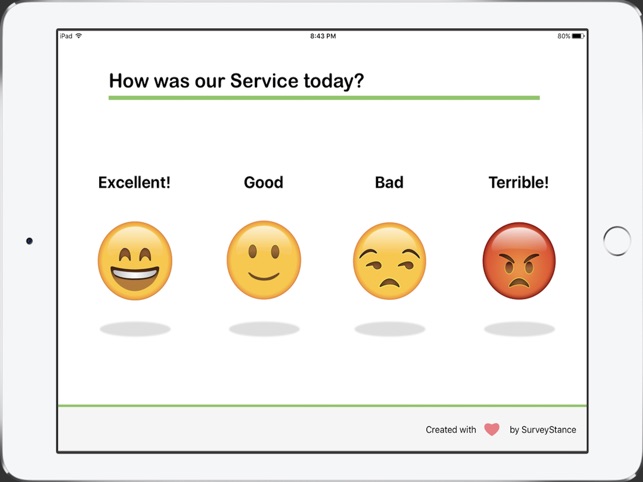
Screenshot 2: https://is1-ssl.mzstatic.com/image/thumb/Purple113/v4/c1/2e/23/c12e23ef-8d3c-c2d1-f90e-7131362dae49/mzl.utegqdac.png/643x0w.jpg
Application Icon: https://is4-ssl.mzstatic.com/image/thumb/Purple124/v4/df/c2/c0/dfc2c00e-ec23-8763-816e-0b4ac6f5980c/AppIcon-0-0-1x_U007emarketing-0-0-0-5-0-0-sRGB-0-0-0-GLES2_U002c0-512MB-85-220-0-0.png/600x600wa.png

SurveyStance is a passionate and dedicated team of rockstars. They wake up everyday focused on helping businesses take the friction out of communicating with customers, employees, and visitors. The company is based out of sunny Southern California but they serve their clients all around the world. The company's mission is to ensure that every business is collecting customer and employee feedback for continuous improvement opportunities. The team is committed to going above and beyond for their clients. All Material and Software (C) Copyright 2020 SurveyStance. All Rights Reserved. Apple, the Apple logo, iPhone, iPod and iPad are registered trademarks of Apple Inc. in the U.S. and/or other countries. Other trademarks and registered trademarks may be the property of their respective owners.
*******
Link To Article: https://prmac.com/release-id-84235.htm
*******
---------------------------------------------------------------------------------
Note that you can alter delivered distributions at any time.
Login to your account on prMac to alter your channel selection, or to opt-out at any time.
Epic Battle Simulator: 1v1 LOL - Releasing on macOS Next Month
A new article has been published at prMac.
Epic Battle Simulator: 1v1 LOL - Releasing on macOS Next Month - Published on 11/30/20
Epic Battle Simulator is one of the top 100 games on the iOS platform and is played by hundreds of thousands of users every month. Due to a requests from our users to release this game on macOS, we have finally modified and updated the game to make it work on macOS and it will be released in the fourth week of next month so stay tuned for this epic release.
New York City, NY - Epic Battle Simulator 1.6.3 is a free-to-play 1v1 multiplayer action on mobile. Enter the arena and become the #1 SHOOTER in this thrilling battle simulator. Compete against your enemies and enjoy every battle in this premier mobile experience!
* TEAM UP with your friends and compete against players from all over the world.
* FREE ON MOBILE - Gaming on the go. Delivers HD graphics and 3D sound. Features customizable mobile controls and chat.
* MULTIPLAYER MODE - Create or join a team. Host private matches. Gather your friends and join them in exciting combat!
* CAREER MODE - Ten competitive levels to develop shooting skills. Unlock and upgrade modern rifles and equipment.
* TEAM DEATHMATCH - Create or join a team and battle it out in a timed match.
* This game is a FIRST PERSON SHOOTER that features competitive 1v1 and TDM combat through beautifully crafted maps and game modes.
* Intuitively easy controls - SWIPE, ZOOM, KILL! whoever kills the most enemies wins the round.
* Enjoy amazing 3D GRAPHICS, the world's best and most famous RIFLES, realistic in detail and spectacular combat location with authentic firing positions, beautifully designed in terms of game logic.
For more information, visit the Epic Battle Simulator website.
Device Requirements:
* iPhone, iPad, and iPod touch
* Requires iOS 9.0 or later
* Universal Application
* 288.5 MB
Pricing and Availability:
Epic Battle Simulator 1.6.3 is free and is available worldwide exclusively through the App Store in the Games category. Convenient in-app purchases are available.
Prism Studios: https://prismstudios.co/
Epic Battle Simulator: 1v1 LOL 1.6.3: https://www.prismstudios.co/epic-battle-simulator-1v1-lol/
Download On Mac App Store: https://apps.apple.com/us/app/epic-battle-simulator-1v1-lol/id1454253823
Screenshot: https://www.prismstudios.co/wp-content/uploads/2020/11/feature-Image.png
App Icon: https://www.prismstudios.co/wp-content/uploads/2020/11/1024X1025-300x300.png
Prism Studios develops advanced 2D, 3D and isometric games in Unity, Unreal Engine and HTML5 including large scale games for iPhone, iPad, Android, Windows, Amazon and other platforms. All Material and Software (C) Copyright 2020 Prism Studios. All Rights Reserved. Apple, the Apple logo, iPhone, iPod and iPad are registered trademarks of Apple Inc. in the U.S. and/or other countries. Other trademarks and registered trademarks may be the property of their respective owners.
*******
Link To Article: https://prmac.com/release-id-84234.htm
*******
---------------------------------------------------------------------------------
Note that you can alter delivered distributions at any time.
Login to your account on prMac to alter your channel selection, or to opt-out at any time.
Epic Battle Simulator: 1v1 LOL - Releasing on macOS Next Month - Published on 11/30/20
Epic Battle Simulator is one of the top 100 games on the iOS platform and is played by hundreds of thousands of users every month. Due to a requests from our users to release this game on macOS, we have finally modified and updated the game to make it work on macOS and it will be released in the fourth week of next month so stay tuned for this epic release.
New York City, NY - Epic Battle Simulator 1.6.3 is a free-to-play 1v1 multiplayer action on mobile. Enter the arena and become the #1 SHOOTER in this thrilling battle simulator. Compete against your enemies and enjoy every battle in this premier mobile experience!
* TEAM UP with your friends and compete against players from all over the world.
* FREE ON MOBILE - Gaming on the go. Delivers HD graphics and 3D sound. Features customizable mobile controls and chat.
* MULTIPLAYER MODE - Create or join a team. Host private matches. Gather your friends and join them in exciting combat!
* CAREER MODE - Ten competitive levels to develop shooting skills. Unlock and upgrade modern rifles and equipment.
* TEAM DEATHMATCH - Create or join a team and battle it out in a timed match.
* This game is a FIRST PERSON SHOOTER that features competitive 1v1 and TDM combat through beautifully crafted maps and game modes.
* Intuitively easy controls - SWIPE, ZOOM, KILL! whoever kills the most enemies wins the round.
* Enjoy amazing 3D GRAPHICS, the world's best and most famous RIFLES, realistic in detail and spectacular combat location with authentic firing positions, beautifully designed in terms of game logic.
For more information, visit the Epic Battle Simulator website.
Device Requirements:
* iPhone, iPad, and iPod touch
* Requires iOS 9.0 or later
* Universal Application
* 288.5 MB
Pricing and Availability:
Epic Battle Simulator 1.6.3 is free and is available worldwide exclusively through the App Store in the Games category. Convenient in-app purchases are available.
Prism Studios: https://prismstudios.co/
Epic Battle Simulator: 1v1 LOL 1.6.3: https://www.prismstudios.co/epic-battle-simulator-1v1-lol/
Download On Mac App Store: https://apps.apple.com/us/app/epic-battle-simulator-1v1-lol/id1454253823
Screenshot: https://www.prismstudios.co/wp-content/uploads/2020/11/feature-Image.png

App Icon: https://www.prismstudios.co/wp-content/uploads/2020/11/1024X1025-300x300.png

Prism Studios develops advanced 2D, 3D and isometric games in Unity, Unreal Engine and HTML5 including large scale games for iPhone, iPad, Android, Windows, Amazon and other platforms. All Material and Software (C) Copyright 2020 Prism Studios. All Rights Reserved. Apple, the Apple logo, iPhone, iPod and iPad are registered trademarks of Apple Inc. in the U.S. and/or other countries. Other trademarks and registered trademarks may be the property of their respective owners.
*******
Link To Article: https://prmac.com/release-id-84234.htm
*******
---------------------------------------------------------------------------------
Note that you can alter delivered distributions at any time.
Login to your account on prMac to alter your channel selection, or to opt-out at any time.
Subscribe to:
Posts (Atom)