A new article has been published at prMac.
WaterField AirPods Max Shield Case Preserves Battery, Looks Professional - Published on 12/25/20
WaterField Designs today announces the AirPods Max Shield Case. This bespoke case combines full-grain leather with waxed canvas or ballistic nylon for a modern look worthy of Apple's sleek headphones. A Magnetic Leather Butterfly acts as a buffer between the ear cups and triggers the AirPods Max into low-power mode. When used in conjunction with the Apple Smart Case, the magnets lie flat. Space-efficient pockets stow cords and accessories, and a luxuriously soft interior cradles the AirPods Max.
San Francisco, California - WaterField Designs, a San Francisco designer and manufacturer of laptop sleeves, bags, and cases for digital gear, announces the AirPods Max Shield Case. The bespoke case, developed with input from over 1,200 Apple fans, combines full-grain leather with waxed canvas or ballistic nylon for a modern look worthy of Apple's sleek headphones. A Magnetic Leather Butterfly acts as a buffer between the ear cups and triggers the AirPods Max into low-power mode. When used in conjunction with the Apple Smart Case, the magnets lie flat. Space-efficient pockets stow cords and accessories, and a luxuriously soft interior cradles the AirPods Max.
"When Apple introduced the AirPods Max, our community clamored for a new case," said WaterField Designs owner Gary Waterfield. "So, we surveyed over 1,200 Apple enthusiasts to understand their needs and then incorporated their feedback into our design. They requested a case that is compact, protective, professional-looking, and capable of carrying a few accessories. They were evenly divided regarding the Apple Smart Case; one camp wanted a case that encompasses the Apple Smart Case while the other wanted a case that replaces it altogether and puts the headphones into low-power mode. It was an exciting challenge to create a case that satisfies both camps and that addresses their other wishes as well."
Unlike generic cases that are marketed as specific to Apple's new headphones, the Shield Case is truly bespoke. A Magnetic Leather Butterfly lies flat when the Smart Case is stowed inside the WaterField case but triggers the headphones into low power mode when the headphones are stowed inside by themselves. Thoughtfully-designed pockets hold an array of accessories while maintaining the case's compact form. Rugged materials, shock-absorbing foam, and waterproof zippers help protect the prized headphones.
Features:
* Compact and custom-fitted to hold and protect AirPods Max with or without a Smart Case
* Innovative Magnetic Leather Butterfly keeps ear cups separated and triggers AirPods Max low power mode to preserve battery life; The Butterfly lies flat when headphones are stowed with the Apple Smart Case
* Zip-around closure with dual zipper sliders allows for in-case charging
* Top and bottom layers of closed-cell foam help disperse external forces and resist compression
* Plush lining, as soft as a puppy's ear, backed with additional soft foam keeps AirPods Max scratch-free
* Stretch mesh pocket with a leather closure utilizes negative interior space to fit a 5W to 20W Apple Power Adapter and charging and headphone cords
* Plush-lined exterior zippered pocket keeps extra cords, AirPods Pro, or other small electronic accessories readily accessible
* Open-topped, stretch mesh, rear pocket stows an iPhone, and/or additional accessories
* Top nylon loop facilitates a quick grab when carrying the case solo and hooks onto a carabiner for attaching to a strap or stashing the case inside another bag
* Rugged black ballistic nylon or waxed canvas paired with full-grain leather and smooth waterproof zippers help protect headphones from the elements
WaterField has designed and manufactured custom cases for Apple gear since Steve Jobs first announced the Titanium PowerBook in 2001. The highly-functional, luxury AirPods Max Shield Case joins WaterField's collection of cases for Apple gear that includes handsome bags and sleeves for MacBooks and iPads, iPhone cases, Magic Keyboard and TrackPad sleeves, an Apple TV Case, and a leather Apple Pencil Pouch. All WaterField products are handcrafted to exacting standards in San Francisco.
Colors and materials:
Black ballistic nylon with premium, full-grain leather in black, blue, or crimson. Tan waxed canvas with distressed, full-grain, chocolate leather. Ultra-plush, foam-backed interior lining. Closed-cell foam inserts. Stretch mesh (two of three pockets). Waterproof zippers. Custom metal zipper pulls.
Dimensions:
* 9.5 x 9 (at widest points) x 2.25 inches
Weight:
Ballistic nylon 11 oz; waxed canvas 14.5 oz.
Pricing and Availability:
The AirPods Max Shield Case is priced at $99 (USD). Pre-order now. First production run ships December 31, 2020.
WaterField Designs: http://www.sfbags.com/
AirPods Max Shield Case: https://www.sfbags.com/products/airpods-max-shield-case
YouTube Video (Demo): https://www.youtube.com/watch?v=5ydyWb50zgA
WaterField Designs is an innovative San Francisco designer and manufacturer of bags and cases for tech-savvy consumers who want to stylishly and responsibly transport their technology. WaterField manufactures custom-fitted, high-quality cases and bags for a full-range of laptop computers, smartphones, tablets, gaming devices, and other digital gear. All products are manufactured to exacting standards entirely in San Francisco. More information is available on the company website at "Our Story." WaterField Designs, Magnetic Leather Butterfly, and SFbags are trademarks of WaterField Designs. Other company and product names may be trademarks of their respective owners. Copyright (C)2020. All Rights Reserved.
*******
Link To Article: https://prmac.com/release-id-84275.htm
*******
---------------------------------------------------------------------------------
Note that you can alter delivered distributions at any time.
Login to your account on prMac to alter your channel selection, or to opt-out at any time.

MegaSeg Pro and DJ app optimized for M1 Macs
A new article has been published at prMac.
MegaSeg Pro and DJ app optimized for M1 Macs - Published on 12/24/20
Fidelity Media releases MegaSeg 6.1.4 for macOS Big Sur. MegaSeg Pro and DJ app sport over 30 improvements and new features, including additional options to control MegaSeg via serial port codes, a new MIDI command to insert break tracks, improved library and playlist sorting, the ability to send Now Playing info to Zoom meetings, easily move tracks into other categories via shift-dragging, and various optimizations while opening playlists, editing tracks, and importing from Music.app or iTunes.
Champaign-Urbana, Illinois - Fidelity Media is pleased to announce the release of MegaSeg 6.1.4, an Apple Silicon M1 optimized version of their professional DJ and music automation system for Mac. The update is a Universal Binary that also supports Intel processors and macOS Big Sur, Apple's latest operating system. With over 30 improvements and new features, it incorporates additional options to control MegaSeg via serial port codes, a new MIDI command to insert break tracks, improved library and playlist sorting, the ability to send Now Playing info to Zoom meetings, easily move tracks into other categories via shift-dragging, and various optimizations while opening playlists, editing tracks, and importing from Music.app or iTunes.
MegaSeg recently introduced 64-bit native support, video playback optimizations, hot swappable output devices, new radio automation options for scheduling long-form shows with breaks for station identification, and new DJ controller presets.
MegaSeg 6.1.4 Highlights:
* Optimized for Macs with the M1 Chip
* Supports macOS Big Sur with many interface refinements
* Adds a MIDI command to insert break tracks
* Send "now playing" info to Zoom meetings
* Serial Trigger events can use ASCII code values
* Improved diacritic accent sort and search filtering
* The previous playlist schedule opens automatically when launched
* Easily move tracks to another category by shift-dragging
* Optimized launching, opening playlists, importing from Music.app or iTunes, and editing tracks
Pro and DJ Edition Features:
MegaSeg is available in two editions. The DJ edition focuses on core live mixing via visual beat syncing and multitouch gestures, multiple outputs for headphone preview, MIDI control, automatic volume, advanced categorization, track logging, and iTunes playlist integration. MegaSeg Pro adds automated music scheduling, events to insert tracks and messaging, rules for applying artist separations, video playback with ambient visuals, hot keys for triggering sound effects, request lists with reminder notes, and other advanced features for professional DJs and VJs, radio stations, and hospitality businesses.
Pricing and Availability:
MegaSeg Pro and DJ editions can be purchased for $199 and $99 (USD) respectively. MegaSeg DJ is also available on the Mac App Store. Older versions of MegaSeg Pro and DJ editions can be upgraded for $69 and $29 respectively. MegaSeg is compatible with any Mac running macOS 10.6 and higher, including macOS Big Sur and the M1 chip.
MegaSeg 6.1.4: https://www.megaseg.com
More Info: https://megaseg.com/about-pro
Release Notes: https://megaseg.com/version
Download MegaSeg: https://megaseg.com/download
Screenshot: https://megaseg.com/press/MegaSeg-6-Screenshot.png
Application Icon: https://megaseg.com/press/MegaSeg-Icon.png
Located in Champaign-Urbana Illinois, Fidelity Media was founded in 1998 with a vision to simplify music mixing and library management for performance and recreational industries. Its flagship product, MegaSeg, spearheaded the digital music revolution, with over 22 years of research and development which cultivated a rock solid and user-friendly interface that has become the premier Mac-based DJ and broadcast automation system used in over 108 countries. Copyright (c) 2020 Fidelity Media, Inc. MegaSeg and Fidelity Media are trademarks of Fidelity Media, Inc. Apple, Mac, Mac App Store, and iTunes are registered trademarks of Apple Inc. Additional company and product names may be trademarks or registered trademarks of the individual companies and are respectfully acknowledged.
*******
Link To Article: https://prmac.com/release-id-84274.htm
*******
---------------------------------------------------------------------------------
Note that you can alter delivered distributions at any time.
Login to your account on prMac to alter your channel selection, or to opt-out at any time.
MegaSeg Pro and DJ app optimized for M1 Macs - Published on 12/24/20
Fidelity Media releases MegaSeg 6.1.4 for macOS Big Sur. MegaSeg Pro and DJ app sport over 30 improvements and new features, including additional options to control MegaSeg via serial port codes, a new MIDI command to insert break tracks, improved library and playlist sorting, the ability to send Now Playing info to Zoom meetings, easily move tracks into other categories via shift-dragging, and various optimizations while opening playlists, editing tracks, and importing from Music.app or iTunes.
Champaign-Urbana, Illinois - Fidelity Media is pleased to announce the release of MegaSeg 6.1.4, an Apple Silicon M1 optimized version of their professional DJ and music automation system for Mac. The update is a Universal Binary that also supports Intel processors and macOS Big Sur, Apple's latest operating system. With over 30 improvements and new features, it incorporates additional options to control MegaSeg via serial port codes, a new MIDI command to insert break tracks, improved library and playlist sorting, the ability to send Now Playing info to Zoom meetings, easily move tracks into other categories via shift-dragging, and various optimizations while opening playlists, editing tracks, and importing from Music.app or iTunes.
MegaSeg recently introduced 64-bit native support, video playback optimizations, hot swappable output devices, new radio automation options for scheduling long-form shows with breaks for station identification, and new DJ controller presets.
MegaSeg 6.1.4 Highlights:
* Optimized for Macs with the M1 Chip
* Supports macOS Big Sur with many interface refinements
* Adds a MIDI command to insert break tracks
* Send "now playing" info to Zoom meetings
* Serial Trigger events can use ASCII code values
* Improved diacritic accent sort and search filtering
* The previous playlist schedule opens automatically when launched
* Easily move tracks to another category by shift-dragging
* Optimized launching, opening playlists, importing from Music.app or iTunes, and editing tracks
Pro and DJ Edition Features:
MegaSeg is available in two editions. The DJ edition focuses on core live mixing via visual beat syncing and multitouch gestures, multiple outputs for headphone preview, MIDI control, automatic volume, advanced categorization, track logging, and iTunes playlist integration. MegaSeg Pro adds automated music scheduling, events to insert tracks and messaging, rules for applying artist separations, video playback with ambient visuals, hot keys for triggering sound effects, request lists with reminder notes, and other advanced features for professional DJs and VJs, radio stations, and hospitality businesses.
Pricing and Availability:
MegaSeg Pro and DJ editions can be purchased for $199 and $99 (USD) respectively. MegaSeg DJ is also available on the Mac App Store. Older versions of MegaSeg Pro and DJ editions can be upgraded for $69 and $29 respectively. MegaSeg is compatible with any Mac running macOS 10.6 and higher, including macOS Big Sur and the M1 chip.
MegaSeg 6.1.4: https://www.megaseg.com
More Info: https://megaseg.com/about-pro
Release Notes: https://megaseg.com/version
Download MegaSeg: https://megaseg.com/download
Screenshot: https://megaseg.com/press/MegaSeg-6-Screenshot.png

Application Icon: https://megaseg.com/press/MegaSeg-Icon.png

Located in Champaign-Urbana Illinois, Fidelity Media was founded in 1998 with a vision to simplify music mixing and library management for performance and recreational industries. Its flagship product, MegaSeg, spearheaded the digital music revolution, with over 22 years of research and development which cultivated a rock solid and user-friendly interface that has become the premier Mac-based DJ and broadcast automation system used in over 108 countries. Copyright (c) 2020 Fidelity Media, Inc. MegaSeg and Fidelity Media are trademarks of Fidelity Media, Inc. Apple, Mac, Mac App Store, and iTunes are registered trademarks of Apple Inc. Additional company and product names may be trademarks or registered trademarks of the individual companies and are respectfully acknowledged.
*******
Link To Article: https://prmac.com/release-id-84274.htm
*******
---------------------------------------------------------------------------------
Note that you can alter delivered distributions at any time.
Login to your account on prMac to alter your channel selection, or to opt-out at any time.
Tank Legion - Action-packed MMO with PvP tank battles
A new article has been published at prMac.
Tank Legion - Action-packed MMO with PvP tank battles - Published on 12/23/20
Indie game studio, VOLV LLC today announces Tank Legion, their brand new tank warfare game title for iOS and Android devices. Tank Legion is a legion-based real-time multiplayer online action game dedicated to armored warfare that let you engage in the fierce tank battles across the world. This fun-to-play game offers breathingtaking graphics coupled with highly detailed tanks and photo-realistic scenery that makes this the most engaging Tank Combat to date.
Beijing, China - VOLV LLC today is proud to announce the release and immediate availability of Tank Legion, the company's brand new tank warfare game title for iOS and Android devices. Meet this Legendary free-to-play 3D Tank Shooter for iOS and Android mobile platform! Become part of a community of players from across the world. Join this modern 2020 shooting game and battle 7vs7 on your own or with friends, research and upgrade armored vehicles, use various tactics from aggressive onslaught to stealthy survival, and win. Pick a tank and become a battlefield hero!
Game Features:
* Wide selection of famous WWII tanks: Tiger, T-34, M4 Sherman, Maus, M46 Patton and many more
* Upgrade components and modules to max out your tanks strategically to make it deadly iron force
* Customize your tanks with cool camouflages and pattern designs for a competitive edge
* Dynamic 7vs7 battles and nonstop action in different modes: Skirmish, Capture the Base and Ranked Matches
* Event mode: Free for All, Protect the Flag, Last Man Standing and Last Team Standing
* Roam around and explore realistic stunning battlefields and spectacular 3D graphics
* Intuitive automatic and manual controls that will be appreciated by novices and hardcore gamers alike
* Complete daily quests and compete in Hero Pass season event to win awesome and exclusive rewards
* Create legions and invite like-minded friends to join, and ranked up in team championship; Dominate in Empire war to become the best legion ever
Device Requirements:
* iPhone 6/6 Plus, 6s/6s Plus, 7/7Plus, 8/8Plus, X/Xs Max, 12/12 Pro Max, iPad
* Requires iOS 10.0 or later
* 966 MB
Tank Legion 1.0.0 is Free and available worldwide through the App Store in the Games category. There is also an Android version available on Google Play Store.
Tank Legion 1.0.0: http://www.volvapps.com/V3/projects/tk1/home.html
Download from App Store: https://apps.apple.com/us/app/id1493243618
Download from Google Play: https://play.google.com/store/apps/details?id=com.volvapps.tk2
Screenshot 1: https://play-lh.googleusercontent.com/SbsREiNsuHTew8BLNFApolJRm4Eyx8FPzZJ1LrnokjIMCt6PfFzQ0_qpxfU67aGoi_Y=w1388-h899-rw
Screenshot 2: https://play-lh.googleusercontent.com/KHcf_9KLxNXw5vaZ5VKMcSVEcD3layJcM-mljP_cVMyIlg7Jvn1iFgkbdx_E8bNIy3g=w1388-h899-rw
Screenshot 3: https://play-lh.googleusercontent.com/Pg61uxEl6JQFQgCT-kKZpv4XZtLMW-5AY_D9s9ewI6lGXunkI0Y8Ab4gNEHQxUpRZp4=w1388-h899-rw
VOLV LLC is a rapidly developing game company founded in 2011. It is bringing the next generation of free-to-play, Strategy and Simulation Game to mobile devices. All Material and Software (C) Copyright (C) 2011-2020 VOLV LLC. All Rights Reserved. Apple, the Apple logo, iPhone, iPod, iPad and Apple Game Center are registered trademarks of Apple Inc. in the U.S. and/or other countries. Other trademarks and registered trademarks may be the property of their respective owners.
*******
Link To Article: https://prmac.com/release-id-84273.htm
*******
---------------------------------------------------------------------------------
Note that you can alter delivered distributions at any time.
Login to your account on prMac to alter your channel selection, or to opt-out at any time.
Tank Legion - Action-packed MMO with PvP tank battles - Published on 12/23/20
Indie game studio, VOLV LLC today announces Tank Legion, their brand new tank warfare game title for iOS and Android devices. Tank Legion is a legion-based real-time multiplayer online action game dedicated to armored warfare that let you engage in the fierce tank battles across the world. This fun-to-play game offers breathingtaking graphics coupled with highly detailed tanks and photo-realistic scenery that makes this the most engaging Tank Combat to date.
Beijing, China - VOLV LLC today is proud to announce the release and immediate availability of Tank Legion, the company's brand new tank warfare game title for iOS and Android devices. Meet this Legendary free-to-play 3D Tank Shooter for iOS and Android mobile platform! Become part of a community of players from across the world. Join this modern 2020 shooting game and battle 7vs7 on your own or with friends, research and upgrade armored vehicles, use various tactics from aggressive onslaught to stealthy survival, and win. Pick a tank and become a battlefield hero!
Game Features:
* Wide selection of famous WWII tanks: Tiger, T-34, M4 Sherman, Maus, M46 Patton and many more
* Upgrade components and modules to max out your tanks strategically to make it deadly iron force
* Customize your tanks with cool camouflages and pattern designs for a competitive edge
* Dynamic 7vs7 battles and nonstop action in different modes: Skirmish, Capture the Base and Ranked Matches
* Event mode: Free for All, Protect the Flag, Last Man Standing and Last Team Standing
* Roam around and explore realistic stunning battlefields and spectacular 3D graphics
* Intuitive automatic and manual controls that will be appreciated by novices and hardcore gamers alike
* Complete daily quests and compete in Hero Pass season event to win awesome and exclusive rewards
* Create legions and invite like-minded friends to join, and ranked up in team championship; Dominate in Empire war to become the best legion ever
Device Requirements:
* iPhone 6/6 Plus, 6s/6s Plus, 7/7Plus, 8/8Plus, X/Xs Max, 12/12 Pro Max, iPad
* Requires iOS 10.0 or later
* 966 MB
Tank Legion 1.0.0 is Free and available worldwide through the App Store in the Games category. There is also an Android version available on Google Play Store.
Tank Legion 1.0.0: http://www.volvapps.com/V3/projects/tk1/home.html
Download from App Store: https://apps.apple.com/us/app/id1493243618
Download from Google Play: https://play.google.com/store/apps/details?id=com.volvapps.tk2
Screenshot 1: https://play-lh.googleusercontent.com/SbsREiNsuHTew8BLNFApolJRm4Eyx8FPzZJ1LrnokjIMCt6PfFzQ0_qpxfU67aGoi_Y=w1388-h899-rw
Screenshot 2: https://play-lh.googleusercontent.com/KHcf_9KLxNXw5vaZ5VKMcSVEcD3layJcM-mljP_cVMyIlg7Jvn1iFgkbdx_E8bNIy3g=w1388-h899-rw
Screenshot 3: https://play-lh.googleusercontent.com/Pg61uxEl6JQFQgCT-kKZpv4XZtLMW-5AY_D9s9ewI6lGXunkI0Y8Ab4gNEHQxUpRZp4=w1388-h899-rw
VOLV LLC is a rapidly developing game company founded in 2011. It is bringing the next generation of free-to-play, Strategy and Simulation Game to mobile devices. All Material and Software (C) Copyright (C) 2011-2020 VOLV LLC. All Rights Reserved. Apple, the Apple logo, iPhone, iPod, iPad and Apple Game Center are registered trademarks of Apple Inc. in the U.S. and/or other countries. Other trademarks and registered trademarks may be the property of their respective owners.
*******
Link To Article: https://prmac.com/release-id-84273.htm
*******
---------------------------------------------------------------------------------
Note that you can alter delivered distributions at any time.
Login to your account on prMac to alter your channel selection, or to opt-out at any time.
Microsoft Office Output Automation Tools on 50% off Holiday Sale
A new article has been published at prMac.
Microsoft Office Output Automation Tools on 50% off Holiday Sale - Published on 12/22/20
Zevrix Solutions announces today a holiday sale company's output automation solutions for Microsoft Office. Zevrix BatchOutput Office Suite automates PDF production and printing from Microsoft Word, Excel and PowerPoint on Mac. The software offers batch printing and PDF export, variable file names, PDF security, single page export and more. The products on sale also include automation tools for Adobe InDesign, Illustrator, and PDF workflows. The company offers a 50% discount until December 31.
Toronto (ON), Canada - Zevrix Solutions announces a spring sale on all products including output automation tools for Microsoft Office. The company offers a 50% discount until December 31. Zevrix BatchOutput Office Suite is a collection of output automation apps for Microsoft Word, Excel and PowerPoint for macOS. The only automation tool for Microsoft users on the Mac market, the software streamlines printing and exporting of Office documents to PDF through batch processing with time saving output options.
In addition to batch printing, BatchOutput Office offers powerful professional PDF production tools for demanding enterprise and office publishing environments that can be applied to direct output from Word, Excel and PowerPoint.
"BatchOutput makes the process of saving collections of Word docs to PDF so much faster and easier," says Giorgio La Scala from Cologny, Switzerland. "Developers also provide top notch support that is fast and efficient... Very impressed by the level of dedication to customer satisfaction."
BatchOutput helps Office users save production costs by eliminating repetitive tasks and reducing the need for time consuming post-processing of PDF files:
* Print and export multiple Office documents to PDF with a single click
* Variable output file names
* Split Microsoft files into single page PDFs
* Encrypt and password-protect PDF documents
* Reduce PDF file size and optimize documents for web, print and mobile devices
* Change PDF color tone, brightness and other properties
BatchOutput Office is a part of the Zevrix family of software products, which also include advanced automation solutions Adobe InDesign, Illustrator, PDF workflows and file delivery.
Pricing and Availability:
BatchOutput Office Suite can be purchased at half price for $30 (USD) from Zevrix website until April 3. The suite's applications - BatchOutput DOC, BatchOutput XLS and BatchOutput PPT - can be also purchased separately for $10 each. Trial is also available for download. The sale also applies all other products and upgrades. BatchOutput Office requires macOS 10.8 - 11.0 and Microsoft Office 2008-2019. InDesign and Illustrator solutions require Adobe Creative Cloud CS6 - 2021.
Zevrix Solutions: https://zevrix.com
Automation Tools For Microsoft Office: https://zevrix.com/batchoutputoffice
Download: https://zevrix.com/downloads/BatchOutputOffice.dmg
Purchase: https://zevrix.com/store
Screenshot: https://zevrix.com/wp-content/uploads/2020/08/bodoc-pdf-946.png
Located in Toronto, Canada, Zevrix Solutions provides automation and productivity solutions for Adobe Creative Cloud and Creative Suite software, PDF workflows, graphic file diagnostics and Microsoft Office output on Mac OS. Zevrix is dedicated to help professionals increase their profits through automating everyday tasks, producing error-free documents, saving disk space and cutting production costs. For more information, visit their website. Copyright (C) 2020 Zevrix Solutions. All Rights Reserved. Other trademarks and registered trademarks may be the property of their respective owners.
*******
Link To Article: https://prmac.com/release-id-84272.htm
*******
---------------------------------------------------------------------------------
Note that you can alter delivered distributions at any time.
Login to your account on prMac to alter your channel selection, or to opt-out at any time.
Microsoft Office Output Automation Tools on 50% off Holiday Sale - Published on 12/22/20
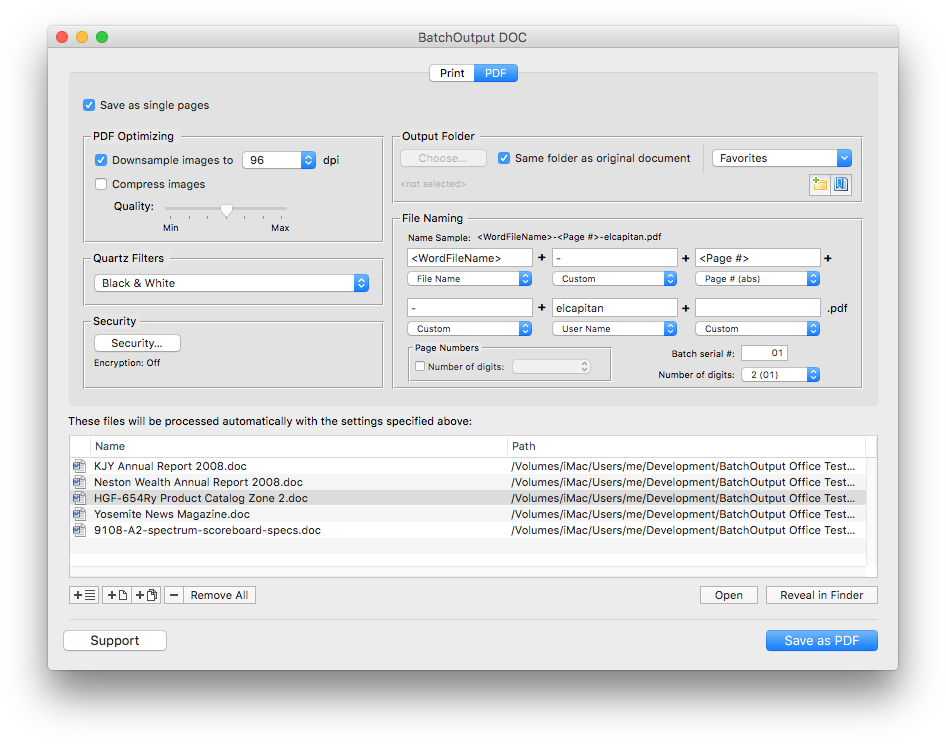
Zevrix Solutions announces today a holiday sale company's output automation solutions for Microsoft Office. Zevrix BatchOutput Office Suite automates PDF production and printing from Microsoft Word, Excel and PowerPoint on Mac. The software offers batch printing and PDF export, variable file names, PDF security, single page export and more. The products on sale also include automation tools for Adobe InDesign, Illustrator, and PDF workflows. The company offers a 50% discount until December 31.
Toronto (ON), Canada - Zevrix Solutions announces a spring sale on all products including output automation tools for Microsoft Office. The company offers a 50% discount until December 31. Zevrix BatchOutput Office Suite is a collection of output automation apps for Microsoft Word, Excel and PowerPoint for macOS. The only automation tool for Microsoft users on the Mac market, the software streamlines printing and exporting of Office documents to PDF through batch processing with time saving output options.
In addition to batch printing, BatchOutput Office offers powerful professional PDF production tools for demanding enterprise and office publishing environments that can be applied to direct output from Word, Excel and PowerPoint.
"BatchOutput makes the process of saving collections of Word docs to PDF so much faster and easier," says Giorgio La Scala from Cologny, Switzerland. "Developers also provide top notch support that is fast and efficient... Very impressed by the level of dedication to customer satisfaction."
BatchOutput helps Office users save production costs by eliminating repetitive tasks and reducing the need for time consuming post-processing of PDF files:
* Print and export multiple Office documents to PDF with a single click
* Variable output file names
* Split Microsoft files into single page PDFs
* Encrypt and password-protect PDF documents
* Reduce PDF file size and optimize documents for web, print and mobile devices
* Change PDF color tone, brightness and other properties
BatchOutput Office is a part of the Zevrix family of software products, which also include advanced automation solutions Adobe InDesign, Illustrator, PDF workflows and file delivery.
Pricing and Availability:
BatchOutput Office Suite can be purchased at half price for $30 (USD) from Zevrix website until April 3. The suite's applications - BatchOutput DOC, BatchOutput XLS and BatchOutput PPT - can be also purchased separately for $10 each. Trial is also available for download. The sale also applies all other products and upgrades. BatchOutput Office requires macOS 10.8 - 11.0 and Microsoft Office 2008-2019. InDesign and Illustrator solutions require Adobe Creative Cloud CS6 - 2021.
Zevrix Solutions: https://zevrix.com
Automation Tools For Microsoft Office: https://zevrix.com/batchoutputoffice
Download: https://zevrix.com/downloads/BatchOutputOffice.dmg
Purchase: https://zevrix.com/store
Screenshot: https://zevrix.com/wp-content/uploads/2020/08/bodoc-pdf-946.png
Located in Toronto, Canada, Zevrix Solutions provides automation and productivity solutions for Adobe Creative Cloud and Creative Suite software, PDF workflows, graphic file diagnostics and Microsoft Office output on Mac OS. Zevrix is dedicated to help professionals increase their profits through automating everyday tasks, producing error-free documents, saving disk space and cutting production costs. For more information, visit their website. Copyright (C) 2020 Zevrix Solutions. All Rights Reserved. Other trademarks and registered trademarks may be the property of their respective owners.
*******
Link To Article: https://prmac.com/release-id-84272.htm
*******
---------------------------------------------------------------------------------
Note that you can alter delivered distributions at any time.
Login to your account on prMac to alter your channel selection, or to opt-out at any time.
MaBaSoft Releases World Clock Deluxe 4.17.1
A new article has been published at prMac.
MaBaSoft Releases World Clock Deluxe 4.17.1 - Published on 12/22/20
MaBaSoft announces World Clock Deluxe 4.17.1, an important update to their world time utility for macOS. World Clock Deluxe comes with over 1,600 cities and 200 time zones, displays multiple clocks in a horizontal or vertical palette, in the menu bar, or in the Dock, calculates corresponding times in different cities, and allows users to easily identify the best time for meetings across multiple time zones. Version 4.17.1 is Universal and runs natively on Apple Silicon and Intel-based Macs.
Milano, Italy - MaBaSoft announces World Clock Deluxe 4.17.1, the latest version of their popular world time utility for macOS. World Clock Deluxe is a reliable and easy-to-use time tool for companies and organizations regularly communicating with people across the world, frequent travelers, and home users having family or friends in other countries or time zones.
World Clock Deluxe displays multiple digital or analog clocks in a highly configurable horizontal or vertical palette, in the menu bar, and in the Dock, and can show the time in over 1,600 cities and 200 time zones and world times, including Greenwich Mean Time, Coordinated Universal Time, and Internet Time. It comes with a variety of date and time formats and can display seconds, weekday, date, date change, time zone, offset from UTC, and offset from local time.
With World Clock Deluxe users can easily organize clocks so that they always have a good overview of the displayed times. Colors and labels can be assigned to clocks to quickly single out the local clock or different groups of clocks. Clocks can be sorted by name, time, longitude, longitude offset, or label. Seldom used clocks can be hidden and different clocks can be displayed in the palette, in the menu bar, and in the Dock.
World Clock Deluxe also helps users with phone calls to other countries and international meetings. The Time Converter quickly calculates corresponding dates and times in different cities or time zones, while the Meeting Planner allows users to easily identify the best time for online chats, conference calls, or video conferences across multiple time zones. Conversion results and meeting details can be easily shared via Mail or Messages, saved to a note, or added to a reminder.
Version 4.17.1 is Universal and runs natively on both Apple Silicon and Intel-based Macs. In addition to that, it fixes several minor bugs.
Language Support:
* English, German, French, Dutch, and Italian
System Requirements:
* Intel 64, Apple Silicon
* macOS 10.11, 10.12, 10.13, 10.14, 10.15, or 11.0 (Big Sur)
Pricing and Availability:
World Clock Deluxe 4.17.1 is a free update for registered version 4 users. It is $10.00 (USD) for users who purchased version 3, and costs $19.00 (USD) for new users. Family, Site, and World-wide licenses are also available.
MaBaSoft: https://www.mabasoft.net/
World Clock Deluxe 4.17.1: https://www.mabasoft.net/products/worldClockDeluxeX.html
Purchase World Clock Deluxe: https://sites.fastspring.com/mabasoft/product/all?language=en
Direct Download: https://www.mabasoft.net/downloads/files/World_Clock_Deluxe_4.17.1.dmg
Release Notes: https://www.mabasoft.net/releaseNotes/worldClockDeluxeX.html
Media Assets: https://www.mabasoft.net/pressImages/worldClockDeluxeX.html
MaBaSoft, based in Milano, Italy, is a small independent company founded by Marco Damaschi and Barbara Canino in 1997. MaBaSoft develops quality system utilities and applications for the Macintosh. All Material and Software Copyright 1997-2020 MaBaSoft. All Rights Reserved. Apple, the Apple logo and Mac are registered trademarks of Apple Inc. in the U.S. and/or other countries. Other trademarks and registered trademarks may be the property of their respective owners.
*******
Link To Article: https://prmac.com/release-id-84271.htm
*******
---------------------------------------------------------------------------------
Note that you can alter delivered distributions at any time.
Login to your account on prMac to alter your channel selection, or to opt-out at any time.
MaBaSoft Releases World Clock Deluxe 4.17.1 - Published on 12/22/20
MaBaSoft announces World Clock Deluxe 4.17.1, an important update to their world time utility for macOS. World Clock Deluxe comes with over 1,600 cities and 200 time zones, displays multiple clocks in a horizontal or vertical palette, in the menu bar, or in the Dock, calculates corresponding times in different cities, and allows users to easily identify the best time for meetings across multiple time zones. Version 4.17.1 is Universal and runs natively on Apple Silicon and Intel-based Macs.
Milano, Italy - MaBaSoft announces World Clock Deluxe 4.17.1, the latest version of their popular world time utility for macOS. World Clock Deluxe is a reliable and easy-to-use time tool for companies and organizations regularly communicating with people across the world, frequent travelers, and home users having family or friends in other countries or time zones.
World Clock Deluxe displays multiple digital or analog clocks in a highly configurable horizontal or vertical palette, in the menu bar, and in the Dock, and can show the time in over 1,600 cities and 200 time zones and world times, including Greenwich Mean Time, Coordinated Universal Time, and Internet Time. It comes with a variety of date and time formats and can display seconds, weekday, date, date change, time zone, offset from UTC, and offset from local time.
With World Clock Deluxe users can easily organize clocks so that they always have a good overview of the displayed times. Colors and labels can be assigned to clocks to quickly single out the local clock or different groups of clocks. Clocks can be sorted by name, time, longitude, longitude offset, or label. Seldom used clocks can be hidden and different clocks can be displayed in the palette, in the menu bar, and in the Dock.
World Clock Deluxe also helps users with phone calls to other countries and international meetings. The Time Converter quickly calculates corresponding dates and times in different cities or time zones, while the Meeting Planner allows users to easily identify the best time for online chats, conference calls, or video conferences across multiple time zones. Conversion results and meeting details can be easily shared via Mail or Messages, saved to a note, or added to a reminder.
Version 4.17.1 is Universal and runs natively on both Apple Silicon and Intel-based Macs. In addition to that, it fixes several minor bugs.
Language Support:
* English, German, French, Dutch, and Italian
System Requirements:
* Intel 64, Apple Silicon
* macOS 10.11, 10.12, 10.13, 10.14, 10.15, or 11.0 (Big Sur)
Pricing and Availability:
World Clock Deluxe 4.17.1 is a free update for registered version 4 users. It is $10.00 (USD) for users who purchased version 3, and costs $19.00 (USD) for new users. Family, Site, and World-wide licenses are also available.
MaBaSoft: https://www.mabasoft.net/
World Clock Deluxe 4.17.1: https://www.mabasoft.net/products/worldClockDeluxeX.html
Purchase World Clock Deluxe: https://sites.fastspring.com/mabasoft/product/all?language=en
Direct Download: https://www.mabasoft.net/downloads/files/World_Clock_Deluxe_4.17.1.dmg
Release Notes: https://www.mabasoft.net/releaseNotes/worldClockDeluxeX.html
Media Assets: https://www.mabasoft.net/pressImages/worldClockDeluxeX.html
MaBaSoft, based in Milano, Italy, is a small independent company founded by Marco Damaschi and Barbara Canino in 1997. MaBaSoft develops quality system utilities and applications for the Macintosh. All Material and Software Copyright 1997-2020 MaBaSoft. All Rights Reserved. Apple, the Apple logo and Mac are registered trademarks of Apple Inc. in the U.S. and/or other countries. Other trademarks and registered trademarks may be the property of their respective owners.
*******
Link To Article: https://prmac.com/release-id-84271.htm
*******
---------------------------------------------------------------------------------
Note that you can alter delivered distributions at any time.
Login to your account on prMac to alter your channel selection, or to opt-out at any time.
MaBaSoft Releases Application Wizard 4.3
A new article has been published at prMac.
MaBaSoft Releases Application Wizard 4.3 - Published on 12/21/20
MaBaSoft announces Application Wizard 4.3, an important update to their popular menu-based application launcher, quitter, and switcher for macOS. With Application Wizard users can quickly open and quit applications, switch between running applications, browse volumes and folders, access favorite and recent files, look up contacts, and preview images, music, movies, and documents. Version 4.3 is Universal and runs natively on Apple Silicon and Intel-based Macs.
Milano, Italy - MaBaSoft is proud to announce the release of Application Wizard 4.3, an important update of their popular menu-based launcher, quitter, switcher, and navigation tool for macOS. Application Wizard allows users to create groups of applications to easily access favorite applications and quickly open or quit multiple applications at the same time. It allows smooth switching between running applications and open windows and provides single application mode to reduce screen clutter.
With Application Wizard, users can also browse volumes and favorite folders to rapidly open enclosed items, eject and mount disks, check memory usage, and easily access recent documents and contacts. Application Wizard previews images, music, movies, and documents and displays file properties and metadata.
Finally, Application Wizard allows users to define keyboard shortcuts so that they can quickly accomplish frequent tasks by pressing keys on their keyboard. Shortcuts can be used, for instance, to quit all running applications, or switch back to the previous application, or turn single application mode on and off.
Version 4.3 is Universal and runs natively on both Apple Silicon and Intel-based Macs. On Apple Silicon Macs, it introduces the possibility to easily open Universal applications using Rosetta directly from the Open menu and marks applications running non-natively in the Quit and Switch menus.
Language Support:
* US English, German, French, Dutch, Spanish, and Italian
System Requirements:
* Intel 64, Apple Silicon
* macOS 10.11, 10.12, 10.13, 10.14, 10.15, or 11.0 (Big Sur)
Pricing and Availability:
Application Wizard 4 costs $19.00 (USD) for new users and $7.00 (USD) for users who purchased version 2 or version 3. Version 4.3 is a free update for registered version 4 users. Family, site, and world-wide licenses are also available.
MaBaSoft: https://www.mabasoft.net/
Application Wizard 4.3: https://www.mabasoft.net/products/applicationWizard/
Release Notes: https://www.mabasoft.net/releaseNotes/applicationWizard.html
Purchase Application Wizard: https://sites.fastspring.com/mabasoft/product/all?language=en
Direct Download: https://www.mabasoft.net/downloads/files/Application_Wizard_4.3.dmg
Media Assets: https://www.mabasoft.net/pressImages/applicationWizard.html
MaBaSoft, based in Milano, Italy, is a small independent company founded by Marco Damaschi and Barbara Canino in 1997. MaBaSoft develops quality system utilities and applications for the Macintosh. Copyright (C) 1997-2020 MaBaSoft. All Rights Reserved. Apple, the Apple logo and Mac are registered trademarks of Apple Inc. in the U.S. and/or other countries.
*******
Link To Article: https://prmac.com/release-id-84270.htm
*******
---------------------------------------------------------------------------------
Note that you can alter delivered distributions at any time.
Login to your account on prMac to alter your channel selection, or to opt-out at any time.
MaBaSoft Releases Application Wizard 4.3 - Published on 12/21/20
MaBaSoft announces Application Wizard 4.3, an important update to their popular menu-based application launcher, quitter, and switcher for macOS. With Application Wizard users can quickly open and quit applications, switch between running applications, browse volumes and folders, access favorite and recent files, look up contacts, and preview images, music, movies, and documents. Version 4.3 is Universal and runs natively on Apple Silicon and Intel-based Macs.
Milano, Italy - MaBaSoft is proud to announce the release of Application Wizard 4.3, an important update of their popular menu-based launcher, quitter, switcher, and navigation tool for macOS. Application Wizard allows users to create groups of applications to easily access favorite applications and quickly open or quit multiple applications at the same time. It allows smooth switching between running applications and open windows and provides single application mode to reduce screen clutter.
With Application Wizard, users can also browse volumes and favorite folders to rapidly open enclosed items, eject and mount disks, check memory usage, and easily access recent documents and contacts. Application Wizard previews images, music, movies, and documents and displays file properties and metadata.
Finally, Application Wizard allows users to define keyboard shortcuts so that they can quickly accomplish frequent tasks by pressing keys on their keyboard. Shortcuts can be used, for instance, to quit all running applications, or switch back to the previous application, or turn single application mode on and off.
Version 4.3 is Universal and runs natively on both Apple Silicon and Intel-based Macs. On Apple Silicon Macs, it introduces the possibility to easily open Universal applications using Rosetta directly from the Open menu and marks applications running non-natively in the Quit and Switch menus.
Language Support:
* US English, German, French, Dutch, Spanish, and Italian
System Requirements:
* Intel 64, Apple Silicon
* macOS 10.11, 10.12, 10.13, 10.14, 10.15, or 11.0 (Big Sur)
Pricing and Availability:
Application Wizard 4 costs $19.00 (USD) for new users and $7.00 (USD) for users who purchased version 2 or version 3. Version 4.3 is a free update for registered version 4 users. Family, site, and world-wide licenses are also available.
MaBaSoft: https://www.mabasoft.net/
Application Wizard 4.3: https://www.mabasoft.net/products/applicationWizard/
Release Notes: https://www.mabasoft.net/releaseNotes/applicationWizard.html
Purchase Application Wizard: https://sites.fastspring.com/mabasoft/product/all?language=en
Direct Download: https://www.mabasoft.net/downloads/files/Application_Wizard_4.3.dmg
Media Assets: https://www.mabasoft.net/pressImages/applicationWizard.html
MaBaSoft, based in Milano, Italy, is a small independent company founded by Marco Damaschi and Barbara Canino in 1997. MaBaSoft develops quality system utilities and applications for the Macintosh. Copyright (C) 1997-2020 MaBaSoft. All Rights Reserved. Apple, the Apple logo and Mac are registered trademarks of Apple Inc. in the U.S. and/or other countries.
*******
Link To Article: https://prmac.com/release-id-84270.htm
*******
---------------------------------------------------------------------------------
Note that you can alter delivered distributions at any time.
Login to your account on prMac to alter your channel selection, or to opt-out at any time.
Adobe InDesign Plug-Ins and PDF Tools on 50% off Holiday Sale
A new article has been published at prMac.
Adobe InDesign Plug-Ins and PDF Tools on 50% off Holiday Sale - Published on 12/21/20
Zevrix Solutions, a developer of automation solutions for Adobe InDesign, PDF workflows and Microsoft Office, announces today a holiday sale until December 31. The company offers a 50% discount on all software including upgrades. Zevrix products include plug-ins for InDesign that automate document exporting and printing, optimize linked image size and color, and simplify file packaging. The company's apps also automate PDF printing and conversion, file delivery, and output from Microsoft Office.
Toronto, Canada - Zevrix Solutions, a developer of automation solutions for Adobe InDesign, PDF workflows and Microsoft Office, announces today a holiday sale until December 31. Zevrix offers a 50% discount on everything in its online store including product upgrades. The company's products include several popular plug-ins for Adobe InDesign, which save users time and production costs through document output automation, file conversion for web and mobile devices, elimination of repetitive tasks, and file size reduction.
"Zevrix software its the best kept secret out there for the Graphic Design industry," says Darren Rath of eponymous design studio in Melbourne, Australia. "It rocks and continues to impress and improve at a scary rate... Thanks to Zevrix products, every piece of artwork that flies out of here requires no intervention by the prepress departments."
The following products are available on sale:
* LinkOptimizer for InDesign, a plug-in that converts file formats, reduces link size by eliminating excess image data, and performs essential picture adjustments. LinkOptimizer lets users save gigabytes of disk space as well as hours - and even days - of optimizing image links manually.
* Output Factory for InDesign, a document printing and exporting automation solution that offers batch output, layer versioning, export as single pages, preflighting, variable file names, and more. The app supports output to PDF, print, EPUB, TIFF and other formats.
* Package Central for InDesign, a server-grade tool that automates packaging of InDesign documents from hot folders. The app automatically collects InDesign documents along with their links and fonts with the ability to include PDF and IDML files, send email notifications, assign variable folder names and more.
Zevrix tools for PDF workflows let users batch print PDF files and automate preflighting, color conversion and format exchange. The company also offers batch output solutions for Microsoft Office, file delivery automation tools, and quality control software for images and vector graphic files.
Pricing and Availability:
Zevrix software can be purchased at 50% off until December 31, 2019 from Zevrix website. For details, please visit the website. Product trials are also available for download. All Zevrix products require macOS 10.8-10.15; InDesign and Illustrator solutions require Adobe Creative Cloud CS5-2021 software.
Zevrix Solutions: https://zevrix.com
Download: https://zevrix.com/download
Purchase: https://zevrix.com/store
Screenshot: https://zevrix.com/wp-content/uploads/2020/08/lo5-win-res-tr.png
Located in Toronto, Canada, Zevrix Solutions provides automation and productivity solutions for Adobe Creative Cloud and Creative Suite software, PDF workflows, graphic file diagnostics and Microsoft Office output on Mac OS. Zevrix is dedicated to help professionals increase their profits through automating everyday tasks, producing error-free documents, saving disk space and cutting production costs. For more information, visit their website. Copyright (C) 2020 Zevrix Solutions. All Rights Reserved. Other trademarks and registered trademarks may be the property of their respective owners.
*******
Link To Article: https://prmac.com/release-id-84269.htm
*******
---------------------------------------------------------------------------------
Note that you can alter delivered distributions at any time.
Login to your account on prMac to alter your channel selection, or to opt-out at any time.
Adobe InDesign Plug-Ins and PDF Tools on 50% off Holiday Sale - Published on 12/21/20
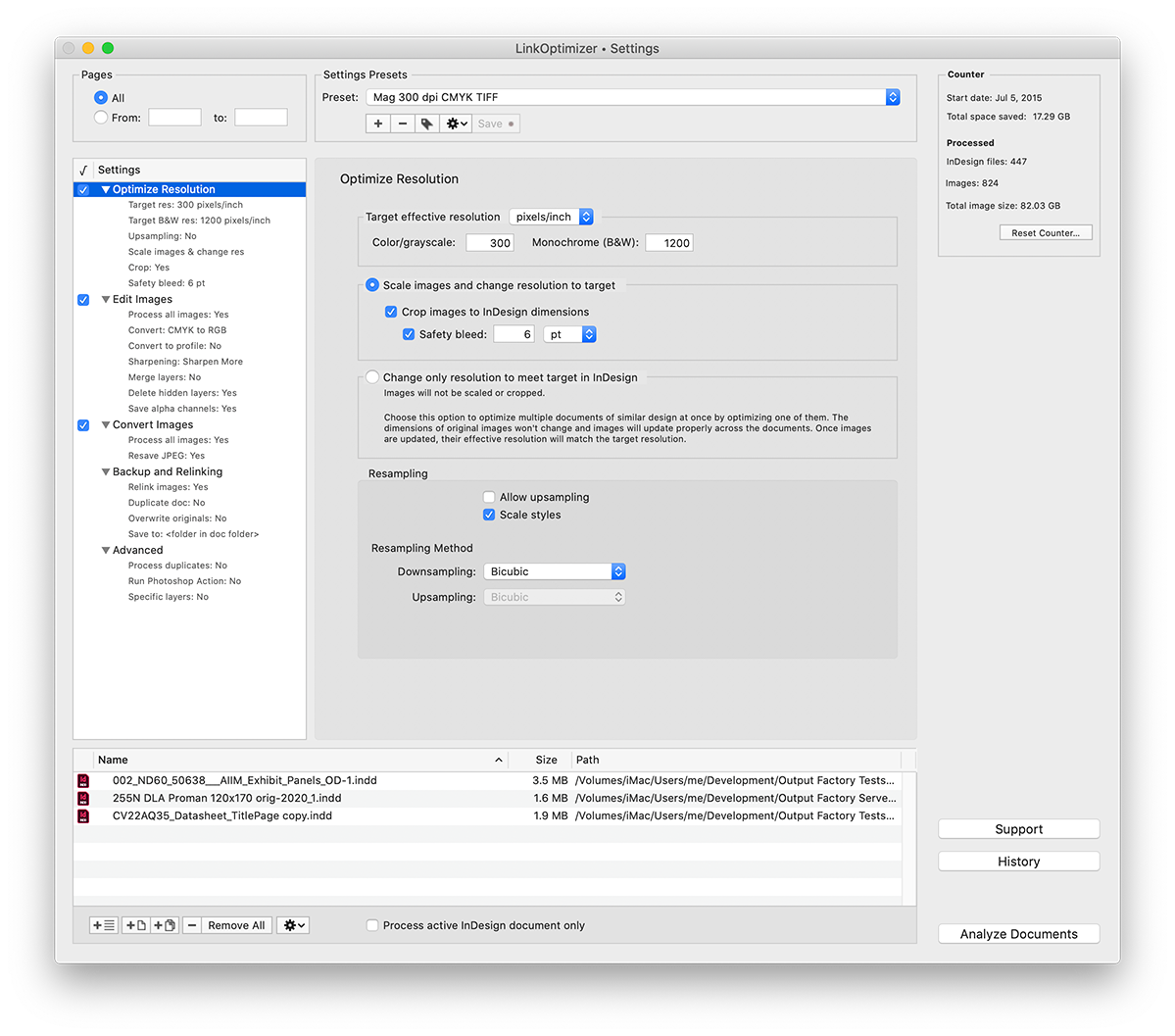
Zevrix Solutions, a developer of automation solutions for Adobe InDesign, PDF workflows and Microsoft Office, announces today a holiday sale until December 31. The company offers a 50% discount on all software including upgrades. Zevrix products include plug-ins for InDesign that automate document exporting and printing, optimize linked image size and color, and simplify file packaging. The company's apps also automate PDF printing and conversion, file delivery, and output from Microsoft Office.
Toronto, Canada - Zevrix Solutions, a developer of automation solutions for Adobe InDesign, PDF workflows and Microsoft Office, announces today a holiday sale until December 31. Zevrix offers a 50% discount on everything in its online store including product upgrades. The company's products include several popular plug-ins for Adobe InDesign, which save users time and production costs through document output automation, file conversion for web and mobile devices, elimination of repetitive tasks, and file size reduction.
"Zevrix software its the best kept secret out there for the Graphic Design industry," says Darren Rath of eponymous design studio in Melbourne, Australia. "It rocks and continues to impress and improve at a scary rate... Thanks to Zevrix products, every piece of artwork that flies out of here requires no intervention by the prepress departments."
The following products are available on sale:
* LinkOptimizer for InDesign, a plug-in that converts file formats, reduces link size by eliminating excess image data, and performs essential picture adjustments. LinkOptimizer lets users save gigabytes of disk space as well as hours - and even days - of optimizing image links manually.
* Output Factory for InDesign, a document printing and exporting automation solution that offers batch output, layer versioning, export as single pages, preflighting, variable file names, and more. The app supports output to PDF, print, EPUB, TIFF and other formats.
* Package Central for InDesign, a server-grade tool that automates packaging of InDesign documents from hot folders. The app automatically collects InDesign documents along with their links and fonts with the ability to include PDF and IDML files, send email notifications, assign variable folder names and more.
Zevrix tools for PDF workflows let users batch print PDF files and automate preflighting, color conversion and format exchange. The company also offers batch output solutions for Microsoft Office, file delivery automation tools, and quality control software for images and vector graphic files.
Pricing and Availability:
Zevrix software can be purchased at 50% off until December 31, 2019 from Zevrix website. For details, please visit the website. Product trials are also available for download. All Zevrix products require macOS 10.8-10.15; InDesign and Illustrator solutions require Adobe Creative Cloud CS5-2021 software.
Zevrix Solutions: https://zevrix.com
Download: https://zevrix.com/download
Purchase: https://zevrix.com/store
Screenshot: https://zevrix.com/wp-content/uploads/2020/08/lo5-win-res-tr.png
Located in Toronto, Canada, Zevrix Solutions provides automation and productivity solutions for Adobe Creative Cloud and Creative Suite software, PDF workflows, graphic file diagnostics and Microsoft Office output on Mac OS. Zevrix is dedicated to help professionals increase their profits through automating everyday tasks, producing error-free documents, saving disk space and cutting production costs. For more information, visit their website. Copyright (C) 2020 Zevrix Solutions. All Rights Reserved. Other trademarks and registered trademarks may be the property of their respective owners.
*******
Link To Article: https://prmac.com/release-id-84269.htm
*******
---------------------------------------------------------------------------------
Note that you can alter delivered distributions at any time.
Login to your account on prMac to alter your channel selection, or to opt-out at any time.
Subscribe to:
Posts (Atom)