A new article has been published at prMac.
Movie Genius - Popular Movie Recommendation App Makes All Genres Free - Published on 05/19/15
Renniksoft has announced Movie Genius 4.9, their popular movie recommendation app for iOS devices. With 20 film genres to choose from, Movie Genius offers intelligent recommendations based on matching themes, plots, and audience opinion. Users can view trailers, cast and crew lists, biographies, link to IMDb and more. Movie Genius is supported by a database of tens of thousands of films and syncs between devices using iCloud. Version 4.9 includes many new features to their Free Version.
Bath, United Kingdom - Renniksoft has announced Movie Genius 4.9, their popular movie recommendation app for iOS devices. Movie Genius offers intelligent recommendations based on matching themes, plots, and audience opinion. Users can view trailers, cast and crew lists, biographies, Rotten Tomatoes reviews, link to IMDb and more. Movie Genius is supported by a database of tens of thousands of films and now syncs between devices using iCloud. Preferences such as saved lists, personal ratings, movie recommendations, and settings can be saved and transferred using iCloud.
With a unique movie matching algorithm that provides intelligent recommendations based on matching themes, plots, and audience opinion, Movie Genius users are prompted to rate films and indicate whether they liked it, didn't like it, or just want to ignore its listing. Over a quarter million users have received more realistic recommendations and discovered new movies they might enjoy using Movie Genius.
"The way (Movie Genius) works is kinda like Netflix in a way," says Steve and Raju of EPN.TV. "You go through lists of movie categories and specific titles and you say whether you like it or you don't like it or if you've never seen it, you just ignore it. And based on that, over time, the app will recommend movies of things you might see." (12 June 2012)
With Movie Genius, users can search upcoming movies, movies now playing in theaters, popular movies, and top rated movies. Listings in Movie Genius can include cast and crew lists, film overviews, biographies, filmographies, photos, movie trailers, critic reviews, Rotten Tomatoes ratings and an IMDb link. Movie Genius also provides the film's MPAA age rating, its release date, duration, language, ratings by audiences and critics, votes, and where a film can be found available for streaming.
Best of all, Movie Genius has updated its app to now include all 20 movie genres within the free version, where only 8 genres were previously available.
Move Genius takes the app update one step further by adding a feature that has been requested and in demand by many avid Movie Genius users, which is the ability to synchronise using iCloud. Users can now handle Movie Genius cross-platform on iOS devices without skipping a beat. Preferences such as saved lists, personal ratings, movie recommendations, and settings are saved and transfered using iCloud.
Feature Highlights:
* Intelligent recommendations based on matching themes, plots and audience opinion
* Search for favorite movies to rate and find similar recommendations
* 20 movie genres to choose from
* View cast and crew lists, pictures, biographies and filmographies
* View trailers and clips from movie with one tap
* Rotten Tomatoes integration to see critics and audience scores immediately
* All movies link to IMDb pages
* List of places a film can be found available for streaming
* Filter out movies based on MPAA age ratings
* Recommendations are sorted by rating (highest first)
* Sync between all devices using iCloud
* Share film recommendations via Facebook, Twitter, or email
* Ability to rent or purchase a movie from iTunes
* Movie News bulletins
* Engaging high quality graphics
* No ads with in-app purchase
* Intuitive User Interface
* Improved interface response time
Described as a "very cool app indeed" by the Daily App Show (19 Jul 2011), Movie Genius offers a robust search function to help users find their favorite movies to rate by searching via title or actor. Additional recommendations can be received after the user determines a rating and badges display the number of movies that Movie Genius recommends. Exploring new movies is just as easy, as search results are displayed by highest rating first. Users can also change search displays to suit preferences.
Further filters include the ability to customize the Genius screens and determine the movie recommendations based on the MPAA ratings. Additionally, users are informed whether a film is available for streaming on Netflix, Amazon, Hulu Plus, Crackle, YouTube Movies, EPIX, XFINITY Streampix, SnagFilms, Fandor, Google play, Vudu, Sony or iTunes.
James Horton of the Daily App Show (19 Aug 2014)
"This is great because now that I'm liking all of these (movies), when I (select) different genres, it's going to actually help me out."
A fully interactive app, Movie Genius allows users to share their recommendations via Twitter, Facebook, and email. Users also have the ability of saving the suggested movie to create a customized list of films they would like to see. Movies can be added to several lists and renamed in any way.
"We are thrilled to introduce some really cool upgrades to the already popular Movie Genius by offering all movie genres free to anyone using the app!," says Clive Skinner, founder of Renniksoft. "Through listening to our users, we've even integrated iCloud for a truly mobile and streamlined experience."
Languages:
* English, French, Spanish
Device Requirements:
* iPhone, iPad, and iPod touch
* Requires iOS 8.0 or later
* Optimized for iPhone 5, 6/6 Plus
* 17.4 MB
Pricing and Availability:
Movie Genius 4.9 is free and available worldwide exclusively through the App Store in the Entertainment category. An ad-free version that removes ads is available for an in-app purchase of $2.99 (USD).
Movie Genius 4.9: http://renniksoft.com
Purchase and Download: https://itunes.apple.com/app/movie-genius-film-movies-streaming/id461356526
Media Assets: http://www.renniksoft.com/media.html
Based in the historic city of Bath in the United Kingdom, Renniksoft was founded in 2011 to develop innovative and original apps exclusively for the Apple iPhone, iPad and iPod touch devices. Copyright (C) 2015 Renniksoft. All Rights Reserved. Apple, the Apple logo, iPhone, iPad and iPod are registered trademarks of Apple Inc. in the U.S. and/or other countries.
*******
Link To Article: http://prmac.com/release-id-74970.htm
*******
---------------------------------------------------------------------------------
Note that you can alter delivered distributions at any time.
Login to your account on prMac to alter your channel selection, or to opt-out at any time.

Fresh Air - Real Time Air Quality Index for iPhone and Apple Watch
A new article has been published at prMac.
Fresh Air - Real Time Air Quality Index for iPhone and Apple Watch - Published on 05/19/15
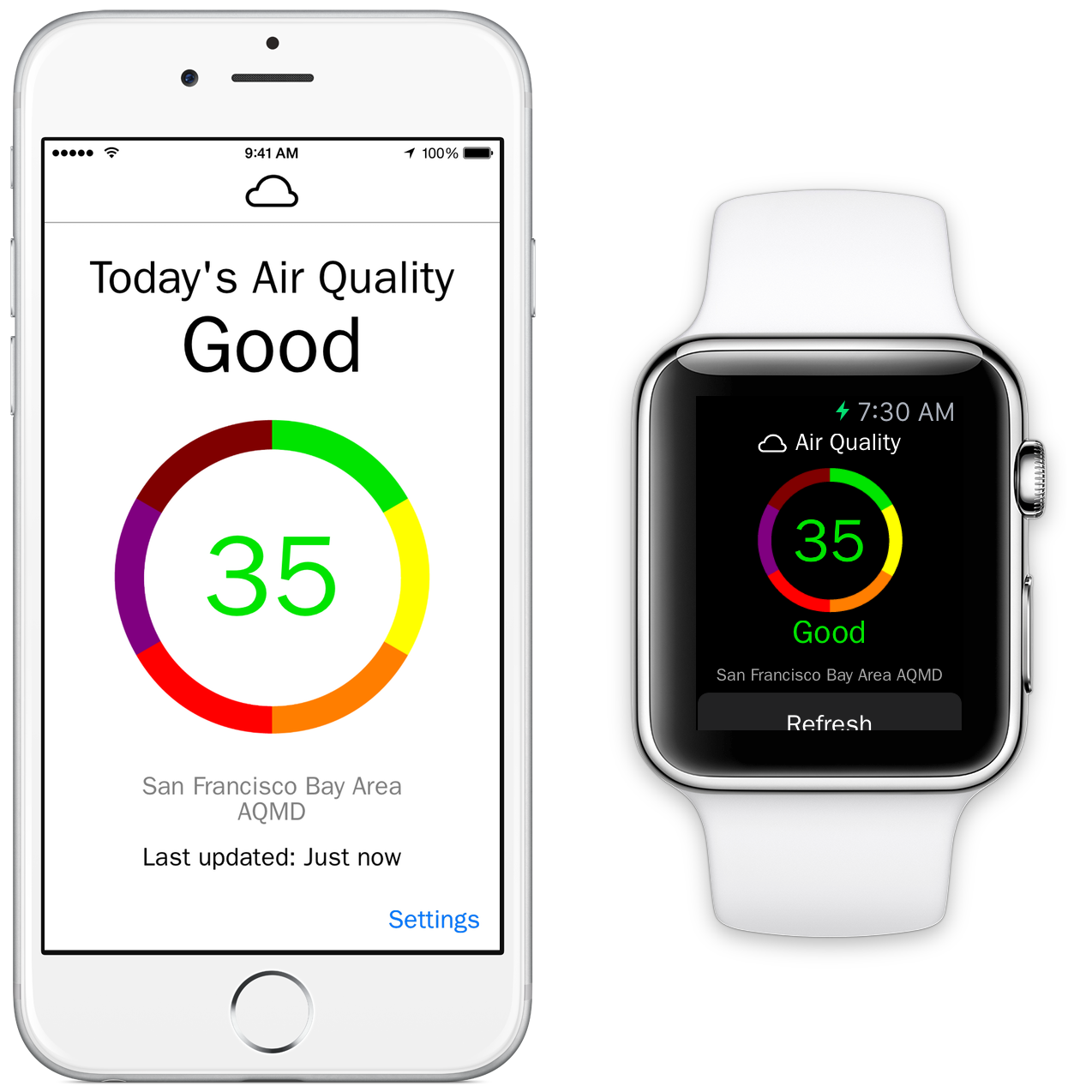
Raleigh based 'e design' has released Fresh Air - Air Quality Index 1.0, the new fitness app for the iPhone and Apple Watch. Fresh Air is a unique Apple Watch app. Providing anyone with real-time air quality information with just a glance, the app can display the exact air quality for the current location. If the air quality worsens, Fresh Air can immediately notify users via the iPhone or Apple Watch. They can then tap on the device's screen to view more information.
Raleigh, North Carolina - 'e design' has announced the release of Fresh Air - Air Quality Index 1.0, their newest app developed exclusively for the iPhone and Apple Watch. Providing anyone with real-time air quality information, Fresh Air displays at-a-glance the exact air quality for the current location. If the air quality worsens, Fresh Air can notify users instantly on their iPhone or Apple Watch.
Fresh Air looks awesome on the Apple Watch. Simply swipe up on the Watch screen to display the Glance with the current air quality category or launch the Apple Watch app to get more detailed information. Fresh Air delivers information about current air quality conditions in an easy to view and understand format, using the EPA's color-coded Air Quality Index (AQI). Granular notifications allow users to receive notifications when the air quality category reaches a certain level.
"For people with asthma and COPD, poor air quality can make symptoms like coughing and wheezing worse. The EPA developed the AQI to report levels of ozone, particle pollution and other common air pollutants on the same scale." said Sal Conigliaro, co-owner of 'e design'. "The higher the AQI rating, the greater the impact on the public's health. The AQI is divided into six color-coded categories (green, yellow, orange, red, purple, maroon), which are intended to convey information for the ratings, (Good, Moderate, Unhealthy for Sensitive Groups, Unhealthy, Very Unhealthy, and Hazardous), about how air quality within each category relates to public health."
Feature Highlights:
* Know the air quality for the current location at a glance
* Air quality is updated twice hourly
* Check the air quality for the current location or check another location via zip code
* Make informed decisions about planned outdoor activities
* Receive notifications on the iPhone or Apple Watch if the air quality worsens
* Swipe up on the Apple Watch screen to view the current air quality
* View the air quality without an Apple Watch by using an iPhone or iPod touch
Even users without an Apple Watch can make use of the information supplied by Fresh Air. The AQI is quickly accessed from the iPhone or iPod touch screen, and it can be quickly refreshed with a simple tap of the finger. Users can set the iPhone app to supply the AQI information for their current location or view the information for other locations by simply entering a zip code in the settings screen of the app.
"Even healthy adults who are active outdoors are at risk from ozone, which can make it more difficult to breathe deeply," continued Sal. "Fresh Air instantly reports the current air quality for a user's location, so a quick swipe up on the screen of the Apple Watch allows users to view the current air quality around them. They can then use that information to make an informed decision about their planned outside activities for the day."
Device Requirements:
* iPhone, iPad, iPod touch and Apple Watch
* Optimized for iPhone 5, iPhone 6, and iPhone 6 Plus
* Requires iOS 8.2 or later
* 10.2 MB
Pricing and Availability:
Fresh Air - Air Quality Index 1.0 is only $0.99 USD (or equivalent amount in other currencies) and currently available in the U.S. App Store in the Health and Fitness category. Fresh Air is currently only available in the App Store in the United States and is expanding to the United Kingdom soon. Promo codes are available to members of the press.
e design: http://www.erinedesign.com
Fresh Air 1.0: http://fresh-air-app.com
Purchase and Download: https://itunes.apple.com/app/fresh-air-air-quality-index/id983137088
Promotional Image: http://fresh-air-app.com/promo_shot.png
App Icon: http://a2.mzstatic.com/us/r30/Purple3/v4/c8/f8/cb/c8f8cb49-bb08-cf2c-5852-6680e79b4abf/icon175x175.png
Press Kit (ZIP): http://fresh-air-app.com/Press_Kit_Images.zip
'e design' is a Raleigh-based creative agency established in 1997 and founded by Erin Conigliaro and Sal Conigliaro. The company specializes in creating apps for a wide variety of businesses, including the SNL 40th anniversary app for NBC, Yood! for Kevin Jonas, and Fresh Air, the first Apple Watch app that provides real-time, location-based air quality information. All Material and Software (C) Copyright 2015 e design. All Rights Reserved. Apple, the Apple logo, iPhone, iPod and iPad are registered trademarks of Apple Inc. in the U.S. and/or other countries. Other trademarks and registered trademarks may be the property of their respective owners.
*******
Link To Article: http://prmac.com/release-id-74969.htm
*******
---------------------------------------------------------------------------------
Note that you can alter delivered distributions at any time.
Login to your account on prMac to alter your channel selection, or to opt-out at any time.
Fresh Air - Real Time Air Quality Index for iPhone and Apple Watch - Published on 05/19/15
Raleigh based 'e design' has released Fresh Air - Air Quality Index 1.0, the new fitness app for the iPhone and Apple Watch. Fresh Air is a unique Apple Watch app. Providing anyone with real-time air quality information with just a glance, the app can display the exact air quality for the current location. If the air quality worsens, Fresh Air can immediately notify users via the iPhone or Apple Watch. They can then tap on the device's screen to view more information.
Raleigh, North Carolina - 'e design' has announced the release of Fresh Air - Air Quality Index 1.0, their newest app developed exclusively for the iPhone and Apple Watch. Providing anyone with real-time air quality information, Fresh Air displays at-a-glance the exact air quality for the current location. If the air quality worsens, Fresh Air can notify users instantly on their iPhone or Apple Watch.
Fresh Air looks awesome on the Apple Watch. Simply swipe up on the Watch screen to display the Glance with the current air quality category or launch the Apple Watch app to get more detailed information. Fresh Air delivers information about current air quality conditions in an easy to view and understand format, using the EPA's color-coded Air Quality Index (AQI). Granular notifications allow users to receive notifications when the air quality category reaches a certain level.
"For people with asthma and COPD, poor air quality can make symptoms like coughing and wheezing worse. The EPA developed the AQI to report levels of ozone, particle pollution and other common air pollutants on the same scale." said Sal Conigliaro, co-owner of 'e design'. "The higher the AQI rating, the greater the impact on the public's health. The AQI is divided into six color-coded categories (green, yellow, orange, red, purple, maroon), which are intended to convey information for the ratings, (Good, Moderate, Unhealthy for Sensitive Groups, Unhealthy, Very Unhealthy, and Hazardous), about how air quality within each category relates to public health."
Feature Highlights:
* Know the air quality for the current location at a glance
* Air quality is updated twice hourly
* Check the air quality for the current location or check another location via zip code
* Make informed decisions about planned outdoor activities
* Receive notifications on the iPhone or Apple Watch if the air quality worsens
* Swipe up on the Apple Watch screen to view the current air quality
* View the air quality without an Apple Watch by using an iPhone or iPod touch
Even users without an Apple Watch can make use of the information supplied by Fresh Air. The AQI is quickly accessed from the iPhone or iPod touch screen, and it can be quickly refreshed with a simple tap of the finger. Users can set the iPhone app to supply the AQI information for their current location or view the information for other locations by simply entering a zip code in the settings screen of the app.
"Even healthy adults who are active outdoors are at risk from ozone, which can make it more difficult to breathe deeply," continued Sal. "Fresh Air instantly reports the current air quality for a user's location, so a quick swipe up on the screen of the Apple Watch allows users to view the current air quality around them. They can then use that information to make an informed decision about their planned outside activities for the day."
Device Requirements:
* iPhone, iPad, iPod touch and Apple Watch
* Optimized for iPhone 5, iPhone 6, and iPhone 6 Plus
* Requires iOS 8.2 or later
* 10.2 MB
Pricing and Availability:
Fresh Air - Air Quality Index 1.0 is only $0.99 USD (or equivalent amount in other currencies) and currently available in the U.S. App Store in the Health and Fitness category. Fresh Air is currently only available in the App Store in the United States and is expanding to the United Kingdom soon. Promo codes are available to members of the press.
e design: http://www.erinedesign.com
Fresh Air 1.0: http://fresh-air-app.com
Purchase and Download: https://itunes.apple.com/app/fresh-air-air-quality-index/id983137088
Promotional Image: http://fresh-air-app.com/promo_shot.png
App Icon: http://a2.mzstatic.com/us/r30/Purple3/v4/c8/f8/cb/c8f8cb49-bb08-cf2c-5852-6680e79b4abf/icon175x175.png

Press Kit (ZIP): http://fresh-air-app.com/Press_Kit_Images.zip
'e design' is a Raleigh-based creative agency established in 1997 and founded by Erin Conigliaro and Sal Conigliaro. The company specializes in creating apps for a wide variety of businesses, including the SNL 40th anniversary app for NBC, Yood! for Kevin Jonas, and Fresh Air, the first Apple Watch app that provides real-time, location-based air quality information. All Material and Software (C) Copyright 2015 e design. All Rights Reserved. Apple, the Apple logo, iPhone, iPod and iPad are registered trademarks of Apple Inc. in the U.S. and/or other countries. Other trademarks and registered trademarks may be the property of their respective owners.
*******
Link To Article: http://prmac.com/release-id-74969.htm
*******
---------------------------------------------------------------------------------
Note that you can alter delivered distributions at any time.
Login to your account on prMac to alter your channel selection, or to opt-out at any time.
100 Essential Apple Watch Tips eBook Released
A new article has been published at prMac.
100 Essential Apple Watch Tips eBook Released - Published on 05/19/15
UK based Stopframe has announced 100 Essential Apple Watch, a brand new eBook available in the iBookstore that reveals a wealth of tips and tutorials for Apple Watch. Priced at just $1.99, it's jam-packed with 100 helpful tips and tricks that help you to unleash the power of Apple Watch, each with a helpful image and written with concise text. You'll discover everything you need to know about the Apple Watch operating system, its built-in apps, customizations, accessibility features and more.
Bournemouth, United Kingdom - Stopframe has announced the release of 100 Essential Apple Watch Tips, a brand new eBook available in the iBookstore that reveals a wealth of tips and tutorials for Apple Watch. This iBook is jam-packed with 100 helpful tips and tricks that help you to unleash the power of Apple Watch, each with a helpful image and written with concise text. You'll discover everything you need to know about the Apple Watch operating system, its built-in apps, customizations, accessibility features and more.
Apple Watch is an incredible piece of technology that's packed with amazing features, and made from the most beautiful elements known to man. It also comes with a brand new operating system and the Digital Crown, which means you'll need to learn new techniques and tricks before you can really make the most of it. 100 Essential Apple Watch Tips is here to help. Written by best-selling technology author T A Rudderham, and brought to you by Stopframe, 100 Essential Apple Watch Tips is an essential eBook that's bursting at its digital seams with knowledge and insight.
Available on iPhone, iPad, iPod touch, and Mac:
* iOS device with iBooks 1.5 or later and iOS 4.3.3 or later
* Mac with iBooks 1.0 or later and OS X 10.9 or later
* Print Length: 300 Pages
Priced just $1.99/GBP 2.49, 100 Essential Apple Watch Tips is available from the iBookstore. Concise and free from technical jargon, it enables you to discover new features about your Apple Watch in a short amount of time. It's also packed with large color images that help you to visually follow its tips and tricks.
Stopframe: http://www.stopframe.co.uk
100 Essential Apple Watch Tips: https://itunes.apple.com/book/100-essential-apple-watch/id992956202
Image (Book Cover): http://www.stopframe.co.uk/files/100_Essential_Apple_Watch_Tips_Cover.jpg
Press Kit (zip): http://www.stopframe.co.uk/files/100_essential_apple_watch_tips_screens.zip
Launched in 2013, Stopframe publishes eBooks and interactive apps that teach users how to use their iOS devices. Stopframe's most notable books to date include iPad Air Guide, The Complete Guide to iOS 7 and iPhone 6 Guide. Copyright (C) 2015 Stopframe. All Rights Reserved. Apple, the Apple logo, iPhone, iPod and iPad are registered trademarks of Apple Inc. in the U.S. and/or other countries. Other trademarks and registered trademarks may be the property of their respective owners.
*******
Link To Article: http://prmac.com/release-id-74968.htm
*******
---------------------------------------------------------------------------------
Note that you can alter delivered distributions at any time.
Login to your account on prMac to alter your channel selection, or to opt-out at any time.
100 Essential Apple Watch Tips eBook Released - Published on 05/19/15
UK based Stopframe has announced 100 Essential Apple Watch, a brand new eBook available in the iBookstore that reveals a wealth of tips and tutorials for Apple Watch. Priced at just $1.99, it's jam-packed with 100 helpful tips and tricks that help you to unleash the power of Apple Watch, each with a helpful image and written with concise text. You'll discover everything you need to know about the Apple Watch operating system, its built-in apps, customizations, accessibility features and more.
Bournemouth, United Kingdom - Stopframe has announced the release of 100 Essential Apple Watch Tips, a brand new eBook available in the iBookstore that reveals a wealth of tips and tutorials for Apple Watch. This iBook is jam-packed with 100 helpful tips and tricks that help you to unleash the power of Apple Watch, each with a helpful image and written with concise text. You'll discover everything you need to know about the Apple Watch operating system, its built-in apps, customizations, accessibility features and more.
Apple Watch is an incredible piece of technology that's packed with amazing features, and made from the most beautiful elements known to man. It also comes with a brand new operating system and the Digital Crown, which means you'll need to learn new techniques and tricks before you can really make the most of it. 100 Essential Apple Watch Tips is here to help. Written by best-selling technology author T A Rudderham, and brought to you by Stopframe, 100 Essential Apple Watch Tips is an essential eBook that's bursting at its digital seams with knowledge and insight.
Available on iPhone, iPad, iPod touch, and Mac:
* iOS device with iBooks 1.5 or later and iOS 4.3.3 or later
* Mac with iBooks 1.0 or later and OS X 10.9 or later
* Print Length: 300 Pages
Priced just $1.99/GBP 2.49, 100 Essential Apple Watch Tips is available from the iBookstore. Concise and free from technical jargon, it enables you to discover new features about your Apple Watch in a short amount of time. It's also packed with large color images that help you to visually follow its tips and tricks.
Stopframe: http://www.stopframe.co.uk
100 Essential Apple Watch Tips: https://itunes.apple.com/book/100-essential-apple-watch/id992956202
Image (Book Cover): http://www.stopframe.co.uk/files/100_Essential_Apple_Watch_Tips_Cover.jpg

Press Kit (zip): http://www.stopframe.co.uk/files/100_essential_apple_watch_tips_screens.zip
Launched in 2013, Stopframe publishes eBooks and interactive apps that teach users how to use their iOS devices. Stopframe's most notable books to date include iPad Air Guide, The Complete Guide to iOS 7 and iPhone 6 Guide. Copyright (C) 2015 Stopframe. All Rights Reserved. Apple, the Apple logo, iPhone, iPod and iPad are registered trademarks of Apple Inc. in the U.S. and/or other countries. Other trademarks and registered trademarks may be the property of their respective owners.
*******
Link To Article: http://prmac.com/release-id-74968.htm
*******
---------------------------------------------------------------------------------
Note that you can alter delivered distributions at any time.
Login to your account on prMac to alter your channel selection, or to opt-out at any time.
Power APP releases Password Keyboard 1.0 to handle Logins and Passwords
A new article has been published at prMac.
Power APP releases Password Keyboard 1.0 to handle Logins and Passwords - Published on 05/19/15
Power APP has released Password Keyboard 1.0.0, their new password utility developed for iPhone, iPad and iPod touch devices. Password Keyboard is aimed to simplify handling passwords and logins by using a keyboard that is using links to login, the login itself and the needed password instead of letters. The security settings go as far as to offer self-destruction and deleting of all settings after entering the wrong password a set number of times.
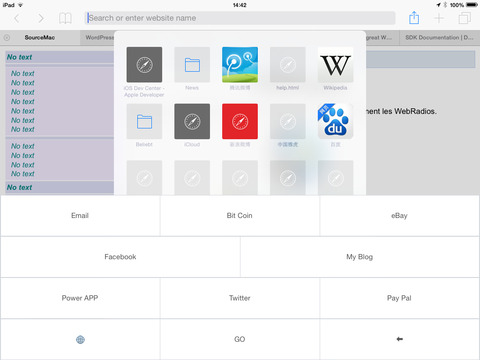
Pfaeffikon, Switzerland - Power APP has announced the release of Password Keyboard 1.0.0, their new password utility developed for iPhone, iPad and iPod touch devices. Password Keyboard is aimed to simplify handling passwords and logins by using a keyboard that is using links to login, the login itself and the needed password instead of letters.
The procedure to use the app is simple: after tapping the link key the homepage with the login is opened. Other keys provide the login itself as well as the password. Login to any homepage therefore can be done with just a few taps from within the app. The app itself is protected by a master password or a fingerprint that can be used alternatively. The security settings go as far as to offer self-destruction and deleting of all settings after entering the wrong password a set number of times.
"Entering passwords on a mobile is a real hassle thanks to the use of special characters that usually needs switching to a different keyboards to enter them," explains Christian Schaffner, Power APPs General Manager, the reason to create this app. "The more secure a password is, the more often the keyboard needs to be switched. While this is not a problem using a normal keyboard on a PC or a laptop, it can be a real hassle on a mobile device for the reason mentioned above. I wanted an app that takes care of all this while maintaining security at the same time. Password Keyboard is our solution that takes care of all this."
Device Requirements:
* iPhone, iPad, and iPod touch
* Requires iOS 7.0 or later
* 4.3 MB
Pricing and Availability:
Password Keyboard 1.0.0 is only $0.99 USD (or equivalent amount in other currencies) and available worldwide exclusively through the App Store in the Utilities category.
Power App: http://www.powerapp.ch
Password Keyboard 1.0.0: http://powerapp.ch/product/password-keyboard/
Purchase and Download: https://itunes.apple.com/app/password-keyboard/id923674387
Screenshot: http://a2.mzstatic.com/us/r30/Purple5/v4/df/c2/97/dfc29707-8fb3-7a86-b4dc-898c47811cd0/screen480x480.jpeg
App Icon: http://a3.mzstatic.com/us/r30/Purple1/v4/2a/e1/b3/2ae1b35d-e4fd-c3c7-840e-05e1d9ecde8b/icon175x175.png
Based in Pfaeffikon, Switzerland, Power App AG is an independent company founded in 2010 by Christian Schaffner. Power App's main focus is developing powerful, versatile applications for the Mac and iOS platforms. Copyright (C) 2010-2015 Power App AG. All Rights Reserved. Apple, the Apple logo, Mac, iPhone, iPod, and iPad are registered trademarks of Apple Inc. in the U.S. and/or other countries. Other trademarks and registered trademarks may be the property of their respective owners.
*******
Link To Article: http://prmac.com/release-id-74967.htm
*******
---------------------------------------------------------------------------------
Note that you can alter delivered distributions at any time.
Login to your account on prMac to alter your channel selection, or to opt-out at any time.
Power APP releases Password Keyboard 1.0 to handle Logins and Passwords - Published on 05/19/15
Power APP has released Password Keyboard 1.0.0, their new password utility developed for iPhone, iPad and iPod touch devices. Password Keyboard is aimed to simplify handling passwords and logins by using a keyboard that is using links to login, the login itself and the needed password instead of letters. The security settings go as far as to offer self-destruction and deleting of all settings after entering the wrong password a set number of times.
Pfaeffikon, Switzerland - Power APP has announced the release of Password Keyboard 1.0.0, their new password utility developed for iPhone, iPad and iPod touch devices. Password Keyboard is aimed to simplify handling passwords and logins by using a keyboard that is using links to login, the login itself and the needed password instead of letters.
The procedure to use the app is simple: after tapping the link key the homepage with the login is opened. Other keys provide the login itself as well as the password. Login to any homepage therefore can be done with just a few taps from within the app. The app itself is protected by a master password or a fingerprint that can be used alternatively. The security settings go as far as to offer self-destruction and deleting of all settings after entering the wrong password a set number of times.
"Entering passwords on a mobile is a real hassle thanks to the use of special characters that usually needs switching to a different keyboards to enter them," explains Christian Schaffner, Power APPs General Manager, the reason to create this app. "The more secure a password is, the more often the keyboard needs to be switched. While this is not a problem using a normal keyboard on a PC or a laptop, it can be a real hassle on a mobile device for the reason mentioned above. I wanted an app that takes care of all this while maintaining security at the same time. Password Keyboard is our solution that takes care of all this."
Device Requirements:
* iPhone, iPad, and iPod touch
* Requires iOS 7.0 or later
* 4.3 MB
Pricing and Availability:
Password Keyboard 1.0.0 is only $0.99 USD (or equivalent amount in other currencies) and available worldwide exclusively through the App Store in the Utilities category.
Power App: http://www.powerapp.ch
Password Keyboard 1.0.0: http://powerapp.ch/product/password-keyboard/
Purchase and Download: https://itunes.apple.com/app/password-keyboard/id923674387
Screenshot: http://a2.mzstatic.com/us/r30/Purple5/v4/df/c2/97/dfc29707-8fb3-7a86-b4dc-898c47811cd0/screen480x480.jpeg
App Icon: http://a3.mzstatic.com/us/r30/Purple1/v4/2a/e1/b3/2ae1b35d-e4fd-c3c7-840e-05e1d9ecde8b/icon175x175.png
Based in Pfaeffikon, Switzerland, Power App AG is an independent company founded in 2010 by Christian Schaffner. Power App's main focus is developing powerful, versatile applications for the Mac and iOS platforms. Copyright (C) 2010-2015 Power App AG. All Rights Reserved. Apple, the Apple logo, Mac, iPhone, iPod, and iPad are registered trademarks of Apple Inc. in the U.S. and/or other countries. Other trademarks and registered trademarks may be the property of their respective owners.
*******
Link To Article: http://prmac.com/release-id-74967.htm
*******
---------------------------------------------------------------------------------
Note that you can alter delivered distributions at any time.
Login to your account on prMac to alter your channel selection, or to opt-out at any time.
Epic Space Game, StarDrive 2, Hits The Mac App Store
A new article has been published at prMac.
Epic Space Game, StarDrive 2, Hits The Mac App Store - Published on 05/18/15
MacPlay today announced that the best-selling 4X strategy game, StarDrive 2 is now available worldwide on the Apple's Mac App Store. Developed by Zero Sum Games and published by Iceberg Interactive, players in StarDrive 2 will reach into the unexplored regions of space fully loaded with options to engage in massive real-time space combat or enter into the all new ground combat, partner with friendly factions, research new technologies, design new ships, and much more.
Austin, Texas - MacPlay today announced that the best-selling 4X strategy game, StarDrive 2 is now available worldwide on the Apple's Mac App Store. Developed by Zero Sum Games and published by Iceberg Interactive, players in StarDrive 2 will reach into the unexplored regions of space fully loaded with options to engage in massive real-time space combat or enter into the all new ground combat, partner with friendly factions, research new technologies, design new ships, and much more. Built on the Unity Engine, StarDrive 2 is highlighted by its impressive new levels of graphic polish and detail, streamlined interfaces, and intense, sophisticated 4X gameplay.
StarDrive 2 is a turn-based 4X strategy that builds on the premise of the popular original game, StarDrive, with the goal of building an empire to span the stars. Players will explore a vibrant galaxy filled with danger and intrigue in a deep turn-based strategy layer. Fans will design custom spaceships and deploy them into real-time battles with spectacular graphics and effects, and they'll hire heroes to conquer alien civilizations in turn-based tactical ground-combat mode. StarDrive 2 is the 4X game that fans have been waiting years for.
"Creating StarDrive 2 on the Unity engine has been a rich, rewarding experience, and now that it's complete, I am totally excited for fans of the franchise and 4X genre to dive in," said Daniel DiCicco, Zero Sum Games. "There is so much more here that 4X gamers will enjoy: The ship design offers a better, faster interface, the ground battles add diversity, new alien races add complexity, and the Unity Engine shines in the background all the while."
StarDrive 2 Gameplay Features:
* Turn-based, Real-time: Players build a space empire in a turn-based environment, but experience battles in real-time
* Nine Alien Races: Experience a multitude of pirate factions, handle interspecies relations, conduct diplomacy and espionage, and make alien friends or enemies
* Ship Design: Build ships in the Custom Ship Design Mode and take them into real-time battles featuring stunning visuals and sound effects
* Heroes: Gamers can hire unique heroes to govern their worlds or to command their mighty fleets in battle
* Expansive Universe and Lore: Populate the universe and colonize planets, moons, asteroid belts, gas giants and more, and discover the extensive, unique lore by encountering dozens of anomalies, heroes, and galactic mysteries that will ensure no two games will ever play the same
* High Tech: Gamers can research hundreds of technologies, including technologies that are unique to their race, and unlock even more through in-game events and galactic exploration
* Battle Arena Mode: Enter Battle Arena mode for quick-fix battles against cunning AI opponents
System Requirements:
* OS: Mac OS X 10.8 or higher
* Processor: 2.5 Ghz Intel Core 2
* Memory: 4 GB RAM
* Graphics: 1 GB nVidia Geforce GT460 or equivalent, 500 MB ATI HD4850 or equivalent
* Hard Drive: 3 GB available space
* Additional Notes: Minimum Resolution: 1366 x 768
Pricing And Availability:
StarDrive 2 is currently available worldwide on the Mac App Store in the Games category for $29.99 (USD).
MacPlay: http://www.macplay.com
StarDrive 2 (v1.0.3): https://itunes.apple.com/app/stardrive-2/id988816092
Screenshot: http://a5.mzstatic.com/us/r30/Purple5/v4/30/ef/5a/30ef5aeb-8481-dd86-9035-d6fa7f60ca3f/screen800x500.jpeg
Application Icon: http://a4.mzstatic.com/us/r30/Purple1/v4/c9/72/de/c972de02-8029-079e-ba0f-9d628fe8d917/icon128-2x.png
MacPlay's 3.0 mission is to provide publishers and developers an exciting and profitable way of distributing their games on the Mac App Store and other platforms. All Material and Software (C) Copyright 2015 MacPlay. All Rights Reserved. Apple, the Apple logo, iPhone, iPod and iPad are registered trademarks of Apple Inc. in the U.S. and/or other countries. Other trademarks and registered trademarks may be the property of their respective owners.
*******
Link To Article: http://prmac.com/release-id-75011.htm
*******
---------------------------------------------------------------------------------
Note that you can alter delivered distributions at any time.
Login to your account on prMac to alter your channel selection, or to opt-out at any time.
Epic Space Game, StarDrive 2, Hits The Mac App Store - Published on 05/18/15
MacPlay today announced that the best-selling 4X strategy game, StarDrive 2 is now available worldwide on the Apple's Mac App Store. Developed by Zero Sum Games and published by Iceberg Interactive, players in StarDrive 2 will reach into the unexplored regions of space fully loaded with options to engage in massive real-time space combat or enter into the all new ground combat, partner with friendly factions, research new technologies, design new ships, and much more.
Austin, Texas - MacPlay today announced that the best-selling 4X strategy game, StarDrive 2 is now available worldwide on the Apple's Mac App Store. Developed by Zero Sum Games and published by Iceberg Interactive, players in StarDrive 2 will reach into the unexplored regions of space fully loaded with options to engage in massive real-time space combat or enter into the all new ground combat, partner with friendly factions, research new technologies, design new ships, and much more. Built on the Unity Engine, StarDrive 2 is highlighted by its impressive new levels of graphic polish and detail, streamlined interfaces, and intense, sophisticated 4X gameplay.
StarDrive 2 is a turn-based 4X strategy that builds on the premise of the popular original game, StarDrive, with the goal of building an empire to span the stars. Players will explore a vibrant galaxy filled with danger and intrigue in a deep turn-based strategy layer. Fans will design custom spaceships and deploy them into real-time battles with spectacular graphics and effects, and they'll hire heroes to conquer alien civilizations in turn-based tactical ground-combat mode. StarDrive 2 is the 4X game that fans have been waiting years for.
"Creating StarDrive 2 on the Unity engine has been a rich, rewarding experience, and now that it's complete, I am totally excited for fans of the franchise and 4X genre to dive in," said Daniel DiCicco, Zero Sum Games. "There is so much more here that 4X gamers will enjoy: The ship design offers a better, faster interface, the ground battles add diversity, new alien races add complexity, and the Unity Engine shines in the background all the while."
StarDrive 2 Gameplay Features:
* Turn-based, Real-time: Players build a space empire in a turn-based environment, but experience battles in real-time
* Nine Alien Races: Experience a multitude of pirate factions, handle interspecies relations, conduct diplomacy and espionage, and make alien friends or enemies
* Ship Design: Build ships in the Custom Ship Design Mode and take them into real-time battles featuring stunning visuals and sound effects
* Heroes: Gamers can hire unique heroes to govern their worlds or to command their mighty fleets in battle
* Expansive Universe and Lore: Populate the universe and colonize planets, moons, asteroid belts, gas giants and more, and discover the extensive, unique lore by encountering dozens of anomalies, heroes, and galactic mysteries that will ensure no two games will ever play the same
* High Tech: Gamers can research hundreds of technologies, including technologies that are unique to their race, and unlock even more through in-game events and galactic exploration
* Battle Arena Mode: Enter Battle Arena mode for quick-fix battles against cunning AI opponents
System Requirements:
* OS: Mac OS X 10.8 or higher
* Processor: 2.5 Ghz Intel Core 2
* Memory: 4 GB RAM
* Graphics: 1 GB nVidia Geforce GT460 or equivalent, 500 MB ATI HD4850 or equivalent
* Hard Drive: 3 GB available space
* Additional Notes: Minimum Resolution: 1366 x 768
Pricing And Availability:
StarDrive 2 is currently available worldwide on the Mac App Store in the Games category for $29.99 (USD).
MacPlay: http://www.macplay.com
StarDrive 2 (v1.0.3): https://itunes.apple.com/app/stardrive-2/id988816092
Screenshot: http://a5.mzstatic.com/us/r30/Purple5/v4/30/ef/5a/30ef5aeb-8481-dd86-9035-d6fa7f60ca3f/screen800x500.jpeg

Application Icon: http://a4.mzstatic.com/us/r30/Purple1/v4/c9/72/de/c972de02-8029-079e-ba0f-9d628fe8d917/icon128-2x.png

MacPlay's 3.0 mission is to provide publishers and developers an exciting and profitable way of distributing their games on the Mac App Store and other platforms. All Material and Software (C) Copyright 2015 MacPlay. All Rights Reserved. Apple, the Apple logo, iPhone, iPod and iPad are registered trademarks of Apple Inc. in the U.S. and/or other countries. Other trademarks and registered trademarks may be the property of their respective owners.
*******
Link To Article: http://prmac.com/release-id-75011.htm
*******
---------------------------------------------------------------------------------
Note that you can alter delivered distributions at any time.
Login to your account on prMac to alter your channel selection, or to opt-out at any time.
Jink Update Introduces Messaging to Map-Based Meetup App
A new article has been published at prMac.
Jink Update Introduces Messaging to Map-Based Meetup App - Published on 05/18/15
Taipei-based Greenhouse Apps releases Jink - Message & Meet on a Map 2.0.1, an important update to its popular social networking app for iOS and Android devices. Aimed at simplifying how friends and family make plans and meet up, Jink 2.0 combines private location sharing and quick messaging in a way that allows users to plan meetups in just a few taps and texts, then find each other with ease. A new "Hey!" feature enables users to start a conversation and share where they're at in an instant.
Taipei, Taiwan - Greenhouse Apps, whose free app Jink is available on both iPhone and Android, last week released the biggest update since its July '14 debut. Aimed at simplifying how friends and family make plans and meet up, Jink 2.0 combines private location sharing and quick messaging in a way that allows users to plan meetups in just a few taps and texts, then find each other with ease.
Prior to this release, Jink's main feature was real-time location sharing to simplify meeting up. Users privately and temporarily see one another move on a map, and the app automatically ends location sharing when they arrive at the same place. Likened to doing for friends what Uber did in putting en route cars on a map, Jink 1.0 has been featured on the Google Play Store home page, been ranked in the app stores of 116 countries, and received praise for its elegantly balanced treatment of privacy and location sharing from publications including TechCrunch, The Guardian, and Android Community.
Last week's release preserves that real-time meetup interaction and adds location-paired messaging, wherein each message sent updates one's position on the receiver's map. A new "Hey!" feature enables users to start a conversation and share where they're at in an instant; simply double-tapping a friend's chathead will send them a "Hey!" along with one's current location.
The additions are meant to broaden the instances where Jink can come in handy, from live meetups to the social and planning conversations that happen every day. Seeing friends' icons on a map adds valuable context to text conversations and eliminates the need for aggravating "where are you?" back-and-forths. As with previous versions, location is shared privately, temporarily, and only with the people you choose.
Device Requirements:
* Compatible with iPhone and Android
* Requires iOS 7.0 or later / Android 4.0 or later
* 17.2 MB on iOS / 9.4 MB on Android
Pricing and Availability:
Jink - Message & Meet on a Map 2.0.1 is free and available worldwide through the iTunes App Store in the Social Networking category. The app is also available for Android devices in the Google Play Store. For more information and to download Jink, please visit the website, the iTunes App Store, or the Google Play Store. Jink has been localized for English, Chinese (Simplified & Traditional), Korean, and Japanese.
Jink - Message & Meet on a Map 2.0.1: http://www.jinkapp.com/
Download from iTunes: https://itunes.apple.com/app/jink-message-meet-on-a-map/id789646743
Download from Google Play: https://play.google.com/store/apps/details?id=com.greenhouseapps.jink&hl=en
Screenshots: https://www.dropbox.com/sh/ccr93f8oxf4a14l/AAAcy-zlGsREnq2EPy1TiKkza?dl=0
App Icon: https://www.dropbox.com/sh/oytqo8lct5mtz9a/AAADlLRHiEtD5CHfF34C3Ivya?dl=0
Jink was created by Greenhouse Apps. Founded in 2013 and with 10 team members across offices in Taipei and San Francisco, Jink has raised $1.5MM in seed funding to date. All Material and Software (C) Copyright 2015 Greenhouse Apps, Inc. All Rights Reserved. Apple, the Apple logo, iPhone, iPod and iPad are registered trademarks of Apple Inc. in the U.S. and/or other countries. Other trademarks and registered trademarks may be the property of their respective owners.
*******
Link To Article: http://prmac.com/release-id-75010.htm
*******
---------------------------------------------------------------------------------
Note that you can alter delivered distributions at any time.
Login to your account on prMac to alter your channel selection, or to opt-out at any time.
Jink Update Introduces Messaging to Map-Based Meetup App - Published on 05/18/15
Taipei-based Greenhouse Apps releases Jink - Message & Meet on a Map 2.0.1, an important update to its popular social networking app for iOS and Android devices. Aimed at simplifying how friends and family make plans and meet up, Jink 2.0 combines private location sharing and quick messaging in a way that allows users to plan meetups in just a few taps and texts, then find each other with ease. A new "Hey!" feature enables users to start a conversation and share where they're at in an instant.
Taipei, Taiwan - Greenhouse Apps, whose free app Jink is available on both iPhone and Android, last week released the biggest update since its July '14 debut. Aimed at simplifying how friends and family make plans and meet up, Jink 2.0 combines private location sharing and quick messaging in a way that allows users to plan meetups in just a few taps and texts, then find each other with ease.
Prior to this release, Jink's main feature was real-time location sharing to simplify meeting up. Users privately and temporarily see one another move on a map, and the app automatically ends location sharing when they arrive at the same place. Likened to doing for friends what Uber did in putting en route cars on a map, Jink 1.0 has been featured on the Google Play Store home page, been ranked in the app stores of 116 countries, and received praise for its elegantly balanced treatment of privacy and location sharing from publications including TechCrunch, The Guardian, and Android Community.
Last week's release preserves that real-time meetup interaction and adds location-paired messaging, wherein each message sent updates one's position on the receiver's map. A new "Hey!" feature enables users to start a conversation and share where they're at in an instant; simply double-tapping a friend's chathead will send them a "Hey!" along with one's current location.
The additions are meant to broaden the instances where Jink can come in handy, from live meetups to the social and planning conversations that happen every day. Seeing friends' icons on a map adds valuable context to text conversations and eliminates the need for aggravating "where are you?" back-and-forths. As with previous versions, location is shared privately, temporarily, and only with the people you choose.
Device Requirements:
* Compatible with iPhone and Android
* Requires iOS 7.0 or later / Android 4.0 or later
* 17.2 MB on iOS / 9.4 MB on Android
Pricing and Availability:
Jink - Message & Meet on a Map 2.0.1 is free and available worldwide through the iTunes App Store in the Social Networking category. The app is also available for Android devices in the Google Play Store. For more information and to download Jink, please visit the website, the iTunes App Store, or the Google Play Store. Jink has been localized for English, Chinese (Simplified & Traditional), Korean, and Japanese.
Jink - Message & Meet on a Map 2.0.1: http://www.jinkapp.com/
Download from iTunes: https://itunes.apple.com/app/jink-message-meet-on-a-map/id789646743
Download from Google Play: https://play.google.com/store/apps/details?id=com.greenhouseapps.jink&hl=en
Screenshots: https://www.dropbox.com/sh/ccr93f8oxf4a14l/AAAcy-zlGsREnq2EPy1TiKkza?dl=0
App Icon: https://www.dropbox.com/sh/oytqo8lct5mtz9a/AAADlLRHiEtD5CHfF34C3Ivya?dl=0
Jink was created by Greenhouse Apps. Founded in 2013 and with 10 team members across offices in Taipei and San Francisco, Jink has raised $1.5MM in seed funding to date. All Material and Software (C) Copyright 2015 Greenhouse Apps, Inc. All Rights Reserved. Apple, the Apple logo, iPhone, iPod and iPad are registered trademarks of Apple Inc. in the U.S. and/or other countries. Other trademarks and registered trademarks may be the property of their respective owners.
*******
Link To Article: http://prmac.com/release-id-75010.htm
*******
---------------------------------------------------------------------------------
Note that you can alter delivered distributions at any time.
Login to your account on prMac to alter your channel selection, or to opt-out at any time.
Audio Switcher 2.5.5 for OS X - Manage audio devices
A new article has been published at prMac.
Audio Switcher 2.5.5 for OS X - Manage audio devices - Published on 05/18/15
Spike Software Inc. today announces Audio Switcher 2.5.5, a maintenance update to its popular menubar applet utility for Mac OS X. Audio Switcher allows you to control your input and output devices from login until shutdown. The app supports a wide range of devices, including USB audio devices, Apple's Thunderbolt monitors, AirPlay devices, along with Firewire devices as well as the built-in audio hardware of your Mac desktop or laptop. Version 2.5.5 sports a resized menu bar icon.
Skokie, Illinois - Spike Software Inc. today is proud to announce the release of Audio Switcher 2.5.5, an update to its popular menubar applet utility developed exclusively for Mac OS X. Easily control your input and output devices from login until shutdown. Audio Switcher is a menu bar utility that enhances the built-in behavior of MacOS X's Sound Preferences by allowing you switch audio devices (input and output devices), from the menu bar. Audio Switcher also allows to setup default input/output devices. This powerful feature will switch to your default device either at login or when the device is connected to your Mac:
* Want your volume or gain at a particular level when in use?
* Audio Switcher can set the volume or gain of a particular device, automatically.
* Have multiple devices of the same type, but can tell one from the other?
Audio Switcher can display the manufacturer name in the menu below each device, eliminating confusion. Audio Switcher supports a wide range of devices including USB audio devices, Apple's Thunderbolt monitors, AirPlay devices, such as the AirPort Express or Apple TV, along with Firewire devices and, of course, the built-in audio hardware of your Mac desktop or laptop.
What's new in version 2.5.5?
As a result of customer feedback, the menu bar icon was resized so that it more appropriately fits in with the other menu bar icons. As with this latest improvement, we always listen to customer feedback and implement changes that seem appropriate for the app.
System Requirements:
* OS X 10.7 or later
* 64-bit processor
* 1.8 MB
Pricing and Availability:
Audio Switcher 2.5.5 is $4.99 USD (or equivalent amount in other currencies) and available worldwide through the Mac App Store in the Utilities category. Current users can receive the free update via the Mac Store. Visit Spike Software online for more information, support and to leave feedback.
Audio Switcher 2.5.5: http://www.spikesoft.net/?page_id=21
Purchase and Download (MAS): https://itunes.apple.com/app/audio-switcher/id930245446
Screenshot: http://a3.mzstatic.com/us/r30/Purple3/v4/d6/5e/ee/d65eee73-6d58-547d-750f-9f270ccad198/screen800x500.jpeg
Application Icon: http://a2.mzstatic.com/us/r30/Purple5/v4/69/5e/f0/695ef01d-f24b-f221-b0e0-b9ce5b3cfd40/icon256.png
Located in Skokie, Illinois, Spike Software is a small development studio founded by Lorenzo Thurman. The company specializes in Mac and iOS utility software. All Material and Software (C) Copyright 2015 Spike Software Inc. All Rights Reserved. Apple, the Apple logo, Mac OS X iPhone, iPod, iPad and Macintosh are registered trademarks of Apple Inc. in the U.S. and/or other countries. Other trademarks and registered trademarks may be the property of their respective owners.
*******
Link To Article: http://prmac.com/release-id-75009.htm
*******
---------------------------------------------------------------------------------
Note that you can alter delivered distributions at any time.
Login to your account on prMac to alter your channel selection, or to opt-out at any time.
Audio Switcher 2.5.5 for OS X - Manage audio devices - Published on 05/18/15
Spike Software Inc. today announces Audio Switcher 2.5.5, a maintenance update to its popular menubar applet utility for Mac OS X. Audio Switcher allows you to control your input and output devices from login until shutdown. The app supports a wide range of devices, including USB audio devices, Apple's Thunderbolt monitors, AirPlay devices, along with Firewire devices as well as the built-in audio hardware of your Mac desktop or laptop. Version 2.5.5 sports a resized menu bar icon.
Skokie, Illinois - Spike Software Inc. today is proud to announce the release of Audio Switcher 2.5.5, an update to its popular menubar applet utility developed exclusively for Mac OS X. Easily control your input and output devices from login until shutdown. Audio Switcher is a menu bar utility that enhances the built-in behavior of MacOS X's Sound Preferences by allowing you switch audio devices (input and output devices), from the menu bar. Audio Switcher also allows to setup default input/output devices. This powerful feature will switch to your default device either at login or when the device is connected to your Mac:
* Want your volume or gain at a particular level when in use?
* Audio Switcher can set the volume or gain of a particular device, automatically.
* Have multiple devices of the same type, but can tell one from the other?
Audio Switcher can display the manufacturer name in the menu below each device, eliminating confusion. Audio Switcher supports a wide range of devices including USB audio devices, Apple's Thunderbolt monitors, AirPlay devices, such as the AirPort Express or Apple TV, along with Firewire devices and, of course, the built-in audio hardware of your Mac desktop or laptop.
What's new in version 2.5.5?
As a result of customer feedback, the menu bar icon was resized so that it more appropriately fits in with the other menu bar icons. As with this latest improvement, we always listen to customer feedback and implement changes that seem appropriate for the app.
System Requirements:
* OS X 10.7 or later
* 64-bit processor
* 1.8 MB
Pricing and Availability:
Audio Switcher 2.5.5 is $4.99 USD (or equivalent amount in other currencies) and available worldwide through the Mac App Store in the Utilities category. Current users can receive the free update via the Mac Store. Visit Spike Software online for more information, support and to leave feedback.
Audio Switcher 2.5.5: http://www.spikesoft.net/?page_id=21
Purchase and Download (MAS): https://itunes.apple.com/app/audio-switcher/id930245446
Screenshot: http://a3.mzstatic.com/us/r30/Purple3/v4/d6/5e/ee/d65eee73-6d58-547d-750f-9f270ccad198/screen800x500.jpeg

Application Icon: http://a2.mzstatic.com/us/r30/Purple5/v4/69/5e/f0/695ef01d-f24b-f221-b0e0-b9ce5b3cfd40/icon256.png

Located in Skokie, Illinois, Spike Software is a small development studio founded by Lorenzo Thurman. The company specializes in Mac and iOS utility software. All Material and Software (C) Copyright 2015 Spike Software Inc. All Rights Reserved. Apple, the Apple logo, Mac OS X iPhone, iPod, iPad and Macintosh are registered trademarks of Apple Inc. in the U.S. and/or other countries. Other trademarks and registered trademarks may be the property of their respective owners.
*******
Link To Article: http://prmac.com/release-id-75009.htm
*******
---------------------------------------------------------------------------------
Note that you can alter delivered distributions at any time.
Login to your account on prMac to alter your channel selection, or to opt-out at any time.
Subscribe to:
Posts (Atom)