A new article has been published at prMac.
AppLinX for Mac: App Analytics Links Made Easy - Published on 08/24/15
Atlantia Software today introduces AppLinX 1.0.0 for Mac OS X. AppLinX simplifies the process of creating and distributing iTunes App Analytics links. With AppLinX, it is possible to create campaign links in seconds, right from the Mac menu bar. All links are saved to and synched via iCloud, easily searchable, and available to be added to the clipboard with a single click. The app even lets iTunes Affiliate Program members enter their token to have it automatically appended to every link.
Boston, Massachusetts - Atlantia Software today took the covers off its all new app for the Mac, AppLinX. Targeted at iOS app developers, the app simplifies the process of creating, organizing, and distributing iTunes App Analytics links. App Analytics links are an excellent way for developers to determine which sources are driving the most views and downloads for their iOS apps, however, up until now, creating such links involved visiting a page deep within iTunes Connect and tracking every link manually for later use.
With AppLinX, it is possible to create campaign links in seconds, right from the Mac menu bar. All links are saved to and synched via iCloud, easily searchable, and available to be added to the clipboard with a single click. Finally, the app even lets iTunes Affiliate Program members enter their token to have it automatically appended to every link, allowing developers to earn more revenue for every app install.
"As a long-time iOS developer, I absolutely love App Analytics," said developer Nick Bonatsakis. "But, I was somewhat disappointed to find that generating analytics links involved the use of a very clunky page buried deep within iTunes Connect. I found myself visiting that page over and over again, and then jotting down links I had created in notes. After some months of doing this, I decided there was enough friction to try and improve the process via software, so AppLinX came to be." When asked about his favorite part of the app, Bonatsakis remarked, "I'm particularly pleased with the screen that lists all links for an app. Creating a new link is super easy, searching is fast, and copying a link to the clipboard is culminated with a cool animation and sound effect, it's a very satisfying action."
Feature Highlights:
* Create, organize, and distribute App Analytics links with ease
* All links stored in iCloud and searchable from within app
* Optionally add iTunes Affiliate Program token to earn extra revenue via every link
Device Requirements:
* Apple Macintosh Computer
* Requires OS X 10.10 or later
Pricing and Availability
AppLinX 1.0 is $9.99 and available worldwide exclusively through the Mac App Store in the Developer Tools category.
AppLinX 1.0.0: http://atlantiasoftware.com/applinx
Direct Download: https://itunes.apple.com/us/app/applinx/id1013248649?mt=12&at=11l32CC&ct=applinx_press
Screenshot: http://atlantiasoftware.com/applinx/img/main_flat.png
Application Icon: http://atlantiasoftware.com/applinx/img/AppIcon.png
Press Kit (zip): https://dl.dropboxusercontent.com/u/122483/press_packs/AppLinX_v1_press_pack.zip
Located in Boston, Massachusetts, Atlantia Software is a private development company dedicated to the creation of high quality software products, with a primary focus on iOS, OS X, and Web. The company strives to produce applications that are easy to use, and rich in functionality. Their position as a small organization allows them to interact with thir customers at a more intimate level, providing first rate support and an ever-open ear. Atlantia has released several highly acclaimed apps as well as countless beautifully designed websites. Check out their apps or hire them for your next software project. Copyright (C) 2015 Atlantia Software LLC. All Rights Reserved. Apple, the Apple logo, iPhone, iPad, iPad mini, iPod touch, and Mac are registered trademarks of Apple Inc. in the U.S. and/or other countries. Other trademarks and registered trademarks may be the property of their respective owners.
*******
Link To Article: http://prmac.com/release-id-76380.htm
*******
---------------------------------------------------------------------------------
Note that you can alter delivered distributions at any time.
Login to your account on prMac to alter your channel selection, or to opt-out at any time.


12-Steppers: Having Trouble Starting Your Moral Inventory - iOS Solution
A new article has been published at prMac.
12-Steppers: Having Trouble Starting Your Moral Inventory - iOS Solution - Published on 08/24/15
For those having difficulty getting started on Step 4, the dreaded "Moral Inventory," there's an iOS solution for that. Indie developer James Hollender's Life Inventory apps provide a step-by-step method leading you through this otherwise difficult task. Based on tried and true methods developed by George, who spent 25 years in the program finally figuring out what was needed and how to accomplish it easily, "digging out of the dungeon, from sand to granite" in an orderly fashion.
Revere, Massachusetts - For those having difficulty getting started on Step 4, the dreaded "Moral Inventory," there's an iOS solution for that. Indie developer James Hollender's Life Inventory apps provide a step-by-step method leading the user through this otherwise difficult task. Based on tried and true methods developed by George, who spent 25 years in the program finally figuring out what was needed and how to accomplish it easily, "digging out of the dungeon, from sand to granite" in an orderly fashion.
Both the iPad and iPhone/iPod touch versions accomplish exactly the same thing, only the interface is considerably different for each because of the significant differences in screen size.
Life Inventory guides the user through six different processes, each with its own activity grouping, for making a Moral Inventory:
* Build Lists
* Causes and Effects
* My Part
* Fears Analysis
* Fear Questions
* Sex Relationss
Throughout the processes, users are encouraged to enter data into their Inventory, be completely honest about themselves and take advantage of encouragement and support from others.
Interestingly, the process of completing a Moral Inventory doesn't normally directly address anyone's specific problems, habits or addictions, but rather helps the user examine in detail events that have transpired in their life. The Life Inventory apps gently assist the user in probing into not only what happened, but also why it happened. The questions asked help the user delve into areas often never considered before, like:
* What did I want
* Why did I want it
* What am I not admitting
* What lie did I tell myself
* What did I leave out or not say
* What lie did I tell others
* Have I ever done the same thing
* Was it any of my business
* Were my expectations reasonable
* What was the real truth
* What was I not seeing
* Did I fail to see the facts of the situation
* What actions did I take to get what I wanted
* What actions did I omit to get what I wanted
The Inventory begins by making one simple list, which defines four fixed Categories in which to file away what are broadly categorized as Incidents:
* People
* Institutions and Organizations
* Principles, Ideals and Beliefs
* Sources of Anxiety and Excitement
Each of the four Categories will contain hierarchical sub-categories. From there, users outline Entities and then individual Incidents related to each Entity.
Process-by-process, users complete the Causes and Effects of each Incident. Next, they determine the part they played in each Incident listed. It's not unusual to create hundreds of Incident forms, each devoted to a single incident. The app includes the ability to create and save all written lists and forms with password protection. Having completed all their Incident forms, users can refer to these forms to help list all their Fears. The app includes the following eight pre-defined fears, to which the user is free to add more if desired:
* Other people's opinions
* Not getting what I want
* Not having control of the situation
* Financial insecurity
* Abandonment
* Physical harm
* Failure
* Success
The fifth process is examining each Fear category and answering the following key questions:
* Why did I have this fear
* When did I first notice this fear in my life
* How did I hold on to this fear
* What did this fear make me do
* What chain of circumstances did this fear set in motion in my life
* How did I react to this fear
* What decision did this fear cause me to make
* How did self-reliance fail me
* What should I have done instead
The sixth and final process is examining Sex Relations, where users answer all the following questions regarding each of their sexual relationships:
* How was I selfish
* Where was I dishonest
* Where was I inconsiderate
* Who was hurt in this situation
* Did I arouse jealousy, suspicion, or bitterness
* Where was I at fault
* What should I have done instead
* What will I do in the future
* Did I pray or have spiritual conversations with him/her
* Did I pray for him/her
* Did I enjoy his/her company
* Did we bring each other closer to God
After completing all the processes, the Life Inventory app then provides a convenient way for the user to share their Moral Inventory with their sponsor (Step 5 of the 12 Steps).
James Hollender is also the author of a suite of Nutrient apps based on the USDA National Nutrient Database:
* iCarbs (Carbohydrates)
* iCholesterol (Dietary Cholesterol)
* iFiber (Fiber)
* iKals (Calories)
* iPotassium (Potassium)
* iProteins (Proteins)
* iSatFat (Saturated Fat)
* iSodium (Sodium)
* iSugars (Sugars)
* Vitamin K (Vitamins K1, K1D & K2)
* iNutrients (encompasses all ten nutrients listed above)
Device Requirements:
* "Life Inventory" - iPhone and iPod touch
* "Life Inventory for iPad" - iPad only
* Requires iOS 5.0 or later
Pricing and Availability:
Life Inventory and Life Inventory for iPad are each $9.99 (USD) and available worldwide exclusively through the iTunes App Store in the Lifestyle category. A Lite version of each app is $1.99, which supplement the main app by providing a mock Life Inventory from which the user can learn by example and experimentation, but is limited as to the number of records created so it's not sufficient to complete a full Life Inventory. Review copies are available on request.
Save even more money with App Bundles:
There are also app bundles where you can save by purchasing both the main and Lite Life Inventory apps along with the $3.99 iNutrients app for $13.99.
James Hollender: http://www.hollender.com/MoralInventory.html
Life Inventory for iPad 3.8: https://itunes.apple.com/app/life-inventory-for-ipad-12/id450749504
Life Inventory for iPhone / iPod touch 3.8: https://itunes.apple.com/app/life-inventory-12-step-moral/id463922586
Life Inventory for iPad + iNutrients App Bundle v.3: https://itunes.apple.com/app-bundle/life-inventory-for-ipad-plus/id917511236
Life Inventory (iPhone/iPod touch) + iNutrients App Bundle: https://itunes.apple.com/app-bundle/life-inventory-+-inutrients/id917511270
Life Inventory for iPhone + Extras App Bundle: https://itunes.apple.com/app-bundle/life-inventory-for-iphone/id917507023
Based in Revere, Massachusetts, Indie developer James Hollender is a well seasoned Information Technology professional who has been familiar with Apple products since the days of the first Macintosh computer and has been involved with object oriented programming since the introduction of Java, culminating most recently in writing apps in Objective C for the iPhone, iPod touch and iPad. Hollender now has 20 apps in the iTunes App Store. His innovative ideas have resulted in numerous suggestions and other awards including a commendation from The President of the United States. James Hollender has been involved writing iPad apps with Foliage, Kronos, Olympus, Agero (formerly Cross Country Automotive Services), and now Valmarc Corp. Copyright (C) 2010-2015 James Hollender. All Rights Reserved. Apple, the Apple logo, iPhone, and iPod are registered trademarks of Apple Inc. in the U.S. and/or other countries. Other trademarks and registered trademarks may be the property of their
respective owners.
*******
Link To Article: http://prmac.com/release-id-76381.htm
*******
---------------------------------------------------------------------------------
Note that you can alter delivered distributions at any time.
Login to your account on prMac to alter your channel selection, or to opt-out at any time.
12-Steppers: Having Trouble Starting Your Moral Inventory - iOS Solution - Published on 08/24/15
For those having difficulty getting started on Step 4, the dreaded "Moral Inventory," there's an iOS solution for that. Indie developer James Hollender's Life Inventory apps provide a step-by-step method leading you through this otherwise difficult task. Based on tried and true methods developed by George, who spent 25 years in the program finally figuring out what was needed and how to accomplish it easily, "digging out of the dungeon, from sand to granite" in an orderly fashion.
Revere, Massachusetts - For those having difficulty getting started on Step 4, the dreaded "Moral Inventory," there's an iOS solution for that. Indie developer James Hollender's Life Inventory apps provide a step-by-step method leading the user through this otherwise difficult task. Based on tried and true methods developed by George, who spent 25 years in the program finally figuring out what was needed and how to accomplish it easily, "digging out of the dungeon, from sand to granite" in an orderly fashion.
Both the iPad and iPhone/iPod touch versions accomplish exactly the same thing, only the interface is considerably different for each because of the significant differences in screen size.
Life Inventory guides the user through six different processes, each with its own activity grouping, for making a Moral Inventory:
* Build Lists
* Causes and Effects
* My Part
* Fears Analysis
* Fear Questions
* Sex Relationss
Throughout the processes, users are encouraged to enter data into their Inventory, be completely honest about themselves and take advantage of encouragement and support from others.
Interestingly, the process of completing a Moral Inventory doesn't normally directly address anyone's specific problems, habits or addictions, but rather helps the user examine in detail events that have transpired in their life. The Life Inventory apps gently assist the user in probing into not only what happened, but also why it happened. The questions asked help the user delve into areas often never considered before, like:
* What did I want
* Why did I want it
* What am I not admitting
* What lie did I tell myself
* What did I leave out or not say
* What lie did I tell others
* Have I ever done the same thing
* Was it any of my business
* Were my expectations reasonable
* What was the real truth
* What was I not seeing
* Did I fail to see the facts of the situation
* What actions did I take to get what I wanted
* What actions did I omit to get what I wanted
The Inventory begins by making one simple list, which defines four fixed Categories in which to file away what are broadly categorized as Incidents:
* People
* Institutions and Organizations
* Principles, Ideals and Beliefs
* Sources of Anxiety and Excitement
Each of the four Categories will contain hierarchical sub-categories. From there, users outline Entities and then individual Incidents related to each Entity.
Process-by-process, users complete the Causes and Effects of each Incident. Next, they determine the part they played in each Incident listed. It's not unusual to create hundreds of Incident forms, each devoted to a single incident. The app includes the ability to create and save all written lists and forms with password protection. Having completed all their Incident forms, users can refer to these forms to help list all their Fears. The app includes the following eight pre-defined fears, to which the user is free to add more if desired:
* Other people's opinions
* Not getting what I want
* Not having control of the situation
* Financial insecurity
* Abandonment
* Physical harm
* Failure
* Success
The fifth process is examining each Fear category and answering the following key questions:
* Why did I have this fear
* When did I first notice this fear in my life
* How did I hold on to this fear
* What did this fear make me do
* What chain of circumstances did this fear set in motion in my life
* How did I react to this fear
* What decision did this fear cause me to make
* How did self-reliance fail me
* What should I have done instead
The sixth and final process is examining Sex Relations, where users answer all the following questions regarding each of their sexual relationships:
* How was I selfish
* Where was I dishonest
* Where was I inconsiderate
* Who was hurt in this situation
* Did I arouse jealousy, suspicion, or bitterness
* Where was I at fault
* What should I have done instead
* What will I do in the future
* Did I pray or have spiritual conversations with him/her
* Did I pray for him/her
* Did I enjoy his/her company
* Did we bring each other closer to God
After completing all the processes, the Life Inventory app then provides a convenient way for the user to share their Moral Inventory with their sponsor (Step 5 of the 12 Steps).
James Hollender is also the author of a suite of Nutrient apps based on the USDA National Nutrient Database:
* iCarbs (Carbohydrates)
* iCholesterol (Dietary Cholesterol)
* iFiber (Fiber)
* iKals (Calories)
* iPotassium (Potassium)
* iProteins (Proteins)
* iSatFat (Saturated Fat)
* iSodium (Sodium)
* iSugars (Sugars)
* Vitamin K (Vitamins K1, K1D & K2)
* iNutrients (encompasses all ten nutrients listed above)
Device Requirements:
* "Life Inventory" - iPhone and iPod touch
* "Life Inventory for iPad" - iPad only
* Requires iOS 5.0 or later
Pricing and Availability:
Life Inventory and Life Inventory for iPad are each $9.99 (USD) and available worldwide exclusively through the iTunes App Store in the Lifestyle category. A Lite version of each app is $1.99, which supplement the main app by providing a mock Life Inventory from which the user can learn by example and experimentation, but is limited as to the number of records created so it's not sufficient to complete a full Life Inventory. Review copies are available on request.
Save even more money with App Bundles:
There are also app bundles where you can save by purchasing both the main and Lite Life Inventory apps along with the $3.99 iNutrients app for $13.99.
James Hollender: http://www.hollender.com/MoralInventory.html
Life Inventory for iPad 3.8: https://itunes.apple.com/app/life-inventory-for-ipad-12/id450749504
Life Inventory for iPhone / iPod touch 3.8: https://itunes.apple.com/app/life-inventory-12-step-moral/id463922586
Life Inventory for iPad + iNutrients App Bundle v.3: https://itunes.apple.com/app-bundle/life-inventory-for-ipad-plus/id917511236
Life Inventory (iPhone/iPod touch) + iNutrients App Bundle: https://itunes.apple.com/app-bundle/life-inventory-+-inutrients/id917511270
Life Inventory for iPhone + Extras App Bundle: https://itunes.apple.com/app-bundle/life-inventory-for-iphone/id917507023
Based in Revere, Massachusetts, Indie developer James Hollender is a well seasoned Information Technology professional who has been familiar with Apple products since the days of the first Macintosh computer and has been involved with object oriented programming since the introduction of Java, culminating most recently in writing apps in Objective C for the iPhone, iPod touch and iPad. Hollender now has 20 apps in the iTunes App Store. His innovative ideas have resulted in numerous suggestions and other awards including a commendation from The President of the United States. James Hollender has been involved writing iPad apps with Foliage, Kronos, Olympus, Agero (formerly Cross Country Automotive Services), and now Valmarc Corp. Copyright (C) 2010-2015 James Hollender. All Rights Reserved. Apple, the Apple logo, iPhone, and iPod are registered trademarks of Apple Inc. in the U.S. and/or other countries. Other trademarks and registered trademarks may be the property of their
respective owners.
*******
Link To Article: http://prmac.com/release-id-76381.htm
*******
---------------------------------------------------------------------------------
Note that you can alter delivered distributions at any time.
Login to your account on prMac to alter your channel selection, or to opt-out at any time.
Walk Me Up Alarm Clock Free - Only Walking Will Dismiss this Alarm App
A new article has been published at prMac.
Walk Me Up Alarm Clock Free - Only Walking Will Dismiss this Alarm App - Published on 08/22/15
Hyperloop Techventures announces the release of Walk Me Up Alarm Clock Free 1.0, their alarm clock app for iOS devices. Walk Me Up! is an alarm app that gets dismissed only when the user has walked a few steps. When the alarm rings, the user has to hold the phone in his hand and start walking to turn off the alarm. The user can specify the number of steps to be taken and also calibrate his phone by making use of the "step" and "shake" sensitivity.
Bangalore, India - Hyperloop Techventures is proud to announce the release of Walk Me Up Alarm Clock Free 1.0, their alarm clock app for the iPhone, iPad, and iPod touch. Having difficulty in waking up? Are you a snoozaholic? Fret not, because just like for everything else, there is an app that takes care of this problem too. Walk Me Up! is an alarm app that gets dismissed only when the user has walked a few steps.
Yes, you read it right, it "walks" you up! When the alarm rings, the user has to hold the phone in his hand and start walking to turn off the alarm. The user can specify the number of steps to be taken and also calibrate his phone by making use of the "step" and "shake" sensitivity.
What's more interesting is that the app makes use of intelligent algorithms to ensure that you do not cheat the app by shaking it instead of walking. If you're found to be cheating, the app imposes a penalty on you by increasing the number of steps to be taken by 5.
Features:
* Customize the number of steps you need to take
* Calibrate the step and shake sensitivities according to your needs
* Set unlimited number of alarms
* Evil Mode: Disables snooze button
* Limit the maximum number of snoozes
* Choose from an awesome collection of alarm tones
* Set labels to each alarm to remind you why you need to wake up
* Regular updates
Device Requirements:
* iPhone, iPad, and iPod touch
* Optimized for iPhone 5, iPhone 6, and iPhone 6 Plus
* Requires iOS 8.4 or later
* 17.3 MB
Pricing and Availability:
Walk Me Up Alarm Clock Free 1.0 is free, and is available worldwide exclusively through the App Store in the Utilities category. In-app purchases are available, including: Additional Tones pack: $0.99, Limit number of snoozes: $0.99, and Remove Ads: $0.99.
Walk Me Up Alarm Clock Free 1.0: https://itunes.apple.com/app/walk-me-up-alarm-clock-free/id1022744160
Product Hunt Feature: http://www.producthunt.com/tech/walk-me-up
Media Assets: https://drive.google.com/folderview?id=0B_7d-3UKq9nyT3MxZTBkVkgxYlE&usp=sharing
Hyperloop Techventures LLP is a Mobile Apps and Games studio based out of Bangalore in India. It was founded in March 2015 by Abhinay Bagaria, Mohammad Shabaz Moosa and Shashank Kumar but they have been making mobile apps for a few years now. The company's vision is to make apps that make people's everyday lives simpler and easier. The founders all hold Computer Science degrees from the best technology institutes in India and their passion for technology made them join hands together and work to try and solve common problems with innovation. Copyright (C) 2015 Hyperloop Techventures LLP. All Rights Reserved. Apple, the Apple logo, iPhone, iPad and iPod are registered trademarks of Apple Inc. in the U.S. and/or other countries.
*******
Link To Article: http://prmac.com/release-id-76379.htm
*******
---------------------------------------------------------------------------------
Note that you can alter delivered distributions at any time.
Login to your account on prMac to alter your channel selection, or to opt-out at any time.
Walk Me Up Alarm Clock Free - Only Walking Will Dismiss this Alarm App - Published on 08/22/15
Hyperloop Techventures announces the release of Walk Me Up Alarm Clock Free 1.0, their alarm clock app for iOS devices. Walk Me Up! is an alarm app that gets dismissed only when the user has walked a few steps. When the alarm rings, the user has to hold the phone in his hand and start walking to turn off the alarm. The user can specify the number of steps to be taken and also calibrate his phone by making use of the "step" and "shake" sensitivity.
Bangalore, India - Hyperloop Techventures is proud to announce the release of Walk Me Up Alarm Clock Free 1.0, their alarm clock app for the iPhone, iPad, and iPod touch. Having difficulty in waking up? Are you a snoozaholic? Fret not, because just like for everything else, there is an app that takes care of this problem too. Walk Me Up! is an alarm app that gets dismissed only when the user has walked a few steps.
Yes, you read it right, it "walks" you up! When the alarm rings, the user has to hold the phone in his hand and start walking to turn off the alarm. The user can specify the number of steps to be taken and also calibrate his phone by making use of the "step" and "shake" sensitivity.
What's more interesting is that the app makes use of intelligent algorithms to ensure that you do not cheat the app by shaking it instead of walking. If you're found to be cheating, the app imposes a penalty on you by increasing the number of steps to be taken by 5.
Features:
* Customize the number of steps you need to take
* Calibrate the step and shake sensitivities according to your needs
* Set unlimited number of alarms
* Evil Mode: Disables snooze button
* Limit the maximum number of snoozes
* Choose from an awesome collection of alarm tones
* Set labels to each alarm to remind you why you need to wake up
* Regular updates
Device Requirements:
* iPhone, iPad, and iPod touch
* Optimized for iPhone 5, iPhone 6, and iPhone 6 Plus
* Requires iOS 8.4 or later
* 17.3 MB
Pricing and Availability:
Walk Me Up Alarm Clock Free 1.0 is free, and is available worldwide exclusively through the App Store in the Utilities category. In-app purchases are available, including: Additional Tones pack: $0.99, Limit number of snoozes: $0.99, and Remove Ads: $0.99.
Walk Me Up Alarm Clock Free 1.0: https://itunes.apple.com/app/walk-me-up-alarm-clock-free/id1022744160
Product Hunt Feature: http://www.producthunt.com/tech/walk-me-up
Media Assets: https://drive.google.com/folderview?id=0B_7d-3UKq9nyT3MxZTBkVkgxYlE&usp=sharing
Hyperloop Techventures LLP is a Mobile Apps and Games studio based out of Bangalore in India. It was founded in March 2015 by Abhinay Bagaria, Mohammad Shabaz Moosa and Shashank Kumar but they have been making mobile apps for a few years now. The company's vision is to make apps that make people's everyday lives simpler and easier. The founders all hold Computer Science degrees from the best technology institutes in India and their passion for technology made them join hands together and work to try and solve common problems with innovation. Copyright (C) 2015 Hyperloop Techventures LLP. All Rights Reserved. Apple, the Apple logo, iPhone, iPad and iPod are registered trademarks of Apple Inc. in the U.S. and/or other countries.
*******
Link To Article: http://prmac.com/release-id-76379.htm
*******
---------------------------------------------------------------------------------
Note that you can alter delivered distributions at any time.
Login to your account on prMac to alter your channel selection, or to opt-out at any time.
Geometry Stash 2 now available free on the App Store
A new article has been published at prMac.
Geometry Stash 2 now available free on the App Store - Published on 08/24/15
Independent developer, Anson Liu today announces Geometry Stash 2, an update to his popular geometry reference for iOS devices. Geometry Stash 2 puts the necessary theorems, postulates, and corollaries at students' fingertips. With the new update, Students and teachers can now make their own review slides. This ability to tailor slides to one's review style or teaching curriculum streamlines the integration of iOS devices into the math classroom.
Fremont, California - Kicking off the back to school season, Geometry Stash 2 puts the necessary theorems, postulates, and corollaries at students' fingertips. As a geometry reference for high school geometry, this app displays definitions and diagrams for students to review. With the new update, Students and teachers can now make their own review slides. This ability to tailor slides to one's review style or teaching curriculum streamlines the integration of iOS devices into the math classroom.
Independent developer Anson Liu originally created Geometry Stash in 2009 to help others and himself study for high school geometry. Developed from a student's perspective, Geometry Stash's interface is no-nonsense - swipe to a theorem, tap to view it. Now six years later, Geometry Stash 2 brings revised diagrams and customizable review slides as a free update.
This update retains the original app's simple interface while taking advantage of new device capabilities to make the studying experience more effective. Students are now able to share their review slides with nearby peers using Airdrop. In addition, the new iCloud Drive support makes slides available on multiple devices. Special Geometry Stash options available in Guided Access can help teachers keep students on track and focused on review.
Now, the app can be used for so much more than just geometry. Users can make and share review slides for any subject! Custom slides are structured in JSON, a lightweight data interchange format. Detailed reference and examples for slide creation is available online. Easy to learn and clean to read, students can create slides to supplement their review sessions and increase knowledge retention. Teachers can distribute multiple slides efficiently by creating a bulk import file that contains a group of slides specific to a topic.
"Being able to extend support to existing users and devices was a top priority. Rewriting Geometry Stash from high school has been a fun experience," says Anson Liu. "Geometry Stash 2 is a universal application for both iPhone and iPad and runs on iOS 6 and above. A post covering the development of this update will be posted on my website later this fall."
Device Requirements:
* iPhone, iPad, and iPod touch
* Optimized for iPhone 5, iPhone 6/6 Plus
* Requires iOS 6.0 or later
* Universal Application
* 1.5 MB
Pricing and Availability:
For a limited time, Geometry Stash 2.0.3 is Free ($1.99 regular price) and available worldwide exclusively through the App Store in the Education category. Expect to see more features coming in later updates!
Geometry Stash 2.0.3: http://GeometryStash.com
Download from iTunes: https://itunes.apple.com/app/geometry-stash/id324651852
Screenshot 1: http://geometrystash.com/img/iPad-air-2-iPhone-6-screenshot-portrait.png
Screenshot 2: http://geometrystash.com/img/iPad-air-2-iPhone-6-screenshot-landscape.png
App Icon: http://ansonliu.com/wp-content/uploads/2015/08/geometry-stash-2-logo.png
Anson Liu has been an independent developer since 2009. He has developed Geometry Stash, a geometry reference, and Next Meal, a menu app for the United States Naval Academy mess hall. Other projects that he has worked on include Unified Lobbyist Lookup, an API pulls data from Congress and allows searching lobbyist status. All Material and Software (C) Copyright 2009-2015 Anson Liu. All Rights Reserved. Apple, the Apple logo, iPhone, iPod and iPad are registered trademarks of Apple Inc. in the U.S. and/or other countries. Other trademarks and registered trademarks may be the property of their respective owners.
*******
Link To Article: http://prmac.com/release-id-76376.htm
*******
---------------------------------------------------------------------------------
Note that you can alter delivered distributions at any time.
Login to your account on prMac to alter your channel selection, or to opt-out at any time.
Geometry Stash 2 now available free on the App Store - Published on 08/24/15
Independent developer, Anson Liu today announces Geometry Stash 2, an update to his popular geometry reference for iOS devices. Geometry Stash 2 puts the necessary theorems, postulates, and corollaries at students' fingertips. With the new update, Students and teachers can now make their own review slides. This ability to tailor slides to one's review style or teaching curriculum streamlines the integration of iOS devices into the math classroom.
Fremont, California - Kicking off the back to school season, Geometry Stash 2 puts the necessary theorems, postulates, and corollaries at students' fingertips. As a geometry reference for high school geometry, this app displays definitions and diagrams for students to review. With the new update, Students and teachers can now make their own review slides. This ability to tailor slides to one's review style or teaching curriculum streamlines the integration of iOS devices into the math classroom.
Independent developer Anson Liu originally created Geometry Stash in 2009 to help others and himself study for high school geometry. Developed from a student's perspective, Geometry Stash's interface is no-nonsense - swipe to a theorem, tap to view it. Now six years later, Geometry Stash 2 brings revised diagrams and customizable review slides as a free update.
This update retains the original app's simple interface while taking advantage of new device capabilities to make the studying experience more effective. Students are now able to share their review slides with nearby peers using Airdrop. In addition, the new iCloud Drive support makes slides available on multiple devices. Special Geometry Stash options available in Guided Access can help teachers keep students on track and focused on review.
Now, the app can be used for so much more than just geometry. Users can make and share review slides for any subject! Custom slides are structured in JSON, a lightweight data interchange format. Detailed reference and examples for slide creation is available online. Easy to learn and clean to read, students can create slides to supplement their review sessions and increase knowledge retention. Teachers can distribute multiple slides efficiently by creating a bulk import file that contains a group of slides specific to a topic.
"Being able to extend support to existing users and devices was a top priority. Rewriting Geometry Stash from high school has been a fun experience," says Anson Liu. "Geometry Stash 2 is a universal application for both iPhone and iPad and runs on iOS 6 and above. A post covering the development of this update will be posted on my website later this fall."
Device Requirements:
* iPhone, iPad, and iPod touch
* Optimized for iPhone 5, iPhone 6/6 Plus
* Requires iOS 6.0 or later
* Universal Application
* 1.5 MB
Pricing and Availability:
For a limited time, Geometry Stash 2.0.3 is Free ($1.99 regular price) and available worldwide exclusively through the App Store in the Education category. Expect to see more features coming in later updates!
Geometry Stash 2.0.3: http://GeometryStash.com
Download from iTunes: https://itunes.apple.com/app/geometry-stash/id324651852
Screenshot 1: http://geometrystash.com/img/iPad-air-2-iPhone-6-screenshot-portrait.png

Screenshot 2: http://geometrystash.com/img/iPad-air-2-iPhone-6-screenshot-landscape.png

App Icon: http://ansonliu.com/wp-content/uploads/2015/08/geometry-stash-2-logo.png

Anson Liu has been an independent developer since 2009. He has developed Geometry Stash, a geometry reference, and Next Meal, a menu app for the United States Naval Academy mess hall. Other projects that he has worked on include Unified Lobbyist Lookup, an API pulls data from Congress and allows searching lobbyist status. All Material and Software (C) Copyright 2009-2015 Anson Liu. All Rights Reserved. Apple, the Apple logo, iPhone, iPod and iPad are registered trademarks of Apple Inc. in the U.S. and/or other countries. Other trademarks and registered trademarks may be the property of their respective owners.
*******
Link To Article: http://prmac.com/release-id-76376.htm
*******
---------------------------------------------------------------------------------
Note that you can alter delivered distributions at any time.
Login to your account on prMac to alter your channel selection, or to opt-out at any time.
Introducing AudioBrain: an Audio Memory Development App
A new article has been published at prMac.
Introducing AudioBrain: an Audio Memory Development App - Published on 08/24/15
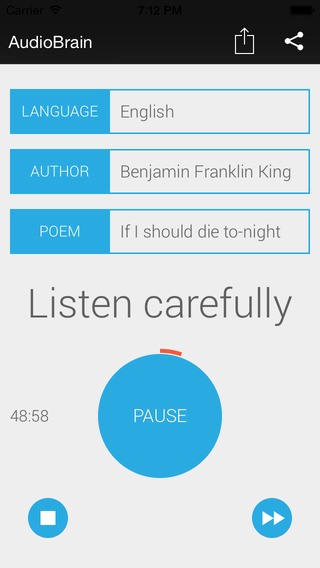
Created for those who want to expand their mental capacity, AudioBrain uses techniques to help arouse under-active brain regions, namely the ones used for processing audio data. Through the use of classical poems, users are able to enliven their remembering process. Compatible with the iPhone, iPad, and iPod touch, AudioBrain has a methodology unlike other brain exercise apps and is already featured in the Top New apps list on the App Store.
Frankfurt AM Main, Germany - AudioBrain, an app like no other, is now available on the App Store and Google Play- but it is not a game. Created for those who want to expand their mental capacity, the new app uses techniques to help arouse under-active brain regions, namely the ones used for processing audio data. It is important to exercise the various regions of the brain to prevent stagnation, and to continue developing audio skills, which helps to increase perception. Unfortunately, as people age, they practice audio memory less and visual perception of information becomes dominant. Through the use of classical poetry, AudioBrain aims to put brain function back in balance.
"People rarely use their audio memory these days," said Alex Melman, developer of AudioBrain. "They mostly use visual memory. Therefore, we created an app that is unique in its kind, with simple and efficient methodology to wake the areas of the brain up which are responsible for audio information comprehension."
Listening to information and repeating it aloud multiple times stimulates auditory processing and helps expand the brain. AudioBrain assists users in repeating poetry by classic authors such as Pushkin, Cervantes, and Shakespeare. The works are narrated by professional native speakers of each language in a recording studio, providing quality sound and a pleasant listening experience. Each poem has a difficulty level, allowing users to improve skills gradually. Users are able to complete a lesson in approximately 40 minutes.
Device Requirements:
* iPhone, iPad, and iPod touch
* Requires iOS 7.0 or later
* 60.9 MB
Pricing and Availability:
AudioBrain is available at the App Store (Education category) in the form of a free version, as well as a full version with all content, including over 130 poems, nine languages, and over 30 authors, for just $4.99. Soon, the developers plan to release more apps based on the same learning methodology. In the meantime, interested parties may purchase the existing app exclusively on the iTunes App Store.
AudioBrain: http://audiobrainapp.com/
Download from iTunes: https://itunes.apple.com/app/audiobrain-free/id1013491183
Purchase and Download: https://itunes.apple.com/app/audiobrain/id1012358278
Screenshot: http://a4.mzstatic.com/us/r30/Purple5/v4/c3/a4/01/c3a4010a-d1da-6ef7-8a11-2c1eba90b148/screen568x568.jpeg
App Icon: https://scontent-fra3-1.xx.fbcdn.net/hphotos-xfp1/v/t1.0-9/10981421_651954558270874_3292783615765881516_n.png?oh=d5948f5ce0d39b0931ffb6f8c19b6a80&oe=567DE69B
AudioBrain was created by a team of two guys, a developer and a designer, with the goal to create an app that would exercise an individual's memory skills. The resulting product is a uniquely designed memory development app, which involves listening and repeating back classical poetry. For more information on AudioBrain product, please visit them at the website. (C) AudioBrain 2015. All Rights Reserved. Apple, the Apple logo, iPhone, iPod and iPad are registered trademarks of Apple Inc. in the U.S. and/or other countries.
*******
Link To Article: http://prmac.com/release-id-76378.htm
*******
---------------------------------------------------------------------------------
Note that you can alter delivered distributions at any time.
Login to your account on prMac to alter your channel selection, or to opt-out at any time.
Introducing AudioBrain: an Audio Memory Development App - Published on 08/24/15
Created for those who want to expand their mental capacity, AudioBrain uses techniques to help arouse under-active brain regions, namely the ones used for processing audio data. Through the use of classical poems, users are able to enliven their remembering process. Compatible with the iPhone, iPad, and iPod touch, AudioBrain has a methodology unlike other brain exercise apps and is already featured in the Top New apps list on the App Store.
Frankfurt AM Main, Germany - AudioBrain, an app like no other, is now available on the App Store and Google Play- but it is not a game. Created for those who want to expand their mental capacity, the new app uses techniques to help arouse under-active brain regions, namely the ones used for processing audio data. It is important to exercise the various regions of the brain to prevent stagnation, and to continue developing audio skills, which helps to increase perception. Unfortunately, as people age, they practice audio memory less and visual perception of information becomes dominant. Through the use of classical poetry, AudioBrain aims to put brain function back in balance.
"People rarely use their audio memory these days," said Alex Melman, developer of AudioBrain. "They mostly use visual memory. Therefore, we created an app that is unique in its kind, with simple and efficient methodology to wake the areas of the brain up which are responsible for audio information comprehension."
Listening to information and repeating it aloud multiple times stimulates auditory processing and helps expand the brain. AudioBrain assists users in repeating poetry by classic authors such as Pushkin, Cervantes, and Shakespeare. The works are narrated by professional native speakers of each language in a recording studio, providing quality sound and a pleasant listening experience. Each poem has a difficulty level, allowing users to improve skills gradually. Users are able to complete a lesson in approximately 40 minutes.
Device Requirements:
* iPhone, iPad, and iPod touch
* Requires iOS 7.0 or later
* 60.9 MB
Pricing and Availability:
AudioBrain is available at the App Store (Education category) in the form of a free version, as well as a full version with all content, including over 130 poems, nine languages, and over 30 authors, for just $4.99. Soon, the developers plan to release more apps based on the same learning methodology. In the meantime, interested parties may purchase the existing app exclusively on the iTunes App Store.
AudioBrain: http://audiobrainapp.com/
Download from iTunes: https://itunes.apple.com/app/audiobrain-free/id1013491183
Purchase and Download: https://itunes.apple.com/app/audiobrain/id1012358278
Screenshot: http://a4.mzstatic.com/us/r30/Purple5/v4/c3/a4/01/c3a4010a-d1da-6ef7-8a11-2c1eba90b148/screen568x568.jpeg
App Icon: https://scontent-fra3-1.xx.fbcdn.net/hphotos-xfp1/v/t1.0-9/10981421_651954558270874_3292783615765881516_n.png?oh=d5948f5ce0d39b0931ffb6f8c19b6a80&oe=567DE69B

AudioBrain was created by a team of two guys, a developer and a designer, with the goal to create an app that would exercise an individual's memory skills. The resulting product is a uniquely designed memory development app, which involves listening and repeating back classical poetry. For more information on AudioBrain product, please visit them at the website. (C) AudioBrain 2015. All Rights Reserved. Apple, the Apple logo, iPhone, iPod and iPad are registered trademarks of Apple Inc. in the U.S. and/or other countries.
*******
Link To Article: http://prmac.com/release-id-76378.htm
*******
---------------------------------------------------------------------------------
Note that you can alter delivered distributions at any time.
Login to your account on prMac to alter your channel selection, or to opt-out at any time.
Top Camera 2 for iOS - Photo and Video, Camera and Editor at 80% off
A new article has been published at prMac.
Top Camera 2 for iOS - Photo and Video, Camera and Editor at 80% off - Published on 08/24/15
Lucky Clan today announces Top Camera 2 1.0 for iOS, a versatile Photography app that adds more than 25 features to the standard iOS Camera app. An extraordinary amount of time was spent designing the interface, to make it as beautiful and intuitive as possible. Camera contains 8 capturing modes: Photo, Video with Pause, HDR, Slow Shutter, Night mode, Superfast Burst, Time Lapse, Slow Motion. Editor module has 9 adjustments and 64 high quality filters.
Lodz, Poland - Lucky Clan today is proud to announce the release and immediate availability of Top Camera 2 1.0, its new photo/video app developed for iOS. Top Camera is back! Here is the 2nd version of award winning photo/video camera/editor app for iOS. What's changed? Just everything. Here is the most advanced photo/video camera with unified photo/video editor.
General:
* We removed all unnecessary settings, Camera module has just modes, some modes has 2-3 submodes
* All photos/videos captured by the app are stored in system Photo Library
* The editor works directly on items from Photo Library as well - no need to import/export to edit
Camera:
* 5 photo modes: Photo, HDR, Slow Shutter, Night Photo, Superfast Burst
* 3 video modes: Simple Video with Pause, Slow Motion, Time Lapse
* Focus box, exposure box (tap-and-hold to lock)
* Manual focus/exposure slider
* Zoom (by pinch gesture or slider)
* Volume button shutter
* Stabilizer
* Self Timer
* Virtual Horizon - a visual leveling bar to keep your images straight
Editor:
* Unified Photo/Video editor - all filters/adjustments can be applied to both Photos and Videos
* 9 Adjustments: Exposure, Contrast, Saturation, Temperature, Vibrance, Sharpen/Blur, Shadows, Highlights, Straighten
* 64 Hollywood quality color-correction filters divided into 8 groups: Cinema, Effects, Vintage, Antique, Pastel, Split/Tone, Monotone
* Adjust filter strength
* Realtime preview
* Drag left/right to scrub through videos
* Save result as a new clip
* Or Overwrite current one - you can later revert to original version from this app system Photos app
* Photo Extension support
Device Requirements:
* iPhone, iPod touch, iPad supporting iOS 8.0 or later
* iOS 8.0 or later
* Universal Application
* 7.8 MB
Pricing and Availability:
Top Camera 2 1.0 is $0.99 USD (or equivalent amount in other currencies) and available worldwide exclusively through the App Store in the Photo & Video category. For more information, or to schedule an interview, please contact Sylwester Los. Review copies are available upon request.
Lucky Clan: http://luckyclan.com/
Top Camera 2 (v1.0): http://luckyclan.com/topcamera2/
Purchase and Download: https://itunes.apple.com/app/top-camera-2-hdr-slow-shutter/id1030718579
Screenshot 1: http://www.luckyclan.com/topcamera2/Screen1.png
Screenshot 2: http://www.luckyclan.com/topcamera2/Screen2.png
App Icon: http://www.luckyclan.com/topcamera2/Icon.png
Located in Lodz, Poland, the Lucky Clan team is an independent software company founded by Sylwester Los in March of 2010. With a focus on the iOS platform, Lucky's mission is to provide their customers with the highest quality, reliability and compatibility with every device produced by Apple. Their flagship app, ArtStudio, has become one of the most popular tools for drawing, painting, and photo editing for iPhone and iPad. Copyright (C) 2015 Lucky Clan. All Rights Reserved. Apple, the Apple logo, iPhone, iPod and iPad are registered trademarks of Apple Inc. in the U.S. and/or other countries.
*******
Link To Article: http://prmac.com/release-id-76377.htm
*******
---------------------------------------------------------------------------------
Note that you can alter delivered distributions at any time.
Login to your account on prMac to alter your channel selection, or to opt-out at any time.
Top Camera 2 for iOS - Photo and Video, Camera and Editor at 80% off - Published on 08/24/15
Lucky Clan today announces Top Camera 2 1.0 for iOS, a versatile Photography app that adds more than 25 features to the standard iOS Camera app. An extraordinary amount of time was spent designing the interface, to make it as beautiful and intuitive as possible. Camera contains 8 capturing modes: Photo, Video with Pause, HDR, Slow Shutter, Night mode, Superfast Burst, Time Lapse, Slow Motion. Editor module has 9 adjustments and 64 high quality filters.
Lodz, Poland - Lucky Clan today is proud to announce the release and immediate availability of Top Camera 2 1.0, its new photo/video app developed for iOS. Top Camera is back! Here is the 2nd version of award winning photo/video camera/editor app for iOS. What's changed? Just everything. Here is the most advanced photo/video camera with unified photo/video editor.
General:
* We removed all unnecessary settings, Camera module has just modes, some modes has 2-3 submodes
* All photos/videos captured by the app are stored in system Photo Library
* The editor works directly on items from Photo Library as well - no need to import/export to edit
Camera:
* 5 photo modes: Photo, HDR, Slow Shutter, Night Photo, Superfast Burst
* 3 video modes: Simple Video with Pause, Slow Motion, Time Lapse
* Focus box, exposure box (tap-and-hold to lock)
* Manual focus/exposure slider
* Zoom (by pinch gesture or slider)
* Volume button shutter
* Stabilizer
* Self Timer
* Virtual Horizon - a visual leveling bar to keep your images straight
Editor:
* Unified Photo/Video editor - all filters/adjustments can be applied to both Photos and Videos
* 9 Adjustments: Exposure, Contrast, Saturation, Temperature, Vibrance, Sharpen/Blur, Shadows, Highlights, Straighten
* 64 Hollywood quality color-correction filters divided into 8 groups: Cinema, Effects, Vintage, Antique, Pastel, Split/Tone, Monotone
* Adjust filter strength
* Realtime preview
* Drag left/right to scrub through videos
* Save result as a new clip
* Or Overwrite current one - you can later revert to original version from this app system Photos app
* Photo Extension support
Device Requirements:
* iPhone, iPod touch, iPad supporting iOS 8.0 or later
* iOS 8.0 or later
* Universal Application
* 7.8 MB
Pricing and Availability:
Top Camera 2 1.0 is $0.99 USD (or equivalent amount in other currencies) and available worldwide exclusively through the App Store in the Photo & Video category. For more information, or to schedule an interview, please contact Sylwester Los. Review copies are available upon request.
Lucky Clan: http://luckyclan.com/
Top Camera 2 (v1.0): http://luckyclan.com/topcamera2/
Purchase and Download: https://itunes.apple.com/app/top-camera-2-hdr-slow-shutter/id1030718579
Screenshot 1: http://www.luckyclan.com/topcamera2/Screen1.png

Screenshot 2: http://www.luckyclan.com/topcamera2/Screen2.png

App Icon: http://www.luckyclan.com/topcamera2/Icon.png

Located in Lodz, Poland, the Lucky Clan team is an independent software company founded by Sylwester Los in March of 2010. With a focus on the iOS platform, Lucky's mission is to provide their customers with the highest quality, reliability and compatibility with every device produced by Apple. Their flagship app, ArtStudio, has become one of the most popular tools for drawing, painting, and photo editing for iPhone and iPad. Copyright (C) 2015 Lucky Clan. All Rights Reserved. Apple, the Apple logo, iPhone, iPod and iPad are registered trademarks of Apple Inc. in the U.S. and/or other countries.
*******
Link To Article: http://prmac.com/release-id-76377.htm
*******
---------------------------------------------------------------------------------
Note that you can alter delivered distributions at any time.
Login to your account on prMac to alter your channel selection, or to opt-out at any time.
LinkOptimizer 4.9.47 for Adobe InDesign Improves Conversion to JPEG
A new article has been published at prMac.
LinkOptimizer 4.9.47 for Adobe InDesign Improves Conversion to JPEG - Published on 08/24/15
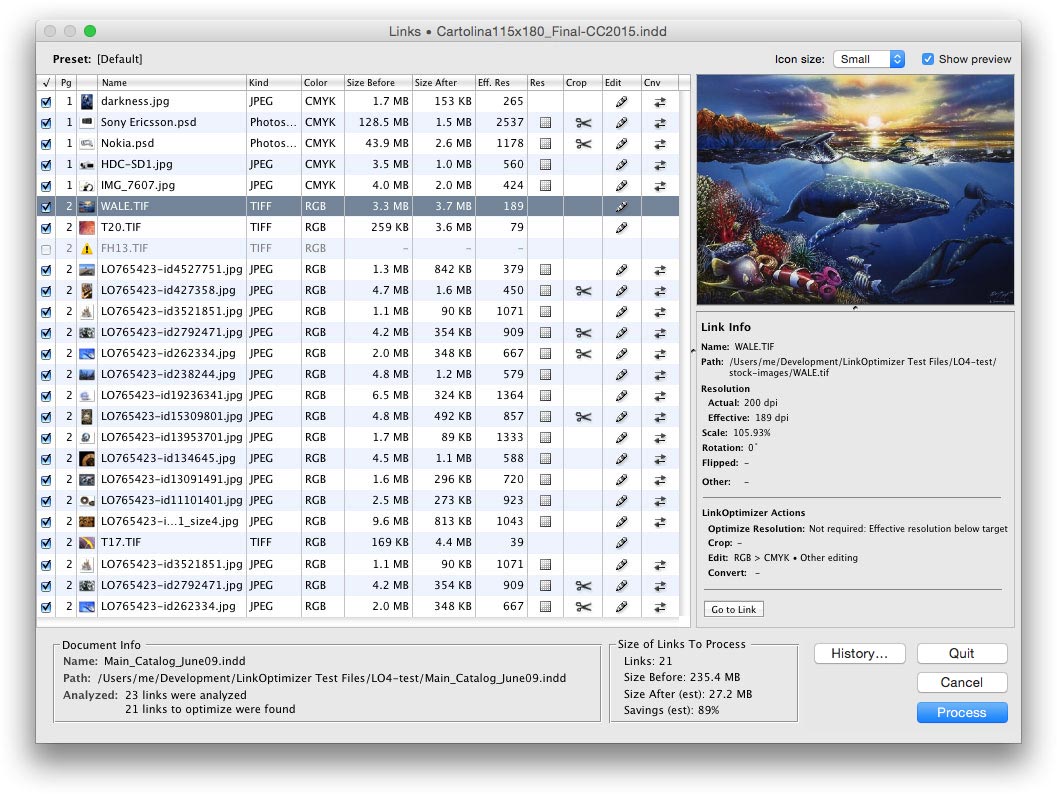
Toronto based Zevrix Solutions today announces LinkOptimizer 4.9.47, a maintenance update to its workflow automation solution for Adobe InDesign. LinkOptimizer allows users to reduce the size of InDesign links and speed up processing by automatically eliminating excess image data, performing essential image adjustments and convert colors and file formats. The new version streamlines conversion of InDesign links to JPEG by automatically flattening image layers prior to the conversion.
Toronto (ON) Canada - Zevrix Solutions today is pleased to announce the release of LinkOptimizer 4.9.47, a maintenance update to its workflow automation solution for Adobe InDesign. Awarded 4 out of 5 stars by Computer Arts magazine, LinkOptimizer automates complex image manipulation tasks and allows to reduce the size of InDesign links, repurpose them for web and mobile devices, save processing time and reduce production costs.
The new version streamlines conversion of InDesign links to JPEG by automatically flattening image layers prior to saving the file. This feature allows to avoid unnecessary process interruption in Photoshop, which presents the Save As dialog on attempt to save a layered image to JPEG. In previous versions, users had to explicitly select the option to flatten images in LinkOptimizer settings.
"LinkOptimizer makes me extremely happy", says Nynke Tiekstra, the owner of design studio ColtsfootMedia in Friesland, Netherlands, "It converted 10000 images in a 1800 pages project saving us at least 40 hours work, and it proved to be 100% accurate."
LinkOptimizer offers the following main features:
* Resize images to match their InDesign dimensions at a target resolution
* Reduce link size by eliminating excess image data
* Convert colors and apply ICC profile
* Merge layers and delete hidden ones
* Convert image formats
* Optimize files for web and mobile devices
* Run a Photoshop Action on each image
Pricing and Availability:
LinkOptimizer can be purchased from Zevrix website for $259.95 USD (Light version: $179.95) as well as from authorized resellers and Adobe Exchange. Trial is also available for download. The update is free for LinkOptimizer 4.x users and $130 to upgrade from previous versions. LinkOptimizer requires Mac OS X 10.6-10.10 and Adobe InDesign and Photoshop CS3-CC 2015. Mac OS X 10.11 will be supported upon release.
Zevrix Solutions: http://zevrix.com
LinkOptimizer 4.9.47: http://zevrix.com/LinkOptimizer.php
Download LinkOptimizer: http://zevrix.com/LinkOptimizer.dmg
Purchase: http://zevrix.com/store.php
Screenshot: http://zevrix.com/screenshots/lo4/links-lrg-med.jpg
Located in Toronto, Canada, Zevrix Solutions provides automation and productivity solutions for Adobe Creative Cloud and Creative Suite software, PDF workflows, graphic file diagnostics and Microsoft Office output on Mac OS. Zevrix is dedicated to help professionals increase their profits through automating everyday tasks, producing error-free documents, saving disk space and cutting production costs. For more information, visit their website. Copyright (C) 2015 Zevrix Solutions. All Rights Reserved. Other trademarks and registered trademarks may be the property of their respective owners.
*******
Link To Article: http://prmac.com/release-id-76375.htm
*******
---------------------------------------------------------------------------------
Note that you can alter delivered distributions at any time.
Login to your account on prMac to alter your channel selection, or to opt-out at any time.
LinkOptimizer 4.9.47 for Adobe InDesign Improves Conversion to JPEG - Published on 08/24/15
Toronto based Zevrix Solutions today announces LinkOptimizer 4.9.47, a maintenance update to its workflow automation solution for Adobe InDesign. LinkOptimizer allows users to reduce the size of InDesign links and speed up processing by automatically eliminating excess image data, performing essential image adjustments and convert colors and file formats. The new version streamlines conversion of InDesign links to JPEG by automatically flattening image layers prior to the conversion.
Toronto (ON) Canada - Zevrix Solutions today is pleased to announce the release of LinkOptimizer 4.9.47, a maintenance update to its workflow automation solution for Adobe InDesign. Awarded 4 out of 5 stars by Computer Arts magazine, LinkOptimizer automates complex image manipulation tasks and allows to reduce the size of InDesign links, repurpose them for web and mobile devices, save processing time and reduce production costs.
The new version streamlines conversion of InDesign links to JPEG by automatically flattening image layers prior to saving the file. This feature allows to avoid unnecessary process interruption in Photoshop, which presents the Save As dialog on attempt to save a layered image to JPEG. In previous versions, users had to explicitly select the option to flatten images in LinkOptimizer settings.
"LinkOptimizer makes me extremely happy", says Nynke Tiekstra, the owner of design studio ColtsfootMedia in Friesland, Netherlands, "It converted 10000 images in a 1800 pages project saving us at least 40 hours work, and it proved to be 100% accurate."
LinkOptimizer offers the following main features:
* Resize images to match their InDesign dimensions at a target resolution
* Reduce link size by eliminating excess image data
* Convert colors and apply ICC profile
* Merge layers and delete hidden ones
* Convert image formats
* Optimize files for web and mobile devices
* Run a Photoshop Action on each image
Pricing and Availability:
LinkOptimizer can be purchased from Zevrix website for $259.95 USD (Light version: $179.95) as well as from authorized resellers and Adobe Exchange. Trial is also available for download. The update is free for LinkOptimizer 4.x users and $130 to upgrade from previous versions. LinkOptimizer requires Mac OS X 10.6-10.10 and Adobe InDesign and Photoshop CS3-CC 2015. Mac OS X 10.11 will be supported upon release.
Zevrix Solutions: http://zevrix.com
LinkOptimizer 4.9.47: http://zevrix.com/LinkOptimizer.php
Download LinkOptimizer: http://zevrix.com/LinkOptimizer.dmg
Purchase: http://zevrix.com/store.php
Screenshot: http://zevrix.com/screenshots/lo4/links-lrg-med.jpg
Located in Toronto, Canada, Zevrix Solutions provides automation and productivity solutions for Adobe Creative Cloud and Creative Suite software, PDF workflows, graphic file diagnostics and Microsoft Office output on Mac OS. Zevrix is dedicated to help professionals increase their profits through automating everyday tasks, producing error-free documents, saving disk space and cutting production costs. For more information, visit their website. Copyright (C) 2015 Zevrix Solutions. All Rights Reserved. Other trademarks and registered trademarks may be the property of their respective owners.
*******
Link To Article: http://prmac.com/release-id-76375.htm
*******
---------------------------------------------------------------------------------
Note that you can alter delivered distributions at any time.
Login to your account on prMac to alter your channel selection, or to opt-out at any time.
Subscribe to:
Posts (Atom)