A new article has been published at prMac.
App Camp For Girls Expands in 2016; Deadline To Apply is March 17 - Published on 03/03/16
App Camp For Girls is expanding in Summer 2016. An inaugural camp session will be held in Phoenix, Arizona. Camp sessions will also take place in established locations: Portland, Oregon; Seattle, Washington; and Vancouver, British Columbia. At App Camp For Girls, campers receive a broad introduction to the process of iOS app development, from brainstorming and designing ideas to building and pitching their apps. The deadline for applying for the first round of acceptances is March 17, 2016.
Portland, Oregon - App Camp For Girls, a non-profit organization aimed at correcting the gender imbalance in the software industry, is expanding in Summer 2016. An inaugural camp session will be held in Phoenix, Arizona. Camp sessions will also take place in established locations: Portland, Oregon; Seattle, Washington; and Vancouver, British Columbia. Applications for 2016 sessions are available on the camp website. The deadline for applying for the first round of acceptances is March 17, 2016.
At App Camp For Girls, campers receive a broad introduction to the process of iOS app development, from brainstorming and designing ideas to building and pitching their apps. The girls use Mac(R) computers and Xcode(R), Apple's suite of developer tools, to build their apps and run them on iPod touch(R) devices. By building an app in one week, campers get a sense of accomplishment that can spark their enthusiasm to pursue further tech education.
The application for Portland, Seattle, Vancouver and Phoenix is now available on the App Camp For Girls website. The deadline for submitting is March 16, 2016, at midnight PDT. If applications outnumber the available spaces at any location, a random selection will be made and a waitlist will be opened. If a location is not filled by the deadline, applications will continue to be accepted until it is filled.
Camp tuition is $400 (USD) for the week at the U.S. locations and $400 (CAD) in Vancouver.
Camp session dates are as follows:
* Portland, OR (2 sessions): July 11-15 and August 15-19, 2016
* Vancouver, BC: July 18-22, 2016
* Seattle, WA: July 18-22, 2016
* Phoenix, AZ: July 25-29, 2016
"This will be our fourth summer," said Jean MacDonald, AC4G founder. "We've worked with over 100 girls and over 40 volunteers so far. The demand continues, so we are committed to continuing to expand."
App Camp For Girls: http://appcamp4girls.com
Apply Now: http://appcamp4girls.com/apply
App Camp For Girls seeks to address the gender imbalance in technology professions by inspiring middle-school age girls with a broad introduction to the process of app development, from brainstorming and designing ideas to building and pitching their apps. We believe that the experience of creating an app that runs on a device in one week can spark the enthusiasm that will propel girls to pursue further tech education. In addition, App Camp For Girls is a place for women in the tech community to come together, network, and provide mutual support in their endeavors to advance in the field of software development. We encourage and support our volunteers to continue their own education in programming and design. All Material (C) Copyright 2016 App Camp For Girls. All Rights Reserved. Apple, the Apple logo, Mac OS X, Xcode, iPhone, iPod, iPad and Macintosh are registered trademarks of Apple Inc. in the U.S. and/or other countries. Other trademarks and registered trademarks may be the
property of their respective owners.
*******
Link To Article: http://prmac.com/release-id-78916.htm
*******
---------------------------------------------------------------------------------
Note that you can alter delivered distributions at any time.
Login to your account on prMac to alter your channel selection, or to opt-out at any time.

The Go-To Place for All Your Music Needs - All Your Music Under One Roof
A new article has been published at prMac.
The Go-To Place for All Your Music Needs - All Your Music Under One Roof - Published on 03/03/16
Developer Oh Ju Shin announces SoundWeaver 1.0.2 for iOS devices. The SoundWeaver application greets you with a setup screen where one can log into each application to retrieve his/her favorite songs. The search bar on the top makes it easier for new users to access songs from the library. The user also has the ability to stream the songs from both YouTube and SoundCloud. SoundWeaver organizes the music into a single library for a user intuitive and friendly experience.
South Korea - SoundWeaver 1.0.2 - The all in one music player for iPhone, iPad, and iPod touch devices, by Oh Ju Shin - is exclusively designed for audiophiles who shuffle around with different applications to satisfy their music needs. It is a single station where people can get all their songs delivered to. With one tap on the SoundWeaver app, audiophiles and any consumer can discover and listen to free music from multiple applications such as SoundCloud, YouTube, and iTunes. After collecting all the music from different applications, SoundWeaver organizes them into a single library for a user intuitive and friendly experience.
The opening screen of The SoundWeaver application greets you with a setup screen where one can log into each application to retrieve his/her favorite songs. The search bar on the top makes it easier for new users to access songs from the library. The user also has the ability to stream the songs from both YouTube and SoundCloud.
YouTube integration has been added to comfort the user with only music. Since, the original YouTube application does not allow the users to play songs in the background. SoundWeaver has incorporated this effective feature in the application. With a single tap, the user can stream the songs as he/she wishes. There is also a repeat button that enables users to listen to the songs again and again without having to frustratingly click on the repeat button every time the song ends. SoundCloud support has also been integrated into the application. The user does have the feature to stream the songs if there is a lack of storage space.
SoundWeaver consists of an enthusiastic team that is ready to add several new features if the consumer wants. Currently, having a 5 star rating in the App Store. The download count of the application is growing marginally. With a cheap tag price of $2.99, the application helps the user to organize the entire music library under one roof. Head on over to the App Store to get the app today, and fulfill your inner audiophile needs in a single moment.
Device Requirements:
* iPhone, iPad, and iPod touch
* Requires iOS 7.0 or later
* 23.5 MB
Pricing and Availability:
SoundWeaver 1.0.2 is free, and is available worldwide exclusively through the App Store in the Music category.
SoundWeaver � Free Cloud Music Player 1.0.2: http://soundweaverapp.com/
Download from iTunes: https://itunes.apple.com/app/id1061501494
Screenshot: http://a2.mzstatic.com/us/r30/Purple69/v4/3d/4d/4c/3d4d4caf-c211-e9f1-b1f8-05a7aee93e60/screen322x572.jpeg
App Icon: http://a2.mzstatic.com/us/r30/Purple49/v4/4a/e8/40/4ae84036-2907-cc95-4baf-9246ca94f34e/icon175x175.jpeg
SoundWeaver makes you can easily add new music into your playlist from YouTube, SoundCloud. Of course, you can also listen your iPod Music. All features are available on SoundWeaver and you just manage one library. All Material and Software (C) Copyright 2016 SoundWeaver. All Rights Reserved. Apple, the Apple logo, iPhone, iPod and iPad are registered trademarks of Apple Inc. in the U.S. and/or other countries. Other trademarks and registered trademarks may be the property of their respective owners.
*******
Link To Article: http://prmac.com/release-id-78921.htm
*******
---------------------------------------------------------------------------------
Note that you can alter delivered distributions at any time.
Login to your account on prMac to alter your channel selection, or to opt-out at any time.
The Go-To Place for All Your Music Needs - All Your Music Under One Roof - Published on 03/03/16
Developer Oh Ju Shin announces SoundWeaver 1.0.2 for iOS devices. The SoundWeaver application greets you with a setup screen where one can log into each application to retrieve his/her favorite songs. The search bar on the top makes it easier for new users to access songs from the library. The user also has the ability to stream the songs from both YouTube and SoundCloud. SoundWeaver organizes the music into a single library for a user intuitive and friendly experience.
South Korea - SoundWeaver 1.0.2 - The all in one music player for iPhone, iPad, and iPod touch devices, by Oh Ju Shin - is exclusively designed for audiophiles who shuffle around with different applications to satisfy their music needs. It is a single station where people can get all their songs delivered to. With one tap on the SoundWeaver app, audiophiles and any consumer can discover and listen to free music from multiple applications such as SoundCloud, YouTube, and iTunes. After collecting all the music from different applications, SoundWeaver organizes them into a single library for a user intuitive and friendly experience.
The opening screen of The SoundWeaver application greets you with a setup screen where one can log into each application to retrieve his/her favorite songs. The search bar on the top makes it easier for new users to access songs from the library. The user also has the ability to stream the songs from both YouTube and SoundCloud.
YouTube integration has been added to comfort the user with only music. Since, the original YouTube application does not allow the users to play songs in the background. SoundWeaver has incorporated this effective feature in the application. With a single tap, the user can stream the songs as he/she wishes. There is also a repeat button that enables users to listen to the songs again and again without having to frustratingly click on the repeat button every time the song ends. SoundCloud support has also been integrated into the application. The user does have the feature to stream the songs if there is a lack of storage space.
SoundWeaver consists of an enthusiastic team that is ready to add several new features if the consumer wants. Currently, having a 5 star rating in the App Store. The download count of the application is growing marginally. With a cheap tag price of $2.99, the application helps the user to organize the entire music library under one roof. Head on over to the App Store to get the app today, and fulfill your inner audiophile needs in a single moment.
Device Requirements:
* iPhone, iPad, and iPod touch
* Requires iOS 7.0 or later
* 23.5 MB
Pricing and Availability:
SoundWeaver 1.0.2 is free, and is available worldwide exclusively through the App Store in the Music category.
SoundWeaver � Free Cloud Music Player 1.0.2: http://soundweaverapp.com/
Download from iTunes: https://itunes.apple.com/app/id1061501494
Screenshot: http://a2.mzstatic.com/us/r30/Purple69/v4/3d/4d/4c/3d4d4caf-c211-e9f1-b1f8-05a7aee93e60/screen322x572.jpeg

App Icon: http://a2.mzstatic.com/us/r30/Purple49/v4/4a/e8/40/4ae84036-2907-cc95-4baf-9246ca94f34e/icon175x175.jpeg

SoundWeaver makes you can easily add new music into your playlist from YouTube, SoundCloud. Of course, you can also listen your iPod Music. All features are available on SoundWeaver and you just manage one library. All Material and Software (C) Copyright 2016 SoundWeaver. All Rights Reserved. Apple, the Apple logo, iPhone, iPod and iPad are registered trademarks of Apple Inc. in the U.S. and/or other countries. Other trademarks and registered trademarks may be the property of their respective owners.
*******
Link To Article: http://prmac.com/release-id-78921.htm
*******
---------------------------------------------------------------------------------
Note that you can alter delivered distributions at any time.
Login to your account on prMac to alter your channel selection, or to opt-out at any time.
Improve Your Productivity With Snippery: The Snippet Editor With a Geek
A new article has been published at prMac.
Improve Your Productivity With Snippery: The Snippet Editor With a Geek - Published on 03/03/16
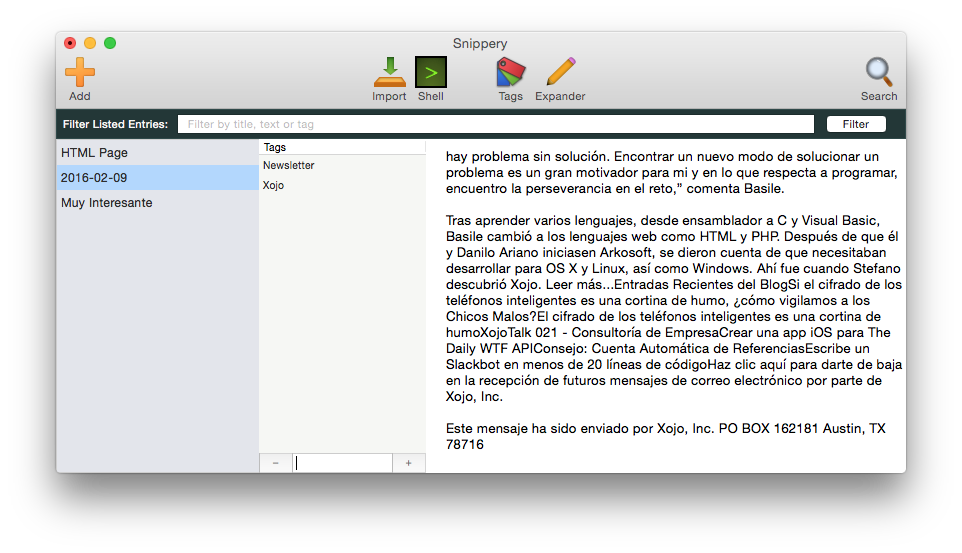
AprendeXojo announces Snippery 1.0 for Mac OS X. The app allows any user to securely save and categorize all their snippets of text, from a few lines to very big text fragments: written from scratch, imported from storage media, downloaded as HTML from the specified URL, or with the output obtained from any Shell session done in Snippery's Shell Mode. Snippery's main window is designed to be as clean, fast and functional as possible for the task at hand.
Madrid, Spain - AprendeXojo is proud to announce the release of Snippery 1.0 for Mac OS X, which allows any user to securely save and categorize all their snippets of text, from a few lines to very big text fragments: written from scratch, imported from storage media, downloaded as HTML from the specified URL, or with the output obtained from any Shell session done in Snippery's Shell Mode.
These snippet creation modes are powered with a wide set of text edition operations, RegEx support, and some automatizations, as for example the definition and use of text templates with on-the-fly placeholders substitution. Snippery's main window is designed to be as clean, fast and functional as possible for the task at hand. This way, it is possible to hide some elements, like the main Toolbar, the Tag section and the Find bar, providing the maximum work area for text edition. From the security point of view, Snippery users can activate the encryption of the data, and create as many backups as desired.
Main text edition operations:
* Add/Remove Line Numbers
* Add End of Line
* Concatenate Lines with...
* Capitalize Words
* Capitalize Sentences
* Exchange Characters
* Change text to Lowercase
* Change text to Uppercase
* Prefix / Suffix...
* Delete Duplicated Lines
* Repeat Last Line
* Repeat Last Line with Substitution
* Shift Right
* Shift Left
* Sort Lines
* Straighten Quotes
* Trim Lines
* Trim Selection
* Export selected Snippets as text or JSON
* Send Snippet via email
Snippery in Shell Mode
For all those Geeks, Shell lovers out there... There is a really powerful mode inside Snippery that brings all the shell windows you may need to unleash your mojo! From executing remote commands over an SSH session (with password pause detection), and save the resulting output, to type all those arcane commands to list directories or to execute and combine more complex scripts.
The best of all is that you can create your own automated shell scripts from Snippery! No rocket-science needed, just have to add the commands you want to execute and reorder them in the wanted sequence; you can include even any of the text expansions added to Snippery during the Shell script creation! The "Run Shell" scripts can be created from scratch or using the history of already typed commands from the current Shell session.
This way, it is possible to combine in a single shell script all the power to reproduce a sequence of commands, with the flexibility to vary some of the parameters represented by the placeholders used when defining a Text Expander entry.
Text Expander Editor
Use all the power of this feature to create dynamic templates that can be expanded later typing just a few characters! The Text Expander entries can contain placeholders that you can substitute with the real content during the expansion process. You can think about that like some kind of variables inserted in the template and whose values you'll assign at a later time. This way a same template can expose several key texts when you're ready to use them!
Create new Text Expander entries from scratch or from current text selection!
HTML Preview... and Edition!
Preview every downloaded webpage... and even edit and see on the fly all the changes applied! From one side, this is the best way to preserve the content of a webpage that you are interested in. From the other side, you can find in Snippery a way to sketch HTML ideas and check how they look in real time.
Price and Availability
Regular Edition: currently with a introductory price of 9.99 EUR, Snippery can be downloaded and purchased directly from the AprendeXojo website.
Mac App Store Edition: The Shell mode is limited by the Sandbox feature of the OS X. The price is US $3.99 and can be purchased from The Mac App Store.
It is possible to download and use Snippery in trial mode too. To do so, get a Trial License from the product webpage. In trial mode Snippery is limited to store a maximum of 10 snippets. Apart from that, any trial-licensed user can enjoy all the app features without limits!
Visit Snippery's Webpage to see more information, screenshots and product videos.
System Requirements:
* OS X 10.7 or later
* 7.2 MB
Pricing and Availability:
Snippery 1.0 is $3.99 USD (or an equivalent amount in other currencies) and is available worldwide through the Mac App Store in the Productivity category. It is also available for 9.99 EUR (or an equivalent amount in other currencies) through the AprendeXojo website. A trial version is also available from the AprendeXojo website.
AprendeXojo: http://www.aprendexojo.com/
Snippery 1.0: http://www.aprendexojo.com/software/snippery/
Purchase and Download from Mac App Store: https://itunes.apple.com/app/snippery/id1086019350
Purchase Link: http://www.aprendexojo.com/product/snippery/
Screenshot: http://www.aprendexojo.com/wp-content/uploads/2016/02/Snippery-Main-Window_thumb.png
App Icon: http://www.aprendexojo.com/wp-content/uploads/2016/02/SnipperyA-1024.png
AprendeXojo provides native software for OS X, iOS, Windows and the Web developed with Xojo, Objective-C, C and other languages and technologies. All Material and Software (C) Copyright 2016 AprendeXojo. All Rights Reserved. Apple, the Apple logo, iPhone, iPod and iPad are registered trademarks of Apple Inc. in the U.S. and/or other countries. Other trademarks and registered trademarks may be the property of their respective owners.
*******
Link To Article: http://prmac.com/release-id-78920.htm
*******
---------------------------------------------------------------------------------
Note that you can alter delivered distributions at any time.
Login to your account on prMac to alter your channel selection, or to opt-out at any time.
Improve Your Productivity With Snippery: The Snippet Editor With a Geek - Published on 03/03/16
AprendeXojo announces Snippery 1.0 for Mac OS X. The app allows any user to securely save and categorize all their snippets of text, from a few lines to very big text fragments: written from scratch, imported from storage media, downloaded as HTML from the specified URL, or with the output obtained from any Shell session done in Snippery's Shell Mode. Snippery's main window is designed to be as clean, fast and functional as possible for the task at hand.
Madrid, Spain - AprendeXojo is proud to announce the release of Snippery 1.0 for Mac OS X, which allows any user to securely save and categorize all their snippets of text, from a few lines to very big text fragments: written from scratch, imported from storage media, downloaded as HTML from the specified URL, or with the output obtained from any Shell session done in Snippery's Shell Mode.
These snippet creation modes are powered with a wide set of text edition operations, RegEx support, and some automatizations, as for example the definition and use of text templates with on-the-fly placeholders substitution. Snippery's main window is designed to be as clean, fast and functional as possible for the task at hand. This way, it is possible to hide some elements, like the main Toolbar, the Tag section and the Find bar, providing the maximum work area for text edition. From the security point of view, Snippery users can activate the encryption of the data, and create as many backups as desired.
Main text edition operations:
* Add/Remove Line Numbers
* Add End of Line
* Concatenate Lines with...
* Capitalize Words
* Capitalize Sentences
* Exchange Characters
* Change text to Lowercase
* Change text to Uppercase
* Prefix / Suffix...
* Delete Duplicated Lines
* Repeat Last Line
* Repeat Last Line with Substitution
* Shift Right
* Shift Left
* Sort Lines
* Straighten Quotes
* Trim Lines
* Trim Selection
* Export selected Snippets as text or JSON
* Send Snippet via email
Snippery in Shell Mode
For all those Geeks, Shell lovers out there... There is a really powerful mode inside Snippery that brings all the shell windows you may need to unleash your mojo! From executing remote commands over an SSH session (with password pause detection), and save the resulting output, to type all those arcane commands to list directories or to execute and combine more complex scripts.
The best of all is that you can create your own automated shell scripts from Snippery! No rocket-science needed, just have to add the commands you want to execute and reorder them in the wanted sequence; you can include even any of the text expansions added to Snippery during the Shell script creation! The "Run Shell" scripts can be created from scratch or using the history of already typed commands from the current Shell session.
This way, it is possible to combine in a single shell script all the power to reproduce a sequence of commands, with the flexibility to vary some of the parameters represented by the placeholders used when defining a Text Expander entry.
Text Expander Editor
Use all the power of this feature to create dynamic templates that can be expanded later typing just a few characters! The Text Expander entries can contain placeholders that you can substitute with the real content during the expansion process. You can think about that like some kind of variables inserted in the template and whose values you'll assign at a later time. This way a same template can expose several key texts when you're ready to use them!
Create new Text Expander entries from scratch or from current text selection!
HTML Preview... and Edition!
Preview every downloaded webpage... and even edit and see on the fly all the changes applied! From one side, this is the best way to preserve the content of a webpage that you are interested in. From the other side, you can find in Snippery a way to sketch HTML ideas and check how they look in real time.
Price and Availability
Regular Edition: currently with a introductory price of 9.99 EUR, Snippery can be downloaded and purchased directly from the AprendeXojo website.
Mac App Store Edition: The Shell mode is limited by the Sandbox feature of the OS X. The price is US $3.99 and can be purchased from The Mac App Store.
It is possible to download and use Snippery in trial mode too. To do so, get a Trial License from the product webpage. In trial mode Snippery is limited to store a maximum of 10 snippets. Apart from that, any trial-licensed user can enjoy all the app features without limits!
Visit Snippery's Webpage to see more information, screenshots and product videos.
System Requirements:
* OS X 10.7 or later
* 7.2 MB
Pricing and Availability:
Snippery 1.0 is $3.99 USD (or an equivalent amount in other currencies) and is available worldwide through the Mac App Store in the Productivity category. It is also available for 9.99 EUR (or an equivalent amount in other currencies) through the AprendeXojo website. A trial version is also available from the AprendeXojo website.
AprendeXojo: http://www.aprendexojo.com/
Snippery 1.0: http://www.aprendexojo.com/software/snippery/
Purchase and Download from Mac App Store: https://itunes.apple.com/app/snippery/id1086019350
Purchase Link: http://www.aprendexojo.com/product/snippery/
Screenshot: http://www.aprendexojo.com/wp-content/uploads/2016/02/Snippery-Main-Window_thumb.png
App Icon: http://www.aprendexojo.com/wp-content/uploads/2016/02/SnipperyA-1024.png

AprendeXojo provides native software for OS X, iOS, Windows and the Web developed with Xojo, Objective-C, C and other languages and technologies. All Material and Software (C) Copyright 2016 AprendeXojo. All Rights Reserved. Apple, the Apple logo, iPhone, iPod and iPad are registered trademarks of Apple Inc. in the U.S. and/or other countries. Other trademarks and registered trademarks may be the property of their respective owners.
*******
Link To Article: http://prmac.com/release-id-78920.htm
*******
---------------------------------------------------------------------------------
Note that you can alter delivered distributions at any time.
Login to your account on prMac to alter your channel selection, or to opt-out at any time.
Subliminal Work Offers 20% Off TOP 10 Best Sellers Special for New Users
A new article has been published at prMac.
Subliminal Work Offers 20% Off TOP 10 Best Sellers Special for New Users - Published on 03/03/16
PPL Development Company LLC has renamed their popular lifestyle app Subliminals Work to Subliminal Work 2.2, and now they are offering sweet deals for new users: 20% OFF top 10 best sellers. The app uses Positive Voice Affirmations that are repeated low enough to penetrate users' subconscious, and can effectively reprogram users' subconscious that sets the directions for our conscious thoughts and actions. In this way, it helps people achieve a desired state and helps them improve themselves.
Chico, California - PPL Development Company LLC has renamed their popular lifestyle app Subliminals Work to Subliminal Work 2.2, and now they are offering sweet deals for new users: 20% OFF top 10 best sellers.
Subliminal Work app uses Positive Voice Affirmations that are repeated low enough to penetrate users' subconscious, and can effectively reprogram users' subconscious that sets the directions for our conscious thoughts and actions. In this way, it helps people achieve a desired state and helps improve themselves in many aspects.
Every month there is a monthly theme promotion. Subliminal users can selected their interested recordings with certain discounts. In order to benefit more people, they decided add a variety promotion for their users, especially new users. They can start their Subliminal experience from the most popular recordings.
Top 10 best sellers of this period are:
1. Law of Attraction
2. Attract Money
3. Weight Loss
4. Boost Self Confidence
5. DNA Repair
6. Develop Charisma
7. Enjoy Socializing
8. Find Harmony
9. Live Happy
10. Stop Worrying
If users want to enjoy all the subliminal recordings, they can try Subscription patterns:
* 1 Month Subscription
* 1 Year Subscription
* Forever Subscription
Reviewers said:
"Incredible sound for mental, physical, and emotional healing"
"I think positive thoughts, I reject negative thinking, I control my mind, I control my thinking..."
It's worth a try, now download it from App Store with full name:Subliminal Work - Positive Thinking Affirmations for Stress Relief & Subconscious Mind Training, and catch the special: 20% OFF top 10 best sellers!
Device Requirements:
* iPhone, iPad, iPod touch, and Apple Watch
* Requires iOS 7.0 or later
* Universal Application
* 74.0 MB
Pricing and Availability:
Subliminal Work - Positive Thinking Affirmations for Stress Relief & Subconscious Mind Training 2.2 is free, and is available worldwide through the App Store in the Lifestyle category. A Mac version is available through the Mac App Store, and an Android version is also available through Google Play.
PPL Development Company: http://www.imoblife.net/
Subliminal Work 2.2: http://www.imoblife.net/subliminals-faq/
Download from iTunes: https://itunes.apple.com/app/subliminals-work-subconscious/id531981452
Screenshot: http://a5.mzstatic.com/us/r30/Purple69/v4/77/a0/56/77a056b1-ff77-841a-3f99-b55fdb415a47/screen322x572.jpeg
App Icon: http://a1.mzstatic.com/us/r30/Purple2/v4/e9/6e/72/e96e72f6-f6d3-5627-658f-d9676a14e8a0/icon175x175.jpeg
PPL Development Company LLC is a technology company that develops mobile applications in the area of Healthcare and Fitness. They endeavor to promote a healthy and positive lifestyle to their users. All Material and Software (C) Copyright 2016 PPL Development Company LLC. All Rights Reserved. Apple, the Apple logo, iPhone, iPod and iPad are registered trademarks of Apple Inc. in the U.S. and/or other countries. Other trademarks and registered trademarks may be the property of their respective owners.
*******
Link To Article: http://prmac.com/release-id-78919.htm
*******
---------------------------------------------------------------------------------
Note that you can alter delivered distributions at any time.
Login to your account on prMac to alter your channel selection, or to opt-out at any time.
Subliminal Work Offers 20% Off TOP 10 Best Sellers Special for New Users - Published on 03/03/16
PPL Development Company LLC has renamed their popular lifestyle app Subliminals Work to Subliminal Work 2.2, and now they are offering sweet deals for new users: 20% OFF top 10 best sellers. The app uses Positive Voice Affirmations that are repeated low enough to penetrate users' subconscious, and can effectively reprogram users' subconscious that sets the directions for our conscious thoughts and actions. In this way, it helps people achieve a desired state and helps them improve themselves.
Chico, California - PPL Development Company LLC has renamed their popular lifestyle app Subliminals Work to Subliminal Work 2.2, and now they are offering sweet deals for new users: 20% OFF top 10 best sellers.
Subliminal Work app uses Positive Voice Affirmations that are repeated low enough to penetrate users' subconscious, and can effectively reprogram users' subconscious that sets the directions for our conscious thoughts and actions. In this way, it helps people achieve a desired state and helps improve themselves in many aspects.
Every month there is a monthly theme promotion. Subliminal users can selected their interested recordings with certain discounts. In order to benefit more people, they decided add a variety promotion for their users, especially new users. They can start their Subliminal experience from the most popular recordings.
Top 10 best sellers of this period are:
1. Law of Attraction
2. Attract Money
3. Weight Loss
4. Boost Self Confidence
5. DNA Repair
6. Develop Charisma
7. Enjoy Socializing
8. Find Harmony
9. Live Happy
10. Stop Worrying
If users want to enjoy all the subliminal recordings, they can try Subscription patterns:
* 1 Month Subscription
* 1 Year Subscription
* Forever Subscription
Reviewers said:
"Incredible sound for mental, physical, and emotional healing"
"I think positive thoughts, I reject negative thinking, I control my mind, I control my thinking..."
It's worth a try, now download it from App Store with full name:Subliminal Work - Positive Thinking Affirmations for Stress Relief & Subconscious Mind Training, and catch the special: 20% OFF top 10 best sellers!
Device Requirements:
* iPhone, iPad, iPod touch, and Apple Watch
* Requires iOS 7.0 or later
* Universal Application
* 74.0 MB
Pricing and Availability:
Subliminal Work - Positive Thinking Affirmations for Stress Relief & Subconscious Mind Training 2.2 is free, and is available worldwide through the App Store in the Lifestyle category. A Mac version is available through the Mac App Store, and an Android version is also available through Google Play.
PPL Development Company: http://www.imoblife.net/
Subliminal Work 2.2: http://www.imoblife.net/subliminals-faq/
Download from iTunes: https://itunes.apple.com/app/subliminals-work-subconscious/id531981452
Screenshot: http://a5.mzstatic.com/us/r30/Purple69/v4/77/a0/56/77a056b1-ff77-841a-3f99-b55fdb415a47/screen322x572.jpeg

App Icon: http://a1.mzstatic.com/us/r30/Purple2/v4/e9/6e/72/e96e72f6-f6d3-5627-658f-d9676a14e8a0/icon175x175.jpeg

PPL Development Company LLC is a technology company that develops mobile applications in the area of Healthcare and Fitness. They endeavor to promote a healthy and positive lifestyle to their users. All Material and Software (C) Copyright 2016 PPL Development Company LLC. All Rights Reserved. Apple, the Apple logo, iPhone, iPod and iPad are registered trademarks of Apple Inc. in the U.S. and/or other countries. Other trademarks and registered trademarks may be the property of their respective owners.
*******
Link To Article: http://prmac.com/release-id-78919.htm
*******
---------------------------------------------------------------------------------
Note that you can alter delivered distributions at any time.
Login to your account on prMac to alter your channel selection, or to opt-out at any time.
DEVONagent 3.9.4 updates plugins, filters more accurately
A new article has been published at prMac.
DEVONagent 3.9.4 updates plugins, filters more accurately - Published on 03/03/16
DEVONtechnologies, LLC updates all editions of its Internet search and research tool DEVONagent. Available in three editions, DEVONagent is a smart internet search agent. It queries search engines and crawls web sites. It then post-filters the results and presents the results in a multitude of ways. The new version brings updated plugins and search sets, adds contextual menu options for videos, and more. The updates are free and recommended for all users.
Coeur d'Alene, Idaho - All editions of DEVONagent 3.9.4 update a number of plugins, the Pro edition also four search sets. Clearing the search results or switching to private browsing clears the system-wide find pasteboard now too. This makes sure no unwanted private data is left behind if not intended.
DEVONagent Pro 3.9.4 lets the user quickly reset the fonts settings to factory defaults. New contextual menu options download HTML 5 videos or open them in new tabs or windows. The update also improves the naming of copied or captured links and bookmarks as well as HTTPS support for XML and JSON plugins. Users extend DEVONagent Pro by writing their own plugins for connecting the application with search engines of choice.
Finally, DEVONagent Pro and Express filter advertising, analytics, trackers, and links to translation services more accurately. All editions also receive bug fixes and reliability improvements.
DEVONagent is a smart internet search agent. It queries search engines and crawls web sites. It then filters the results again and presents the results in a multitude of ways. DEVONagent is available in three editions from Pro for serious research to Lite for the casual search from the menu bar.
"We have always designed our applications for power users. This update is no different. Improved default plugins, better support for plugins our users can write themselves, and more accurate filters make DEVONagent a power searcher's dream. And because our users also like their privacy, we've made private browsing more, well, private than ever," remarks DEVONtechnologies' President, Eric Bohnisch-Volkmann.
Pricing and Availability:
All editions of DEVONagent require an Intel-based Mac and OS X 10.8.5 or later. They can be downloaded from www.devontechnologies.com and be test-driven for free before they need to be properly licensed. All editions of DEVONagent are also available in the App Store; DEVONagent Pro and Express can be bought as part of attractive bundles together with DEVONthink in DEVONtechnologies' online shop.
* DEVONagent Pro: US $49.95 (App Store: $49.99)
* DEVONagent Express: US $4.95 (App Store: $4.99)
* DEVONagent Lite: free
More information:
Customers find more information about our apps on the DEVONtechnologies website. Eric Bohnisch-Volkmann also posts news, opinions, previews, and public betas in his blog Devonian Times.
DEVONtechnologies: http://www.devontechnologies.com
DEVONproducts: http://www.devontechnologies.com/redirect.php?id=products
Download: http://www.devontechnologies.com/redirect.php?id=download
Online Shop: http://www.devontechnologies.com/redirect.php?id=shop
Devonian Times: http://www.devontechnologies.com/redirect.php?id=blog
DEVONtechnologies LLC creates end-user and server applications for the Mac and iOS platforms that enhance productivity, organization, and user experience with unique artificial intelligence technology. All applications are focused on both ease of use and satisfying the needs of even the most savvy users. The underlying DEVONtechnology is a flexible and versatile foundation that can be used for a large range of purposes from databases, data mining, and information retrieval to human-computer interfaces. DEVONtechnologies LLC was founded 2002 and incorporated 2004, and is today headquartered in Coeur d'Alene, Idaho, USA. All Material and Software (C) Copyright 2016 DEVONtechnologies LLC. All Rights Reserved. Apple, the Apple logo, Macintosh and Mac OS X are registered trademarks of Apple Inc. in the U.S. and/or other countries. Other trademarks and registered trademarks may be the property of their respective owners.
*******
Link To Article: http://prmac.com/release-id-78917.htm
*******
---------------------------------------------------------------------------------
Note that you can alter delivered distributions at any time.
Login to your account on prMac to alter your channel selection, or to opt-out at any time.
DEVONagent 3.9.4 updates plugins, filters more accurately - Published on 03/03/16
DEVONtechnologies, LLC updates all editions of its Internet search and research tool DEVONagent. Available in three editions, DEVONagent is a smart internet search agent. It queries search engines and crawls web sites. It then post-filters the results and presents the results in a multitude of ways. The new version brings updated plugins and search sets, adds contextual menu options for videos, and more. The updates are free and recommended for all users.
Coeur d'Alene, Idaho - All editions of DEVONagent 3.9.4 update a number of plugins, the Pro edition also four search sets. Clearing the search results or switching to private browsing clears the system-wide find pasteboard now too. This makes sure no unwanted private data is left behind if not intended.
DEVONagent Pro 3.9.4 lets the user quickly reset the fonts settings to factory defaults. New contextual menu options download HTML 5 videos or open them in new tabs or windows. The update also improves the naming of copied or captured links and bookmarks as well as HTTPS support for XML and JSON plugins. Users extend DEVONagent Pro by writing their own plugins for connecting the application with search engines of choice.
Finally, DEVONagent Pro and Express filter advertising, analytics, trackers, and links to translation services more accurately. All editions also receive bug fixes and reliability improvements.
DEVONagent is a smart internet search agent. It queries search engines and crawls web sites. It then filters the results again and presents the results in a multitude of ways. DEVONagent is available in three editions from Pro for serious research to Lite for the casual search from the menu bar.
"We have always designed our applications for power users. This update is no different. Improved default plugins, better support for plugins our users can write themselves, and more accurate filters make DEVONagent a power searcher's dream. And because our users also like their privacy, we've made private browsing more, well, private than ever," remarks DEVONtechnologies' President, Eric Bohnisch-Volkmann.
Pricing and Availability:
All editions of DEVONagent require an Intel-based Mac and OS X 10.8.5 or later. They can be downloaded from www.devontechnologies.com and be test-driven for free before they need to be properly licensed. All editions of DEVONagent are also available in the App Store; DEVONagent Pro and Express can be bought as part of attractive bundles together with DEVONthink in DEVONtechnologies' online shop.
* DEVONagent Pro: US $49.95 (App Store: $49.99)
* DEVONagent Express: US $4.95 (App Store: $4.99)
* DEVONagent Lite: free
More information:
Customers find more information about our apps on the DEVONtechnologies website. Eric Bohnisch-Volkmann also posts news, opinions, previews, and public betas in his blog Devonian Times.
DEVONtechnologies: http://www.devontechnologies.com
DEVONproducts: http://www.devontechnologies.com/redirect.php?id=products
Download: http://www.devontechnologies.com/redirect.php?id=download
Online Shop: http://www.devontechnologies.com/redirect.php?id=shop
Devonian Times: http://www.devontechnologies.com/redirect.php?id=blog
DEVONtechnologies LLC creates end-user and server applications for the Mac and iOS platforms that enhance productivity, organization, and user experience with unique artificial intelligence technology. All applications are focused on both ease of use and satisfying the needs of even the most savvy users. The underlying DEVONtechnology is a flexible and versatile foundation that can be used for a large range of purposes from databases, data mining, and information retrieval to human-computer interfaces. DEVONtechnologies LLC was founded 2002 and incorporated 2004, and is today headquartered in Coeur d'Alene, Idaho, USA. All Material and Software (C) Copyright 2016 DEVONtechnologies LLC. All Rights Reserved. Apple, the Apple logo, Macintosh and Mac OS X are registered trademarks of Apple Inc. in the U.S. and/or other countries. Other trademarks and registered trademarks may be the property of their respective owners.
*******
Link To Article: http://prmac.com/release-id-78917.htm
*******
---------------------------------------------------------------------------------
Note that you can alter delivered distributions at any time.
Login to your account on prMac to alter your channel selection, or to opt-out at any time.
Records 1.1 for Mac Adds Table View, CSV Data Importer and 30 Templates
A new article has been published at prMac.
Records 1.1 for Mac Adds Table View, CSV Data Importer and 30 Templates - Published on 03/03/16
Records Team today announces the release of Records 1.1 for Mac, a major update to their popular personal database application for OS X. Records for Mac allows anyone to collect and organize their information, from favorite movies, to customer invoices, to home inventory, and more. The app offers the perfect balance between ease of use and powerful features. Version 1.1 introduces a new Table view, CSV data import and export, 30 ready to use templates.
Bologna, Italy - Records Team today is proud to announce the release and immediate availability of Records 1.1 for Mac, a major update to their popular and easy to use personal database application for OS X. Records for Mac is built exclusively for the Mac, and offers an excellent balance between ease of use and powerful features. The app offers any Mac user the ability to create custom databases as easily as dragging and dropping 15 fully-configurable fields into place on a form.
The Records canvas editor allows users to customize the layout and design of their forms, designing and building a database template in minutes. The intelligent drag-and-drop editor will have users up and running in no time at all. Configurable form fields ensure the correct data is entered where it should be entered. Properties such as text case, date format, and image scale make your data attractive and presentable.
Records for Mac's Visual Editor also includes stunning themes that offer several beautiful colors to choose from. Pre-filled lists offer an easy way to add and use lists on the database forms, saving time and effort. Records includes 30 ready to use templates to start using the app in just a few seconds and are also shareable. With just a few clicks, users can share their database templates with friends, family and colleagues.
Easy setup and design isn't all that Records for Mac has to offer. A database isn't worth the silicon it's written to if the application used to access the data can't offer a fast and easy way to find needed information from the data stored inside it. Records offers full text search, which allows anyone to quickly enter a search query and easily search the entire database to find exactly the data they need.
As well as being easy to setup and maintain, Records for Mac is scalable. Records supports databases with tens of thousands of records, so now there is no need to compromise when it comes to storing and accessing important data. Users also don't have to fear slowdowns when dealing with large amount of records. The application also allows easy importing, exporting and backup of data, so there is never a need to worry about losing data in case of a hard drive crash.
Records is built exclusively for the Mac, and uses a number of modern OS X features and technologies, including: Cocoa, Core Data, Quartz, Grand Central Dispatch, 64-bit, Full-Screen, Calendar, Contacts and more. The Records user interface has been fully optimized to take advantage of Macs with Retina displays, including the new iMacs and MacBook Pros.
Records for Mac is an innovative data collection and management tool that any Mac user can easily make use of to safely and efficiently store their personal and business-related data. Records Team will continually work to enhance and improve Records for Mac.
"There has always been a real need for a personal database app that would allow users to create and maintain databases to store their information," says Andrea Gelati, founder of Records Team. "With Records for Mac, we've brought that capability to Mac users, allowing them to store the information they need to access without the need for any prior coding or database design knowledge."
Here's What Reviewers Say About Records for Mac:
"Records looks fantastic. I can't imagine all the hard work you guys put into this app - the icon alone is just stunning." - Shawn Blanc
"Records is a powerful, customizable, easy to use database app for Mac." - Peter Cohen, iMore
"Wow, Records for Mac looks really great!" - Christina Warren, Mashable
"Records is an impressively nimble piece of Mac software that makes personal databases insanely simple to create and use." - J. R. Bookwalter, Mac|Life - 4 stars
"Records for Mac makes creating a personal database very simple." - MacFormat - 4 stars
Top-notch features
* Incredibly easy, drag & drop form and database creation
* Canvas editor lets you customize the layout and design of your forms
* Table view lets you display, edit and sort data in a single view
* 30 templates ready to use lets you start using Records in seconds
* 15 fully-configurable form fields, including images, contacts, URLs and ratings
* Powerful alignment guides help you design visually appealing forms
* Use one of several pre-filled lists, such as countries, currencies, or credit card vendors
* Build your own forms and choose your favorite eye-candy color theme
* Full text search help to find instantly your data
* Easily import, export and backup your data in CSV/TSV formats (Bento's users are welcome)
* Import, export and share templates with friends, family and colleagues
* No prior database design or coding knowledge required
What's New in Version 1.1
* New 30 templates ready to use
* New Table view to display, edit and sort data in a single view
* New Ascending and descending data sorting
* New Star rating field
* New CSV/TSV data import and export
* New portrait and landscape print paper orientations
* New German, Italian and Japanese localizations
* New Force Touch and Haptic Feedback support
* New User Interface design inspired by OS X 10.11 El Capitan
* Fixed an issue where the application crashes when the user is searching using special characters
* Fixed an issue where the List editor does not save correctly the new value for the selected list or item
* Various improvements and performance enhancements
System Requirements:
* OS X 10.10 Yosemite or later
* 64-bit processor
Pricing and Availability:
Records 1.1 for Mac is only $39.99 USD (or equivalent amount in other currencies) and is available worldwide through the Mac App Store in the Business category and through the Records Team website. Review copies are available upon request.
Records 1.1 for Mac: http://records.team
Purchase and Download (MAS): https://itunes.apple.com/app/records/id946833065
Download Trial (ZIP): http://records.team/s/records-trial.zip
Screenshot: http://pushpopcorn.com/assets/press/records-screenshot.jpg
Application Icon: http://pushpopcorn.com/assets/press/records-appicon.png
Press Kit (ZIP): http://records.team/s/records-presskit.zip
Records Team was founded in early 2012 by Andrea Gelati with the goal to create Records, a full-featured and powerful personal database app for the Mac. (C) 2015-2016 Records Team. All Rights Reserved. Apple, the Apple logo, Macintosh and Mac OS X are registered trademarks of Apple Inc. in the U.S. and/or other countries. Other trademarks and registered trademarks may be the property of their respective owners.
*******
Link To Article: http://prmac.com/release-id-78914.htm
*******
---------------------------------------------------------------------------------
Note that you can alter delivered distributions at any time.
Login to your account on prMac to alter your channel selection, or to opt-out at any time.
Records 1.1 for Mac Adds Table View, CSV Data Importer and 30 Templates - Published on 03/03/16
Records Team today announces the release of Records 1.1 for Mac, a major update to their popular personal database application for OS X. Records for Mac allows anyone to collect and organize their information, from favorite movies, to customer invoices, to home inventory, and more. The app offers the perfect balance between ease of use and powerful features. Version 1.1 introduces a new Table view, CSV data import and export, 30 ready to use templates.
Bologna, Italy - Records Team today is proud to announce the release and immediate availability of Records 1.1 for Mac, a major update to their popular and easy to use personal database application for OS X. Records for Mac is built exclusively for the Mac, and offers an excellent balance between ease of use and powerful features. The app offers any Mac user the ability to create custom databases as easily as dragging and dropping 15 fully-configurable fields into place on a form.
The Records canvas editor allows users to customize the layout and design of their forms, designing and building a database template in minutes. The intelligent drag-and-drop editor will have users up and running in no time at all. Configurable form fields ensure the correct data is entered where it should be entered. Properties such as text case, date format, and image scale make your data attractive and presentable.
Records for Mac's Visual Editor also includes stunning themes that offer several beautiful colors to choose from. Pre-filled lists offer an easy way to add and use lists on the database forms, saving time and effort. Records includes 30 ready to use templates to start using the app in just a few seconds and are also shareable. With just a few clicks, users can share their database templates with friends, family and colleagues.
Easy setup and design isn't all that Records for Mac has to offer. A database isn't worth the silicon it's written to if the application used to access the data can't offer a fast and easy way to find needed information from the data stored inside it. Records offers full text search, which allows anyone to quickly enter a search query and easily search the entire database to find exactly the data they need.
As well as being easy to setup and maintain, Records for Mac is scalable. Records supports databases with tens of thousands of records, so now there is no need to compromise when it comes to storing and accessing important data. Users also don't have to fear slowdowns when dealing with large amount of records. The application also allows easy importing, exporting and backup of data, so there is never a need to worry about losing data in case of a hard drive crash.
Records is built exclusively for the Mac, and uses a number of modern OS X features and technologies, including: Cocoa, Core Data, Quartz, Grand Central Dispatch, 64-bit, Full-Screen, Calendar, Contacts and more. The Records user interface has been fully optimized to take advantage of Macs with Retina displays, including the new iMacs and MacBook Pros.
Records for Mac is an innovative data collection and management tool that any Mac user can easily make use of to safely and efficiently store their personal and business-related data. Records Team will continually work to enhance and improve Records for Mac.
"There has always been a real need for a personal database app that would allow users to create and maintain databases to store their information," says Andrea Gelati, founder of Records Team. "With Records for Mac, we've brought that capability to Mac users, allowing them to store the information they need to access without the need for any prior coding or database design knowledge."
Here's What Reviewers Say About Records for Mac:
"Records looks fantastic. I can't imagine all the hard work you guys put into this app - the icon alone is just stunning." - Shawn Blanc
"Records is a powerful, customizable, easy to use database app for Mac." - Peter Cohen, iMore
"Wow, Records for Mac looks really great!" - Christina Warren, Mashable
"Records is an impressively nimble piece of Mac software that makes personal databases insanely simple to create and use." - J. R. Bookwalter, Mac|Life - 4 stars
"Records for Mac makes creating a personal database very simple." - MacFormat - 4 stars
Top-notch features
* Incredibly easy, drag & drop form and database creation
* Canvas editor lets you customize the layout and design of your forms
* Table view lets you display, edit and sort data in a single view
* 30 templates ready to use lets you start using Records in seconds
* 15 fully-configurable form fields, including images, contacts, URLs and ratings
* Powerful alignment guides help you design visually appealing forms
* Use one of several pre-filled lists, such as countries, currencies, or credit card vendors
* Build your own forms and choose your favorite eye-candy color theme
* Full text search help to find instantly your data
* Easily import, export and backup your data in CSV/TSV formats (Bento's users are welcome)
* Import, export and share templates with friends, family and colleagues
* No prior database design or coding knowledge required
What's New in Version 1.1
* New 30 templates ready to use
* New Table view to display, edit and sort data in a single view
* New Ascending and descending data sorting
* New Star rating field
* New CSV/TSV data import and export
* New portrait and landscape print paper orientations
* New German, Italian and Japanese localizations
* New Force Touch and Haptic Feedback support
* New User Interface design inspired by OS X 10.11 El Capitan
* Fixed an issue where the application crashes when the user is searching using special characters
* Fixed an issue where the List editor does not save correctly the new value for the selected list or item
* Various improvements and performance enhancements
System Requirements:
* OS X 10.10 Yosemite or later
* 64-bit processor
Pricing and Availability:
Records 1.1 for Mac is only $39.99 USD (or equivalent amount in other currencies) and is available worldwide through the Mac App Store in the Business category and through the Records Team website. Review copies are available upon request.
Records 1.1 for Mac: http://records.team
Purchase and Download (MAS): https://itunes.apple.com/app/records/id946833065
Download Trial (ZIP): http://records.team/s/records-trial.zip
Screenshot: http://pushpopcorn.com/assets/press/records-screenshot.jpg

Application Icon: http://pushpopcorn.com/assets/press/records-appicon.png

Press Kit (ZIP): http://records.team/s/records-presskit.zip
Records Team was founded in early 2012 by Andrea Gelati with the goal to create Records, a full-featured and powerful personal database app for the Mac. (C) 2015-2016 Records Team. All Rights Reserved. Apple, the Apple logo, Macintosh and Mac OS X are registered trademarks of Apple Inc. in the U.S. and/or other countries. Other trademarks and registered trademarks may be the property of their respective owners.
*******
Link To Article: http://prmac.com/release-id-78914.htm
*******
---------------------------------------------------------------------------------
Note that you can alter delivered distributions at any time.
Login to your account on prMac to alter your channel selection, or to opt-out at any time.
KiKi's Sand Painting Released Free Version 1.0 - Kid's Sand Art on iPad
A new article has been published at prMac.
KiKi's Sand Painting Released Free Version 1.0 - Kid's Sand Art on iPad - Published on 03/03/16
G-Power Team today introduces KiKi's Sand Painting Free 1.0 on iPad. Perfect for kids 4-5 years of age, KiKi's Sand Painting uses beautiful sands to paint fun coloring pages of animals, dinosaurs and fairy tale characters. Choose a favorite template, tap to remove glue, select a sand color and paint with your fingers. While drawing and painting will inspire their imagination, parents can see the color analysis in Parents Center as well as set a security lock and play time for their kids.
Xi'an, China - After the paid version, G-Power Team today is proud to announce the release and immediate availability of KiKi's Sand Painting Free 1.0 on iPad. Parents who have little kids above 4 or 5 years old are perfect to try this app. KiKi's Sand Painting uses beautiful sands to paint fun coloring pages of animals, dinosaurs and fairy tale characters. Little kids who start to learn about color and painting will find this coloring book interesting and innovative. There is no need to prepare glue, sand, paper, just your iPad is enough.
The design team created three themes of the coloring pages to choose from: fairy tale characters, animals and dinosaurs. No matter if you have a boy or a girl, they will find their loved templates. Unlike most painting apps, the sand grain makes the painting process, and its result, very special. The magic shovel tool makes creation easy and unlimited. You can DIY the coloring pages by using the shovel tool to draw grass, clouds, house, people, everything you can think of on the templates. So it becomes unique for your artwork.
Features:
* Two painting modes to choose: sand spraying or sand shaking
* Parent center lets parents set play time and get analysis for the kid's favorite color
* Three coloring page themes in lovely animals, dinosaurs and fairy tale characters
* Want to recolor? Use the shovel tool to remove the existed sand and re-paint
* Easily share to Facebook etc. to share with family and friends
For parents who worried about kids' play time, there is the Parent Center within the app. It lets parents set the play time and period. Furthermore, parents could see their kids' color analysis and favorite templates. Get to know more about their kids.
"Sand Painting is a great way to bring out kids' imagination and recognition", says Eric Ge of the G-Power Team, "Kids love to paint coloring pages. There are no rules for their coloring. KiKi's Sand Painting is a great way for kids' free flow of creation. They can mix colors, draw things on the template with the shovel tool. Anything they want for painting."
Device Requirements:
* Compatible with iPad
* Requires iOS 7.0 or later
* 71.1 MB
Pricing and Availability:
KiKi's Sand Painting Free 1.0 is Free and available worldwide exclusively through the App Store in the Education category. This free version has Animal theme preset for the free use, with 12 kinds of animal templates for kids' choice. The other two themes Dinosaurs and Fairy Tale Characters are In-App Purchase items. KiKi's Sand Painting is for iPad now. In the future they will release an iPhone version to make it more accessible on mobile.
KiKi's Sand Painting Free 1.0: http://www.gpower.co/kiki_en.html
Download from iTunes: https://itunes.apple.com/app/kikis-sand-painting-free-coloring/id1063623128
YouTube Video: https://www.youtube.com/watch?v=DAjfMjl1TCg
Screenshot: http://media.gpowers.net/pad_01.jpg
App Icon: http://media.gpowers.net/iTunesArtwork.png
Founded in 2012, G-Power Team is committed to develop easy-to-use apps that will help people in their lives. We aimed to let every user has the chance to be an artist, record, pass on and share their beautiful moments via our apps. Copyright (C) 2016 G-Power. All Rights Reserved. Apple, the Apple logo, iPhone, and iPod are registered trademarks of Apple Inc. in the U.S. and/or other countries. Other trademarks and registered trademarks may be the property of their respective owners.
*******
Link To Article: http://prmac.com/release-id-78915.htm
*******
---------------------------------------------------------------------------------
Note that you can alter delivered distributions at any time.
Login to your account on prMac to alter your channel selection, or to opt-out at any time.
KiKi's Sand Painting Released Free Version 1.0 - Kid's Sand Art on iPad - Published on 03/03/16
G-Power Team today introduces KiKi's Sand Painting Free 1.0 on iPad. Perfect for kids 4-5 years of age, KiKi's Sand Painting uses beautiful sands to paint fun coloring pages of animals, dinosaurs and fairy tale characters. Choose a favorite template, tap to remove glue, select a sand color and paint with your fingers. While drawing and painting will inspire their imagination, parents can see the color analysis in Parents Center as well as set a security lock and play time for their kids.
Xi'an, China - After the paid version, G-Power Team today is proud to announce the release and immediate availability of KiKi's Sand Painting Free 1.0 on iPad. Parents who have little kids above 4 or 5 years old are perfect to try this app. KiKi's Sand Painting uses beautiful sands to paint fun coloring pages of animals, dinosaurs and fairy tale characters. Little kids who start to learn about color and painting will find this coloring book interesting and innovative. There is no need to prepare glue, sand, paper, just your iPad is enough.
The design team created three themes of the coloring pages to choose from: fairy tale characters, animals and dinosaurs. No matter if you have a boy or a girl, they will find their loved templates. Unlike most painting apps, the sand grain makes the painting process, and its result, very special. The magic shovel tool makes creation easy and unlimited. You can DIY the coloring pages by using the shovel tool to draw grass, clouds, house, people, everything you can think of on the templates. So it becomes unique for your artwork.
Features:
* Two painting modes to choose: sand spraying or sand shaking
* Parent center lets parents set play time and get analysis for the kid's favorite color
* Three coloring page themes in lovely animals, dinosaurs and fairy tale characters
* Want to recolor? Use the shovel tool to remove the existed sand and re-paint
* Easily share to Facebook etc. to share with family and friends
For parents who worried about kids' play time, there is the Parent Center within the app. It lets parents set the play time and period. Furthermore, parents could see their kids' color analysis and favorite templates. Get to know more about their kids.
"Sand Painting is a great way to bring out kids' imagination and recognition", says Eric Ge of the G-Power Team, "Kids love to paint coloring pages. There are no rules for their coloring. KiKi's Sand Painting is a great way for kids' free flow of creation. They can mix colors, draw things on the template with the shovel tool. Anything they want for painting."
Device Requirements:
* Compatible with iPad
* Requires iOS 7.0 or later
* 71.1 MB
Pricing and Availability:
KiKi's Sand Painting Free 1.0 is Free and available worldwide exclusively through the App Store in the Education category. This free version has Animal theme preset for the free use, with 12 kinds of animal templates for kids' choice. The other two themes Dinosaurs and Fairy Tale Characters are In-App Purchase items. KiKi's Sand Painting is for iPad now. In the future they will release an iPhone version to make it more accessible on mobile.
KiKi's Sand Painting Free 1.0: http://www.gpower.co/kiki_en.html
Download from iTunes: https://itunes.apple.com/app/kikis-sand-painting-free-coloring/id1063623128
YouTube Video: https://www.youtube.com/watch?v=DAjfMjl1TCg
Screenshot: http://media.gpowers.net/pad_01.jpg

App Icon: http://media.gpowers.net/iTunesArtwork.png

Founded in 2012, G-Power Team is committed to develop easy-to-use apps that will help people in their lives. We aimed to let every user has the chance to be an artist, record, pass on and share their beautiful moments via our apps. Copyright (C) 2016 G-Power. All Rights Reserved. Apple, the Apple logo, iPhone, and iPod are registered trademarks of Apple Inc. in the U.S. and/or other countries. Other trademarks and registered trademarks may be the property of their respective owners.
*******
Link To Article: http://prmac.com/release-id-78915.htm
*******
---------------------------------------------------------------------------------
Note that you can alter delivered distributions at any time.
Login to your account on prMac to alter your channel selection, or to opt-out at any time.
Subscribe to:
Posts (Atom)