A new article has been published at prMac.
AirBeamTV launches Mirror to Mac for screen mirroring from iPhone to Mac - Published on 06/28/18
AirBeamTV today introduces Mirror to Mac, a new iPhone and iPad application for screen mirroring from iOS devices to Mac. It is the first app to allow for wireless screen mirroring, without the need to install an additional receiver application on the Mac. After enabling Screen Recording in Control Center, users can connect to the Chrome Browser on their Mac. Then slide up Control Center from within any app, firmly press and hold the screen recording button and start mirroring.
Naarden, Netherlands - Mirror to Mac, a new iPhone and iPad application for screen mirroring from iOS devices to Mac is available today. The Mirror to Mac app, sold on the iTunes App Store, is the first app to allow for wireless screen mirroring, without the need to install an additional receiver application on the Mac.
According to Jan van Ottele, co-founder and CEO of AirBeamTV, there are many interesting use cases for screen mirroring from iPhone or iPad to Apple Macs: "Mirror to Mac is perfect for anyone who needs to share mobile device content with a large group of people. Consumer can use it to share family photos and videos at a social gathering. Some people actually have Mac Minis connected to large screen TVs, for them, this app is perfect. Also businesses can use it to display presentations or specific iPhone and iPad apps during a meeting."
To start screen mirroring, customers need to download the Mirror for Mac app from the App Store. Before using the app, Screen Recording should be enabled in the iPhone or iPad Control Centre. The Company provides a video tutorial and a step-by-step guide on how to do this. After enabling Screen Recording in Control Centre, users can use the app to connect to the Chrome Browser on their Mac. After connecting to the Mac, a user can slide up Control Centre from within any app, firmly press and hold the screen recording button and start mirroring.
Pricing and Availability:
Mirror for Mac ($4.99 USD) runs on every iPhone or iPad that uses iOS 11 or newer. It works on any Mac, as long as the Google Chrome browser (which can be downloaded for free) is installed.
AirBeamTV: https://www.airbeam.tv
Mirror to Mac: https://www.airbeam.tv/iphoneipad/buy/mirror-ios-mac/
Purchase and Download: https://itunes.apple.com/app/mirror-to-mac/id1350438765
Screenshots: https://drive.google.com/open?id=1NgWN4VYEOBf9VyjOAsLVoRdK2YyR1ADM
Screenshot/App Icon: https://drive.google.com/open?id=17topiRMSgsJznwurZWCw8bgR4OzSt1Qs
AirBeamTV was founded in 2014 to develop applications for wireless screen mirroring to Smart TVs, network streamers and other devices. It is based in Naarden, The Netherlands. Prior to launching the Mirror to Mac app, the Company released a range of successful screen mirroring applications for Mac, iPhone and iPad. All Material and Software (C) Copyright 2014-2018 AirBeamTV. All Rights Reserved. Apple, the Apple logo, macOS, iPhone, iPad, iPod and Macintosh are registered trademarks of Apple Inc. in the U.S. and/or other countries. Other trademarks and registered trademarks may be the property of their respective owners.
*******
Link To Article: https://prmac.com/release-id-82822.htm
*******
---------------------------------------------------------------------------------
Note that you can alter delivered distributions at any time.
Login to your account on prMac to alter your channel selection, or to opt-out at any time.

AudFree Unveiled Spotify Downlaoder to Download Spotify Songs as MP3
A new article has been published at prMac.
AudFree Unveiled Spotify Downlaoder to Download Spotify Songs as MP3 - Published on 06/27/18
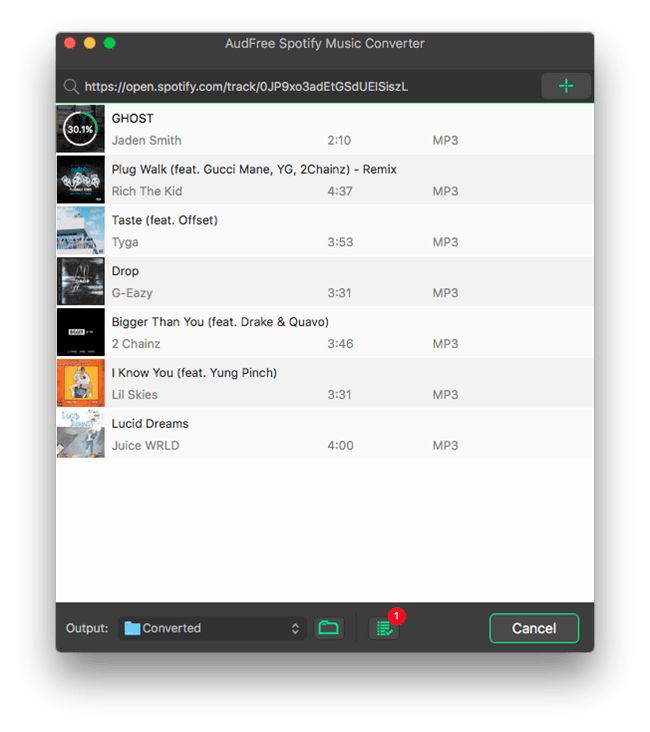
AudFree Software today officially unveiled Spotify Music Converter for Mac, its DRM removal product for Spotify. With Spotify Music Converter, users can easily download any Spotify song/playlist to MP3 for offline listening on any device and player. This intelligent Spotify music downloader can not only download Spotify music offline, but can also convert the protected Spotify songs from OGG Vorbis to MP3, AAC, FLAC, WAV and other common audio formats.
Shenzhen, China - AudFree, an innovative multimedia studio, officially launched its online store with one of the most popular music solutions for Spotify, namely AudFree Spotify Music Converter, which was specially designed to free Spotify music addicts from any audio annoyance by helping them unlocking DRM protection from Spotify songs as well as extracting the tracks to unprotected MP3 so that they can freely enjoy any Spotify song and playlist on all widely used devices even in offline mode.
AudFree Spotify Music Converter - Download Spotify Songs/Playlists as MP3 without Premium
As Spotify songs are locked by DRM, it's impossible for free users to download the music streams offline. Even paid users who can save Spotify songs offline are only allowed to listen to the downloads on selected devices due to DRM. That's why AudFree Spotify Music Converter comes out, aiming to solving this annoyance for both free and premium subscribers once and for all.
Now with AudFree Spotify Music Converter, even free users of Spotify are able to freely download and extract any track, album and playlist from Spotify for offline playing in just one click. This intelligent Spotify music downloader can not only download Spotify music offline, but can also convert the protected Spotify songs from OGG Vorbis to MP3, AAC, FLAC, WAV and other common audio formats. In addition, it's able to retain the lossless music quality and ID3 tags, including track number, title, artist, album, composer, cover, etc. while converting. To achieve better output quality, it also lets you customize the audio parameters, like audio codec, channel, bit rate, sample rate, etc. according to your own needs. Once downloaded, you are able to play the offline Spotify songs on any MP3 player, such as Apple iPod, iPad, Zune, Sony Walkman, iRiver, Creative Zen and more.
"This music downloader for Spotify is standing out of competitors mainly because of the better performance it presents. Only in one click, you can drag any track from Spotify and convert it to any other format without losing any quality, while most other similar tools take a complicated process to complete the downloading." said James, the R&D director of AudFree Software.
Pricing and Availability:
Now this simple-to-use Spotify Music Converter is available for both Mac and Windows OS with free trial versions provided. The full version is sold at $19.95 for single license and $39.95 (USD) for family license. Users can navigate to the official online store of AudFree to find more details about this product.
AudFree: https://www.audfree.com
AudFree Spotify Music Converter for Mac: https://www.audfree.com/spotify-music-converter-mac/
Download: https://www.audfree.com/download/SpotifyMusicConverter.dmg
Screenshot: https://www.audfree.com/images/spotify-music-converter/download-spotify-mac.png
As an innovation-driven multimedia studio, AudFree is focused on developing and providing industry-leading DRM removal solutions for streaming music addicts, such as users of Apple Music, Spotify songs, Audible audioboks, iTunes music and more. With a passionate team full of dedicated individuals, AudFree is aiming to make your digital life much easier and bring more fun to you when enjoying music. All Material and Software (C) Copyright 2018 AudFree. All Rights Reserved. Apple, the Apple logo, macOS, iTunes, iPhone, iPod and iPad are registered trademarks of Apple Inc. in the U.S. and/or other countries. Other trademarks and registered trademarks may be the property of their respective owners.
*******
Link To Article: https://prmac.com/release-id-82821.htm
*******
---------------------------------------------------------------------------------
Note that you can alter delivered distributions at any time.
Login to your account on prMac to alter your channel selection, or to opt-out at any time.
AudFree Unveiled Spotify Downlaoder to Download Spotify Songs as MP3 - Published on 06/27/18
AudFree Software today officially unveiled Spotify Music Converter for Mac, its DRM removal product for Spotify. With Spotify Music Converter, users can easily download any Spotify song/playlist to MP3 for offline listening on any device and player. This intelligent Spotify music downloader can not only download Spotify music offline, but can also convert the protected Spotify songs from OGG Vorbis to MP3, AAC, FLAC, WAV and other common audio formats.
Shenzhen, China - AudFree, an innovative multimedia studio, officially launched its online store with one of the most popular music solutions for Spotify, namely AudFree Spotify Music Converter, which was specially designed to free Spotify music addicts from any audio annoyance by helping them unlocking DRM protection from Spotify songs as well as extracting the tracks to unprotected MP3 so that they can freely enjoy any Spotify song and playlist on all widely used devices even in offline mode.
AudFree Spotify Music Converter - Download Spotify Songs/Playlists as MP3 without Premium
As Spotify songs are locked by DRM, it's impossible for free users to download the music streams offline. Even paid users who can save Spotify songs offline are only allowed to listen to the downloads on selected devices due to DRM. That's why AudFree Spotify Music Converter comes out, aiming to solving this annoyance for both free and premium subscribers once and for all.
Now with AudFree Spotify Music Converter, even free users of Spotify are able to freely download and extract any track, album and playlist from Spotify for offline playing in just one click. This intelligent Spotify music downloader can not only download Spotify music offline, but can also convert the protected Spotify songs from OGG Vorbis to MP3, AAC, FLAC, WAV and other common audio formats. In addition, it's able to retain the lossless music quality and ID3 tags, including track number, title, artist, album, composer, cover, etc. while converting. To achieve better output quality, it also lets you customize the audio parameters, like audio codec, channel, bit rate, sample rate, etc. according to your own needs. Once downloaded, you are able to play the offline Spotify songs on any MP3 player, such as Apple iPod, iPad, Zune, Sony Walkman, iRiver, Creative Zen and more.
"This music downloader for Spotify is standing out of competitors mainly because of the better performance it presents. Only in one click, you can drag any track from Spotify and convert it to any other format without losing any quality, while most other similar tools take a complicated process to complete the downloading." said James, the R&D director of AudFree Software.
Pricing and Availability:
Now this simple-to-use Spotify Music Converter is available for both Mac and Windows OS with free trial versions provided. The full version is sold at $19.95 for single license and $39.95 (USD) for family license. Users can navigate to the official online store of AudFree to find more details about this product.
AudFree: https://www.audfree.com
AudFree Spotify Music Converter for Mac: https://www.audfree.com/spotify-music-converter-mac/
Download: https://www.audfree.com/download/SpotifyMusicConverter.dmg
Screenshot: https://www.audfree.com/images/spotify-music-converter/download-spotify-mac.png
As an innovation-driven multimedia studio, AudFree is focused on developing and providing industry-leading DRM removal solutions for streaming music addicts, such as users of Apple Music, Spotify songs, Audible audioboks, iTunes music and more. With a passionate team full of dedicated individuals, AudFree is aiming to make your digital life much easier and bring more fun to you when enjoying music. All Material and Software (C) Copyright 2018 AudFree. All Rights Reserved. Apple, the Apple logo, macOS, iTunes, iPhone, iPod and iPad are registered trademarks of Apple Inc. in the U.S. and/or other countries. Other trademarks and registered trademarks may be the property of their respective owners.
*******
Link To Article: https://prmac.com/release-id-82821.htm
*******
---------------------------------------------------------------------------------
Note that you can alter delivered distributions at any time.
Login to your account on prMac to alter your channel selection, or to opt-out at any time.
Tension Software Announces My IP 2.3 for macOS
A new article has been published at prMac.
Tension Software Announces My IP 2.3 for macOS - Published on 06/27/18
Tension Software announces My IP 2.3 for macOS, a utility app to see with which public IP address users are connected with to the net (different from your IP address inside your LAN). It can work also in background and can optionally show the current IP in the menu bar. My IP offers users a simple and intuitive interface and the option to work with 4 different servers to show a user's public IP address.
Milano, Italy - Tension Software is pleased to announce the release of My IP 2.3 for macOS, a utility app to see with which public IP address you are connected to the net (different from your IP address inside your LAN). It can work also in background and can optionally show the current IP in the menu bar.
The public IP is the IP address you use to connect to the global net, the address the rest of the world see you at. The public IP address sometime can be static (always the same), sometime dynamic (changed by the internet provider over time at any connection).
Obtaining the IP value of your connection could be not easy, particularly if you are behind a modem router. In the case you are using a modem router, using normal system utilities, your IP address will be indicated as equal to your LAN (Local Area Network) IP address, with is really just your address inside your local network, totally different form your true external public IP address on internet.
Your internal IP address has no value outside your local area network.
My IP works instead indicating always your true internet IP address, the one the world can see you at, detecting the IP address your modem router uses to connect with the rest of the world, with is the address the rest of the world identify you and can use to connect to you.
Knowing your true public IP address is mandatory in many situation where you have to specify, specially for external use, at which address you are and can be reached by servers or desktops outside of your LAN.
My IP offers a simple and intuitive interface, a fast use and the option to work with 4 different servers to show your public IP address. It can optionally display the IP in the menu bar also when in background and log the IP changes on disk. Log can be rewetted at any time.
Features:
* Fast and easy to use
* Useful to know your public IP address behind a modem router with a shared IP
* Able to show your public IP where usually system utility fails showing just your LAN IP
* Instant result available at launch
* Can use 4 different servers to calculate your public IP
* Can log the IP and its changes on a log on disk
* Can optionally display in the menu bar the current Ip also when in background
* Copy the IP from within other applications from the menu bar.
* Includes embedded PDF User Guide
* Has a similar native version for the iPhone , 'My Public IP' available on iTunes
New in this release:
* Layout and Interface Update
* Possibility to use a shorter check IP interval (from 5 seconds to 59:59)
* Bug fixes
* Various Optimization
System Requirements:
* macOS
* 1.6 MB
Pricing and Availability:
My IP 2.3 is just $2.99 USD (or an equivalent amount in other currencies) and is available worldwide through the Mac App Store in the Utilities category.
Tension Software: http://www.tensionsoftware.com
My IP 2.3: http://www.tensionsoftware.com/osx/myip/
Purchase and Download from Mac App Store: https://itunes.apple.com/app/my-ip-2/id779564001
Tension Software develops software for macOS and iOS using the latest Apple technologies. Other brands and products referenced herein are the trademarks or registered trademarks of their respective holders. All Material and Software (C) Copyright 2018 Tension Software. All Rights Reserved. Apple, the Apple logo, Macintosh Mac OS X and macOS are registered trademarks of Apple Inc. in the U.S. and/or other countries. Other trademarks and registered trademarks may be the property of their respective owners.
*******
Link To Article: https://prmac.com/release-id-82819.htm
*******
---------------------------------------------------------------------------------
Note that you can alter delivered distributions at any time.
Login to your account on prMac to alter your channel selection, or to opt-out at any time.
Tension Software Announces My IP 2.3 for macOS - Published on 06/27/18
Tension Software announces My IP 2.3 for macOS, a utility app to see with which public IP address users are connected with to the net (different from your IP address inside your LAN). It can work also in background and can optionally show the current IP in the menu bar. My IP offers users a simple and intuitive interface and the option to work with 4 different servers to show a user's public IP address.
Milano, Italy - Tension Software is pleased to announce the release of My IP 2.3 for macOS, a utility app to see with which public IP address you are connected to the net (different from your IP address inside your LAN). It can work also in background and can optionally show the current IP in the menu bar.
The public IP is the IP address you use to connect to the global net, the address the rest of the world see you at. The public IP address sometime can be static (always the same), sometime dynamic (changed by the internet provider over time at any connection).
Obtaining the IP value of your connection could be not easy, particularly if you are behind a modem router. In the case you are using a modem router, using normal system utilities, your IP address will be indicated as equal to your LAN (Local Area Network) IP address, with is really just your address inside your local network, totally different form your true external public IP address on internet.
Your internal IP address has no value outside your local area network.
My IP works instead indicating always your true internet IP address, the one the world can see you at, detecting the IP address your modem router uses to connect with the rest of the world, with is the address the rest of the world identify you and can use to connect to you.
Knowing your true public IP address is mandatory in many situation where you have to specify, specially for external use, at which address you are and can be reached by servers or desktops outside of your LAN.
My IP offers a simple and intuitive interface, a fast use and the option to work with 4 different servers to show your public IP address. It can optionally display the IP in the menu bar also when in background and log the IP changes on disk. Log can be rewetted at any time.
Features:
* Fast and easy to use
* Useful to know your public IP address behind a modem router with a shared IP
* Able to show your public IP where usually system utility fails showing just your LAN IP
* Instant result available at launch
* Can use 4 different servers to calculate your public IP
* Can log the IP and its changes on a log on disk
* Can optionally display in the menu bar the current Ip also when in background
* Copy the IP from within other applications from the menu bar.
* Includes embedded PDF User Guide
* Has a similar native version for the iPhone , 'My Public IP' available on iTunes
New in this release:
* Layout and Interface Update
* Possibility to use a shorter check IP interval (from 5 seconds to 59:59)
* Bug fixes
* Various Optimization
System Requirements:
* macOS
* 1.6 MB
Pricing and Availability:
My IP 2.3 is just $2.99 USD (or an equivalent amount in other currencies) and is available worldwide through the Mac App Store in the Utilities category.
Tension Software: http://www.tensionsoftware.com
My IP 2.3: http://www.tensionsoftware.com/osx/myip/
Purchase and Download from Mac App Store: https://itunes.apple.com/app/my-ip-2/id779564001
Tension Software develops software for macOS and iOS using the latest Apple technologies. Other brands and products referenced herein are the trademarks or registered trademarks of their respective holders. All Material and Software (C) Copyright 2018 Tension Software. All Rights Reserved. Apple, the Apple logo, Macintosh Mac OS X and macOS are registered trademarks of Apple Inc. in the U.S. and/or other countries. Other trademarks and registered trademarks may be the property of their respective owners.
*******
Link To Article: https://prmac.com/release-id-82819.htm
*******
---------------------------------------------------------------------------------
Note that you can alter delivered distributions at any time.
Login to your account on prMac to alter your channel selection, or to opt-out at any time.
Menu Calendar 1.3 to Make Date Calculation Directly in the Menu Bar
A new article has been published at prMac.
Menu Calendar 1.3 to Make Date Calculation Directly in the Menu Bar - Published on 06/26/18
Tension Software announces Menu Calendar 1.3 for macOS. Menu Calendar makes available under the menu bar, in any application you are running, a small calendar usable also for date calculation. Clicking it's icon under the menu bar not only shows a small standard calendar that you can use to navigate inside any month, it also makes available a small area under the calendar for date calculation.
Milano, Italy - Tension Software is pleased to announce the release of Menu Calendar 1.3 for macOS. Menu Calendar 1.3 the utility to make date calculation directly in the menu bar. Menu Calendar makes available under the menu bar, in any application you are running , a small calendar usable also for date calculation.
Clicking it's icon under the menu bar not only shows a small standard calendar that you can use to navigate inside any month, it also makes available a small area under the calendar for date calculation.
You can add (or subtract) days, months, years and Menu Calendar will instantly show the resulting day.
You can also optionally select from the menu to have Menu Calendar launched any time you login inside your Mac.
If you often need to make date calculations inside other applications or simply need a menu calendar that can popup from the menubar at any time and instantly, Menu Calendar is for you.
Simplicity and effectiveness are the primary features of Menu Calendar.
* You can have it always on your menu bar. Simply and effective
* It's fast, it pops up in a fractions of seconds
* Runs and is available with any application you run
* You can make date calculation in a single click (no typing required)
* Doesn't take precious screen space
* Sandboxed and Gatekeeper signed respecting all the Apple rules for first class macOS apps
* Optimized for macOS 10.13 High Sierra
New in this release:
* New improved layout
* New buttons to add days in a click
* Bug fixes
* Various optimizations
System Requirements:
* Requires macOS 10.10 or Higher
* Optimized for macOS 10.13 High Sierra
Pricing and Availability:
Menu Calendar is just $1.99 USD (or an equivalent amount in other currencies) and is available worldwide through the Mac App Store in the Utilities category.
Tension Software: http://www.tensionsoftware.com
Menu Calendar 1.3: http://www.tensionsoftware.com/osx/menucalendar/
Purchase and Download from Mac App Store: https://itunes.apple.com/app/menu-calendar/id1118922137
Tension Software develops software for macOS and iOS using the latest Apple technologies. Other brands and products referenced herein are the trademarks or registered trademarks of their respective holders. All Material and Software (C) Copyright 2018 Tension Software. All Rights Reserved. Apple, the Apple logo, Macintosh Mac OS X and macOS are registered trademarks of Apple Inc. in the U.S. and/or other countries. Other trademarks and registered trademarks may be the property of their respective owners.
*******
Link To Article: https://prmac.com/release-id-82818.htm
*******
---------------------------------------------------------------------------------
Note that you can alter delivered distributions at any time.
Login to your account on prMac to alter your channel selection, or to opt-out at any time.
Menu Calendar 1.3 to Make Date Calculation Directly in the Menu Bar - Published on 06/26/18
Tension Software announces Menu Calendar 1.3 for macOS. Menu Calendar makes available under the menu bar, in any application you are running, a small calendar usable also for date calculation. Clicking it's icon under the menu bar not only shows a small standard calendar that you can use to navigate inside any month, it also makes available a small area under the calendar for date calculation.
Milano, Italy - Tension Software is pleased to announce the release of Menu Calendar 1.3 for macOS. Menu Calendar 1.3 the utility to make date calculation directly in the menu bar. Menu Calendar makes available under the menu bar, in any application you are running , a small calendar usable also for date calculation.
Clicking it's icon under the menu bar not only shows a small standard calendar that you can use to navigate inside any month, it also makes available a small area under the calendar for date calculation.
You can add (or subtract) days, months, years and Menu Calendar will instantly show the resulting day.
You can also optionally select from the menu to have Menu Calendar launched any time you login inside your Mac.
If you often need to make date calculations inside other applications or simply need a menu calendar that can popup from the menubar at any time and instantly, Menu Calendar is for you.
Simplicity and effectiveness are the primary features of Menu Calendar.
* You can have it always on your menu bar. Simply and effective
* It's fast, it pops up in a fractions of seconds
* Runs and is available with any application you run
* You can make date calculation in a single click (no typing required)
* Doesn't take precious screen space
* Sandboxed and Gatekeeper signed respecting all the Apple rules for first class macOS apps
* Optimized for macOS 10.13 High Sierra
New in this release:
* New improved layout
* New buttons to add days in a click
* Bug fixes
* Various optimizations
System Requirements:
* Requires macOS 10.10 or Higher
* Optimized for macOS 10.13 High Sierra
Pricing and Availability:
Menu Calendar is just $1.99 USD (or an equivalent amount in other currencies) and is available worldwide through the Mac App Store in the Utilities category.
Tension Software: http://www.tensionsoftware.com
Menu Calendar 1.3: http://www.tensionsoftware.com/osx/menucalendar/
Purchase and Download from Mac App Store: https://itunes.apple.com/app/menu-calendar/id1118922137
Tension Software develops software for macOS and iOS using the latest Apple technologies. Other brands and products referenced herein are the trademarks or registered trademarks of their respective holders. All Material and Software (C) Copyright 2018 Tension Software. All Rights Reserved. Apple, the Apple logo, Macintosh Mac OS X and macOS are registered trademarks of Apple Inc. in the U.S. and/or other countries. Other trademarks and registered trademarks may be the property of their respective owners.
*******
Link To Article: https://prmac.com/release-id-82818.htm
*******
---------------------------------------------------------------------------------
Note that you can alter delivered distributions at any time.
Login to your account on prMac to alter your channel selection, or to opt-out at any time.
Orders 1.3 To Archive Company Orders and Sort/Extract Them
A new article has been published at prMac.
Orders 1.3 To Archive Company Orders and Sort/Extract Them - Published on 06/25/18
Orders 1.3 is an application for Mac to archive your company sales orders, typically coming in tabled or form orders, after a previous preprocessing or directly from web servers or other sources. The Orders application is part of your work chain managing your company. Orders is about just one thing, archive your orders in a stable, secure place, easily maintainable and searchable, for successive output and post processing and for any successive use.
Milano, Italy - Tension Software is proud to announce the release of Orders 1.3, an application for Mac to archive your company sales orders, typically coming in tabled or form orders, after a previous preprocessing or directly from web servers or other sources. The Orders application is just a part of your work chain and it doesn't try to do it all.
Orders is about just one thing, archive your orders in a stable, secure place, easily maintainable and searchable, for successive output and post processing and for any successive use.
It can import from CSV (comma separated values), CSV-S (char separated values using semicolon) and FORM text files, and accepting different encoding formats. It can import also from 'form' format, from text files with a single record per file.
Orders provide an easy search and filter method to search inside all your records with preset periods: today, yesterday, current week, previous week, current month, previous month, current year, previous year.
It can import unattended and in an automatic way, processing at regular time interval your orders, archiving them in the internal database and moving processed input files in another folder.
What's new:
* Table now ordered in Non case sensitive mode
* Table selection shows instantly how many selected and sum amount of selection
* Selection dialog to specify form import folders improved
* Bug fixes
* Optimization
System Requirements:
* macOS Version 10.10 or higher
* 3.8 MB
Pricing and Availability:
Orders 1.3 is just $19.99 USD (or an equivalent amount in other currencies) and is available worldwide through the Mac App Store in the Productivity category.
Tension Software: http://www.tensionsoftware.com
Orders 1.3: http://www.tensionsoftware.com/osx/orders/
Purchase and Download from Mac App Store: https://itunes.apple.com/app/orders/id889716377
Tension Software develops software for macOS and iOS using the latest Apple technologies.
Other brands and products referenced herein are the trademarks or registered trademarks of their respective holders. All Material and Software (C) Copyright 2018 Tension Software. All Rights Reserved. Apple, the Apple logo, Macintosh Mac OS X and macOS are registered trademarks of Apple Inc. in the U.S. and/or other countries. Other trademarks and registered trademarks may be the property of their respective owners.
*******
Link To Article: https://prmac.com/release-id-82817.htm
*******
---------------------------------------------------------------------------------
Note that you can alter delivered distributions at any time.
Login to your account on prMac to alter your channel selection, or to opt-out at any time.
Orders 1.3 To Archive Company Orders and Sort/Extract Them - Published on 06/25/18
Orders 1.3 is an application for Mac to archive your company sales orders, typically coming in tabled or form orders, after a previous preprocessing or directly from web servers or other sources. The Orders application is part of your work chain managing your company. Orders is about just one thing, archive your orders in a stable, secure place, easily maintainable and searchable, for successive output and post processing and for any successive use.
Milano, Italy - Tension Software is proud to announce the release of Orders 1.3, an application for Mac to archive your company sales orders, typically coming in tabled or form orders, after a previous preprocessing or directly from web servers or other sources. The Orders application is just a part of your work chain and it doesn't try to do it all.
Orders is about just one thing, archive your orders in a stable, secure place, easily maintainable and searchable, for successive output and post processing and for any successive use.
It can import from CSV (comma separated values), CSV-S (char separated values using semicolon) and FORM text files, and accepting different encoding formats. It can import also from 'form' format, from text files with a single record per file.
Orders provide an easy search and filter method to search inside all your records with preset periods: today, yesterday, current week, previous week, current month, previous month, current year, previous year.
It can import unattended and in an automatic way, processing at regular time interval your orders, archiving them in the internal database and moving processed input files in another folder.
What's new:
* Table now ordered in Non case sensitive mode
* Table selection shows instantly how many selected and sum amount of selection
* Selection dialog to specify form import folders improved
* Bug fixes
* Optimization
System Requirements:
* macOS Version 10.10 or higher
* 3.8 MB
Pricing and Availability:
Orders 1.3 is just $19.99 USD (or an equivalent amount in other currencies) and is available worldwide through the Mac App Store in the Productivity category.
Tension Software: http://www.tensionsoftware.com
Orders 1.3: http://www.tensionsoftware.com/osx/orders/
Purchase and Download from Mac App Store: https://itunes.apple.com/app/orders/id889716377
Tension Software develops software for macOS and iOS using the latest Apple technologies.
Other brands and products referenced herein are the trademarks or registered trademarks of their respective holders. All Material and Software (C) Copyright 2018 Tension Software. All Rights Reserved. Apple, the Apple logo, Macintosh Mac OS X and macOS are registered trademarks of Apple Inc. in the U.S. and/or other countries. Other trademarks and registered trademarks may be the property of their respective owners.
*******
Link To Article: https://prmac.com/release-id-82817.htm
*******
---------------------------------------------------------------------------------
Note that you can alter delivered distributions at any time.
Login to your account on prMac to alter your channel selection, or to opt-out at any time.
Output Factory for InDesign Now Lets Export Books as Single Pages
A new article has been published at prMac.
Output Factory for InDesign Now Lets Export Books as Single Pages - Published on 06/26/18
Zevrix Solutions announces Output Factory 2.3.1, a feature update to company's output automation solution for Adobe InDesign. Output Factory helps users automate printing and exporting from InDesign by offering batch processing, single page export, layer versioning, variable file names, custom scripts and more. The new version lets users export InDesign books as single pages by adding an option to automatically spit the book files into their document components upon adding to the batch queue.
Toronto (ON), Canada - Zevrix Solutions today announces the release of Output Factory 2.3.1, a feature update to company's output automation plug-in for Adobe InDesign. Awarded 5 stars by InDesign Magazine, Output Factory automates and simplifies workflows of printers, ad agencies, publishers, and prepress houses worldwide. The software helps eliminate repetitive tasks and costly errors through batch processing with time-saving output options.
The new version lets the users easily export InDesign books (.indb) as single page PDF files, as well as other supported formats. The update adds an option to automatically split the book files into their document components by holding the Command key when adding files to the app's queue. The new feature eliminates the need to manually add separate book parts to the queue. Books must be split into their .indd file components as InDesign prevents from exporting specific page ranges from the book file itself.
"Using Output Factory is straightforward. You determine your settings and sit back while Output Factory does all the heavy lifting. The time savings are huge," writes Jamie McKee in a 5-star review in InDesign Magazine. "If you find yourself repeatedly exporting InDesign files in various formats, you owe it to yourself to install the free trial and see just how much time you'll save using Output Factory."
Output Factory supports printing as well as exporting to PDF, PostScript, EPS, Flash, IDML, EPUB and several image formats. It offers the following key features:
* Batch output of InDesign files
* Export every n pages as a single PDF file
* Output files to multiple formats with one click
* Variable output file names
* Layer versioning: output layer combinations as single files
* Eliminate errors with automatic preflight
* Send files to FTP and other servers
Pricing and Availability:
Output Factory can be purchased from Zevrix website for $169.95 USD (Lite version $119.95), as well as from authorized resellers and Adobe Exchange. Trial is also available for download. The update is free for the users of Output Factory 2.x, and $84.97 to upgrade from Output Factory 1.x and BatchOutput. Output Factory requires macOS 10.7-10.13 and Adobe InDesign CS3-CC 2018.
Zevrix Solutions: http://zevrix.com
Output Factory 2.3.1: http://zevrix.com/OutputFactory.php
Download Output Factory: http://zevrix.com/OutputFactory.dmg
Purchase Output Factory: http://zevrix.com/store.php
Screenshot: http://zevrix.com/screenshots/of2/of2-pdf.jpg
Located in Toronto, Canada, Zevrix Solutions provides automation and productivity solutions for Adobe Creative Cloud and Creative Suite software, PDF workflows, graphic file diagnostics and Microsoft Office output on Mac OS. Zevrix is dedicated to help professionals increase their profits through automating everyday tasks, producing error-free documents, saving disk space and cutting production costs. For more information, visit their website. Copyright (C) 2018 Zevrix Solutions. All Rights Reserved. Other trademarks and registered trademarks may be the property of their respective owners.
*******
Link To Article: https://prmac.com/release-id-82816.htm
*******
---------------------------------------------------------------------------------
Note that you can alter delivered distributions at any time.
Login to your account on prMac to alter your channel selection, or to opt-out at any time.
Output Factory for InDesign Now Lets Export Books as Single Pages - Published on 06/26/18
Zevrix Solutions announces Output Factory 2.3.1, a feature update to company's output automation solution for Adobe InDesign. Output Factory helps users automate printing and exporting from InDesign by offering batch processing, single page export, layer versioning, variable file names, custom scripts and more. The new version lets users export InDesign books as single pages by adding an option to automatically spit the book files into their document components upon adding to the batch queue.
Toronto (ON), Canada - Zevrix Solutions today announces the release of Output Factory 2.3.1, a feature update to company's output automation plug-in for Adobe InDesign. Awarded 5 stars by InDesign Magazine, Output Factory automates and simplifies workflows of printers, ad agencies, publishers, and prepress houses worldwide. The software helps eliminate repetitive tasks and costly errors through batch processing with time-saving output options.
The new version lets the users easily export InDesign books (.indb) as single page PDF files, as well as other supported formats. The update adds an option to automatically split the book files into their document components by holding the Command key when adding files to the app's queue. The new feature eliminates the need to manually add separate book parts to the queue. Books must be split into their .indd file components as InDesign prevents from exporting specific page ranges from the book file itself.
"Using Output Factory is straightforward. You determine your settings and sit back while Output Factory does all the heavy lifting. The time savings are huge," writes Jamie McKee in a 5-star review in InDesign Magazine. "If you find yourself repeatedly exporting InDesign files in various formats, you owe it to yourself to install the free trial and see just how much time you'll save using Output Factory."
Output Factory supports printing as well as exporting to PDF, PostScript, EPS, Flash, IDML, EPUB and several image formats. It offers the following key features:
* Batch output of InDesign files
* Export every n pages as a single PDF file
* Output files to multiple formats with one click
* Variable output file names
* Layer versioning: output layer combinations as single files
* Eliminate errors with automatic preflight
* Send files to FTP and other servers
Pricing and Availability:
Output Factory can be purchased from Zevrix website for $169.95 USD (Lite version $119.95), as well as from authorized resellers and Adobe Exchange. Trial is also available for download. The update is free for the users of Output Factory 2.x, and $84.97 to upgrade from Output Factory 1.x and BatchOutput. Output Factory requires macOS 10.7-10.13 and Adobe InDesign CS3-CC 2018.
Zevrix Solutions: http://zevrix.com
Output Factory 2.3.1: http://zevrix.com/OutputFactory.php
Download Output Factory: http://zevrix.com/OutputFactory.dmg
Purchase Output Factory: http://zevrix.com/store.php
Screenshot: http://zevrix.com/screenshots/of2/of2-pdf.jpg

Located in Toronto, Canada, Zevrix Solutions provides automation and productivity solutions for Adobe Creative Cloud and Creative Suite software, PDF workflows, graphic file diagnostics and Microsoft Office output on Mac OS. Zevrix is dedicated to help professionals increase their profits through automating everyday tasks, producing error-free documents, saving disk space and cutting production costs. For more information, visit their website. Copyright (C) 2018 Zevrix Solutions. All Rights Reserved. Other trademarks and registered trademarks may be the property of their respective owners.
*******
Link To Article: https://prmac.com/release-id-82816.htm
*******
---------------------------------------------------------------------------------
Note that you can alter delivered distributions at any time.
Login to your account on prMac to alter your channel selection, or to opt-out at any time.
Super Candy Ball released for iOS - Unique Fingertip Match Game
A new article has been published at prMac.
Super Candy Ball released for iOS - Unique Fingertip Match Game - Published on 06/25/18
Shanghai-based developer, StarSprite Studios today announces Super Candy Ball, the company's unique fingertip match game developed for iPhone, iPad and iPod touch devices. In this fun, animated game, players must move candy balls so that they group freely to create explosive matches. Collect stars to unlock special items to help them pass very tricky levels. Offering 4 different game modes, there are power ball, color bombs and various another magical booster to help with challenging levels.
Shanghai, China - StarSprite Studios is proud to announce the release of Super Candy Ball, the company's unique fingertip match game developed for iPhone, iPad and iPod touch devices. Super Candy Ball is a new and different match game you won't find anywhere else. In this fun, animated game, players must move candy balls so that they group freely to create explosive matches.
Escape from boredom and stimulate your mind by moving your finger and using your talent for solving puzzles. Collect stars to unlock special items to help them pass very tricky levels. Offering 4 different game modes, there are power ball, color bombs and various another magical booster to help with challenging levels. Take on this fantastic super candy ball along or play with your friends to see who can get the top score!
Super Candy Ball Features:
* Free to play and fun for everyone
* Offer 4 different game modes
* Power ball, color Bombs and various another magical booster to help with challenging levels
* Collect stars to unlock special items to help you pass those tricky levels
* Spin the wheel to earn daily rewards
* Starts off easy but gets challenging fast
"Super Candy Ball is an excellent, well-presented game, friendly to both long and short play sessions." - Inside Mobile Apps
"The whole game is well executed and we really love to tap on one of the runes, for the animation is so smooth." - Fun 2 Tap
Device Requirements:
* iPhone 5s or later and iPod touch (6th generation)
* iPad 5th generation or later (Supports iPad Pro)
* Requires iOS 9.0 or later
* 111.4 MB
Pricing and Availability:
Super Candy Ball is Free (With In-App Purchases) and available worldwide exclusively through the App Store in the Games category. Have fun playing Super Candy ball! if you have any questions or concerns, please contact Zhang Kai.
Star Sprite: http://starsprite.com
Super Candy Ball (v1.0): http://starsprite.com/super-candy-ball/#.WzD4PKlryuU
Download from iTunes: https://itunes.apple.com/app/super-candy-ball/id1365277061
Screenshot: https://is2-ssl.mzstatic.com/image/thumb/Purple118/v4/a6/99/a2/a699a254-248e-2e62-8e27-b4a9e1a2add0/pr_source.png/643x0w.jpg
App Icon: https://is4-ssl.mzstatic.com/image/thumb/Purple128/v4/0e/32/9c/0e329cb9-06d7-0ad9-52a4-2b2b463dc60e/AppIcon-1x_U007emarketing-85-220-0-8.png/246x0w.jpg
Located in Shanghai, China, StarSprite Studios is a new iOS game studio. Copyright (C) 2018 StarSprite Studios. All Rights Reserved. Apple, the Apple logo, iPhone, iPod and iPad are registered trademarks of Apple Inc. in the U.S. and/or other countries.
*******
Link To Article: https://prmac.com/release-id-82815.htm
*******
---------------------------------------------------------------------------------
Note that you can alter delivered distributions at any time.
Login to your account on prMac to alter your channel selection, or to opt-out at any time.
Super Candy Ball released for iOS - Unique Fingertip Match Game - Published on 06/25/18
Shanghai-based developer, StarSprite Studios today announces Super Candy Ball, the company's unique fingertip match game developed for iPhone, iPad and iPod touch devices. In this fun, animated game, players must move candy balls so that they group freely to create explosive matches. Collect stars to unlock special items to help them pass very tricky levels. Offering 4 different game modes, there are power ball, color bombs and various another magical booster to help with challenging levels.
Shanghai, China - StarSprite Studios is proud to announce the release of Super Candy Ball, the company's unique fingertip match game developed for iPhone, iPad and iPod touch devices. Super Candy Ball is a new and different match game you won't find anywhere else. In this fun, animated game, players must move candy balls so that they group freely to create explosive matches.
Escape from boredom and stimulate your mind by moving your finger and using your talent for solving puzzles. Collect stars to unlock special items to help them pass very tricky levels. Offering 4 different game modes, there are power ball, color bombs and various another magical booster to help with challenging levels. Take on this fantastic super candy ball along or play with your friends to see who can get the top score!
Super Candy Ball Features:
* Free to play and fun for everyone
* Offer 4 different game modes
* Power ball, color Bombs and various another magical booster to help with challenging levels
* Collect stars to unlock special items to help you pass those tricky levels
* Spin the wheel to earn daily rewards
* Starts off easy but gets challenging fast
"Super Candy Ball is an excellent, well-presented game, friendly to both long and short play sessions." - Inside Mobile Apps
"The whole game is well executed and we really love to tap on one of the runes, for the animation is so smooth." - Fun 2 Tap
Device Requirements:
* iPhone 5s or later and iPod touch (6th generation)
* iPad 5th generation or later (Supports iPad Pro)
* Requires iOS 9.0 or later
* 111.4 MB
Pricing and Availability:
Super Candy Ball is Free (With In-App Purchases) and available worldwide exclusively through the App Store in the Games category. Have fun playing Super Candy ball! if you have any questions or concerns, please contact Zhang Kai.
Star Sprite: http://starsprite.com
Super Candy Ball (v1.0): http://starsprite.com/super-candy-ball/#.WzD4PKlryuU
Download from iTunes: https://itunes.apple.com/app/super-candy-ball/id1365277061
Screenshot: https://is2-ssl.mzstatic.com/image/thumb/Purple118/v4/a6/99/a2/a699a254-248e-2e62-8e27-b4a9e1a2add0/pr_source.png/643x0w.jpg

App Icon: https://is4-ssl.mzstatic.com/image/thumb/Purple128/v4/0e/32/9c/0e329cb9-06d7-0ad9-52a4-2b2b463dc60e/AppIcon-1x_U007emarketing-85-220-0-8.png/246x0w.jpg

Located in Shanghai, China, StarSprite Studios is a new iOS game studio. Copyright (C) 2018 StarSprite Studios. All Rights Reserved. Apple, the Apple logo, iPhone, iPod and iPad are registered trademarks of Apple Inc. in the U.S. and/or other countries.
*******
Link To Article: https://prmac.com/release-id-82815.htm
*******
---------------------------------------------------------------------------------
Note that you can alter delivered distributions at any time.
Login to your account on prMac to alter your channel selection, or to opt-out at any time.
Subscribe to:
Posts (Atom)